

Page 1
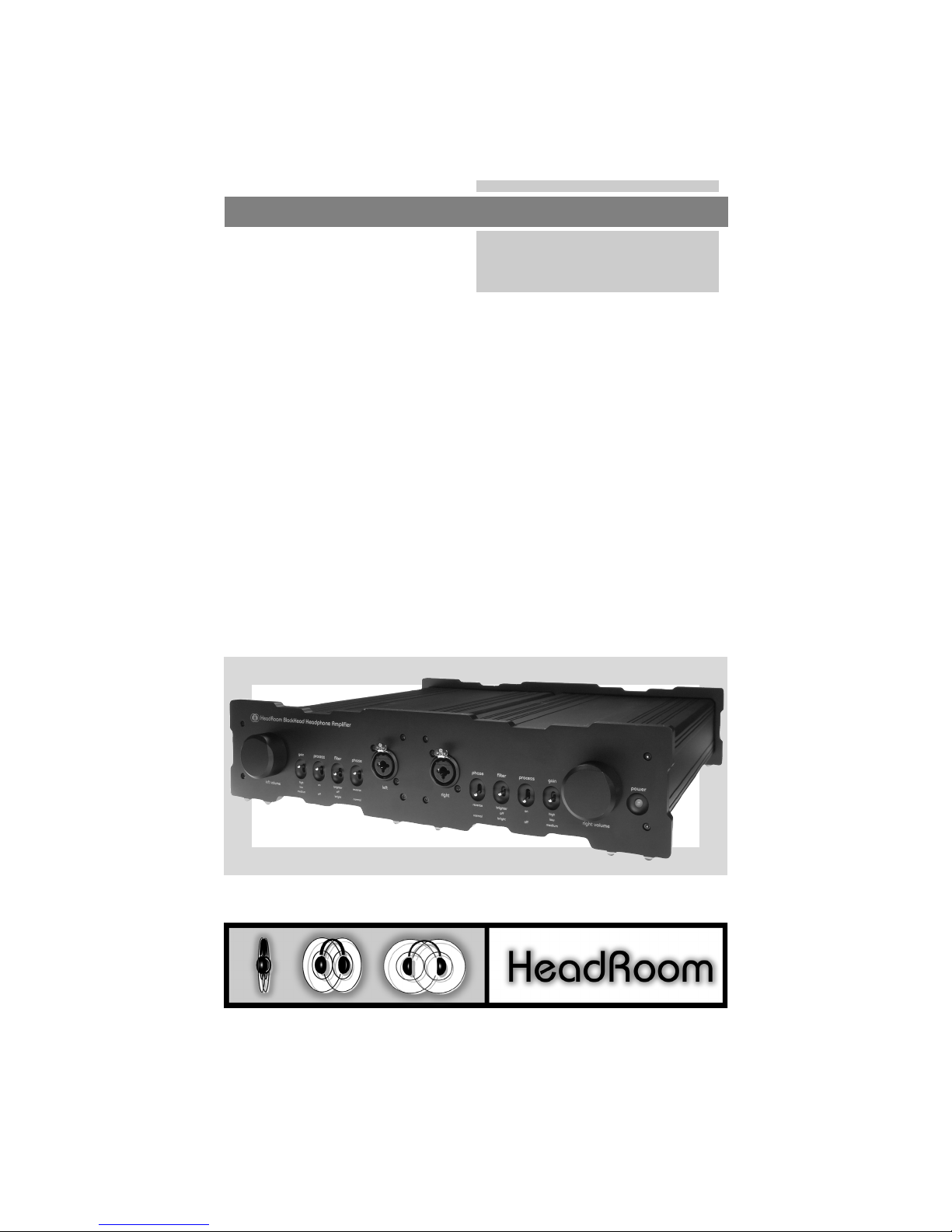
The BlockHead Owner’s Manual
Headphone Amplifier
HeadRoom Corporation
The BlockHead is the world’s first and only commer-
cially available fully balanced, double dual-mono,
mono-block headphone amplifier. While it’s finesse
and depth of imaging are a significant improvement
over anything we’ve previously experienced with
dynamic headphones, it’s the BlockHead’s Adam’s
apple wobbling bass reproduction and eye blinking
impact that have us re-thinking everything we
thought we knew about headphones.
obsessed headphone geeks at your service.
www.headphone.com
The BlockHead Owner’s Manual
1
Page 2
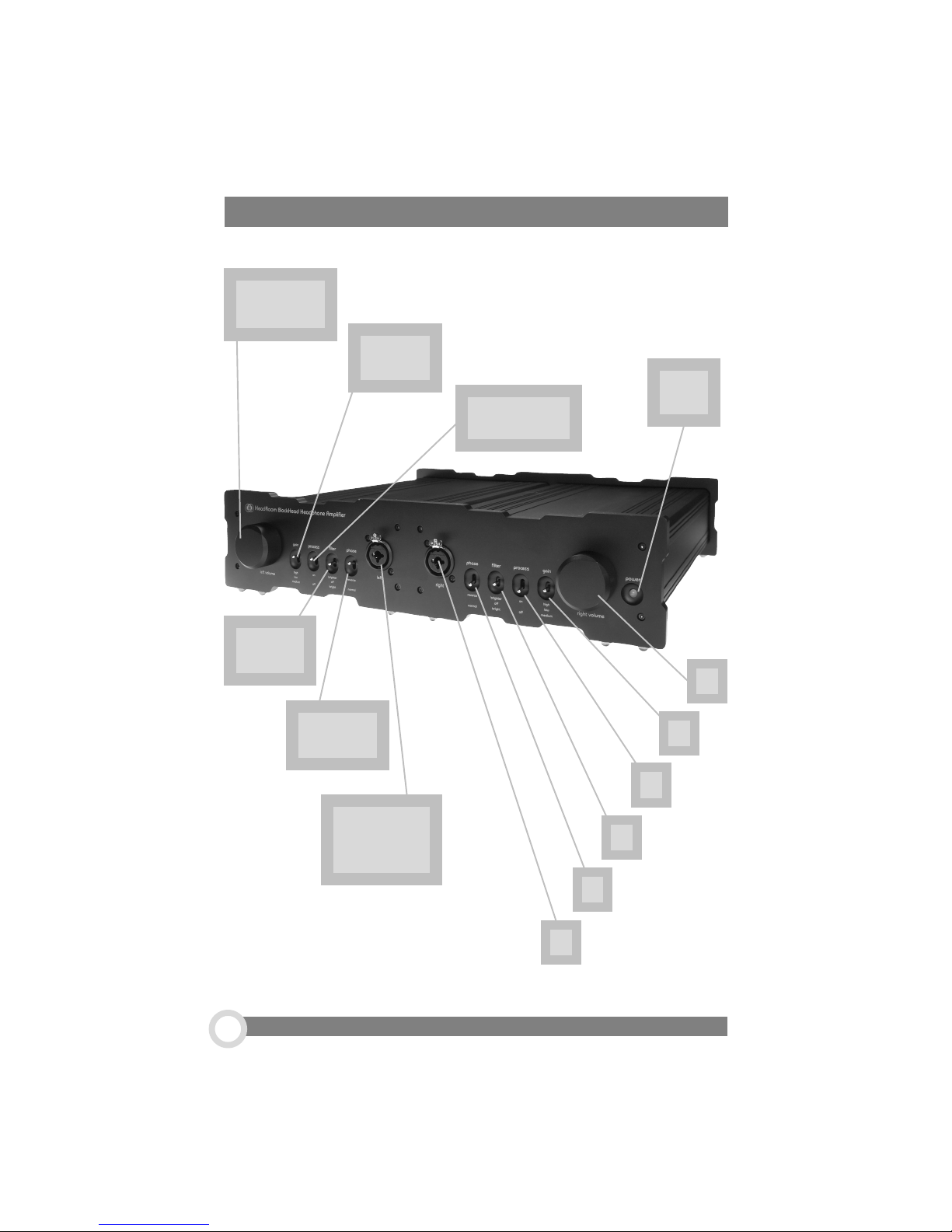
A Tour of Your HeadRoom BlockHead Amp
1. Volume
Control
2. Gain
Switch
3. Processor
Switch
4. Filter
Switch
7.
LED
1.
5. Phase
Switch
6. The
Headphone
4.
Jack
5.
6.
800.828.8184 www.headphone.com
2
2.
3.
Page 3

About your Blockhead amp...
1. The Volume Controls. Big, beautiful, anodized, and aluminum. They feel and
sound as good as they look! Increase the volume for each channel by turning the
knobs clockwise.
2. The Gain Switches. The 3-position Gain Switch accomodates various head-
phones’ power needs. For instance, the Low Gain setting would be used for
Grado headphones, allowing a larger range on the volume control pot.
Experiementing with your headphones and the gain switch may help you to determine which setting you prefer. If have any questions regarding your headphones,
feel free to call and ask us.
3. The Processor Switches. When switched toward PROCESS, the Audio Image
Processor is engaged for normal stereo headphone listening. In the OFF position,
the Processor is bypassed for listening to mono or binaural recordings. (These
switches should be in the OFF position when using the headphone amp as a
preamp.)
4. The Filter Switches. The filter switch is used to compensate for the warming
action of the processor. In the center position there is no filter in the circuit;
generally this is preferred. But if the processor is causing too much bass or
blurring of the central image, a mild high frequence boost filter can be turned on.
The “bright” setting accentuates the highs at about 3 kHz; with the “brighter”
setting the filter starts an octave earlier and catches some of the upper mids.
Basically, set it to what ever sounds best to you.
5. The Phase Switches. Audio sources will commonly invert the phase on a
recording. Use this switch to correct the problem.
6. The Headphone Jacks. The Neutrik headphone jacks on The BlockHead
clamp down tightly for optimum signal transfer. They will accomodate both a
1/4” and well as XLR connectors- although the XLR connectors are certainly the
recommended jack for use with the BlockHead.
7. The LED. The LED simply indicates if your unit is on or off.
The BlockHead Owner’s Manual
3
Page 4
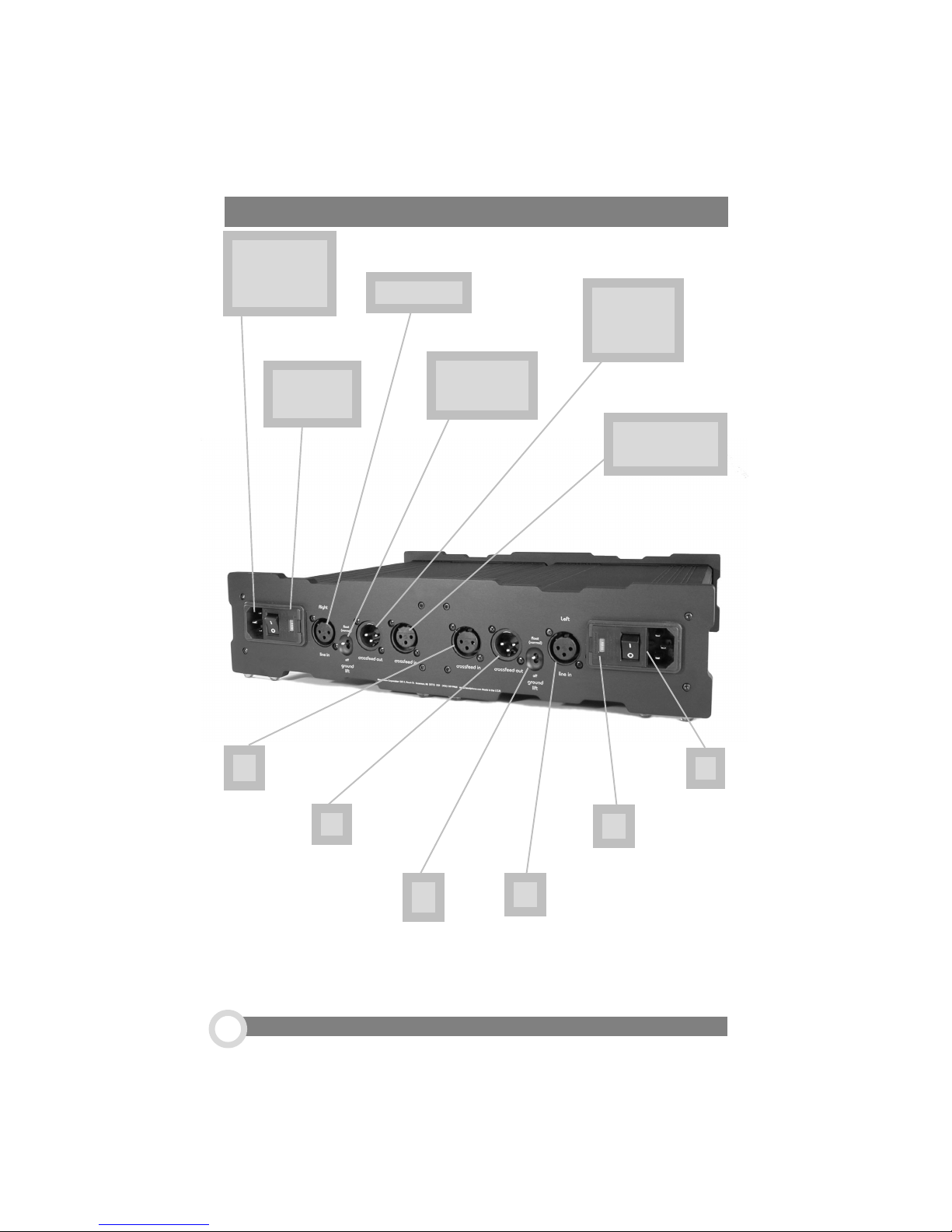
1. Power
Switch/ DC
Input
BlockHead Rear Panel
3. Line In
5.
Crossfeed
Out
6.
2. Voltage
Indicator
5.
4. Ground
Lift Switch
6.
Crossfeed In
1.
2.
800.828.8184 www.headphone.com
4
4.
3.
Page 5
Rear Panel...
1. The Power Switch & DC Input. 1 is on, 0 is off. When the amp is on, the
glowing red LED on the front of the unit tells you so.
2. Voltage Indicator. In most cases, the voltage indicator should read ‘115
volts’ for use in the U.S. However, your voltage can be easily adjusted to 230 v. for
foreign use; call us for details on how to do this yourself.
3. Line In. Plug your source into these left and right channel inputs.
4. Ground Lift Switch. For normal use, the Ground Lift Switch should be on
‘float’.
5. Crossfeed Out.
6. Crossfeed In.
The crossfeeds ennable the audio image processor to
work with the BlockHead. Use the supplied 1ft.
}
Dimarzio cables to loop one block to the other.
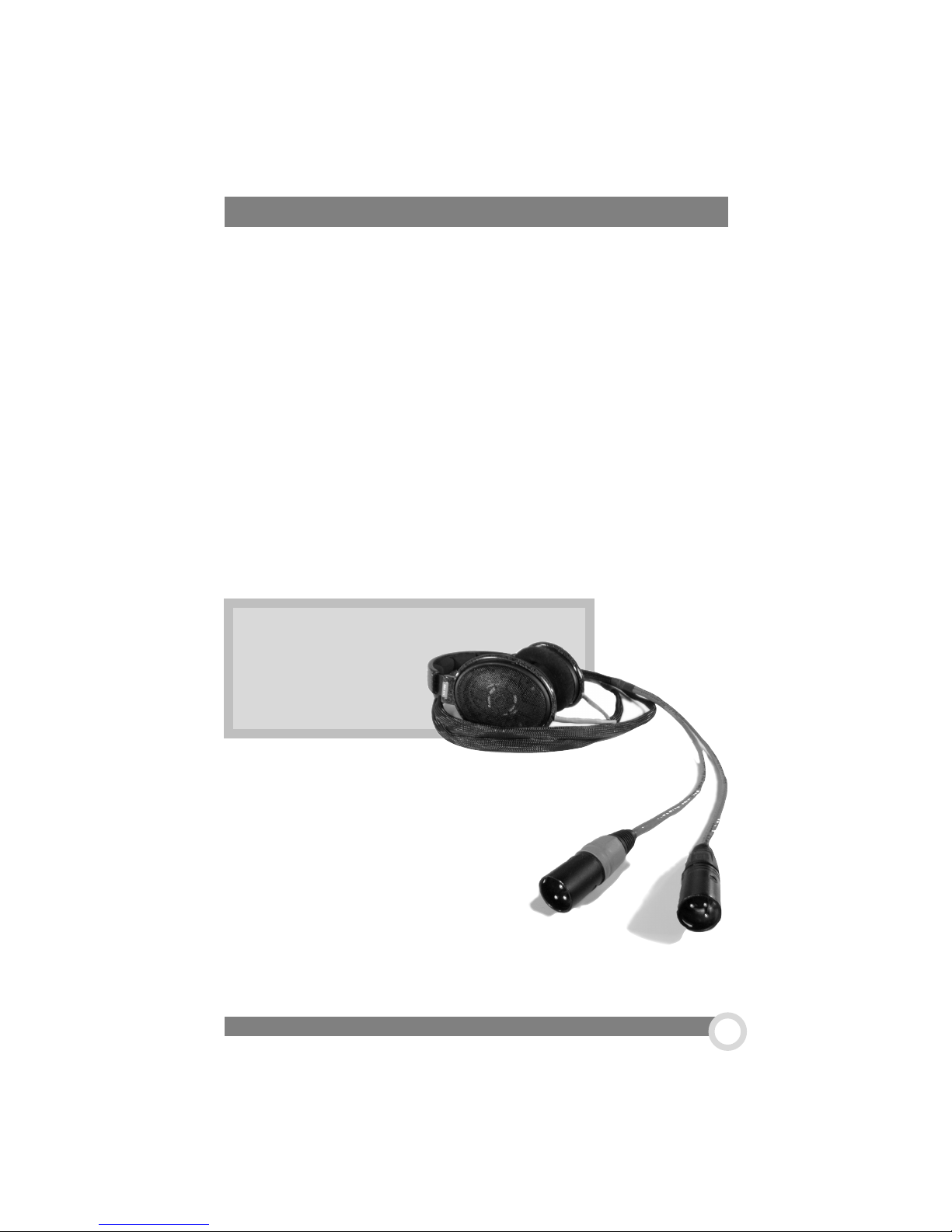
Sennheiser 600’s
with Custom XLR
Cables
Since the BlockHead is a fully
balanced amplifier, you must have balanced
outputs on your headphones. Currently,
Sennheiser 600’s and Grado RS1’s are
availabe with fully balanced cables. You
also have a choice of what kind of cables
you would like to use; both Clou Cable of
Germany and Cardas Cables of USA
manufacture fully balanced headphone
cables. Just give us a call, 800.828.8184,
for more information!
The BlockHead Owner’s Manual
5
Page 6
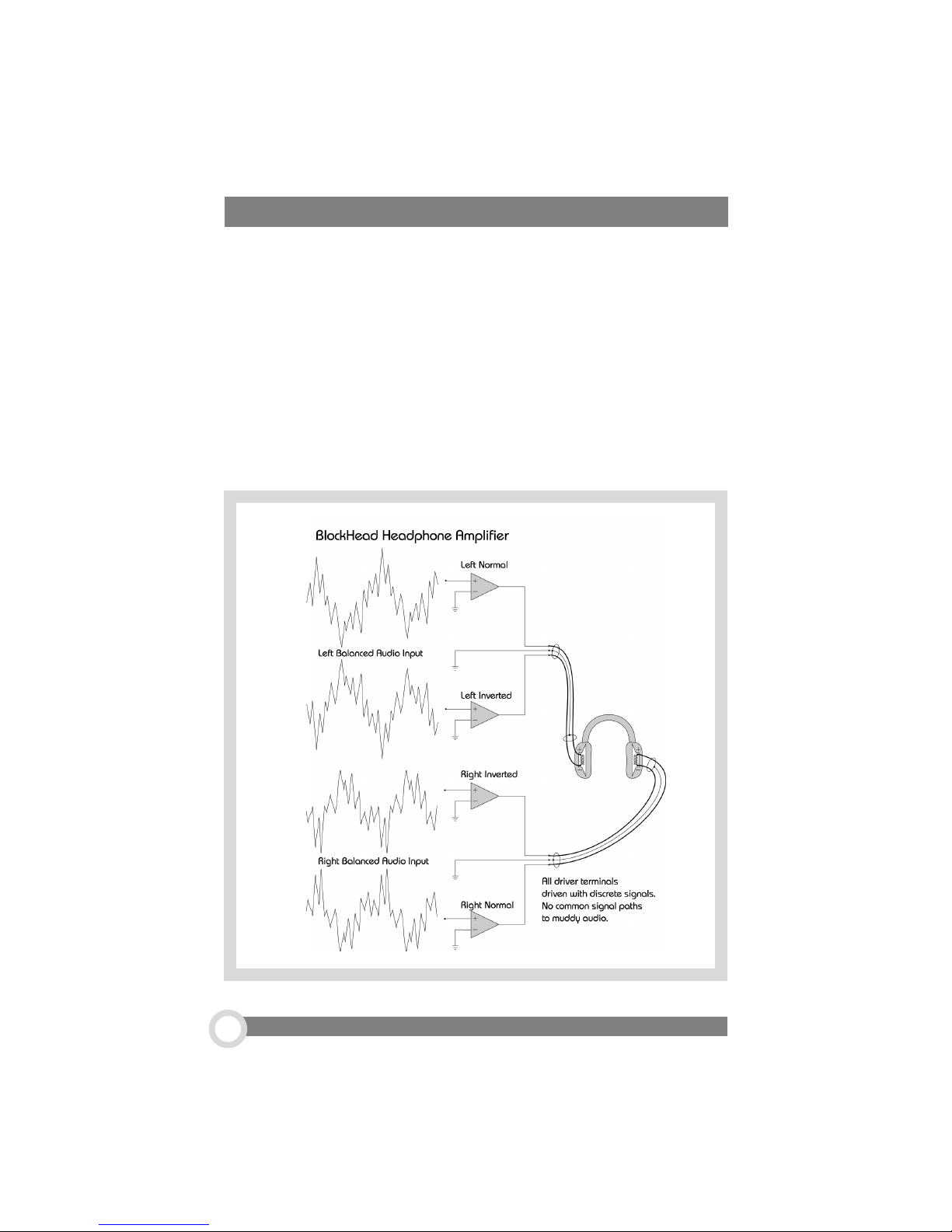
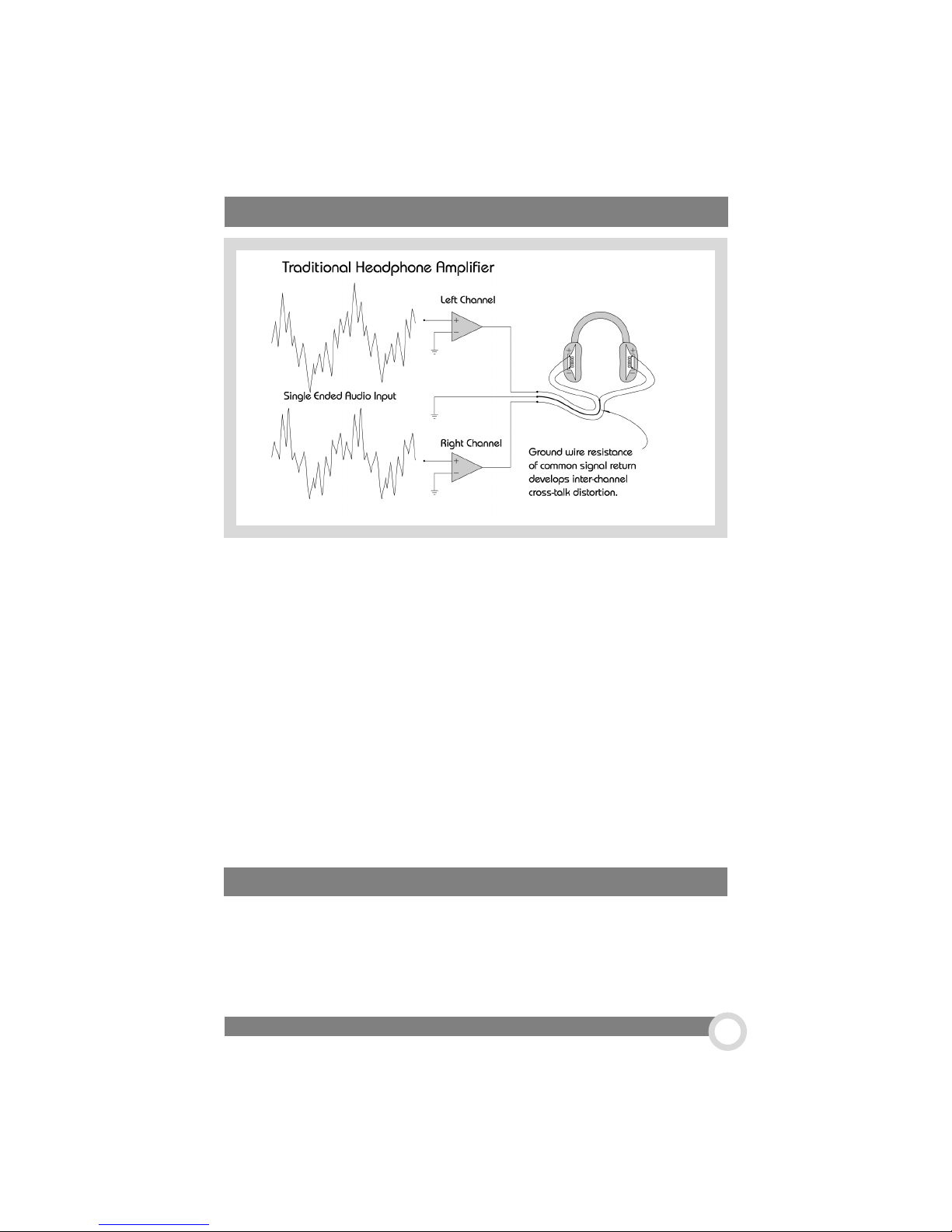
What’s so special about a fully-balanced headphone amp?
Headphones share a common connection on the non-driven side of the driver
elements. You can see this by looking at a headphone plug; the left channel
connection is at the tip, the right channel connection is the ring, and the common
connection were talking about is the remainder of the plug shaft, called the sleeve.
The problem is that the summed left and right channel return current will develop a
signal across the series resistance of the common return path, which muddies the
stereo presentation on headphones with cross-talk. (When evaluating headphones,
one thing you can look for is having the join of the left and right common return at the
plug rather than within the headphones.) It is this headphone connector found on all
headphones that makes it impossible to drive the return side of the headphone
coils with the separate left and right inverted signals of a fully balanced amplifier.
800.828.8184 www.headphone.com
6
Page 7
about the Blockhead...
HeadRoom has managed to overcome this problem by convincing Clou Cables and
Grado Labs to build custom headphone cables. The BlockHead’s machined aluminum
front and rear panels hold together two enclosures which house the completely
separate left and right audio channel electronics (hence mono-block). Each noninverted and inverted audio channel has completely separate electronics and power
supplies all the way back to separate Avel-Lindburg toroidal transformers (hence
double dual-mono). Yes, this amp has four transformer, four power supplies, and
four audio channels. The amp comes standard with all sorts of sweet stuff like: high
performance Burr-Brown 627 audio op-amps (see the June ’01 Stereophile for a
very intelligent discussion about high performance audio op-amps), very low
temperature coefficient .1% metal film resistors and matched polyphenoline-sulphide
film capacitors in the signal path; Nobel potentiometer, Neutrik connectors, three
step gain control for volume control optimization of various efficiency headphones,
three step filter control, HeadRoom psychoacoustic processor circuit, and much
more. And optionally available stepped attenuators and further audio electronic
component upgrades are available, call us for details.
How about another helpful feature: The BlockHead can double as a very good
sounding, fully balanced preamp. Make sure the Processor and Filter switches are
in the OFF position when listening through speakers to avoid goofing up your imaging and frequency response. Because the BlockHead is a fully balanced unit, it is a
good idea to call us on the details of how to hook up the BlockHead to your source.
Using Your Amp as a Preamp
The BlockHead Owner’s Manual
7
Page 8
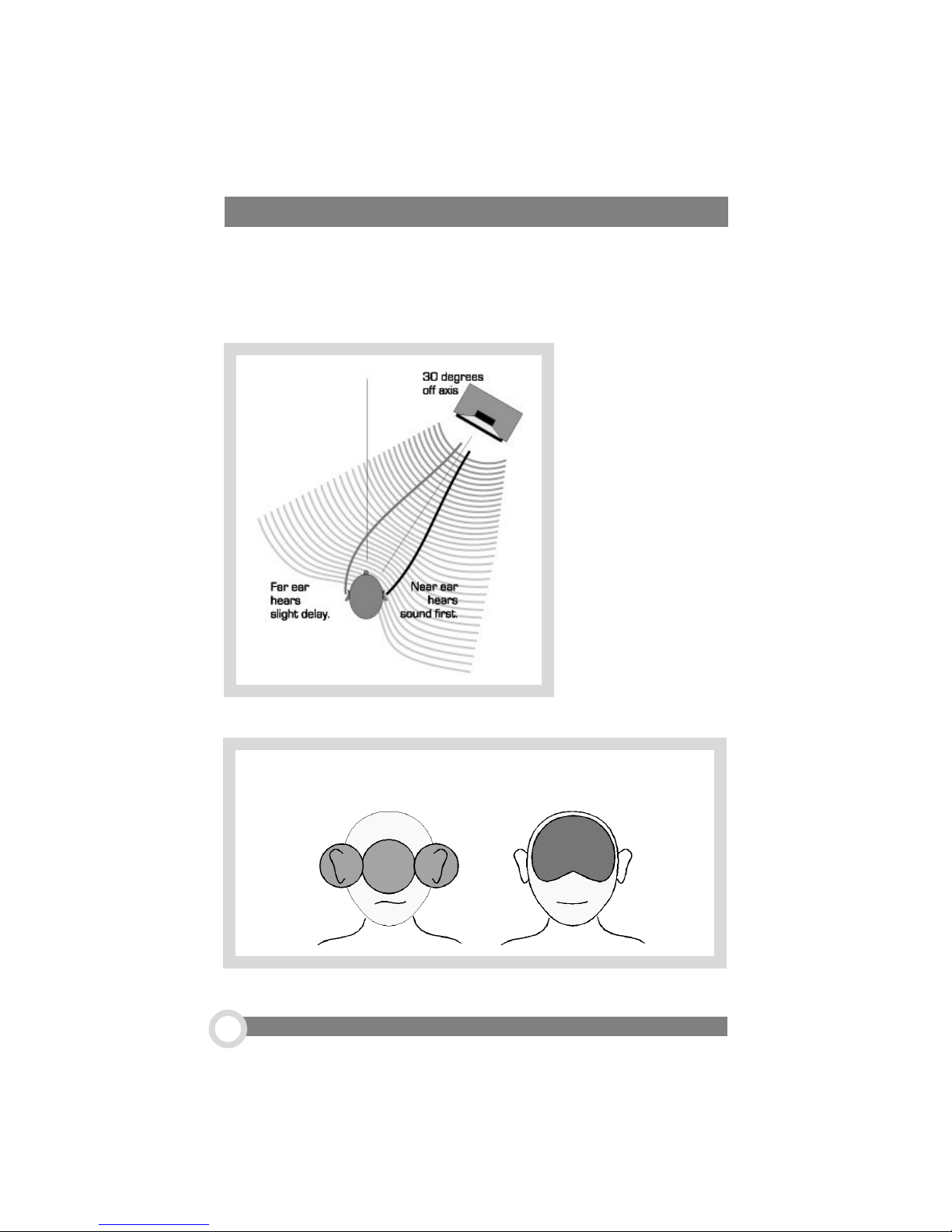
Why Does Your Headphone Amp Have a Processor?
Your amp has a processor because it makes headphone listening much more natural. When listening to speakers, you hear both the left and the right signals in both
ears. Not so with headphones. When you stick a pair of speakers directly to your
ears (i.e., headphones), you lose the spatial/acoustic cues your mind needs to
locate sounds in space.
Despite this lack of
acoustic data, you
mind attempts to
laterally locate
sounds. The result
is a troubling
blobs-in-the-head
sonic image. Your
brain ends up frustrated and fatigued.
without HeadRoom with HeadRoom
800.828.8184 www.headphone.com
8
Page 9
more about the processor...
The Audio Image Processor solves this problem. Analog filters are used to take an
attenuated signal from each channel, slightly delay it(about 300 microseconds,
depending on the frequency), and feed it to the opposite ear. This is the acoustic
information your mind needs to create a believable audio image in you head. This
added information eases the burden on your brain by spreading out the clumped
image in your head. Ahh, sweet relief.
How can the processor be tested?
If you have already tried out the Processor, you have probably noticed that there
isn’t a huge difference in the sound when switching the Processor on and off. If you
would like a more obvious demonstration of the effect of the Processor, just unplug
one of the line inputs to The BlockHead and listen for a few moments with the
Processor off. Now switch the Processor on and hear the difference. [
experimentation
] See, it really is doing something dramatic.
pause for
Upgrading your BlockHead
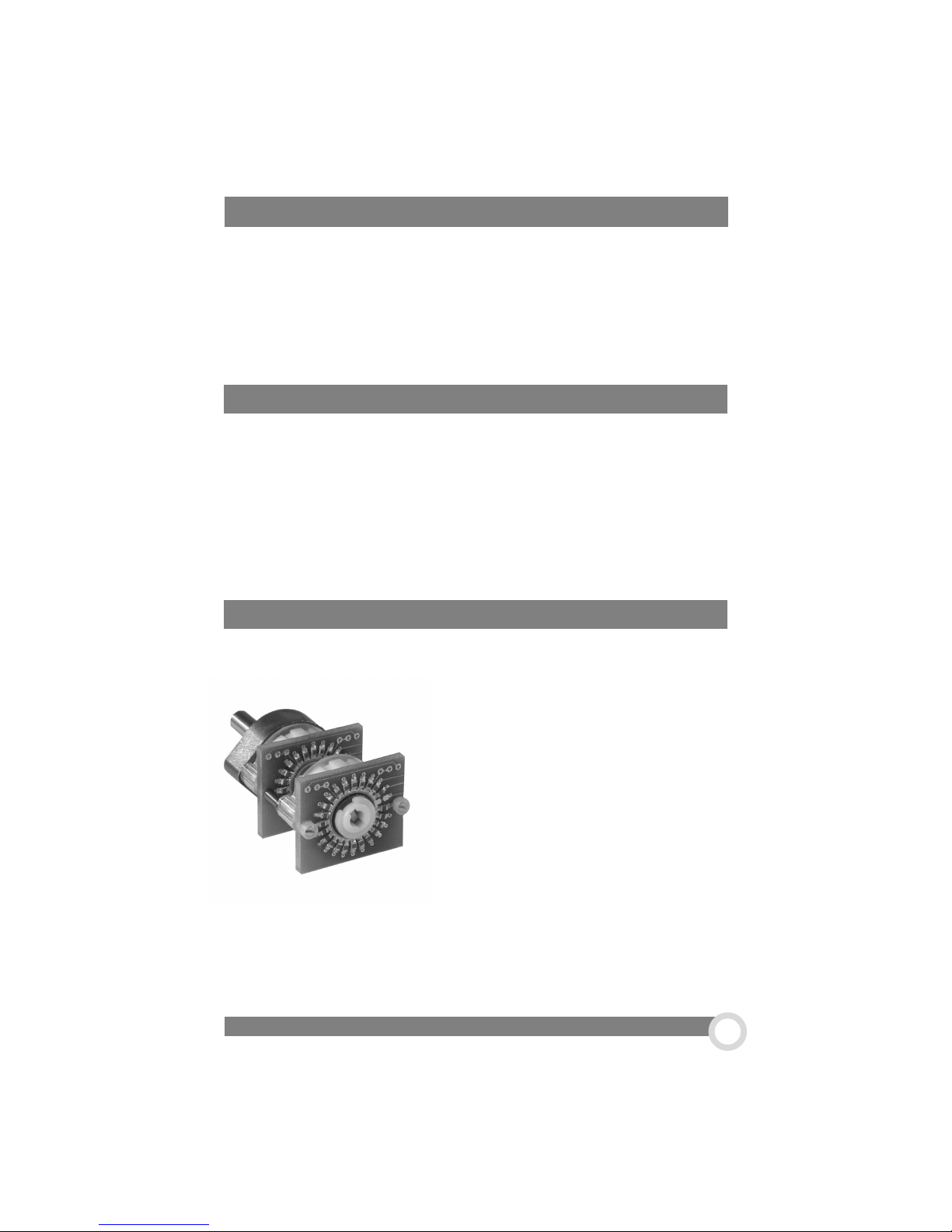
The stepped attenuator is an available upgrade for our high-end
headphone amplifiers. We use the Nobel potientiometer
on our high-end amps, and its performance is very
good—but not perfect. In order to elevate the per-
formance of our reference products to as near
perfection as possible, we use a stepped attenuator. The stepped attenuator uses a range
of discrete resistors switched into the circuit to
attenuate the signal. We start with a Swiss made
Elma 24-position switch. Then we disassemble it
and remove the stock circuit boards and replace
them with our custom made boards which allows
us to mount the precision thin film resistor right on the contact
boards. The gold plating on the contacts on these boards is about 4 times thicker
than on normal contact boards. The result is, what we believe to be, the finest
stepped attenuator in the audio world today.
The BlockHead Owner’s Manual
9
Page 10
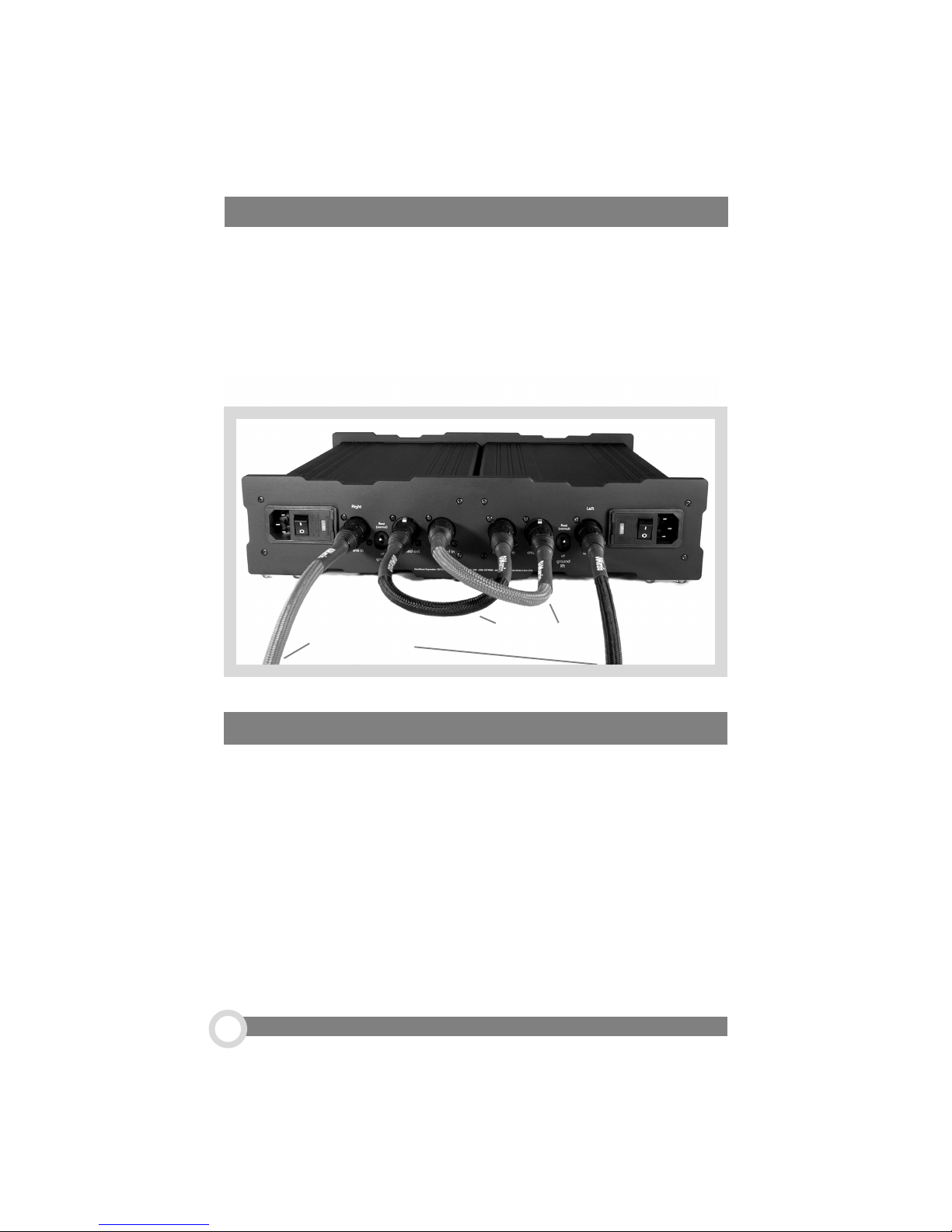
How to Hook Up Your BlockHead Amp
On the back of your BlockHead amp you will find 6 inputs. Two inputs are from your
source, one for the left channel and one for the right.
The other 4 connectors are for wiring the crossfeed circuit, ennabling the HeadRoom
processor. the two 1-foot Dimarzio Interconnects included with the amp are for this
purpose. It doesn’t matter which interconnect is used for either side. For more
information about hooking up your BlockHead amp to other sources, please consult
www.headphone.com in the ‘Reading’ area, or give us a call at 800-828-8184. We’re
happy to help!
Crossfeed
Source Inputs
Five-Year Product Warranty
The BlockHead amplifier carries a five-year parts and labor product warranty. If you
have any problems with your headphone listening system, please first call us at 1800-828-8184. We will try to diagnose the problem over the phone, which can save
both of us considerable time, effort and money. If the equipment must be returned
for repair, we will authorize a return for you. HeadRoom is the only authorized
service center for HeadRoom products, either in or out of warranty. If a unit is under
warranty, there is no cost for the repair labor, parts, or shipping from HeadRoom
back to you (i.e., You’re responsible for paying the shipping charges to get the
product to us). For units out of warranty, repairs are billed on a time and parts
basis, plus shipping costs. When we receive the equipment, we will initiate repairs
quickly (usually within three working days) and return the unit to you, or call you with
an assessment of the problem.
800.828.8184 www.headphone.com
10
Page 11

And Now A Word About Your Hearing
People have a natural tendency to listen to music on headphones at much louder
levels than they would on speakers. If you hope to avoid permanent hearing damage, it’s important to be careful not to listen at extremely loud levels or to listen for
too long at moderately loud levels. Because HeadRoom amps must be capable of
driving even the most inefficient dynamic headphones to satisfactory listening levels, the amps are able to drive headphones of average and high efficiencies to
high levels. As a result, you may not be listening at a safe level even though the
volume control on the amp is less than half way up. Generally speaking, when
listening to headphones, you should only turn up the volume to the point at which the
sound isn’t too quiet.
The most common hearing damage caused by prolonged or excessively loud sound
is called tinnitus. It manifests itself as a sustained ringing in the ears and can
become a permanent condition. If you find that your ears are ringing or that there is
a sensation of pressure or fatigue, give them a rest for a couple of days (or until
they feel fresh). These symptoms are your body telling you that your ears need a
break. Should you choose to ignore these symptoms, you are risking permanent
hearing damage. As a general rule, sound pressure levels under 80 decibels will not
damage hearing, even if listened to continually. On the other hand, anything over
100 decibels may cause permanent damage fast. Sound pressure levels anywhere
in between can also be damaging. The louder the sound, the shorter the exposure
time required to cause permanent damage.
very
Now, don’t fool yourself into thinking that you either have full-blown tinnitus or you
don’t have it at all—you can get a slight case. For example, you might only notice
your ears ringing in bed at night. Once you have a slight case of tinnitus, your ears
are much more susceptible to further damage. So, if you get tinnitus, it’s important to
be much more careful about exposure to loud sounds. Now that we’ve told you to be
careful, don’t blame us if you blow it. If you have any more questions about hearing
damage, call a doctor. Sorry to sound so sobering, but a lifetime of musical enjoyment requires ears in tiptop shape.
The BlockHead Owner’s Manual
11
Page 12

30-day Satisfaction Guaranty
Unless specifically stated, all HeadRoom purchases come with a 30-day satisfaction guaranty. We
do this because we want to give you the opportunity to change your mind after you get to hear
the products you bought. We’re very glad to give you this option, and we want you to use it if you
aren’t happy with your purchase, but we also want you to be aware of the conditions under which
we can provide you this guaranty:
· Please return all packages to 2020 Gilkerson Drive, Bozeman, MT 59715
· Assuming all conditions are met, we are willing to refund the entire purchased amount
for products returned. We do not refund shipping charges.
· If you are experiencing trouble with a headphone amp or a headphone system, please
email Sales at [email protected] to troubleshoot the problem. This can save all of us
considerable time, effort, and money.
· If you are doing a partial return, you will be refunded the cost to you of the products
returned. If you purchased a package system at a discount and are keeping some of the items
in the package, your refund will be adjusted based on the retail price of the equipment you are
keeping. In other words, we don’t give full-price refunds on products purchased at a discount.
· If you are doing a partial return and exchange for other product, you will be eligible for
all discounts that would apply to the set of products that you end up keeping.
· Products must be returned to us within 30 days of the date you receive the product. SO
if you think you might want to return something to us, listen right away; it’s amazing how many
people say the went out of the country and didn’t have a chance to listen before they left.
· Products must be in as new condition. This means that they are not only in pristine
cosmetic condition and functioning perfectly, but that they are repacked with ALL materials (plastic
bags, warranty cards, tie wraps, and ANY other little bit or piece that came with the product) just
as you received it. Please use the original box it was received in (or another that is comparable); and please don’t send your headphones back in JUST the headphone box!
· If a product is returned within 30-days, but is not in as new condition, we will charge
you a 15% restocking fee PLUS any labor and materials required to return the product to as new
condition.
· Return packages shipped to us must be sent “signature required” and insured, otherwise they are sent back at your own risk!
· Products returned to us after the 30-day period, or which require more cost to repair
than the wholesale value of the product will simply be returned to the customer.
We want you to know that we’re not hard cases about this; the vast majority of returns are
refunded.
Contacting HeadRoom..
HeadRoom Corporation 2020 Gilkerson Drive Bozeman, MT 59715
toll free 800-828-8184 or 1+ 406-587-9466 fax to 406-587-9484
email [email protected] or [email protected]
obsessed headphone geeks at your service.
800.828.8184 www.headphone.com
12
www.headphone.com
 Loading...