

Page 1
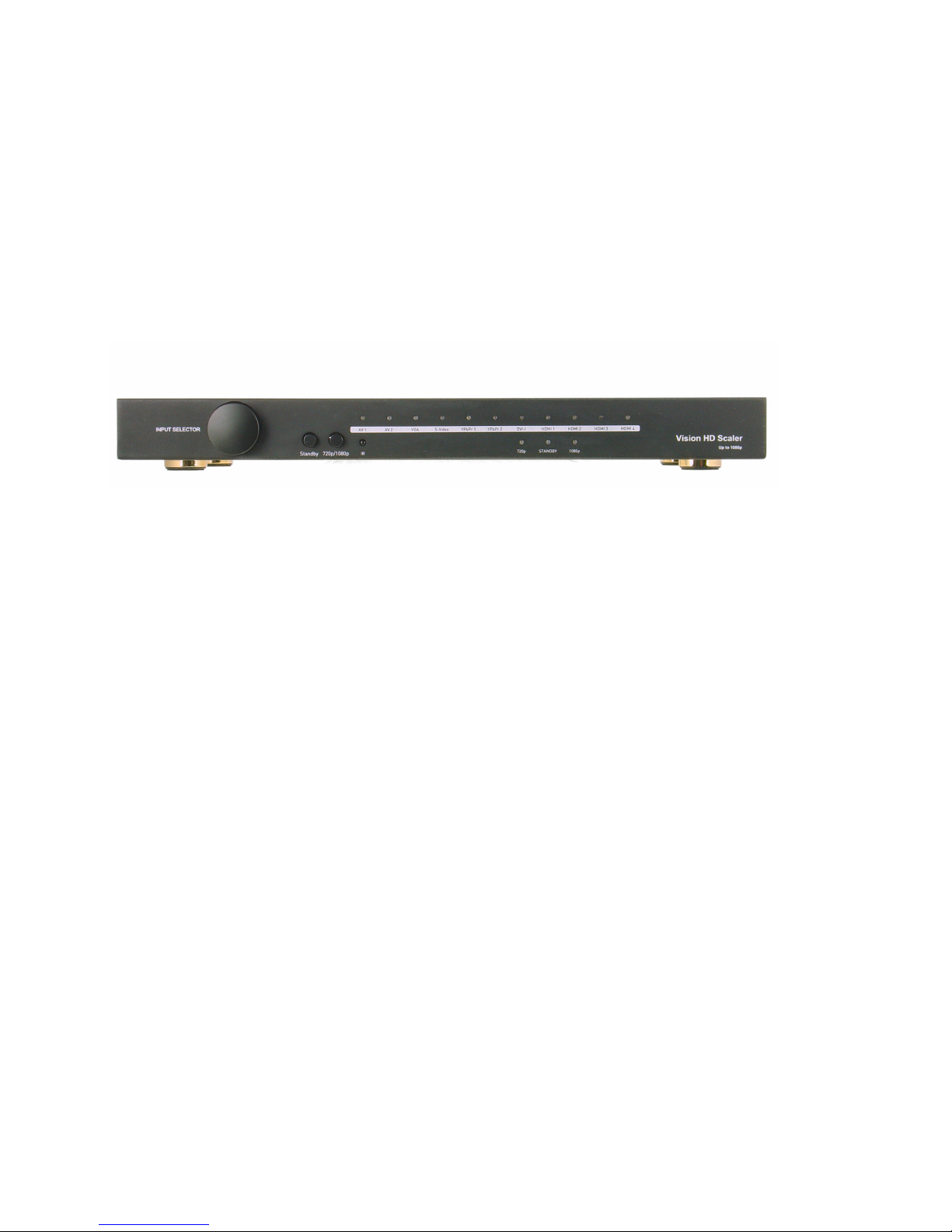
Mega Scaler
Model No: mega-scaler
Operating Instructions
Mega Scaler Operating Instructions
HDTV Supply®
FEATURES
11-inputs-2 outputs multi-function video scaler, could convert AV, S-video,
YPBPR, VGA, DVI-I and HDMI signal to two identical HDMI outputs in support
of 720P and 1080P.
Allows display to view any source at any time.
Supports bypass function under VGA and DVI-I port.
One of the four HDMI inputs support 5.1 channel surround.
DVI-I support both analog and digital input with L/R and optical.
Detached audio output by L/R and optical.
Delivers uncompressed digital video with zero signal loss.
Support high definition resolutions 1080P, 1080I, 720P and standard video
format.
10-bit triple-ADC for RGB/YPBPR.
Double switching modes, IR remote and manual.
Remote controls function with RS232.
Dual 3-D motion adaptive video de-interlaces.
3-D video noise reduction.
HDMI V1.2 compatible.
HDTV Supply, Inc.
1
Page 2

Mega Scaler Operating Instructions
Dear customer:
Thank you for purchasing this product. For optimum performance and safety,
please read these instructions carefully before connecting, operating or adjusting
this product. Please keep this manual for future reference.
NOTICE
HDTV Supply Inc. reserves the right to make changes in the hardware, packaging
and any accompanying documentation without prior written notice.
WARNING:
TO REDUCE THE RISK OF FIRE, ELECTRIC SHOCK OR PRODUCT DAMAGE:
1) DO NOT EXPOSE THIS APPARATUS TO RAIN, MOISTURE, DRIPPING OR
SPLASHING AND THAT NO OBJECTS FILLED WITH LIQUIDS, SUCH AS VASES,
SHALL BE PLACED ON THE APPARATUS.
2) DO NOT INSTALL OR PLACE THIS UNIT IN A BOOKCASE, BUILT-IN CABINET
OR IN ANOTHER CONFINED SPACE. ENSURE THE UNIT IS WELL VENTILATED.
3) TO PREVENT RISK OF ELECTRIC SHOCK OR FIRE HAZARD DUE TO
OVERHEATING, DO NOT OBSTRUCT THE UNIT’S VENTILATION OPENINGS
WITH NEWSPAPERS, TABLECLOTHS, CURTAINS, AND SIMILAR ITEMS.
4) DO NOT INSTALL NEAR ANY HEAT SOURCES SUCH AS RADIATORS, HEAT
REGISTERS, STOVES, OR OTHER APPARATUS (INCLUDING AMPLIFIERS)
THAT PRODUCE HEAT.
5) DO NOT PLACE SOURCES OF NAKED FLAMES, SUCH AS LIGHTED CANDLES,
ON THE UNIT.
6) CLEAN THIS APPARATUS ONLY WITH DRY CLOTH.
7) UNPLUG THIS APPARATUS DURING LIGHTNING STORMS OR WHEN UNUSED
FOR LONG PERIODS OF TIME.
8) PROTECT THE POWER CORD FROM BEING WALKED ON OR PINCHED
PARTICULARLY AT PLUGS.
9) O N LY U S E AT TA C H M E N T S / A C C E S S O R I E S S P E C I F I E D B Y T H E
MANUFACTURER.
10) REFER ALL SERVICING TO QUALIFIED SERVICE PERSONNEL.
HDTV Supply, Inc.
2
Page 3

Mega Scaler Operating Instructions
TABLE OF CONTENTS
............................................................................................................................................................Introduction 3
....................................................................................................................................................Package Contents 3
.......................................................................................................................................PANEL DESCRIPTIONS 4
...............................................................................................................................................................Rear Panel 4
...........................................................................................................................................Connect and Operation 7
................................................................................................................................................Typical Application 9
...........................................................................................................................................................Maintenance 9
.......................................................................................................................................................Product Service 9
.........................................................................................................................................................WARRANTY 9
INTRODUCTION
Mega Scaler supports one VGA source, one S-Video source, two AV sources, two
YPBPR sources with analog audio, four HDMI sources and one DVI-I source with
analog audio and digital audio by optical, if both of the analog and digital audio are
connected, the digital audio has the priority. The analog audio from the input is digitized
and outputted to the HDMI connection as well as the digital audio outs. The HDMI
outputs also have separate analog audio output. One of the HDMI input supports audio
5.1.
Mega Scaler allows you to upscale and switch your standard definition or high definition
sources to resolutions up to 720P or 1080P. The two outputs work simultaneously and
are totally same. Some given VESA format can be bypassed under VGA and DVI-I port.
Mega Scaler has the ability of equalization and amplification to ensure HDMI signal's
transmission through long cable without quality loss.
Mega Scaler offers solutions for digital entertainment center, HDTV retail and show site,
HDTV, STB, DVD and Projector factory, noise, space and security concerns, data center
control, information distribution, conference room presentation, school and corporate
training environments.
Note: The switching is done by using the remote control or the button on the front panel. Any
HDTV with DVI inputs can be connected to the HDMI output of the Mega Scaler by using a
HDMI to DVI adapter, if the cable being used is DVI.
PACKAGE CONTENTS
1. Main unit. P/N_Mega Scaler
2. Power Supply, 5VDC
3. Operating Instructions
4. Remote.
5. IR extension cable.
HDTV Supply, Inc.
3
Page 4
*PART NUMBER (Abbreviation as P/N).
PANEL DESCRIPTIONS
Mega Scaler Operating Instructions
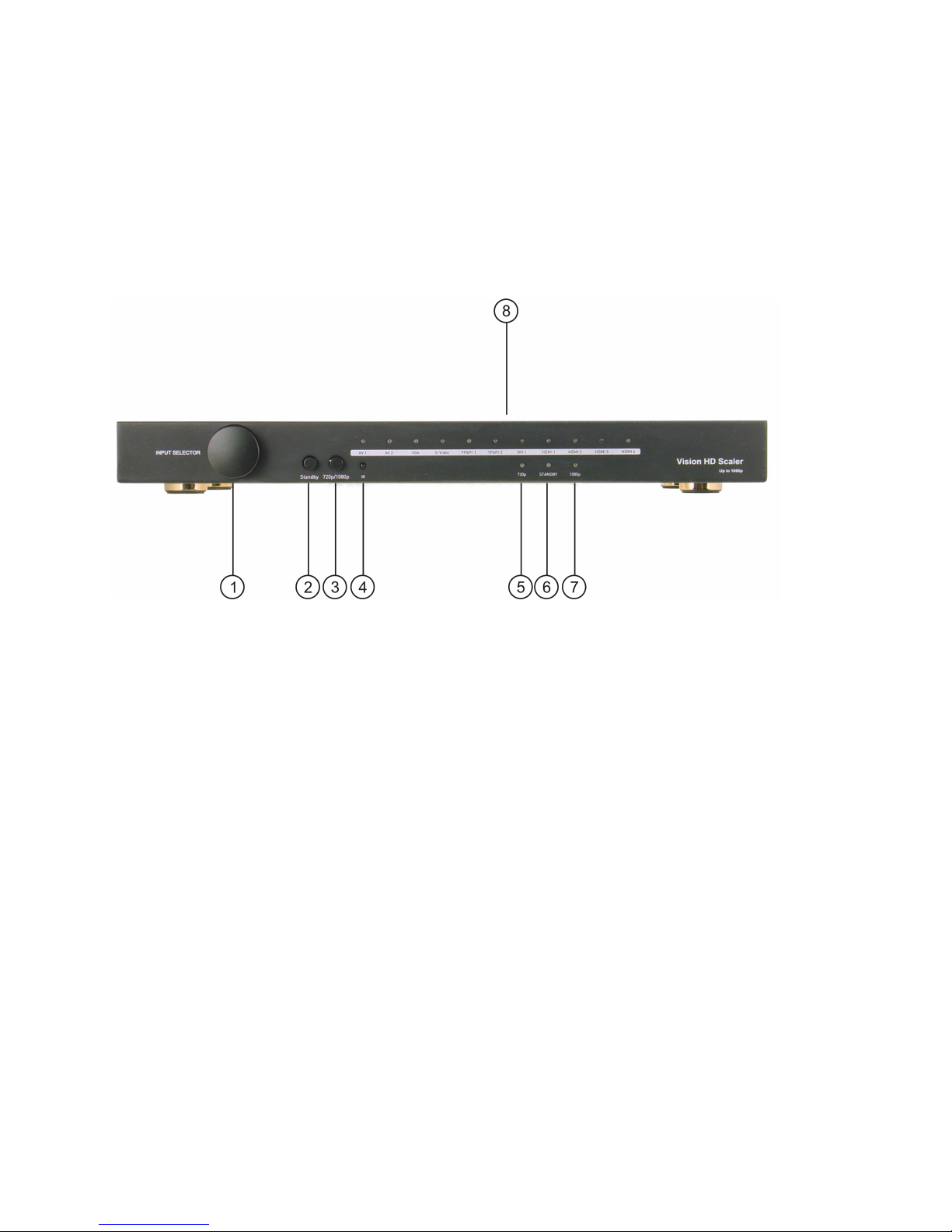
Front Panel
1. Button of input selection.
2. Button of power standby.
3. Button of output format rolling between 720P, 1080P and bypass. Bypass function is
useful under VGA and DVI-I input.
4. IR window.
5. Indicator of 720P.
6. Indicator of power standby. When power standby, the LED lights.
7. Indicator of 1080P.
8. Indicator of input sources.
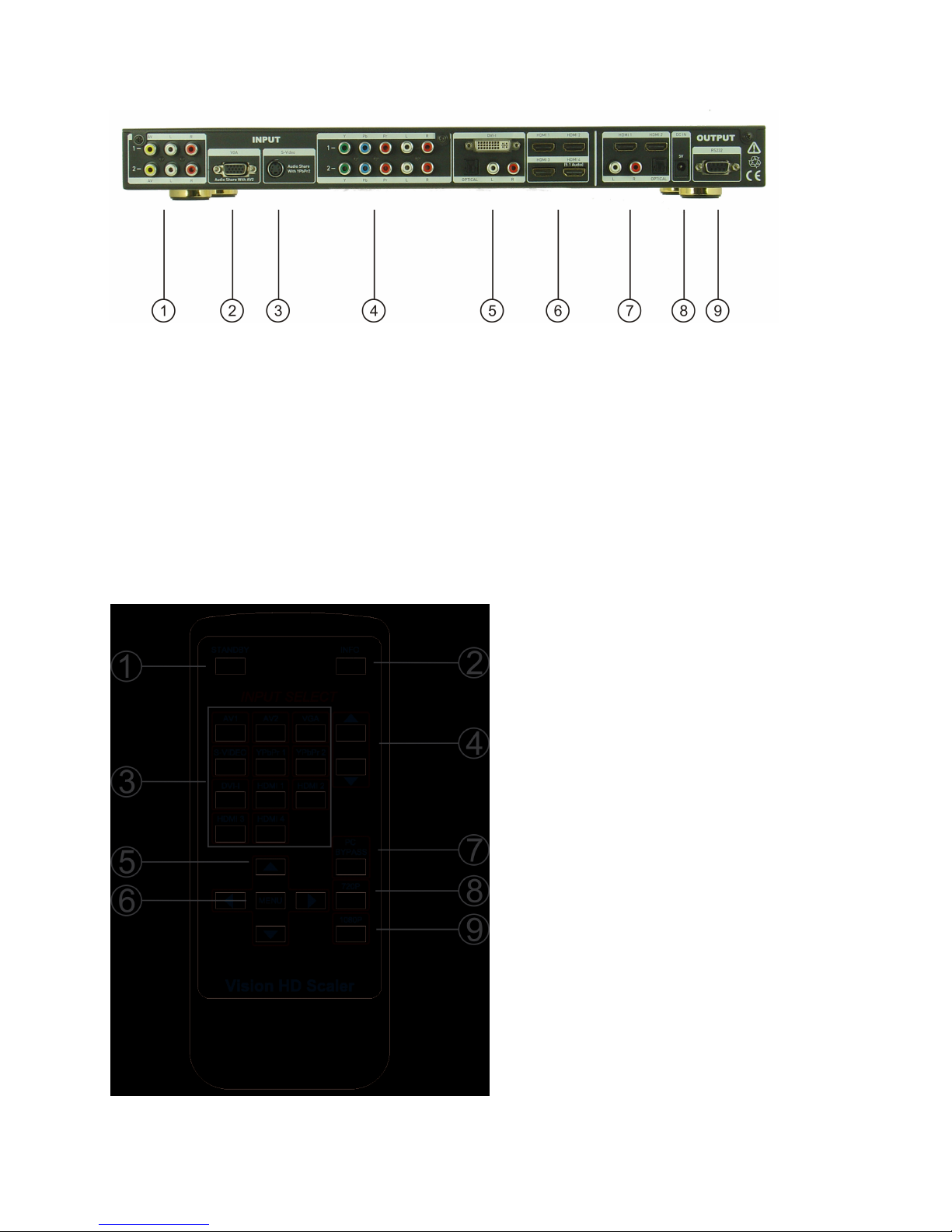
Rear Panel
HDTV Supply, Inc.
4
Page 5
Mega Scaler Operating Instructions
1. Input port AV1 and AV2 with audio R/L.
2. Input port VGA.
3. Input port SV.
4. Input port YPbPr1 and YPbPr2 with audio R/L.
5. Input port DVI-I with audio R/L and optical.
6. Input port HDMI1 to HDMI4, HDMI4 supports audio 5.1.
7. Output port HDMI1 and HDMI2 with audio R/L and optical.
8. Power input.
9. RS232 port.
IR REMOTE
1 STANDBY
Press the button once to enter standby mode;
press again to power on the MS1102-01A.
2 INFO
Press the button to view the input and output
message.
3 INPUT SOURCE
Press any of the button to directly select an
Input source.
4 UP/DOWN
Select the input source one by one.
5 UP/DOWN/LEFT/RIGHT
Pr e ss U P /D OW N b ut t on t o m ov e t he
highlighter bar to the desired parameter in OSD
menu . Press LEFT/ R I GHT to i n crease/
decrease the setting value of a selected
parameter.
6 MENU
Press the button to activate an on screen menu
page.
7 PC BYPASS
Press the button to enter bypass mode.
8 720P
Press the button to directly output 720P.
9 1080P
Press the button to directly output 1080P.
OSD MENU
HDTV Supply, Inc.
5
Page 6
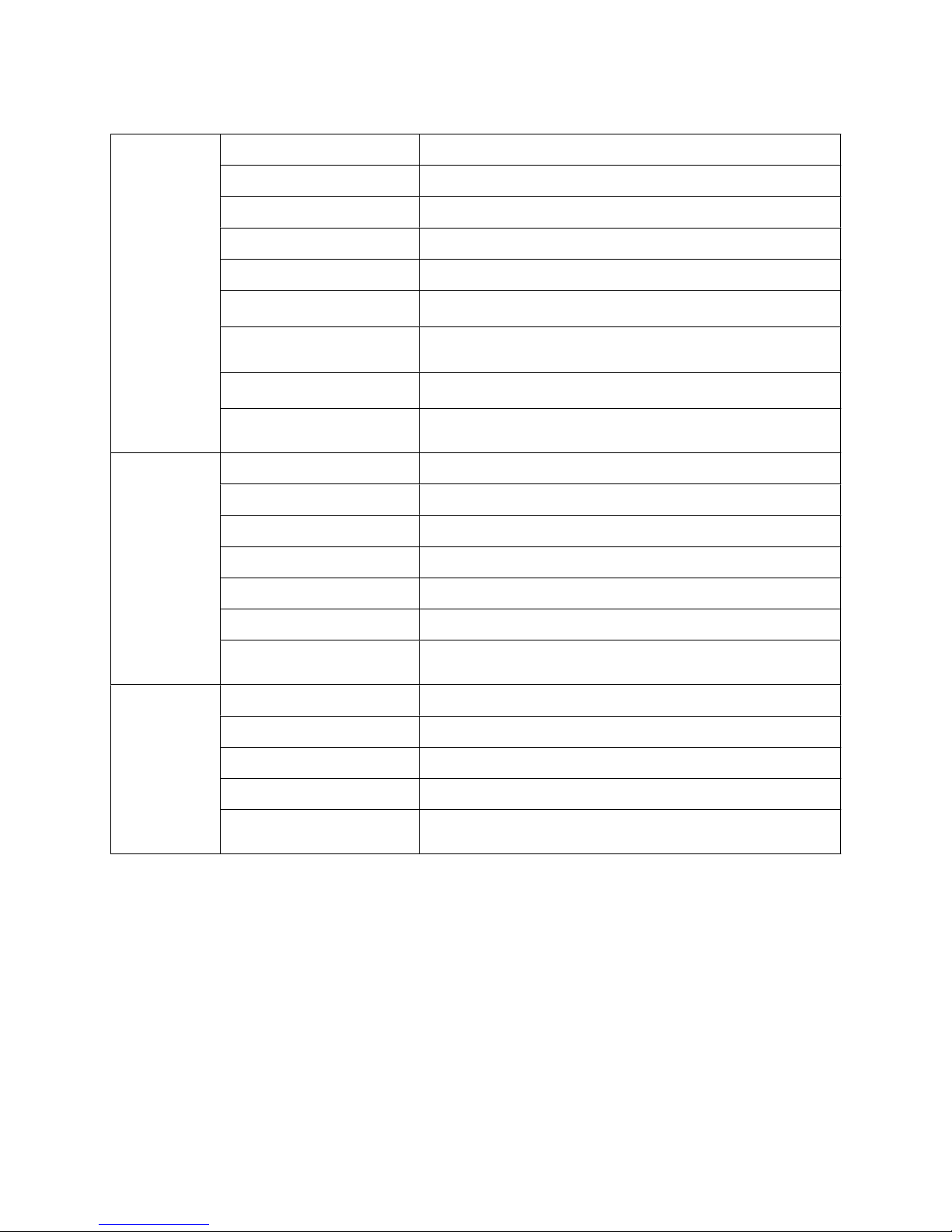
PICTURE
CONTRAST
0~100 of contrast level
BRIGHTNESS
0~100 of bright level
SATURATION
0~100 of saturation level
SHARPNESS
0~100 of sharpness level
HUE
0~100 of sharpness level
PICTURE MODE
STANDARD/ DYNAMIC/ SOFT /PERSONAL
SCALE
FULL/ OVERSCAN/ UNDERSCAN/ LETTERBOX/
PANSCAN
NR
HIGH/ MID /LOW/ AUTO/ OFF
RESET
Reset the above parameters to the default factory
settings.
PC
CONTRAST
0~100 contrast level
BRIGHTNESS
0~100 of bright level
H-POSITION
0~100 of H position level
V-POSITION
0~100 of V position level
H-SIZE
0~20 of H size level
V-SIZE
0~20 of V size level
RESET
Reset the above parameters to the default factory
settings.
OSD
H-POSITION
0~100 of H position level
V-POSITION
0~100 of V position level
DURATION
5s/ 15s/ 30s/ 60s
HALFTONE
0~8 of halftone level
RESET
Reset the above parameters to the default factory
settings.
Mega Scaler Operating Instructions
OUTPUT FORMAT
HDTV Supply, Inc.
6
Page 7
Mega Scaler Operating Instructions
INPUT
AV/SV
PAL,
NTSC
YPBPR/HDMI
480i,480P,576i,576P,720P@[50/60], 1080i@[50/60],
1080P@[50/60]
VGA/DVI
800x600@60, 1024x768@60,1152x864@60,
1280 x768@60,1280 x960@60,1280x1024@60,
1440 x900@60,1400 x1050@60,1600 x1200@60,
1920 x1200@60
VESA-BYPASS
800x600@60,1024x768@60,1280 x720@60,
1280x1024@60,1280 x960@60,1440 x900@60,
1600 x1200@60,1920 x1080@60
OUTPUT
AV/SV/YPBPR/HDMI/
VGA/DVI
720P@[50/60]
1080P@[50/60]
VESA-BYPASS
800x600@60,1024x768@60,1280 x720@60,
1280x1024@60,1280 x960@60,1440 x900@60,
1600 x1200@60,1920 x1080@60
CONNECT AND OPERATION
1) Connect the HDMI input sources (such as HD-DVD, PS3, STB etc) into Mega
Scaler.
2) Connect the HDMI outputs (such as HD-LCD, HD-DLP) into Mega Scaler.
3) Power on the input source you want to show. (Keep the unused input power off,
otherwise it may interfere the normal display.)
4) Connect the power supply into Mega Scaler and turn on the display you want to
watch.
5) Use remote or rolling the button to choose input source.
NOTE:
VGA and AV2 share the same L/R audio input, S-video and YPBPR2 share the same L/
R audio..
MS1102-01A accepts AV,SV, VGA, YPBPR,DVI-I and HDMI inputs. The formats
supported by these inputs are as follows:
HDTV Supply, Inc.
7
Page 8
Attention
1. This equipment has memory. When restarting this machine, input
selection would be fixed as it was before.
2. Under bypass mode, the indicators of output will go out.
3.Under bypass mode, when switching from VGA or DVI-I to other inputs, the
output will be in 1080P.
4.The output will be 1080P when powered on from bypass mode.
5.The bypass key is only useful under VGA and DVI-I input.
6.Besides the given VESA format, the output will be automatically 1080P.
SPECIFICATIONS
Operating Temperature Range
-5 to +35°C (-41 to +95 °F)
Operating Humidity Range
5 to 90 % RH (no condensation)
Input Video Signal
0.5-1.0 volts p-p
Input DDC Signal
5 volts p-p (TTL)
Output Video
HDMI1.2
Maximum Transmission Distance
<15m (If needed, HDMI extender is optional)
Power Consumption
15wtts (Max)
Power Supply
5VDC
Dimensions
430mmW×48mmH×200mmD/16.9''W×1.9''H×7.9''D
Mass (Main unit)
2.4kgs/5.3lb
Mega Scaler Operating Instructions
*Note: Specifications are subject to change without notice. Mass and dimensions are
approximate.
HDTV Supply, Inc.
8
Page 9
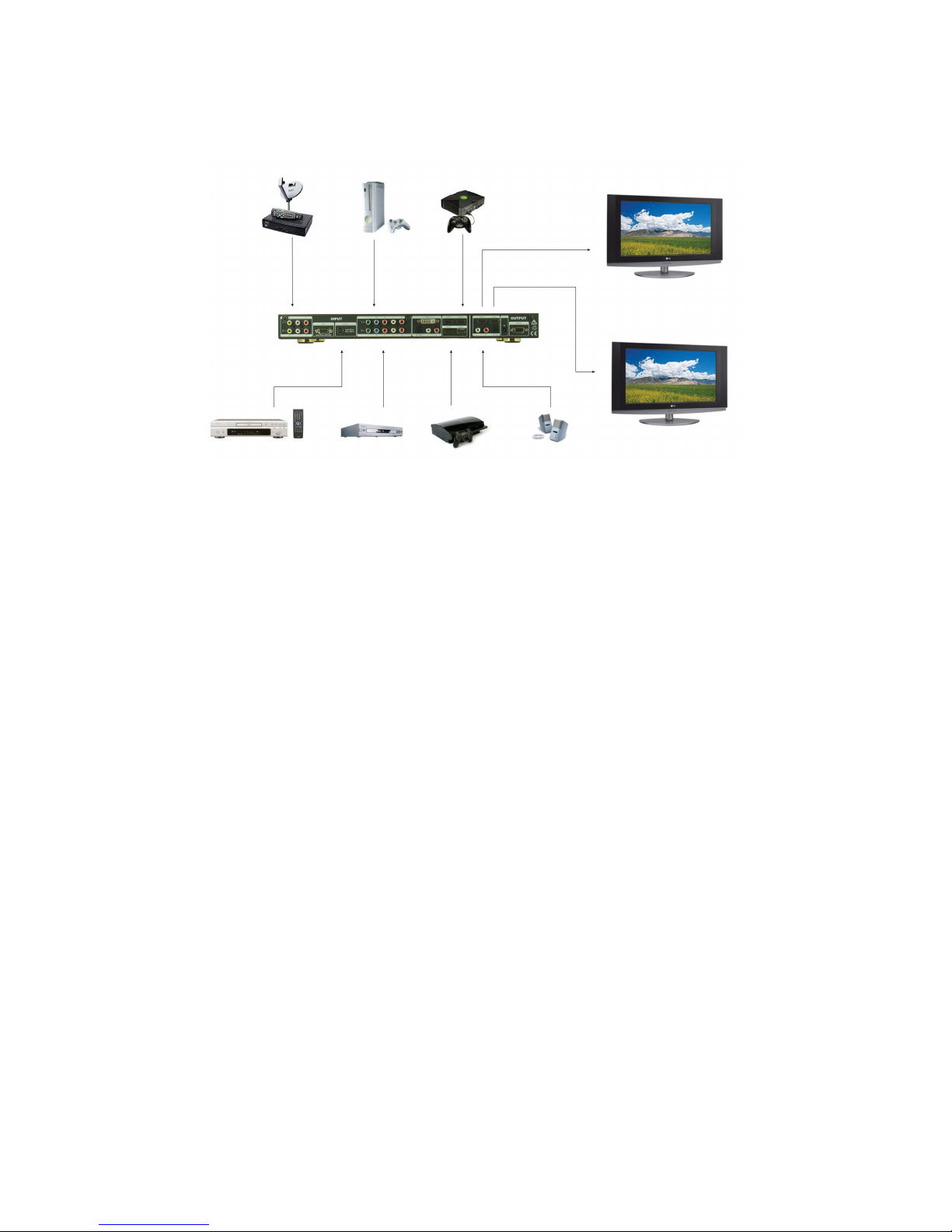
TYPICAL APPLICATION
MAINTENANCE
Mega Scaler Operating Instructions
Clean this unit with a soft, dry cloth. Never use alcohol, paint thinner or benzine to clean
this unit.
PRODUCT SERVICE
1) Damage requiring service: The unit should be serviced by qualified service
personnel if:
(a) The DC power supply cord or AC adaptor has been damaged;
(b) Objects or liquids have gotten into the unit;
(c) The unit has been exposed to rain;
(d) The unit does not operate normally or exhibits a marked change in performance;
(e) The unit has been dropped or the cabinet has been damaged.
2) Servicing Personnel: Do not attempt to service the unit beyond that described in
these operating instructions. Refer all other servicing to authorized servicing
personnel.
3) Replacement parts: When parts need replacing ensure the servicer uses parts
specified by the manufacturer or parts that have the same characteristics as the
original parts. Unauthorized substitutes may result in fire, electric shock, or other
hazards.
4) Safety check: After repairs or service, ask the servicer to perform safety checks to
confirm that the unit is in proper working condition.
WARRANTY
If your product does not work properly because of a defect in materials or workmanship,
HDTV Supply Inc. (referred to as “the warrantor”) will, for the length of the period
indicated as below, (Parts (1) Year, Labor(90) Days)which starts with the date of
original purchase (“Limited Warranty period”), at its option either (a) repair your product
HDTV Supply, Inc.
9
Page 10

Mega Scaler Operating Instructions
with new or refurbished parts, or (b) replace it with a new or a refurbished product. The
decision to repair or replace will be made by the warrantor.
During the “Labor” Limited Warranty period there will be no charge for labor. During the
“Parts” warranty period, there will be no charge for parts. You must mail-in your product
during the warranty period. This Limited Warranty is extended only to the original
purchaser and only covers product purchased as new. A purchase receipt or other proof
of original purchase date is required for Limited Warranty service.
Mail-In Service
When shipping the unit, carefully pack and send it prepaid, adequately insured and
preferably in the original carton. Include a letter detailing the complaint and provide a
day time phone and/or email address where you can be reached.
IF REPAIR IS NEEDED DURING THE LIMITED WARRANTY PERIOD THE
PURCHASER WILL BE REQUIRED TO FURNISH A SALES RECEIPT/PROOF OF
PURCHASE INDICATING DATE OF PURCHASE, AMOUNT PAID AND PLACE OF
PURCHASE. CUSTOMER WILL BE CHARGED FOR THE REPAIR OF ANY UNIT
RECEIVED WITHOUT SUCH PROOF OF PURCHASE.
LIMITED WARRANTY LIMITS AND EXCLUSIONS
1) This Limited Warranty ONLY COVERS failures due to defects in materials or
workmanship, and DOES NOT COVER normal wear and tear or cosmetic damage.
The Limited Warranty ALSO DOES NOT COVER damages which occurred in
shipment, or failures which are caused by products not supplied by the warrantor, or
failures which result from accidents, misuse, abuse, neglect, mishandling,
misapplication, alteration, faulty installation, set-up adjustments, misadjustment of
consumer controls, improper maintenance, power line surge, lightning damage,
modification, or service by anyone other than a Factory Service center or other
Authorized Servicer, or damage that is attributable to acts of God.
2) THERE ARE NO EXPRESS WARRANTIES EXCEPT AS LISTED UNDER “LIMITED
WARRANTY COVERAGE”. THE WARRANTOR IS NOT LIABLE FOR INCIDENTAL
OR CONSEQUENTIAL DAMAGES RESULTING FROM THE USE OF THIS
PRODUCT, OR ARISING OUT OF ANY BREACH OF THIS WARRANTY. (As
examples, this excludes damages for lost time, cost of having someone remove or
re-install an installed unit if applicable, travel to and from the servicer, loss of or
damage to media or images, data or other recorded content. The items listed are not
exclusive, but are for illustration only.)
3) PARTS AND SERVICE, WHICH ARE NOT COVERED BY THIS LIMITED
WARRANTY, ARE YOUR RESPONSIBILITY.
HDTV Supply, Inc.
10
Page 11

Mega Scaler Operating Instructions
Thank you for your purchase.
We appreciate your business. Please contact us with your question and
comments.
HDTV Supply, Inc.
3835-R East Thousand Oaks Blvd
Unit 295
Westlake Village, CA 91362
(800) 841-9238
(805) 277-1870 - Direct
(805) 277-9138 - FAX
WEB: www.HDTVSupply.com
EMAIL: [email protected]
HDTV Supply, Inc.
11
 Loading...