

Page 1
HM-BLE User Manual
MAN-1022 2/11/2015 v1 Designed and Produced under Page 1 of 8
ISO 9001:2008 Certification
Introduction
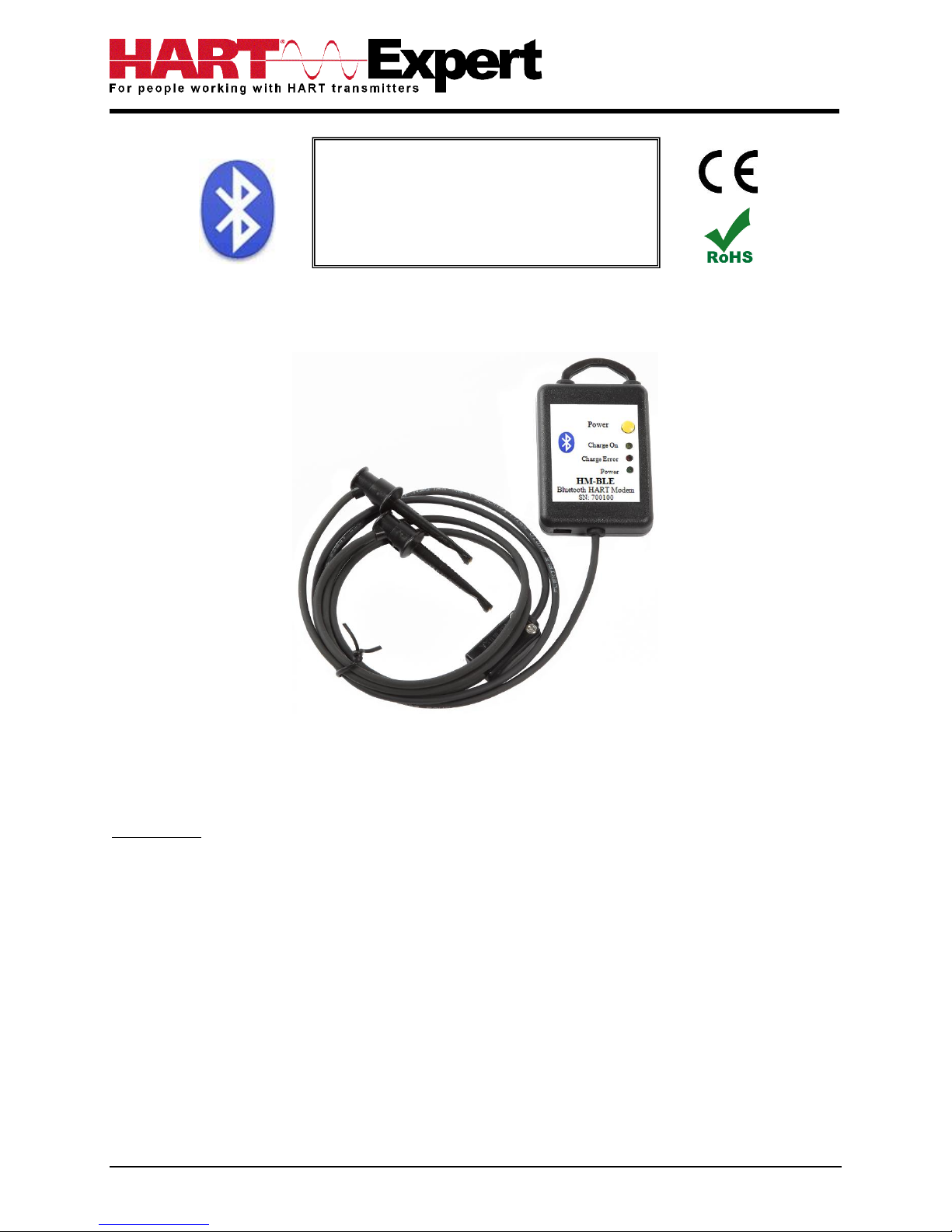
The Bluetooth HART Modem (HM-BLE) provides the physical connection required for Apple iOS devices
(iPAD, iPhone) to communicate with wired HART devices/networks.
As such iPADs and iPhones using iOS operating system can communicate with wired HART
devices/networks via wireless Bluetooth technology. For devices using Windows OS you will instead
need our HM-BT-BAT-ER Bluetooth HART Modem.
Once the HART side is connected, our DevCom.iOS HART Configuration software can then configure /
monitor / document / etc. HART devices from up to 83 meters away.
Bluetooth HART® Modem
(HM-BLE)
User Manual
Page 2

HM-BLE User Manual
MAN-1022 2/11/2015 v1 Designed and Produced under Page 2 of 8
ISO 9001:2008 Certification
Contents
Introduction ..................................................................................................................................... 1
Installation....................................................................................................................................... 3
Step 1) Turn on the Bluetooth Modem ....................................................................................... 3
Step 2) Turn on the Bluetooth Modem ....................................................................................... 3
Multiple HM-BLE Modem ......................................................................................................... 3
Step 3) Connect the leads of the Bluetooth HART Modem to a HART device/network ........... 3
Step 4) Power your HART device/network ................................................................................ 3
Recharging the Modem ................................................................................................................... 4
Troubleshooting .............................................................................................................................. 4
Warranty ......................................................................................................................................... 6
Notice of FCC Compliance ............................................................................................................. 6
Specifications: ................................................................................................................................. 7
Contact Information ........................................................................................................................ 8
Page 3
HM-BLE User Manual
MAN-1022 2/11/2015 v1 Designed and Produced under Page 3 of 8
ISO 9001:2008 Certification
Installation
Step 1) Turn on the HM-BLE Bluetooth HART Modem
Press the power button on the Bluetooth HART Modem, the green “Power” LED will illuminate if there is
sufficient charge in the battery. If the “Power” LED does not illuminate, see the section on recharging
the modem. The modem does not need to be connected to the HART device/network at this stage.
Step 2) Open the DevCom.iOS app
Launch the DevCom.iOS App on your iPAD/iPhone. The App will scan for available HM-BLE Bluetooth
HART Modems, simply select the desired modem in the list. The scan name is “HART BLE Modem”.
Multiple HM-BLE Modems
When several modems are in the same area, it may require trial and error to determine
which modem is connected to the desired HART network, alternatively you can turn off the other
modems so only the powered modem is visible.
Step 3) Connect the leads of the Bluetooth HART Modem to a HART device/network
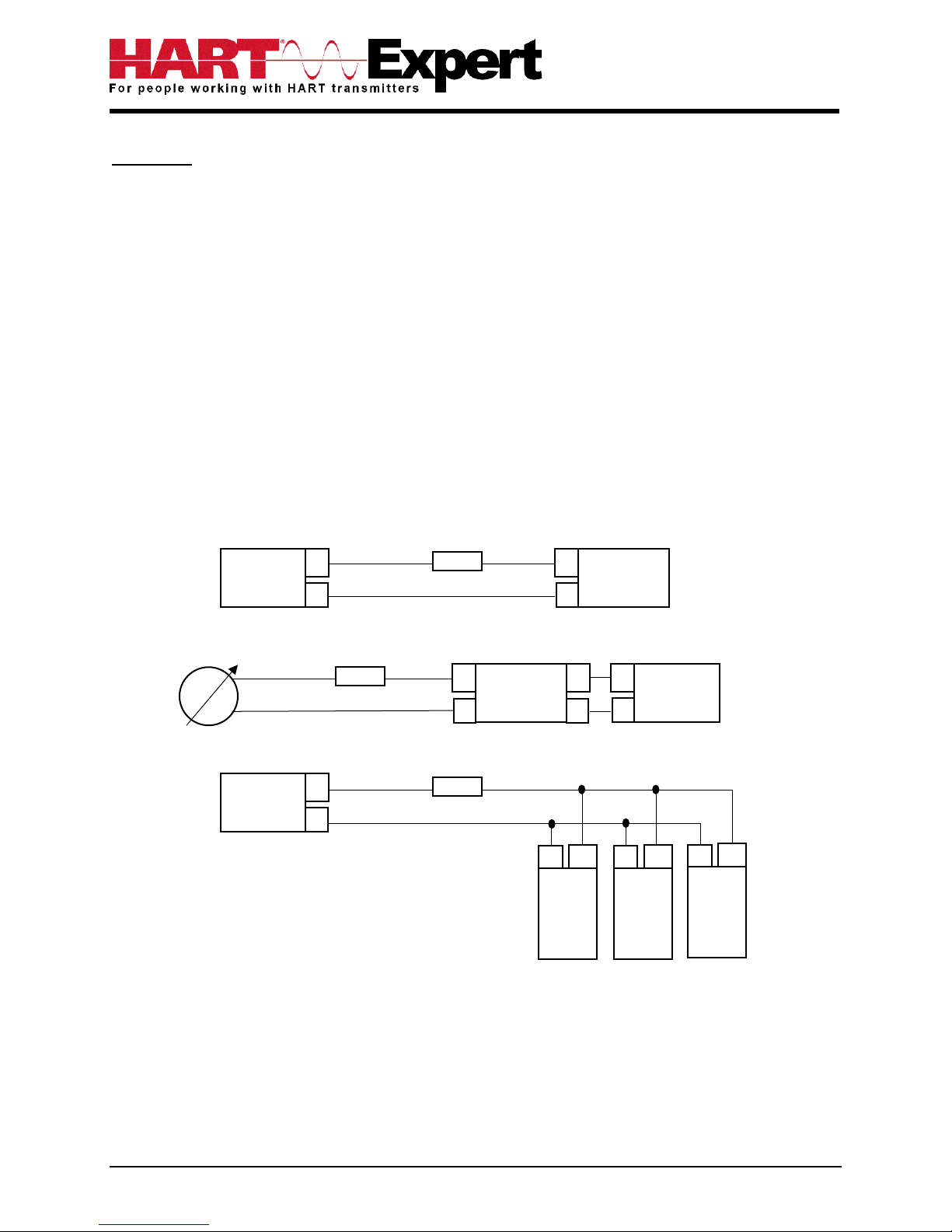
The modem can be connected in one of two ways: across the loop load resistor (A – B) or across the
HART transmitter terminals (C – D). See the relevant Figure 1a, 1b or 1c below.
Figure 1a. Loop Powered HART Transmitter Connection
Figure 1b. 4-Wire HART Transmitter Connection
Figure 1c. Multi-drop HART Transmitter Connection
Step 4) Power your HART device/network
No external power sources are required for the HART Modem (HM-BLE) as it is powered from its internal
rechargeable Li-ion battery. As shown in Figures 1a, 1b and 1c (above) the HART device should be
powered as per the manufacturer’s instructions.
Loop
Power
Supply
+
HART
Transmitter
+
Loop Resistor
A B C
D
Loop Resistor
C
A
Power
Supply
+
HART
Transmitter
+
+
D A B
Loop
Power
Supply
+
HART
Transmitter
+
Loop Resistor
B C A
D
HART
Transmitter
+
-
HART
Transmitter
+
-
Page 4

HM-BLE User Manual
MAN-1022 2/11/2015 v1 Designed and Produced under Page 4 of 8
ISO 9001:2008 Certification
Recharging the Modem
The modem uses a built in rechargeable Lithium Ion battery. When needed it can be recharged by
connecting the modem to a powered USB port using a micro USB to USB cable (one is included for you).
The time it takes to recharge will depend on the maximum power output of the USB port it is connected
to, however approximately 1 hour is typical.
While actively charging the “Charge On” LED will illuminate, when completely charged the LED will turn
off. When the battery is almost full the “Charge On” LED may blink. If the “Charge Error” LED illuminates,
disconnect the Bluetooth modem and allow it to cool down. The normal cause for “Charge Error” is an
excessively hot battery. If when you connect the modem the “Charge On” led blinks once and then stays
off, your modem is already fully charged.
Rechargeable Lithium Ion batteries are very reliable so long as they are not abused. They maintain
charge very well, after 1 year of storage they typically have 75% of the charge remaining. Hence you can
use and recharge them without worries associated with many other battery technologies, e.g. Lithium
Ion batteries do not suffer from battery memory. As an engineer you may be interested in how to
optimise battery life/performance, if so all the normal recommendations for lithium batteries (Li-Ion, LiPo) apply:
1) Do not expose to flames or excessive heat (>85 deg.c)
2) Do not charge by any method other than that described above
3) Lithium Batteries do not have a “memory” therefore they can be partially used and partially
charged at any time, in fact they prefer partial charge/discharge. Unlike NiCad batteries, you do
not need to fully discharge and then fully charge Lithium based rechargeables. Lithium batteries
have a longer life if you only partially discharge them.
4) Do not leave Lithium batteries permanently plugged in on a trickle or standby charge. Once they
are charged disconnect them from the power source.
5) Store away from heat sources. A cool room (10 – 20 deg.c) is ideal, but do not store Lithium
batteries at fridge or freezer temperatures!
6) Do not leave lithium batteries fully discharged for long periods of time (weeks/months). If they
are fully discharged they should be recharged as soon as possible.
Troubleshooting
Problem: Cannot not communicate
Verify the following:
1. Loop power supply is on
2. Loop resistance is between 250 ohms and 1Kohms
3. Loop current is within HART limits
4. If multi drop configuration, all transmitters in loop have unique addresses
5. HM-BLE connections are across loop resistor or across transmitter terminals (see step 3)
6. HM-BLE Battery is charged
7. Modem power switch is on and “Power” LED is illuminated
8. Perform the “Discovery” procedure again (Step 2) and verify a connection can be made
Page 5

HM-BLE User Manual
MAN-1022 2/11/2015 v1 Designed and Produced under Page 5 of 8
ISO 9001:2008 Certification
Problem: Communication is unreliable
Verify the following:
1. You are within radio range of the master transmitter, for Class 1 devices = 83 meters unobstructed,
for Class 2 devices = 10 meters unobstructed. HM-BLE is a Class 1 Bluetooth device, check what class
your iPAD / iPhone is. For 83m both devices must be Class 1
2. Vary the orientation of the master transmitter or the HM-BLE to improve radio link strength
3. Battery is charged
4. HART connections made before power turned on
5. HART Transmitter is not in Burst mode. Communications can occur in Burst mode, but more retries
will be necessary for success
6. In some applications, a connection can be lost, which looks like a communication lock-up.
Page 6

HM-BLE User Manual
MAN-1022 2/11/2015 v1 Designed and Produced under Page 6 of 8
ISO 9001:2008 Certification
Warranty
The HM-BLE is warranted for 1 year for materials and workmanship. Contact HART Expert Ltd (UK) or
ProComSol Ltd (USA) if having trouble. In the unlikely event that you will need to return a modem for a
repair/replacement, an RMA (Return Material Authorization) number from HART Expert or ProComSol is
required before returning the item.
Notice of FCC Compliance
This product contains a radio module that has been tested and found to comply with the
FCC Part15 Rules. These limits are designed to provide reasonable protection against harmful
interference in approved installations. This equipment generates, uses, and can radiate radio frequency
energy and, if not installed and used in accordance the instructions, may cause harmful interference to
radio communications. However, there is no guarantee that interference will not occur in a particular
installation. This device complies with part 15 of the FCC Rules. Operation is subject to the following two
conditions: (1) This device may not cause harmful interference, and (2) this device must accept any
interference received, including interference that may cause undesired operation. Modifications or
changes to this equipment not expressly approved by ProComSol, Ltd may void the user’s authority to
operate this equipment.
Contains Transmitter Module FCC ID: ZAT26M1
Page 7

HM-BLE User Manual
MAN-1022 2/11/2015 v1 Designed and Produced under Page 7 of 8
ISO 9001:2008 Certification
Specifications:
Enclosure & Cables
Material High strength ABS Plastic
Dimensions 50mm x 70mm x 20mm
Total Unit Weight 170 g
HART Cable Length 1.2 m
HART Cable Connectors Mini-Grabber
HART
Interface Capacitive coupling
Output 600 mVpp
Leakage < 10 uA
Connections Across loop resistor or HART field device
Specifications HART 4, HART 5, HART 6, HART 7, Physical Layer Spec HCF_SPEC-54
Computer/Tablet/Smart-Phone
Operating System Apple iOS (iPAD, iPhone) is supported. For Windows devices you instead
need to use our HM-BT-BAT-ER Bluetooth HART Modem.
Bluetooth Bluetooth v4 compatible
Class Class 1 (up to 83.8 meters), or Class 2 (up to 10 meters)*
* To be able to achieve the full Bluetooth range (83m) your iPAD / iPhone must also be Class 1 (most
are). If it is a Class 2 Bluetooth device the range will be up to 10m.
Battery
Type Rechargeable Li-Ion
Life 19 hours continuous use (perfect conditions), 14 hours typical
Environmental
Operating Temperature 0 deg.C to 50 deg.C
Storage Temperature -40 deg.C to 85 deg.C
Humidity 0% to 99% (non-condensing)
Compliances
CE Certification EN 61326 (EMC), Directive 2011/65/EU (RoHS)
Page 8

HM-BLE User Manual
MAN-1022 2/11/2015 v1 Designed and Produced under Page 8 of 8
ISO 9001:2008 Certification
Contact Information
Supplied by HART Expert Ltd www.hart-expert.co.uk
Designed and Produced by ProComSol Ltd www.procomsol.com
HART Expert Ltd
14 St. Patricks Court
Brockworth
Gloucestershire
GL3 4NT
UK
Phone: +44 (0)7966 233639
Email: [email protected]
Web: www.hart-expert.co.uk
ProComSol Ltd
Process Communications Solutions
13000 Athens Ave.
Suite 104G
Lakewood, OH 44107
USA
Phone: 216.221.1550
Email: [email protected]
Web: www.procomsol.com
 Loading...