

Page 1

Harsper R&D
- 1 -
RS-232C (NTSC) Manual
MODEL : LCD TV
Ver 3.0
2005. 04. 20
R&D Center
Harsper Co., Ltd.
Page 2
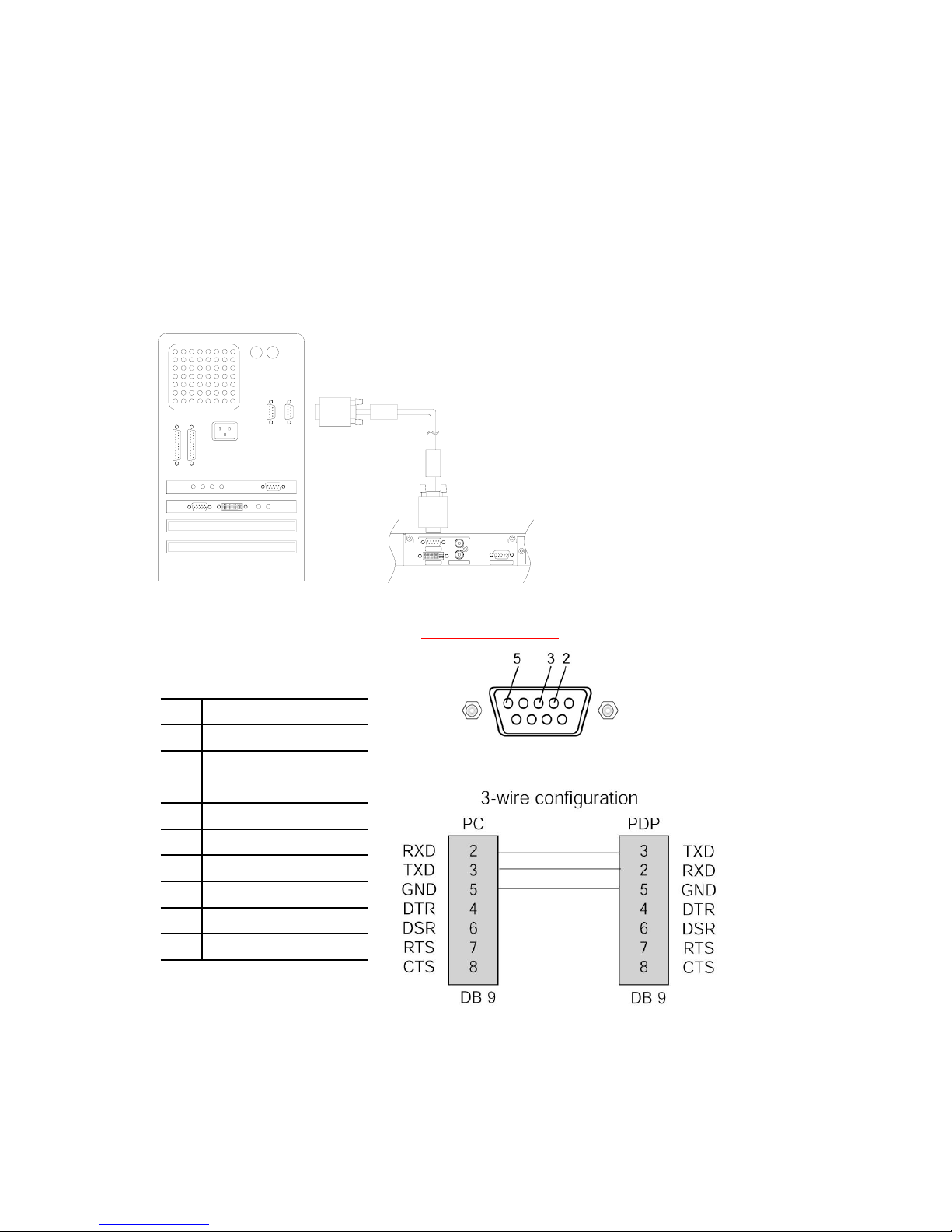
< Control LCD & PDP through Serial Port >
1. How to connect external equipment
- Connect the serial port of external equipment to the RS-232C jack of the monitor
back panel.
- RS-232C cables not included with the Monitor.
- The remote control and LCD&PDP front panel buttons (except main power) doesn’t
operate when controlling LCD&PDP set by PC.
DVI INPUT
RGB PC INPUTAUDIO INPUT
Com1Com2
RS-232C Cable
<PDP>
<PC>
RS-232C
- Type of co n nector : D-Sub 9-Pin female to female
No conection9
No conection8
No conection7
No conection6
GND5
No conection4
TXD (Transmit data)3
RXD (Receive data)2
No conection1
Pin NameNo.
[NOTE]
* Use a crossed (reverse) cable.
- Cable Side (female) -
Harsper R&D
2005. 4. 20.
Page 3
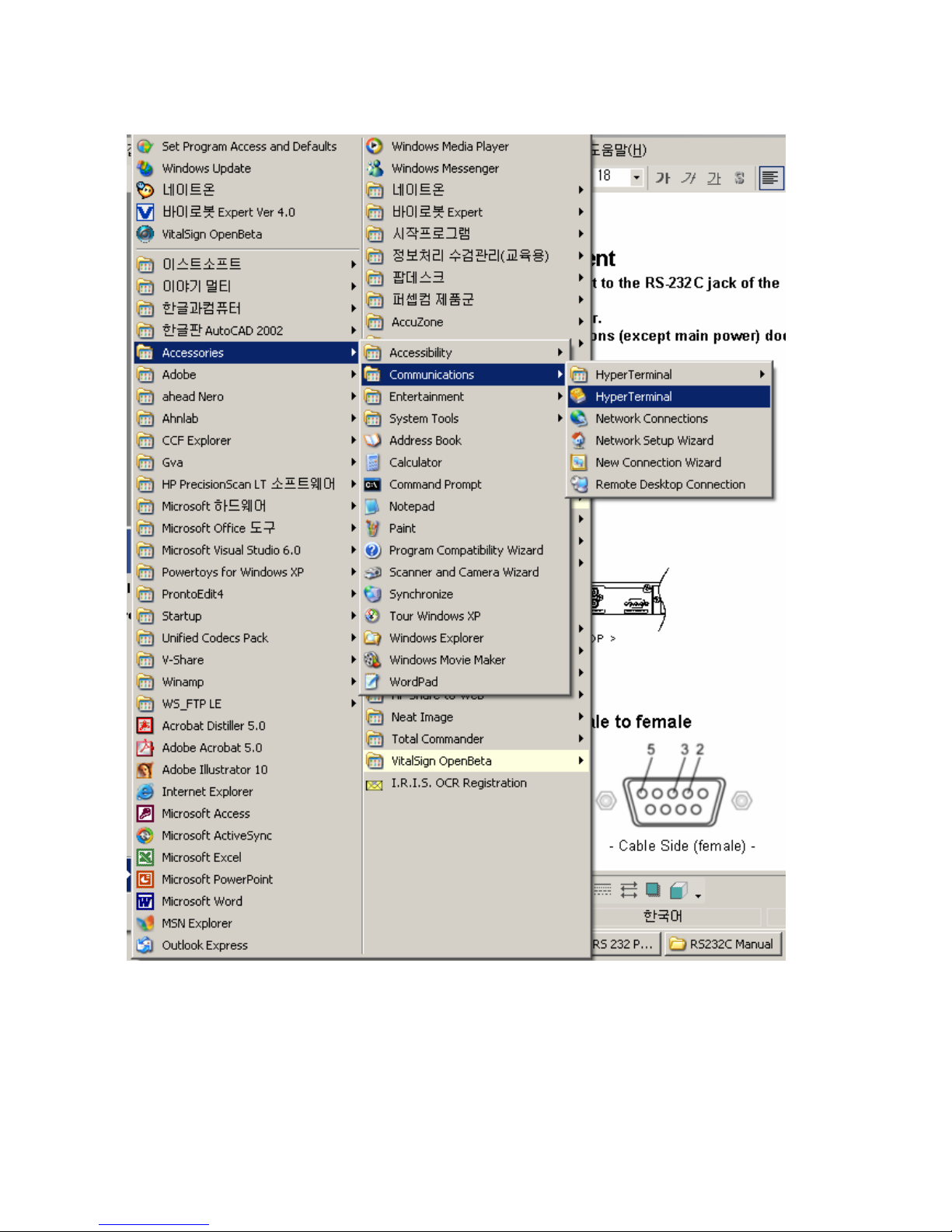
2. Run ‘Hyper Terminal’ (Example)
Page 4
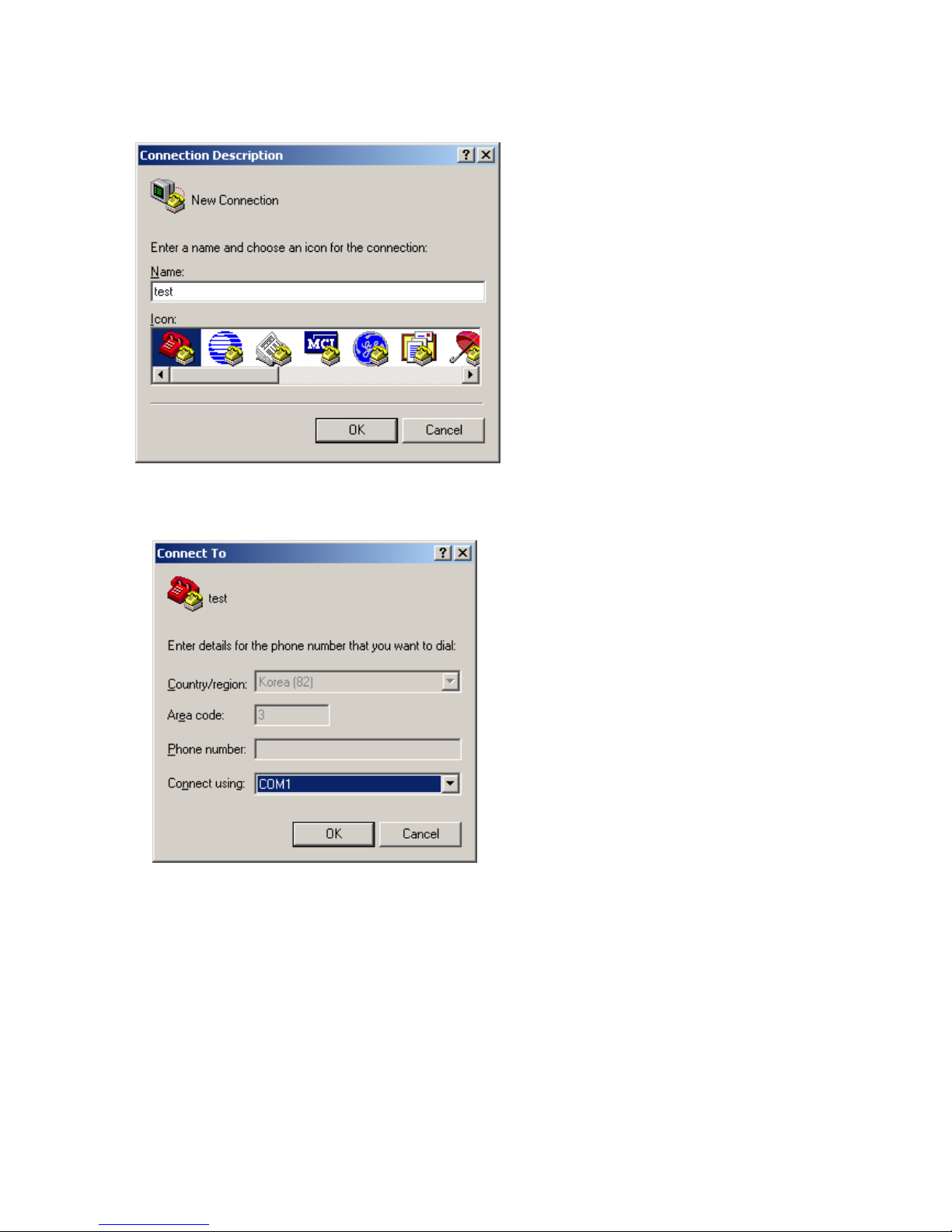
3. Enter any name
4. Select COM Port
Page 5
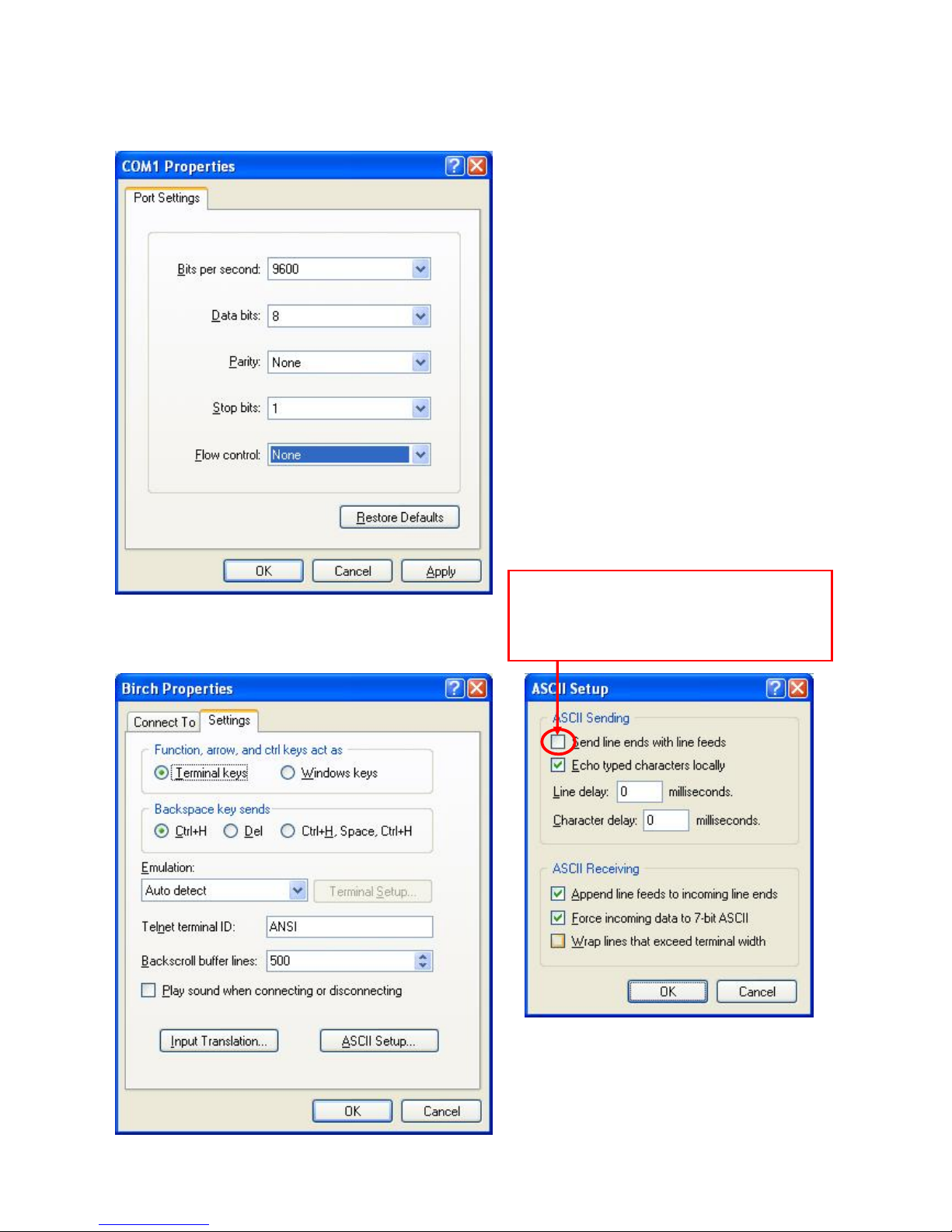
5. Set the port properties
6. Set the ASCⅡ Setup
Caution : You don’t check the box
If you check the box,
TV doesn’t work correctly.
Page 6
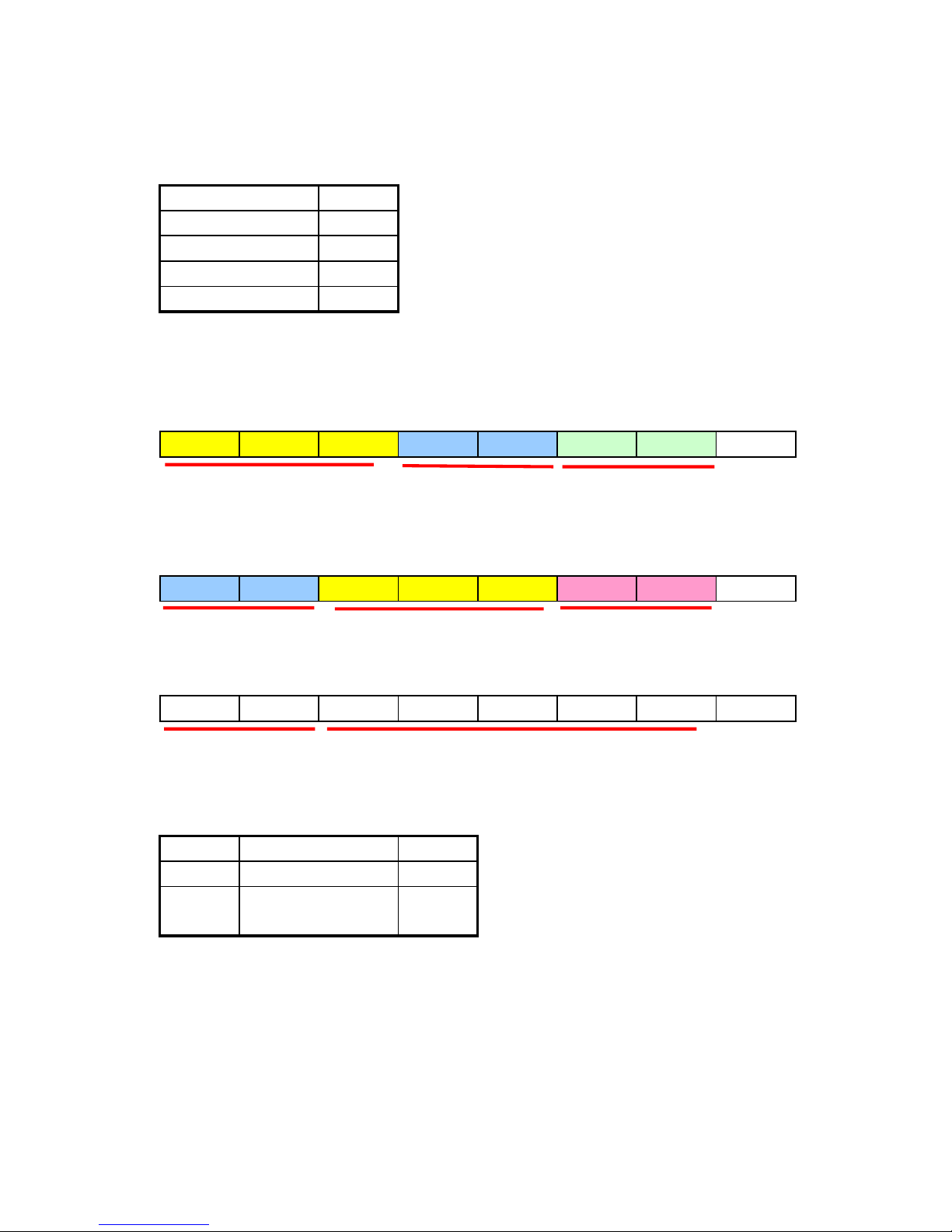
Communication Conditions
9600bps
8 Byte
None
1 Byte
None
2. Communication Procedure
- The response to cope with him must be in all order to a "Command --- > Response." basic
1) Command Format
Eight ASCII Codes + CR
C1 C2 C3 S1 S2 I1 I2 CR
2) Response Format
Eight ASCII Codes + CR
S1 S2 C1 C2 C3 R1 R2 CR
S1 S2 E R R O R CR
: When logic error a ( sentence error order ) or became wrong we send Error Message to
the case when a communication error happens.
Command
3 Byte
Set_ID
2 Byte
Input/
Response
2 Byte
- Command is a lowercase 3rd word.
- Set_ID is the value of Decimal from 00 to 99.(00 sends the order to all TV)
it inputs in "ff0" in command line.
- All alphabet is the lowercase.
- The case to read the
p
rice of the situation currently not to change the setting u
p
Character
DEC (00 ~ 99)
HEX (00 ~ FF)
Set the case to be ID edge 0 sends the order to all TV to be connected.
Input (2 Byte)
< Control TV through Serial Port>
Baud Rate
Data Length
Parity Byte
Stop Byte
Flow
Command (3 Byte) Set_ID (2 byte)
Set_ID (2 byte) Command (3 Byte) Response (2 Byte)
Set_ID (2 byte) Error Message ( 5 Byte)
: The case which straight order is sentenced and that action is performed.
Page 7
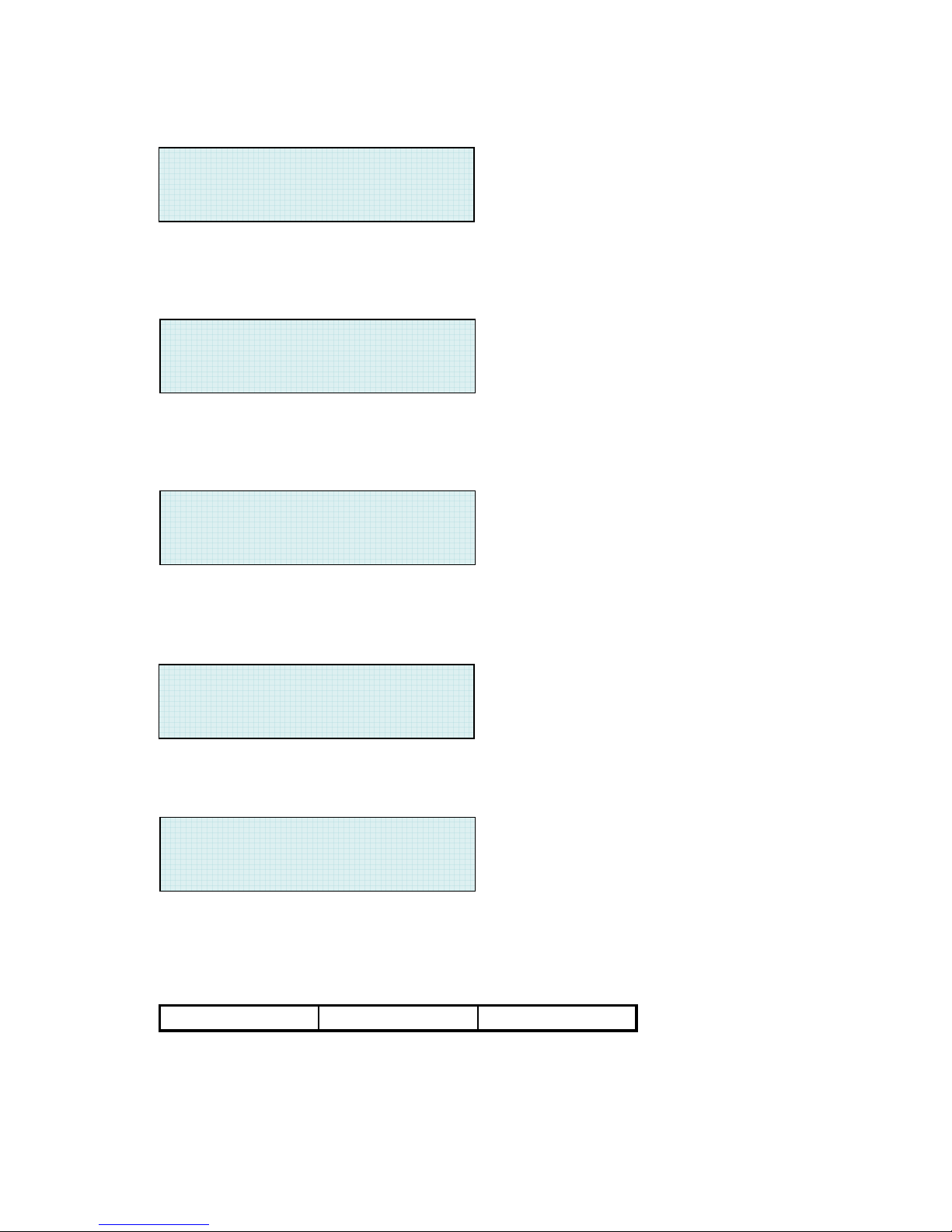
Ex. When the Set_ID wants lighting 1st person TV
Command : " mpo0101" (mpo : Power / 01 : Set_ID / 01 : Power On)
Response : " 01mpo01" ( The Set_ID lights 01st person LCD&PDP)
When the Set_ID wants knowing the Power condition of 3rd person TV
Command : " mpo03ff" (mpo : Power / 03 : Set_ID / ff : Present situation question)
Response : " 03mpo01" ( Status : Power On)
When the TV with 12th Set_ID wants Volume 34
Command : " svo1234" (svo : Volume / 12(Dec) : Set_ID / 34(Dec) : Volume size)
Response : " 12svo34" ( Set_ID 12th person PDP Volume 34)
When wanting putting out all the member of all TV
Command : " mpo0000" (mpo : Power / 00 : All PDP which are connected / 00 : Power)
when it wants to sees Last Command it does not change a set not to be
Command :" ff00100" (ff0 : The Last the Command it asks / 01 : Set_ID / 00 :
Condition question)
3. Communication Table
1) Command structure
P : Picture
S : Sound
M : Setup (Miscellany)
T : TV
C1 C2 C3
> mpo0101
> 01mpo01
> mpo03ff
> 03mpo01
> svo1234
> 12svo34
> mpo0000
> ff00100
Page 8
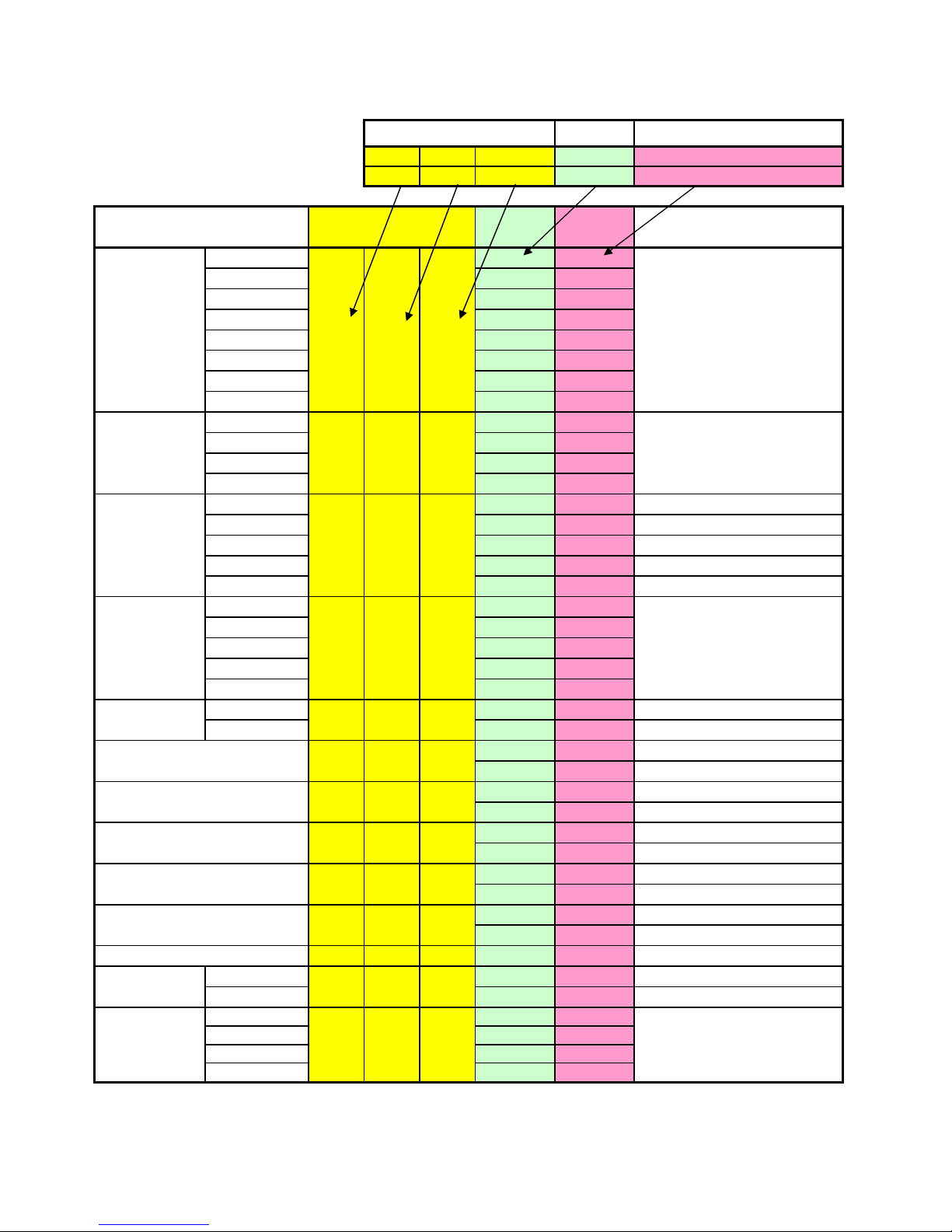
Command Table
SET ID INPUT
C1 C2 C3 S1 S2 I1 I2
EX) P C T 0 1 0 0
Picture
TV *00 00
AV 1 00 01
AV 2 00 02
S-Video /AV3 00 03
Component 1 00 04
Component 2 00 05
PC 00 06
DVI 00 07
Standard 00 *00
Vivid 00 01
Mild 00 02
User 00 03
Cool 2 00 00
Cool 1 00 01
Normal 00 02
Warm 1 00 03
Warm 2 00 04
16:9 00 *00
Panorama 00 01
Zoom1 00 02
Zoom2 00 03
4:3 00 04
OFF 00 00
ON 00 01
00 00 Contrast Down Increment
00 01 Contrast Up Increment
00 00 Brightness Down Increment
00 01 Brightness Up Increment
00 00 Color Down Increment
00 01 Color Up Increment
00 00 Tint Down Increment
00 01 Tint Up Increment
00 00 Sharpness Down Increment
00 01 Sharpness Up Increment
pre
00 00
OFF 00 00
ON 00 01
OFF 00 *00
Small 00 01
Large 00 02
Twin 00 03
Set ID
Command
*Set ID=00 send same
command to all TV on
data chain. For individual
TV control set ID = (01~99)
to match TV ID number
in advanced menu
*Repeat command
"ppm0000" to scroll
through selections
*Repeat command
"pvc0000" to scroll
through selections
ti
Input
m
s
t
*Repeat command
"ppz0000" to scroll
through selections
Source
Select
ps
Color
Temperature
pc
Picture
mode
pp
V.Size
pvz
Contrast
pcr
Video NR
pnr
br
pco
Color
Brightness
p
p
p
Tint
sh
Still
pst
Recall
Sharpness
Control Item Command
Remark
PIP Size
ppz
Page 9
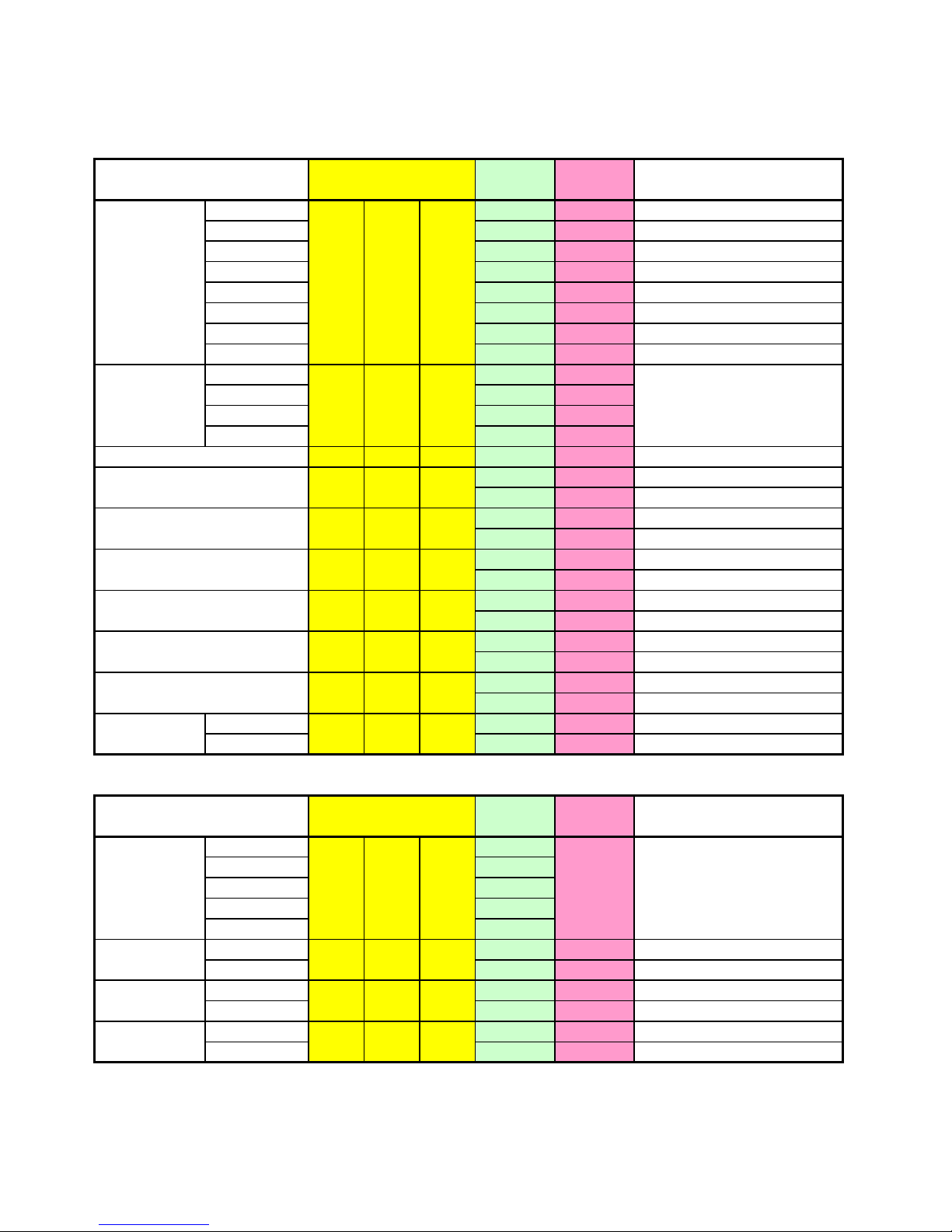
Picture
TV 00 00
AV1 00 01
AV 2 00 02
S-Video /AV3 00 03
Component 1 00 04
Component 2 00 05
PC 00 06
DVI 00 07
Right Down 00 *00
Right UP 00 01
Left UP 00 02
Left Down 00 03
ppx 00 00
00 00 Down Increment
00 01 Up Increment
00 00 Down Increment
00 01 Up Increment
00 00 Down Increment
00 01 Up Increment
00 00 Down Increment
00 01 Up Increment
00 00 Down Increment
00 01 Up Increment
00 00 Down Increment
00 01 Up Increment
OFF 00 00
ON 00 01
Sound
Standard 00
Movie 00
Music 00
News 00
User 00
OFF 00 00
ON 00 01
OFF 00 00
ON 00 01
OFF 00 00
ON 00 01
Input Input
v
e
m
00
Mute
smu
AVC
sa
Sound Mode
ss
Spatial
Effect
ss
Remark
InputControl Item Command
V-chip
pvc
*Repeat command
"ssm0000"to scroll
through selections.
Input
PIP Source
pps
*Repeat command
"ppp0000" to scroll
through selections
PIP_Swap(Cross)
Geo_H Position
pgh
PIP Position
ppp
Geo_V Position
pgv
Geo_Phase
pgp
Geo_Auto
pga
Geo_Native Mode
pgn
Remark
Control Item Command
Geo_Native H-size
pgs
Page 10
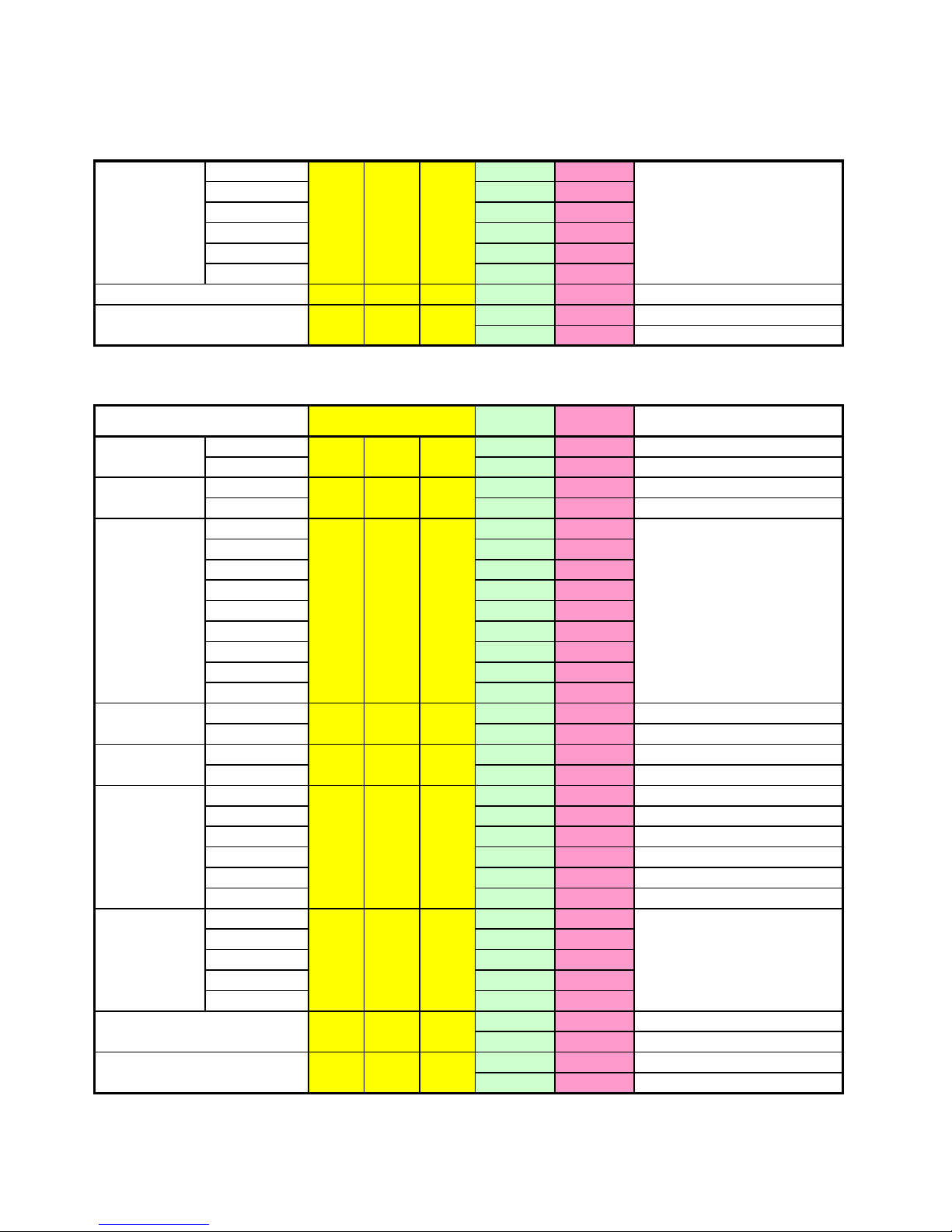
Sound
Mono 00 00
Stereo 00 01
Language A 00 02
Language B 00 03
Language AB 00 04
SAP 00 05
svo
00 (0~99)
00 00 Down Increment
00 01 Up Increment
Miscellany (Setup)
OFF 00 00
ON 00 01
OFF 00 00
ON 00 01
OFF 00 *00
10 00 01
20 00 02
30 00 03
60 00 04
90 00 05
120 00 06
150 00 07
180 00 08
OFF 00 00
ON 00 01
OFF 00 00
ON 00 01
English 00 00
Deutsch 00 01
Francais 00 02
Espanol 00 03
Italiano 00 04
China 00 05
OFF 00 *00
CC1 00 01
CC2 00 02
Text1 00 03
Text2 00 04
00 00
00 01
00 00
00 01
Volume
Language
m
Blue Back
mbpb
c
mf
la
Remote
Lock
m
Power
Sleep Time
ms t
rl
Caption
mc
Front Key
Lock
Balance
sba
Control Item Command
mp o
MTS
smt
Input
Direct Input - No scrolling
input command needed
Remark
*Repeat command
"mst0000" to scroll
through selections
*Repeat command
"mcc0000" to scroll
through selections
Input
Black Enhancer
pbe
Film Mode
pfm
Page 11
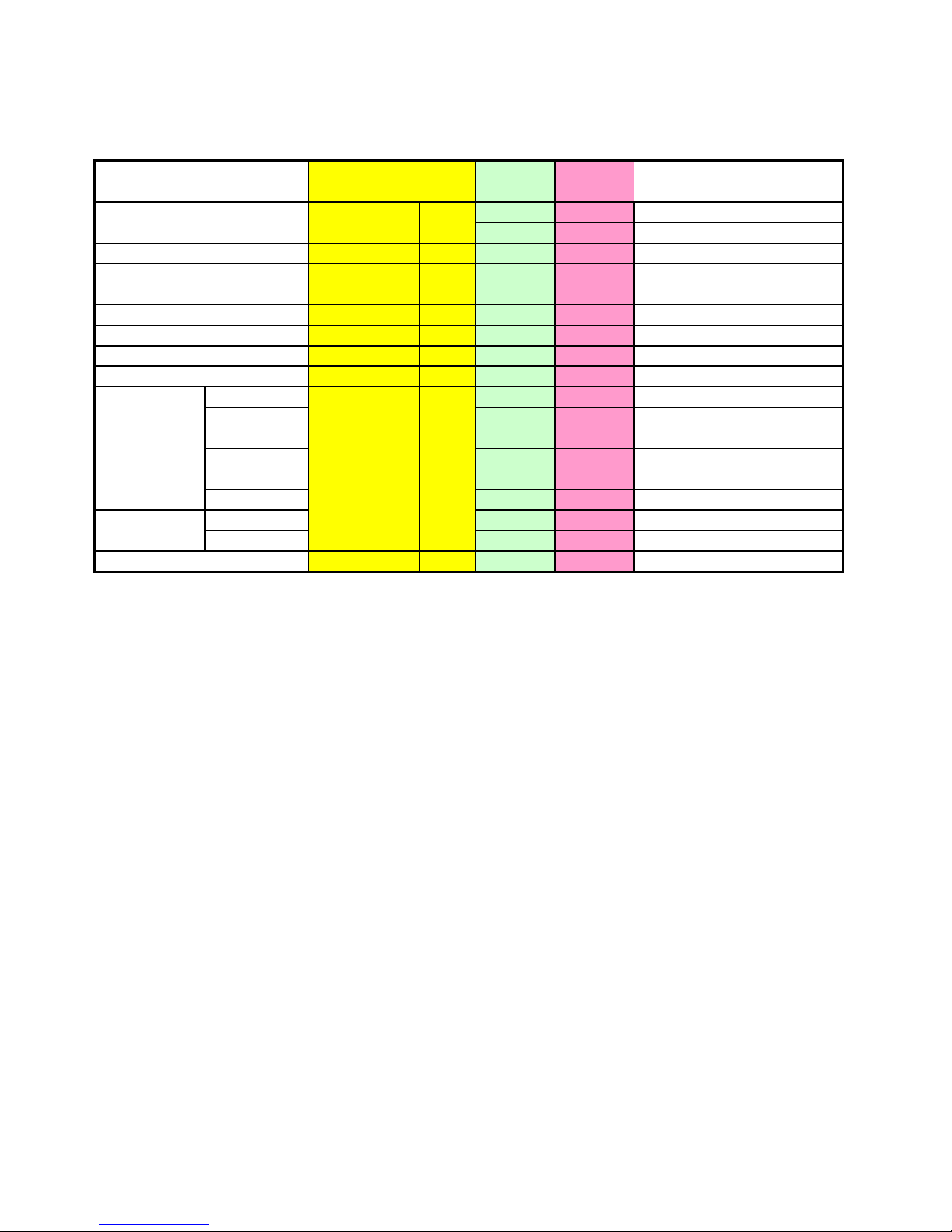
TV
00 00
00 01
tpu 00 00
tpd 00 00
tpn
00
(0~99)
tph
00
(0~27)
tpc 00 00
tsu 00 00
tsd 00 00
OFF 00 00
ON 00 01
AIR 00 00
CATV 00 01
HRC 00 02
IRC 00 03
AIR 00 04
CATV 00 05
tas 00 00
Input
Auto Scan
t
CH Number (0~99)
CH Number (100~127)
d
Pre .CH
PIP SUB CH Up
PIP SUB CH Down
Digest
i
Fine Tune
tft
CH Up
CH Down
Control Item Command Input
Remark
Channel
Type(NTSC)
tct
Channel
Type(PAL)
 Loading...