

Page 1
H A R B O R T O U C H
QUICK REFERENCE GUIDE
HYPERCOM T4210/T4220 RETAIL
Customer Service: 800-201-0461
24-Hour Technical Support: 800-632-1888
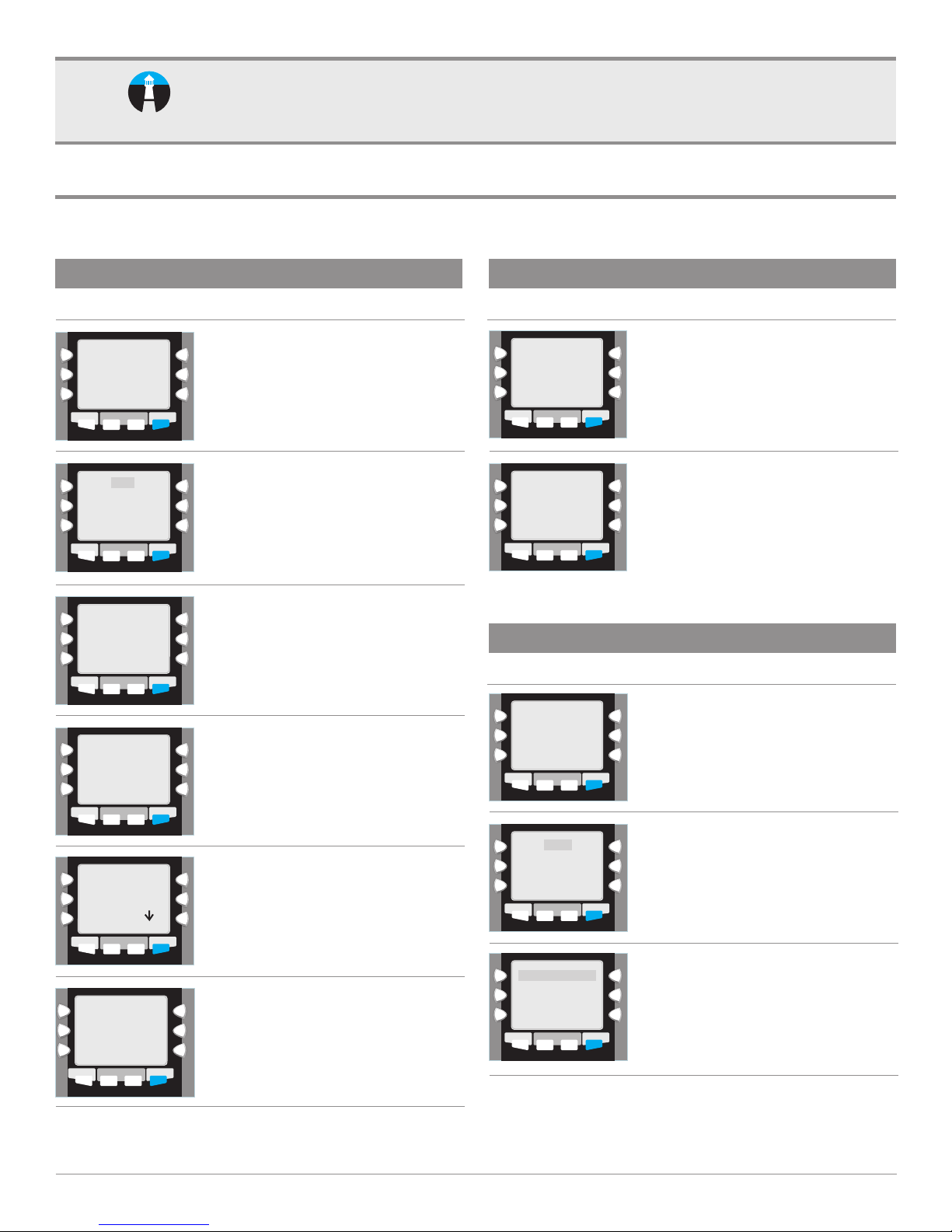
CREDIT CARD PURCHASE
TERMINAL DISPLAY
Debit
Void
Reprint
HOME SETTLE REPORTS
Enter Card Number
HOME SETTLE REPORTS
HOME SETTLE REPORTS
Expiration Date MMYY
HOME SETTLE REPORTS
Refund
Sale
Card Present
Yes/No?
Offline
FUNCTION
FUNCTION
FUNCTION
FUNCTION
ACTION
Swipe card or manually enter credit card
number.
Enter card number. Press ENTER.*
If the card is present, press ENTER. If not,
press CLEAR.*
Enter card expiration date (MMYY). Press
ENTER when complete.*
CREDIT CARD PURCHASE (continued)
TERMINAL DISPLAY
Enter Billing Zip Code
HOME SETTLE REPORTS
Press Any Key
Customer Receipt
HOME SETTLE REPORTS
*Manually entered sales only.
**CVV may be prompted on card present, subject to card association requirements.
FUNCTION
to Print
FUNCTION
ACTION
Enter customer's billing zip code if card
not present.*
Tear the receipt and have the customer sign.
This is the merchant's copy.
Press any key to print the customer's copy.
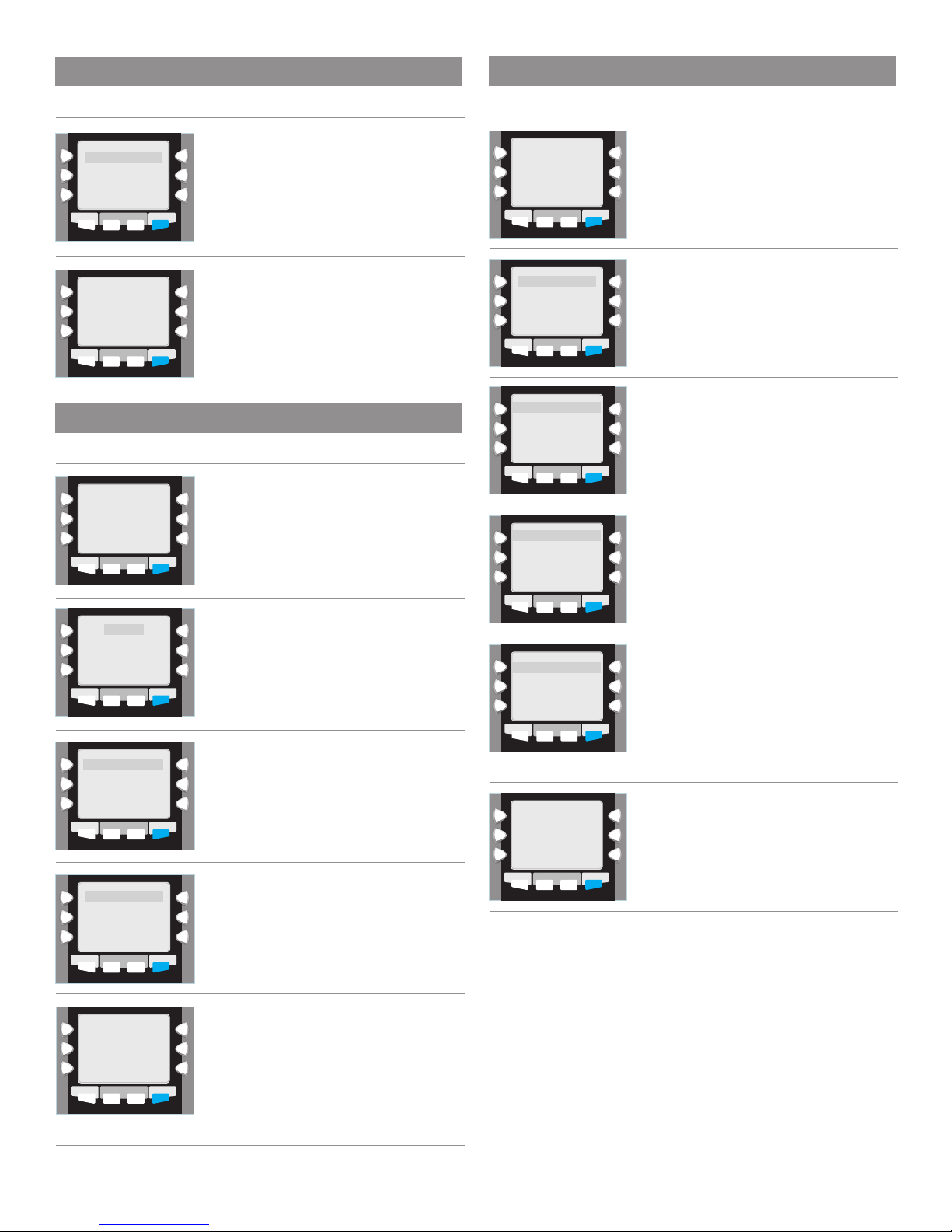
DEBIT CARD PURCHASE
TERMINAL DISPLAY
Debit
Void
Reprint
HOME SETTLE REPORTS
Offline
Refund
FUNCTION
ACTION
Choose option for Debit.
Not Provided
Present
Illegible
Not Present
HOME SETTLE REPORTS
Enter Amount
FUNCTION
If you choose No for not present, these
options will be displayed.*
Choose the appropriate option and continue
with sale.**
Enter amount of transaction, press
ENTER when complete.
HOME SETTLE REPORTS
HT1005_12062011
FUNCTION
Debit
Swipe Customer Card
HOME SETTLE REPORTS
Debit Debit
Sale Amount
HOME SETTLE REPORTS
FUNCTION
FUNCTION
Swipe customer's card.
Enter in amount of sale, press ENTER when
complete.
PAGE 1
Page 2
DEBIT CARD PURCHASE (continued)
OFFLINE (FORCED TRANSACTION) CREDIT CARD
TERMINAL DISPLAY
Debit Debit
Total $0.00
Enter Pin
HOME
SETTLE REPORTS
Press Any Key
to Print
Customer Receipt
HOME
SETTLE REPORTS
FUNCTION
FUNCTION
Customer enters PIN number on pin pad.
Press ENTER.
Tear the receipt and have the customer sign.
This is the merchant's copy.
Press any key to print the customer's copy.
CREDIT CARD RETURN
TERMINAL DISPLAY
Debit
Void
Reprint
HOME SETTLE REPORTS
Offline
Refund
Choose option for REFUND.
FUNCTION
ACTION
ACTION
TERMINAL DISPLAY
Debit
Void
Reprint
HOME SETTLE REPORTS
Enter Card Number
HOME SETTLE REPORTS
Card Type Sale<OFFL>
Expiration Date
MMYY
HOME SETTLE REPORTS
Card Type Sale<OFFL>
Enter Amount
HOME SETTLE REPORTS
Offline
Refund
FUNCTION
SALE <OFFL>
FUNCTION
FUNCTION
FUNCTION
ACTION
Choose option for OFFLINE.
Swipe customer's card or manually enter card
number. If manually entered, press ENTER key.
Enter card expiration date (MMYY).
Press ENTER when complete.*
Enter amount of sale. Press ENTER when
complete.
Refund
Swipe Customer Card
HOME SETTLE REPORTS
Card Type Refund
Expiration Date
MMYY
HOME SETTLE REPORTS
Debit Debit
Sale Amount
HOME SETTLE REPORTS
Press Any Key
Customer Receipt
HOME SETTLE REPORTS
FUNCTION
FUNCTION
FUNCTION
to Print
FUNCTION
Swipe customer's card or manually enter
card number. If manually entered, press
ENTER key.
Enter expiration date of customer's card.
Press ENTER key.*
Enter in amount of sale, press ENTER
when complete.
Tear the receipt and have the customer sign.
This is the merchant's copy.
Press any key to print the customer's copy.
Card Type Sale<OFFL>
Enter Approval Code
HOME SETTLE REPORTS
FUNCTION
*Manually entered sales only.
Press Any Key
to Print
Customer Receipt
HOME SETTLE REPORTS
FUNCTION
Enter approval code. Press ENTER when
complete.
Tear the receipt and have the customer sign.
This is the merchant's copy.
Press any key to print the customer's copy.
*Manually entered sales only.
PAGE 2
Page 3
EBT SALE
EBT SALE (continued)
TERMINAL DISPLAY ACTION
Debit
Void
Reprint
HOME SETTLE REPORTS
Swipe Customer Card
HOME SETTLE REPORTS
Food Stamp
EBT Cash Benefit
HOME SETTLE REPORTS
HOME SETTLE REPORTS
Refund
EBT
Amount $x.xx
Offline
EBT
FUNCTION
FUNCTION
FUNCTION
FUNCTION
Select EBT.
Swipe EBT card.
Select desired option.
Type in amount and press ENTER.
TERMINAL DISPLAY ACTION
Select receipt type.
Customer Copy
Merchant Copy
HOME SETTLE REPORTS
FUNCTION
VOID
TERMINAL DISPLAY
Debit
Void
Reprint
HOME SETTLE REPORTS
Last
Invoice
HOME SETTLE REPORTS
Offline
Refund
FUNCTION
Void
FUNCTION
ACTION
Choose option for Void.
Choose method in which you wish to void
transaction. If LAST is chosen, last transaction
will be prompted. Press ENTER to void or
CLEAR to cancel. If INVOICE is chosen, you will
be prompted to enter transactions invoice
number. Press ENTER after number is entered.
Transaction will be displayed. Press ENTER to
void or CLEAR to cancel.
Total $x.xx
Enter PIN
HOME SETTLE REPORTS
Debit
Void
Reprint
HOME SETTLE REPORTS
Last
Invoice
HOME SETTLE REPORTS
FUNCTION
Offline
Refund
EBT
FUNCTION
FUNCTION
Enter PIN.
Select REPRINT.
Select LAST to choose the last transaction
or select INVOICE to select another
transaction.
If INVOICE is selected:
Enter invoice number and press ENTER.
or
Press ENTER For Last Invoice.
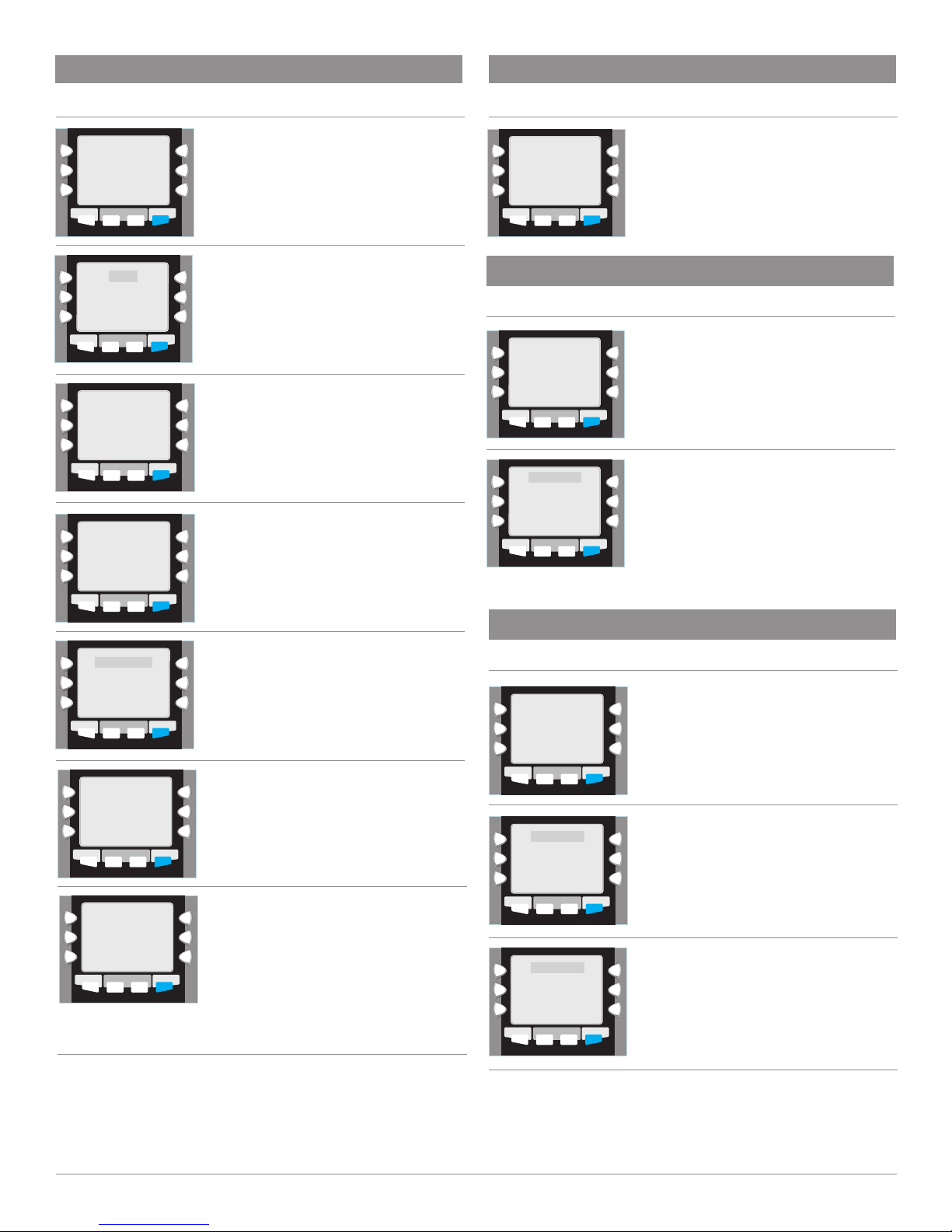
BATCH SETTLEMENT
TERMINAL DISPLAY
Debit
Void
Reprint
HOME SETTLE REPORTS
Enter Password
HOME SETTLE REPORTS
Ok ### #### ####
HOME SETTLE REPORTS
Offline
Refund
FUNCTION
Settle
FUNCTION
Settle
FUNCTION
ACTION
Press SETTLE key.
Enter Password 0000 and press ENTER key.
Confirm totals by pressing ENTER key.
Confirm refunds by pressing ENTER key.
Terminal will dial to host and settle
machine. Settlement report will then print.
PAGE 3
Page 4

CURRENT BATCH REPORT
TERMINAL DISPLAY
Debit
Void
Reprint
HOME SETTLE REPORTS
Audit
Summary
Reprint
HOME SETTLE REPORTS
Offline
Refund
FUNCTION
FUNCTION
ACTION
Press REPORTS key.
Choose which report type you require.
Terminal will then print desired Report.
IMPORTANT “VoIP” NOTICE
ONLY IP CREDIT CARD TERMINALS ARE ABLE TO SUPPORT “VOICE OVER IP” (VoIP).
DIAL-UP TERMINALS WILL NOT WORK WITH VoIP SINCE THEY REQUIRE A LANDLINE.
Changes made to your telephone system, such as conver ting to digital telephone service or Voice
Over Internet Protocol (VoIP), can adversely affect the ability of your credit card terminal to function
properly. Dial-up terminals do not work though VoIP. You must use a landline for dial-up terminals to
function properly. If a dual communication terminal is present, a router must be used in conjunction
with a DSL/cable modem to obtain a high speed connection.
If you plan on making any changes to the telephone system at the location where your terminal is
used or if you have any questions in regards to your current terminal's capabilities, please contact
technical support at 800-632-1888.
PAGE 4
 Loading...