

Page 1

Sleep Mask – user's guide
Sleep Mask
User's Guide
1/4
Page 2

Sleep Mask – user's guide
Content
Introduction..........................................................................................................................................2
Requirements........................................................................................................................................2
Package content....................................................................................................................................2
Advice and warnings............................................................................................................................2
First start...............................................................................................................................................2
Special functions..................................................................................................................................3
Lucid dreaming................................................................................................................................3
Anti-snoring effects.........................................................................................................................3
Sunrise alarm...................................................................................................................................3
Introduction
Congratulations on purchasing Sleep Mask – the ultimate device which allows you to use up the
potential of Sleep as Android application. This guide will help you set up and operate the device.
Requirements
• Android that supoorts USB OTG
• Android 3.2 and higher.
Package content
• Glasses with USB and microusb adapter
• 2 year guarantee
• 30-Day Money-Back Guarantee
• User's Manual
Advice and warnings
• To ensure proper functioning, keep the device clean.
• Be careful when cleaning the device, don't let moisture get to the diodes. You alone are
responsible, if you destroy the device cleaning it.
• Protect the device from fire, water and extreme temperatures.
• The mask is not made of any health damaging materials.
• The device was carefully tested, it cannot hurt you while sleeping.
• The package of the Sleep Mask is recyclable and must be handled in accordance with local
laws.
• All unrecyclable parts of the Sleep Mask must be handled in accordance with local laws.
• Keep the device out of the reach of children.
• Don't keep the devices connected, if you're not using it.
First start
• Run the Sleep as Android application.
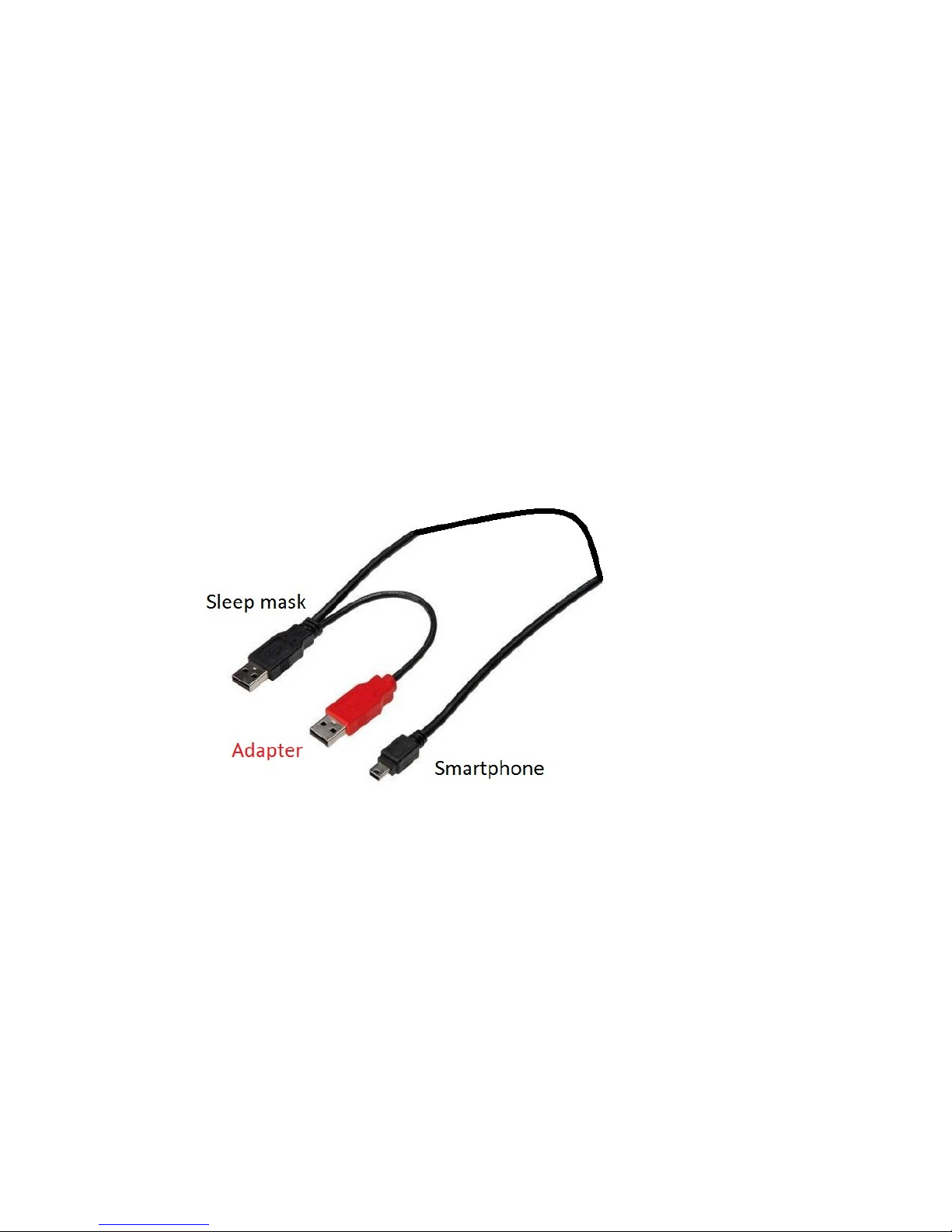
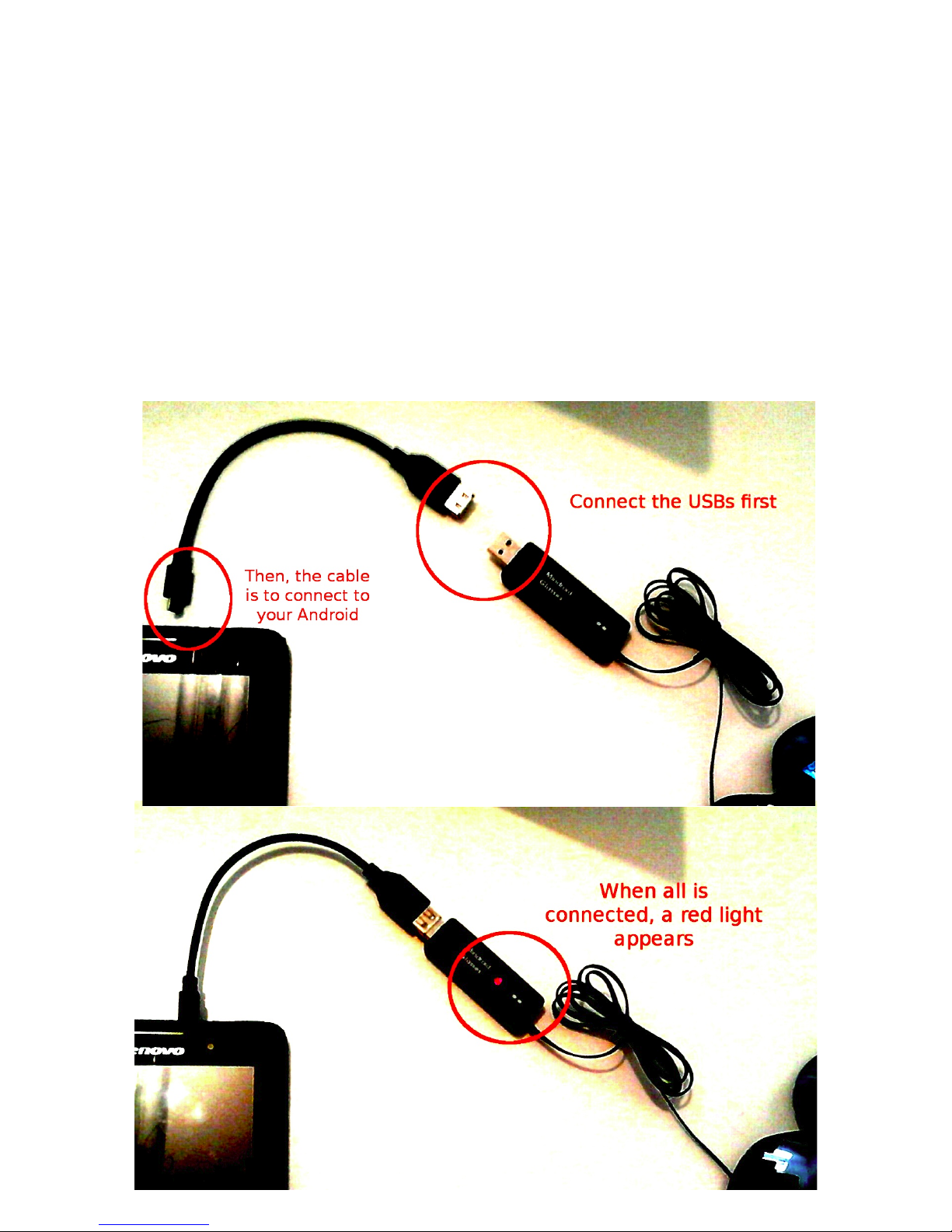
• Connect the small black box to the black connector via USB.
• The red connector can be plugged into adapter, so the mask doesn't consume your
smartphone's battery.
• Connect the cable to the micro USB port of your Android device. A diode lights on.
2/4
Page 3
Sleep Mask – user's guide
• In the application, go to the settings and choose the mask.
• Now you can start the session.
• Disconnect the glasses, when the session is over. Remove the cable from your Android
device carefully.
If you have any problem with the Sleep as Android application, please send us a report and we will
help you solve it
Using the Mask as a mind machine
• Connect the Mask to your smartphone. You can use the delivered cable or any USB
OTG/micro USB cable.
• In this case, htere is no need to use an adapter.
• Rund the Mindroid application. You can download it and get more information on Google
Play.
• Allow the application to use an external USB device in case a pop-up window appear, select
the Mask in the settings in order to use it as external glasses.
• Now you can start the session. Remember to have your eyes closed during it.
More information and all the guides are to find here:
https://sites.google.com/site/sleepasandroid/doc
https://www.happy-electronics.eu/support/support-sleep-mask/
Special functions
The mask is an accessory to the Sleep as Android application. Thanks to it, you can enjoy some
special functions and light effects as well as visual stimulation that helps falling asleep.
Lucid dreaming
This technique can help you to get some control over your dream. First, you should do some
research and go through available internet resources to get the general idea about it. Then you can
start training.
The training focuses on often controlling the fact that you're awake, getting used to the cues and on
3/4
Page 4
Sleep Mask – user's guide
remembering your dreams.
The Sleep as Android application can give you the cue, if turned on, in several ways including light
effect. It's so timed, that the cue comes in the phase of sleep most rich on dreams.
Anti-snoring effects
The application recognizes when you are snoring. If the function is turned on, it will give you a
stimuli which should make you stop. Several ways are available including a light effect.
Sunrise alarm
A very gentle way of waking up. Light effect similar to sunrise, from low red to bright yellow
instead of annoying noise of alarm clock.
4/4
 Loading...