

Page 1
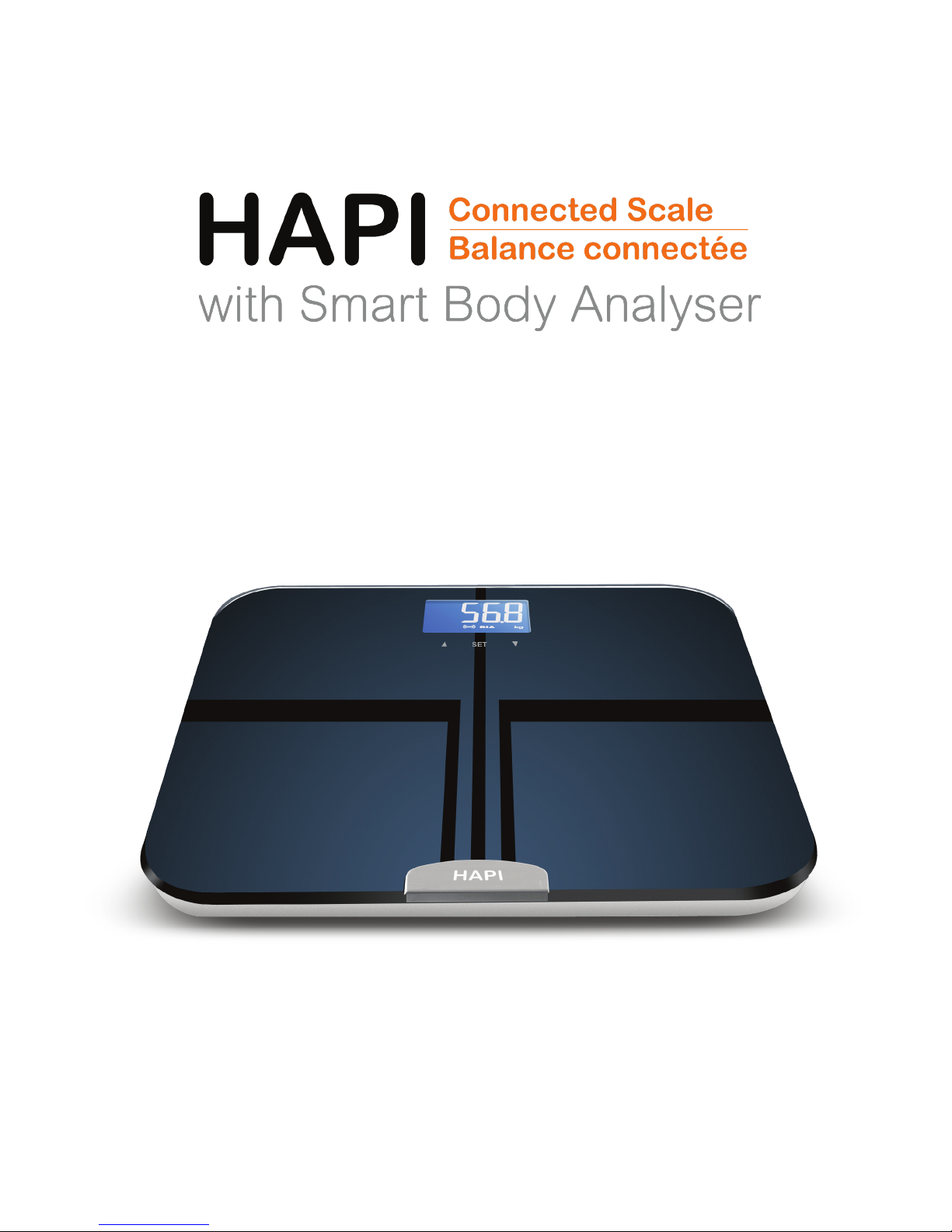
User Manual
Page 2

Contents
Safety Information ..................................................................3
Safety and Usage Information ..........................................................3
Regulatory Statements on Proper Handling and Intended Use ......................3
Overview ................................................................................5
Device Components .....................................................................5
LCD Display ............................................................................. 5
General Instructions ...............................................................6
Insert the Batteries ......................................................................6
Pairing and Setting Up a Prole with the HAPI Connect Mobile App .................7
Setting Up Your Prole and Multiple Users on the Scale ..............................8
Initialising the Scale ...................................................................10
Weight-Only Operationt ...............................................................10
Start Measuring ....................................................................11
First Measurement ....................................................................11
Daily Measurement ....................................................................12
Manage Your Health ..............................................................13
Syncing Data ..........................................................................13
Activate Your Free Nutritional Coaching Program on HAPIcoach .................. 14
Troubleshooting ...................................................................15
Error Messages ........................................................................15
When Measuring ...................................................................... 15
During Data Syncing .................................................................. 16
Specications .......................................................................... 17
About the accuracy of this product ................................................... 17
Maintenance .........................................................................18
Warranty .............................................................................. 19
Appendix ..............................................................................19
Health Tips - About Body Fat .........................................................19
Standard for Men ......................................................................19
Standard for Women ..................................................................20
Health Tips - About Body Water ...................................................... 20
Health Tips - About Muscle Mass ..................................................... 21
Muscle Mass Percentage .............................................................21
Health Tips - About Bone Mass .......................................................21
EMC Guidance ........................................................................ 21
Page 3
Safety Information
Safety and Usage Information
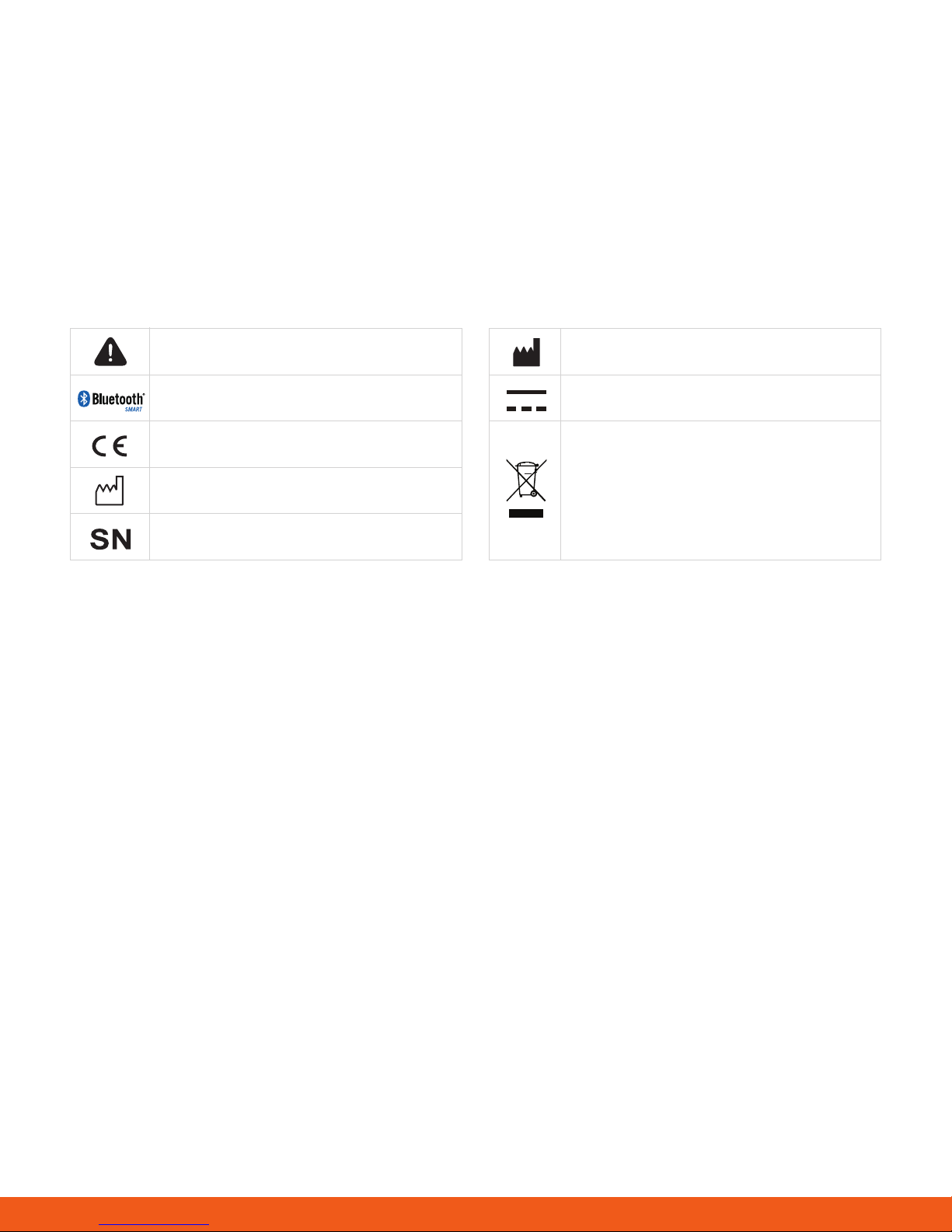
The warning signs and symbols are essential to ensure your correct and safe use of this product and
protect you and others from injury. Here are the meanings of the warning signs and symbols, which you may
encounter in the label and user manual, as follows:
Important
The Bluetooth logo
Complies with EU requirements
Manufacture date
Serial number
Manufacturer
Direct current
ENVIRONMENT PROTECTION
Discarded electrical products should
not be disposed of with household
waste. Please recycle where facilities
exist. Check with your local authority
or retailer for recycling advice.
Regulatory Statements on Proper Handling and Intended Use
To ensure you use your product correctly and safely, read and heed these warnings and the entire user
manual before using the product.
The HAPI Connected Scale with Smart Body Analyser (also known as the HAPI Connected Smart Body
Analyser) offers you a seamless way to manage your health.
Please be aware that this device is designed for healthy individuals over 10 years old to measure their weight
and monitor their body composition. Any information provided by this device is in no way meant to treat, cure,
or prevent any disease or illness from happening. If in doubt, contact your physician.
This device is contraindicated for any female user who may be suspected of being, or is pregnant. Otherwise,
the effects of this device on the fetus are unknown.
This device is contraindicated for any person who is connected to a wearable or implantable electronic
device or instrument, such as a pacemaker or debrillator.
This device should not be used for anyone who is acutely or chronically ill because of suffering from a
disease or taking medications that affect water levels. The accuracy of readings for these patients has not
been veried. Specic medical advice should be obtained from a physician.
This connected scale is equipped with data transmission function. It may emit electromagnetic energy so as
to perform its intended function. Nearby portable and mobile RF communications equipment can affect the
performance of the connected scale. And the device can interfere with electrical equipment in the vicinity.
The manufacturer will make available on request circuit diagrams, component parts list, etc.
3
Page 4

WARNING:
No modications of this equipment is allowed. This may result in increased emissions or decreased lifetime
of the scale.
Please use the device according to the user manual. Any misuse can cause electric shock, burns, re, and
other unexpected hazards.
Please use and storage the device under the environment which was provided in the user manual.
Don’t expose the device to extreme temperatures, direct sunlight, moisture, or corrosive environments.
Do not step on the scale when your body or feet are wet, especially after bathing or showering, to prevent
slipping.
Please keep the device out of reach of infants, children or pets, since inhalation or swallowing of small parts
is dangerous or even fatal.
Please don’t use the device past its lifetime, as degraded sensors and electrodes, or
loosened electrodes can degrade performance or cause other problems.
If you have an allergy to stainless steel, please avoid contact with the electrodes of the device.
The user of this connected scale can measure, transmit data and charge battery under
normal circumstances and maintain the device and its accessories according to the user manual.
INDICATIONS FOR USE
The HAPI Connected Scale with Smart Body Analyser measures weight and uses bio-electrical impedance
analysis (BIA) technology to estimate body fat, total body water percentage, bone mass, and muscle mass
in generally healthy children between 10 to 17 years old and healthy adults.
It is intended for personal use at home only.
Tips
To ensure the accuracy of measurement,
please follow the instructions below when
you start your measurement.
• Place the scale on a at, hard surface. A
soft surface, like a carpet, will affect the
performance of the scale.
• Step onto the platform with bare feet. Stand
still and keep full contact with the electrodes
until the measurement is complete.
• Weigh in at least two hours after waking up or
eating a meal.
• Avoid weighing in immediately after strenuous
exercise, sauna or bath, drinking, and eating.
• Always weigh in at the same time slot and with
the scale at the same location and at, hard
surface.
• For maximum accuracy and consistency, it is
recommended that you should use the device
in the same time of the day and at the same
location.
• Body fat percentage estimates will vary with the
amount of water in the body, and can be affected
by dehydration or over-hydration due to factors
such as alcohol consumption, menstruation,
4
Page 5
Overview
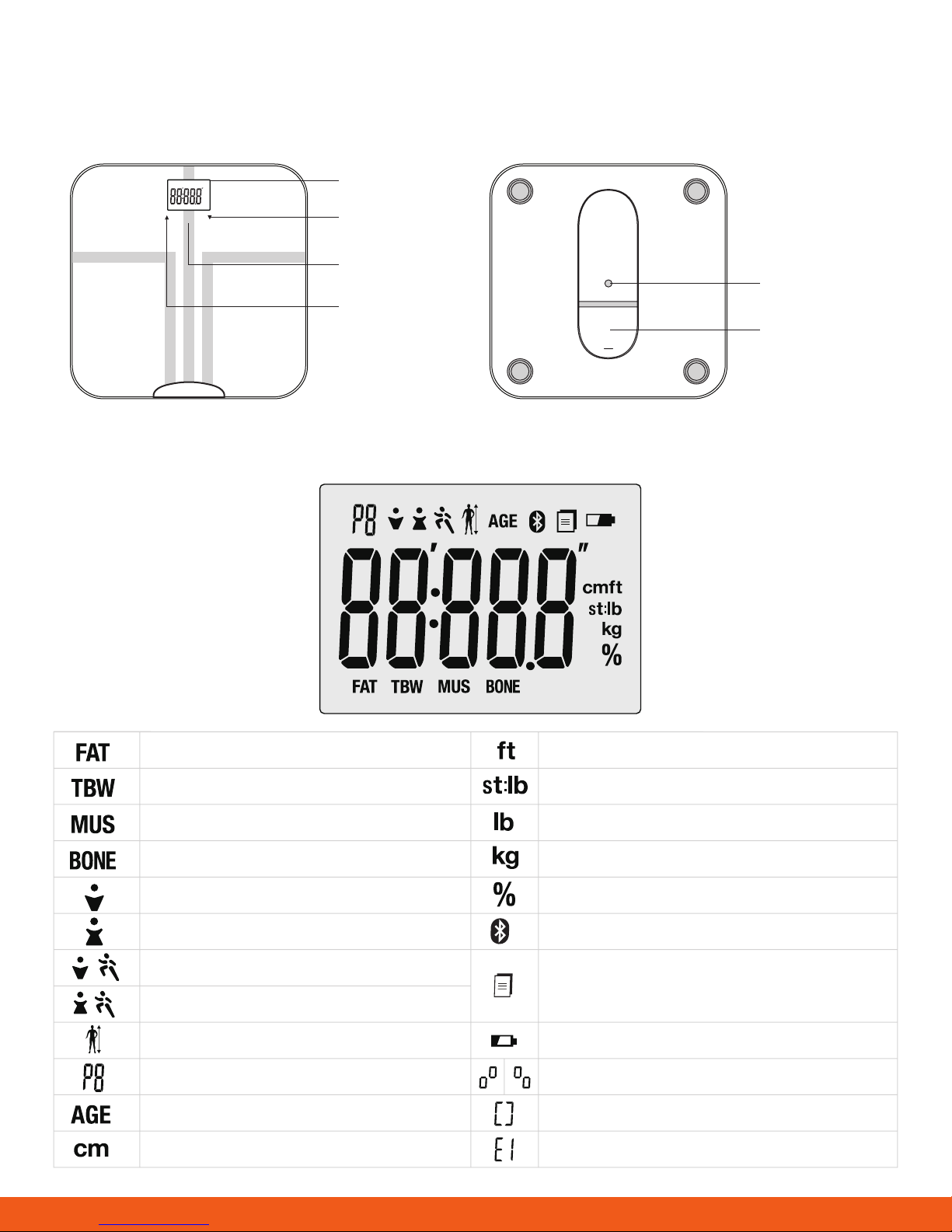
Device Components
LCD Display
SET
HAPI
LCD Display
Down Key
Set Key
UNIT Button
Up Key
Battery
Compartment
Body Fat Analysis Result
Water Analysis Result
Muscle Mass Analysis Result
Bone Mass Analysis Result
Male
Female
Male Athlete
Female Athlete
Height
User ID (Range from U1 to U8 )
Age
Centimeter
Foot
Stone
Pound
Kilogram
Percentage
Successful Bluetooth Connection
Data transmitting / pending to transmit to
wireless wellness system
Low Battery
Pair-Up
Pair-Up succeeded
Pair-Up failed
5
Page 6
General Instructions
The HAPI Connected Smart Body Analyser applies BIA (bio-impedance Analysis) technology. A weak current
ows through the human body to detect bio-impedance and estimate body fat, body water, muscle mass
and bone mass. The electrical current is small and cannot be felt. This BIA technology is cheap, safe, noninvasive, toxic-free and harmless. It also possesses the characteristics of simple operation and abundant
information.
The current mentioned above is less than 0.5mA. However, please be aware that anyone with a wearable or
implantable medical electronic instrument, such as a pacemaker, must avoid using this device.
The intended use of this device is for healthy children from 10 to 17 years old and healthy adults.
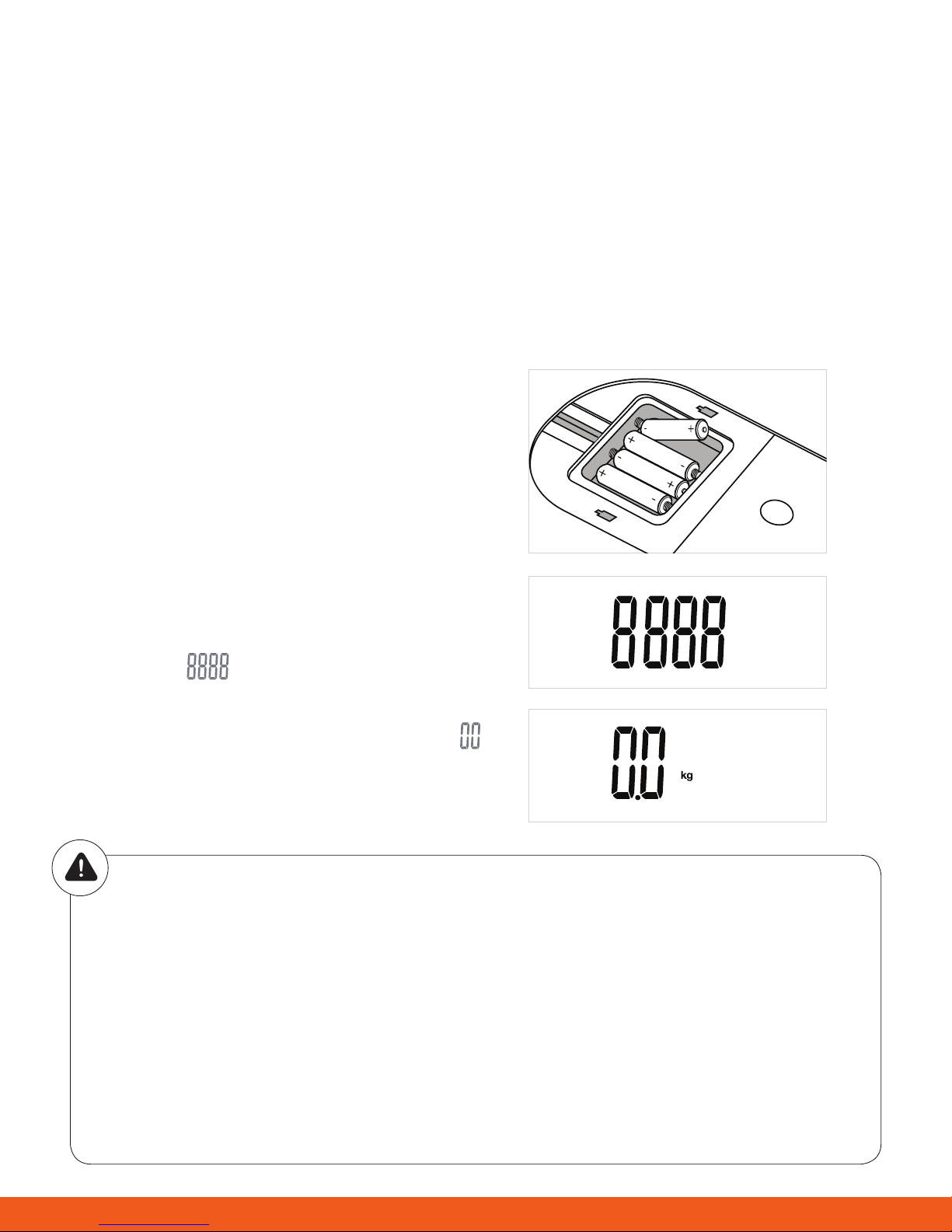
Insert the Batteries
• Open the battery door at the bottom of the scale.
• Insert the batteries (4 x 1.5V AAA) into the battery
compartment according to the polarity indications
marked inside the compartment.
*The digits “ ” will be shown on the LCD.
• Close the battery door and wait until the digits “ ”
are shown on the LCD.
CAUTION
When the symbol appears, the device will power off. This indicates that you will need to replace the
batteries. Please replace all four batteries at the same time. Do NOT mix the old batteries with the
new ones.
Worn batteries are hazardous waste. Do NOT dispose of them together with the household garbage.
Please refer to the local ordinances and recycling instructions regarding disposal of the worn
batteries and device.
If you do not intend to use this unit for a prolonged period of time, it is advisable to remove the
batteries before storing.
6
Page 7
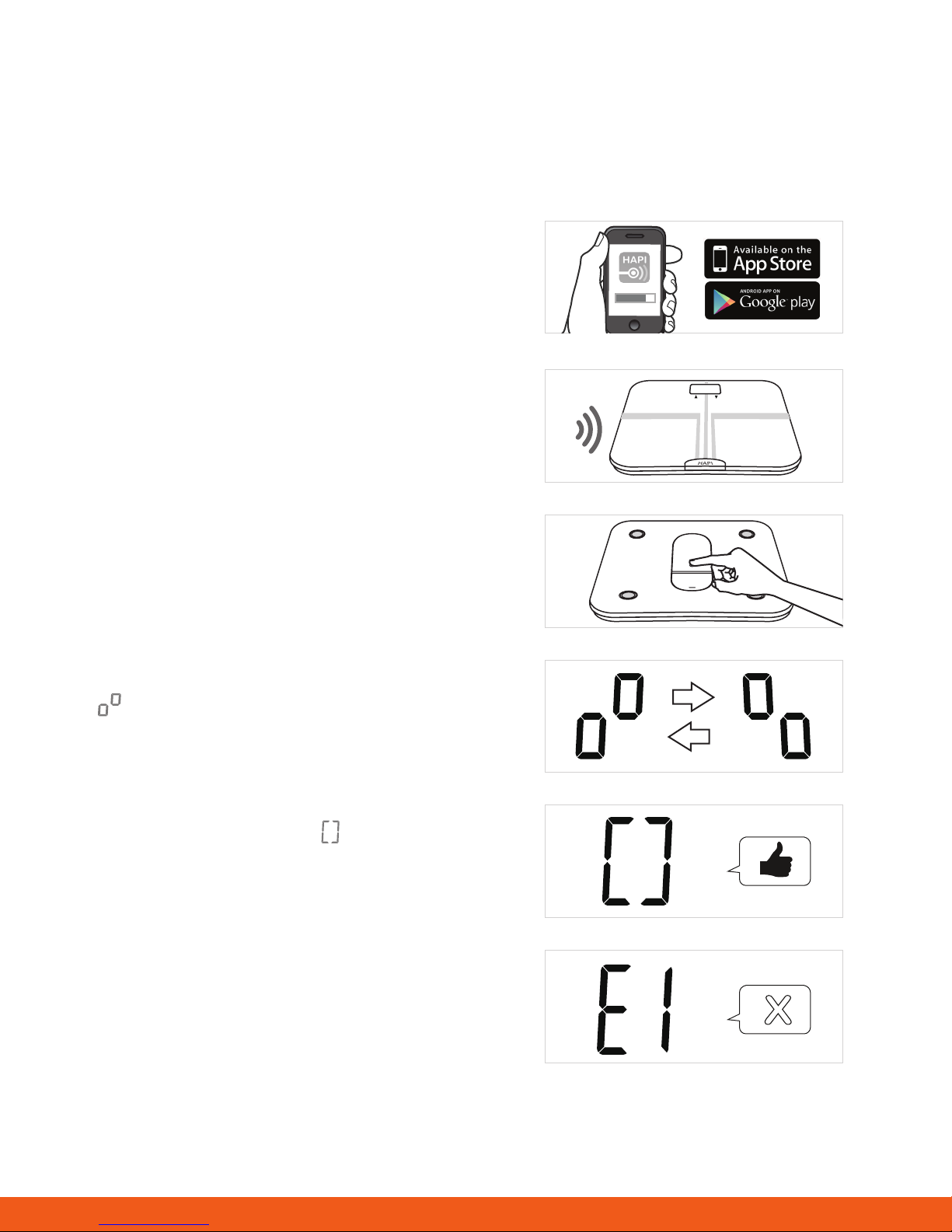
Pairing and Setting Up a Profile with the HAPI Connect Mobile App
With the advanced Bluetooth 4.0 technology installed, mobile devices such as smartphones or tablets which
are equipped with the BLE Technical Specications established by global organization Bluetooth SIG, are
capable to receive your personal health data.
1. Search for HAPI Connect on the App Store for iOS
Devices and Google Play for Android devices.
2. Turn on Bluetooth in your device’s settings. Run the
HAPI Connect app once installation has nished.
3. Register for an account with your e-mail address
and set up your prole by following the on-screen
instructions.
4. In the HAPI Connect app’s main menu, tap on Device
and + Add Device
%
SET
5. At the bottom of the Connected Scale, press and hold
the UNIT button.
6. “ ” on the scale’s LCD indicates the pairing process
is in progress.
7. If pairing is successful, this “ ” will be shown on
the LCD, and you will be prompted to assign a slot or
user ID (P1-P8) to the prole on the mobile app.
8. If the pairing failed, E1 will be displayed on the LCD.
Repeat from step 4 to try again.
X
7
Page 8
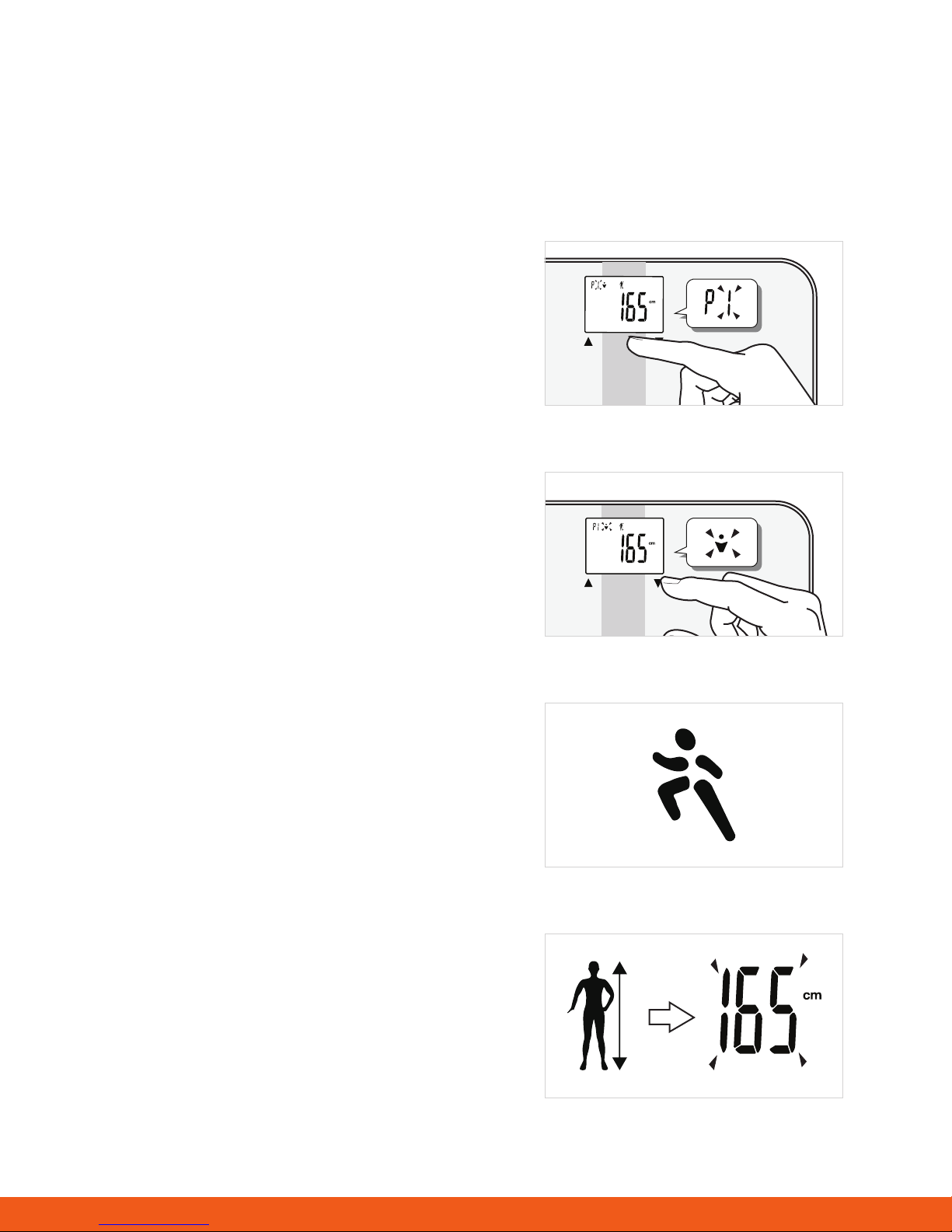
Setting Up Your Profile and Multiple Users on the Scale
The HAPI Connected Body Analyser supports multiple users (up to 8). If you have a mobile phone running
Bluetooth 4.0, you can congure and assign these user IDs using the HAPI Connect app and the process
described in the previous page. Otherwise, you can follow the instructions below to assign a user ID and set
up a prole on the device itself.
1. Assigning a user ID
• With the batteries correctly installed, press the SET
key.
• You can now select a user ID, as indicated by P1-P8.
You can tap the arrow keys < > to select the user ID.
• Once selected, press SET to conrm
2. Setting gender
• After conrming the user ID, you can set the gender
for this prole
SET
• The gender icon will blink to indicate that this can
be edited. Tap on the arrow keys to run through
the selections (male, female, male athlete, female
athlete)
• Once selected, press SET to conrm.
Athlete mode:
An athlete is dened as an adult who is involved in
intense physical activity of approximately 12 hours
per week, and with a resting heart rate of 60 beats per
minute or fewer.
3. Setting height
• After selecting the gender, you can set the height for
this prole.
• The digits 165 will blink on the display. Tap the arrow
keys to adjust accordingly (100 to 220 cm or 3’ 3.5”
to 7’2.5”)
SET
• You can press and hold on the arrows to adjust the
numbers faster.
• Once you’ve nished entering the height, press SET
to conrm.
8
Page 9
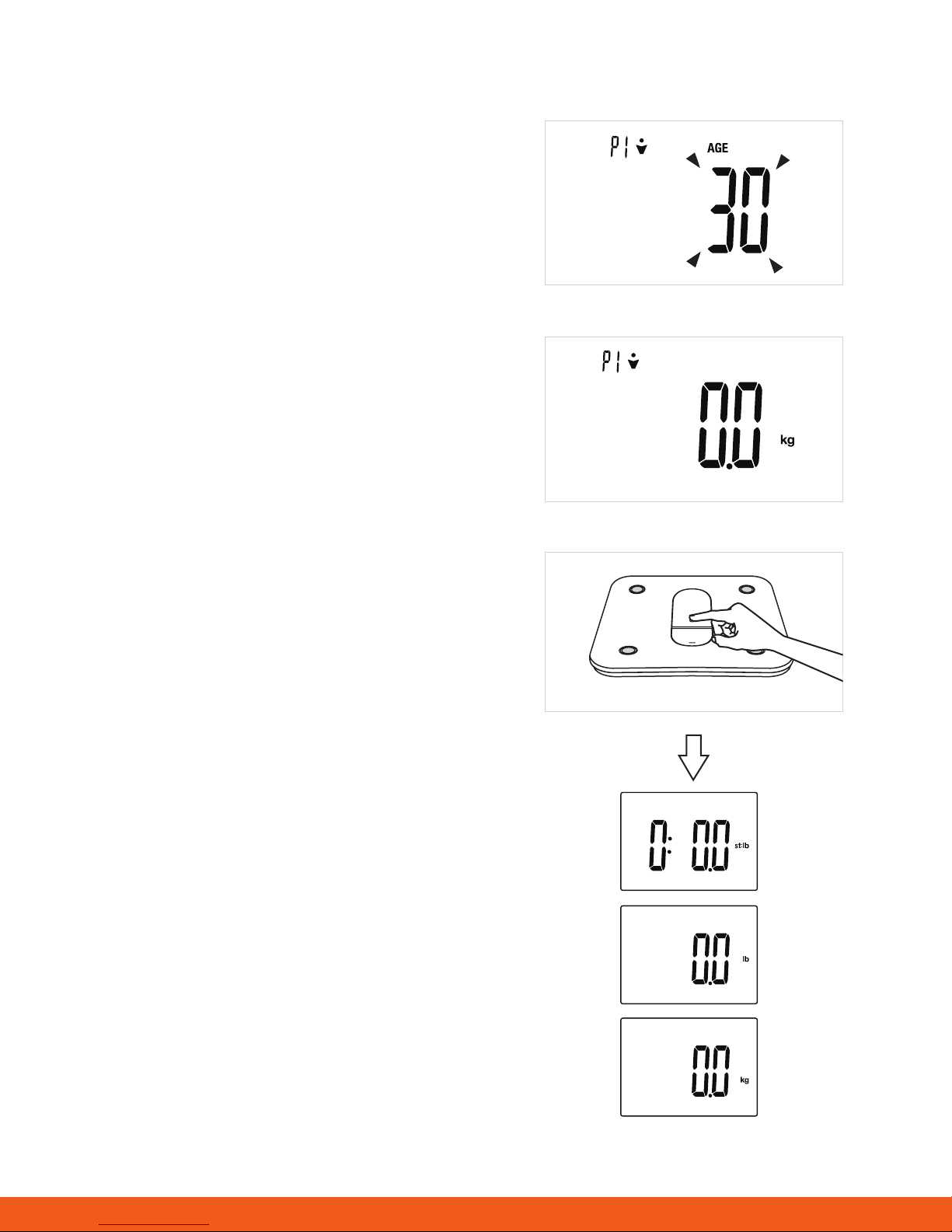
4. Setting age
• After entering the height, you can set the age for this
prole.
• When the digits 30 blink, you can press the arrow
keys to adjust the age.
• You can press and hold on the arrows to adjust the
numbers faster.
• Once you’ve nished entering the age, press SET to
conrm.
When the LCD displays 0.0, you can weigh in.
Selecting the Measurement Unit
With the batteries correctly installed, press the UNIT
button at the bottom of the scale to scroll through the
measurement units. The default measurement unit
is kilograms. You can press UNIT to select kilograms,
pounds, and stone.
9
Page 10
Initialising the Scale
If your rst weight reading was inaccurate, you may need to initialise the scale. This process is necessary
because the scale was moved during the shipping process. Initialising the scale “re-seats” the internal parts,
allowing the scale to nd the correct “zero.” Here is how to initialise your scale:
SET
1. Place the scale back on a hard surface oor.
2. With only one foot, step on the platform and
remove your foot.
SET
SET
3. 0.0 will be displayed
4. The scale will switch off and is now ready for use.
This initialisation process must be repeated if the scale is moved. At all other times, step straight on the scale.
Weight-Only Operation
The HAPI Connected Body Analyser can also operate as a conventional weight-reading scale. No special
programming steps are required.
Once the scale is initialised, as previously described, you can simply step on the scale to measure your
current weight. In this process, weight is the only measurement that is taken.
1. Position the scale on a at, hard surface. Carpeted or uneven oors may affect accuracy.
2. Step onto the scale platform and remain still while the scale measures your weight.
3. The scale will display your weight.
4. The scale will automatically turn off after a few seconds.
Note: The weight taken from this operation will not be saved in the scale’s onboard memory and will not be
transmitted to the app.
10
Page 11
Start Measuring
First Measurement
Please set up a user ID before your rst measurement. (Refer to Setting Up a Prole on HAPI Connect or
on the scale for more details.)
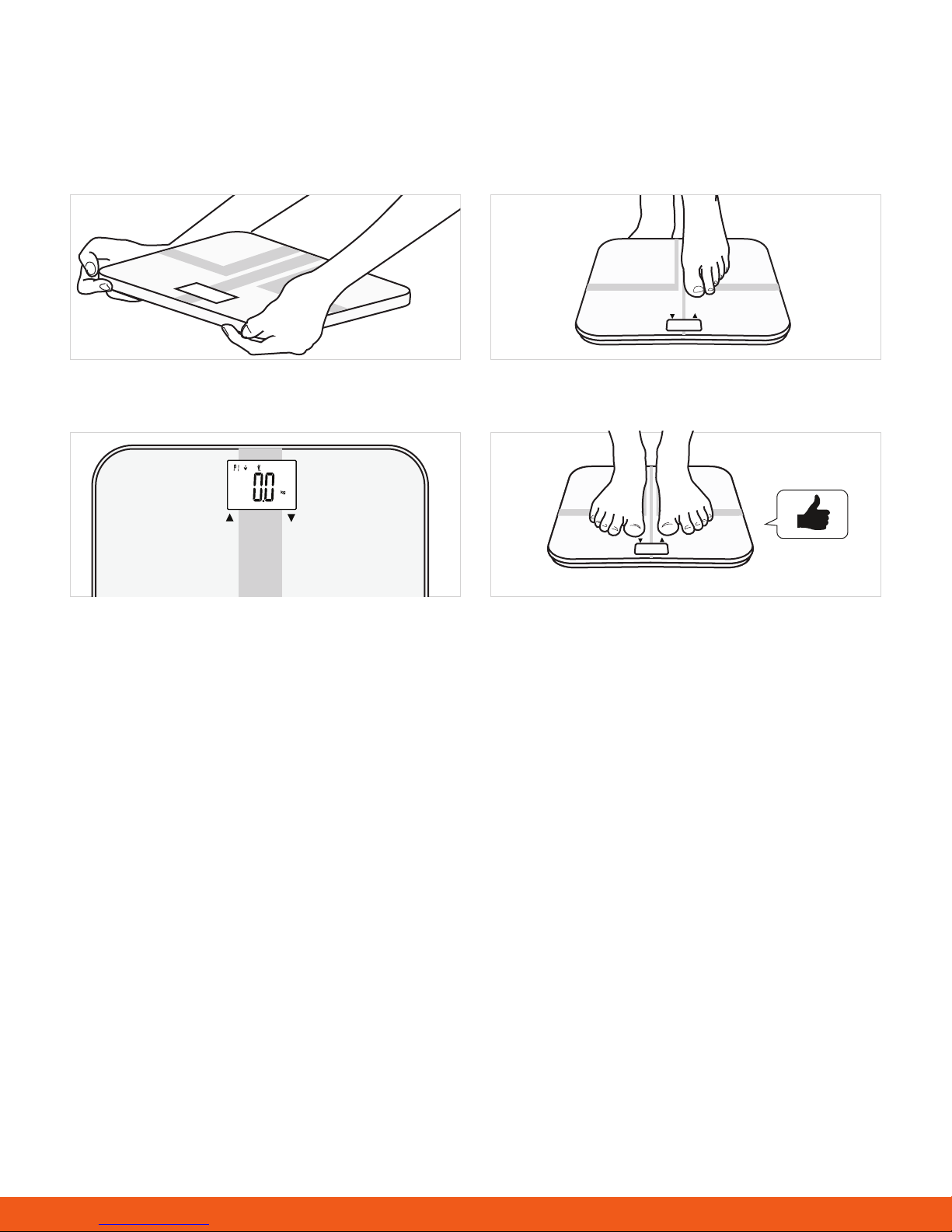
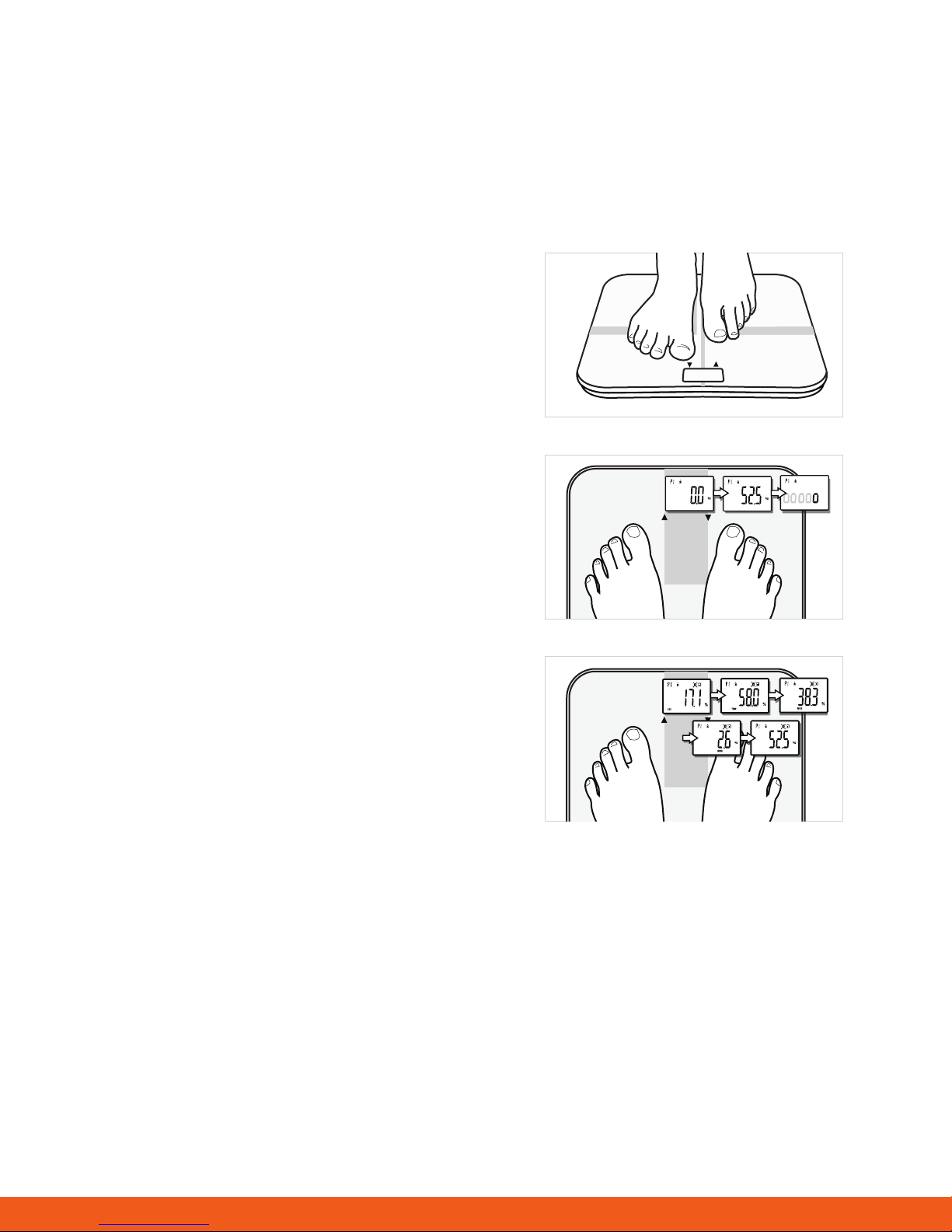
Step 1
Step on the platform barefoot.
SET
Step 2
Stand still until the weight gure on the LCD locks
SET
when the digits stop blinking. Keep full contact with the
conductors until the LCD’s activity indicator (moving Os)
is no longer displayed.
Step 3
The total following results will be displayed in the
SET
following sequence: body fat, total body water, muscle
mass, bone mass, and weight before the scale turns
itself off.
If the full body analysis is not completed, the LCD will only display the weight data. (Please refer to the
Troubleshooting section for more details.)
When your scale is successfully paired with your smartphone with HAPI Connect running and Bluetooth
turned on, the HAPI Connected Body Analyser will transmit data to the app instead. (Please refer to Syncing
Data for more details.)
11
Page 12
Daily Measurement
With the patented SENSE ON technology, the HAPI Connected Body Analyser will switch on as you step on
the platform barefoot.
Stand still and keep full contact with the conductors until the LCD activity indicator (moving Os) is no longer
displayed.
According to the analysis results, the system will automatically identify the user ID with the most similar
history records. Then the body analysis results will be displayed sequentially three times and then turn off.
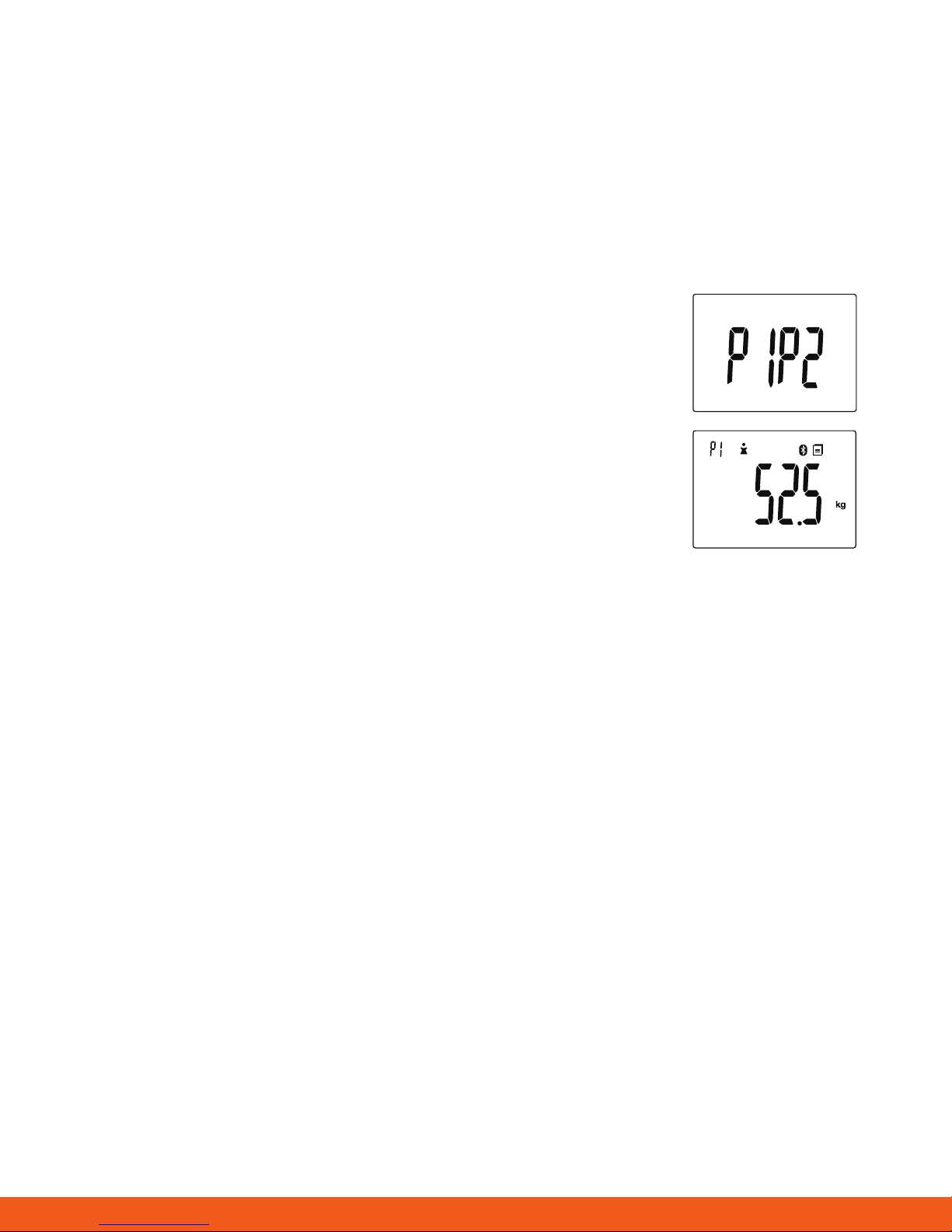
When the system detects two or more users with similar records, it will notify
you to choose between, for example, P1 and P2. You can press the (up) arrow
for P1 or the (down) arrow for P2. The results will then be saved to the user ID
you selected and be displayed three times.
If the user ID is not identied, the LCD will only display the weight data. (To
nd the solutions, please refer to Troubleshooting for more details.)
When your scale is successfully paired with your smartphone with HAPI Connect running and Bluetooth
turned on, the HAPI Connected Body Analyser will transmit data to the app instead. (Please refer to
Syncing Data for more details.)
12
Page 13
Manage Your Health
Syncing Data
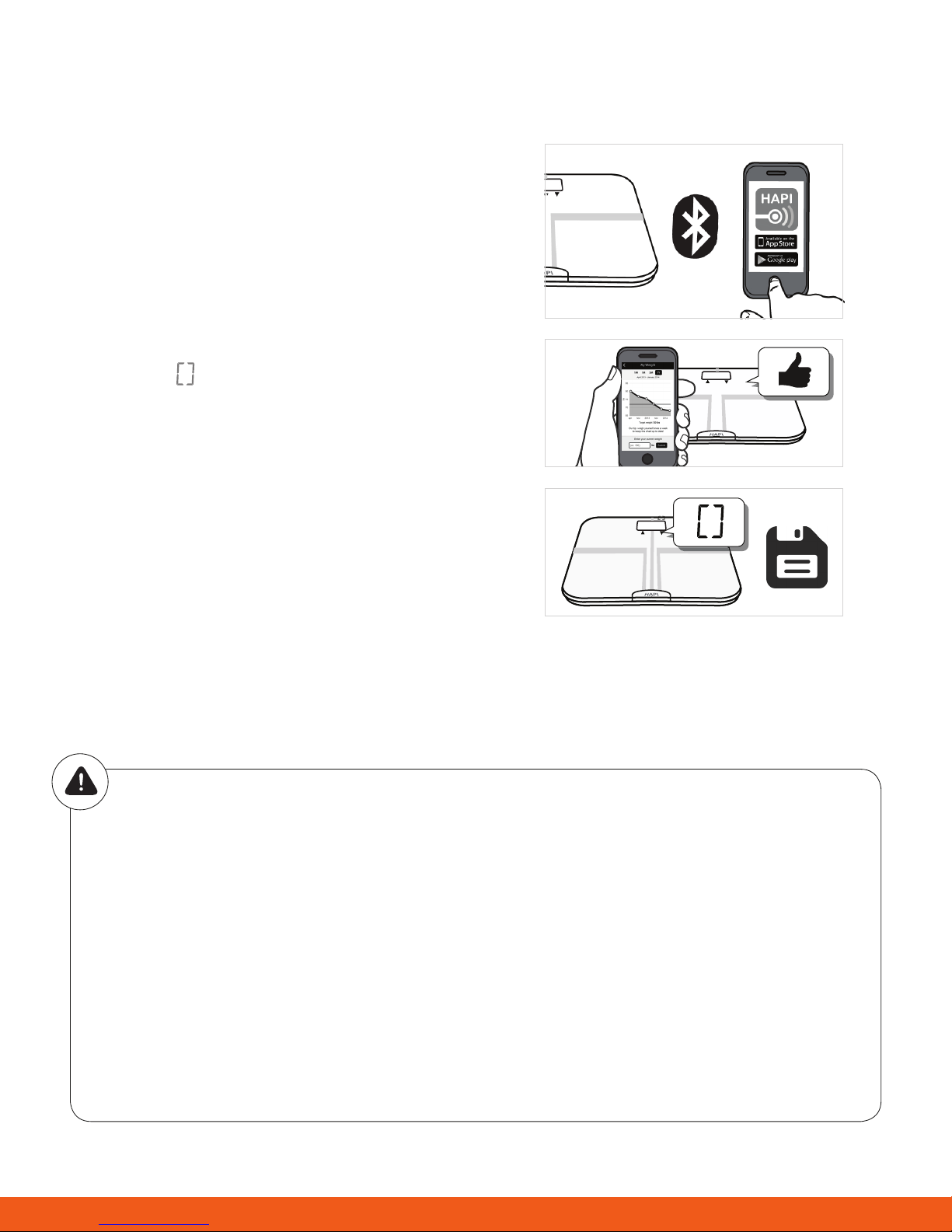
If you’ve successfully paired the HAPI Connected Body
Analyser with HAPI Connect on your Bluetooth-enabled
smartphone, the measurement data will be transmitted
to your mobile via Bluetooth.
Data syncing via Bluetooth is only possible when the
results are tied to a specic user ID after measurement.
The symbol “ ” will disappear after successful data
SET
syncing, and you may check your personal health data
stored in the HAPI Connect app on your smartphone.
If the data syncing fails, the symbol will remain. The
pending measurement data will be temporarily kept
SET
in the scale and transmitted to your smartphone the
next time the scale successfully connects to the HAPI
Connect app over Bluetooth.
Successful Bluetooth connection
Data sync in progress. If successful, the symbol disappears. If sync fails, the symbol remains.
CAUTION
Interference may occur in the vicinity of equipment marked with the following symbol [] . The Analyser
may also interfere with nearby electrical equipment.
To enable data syncing, this product should be paired to a smartphone compatible with Bluetooth
4.0.
How to circumvent possible interference
1. The range between the Connected Smart Body Analyser and the smartphone should be
reasonably close, from 1 to 10 meters. Make sure there are no obstructions between the Analyser
and the Bluetooth smartphone to obtain quality connection.
2. To avoid interference, other electronic devices (particularly those with Bluetooth turned on) should
be kept at least 1 meter away from the Analyser.
13
Page 14
Activate Your Free Nutritional Coaching Program on HAPIcoach
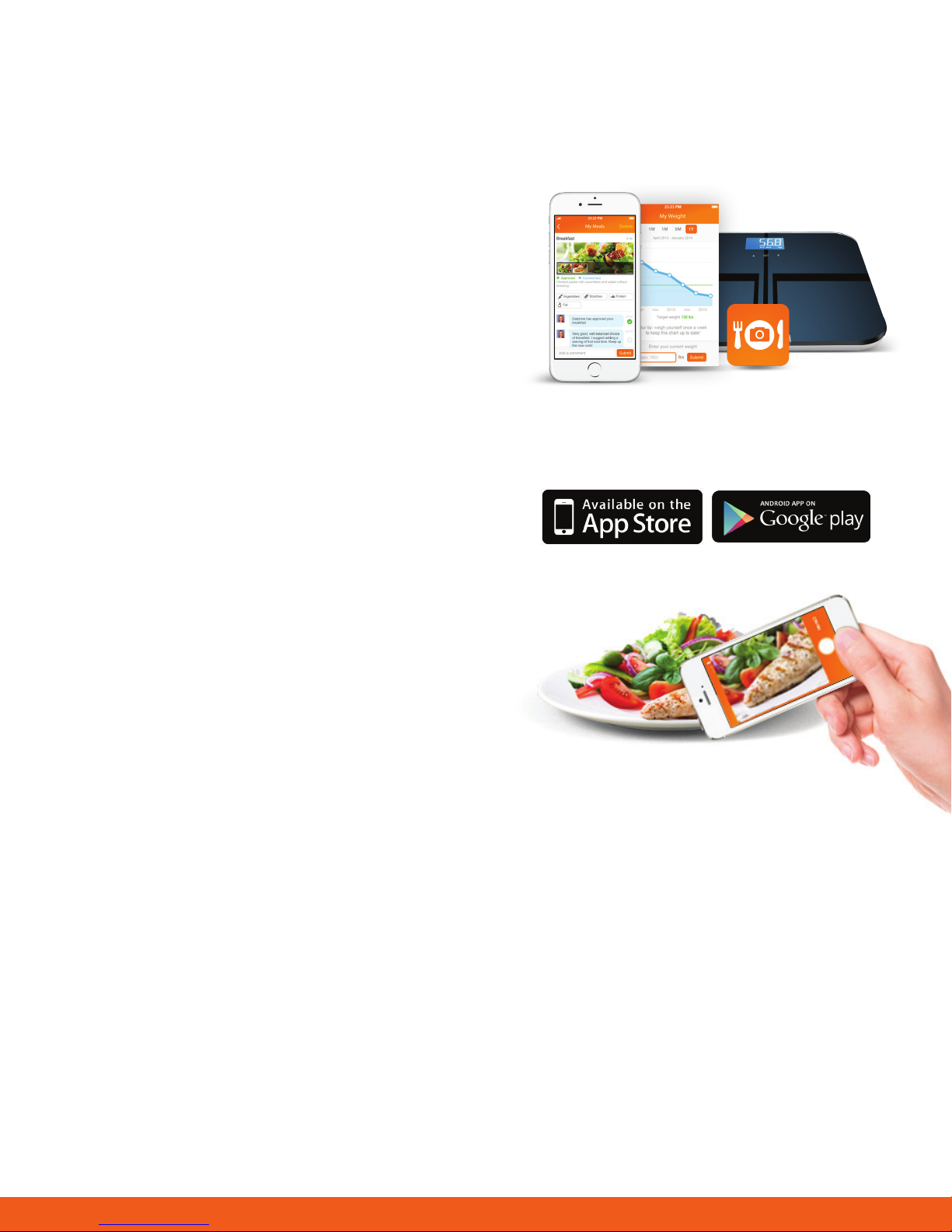
The HAPI Connected Body Analyser comes with 12
months of free nutritional coaching with HAPIcoach.
With HAPIcoach, you can enjoy:
• 1:1 interaction with your personal dietitian
• Validations of your meals throughout the week
• Comprehensive weekly summaries from your coach
and health data
• Optional daily coaching programs (from under £1 a
day)
To activate your free nutritional coaching, you should
have created an account and paired a scale on HAPI
Connect. The next day, you should receive an e-mail
inviting you to download the HAPIcoach on the App
Store for iOS devices or Google Play for Android devices.
Download the HAPIcoach app to your device and log
in using the same e-mail address and password you
registered on HAPI Connect.
You can now log your meals by posting a photo or text
details and share your meals and health data with a
personal nutritional coach.
14
Page 15
Troubleshooting
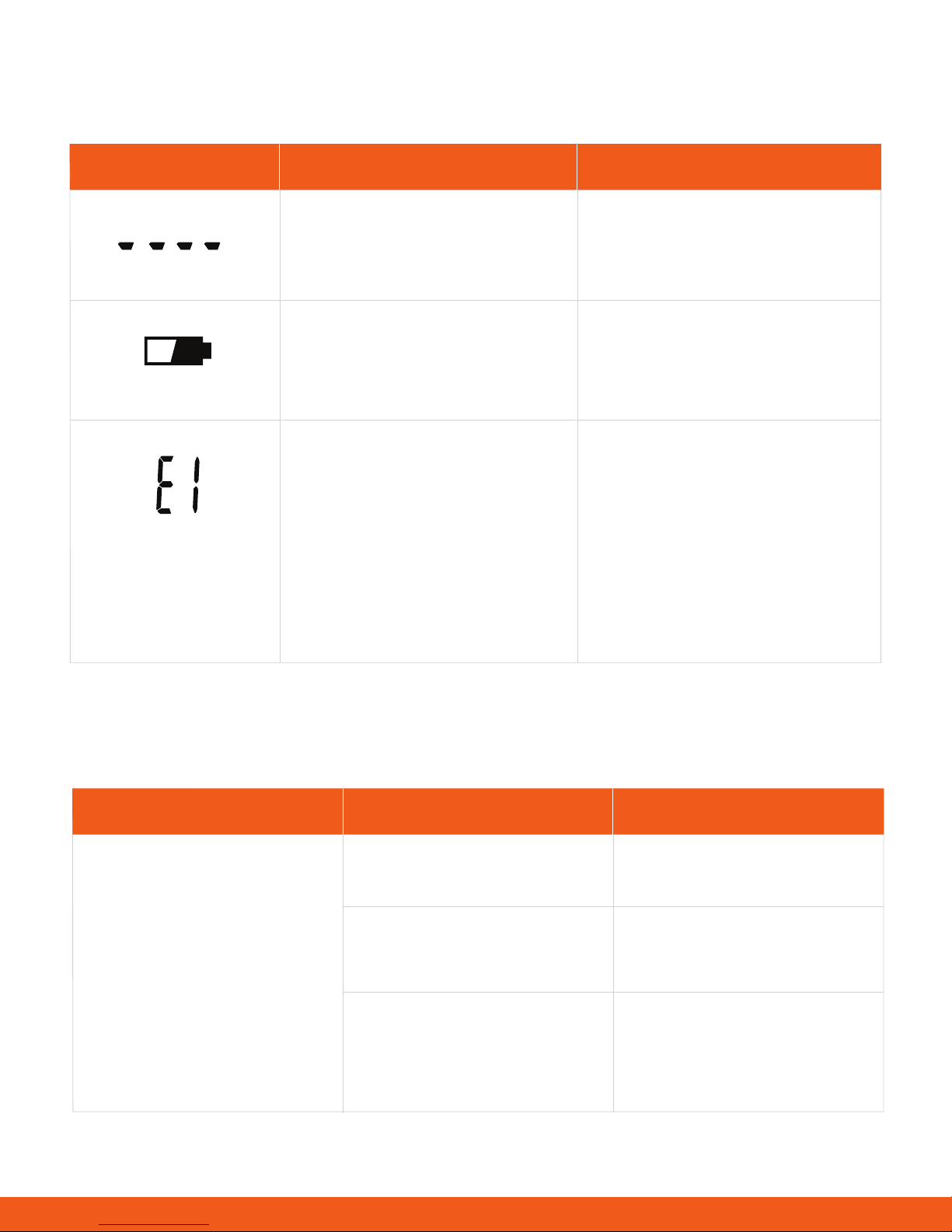
Error Messages
Error Display Description Solution
Overload. The device will power
off.
Low battery. The device will
power off after about 4 seconds.
Pairing with smartphone is
unsuccessful.
Do not use this scale for this
measurement as it goes beyond
the scale’s maximum limit.
Replace all 4 batteries at the same
time with a fresh batch of 4 AAA
batteries.
Please conrm the following:
• Bluetooth on the smartphone
is ON
• The HAPI Connect app is
running on the phone
• Both devices are within
the Bluetooth transmission
distance
When Measuring
Issue
• -Too high OR
• - Too low OR
• - Huge difference between
two recent measurements
Possible Cause
Incorrect postureAbnormal measuring results:
The device is located on a
soft surface like carpet OR
on an uneven surface.
Your hands or feet are too
dry.
Solution
Please step on the platform
barefoot and stand still
Please place the device on a
at, hard surface.
Wipe your feet with a
damp cloth, keeping them
slightly damp when starting
measurement.
15
Page 16
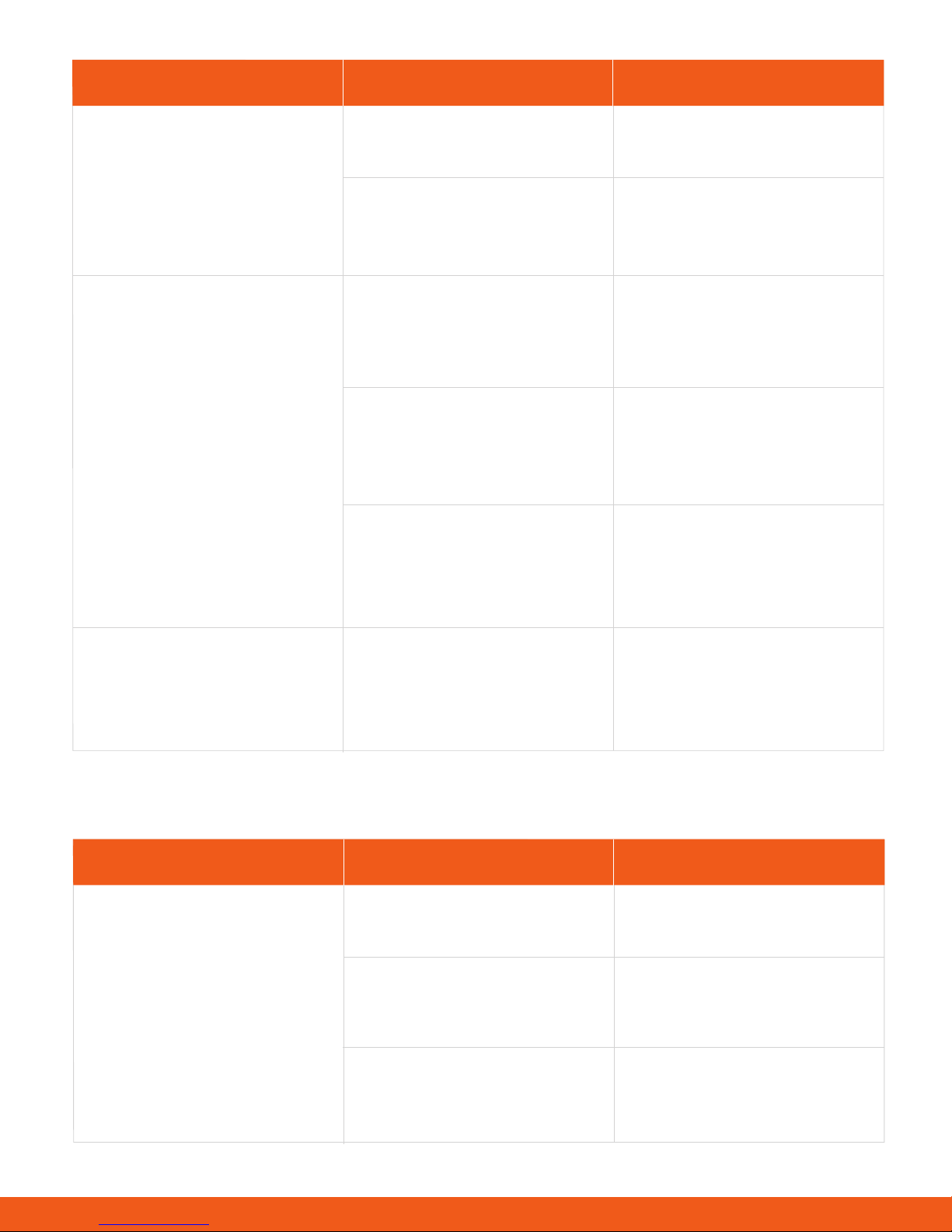
Issue Possible Cause Solution
No display the LCD when the
device powers on.
Analysis of body fat, total
body water, muscle mass,
and bone mass does not
proceed.
Batteries not yet installed.
Worn batteries.
Stepping onto the platformwhile
wearing socks or shoes.
The system cannot identify
the possible user ID with most
similar data.
The user fails to select the
user ID from what the system
detected.
Install the batteries. (Please
refer to Inserting the Batteries)
Replace all four batteries at the
same time. Do not mix new and
used batteries together.
Please step barefoot during the
measurement, and keep full
contact with the electrodes.
Please assign a user
IDfollowing the instruction in
Setting Up Your Prole.
Please assign a user
IDfollowing the instruction in
Setting Up Your Prole.
The device powers off.
Batteries are low.
Replace all four batteries at the
same time. Do not mix new and
used batteries together.
During Data Syncing
Issue
Data syncing failed Turn ON Bluetooth via “Setting
Bluetooth is OFF.
You are not running the HAPI
Connect app.
The measurement is not
assigned to a user ID.
Cause
Solution
>> General >> Bluetooth”.
Launch HAPI Connect (requires
prior download).
Please assign a User ID as
detailed in Setting Up Your
Prole.
16
Page 17

Specifications
Product Name
Dimensions
Net Weight
Display
Measurement Unit
Measurement Range
Division
Accuracy
Working Environment
HAPI Connected Scale with Smart Body Analyser (LS202-B)
321x321x25mm (Approximately)
Approximately 1.98kg (Excluding dry cells)
Blue LCD with White Backlight
Kilogram / Stone/ Pound
5kg to 180kg / 0st: 11lb to 28st: 5lb / 11lb to 397lb
0.1kg / 0.2lb
5-50kg: ±0.3kg;
100-150kg: ±0.5kg;
50-100kg: ±0.4kg;
150-180kg: ±0.7kg
Temperature: 5° to 40°
Humidity: 15% RH to 93%RH
Atmospheric pressure: 70kPa to 106kPa
Storage Environment
Power Source
Turn on Method
Auto-OFF
Accessories
Mode of Operation
Temperature: -20° to 60°
Humidity: <=93RH
Atmospheric pressure: 70kPa to 106kPa
6V (Four AAA-size Batteries)
SENSE ON technology
The scale will turn off after about 10 seconds if there is no activity
1. Four AAA-size batteries
2. User Manual
Continuous Operation
About the accuracy of this product
This product passes strict inspections before delivery and therefore its accuracy is guaranteed by the
manufacturer. Please refer to the above table for the descriptions on accuracy.
This product is specially designed for body fat analysis as well as body weight measurement. It should NOT
be used by anyone during the process of transaction for verication of weight of goods or products.
17
Page 18
Maintenance
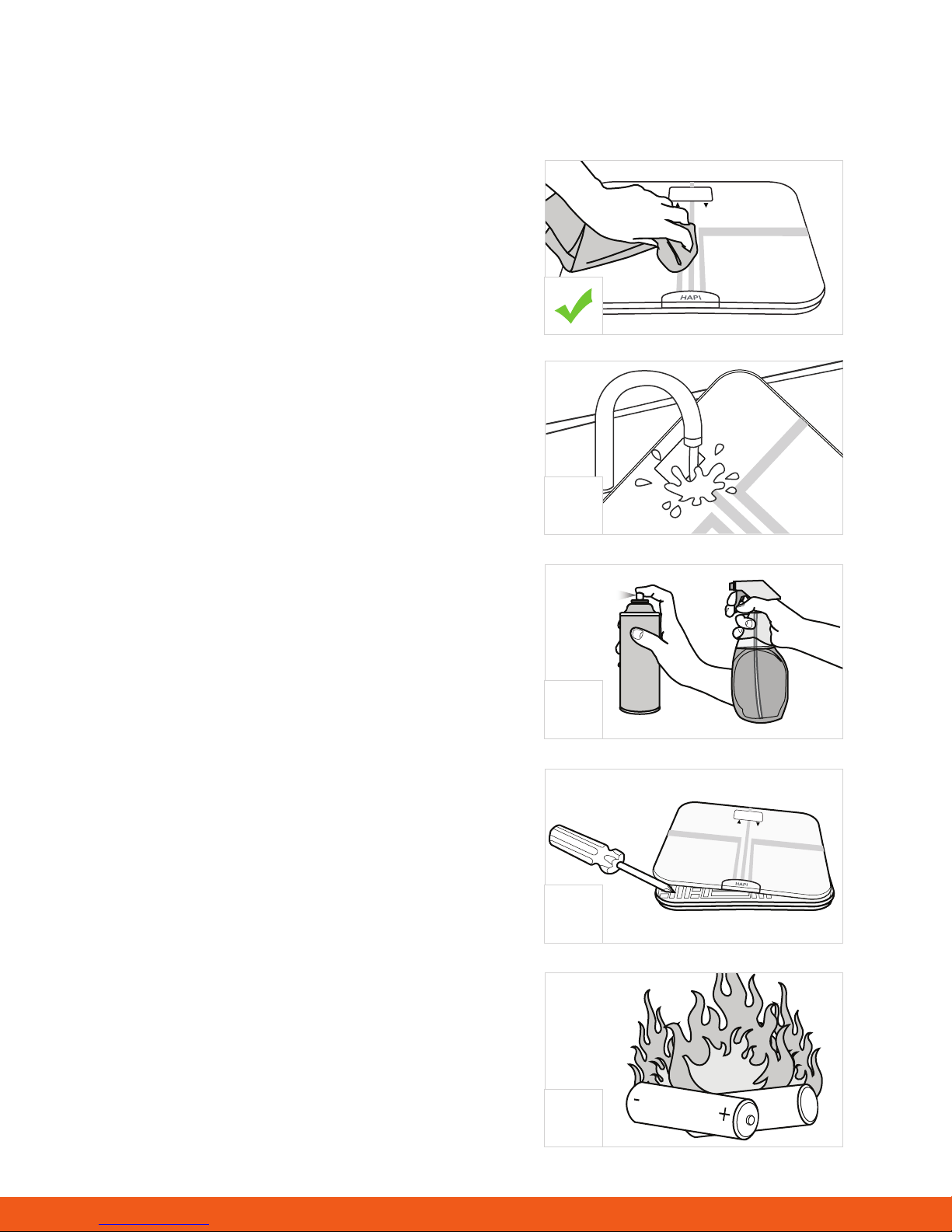
While taking care of your product, please ensure the following to prolong its working conditions:
DO use a dry soft cloth to wipe the dust.
DO use a damp soft cloth, dipped into water and wrung
out, to wipe the dirt. Then use a dry soft cloth to dry up
the device.
DON’T wash the device with water or immerse it in water.
DON’T use propellant, abrasive or other chemicals to
wipe the dirt to avoid discolor or malfunction.
SET
X
DON’T disassemble this device. If you have any
problems, please contact HAPILABS. (Please refer to
Warranty for contact information)
Do not dispose of batteries in re. Batteries may explode
or leak. Remove the batteries if the scale will not be used
for a long period.
X
SET
X
X
18
Page 19

Warranty
HAPILABS warrants its products free of defects in materials and workmanship in normal use for a period of
ONE (1) years from the date of retail purchase.
This warranty does NOT cover damages caused by misuse or abuse, including but not limited to:
• Failure caused by unauthorized repairs or modications;
• Damage caused by shock or drop during transportation;
• Failure caused by improper operation inconsistent with the instructions stated in this user manual;
• Malfunction or damage from failure to provide the recommended maintenance;
• Damage caused by improper use of power supply.
Should this device require maintenance (or replacement at our option) under warranty, please contact
[email protected] or use the contact form on our website at hapi.com for instructions for return. Please
attach a copy of the the store receipt (with the retail purchase date) and write a note with reasons for return.
Appendix
Health Tips - About Body Fat
The human body is made up of, amongst other things, a percentage of fat. Body fat is vital for a healthy,
functioning bod. It protects vital organs, helps regulate body temperature, stores vitamins, and helps the
body sustain itself when food is scarce. However, too much body fat or indeed too little body fat will damage
your health. It is difcult to gauge how much body fat we have in our bodies simply by looking at ourselves in
the mirror. This is why it is important to measure and monitor your body fat percentage. Body fat percentage
gives you a better measure of tness than weight alone–the composition of your weight loss could mean
you are losing muscle mass rather than fat-you could still have a high percentage of fat even when a scale
indicates a so-called normal weight.
The following table can be used as a guide:
Table of Body Fat Level (Unit: %)
a) Body fat percentage (%): 5%-60%/0.1%
Standard for Men
Age
40-49
<16
50-59
<17
60+
<18
Low
Rating
20-29
<13
30-39
<14
Normal
Moderately High
High
14-20
21-23
>23
15-21
22-24
>24
19
17-23
24-26
>26
18-24
25-27
>27
19-25
26-28
>28
Page 20
Standard for Women
Rating
Low
Normal
Moderately High
High
20-29
<19
20-28
29-31
>31
30-39
<20
21-29
30-32
>32
Age
40-49
<22-30
22-30
31-33
>33
50-59
<22
23-31
32-33
>34
60+
<23
24-32
33-35
>35
Health Tips - About Body Water
Body water is the single most important component of body weight. It represents over half of your total weight
and almost two-thirds of your lean body mass (predominantly muscle). Water performs a number of important
roles in the body.
All the cells in the body, whether in the skin, glands, muscles, brain or anywhere else, can only function
properly if they have enough water. Water also plays a vital part in regulating the body’s temperature balance,
particularly through perspiration.
The combination of your weight and fat measurement could appear to be normal, but your body hydration
level could be insufcient for healthy living.
The following table can be used as a guide:
Table of Body Water Level (Unit: %)
b) The body water percentage (%): 43%-73%/0.1%
Rating
Men
Women
Body Fat % Range Optimal Total Body Water Range
4 to 14%
15 to 21%
22 to 24%
25 and over
4 to 20%
21 to 29%
30 to 32%
33 and over
70 to 63%
63 to 57%
57 to 55%
55 to 37%
70 to 58%
58 to 52%
52 to 49%
49 to 37%
20
Page 21
Health Tips - About Muscle Mass
According to the American College of Sports Medicine (ACSM), lean muscle mass may
decrease by nearly 50 percent between the age of 20 and 90. If you do nothing with it,
you’re losing muscle and increasing fat. It is also important to know your muscle mass %
during weight reduction. At rest, the body burns approximately 110 additional calories for
each kilo of muscle gained. Benets of gaining muscle mass include:
• Reversing the decline in strength, bone density and muscle mass with aging
• Maintenance of exible joints
• Easier weight loss when combined with a healthy diet.
The following table can be used as a guide:
Muscle Mass Percentage
Men
Women
Approximately 40% of total body weight
Approximately 30% of total body weight
Health Tips - About Bone Mass
Regular exercise and a balanced diet can help maintain healthy bones. Like muscle, bone is a living tissue
that can respond to exercise by becoming stronger. For most people, bone mass peaks in their thirties. Then,
people begin to lose bone mass. Regular exercise can help prevent that loss.
Calcium and vitamin D, good sources of which are dairy products, green leafy vegetables and sh, contribute
to healthy bones.
The bone mass readings given by this product are an estimation of the amount of bone mass in
your body. Those with osteoporosis or low bone densities may not get accurate estimations. If you have any
concern regarding your bones please consult your doctor.
The average bone mass percentage for both men and women is between 4 to 5%.
EMC Guidance
1. MEDICAL ELECTRICAL EQUIPMENT needs special precautions regarding EMC and needs to be installed
and put into service according to the EMC information provided in the ACCOMPANYING DOCUMENTS.
2. Wireless communications equipment such as wireless home network devices, mobile phones, cordless
telephones and their base stations, walkie-talkies can affect this equipment and should be kept at least a
distance d = 3,3 m away from the equipment.
(Note. As indicated in Table 6 of IEC 60601-1-2:2007 for ME EQUIPMENT, a typical cell phone with a
maximum output power of 2 W yields d = 3,3 m at an IMMUNITY LEVEL of 3 V/m)
21
 Loading...