

Page 1

Front-runner of information & communication
HANBiT Electronics Co., LTD. [www.hbe.co.kr]
USER’S MANUAL
Portable Flash Memory Disk Drive
Page 2

H
anbit Electronics Co,Ltd. All r
ights
r
eserved
Rev.00 2003-02-20 Page 2/20 www.hbe.co.kr
INDEX
1. Introduction
1.1 About COMBO MP3 N Drive … ………………………………………… 3
1.2 Features …………………………………………………………………… 3
2. How to use COMBO MP3 N Drive
2.1 Mechanical parts ………………………………………………………… 5
2.2 How to install battery …………………………………………………… 5
2.3 Function ………………………………………………………………… 6
3. How to install / Modify / Repair / Remove driver
3.1 Windows 98 / 98SE installation ………………………………………10
3.2 Modify / Repair driver for Windows 98 / 98SE … … ……………… 11
3.3 Remove driver from Windows 98 / 98SE …………………………… 12
3.4 Windows 2000 / ME / XP Installation ……………………………… 14
4. Remove COMBO MP3 N Drive from Computer … ………………………………… 14
5. Linux 2.4.0 or / Mac 8.6 up installation … ………………………………………… 14
6. Important Notices …………………………………………………………………… 14
Notice
Some of computers may have power leaky or other problems, to avoid any direct damage
Caused to COMBO MP3 N Drive , We suggest you use extension cable, USB hub or
Docking station to connect COMBO MP3 N Drive to your computer. Do not straightly plug
Page 3

H
anbit Electronics Co,Ltd. All r
ights
r
eserved
Rev.00 2003-02-20 Page 3/20 www.hbe.co.kr
1. Introduction
1.1 About COMBO MP3 N Drive
COMBO MP3 N Drive is more than a MP3 Player Being a smart customer, you pay for one
COMBO MP3 N Drive price but enjoy double effects. Our COMBO MP3 stores not only MP3
format but also all kinds of data. It delicately combines MP3 Player with a removable hard drive.
Furthermore, COMBO MP3 N Drive is absolutely user friendly that you simply plug it into USB
port of your notebook or desktop Computer. You can enjoy listening to your favorite music in
parallel with keeping data Reading/ Writing through the hard drive function. With the long-
lasting Li-battery, it is so convenient that you can take our COMBO MP3 N Drive wherever you
go and do whatever you want. Its chic outlook and mini design is also for user’s consideration.
If you are looking for innovative, attractive and pragmatic high-tech product, COMBO MP3 N
Drive will be your best choice.
1.2 Features
◈ Current available: 64MB / 128MB / 256MB
◈ Support music format: MP3
◈ Earphone jack: 2.5 mm
◈ Audio output: 5mW+5mW
◈ Outer frequency range: 20HZ – 20KHZ
◈ Battery: Lithium-ION 500mA 3.7V, continue using at least 7.5hours at full-charge.
◈ Support USB specification revision 1.1
◈ Transferring rate up to 12Mbit per second at “Full Speed”
◈ Support power saving mode to reduce power consumption while no playing MP3
◈ Support Windows 2000, ME, XP, Mac OS 8.6 or above and Linux 2.4.0 or above
without device driver
◈ Support Windows 98 / 98SE with device driver
Page 4

H
anbit Electronics Co,Ltd. All r
ights
r
eserved
Rev.00 2003-02-20 Page 4/20 www.hbe.co.kr
◈ Power LED:
(i) Orange LED on indicates battery in charge.
Plug COMBO MP3 N Drive into USB port to re-charge battery through computer
(ii) Green LED on indicates battery in full charge.
◈ Play LED:
(i) Red LED indicates you are using MP3 player mode
(ii) Red LED quickly flashes when no MP3 file found.
(iii) Red LED slowly flashes when you pause MP3 player.
(iv) Green LED indicates you are using USB removable disk mode.
(v) Green LED blinking when you are reading/writing from/on USB removable disk.
◈ Write/Delete protection switch
◈ Hot Plug & Play – Enable you to install COMBO MP3 N Drive at anytime
◈ Durable solid-state storage – data retention for at least 10 years
◈ Erase Cycles: 1,000,000 times
◈ Acoustic noise: 0dB (at one meter)
◈ No external power is required - DC 4.5V ~ 5.5V from USB port
◈ Low Power consumption – Write 39.1mA ~ 39.4mA/
Read 35.0mA ~ 36.1mA.
◈ Read/Write Speed of USB interface: Read 800KB / Write 600KB
◈ Size: 91.2 x 30.4 x 26.3 mm
◈ Unit weight: 30g (not including battery)
◈ CE and FCC certificate of approval.
2. How to use MP3 player
2.1 Mechanical parts
Page 5

H
anbit Electronics Co,Ltd. All r
ights
r
eserved
Rev.00 2003-02-20 Page 5/20 www.hbe.co.kr
◈ Neckstrap for easy carry
◈ Ear phone
◈ Power LED
◈ Play LED
◈ USB connector
◈ Cap
◈ Write protect switch
◈ Clip
◈ Battery cover
2.2 How to install battery
1. Please remove battery cover by press two sides and take out
2. Connect battery’s cord to the power port.
3. Put back battery cover.
4. Please connect to USB port to charge battery when you first time use it.
Page 6

H
anbit Electronics Co,Ltd. All r
ights
r
eserved
Rev.00 2003-02-20 Page 6/20 www.hbe.co.kr
2.3 Function: MP3 player mode
1. Power on when earphone plugged.
(earphone port is 2.5mm)
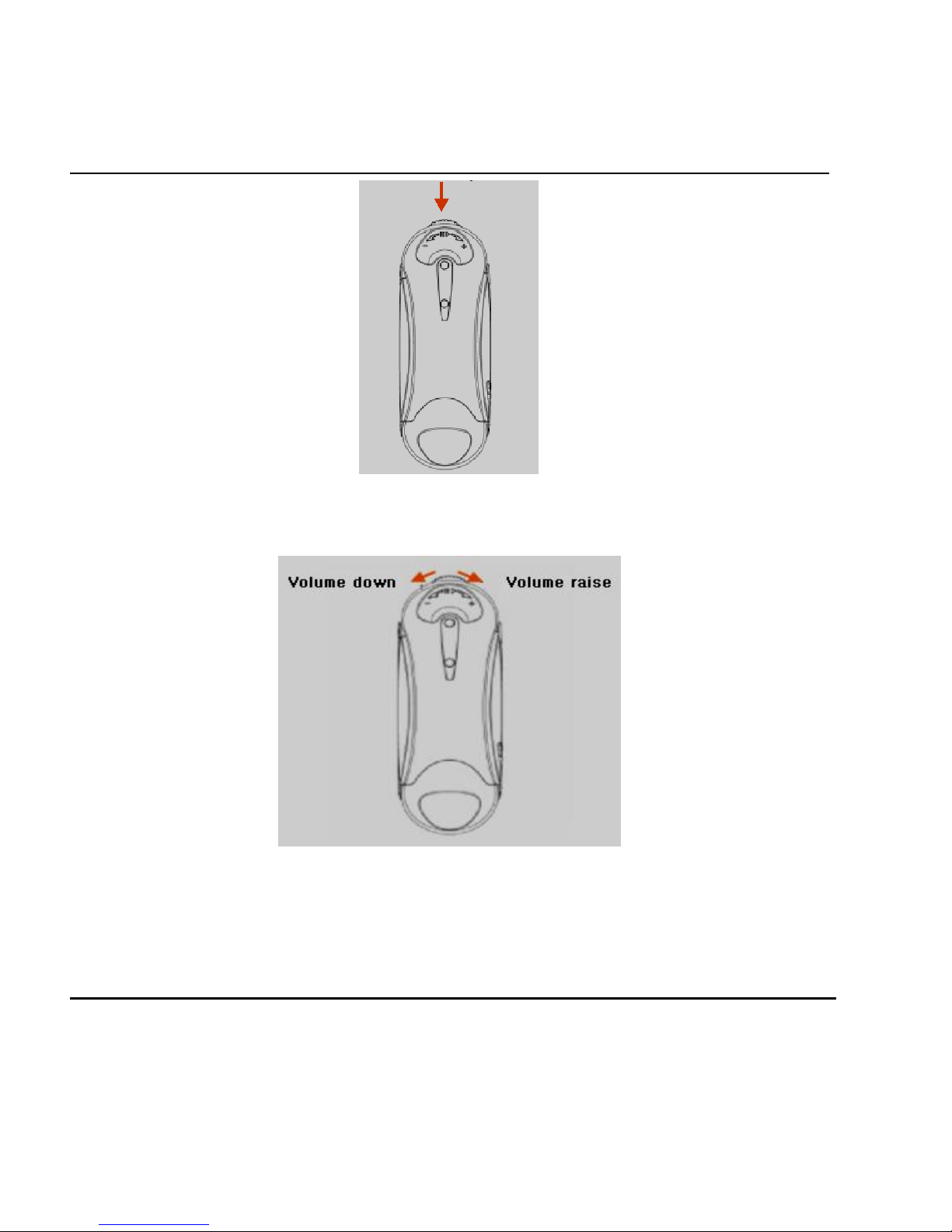
2. Play/Pause: Press Control Switch button once.
Page 7
H
anbit Electronics Co,Ltd. All r
ights
r
eserved
Rev.00 2003-02-20 Page 7/20 www.hbe.co.kr
3. Slide to right side and hold: volume raise.
Slide to left side and hold: volume low down
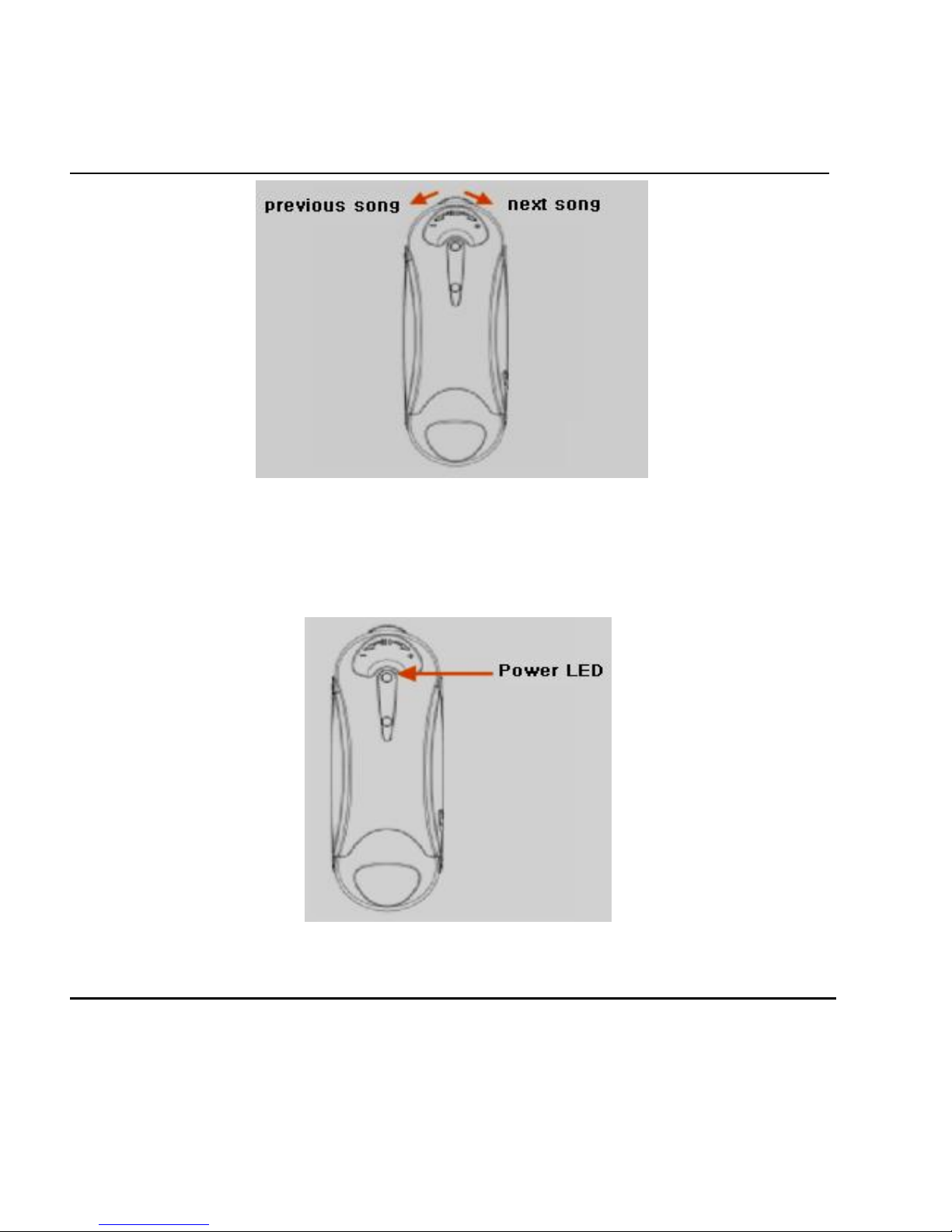
4. Quick pull to right side: next song.
Quick pull to left side: previous song.
Page 8
H
anbit Electronics Co,Ltd. All r
ights
r
eserved
Rev.00 2003-02-20 Page 8/20 www.hbe.co.kr
5. Power LED:
(i) Orange LED on indicates battery in charge.
Plug COMBO MP3 N Drive into USB port to
Re-charge battery through computer.
(ii) Green LED on indicates battery is in full charge
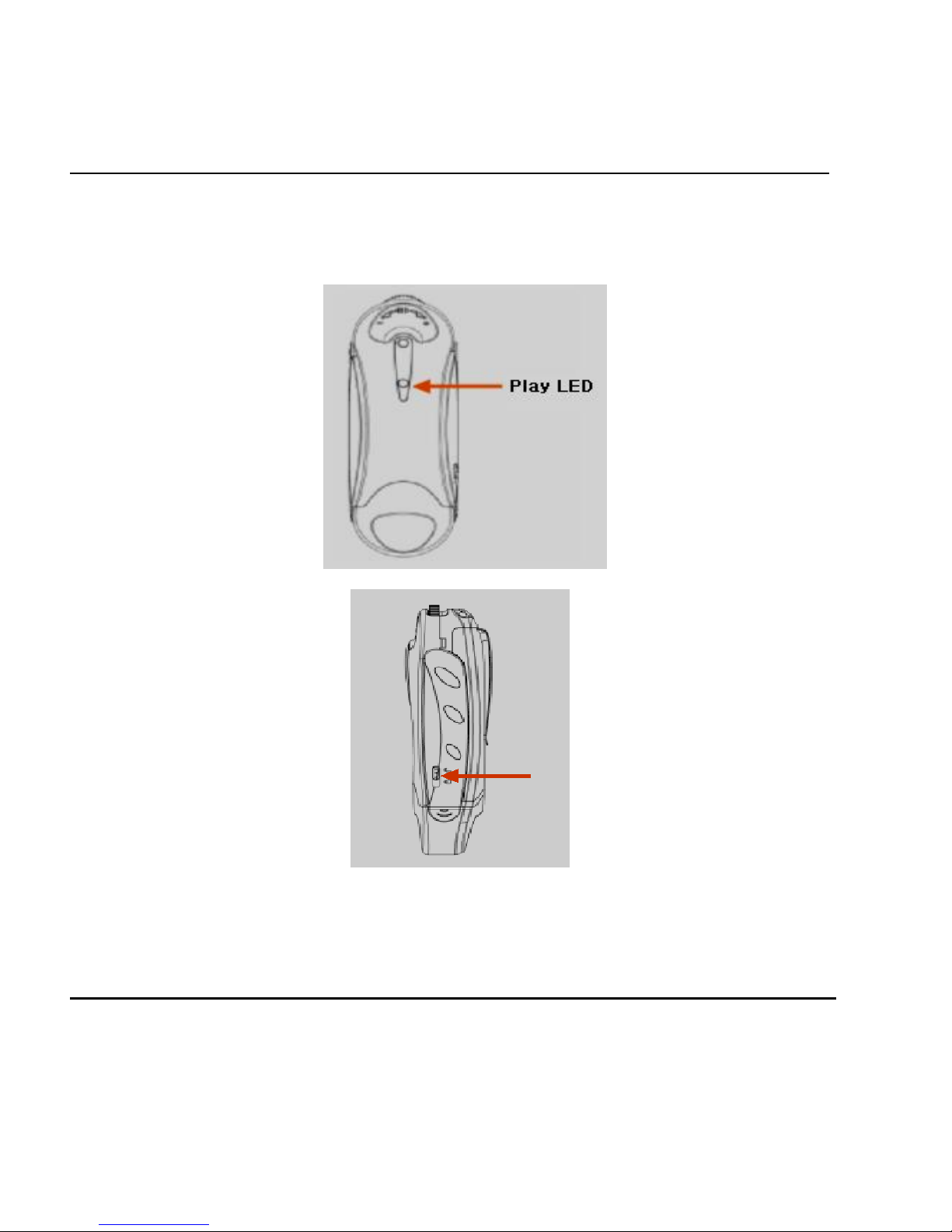
6. Play LED:
(i) Red LED indicates you are using MP3 Player mode.
Page 9
H
anbit Electronics Co,Ltd. All r
ights
r
eserved
Rev.00 2003-02-20 Page 9/20 www.hbe.co.kr
(ii) Red LED quickly flashes when no MP3 file found.
(iii) Red LED slowly flashes when you pause MP3 player.
(iv) Green LED indicates you are using USB removable disk mode.
(v) Green LED blinking when you are reading/ writing from/on USB removable
disk.
7. Read/Write protection
8. To charge battery: take off cap and plug into USB port of notebook or desktop
computer to charge battery. For better usage, please charge
at least 1 hour and 45 minutes.
Page 10
H
anbit Electronics Co,Ltd. All r
ights
r
eserved
Rev.00 2003-02-20 Page 10/20 www.hbe.co.kr
3. How to Install driver
3.1 Windows 98/98SE Installation
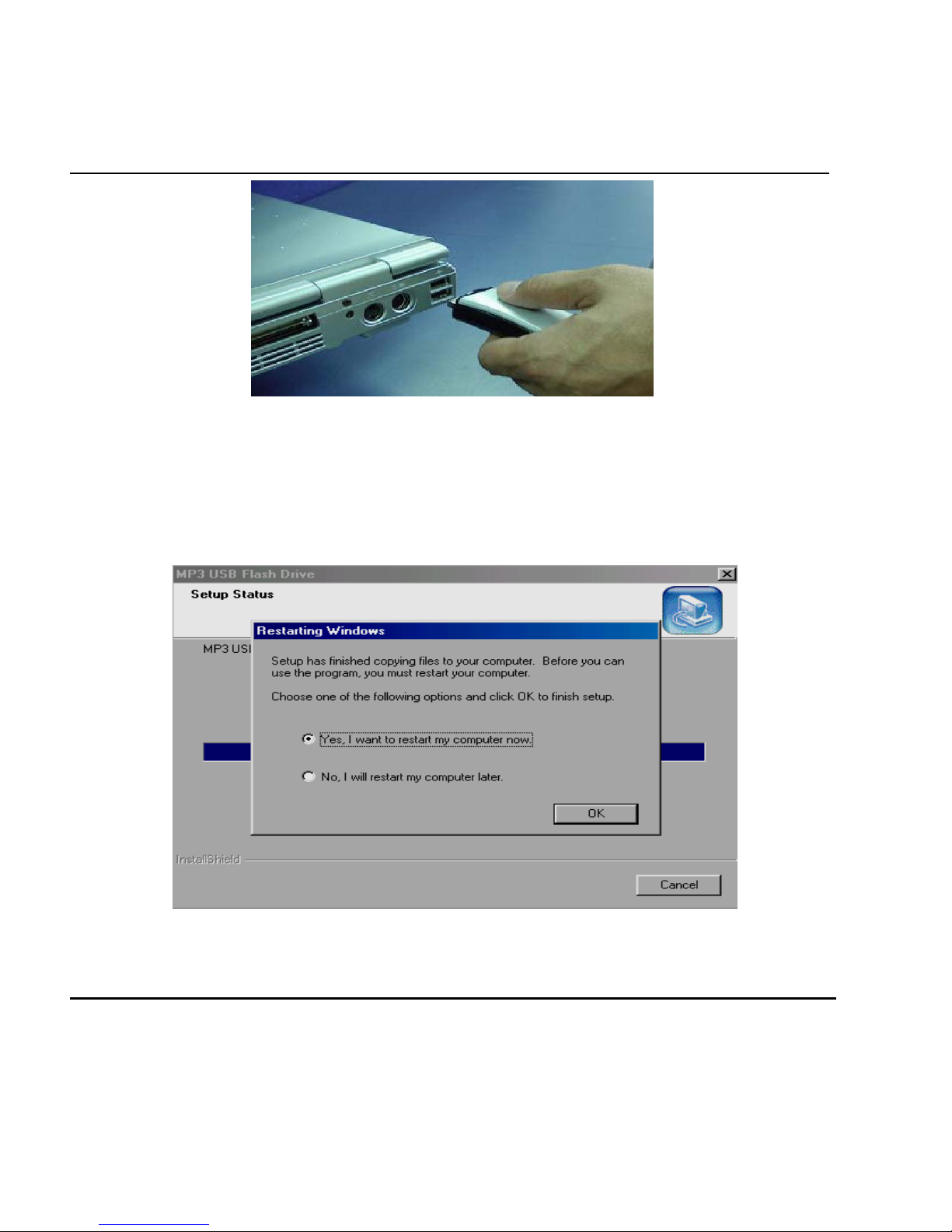
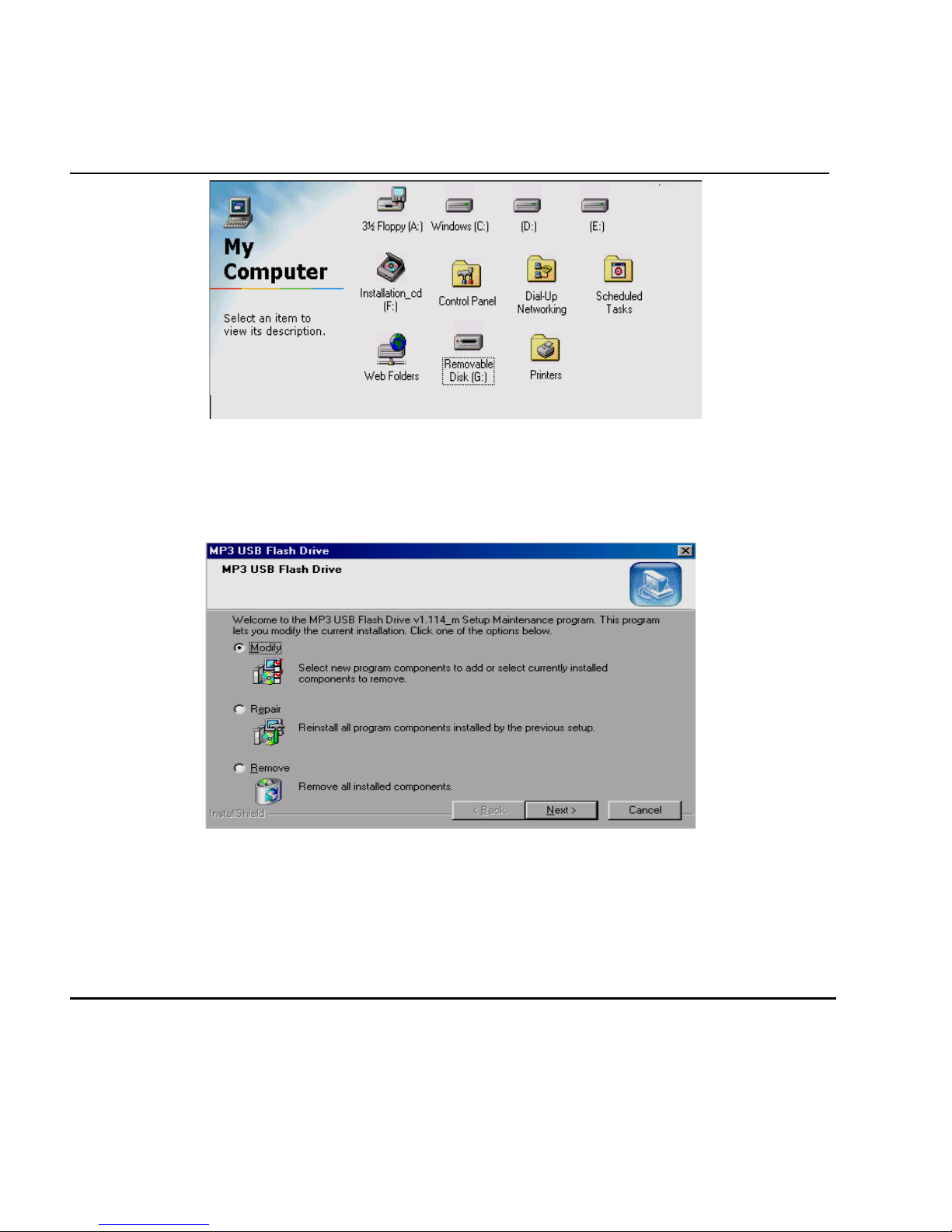
(1) Go to CD or floppy disk driver in “My Computer.”
(2) Execute “Setup.exe” by double click on the icon.
(3) System will install all the necessary files into your Windows operating system..
After setup installation completed, click “OK” to restart computer
.
Once installation is finished completely, you can see “removable disk” in
“My Computer” when you plug COMBO MP3 N Drive
Page 11
H
anbit Electronics Co,Ltd. All r
ights
r
eserved
Rev.00 2003-02-20 Page 11/ 20 www.hbe.co.kr
3.2 Modify or Repair driver for Win 98 / Win 98SE
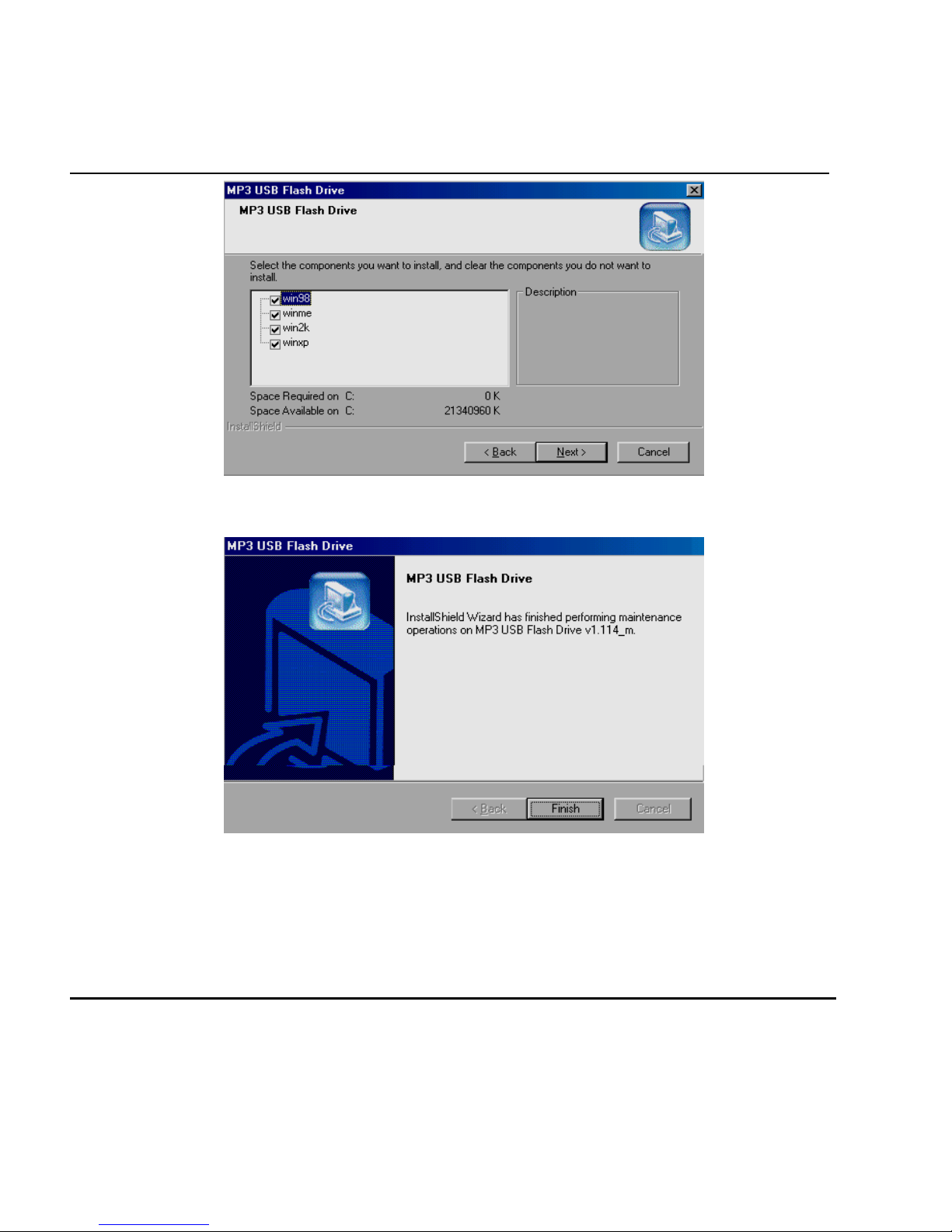
(1) If you have installed the driver once before, when execute the “Setup.exe”
file again. You will see the following screen. If somehow the driver is wrong or
damaged, You can select “Repair”
Select “Modify” or “Repair” and then click “Next.”
(2) Select all files and click “Next.”
Page 12
H
anbit Electronics Co,Ltd. All r
ights
r
eserved
Rev.00 2003-02-20 Page 12/20 www.hbe.co.kr
(3) Click “Finish” to complete modification
3.3 Remove driver from Win 98 / Win 98 SE
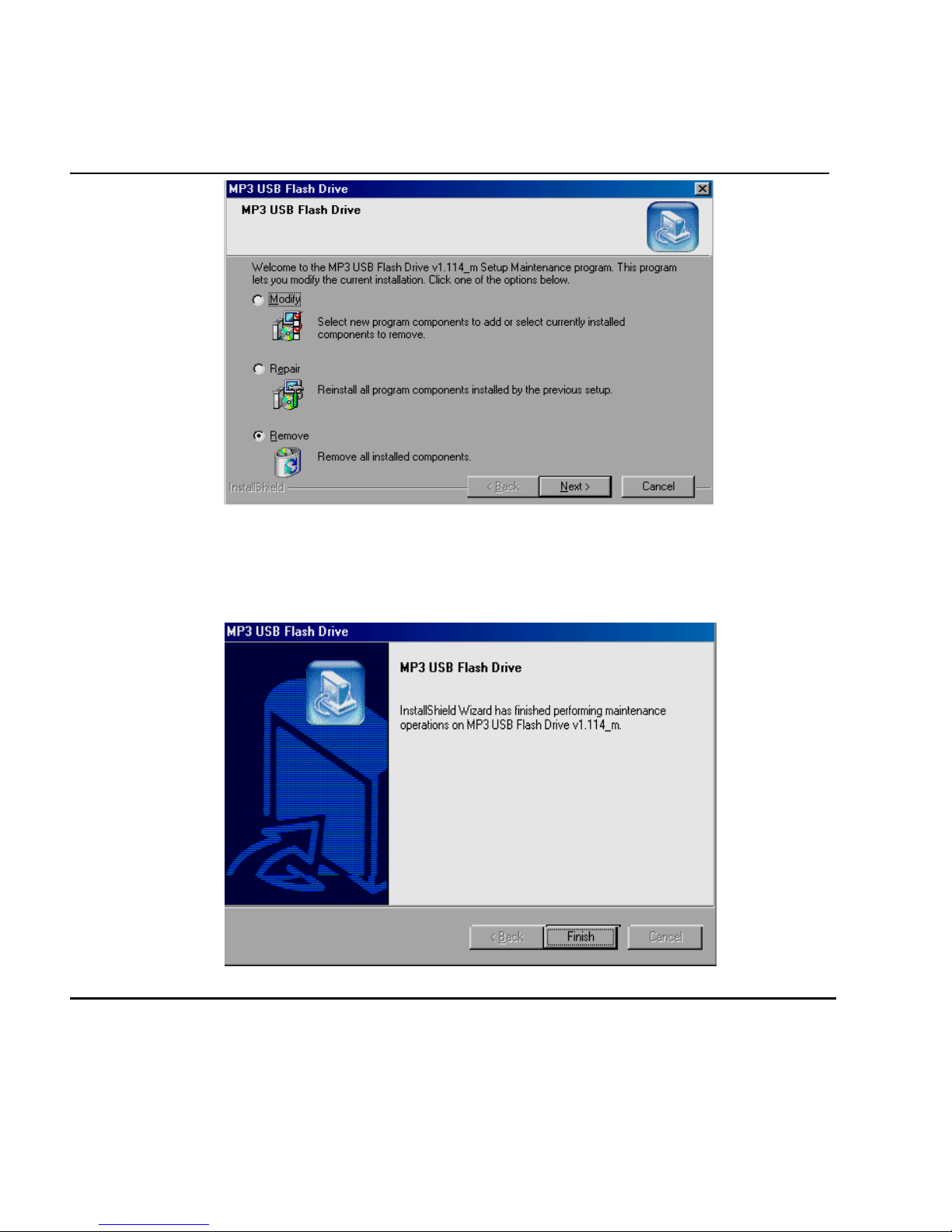
(1) To remove driver from operating system. Execute the “Setup.exe.”
file from CD driver disk again, Select “Remove” and click “Next”
Page 13
H
anbit Electronics Co,Ltd. All r
ights
r
eserved
Rev.00 2003-02-20 Page 13/20 www.hbe.co.kr
(2) System will then ask you confirm deletion Click “OK”.
(3) This screen may or may not appear. It’s system asks you to double confirm the
files for deletion. Just click “Yes.”
(4) Click “Finish” to complete the process of removing device driver from system.
3.4 Windows 2000 / Windows ME / XP Installation
Page 14

H
anbit Electronics Co,Ltd. All r
ights
r
eserved
Rev.00 2003-02-20 Page 14/20 www.hbe.co.kr
For these operating systems, No driver is needed, because Windows has built-in
driver to support USB removable disk. Simply plug COMBO MP3 N Drive into the
USB port and it will be recognized by the system. System will setup COMBO MP3 N
Drive automatically without any further installation of driver.
4. Remove COMBO MP3 N Drive
After using COMBO MP3 N Drive please choose one of the methods below according to
your Operating system to remove COMBO MP3 N Drive from USB port.
Windows 98/98SE LED: You could unplug COMBO MP3 N Drive from USB port directly
Once the LED stops blinking and its icon would disappear automatically
Windows Me/2000/XP: Click the icon of COMBO MP3 N Drive at the right down corner
And a “ Stop USB Mass Storage Device – Drive(H)” Menu appears Click the menu, and the
below Window appears, telling you “the USB Mass Storage Device, device can be safely
Removed from the system”
Click “OK” to close the Window, then You can safely remove COMBO MP3 N Drive.
5. Linux 2.4.0 or / Mac 8.6 up Installation
Again, No driver is required for these two operating systems, Simply plug the COMBO
MP3 N Drive, you could unplug COMBO MP3 N Drive into the USB port and the System
Will automatically find COMBO MP3 N Drive, After using COMBO MP3 N Drive, you
Could unplug COMBO MP3 N Drive from USB port directly once the LED stops blinking
Then its icon would disappear automatically.
For Linux User, Please refer to Important notices.
6. Important Notices
(i) In OS Windows 98/98SE, if you don’t set up installation firstly, system will ask you
to put driver disk for running installation. Be sure to unplug COMBO MP3 N Drive before
running setup programs. If you install the driver with COMBO MP3 N Drive plugged, it
may cause setup error or failure.
(ii) If you plug COMBO MP3 N Drive into the USB port. System can find COMBO MP3 N
Drive but you are unable to access COMBO MP3 N Drive. Please Format COMBO MP3
N Drive.
Page 15

H
anbit Electronics Co,Ltd. All r
ights
r
eserved
Rev.00 2003-02-20 Page 15/20 www.hbe.co.kr
(iii) Before unplugged COMBO MP3 N Drive from USB port in Windows ME/2000/XP
make sure you go to the right hand bottom of the screen to stop the USB device.
Otherwise, It may result in losing data that you have saved on COMBO MP3 N Drive
(iv) Linux uses a so-called “USB Manager.” Which does automatically load kernel
modules(drivers) for USB devices, Its loads only drivers for devices that are present
on the USB bus to reduce memory usage, Per default, the USB Manager does not
come with the USB Drive pre-configured. However, you can easily configure the
USB Manager to automatically recognize the USB Drive yourself. Just add the following
To the configuration file.
usbmgr.conf (usually in /etc/ usbmgr): vendor 0xd7d product 0x100 module scsi_mod,
usb_storage.
This line identifies the USB Drive and tells the USB Manager to load the SCSI as well as
The USB storage modules, The SCSI modules is needed in order to talk to both SCSI
And USB storage devices, While the usb_storage module is needed to talk to USB
Storage devices.
Do not forget to either reload the USB Manager’s configuration or to restart the USB
Manager
For instance, do as root: / etc / init.d / usbmgr reload
Page 16
H
anbit Electronics Co,Ltd. All r
ights
r
eserved
Rev.00 2003-02-20 Page 16/20 www.hbe.co.kr
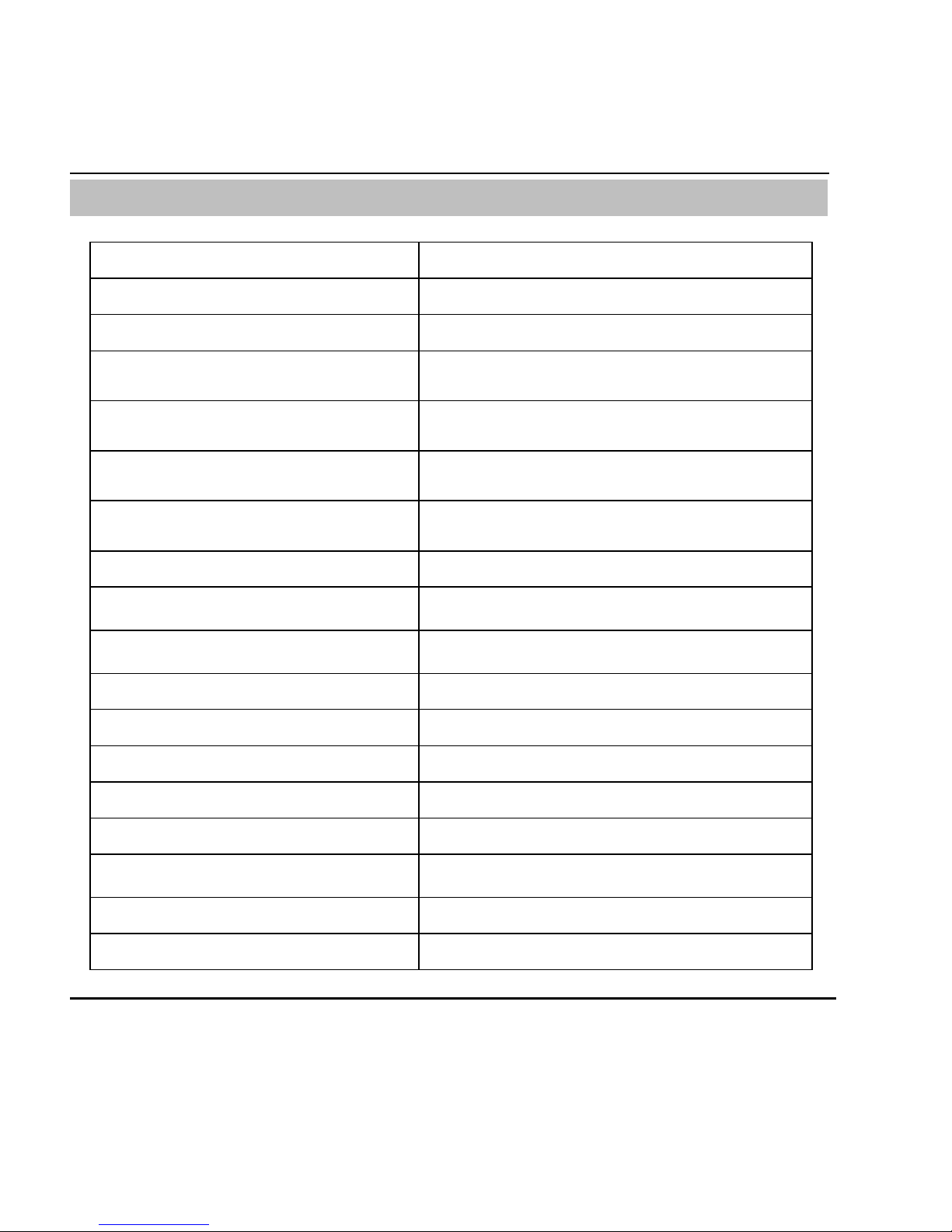
◈ USB STORIUM COMBO MP3 N DRIVE Specification
Capacity 64, 128, 512MB
Transferring rate 12Mbit / sec (at full speed)
Read Performance 800KB/sec
Write Performance 600KB/sec
O/S (Available O/S)
Windows 98/98SE/2000/ME/XP
Mac OS 9.x, Linux 2.4.0 or Higher
Drive Support
Win98 Install driver
Win ME Patch driver
Power Supply
No external power is required
(DC 4.5V ~ 5.5V form USB port)
Data Retention 10 Years
LED State LED Indicator when Gray Whale is in use
power consumption
Read: 35.0mA ~ 36.1mA
Write: 39.1mA ~ 39.4mA
Size 91.2×30.4×26.3 mm
Weight 30g
Erase Cycles 1,000,000 times
Acoustic noise 1,000G(maximum)
Support music format MP3
Audio output 5mW+5mW
Battery Lithium-ION 500mA 3.7V (6 hour lasting)
Certificate of approval CE, FCC
Page 17

H
anbit Electronics Co,Ltd. All r
ights
r
eserved
Rev.00 2003-02-20 Page 17/20 www.hbe.co.kr
※ Customer Support
Inquiries can be made to Customer Support by phone: (031) 218-1900, 1914, 1915
or e-mail after connecting to our website www.hbe.co.kr and clicking on the A/S Corner
※ Notice
Part or all of this User’s Manual may not be copied without prior approval by
HANBiT Electronics, Ltd. and any other illegal use of it is prohibited.
HANBiT Electronics, Ltd. has no legal liability for technical or editorial errors of the
contents of this User’s Manual, which is subject to change without prior notice.
HANBiT Electronics, Ltd. is not responsible for the loss of data during the use of
the product.
※ Caution: Safe removal of equipment
Please be sure to note the following for safe use.
● When removing COMBO MP3 N Drive from and inserting it into USB port with O/S
prior to Windows 98, remove it after the activation of the mouse pointer is completed.
● Windows 98: Make sure to remove it when LED is not lighted.
● Windows ME, 2000, XP: Remove the equipment safely by executing the "hardware
separation” or ”takeout” (small-sized) icons that are on the bottom right of the Windows or
using the Hardware Wizard in the control panel. If the equipment is separated or taken
out before executing equipment removal, the computer could stop operating or the data
could be lost.
● Mac: Remove after moving the icon and dumping it into the waste basket.
● Linux: Remove after carrying the “unmount” command.
Page 18
H
anbit Electronics Co,Ltd. All r
ights
r
eserved
Rev.00 2003-02-20 Page 18/20 www.hbe.co.kr
HANBiT Electronics Co.,Ltd
Address : 414-5 Woncheon-Dong, Paldal-Gu, Suwon-City, Kyungki-Do, Korea (ZIP 442-823 )
Telephone : +82 (31) - 218 - 1900 / Facsimile : +82 (31) - 217 -1926
E-mail : [email protected] / [email protected] / [email protected]
URL : www.hbe.co.kr
 Loading...