

Page 1

Test Report No.: GETEC-E3-05-013
FCC Class B Certification
APPENDIX G
: USER’S MANUAL
EUT Type: Automotive Handheld Scantool
FCC ID : RZXMSPLUS
Page 2

Hanatech Co., Ltd.
Chapter 1
Safety and Warranty
About this Manual
All rights reserved by Hanatech Co., Ltd., Gumi, Korea.
The contents of this manual are the result of contributions by dozens
of individuals all who have added their vital expertise and experience to
the evolution of the contents of this manual.
The information contained in this manual may contain printing errors
and is subject to change without notice according to product upgrade.
Hanatech shall not be liable for errors contained herein or for incidental
or consequential damage in connection with the furnishing, performance,
or use of this material.
No part of this manual may be photocopied, reproduced, or translated
to another language in any way without the prior written consent of
Hanatech Co., Ltd.
Using this Manual
It is recommended that the user become familiar with the
operating procedures, terminologies and information contained
within this user’s manual. This will help to increase the user’s
effectiveness with this equipment
Vehicle system familiarity
While this equipment provides very powerful functions with extensive
vehicle coverage, it cannot replace knowledge and skill. To get the
most out of this equipment, a full understanding of vehicle systems is
required. It is recommended that the equipment be used in conjunction
with the original service manual for the vehicle being tested.
The equipment is designed for use by trained service personnel and
this manual assumes that the service technician who is going to use this
equipment has a familiarity with vehicle electronic control systems,
however, the latest service manuals and bulletins should always be
referenced before using this equipment.
.
Chapter 1 - 1
Page 3
USER MANUAL For MULTISCAN plus
I. SAFETY INSTRUCITONS -----------------------
Thank you for purchasing MULTISCAN plus. To get the maximum performance of
the equipment, please carefully read this manual first, and keep it at hand.
On delivery inspection
When the equipment is delivered, a check should be made for any damaged or
missing components. If the unit is damaged or fails to operate according to the
specifications, contact your local distributor or the manufacturer, Hanatech Co., Ltd.,
Hana bldg., 80-1 Songjung-dong, Gumi-shi, Kyung-buk Republic of Korea 730-913.
In the unlikely event the equipment requires shipping back to the manufacturer, please
use the original packing material.
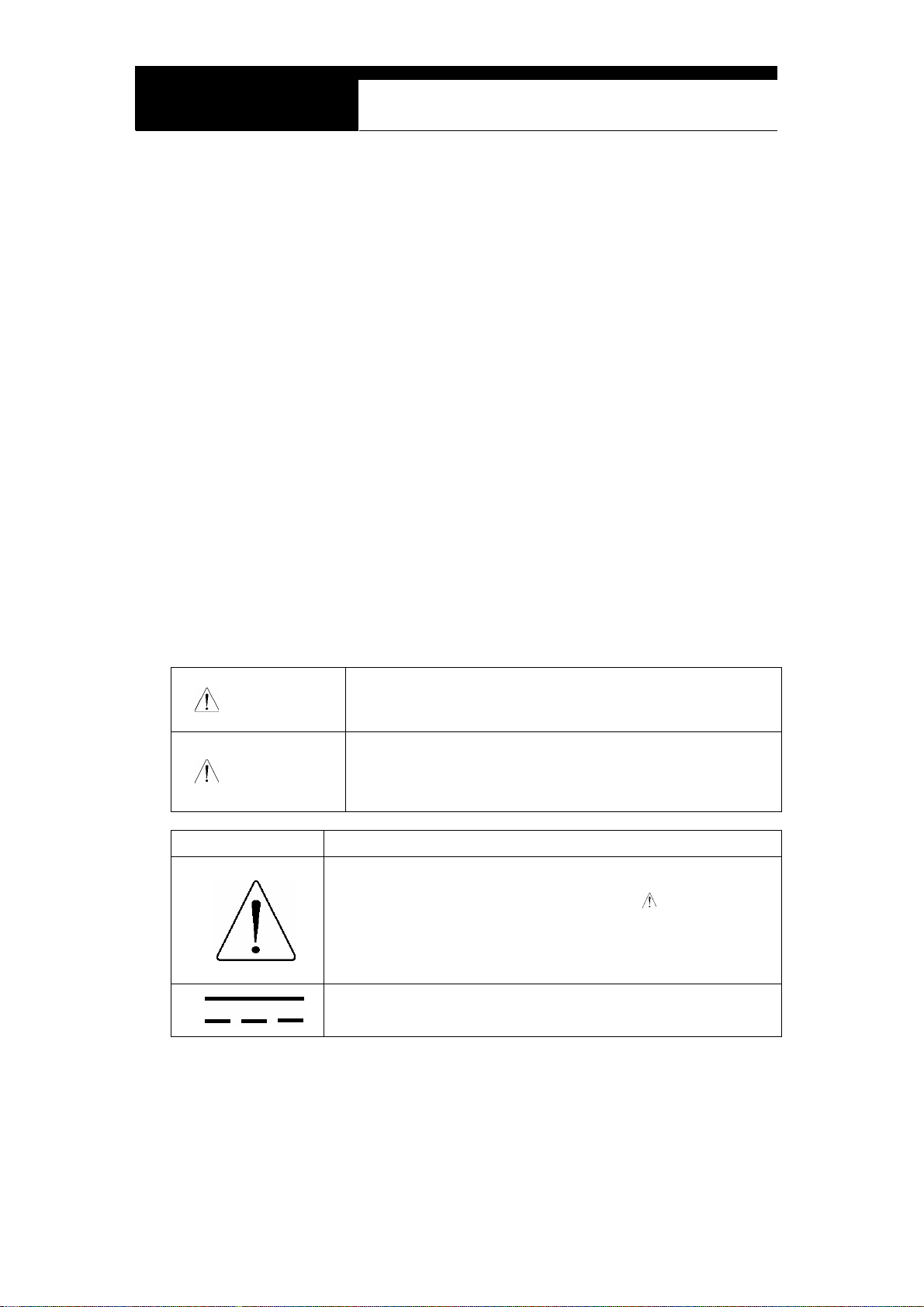
Safety symbols
The following symbols are used throughout this manual:
This mark means that dangerous consequences may
DANGER
arise, with the possibility of death or serious injury to the
user, if the machine is handled incorrectly.
This mark means dangerous consequences may arise,
WARNING
SYMBOL Description
with the possibility of somewhat serious injury to the user
and or damage to the machine and facilities, if the
equipment is handheld incorrectly.
This symbol is affixed to locations on the equipment where
the operator should consult corresponding topics in this
manual (which are also marked with the
using relevant functions of the equipment. In the manual,
this symbol indicates explanations that are particularly
important that the user is expected to read the manual before
using the equipment.
This symbol represents DC (Direct Current)
Chapter 1 - 2
symbol) before
Page 4
Hanatech Co., Ltd.
Chapter 1
Safety guideline
In order to ensure proper operation and satisfactory performance, observe the
cautions listed below.
DANGER
This equipment is designed to comply with IEC61010-1 safety standards, and
has been tested for safety prior to shipment. Excessive high voltage measurement
or improper operation could result in personal injury, as well as damage to the
equipment or the vehicle. Please read this manual carefully and be sure that you
understand its contents before using the equipment.
The manufacturer disclaims all responsibility for any accident except for that
resulting due to defect in its product.
WARNING
For safety reasons, this equipment should not be used to
measure circuits carrying more than 30Vrms or 42.4V peak.
To avoid electrical accident that could result in injury or
death, do not measure voltage in excess of these limitations.
Maximum rated measurable voltage is 30Vrms or 42.4V
peak.
Chapter 1 - 3
Page 5
USER MANUAL For MULTISCAN plus
II. SAFETY PRECAUTIONS -----------------------
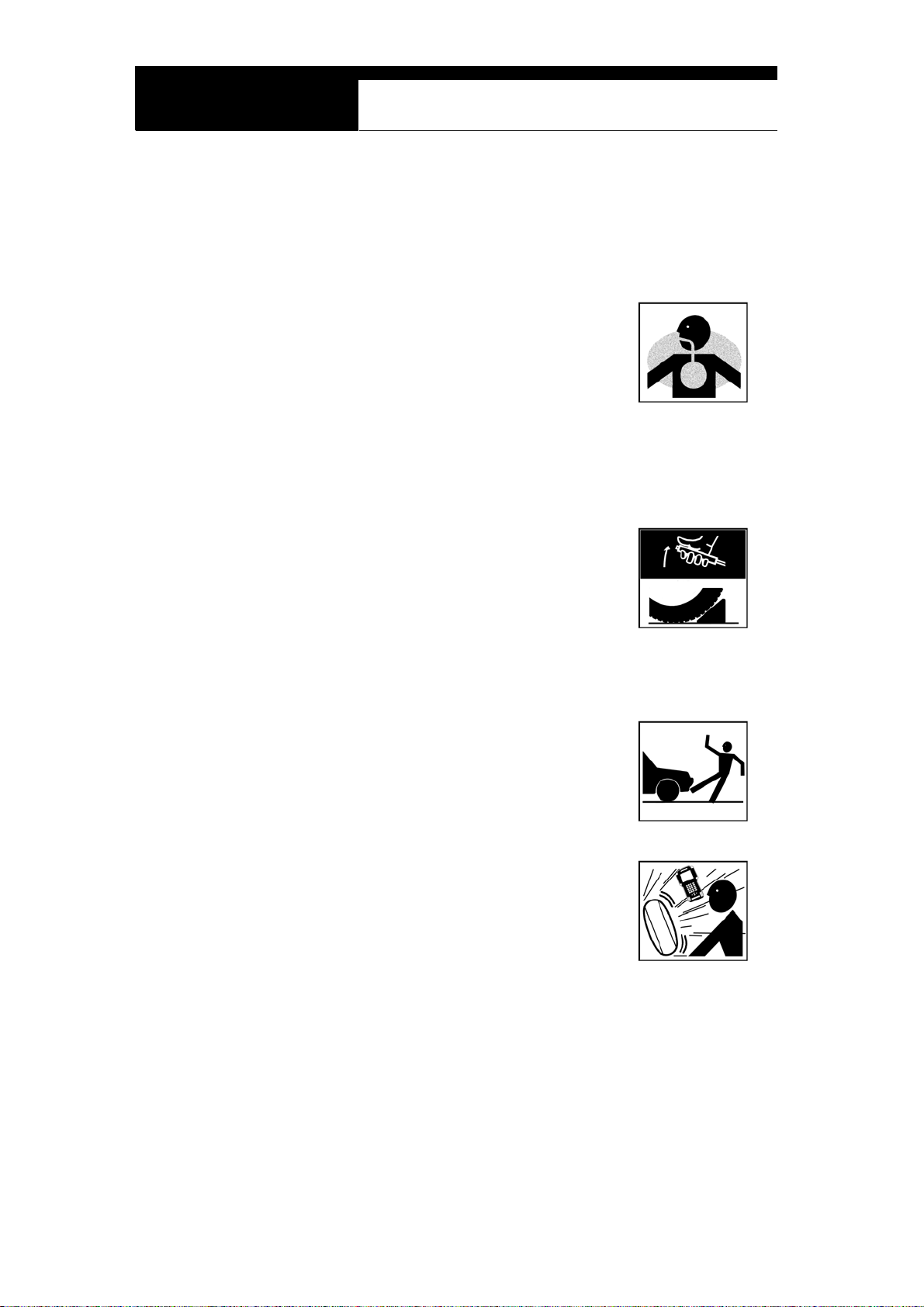
DANGER
When an engine is running, keep the workshop area WELL
VENTILATED or attach a building exhaust removal system to the
engine exhaust system. Engines produce carbon monoxide, an
odorless and poisonous gas that causes slower reaction time
and may lead to serious injury or death.
WARNING
Brakes and wheel blocks
Apply the hand brake and block the wheels before using the test
equipment. It is highly recommended to block the wheels on
front-wheel drive vehicles because the hand brake does not hold
the driving wheels.
Drive Test
Do not drive the vehicle and operate the test equipment at the
same time. Any distraction may cause an accident. Have one
person operate the test equipment while the other person drives
the vehicle.
Never place the test equipment in front of you when driving the vehicle because the
test equipment may hit your body and cause serious injury when
the air bag inflates.
Do not try to test the SRS air bag system while driving the
vehicle as unintended air bag inflation may result.
Chapter 1 - 4
Page 6
Hanatech Co., Ltd.
Chapter 1
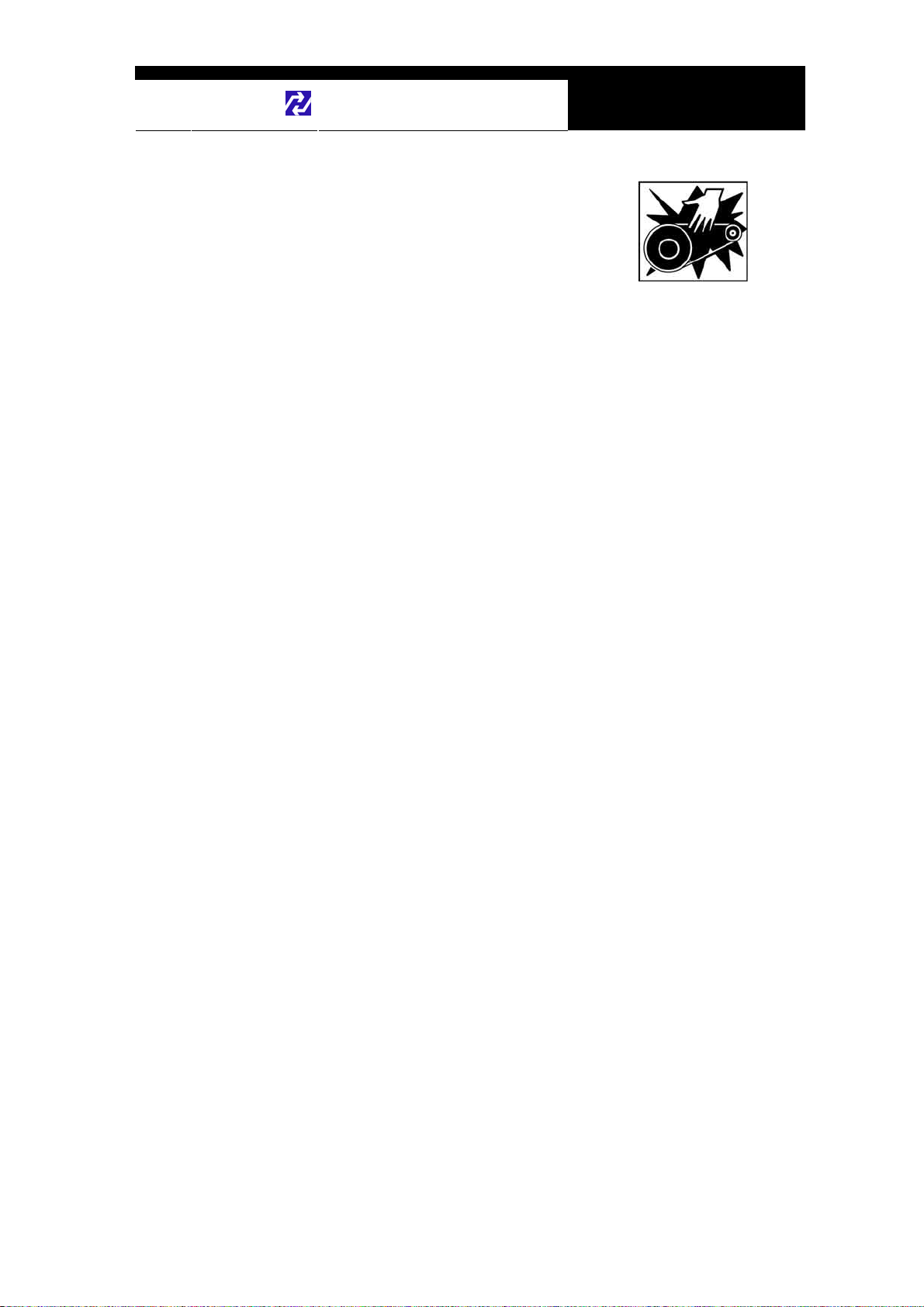
Engine Compartment
Maintain sufficient clearance between moving components or
belts while using the test equipment in the engine compartment.
Moving components and belts may catch loose clothing, test
cables or a part of your body and cause damage or personal
injury.
Electrical Components
Always turn the ignition key OFF when connecting or disconnecting electrical
components unless otherwise instructed.
Vehicle Battery
MULTISCAN plus is designed to prevent damage from reverse polarity battery cable
connection, however, it is always highly recommended to always ensure correct
polarity terminal connection.
Never lay the test equipment on vehicle battery. You may short the terminals and may
cause damage to your body, the test equipment or the battery.
To avoid damaging the test equipment or displaying false data, make sure the vehicle
battery is fully charged and the connections to the electronic control module are clean
and tight.
The warning messages above and the safety messages contained hereinafter cover
situations Hanatech is aware of. Hanatech cannot know, evaluate or advise you as to
all of the possible hazards. You must make sure that any conditions or service
procedures encountered do not jeopardize your personal safety.
Chapter 1 - 5
Page 7

USER MANUAL For MULTISCAN plus
III. WARRANTY SERVICE -------------------------
Warranty Period
In principle, MULTISCAN plus is warranted to the consumer to be free of defects in
material and workmanship for the period of 3 years after the date of purchase.
If the product is found defective during this period, the product can be returned to
Hanatech and will be repaired or replaced free of charge.
Freight and repair Cost
For the repair of head unit, Hanatech covers the freight cost for the service during one
year from the date of purchase, and you can send the troubled unit to your local
distributor without having to pay the freight cost. You sho uld consult with your local
distributor about the validity of remaining warranty period before sending the unit.
For the remaining two years, you are liable for any international cost incurred. Repair
or replacement will be provided free of charge.
When the warranty period is expired after three years, the customer must pay the
round trip freight and the repair or replacement cost.
Upon delivery
Hanatech inspects all the ordered product parts and components are included in the
package before shipment, and includes the original copy of pre-shipment inspection
report in the box. As soon as the product is delivered to you, please ensure
everything you ordered is properly checked and included referring to the pre-shipment
inspection report. If there is anything missing or damaged, you must notify the local
distributor immediately within 3 working days from the delivery date for free of charge
replacement of the parts.
In case of trouble
If you encounter any malfunction or trouble with the equipment, please refer to the
Trouble Shooting chapter in this manu al. If the problem cannot be solved, please
contact your local distributor for assista nce. For early identification of a fault or error,
Chapter 1 - 6
Page 8
Hanatech Co., Ltd.
your local distributor will require the following details:
1. Symptom of problem you are experiencing
2. Serial number of the head unit
3. Vehicle information: Which specific car were you testing when the problem
occurred – Model name, Model year and system ID number if available (for Mitsubishi,
Subaru and Suzuki only: Refer to Japanese car chapter for details)
Chapter 1
Warranty Void
Even in the effective warranty period, if the problem is found to be caused by any of
the followings, Hanatech charges the cost for round trip freight and actual cost for the
service to the customer, and the shipment back to the customer will be suspended
until the customer’s payment is duly made
1. Evidence of improper use or application of the product ignoring the cautions and
warnings stipulated in the user’s manual
2. Intentional damage or modifications to the product or user’s attempt to repair
without proper authorization
3. Any damage caused by Force Maje ure including war and natural disaster
4. Loss of time, inconvenience and other consequential damage or loss
Warranty void seal
In addition to the above mentioned warranty void conditions, warranty service is not
provided in case the warranty void seal is broken or removed.
If you remove the head unit safety boot, you will see a yellow round sticker covering
one of the screw holes in the back. Please be careful not to break this seal and never
try to open the head unit without direct authorization from the manufacturer.
Bought in other countries
Only the products properly supplied by the contracted authorized local distributo r s are
recognizable for free of charge warranty service. Any equipment bought outside the
contracted national territory of your local distributor will be charged for service.
Chapter 1 - 7
Page 9
USER MANUAL For MULTISCAN plus
FCC RF INTERFERENCE STATEMENT
Note
This equipment has been tested and found to comply with the limits for a Class B
digital device, pursuant to Part 15 of the FCC Rules.
These limits are designed to provide reasonable protection against harmful
interference in a residential installation.
The equipment generates, uses and can radiate radio frequency energy and, if not
installed and used in accordance with the instructions, may cause harmful interference
to radio communications. However, there is no guarantee that interference will not
occur in a particular installation.
If this equipment does not cause harmful interference to radio or television reception
which can be determined by turning the equipment off and on, the user is encouraged
to try to correct the interference by one or more of the following measures;
- Reorient or relocate the receiving antenna
- Increase the separation between the equipment and receiver
- Connect the equipment into an outlet on a circuit different from that to which the
receiver is connected
Caution
Changes or modification not expressly approved by the party responsible for
compliance could void the user’s authority to operate the equipment.
THIS DEVICE COMPLIES WITH PART 15 OF THE FCC RULES. OPERATION IS
SUBJECT TO THE FOLLOWING TWO CONDITIONS; (1) THIS DEVICE MAY NOT
CAUSE HARMFUL INTERFERENCE. AND (2) THIS DEVICE MUST ACCEPT ANY
INTERFERENCE RECEIVED INCLUDING INTERFERENCE THAT MAY CAUSE
UNDESIRED OPERATION.
Chapter 1 - 8
Page 10
Hanatech Co., Ltd.
Chapter 2
Specification and Parts
I. Specification -----------------------------------
A. Hardware
CPU: 16bit, 33MHz
RAM: 1 Mbyte (SRAM)
Program Cartridge Memory: 128Mbytes Flash Memory
Display: 320×240 Monochrome Graphic LCD with Back Light
Key Pad: 20 membrane keys, embossing type
Serial Port: USB and RS232
Printer: General PC printer
Power: DC 8~18V, 800mA or higher
B. Environmental Specification
Indoor use only
Operating temperature: Max 50℃ / 122℉
Maximum relative humidity: 80% (up to 31℃/88℉) and 50% (40℃/104℉ or
higher)
Installation overvoltage categories: CATⅡ
Maximum measurable voltage: DC 30V Max
Pollution degree 2
Max. Altitude: Up to 2000m
Chapter 2 - 1
Page 11

USER MANUAL For MULTISCAN plus
C. Mechanical Dimensions
Length: 222㎜ / 9"
Width: 187㎜ / 7.5"
Height: 51㎜ / 2"
Weight: 950g / 2.1lb (head unit only)
Body Color: Dark Grey
Safety Boot Color: Blue
All specifications are subject to change without notice for the purpose of product
and quality improvement.
Chapter 2 - 2
Page 12
Hanatech Co., Ltd.
Chapter 2
II. Part List -----------------------------------------
A. Head unit and basic supplies
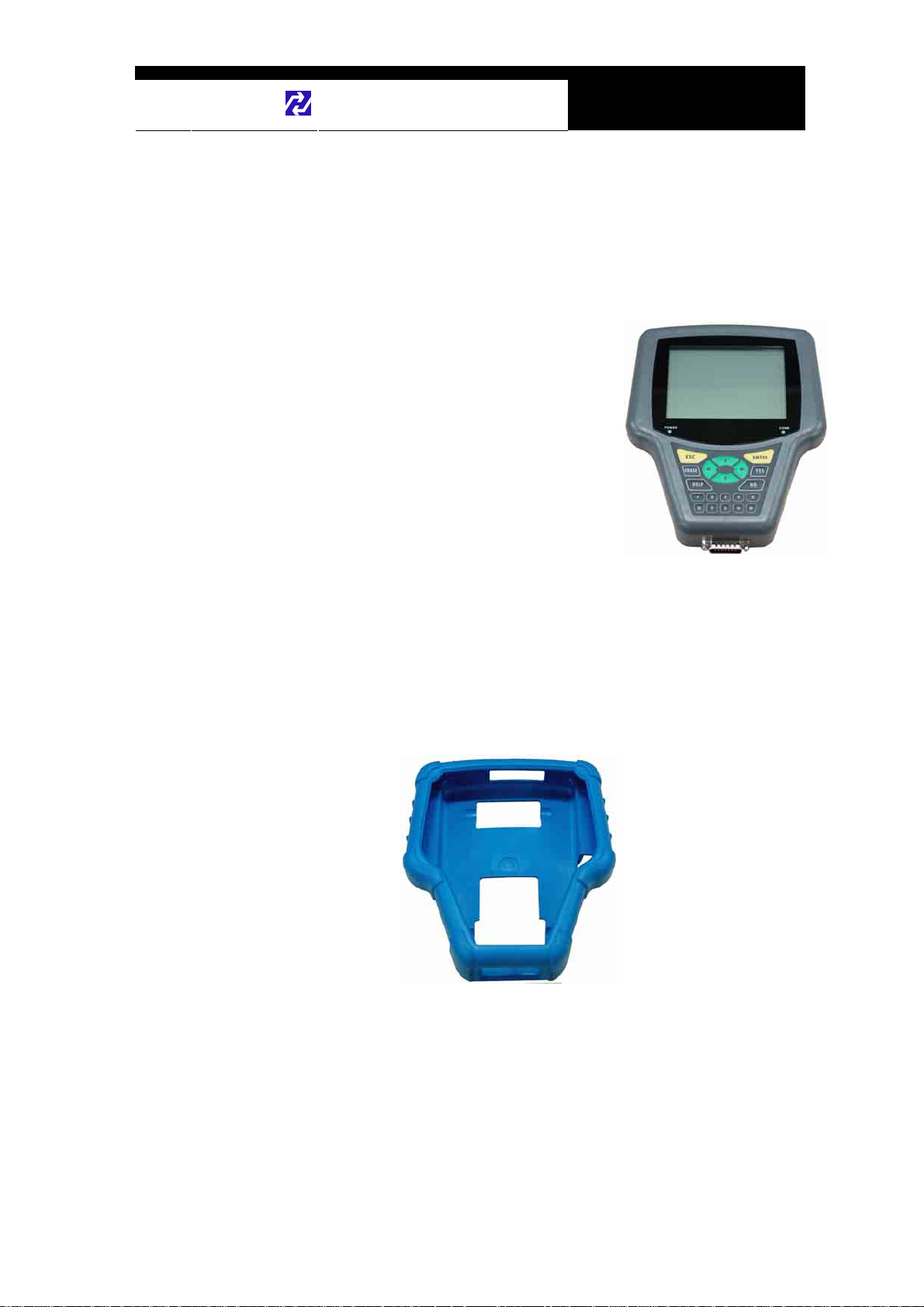
1. Head Unit
- Made of strong ABS resin, each unit has
passed internal impact test before shipment.
- As the inner surface is coated with antielectromagnetic interference material, it
neither interferes the other electronic
devices nor gets interfered by the other
equipments.
(P/N. )
2. Safety Boot (P/N. )
- Flexible plastic cover that protects the head unit from physical,
chemical and electrical damage
- Basic color is blue, however, it can be changed according to the
distributor’s demand.
Chapter 2 - 3
Page 13

USER MANUAL For MULTISCAN plus
3. Carry Case (P/N. 3003-0003)
Provides convenient transportation and the
protection of the head unit and other
components from outer physical impact during
the transportation and storage. Carry case is
provided when purchasing the head unit and at
least one software package together. Includes
keys and dial lock
4. Main Data Link Cable (P/N. 3001-0001)
-
Connects vehicle side DLC and MULTISCAN head unit for data
transmission.
-
Connecting parts on both ends
are exactly same, therefore,
simply put any one end to the
head unit, and then hook the
other end to the vehicle side
DLC after connecting an
appropriate adaptor
5. Power Cable 1 – Cigarette Lighter
- Supplies power to the head unit
from the cigarette lighter socket.
Used when DLC is located near
the driver or passenger seat and
power is not supplied through
DLC.
- LED lights on both ends turn ON
(P/N. 3000-0004)
when power is properly supplied.
- The metal plunger part in the end of cigarette lighter con nector is
Chapter 2 - 4
Page 14
Hanatech Co., Ltd.
- The rated voltage and current for this power cable are 12V and less than
removable by unscrewing for the fuse replacement. It may become
loose over repeated use, therefore, it is highly recommended to check if
it is tightly screwed frequently. A set of plunger parts are included in the
basic supplies. Refer to spare parts section hereinafter.
2A.
Chapter 2
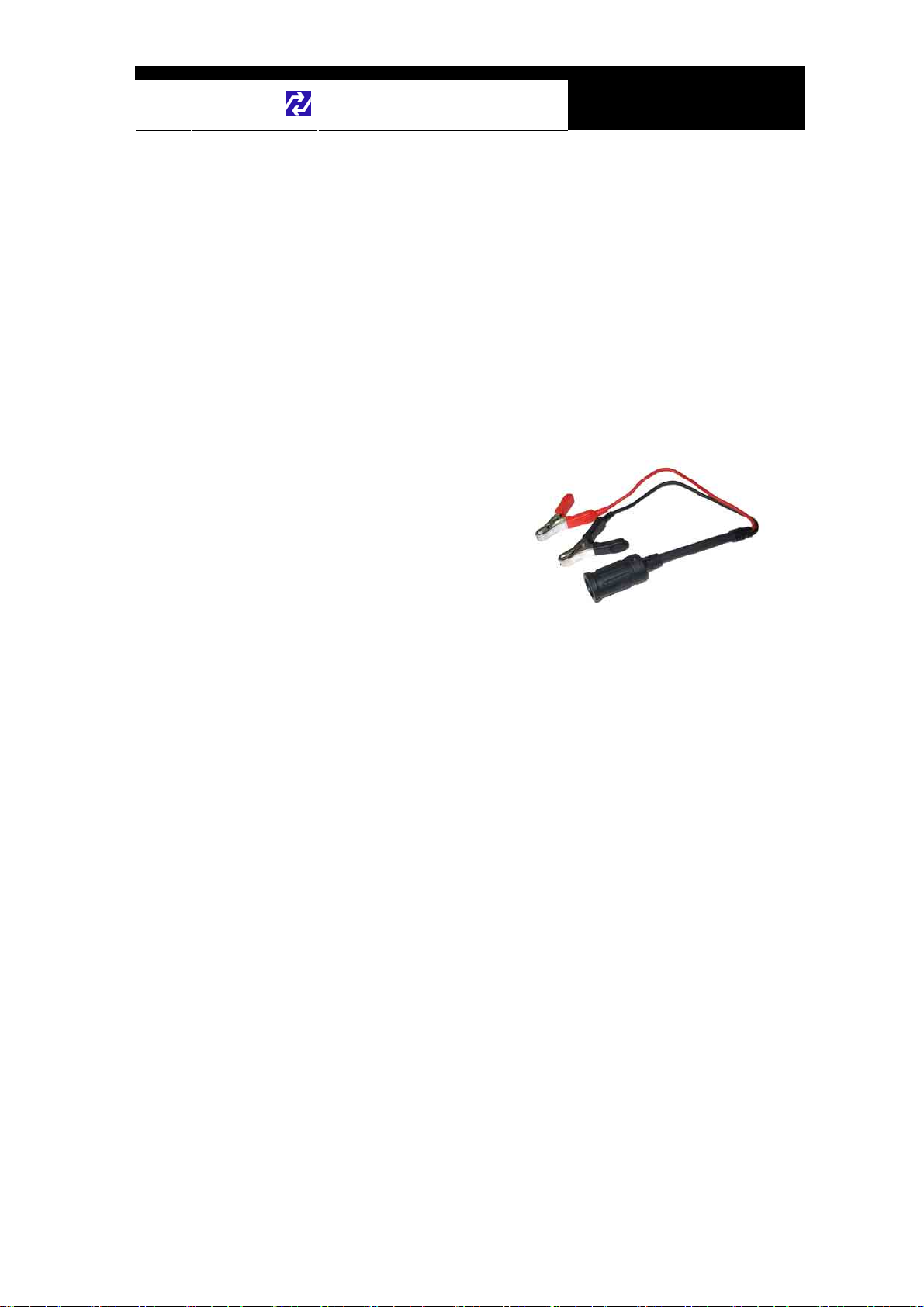
6. Power cable 2 – Vehicle Battery
- Supplies power from the vehicle battery when the DLC is located in
the engine bay or when using the oscilloscope or multi-meter
functions
(P/N. 3000-0005)
- Connect each of the two
alligator clips to the battery
terminal of the correct
polarity with caution.
- Must be used together with
the Power Cable 1. Insert
the cigarette lighter adaptor of the Power Cable 1 into the socket,
and connect the other end to the head unit.
- Red LED light turns ON when power is properly supplied from the
vehicle battery.
Chapter 2 - 5
Page 15
USER MANUAL For MULTISCAN plus
B. Diagnostic Adapters
Diagnostic adapters may be sold separately, therefore check if all the
adapters you ordered are included in the package upon delivery.
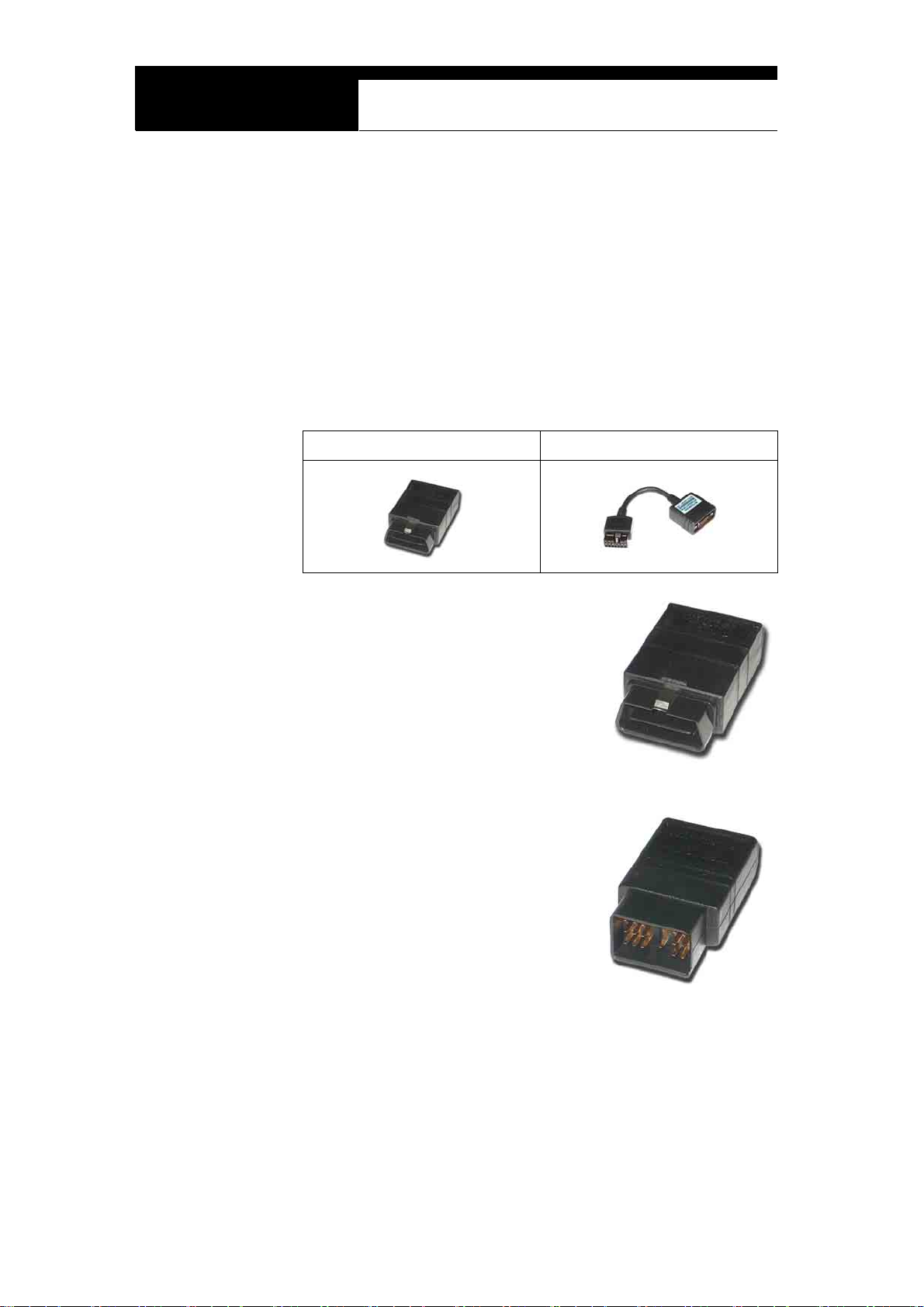
There are two types of adapters: capsulated and wired types.
Most of MULTISCAN adapters are capsulated for better durability and
storage, however, sometimes it is difficult or almost impossible to connect the
capsulated adapter to vehicle side DLC when it is located deep inside
beneath the dashboard. We use wire type adapters for the cars such as
Hyundai and Kia that we were reported to have such connecting difficulties.
Capsule type Wire type
1. OBD2 Standard Adapter
(P/N. 3001-0010)
Used for all OBD generation 2 and EOBD
compatible vehicles. Vehicle side DLC is
generally located near the driver’s seat and
most frequently found beneath the dash panel.
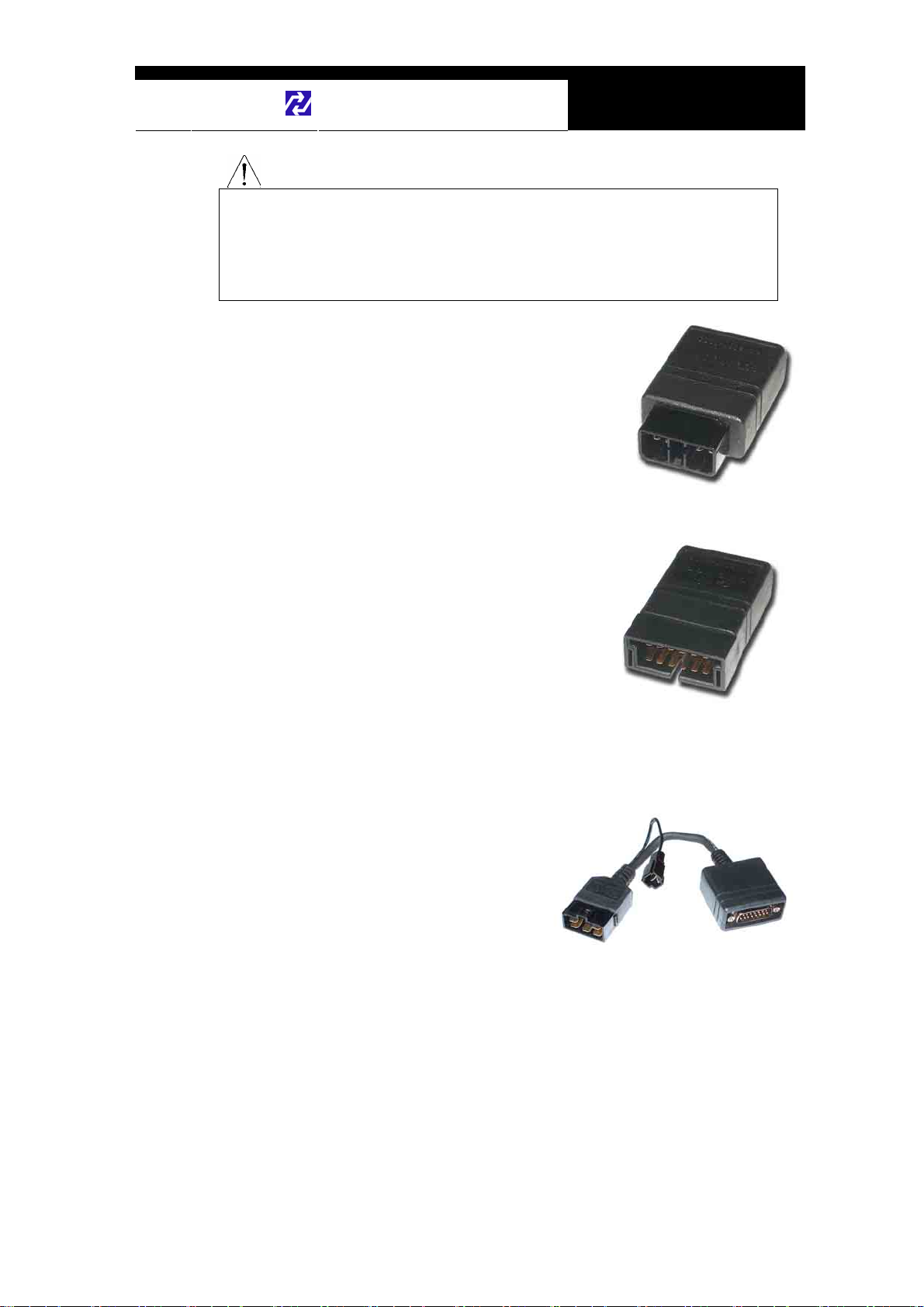
2. Toyota / Lexus 17Pin Rectangular
Adapter
Used for the diagnosis of Toyota and Lexus
of OBD generation 1. Vehicle side DLC of
this type is generally located in the engine
compartment.
(P/N. 3001-0011)
Chapter 2 - 6
Page 16
Hanatech Co., Ltd.
Chapter 2
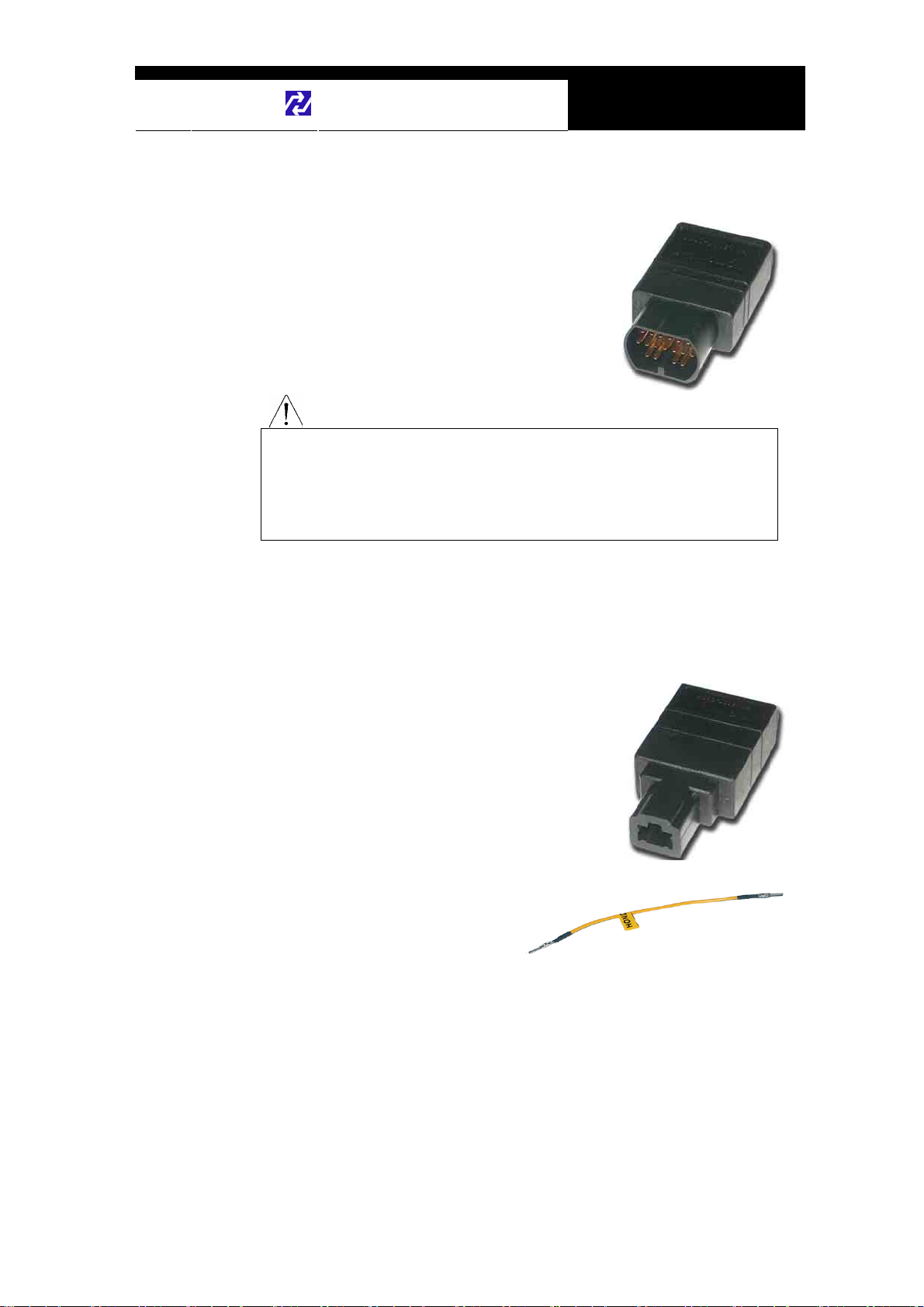
3. Toyota/Lexus 17Pin Semi-circular Adapter (P/N. 3001-0012)
Also used for the diagnosis of Toyota and
Lexus of OBD generation 1.
The vehicle side DLC is generally found
beneath the dashboard.
Refer to the following warning message.
The appearances of this adapter and MAZDA 17Pin adapter are exactly
same, however, the internal wiring and circuit are different. Check the
engraved name and the body color of the adapter carefully before use.
Improper adapter connection may result in serious malfunction of
either control system and MULTISCAN plus head unit.
WARNING
4. Honda 3 Pin Adapter and 2 Pin Jump Wire
(P/N. 3-pin: 3001-0014, 2-pin wire: 3001-0023)
3-pin adapter is used for the diagnosis of Honda
cars of OBD generation 1 that support DTC
read and erase as well as data stream.
Older Honda cars have 2-pin DLC that supports
DTC read only. The jump wire is used for these
older cars to bridge the 2-pin DLC terminals.
The vehicle side DLC is generally located under
the dashboard or the glove box.
Chapter 2 - 7
Page 17
USER MANUAL For MULTISCAN plus
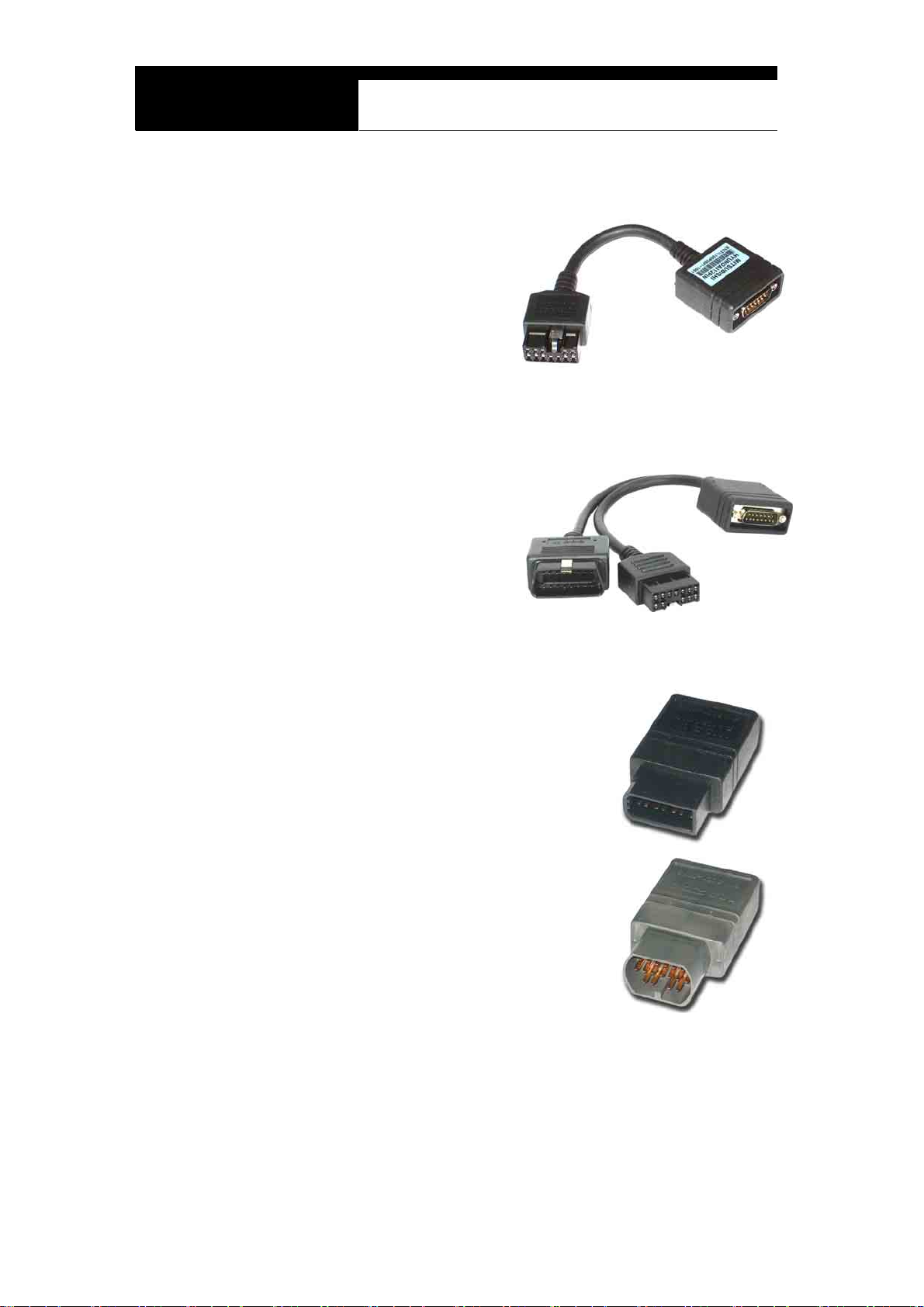
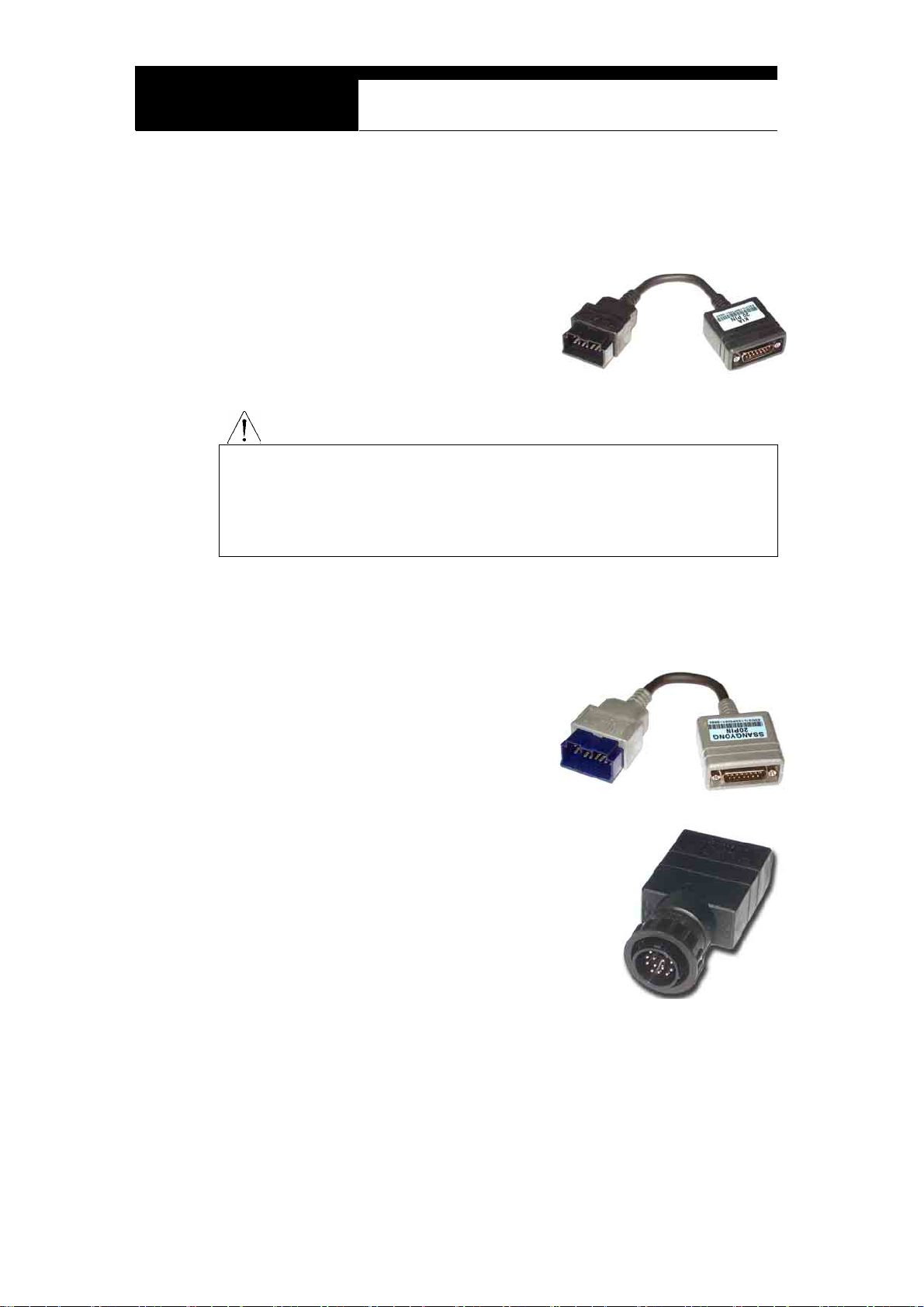
5. Mitsubishi and Hyundai 12Pin Adapter (P/N. 3001-0001)
Used for the communication
with Mitsubishi and Hyundai
cars of OBD generation 1.
A wire type adapter is provided
as the connecting difficulties of
capsule type adapter in quite a
few Hyundai cars were
reported.
6. Mitsubishi 12+16pin dual headed adapter (P/N: 3001-0030)
Used for the communication with
Mitsubishi cars with both of 12-pin
OBD1 and 16-pin OBD2 adapters
on-board.
Refer to the Mitsubishi section,
Chapter 6 for details.
7. Nissan and Samsung 14Pin Adapter (P/N. 3001-0006)
Used for the communication with Nissan cars
of OBD generation 1 and all Samsung
passenger cars.
Vehicle side DLC is generally found under the
dash or inside the fuse box.
8. Mazda 17Pin Adapter (P/N. 3001-0013)
Used for the communication with Mazda cars
of OBD generation 1.
Vehicle side DLC is generally located in the
engine compartment.
Refer to the warning message in the next page:
Chapter 2 - 8
Page 18
Hanatech Co., Ltd.
Chapter 2
The appearances of this adapter and Toyota 17Pin SEMI-CIRCULAR adapter
are exactly same, however, the internal wiring and circuit are different. Check
the engraved name and the body color of the adapter carefully before use.
Improper adapter connection may result in serious malfunction of either
control system and MULTISCAN plus head unit
WARNING
9. Subaru 9Pin Adapter
Used for the communication with Subaru cars of
OBD generation 1.
The vehicle side DLC is generally located
beneath the dashboard.
(P/N. 3001-0022)
10. GM Daewoo 12Pin Adapter
(P/N. 3001-1002)
Used for the communication with Daewoo cars
of OBD generation 1.
The vehicle side DLC is generally located
beneath the glove box, door side.
11. Kia 6Pin Adapter (P/N. 3001-0003)
Used for the communication with old
Kia cars of OBD generation 1.
Only the Diagnostic Trouble Code
reading function is available for the
cars with this type of adapter as only
the slow pulse signal is transmitted
through the vehicle side DLC.
The split wire of the adapter is to be connected to the ground terminal of
the vehicle side DLC.
Chapter 2 - 9
Page 19
USER MANUAL For MULTISCAN plus
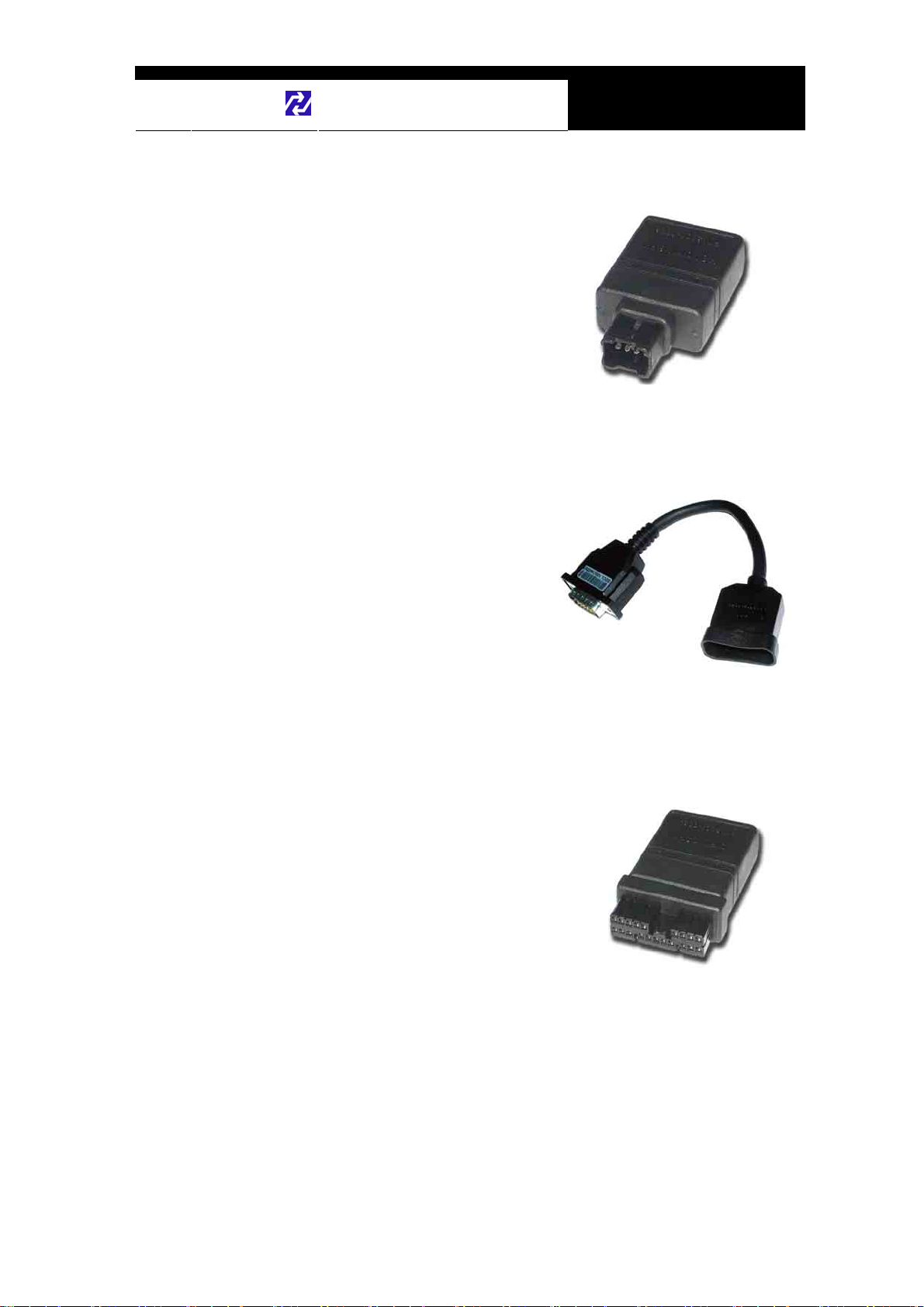
12. Kia 20Pin Adapter (P/N. 3001-0004)
Used for the communication with Kia cars of OBD generation 1.
DTC read & erase and data stream
functions are available for the cars
with this type of adapter.
Refer to the following warning
message.
The appearances of Kia 20Pin adapter and Ssangyong 20Pin Rectangular
adapter are exactly same, however, the internal wiring and circuit are different.
Check the engraved name and the body color of the adapter carefully before
use. Improper adapter connection may result in serious malfunction of
either control system and MULTISCAN plus head unit
WARNING
13. Ssangyong 20Pin Rectangular Adapter
Used for Ssangyong cars of OBD
generation 1.
Vehicle side DLC is located in the
engine compartment.
Refer to the warning above.
(P/N. 3001-0005)
14. Ssangyong 14Pin Circular Adapter
(P/N. 3001-0007)
Used for old Ssangyong cars of OBD
generation 1.
Vehicle side DLC is located in the engine
compartment.
Chapter 2 - 10
Page 20
Hanatech Co., Ltd.
Chapter 2
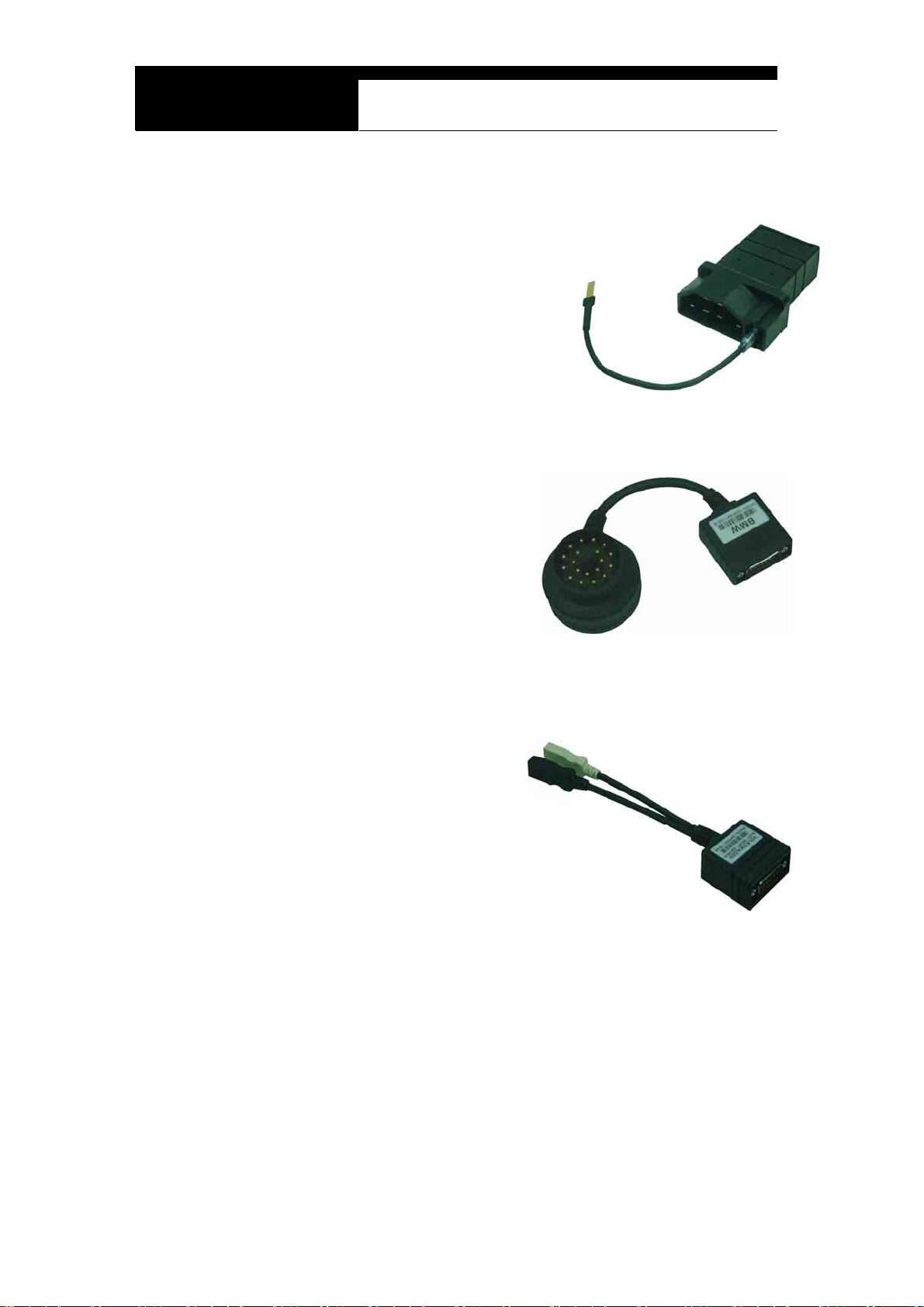
15. Holden 6 Pin Adapter
Used for Australian Holden of OBD
generation 1.
Japanese cars such as Toyota and Nissan
assembled in Australia with Holden built
engines may have this type of adapter, too.
Vehicle side DLC is generally located
beneath the glove box to the center facia.
(P/N. 3001-0023)
16. GM Opel 10Pin Adapter (P/N. 3001-0019)
Used for the communication with
Opel cars of OBD generation 1.
Also available with MULTISCAN
Australian Holden, South American
Opel and European Vauxhall
software packages.
Vehicle side DLC is generally
located in the fuse box beneath the dashboard or near the parking brake.
17. Ford 20 Pin Adapter(P/N. 3001-0020)
Used for the communication with Ford cars
of OBD generation 1, including Australian
and British Fords.
Vehicle side DLC is generally located in the
fuse box beneath the dashboard.
Chapter 2 - 11
Page 21
USER MANUAL For MULTISCAN plus
18. Ford EEC-IV
Used for the communication with
Australian Ford cars of OBD generation 1,
Vehicle side DLC is generally located in
the engine compartment.
(P/N. 3001-0017)
19. BMW 20Pin Adapter(P/N. 3001-0016)
Used for the communication with
BMW cars.
Vehicle side DLC is generally
located beneath the dashboard or in
the engine compartment.
20. VAG 2X2Pin Adapter(P/N. 3001-0029)
Used for the communication with
Volkswagen/Audi Group cars,
Vehicle side DLC is located in
various place on the vehicle but
generally around dashboard.
Applied with SEAT, SKODA with
this adapter also.
Chapter 2 - 12
Page 22
Hanatech Co., Ltd.
Chapter 2
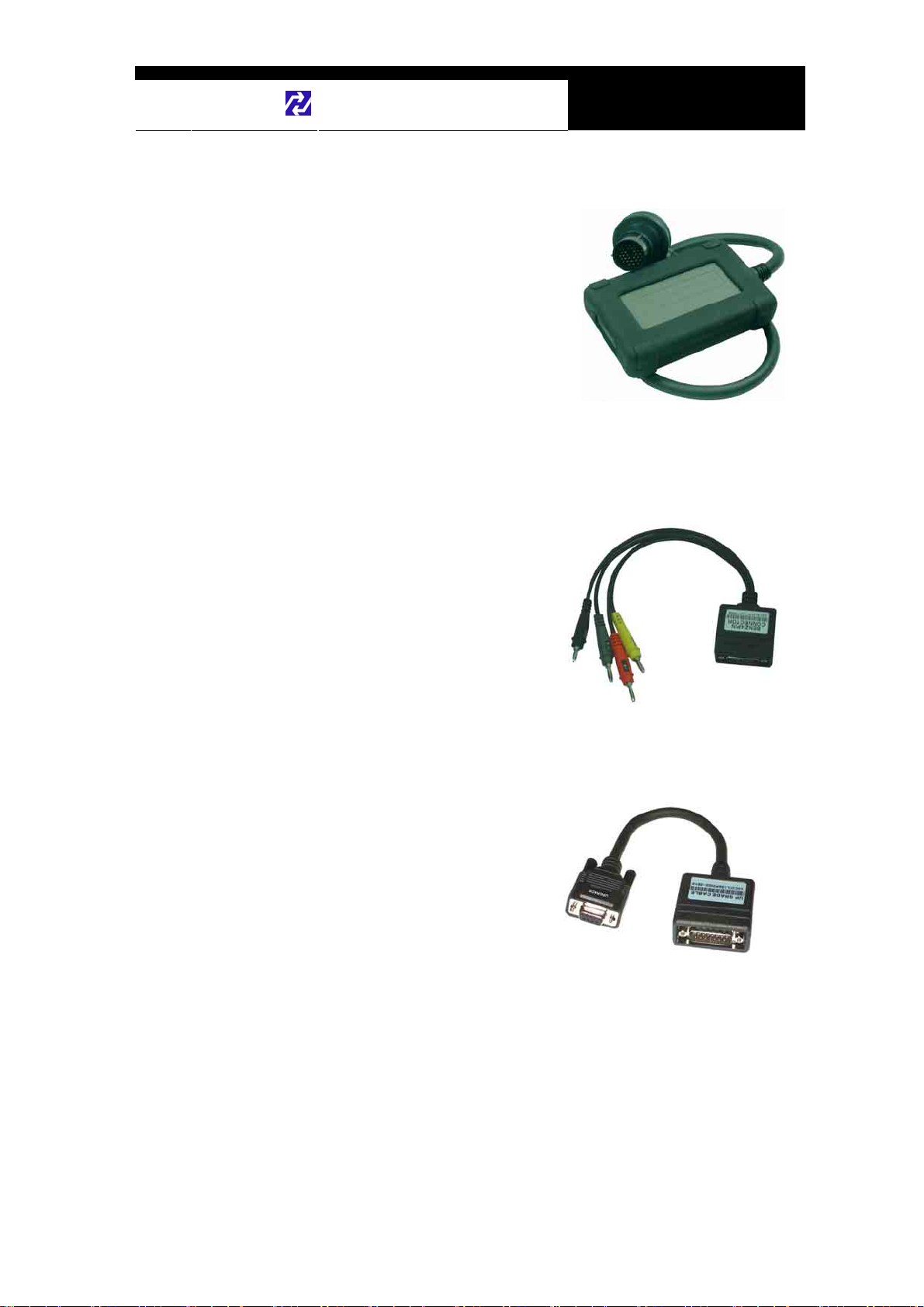
21. Mercedes Benz 38Pin Adapter
Used for the communication with
Mercedes Benz cars equipped with 38Pin
vehicle side DLC.
Applied with C202, CLK208, E210, E124,
S140, SL129, SLK170, G463, G461.
(P/N. 3001-0015)
22. Mercedes Benz 4Pin Adapter(P/N. 3001-0009)
Used for the communication with Mercedes Benz cars equipped with
8Pole or 16Pole vehicle side DLC.
(Red: Battery +, Gray: K Line,, Yellow :
Ignition check, Black: Ground)
Applied with C201, E124, S126, SL107,
G463
23. Upgrade cable
To be connected to main data link
cable for updating your
MULTISCAN plus software by
downloading updated codes from
your PC. Refer to the related
chapter in this manual.
(P/N. 3000-0010)
Chapter 2 - 13
Page 23
USER MANUAL For MULTISCAN plus
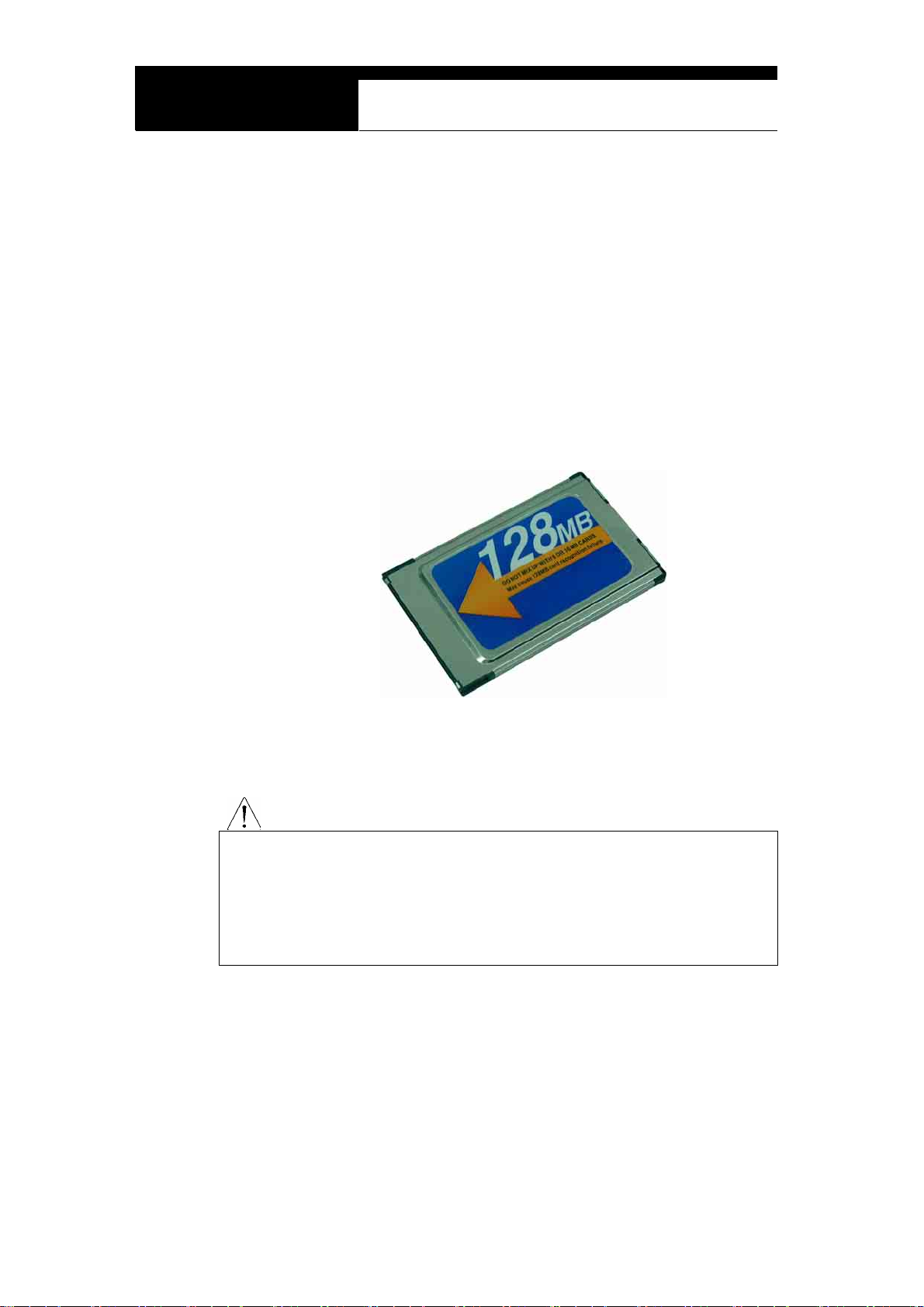
C. Software Cartridge
- Contains vehicle information and operating software for MULTISCAN
plus scanners.
- The appearance and measurements for MULTISCAN plus cartridges
complies with standard PCMCIA, however, inner circuits are of
Hanatech’s own design. Therefore, you can neither use it with the
other equipment nor copy its contents to the other standard PCMCIA.
MAKE SURE TO TURN POWER OFF BEFORE REMOVING OR INSERTING
A CARTRIDGE. It is extremely dangerous to insert or remove a PCMCIA card
while the head unit is turned on. Both PCMCIA card and head unit can be
critically damaged and break down. Always turn power off by pressing the
[POWER] key or removing power supply cable from the head unit before
inserting or removing a PCMCIA card..
WARNING
Chapter 2 - 14
Page 24

Hanatech Co., Ltd.
Chapter 2
D. Spare Parts
- Extra fuses (P/N. 3008-0003)
For the replacement of the fuse located inside the
cigarette lighter power cable. You can also replace
it with a fuse of which rated current is 2 Ampere or
less.
- Spare cigarette lighter power cable plunger parts
A set of spare parts for replacement when
the original parts are lost.
E. Optional Supplies
1. Printer Cable (P/N. 3000-0009)
To be connected between head unit
RS232 port and printer to enable direct
interface with a PC printer.
Compatible with the printers that support
PCL mode, and Hewlett Packard ® is
highly recommended.
Chapter 2 - 15
Page 25

Hanatech Co., Ltd.
Chapter 3
Operating MULTISCAN
I. Getting Started---------------------------------
A. Head Unit
①. LCD Display
②. Key Pad (may be designed differently)
③. 12V Power Jack Connection
④. 15-pin Main DLC Cable Connection
⑤. USB Communication port
⑥. RS232C Serial Communication Port
⑦. LCD Contrast Adjustment Dial
⑧. PCMCIA slot
Chapter 3 - 1
Page 26

USER MANUAL For MULTISCAN
B. Main DLC Cable
1. Connection to the head unit
a. The male connectors in both ends of the main DLC cable are exactly
same and you can connect any of them to the head unit.
b. Press the main DLC cable connector into the head unit 15 pin female
connector, and tighten up the two screws for firm connection.
2. Connecting the DLC adapters
Locate the vehicle side adapter and connect the corresponding DLC adapter
to the remaining male connector of the main DLC cable
It is recommended to keep the main DLC cable connected and screwed
to the head unit. Frequent connection and removal of the main DLC
cable may loose the fastening parts and bend the connecting pins.
CAUTION
Chapter 3 - 2
Page 27

C. Power supply
1. Power supplied through DLC adapter
12V battery power is supplied through most of the DLC adapters except
Hanatech Co., Ltd.
Chapter 3
GM/Daewoo 10Pin and Mitsubishi/Hyundai 12Pin adapters
2. Cigarette lighter
a. Use the cigarette lighter cable when power is not supplied through the
DLC adapter.
b. Insert the cigarette lighter connector into the socket, and check if the red
LEDs in both ends of the cable are ON.
c. Insert the power jack into the head unit power socket.
Chapter 3 - 3
Page 28

USER MANUAL For MULTISCAN
3. Vehicle battery
a. Sometimes it is necessary to put the head unit in the engine
compartment when testing OBD1 generation vehicles with the
diagnostic adapters located near the engine, such as Toyota, Mazda,
Kia, Ssangyong, BMW, Mercedes Benz, etc.
b. In case power is not supplied through the diagnostic adapter,
connect the alligator clips of the battery power cable to the battery
terminals of correct polarity. Check the red LED on the round
socket turns ON.
c. Connect the cigarette lighter power cable connector into the battery
power cable socket.
4. Power ON
MULTISCAN automatically turns on when power is supplied properly..
Chapter 3 - 4
Page 29

D. Contrast
a. The LCD display is sensitive to the temperature.
b. If the screen is too faint or too dark to read, you can adjust the contrast by
c. In case of any trouble with the display, please refer to the Trouble Shooting
Hanatech Co., Ltd.
Chapter 3
It may become too faint when it is cold and too dark when it is hot.
turning the contrast dial in the right side of the head unit.
chapter in this manual.
Chapter 3 - 5
Page 30

USER MANUAL For MULTISCAN
II. Control Keys -----------------------------------
A. Keypad
The keypad is made of chemistry
proofing PVC material that
prevents contamination and
damage from hazardous oily
workshop environment.
The membrane keypad is designed
and tested to maintain its normal
operation over a million keystroke
for each.
Each key is raised for better tactile feel. The keypad has total of 20 keys.
B. Making selection in the menu
1. Numeric Keypad in the bottom
Simply press the corresponding number when making selection from a menu.
This is available only when you are selecting an item of which number is 9 or
less. For more than 10, you should locate the highlighted bar on the desired
item and press the [ENTER] key.
2. Arrow keys in the middle
Chapter 3 - 6
Page 31

Hanatech Co., Ltd.
◀ ▶ Page Up/Down
Chapter 3
▲▼
Scroll Up/ Down
a. Scroll up and down the highlighted bar in the menu by pressing Up/Down
arrow keys and press the [ENTER] key to confirm the selection.
b. If the menu has more than 12 items, you may have to move between the
pages to make selection. You do not have to pound on Up/Down arrow
keys to scroll the whole page. Simply pressing the Left or Right arrow
key will shift page to page. Move the highlighted bar by pressing the
up/down keys when the desired item appears on the screen, and press
the [ENTER] key.
c. If differently defined, key instructions will be given in the bottom of the
screen.
C. Function keys
1. ESC
Used to abort an operation of MULTISCAN or to return to the upper level
menu.
If differently defined, key instructions will be given in the bottom of the screen.
2. HELP
a. DTC Read
- When a trouble code is detected, you can press this key to view the
detailed information of the DTC.
- DTC definition, DTC registration conditions and check points are
Chapter 3 - 7
Page 32

USER MANUAL For MULTISCAN
provided (For Korean and Malaysian cars only as of May, 2003)
b. Service Data (Live Data Stream)
- While live data is being displayed on the screen, select a live data
item by moving the highlighted bar, and press this key to view the
detailed information about the selected item.
- Standard value and technical explanations are provided. (For
Korean and Malaysian cars only as of March, 2004)
3. ERASE
When one or more DTC(s) are found, you can press this button to erase the
DTC. A query to confirm your intention to erase the DTC will follow.
4. ENTER
a. To confirm the selection after locating the highlight bar on a desired item
in the menu.
b. To proceed to the next step when the instruction or pop-up message
appears.
c. To freeze the live data parameter in the top of the screen. Refer to the
freeze data function in the following chapter.
d. If differently defined, key instructions will be given in the bottom of the
screen.
Chapter 3 - 8
Page 33

Hanatech Co., Ltd.
Chapter 3
III. Configuration ----------------------------------
Press the [3] key from the initial function menu to proceed to the configuration
menu. You can check the version numbers of the software packages contained
in the built-in 128MB memory, test the keypad and LCD, set up sound and
language options and download software updates in the configuration menu.
A. Software Information
When you select [1. SOFTWARE INFORMATION] in the configuration menu, a
list of software packages contained in the built-in memory will appear as below:
Should you get any update files from your local distributor or from Hanatech
website, please compare the version number and last update date to check if the
update is necessary.
Chapter 3 - 9
Page 34

USER MANUAL For MULTISCAN
B. Special functions
1. Download software
- You can download the software updates from your PC when you
select [1. DOWNLOAD SOFTWARE].
- Instructions will be given separately whenever an update is available.
Contact your local distributor for the availability of update frequently
and keep posted of such events.
2. Language
- You can select provided language. English and Spanish languages
are available for selection as of March 2004.
3. Sound
- You can toggle ON and OFF the key sou nd.
4. Save Configuration
- If you have made any change in this [Special Function] menu, you
have to save the configuration to make such changes effective.
- Press the [4] key to save the changes in configuration
Chapter 3 - 10
Page 35

Hanatech Co., Ltd.
Chapter 4
MULTISCAN plus Functions
The functions you can choose when all the test vehicle details are selected
properly are explained in this chapter of the manual. The actual list of
available functions may be different according to the vehicle you want to test.
I. Diagnostic T rouble Code---------------------
A. DTC Read
1. Pulse signal type
a. Many of old Toyota, Honda, Mazda, Hyundai and Kia cars until early 90’s
support slow pulse signal output for the DTC reading function.
As shown below, MULTISCAN plus shows the pulse signal being
received through the DLC adapter in the top and the received DTC
numbers.
b. Manual input
- Even older cars such as Honda with 2-pin adapter have no signal
output terminal for DTC in the DLC adapter. In this case,
MULTISCAN plus shows the following message as there is no signal
Chapter 4 - 1
Page 36

USER MANUAL For MULTISCAN plus
input through the adapter .
- You have to count the MIL flashing on the dashboard and manually
input the DTC number to MULTISCAN plus to view the details as
below:
- Long flash signals count for tens and short signals for ones. Input
two digits for tens and ones in sequence using the numeric keypad.
A flash signal for a code is followed by another if there are multiple
trouble codes. Blinking signals for all trouble codes flash in
sequence, and repeat after a pause.
Chapter 4 - 2
Page 37

Hanatech Co., Ltd.
c. Others
- Generally MULTISCAN plus reads DTC pulse signal from the
diagnostic adapter and shows the DTC number, title and details
automatically.
Chapter 4
2. Serial Communication type
a. Most of the cars built in 1990’s or later support serial communication with
a scanner, and the DTC is read by bi-directional communication.
b. MULTISCAN plus sends a command to the control module to reply with
the DTC numbers stored in memory, and the control module replies
thereupon.
Chapter 4 - 3
Page 38

USER MANUAL For MULTISCAN plus
B. DTC Erase (Clear fault code)
1. Pulse signal type
a. Pulse signal type does not support bi-directional serial communication,
therefore, a scanner is unable to send a command to the control module
to erase the DTC information from memory.
These old cars require you to remove battery terminal to clean up
diagnostic information from control module memory.
Removing the battery terminal will get rid of all information contained in
the car stereo and other electronic devices. And it may not effectively
erase the fault codes in some cars. Refer to the original repair manual
for further information.
Check if DTC information is properly removed by reading the trouble
code again after erasing the code.
2. Serial communication type
a. MULTISCAN plus sends a command to the control module to erase DTC
information stored in memory, and the control module replies thereupon.
b. Check if DTC information is properly removed by reading the trouble
code again after erasing the code
Chapter 4 - 4
Page 39

C. DTC Help tips
a. Help tips are provided when you press the [HELP] key after locating the
highlighted bar on one of the detected trouble code(s). This function is
available when MULTISCAN plus detects one or more trouble code(s)
b. Help tips including trouble code definition, conditions and check points
are provided for all Korean cars and Malaysian cars as of May 2003.
Wiring diagrams are also provided for Korean cars of 2000 model-year or
older.
Hanatech Co., Ltd.
Chapter 4
c. Press the [ESC] key to return to DTC list.
Chapter 4 - 5
Page 40

USER MANUAL For MULTISCAN plus
II.
Current Data -----------------------------------
(= Data Stream, Live Data, Service Data)
A. Pulse Signal Type
a. Data stream is not generally supported for this type of old cars because the
speed of pulse signal communication is too slow to read the data stream
variables.
b. Some of old Toyota cars using 17-pin rectangular adapter exceptionally
support data readings as the system supports relatively high speed pulse
signal communication.
B. Serial Communication Type
a. Most of control systems with serial communication support data stream
function. Select [Current data] from the menu, then the data readings follow.
b. Some systems like SRS or ABS may be designed not to support data stream
on purpose by the car manufacturer while the other systems are supported.
A scanner is a passive tool that reads information from the control system,
and it is unable to actively generate information that the system does not
provide.
c. Some old OBD1 generation Korean and European cars equipped with Bosch
control system that communicates in ISO9141 protocol provide relatively
slower communication speed. Data sampling may seem slow with these
cars
Chapter 4 - 6
Page 41

C. Data Freeze
The [Data Freeze] function places the selected data stream variable on top of
the LCD screen so that the user can check and compare desired sensor
values continually without having to scroll up and down.
This is different from ‘Freeze Frame Data’ function of Generic OBD2.
1) Step One
Select a desired sensor using the [◀][▶] and the [▲][▼] keys.
2) Step Two
Press the [ENTER] key to freeze the selected sensor.
Hanatech Co., Ltd.
Chapter 4
i.e., when O2 sensor and MAP sensor are selected and frozen, these
sensor values will be placed at the top of the display as below :
3) Step Three
Up to five sensors may be frozen at a time. For example, if the Injection
Time, which can be shown when scrolled down, is selected and frozen,
Injection Time value will be placed below the previously frozen O2 and MAP
sensor.
Chapter 4 - 7
Page 42

USER MANUAL For MULTISCAN plus
D. Data Graph
MULTISCAN plus provides the [Data Graph] function for more efficient
data analysis.
a When you press the [1] key after locating the highlight bar on the desired
sensor, the sensor data graph will be displayed as shown below.
b You can display up to 3 graphs in a screen by choosing the sensors as
previously explained [Data Freeze] procedure - Press the [Enter] key
after locating the highlight bar on the desired sensor, and then press the
[1] key. When more than 4 sensors are selected, the graphs of upper
three sensors will be displayed.
Chapter 4 - 8
Page 43

Hanatech Co., Ltd.
c For each sensor data graph, the name of the sensor and its current
d To change the sensor, go back to the previous Service Data display by
e To halt the graph output, press the [ENTER] key. It will resume when
value will be simultaneously displayed together.
pressing the [Esc] key, and then choose other sensors.
you press the [ENTER] key again.
Chapter 4
Chapter 4 - 9
Page 44

USER MANUAL For MULTISCAN plus
E. Help tips
a When you press the [HELP] key after locating the highlight bar on a
certain data stream variable, the help message will be displayed. This
works the same for detected Trouble Codes in [Self Diagnosis] function.
b Detailed information including conditional standard range on the selected
sensor will be displayed as shown below.
c Press the [ESC] key to go back to the data stream display.
Chapter 4 - 10
Page 45

Hanatech Co., Ltd.
Chapter 4
III. Actuation Test ---------------------------------
- The actuation test is a very helpful function that temporarily activates
or stops a certain actuator such as an injector, a motor or a solenoid
by force, so that the user can evaluate the system's condition or the
part’s normal operation by observing its reaction
- Signals from various sensors are input to a control unit, and the
actions are taken by controlling to actuators. Sensors and
actuators are causes and effects in a control system.
- While the data stream function is useful to observe if the sensors are
working properly and the control unit is collecting correct data from
the sensors without problem, the actuator test is helpful to examine if
the actuators are working in normal conditions and the control unit is
commanding proper control over the system.
- Some of the cars such as Nissan or Toyota provide even more
advanced actuation tests by letting the user observe the reaction of
overall control system when manually adjusting the sensor input
values.
Chapter 4 - 11
Page 46

USER MANUAL For MULTISCAN plus
A. Menu Selection
a Choose [ACTUATION TEST] from the function Selection Menu
b The name of the actuator to be tested, test method and the test condition
are shown in the display. Available actuators, test methods and
conditions may differ in each vehicle.
B. Test Start
1. Selecting Test Item
a Choose an actuator to test from the menu by using the [▲] and [▼] keys.
b Check the test conditions and press the [ENTER] key when all the
conditions are met.
2. Testing
a [TESTING...] message will be displayed during the actuation test
Test method means how the actuation test will be performed. Check
the actual reaction of the actuator
b In the example below, the injector will stop injecting fuel for 6 seconds
Chapter 4 - 12
Page 47

Hanatech Co., Ltd.
c Testing a fan or an injector is easy to check the proper reaction as it
while engine is idling, and it will make engine stall or unstable.
generates distinctive changes in vehicle condition such as fan whining or
unstable idling. However, valves or motors are generally tested while
engine is stopped and all you can hear may be a small and unclear
electric buzzing sound. Test in a quite place and observe the test
results carefully.
Chapter 4
d When the test is completed, the [TEST COMPLETE] message will be
displayed. You can choose other actuators by using the [▲] and [▼]
keys. Press the [ESC] key to quit test mode.
Chapter 4 - 13
Page 48

USER MANUAL For MULTISCAN plus
IV. Black Box --------------------------------------
(= Record Replay)
Just like the 'Black Box' or a ‘flight recorder’ of an aircraft, MULTISCAN
plus can 'record' data stream during the vehicle drive test and the recorded
data can be 'retrieved' later for intensive analysis of vehicle's condition.
MULTISCAN plus has a menu when selecting Japanese cars, so called
“Record Replay” same as Black Box function and you can understand
“Record Replay” as Black Box function
A. Function selection
Choose [#. Black Box Data] from the [Function Selection Menu] after
selecting Origin, Car Manufacturer, Model name and system to test.
Chapter 4 - 14
Page 49

Hanatech Co., Ltd.
Chapter 4
B. Capacity
a During a normal test, the [Data Stream] frames pass by in rapid
succession, and cannot be recalled unless the data has been saved.
Thanks to its extensive internal memory, MULTISCAN plus can record
up to 2040 frames of Data Stream for multiple cars.
b By loading the recorded data, you can diagnose sensor data frame to
frame without missing a single critical moment.
B. Memory Check
a. MULTISCAN plus checks its internal memory before it starts recording
Black Box data. If there is no sufficient free memory space available,
MULTISCAN plus will suggest deleting one or more of previous
record(s).
b. Press the [ERASE] key to proceed, then a list of saved data will follow.
Locate the highlight bar on data to delete, and press the [ENTER] key.
A query for your confirmation will follow. Press the [YES] key to erase
otherwise press the [NO] key.
Chapter 4 - 15
Page 50

USER MANUAL For MULTISCAN plus
Chapter 4 - 16
Page 51

Hanatech Co., Ltd.
C. PID(Live data parameter) selection
a You are required to select the parameters to record.
b MULTISCAN plus will show you the whole live data parameters available
in the control system you selected. Locate the highlight bar on the
Chapter 4
desired parameter and press the [ENTER] key.
Selected parameter will be marked star(*).
You can also deselect the parameter by repeating the procedure.
c You can select up to 40 PIDs to record. Press the [ESC] key when the
selection is completed, then MULTISCAN plus will start recording data.
Chapter 4 - 17
Page 52

USER MANUAL For MULTISCAN plus
D. Trigger Modes
There are three trigger modes in the black box function.
a Continuous Record Mode (No trigger mode)
- MULTISCAN plus will record live data of selected parameters up to
2040 frames or until you press the [ESC] key.
- Percentile memory usage and sampling time(frequency) will appear
in the center of the screen while recording data, and the actual live
data values will remain unchanged.
- Since no DTC trigger is applied in this mode, number of “Before
DTC” frames will remain 0, and the “After DTC” will keep increasing
as the more frames are recorded.
Chapter 4 - 18
Page 53

Hanatech Co., Ltd.
b Automatic Trigger Mode (Triggered by DTC)
- MULTISCAN plus will keep recording live data of selected
parameters up to 128 frames.
- Once a DTC is detected or the [ESC] key is pressed by the user, it
will proceed with recording remaining frames up to 2,040 or until you
abort.
- This function will let you have a set of data stream before and after
the ECM’s DTC recognition when you perform the test drive.
Chapter 4
- Before DTC, you will see the Live Data of the selected parameters
keep refreshing, however, once triggered by DTC or [ESC] key
stroke, only the percentile process information and sampling
frequency will be displayed.
Chapter 4 - 19
Page 54

USER MANUAL For MULTISCAN plus
c Manual Trigger Mode
- MULTISCAN plus will keep recording live data of selected
parameters up to 128 frames, and once the [ESC] key is pressed by
the user, it will proceed with recording remaining frames up to 2040.
- The screen display is the same as when selecting the Auto Trigger
Mode.
Chapter 4 - 20
Page 55

Hanatech Co., Ltd.
E. Saving the recorded data
a When the total frame number reaches 2040 or when you press the
[ESC] key to abort, a query asking you if you would like to save recorded
data or to discard it. Press [YES] to save or [NO] to cancel.
b When pressed [YES], a dialog box follows and asks you to input the test
Chapter 4
date. Enter the date and press the [ENTER] key to save the recorded
data to MULTISCAN plus memory.
Pressing the [ESC] key cancels saving data.
Date format is DD-MM-YYYY(D-day, M-month, Y-year), and only
numeric values are available.
c Tested Vehicle model name and control system will be saved as well as
the date stamp for future retrieval.
Chapter 4 - 21
Page 56

USER MANUAL For MULTISCAN plus
F. Black Box Data Load
a You can load saved data by choosing [BLACKBOX RECORD LOAD /
ERASE] from the [Car Manufacturer Selection] menu as shown below:
b A list of recorded Black Box Data will follow for your selection
Up to 4 black box data can be stored in the memory per car
manufacturer, therefore, up to 4 saved black box data can be listed in
the menu.
c The details of recorded data will be displayed for confirmation. If the
record is correct, press the [ENTER] key. Press the [ESC] key to abort.
d If you want to erase any of these saved data, locate the highlight bar and
press the erase key.
Chapter 4 - 22
Page 57

Hanatech Co., Ltd.
G. Loaded Blackbox data
Loaded black box data has basically the same format as the [Service
Data (Live Data Stream)]. See the illustration below.
1. Data format
In the lower part of the display, the total number of recorded frames, frame
number before and after the DTC(Diagnostic Trouble Code), and the number
of DTC detected is displayed. In the example below, you can see that a
total of 458 frames were recorded, and data stream currently shown in the
main window is of the 336th frame from the beginning. It also tells you that
Chapter 4
the current frame is the 80th after 2 trouble codes were detected.
The live data values may not be realistic as the screen was
captured while the scan tool was linked to a simulator.
2. Data Replay
a. Press the [YES] key then the saved black box data will start
replaying. MULTISCAN plus preserves the refresh time intervals of
Black Box data. Therefore, Black Box data is replayed at the same
speed as when it was originally recorded.
Chapter 4 - 23
Page 58

USER MANUAL For MULTISCAN plus
b. If you want to go forward or backward faster, press the [◀] or [▶]
key while replaying. Replay speed will restore to the original speed
when the key is released.
c. Pressing the [YES] key will pause the replay. You can resume
replaying from the frame where it was paused by pressing the [YES]
key again.
d. Pressing the [NO] key will stop replaying. You can restart replay
by pressing the [YES] key again, but it will start from the first frame.
Chapter 4 - 24
Page 59

Hanatech Co., Ltd.
Chapter 4
3. Graph
a As previously explained in section [3. Service Data], data from up to
three selected parameter data can be graphed.
b Make sure that the Black Box data replay is stopped. If it is being
replayed or paused, press the [NO] key to stop replaying completely.
c Choose the parameter by locating the highlight bar and pressing the
[ENTER] key. The selected parameter will be marked with a triangle as
shown below:
d Then press the [1] key to view the data in graph format.
The line graphs are flat as it is not based on
data recorded from the active vehicle.
Chapter 4 - 25
Page 60

USER MANUAL For MULTISCAN plus
e Up to 316 frames can be displayed on a single page.
If recorded data has more than 316 frames, you can shift to next or
previous page by using the [▲] and [▼] keys.
f The dotted line indicates from which frame the live data parameter
values are being displayed. You can move it left and right with the [◀]
and [▶] keys.
g Elapsed time and frame number are indicated in the bottom.
- Continuous Record (No trigger) Mode: Elapsed time and number of
frames from the first frame
- Automatic / Manual Trigger (Triggered by DTC or user) Mode:
Elapsed time and number of frames from the trigger point (DTC
detection or [ESC] key stroke by the user). Before the trigger point
will be marked in negative values.
h To return to the Black Box Data Display, press the [ESC] key.
Chapter 4 - 26
Page 61

Hanatech Co., Ltd.
Chapter 4
4. DTC
a You can check the DTC(s) found during recording Black Box Data.
b Make sure that the Black Box data replay is stopped. If it is being
replayed or paused, press the [NO] key to stop replaying completely.
c Press the [2] key then the list of DTC(s) will appear as below:
d Because Black Box Data is not live or active, you cannot erase DTC(s).
Chapter 4 - 27
Page 62

USER MANUAL For MULTISCAN plus
V. Connector Location ---------------------------
a The vehicle side OBD2 adapter is easy to find as the location is quite
regular – under the dash, however, the old vehicle side DLC adapters of
OBD generation 1 are located quite randomly and sometimes it is very
difficult to find.
MULTISCAN plus has the vehicle side adapter location maps for each
car make to aid the user in locating the adapters.
The locations suggested in this function are purely from Hanatech’s
experience, therefore, it may contain incorrect information. It is always
highly recommended to refer to the original repair manual published by
the car manufacturers for correct information.
b Select [CONNECTOR LOCATION] from the vehicle selection menu if the
adapter is not found in the place where it is supposed to be.
A drawing indicating the location of the vehicle side adapter follows. In
the right bottom of the display, the total number of location maps for the
selected car make is indicated. The example below is when Hyundai
motors is selected, and it tells there are total 5 maps.
Chapter 4 - 28
Page 63

Hanatech Co., Ltd.
c The maps are provided in the order of most frequently found location.
Press Up or Down key to view the next or previous map. Press the
[ESC] key to return to vehicle selection menu.
Chapter 4
d Location maps for Korean cars are based on Left Hand Drive vehicles,
and the others such as Japanese, Australian and Malaysian cars are
based on Right Hand Drive cars. You may have to consider reversed
image according to your local practice.
Refer to each car make section in this manual for further information.
Chapter 4 - 29
Page 64

Hanatech Co., Ltd.
European Cars
I. Mercedes Benz
A. Mercedes Benz Diagnostic Connectors
1) 38-Pin Connector: Use MB 38-Pin DLC Multiplexer Module
2) 8-Pole Connector: Use MB 4-Pin Connector
3) 16-Pole Connector: Use MB 4-Pin Connector
4) OBD2 Connector: Use OBD2 Connector
Chapter 5
B. MB 38-Pin DLC Multiplexer Module
1) Apply the 38-Pin Multiplexer when the vehicle has a 38-pin circular
diagnostic socket in the engine compartment.
2) Applicable vehicles: 124,129,140,170,202,208,210
3) Connect ULTRASCAN plus/MULTISCAN plus head unit and Mercedes
Benz 38-Pin DLC Multiplexer Module using the main data link cable.
Make sure all the connections are secured by fastening the screws cables can be disconnected rather easily when not fastened because of
the weight of the multiplexer.
[Connecting MB 38-pin multiplexer to the head unit]
Chapter 8 - 1
Page 65

USER MANUAL For MULTISCAN plus
4) Extend the multiplexer to the engine compartment and connect the 38pin male adapter to the vehicle-side 38-pin female socket. Be sure not
to place the multiplexer near the hot or moving parts.
IMPORTANT!
Utmost care must be taken when aligning and inserting the Mercedes Benz 38 pin connector
into the vehicles diagnostic connector socket. Using excessive force or sideways movement
may result in bent or damaged connector pins and render the connector unserviceable
Make sure to turn the ignition key OFF before connecting the diagnostic adapter.
Align the 38-pin connector's
two exterior side lugs into the
corresponding vehicle
connector cut outs
Make sure to hold the
connector vertically aligned
[Benz 38-Pin adapter connection]
5) Power is supplied to the ULTRASCAN plus/MULTISCAN plus head unit
through the 38-pin adapter, therefore extending power cord to the
After checking for perfect
connector alignment, gently use
firm downwards pressure to
push the connector into position
vehicle battery or cigarette lighter socket is not necessary.
Chapter 7 - 2
Page 66

Hanatech Co., Ltd.
Chapter 5
B. BENZ 4Pin Connector
1) Benz 4Pin connector can be used when the vehicle has an 8-pole or 16pole diagnostic connector. Each pole of the connectors is defined
differently, therefore, make sure to read and comprehend the
explanations provided below:
2) Applicable models: 201,124,126,129
z 8-pole Pin assignment of Diagnostics Connector
31
1
2
3 CIS-E
4 ELR
5 ASD
6 SRS
7 A/C
8
EDS
4MATIC
5
24
Ground
Not used
KE/CFI Continuous fuel injection
Diesel injection System – Electronic idle speed control system
Electronic diesel system
Automatic locking differential
Automatic-engaged four wheel drive, 124only
Supplemental Restraint System/Air Bag
Air conditioning
Not used
786
Chapter 8 - 3
Page 67

USER MANUAL For MULTISCAN plus
z 16-pole Pin assignment of Diagnostics Connector
13
56
42
13
78
11910 12
161514
CALIFONIA MODELS FEDERAL/CANADIAN MODELS
1
2
3 CIS-E
DM
4 EDS
5 ASD
4MATIC
6 SRS
7 A/C
RB
8 DI
HFM-SFI
PMS (PEC)
9 ADS
RB
10 RST/CST
11 ATA
12 IRCL
13 EAG
14 EA
CC/ISC
MAS/ESCM
15
16
Ground Ground
OBD Pushbutton for on-board
Not used
diagnostics
KE/CFI Continuous fuel injection
Diagnostics module
KE/CFI Continuous fuel injection
LED Electronic diesel system
Automatic locking differential Automatic locking differential
Automatic-engaged four wheel drive
Supplemental Restraint
System/Air Bag
Air conditioning,
Roll bar,
Distributor ignition
HFM sequential multi-port fuel
injection/ignition
Supplemental Restraint System/Air
Bag
Air conditioning,
Roll bar,
Distributor ignition
HFM sequential multi-port fuel
injection/ignition
Pressurized engine control
Adaptive damPing system
Roll bar,
Roadster soft-top,Cabriolet softtop
Adaptive damPing system
Roll bar,
Roadster soft-top ,Cabriolet soft-top
TN-signal (gasoline)
TN-signal (gasoline)
Anti-theft alarm Anti-theft alarm
Remote central locking Remote central locking
Electronic transmission control Electronic transmission control
Electronic accelerator,
Cruise control/idle speed control,
Engine systems control module,
Electronic accelerator,
Cruise control/idle speed control,
Engine systems control module,
Not used Not used
12 Volt Positive, (Circuit 15) 12 Volt Positive, (Circuit 15)
Chapter 7 - 4
Page 68

Hanatech Co., Ltd.
3) For the diagnosis of Mercedes Benz with an 8 or a 16-pole connector,
connect the DCN-PRO / Multiscan head unit and the MB 4-pin adapter
by the main data link cable as shown below:
[Connecting MB 4-pin adapter]
Chapter 5
IMPORTANT!
All 4 pins must be connected to the correct terminals as instructed, otherwise it may
result in malfunction or bring about serious damage to both the vehicle control system
and the scan tool.
Make sure to turn Ignition Key OFF before connecting a pin.
4) Make the connection of the 4 pins
a. Red to 12 Volt Positive terminal
(8-pole connector has no 12 Volt Positive terminal. Use power
from the cigarette lighter socket)
b. Black to Ground terminal
c. Yellow to Ignition terminal
d. Gray (K Line) to the terminal that is suggested on the head unit
screen.
Chapter 8 - 5
Page 69

Hanatech Co., Ltd.
Trouble Shooting
This part of manual presents you the instant actions to be taken for
the most frequently reported troubles.
The purpose of this troubleshooting guide is to minimize the loss of
time and cost caused by disputing of troubles that can be simply
solved by the user himself.
Please always refer to this troubleshooting guide and do as
suggested herein when you have any trouble while using
MULTISCAN plus equipment in advance to calling up your local
Chapter 6
distributor.
The manufacturer keeps endeavoring to minimize the possible
troubles, therefore, remedies to prevent listed problems can be
made without notice to individual users.
Note your local distributor’s contact information here:
Chapter 8 - 1
Page 70

USER MANUAL For MULTISCAN plus
Would not turn on when the power is supplied
Check the power cable connection
NO. It was not properly connectedYES. The cable is firmly connected
Reconnect the power cable firmly
NO. It still does not work
Check if the red LED’s on both
ends of the power cable are ON
Both LED’s are ON Only one LED is ON Both LED’s are OFF
Replace the power Cable
Open the cigarette lighter socket,
and check if the fuse is blown
It is O. K. It is Blow n
Replace the fuseCheck the battery voltage
It is less than 8~10V It is more than 8V
Vehicle Battery Voltage is too LOW Contact local distributor
Multiscan is not defective
Try again with the other vehicle
The unit may not respond to the key input due to
internal keypad connection failure. The distributor
may have to open the head unit to check the
connection. Report the symptoms to your local
distributor and wait for the instruction.
Chapter 8 - 2
Page 71

Hanatech Co., Ltd.
Chapter 6
Power automatically turns off after turned o n
Check the battery voltage
Multiscan requires the power of 8V or higher for
proper operation. Insufficient vehicle battery
voltage may result in prompt system turn off.
Check the vehicle battery voltage
It is normal. It is higher than 10 VIt is lower than 10 V
Use the other power source
Replace the vehicle battery with fresh new one.
Or use external vehicle battery for temporary
power supply.
Check the power Amperage
Multiscan requires the power of 600mA or more
for proper operation. Insufficient power amperage
may result in prompt system turn off.
Use the other power source
Replace the vehicle battery with fresh new one.
Or use external vehicle battery for temporary
power supply.
Chapter 8 - 3
It is normal. It is higher than 600mAIt is lower than 600mA
Report to your local distributor
The distributor may have to replace the main
board. Report the symptoms to your local
distributor and wait for our instruction
Page 72

USER MANUAL For MULTISCAN plus
LCD screen problems
The displa y is too dim or too dark
Adjust the contrast using the contrast
wheel on the right side of Multiscan
LCD stan ds for Liqui d Cr ystal Display, and it is very sensiti ve to
temperature.
If you have placed Multiscanin a col d or hot place, the display may
become too dim or too dark when tu rned on. Th is is not a defectof
Multis can, but a norm a l respons e of all LC D’ s to the cha n ge of
temperature.
However, if you cannot control t he contrast using the dial, please
contact us for further assistance.
A part of LCD became very dark
Adjust the contrast using the contrast
wheel on the right side of Multiscan
The LCD unit of Multiscan has a backlight for brighter display . This
backlight generates heat as t ime elapses when turned on.
As mentioned above, because LC D is sensitive to temperature, t h e
part of the LCD near the backlight ma y turn dark when you keep
Multiscan turned on for more than 2 hours.
This is not a def ec t of Multiscan.
However, if the LCD becomes dark too early or the contrast a d justment
doesn’t work, please contac t us for furt he r assistanc e.
Report to your local distributor
If the problem is too serious to use properly or the contrast
dial does not function, repo rt the symptoms to your local
distributor and wait for instruction.
Replacement of the LCD module may be necessary.
Chapter 8 - 4
Page 73

Hanatech Co., Ltd.
Chapter 6
Communication Error
Check the cable connection
Check the followings
The main data link cable is firmly connected to the Multiscan.
The correct adapter is firmly connected to the main data link cable.
The adapter is firmly connected to the vehicle side connector.
Try with the other vehicle
If you can find another vehicle of the different model that requires
the same adapter, please try again with the vehicle.
Yes, it works fine with the other carsNo, it doesn’t wor k, ei th er
Try with the other vehicles
If you can find other vehicles of different make and
model, try to test with as many cars as possible.
Cable or Adapter is defective
If the communication error occurs with all
cars, we can conclu de that the main data
link cable is defective.
If the communication error occurs with
vehicles using a sp ecific ada pter, the
adapter is regarded defective
Report the symptom to your local
distri butor and w ait for inst r uction.
Software update is necessary
Please r e port your er ror to your local
distributor. We will revise the software
and let you have the updated software as
soon as it is released
Check if the car has any other
connector for communication
A car may have multiple connectors for diagnostic
communication for different systems. Please try
with the other connector if available.
Check if the detailed vehicle
selection was correctly made
Please restart the vehicle selection procedure.
Check if the vehicle is included in
the coverage list
The applicable vehicle range is updated frequently.
Please consult your local distributor if the vehicle
is inc l ud e d in yo ur c u rr ent sof t ware ver s i o n.
Chapter 8 - 5
Page 74

USER MANUAL For MULTISCAN plus
Hanatech Co., Ltd.
Automotive Diagnostic Equipment Specialist
Global Standard
MULTISCAN plus CE
Marked
Head Quarter
Hana Bldg., 80-1 Songjung-dong, Gumi-shi
Kyungbuk-do, 730913 Korea
Phone: +82-54-454-9009
Fax: +82-54-454-8554
Website: http://www.hanatech.net
©
Copyright 2004 by Hanatech Co., Ltd.
Published in Korea
Chapter 8 - 6
Page 75

*Hanatech reserves the right to change, modify
the content of this instruction manual for product
enhancement both technical and non technical
without notice.
This may include scan tool graphic displays,
vehicle coverage, supported functions both
technical, non technical and operating procedures.
Hardware may also be modified, altered or
redesigned or may differ from the descriptions
and illustrations displayed in this manual
 Loading...