

Page 1
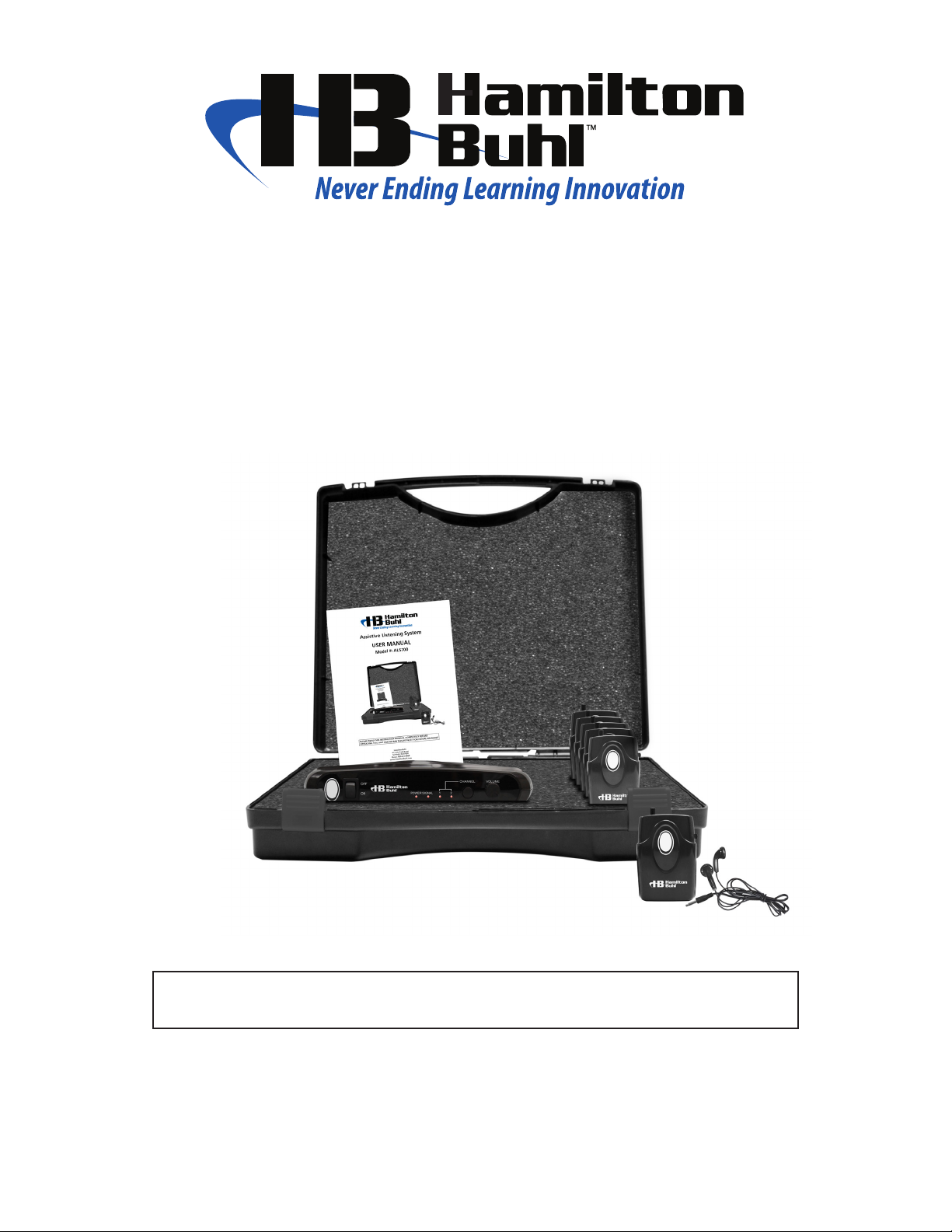
Assistive Listening System
INSTRUCTION MANUAL
MODEL #: ALS700
PLEASE READ THIS INSTRUCTION MANUAL COMPLETELY BEFORE OPERATING THIS UNIT AND RETAIN THIS
BOOKLET FOR FUTURE REFERENCE
HamiltonBuhl
80 Little Falls Road
Faireld, NJ 07004
Phone: 800-631-0868
www.HamiltonBuhl.com
Page 2

SAFE OPERATION
For safe operation please ensure to follow the instructions indicated below.
Stop operation immediately if any liquid or solid object should fall into the cabinet.
If the unit is not to be used for a long period of time, please ensure to disconnect all power sources. Remove all batteries from the receiver battery compartment, and unplug the
transmitter AC/DC adapter from the wall outlet. Do not unplug the AC/DC by pulling the
cord.
Place the transmitter only on a flat and even surface.
Place the unit in an area with proper ventilation. Do not cover the unit with a cloth or
place on a carpeted surface.
Do not use the unit in extremely hot, cold, dusty or humid environments
Placing the unit in a humid environment may cause condensation to form inside the unit.
If this were to occur, remove all power sources and allow the unit to sit at room temperature for 1-2 hours prior to usage allowing the condensation to dissipate.
COMPLIANCE WITH FCC REGULATIONS
This device complies with Part 15 of the FCC Rules. Operation is subject to the following two conditions:
(1) This device may not cause harmful interference, and
(2) This device must accept any interference received, including interference that
may cause undesired operation.
NOTE: This equipment has been tested and found to comply with the limits for a Class B digital device, pursuant to Part 15 of the FCC Rules. These limits are designed to provide reasonable protection
against harmful interference in a residential installation. This equipment generates, uses and can
radiate radio frequency energy and, if not installed and used in accordance with the instructions, may
cause harmful interference to radio communications. However, there is no guarantee that interference
will not occur in a particular installation. If this equipment does cause harmful interference to radio or
television reception, which can be determined by turning the equipment off and on, the user is encouraged to try to correct the interference by one or more of the following measures:
- Reorient or relocate the receiving antenna.
- Increase the separation between the equipment and receiver.
- Connect the equipment into an outlet on a circuit different from that to which the
receiver is connected.
- Consult the dealer or an experienced radio/TV technician for help.
Page 3
PREPARATION FOR USE
UNPACKING YOUR ASSISTIVE LISTENING SYSTEM
This system includes the following items:
• ALSM700 Dual Channel Transmitter
• ALSR700 Dual Channel Receivers
• ALSB700 Mono Earbuds
• Power Adapter
• Instruction Manual
• AAA Batteries
• Carrying Case
Rear Panel
x1
x6
x6
x1
x1
x18
x1
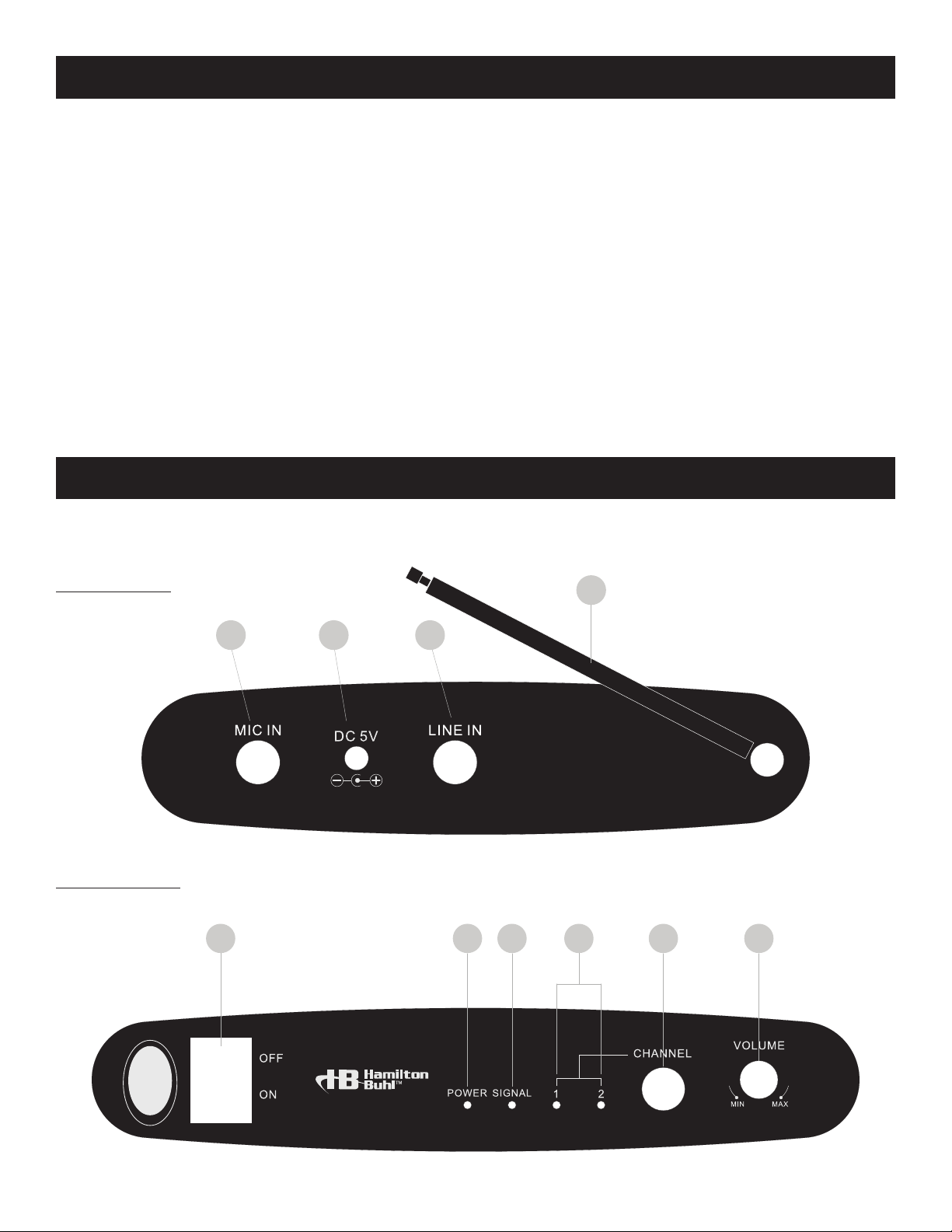
LOCATION OF CONTROLS
4
123
Front Panel
765
8
75MHz 75.5MHz
9 10
Page 4

ALSR700 RECEIVER
1511
75MHz
75.5MHz
16
17
18
13
1412
1. LINE IN JACK
2. DC 5V JACK
3. MICROPHONE INPUT
4. ANTENNA
5. POWER ON/OFF SWITCH
6. POWER INDICATOR
7. SIGNAL INDICATOR
8. CH1 & CH2 INDICATOR
9. CHANNEL SELECTION BUTTON
10. VOLUME CONTROL
11. CHANNEL SELECTION BUTTON
12. PHONE JACK
13. CH1 INDICATOR
14. CH2 INDICATOR
15. GAIN CONTROL KNOB
16. POWER ON/OFF SWITCH
17. BELT CLIP
18. BATTERY COMPARTMENT
Page 5

ALSM700 TRANSMITTER
POWERING THE TRANSMITTER
NOTE: Only use the supplied power adapter.
1. Insert the smaller end of the plug of the adapter to the back of the transmitter.
Please ensure the power switch is on OFF prior to inserting the plug.
2. Plug the large end of the adapter into an AC wall socket.
See diagram below for reference.
AC Outlet
AC Adapter Plug
3. Turn on the Power by pressing the POWER SWITCH. Once turned on, the power indicator
will illuminate.
4. The transmitter “signal” indicator will illuminate to confirm that the transmitter is
broadcasting.
5. Press the CHANNEL button on the front panel to select your desired channel.
SETTING UP THE TRANSMITTER
MICROPHONE INPUT the 1/4” MIC IN jack on the back of the transmitter is designed to accept
either dynamic or electret microphones (microphone not included)
The 1/4” LINE IN jack enables you to connect directly to any audio source (Cable not included).
See below diagram for reference.
Page 6

ALSR700 RECEIVER
FEATURES & CONTROLS
• Volume Control
• Channel Button
• CH1 & CH2 Indicators
• Power Switch
• Phone Jack
POWERING THE RECEIVER
Insert 3 x “AAA” size batteries into the battery compartment on the back of the receiver.
Please ensure to insert the batteries in the correct polarity. To preserve battery life, always turn
ALSR700 receiver off when not in use. If the sound quality becomes weak or distorted, try relocating
the transmitter or adjusting the antenna.
If the poor sound quality persists, then replace battery of the receiver. The life expectancy from a
regular alkaline battery is up to 20 hours.
BATTERY WARNINGT
Be sure that the batteries are installed correctly. Inserting the batteries at the wrong polarity may
damage the unit.
2. Use only the size and type of batteries specified.
3. Do not mix old and new batteries.
4. Do not mix alkaline, standard (carbon-zinc) or rechargeable (nickel-cadmium) batteries.
5. For better performance and longer operating time, we recommend the use of alkaline-type
batteries.
6. If the unit is not to be used for an extended period of time, remove the batteries. Old or leaking
batteries can cause damage to the unit and may void the warranty.
7. Do not try to recharge any non-rechargeable batteries not intended to be recharged; they can
overheat and rupture. (Follow battery manufacturer’s directions).
8. Do not dispose of batteries in a fire, as the batteries may leak or explode.
OPERATING THE RECEIVER
Plug the ALSB700 mono earbuds into the phone jack on top of the receiver.
Turn on the receiver with the POWER SWITCH. The CH1 indicator will light up when receiving a signal
from the ALSM700 transmitter CH1. If the receiver is not on the correct channel, the indicator will
flash, when the receiver is on the correct channel indicator light will be solid. Press the channel button on the receiver to change to the correct channel.
Use the GAIN control to adjust the volume to your desired listening level. If there is no sound, please
ensure the VOLUME on the transmitter is at a reasonable level.
Page 7

OPTIMAL PERFORMANCET
For an optimal performance, please ensure the following:
1) The antenna is fully extended
2) There are no large structures/obstacles blocking the line of sight between the
transmitter and the receiver.
3) The receivers have new batteries
4) The usage of the ALS700 is done in an environment of low interference
(Areas with multiple FM transmissions can possibly increase interference)
SPECIFICATIONS
OVERALL ALS700 SYSTEM PERFORMANCE
Frequency Response ………………………100Hz – 8KHz
Signal to Noise Ratio ……………………...41dB
Total Harmonic Distortion …………………< 0.5%
RF Carrier Frequencies …………………….75.5MHz (Channel 1) — 75.9MHz (Channel 2)
Frequency Stability ……………………….. > 0.005%
Modulation ……………………………….FM +75KHz max.
Operating Range ………………………….Up to150 feet line of sight
ALSM700 TRANSMITTER
Mic Input ………………………………....Connector: 1/4” Phone jack Impedance: unbalanced
Line Input ………………………………...Connector: 1/4” Phone jack Impedance: 100K unbalanced
Power Output …………………………….13dBm
Controls …………………………………..Power On/Off, Volume Adjust, Channel Select
Indicators ………………………………....Power On LED, Signal LED, CH1 LED, CH2 LED.
Antenna …………………………………..Permanently mounted telescope
Power Requirement………………………..5V DC, regulated @200mA, Adapter provided
Dimensions ……………………………….9(L) x 6.07(W) x 1.97(H) Inches
Weight ……………………………………TBD
ALSM700 TRANSMITTER
Mic Input ………………………………....Connector: 1/4” Phone jack Impedance: unbalanced
Line Input ………………………………...Connector: 1/4” Phone jack Impedance: 100K unbalanced
Power Output ……………………………..13dBm
Controls …………………………………..Power On/Off, Volume Adjust, Channel Select
Indicators …………………………………Power On LED, Signal LED, CH1 LED, CH2 LED.
Antenna …………………………………..Permanently mounted telescope
Power Requirement………………………..5V DC, regulated @200mA, Adapter provided
Dimensions ……………………………… 9(L) x 6.07(W) x 1.97(H) Inches
Weight ……………………………………TBD
Page 8

Product Registration Instruction
Visit: www.HamiltonBuhl.com
1. Click on Customer Support
2. Click on Product Registration Form
3. Please ll out all eld marked with * to register your product
Our Mission:
Since our founding in 1993, HamiltonBuhl continues to evolve as a leader in technology
products for education and industry. Our products are embraced by educators, corporate
trainers, presenters, government agencies and hospitals for their daily presentation, from
classrooms to the boardroom.
80 Little Falls Road, Faireld, NJ 07004
 Loading...