

Page 1
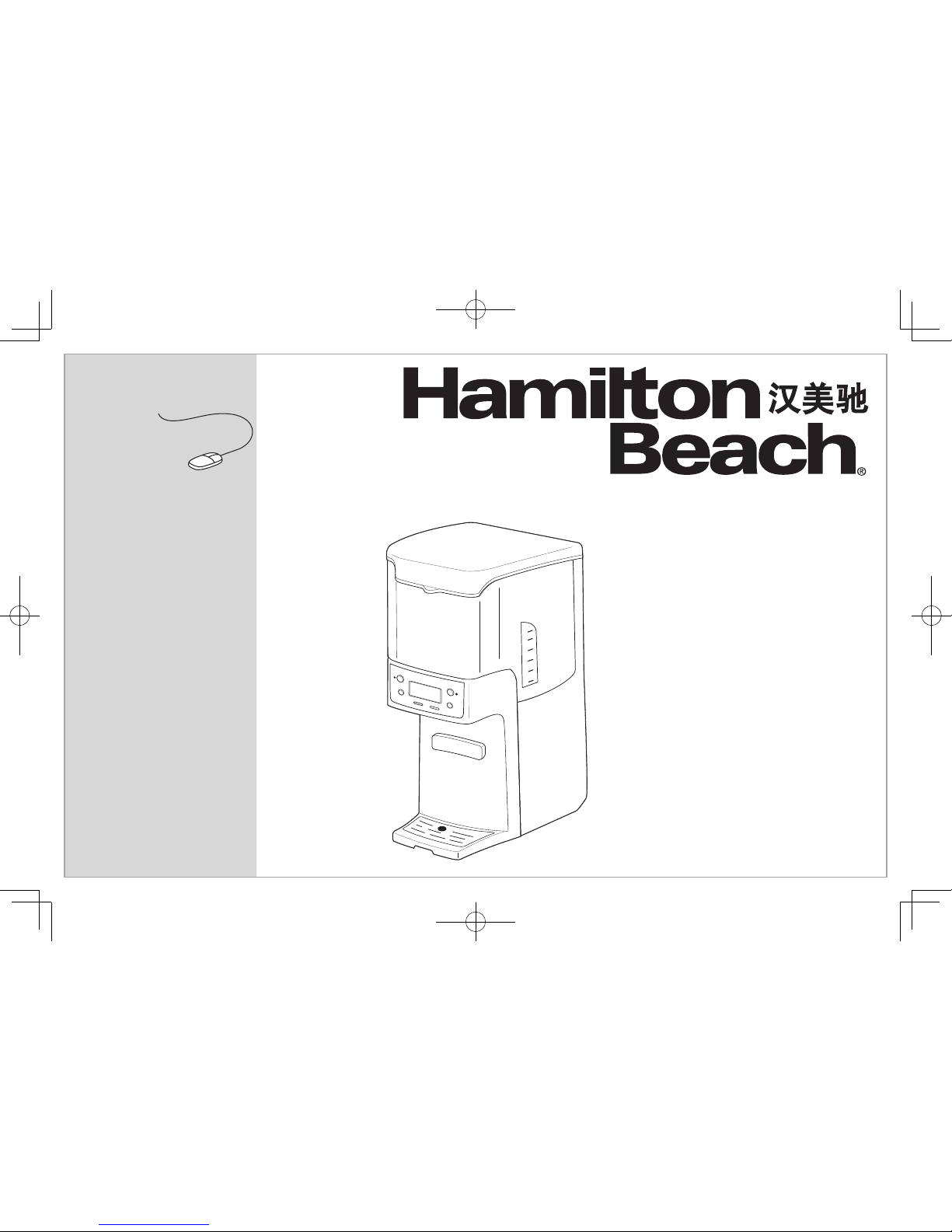
BrewStation
®
Coffee Maker
咖啡机
English ...................... 2
简体中文 ................. 11
READ BEFORE USE
使用前阅读
Visit www.hamiltonbeach.cn for our
complete line of products and Use and
Care Guides – as well as
delicious recipes, tips, and
to register your product online!
有关我们所有系列产品的,使用与维护
指南 – 以及美味食谱、生活小贴士和
产品在线注册的更多信息,请访问
www.hamiltonbeach.cn
。
Questions?
Please call us – our friendly
associates are ready to help.
China: 400-852-2655
使用本设备前,我们建议您仔细阅读这
些说明。
如有疑问?
请致电我们,我们的团队
随时准备为您提供帮助。
中国大陆免费客服热线:
400-852-2655
官方网站:www.hamiltonbeach.cn
保鲜即饮咖啡机
型号:48465-CN
48467-CN
此说明书中图片仅供参考,
产品以实物为准。
Page 2

2
IMPORTANT SAFEGUARDS
1. Read all instructions.
2. This appliance is intended to be used in household and simi-
lar applications such as: staff kitchen areas in shops, offices,
and other working environments; farm houses; by clients in
hotels, motels, and other residential type environments; bed
and breakfast-type environments.
3. Do not touch hot surfaces. Use handles or knobs. Care must
be taken, as burns can occur from touching hot parts or from
spilled, hot liquid.
4. To protect against electric shock, do not place cord, plug, or
BrewStation
®
in water or other liquid.
5. This appliance can be used by children aged from 8 years and
above and persons with reduced physical, sensory, or mental
capabilities or lack of experience and knowledge if they have
been given supervision or instruction concerning use of the
appliance in a safe way and understand the hazards involved.
Children shall not play with the appliance. Cleaning and user
maintenance shall not be made by children with out supervision.
6. Close supervision is necessary when any appliance is used by
or near children.
7. Unplug from outlet when either the BrewStation
®
or clock is
not in use and before cleaning. Allow to cool before putting
on or taking off parts and before cleaning the appliance.
8. Scalding may occur if the lid is lifted during the brewing cycle.
Do not open lid until coffeemaker has cooled completely.
9. BrewStation
®
must be operated on a flat surface away from
the edge of counter to prevent accidental tipping.
10. Do not operate any appliance with a damaged cord or plug,
or after the appliance malfunctions or is dropped or damaged
in any manner. Call our toll-free customer service number for
information on examination, repair, or adjustment.
11. The use of accessory attachments not recommended by the
appliance manufacturer may cause injuries.
12. Do not use outdoors.
13. Do not let cord hang over edge of table or counter or touch
hot surfaces, including stove.
14. The coffee tank is designed for use with this BrewStation
®
. It
must never be used on a range top or in a microwave oven.
15. Do not place BrewStation
®
on or near a hot gas or electric
burner or in a heated oven.
16. To disconnect BrewStation
®
, turn controls to OFF, then
remove plug from wall outlet.
17. WARNING! To reduce the risk of fire or electric shock,
do not remove the bottom cover. No user-serviceable parts
are inside. Repair should be done by authorized service
personnel only.
18. Do not use appliance for other than intended use.
19. CAUTION: In order to avoid a hazard due to inadvertent reset-
ting of the thermal cut-out, this appliance must not be supplied through an external switching device, such as a timer, or
connected to a circuit that is regularly switched on and off by
the utility.
When using electrical appliances, basic safety precautions should always be followed to reduce the risk of fire, electric shock, and/or
injury to persons, including the following:
SAVE THESE INSTRUCTIONS!
Page 3
3
OTHER CONSUMER SAFETY INFORMATION
This appliance is intended for household use only.
The length of the cord used on this appliance was selected to
reduce the hazards of becoming tangled in, or tripping over a
longer cord. If a longer cord is necessary, an approved extension
cord may be used. The electrical rating of the extension cord
must be equal to or greater than the rating of the BrewStation
®
.
Care must be taken to arrange the extension cord so that it will
not drape over the countertop or tabletop where it can be pulled
on by children or accidentally tripped over.
To avoid an electrical circuit overload, do not use another high- wattage
appliance on the same circuit with your BrewStation
®
.
IMPORTANT
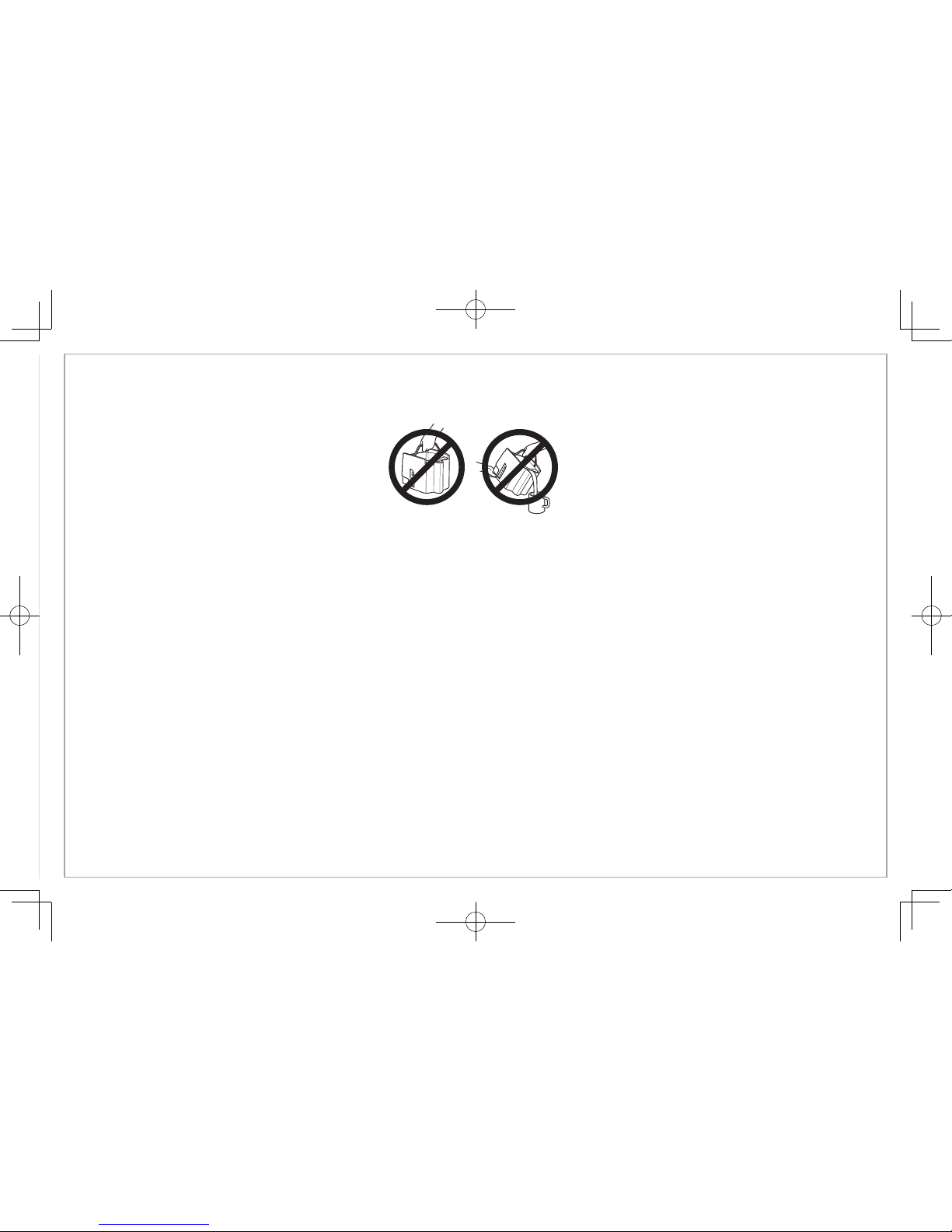
Never use coffee tank to pour hot coffee or carry hot coffee.
Handle coffee tank when it holds only cold water.
Additional Information
• If overflow occurs: Let unit, coffee, and grounds cool completely before attempting any cleanup.
• Use only brand-name, high-quality filters.
• Use only 1 Tablespoon (15 ml) of ground coffee for each cup of water.
• Use coffeemaker cleaner to prevent hard water deposits that affect coffeemaker performance. Clean monthly.
• Do not clean coffee tank in dishwasher.
• Read instructions before using.
Page 4
4
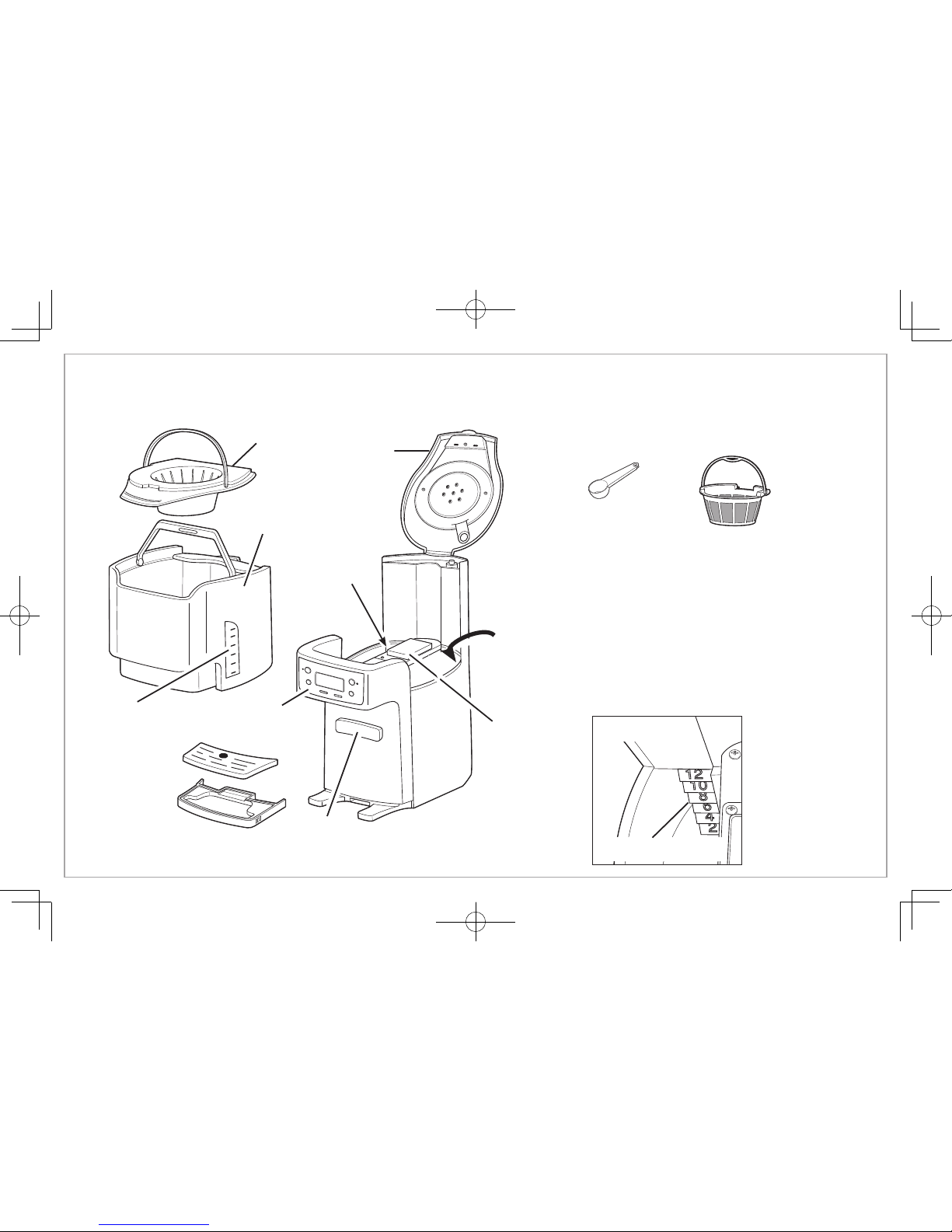
Parts and Features
Filter Basket
Coffee
Tank
Coffee Level
Guide
Coffee
Dispenser Bar
Drip Tray
Water Level Guide
(see Fig. 1)
Lid
Control Panel
and Display
Coffee
Scoop
Water
Reservoir
Keep
Warm
Plate
Water Level Guide
Fig. 1
Gold Tone
Permanent
Coffee Filter
Page 5
5
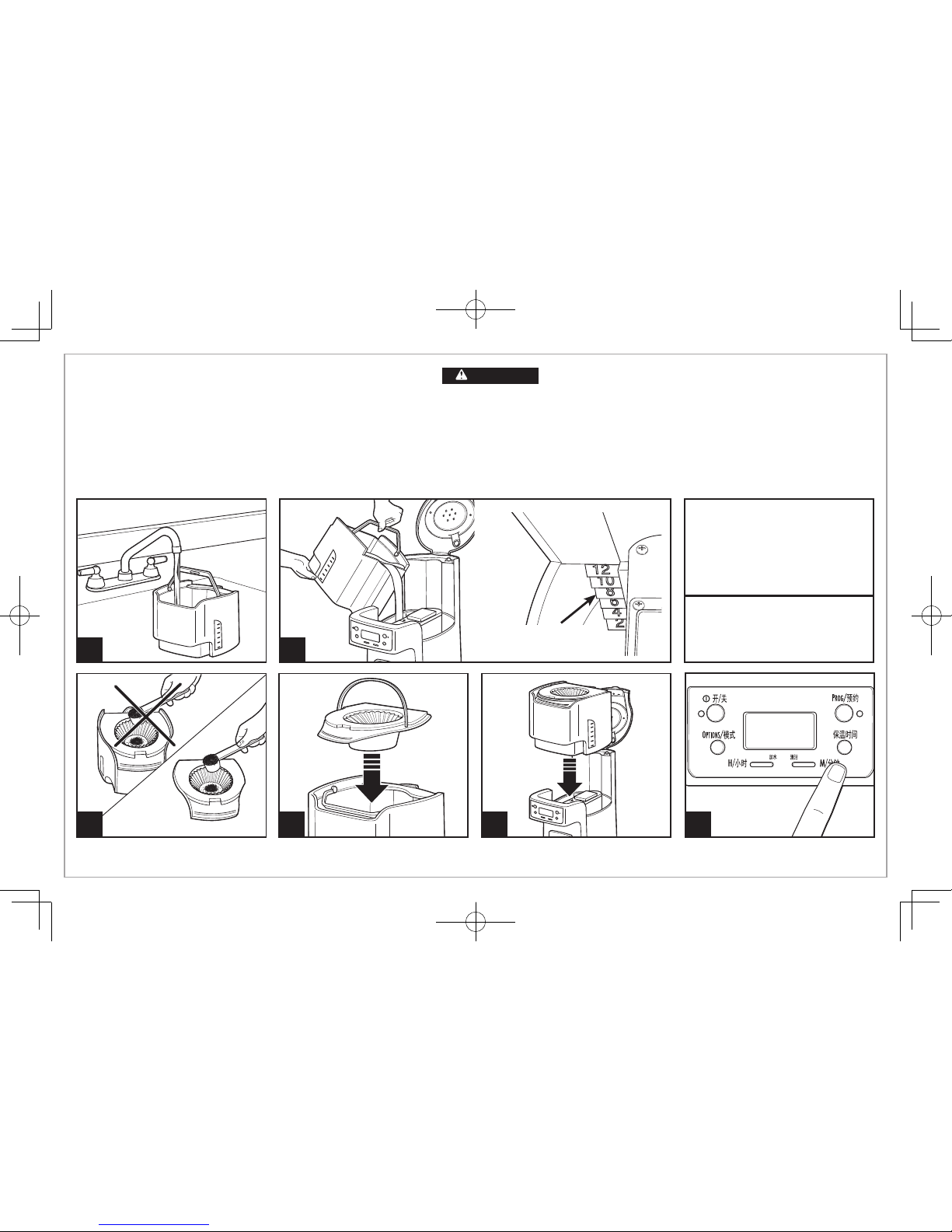
How To Make Coffee
1 2
4 5
Avoid getting coffee grounds in any
other areas of the BrewStation
®
.
Before first use:
Wash coffee tank, filter basket, and drip tray
in hot, soapy water. NEVER put the coffee tank in dishwasher.
BrewStation
®
can be programmed to automatically shut off
in 0 (for Iced Coffee), 1, 2, 3, or 4 hours as desired. Default is
4 hours for automatic shutoff.
Maximum Amount of Automatic
Drip Coffee to Use in BrewStation
®
Coffee Scoop Tablespoons
Regular 12 12
Decaf 12 12
Normal Amount of Coffee Per Cup
1 scoop or 1 level tablespoon per cup
3
Burn Hazard.
•
Never use coffee tank to pour or carry hot coffee.
• Handle coffee tank only when holding cold water for filling water reservoir
and to clean tank after BrewStation
®
• If BrewStation® overflows, unplug unit. Allow unit, coffee, and grounds to cool
before cleaning unit, coffee, or grounds.
WARNING
Water Level Guide
(inside reservoir)
6
Set KEEP WARM HOURS to 1, 2, 3, or
4. The 0 setting is for iced coffee.
Page 6
6
8
How To Make Coffee
(cont.)
7
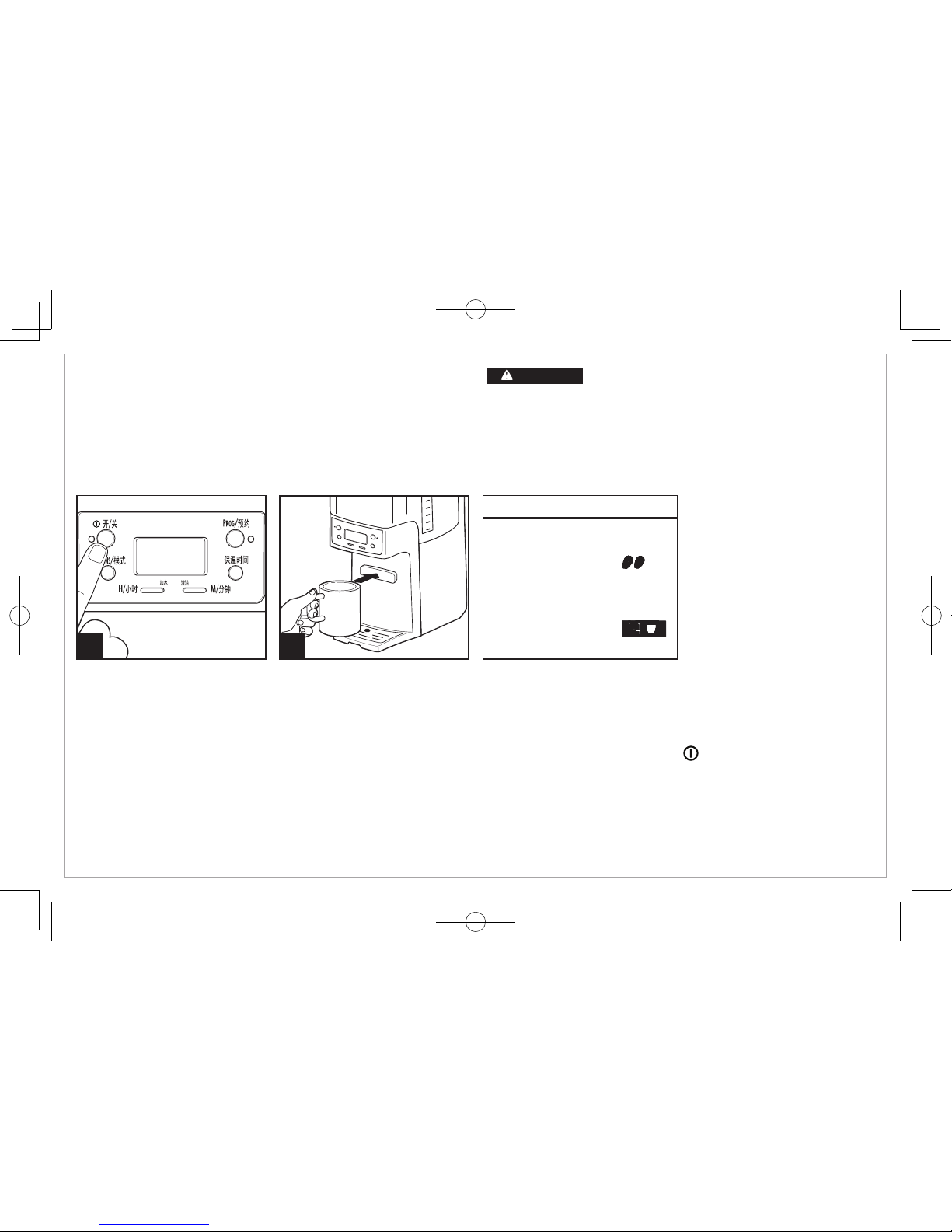
Brew Options
NOTE: BOLD and 1–4 CUPS modes will require additional time to
complete a brewing cycle. A Brew Option must be selected prior
to pressing the ON button. The setting cannot be changed during/
in brew mode. If a Brew Option is not selected, the coffeemaker will
automatically brew on the regular/default setting.
TO REHEAT COFFEE: Press and hold (ON/OFF) button for 3 seconds.
This will reset the timer and keep coffee warm for selected number
of hours (1, 2, 3, or 4).
Coffeemaker will beep one time
when brewing is complete.
Burn Hazard.
•
Never use coffee tank to pour or carry hot coffee.
• Handle coffee tank only when holding cold water for filling water
reservoir and to clean tank after BrewStation
®
• If BrewStation® overflows, unplug unit. Allow unit, coffee, and grounds to
cool before cleaning unit, coffee, or grounds.
WARNING
BOLD
Enhanced full/strong-flavored coffee
Press Brew Mode button until
is
displayed
1-4 CUPS
When brewing 1–4 cups of coffee
Press Brew Mode button until
is displayed
Page 7
7
1 2
6 7
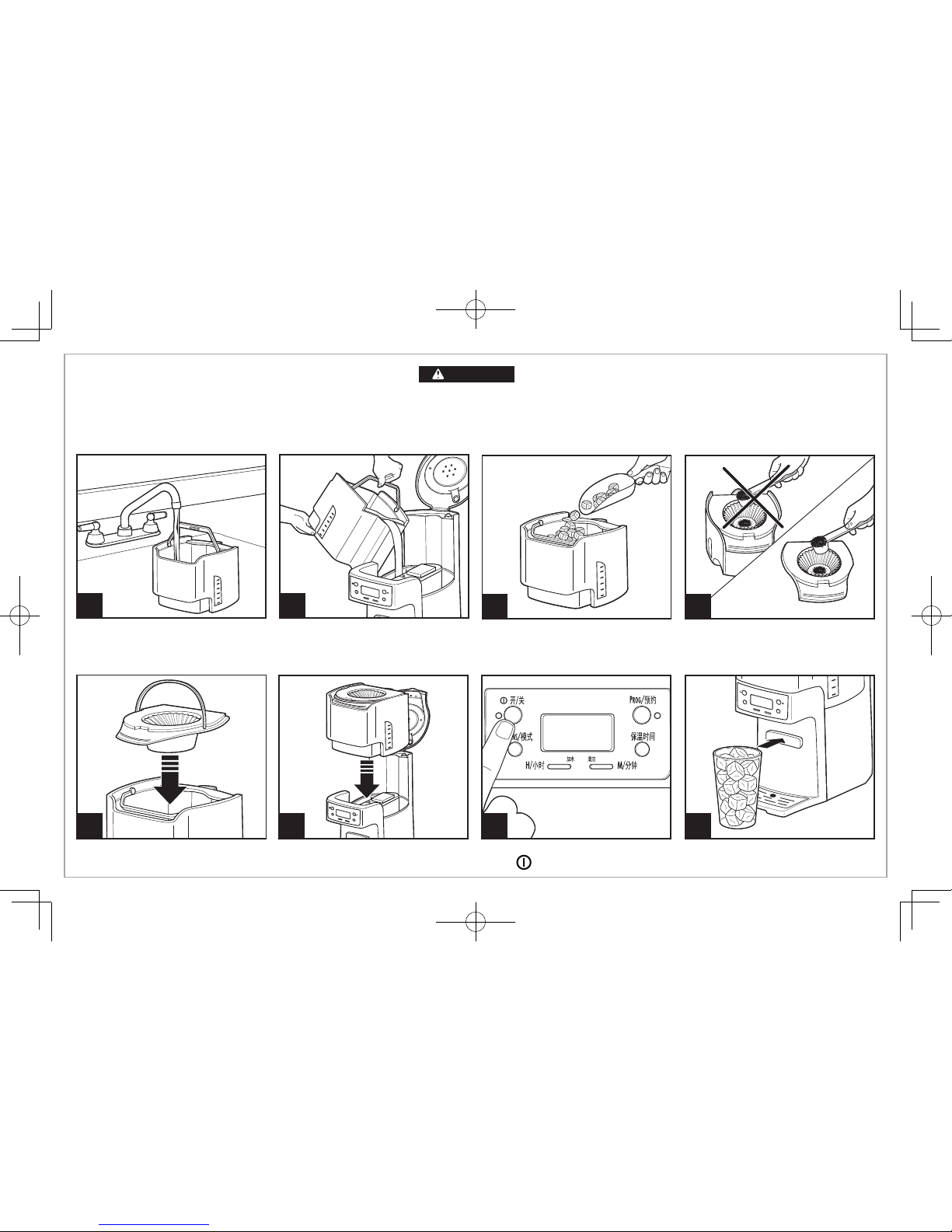
Fill coffee tank with water. Do not fill
beyond the 6-cup line when making
iced coffee.
Fill coffee tank with ice to the
10 CUP marking line.
Set KEEP WARM HOURS to 0.
Press
.
To Make Iced Coffee
8
43
Brew double-strength coffee for
iced coffee. Add 2 scoops or
2 level tablespoons of ground coffee
per cup (up to 12 scoops).
5
Burn Hazard.
If BrewStation
®
overflows, unplug unit. Allow unit, coffee, and grounds to cool
before cleaning unit, coffee, or grounds.
WARNING
Page 8
8
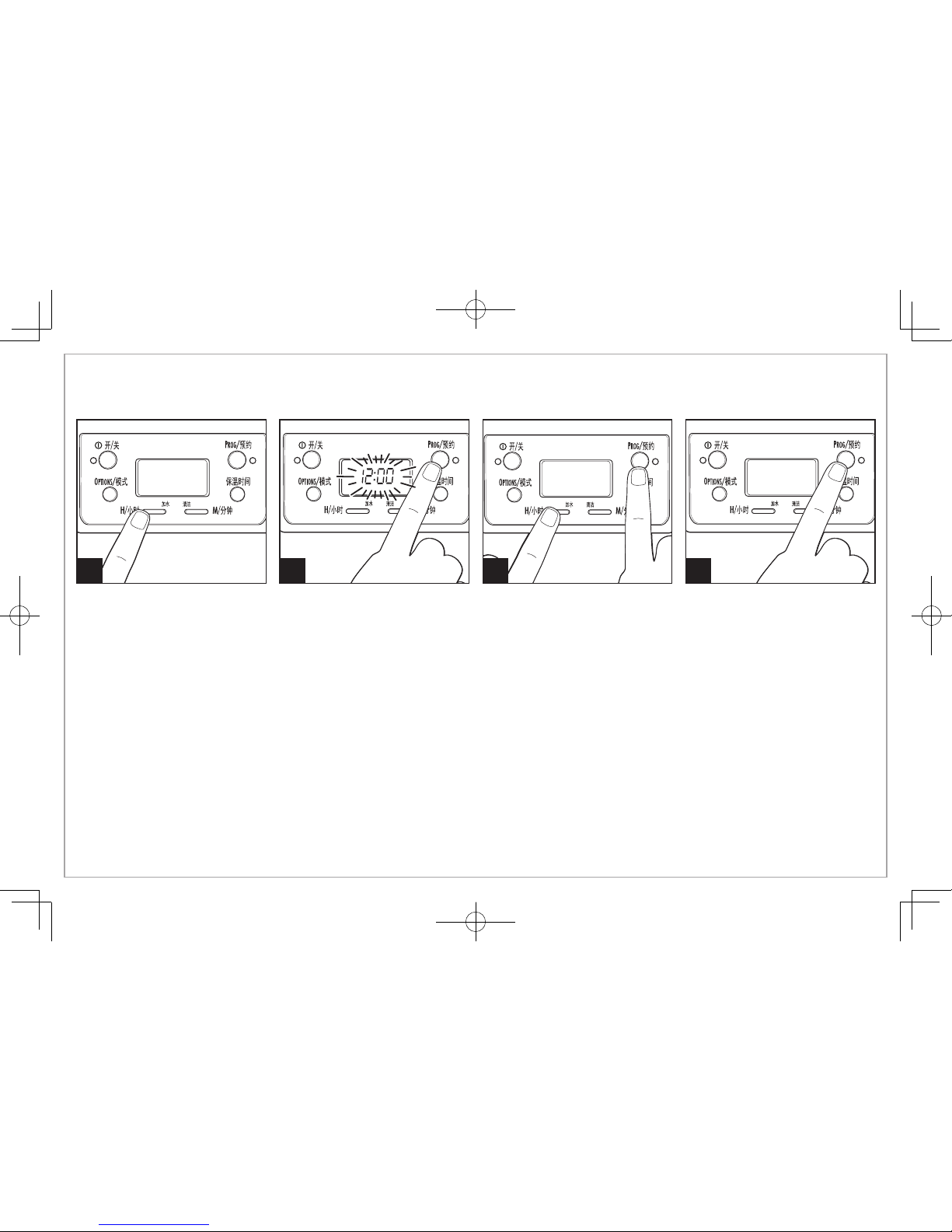
Programming
1 2 3 4
To set clock: Press H and then M.
NOTE: Clock time must be set for
programming function to work.
To program auto brew: Press and
hold PROG until clock flashes.
Continue holding
PROG;
then
press H and M until the desired
brewing start time is reached.
Press and release
PROG
to
activate automatic brewing.
A green light will signal that the
unit is in program mode.
Page 9
9
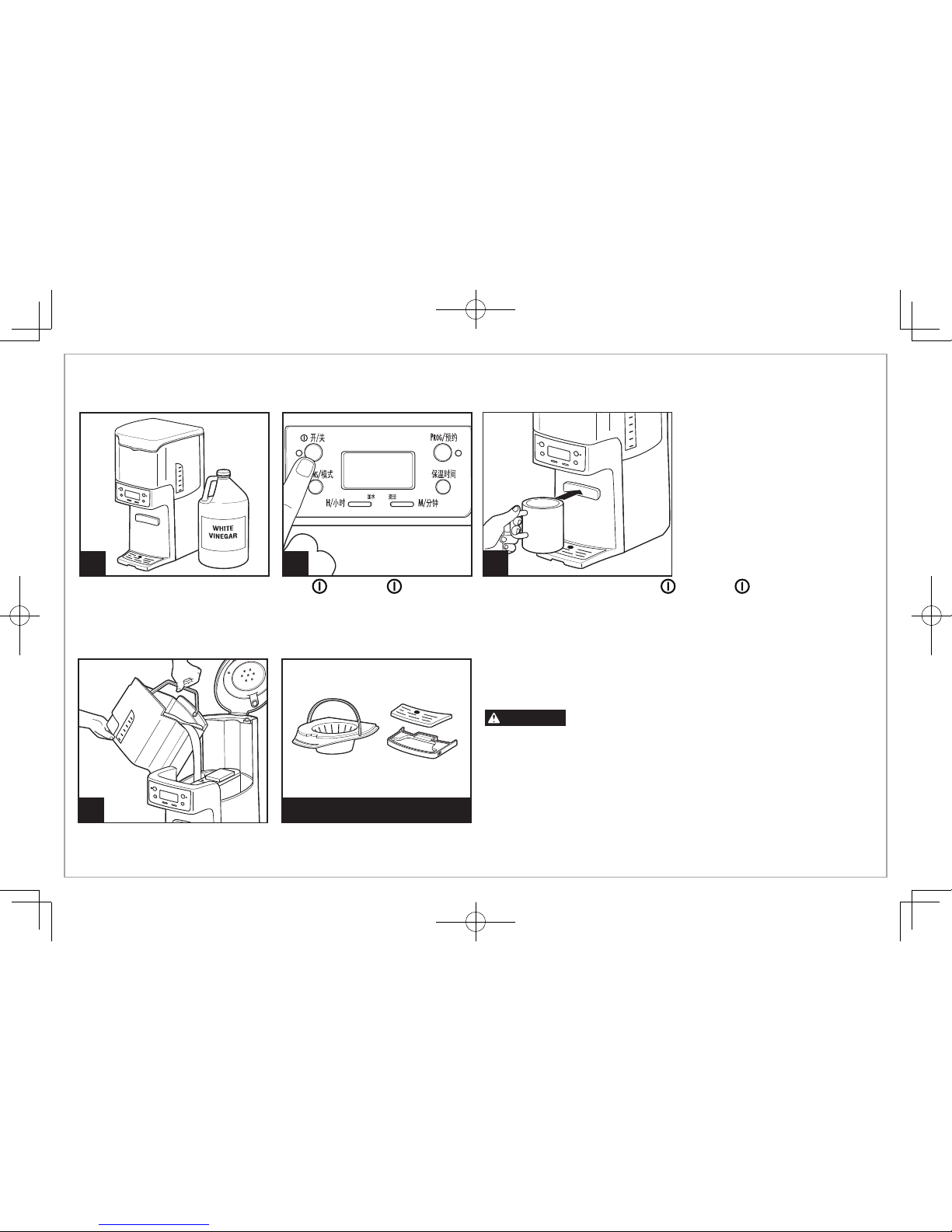
Cleaning with Vinegar
1 2
Pour 1 pint (2 cups/500 ml)
vinegar into water reservoir.
Press (ON). Turn (OFF) after 20 seconds and wait 30 minutes. Press (ON). Turn (OFF)
when finished. When cool, dispense several cups before emptying and rinsing reservoir. NOTE: Coffeemaker
will remind you it is time for cleaning in two ways:
• Built-in cycle timer—Every 30 cycles, CLEAN will flash in display and stay illuminated for 2 cycles.
• Built-in residue sensor—CLEAN will appear in display when unit senses residue buildup and remain illuminated until the unit has been cleaned.
Clean BrewStation® at least once a month (once a week for areas with hard water).
4
Run 2–3 more brew cycles with
CLEAN WATER only. Allow to cool
between cycles.
3
General Cleaning Instructions
Burn Hazard. Do not immerse cord, plug, or coffeemaker in any
liquid.
Inside of coffeemaker: Follow steps 1–5 in “Cleaning with Vinegar.”
Filter basket and coffee tank: Remove the filter basket and coffee tank and wash
by hand with warm, soapy water. Filter basket may also be cleaned in top rack of
dishwasher. Clean filter basket often.
Outside of coffeemaker: Wipe outside with a soft cloth and warm, soapy water.
Do not use abrasive cleaners, as they will scratch the finish of the product.
DISHWASHER-SAFE
WARNING
Page 10
PROBLEM
Coffee leaks from dispenser.
CLEAN appears in display.
Coffee tastes bad.
Coffee not brewing or stops
brewing/unit will not turn on.
Coffee brews slowly.
Coffee overflows basket.
Unit beeps continuously/
will not brew and/or POUR
WATER appears in display.
Coffee is cold
when dispensed.
PROBABLE CAUSE
• Coffee grounds trapped in coffee tank dispensing mechanism under seal in coffee tank.
See “Cleaning with Vinegar.”
• This is a reminder to clean coffeemaker. See “Cleaning with Vinegar.”
• Coffeemaker needs cleaning.
• Coffee ground too coarsely or too finely. Set coffee grinder to automatic drip grind.
• Coffee-to-water ratio unbalanced. Adjust for personal preference.
• Poor water quality. Use water filter or bottled water to make coffee.
• Mineral deposits have built up. Clean the coffeemaker following “Cleaning with Vinegar.”
• Water reservoir is empty.
• Unit is unplugged.
• Power outage or power surge. If surge, unplug; then plug back in.
• Coffeemaker needs cleaning. Clean at least every 30 days to maintain proper performance.
• Coffeemaker is in the 1–4 CUPS or BOLD modes. Press Brew Mode button until no lights appear.
• Excessive amounts of coffee grounds. See Table on page 5.
• Coffee ground too finely. Set coffee grinder to automatic drip grind.
• More than one paper filter in filter basket. Poor quality paper filter or wrong size paper filter.
• No water in reservoir. Transfer water from coffee tank to reservoir.
• Selected Keep Warm Hours have elapsed and coffeemaker has automatically shut off.
See “To Reheat Coffee” instructions on page 6, or brew new cycle.
Troubleshooting
10
Page 11
11
重要安全说明
1. 阅读所有相关说明。
2. 本电器预定用于家用及类似应用场合,例如:办公室、商铺及其
它工作环境的员工厨房区;农舍;酒店、汽车旅馆和其它居住型
环境的旅客使用;以及住宿早餐型环境场合。
3. 请勿接触发热表面。应使用手柄或旋钮。触摸烫热部件或溢出的
热液体会导致灼伤,所以必须小心。
4. 为防止触电,请勿将电源线、插头或 BrewStation
®
咖啡机放入水
或其他液体中。
5. 本电器可供8岁及以上儿童使用,行动不便者、精神或智商缺陷
者、缺少经验和常识者使用时,须在监督或指导下使用,以确保
安全。请勿将本电器用于儿童玩耍。在未受监督的情况下,儿童
不可以执行清洁和用户维护工作。
6. 当电器由儿童使用,或在其附近使用时,应予以密切监护。
7. BrewStation
®
咖啡机或时钟未使用时,以及清洁前,请从插座上
拔下电源。安装或拆解部件和清洁该电器前,请先将其冷却。
8. 如果冲泡循
环过程中打开盖子,可能会被烫伤。请勿打开盖子,
除非咖啡机已完全冷却。
9. BrewStation
®
咖啡机必须在远离柜台边缘的平面上操作,以防意
外倾翻。
10. 在下列情况下,请勿使用电器:电源线或插头破损、电器出现故
障、电器曾跌落或已经出现任何形式的损坏。请拨打我们的免费
售后服务电话,咨询有关电器检查、修理或调整的相关信息,并
由相关的专业维修人员进行更换、维修。
11. 使用非电器制造商推荐的配套附件可能会导致受伤。
12. 请勿户外使用。
13. 请勿将电源线搭置在桌台边缘,或与发热表面接触,包括电炉。
14. 咖啡桶设计为与此 BrewStation
®
咖啡机配合使用。切勿用在炉
头上或微波炉中。
15. 请勿将 BrewStation
®
咖啡机放置或靠近燃气、电炉、热烤箱。
16. 若要断开 BrewStation
®
咖啡机,请关闭控制装置;然后从壁装
电源插座上拔下插头。
17. 警告!为减少火灾或触电危险,请勿取下底盖。内部无用户可使
用的
部件。应仅可由授权的维修人员进行修理。如果电源软线损
坏,为了避免危险,必须由制造商、其维修部或类似部门的专业
人员更换。
18. 请勿将电器用于非预期用途。
19.
小心:为了避免由于热熔断器的疏忽重置导致的危险,本电器不能
在外接定时器或独立的遥控控制系统的方式下运行。
当使用电器时,应始终遵守基本的安全防范措施,以减少火灾、触电和/或人身伤害的风险,包括以下内容:
请妥善保管这些说明!
Page 12
12
其他用户安全信息
此电器建议于家庭使用。
此电器电源线的长度设计考虑减少长电源线缠绕或绊倒的危险。倘
若需要更长的电源线,可使用有认证的电源延长线。电源延长线的
额定功率必须等于或大于此电器的额定功率。电源延长线使用时需
特别注意,以防将其搭设在工作台或桌台上,造成儿童扯拉或绊倒
他人。
为防电路过载,请勿在此电器的同一电路上使用其他高功率电器。
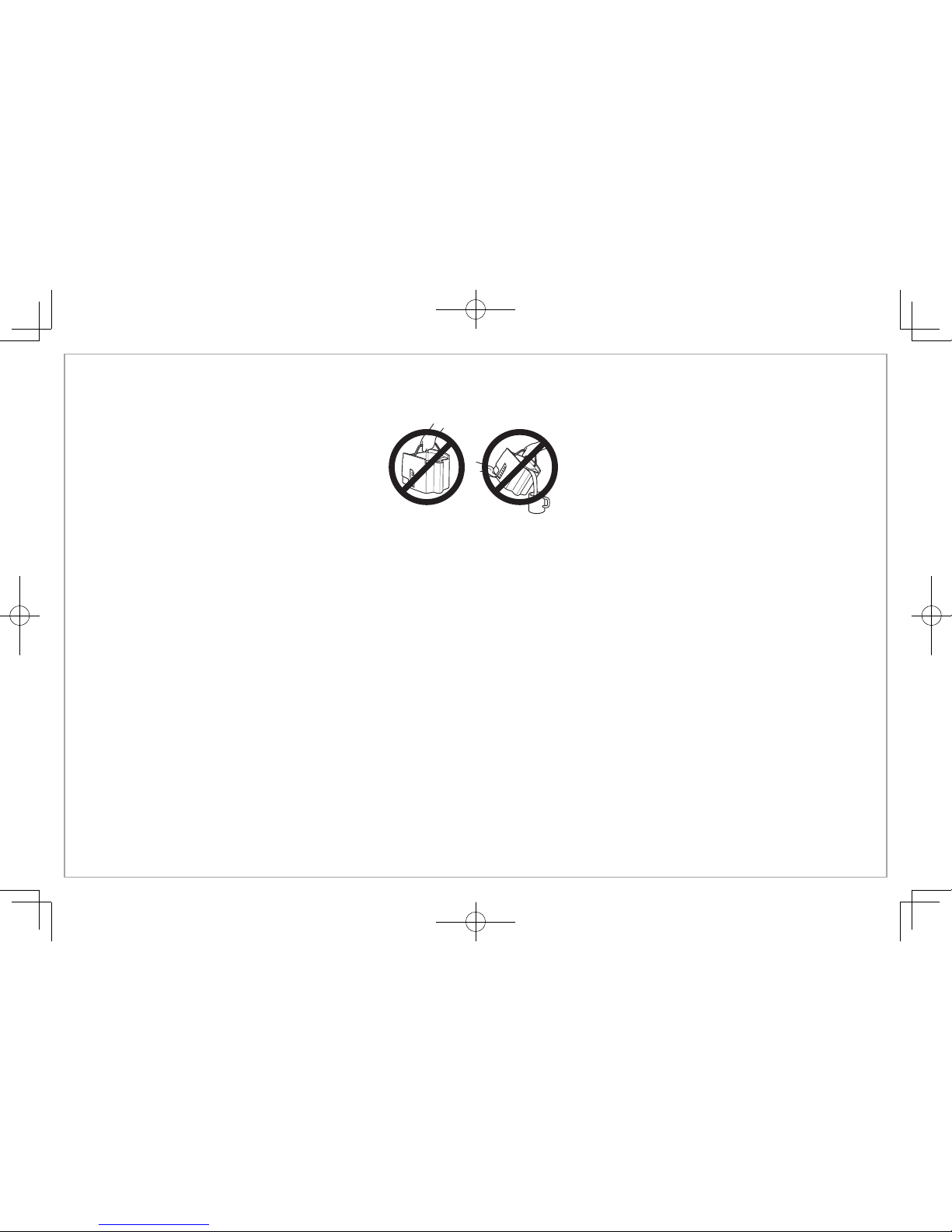
重要
切勿使用咖啡桶倒出或承装热咖啡。
仅在咖啡桶承装冷水时,才可处理。
附加信息
• 如果出现溢出:试图进行任何清理前,让咖啡机、咖啡和咖啡粉完全冷却。
• 仅使用有品牌的高品质过滤器。
• 一杯水对应一汤匙(15毫升)咖啡粉。
• 使用咖啡机清洁剂清洗咖啡机,以防硬质水沉淀,影响咖啡机性能。每月清洁一次。
• 切勿将咖啡桶放在洗碗机中清洗。
• 使用前阅读说明。
Page 13
13
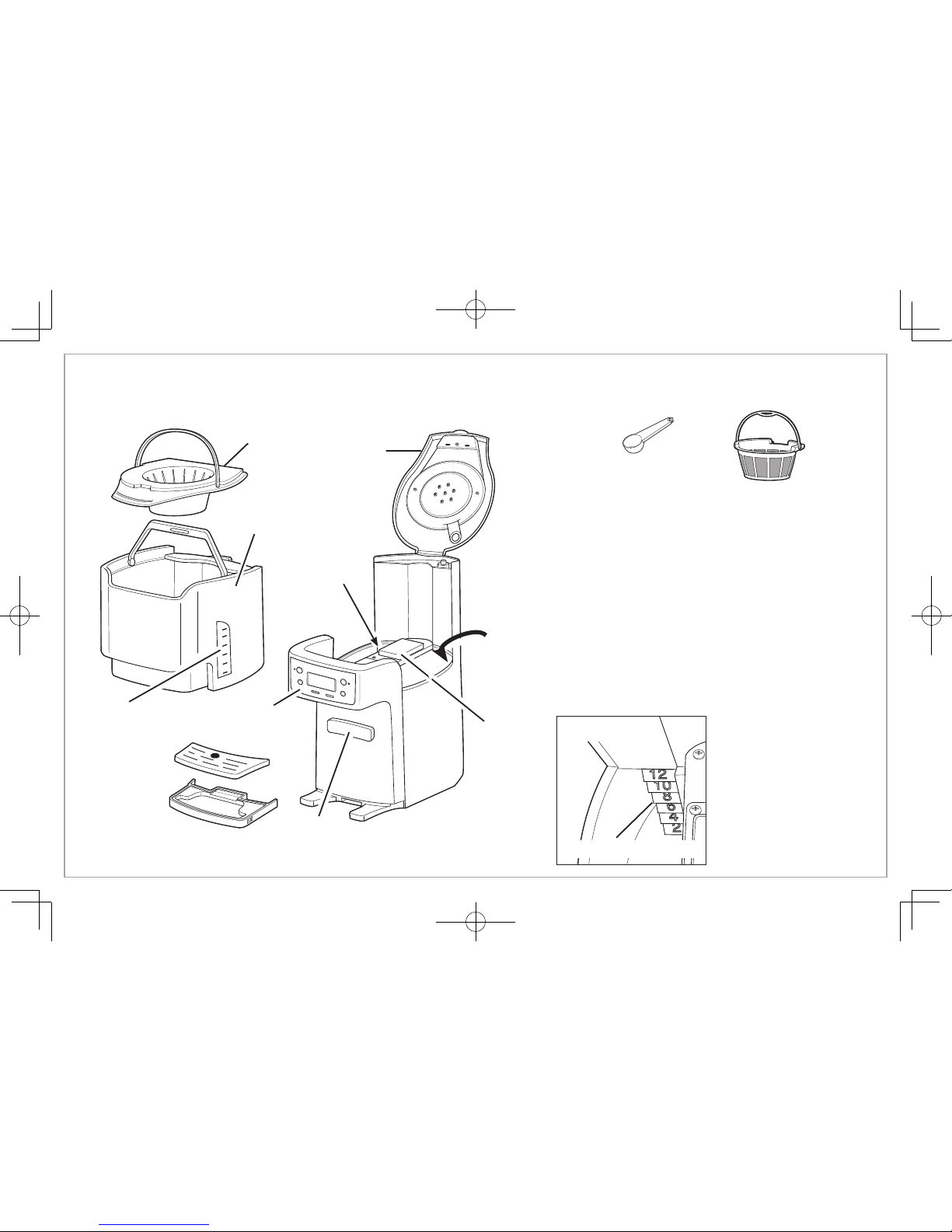
部件和功能
滤篮
咖啡桶
咖啡容量
指示
咖啡
出水按钮
承滴盘
水位指示
(见图1)
盖子
控制面板和
显示屏
咖啡勺
水箱
保温板
水位指示
图1
金色永久
咖啡过滤器
Page 14
14
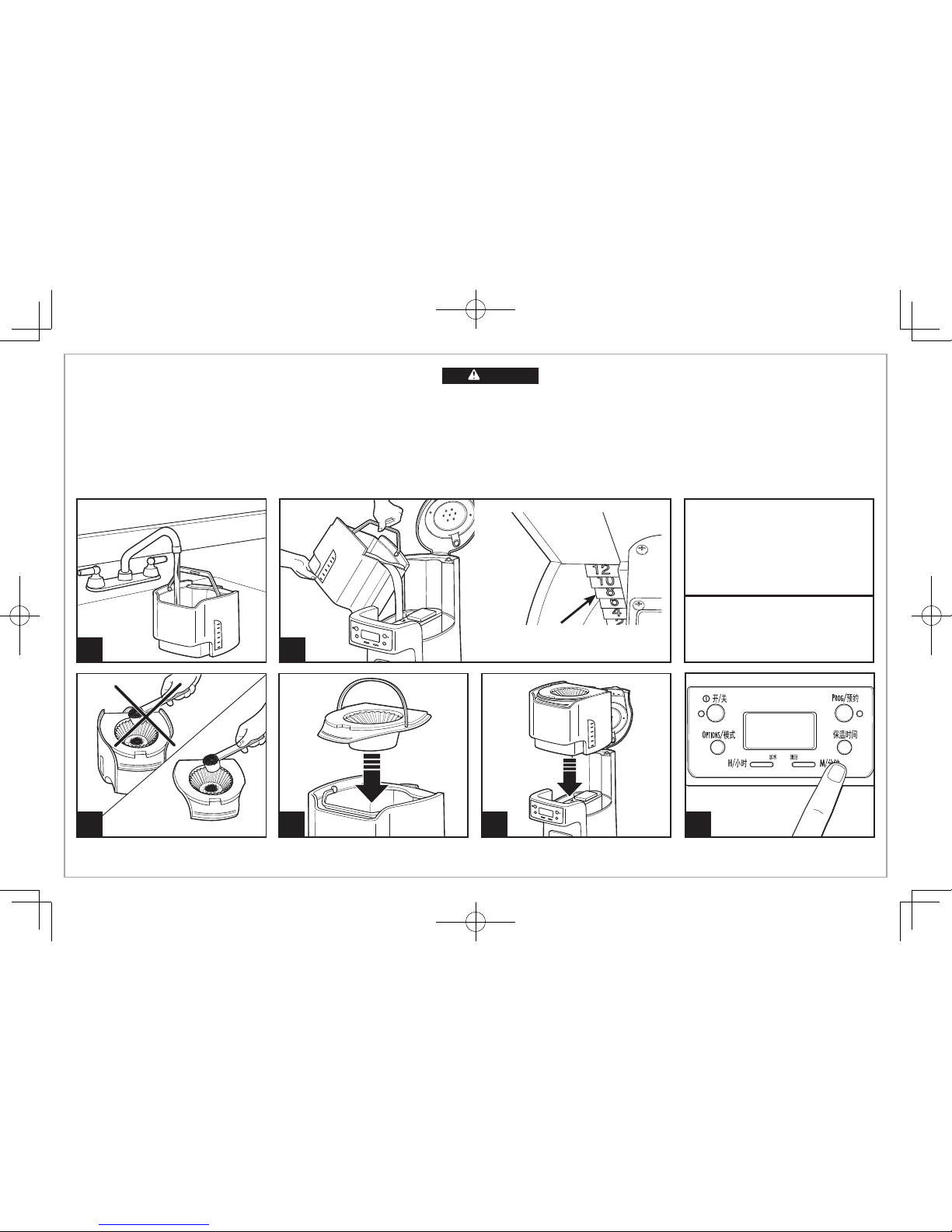
如何冲咖啡
1 2
4 5
避免咖啡粉粘在 BrewStation®
咖啡机的任何其他区域中。
首次使用前:
将咖啡桶、滤篮和承滴盘放入带清洁剂的温水中清
洗。切勿将咖啡桶放在洗碗机中清洗。可将 BrewStation
®
咖啡机
设置为自动在 0(适用于冰咖啡)、1、2、3 或 4 小时后关闭。默
认值是 4 小时后自动关器。
使用 BrewStation® 咖啡机
自动冲泡的最大量
咖啡 勺 汤匙
普通咖啡 12 12
无因咖啡 12 12
每杯咖啡正常量
每杯1勺或1平汤匙
3
烫伤危险。
• 切勿使用咖啡桶倒出或承装热咖啡。
• 仅在将冷水注入水槽和清洁咖啡桶时,才可处理咖啡桶。
• 如果 BrewStation
®
咖啡机溢出,请拔下插头。清洁咖啡机、咖啡或咖啡粉前,
让咖啡机、咖啡和咖啡粉冷却。
警告
水位指示
(水箱内)
6
将保温时间设置为 1、2、3 或 4 个
小时。0 设置适用于冰咖啡。
Page 15
8
如何冲咖啡
(续)
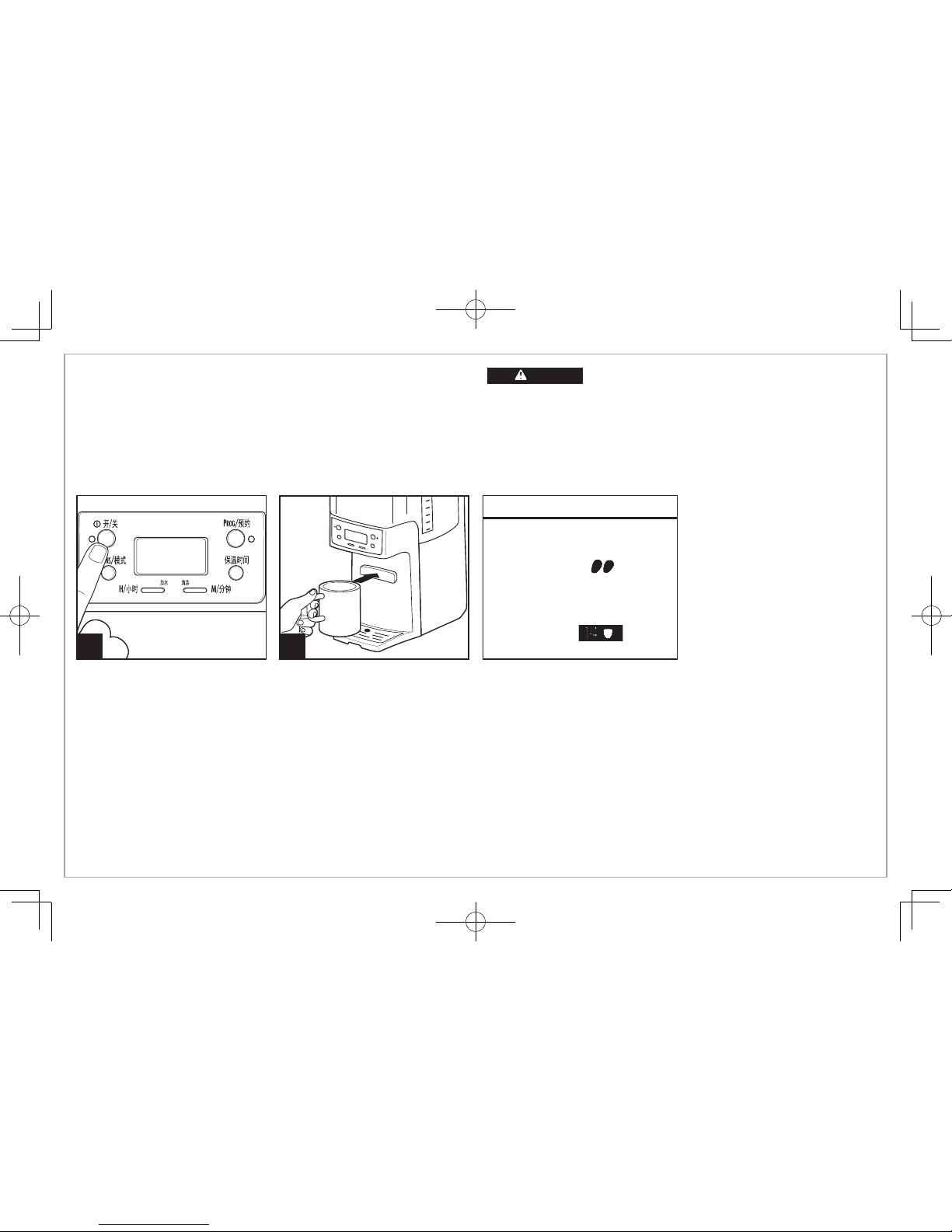
冲泡选项
注意:浓咖啡和 1–4 杯模式下,完成一个冲泡循环还需要一些附加时
间。必须在按“开”按钮前选择“Options/模式”。冲泡过程中不能更改
设置。如果未选择“Options/模式”,咖啡机将自动根据定期/默认设置
进行冲泡。
再加热咖啡:按住“开/关”按钮 3 秒钟。将复位定时器,咖啡保温时间为选择的
小时数(1、2、3 或 4)。
冲泡完成后,咖啡机蜂鸣一次。
烫伤危险。
•
切勿使用咖啡桶倒出或承装热咖啡。
•
BrewStation® 咖啡机完成操作后,仅在将冷水注入水箱清洁时才
可处理咖啡桶。
• 如果 BrewStation® 咖啡机溢出,请拔下插头。清洁咖啡机、咖啡或
咖啡粉前,让咖啡机、咖啡和咖啡粉冷却。
警告
浓咖啡
对于浓咖啡/浓香咖啡,按冲泡模
式按钮,直到显示
。
1–4 杯模式
冲泡 1–4 杯咖啡时,按冲泡模式
按钮,直到显示
。
7
15
Page 16
16
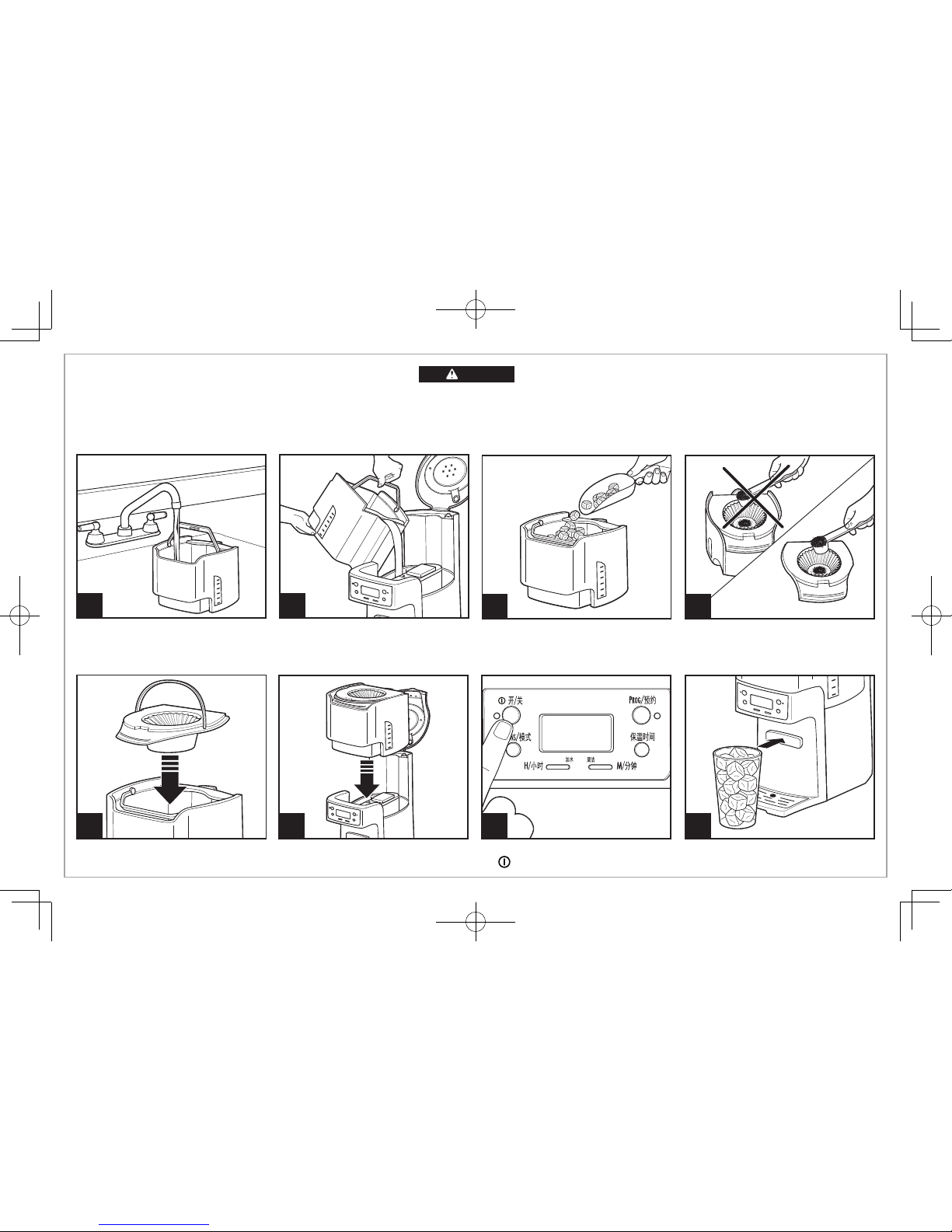
1 2
6 7
向咖啡桶中注水。冲冰咖啡时,
请勿超过 6 杯咖啡水位。
将咖啡桶加冰至 10 杯标记线处。
将保温时间设置为 0。
按
开/关
。
如何冲冰咖啡
8
43
冲双倍浓冰咖啡。每杯添加
2 勺或 2 汤匙咖啡粉(最多12勺)。
5
烫伤危险。
如果 BrewStation
®
咖啡机溢出,请拔下插头。清洁咖啡机、咖啡或咖啡粉前,让咖
啡机、咖啡和咖啡粉冷却。
警告
Page 17
17
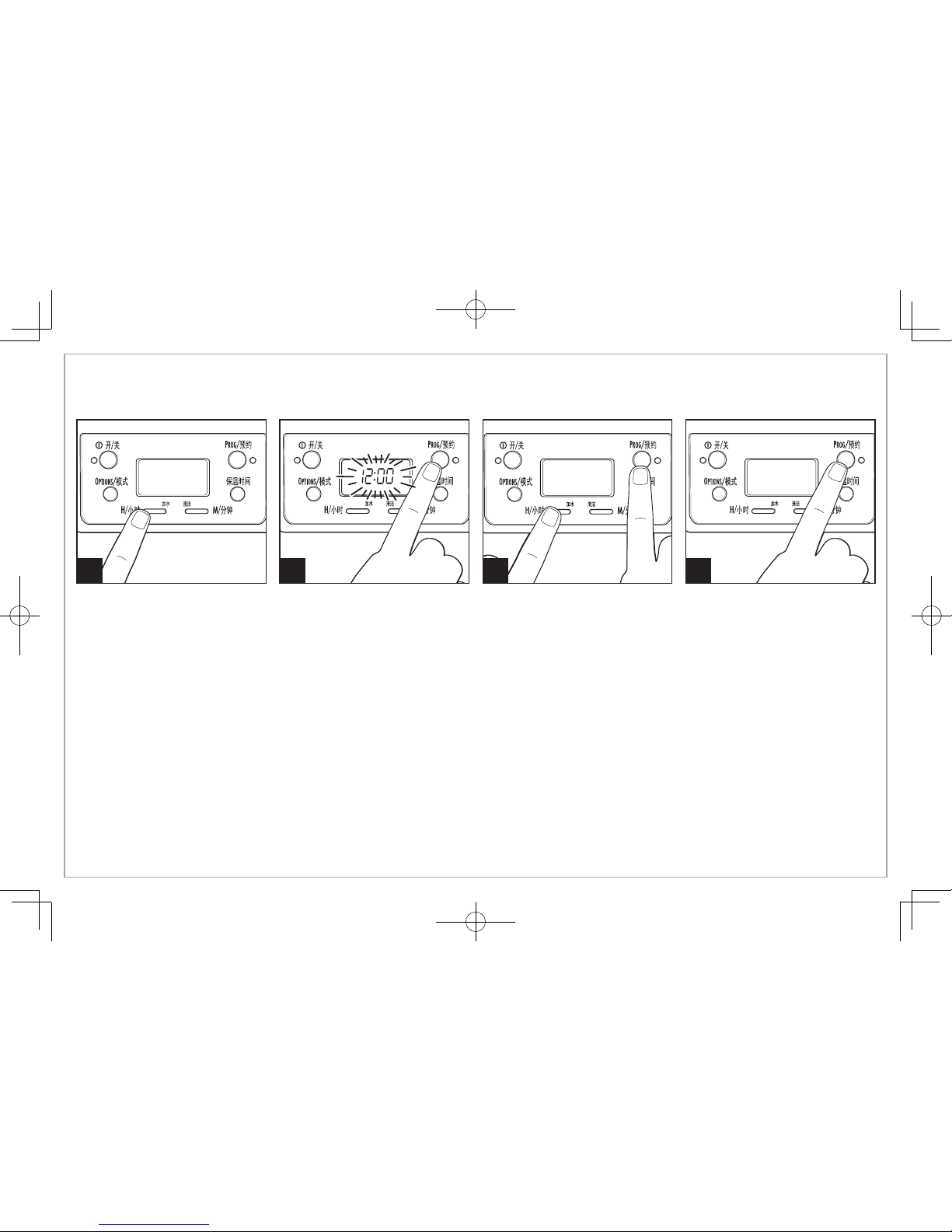
预约
1 2 3 4
设置时钟:按 H/小时,然后按 M/
分钟。注意:必须设置时钟时间,
以将功能编程为有效运行。
设置自动冲泡:按住 PROG/预约,直
到时钟闪烁。
继续按住
PROG/预约;并
按 H/小
时和M/分钟,直到达到所需的开始
时间。
短按PROG/预约
,以启动自动冲
泡。绿色指示灯点亮,表示装置处
于预约模式。
Page 18
18
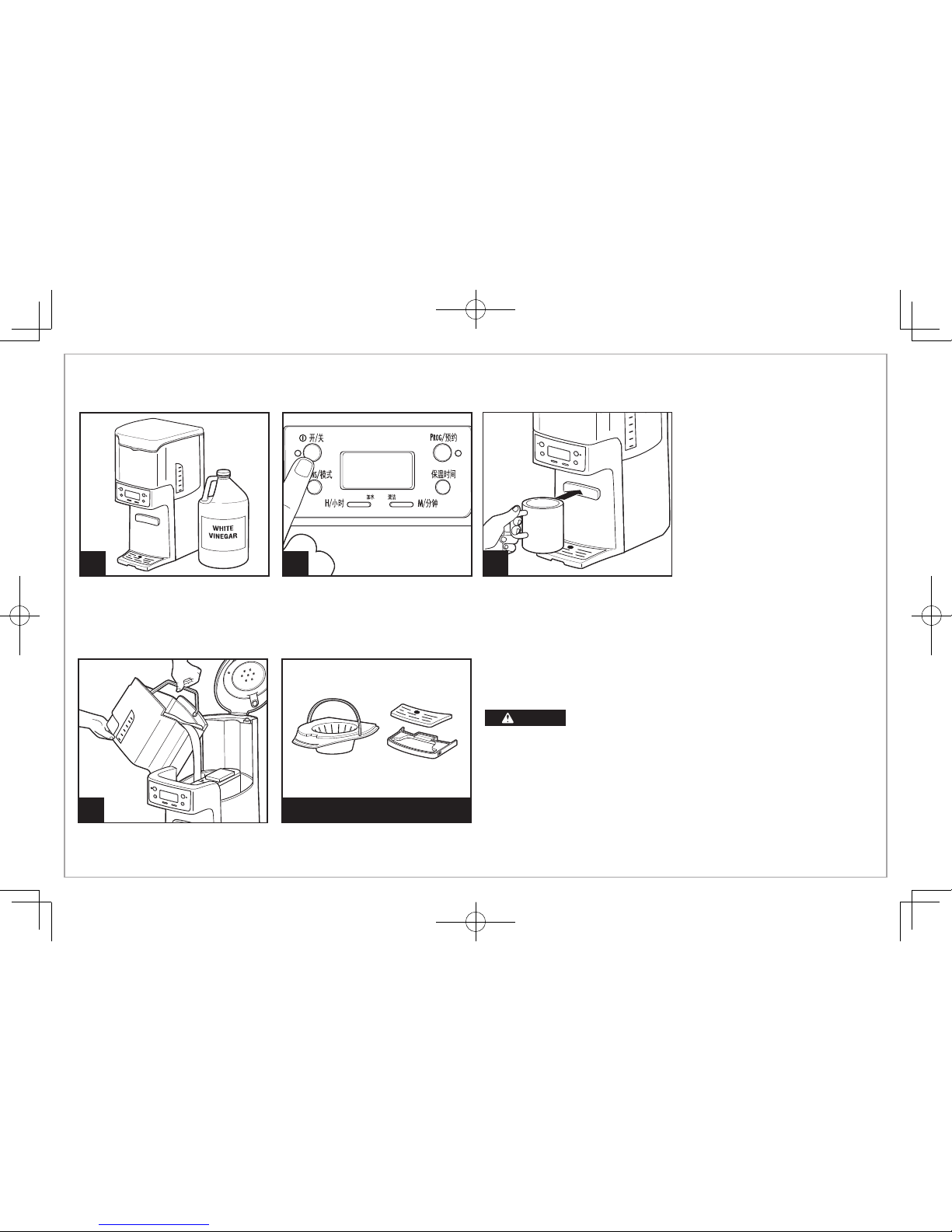
清洗使用醋清洁
1 2
将 1 品脱(2 杯/500 毫升)醋倒入
水槽中。
按开/关。20 秒后关闭,然后等待
30 分钟。按开/关。完成后关闭。
冷却后,可在倒空和冲洗水箱前,
接几杯水,以清洗龙头。
BrewStation
®
咖啡机每个月至少清洁一次(对于有硬质水的其他区域,每周清洁一次)。
4
仅使用“洁净的水”运行 2–3
个以上的冲泡循环。允许在两
个循环之间冷却。
3
一般清洁说明
烫伤危险。请勿将电源线、插头或咖啡机浸在任何液
体中。
滤篮和咖啡桶:取下滤篮和咖啡桶,并使用温的带清洁剂的水手动清
洗。
滤篮还可放在洗碗机的顶层进行清洗。经常清洁滤篮。
咖啡机的外部:使用软布和带清洁剂的温水擦拭外部。请勿使用擦洗
剂,否则会刮伤产品面漆。
可用于洗碗机
警告
注意:咖啡机会提醒您按以下两种方式清洗:
• 内置循环定时器—每 30 个循环,“清洁”将在显示屏中闪烁,
保持点亮 2 个循环。
• 内置残余物传感器—当机器检测到累积的残余物时,“清洁”
将出现在显示屏中,并保持点亮状态,直到机器清洗完成。
Page 19
19
问题
出水口泄漏咖啡。
“清洁”出现在显示屏上。
咖啡味道不好。
咖啡未冲泡或停止冲泡/本机
不开启。
咖啡缓慢冲泡。
咖啡溢出滤网。
装置连续发出蜂鸣声/不冲泡/或
“倒水”出现在显示屏中。
咖啡配制后变冷。
可能的原因
•
咖啡粉卡在了咖啡桶出水口密封件的下方。请参见“使用醋清洁”
•
这是提醒清洁咖啡机。请参见“使用醋清洁”
• 咖啡机需要清洁。
• 咖啡粉太粗或太细,不适合滴漏式咖啡机。
• 咖啡与水配比不平衡。根据个人喜好进行调整。
• 水质不良。使用滤水器或瓶装水配制咖啡。
• 矿物质累积。按照清洁说明清洁咖啡机。
• 水箱为空。
• 本机电源插头未插上。
• 断电或电涌。如果发生电涌,请拔下插头;然后再插上。
• 咖啡机需要清洁。至少每 30 天清洗一次,以保持正常的性能。
• 咖啡机提供 1–4 杯或浓咖啡模式。按“Options/模式”按钮直到无指示灯出现。
• 咖啡粉
量过多。
• 咖啡豆研磨过细,不适合滴漏式咖啡机。
• 滤篮中有一张以上的过滤纸。过滤纸质量差或尺寸错误。请使用随机配送的金色永久咖啡过滤器。
• 水箱中无水。将咖啡桶中的水输送到水箱。
• “保温时间”过了,咖啡机自动关闭了。
请参见第15页“再加热咖啡”,或重新冲泡。
故障排除
Page 20
840233003
Model/型号:
48465-CN
48467-CN
Dist.: Hamilton Beach Brands, Inc., Glen Allen, VA 23060
© 2014 Hamilton Beach Brands, Inc.
以上内容如有改动,恕不预先通知
Type/类别:
A56
Rating/规格
220V-240V~ 50-60Hz 950-1150W
 Loading...