

Page 1
Bluetooth
KBT120N-51
BLUETOOTH HANDS FREE CAR KIT
USER GUIDE
MAXCALL
Page 2

Contents
Welcome ····························································································2
Safety and general information ····························································3
How to use Bluetooth Car-kit ·······························································6
Description to control panel ·····························································6
Pairing between Bluetooth Car-kit and Bluetooth phone ····················7
Connection······················································································8
Disconnect ······················································································8
Make a call through hands free Car-kit ·············································9
Voice control dialing ····································································10
Status of indicator·············································································10
Description to pairing operation for some common phone brands ········ 11
Phone models supported by this Bluetooth Car-kit······························12
Simple troubleshooting method··························································13
1
Welcome
Welcome to Bluetooth wireless network. The Bluetooth hands free
car kit can be connected wirelessly with your Bluetooth cell phone
taken with you. This makes call more free, convenient, flexible and
humanized.
* Bluetooth cell phone is a cell phone that can support Bluetooth
functions.
This Bluetooth hands free car kit is advanced and ingenious, it has
the following features:
● Hands free audio can be achieved seamlessly and wirelessly
through Bluetooth link.
● High quality digital audio interface.
● Voice dialing (need Bluetooth cell phone to support voice
dialing function).
● Built-in DSP echo canceling circuit to cancel echo and reduce
noise.
● Meets Bluetooth Headset V1.1 and Bluetooth Hand Free V1.0
specification
SPECIAL STATEMENT:
Cell phone needs to have the function of Bluetooth audio transmission.
Some functions described in this user guide may not be able to operate
normally or to be used with some phone models and brands. Read
operation instructions for phone carefully. If a phone supports
Bluetooth image transmission (such as, NOKIA 7650) only, this kit
can’t be used with it. This user guide subjects to revision without
notice.
2
Page 3

Safety and general information
1. This device conforms to FCC Part 15.
Federal Communications Commission (FCC) Statement
15.21
You are cautioned that changes or modifications not expressly approved
by the part responsible for compliance could void the user’s authority to
operate the equipment.
15.105(b)
This equipment has been tested and found to comply with the limits for a
Class B digital device, pursuant to part 15 of the FCC rules. These li mits
are designed to provide reasonable protection against harmful
interference in a residential installation. This equipment generates, uses
and can radiate radio frequency energy and, if not installed and used in
accordance with the instructions, may cause harmful interference to radio
communications. However, there is no guarantee that interference will
not occur in a particular installation. If this equipment does cause
harmful interference to radio or television reception, which can be
determined by turning the equipment off and on, the user is encouraged
to try to correct the interference by one or more of the following
measures:
3
-Reorient or relocate the receiving antenna.
-Increase the separation between the equipment and receiver.
-Connect the equipment into an outlet on a circuit different from
that to which the receiver is connected.
-Consult the dealer or an experienced radio/TV technician for help.
Operation is subject to the following two conditions:
1) this device may not cause interference and
2) this device must accept any interference, including interference that
may cause undesired operation of the device.
FCC RF Radiation Exposure Statement:
This equipment complies with FCC radiation exposure limits set forth for
an uncontrolled environment. End users must follow the specific
operating instructions for satisfying RF exposure compliance. This
transmitter must not be co-located or operating in conjunction with any
other antenna or transmitter.
2. User should not change or modify this device in any ways. The
change or modification may be causes cancellation of user’s right
to use this device and the warranty to user without explicit consent
of the party responsible for complying with this regulation.
3. To avoid radio interference to authorized service, this device shall
be used in vehicle so as to get maximum protection.
4
Page 4
4. This device conforms to Directive R&TTE of May 1995 of
European Community and is approved to bear CE label.
678
5. If no proper protection design or electromagnetic compatibility is
considered, almost all devices will be affected by electromagnetic
interference (EMI).
5
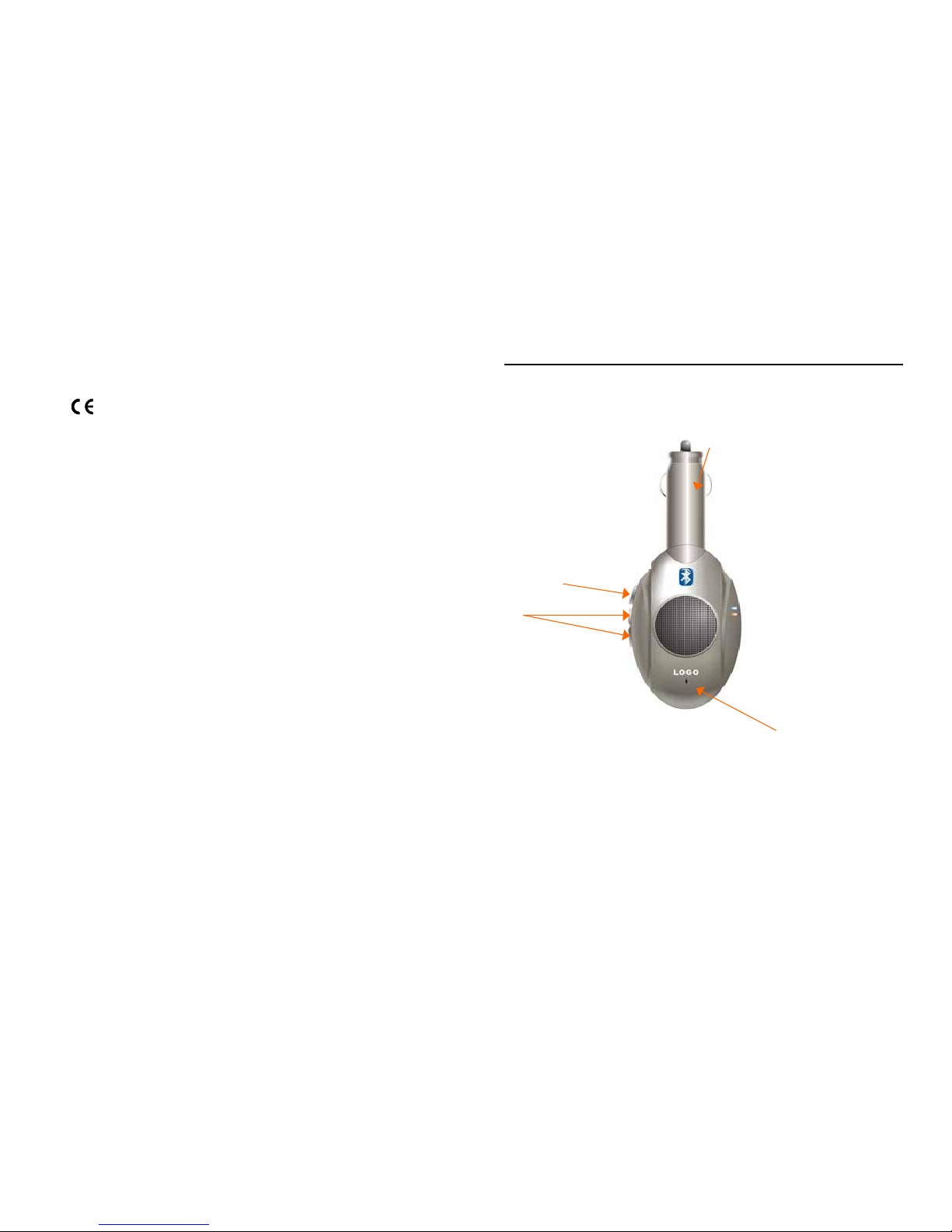
Description to control panel
CONTROL PANEL
FUNCTION BUTTON: To perform many correlative functions.
MIC: Including built-in type and external type
CLA: In-line CLA (Power interface)
6
VOLUME
FUNCTION BUTTON
CLA
MIC
Page 5

Pairing between Bluetooth Car-kit and Bluetooth phone
* This Bluetooth hands free car kit can only be used after paired with
Bluetooth cell phone.
Pairing makes Bluetooth wireless link between hands free car kit and
cell phone.
PAIRING BETWEEN BLUETOOTH HANDS FREE CAR KIT AND
BLUETOOTH CELL PHONE
INITIAL PAIRING: With hands free car kit installed in vehicle and
Bluetooth cell phone being close to the kit, start vehicle:
1. Press function button for more than 4 seconds and release it
blue indicator flashes per 0.5 second. This indicates that the kit
is in headset pairing mode
2. Press function button for more than 6 seconds or till blue
indicator flashes per 1 second. This indicates that the kit is in
hands free pairing mode.
3. Operate cell phone to realize link: For NOKIA 8910:
Enter into function menu → Select Data Link → Select
Bluetooth → Select Search for Audio Device → (If correlative
Bluetooth device is detected, the name of the correlative
Bluetooth device is displayed). Select this device → Enter code
0000
Pairing is completed.
Note: See page 9 for detailed pairing method for some common
brands of phone.
4. After pairing completed, during hands free car kit linking with
Bluetooth phone, the blue indicator is on and orange indicator is
off.
5. During pairing, if you click function button, the pairing operation
will be cancelled and the kit resumes to standby status.
7
Connection/Disconnection
CONNECTION
AUTOMATIC CONNECTION: After initial pairing has been made, the
hands free car kit will remember the ID of phone. Every time when
the vehicle is started, the hands free car kit will automatically search
for the Bluetooth cell phone last used. The blue indicator is off and
the orange indicator flashes. After wireless link is established, the
blue indicator is on and the orange indicator is off.
*Note: If Bluetooth cell phone is powered off during car being started,
the automatic link will not be made
even if the phone is powered on
after starting car is over.
MANUAL CONNECTION
1. When the hands free car kit is in standby mode and isn’t
connected with Bluetooth cell phone after pairing, you can click
function button to make Bluetooth hands free car kit search for paired
phone. At this moment, the orange indicator is on and the blue
indicator is off. After the connection is established, the blue indicator is
on and the orange indicator is off.
2. With hands free car kit in standby mode and not connected
with Bluetooth cell phone after pairing, you can operate phone to
establish Bluetooth link. Refer to the Bluetooth section of operation
instructions for phone for detailed operation method.
*This hands free car kit can storage three sets of pairing information
maximum.
CANCEL SEARCHING: You can press the function button to cancel
searching and to let the kit resume to standby status during hands
free car kit searching for Bluetooth cell phone.
DISCONNECT THE HANDS FREE CAR KIT WITH BLUETOOTH CELL
PHONE
1. With hands free car kit in standby status and connected with cell
phone, you can press the function button for more than 6 seconds
to disconnect the hands free car kit with Bluetooth cell phone.
2. If vehicle is turned off, the hands free car kit will automatically be
disconnected with Bluetooth cell phone.
8
Page 6

Make a call through hands free Car-kit
MAKE A CALL:
Make a call through the keypad of Bluetooth cell phone. During
call, the blue and orange indicators all light up.
ANSWER A CALL:
When the ringer rings for an incoming call, you can click the
function button to answer the call, or you can press the function button
for more than 3 seconds to reject the call.
HANGUP:
During Conversation, you can click the function button to hang up
the call.
SWITCH CALL(Link and Conversation):
Phone to Hands free: Click the function button or through the
phone menu.
Hands free to Phone: Press the function button more than 6
seconds or through the phone menu.
ADJUST VOLUME:
During a call, you can click the volume button or press the volume
button for a long time to adjust the volume.
Last Number Redial:
During the Idle mode, click the ‘+’ button, the system will redial the
last number (you have dialed)
9
Voice control dialing/status of indicator
* This function is only valid for the Bluetooth phone that has voice
dialing function.
VOICE NAMETAG:
Add voice nametag for the number to be voice dialed. Refer to
“voice control dialing” section in the user manual for cell phone for
operating steps.
INITIATE VOICE CONTROL DIALING(Bluetooth Link and Standby):
Click the
‘-‘ button to initiate voice control dialing, a prompt voice
can be heard.
CANCEL
VOICE CONTROL DIALING:
You can Click the function button to cancel voice control dialing
during voice dialing.
VOICE CONTROL DIALING:
User speaks the nametag for the number to be dialed. If the
spoken nametag matches a nametag stored, an outgoing call is given
to the number with this nametag.
DESCRITION TO THE STATUS OF INDICATORS:
1. Blue indicator on, orange indicator off: indicates that hands free
car kit is connected with Bluetooth cell phone.
2. Blue indicator off, orange indicator off: indicates that hands free
car kit is not connected with Bluetooth cell phone.
3. Blue indicator off, orange indicator flashing: indicates that hands
free car kit is searching for Bluetooth cell phone.
4. Blue indicator flashing, orange indicator off: indicates that hands
free car kit is in pairing status.
5. Blue indicator on, orange indicator on: indicates that call is in
session.
10
Page 7

Description to pairing operation for some common phone br ands
Typically there are different operations for cell phones from different
manufacturers. (However, there are basically the same operations for
different models from the same manufacturer.) The pairing operation
for Bluetooth hands free car kit with Motorola, Nokia and Ericsson
Bluetooth cell phones are described as follows (See operation
instructions for phone for detail operation.):
1.For Nokia phone (8910):
Enter into function menu → Select Data Link → Select
Bluetooth → Select Search for Audio Device → (If correlative
Bluetooth device is detected, the name of the correlative
Bluetooth device is displayed). Select this device → Enter code
0000
2.For Motorola phone:
Enter into MENU→ Select “ Setting” →Select “Connection”
→ Select “Bluetooth Link” → Select “Hands free” → Select
“Scan All” →(If correlative Bluetooth device is detected, the
name of the correlative Bluetooth device is displayed). Select this
device → Enter code 0000.
3.For Sony Ericsson phone (T68i):
Press middle function key (between dialing key and cancel key)
→Select “Connection”→ Select “Bluetooth”→Select “Scan
device”→ (If correlative Bluetooth device is detected, the name of
the correlative Bluetooth device is displayed). Select this device
→ Enter code 0000.
11
Phone models supported by this Bluetooth hands free Car-kit
PHONE MODELS SUPPORTED BY THIS BLUETOOTH HANDS
FREE CAR KIT:
NOKIA:8910/8910i、6600
、6310/6310i、6280
Sony Ericsson:T68/T68i、T610 / T618/T628、P800/P802
P900/P908、T628、Z608、 K700
Philips Fisio:820/826、 530
Motorola:A760/A768、V500、 V600、E760
Siemens:S55
Panasonic: X88
Attention:
1. Don’t put hands or body other parts clinging to swivel closel y,
Otherwise they would be hurt.
2. Certain functions in this system may not be realized if the
mobile phone doesn’t support. Please inquire of mobile phone
manufacturer about the details.
3. If you have any questions during operation, please contact
seller or manufacturer betimes in order to ensure its normal
work.
12
Page 8

Simple troubleshooting method
13
NO. FAILURE CAUSE
ANALYSIS
TROUBLESHOOTING
METHOD
1 Can’t be
switched to
hands free
mode
No Bluetooth
link
established.
Conduct pairing operation.
Then, establish Bluetooth link
using function button or phone
menu.
2 Fail to pair. Phone locks its
Bluetooth
function.
Re-power up kit and initiate
pairing operation again or
power phone off then power it
on to scan again.
3 Bluetooth link
can’t be
established
automatically.
Pairing
information in
phone or
Bluetooth
module is
cleared.
Do pairing operation again.
4 When a call
is incoming, it
is answered
in 6 seconds.
Auto answer
function is set
in phone.
Turn off this function.
5 During a
conversation
is stablished;
however, no
voice heard.
Manual
switching of
voice is needed
for most
phones.
Use phone menu to transfer
voice to hands free car kit.
6 No voice from
phone and
hands free
car kit.
Bluetooth
function of
phone is down.
Power phone off then power it
on.
7 Broken voice Too louder Decrease the volume
8 Pair fail Pin error Input correct pin:”0000”
Page 9

HAMG SHING Technology Corp.
Address: 5/F,No.23,Sec.2,Keelung Rd., Taipei City Taiwan
Tel: 886-2-23772226
Fax: 886-2-27380206
E-mail: [email protected]
Address: The Second Industrial Estate, Ping Shan Town,
Long gang District, Shenzhen City, Guangdong
Province, P.R.C.
Phone Number: 86-755-84600372
Fax Number: 86-755-28826518. 86-755-28823380
E-mail: [email protected]
 Loading...