

Page 1

00062723/03.07
All listed br ands are tr adem arks of the corr espo nding companies. Errors and omissions excepted,
and subject to technical changes. Our general terms of delivery and payment are applied.
PO Box 80 · 86651 Monheim/Germany
Phone: +49 9091 502-0
Fax: +49 9091 502-458
http://www.hama.com
Page 2
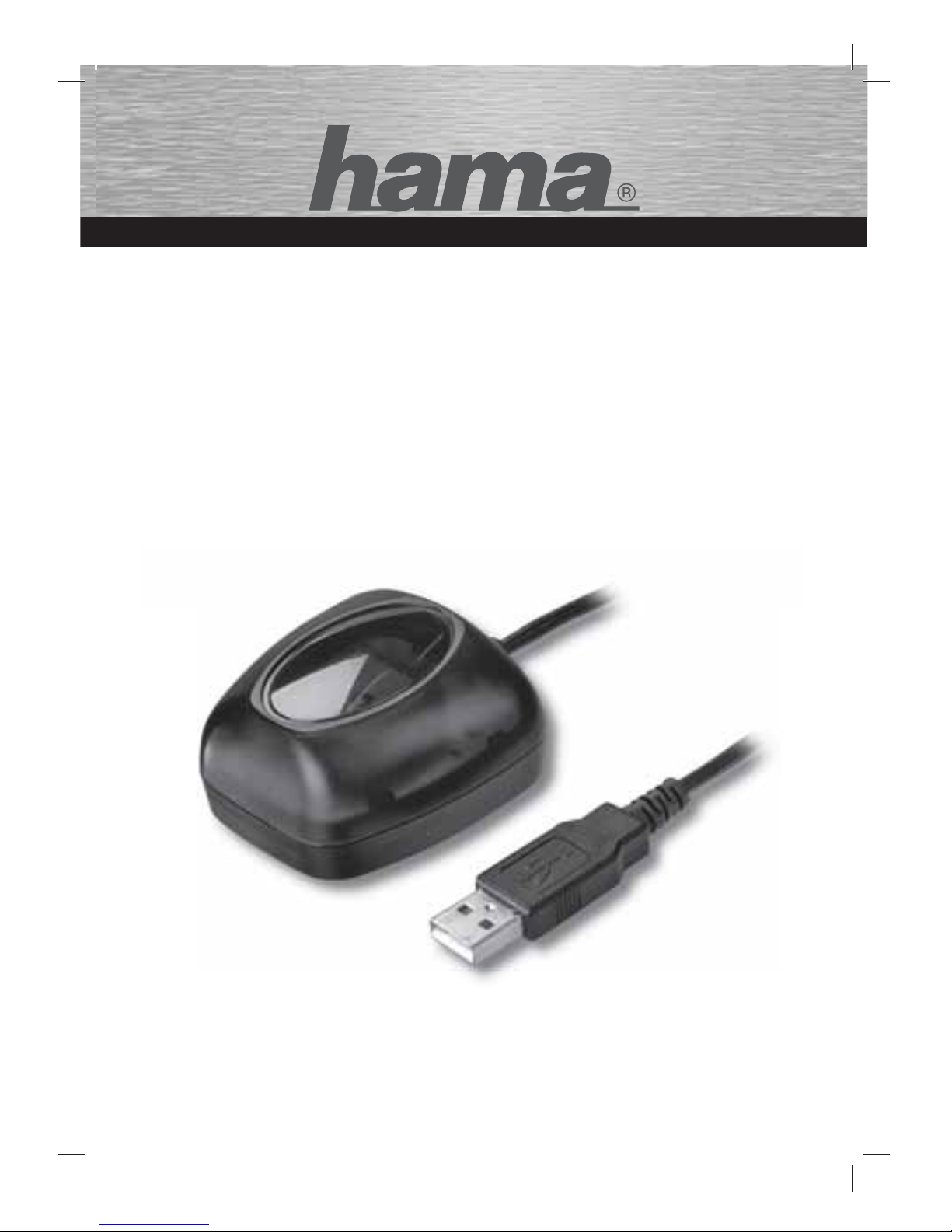
GPS-Empfänger
GPS Receiver
Récepteur GPS USB
COMPUTER
00062723
Page 3
2
Übersicht:
1. Wichtiger Hinweis
2. Verpackungsinhalt
3. Installation
4. Konfi guration
5. Sicherheitshinweise
6. Kontakt- und Supportinformationen
1. Wichtiger Hinweis
Achten Sie während der Fahrt genau auf den Verkehr und
treffen Sie eventuelle Einstellungen am GPS-Receiver bzw.
Notebook nur wenn das Fahrzeug still steht und abgestellt
ist.
Nähere Hinweise fi nden Sie hierzu auch in der
Dokumentation der Navigationssoftware.
2. Verpackungsinhalt:
• USB GPS Empfänger
• Installationsanleitung
• Treiber CD
• Hinweis zum Umweltschutz
3. Installation
1. Legen Sie die beiliegende Treiber CD in das CD-Rom
Laufwerk Ihres Notebooks ein.
2. Schließen Sie nun den GPS Empfänger an die USB
Buchse des Notebooks an.
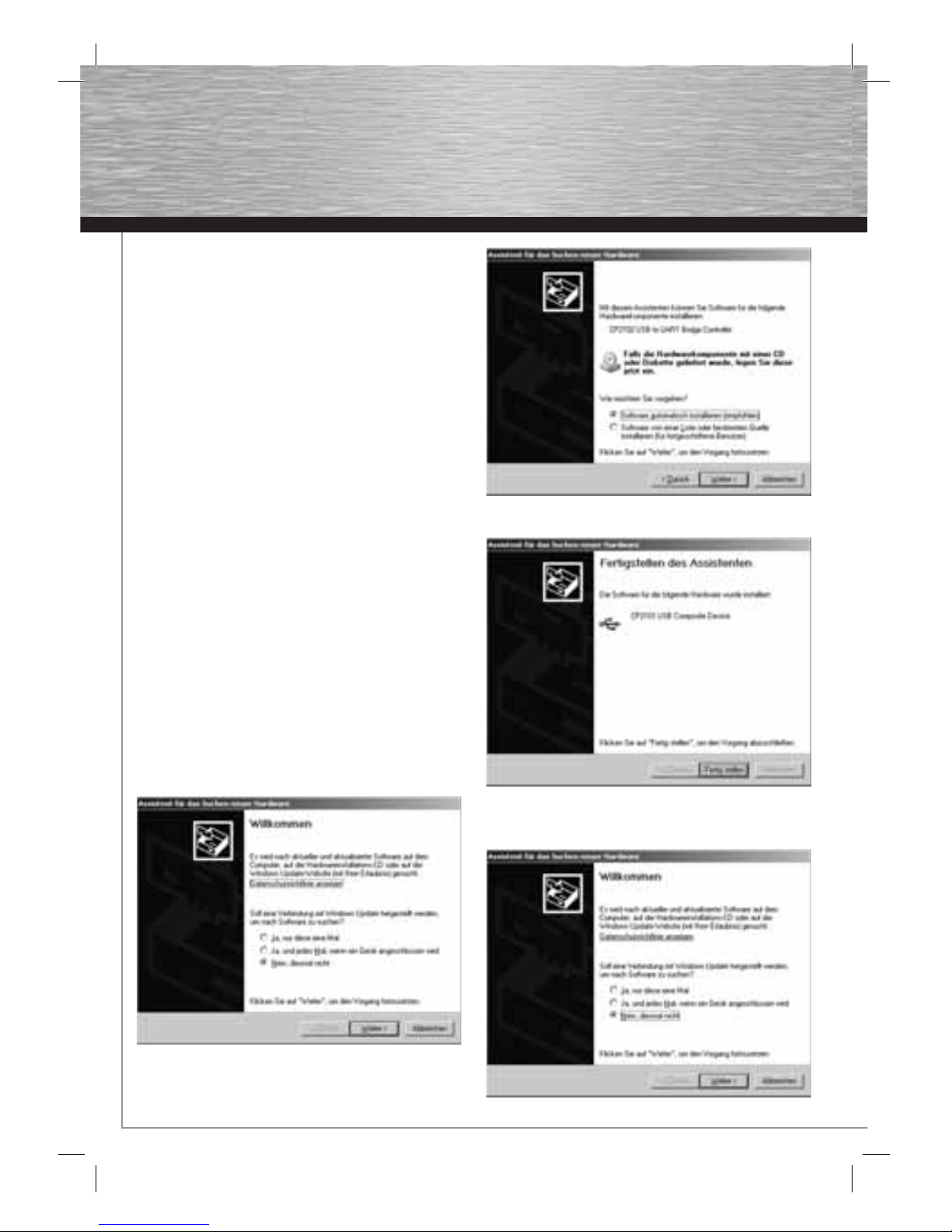
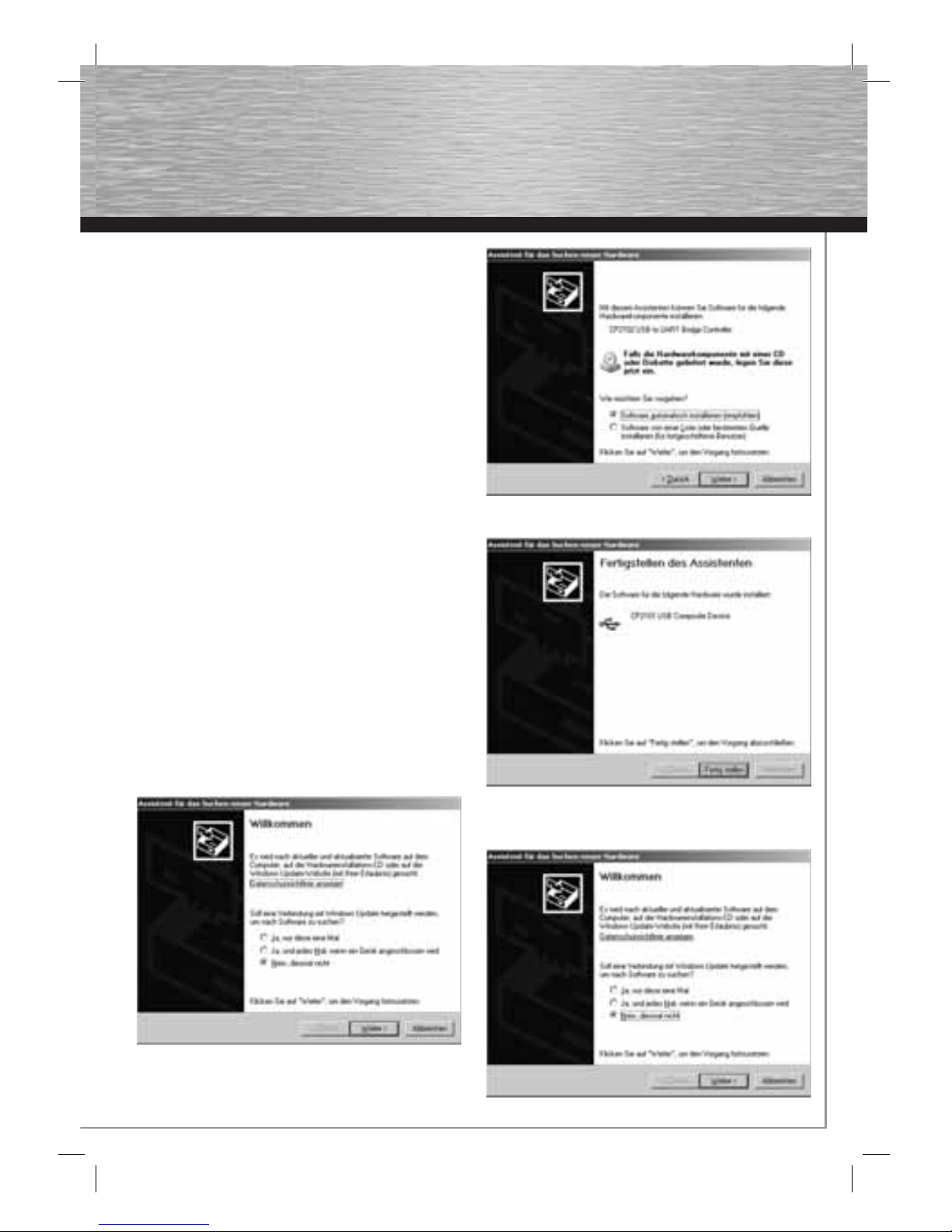
3. Der Assistent für das Suchen neuer Hardware
erscheint. Wählen Sie „Nein diesmal nicht“ und
fahren Sie mit einem Klick auf Weiter fort.
4. Wählen Sie „Software automatisch installieren
(empfohlen)“ und fahren Sie mit Weiter fort.
5. Fahren Sie mit einem Klick auf Fertig stellen fort.
6. Wählen Sie „Nein – diesmal nicht“ und fahren Sie mit
Weiter fort.
d
Bedienungsanleitung
Page 4
3
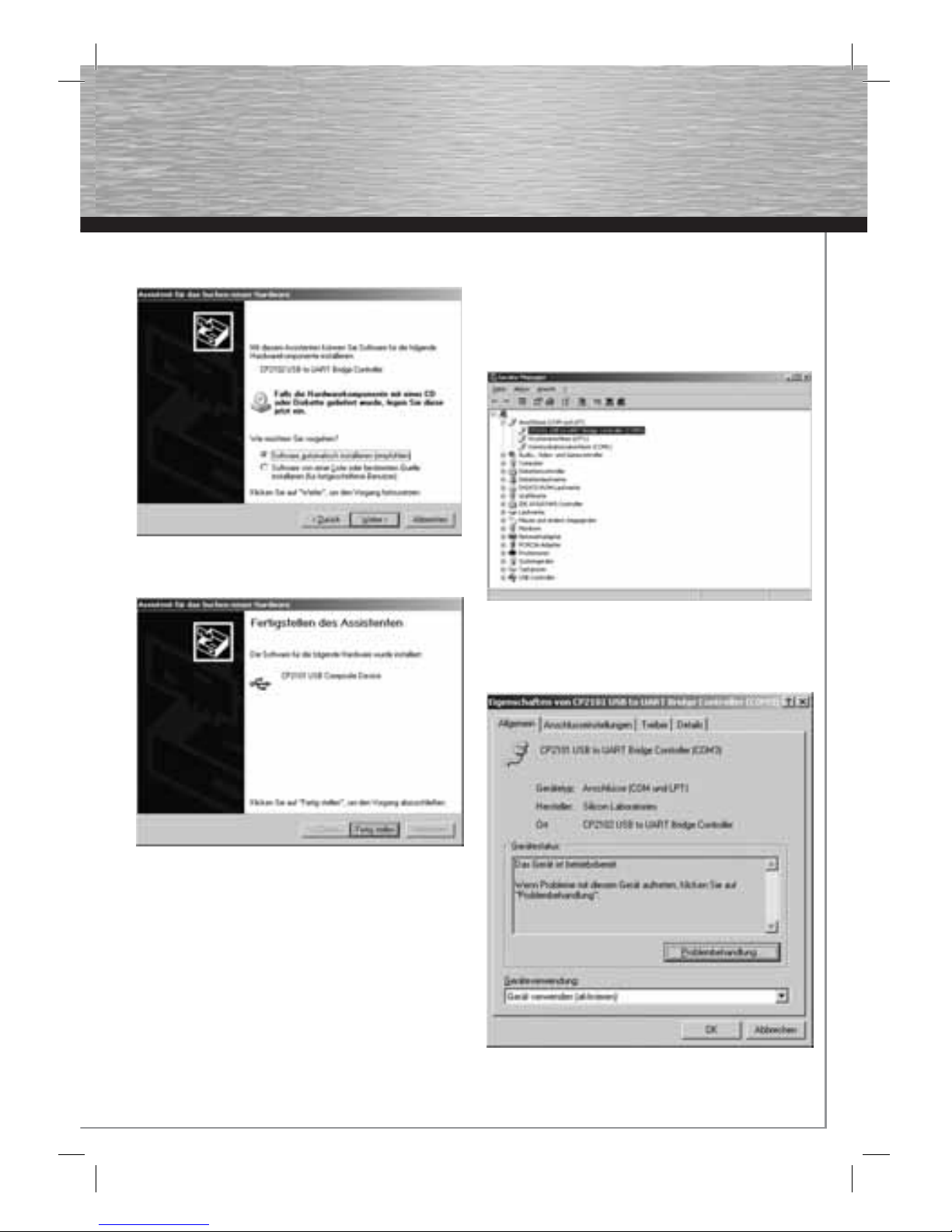
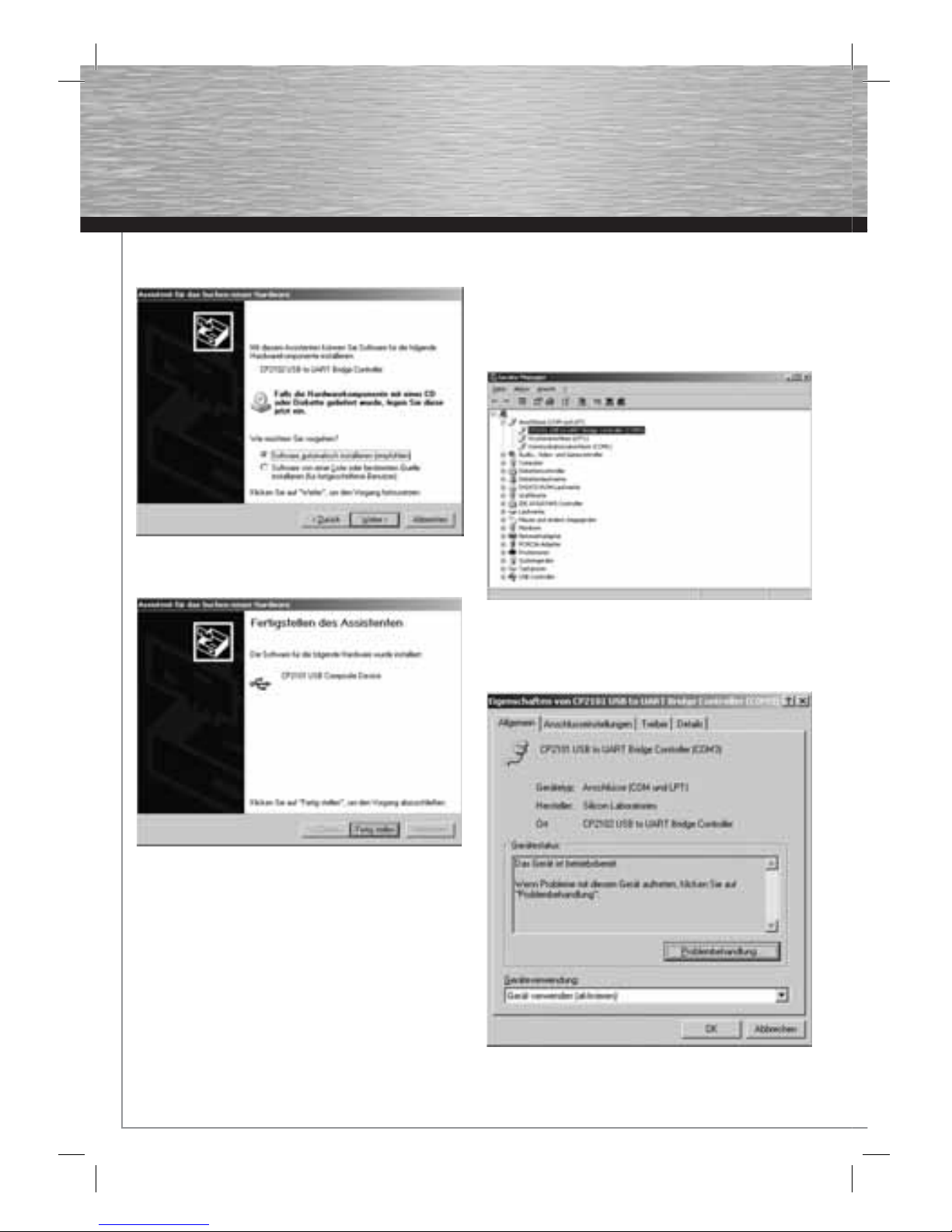
7. Wählen Sie „Software automatisch installieren
(empfohlen)“ und fahren Sie mit „Weiter“ fort.
8. Schließen Sie die Installation mit einem Klick auf
„Fertig stellen“ ab.
4. Konfi guration
Standardmäßig verwendet der USB GPS Empfänger
folgende Einstellungen:
COM-Port: COM3
Übertragungsgeschwindigkeit: 115200 Baud/s
Damit das Navigationsprogramm mit dem GPS Empfänger
kommunizieren kann, muss der entsprechende COM-Port
und die Übertragungsgeschwindigkeit in der
Navigationssoftware eingestellt werden. Nähere
Informationen hierzu entnehmen Sie bitte aus dem
Handbuch der Navigationssoftware.
Sollte Ihr Navigationsprogramm den standardmäßig
verwendeten COM-Port nicht unterstützen, können Sie den
COM-Port manuell ändern.
Gehen Sie bitte wie folgt vor:
1. Öffnen Sie den Gerätemanager.
2. Wählen Sie „CP2101 USB to UART Bridge Controller
(COM3)“ unter Anschlüsse (COM und LPT) aus und
öffnen Sie die Geräteeigenschaften mit einem
Doppelklick.
Page 5
4
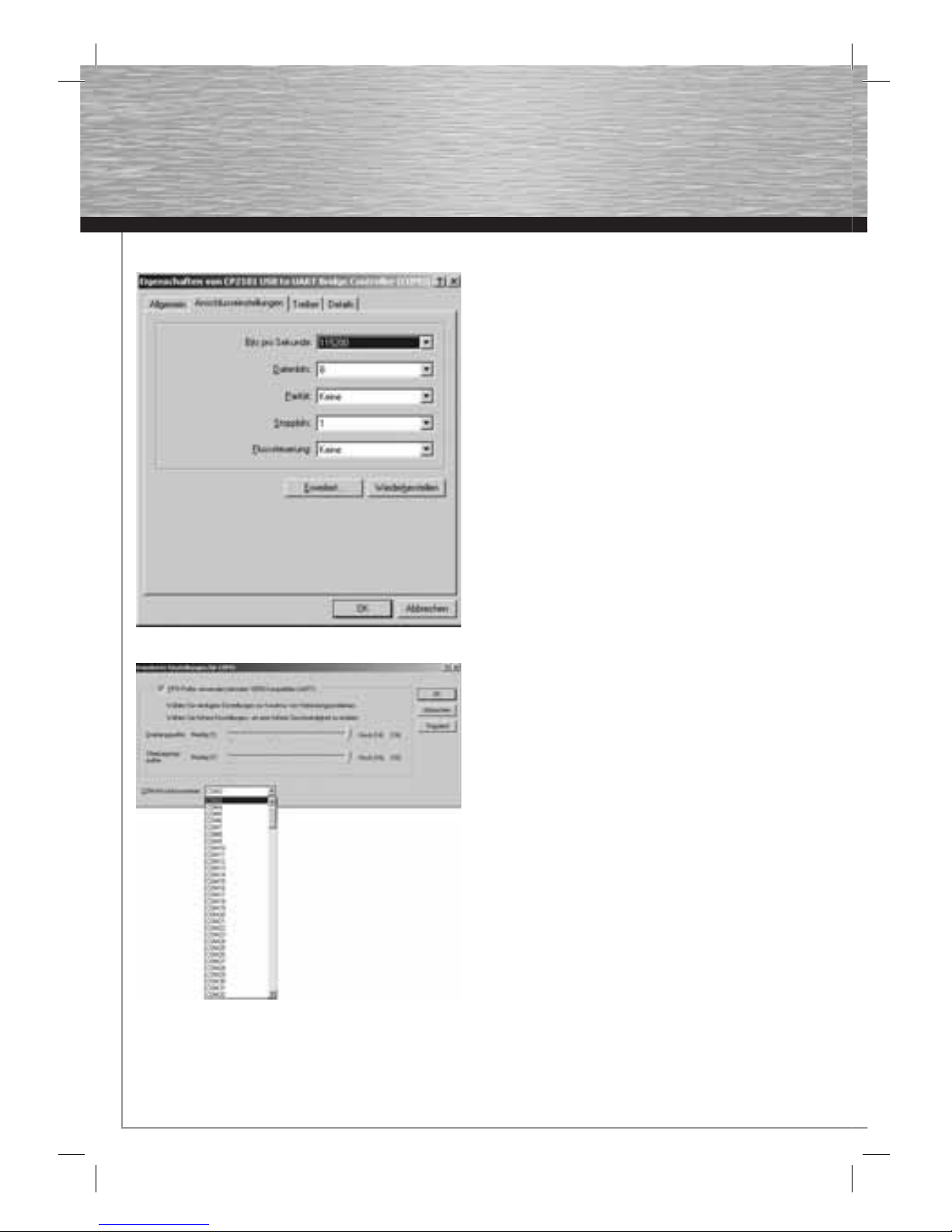
3. Wechseln Sie auf den Reiter „Anschlusseinstellungen“
4. Klicken Sie auf „Erweitert“
5. Mit einem Klick in das Auswahlfeld neben
„COM-Anschlussnummer:“ können Sie den
entsprechenden COM-Port auswählen. Bestätigen Sie
Ihre Auswahl danach mit OK.
5. Sicherheitshinweise:
Betreiben Sie das Gerät weder in feuchter, noch in extrem
staubiger Umgebung, sowie auf Heizkörpern oder in der
Nähe von Wärmequellen. Dieses Gerät ist nicht für den
Einsatz im Freien bestimmt. Schützen Sie das Gerät vor
Druck- und Stoßeinwirkung. Das Gerät darf während des
Betriebes nicht geöffnet oder bewegt werden.
6. Kontakt- und Supportinformationen
Bei defekten Produkten:
Bitte wenden Sie sich bei Produktreklamationen an Ihren
Händler oder an die Hama Produktberatung.
Internet/World Wide Web
Produktunterstützung, neue Treiber oder
Produktinformationen bekommen
Sie unter www.hama.com
Support Hotline – Hama Produktberatung:
Tel. +49 (0) 9091 / 502-115
Fax +49 (0) 9091 / 502-272
e-mail: [email protected]
Page 6
5
g
Operating Instruction
Overview:
1. Important note
2. Package contents
3. Installation
4. Confi guration
5. Safety instructions
6. Support and contact information
1. Important note
Pay close attention to traffi c when driving, and only
make any necessary adjustments to the GPS receiver or
laptop once the vehicle is parked and switched off.
For further information, refer to the navigation software
documentation.
2. Package contents
• USB GPS receiver
• Installation instructions
• Driver CD
• Note on environmental protection
3. Installation
1. Place the enclosed driver CD into your notebook’s
CD-ROM drive.
2. Now connect the GPS receiver to the USB port on your
notebook.
3. The Add New Hardware Wizard appears. Select “No,
not this time” and then click Next.
4. Select “Install the software automatically
(recommended)”, and click Next.
5. Continue by clicking Finish.
6. Select “No, not this time”, and click Next.
Page 7
6
7. Select “Install the software automatically
(recommended)”, and click Next.
8. To complete the installation, click Finish.
4. Confi guration
By default, the USB GPS receiver using the following
settings:
COM port: COM3
Transfer speed: 115200 baud/s
In order for the navigation program to be able to
communicate with the GPS receiver, the respective COM
port and the transfer speed must be set in the navigation
software. For further information on this, refer to the
navigation software manual.
If your navigation program does not support the COM
port used by default, you can manually change the COM
port.
Proceed as follows:
1. Open the Device Manager.
2. Select “CP2101 USB to UART Bridge Controller
(COM3)” under Ports (COM and LPT), and open the
device properties by double-clicking.
Page 8
7
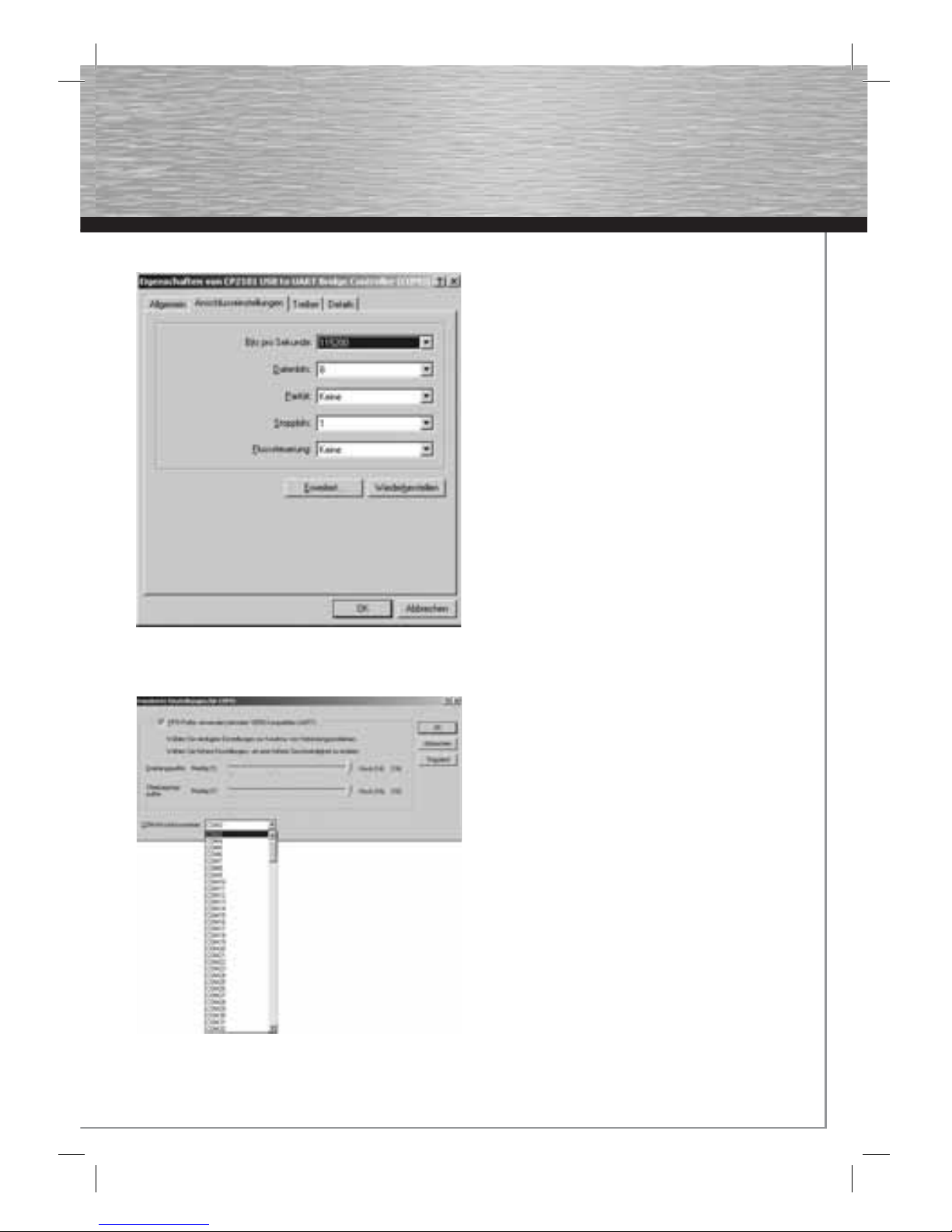
3. Select the tab “Port Settings”.
4. Click “Advanced…”.
5. By clicking the selection fi eld next to “COM Port
Number:”, you can select the appropriate COM port.
Click OK to confi rm your selection.
5. Safety instructions:
Do not use the device in moist or extremely dusty areas,
on radiators or in the vicinity of heat sources. This device
is not designed for use outdoors. Protect the device from
pressure and impact. The device may not be opened or
moved during operation.
6. Support and Contact Information
If products are defective:
Please contact your dealer or Hama Product Consulting if
you have any product claims.
Internet / World Wide Web:
Product support, new drivers or product information can be
found at www.hama.com
Support Hotline – Hama Product Consulting:
Tel. +49 (0) 9091 / 502-115
Fax +49 (0) 9091 / 502-272
E-mail: [email protected]
Page 9
8
f
Mode d‘emploi
Vue d´ensemble :
1. Information importante
2. Contenu du pack
3. Installation
4. Confi guration
5. Mesures de sécurité
6. Contact et informations de support
1. Information importante
Pendant la conduite, concentrez-vous sur la circulation et
procédez à d´éventuels réglages du récepteur GPS ou de
l´ordinateur portable,uniquement quand le véhicule est à
l´arrêt ou garé.
Vous trouverez davantage d´informations dans la
documentation du logiciel de navigation.
2. Contenu du pack :
• Récepteur USB GPS
• Notice d´installation
• Pilote CD
• Information sur la protection de l´environnement
3. Installation
1. Insérez le pilote CD ci-joint dans le lecteur CD-ROM de
votre ordinateur portable.
2. A présent, raccordez le récepteur GPS à la prise USB
de votre ordinateur portable.
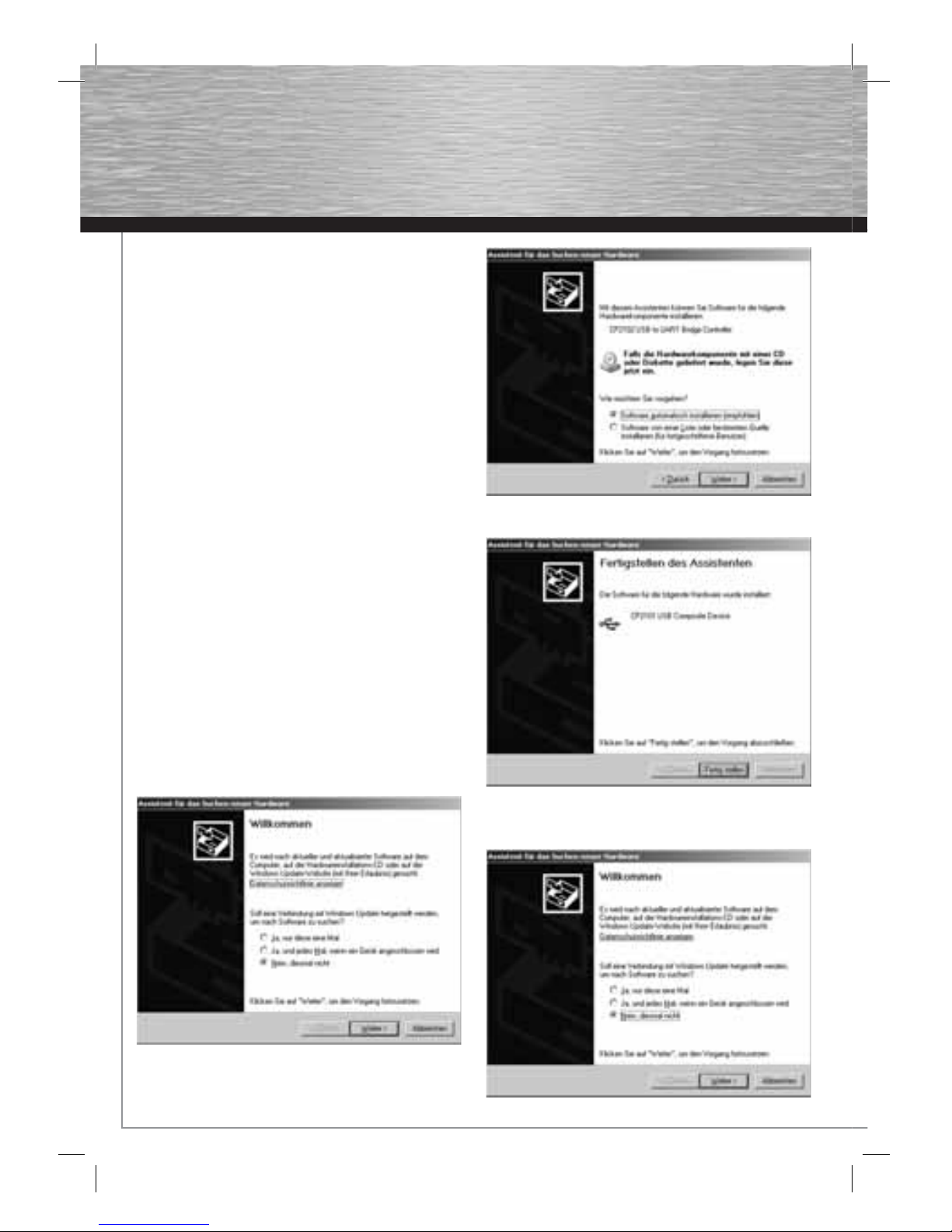
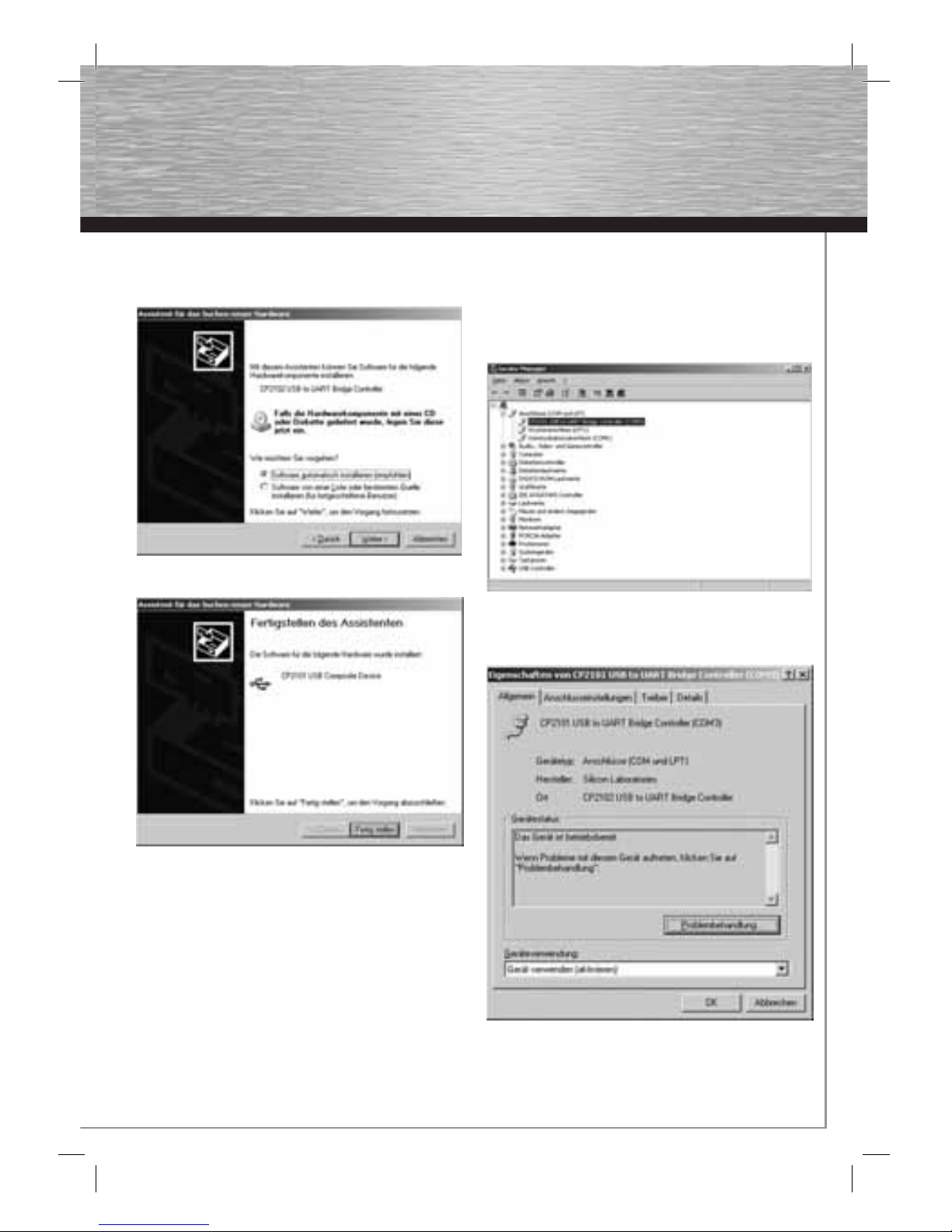
3. L´Assistant de recherche de nouveaux matériels
apparaît à l´écran. Cliquez sur „Non, pas cette fois“ et
poursuuivez en cliquant sur Continuer.
4. Sélectionnez „Installation automatique du logiciel
(recommandé)“ puis cliquez sur Continuer.
5. Poursuivez en cliquant sur Achever.
6. Sélectionnez „Non – pas cette fois“ et poursuivez en
cliquant sur Continuer.
Page 10
9
7. Sélectionnez „Installation automatique du logiciel
(recommandé)“ et poursuivez en cliquant sur
„Continuer“.
8. Terminez l´installation en cliquant sur „Achever“.
4. Confi guration
Le récepteur GPS USB utilise les réglages suivants :
Port COM : COM3
Vitesse de transmission : 115200 Bauds/s
Pour que le programme de navigation puisse communiquer
avec le récepteur GPS, le port-COM correspondant et la
vitesse de transmission doivent être réglés dans le logiciel
de navigation. Pour plus d´informations veuillez consulter le
manuel d´utilisation du logiciel de navigation.
Si votre programme de navigation ne peut pas supporter le
port COM standard, vous avez la possibilité de modifi er le
port COM manuellement.
Veuillez procéder comme suit :
1. Ouvrez le Gestionnaire des périphériques
2. Sélectionnez „CP2101 USB to UART Bridge Controller
(COM3)“ dans Connexions (COM et LPT) et ouvrez les
propriétés des appareils en double-cliquant.
Page 11
10
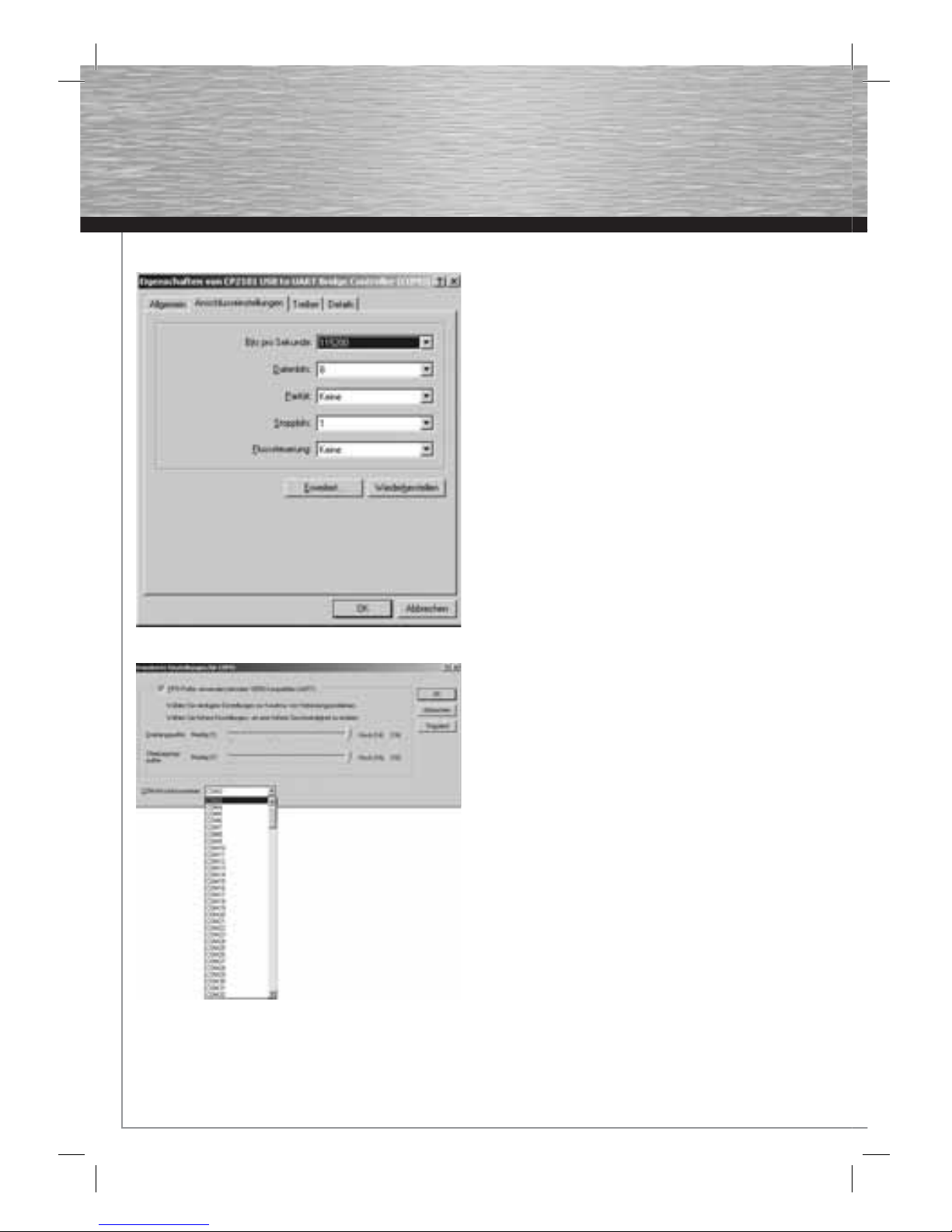
3. Avec le curseur allez dans „Réglages des connexions“
4. Cliquez sur „Etendu“
5. Avec un clic dans le champ de sélection à côté du
„Numéro de connexion COM“ vous pouvez sélectionner
le port COM correspondant. Confi rmez ensuite votre
choix en cliquant sur OK.
5. Consignes de sécurité :
N‘utilisez pas l’appareil dans des environnements poussiéreux ou humides ainsi qu’à proximité de
radiateurs ou d’autres sources de chaleur. Cet appareil
n’est pas conçu pour une utilisation en plein air. Protégez
l’appareil de pression et des chocs. L‘appareil ne doit être
ni ouvert, ni transporté pendant son fonctionnement.
6. Support technique et contact
En cas d’appareil défectueux :
En cas de réclamation concernant le produit, veuillez vous
adresser à votre revendeur ou au département conseil
produits de Hama.
Internet / World Wide Web
Notre support technique, les nouveaux pilotes et les informations produits sont disponibles sous :
www.hama.com
Ligne téléphonique directe d’assistance – Conseil produits
Hama :
Tél. +49 (0) 9091 / 502-115
Fax +49 (0) 9091 / 502-272
e-mail : [email protected]
Page 12
11
d
Die Konformitätserklärung nach der R&TTE Richtlinie 99/5/EG fi nden Sie unter www.hama.com
g
See www.hama.com for declaration of conformity according to R&TTE Directive 99/5/EC guidelines
f
La déclaration de conformité à la directive R&TTE 99/5/CE se trouve sur www.hama.com
e
La declaración de conformidad según la directiva R&TTE 99/5/CE la encontrará en www.hama.com
o
De conformiteitsverklaring conform de R&TTE-richtlijn 99/5/EG vindt u onder www.hama.com
i
La dichiarazione di conformità secondo la direttiva R&TTE 99/5/CE è disponibile sul sito www.hama.com
p
A declaração de conformidade segundo a directiva R&TTE 99/5/CE pode ser consultada em www.hama.com
s
Konformitetsförklaring enligt R&TTE riktlinje 99/5/EG fi nner du på www.hama.com
m
Radio- ja telepäätelaitteita koskevan direktiivin 99/5/EY mukainen vaatimustenmukaisuusvakuutus löytyy
osoitteesta www.hama.com
q
Deklaracja zgodności według dyrektywy R&TTE 99/5/EG dostępna na stronie internetowej www.hama.com
h
A megfelelőségi követelmények megegyeznek az R&TTE Irányelvek 99/5/EG ajánlásaival www.hama.com
c
Prohlášení, o shodě podle směrnice R&TTE 99/5/EG, naleznete na www.hama.com
v
Prehlásenie o zhode podľa R&TTE smernice 99/5/EG nájdete na www.hama.com
k
Τη δήλωση συμμόρφωσης σύμφωνα με την οδηγία 99/5/EΚ περί R&TTE θα τη βρείτε στη διεύθυνση
www.hama.com
u
Заявление о соответствии товара нормам R&TTE 99/5/EG см. на веб-узле ww w.hama.com
t
R&TTEDirektifi 99/5/EG’ye göre uygunluk beyanı için www.hama.com adresine bakınız.
e
 Loading...