

Page 1
00053228/09.08
All listed brands are trademarks of the corresponding companies. Errors and omissions excepted,
and subject to technical changes. Our general terms of delivery and payment are applied.
Hama GmbH & Co KG
D-86651 Monheim/Germany
www.hama.com
d Deutsch
[German]
Hiermit erklärt Hama GmbH & Co. KG, dass sich das Gerät 00053228 in Übereinstimmung mit den grundlegenden Anforderungen und den übrigen
einschlägigen Bestimmungen der Richtlinie 1999/5/EG befi ndet. Die Konformitä tserklärung nach der R&T TE Rich tlinie 9 9/5 /EG fi nden Sie unter
www.hama.com
g English Hereby, Hama GmbH & Co. KG, declares that this 00053228 is in compliance with the essential requirements and other relevant provisions of
Directive 1999/5/EC.
See w ww.hama.com for declaration of conformi ty according to R&T TE Direc tive 99/ 5/EC guidelines.
f Français
[French]
Par la présente Hama GmbH & Co. KG déclare que l‘appareil 00053228 est conforme aux exigences essentielles et aux autres dispositions pertinentes de la directive 1999/5/CE. La déclara tion de conformit é à la direct ive R&T TE 99/5 /CE se tr ouve sur w ww.hama.com.
e Español
[Spanish]
Por medio de la presente Hama GmbH & Co. KG declara que el 00053228 cumple con los requisitos esenciales y cualesquiera otras disposiciones
aplicables o exigibles de la Directiva 1999/5/CE. La declaración de conformidad según la directiva R&T TE 99 /5/C E la encont rará en www.
hama.com
i Italiano
[Italian]
Con la presente Hama GmbH & Co. KG dichiara che questo00053228 è conforme ai requisiti essenziali ed alle altre disposizioni pertinenti stabilite
dalla direttiva
1999/5/CE. La dichiarazione di conformi tà secondo la direttiva R&T TE 99 /5/CE è disponibile sul si to www.hama.co m
p Português
[Portuguese]
Hama GmbH & Co. KG declara que este 00053228 está conforme com os requisitos essenciais e outras disposições da Directiva 1999/5/CE. A
declaração de conformidade segundo a directiva R&TTE 9 9/5/CE pode ser consult ada em ww w.hama.com
u
Россия
[Russian]
Компания Hama GmbH & Co. KG настоящим подтверждает, что изделие
00053228
соответствует основным требованиям, а также положениям
нормативов 1999/5/EG. Заявление о соот ветствии товара нормам R&TTE 99/5/EG см. на веб-узле w ww.hama.com
o Nederlands
[Dutch]
Hierbij verklaart Hama GmbH & Co. KG dat het toestel 00053228 in overeenstemming is met de essentiële eisen en de andere relevante bepalingen
van richtlijn 1999/5/EG. De conformit eitsverklaring conform de R&T TE-richtlijn 99/ 5/EG v indt u onder ww w.hama.com
q Polski
[Polish]
Niniejszym Hama GmbH & Co. KG oświadcza, że
00053228
jest zgodny z zasadniczymi wymogami oraz pozostałymi stosownymi postanowieniami
Dyrektywy 1999/5/EC. Deklaracja zgodności według dyrektywy R&TTE 99/ 5/EG dostępna na stronie internetowej www.hama.com
h Magyar
[Hungarian]
Alulírott, Hama GmbH & Co. KG nyilatkozom, hogy a
00053228
megfelel a vonatkozó alapvetõ követelményeknek és az 1999/5/EC irányelv egyéb
elõírásainak. A megfelelőségi követelmények megegyeznek az R&TTE Irányelvek 99/5/ EG ajánlásaival w ww.hama.com
k
Ελληνική
[Greek]
ΜΕ ΤΗΝ ΠΑΡΟΥΣΑ Hama GmbH & Co. KG ∆ΗΛΩΝΕΙ ΟΤΙ
00053228
ΣΥΜΜΟΡΦΩΝΕΤΑΙ ΠΡΟΣ ΤΙΣ ΟΥΣΙΩ∆ΕΙΣ ΑΠΑΙΤΗΣΕΙΣ ΚΑΙ ΤΙΣ ΛΟΙΠΕΣ ΣΧΕΤΙΚΕΣ
∆ΙΑΤΑΞΕΙΣ ΤΗΣ Ο∆ΗΓΙΑΣ 1999/5/ΕΚ.
Τη δήλωση συµµόρφωσης σύµφωνα µε την οδηγία 99/5/EΚ περί R&TTE θα τη βρείτε στη
διεύθυνση www.hama.com
c
Česky
[Czech]
Hama GmbH & Co. KG tímto prohlašuje, že tento
00053228
je ve shodě se základními požadavky a dalšími příslušnými ustanoveními směrnice
1999/5/ES. Prohlášení, o shodě podle směrnice R&TTE 99/5/EG, naleznete na www.hama.com
v
Slovensky
[Slovak]
Hama GmbH & Co. KG týmto vyhlasuje, že
00053228
spĺňa základné požiadavky a všetky príslušné ustanovenia Smernice 1999/5/ES. Prehlásenie
o zhode podľa R&TTE smernice 99/5/EG nájdete na ww w.hama.com
t
Türkiye
[Turkish]
Hama GmbH & Co. KG bu cihazın
00053228
1999/5/EG Direktifi ’nin ilgili talimatlarına ve bu direktif tarafından istenen koşullara uygunluğunu
beyan eder. R&TTEDirektifi 99/5/EG’ye göre uygunluk beyanı için ww w.hama.com adresine bakınız.
s
Svenska
[Swedish]
Härmed intygar Hama GmbH & Co. KG att denna
00053228
står I överensstämmelse med de väsentliga egenskapskrav och övriga relevanta
bestämmelser som framgår av direktiv 1999/5/EG. Konformitetsförklaring enligt R&TTE riktlinje 99/5/EG fi nner du på www.hama.com
m Suomi
[Finnish]
Hama GmbH & Co. KG vakuuttaa täten että 00053228 tyyppinen laite on direktiivin 1999/5/EY oleellisten vaatimusten ja sitä koskevien direktiivin
muiden ehtojen mukainen. Radio- ja telepäätelait teita koskevan direk tiivin 99 /5/ EY mukainen vaatimustenmukaisuus vakuutus löy tyy osoitteesta www.hama.com
r România
[Romanian]
Prin prezenta Hama GmbH & Co. KG declară, că aparatul
00053228.p
satisface cerinţele fundamentale şi celelalte dispoziţii relevante ale Directivei
1999/5/CE. Declaraţia de conformitate conform directivei 99/5/UE din R&TTE o găsiţi la www.hama.com
Page 2
Bluetooth Mouse
COMPUTER
00053228
Page 3
2
1. Einleitung
Vielen Dank, dass Sie sich für die Hama Bluetooth Mouse
entschieden haben. Diese Bedienungsanleitung enthält
Informationen zur Bedienung Ihrer Bluetooth Mouse bereit.
Bitte bewahren Sie diese Anleitung zum späteren
Nachschlagen an einem sicheren Platz auf.
2. Verpackungsinhalt
- Bluetooth Mouse
- 2xAAA Batterien
- Bedienungsanleitung
3. Systemvoraussetzungen
- MAC OS 10.4.7 oder höher
- MS Windows 2000, XP, Vista
- Bluetooth Adapter oder integrierte Bluetooth-Technik
4. Eigenschaften
- Bluetooth® 2.0 Schnittstelle (kompatibel mit Bluetooth 1.0)
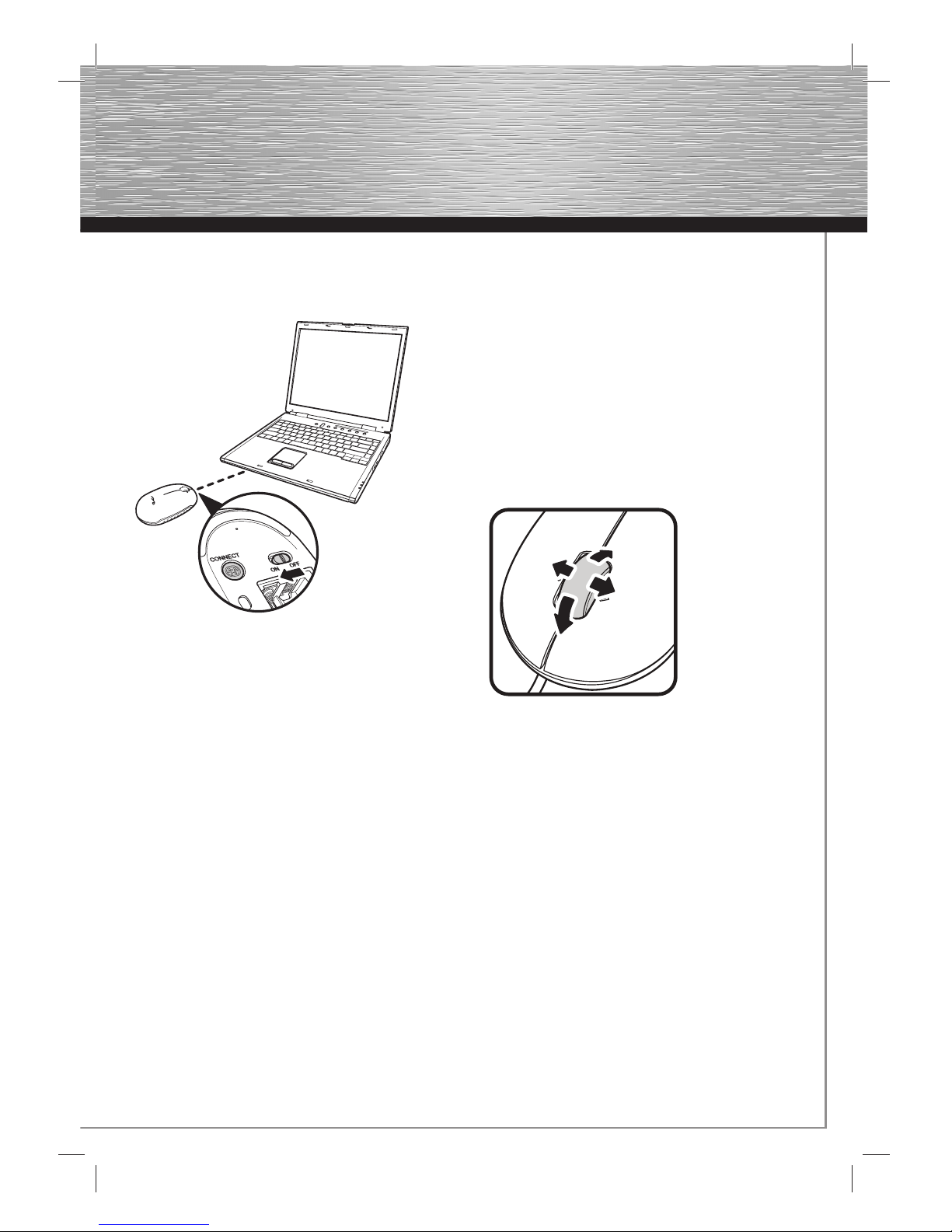
- 4-Wege Scrollrad für vertikales und horizontales Scrollen
- Laser Sensor mit einer Aufl ösung von 1200dpi
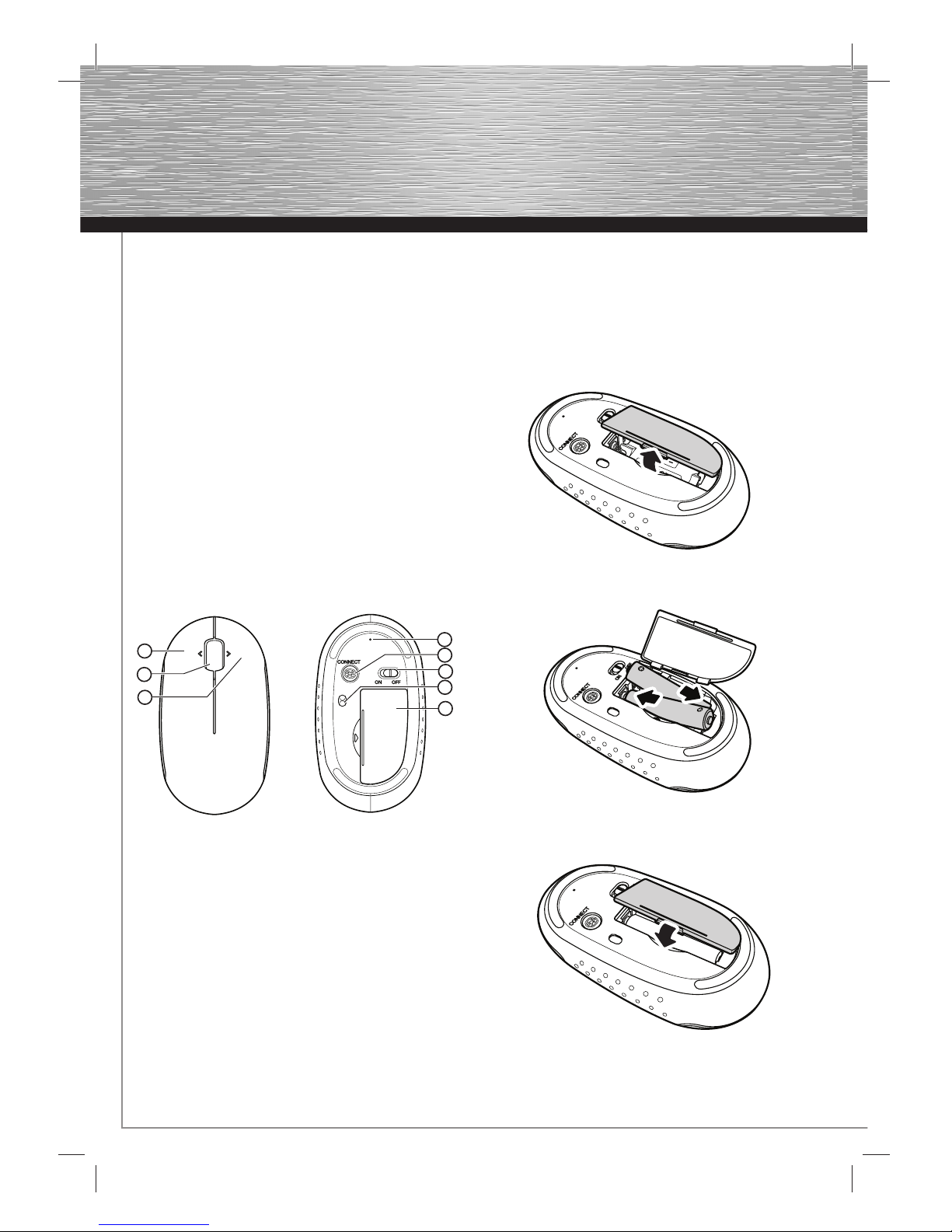
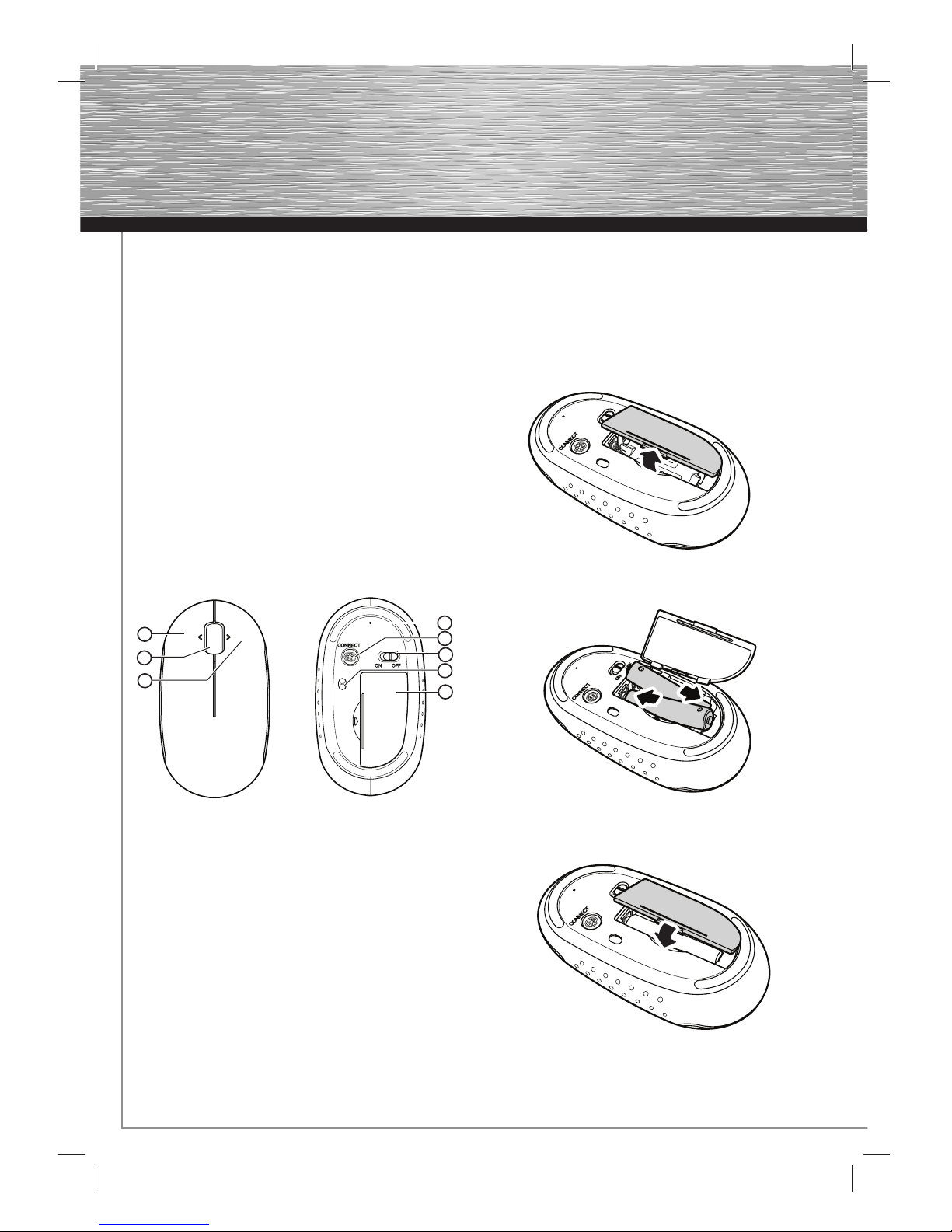
5. Übersicht
1 linke Maustaste
2 Scrollrad
3 rechte Maustaste
4 LED
5 Verbindungstaste
6 ON/OFF Schalter
7 Laser Sensor
8 Batteriefach-Abdeckung
Hinweis:
Der LED Indikator (4) an der Unterseite der Maus zeigt folgende
Situationen an:
- LED blinkt grün sobald der Pairing Vorgang abgeschlossen ist
- LED blinkt rot sobald die Batteriespannung zu gering ist
6. Installation der Maus
6.1 Einlegen der Batterien
Öffnen Sie die Batteriefach-Abdeckung.
Legen Sie die Batterien, wie abgebildet, polrichtig in das
Batteriefach.
Bringen Sie die Batteriefach-Abdeckung wieder so an, dass sie
fest verschlossen ist.
d
Bedienungsanleitung
3
1
2
5
6
8
7
4
Page 4
3
6.2 Verbinden/Pairing
Schalten Sie Ihren Computer ein und stellen Sie den ON/OFF
Schalter an der Unterseite der Maus auf ON.
Betätigen und halten Sie die „Connect” Taste (5) an der
Unterseite der Maus gedrückt bis die LED (4) grün blinkt.
Starten Sie mit dem Verbinden (Pairing) der Maus, indem Sie
(mit Hilfe des Touchpads oder einer kabelgebundenen Maus)
auf das Bluetooth Symbol in der Menüleiste klicken.
Achten Sie darauf, dass der Menüpunkt „Bluetooth: aktiviert:”
grau hinterlegt ist. Wählen Sie hier den Menüpunkt
„Bluetooth-Gerät konfi gurieren” aus um den
Bluetooth-Assistenten zu öffnen.
Hinweis:
Zu diesem Zeitpunkt ist die Bluetooth Maus noch nicht im
Computer bzw. Notebook verbunden.
Wählen Sie den Gerätetyp „Maus” aus und betätigen Sie
anschließend den Button „Fortfahren”. Markieren Sie das
gefundene Bluetooth-Gerät Maus und folgen Sie im weiteren
den Anweisungen des Assistenten. Zum Abschluss wird Ihnen
die erfolgreiche Konfi guration bestätigt.
6.3 Teiber für 4-Wege Scrollrad
Wird die Maus an einem MAC Computer/Notebook
angeschlossen, ist es nicht notwendig weitere Treiber zu
installieren. Die Maus ist sofort einsatzbereit.
Hinweis:
Unter MS Windows 2000 wird der Tilt Wheel Treiber nur von
den Bluetooth Stacks (Software) Broadcom® oder Toshiba®
Bluetooth (Software) unterstützt.
Bei Anschluss unter einem Windows Betriebssystem wird für
die volle Funktionsfähigkeit des Scrollrades ein zusätzlicher
Treiber benötigt.
Bitte laden Sie dazu den notwendigen externen Maustreiber
unter www.hama.com herunter und installieren ihn
anschließend.
Hinweis:
Die Benutzung der Maus auf refl ektierenden, transparenten,
metallischen und komplex gemusterten Oberfl ächen ist nicht zu
empfehlen.
Page 5
4
1. Introduction
Thank you for choosing the Hama Bluetooth Mouse.
These operating instructions contain information for operating
your Bluetooth Mouse.
Please keep these instructions in a safe place for future
reference.
2. Package contents
- Bluetooth Mouse
- 2x AAA batteries
- Operating instructions
3. System Requirements
- MAC OS 10.4.7 or higher
- MS Windows 2000, XP, Vista
- Bluetooth adapter or integrated Bluetooth technology
4. Features
- Bluetooth® 2.0 Interface (compatible with Bluetooth 1.0)
- 4-way scroll wheel for vertical and horizontal scrolling
- Laser sensor with a resolution of 1200 dpi
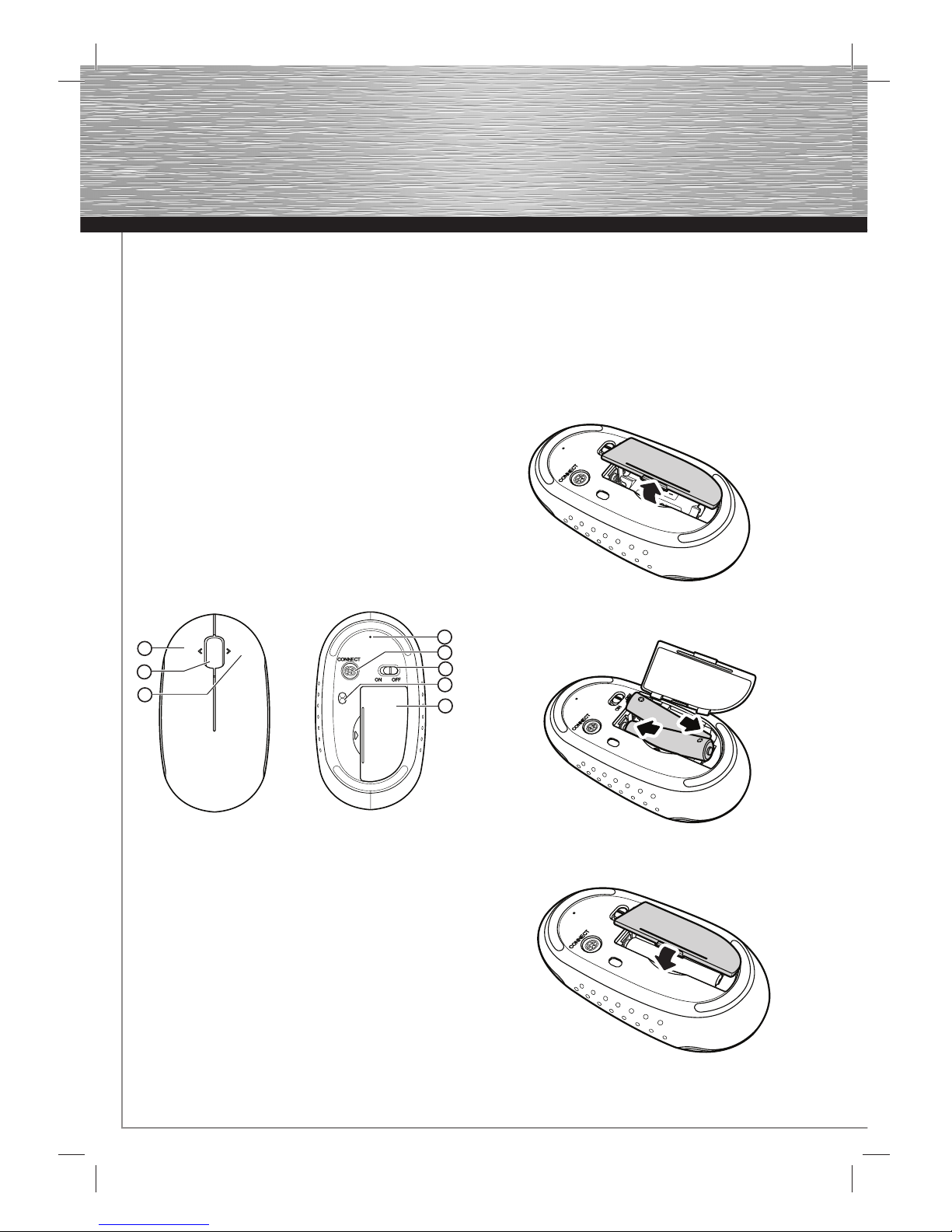
5. Overview
1 Left mouse button
2 Scroll wheel
3 Right mouse button
4 LED
5 Connect button
6 ON/OFF switch
7 Laser Sensor
8 Battery compartment cover
Note:
The LED indicator (4) on the bottom of the mouse indicates the
following situations:
- The LED fl ashes green when the pairing process is complete
- The LED fl ashes red when the battery voltage is too low
6. Installing the Mouse
6.1 Inserting the batteries
Open the battery compartment cover.
Insert the batteries into the battery compartment as shown,
observing proper polarity.
Reattach the battery cover so that it is closed securely.
g
Operating instruction
3
1
2
5
6
8
7
4
Page 6
5
g
Operating Instruction
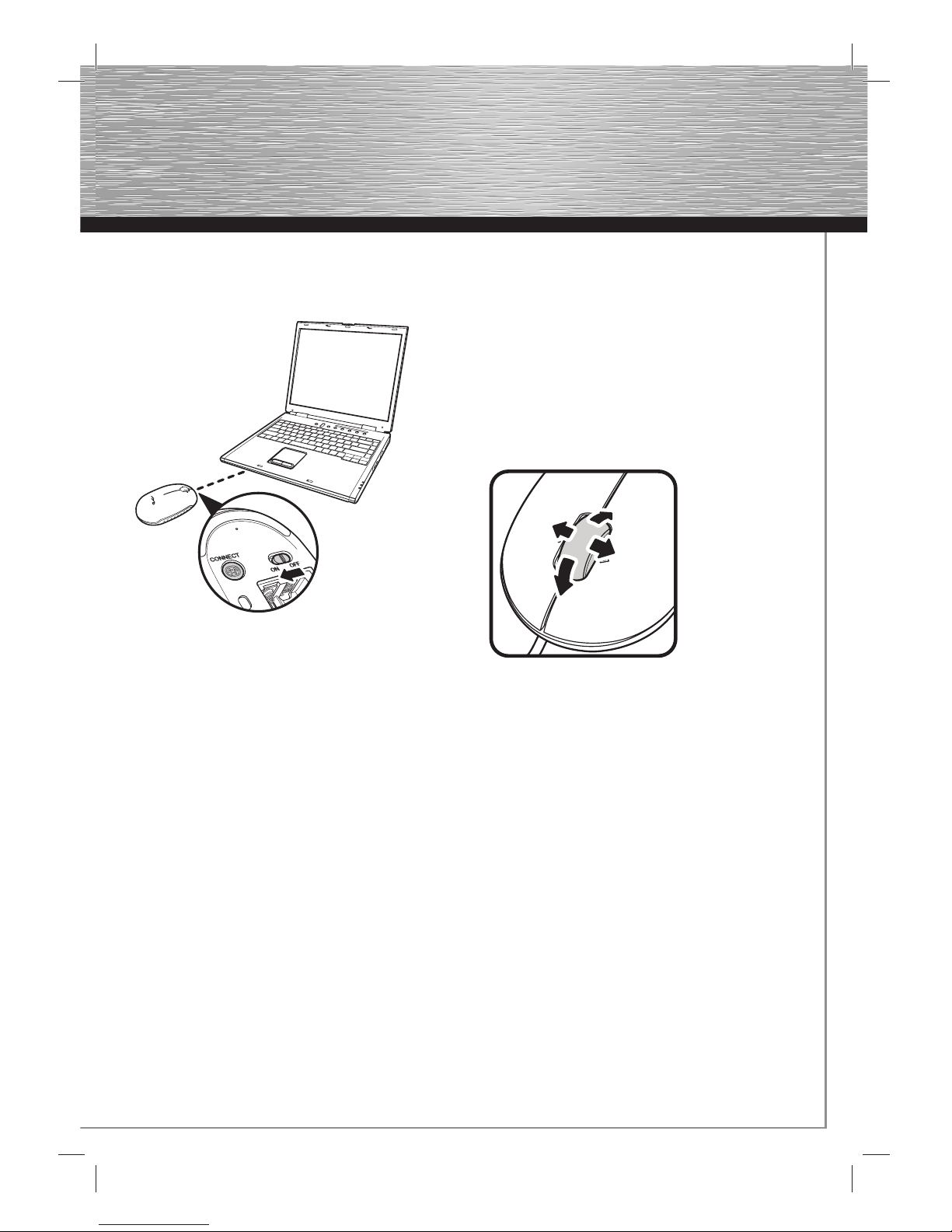
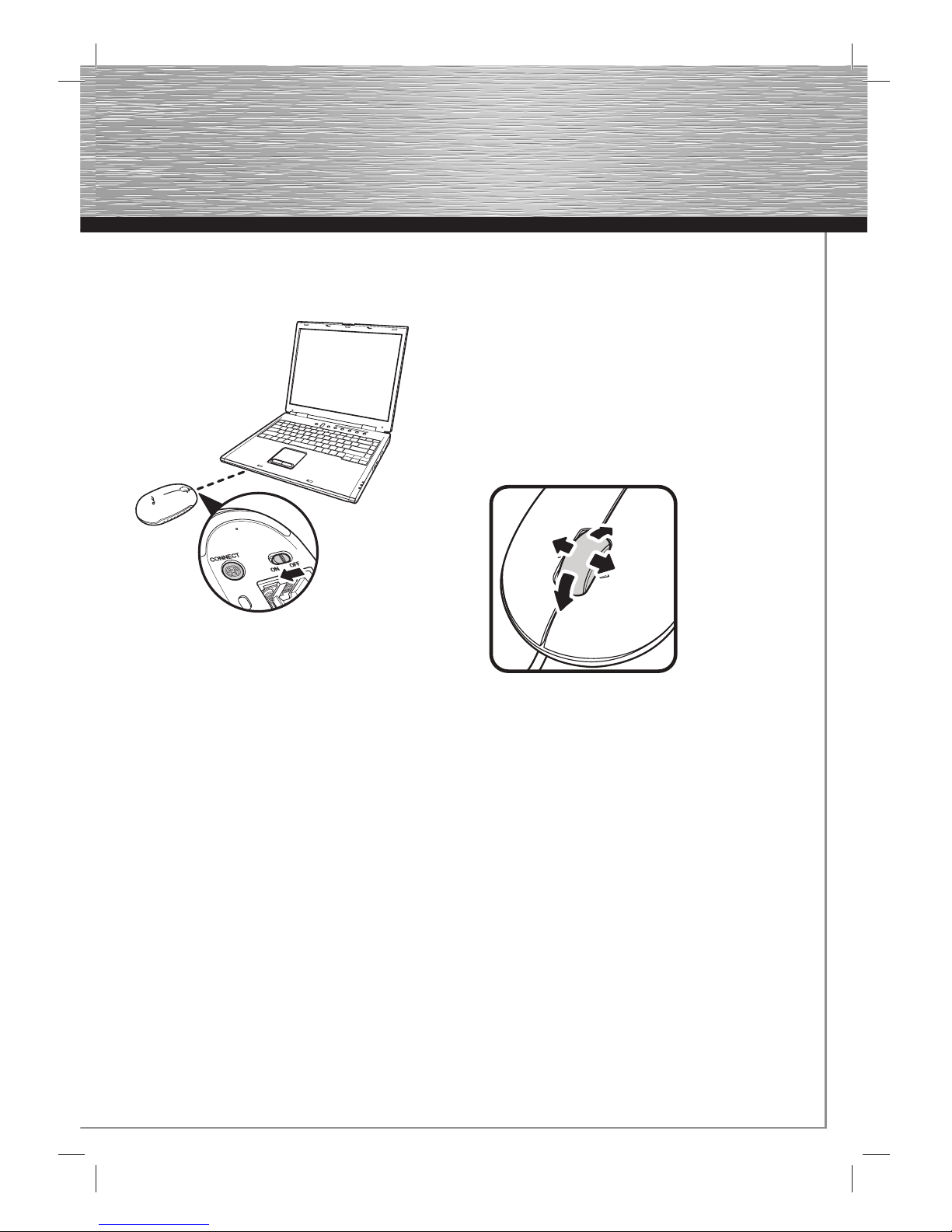
6.2 Connecting/pairing the mouse
Switch on your computer and switch the ON/OFF switch on the
bottom of the mouse to ON.
Press and hold down the „Connect“ key (5) on the bottom of the
mouse until the LED (4) fl ashes green.
Using the touchpad or a wired mouse, start the connection
(pairing) process of the mouse by clicking on the Bluetooth
symbol in the menu bar. Ensure that the menu item
„Bluetooth: activated:“ is highlighted in grey. Select the menu
item „Confi gure Bluetooth device“ to open the Bluetooth
Assistant.
Note:
At this point, the Bluetooth Mouse is not yet connected to the
computer or laptop.
Select the device type „Mouse“ and then click on „Continue“.
Select the Bluetooth Mouse that was found and follow the
remaining instructions provided by the assistant.
The successful confi guration will be confi rmed for you at the
end of the process.
6.3 Driver for the 4-way scroll wheel
If the mouse is installed on a MAC computer or laptop,
it is not necessary to install additional
drivers. The mouse is immediately ready for use.
Note:
With MS Windows 2000, the tilt wheel driver is only supported
by Bluetooth stacks (software), Broadcom® or Toshiba®
Bluetooth (software).
When used with a Windows operating system, an additional
driver is required for the scroll wheel to be fully operational.
Load the required external mouse driver
from www.hama.com and install it.
Note:
It is not recommended that you use the mouse on refl ective,
transparent or metallic surfaces or surfaces with a complex
pattern.
Page 7
6
1. Introduction
Nous vous remercions d’avoir acheté la souris Bluetooth de
Hama.
Ce mode d’emploi contient des informations concernant la
commande de votre souris Bluetooth.
Veuillez conserver ces instructions à portée de main afi n de
pouvoir les consulter en cas de besoin.
2. Contenu de l‘emballage
- Souris Bluetooth
- 2 piles LR03 (AAA)
- Mode d’emploi
3. Confi guration système requise
- MAC OS 10.4.7 ou versions ultérieures
- MS Windows 2000, XP, Vista
- Adaptateur Bluetooth ou technique Bluetooth intégrée
4. Caractéristiques
- Interface Bluetooth® 2.0 (compatible avec Bluetooth 1.0)
- Molette à 4 directions pour le défi lement horizontal et vertical
- Capteur optique d’une résolution de 1200 dpi
5. Aperçu
1 Touche gauche de souris
2 Molette
3 Touche droite de souris
4 DEL
5 Touche de connexion
6 Interrupteur ON/OFF
7 Capteur laser
8 Couvercle du compartiment à piles
Remarque :
Le témoin DEL (4) sur la face inférieure de la souris indique les
situations suivantes :
- La DEL clignote en vert dès que la procédure de couplage est
terminée
- La DEL clignote en rouge lorsque le niveau des piles est
insuffi sant
6. Installation de la souris
6.1 Mise en place des piles
Ouvrez le couvercle du compartiment des piles.
Insérez les piles dans le compartiment comme indiqué dans
l’illustration en respectant la polarité.
Refermez le couvercle du compartiment à batteries de manière
à ce qu’il soit bien fermé.
f
Mode d‘emploi
3
1
2
5
6
8
7
4
Page 8
7
g
Operating Instruction
6.2 Connexion/couplage
Mettez votre ordinateur sous tension et placez le commutateur
ON/OFF de la face arrière de la souris sur ON.
Appuyez sur la touche „connect“ (5) de la face inférieure de
la souris et maintenez-la enfoncée jusqu’à ce que la DEL (4)
clignote en vert.
Démarrez la procédure de couplage de la souris en cliquant
(avec l’écran tactile ou une souris à câble) sur l’icône Bluetooth
dans la barre des tâches. Veillez à ce que le point de menu
„Bluetooth : activé :” apparaisse en gris. Sélectionnez le point
de menu « confi guration d’un appareil Bluetooth » afi n d’ouvrir
l’assistant Bluetooth.
Remarque :
A ce moment, la souris Bluetooth n’est pas encore connectée à
votre ordinateur.
Sélectionnez le type d’appareil « souris », puis cliquez sur le
bouton « continuer ». Sélectionnez la souris Bluetooth détectée,
puis suivez les indications de l’assistant. Vous obtenez
fi nalement une confi rmation de confi guration terminée.
6.4 Pilote pour la molette à 4 directions
Il est inutile d’installer un pilote en cas d’installation de la souris
sur un ordinateur portable (ou non) Apple. La souris est immédiatement prête à fonctionner.
Remarque :
Sous MS Windows 2000, le pilote Tilt Wheel est pris en charge
uniquement par les stacks (logiciels) Bluetooth Broadcom® ou
Toshiba® Bluetooth (logiciel).
Un pilote doit être installé pour les systèmes d’exploitation
Windows afi n de garantir toutes les fonctionnalités de la
molette.
Veuillez télécharger le pilote de souris externe nécessaire sous
www.hama.com et installer le programme.
Remarque :
Il n’est pas recommandé d’utiliser la souris sur une surface
réfl échissante, transparente, métallique ou une surface à
dessins compliqués.
 Loading...