

Page 1
00184108
00184109
BLUETOOTH®EARPHONES
“Spirit Pure”
G Operating Instructions D Bedienungsanleitung F Mode d‘emploi E Instrucciones de uso
N
Gebruiksaanwijzing I Istruzioni per l‘uso P Instrukcja obsługi H Használati útmutató
M Manual de utilizare C Návod k použití Q Návod na použitie O Manual de instruções
S Bruksanvisning R Руководство по эксплуатации B Работна инструкция
J Οδηγίες χρήσης T Kullanma kılavuzu L Käyttöohje
Page 2

G Operating Instructions � � � � � � � � � � � � � � � � � � � � � � � � � � � � � � � � � � � � � � 1
D Bedienungsanleitung � � � � � � � � � � � � � � � � � � � � � � � � � � � � � � � � � � � � � � 11
F Mode d’emploi � � � � � � � � � � � � � � � � � � � � � � � � � � � � � � � � � � � � � � � � � � 21
E Manual de instrucciones � � � � � � � � � � � � � � � � � � � � � � � � � � � � � � � � � � � 31
N Gebruiksaanwijzing � � � � � � � � � � � � � � � � � � � � � � � � � � � � � � � � � � � � � � � 41
I Istruzioni d’uso � � � � � � � � � � � � � � � � � � � � � � � � � � � � � � � � � � � � � � � � � � 51
P Instrukcja obsługi� � � � � � � � � � � � � � � � � � � � � � � � � � � � � � � � � � � � � � � � � 61
H Használati útmutató� � � � � � � � � � � � � � � � � � � � � � � � � � � � � � � � � � � � � � � 71
M Instrucțiuni de utilizare
� � � � � � � � � � � � � � � � � � � � � � � � � � � � � � � � � � � � � 81
C Návod k použití � � � � � � � � � � � � � � � � � � � � � � � � � � � � � � � � � � � � � � � � � � 91
Q Návod na obsluhu � � � � � � � � � � � � � � � � � � � � � � � � � � � � � � � � � � � � � � � 101
O Manual de instruções� � � � � � � � � � � � � � � � � � � � � � � � � � � � � � � � � � � � � 111
S Bruksanvisning� � � � � � � � � � � � � � � � � � � � � � � � � � � � � � � � � � � � � � � � � � 121
R Руководство по эксплуатации
� � � � � � � � � � � � � � � � � � � � � � � � � � � � � � 131
B Ръководство за експлоатация � � � � � � � � � � � � � � � � � � � � � � � � � � � � � 141
h Εγχειρίδιο οδηγιών � � � � � � � � � � � � � � � � � � � � � � � � � � � � � � � � � � � � � � � 151
T Kullanım kılavuzu
� � � � � � � � � � � � � � � � � � � � � � � � � � � � � � � � � � � � � � � � 161
L Käyttöohje� � � � � � � � � � � � � � � � � � � � � � � � � � � � � � � � � � � � � � � � � � � � � 171
Page 3
1
Thank you for choosing a Hama product�
Take your time and read the following instructions
and information completely� Please keep these
instructions in a safe place for future reference� If
you sell the device, please pass these operating
instructions on to the new owner
�
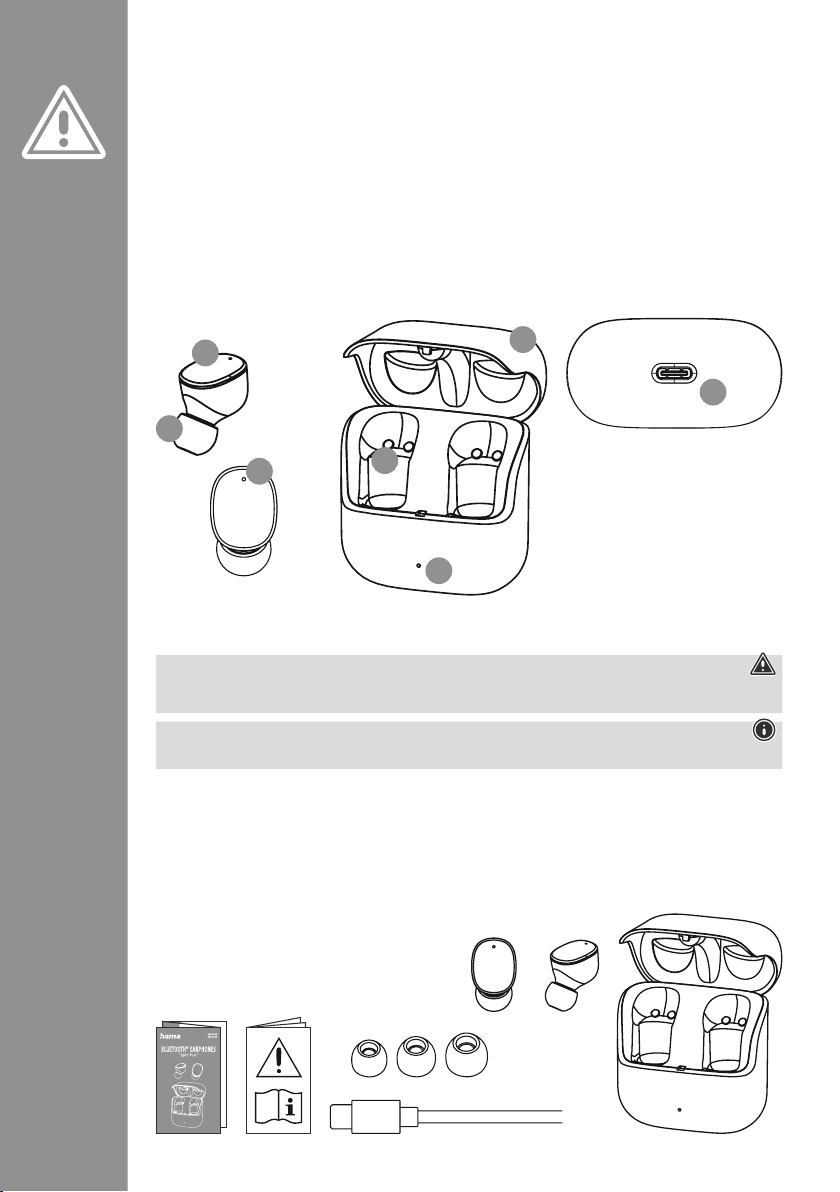
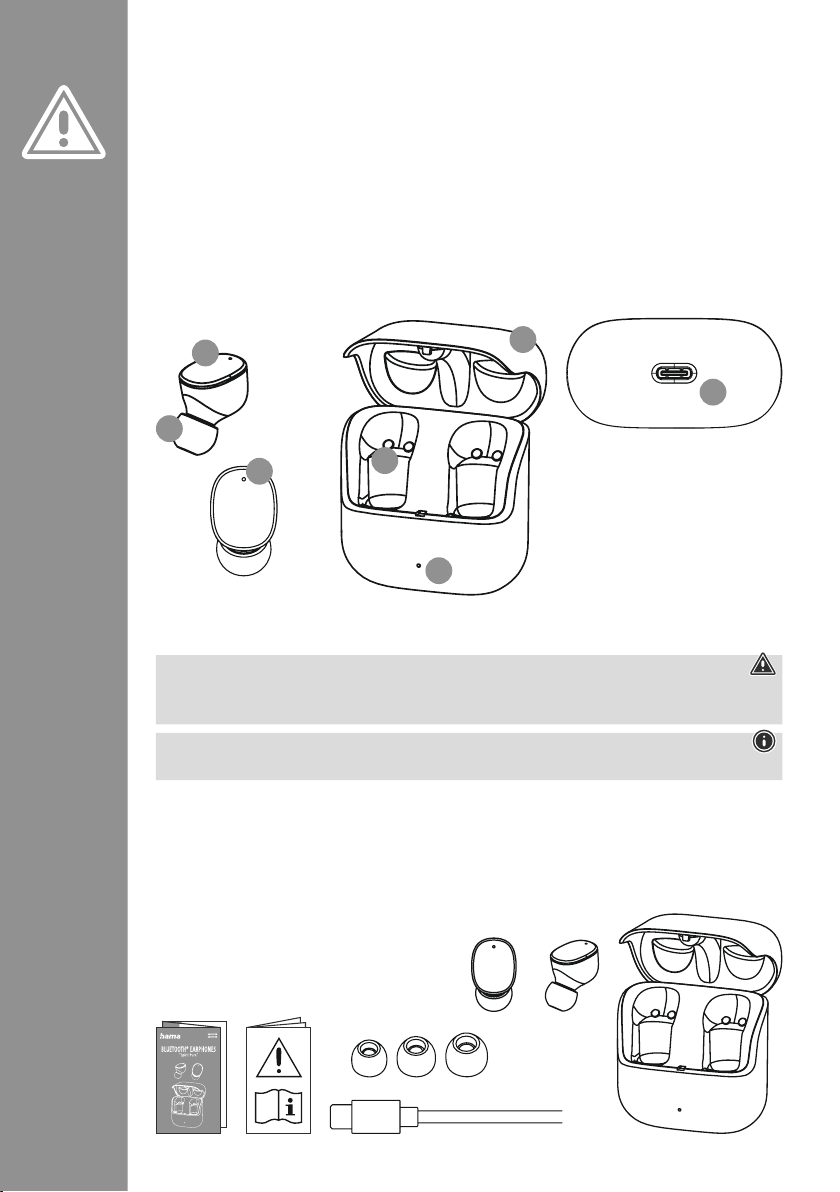
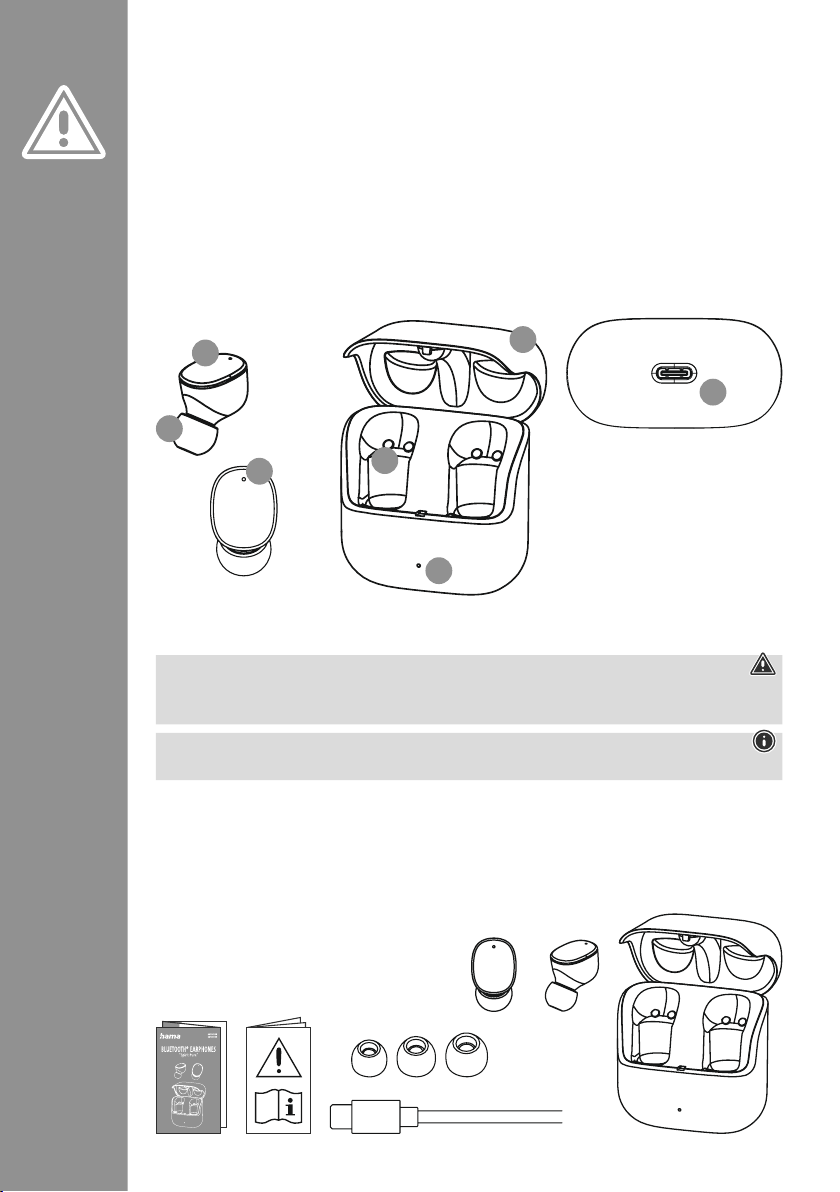
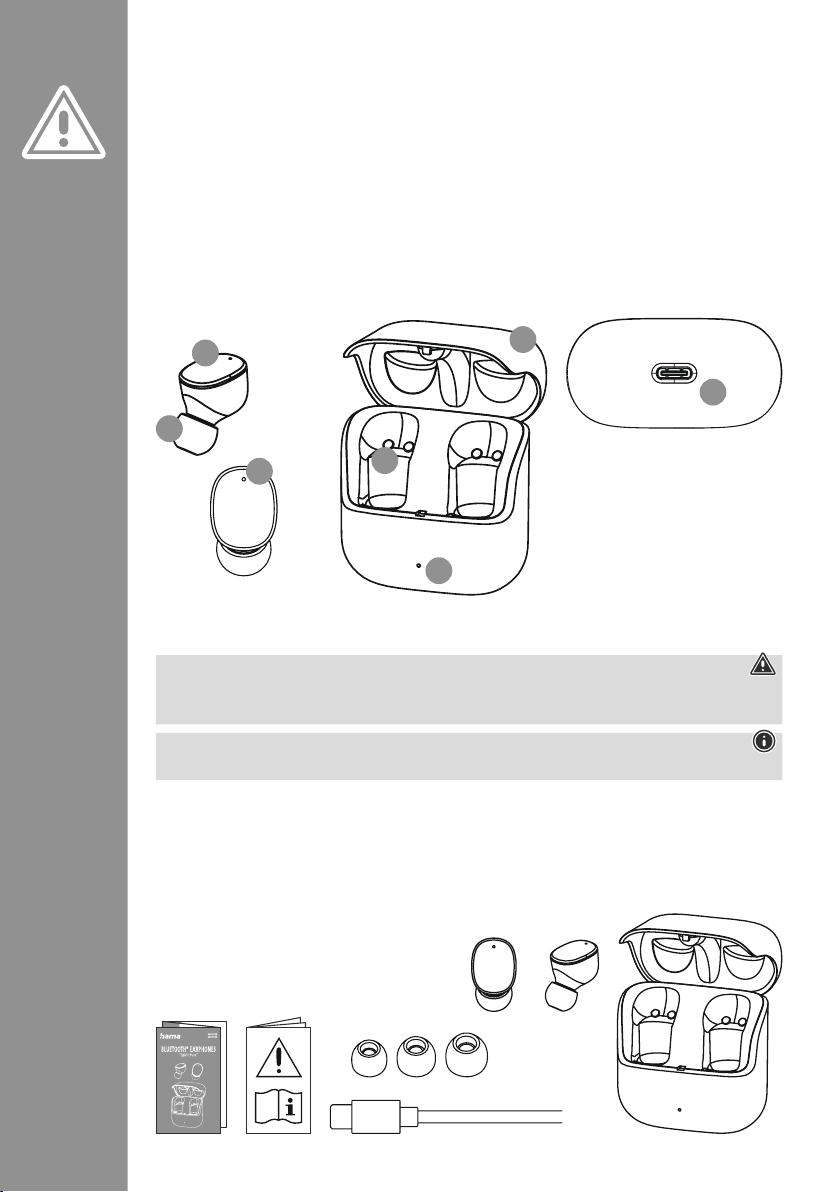
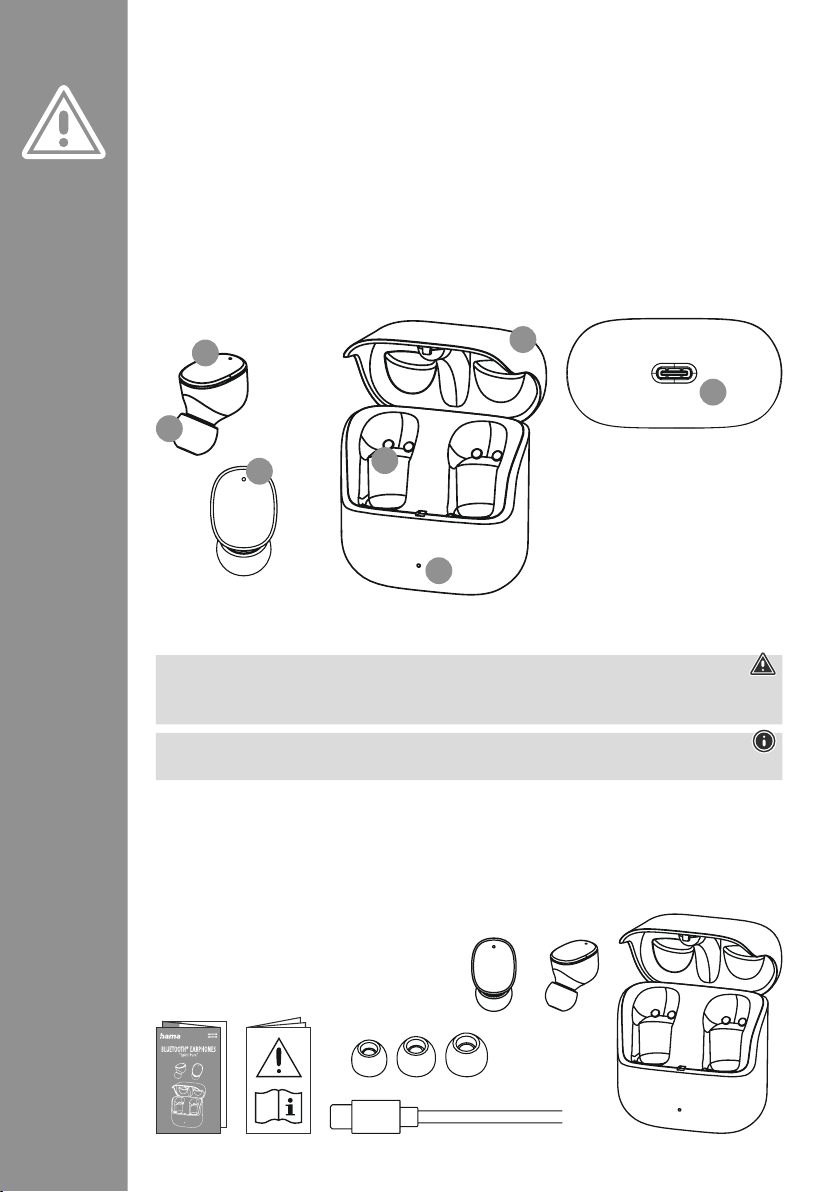
Controls and displays
1� Charging box
2� Charging box status LED
3� Earphones status LED
4
� Multi-function touch sensor
5� Silicone ear pads
6� Charging contacts
7
� USB-C connection
1. Explanation of warning symbols and notes
Warning
This symbol is used to indicate safety instructions or to draw your attention to specic hazards and risks
�
Note
This symbol is used to indicate additional information or important notes
�
2. Package contents
1 x "Spirit Pure" True Wireless Bluetooth®earphones
1 x charging box
1 x USB-C charging cable
3 pairs of ear pads in various sizes (S/M/L)
1 x quick guide
1 x warning and safety instructions
G Operating Instructions
S
M
L
5
3
4
2
6
7
1
Page 4
2
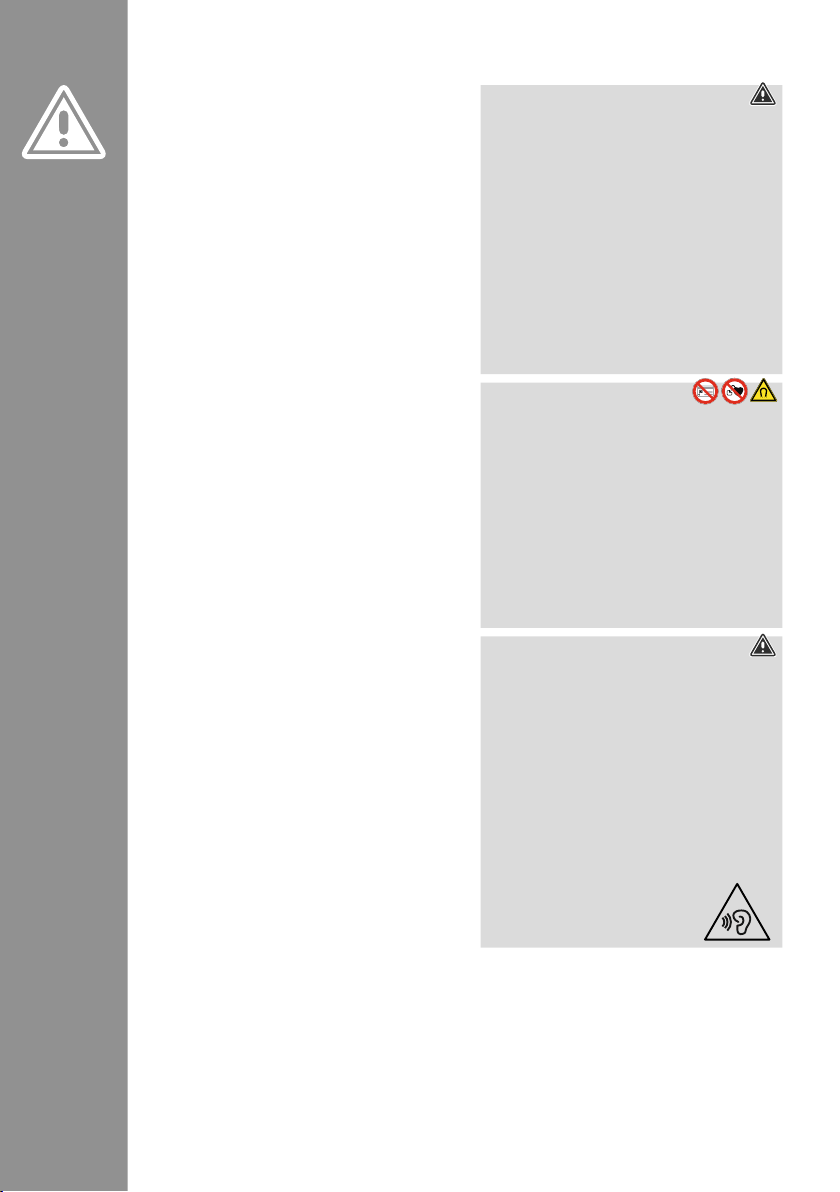
3. Safety instructions
• The product is intended for private, noncommercial use only
�
• Use the product only for the intended purpose�
• Children should be supervised to ensure that they
do not play with the product
�
• Do not use the product in areas in which
electronic products are not permitted
�
• Do not attempt to service or repair the product
yourself
� Leave any and all service work to
qualied experts
�
• Do not open the device or continue to operate it if
it becomes damaged
�
• Do not bend or crush the cable�
• Do not drop the product and do not expose it to
any major shocks
�
• Dispose of packaging material immediately in
accordance with the locally applicable regulations
�
• Do not modify the product in any way� Doing so
voids the warranty
�
• Protect the product from dirt, moisture and
overheating and use it in dry environments only
�
• Do not use the product in the immediate vicinity
of heaters, other heat sources or in direct sunlight
�
• Only use the article under moderate climatic
conditions
�
• As with all electrical products, this device should
be kept out of the reach of children
�
• Do not operate the product outside the power
limits specied in the technical data
�
• Do not use the product in a damp environment
and avoid splashing water
• While driving a car or using sports equipment, do
not allow yourself to be distracted by your product
and keep an eye on the trac situation and your
surroundings
�
• The battery is permanently installed and cannot
be removed; dispose of the product as a whole in
accordance with the statutory regulations
�
• Do not incinerate the battery or the product�
• Do not tamper with or damage/heat/disassemble
the batteries/rechargeable batteries
�
• Do not use the product during the charging
process!
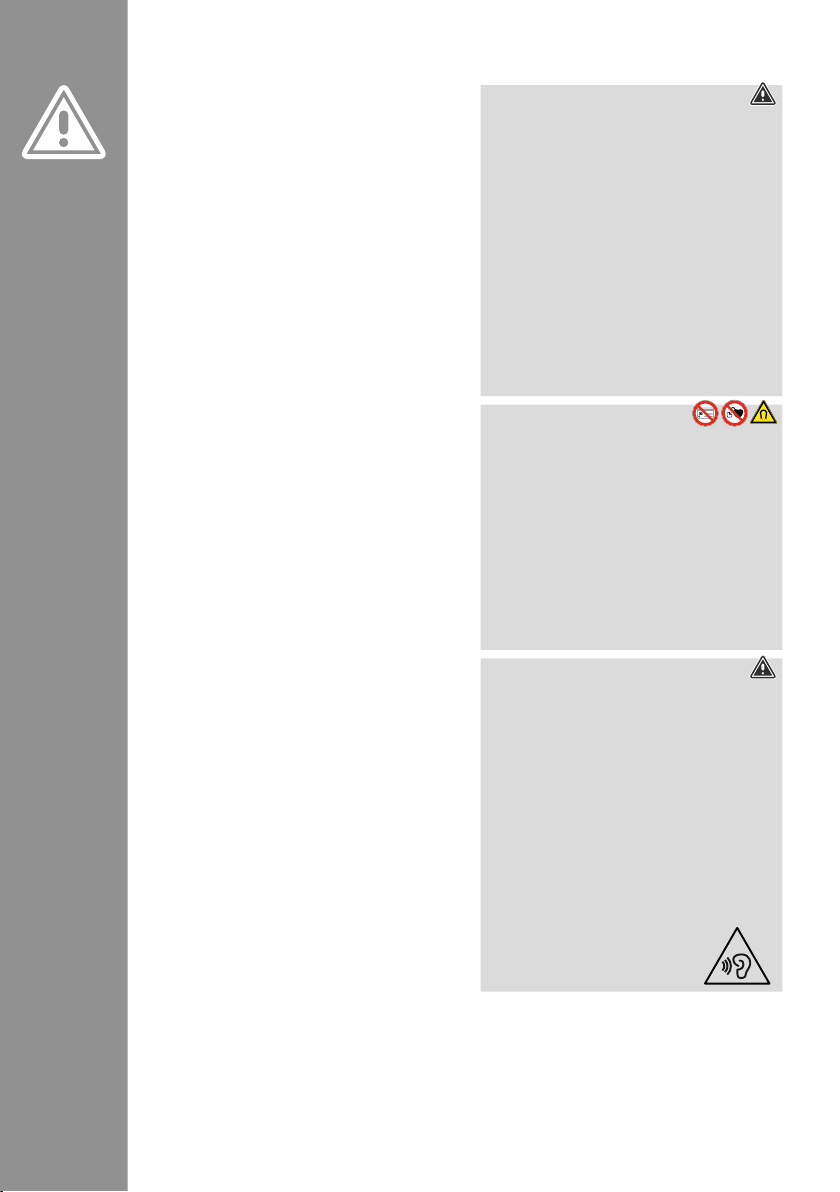
Warning – rechargeable battery
• Only use suitable charging devices or USB
connections to charge the product�
• Do not use defective chargers or USB ports
and do not attempt to repair them
�
• Do not overcharge the product or allow the
battery to completely discharge�
• Avoid storing, charging and using in
extreme temperatures and at extremely
low atmospheric pressures (such as at high
altitudes)
�
• Charge regularly (at least quarterly) during
periods of prolonged storage�
Warning - magnets
• This product generates magnetic elds�
Persons with a cardiac pacemaker should
consult a doctor before using this product,
as the pacemaker's proper function could be
affected
�
• Do not store bank or similar cards with
magnetic strips near the charging box or
earphones
� The data on the cards could be
damaged or completely deleted�
Warning - high volume
• High sound pressure!
• There is a risk of hearing damage�
• To prevent any loss of hearing, avoid listening
at loud volumes for prolonged periods�
• Always keep the volume at a sensible level�
Loud volumes, even over short periods, can
cause hearing loss�
• Using this product limits your perception
of ambient noise
� You should
therefore not drive
or operate machinery
while using them�
Page 5
3
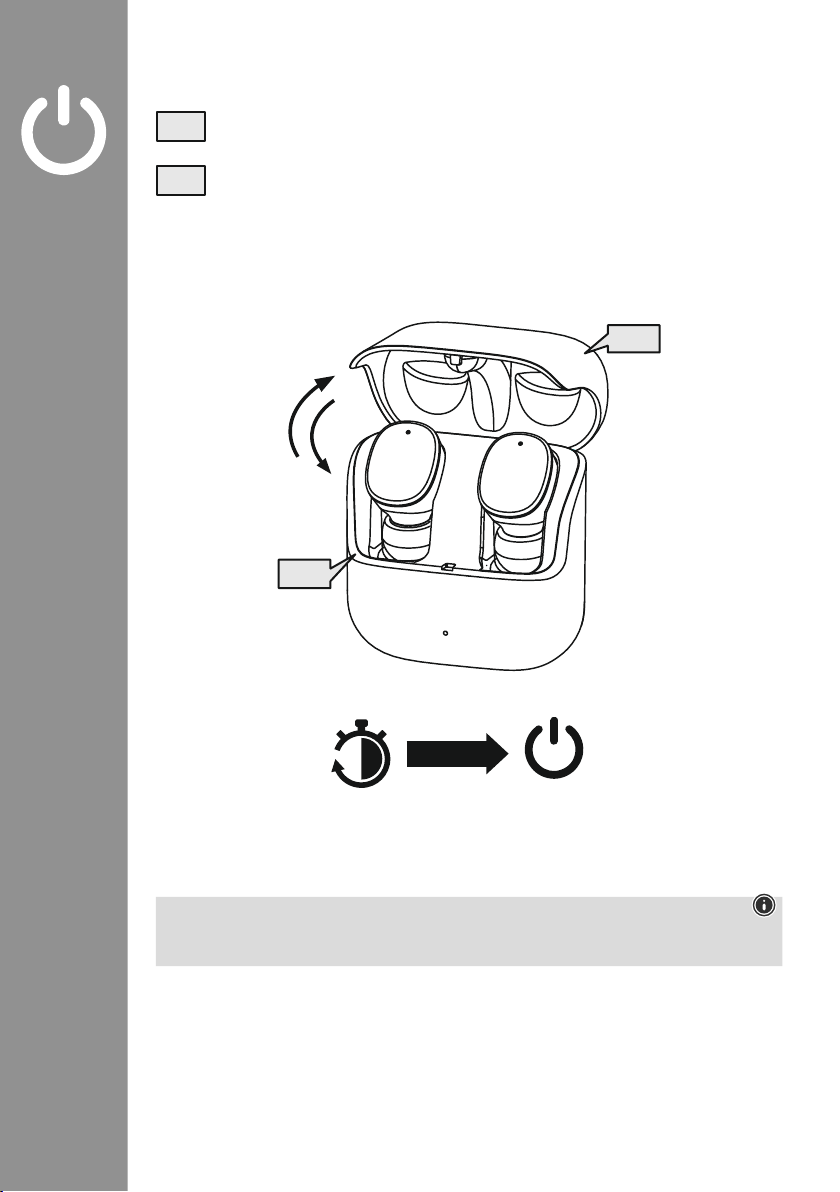
4. Switching on/off
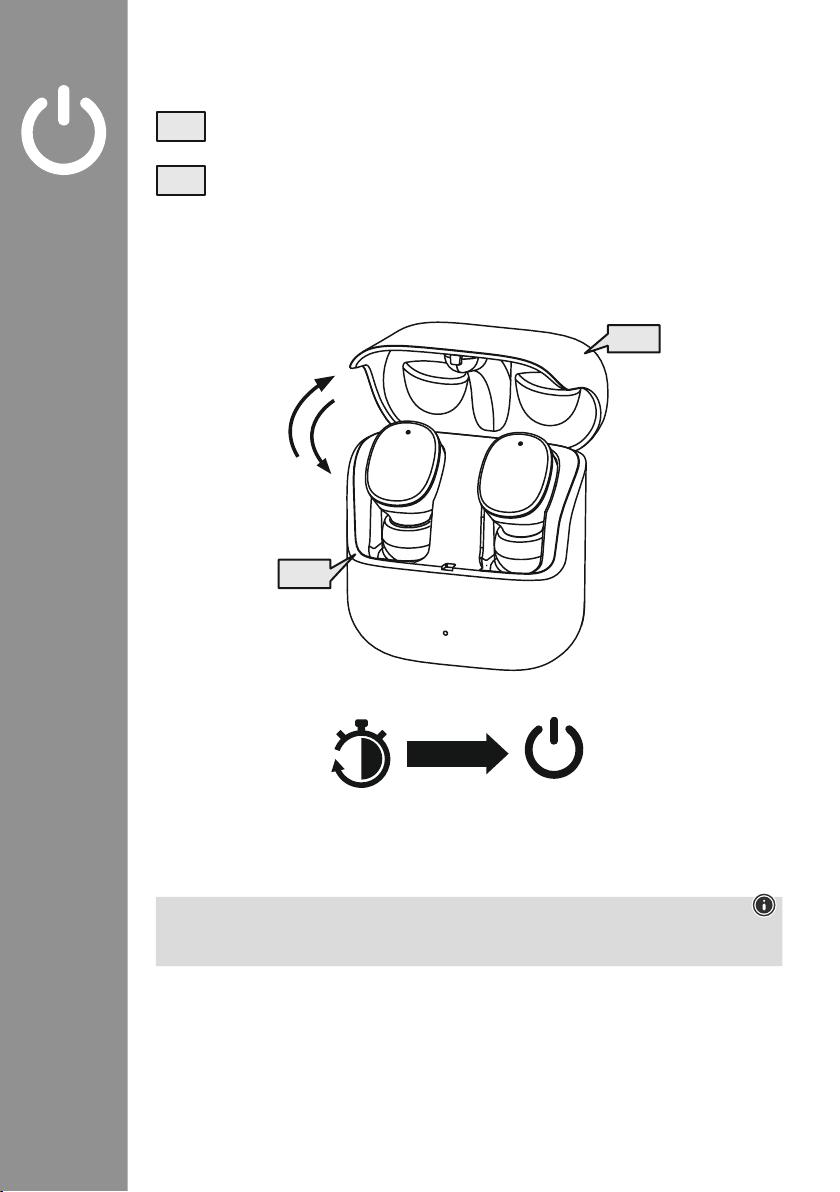
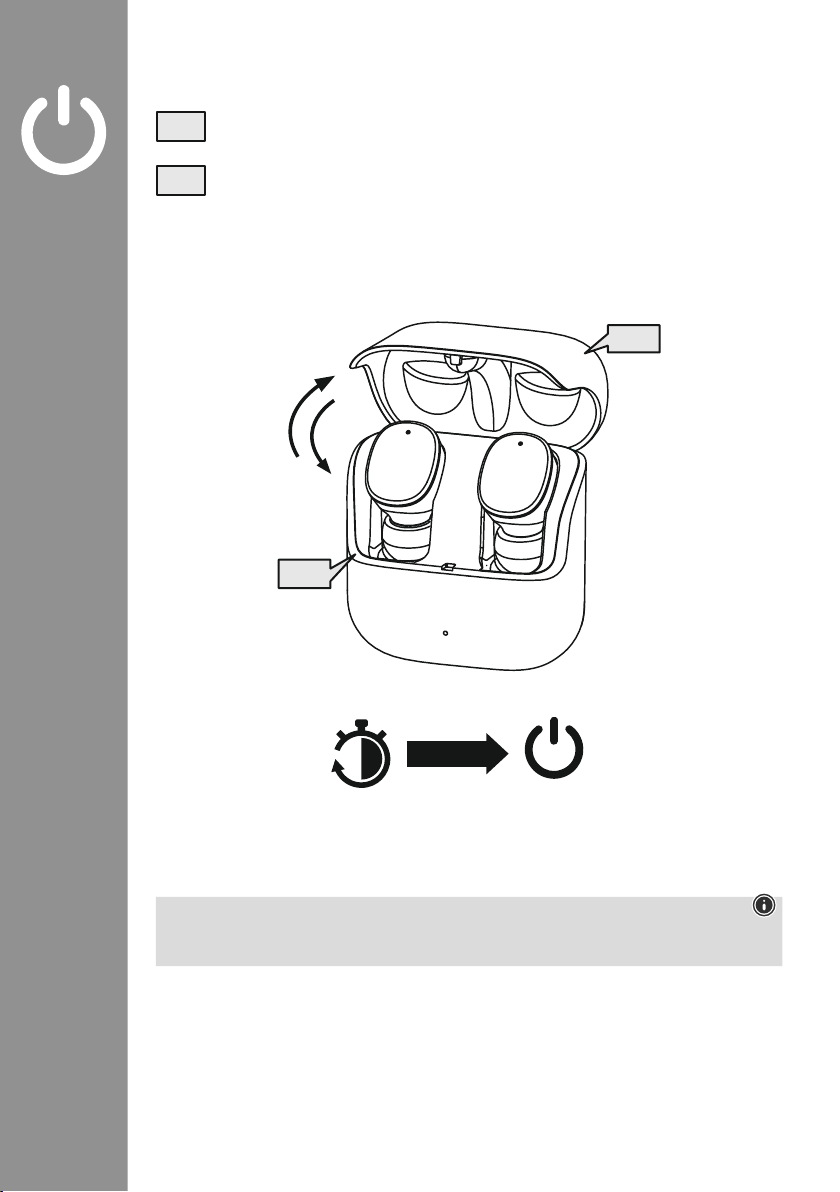
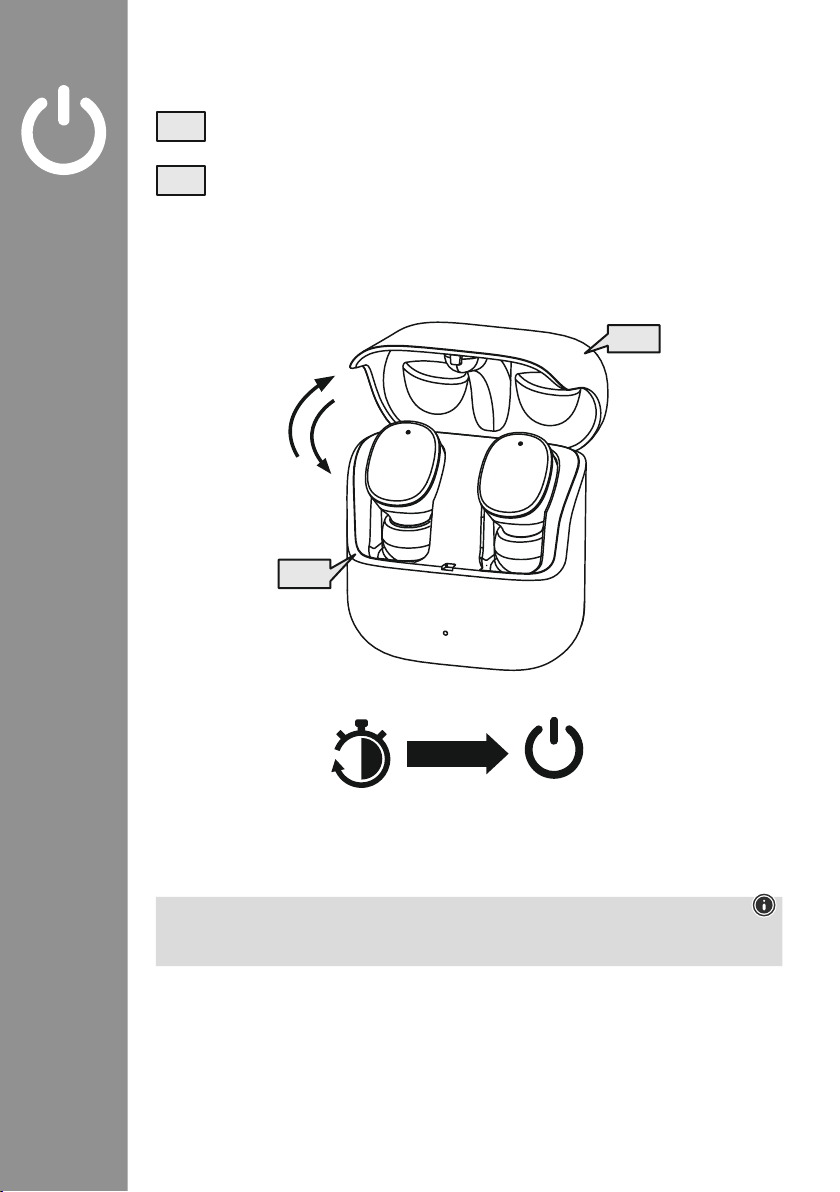
When you open the charging box, the earphones switch on automatically and start the pairing
process�
To switch them off, simply place the earphones back in charging box� Ensure that the
earphones are inserted into the correct sides, using the L/R markings as a guide� Then close
the charging box
�
zZz
STANDBY
3min
ON
OFF
ON
OFF
Note – Automatic switch-off of the product
The product is equipped with an automatic switch-off mechanism
� If there is no connection to your
device within 3 minutes, it switches itself off automatically�
Page 6
4
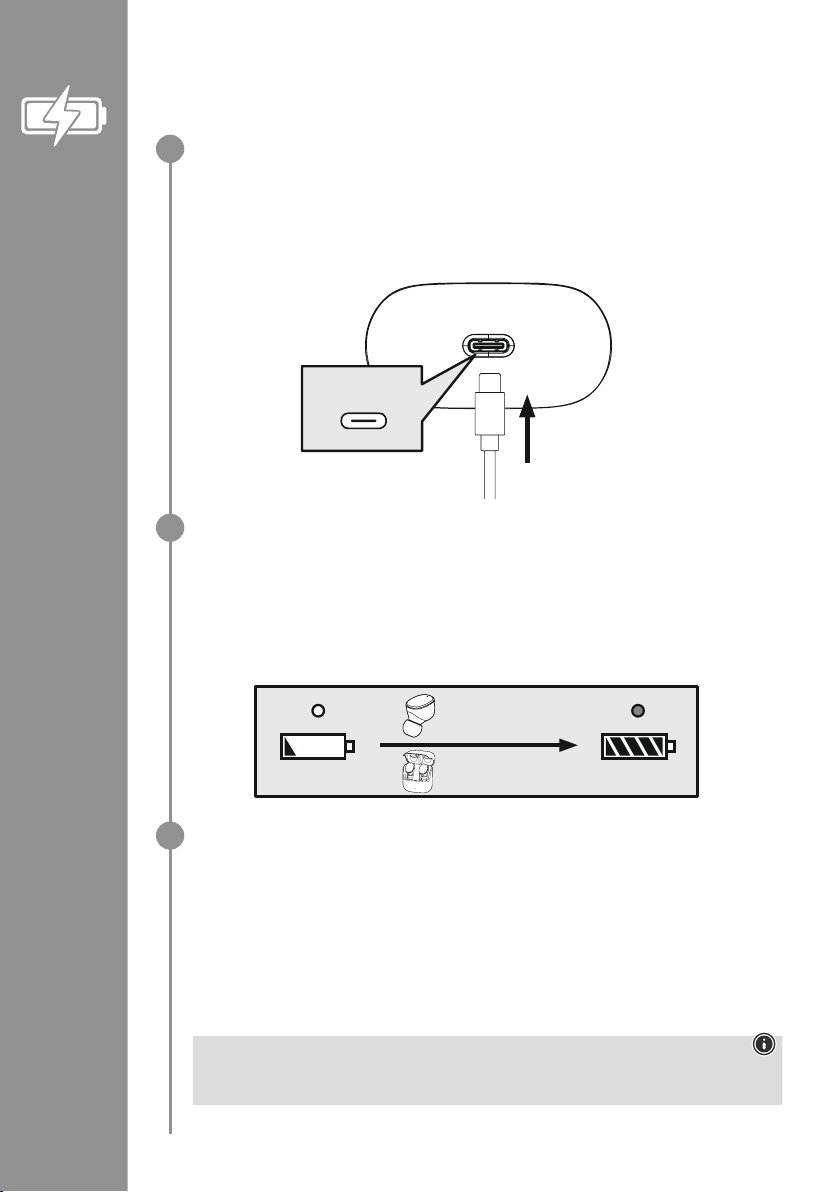
5. Charging
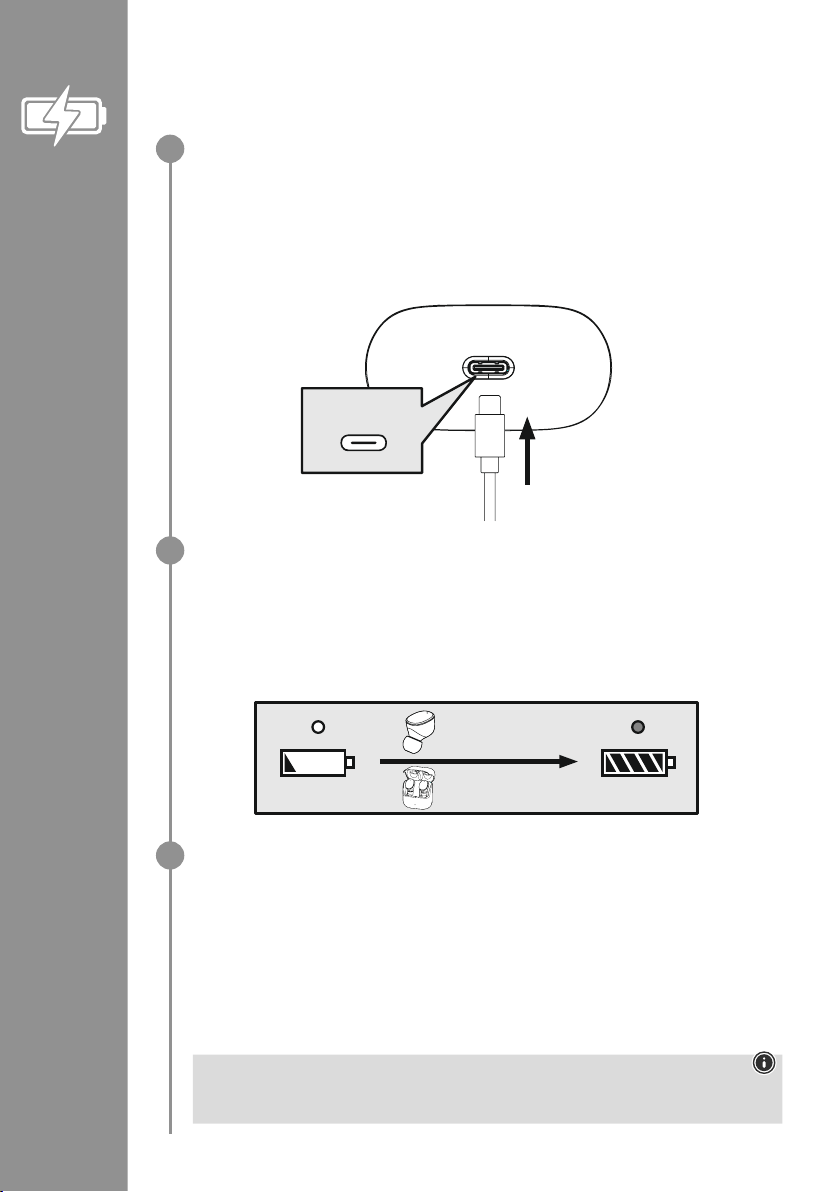
Fully charge the earphones and the charging box once before using them for the rst time
�
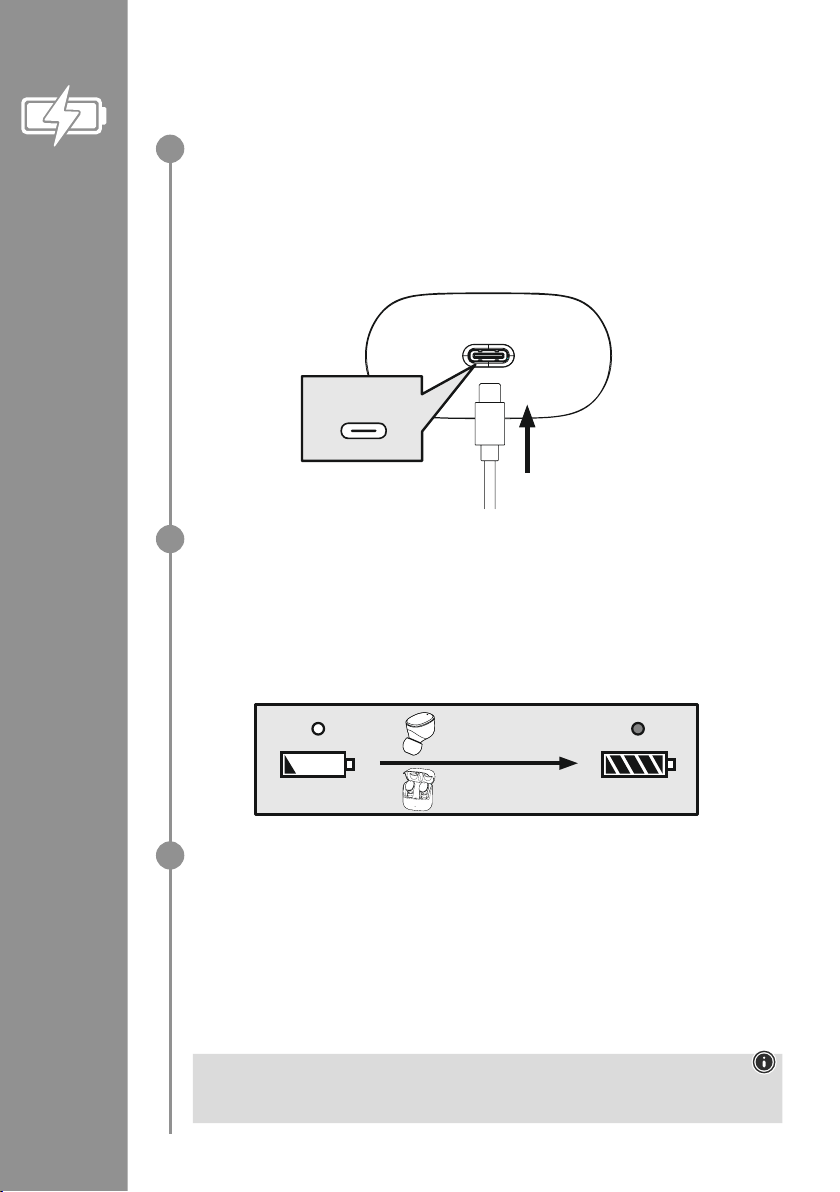
Insert the earphones, close the charging box and connect it
Place the earphones in the charging box� Ensure that the earphones are inserted into the correct
sides, using the L/R markings as a guide� Then close the charging box�
Connect the USB-C charging cable included to the charging socket (7) on the charging box�
Connect the free plug on the USB-C charging cable to a suitable USB charger� To do this, consult
the operating instructions for the USB charger you are using�
Charging procedure for the charging box and earphones
The status LED on the charging box (2) lights up white during the charging process� After the
charging box is fully charged, the LED on the charging box lights up solid white�
The earphones are only charged when the charging box is closed�
It can take up to 2 hours (earphones) or up to 2�5 hours (charging box) until the batteries are fully
charged�
Battery capacity
Charging box
When battery levels are low, the status LED (2) on the charging box ashes white
�
Earphones
When the battery level is low, you will hear a signal tone once every minute and the status LED (3)
on the earphones ashes white
�
The actual battery life will vary depending on how you use the device, the settings and the ambient
temperatures (rechargeable batteries have a limited life)�
Note
If you have not used the product for a few months, it can take up to 15 - 30 minutes until the
status LED (2) lights up red during the charging process�
USB-C
CHARGING CHARGED
2h:00m
2h:30m
1
2
3
Page 7
5
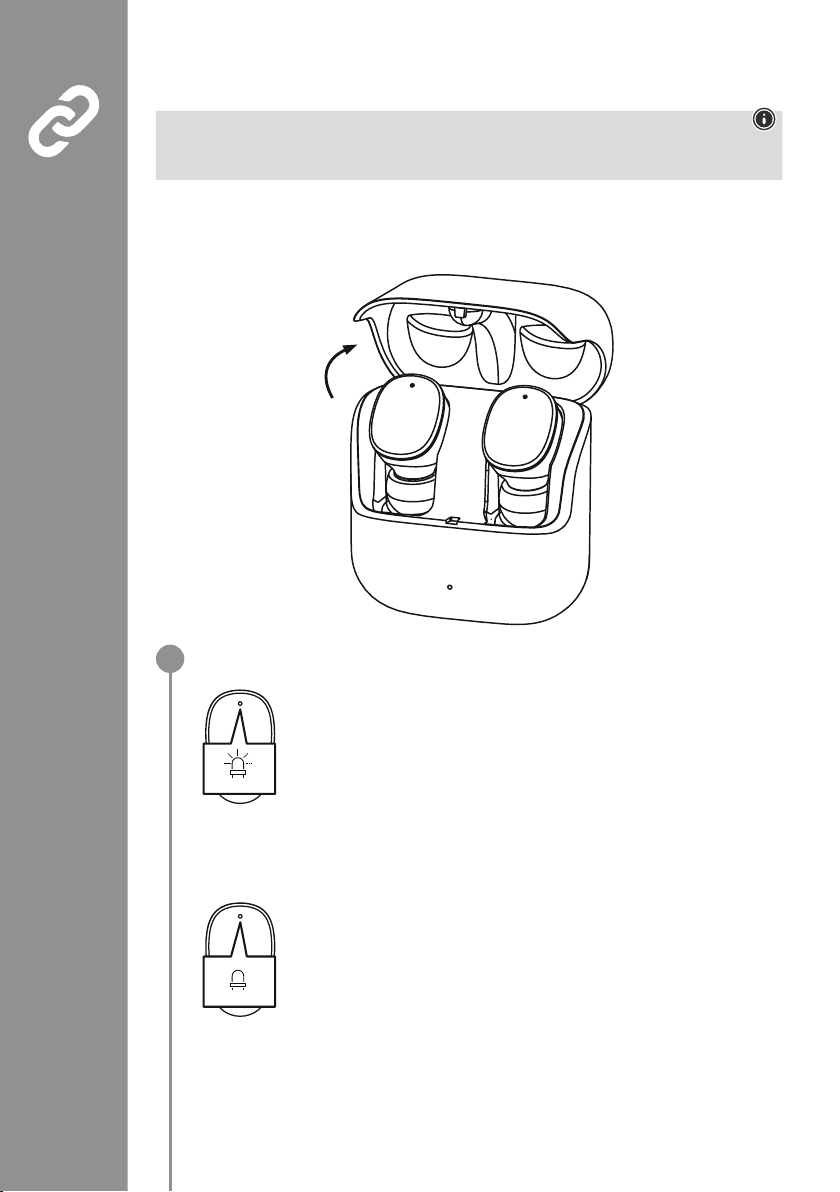
6. Bluetooth®pairing
Note - Pairing
• Make sure that your Bluetooth
®
-capable device is switched on and that Bluetooth®is activated�
• For more information, please refer to the operating instructions of your device�
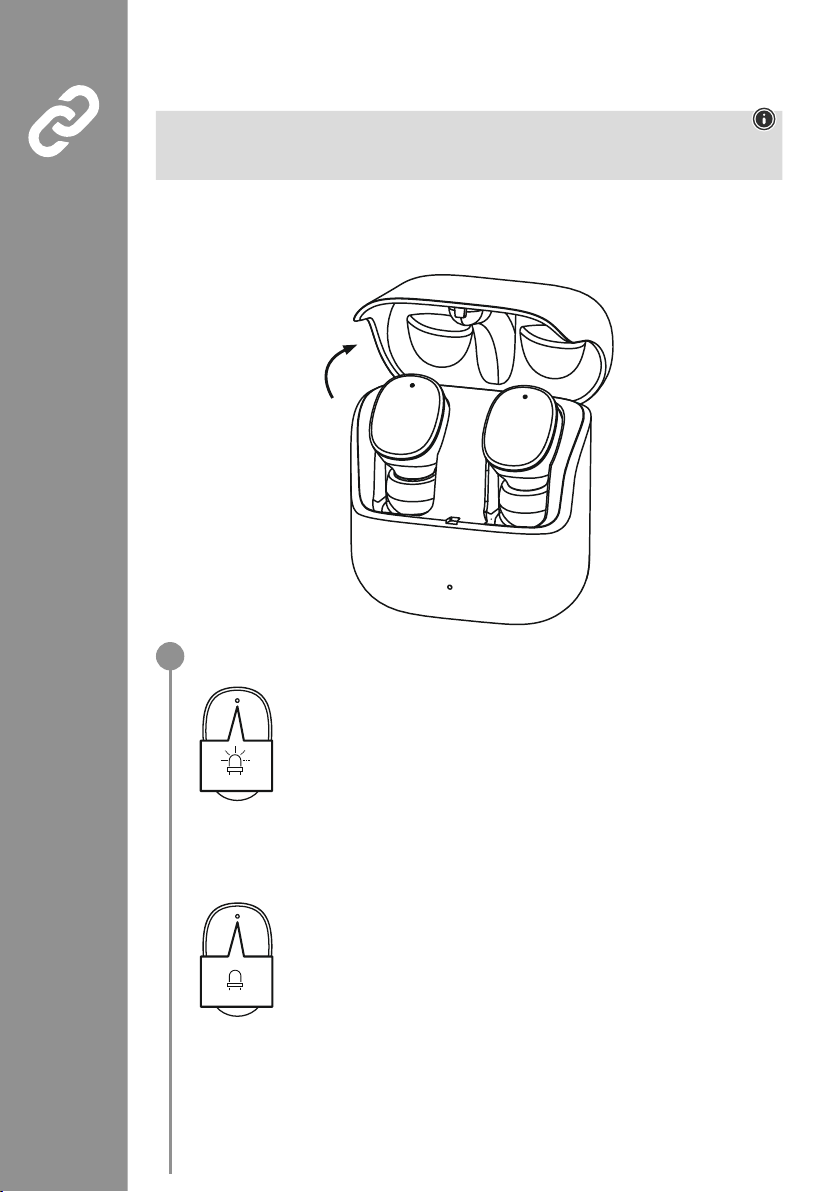
The earphones and the device should not be more than 1 metre apart� The shorter the distance, the
better�
Ensure that the earphones are switched on�
Check the status of the status LED (3)
If the status LEDs (3) on the earphones flash alternately:
the earphones are searching for a Bluetooth
®
connection�
If the status LEDs (3) are flashing and then go out:
the earphones are already paired with a Bluetooth
®
device�
Blue/red
off
1
Page 8
6
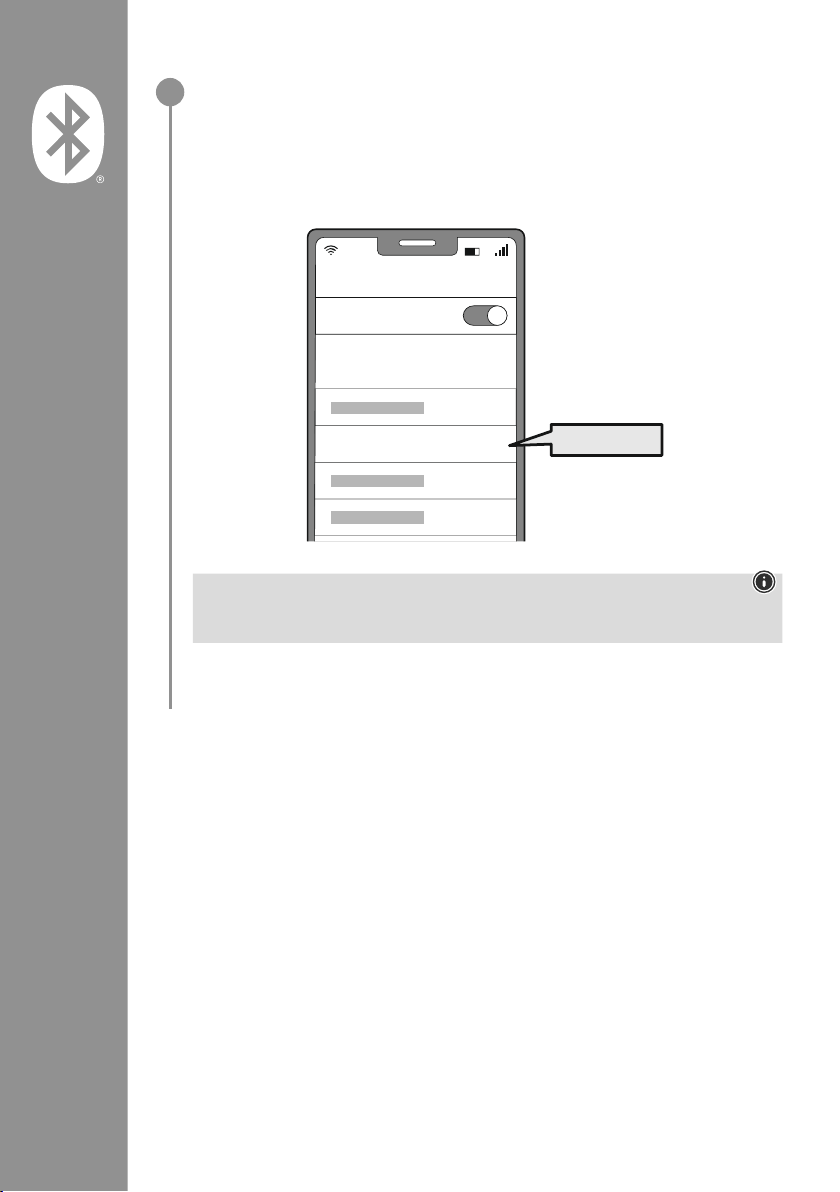
Search using your device for the earphones (only required on the first connection)
Open the Bluetooth
®
settings on your device and wait until the list
of found Bluetooth
®
devices shows Hama Spirit Pure
�
Select Hama Spirit Pure and wait until the earphones are shown as connected
in your device's Bluetooth
®
settings� You will hear a brief signal tone�
Note - Bluetooth®password
Some devices require a password in order to connect to another Bluetooth
®
device�
• If your device requests a password to connect to the earphones, enter 0000�
2
Password
Bluetooth
Hama Spirit Pure
ON
0000
Page 9
7
7. Controls
Note
• Please be aware that your terminal device must support some functions if they are to be used�
• For more information, please refer to the operating instructions of your device�
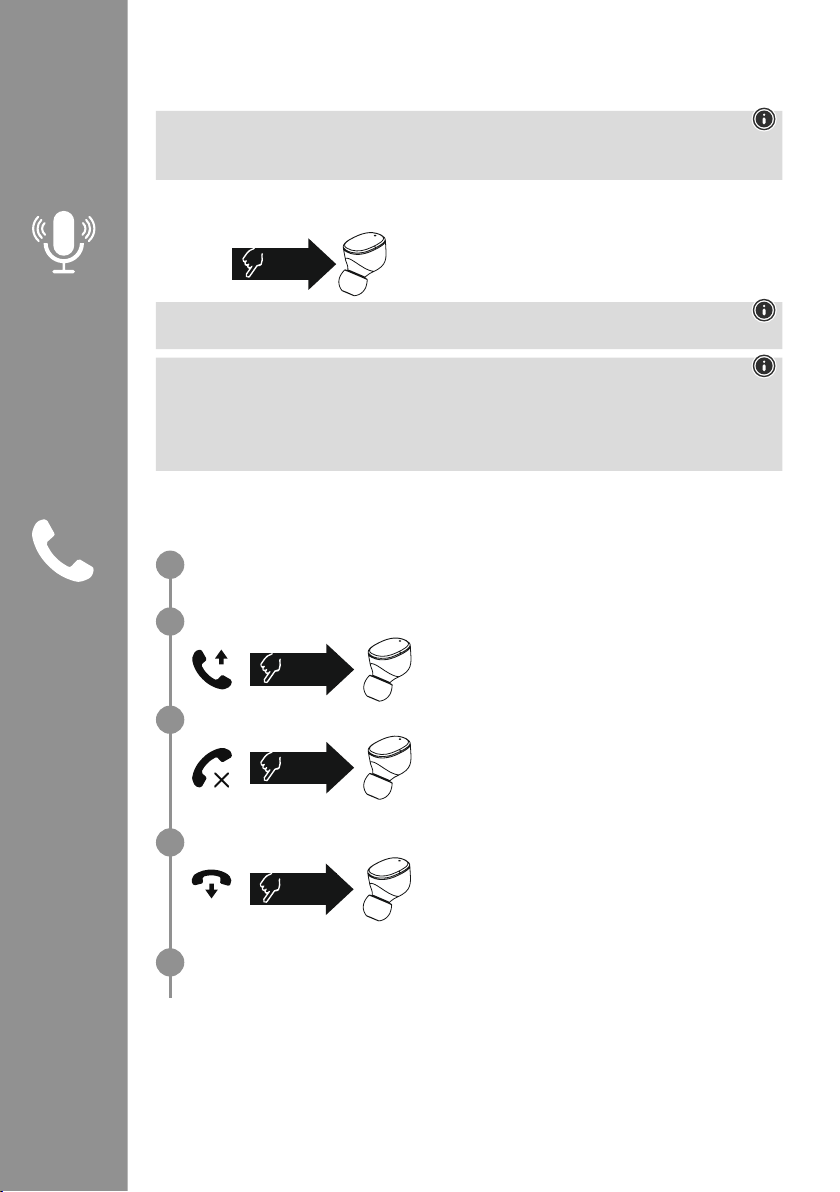
7.1 Voice assistant function
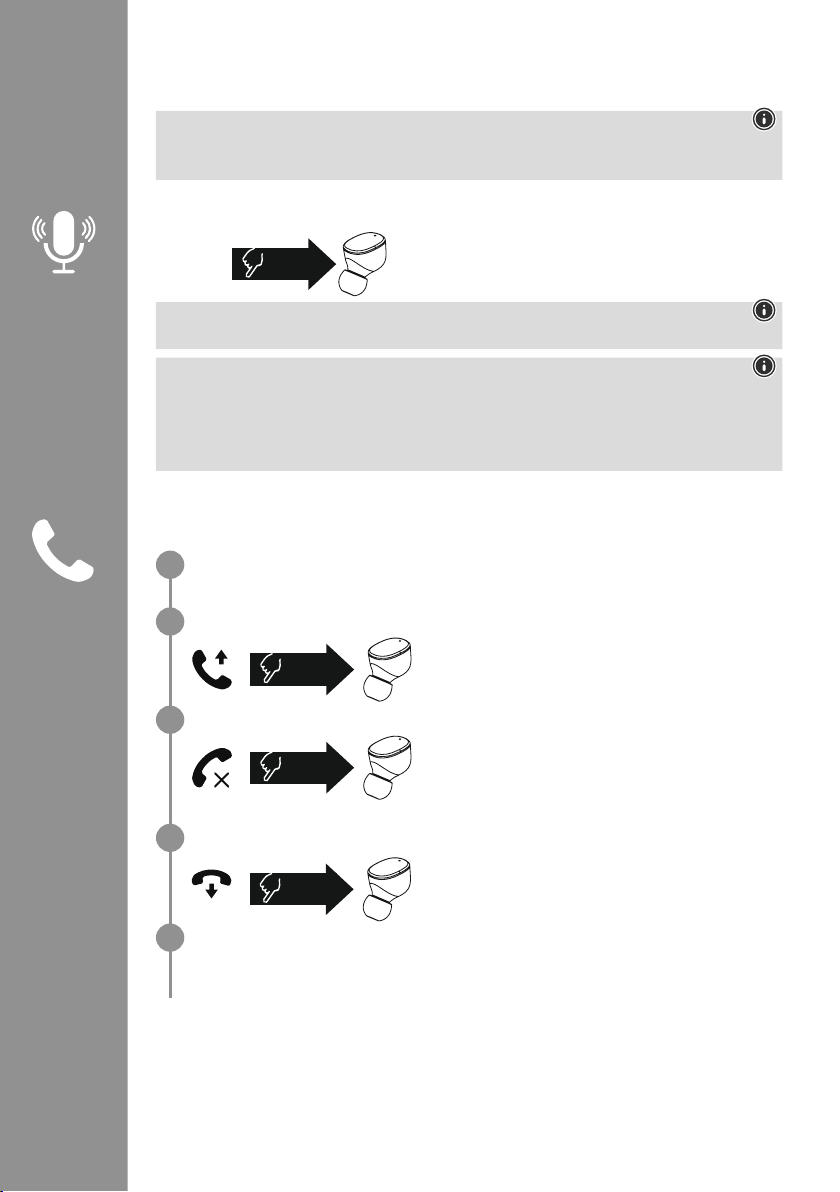
Tap the multi-function touch sensor (4) on the right earphone
once to initiate communication with Siri or the Google
Assistant
�
Note - Siri
Siri is only available on suitable devices running iOS 5 (iPhone 4s or later) or higher�
Note - Google Assistant
• The Google Assistant is only available on suitable devices running Android 5.0 or higher with
Google Play Services, >1�5 GB of free memory and a minimum screen resolution of 720P�
• The Google Assistant App must be available on your device and be set as the default voice
assistant�
7.2 Hands-free function
It is possible to use the earphones like a hands-free facility for your device�
Make a call
Dial the number directly via your device to make a call�
Accept a call
Tap the multi-function touch sensor (4) on the left or right
earphone twice to accept an incoming call� You will hear a
brief signal tone�
Reject a call
To reject an incoming call, tap the multi-function touch
sensor (4) on the left or right earphone three times� You will
hear a brief signal tone�
End a call
During the call, tap the multi-function touch sensor (4) on
the left or right earphone twice to end the call� You will
hear a brief signal tone
�
Last number redial
You can redial the last number you called via the voice assistant function (7�1)�
1x
Siri/
Google
2x
3x
2x
1
2
3
4
5
Page 10
8
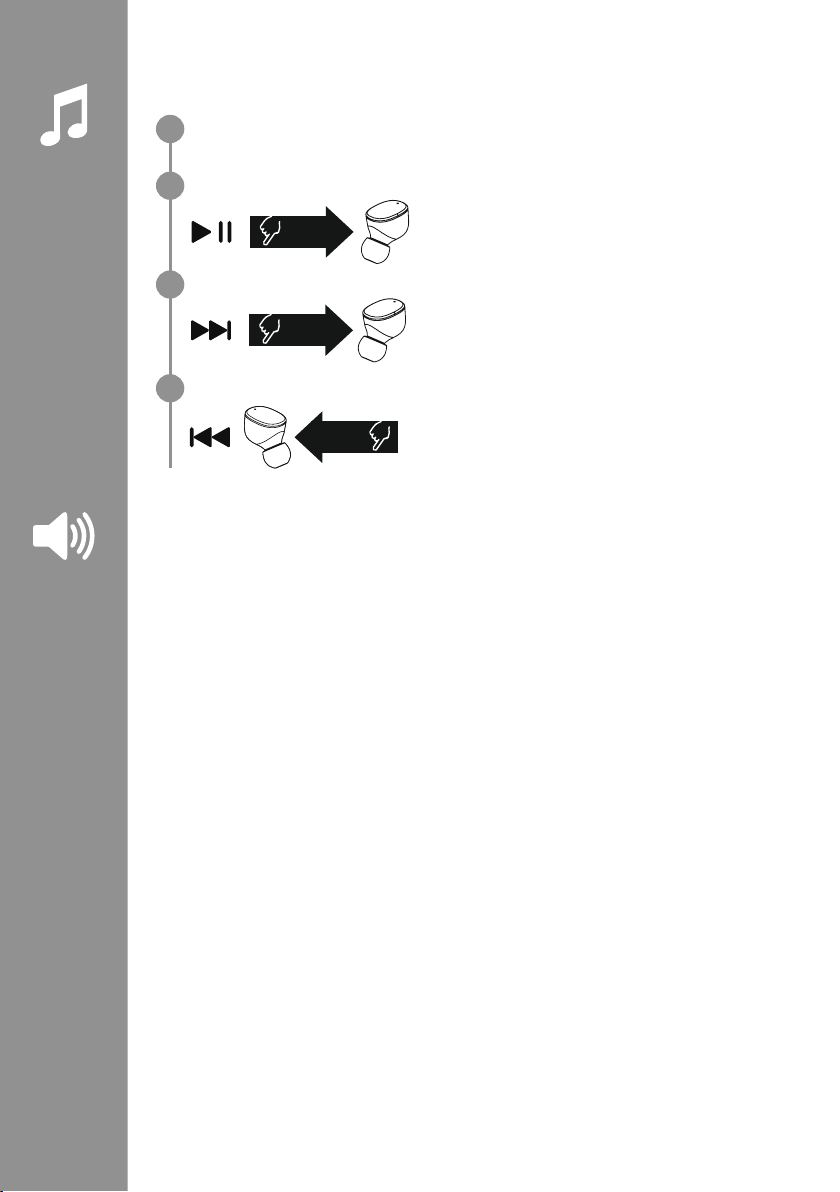
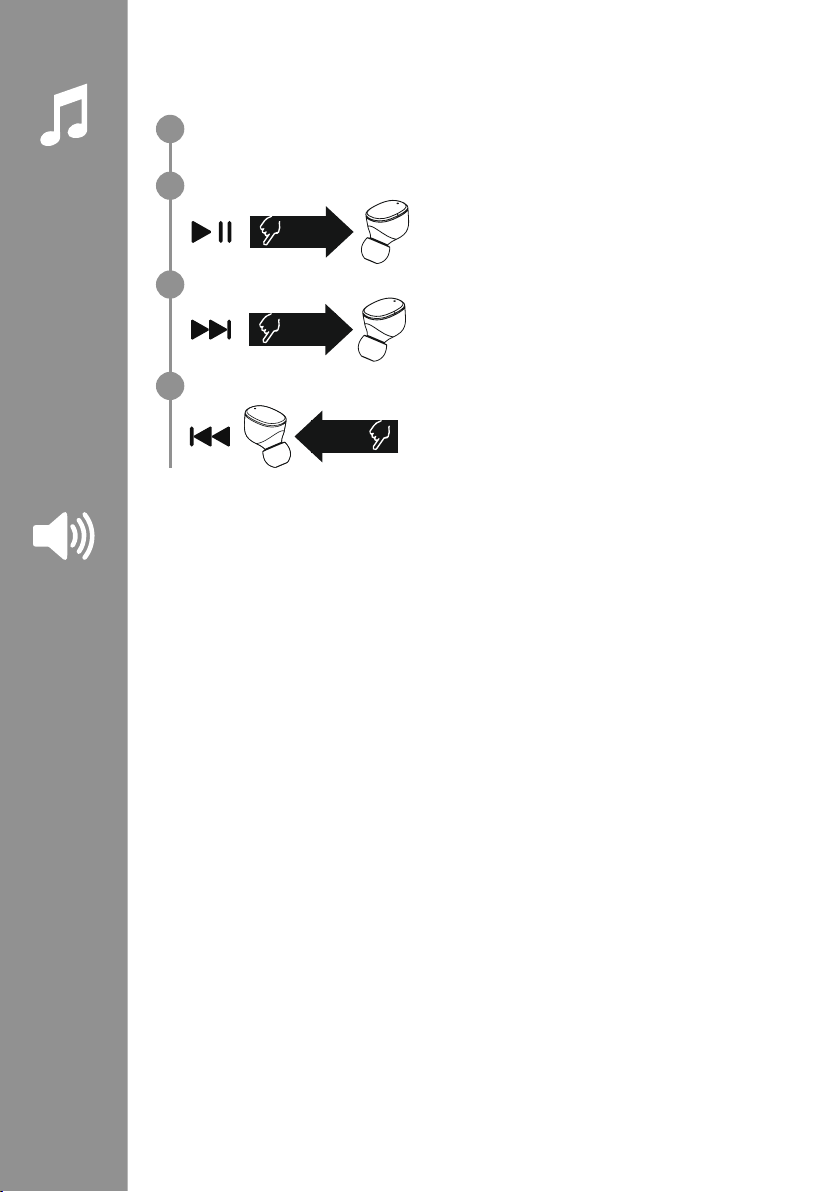
7.3 Audio playback
Start playback on your device.
Play / Pause
Tap the multi-function touch sensor (4) on the left or right
earphone twice to start or stop audio playback�
Next track
Tap the multi-function touch sensor (4) on the right
earphone three times to skip to the next track�
Previous track
Tap the multi-function touch sensor (4) on the left earphone
three times to skip to the previous track�
7.4 Volume control
The volume is controlled by the voice assistant function (7�1)�
Alternatively, you can also control the volume via your device�
2x
3x
R
3x
L
1
2
3
4
Page 11

9
8. Technical data
Bluetooth®earphones
Bluetooth technology Bluetooth
®
v5
�0
Proles supported A2DPV1�3, AVRCP 1�6, HFP V1�7, SPP V1�2
Frequency for Bluetooth
®
transmissions
2402 – 2480 MHz
Range < 10 m
Rechargeable battery
Battery type 3
�7 V Li polymer
Min. capacity
Earphones / charging box
45
mAh / 480 mAh
Power consumption max� 5 V
330mA
Earphones charging time ~ 2 h
Charging box charging time ~ 2
�5h
Standby * ~ 70 h
Music time (charging box) * ~ 5 h (25h)
Talk time (charging box)* ~ 3
�5h (17�5 h)
Weight of earphones approx� 4 g per earphone
Weight of charging tray
incl. earphones
approx
� 44g
* Once fully charged
Page 12
10
9. Care and maintenance
Only clean this product with a slightly damp, lint-free cloth and do not use aggressive cleaning agents
�
10. Warranty disclaimer
Hama GmbH & Co KG assumes no liability and provides no warranty for damage resulting from improper
installation/mounting, improper use of the product or from failure to observe the operating instructions
and/or safety notes
�
11. Service and Support
Please contact Hama Product Consulting if you have any questions about this product�
Hotline: +49 9091 502-0 (German/English)
Further support information can be found here: www
�hama�com
12. Declaration of Conformity
Hama GmbH & Co KG hereby declares that the radio equipment type [00184108, 00184109]
is in compliance with Directive 2014/53/EU� The full text of the EU declaration of conformity is
available at the following Internet address:
www
�hama�com-> 00184108, 00184109-> Downloads�
Frequency band(s) 2402 – 2480 MHz
Maximum radio-frequency power transmitted 3�28 dBm
Page 13
11
Vielen Dank, dass Sie sich für ein Hama Produkt
entschieden haben!
Nehmen Sie sich Zeit und lesen Sie die folgenden
Anweisungen und Hinweise zunächst ganz
durch
� Bewahren Sie diese Bedienungsanleitung
anschließend an einem sicheren Ort auf, um
bei Bedarf darin nachschlagen zu können
�
Sollten Sie das Gerät veräußern, geben Sie diese
Bedienungsanleitung an den neuen Eigentümer
weiter
�
Bedienelemente und Anzeigen
1� Ladebox
2� Status-LED Ladebox
3� Status-LED Ohrhörer
4
� Multifunktions-Touch-Sensor
5� Silikonohrpolster
6� Ladekontakte
7
� USB-C Anschluss
1. Erklärung von Warnsymbolen und Hinweisen
Warnung
Wird verwendet, um Sicherheitshinweise zu kennzeichnen oder um Aufmerksamkeit auf besondere
Gefahren und Risiken zu lenken
�
Hinweis
Wird verwendet, um zusätzlich Informationen oder wichtige Hinweise zu kennzeichnen�
2. Packungsinhalt
1x True Wireless Bluetooth®- Ohrhörer "Spirit Pure"
1x Ladebox
1x USB-C-Ladekabel
3 Paar Ohrpolster in verschiedenen Größen (S/M/L)
1x Kurzanleitung
1x Warn- und Sicherheitshinweise
D Bedienungsanleitung
S
M
L
5
3
4
2
6
7
1
Page 14
12
3. Sicherheitshinweise
• Das Produkt ist für den privaten, nichtgewerblichen Haushaltsgebrauch vorgesehen
�
• Verwenden Sie das Produkt ausschließlich für den
dazu vorgesehenen Zweck
�
• Kinder sollten beaufsichtigt werden, um sicher zu
stellen, dass sie nicht mit dem Produkt spielen
�
• Benutzen Sie das Produkt nicht in Bereichen, in
denen elektronische Geräte nicht erlaubt sind
�
• Versuchen Sie nicht, das Produkt selbst zu warten
oder zu reparieren
� Überlassen Sie jegliche
Wartungsarbeit dem zuständigen Fachpersonal
�
• Öffnen Sie das Produkt nicht und betreiben Sie es
bei Beschädigungen nicht weiter
�
• Knicken und quetschen Sie das Kabel nicht�
• Lassen Sie das Produkt nicht fallen und setzen Sie
es keinen heftigen Erschütterungen aus
�
• Entsorgen Sie das Verpackungsmaterial
sofort gemäß den örtlich gültigen
Entsorgungsvorschriften
�
• Nehmen Sie keine Veränderungen am
Produkt vor
� Dadurch verlieren sie jegliche
Gewährleistungsansprüche
�
• Schützen Sie das Produkt vor Schmutz,
Feuchtigkeit und Überhitzung und verwenden Sie
es nur in trockenen Umgebungen
�
• Betreiben Sie das Produkt nicht in unmittelbarer
Nähe der Heizung, anderer Hitzequellen oder in
direkter Sonneneinstrahlung
�
• Verwenden Sie den Artikel nur unter moderaten
klimatischen Bedingungen
�
• Dieses Produkt gehört, wie alle elektrischen
Produkte, nicht in Kinderhände!
• Betreiben Sie das Produkt nicht außerhalb
seiner in den technischen Daten angegebenen
Leistungsgrenzen
�
• Verwenden Sie das Produkt nicht in einer feuchten
Umgebung und vermeiden Sie Spritzwasser
• Lassen Sie sich auf der Fahrt mit einem
Kraftfahrzeug oder Sportgerät nicht durch
Ihr Produkt ablenken und achten Sie auf die
Verkehrslage und Ihre Umgebung
�
• Der Akku ist fest eingebaut und kann nicht
entfernt werden, entsorgen Sie das Produkt als
Ganzes gemäß den gesetzlichen Bestimmungen
�
• Werfen Sie den Akku bzw� das Produkt nicht ins
Feuer
�
• Verändern und/oder deformieren/erhitzen/zerlegen
Sie Akkus/Batterien nicht
�
• Verwenden Sie das Produkt nicht während des
Ladevorgangs!
Warnung – Akku
• Verwenden Sie nur geeignete Ladegeräte oder
USB-Anschlüsse zum Auaden�
• Verwenden Sie defekte Ladegeräte oder USBAnschlüsse generell nicht mehr und versuchen
Sie nicht, diese zu reparieren
�
• Überladen oder tiefentladen Sie das Produkt
nicht
�
• Vermeiden Sie Lagerung, Laden und
Benutzung bei extremen Temperaturen und
extrem niedrigem Luftdruck (wie z
�B� in großen
Höhen)�
• Laden Sie bei längerer Lagerung regelmäßig
(mind� vierteljährig) nach�
Warnung – Magnete
• Das Produkt erzeugt magnetische Felder�
Personen mit Herzschrittmacher sollten vor
Benutzung dieses Produktes einen Arzt zu Rate
ziehen, ob die Funktion des Herzschrittmachers
dadurch beeinträchtigt werden könnte
�
• Bewahren Sie keine EC- oder ähnliche Karten
mit Magnetstreifen in der Nähe der Ladebox
oder der Ohrhörer auf
� Die Daten auf den
Karten können beschädigt oder gelöscht
werden
�
Warnung – Hohe Lautstärke
• Hoher Schalldruck!
• Es besteht das Risiko eines Gehörschadens�
• Um einen Verlust des Hörsinns zu verhindern,
vermeiden Sie das Hören bei großem
Lautstärkepegel über lange Zeiträume�
• Halten Sie die Lautstärke immer auf einem
vernünftigen Niveau� Hohe Lautstärken können
– selbst bei kurzer Dauer – zu Hörschäden
führen
�
• Die Benutzung des Produktes schränkt Sie in
der Wahrnehmung von Umgebungsgeräuschen
ein� Bedienen Sie daher während
der Benutzung keine Fahrzeuge
oder Maschinen
�
Page 15
13
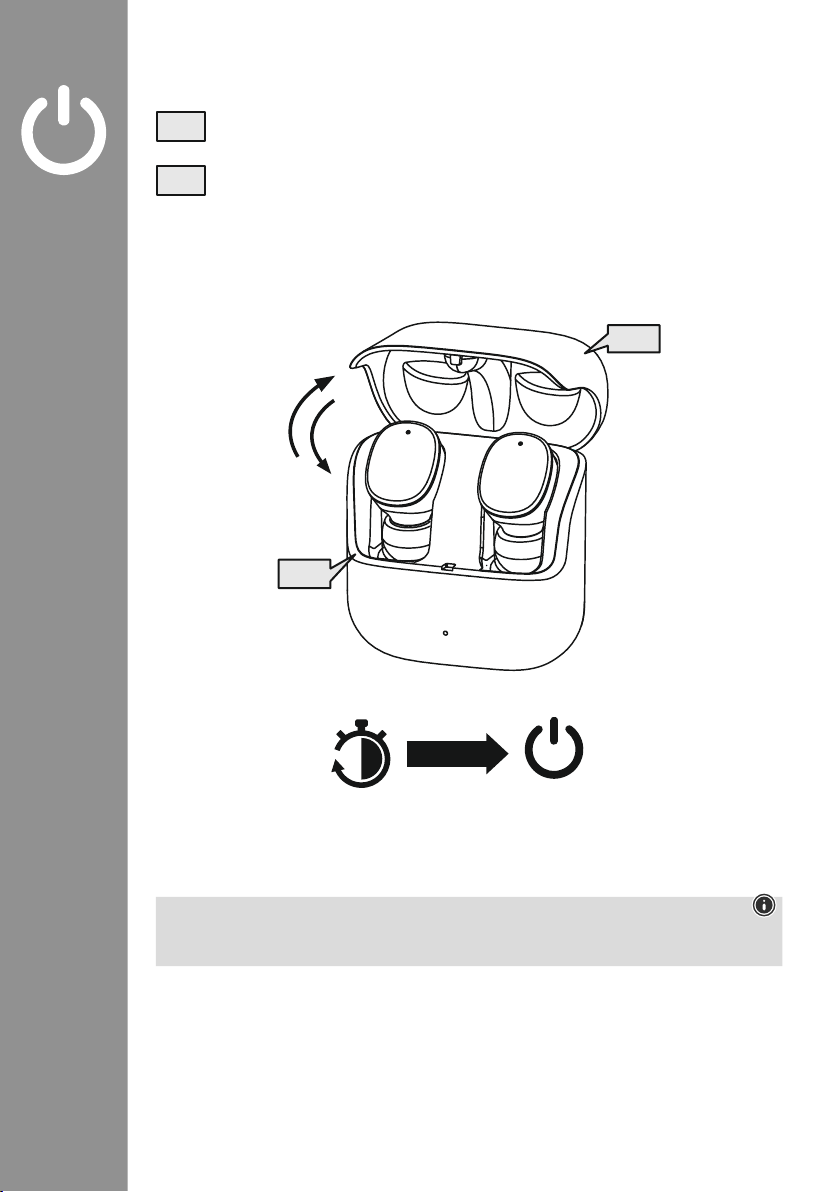
4. Ein-/ Ausschalten
Öffnen Sie die die Ladebox, die Ohrhörer schalten sich automatisch ein und starten den
Pairing-Vorgang�
Zum Ausschalten legen Sie die Ohrhörer einfach zurück in die Ladebox� Beachten Sie dabei das
seitenrichtige Einlegen der Ohrhörer gemäß der Markierung L/R� Schließen Sie anschließend
die Ladebox
�
zZz
STANDBY
3min
ON
OFF
ON
OFF
Hinweis – Automatisches Ausschalten des Produkts
Das Produkt sind mit einer Abschaltautomatik ausgestattet
� Erfolgt innerhalb von 3 Minuten keine
Verbindung zu Ihrem Endgerät, schaltet dieses automatisch ab�
Page 16
14
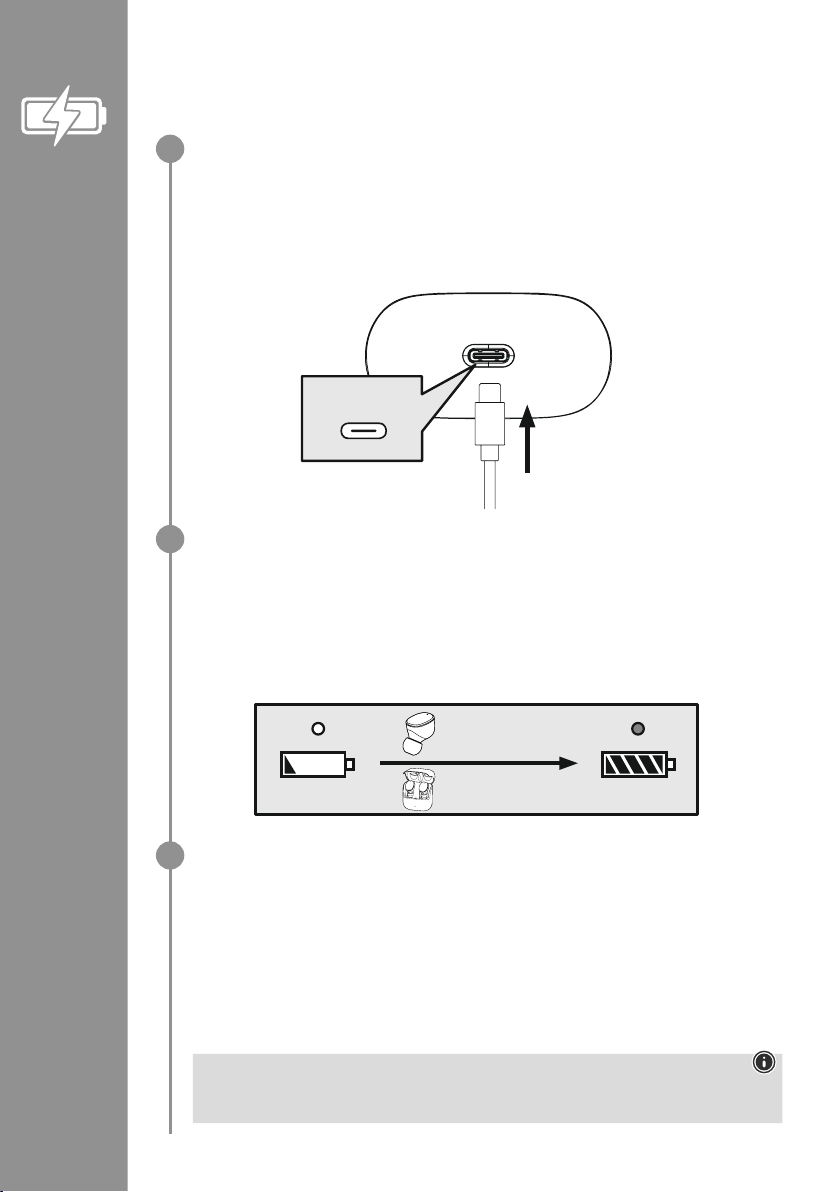
5. Laden
Laden Sie vor dem ersten Gebrauch die Ohrhörer sowie die Ladebox einmal vollständig auf
�
Ohrhörer einlegen, Ladebox schließen und anschließen
Legen Sie die Ohrhörer in die Ladebox ein� Beachten Sie dabei das seitenrichtige Einlegen der
Ohrhörer gemäß der Markierung L/R� Schließen Sie anschließend die Ladebox�
Schließen Sie das beiliegende USB-C-Ladekabel an die Ladebuchse (7) der Ladebox an�
Schließen Sie den freien Stecker des USB-C-Ladekabels an einem geeigneten USB Ladegerät an�
Beachten Sie hierzu die Bedienungsanleitung des verwendeten USB Ladegeräts�
Ladevorgang Ladebox und Ohrhörer
Die Status LED der Ladebox (2) blinkt während des Ladevorgangs weiß� Nach vollständiger Ladung
der Ladebox leuchtet die LED der Ladebox dauerhaft wei�
Die Ohrhörer werden nur bei geschlossener Ladebox geladen�
Es kann bis zu 2 Stunden (Ohrhörer) und bis zu 2,5 Stunden (Ladebox) dauern, bis die Akkus
vollständig geladen sind�
Akkukapazität
Ladebox
Bei niedrigem Akkustand blinkt die Status LED (2) der Ladebox weiß
�
Ohrhörer
Bei niedrigem Akkustand hören Sie einmal in der Minute einen Signalton und die Status-LED (3)
des Ohrhörers blinkt weiß
�
Die tatsächliche Akkulaufzeit variiert je nach Nutzung des Gerätes, den Einstellungen und den
Umgebungstemperaturen (Akkus haben eine begrenzte Lebensdauer)�
Hinweis
Wenn Sie das Produkt einige Monate lang nicht verwendet haben, kann es 15 – 30 Minuten
dauern, bis die Status-LED (2) beim Ladevorgang rot leuchtet�
USB-C
CHARGING CHARGED
2h:00m
2h:30m
1
2
3
Page 17
15
6. Bluetooth®Verbindung (Pairing)
Hinweis – Pairing
• Stellen Sie sicher, dass Ihr Bluetooth
®
-fähiges Endgerät eingeschaltet ist und dass Bluetooth®aktiviert
ist�
• Beachten Sie hierzu die Bedienungsanleitung Ihres Endgerätes�
Die Ohrhörer und das Endgerät sollten nicht weiter als 1 Meter voneinander entfernt sein� Je geringer der
Abstand, desto besser�
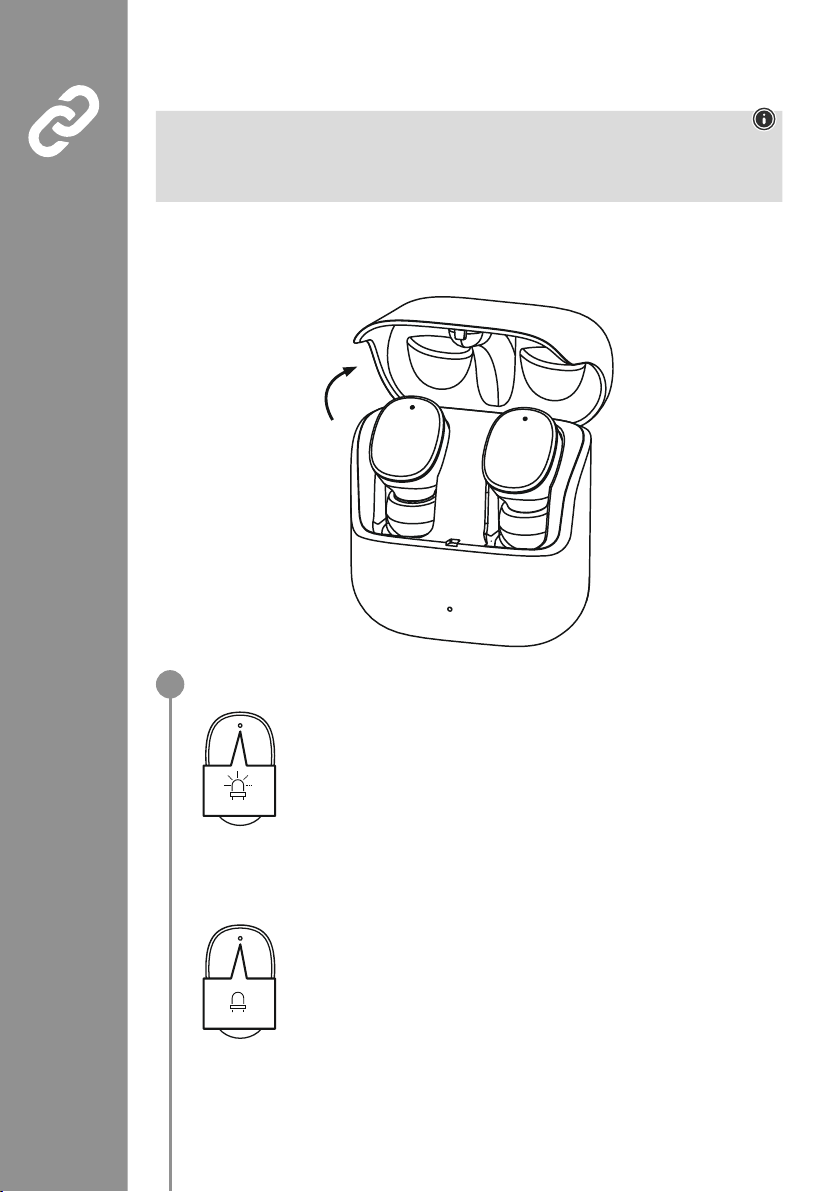
Stellen Sie sicher, dass die Ohrhörer eingeschaltet sind�
Prüfen Sie den Status der Status-LED (3)
Wenn die Status-LEDs (3) der Ohrhörer abwechselnd blinken:
Die Ohrhörer suchen nach einer Bluetooth
®
-Verbindung�
Wenn die Status-LEDs (3) blinken und anschließend erlöschen:
Die Ohrhörer sind bereits mit einem Bluetooth
®
-Endgerät verbunden
�
Blue/red
off
1
Page 18
16
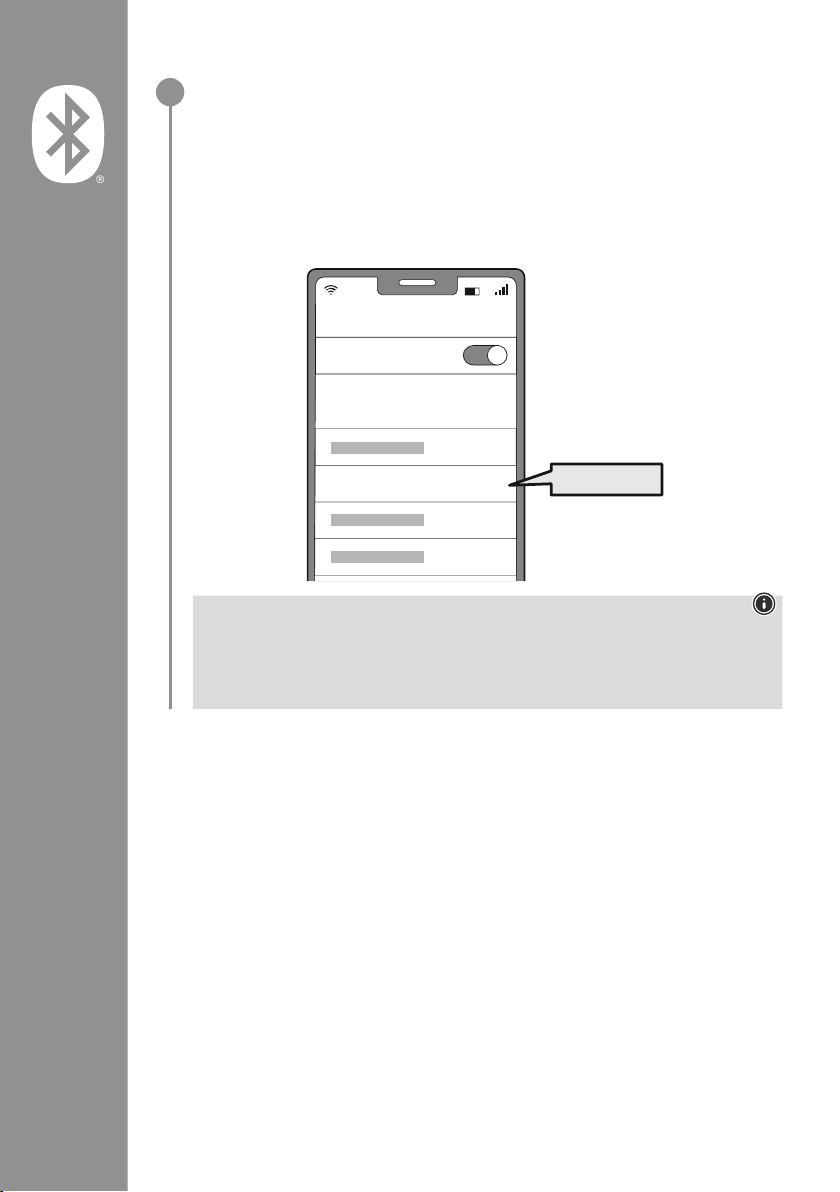
Suchen Sie mit Ihrem Endgerät nach den Ohrhörern (nur bei Erstverbindung
notwendig)
Öffnen Sie auf Ihrem Endgerät die Bluetooth
®
-Einstellungen und warten Sie, bis in der Liste
der gefundenen Bluetooth
®
Geräte Hama Spirit Pure angezeigt wird
�
Wählen Sie Hama Spirit Pure aus und warten Sie, bis die Ohrhörer als verbunden in den
Bluetooth
®
-Einstellungen Ihres Endgerätes angezeigt werden� Sie hören einen kurzen Signalton�
Hinweis – Bluetooth®Passwort
Manche Endgeräte benötigen für die Einrichtung der Verbindung mit einem anderen Bluetooth
®
Gerät ein Passwort�
• Geben Sie für die Verbindung mit den Ohrhörern das Passwort 0000 ein, wenn Sie zur Eingabe
von Ihrem Endgerät aufgefordert werden�
2
Password
Bluetooth
Hama Spirit Pure
ON
0000
Page 19
17
7. Bedienelemente
Hinweis
• Beachten Sie, dass die Unterstützung einiger Funktionen von Ihrem Endgerät abhängig ist�
• Beachten Sie hierzu die Bedienungsanleitung Ihres Endgerätes�
7.1 Voice Assistant Funktion
Tippen Sie einmal den Multifunktions-Touch-Sensor (4) am
rechten Ohrhörer, um eine Kommunikation mit Ihrem Siri oder
Google Assistant zu starten
�
Hinweis – Siri
Siri ist nur auf geeigneten Endgeräten mit iOS 5 (ab iPhone 4s) oder höher verfügbar�
Hinweis – Google Assistant
• Der Google Assistant ist nur auf geeigneten Endgeräten mit Android 5.0 oder höher verfügbar
mit Google Play Services, >1�5GB freien Speicher und einer Mindestbildschirmauösung von 720P�
• Die Google Assistant App muss auf Ihrem Endgerät verfügbar sein und als Standardsprachassistent
eingestellt sein�
7.2 Freisprechfunktion
Es besteht die Möglichkeit, die Ohrhörer wie eine Freisprecheinrichtung für Ihr Endgerät zu verwenden�
Anruf tätigen
Wählen Sie die Nummer direkt über Ihr Endgerät, um einen Anruf zu tätigen�
Anruf annehmen
Tippen Sie zweimal den Multifunktions-Touch-Sensor (4) am
linken oder rechten Ohrhörer, um einen eingehenden Anruf
anzunehmen� Sie hören einen kurzen Signalton�
Anruf ablehnen
Zum Ablehnen eines eingehenden Anrufs tippen Sie dreimal
den Multifunktions-Touch-Sensor (4) am linken oder rechten
Ohrhörer� Sie hören einen kurzen Signalton�
Anruf beenden
Tippen Sie während des Gesprächs zweimal den
Multifunktions-Touch-Sensor (4) am linken oder rechten
Ohrhörer, um den Anruf zu beenden
� Sie hören einen
kurzen Signalton�
Wahlwiederholung
Die zuletzt gewählte Rufnummer können Sie über die Voice Assistant Funktion (7�1) erneut wählen�
1x
Siri/
Google
2x
3x
2x
1
2
3
4
5
Page 20
18
7.3 Audiowiedergabe
Starten Sie die Wiedergabe auf Ihrem Endgerät.
Play / Pause
Tippen Sie zweimal den Multifunktions-Touch-Sensor (4) am
linken oder rechten Ohrhörer, um die Audiowiedergabe zu
starten oder zu stoppen�
Nächster Titel
Tippen Sie dreimal den Multifunktions-Touch-Sensor (4) am
rechten Ohrhörer, um zum nächsten Titel zu wechseln�
Vorheriger Titel
Tippen Sie dreimal den Multifunktions-Touch-Sensor (4) am
linken Ohrhörer, um zum vorherigen Titel zu wechseln�
7.4 Lautstärkeregelung
Die Steuerung der Lautstärke erfolgt über die Voice Assistant Funktion (7�1)�
Alternativ können Sie die Lautstärke auch über Ihr Endgerät steuern�
2x
3x
R
3x
L
1
2
3
4
Page 21

19
8. Technische Daten
Bluetooth®Ohrhörer
Bluetooth Technologie Bluetooth
®
v5
�0
Unterstützte Prole A2DPV1�3, AVRCP 1�6, HFP V1�7, SPP V1�2
Frequenz für die Bluetooth
®
-
Übertragungen
2402 – 2480 MHz
Reichweite < 10 m
Akku
Batterietyp 3,7V Li-Polymer
Min. Kapazität
Ohrhörer / Ladebox
45
mAh / 480 mAh
Stromaufnahme max� 5 V
330mA
Auadezeit Ohrhörer ~ 2 h
Auadezeit Ladebox ~ 2,5
h
Ruhezustand * ~ 70 h
Musikzeit (Ladebox) * ~ 5h (25 h)
Gesprächszeit (Ladebox)* ~ 3,5
h (17,5 h)
Gewicht Ohrhörer ca� 4g je Ohrhörer
Gewicht Ladeschale
inkl. Ohrhörer
ca
� 44g
*nach voller Ladung
Page 22
20
9. Wartung und Pflege
Reinigen Sie dieses Produkt nur mit einem fusselfreien, leicht feuchten Tuch und verwenden Sie keine
aggressiven Reiniger
�
10. Haftungsausschluss
Die Hama GmbH & Co KG übernimmt keinerlei Haftung oder Gewährleistung für Schäden, die aus
unsachgemäßer Installation, Montage und unsachgemäßem Gebrauch des Produktes oder einer
Nichtbeachtung der Bedienungsanleitung und/oder der Sicherheitshinweise resultieren�
11. Service und Support
Bitte wenden Sie sich bei Fragen zum Produkt gerne an die Hama-Produktberatung�
Hotline: +49 9091 502-0 (Deu/Eng)
Weitere Supportinformationen nden Sie hier: www
�hama�com
12. Konformitätserklärung
Hiermit erklärt die Hama GmbH & Co KG, dass der Funkanlagentyp [00184108, 00184109]
der Richtlinie 2014/53/EU entspricht� Der vollständige Text der EU-Konformitätserklärung ist
unter der folgenden Internetadresse verfügbar:
www
�hama�com-> 00184108, 00184109-> Downloads�
Frequenzband/Frequenzbänder 2402 – 2480 MHz
Abgestrahlte maximale Sendeleistung 3�28 dBm
Page 23
21
Nous vous remercions d’avoir choisi un produit
Hama !
Veuillez prendre le temps de lire l’ensemble
des remarques et consignes suivantes
� Veuillez
conserver ce mode d’emploi à portée de main
an de pouvoir le consulter en cas de besoin
�
Transmettez-le au nouveau propriétaire avec
l’appareil le cas échéant�
Éléments de commande et
d’affichage
1� Boîtier de charge
2� Voyant d’état LED du boîtier de charge
3� Voyant d’état LED des écouteurs
4
� Détecteur tactile multifonctions
5� Embout silicone
6� Contacts de charge
7
� Port USB-C
1. Explication des symboles d’avertissement et des remarques
Avertissement
Ce symbole est utilisé pour indiquer des consignes de sécurité ou pour attirer votre attention sur des
dangers et risques particuliers
�
Remarque
Ce symbole est utilisé pour indiquer des informations supplémentaires ou des remarques importantes�
2. Contenu de l’emballage
1 paire d’écouteurs True Wireless Bluetooth®"Spirit Pure"
1 boîtier de charge
1 câble de chargement USB-C
3 paires d’embout de différentes tailles (S/M/L)
1 notice d’utilisation
1 notice de mises en garde et de sécurité
F Mode d’emploi
S
M
L
5
3
4
2
6
7
1
Page 24
22
3. Consignes de sécurité
• Ce produit est destiné à une utilisation
domestique non commerciale
�
• L’emploi du produit est exclusivement réservé à sa
fonction prévue
�
• Les enfants doivent être surveillés an de s’assurer
qu’ils ne jouent pas avec le produit
�
• N’utilisez pas le produit dans des zones où les
appareils électroniques ne sont pas autorisés
�
• Ne tentez pas de réparer le produit vous-même ni
d’effectuer des travaux d’entretien
� Déléguez tous
travaux d’entretien à des techniciens qualiés
�
• Ne tentez pas d’ouvrir le produit en cas de
détérioration et cessez de l’utiliser
�
• Ne pliez pas et n’écrasez pas le câble�
• Protégez le produit des secousses violentes et
évitez tout choc ou toute chute
�
• Recyclez les matériaux d’emballage conformément
aux prescriptions locales en vigueur
�
• N’apportez aucune modication au produit�
Toute modication vous ferait perdre vos droits de
garantie
�
• Protégez le produit de toute saleté, humidité,
surchauffe et utilisez-le uniquement dans des
environnements secs
�
• N’utilisez pas le produit à proximité immédiate
d’un chauffage, d’autres sources de chaleur ou à
la lumière directe du soleil
�
• Utilisez l’article dans des conditions climatiques
modérées uniquement
�
• Cet appareil, comme tout appareil électrique, doit
être gardé hors de portée des enfants !
• N’utilisez pas le produit en dehors des limites
de puissance indiquées dans les caractéristiques
techniques
�
• N’utilisez pas l’appareil dans un environnement
humide et évitez les projections d’eau
�
• Ne vous laissez pas distraire par votre produit
sur la route en voiture ou avec votre équipement
sportif et soyez attentifs aux conditions de
circulation et à votre environnement
�
• La batterie est installée de manière permanente et
ne peut pas être retirée ; éliminer l’ensemble du
produit conformément aux dispositions légales
�
• Ne jetez pas la batterie ou le produit au feu�
• Ne modiez pas et/ou ne déformez/chauffez/
démontez pas les batteries/piles
�
• N’utilisez pas le produit pendant le processus de
charge !
Avertissement - Batterie
• Utilisez exclusivement un chargeur approprié
ou une connexion USB pour la recharge�
• N’utilisez plus des chargeurs ou des ports USB
défectueux et n’essayez pas de les réparer
�
• Ne surchargez ou ne déchargez pas totalement
le produit�
• Évitez le stockage, le chargement et
l’utilisation du produit à des températures
extrêmes et à des pressions atmosphériques
extrêmement basses (comme en haute altitude
par exemple)
�
• Rechargez régulièrement (au moins tous les
trois mois) si l’appareil est entreposé pendant
une période prolongée
�
Avertissement - Aimants
• Ce produit génère des champs magnétiques�
Avant d’utiliser ce produit, toute personne
portant un stimulateur cardiaque doit
se faire conseiller par un médecin car le
fonctionnement du stimulateur cardiaque
pourrait en être affecté
�
• Ne rangez pas de cartes bancaires ou similaires
avec bandes magnétiques à proximité du
boîtier de charge ou des écouteurs� Les
données des cartes sont susceptibles d’être
endommagées, voire supprimées
�
Avertissement : volume excessif
• Pression sonore élevée !
• Il existe un risque de troubles auditifs�
• An d’éviter toute perte d’audition, évitez
l’écoute à un volume élevé pendant de
longues périodes�
• Maintenez toujours le volume à un niveau
raisonnable� Un volume excessif - même à
courte durée - est susceptible d’endommager
votre ouïe
�
• L’utilisation du produit limite votre perception
des bruits ambiants� N’utilisez
donc aucun véhicule ou aucune
machine pendant son utilisation�
Page 25
23
4. Mise en marche/arrêt
Ouvrez le boîtier de charge, les écouteurs s’allument automatiquement et le processus de
couplage commence�
Pour les éteindre, il vous sut de replacer les écouteurs dans le boîtier de charge� Veillez à
faire attention au sens d’insertion en respectant le marquage L/R� Fermez ensuite le boîtier de
charge
�
zZz
STANDBY
3min
ON
OFF
ON
OFF
Remarque – Arrêt automatique du produit
Le produit est doté d’un système d’arrêt automatique
� Il se désactive ainsi automatiquement en
l’absence de connexion à votre appareil pendant 3 minutes�
Page 26
24
5. Chargement
Chargez complètement les écouteurs et le boîtier de charge une fois avant leur première utilisation
�
Mise en place des écouteurs, fermeture du boîtier de charge et raccordement
Placez les écouteurs dans le boîtier de charge
� Veillez à faire attention au sens d’insertion en
respectant le marquage L/R� Fermez ensuite le boîtier de charge�
Raccordez le câble de charge USB-C fourni au port de charge (7) du boîtier de charge�
Branchez la che libre du câble de charge USB-C à un chargeur USB approprié� Reportez-vous au
mode d’emploi du chargeur USB que vous utilisez�
Processus de charge du boîtier de charge et des écouteurs
La LED d’état du boîtier de charge (2) clignote en blanc pendant le processus de charge� Après le
chargement complet du boîtier de charge,la LED du boîtier de charges’allume de façon xe en blanc
�
Les écouteurs se chargentuniquement lorsque le boîtier de charge est fermé�
Le chargement complet des batteries peut prendre jusqu’à 2 heure (écouteurs) et jusqu’à 2,5 heures
(boîtier de charge)
�
Capacité de la batterie
Boîtier de charge
En cas de batterie faible, la LED d’état (2) du boîtier de charge clignote en blanc�
Écouteurs
En cas de batterie faible, un signal sonore retentit une fois par minute et la LED d’état (3) des
écouteurs clignote en blanc�
La durée de vie réelle de la batterie varie en fonction de l’utilisation de l’appareil, des réglages et
des températures ambiantes (les batteries ont une durée de vie limitée)�
Remarque
Lorsque le produit reste inutilisé pendant quelques mois, il peut s’écouler 15 à 30 minutes avant
que la LED d’état (2) ne s’allume en rouge lors du processus de charge�
USB-C
CHARGING CHARGED
2h:00m
2h:30m
1
2
3
Page 27
25
6. Connexion Bluetooth®(couplage)
Remarque – Couplage
• Assurez-vous que votre appareil compatible Bluetooth
®
est allumé et que le Bluetooth®est activé�
• Veuillez consulter le mode d’emploi de votre appareil à ce sujet�
Les écouteurs et l’appareil nal ne doivent pas se trouver à plus de 1 mètre les uns des autres� Plus la
distance est réduite, mieux c’est�
Assurez-vous que les écouteurs sont en marche�
Vérifiez le statut de la LED d’état (3).
Lorsque la LED d’état (3) des écouteurs clignote par intermittence :
les écouteurs recherchent une connexion Bluetooth
®
�
Lorsque les LED d’état (3) clignotent puis s’éteignent :
les écouteurs sont déjà connectés à un appareil Bluetooth
®
�
Blue/red
off
1
Page 28
26
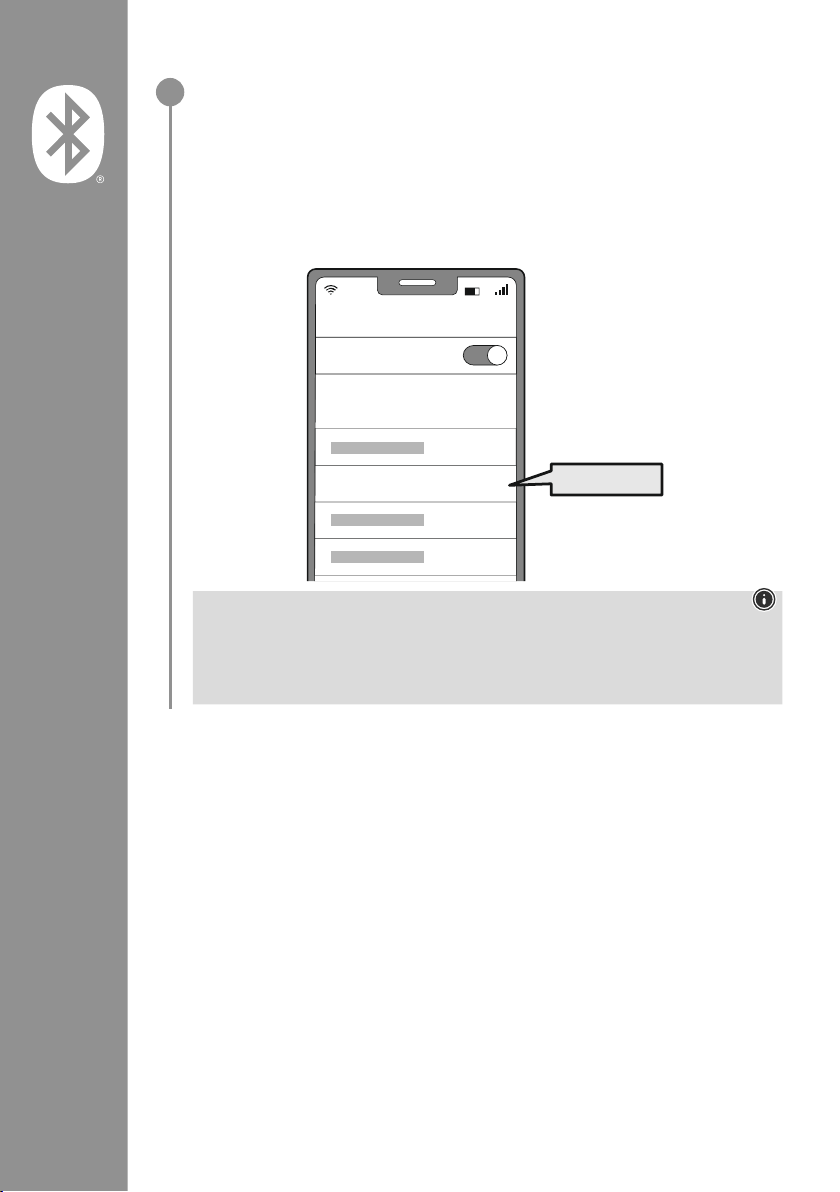
Recherchez les écouteurs avec votre appareil (uniquement nécessaire lors de la
première connexion)
Ouvrez le menu des paramètres Bluetooth
®
sur votre appareil et attendez que les appareils
Hama Spirit Pure apparaissent dans la liste des appareils Bluetooth
®
détectés
�
Sélectionnez Hama Spirit Pure, puis patientez jusqu’à ce que les écouteurs apparaissent comme
étant connectés
dans les réglages Bluetooth
®
de votre appareil� Vous entendrez alors un bref signal sonore�
Remarque – Mot de passe Bluetooth
®
Certains appareils requièrent un mot de passe pour l’établissement de la connexion avec un
appareil Bluetooth
®
�
• Saisissez le mot de passe 0000 lors de la connexion avec des écouteurs dans le cas où
l’appareil exige la saisie d’un mot de passe�
2
Password
Bluetooth
Hama Spirit Pure
ON
0000
Page 29
27
7. Éléments de commande
Remarque
• Veuillez noter que la compatibilité de chaque fonction dépend de votre appareil�
• Veuillez consulter le mode d’emploi de votre appareil à ce sujet�
7.1 Fonction d’assistant vocal
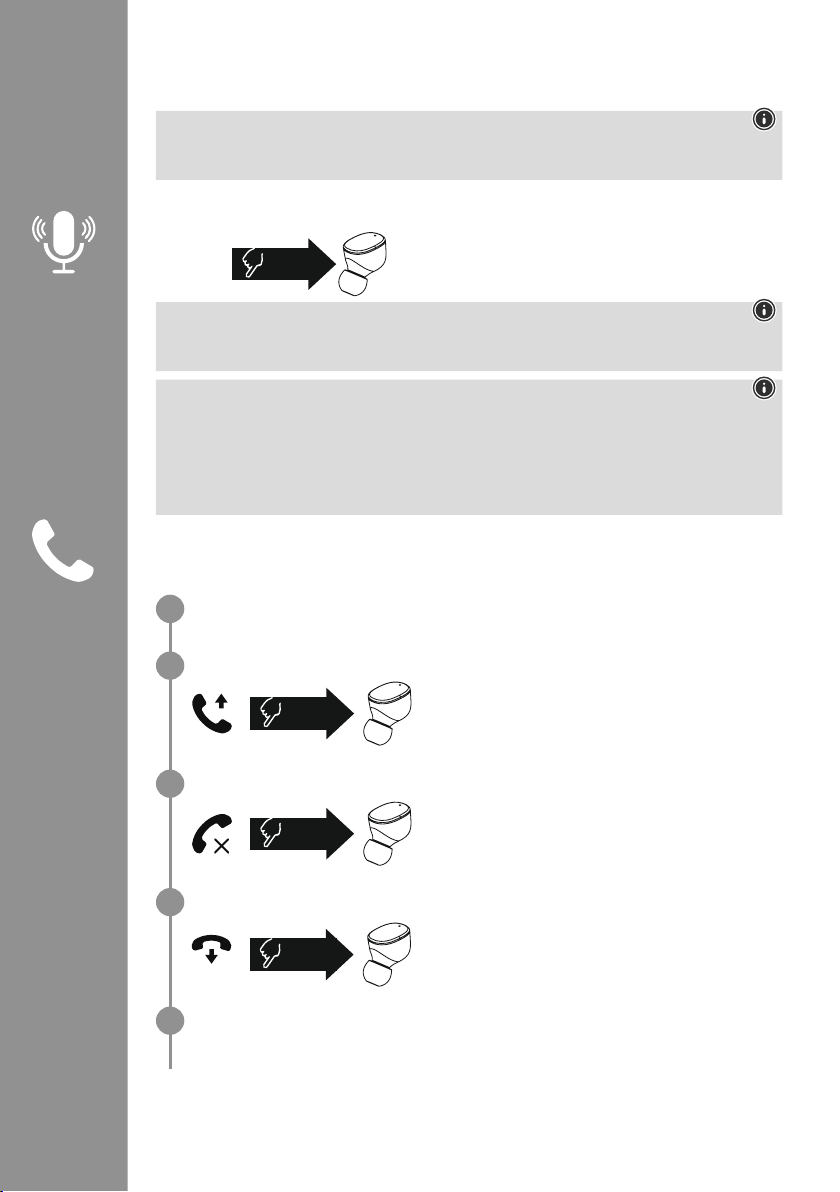
Appuyez une fois sur le détecteur tactile multifonctions (4) au
niveau de l’écouteur droit an de commencer à communiquer
avec Siri ou votre assistant Google
�
Remarque – Siri
Siri est uniquement disponible sur les appareils disposant d’iOS 5 (à partir de l’iPhone 4s) ou d’une
version ultérieure
�
Remarque – Google Assistant
• Google Assistant est uniquement disponible sur des appareils adaptés disposant d’Android 5.0
ou d’une version ultérieure avec Google Play Services, > 1,5 Go de mémoire disponible et une
résolution d’écran minimale de 720P�
• L’application Google Assistant doit être disponible sur votre appareil et être paramétrée comme
assistant vocal standard
�
7.2 Fonction mains-libres
Il est possible d’utiliser les écouteurs comme un kit mains libres pour votre appareil nal�
Passer des appels
Composez le numéro directement sur votre appareil nal an de passer un appel�
Répondre à un appel
Appuyez deux fois sur le détecteur tactile multifonctions (4)
au niveau de l’écouteur gauche ou droit an de répondre
à un appel entrant� Vous entendrez alors un bref signal
sonore
�
Refuser un appel
An de refuser un appel entrant, appuyez trois fois sur le
détecteur tactile multifonctions (4) au niveau de l’écouteur
gauche ou droit
� Vous entendrez alors un bref signal
sonore�
Terminer l’appel
Pendant la conversation, appuyez deux fois sur le détecteur
tactile multifonctions (4) de l’écouteur gauche ou droit
an de terminer appel� Vous entendrez alors un bref signal
sonore
�
Répétition du dernier appel
Vous pouvez recomposer le dernier numéro appelé via la fonction d’assistant vocal (7�1)�
1x
Siri/
Google
2x
3x
2x
1
2
3
4
5
Page 30
28
7.3 Lecture audio
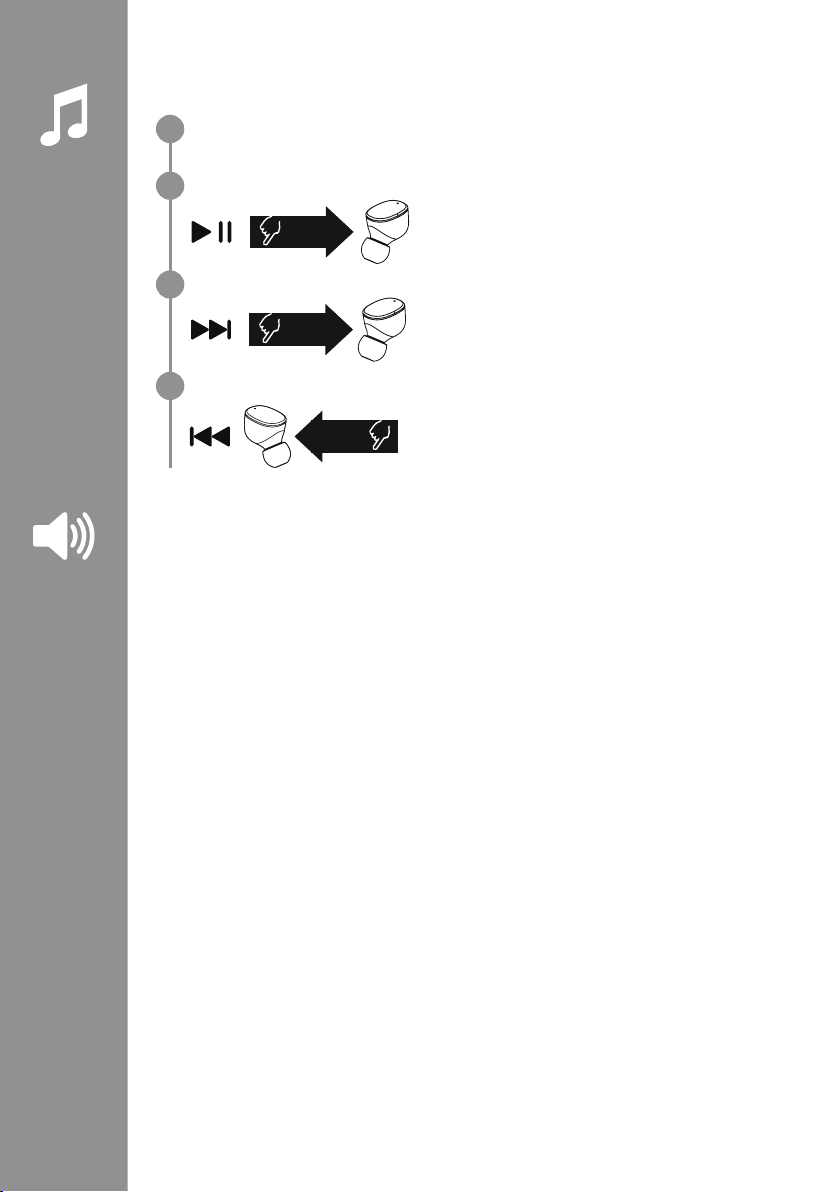
Lancez la lecture sur votre appareil nal.
Lecture/pause
Appuyez deux fois sur le détecteur tactile multifonctions (4)
au niveau de l’écouteur gauche ou droit an de commencer
ou d’arrêter la lecture audio�
Titre suivant
Appuyez trois fois sur le détecteur tactile multifonctions (4)
au niveau de l’écouteur droit an de passer au titre suivant�
Titre précédent
Appuyez trois fois sur le détecteur tactile multifonctions (4) au
niveau de l’écouteur gauche an de passer au titre précédent�
7.4 Réglage du volume
La commande du volume s’effectue via la fonction d’assistant vocal (7�1)�
Vous pouvez également commander le volume par l’intermédiaire de votre appareil nal�
2x
3x
R
3x
L
1
2
3
4
Page 31

29
8. Caractéristiques techniques
Écouteurs Bluetooth
®
Technologie Bluetooth Bluetooth®v5
�0
Prols pris en charge A2DPV1�3, AVRCP 1�6, HFP V1�7, SPP V1�2
Fréquence pour le
Bluetooth
®
-
Transmissions
2 402 – 2 480 MHz
Portée < 10 m
Batterie
Type de batterie 3,7 V lithium-polymère
Capacité min.
Écouteurs/boîtier de charge
45 mAh/480 mAh
Consommation de courant 5 V max
�
330mA
Temps de charge des
écouteurs
~ 2 h
Temps de charge du boîtier
de charge
~ 2,5 h
Mode veille * ~ 70 h
Durée d’écoute de musique
(boîtier de charge) *
~ 5 h (25h)
Temps de conversation
(boîtier de charge)*
~ 3,5 h (17,5h)
Poids des écouteurs Environ 4 g chaque
Poids du socle de charge
avec les écouteurs
Environ 44 g
*
après une charge complète
Page 32
30
9. Soins et entretien
Nettoyez le produit uniquement à l’aide d’un chiffon non pelucheux légèrement humide ; évitez tout
détergent agressif
�
10. Exclusion de garantie
La société Hama GmbH & Co KG décline toute responsabilité en cas de dommages provoqués par une
installation, un montage ou une utilisation non conformes du produit ou encore provoqués par le nonrespect des consignes du mode d’emploi et/ou des consignes de sécurité�
11. Service clientèle et assistance
En cas de question concernant le produit, veuillez vous adresser au service de conseil produits de Hama�
Ligne téléphonique directe : +49 9091 502-0 (allemand/anglais)
Vous trouverez de plus amples informations concernant l’assistance sur notre site internet : www
�hama�
com
12. Déclaration de conformité
Le soussigné, Hama GmbH & Co KG, déclare que l’équipement radioélectrique du type
[00184108, 00184109] est conforme à la directive 2014/53/UE� Le texte complet de la
déclaration UE de conformité est disponible à l’adresse internet suivante :
www
�hama�com-> 00184108, 00184109-> Downloads�
Bandes de fréquences 2 402 – 2 480 MHz
Puissance d’émission émise maximale 3,28 dBm
Page 33
31
Le agradecemos que se haya decidido por un
producto de Hama
�
Tómese tiempo y lea primero las siguientes
instrucciones e indicaciones� Después, guarde
estas instrucciones de manejo en un lugar seguro
para poder consultarlas cuando sea necesario
� Si
vende el aparato, entregue estas instrucciones de
manejo al nuevo propietario�
Elementos de control e indicadores
1� Estación de carga
2� LED de estado de la estación de carga
3� LED de estado de los auriculares
4
� Sensor táctil multifunción
5� Almohadilla de silicona para los oídos
6� Contacto de carga
7
� Puerto USB-C
1. Explicación de los símbolos de aviso y de las indicaciones
Aviso
Se utiliza para identicar indicaciones de seguridad o para llamar la atención sobre peligros y riesgos
especiales
�
Nota
Se utiliza para indicar información adicional o indicaciones importantes�
2. Contenido del paquete
1x auriculares True Wireless Bluetooth®"Spirit Pure"
1X estación de carga
1x cable de carga USB-C
3 pares de almohadillas para oído de diferentes tallas (S, M, L)
1x guía de inicio rápido
1x advertencias e instrucciones de seguridad
E Manual de instrucciones
S
M
L
5
3
4
2
6
7
1
Page 34
32
3. Indicaciones de seguridad
• Este producto está previsto para usarlo en el
ámbito privado y no comercial del hogar
�
• Utilice el producto exclusivamente para el n
previsto
�
• Evite que los niños jueguen con el producto�
• No utilice el producto en áreas donde no se
permitan aparatos electrónicos
�
• No intente mantener ni reparar el producto por
cuenta propia
� Encomiende cualquier trabajo
de mantenimiento al personal especializado
competente
�
• No abra el producto ni siga utilizándolo en caso
de presentar daños
�
• No pliegue ni aplaste el cable�
• No deje caer el producto ni lo someta a sacudidas
fuertes
�
• Deseche el material de embalaje de conformidad
con las normativas locales vigentes en materia de
eliminación de desechos
�
• No realice cambios en el producto� ello conllevaría
la pérdida de todos los derechos de garantía
�
• Proteja el producto de la suciedad, la humedad y
el sobrecalentamiento y utilícelo solo en entornos
secos
�
• No utilice el producto junto a sistemas de
calefacción, otras fuentes de calor ni expuesto a la
luz solar directa
�
• Use el artículo únicamente cuando las condiciones
climáticas sean moderadas
�
• Este producto, como todos los productos
eléctricos, no debe estar en manos de los niños
�
• No utilice el producto fuera de los límites de
potencia indicados en los datos técnicos
�
• No utilice el producto en entornos húmedos y
evite el contacto con las salpicaduras de agua
�
• No permite que su producto le distraiga si, por
ejemplo, está conduciendo un automóvil o usando
equipos deportivos, y preste atención al tráco y
el entorno que le rodea
�
• La batería está instalada de manera permanente
y no puede retirarse; deseche el producto
de manera íntegra de conformidad con las
disposiciones legales vigentes
�
• No eche la batería o el producto al fuego�
• No modique ni deforme/caliente/desensamble las
pilas recargables/baterías
�
• No use el producto durante el proceso de carga�
Aviso: batería
• Utilice únicamente cargadores adecuados o
conexiones USB para cargar el dispositivo�
• No utilice cargadores ni conexiones USB
defectuosos; asimismo, no intente repararlos
�
• No sobrecargue ni descargue totalmente el
producto�
• Evite almacenar, cargar o usar las pilas en
condiciones de temperatura extrema o de
presión atmosférica extremadamente baja
como, por ejemplo, a grandes alturas
�
• Recárguelo con regularidad (al menos cada
tres meses) si va a estar almacenado durante
mucho tiempo�
Advertencia - Magnetismo
• El producto genera campos magnéticos� Antes
de utilizar este producto, aquellas personas
con marcapasos deberán consultar a un
médico si la función del marcapasos podría
verse afectada
�
• No guarde las tarjetas de crédito o similares
que cuenten con bandas magnéticas cerca de
la estación de carga o de los auriculares
� Los
datos de las tarjetas pueden sufrir deterioros o
incluso borrarse por completo
�
Advertencia - Volumen alto
• ¡Alta presión acústica!
• Existe el riesgo de que se produzcan daños
auditivos�
• Para prevenir una pérdida de audición, evite
escuchar a altos niveles de volumen durante
largos períodos de tiempo
�
• Mantenga siempre el volumen a un nivel
razonable� Los volúmenes altos pueden
causar daños auditivos, también en caso de
exposición breve a ellos
�
• El uso del producto le limita la percepción de
ruidos del entorno� Por ello, mientras
los utiliza
no conduzca o use máquinas
�
Page 35
33
4. Encendido/ apagado
Abra la estación de carga, los auriculares se encenderán automáticamente e iniciarán el
proceso de emparejamiento�
Para apagarlo, simplemente vuelva a colocar los auriculares en la estación de carga� Asegúrese
de que los auriculares estén colocados en el lado correcto según la indicación L/R (izquierda/
derecha)
� Cierre entonces la estación de carga�
zZz
STANDBY
3min
ON
OFF
ON
OFF
Nota – Apagado automático del producto
El producto cuenta con una función de apagado automático
� Tras 3 minutos sin conexión con el
dispositivo terminal, se apagan automáticamente�
Page 36
34
5. Carga
Cargue los auriculares por completo antes de utilizarlos por primera vez
�
Inserte los auriculares, cierre y conecte la estación de carga
Coloque los auriculares en la estación de carga� Asegúrese de que los auriculares estén colocados
en el lado correcto según la indicación L/R (izquierda/derecha)� Cierre entonces la estación de
carga�
Conecte el cable USB-C suministrado a la toma de carga (7) de la estación de carga�
Conecte el conector libre del cable de carga USB-C a un cargador con USB adecuado� Tenga en
cuenta las instrucciones de uso del cargador USB utilizado�
Proceso de carga de la estación de carga y los auriculares
El LED de estado de la estación de carga (2) parpadea en blanco durante el proceso de
carga
� Cuando la carga de la estación de carga se completa, el LED de la estación se ilumina
permanentemente en blanco
� Los auriculares sólo se cargan con la estación de carga cerrada�
La carga completa de las baterías puede tardar hasta 2 hora (auriculares) o hasta 2,5 horas
(estación de carga)�
Capacidad de la batería
Estación de carga
Cuando el nivel de carga es bajo la luz LED de estado (2) de la estación de carga parpadea de color
blanco�
Auriculares
Cuando la batería esté baja, oirá una señal una vez por minuto y el LED de estado (3) del auricular
parpadeará en blanco�
La duración real de la batería varía en función del uso del aparato, así como de los ajustes y las
temperaturas ambiente (las baterías tienen una vida útil limitada)�
Nota
Si no ha utilizado el producto durante unos meses, el LED de estado (2) puede tardar entre 15 y
30 minutos en encenderse en rojo durante la carga�
USB-C
CHARGING CHARGED
2h:00m
2h:30m
1
2
3
Page 37
35
6. Conexión Bluetooth®(emparejamiento)
Nota – Emparejamiento
• Asegúrese de que su terminal compatible con Bluetooth
®
está encendido y de que se ha activado el
modo Bluetooth
®
�
• Observe también las instrucciones de uso de su terminal�
Los auriculares y el terminal no deben estar a más de 1 metro de distancia� Cuanto menor sea la
distancia, mejor funcionamiento�
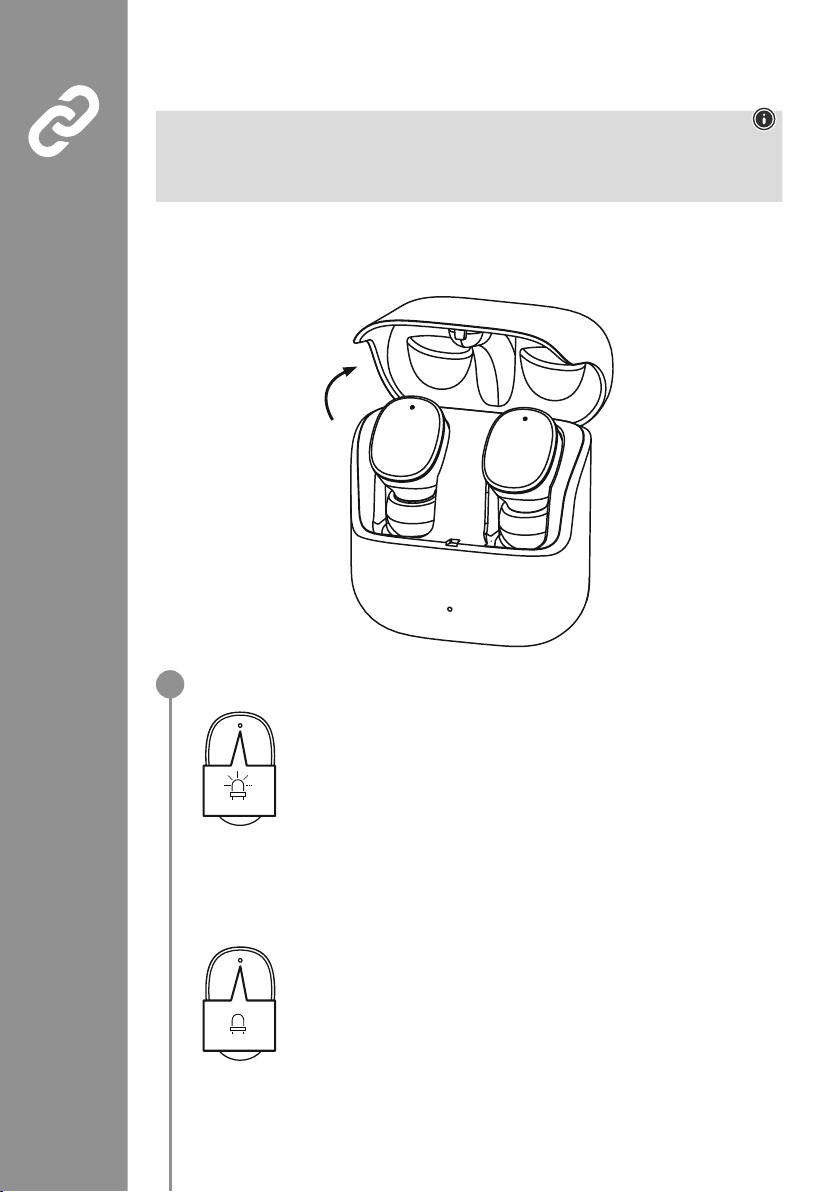
Asegúrese de que los auriculares están encendidos�
Compruebe el LED de estado (3).
Cuando los LEDs de estado (3) de los auriculares parpadean
alternativamente:
los auriculares están buscando una conexión Bluetooth
®
�
Cuando las luces led de estado (3) parpadean y luego se apagan:
los auriculares ya están conectados a un terminal Bluetooth
®
�
Blue/red
off
1
Page 38
36
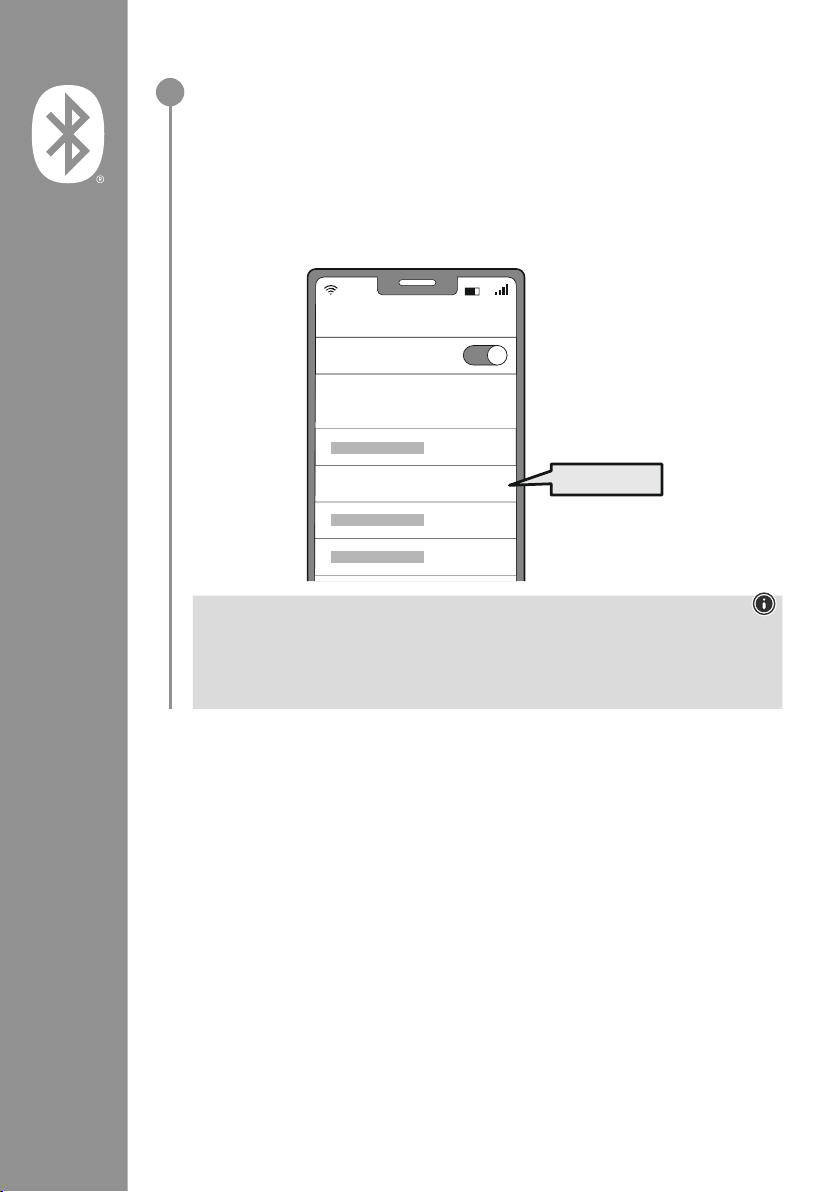
Busque los auriculares con su dispositivo terminal (sólo necesario para la conexión
inicial)
Abra la conguración de Bluetooth® en su dispositivo nal y espere
hasta que aparezca Hama Spirit Pure en la lista de dispositivos Bluetooth® encontrados�
Seleccione Hama Spirit Purey espere hasta que los auriculares se muestren como conectados
en la conguración Bluetooth de su terminal� Escuchará una breve señal�
Nota – contraseña para Bluetooth
®
Algunos terminales requieren una contraseña para la conguración de la conexión con otro
dispositivo Bluetooth
®
�
• Introduzca la contraseña 0000 para conectar el correspondiente terminal a los altavoces si el
terminal lo requiere
�
2
Password
Bluetooth
Hama Spirit Pure
ON
0000
Page 39
37
7. Controles
Nota
• Tenga en cuenta que el soporte de algunas funciones depende de su dispositivo terminal�
• Observe también las instrucciones de uso de su terminal�
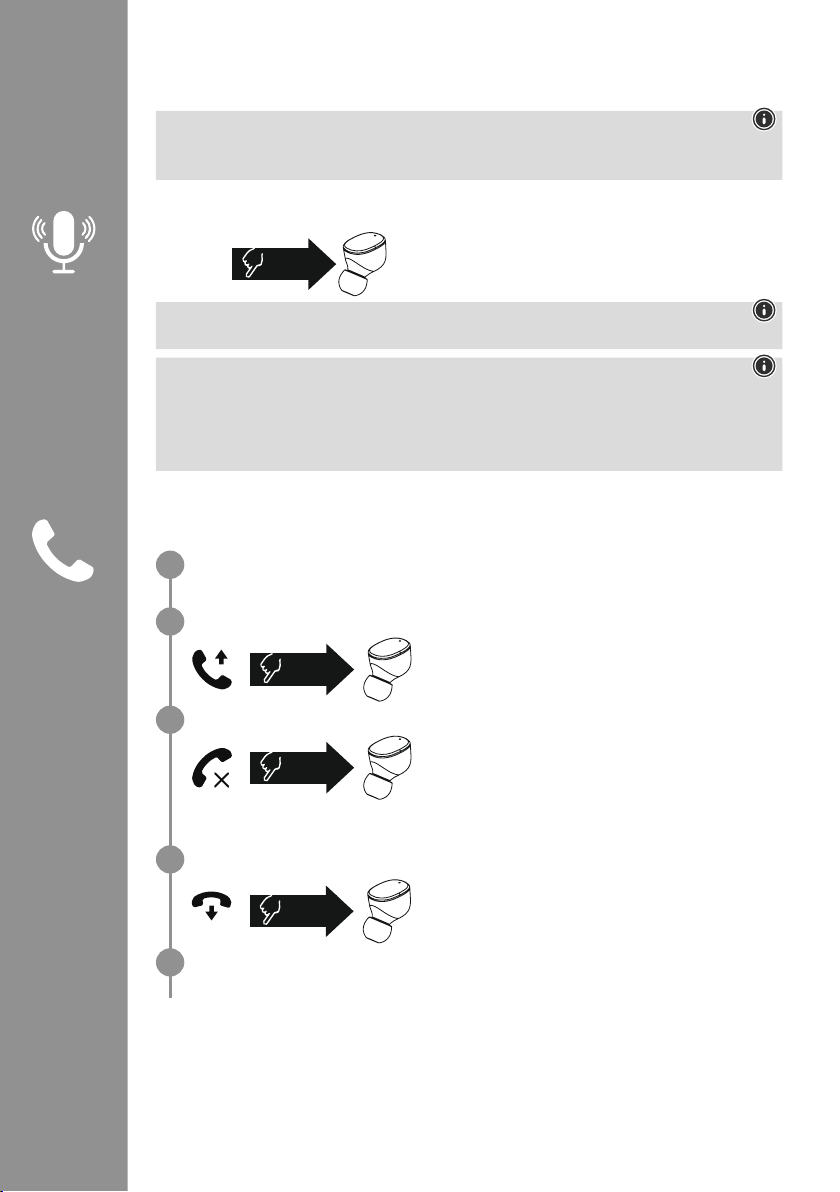
7.1 Función de asistente de voz
Toque una vez el sensor táctil multifunción (4) del auricular
izquierdo para iniciar una comunicación con Siri o el Asistente
de Google
�
Nota – Siri
Siri sólo está disponible en dispositivos con iOS 5 (iPhone 4s y posteriores) o superior�
Nota – Google Assistant
• El Asistente de Google sólo está disponible en dispositivos con Android 5.0 o superior con los
servicios de Google Play, >1,5 GB de memoria libre y una resolución de pantalla mínima de 720P�
• La aplicación Google Assistant App debe estar disponible en el dispositivo y congurada como el
asistente de idioma predeterminado�
7.2 Función de manos libres
Los auriculares se pueden utilizar como dispositivo manos libres para su teléfono móvil�
Realizar una llamada
Marque el número directamente desde su terminal para hacer una llamada�
Aceptar una llamada
Toque dos veces el sensor táctil multifunción (4) del
auricular izquierdo o derecho para responder a una llamada
entrante� Escuchará una breve señal�
Rechazar una llamada
Para rechazar una llamada entrante, pulse tres veces el
sensor táctil multifunción (4) del auricular izquierdo o
derecho durante aproximadamente 1 segundo� Escuchará
una breve señal
�
Finalizar una llamada
Durante la llamada, toque dos veces el sensor táctil
multifunción (4) del auricular izquierdo o derecho para
nalizarla
� Escuchará una breve señal�
Marcar de nuevo
Puede volver a marcar el último número marcado con la función de asistente de voz (7�1)�
1x
Siri/
Google
2x
3x
2x
1
2
3
4
5
Page 40
38
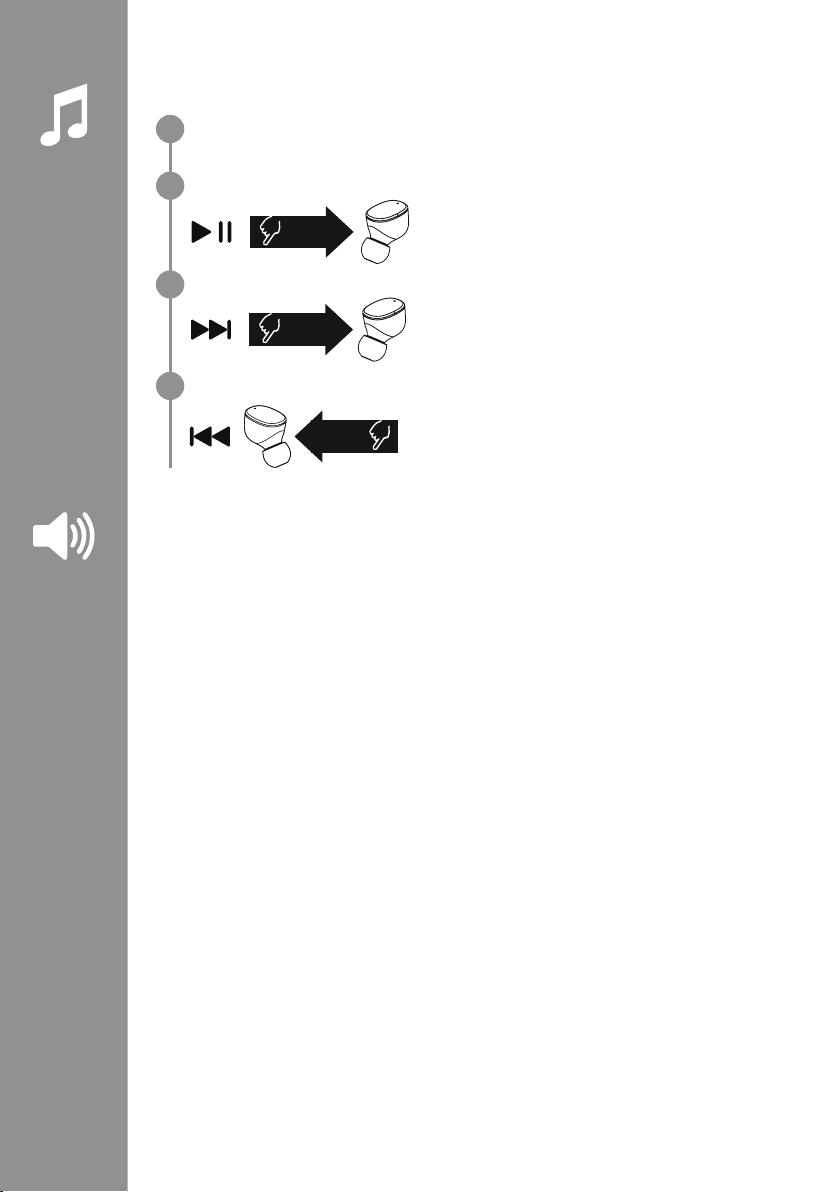
7.3 Reproducción de audio
Inicie la reproducción desde su terminal.
Reproducción/Pausa
Toque dos veces el sensor táctil multifunción (4) del
auricular izquierdo o derecho para iniciar o detener la
reproducción de audio�
Siguiente pista
Toque tres veces el sensor táctil multifunción (4) del
auricular derecho para pasar a la siguiente pista�
Pista anterior
Pulse tres veces el sensor táctil multifunción (4) del auricular
izquierdo para cambiar a la pista anterior�
7.4 Control de volumen
El volumen se controla a través de la función de asistente de voz (7�1)�
Alternativamente, también puede controlar el volumen desde su terminal�
2x
3x
R
3x
L
1
2
3
4
Page 41

39
8. Datos técnicos
Auriculares Bluetooth
®
Tecnología Bluetooth Bluetooth®v5
�0
Perles soportados A2DPV1�3, AVRCP 1�6, HFP V1�7, SPP V1�2
Frecuencia para Bluetooth
®
-
Transferencia
2402 – 2480 MHz
Alcance < 10 m
Batería
Tipo de batería 3,7 V Li-polímero
Capacidad mínima
Auriculares/Estación de carga
45
mAh / 480 mAh
Consumo de corriente máx� 5 V
330mA
Tiempo de carga de los
auriculares
~ 2 h
Duración de carga estación
de carga
~ 2,5 h
Duración en inactividad * ~ 70h
Duración de reproducción
(estación de carga) *
~ 5 h (25h)
Duración de llamadas
(estación de carga) *
~ 3,5 h (17,5h)
El peso de los auriculares aprox� 4 g por auricular
Peso de la estación de carga
incluyendo auriculares
aprox
� 44g
*Tras carga completa
Page 42
40
9. Mantenimiento y cuidado
Limpie este producto solo con un paño ligeramente humedecido que no deje pelusas y no utilice
detergentes agresivos
�
10. Exclusión de responsabilidad
La empresa Hama GmbH & Co KG no se responsabiliza ni concede garantía alguna por los daños que
se deriven de una instalación, montaje o manejo incorrectos del producto o por la inobservancia de las
instrucciones de uso o de las indicaciones de seguridad�
11. Servicio y asistencia
Si tiene alguna pregunta sobre el producto, puede ponerse en contacto con el departamento de
asesoramiento de productos de la empresa Hama�
Línea directa: +49 9091 502-0 (alemán e inglés)
Encontrará más información sobre el servicio de asistencia aquí: www�hama�com
12. Declaración de conformidad
Por la presente, la empresa Hama GmbH & Co KG declara que el tipo de equipo radioeléctrico
[00184108, 00184109] es conforme con la Directiva 2014/53/UE� El texto completo de la
declaración UE de conformidad está disponible en la siguiente dirección de Internet:
www
�hama�com-> 00184108, 00184109-> Downloads�
Banda o bandas de frecuencia 2402 – 2480 MHz
Potencia máxima de radiofrecuencia 3,28 dBm
Page 43
41
Hartelijk dank dat u voor een product van Hama
hebt gekozen
�
Neem de tijd om de volgende aanwijzingen
en instructies volledig door te lezen� Berg deze
gebruiksaanwijzing vervolgens op een goede plek
op zodat u hem als naslagwerk kunt gebruiken
�
Mocht u het toestel verkopen, geeft u dan ook
deze gebruiksaanwijzing aan de nieuwe eigenaar�
Bedieningselementen en weergaven/
indicaties
1� Oplaadbox
2� Status-led oplaadbox
3� Status-led oortelefoons
4
� Multifunctionele touch-sensor
5� Silicone oorkussens
6� Oplaad-contactpunten
7
� USB-C-aansluiting
1. Verklaring van waarschuwingssymbolen en instructies
Waarschuwing
Wordt gebruikt om veiligheidsinstructies te markeren of om op bijzondere gevaren en risico’s te
attenderen
�
Aanwijzing
Wordt gebruikt om extra informatie of belangrijke aanwijzingen te markeren�
2. Inhoud van de verpakking
1x True Wireless Bluetooth®-oortelefoon "Spirit Pure"
1x oplaadbox
1x USB-C-oplaadkabel
3 paar oorkussens in verschillende maten (S, M, L)
1x korte handleiding
1x waarschuwings- en veiligheidsinstructies
N Gebruiksaanwijzing
S
M
L
5
3
4
2
6
7
1
Page 44
42
3. Veiligheidsinstructies
• Het product is bedoeld voor huishoudelijk, nietcommercieel gebruik
�
• Gebruik het product alleen voor het beoogde doel�
• Kinderen moeten onder toezicht staan om ervoor
te zorgen dat ze niet met het product spelen
�
• Gebruik het product niet op plaatsen waar
elektronische apparaten niet zijn toegestaan
�
• Probeer het product niet zelf te onderhouden
of te repareren
� Laat onderhouds- en
reparatiewerkzaamheden door vakpersoneel
uitvoeren
�
• Open het product niet en gebruik het niet meer bij
beschadigingen
�
• Knik of klem de kabel niet�
• Laat het product niet vallen en stel het niet bloot
aan zware schokken of stoten
�
• Voer het verpakkingsmateriaal direct
en overeenkomstig de lokaal geldende
afvoervoorschriften af
�
• Verander niets aan het product� Daardoor vervalt
elke aanspraak op garantie
�
• Bescherm het product tegen vuil, vocht en
oververhitting en gebruik het alleen in droge
omgevingen
�
• Gebruik het product niet in de onmiddellijke
nabijheid van de verwarming, andere
warmtebronnen of in direct zonlicht
�
• Gebruik het artikel alleen in gematigde
klimatologische omstandigheden
�
• Dit product dient, zoals alle elektrische producten,
buiten het bereik van kinderen te worden
gehouden!
• Gebruik het product niet buiten de in de
technische gegevens vermelde vermogensgrenzen
�
• Gebruik het product niet in een vochtige
omgeving en vermijd spatwater
�
• Laat u niet door het product aeiden tijdens het
autorijden of sporten en let op de verkeerssituatie
en uw omgeving
�
• De accu is vast geïnstalleerd en kan niet worden
verwijderd, gooi het product als geheel weg in
overeenstemming met de wettelijke bepalingen
�
• Gooi de accu resp� het product niet in vuur�
• U mag de accu‘s/batterijen niet wijzigen en/of
vervormen/verhitten/demonteren
�
• Gebruik het product niet terwijl het wordt
opgeladen!
Waarschuwing – Accu
• Gebruik alleen geschikte opladers of USBaansluitingen voor het opladen�
• Gebruik nooit defecte opladers of defecte
USB-aansluitingen en probeer deze niet te
repareren
�
• U mag het product niet overladen of
diepontladen
�
• Vermijd opslag, opladen en gebruik bij extreme
temperaturen en extreem lage luchtdruk (bijv�
op grote hoogte)�
• Laad de accu regelmatig op (minstens
driemaandelijks) tijdens langdurige opslag�
Waarschuwing – magneet
• Het product genereert magnetische velden�
Personen met een pacemaker dienen vóór het
gebruik van dit product een arts om advies te
vragen of het functioneren van de pacemaker
er negatief door kan worden beïnvloed
�
• Bewaar geen pinpassen of soortgelijke kaarten
met magnetische strips in de buurt van de
oplaadbox of de oortelefoon
� De gegevens
op de kaarten kunnen beschadigd raken of
worden gewist
�
Waarschuwing - hoog volume
• Hoge geluidsdruk!
• Er is een risico op gehoorbeschadiging�
• Vermijd langdurig luisteren op een hoog
volumeniveau om gehoorverlies te voorkomen�
• Houd het geluidsvolume te allen tijde op een
verstandig niveau
� Grote geluidsvolumen
kunnen – zelfs kortstondig – tot
gehoorbeschadiging leiden�
• De gebruikmaking van het product beperkt u
in de waarneming van omgevingsgeluiden�
Bedient u om deze reden tijdens
het gebruik ervan geen voertuigen
of machines
�
Page 45
43
4. In-/uitschakelen
Open de oplaadbox, de oortelefoons worden automatisch ingeschakeld en starten het
koppelingsproces�
Om uit te schakelen, plaatst u de oortelefoons gewoon terug in de oplaadbox� Zorg ervoor dat
de oortelefoons op de juiste manier worden geplaatst op basis van de L/R-markeringen� Sluit
vervolgens de oplaadbox
�
zZz
STANDBY
3min
ON
OFF
ON
OFF
Aanwzing – Automatisch uitschakelen van het product
De producten zijn voorzien van een automatische uitschakeling
� Als er binnen 3 minuten geen
verbinding is met uw eindapparaat, wordt het automatisch uitgeschakeld�
Page 46
44
5. Opladen
Laad de oortelefoons en de oplaadbox een keer volledig op voordat u ze voor de eerste keer gebruikt
�
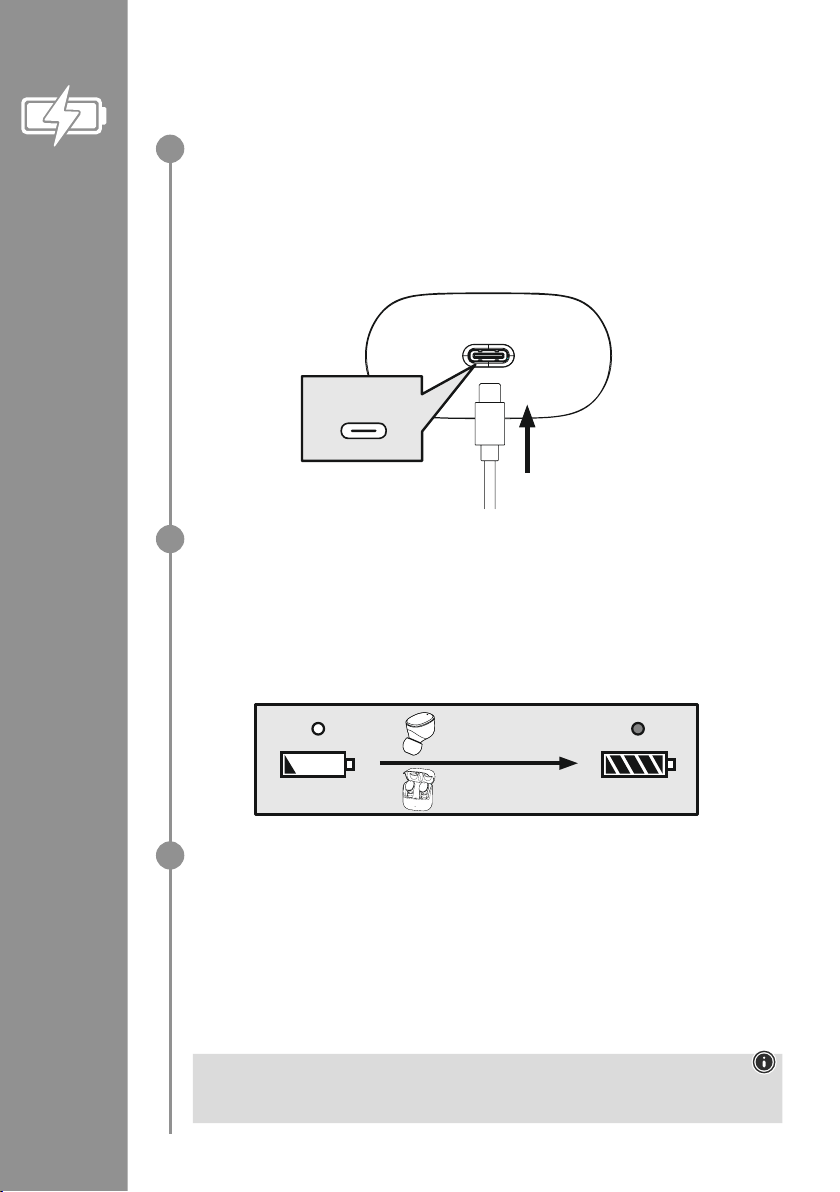
Oortelefoon plaatsen, oplaadbox sluiten en aansluiten
Plaats de oortelefoons in de oplaadbox� Zorg ervoor dat de oortelefoons op de juiste manier
worden geplaatst op basis van de L/R-markeringen� Sluit vervolgens de oplaadbox�
Sluit de meegeleverde USB-C-oplaadkabel aan op de oplaadaansluiting (7) van de oplaadbox�
Sluit de vrije stekker van de USB-C-oplaadkabel op een geschikte USB-oplader aan� Raadpleeg
hiervoor de gebruiksaanwijzing van de gebruikte USB-oplader�
Oplaadproces oplaadbox en oortelefoons
De status-led van de oplaadbox (2) knippert tijdens het opladen wit� Wanneer de oplaadbox
volledig is opgeladen, brandt de led op de oplaadbox permanent wit�
De oortelefoons worden alleen bij gesloten oplaadbox opgeladen�
Het kan tot 2 uur (oortelefoons) en tot 2,5 uur (oplaadbox) duren om de accu's volledig op te
laden�
Accucapaciteit
Oplaadbox
Als het accuniveau laag is, knippert de status-led (2) van de oplaadbox wit
�
Oortelefoons
Als het accuniveau laag is, hoort u eenmaal per minuut een signaaltoon en de status-led (3) van de
oortelefoon knippert wit
�
De feitelijke gebruiksduur van de accu is afhankelijk van het gebruik van het apparaat, de
instellingen en de omgevingstemperatuur (accu's hebben een beperkte levensduur)�
Aanwijzing
Als u het product een paar maanden niet hebt gebruikt, kan het 15-30 minuten duren voordat de
status-led (2) rood oplicht tijdens het opladen�
USB-C
CHARGING CHARGED
2h:00m
2h:30m
1
2
3
Page 47
45
6. Bluetooth®-verbinding (pairing)
Aanwijzing – pairing
• Controleer of uw eindapparaat met Bluetooth
®
-functie is ingeschakeld en of de Bluetooth®-functie is
geactiveerd�
• Raadpleeg hiervoor de gebruiksaanwijzing van uw eindapparaat�
De oortelefoons en het eindapparaat mogen niet meer dan 1 meter van elkaar verwijderd zijn� Hoe
kleiner de afstand, hoe beter�
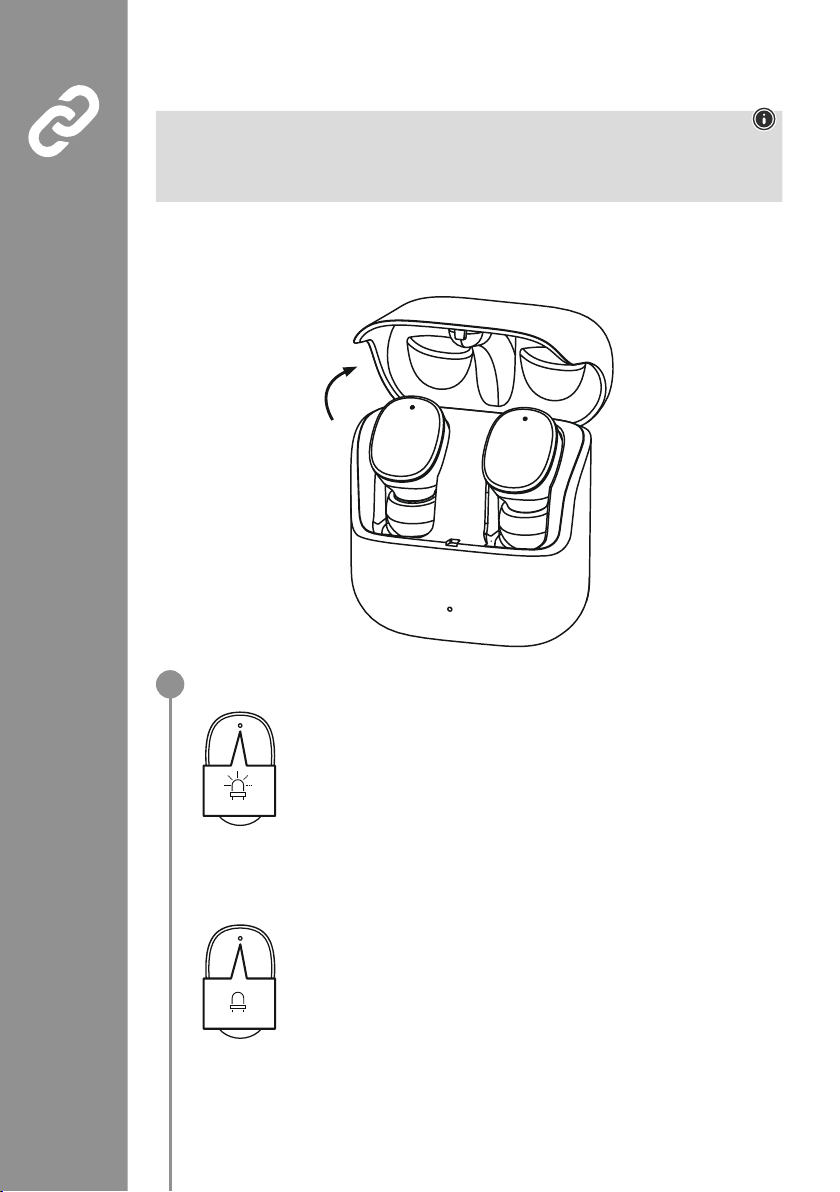
Zorg ervoor dat de oortelefoons zijn ingeschakeld�
Controleer de status van de status-led (3)
Als de status-leds (3) van de oortelefoons afwisselend knipperen:
de oortelefoons zoeken naar een Bluetooth
®
-verbinding�
Als de status-leds (3) knipperen en vervolgens uitgaan:
de oortelefoons zijn al met een Bluetooth
®
-apparaat verbonden
�
Blue/red
off
1
Page 48
46
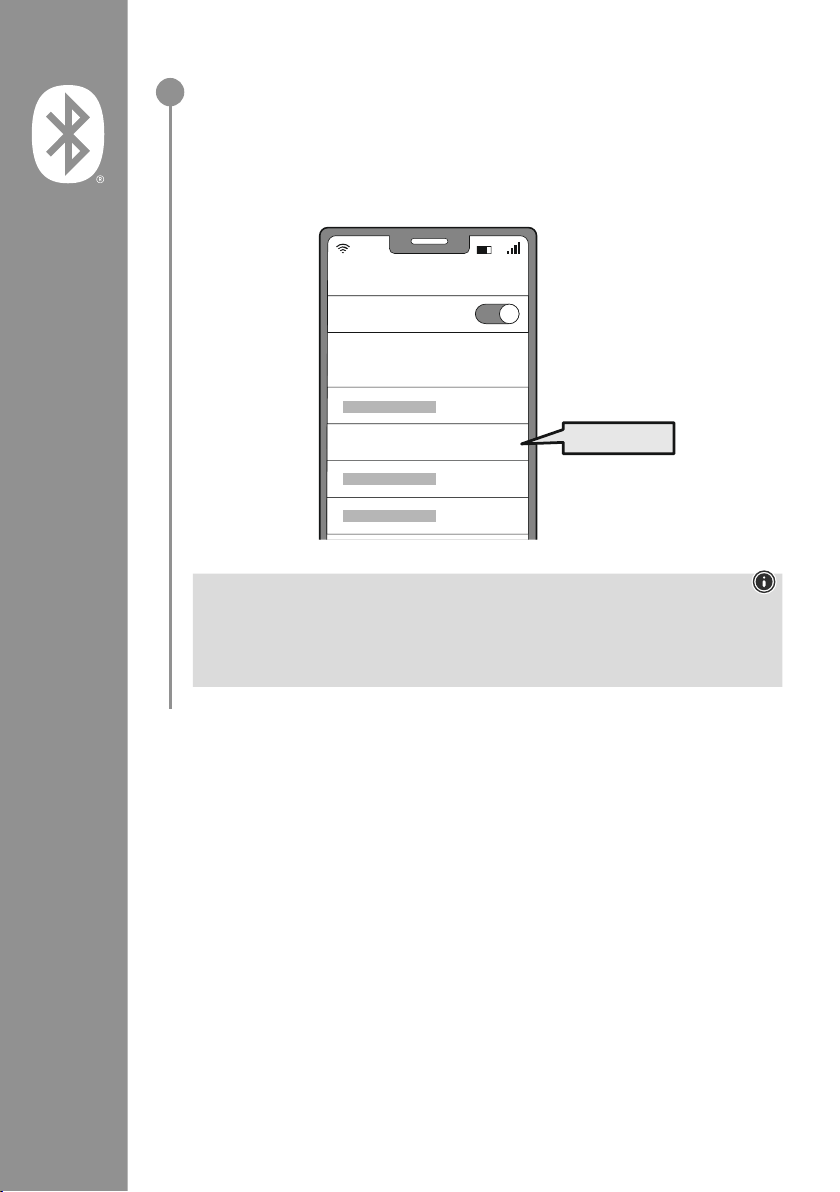
Zoek de oortelefoons met uw eindapparaat (alleen nodig voor de eerste verbinding)
Open op uw eindapparaat de Bluetooth
®
-instellingen en wacht tot in de lijst
met gevonden Bluetooth
®
-apparaten Hama Hama Spirit Pure wordt weergegeven
�
Selecteer Hama Spirit Pure en wacht tot de oortelefoons als "verbonden" in de
Bluetooth
®
-instellingen van uw eindapparaat worden weergegeven� U hoort een korte signaaltoon�
Aanwijzing – Bluetooth®-wachtwoord
Sommige toestellen hebben voor het tot stand brengen van de verbinding met een ander
Bluetooth
®
-toestel een wachtwoord nodig�
• Voer voor de verbinding met de oortelefoons het wachtwoord 0000 in als uw eindapparaat
daarnaar vraagt
�
2
Password
Bluetooth
Hama Spirit Pure
ON
0000
Page 49
47
7. Bedieningselementen
Aanwijzing
• Houd er rekening mee dat de ondersteuning van sommige functies afhankelijk is van uw apparaat�
• Raadpleeg hiervoor de gebruiksaanwijzing van uw eindapparaat�
7.1 Voice Assistant-functie
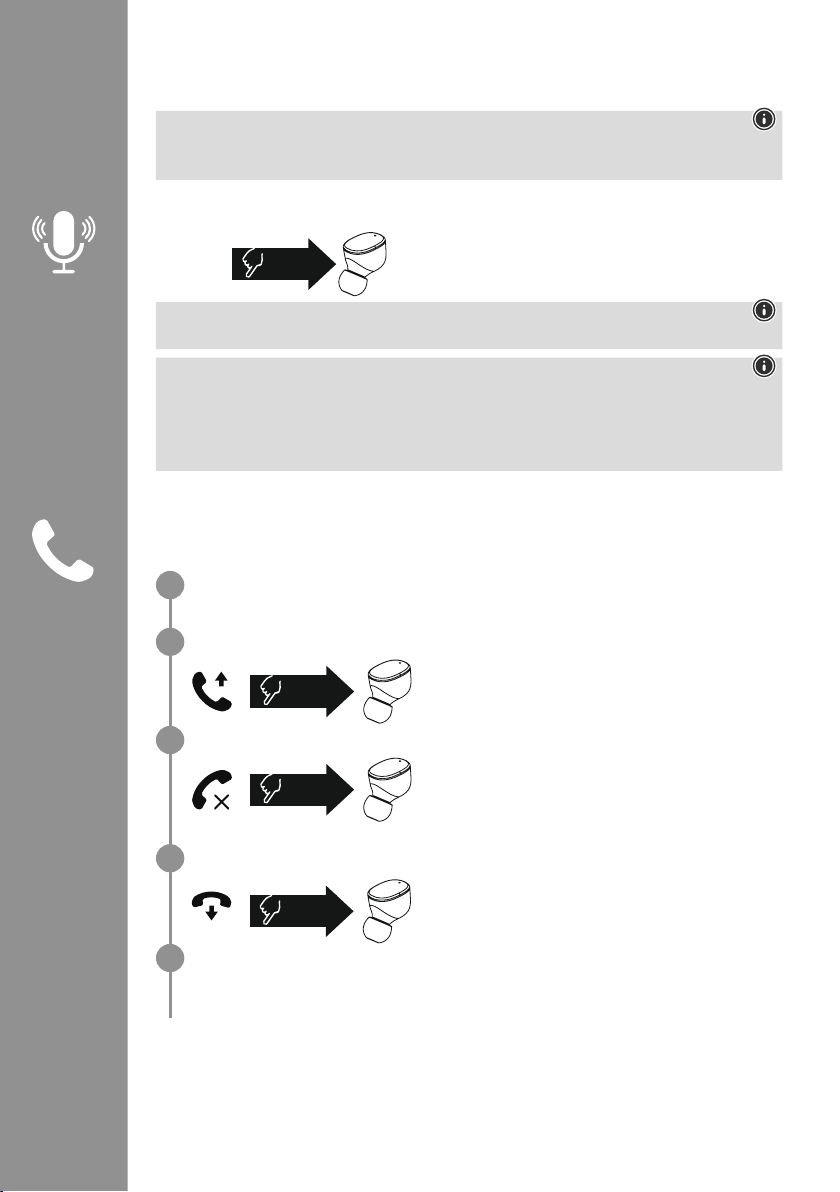
Tik één keer op de multifunctionele touch-sensor (4) op de
rechter oortelefoon om de communicatie met uw Siri of Google
Assistant te starten
�
Aanwijzing – Siri
Siri is alleen op geschikte apparaten met iOS 5 (vanaf iPhone 4s) of hoger beschikbaar�
Aanwijzing – Google Assistant
• De Google Assistant is nu op geschikte eindapparaten met Android 5.0 of hoger beschikbaar
met Google Play Services, >1�5GB vrije opslagruimte en een minimale beeldschermresolutie van 720P�
• De Google Assistant-app moet beschikbaar zijn op uw apparaat en zijn ingesteld als de standaard
spraakassistent�
7.2 Handsfree-functie
U hebt de mogelijkheid om de oortelefoons als een handsfree-apparaat voor uw eindapparaat te
gebruiken�
Bellen
Kies het nummer rechtstreeks op uw eindapparaat om te bellen�
Gesprek aannemen
Tik twee keer op de multifunctionele touch-sensor (4) op de
linker of rechter oortelefoon om een inkomende oproep te
accepteren
� U hoort een korte signaaltoon�
Gesprek afwijzen
Om een inkomende oproep te weigeren, tikt u drie keer op
de multifunctionele touch-sensor (4) op de linker of rechter
oortelefoon
� U hoort een korte signaaltoon�
Gesprek beëindigen
Tik tijdens het gesprek twee keer op de multifunctionele
touch-sensor (4) op de linker of rechter oortelefoon om het
gesprek te beëindigen
� U hoort een korte signaaltoon�
Nummerherhaling
U kunt het laatst gekozen nummer opnieuw kiezen met de functie Voice Assistant (7�1)�
1x
Siri/
Google
2x
3x
2x
1
2
3
4
5
Page 50
48
7.3 Audioweergave
Start de audioweergave op uw eindapparaat.
Weergave / pauze
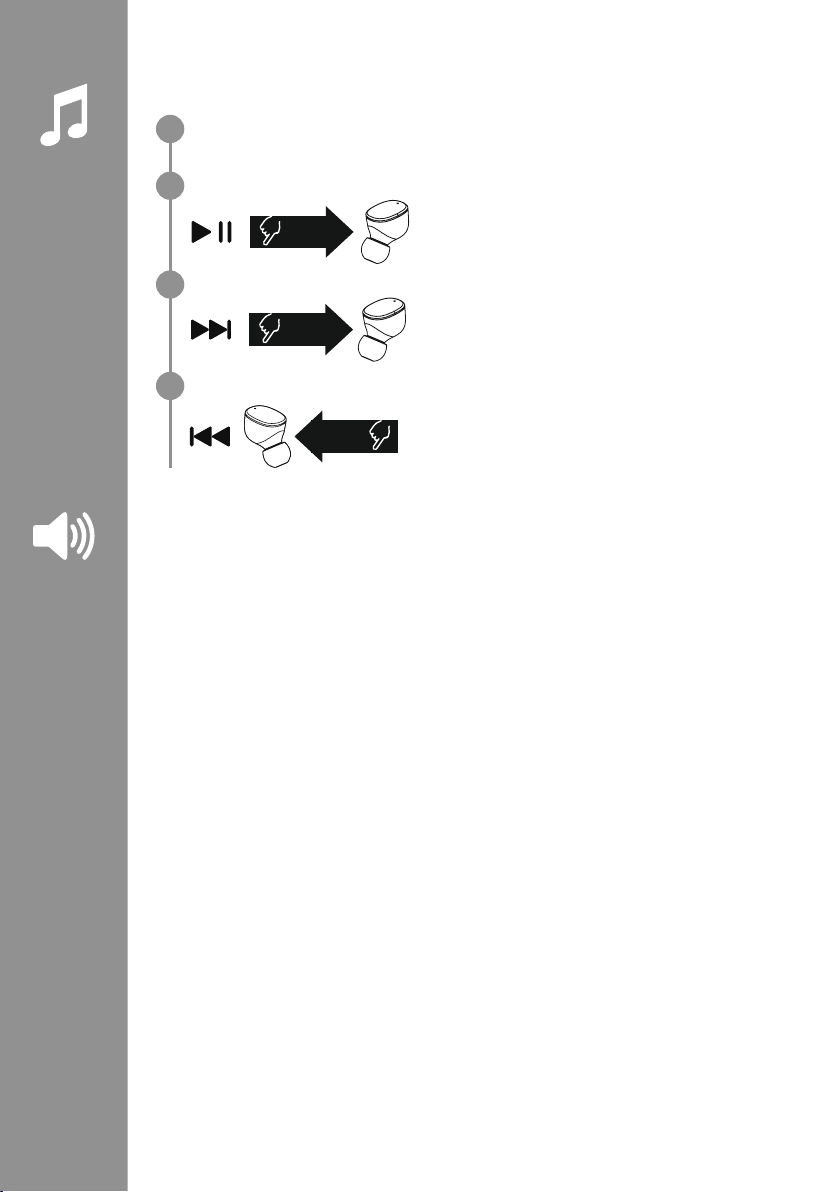
Tik twee keer op de multifunctionele touch-sensor (4) op
de linker of rechter oortelefoon om de audioweergave te
starten of te stoppen�
Volgend nummer
Tik drie keer op de multifunctionele touch-sensor (4) op de
rechter oortelefoon om naar het volgende nummer te gaan�
Vorig nummer
Tik drie keer op de multifunctionele touch-sensor (4) op de
linker oortelefoon om naar het vorige nummer te gaan�
7.4 Volumeregeling
Het volume wordt geregeld met de Voice Assistant-functie (7�1)�
U kunt het volume ook via uw eindapparaat regelen�
2x
3x
R
3x
L
1
2
3
4
Page 51

49
8. Technische gegevens
Bluetooth®-oortelefoons
Bluetooth-technologie Bluetooth
®
v5
�0
Ondersteunde proelen A2DPV1�3, AVRCP 1�6, HFP V1�7, SPP V1�2
Frequentie voor de
Bluetooth
®
-
overdracht
2402 – 2480 MHz
Reikwijdte < 10 m
Accu
Batterijtype 3,7V lithium-polymeer
Min. capaciteit
Oortelefoons / oplaadbox
45
mAh / 480 mAh
Stroomverbruik max� 5 V
330mA
Oplaadtijd oortelefoons ~ 2 h
Oplaadtijd oplaadbox ~ 2,5
h
Rusttoestand * ~ 70 h
Muziektijd (oplaadbox) * ~ 5 h (25h)
Gesprekstijd (oplaadbox)* ~ 3,5
h (17,5 h)
Gewicht oortelefoons ca� 4g per oortelefoon
Gewicht oplaadbox
incl. oortelefoons
ca
� 44g
*na volledig opladen
Page 52
50
9. Onderhoud en verzorging
Reinig dit product uitsluitend met een pluisvrije, licht vochtige doek en gebruik geen agressieve
reinigingsmiddelen
�
10. Uitsluiting aansprakelijkheid
Hama GmbH & Co KG is niet aansprakelijk voor en verleent geen garantie op schade die het gevolg is van
ondeskundige installatie, montage en ondeskundig gebruik van het product of het niet in acht nemen van
de handleiding en/of veiligheidsinstructies�
11. Service en support
Bij vragen over het product kunt u altijd contact opnemen met Hama-productadvies�
Hotline: +49 9091 502-0 (Dui/Eng)
Meer support-informatie vindt u hier: www
�hama�com
12. Conformiteitsverklaring
Hama GmbH & Co KG verklaart hierbij dat dit toestel [00184108, 00184109] zich in
overeenstemming met de essentiële eisen en aan de overige relevante bepalingen van de
Richtlijn 2014/53/EU bevindt� De conformiteitsverklaring overeenkomstig de desbetreffende
Richtlijn vindt u onder:
www
�hama�com-> 00184108, 00184109-> Downloads�
Frequentieband(en) 2402 – 2480 MHz
Maximaal radiofrequent vermogen 03:28 dBm
Page 53
51
Grazie per avere acquistato un prodotto Hama!
Prima di iniziare a utilizzare il prodotto, si prega
di prendersi il tempo necessario per leggere le
istruzioni e le informazioni descritte di seguito
�
Custodire quindi il presente libretto in un luogo
sicuro e consultarlo qualora si renda necessario�
In caso di cessione dell’apparecchio, consegnare
anche il presente libretto al nuovo proprietario
�
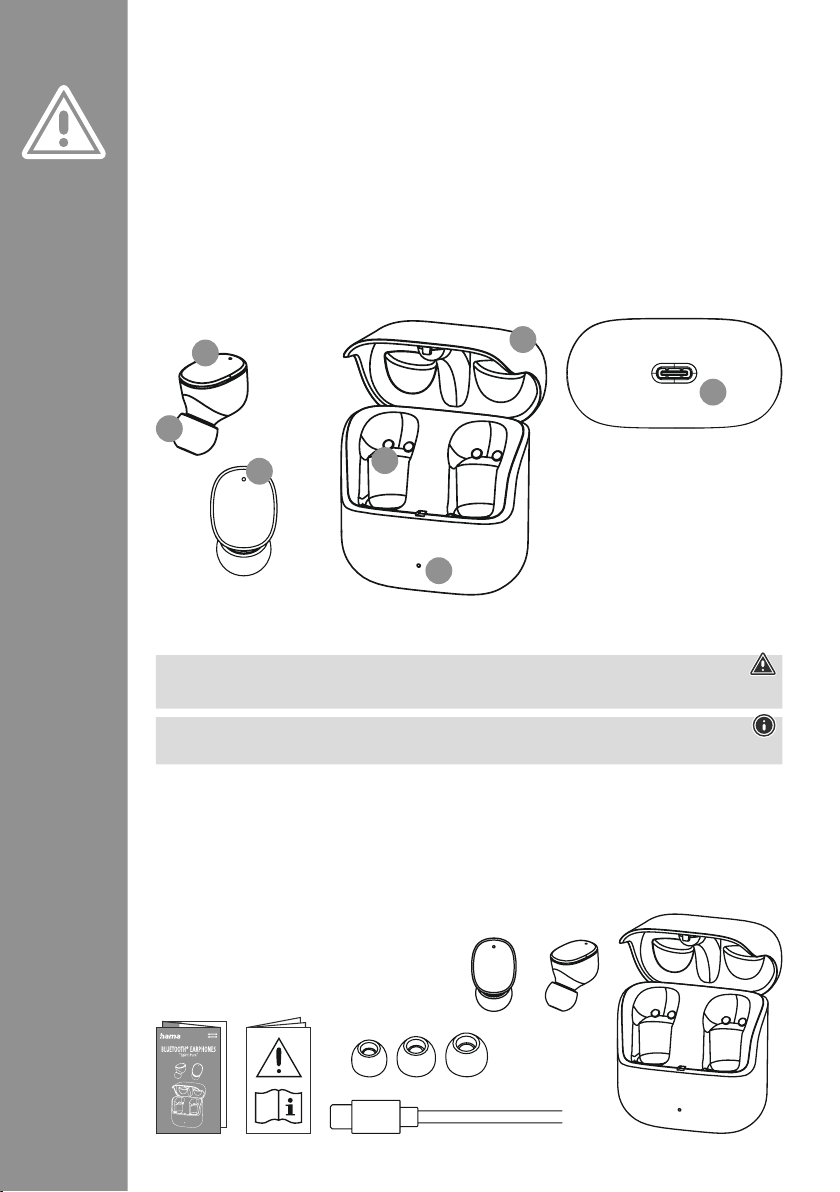
Elementi di comando e indicatori
1� Caricabatteria
2� LED di stato del caricabatteria
3� LED di stato delle cue
4
� Sensore touch multifunzione
5� Cuscinetti in silicone
6� Contatti di carica
7
� Presa USB-C
1. Spiegazione dei simboli di avvertenza e delle istruzioni
Attenzione
Contraddistingue le istruzioni di sicurezza o richiama l’attenzione su particolari rischi e pericoli
�
Nota
Contraddistingue informazioni supplementari o indicazioni importanti�
2. Contenuto della confezione
1x cue Bluetooth®True Wireless "Spirit Pure"
1x caricabatteria
1x cavo di ricarica USB-C
3 coppie di cuscinetti in silicone di misure diverse (S/M/L)
1x guida rapida
1x istruzioni di avviso e sicurezza
I Istruzioni d’uso
S
M
L
5
3
4
2
6
7
1
Page 54
52
3. Istruzioni di sicurezza
• Il prodotto è previsto per uso personale, non
commerciale
�
• Utilizzare il prodotto soltanto per gli scopi previsti�
• Vigilare sui bambini anché non giochino con il
prodotto
�
• Non utilizzare il prodotto in ambienti dove non è
consentito l’uso di apparecchi elettronici
�
• Non effettuare interventi di manutenzione e
riparazione sul prodotto di propria iniziativa
�
Fare eseguire i lavori di riparazione soltanto da
operatori specializzati
�
• Non aprire il prodotto e cessarne l’utilizzo se
presenta danneggiamenti
�
• Non piegare, né schiacciare il cavo�
• Non far cadere il prodotto e non esporlo a urti�
• Smaltire immediatamente il materiale
d’imballaggio in conformità alle prescrizioni locali
vigenti
�
• Non apportare modiche al prodotto� In tal caso
decadono i diritti di garanzia
�
• Proteggere il prodotto dallo sporco, dall’umidità
e dal surriscaldamento e utilizzarlo soltanto in
ambienti asciutti
�
• Non collocare il prodotto nelle immediate
vicinanze del riscaldamento, di fonti di calore o
alla luce diretta del sole
�
• Utilizzare il prodotto soltanto in condizioni
climatiche moderate
�
• Come tutte le apparecchiature elettriche, tenere il
prodotto fuori dalla portata dei bambini!
• Non utilizzare il prodotto oltre i limiti di potenza
indicati nei dati tecnici
�
• Non utilizzare il prodotto in ambienti umidi e
proteggerlo dagli spruzzi d’acqua
�
• Non farsi distrarre dal prodotto durante guida di
un veicolo o l’uso di un attrezzo sportivo e fare
attenzione alla circolazione stradale e all’ambiente
circostante
�
• La batteria è installata ssa e non può essere
rimossa
� Smaltire il prodotto completo in
conformità alle normative in vigore
�
• Non gettare la batteria o il prodotto nel fuoco�
• Non modicare e/o deformare/riscaldare/
scomporre le batterie/pile
�
• Non utilizzare il prodotto quando è sotto carica!
Nota – Batteria
• Utilizzare soltanto caricabatteria o prese USB
compatibili�
• Non utilizzare caricabatteria o prese USB
guasti e non effettuare tentativi di riparazione
�
• Non sovraccaricare il prodotto ed evitare
scariche profonde�
• Evitare la custodia, la ricarica e l’uso del
prodotto a temperature estreme e a pressioni
atmosferiche estremamente basse (ad esempio
ad alte quote)
�
• In caso di inutilizzo prolungato effettuare la
ricarica a intervalli regolari (per lo meno ogni
tre mesi)�
Attenzione – Campi magnetici
• Il prodotto genera campi magnetici� Prima
di utilizzarlo, si raccomanda ai portatori di
pace maker di chiedere al proprio medico
se il prodotto può interferire sul suo corretto
funzionamento
�
• Non custodire bancomat o carte simili dotate
di banda magnetica nelle vicinanze del
caricabatteria o delle cue
� I dati contenuti
sulle carte possono venire danneggiati o
andare persi
�
Attenzione – Volume elevato
• Elevata pressione sonora!
• Rischio di danni all’udito�
• Per impedire perdite di udito, evitare l’ascolto
prolungato a volume elevato�
• Regolare sempre il volume su un livello
ragionevole
� Il volume elevato - anche per
brevi lassi tempo - può causare danni all’udito�
• L’uso del prodotto limita la percezione dei
rumori circostanti
� Durante l’utilizzo delle cue
non è quindi consentito
guidare veicoli o
utilizzare macchine�
Page 55
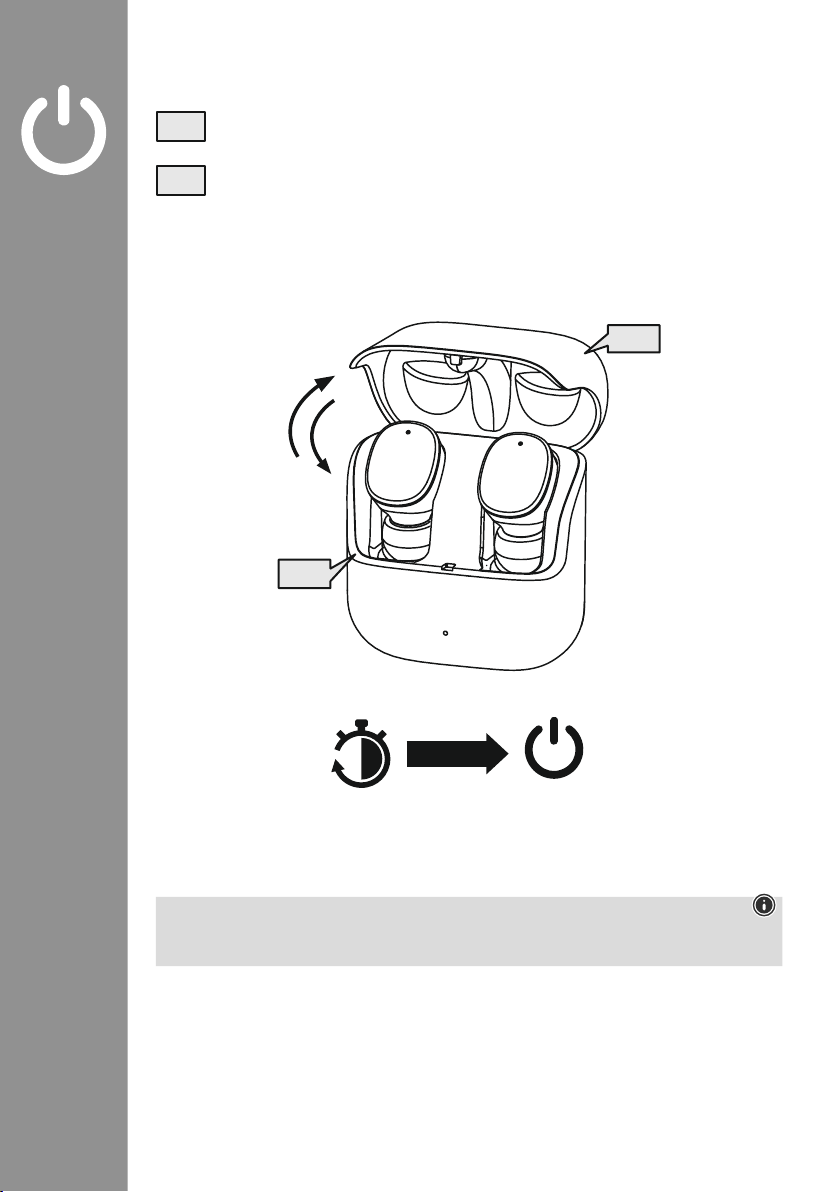
53
4. Accendere / Spegnere
Le cue si accendono automaticamente aprendo il caricabatteria e avviano il processo di
pairing�
Per spegnerle, riporre semplicemente le cue nel caricabatteria� Riporre le cue sul lato
corretto facendo riferimento alle lettere L/R� Chiudere quindi il caricabatteria�
zZz
STANDBY
3min
ON
OFF
ON
OFF
Nota – Spegnimento automatico del prodotto
Il prodotto è dotato di un sistema di spegnimento automatico
� Se entro 3 minuti non viene stabilita la
connessione con il dispositivo, si spegne automaticamente�
Page 56
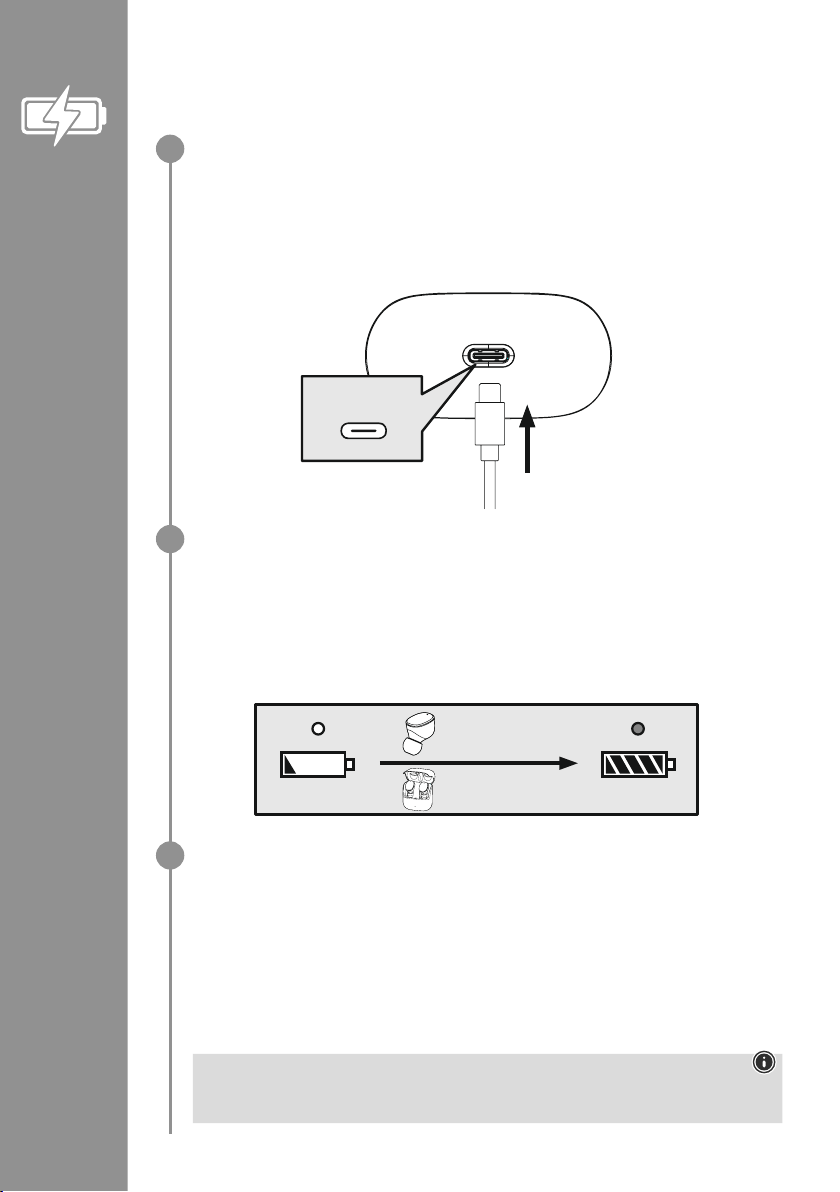
54
5. Caricare le cuffie
Caricare completamente le cue e il caricabatteria prima della messa in funzione iniziale
�
Riporre le cuffie nel caricabatteria, chiuderlo e collegarlo
Riporre le cue nel caricabatteria� Riporre le cue sul lato corretto facendo riferimento alle lettere
L/R� Chiudere quindi il caricabatteria�
Collegare il cavo di carica USB-C in dotazione alla presa (7) del caricabatteria�
Collegare quindi l’altro connettore del cavo di ricarica USB-C a un caricabatteria USB-C
compatibile� Seguire le istruzioni d’uso del caricabatteria USB utilizzato�
Processo di carica del caricabatteria e delle cuffie
Durante il processo di carica, il LED di stato del caricabatteria (2) lampeggia a luce bianca� Al
termine del processo di carica del caricabatteria, il LED si accende a luce ssa bianca�
Le cue vengono ricaricate soltanto con il caricabatteria chiuso�
La carica completa delle batterie può richiedere no a 2 (cue) ovvero no a 2,5 ore
(caricabatteria)�
Capacità della batteria
Caricabatteria
Se il livello di carica è basso, il LED di stato (2) del caricabatteria lampeggia a luce bianca
�
Cuffie
Se il livello di carica è basso viene emesso un segnale acustico ogni minuto e il LED di stato (3)
delle cue lampeggia a luce bianca
�
La reale autonomia della batteria varia a seconda dell’utilizzo del dispositivo, delle impostazioni e
delle temperature ambientali (le batterie hanno un ciclo di vita limitato)�
Nota
Se il prodotto non viene utilizzato da alcuni mesi, l’accensione a luce rossa ssa del LED di stato
(2) durante il processo di carica può richiedere 15 – 30 minuti�
USB-C
CHARGING CHARGED
2h:00m
2h:30m
1
2
3
Page 57
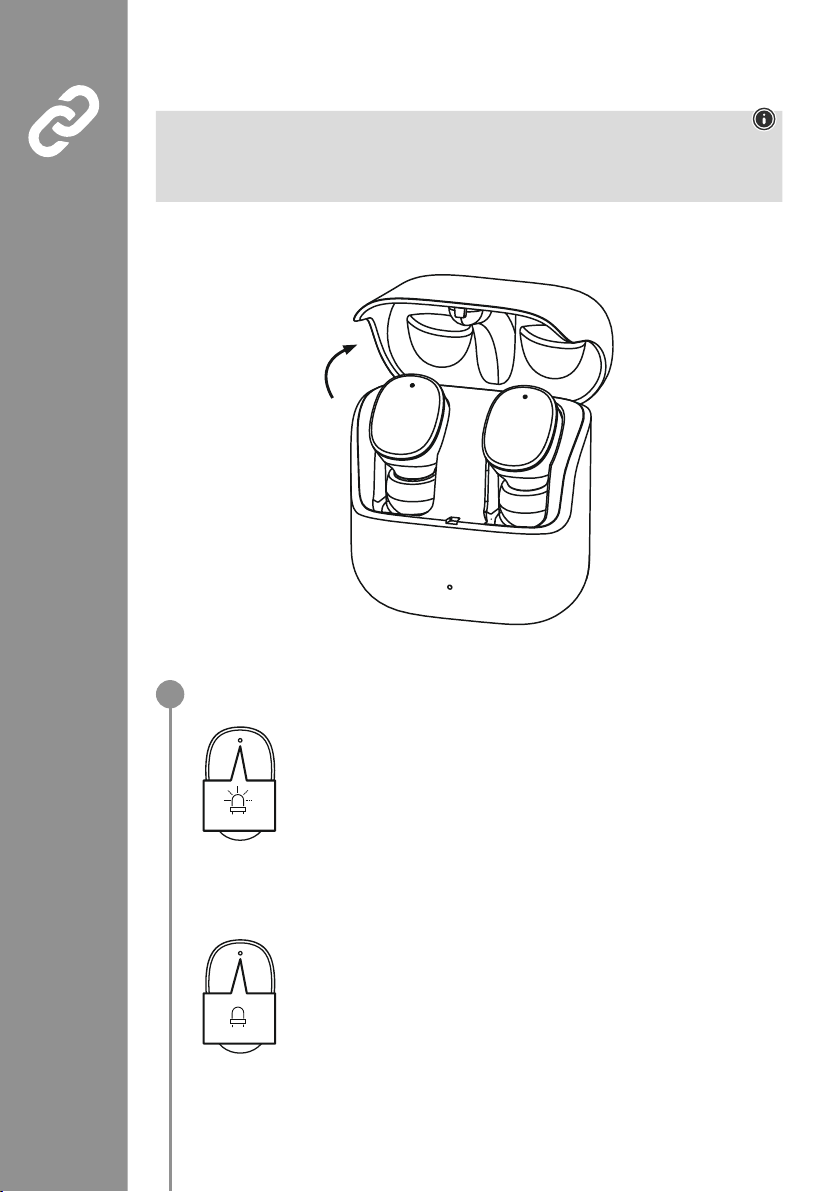
55
6. Connessione Bluetooth®(Pairing)
Nota – Pairing
• Assicurarsi che il dispositivo compatibile Bluetooth
®
sia acceso e che la funzione Bluetooth®sia
attivata�
• Seguire a questo proposito le istruzioni d’uso del dispositivo�
La distanza tra le cue e il dispositivo non deve essere superiore a 1 metro� Più è ridotta e meglio è�
Assicurarsi che le cue siano accese�
Controllare il LED di stato (3)
Se il LED di stato (3) delle cuffie lampeggia a luci alternate:
le cue stanno cercando una connessione Bluetooth
®
�
Se i LED di stato (3) lampeggiano e poi si spengono:
le cue hanno già stabilito la connessione Bluetooth
®
con un dispositivo�
Blue/red
off
1
Page 58
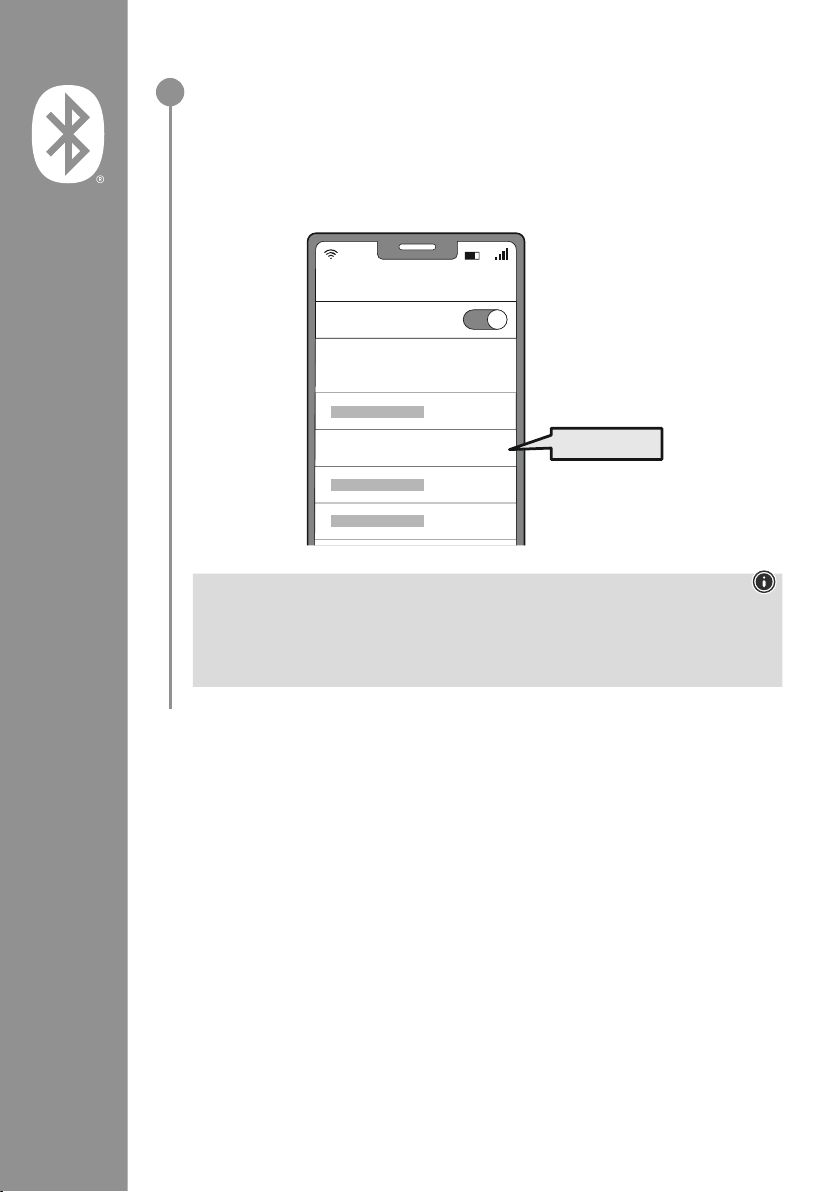
56
Cercare le cuffie con il proprio dispositivo (necessario soltanto alla prima connessione)
Aprire le impostazioni Bluetooth
®
del dispositivo e attendere che l’elenco
dei dispositivi Bluetooth
®
trovati visualizzi Hama Spirit Pure
�
Selezionare Hama Spirit Pure e attendere che le cue risultino connesse
nelle impostazioni Bluetooth® del proprio dispositivo� Viene emesso un breve segnale acustico�
Nota – password Bluetooth
®
Per stabilire la connessione con un altro dispositivo Bluetooth®alcuni dispositivi richiedono una
password
�
• Per stabilire la connessione con le cue digitare la password 0000, quando richiesto dal
proprio dispositivo�
2
Password
Bluetooth
Hama Spirit Pure
ON
0000
Page 59
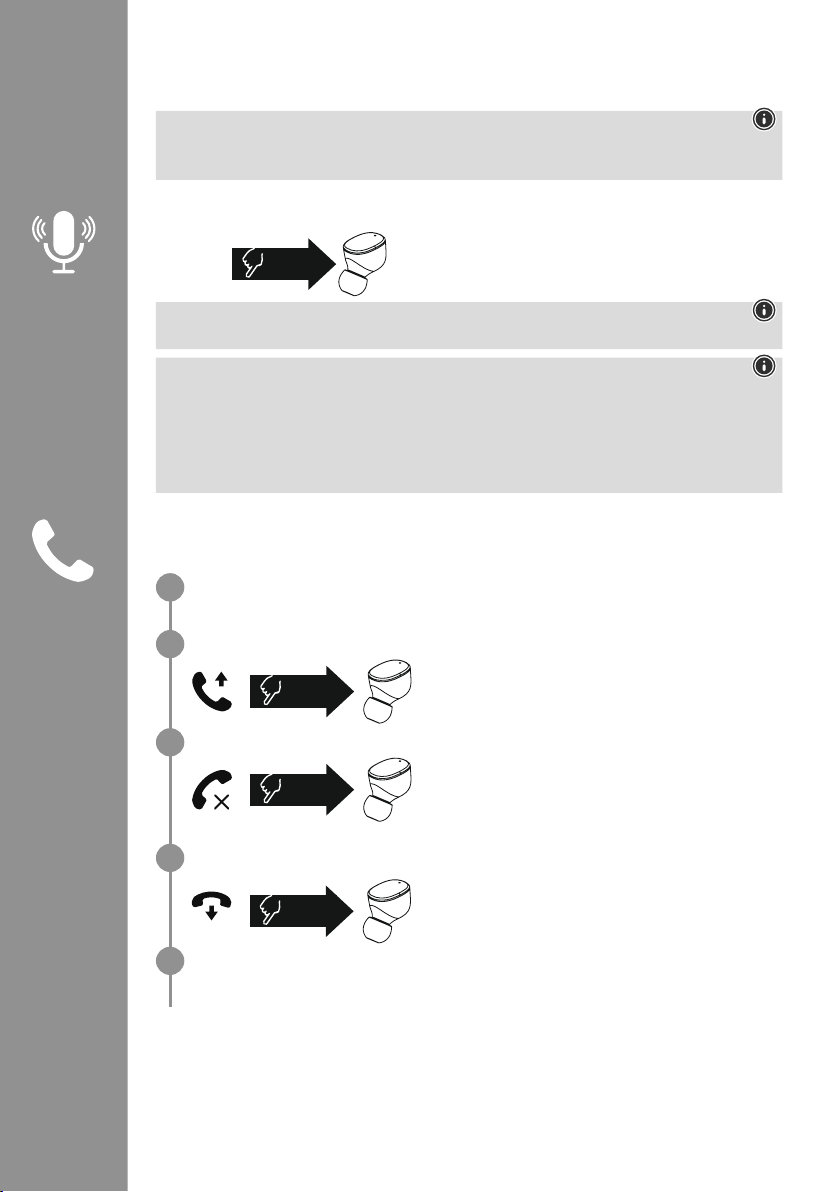
57
7. Elementi di comando
Nota
• Il supporto di alcune funzioni varia a seconda del proprio dispositivo�
• Seguire a questo proposito le istruzioni d’uso del dispositivo�
7.1 Funzione Assistente vocale
Premere una volta il sensore touch multifunzione (4)
dell’auricolare sinistro per avviare la comunicazione con il
proprio Siri o Assistente Google
�
Nota – Siri
Siri è compatibile soltanto con dispositivi iOS 5 (a partire da iPhone 4s) o superiori�
Nota – Assistente Google
• L’Assistente Google è disponibile soltanto su dispositivi compatibili dotati di Android 5.0 o
superiore, servizi Google Play, >1�5GB di memoria libera e risoluzione dello schermo di almeno
720P�
• L’App Assistente Google deve essere disponibile sul proprio dispositivo e impostata come
assistente vocale predenito
�
7.2 Funzione viva voce
Le cue possono essere utilizzate come dispositivo viva voce per il proprio dispositivo�
Effettuare chiamate
Per effettuare una chiamata, comporre il numero dal proprio dispositivo�
Rispondere alle chiamate
Per rispondere a una chiamata in arrivo, premere due volte
il sensore touch multifunzione (4) dell’auricolare sinistro o
destro� Viene emesso un breve segnale acustico�
Respingere le chiamate
Per respingere una chiamata in arrivo, toccare tre volte il
sensore touch multifunzione (4) dell’auricolare sinistro o
destro� Viene emesso un breve segnale acustico�
Concludere le chiamate
Per concludere una chiamata, premere due volte il sensore
touch multifunzione (4) dell’auricolare sinistro o destro�
Viene emesso un breve segnale acustico�
Ripetizione del numero selezionato
L’ultimo numero selezionato può essere richiamato tramite la funzione assistente vocale (7�1)�
1x
Siri/
Google
2x
3x
2x
1
2
3
4
5
Page 60
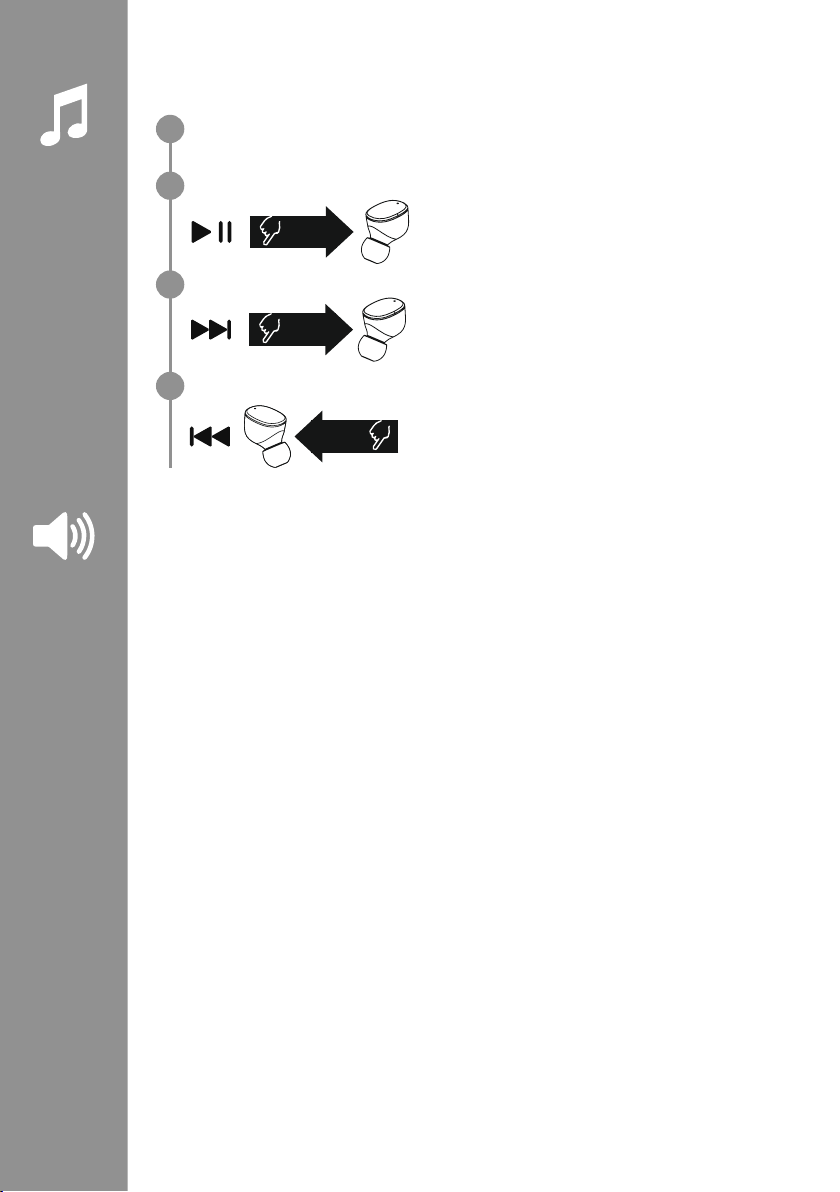
58
7.3 Riproduzione audio
Avviare la riproduzione audio dal dispositivo.
Play / Pausa
Per avviare o arrestare la riproduzione audio, premere
due volte il sensore touch multifunzione (4) dell’auricolare
sinistro o destro�
Brano successivo
Per passare al brano successivo, premere tre volte il sensore
touch multifunzione (4) dell’auricolare destro�
Brano precedente
Per tornare al brano precedente, premere tre volte il sensore
touch multifunzione (4) dell’auricolare sinistro�
7.4 Regolazione del volume
Il volume può essere regolato tramite la funzione assistente vocale (7�1)�
In alternativa tramite il dispositivo�
2x
3x
R
3x
L
1
2
3
4
Page 61

59
8. Dati tecnici
Cue Bluetooth
®
Tecnologia bluetooth Bluetooth®v5
�0
Proli supportati A2DPV1�3, AVRCP 1�6, HFP V1�7, SPP V1�2
Frequenza per il Bluetooth
®
Trasmissioni
2402 – 2480 MHz
Raggio d’azione < 10 m
Batteria
Tipo di batteria Polimeri di litio 3,7 V
Capacità min.
Cue / Caricabatteria
45
mAh / 480 mAh
Potenza assorbita max� 5V
330mA
Tempi di carica delle cue ~ 2 h
Tempi di carica del
caricabatteria
~ 2,5 h
Stand-by * ~ 70
h
Autonomia di riproduzione
musicale (caricabatteria) *
~ 5 h (25h)
Autonomia di conversazione
(caricabatteria)*
~ 3,5 h (17,5h)
Peso delle cue circa 4g per auricolare
Peso del caricabatteria
cue incluse
circa 44g
*carica completa
Page 62
60
9. Cura e manutenzione
Pulire il presente prodotto servendosi di un panno anti-pelucchi leggermente umido, senza utilizzare
detergenti aggressivi
�
10. Esclusione di garanzia
Hama GmbH & Co KG declina ogni responsabilità per danni dovuti al montaggio o all’utilizzo scorretto
del prodotto, nonché alla mancata osservanza delle istruzioni d’uso e/o di sicurezza�
11. Assistenza e supporto
In caso di domande sul prodotto, rivolgersi alla Consulenza prodotto Hama�
Hotline: +49 9091 502-0 (tedesco/inglese)
Ulteriori informazioni sul supporto sono disponibili qui: www
�hama�com
12. Dichiarazione di conformità
Hama GmbH & Co KG dichiara che il tipo di apparecchiatura radio [00184108, 00184109] è
conforme alla direttiva 2014/53/UE� Il testo completo della dichiarazione di conformità UE è
disponibile al seguente indirizzo Internet:
www
�hama�com-> 00184108, 00184109-> Downloads�
Bande di frequenza 2402 – 2480 MHz
Massima potenza a radiofrequenza trasmessa 3�28 dBm
Page 63
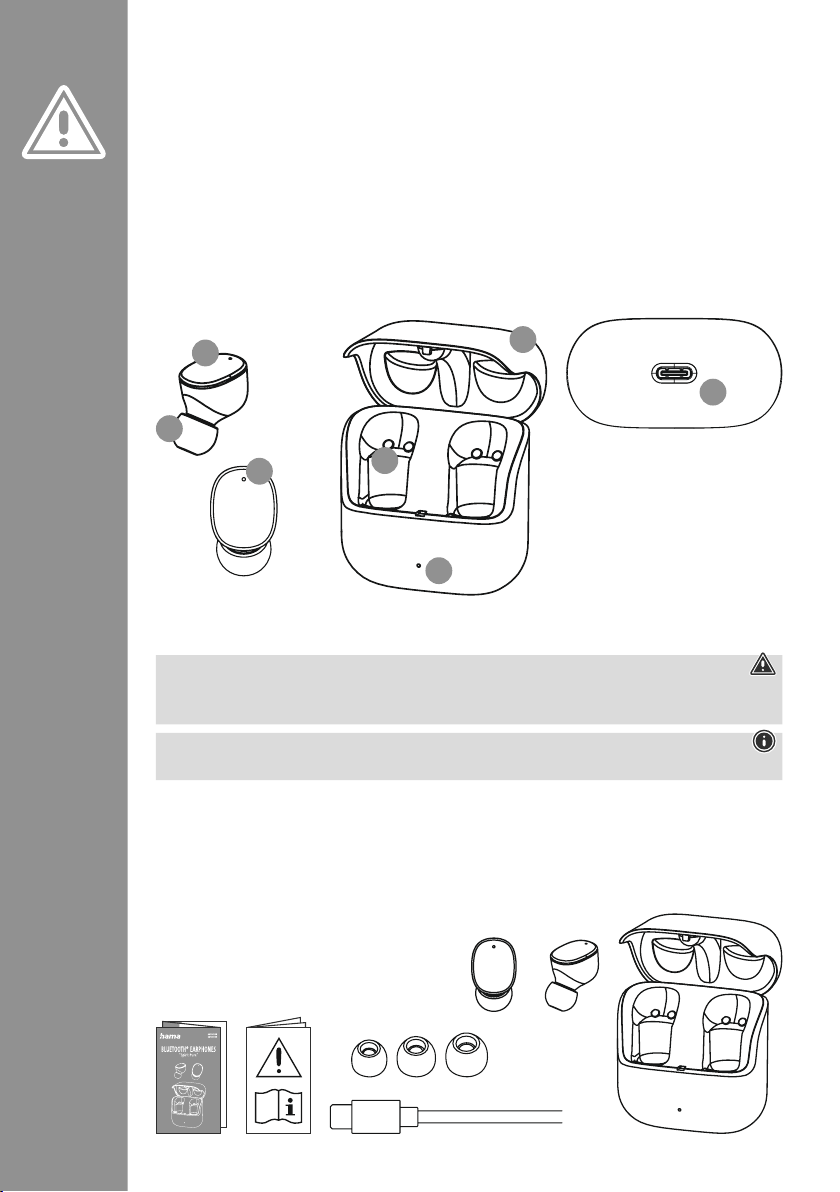
61
Dziękujemy za zakup produktu rmy Hama!
Prosimy poświęcić czas na przeczytanie niniejszej
instrukcji i podanych informacji w całości
�
Instrukcję należy przechowywać w bezpiecznym
miejscu, aby później móc do niej zaglądać
�
W przypadku odsprzedaży urządzenia należy
przekazać niniejszą instrukcję obsługi nowemu
właścicielowi
�
Elementy obsługowe i wskaźniki
1� Stacja ładowania
2� Dioda LED stanu stacji ładowania
3� Dioda LED stanu słuchawek
4
� Wielofunkcyjny czujnik dotykowy
5� Silikonowe wkładki douszne
6� Styki ładujące
7
� Gniazdo USB-C
1. Objaśnienie symboli i instrukcji ostrzegawczych
Ostrzeżenie
Niniejszy symbol stosuje się do wskazania zaleceń dotyczących bezpieczeństwa lub w celu zwrócenia
uwagi na konkretne zagrożenia i niebezpieczeństwa
�
Wskazówka
Niniejszy symbol wskazuje na dodatkowe informacje i istotne uwagi�
2. Zawartość zestawu
1 x słuchawki douszne True Wireless Bluetooth®"Spirit Pure"
1 x stacja ładowania
1 x kabel do ładowania USB-C
3 pary nakładek na słuchawki w różnych rozmiarach (S/M/L)
1 x skrócona instrukcja obsługi
1 x ostrzeżenia i uwagi dotyczące bezpieczeństwa
P Instrukcja obsługi
S
M
L
5
3
4
2
6
7
1
Page 64
62
3. Zasady bezpieczeństwa
• Produkt jest przeznaczony do prywatnego,
niekomercyjnego użytku domowego
�
• Produktu należy używać wyłącznie zgodnie z
przeznaczeniem
�
• Należy nadzorować dzieci, aby nie bawiły się
produktem
�
• Nie używać produktu w miejscach, gdzie
niedozwolone jest stosowanie urządzeń
elektronicznych
�
• Nie próbować samodzielnie dokonywać
konserwacji lub naprawiać urządzenia
�
Wszelkie prace konserwacyjne należy powierzyć
odpowiedniemu personelowi specjalistycznemu
�
• Nie otwierać produktu i nie kontynuować jego
obsługi, jeżeli jest uszkodzony
�
• Nie zginać i nie zgniatać przewodu�
• Nie upuszczać produktu i nie narażać go na silne
wstrząsy
�
• Opakowanie należy niezwłocznie usunąć zgodnie
z lokalnymi przepisami dotyczącymi utylizacji
�
• Nie wolno w żaden sposób modykować
produktu
� W przeciwnym razie gwarancja utraci
ważność
�
• Chronić produkt przed zanieczyszczeniami,
wilgocią i przegrzaniem
� Korzystać z produktu
wyłącznie w suchych pomieszczeniach
�
• Nie używać produktu w bezpośrednim
sąsiedztwie grzejnika, innych źródeł ciepła lub w
bezpośrednim świetle słonecznym
�
• Z produktu należy korzystać wyłącznie w
umiarkowanych warunkach klimatycznych
�
• Ten produkt, podobnie jak wszystkie produkty
elektryczne, nie jest przeznaczony do obsługi przez
dzieci!
• Nie używać produktu poza granicami jego
wydajności określonymi w danych technicznych
�
• Nie używać produktu w wilgotnym otoczeniu i
chronić go przed bryzgami wody
�
• Nie pozwolić, aby produkt rozpraszał uwagę
podczas jazdy samochodem lub na sprzęcie
sportowym i zwracać uwagę na sytuację na
drodze i otoczenie
�
• Akumulator został zamontowany na stałe i nie
można go wyjąć, należy zutylizować produkt w
całości zgodnie z obowiązującymi przepisami
�
• Nie wolno wrzucać akumulatora ani produktu do
ognia
�
• Nie modykować/deformować/podgrzewać/
rozmontowywać akumulatorów/baterii
�
• Nie należy używać produktu podczas ładowania!
Ostrzeżenie — akumulator
• Używać do ładowania tylko odpowiednich
ładowarek lub portów USB�
• Z zasady nie należy używać uszkodzonych
ładowarek ani portów USB i nie wolno
próbować ich naprawiać
�
• Chronić produkt przed przeładowaniem lub
głębokim rozładowaniem
�
• Unikać przechowywania, ładowania i
użytkowania w ekstremalnych temperaturach i
przy bardzo niskim ciśnieniu powietrza (np
� na
dużych wysokościach)�
• Ładować regularnie (przynajmniej raz na
kwartał) podczas dłuższego przechowywania�
Ostrzeżenie – magnesy
• Produkt wytwarza pola magnetyczne� Przed
zastosowaniem tego produktu osoby z
rozrusznikami serca powinny skonsultować się
z lekarzem, gdyż działanie rozrusznika serca
może zostać zakłócone
�
• Nie należy trzymać kart EC lub podobnych kart
z paskami magnetycznymi w pobliżu stacji
ładowania lub słuchawek
� Dane zapisane
na kartach mogą ulec uszkodzeniu lub
skasowaniu
�
Ostrzeżenie – wysoki poziom
głośności
• Wysoki poziom hałasu!
• Istnieje ryzyko uszkodzenia słuchu�
• Aby zapobiec niedosłuchowi, należy unikać
słuchania przy wysokim poziomie głośności
przez dłuższy czas
�
• Głośność ustawiać zawsze na rozsądny
poziom� Wysoki poziom głośności może –
nawet jeżeli trwa krótko – prowadzić do
uszkodzenia słuchu
�
• Podczas używania produktu ograniczona jest
percepcja dźwięków z otoczenia� Dlatego
podczas używania produktu nie należy
obsługiwać żadnych pojazdów
ani maszyn
�
Page 65
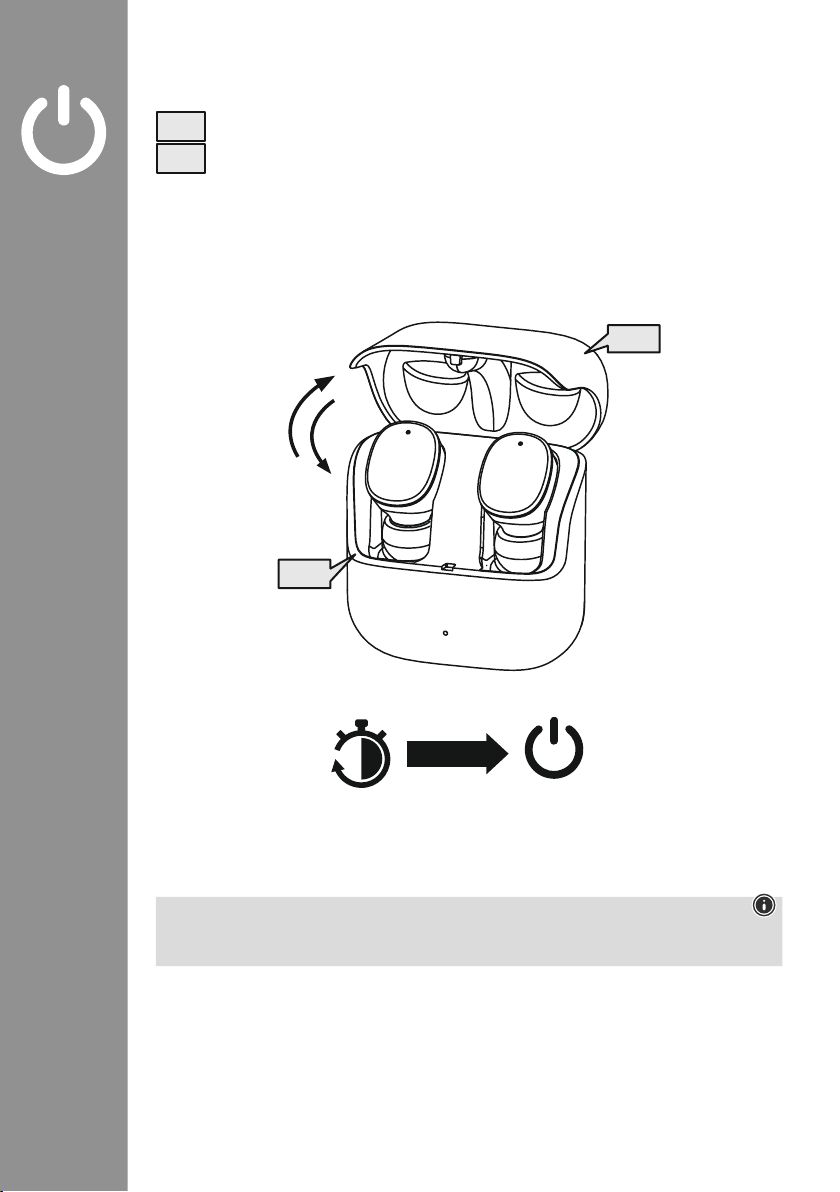
63
4. Włączanie/wyłączanie
Otworzyć stację ładowania, słuchawki włączą się automatycznie i rozpoczną proces parowania�
Aby wyłączyć, wystarczy włożyć słuchawki z powrotem do stacji ładowania� Upewnić się, że
słuchawki są włożone po właściwej stronie, zgodnie z oznaczeniem L/R� Następnie zamknąć
stację ładowania�
zZz
STANDBY
3min
ON
OFF
ON
OFF
Wskazówka – automatyczne wyłączanie produktu
Produkt jest wyposażony w funkcję automatycznego wyłączania
� Jeżeli w ciągu 3 minut nie ma
połączenia z urządzeniem końcowym, zostanie ono automatycznie wyłączone�
Page 66
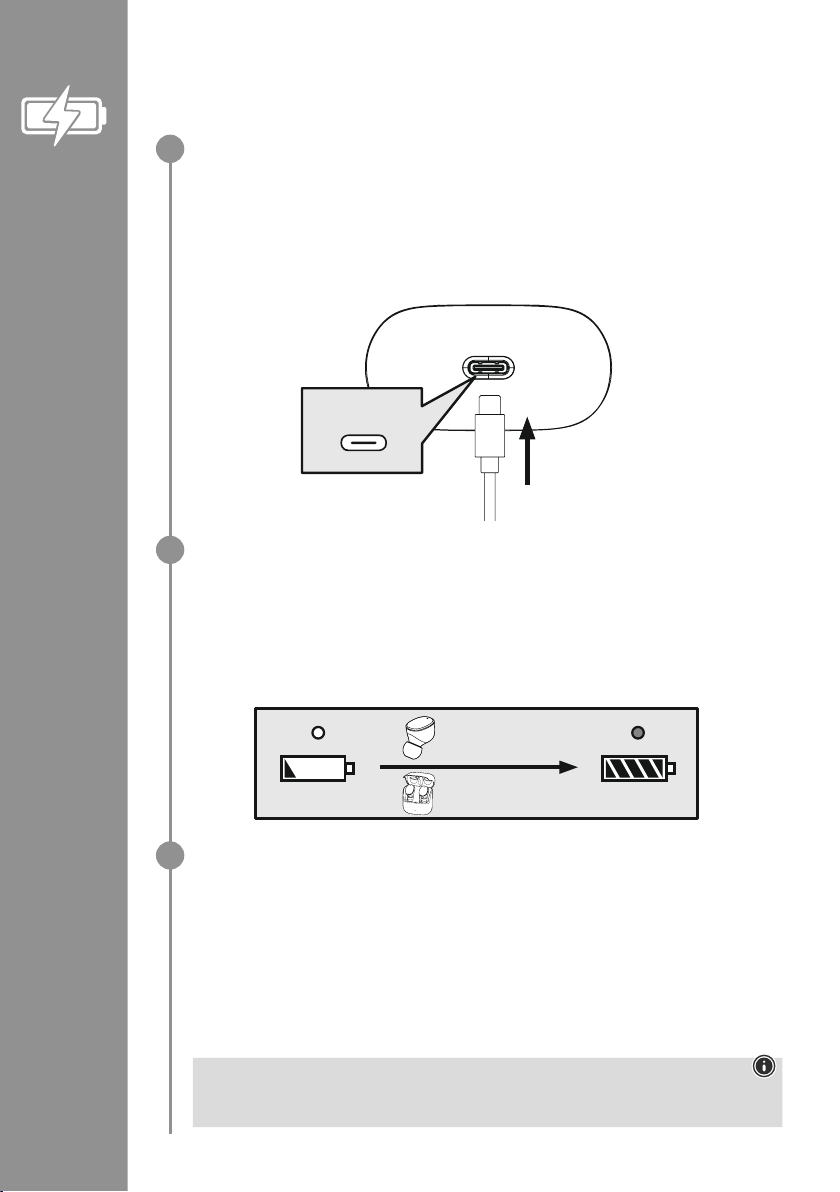
64
5. Ładowanie
Przed pierwszym użyciem należy raz w pełni naładować słuchawki i stację ładowania
�
Wkładanie słuchawek, zamykanie i podłączanie stacji ładowania
Włożyć słuchawki do stacji ładowania� Upewnić się, że słuchawki są włożone po właściwej stronie,
zgodnie z oznaczeniem L/R� Następnie zamknąć stację ładowania�
Podłączyć dostarczony w zestawie kabel do ładowania USB-C do gniazda ładowania (7) stacji
ładowania
�
Podłączyć wolną wtyczkę kabla do ładowania USB-C do odpowiedniej ładowarki USB� Należy
zapoznać się z instrukcją obsługi używanej ładowarki USB�
Proces ładowania stacji ładowania i słuchawek
Dioda LED stanu stacji ładowania (2) miga na biało podczas procesu ładowania
� Po pełnym
naładowaniu stacji ładowania dioda stacji ładowania świeci się na biało�
Słuchawki są ładowane tylko przy zamkniętej stacji ładowania�
Pełne naładowanie akumulatora może potrwać ok� 2 godziny (słuchawki) lub ok� 2,5 godzin (stacja
ładowania)�
Pojemność akumulatora
Stacja ładowania
Gdy stan akumulatora jest niski, dioda LED stanu (2) stacji ładowania miga na biało
�
Słuchawki
Gdy poziom naładowania baterii jest niski, raz na minutę słychać sygnał dźwiękowy, a dioda LED
stanu (3) słuchawki zaczyna migać na biało�
Rzeczywisty czas pracy akumulatora zależy od sposobu użytkowania urządzenia, ustawień i
temperatury otoczenia (akumulatory mają ograniczoną żywotność)
�
Wskazówka
Jeśli produkt nie był używany przez kilka miesięcy, może upłynąć 15–30 minut zanim dioda LED
stanu (2) zaświeci się na czerwono podczas procesu ładowania�
USB-C
CHARGING CHARGED
2h:00m
2h:30m
1
2
3
Page 67
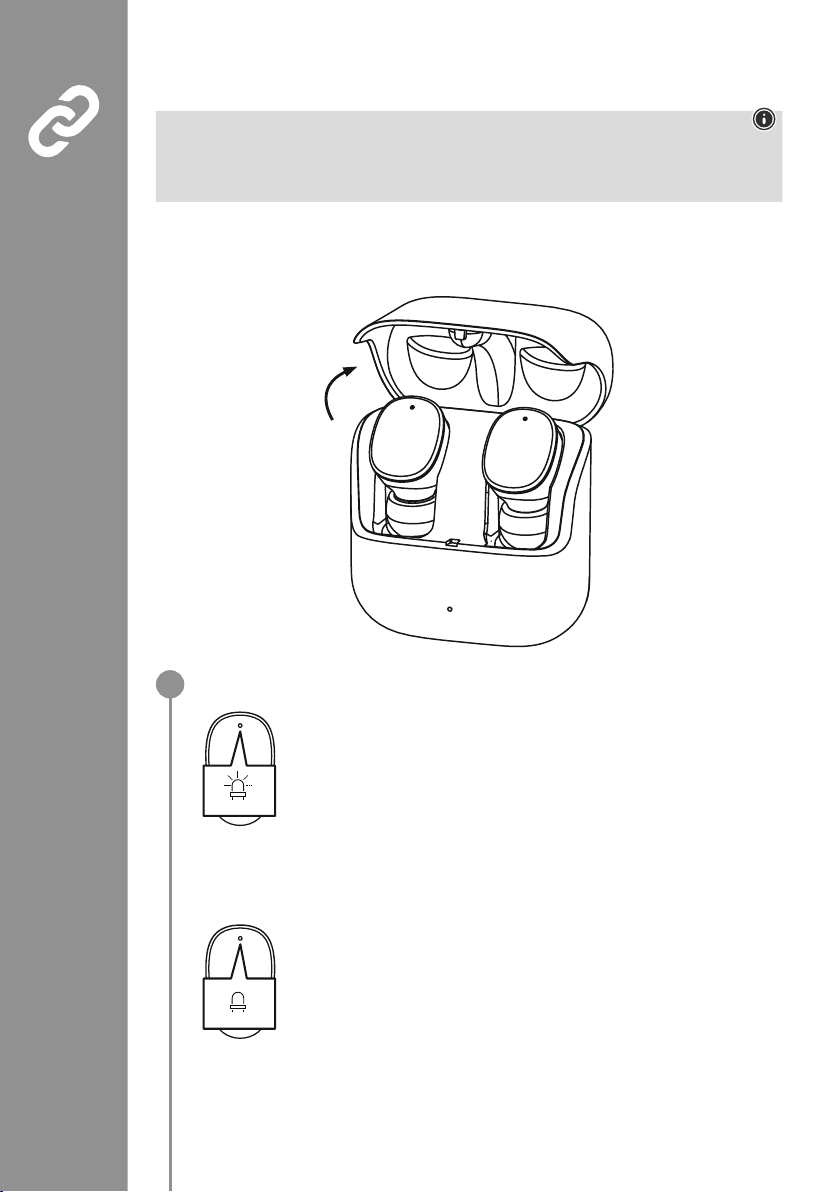
65
6. Pierwsze łączenie Bluetooth®(parowanie)
Wskazówka – parowanie
• Upewnić się, że urządzenie końcowe obsługujące technologię Bluetooth
®
jest włączone, a funkcja
Bluetooth
®
jest aktywowana�
• Uwzględnić instrukcję obsługi urządzenia końcowego�
Słuchawki i urządzenie końcowe nie powinny znajdować się w odległości większej niż 1 metr od siebie�
Im mniejsza odległość, tym lepiej�
Upewnić się, że słuchawki są włączone�
Sprawdzanie stanu diody LED (3)
Gdy diody LED stanu (3) słuchawek migają naprzemiennie:
słuchawki wyszukują połączenia Bluetooth
®
�
Gdy diody LED stanu (3) migają, a następnie gasną:
słuchawki są już połączone z urządzeniem Bluetooth
®
�
Blue/red
off
1
Page 68
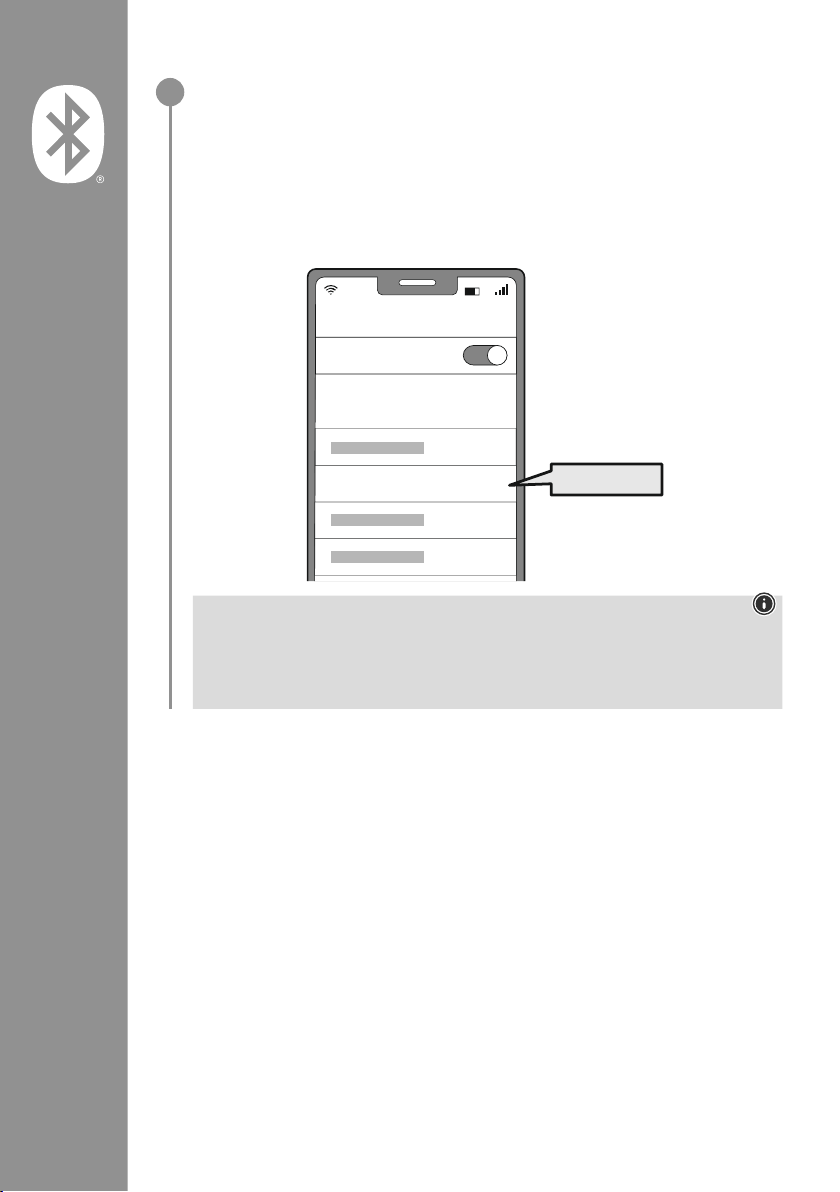
66
Wyszukiwanie słuchawek za pomocą urządzenia końcowego (konieczne tylko przy
pierwszym połączeniu)
Otworzyć ustawienia Bluetooth
®
na swoim urządzeniu końcowym i zaczekać, aż na liście
znalezionych urządzeń Bluetooth
®
pojawi się Hama Spirit Pure
�
Wybrać Hama Spirit Pure i poczekać, aż słuchawki douszne pojawią się jako podłączone
w ustawieniach Bluetooth
®
urządzenia końcowego� Słyszalny będzie krótki sygnał dźwiękowy�
Wskazówka – hasło Bluetooth
®
Niektóre urządzenia końcowe wymagają podania hasła do konguracji połączenia z innym
urządzeniem Bluetooth
®
�
• Jeżeli na urządzeniu końcowym pojawi się wezwanie do podania hasła, należy wpisać hasło
0000 w celu połączenia się ze słuchawkami
�
2
Password
Bluetooth
Hama Spirit Pure
ON
0000
Page 69
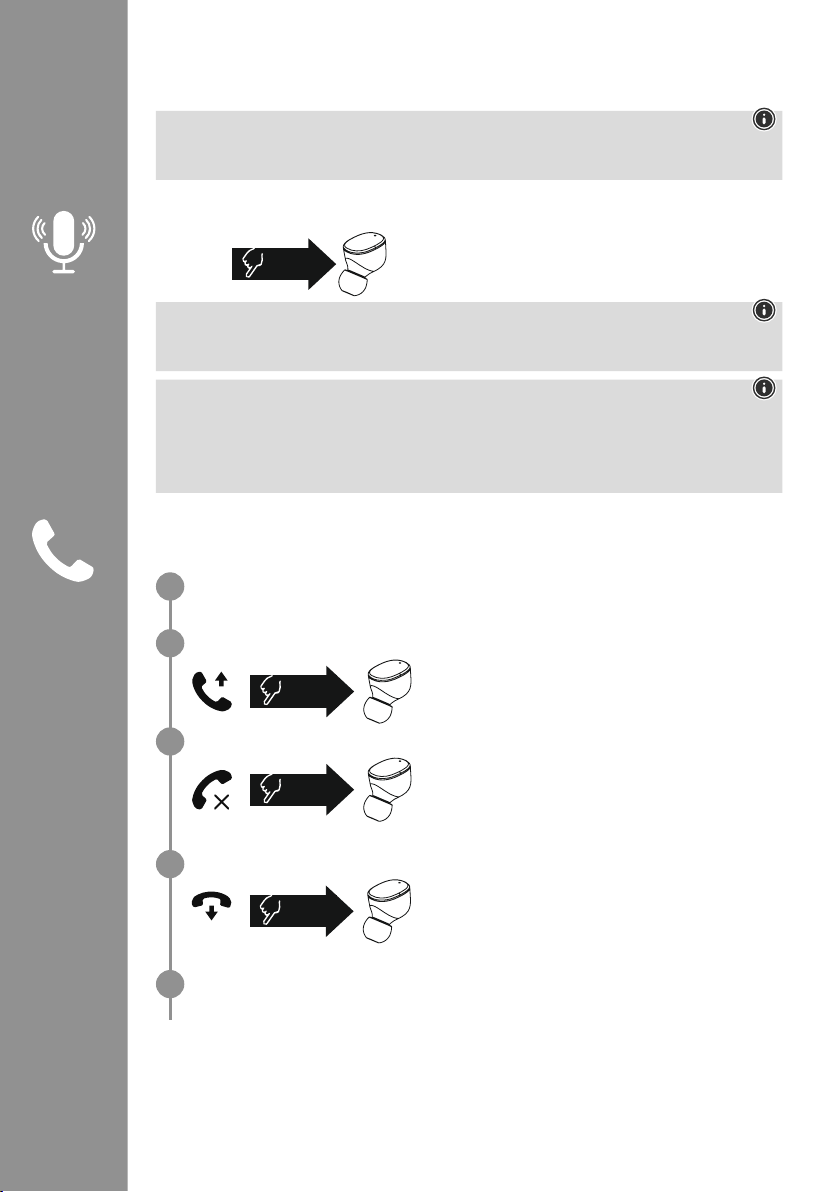
67
7. Elementy obsługowe
Wskazówka
• Należy pamiętać, że obsługa niektórych funkcji zależy od urządzenia końcowego�
• Uwzględnić instrukcję obsługi urządzenia końcowego�
7.1 Funkcja Voice Assistant
Dotknąć raz wielofunkcyjnego czujnika dotykowego (4) na
prawej słuchawce, aby rozpocząć komunikację z asystentem Siri
lub Google Assistant
�
Wskazówka – Siri
Asystent Siri jest dostępny tylko na odpowiednich urządzeniach z systemem iOS 5 (iPhone 4s i nowszy)
lub nowszym
�
Wskazówka – Google Assistant
• Google Assistant jest dostępny tylko na odpowiednich urządzeniach z systemem Android 5.0 lub
nowszym z usługami Google Play, > 1,5 GB wolnej pamięci i minimalnej rozdzielczości ekranu 720P�
• Aplikacja Google Assistant musi być dostępna na urządzeniu końcowym i ustawiona jako domyślny
język asystenta�
7.2 Funkcja głośnomówiąca
Słuchawki mogą być używane jako zestaw głośnomówiący dla urządzenia końcowego�
Wykonywanie połączenia
Wybrać numer bezpośrednio na urządzeniu końcowym, aby wykonać połączenie�
Odbieranie połączenia
Dotknąć dwa razy wielofunkcyjnego czujnika dotykowego
(4) na lewej lub prawej słuchawce, aby odebrać połączenie
przychodzące� Słyszalny będzie krótki sygnał dźwiękowy�
Odrzucanie połączenia
Aby odrzucić połączenie przychodzące, dotknąć trzykrotnie
wielofunkcyjny czujnik dotykowy (4) na lewej lub prawej
słuchawce� Słyszalny będzie krótki sygnał dźwiękowy�
Zakończenie połączenia
Podczas rozmowy należy dwukrotnie dotknąć
wielofunkcyjnego czujnika dotykowego (4) na lewej lub
prawej słuchawce, aby zakończyć rozmowę
� Słyszalny
będzie krótki sygnał dźwiękowy�
Ponowne wybieranie ostatniego numeru
Ostatni wybierany numer można wybrać ponownie za pomocą funkcji Voice Assistant (7�1)�
1x
Siri/
Google
2x
3x
2x
1
2
3
4
5
Page 70
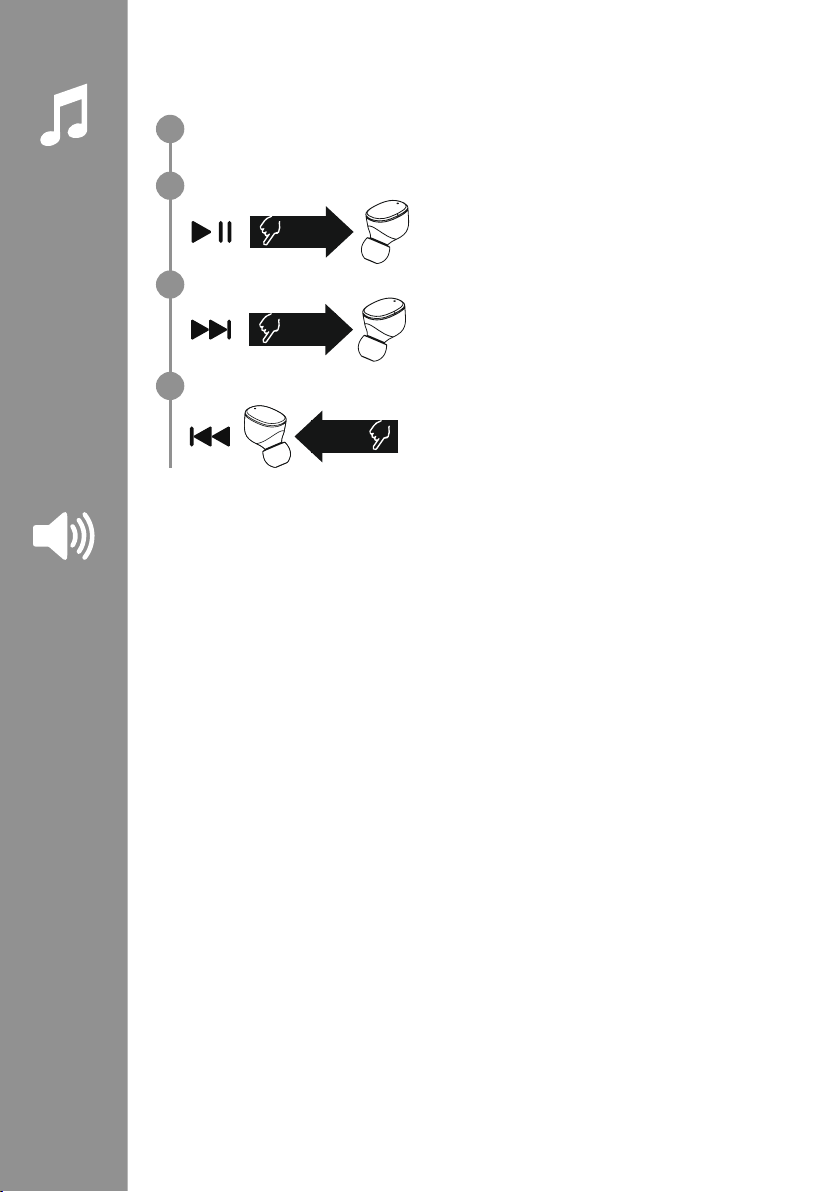
68
7.3 Odtwarzanie audio
Uruchamianie odtwarzania audio na urządzeniu końcowym.
Odtwarzaj / Wstrzymaj
Dotknąć dwa razy wielofunkcyjnego czujnika dotykowego
(4) na lewej lub prawej słuchawce, aby rozpocząć lub
zatrzymać odtwarzanie dźwięku�
Następny tytuł
Dotknąć trzykrotnie wielofunkcyjnego czujnika dotykowego
(4) na prawej słuchawce, aby przejść do następnego tytułu�
Poprzedni tytuł
Dotknąć trzykrotnie wielofunkcyjnego czujnika dotykowego
(4) na lewej słuchawce, aby przejść do poprzedniego tytułu�
7.4 Regulacja głośności
Głośność jest regulowana za pomocą funkcji Voice Assistant (7�1)�
Alternatywnie, można również regulować głośność za pomocą urządzenia końcowego�
2x
3x
R
3x
L
1
2
3
4
Page 71

69
8. Dane techniczne
Słuchawki Bluetooth
®
Technologia Bluetooth Bluetooth®v5
�0
Obsługiwane prole A2DPV1�3, AVRCP 1�6, HFP V1�7, SPP V1�2
Częstotliwość dla transmisji
Bluetooth®
2 402–2 480 MHz
Zasięg < 10 m
Akumulator
Typ akumulatora litowo-polimerowy 3,7
V
Min. pojemność
słuchawki / stacja ładowania
45mAh / 480mAh
Pobór mocy maks� 5 V
330mA
Czas ładowania słuchawek ok� 2 h
Czas ładowania stacji ok
� 2,5 h
Stan czuwania* ok� 70 h
Czas muzyki (stacja
ładowania) *
~ 5 h (25h)
Czas rozmowy (stacja
ładowania)*
~ 3,5 h (17,5h)
Waga słuchawek ok� 4 g każda słuchawka
Waga stacji ładowania
łącznie ze słuchawkami
ok
� 44g
*przy pełnym naładowaniu akumulatora
Page 72
70
9. Czyszczenie i konserwacja
Czyścić produkt wyłącznie niestrzępiącą się, lekko wilgotną ściereczką
� Nie używać agresywnych środków
czyszczących�
10. Wyłączenie odpowiedzialności z tytułu gwarancji
Hama GmbH & Co KG nie ponosi odpowiedzialności i nie udziela żadnej gwarancji z tytułu szkód
wynikających z niewłaściwego montażu, instalacji, niewłaściwego użytkowania urządzenia ani z tytułu
szkód wynikających z postępowania niezgodnie z instrukcją obsługi i wskazówkami bezpieczeństwa�
11. Serwis i pomoc techniczna
W przypadku jakichkolwiek pytań prosimy o kontakt z Działem Obsługi Klienta rmy Hama�
Gorąca linia: +49 9091 502-0 (niem�/ang�)
Bardziej szczegółowe informacje na temat wsparcia można znaleźć na stronie: www
�hama�com�
12. Deklaracja zgodności
Hama GmbH & Co KG niniejszym oświadcza, że typ urządzenia radiowego [00184108,
00184109] jest zgodny z dyrektywą 2014/53/UE� Pełny tekst deklaracji zgodności UE jest
dostępny pod następującym adresem internetowym:
www
�hama�com-> 00184108, 00184109-> Downloads�
Zakres(y) częstotliwości 2 402–2 480 MHz
Promieniowana maksymalna moc transmisji 3,28 dBm
Page 73
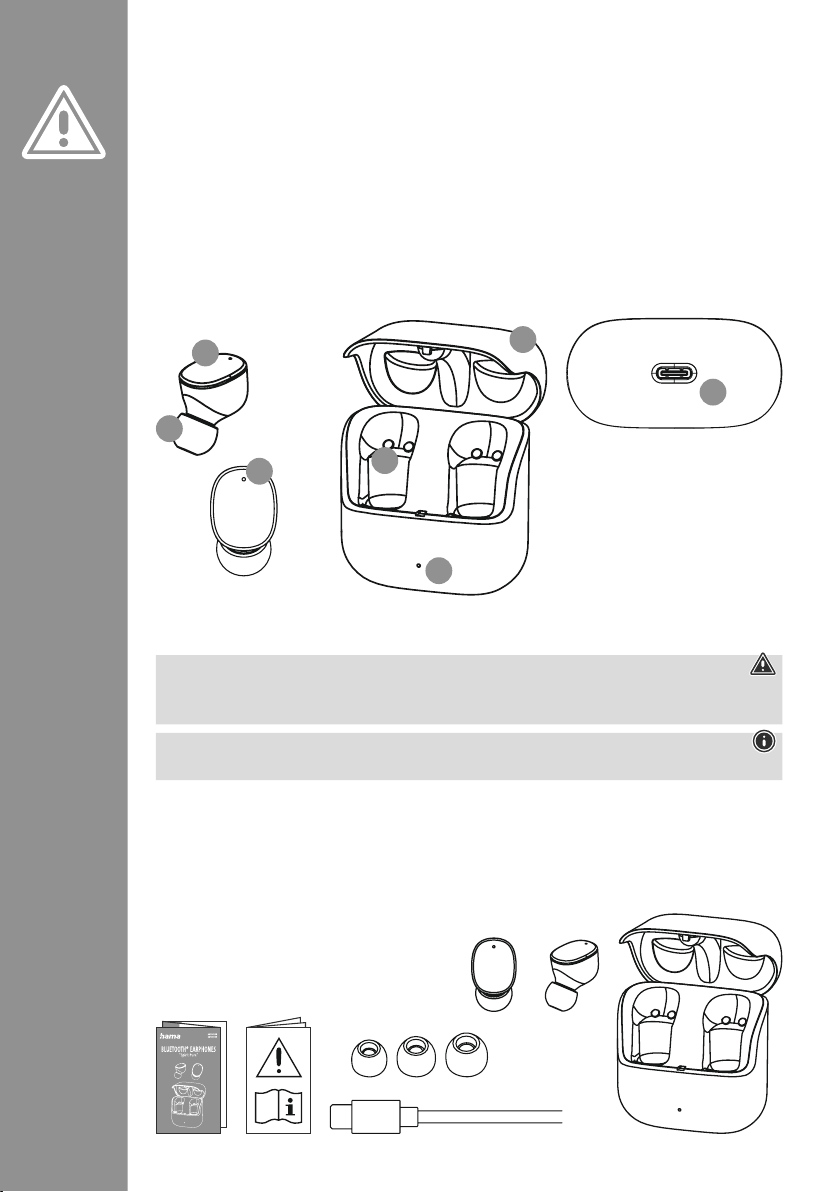
71
Köszönjük, hogy Hama terméket választott!
Szánjon rá időt, és először olvassa végig az alábbi
utasításokat és megjegyzéseket
� A későbbiekben
tartsa biztonságos helyen ezt az útmutatót, hogy
szükség esetén bármikor fellapozhassa
� Ha eladja
ezt a terméket, vele együtt adja tovább ezt az
útmutatót is az új tulajdonosnak�
Kezelőelemek és kijelzők
1� Töltődoboz
2� A töltődoboz állapotjelző LED-je
3� A fülhallgatók állapotjelző LED-je
4
� Többfunkciós érintésérzékelő
5� Szilikon fülpárna
6� Töltőérintkezők
7
� USB-C csatlakozó
1. Figyelmeztető jelzések és megjegyzések magyarázata
Figyelmeztetés
A biztonsági utasítások jelölésére használjuk, illetve hogy felhívjuk a gyelmet a különleges veszélyekre
és kockázatokra
�
Megjegyzés
Akkor használjuk, ha kiegészítő információkat közlünk, vagy fontos tudnivalókra hívjuk fel a gyelmet�
2. A csomag tartalma
1x True Wireless Bluetooth®fülhallgató "Spirit Pure"
1x Töltődoboz
1x USB-C-töltőkábel
3 pár fülpárna különböző méretekben (S/M/L)
1x Rövid útmutató
1x Figyelmeztetések és biztonsági utasítások
H Használati útmutató
S
M
L
5
3
4
2
6
7
1
Page 74
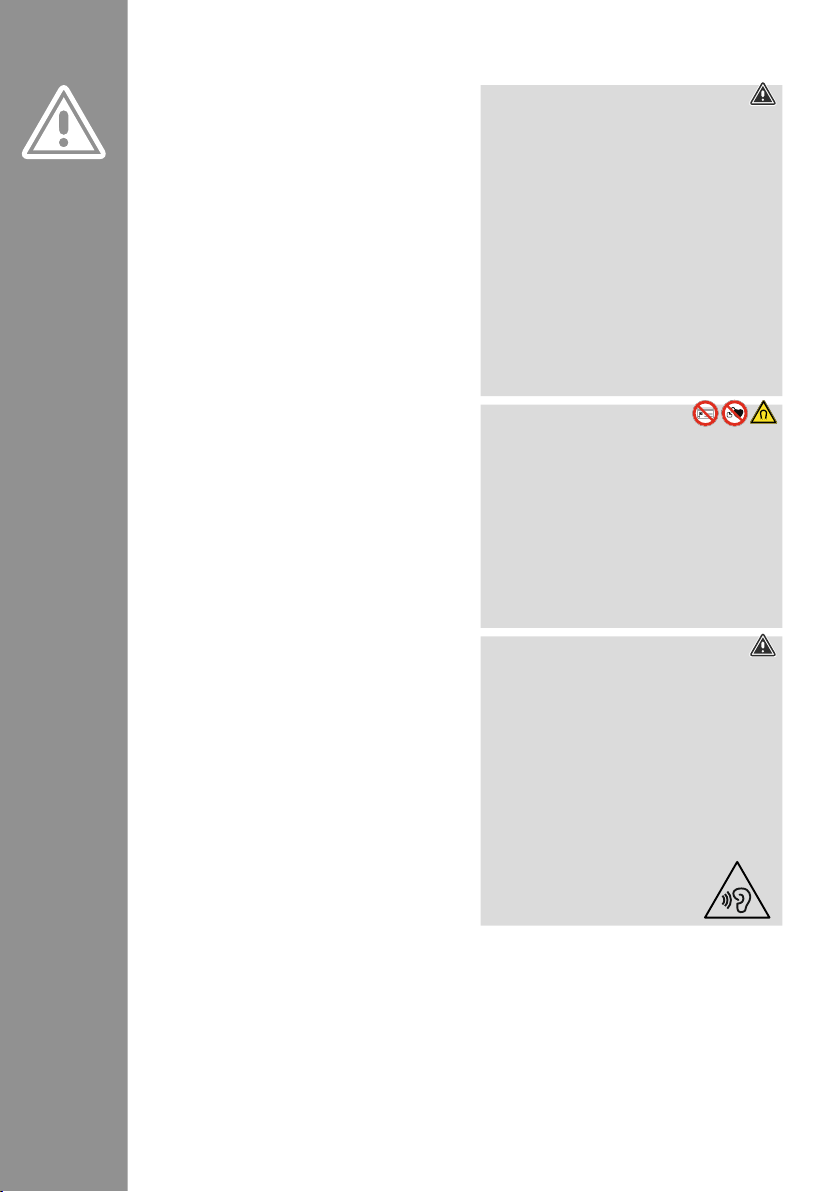
72
3. Biztonsági utasítások
• A terméket privát és nem kereskedelmi
használatra terveztük
�
• A terméket kizárólag a rendeltetési céljára
használja
�
• Felügyelje a gyermekeket, hogy biztosan ne
játsszanak a termékkel
�
• Ne használja a terméket olyan helyen, ahol
elektronikus készülékek használata nem
megengedett
�
• Ne kísérelje meg a készüléket saját kezűleg
karbantartani vagy megjavítani
� Minden
karbantartási munkát bízzon illetékes
szakemberre
�
• Ne nyissa ki a terméket, és sérülés esetén ne
üzemeltesse tovább
�
• Ne hajlítsa vagy törje meg a kábelt�
• Ne ejtse le a terméket, és ne tegye ki heves
rázkódásnak
�
• Azonnal selejtezze le a csomagolóanyagot a
helyileg érvényes hulladékkezelési előírások
szerint
�
• Ne végezzen semmilyen módosítást a terméken�
Ebben az esetben minden garanciaigény
megszűnik
�
• Óvja a terméket szennyeződéstől, nedvességtől és
túlmelegedéstől, és kizárólag száraz környezetben
használja
�
• Ne üzemeltesse a terméket közvetlenül fűtés,
más hőforrás közelében vagy közvetlen
napsugárzásnál
�
• A terméket csak mérsékelt időjárási körülmények
között használja
�
• Ez a termék, mint minden elektromos készülék,
nem gyermekek kezébe való!
• Ne üzemeltesse a terméket a műszaki adatokban
megadott teljesítményhatárokon túl
�
• Ne használja a terméket párás környezetben, és
ne fröccsenjen rá semmilyen folyadék
�
• Ne hagyja, hogy gépjárművel vagy sporteszközzel
való utazása közben a termék elterelje a gyelmét
a közlekedési helyzetről és a környezetéről
�
• Az akkumulátor nem kivehető, a termék beépített
részét képezi, így a terméket egyben kell
leselejtezni a törvényi előírásoknak megfelelően
�
• Ne dobja tűzbe az akkumulátort, ill� a terméket�
• Ne módosítsa és/vagy deformálja/hevítse/szedje
szét az akkumulátorokat/elemeket
�
• Ne használja a terméket a töltési folyamat alatt!
Figyelmeztetés – akkumulátor
• Töltéshez csak megfelelő töltőket vagy USBcsatlakozókat használjon�
• A meghibásodott töltőkészülékeket, USBcsatlakozókat ne használja tovább, és ne
próbálkozzon a megjavításukkal se
�
• Ne töltse túl és ne merítse le túlságosan a
terméket
�
• A terméket ne tárolja, ne töltse és ne használja
szélsőséges hőmérsékleteken, ill� szélsőségesen
alacsony légnyomáson (pl
� jelentős tengerszint
feletti magasságban)�
• Hosszabb tárolás alatt rendszeresen töltse újra
(min� negyedévente)�
Figyelmeztetés – mágnesek
• A termék mágneses erőteret kelt� Mielőtt
ezt a terméket szívritmus-szabályozót viselő
személyek használnák, kérjék ki orvos tanácsát
arról, hogy a termék befolyásolhatja-e a
szívritmus-szabályozó működését
�
• Ne tároljon bankkártyákat vagy hasonló
mágnescsíkos kártyákat a töltődoboz vagy a
fülhallgatók közelében
� A kártyán lévő adatok
megsérülhetnek vagy törlődhetnek�
Figyelmeztetés – nagy hangerő
• Nagy hangnyomás!
• Károsodhat a hallása�
• Ne hallgasson semmit nagy hangerőszinten
hosszú időn át, mert az rontja a hallását�
• A hangerőt tartsa mindig ésszerű szinten�
A nagy hangerő – akár rövid ideig is –
halláskárosodáshoz vezethet�
• A termék használata korlátozza Önt a
környezeti zajok észlelésében
� Ezért a
használat alatt
ne kezeljen járművet
vagy gépet�
Page 75
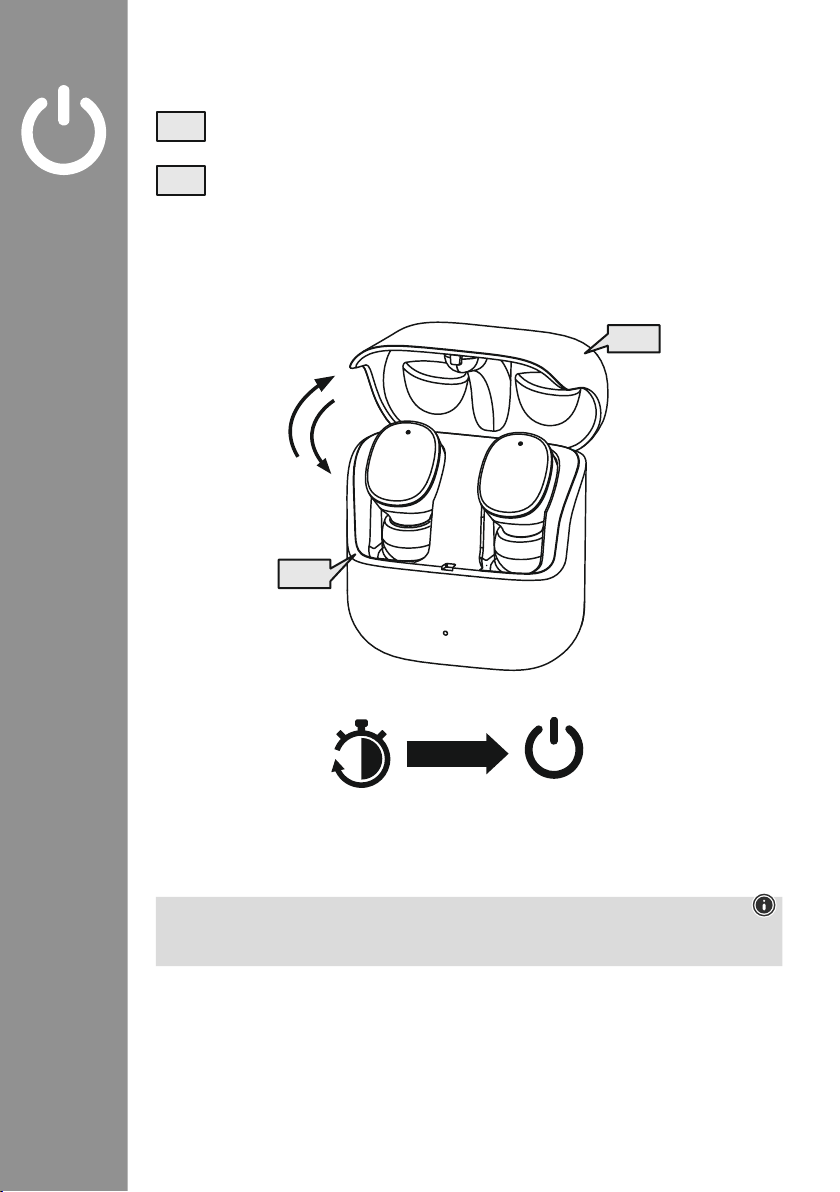
73
4. Be-/kikapcsolás
Nyissa ki a töltődobozt; a fülhallgató automatikusan bekapcsolódik� és indítsa el a párosítás
folyamatot�
A kikapcsoláshoz egyszerűen helyezze vissza a fülhallgatókat a töltődobozba� Ennek során
gyeljen a fülhallgatók megfelelő oldali behelyezésére az L/R (bal/jobb) jelölés szerint� Végül
csukja be a töltődobozt
�
zZz
STANDBY
3min
ON
OFF
ON
OFF
Megjegyzés – A headset automatikusan kikapcsol
A termék automatikus kikapcsolási funkcióval rendelkezik
� Ha 3 percen belül nem jön létre kapcsolat az
eszközzel, automatikusan kikapcsol�
Page 76
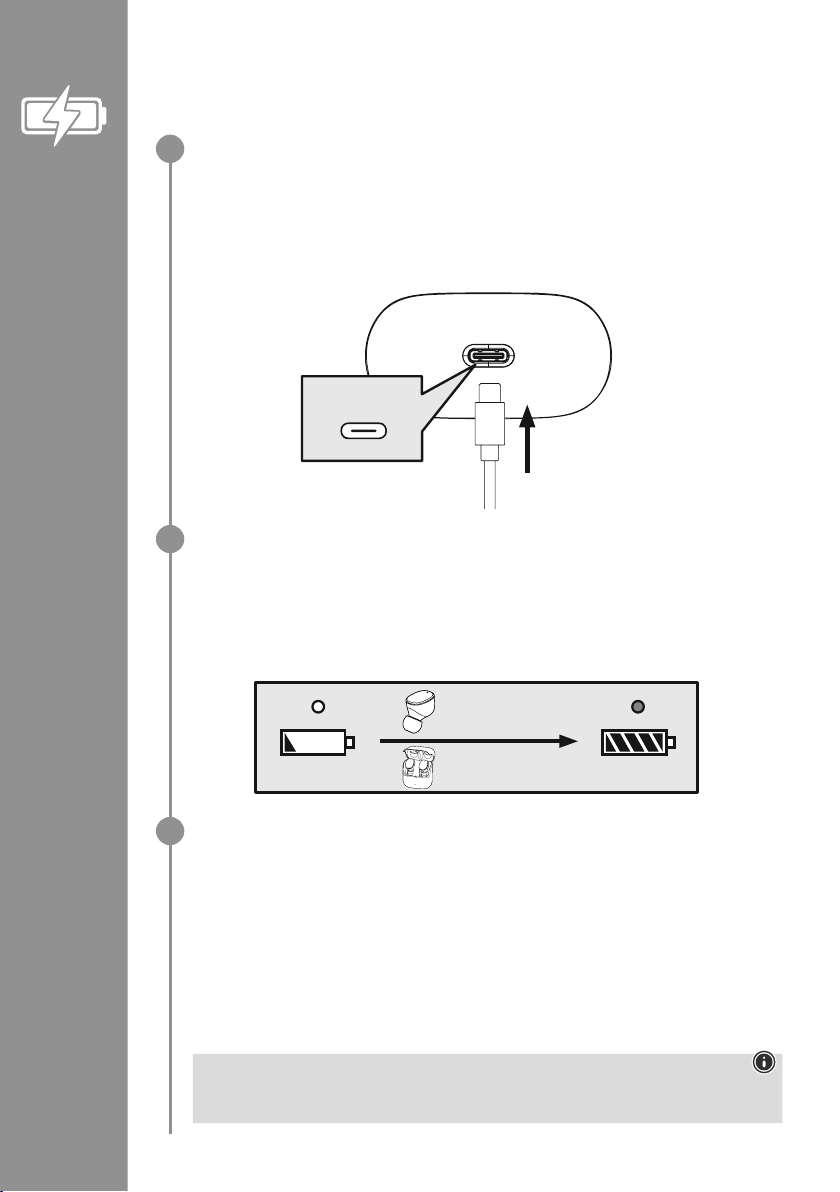
74
5. Töltés
Az első használat előtt töltse fel egyszer teljesen a fülhallgatókat és a töltődobozt
�
A fülhallgató töltődobozba helyezése, a töltődoboz lezárása és csatlakoztatása
Helyezze be a fülhallgatókat a töltődobozba� Ennek során gyeljen a fülhallgatók megfelelő oldali
behelyezésére az L/R (bal/jobb) jelölés szerint� Végül csukja be a töltődobozt�
Csatlakoztassa a mellékelt USB-C töltőkábelt a töltődoboz (7) töltőhüvelyéhez�
Csatlakoztassa az USB-C töltőkábel szabad csatlakozóját egy megfelelő USB-töltőkészülékhez�
Ehhez vegye gyelembe a használt USB-töltőkészülék kezelési útmutatóját�
A töltődoboz és a fülhallgatók töltési folyamata
A töltési folyamat alatt a töltődoboz (2) állapotjelző LED-je fehéren villog� A teljes feltöltés után a
töltődoboz LED-je folyamatosan és fehéren világít�
A fülhallgatót csak zárt töltődoboznál lehet tölteni�
Az akkumulátorok teljes feltöltése 2 óráig (fülhallgatók), ill� 2,5 óráig (töltődoboz) tarthat�
Akkukapacitás
Töltődoboz
Az akkumulátor alacsony töltöttségi szintje esetén a töltődoboz állapotjelző LED-je (2) fehéren
villog
�
Fülhallgatók
Az akkumulátor alacsony töltöttségi szintje esetén percenként egy hangjelzés hallható, és a
fülhallgató állapotjelző LED-je (3) fehéren villog
�
Az akkumulátor tényleges működési ideje a termék használatától, a beállításoktól és a környezeti
hőmérséklettől függően változhat (az akkumulátor élettartama véges)�
Megjegyzés
Ha a készüléket néhány hónapig nem használta, 15–30 percig eltarthat, mire az (2) állapotjelző
LED a töltési folyamatkor pirosan világítana�
USB-C
CHARGING CHARGED
2h:00m
2h:30m
1
2
3
Page 77
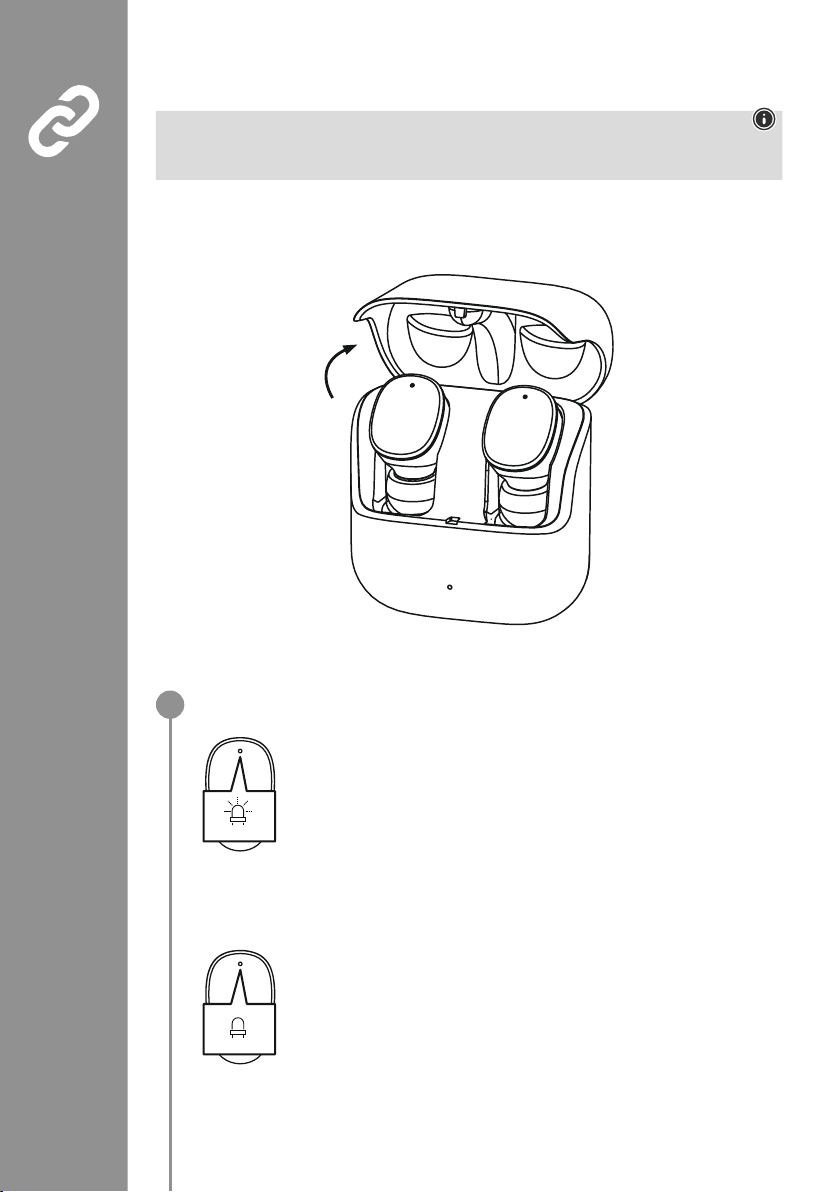
75
6. Bluetooth®-kapcsolat (párosítás)
Megjegyzés – párosítás
• Győződjön meg arról, hogy a Bluetooth
®
-képes eszköz be van kapcsolva, és a Bluetooth®aktív�
• Ehhez vegye gyelembe az eszköz használati útmutatóját�
A fülhallgatók és az eszköz ne legyenek 1 méternél nagyobb távolságra egymástól� Minél kisebb a
távolság, annál jobb�
Győződjön meg arról, hogy a fülhallgatók be vannak kapcsolva�
Ellenőrizze a (3) állapotjelző LED állapotát
Ha a fülhallgatók állapotjelző LED-jei (3) váltakozva villognak:
A fülhallgatók Bluetooth
®
-kapcsolatot keresnek�
Ha a (3) állapotjelző LED-ek felvillannak, majd kialszanak:
A fülhallgatók már kapcsolódnak egy Bluetooth
®
-eszközhöz�
Blue/red
off
1
Page 78
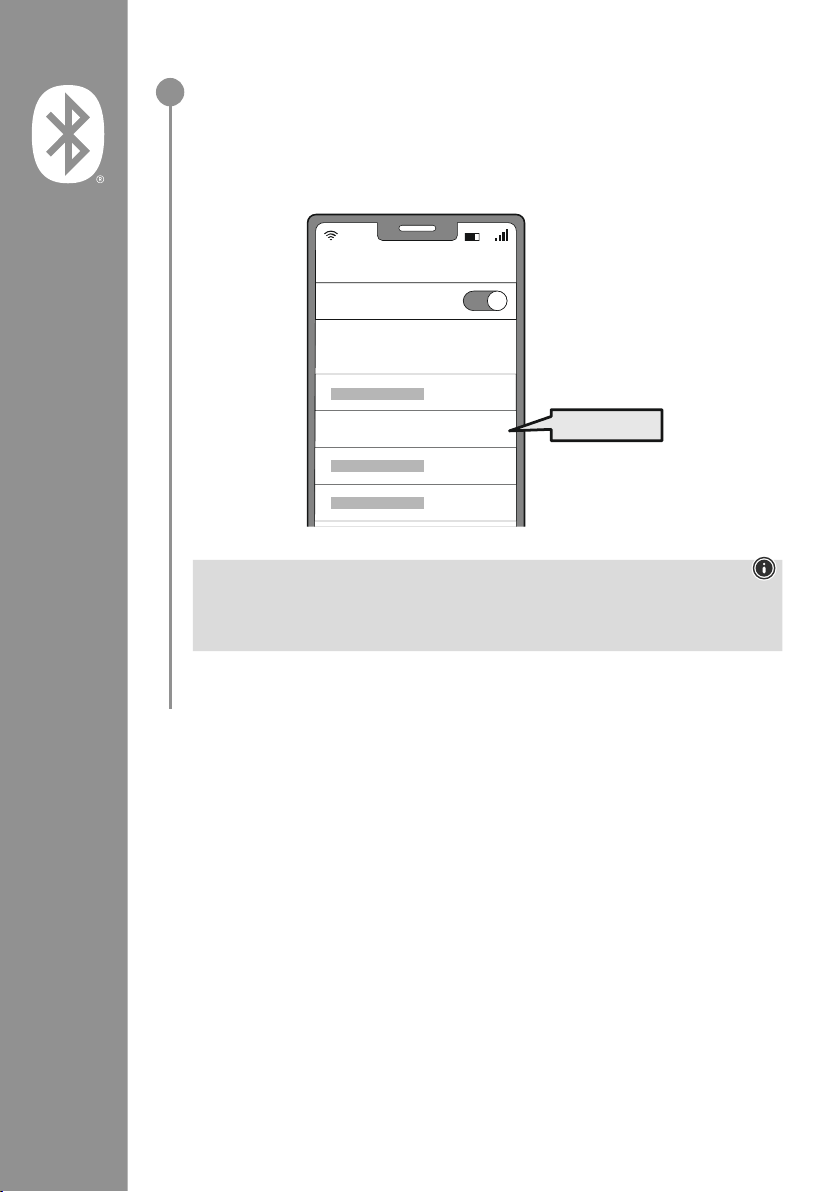
76
Keresse eszközével a fülhallgatókat (csak az első kapcsolódásnál szükséges)
Nyissa meg eszközén a Bluetooth
®
-beállításokat, és várjon amíg
a megtalált Bluetooth
®
készülékek listájában megjelenik a Hama Spirit Pure
�
Válassza ki a Hama Spirit Pure eszközt, és várjon, míg a fülhallgatók csatlakozottként
jelennek meg eszköze Bluetooth
®
-beállításaiban� Rövid hangjelzést hall�
Megjegyzés – Bluetooth®-jelszó
Egyes eszközök esetén jelszót kell megadnunk, amikor az eszközt egy másik Bluetooth
®
eszközhöz
csatlakoztatjuk
�
• A fülhallgatók csatlakoztatásához írja be a 0000 jelszót, amikor az eszköz kéri�
2
Password
Bluetooth
Hama Spirit Pure
ON
0000
Page 79
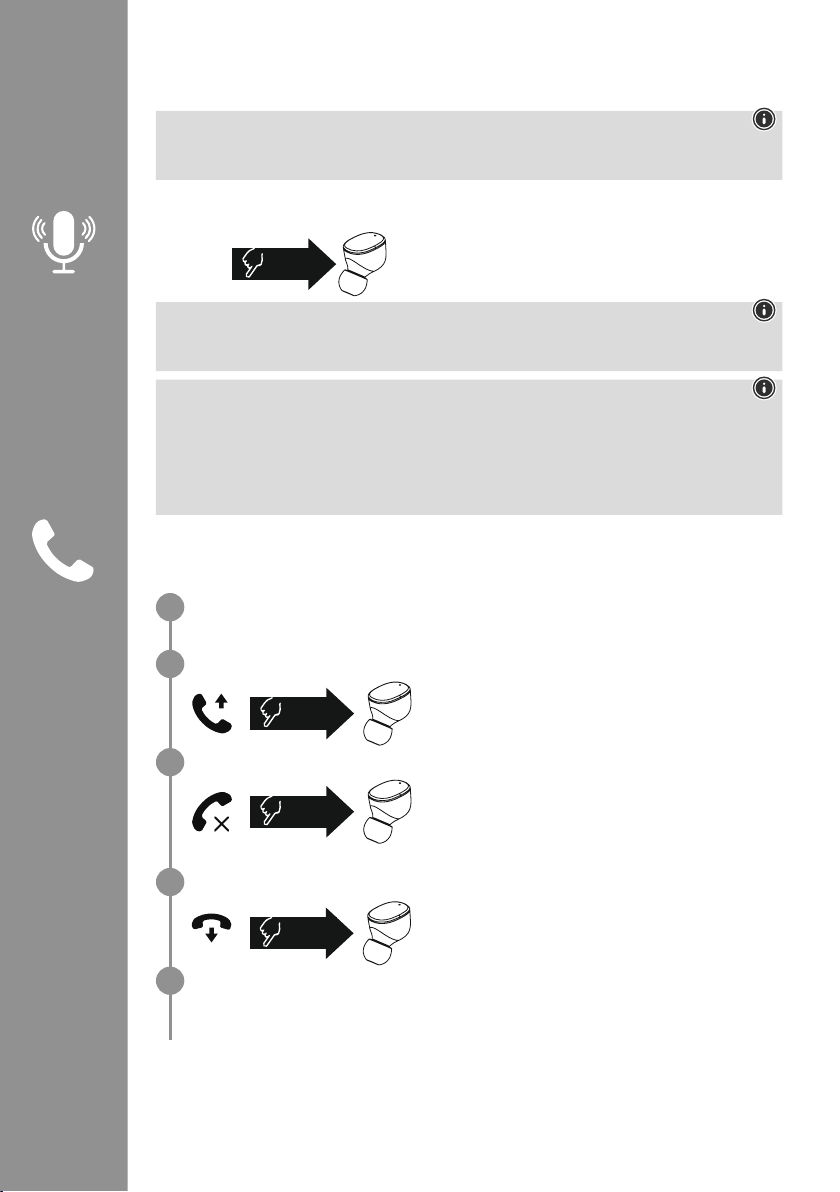
77
7. Kezelőelemek
Megjegyzés
• Vegye gyelembe, hogy egyes funkciók támogatása az eszköztől függ�
• Ehhez vegye gyelembe az eszköz használati útmutatóját�
7.1. Hangvezérlés funkció
Koppintson háromszor a jobb fülhallgatón található
többfunkciós érintésérzékelőre (4), hogy kommunikációt
indítson a Siri vagy a Google Assistant asszisztenssel
�
Megjegyzés – Siri
A Siri csak iOS 5 (az iPhone 4s-től kezdve) vagy újabb verzióval rendelkező, megfelelő eszközökön
érhető el
�
Megjegyzés – Google Assistant
• A Google Assistant csak Android 5.0 vagy újabb verzióval, Google Play Services szolgáltatással,
> 1,5 GB szabad tárhellyel és legalább 720p képernyőfelbontással rendelkező, megfelelő eszközökön
érhető el�
• A Google Assistant alkalmazás legyen az eszközön elérhető, és alapértelmezett nyelvi
asszisztensként legyen beállítva
�
7.2. Kihangosító funkció
A fülhallgatók használhatók mobiltelefon-kihangosítóként�
Hívás indítása
Hívás indításához válassza ki a számot közvetlenül az eszközön�
Hívás fogadása
Bejövő hívás fogadásához koppintson kétszer a bal vagy a
jobb fülhallgatón lévő (4) többfunkciós érintésérzékelőre�
Rövid hangjelzést hall�
Hívás elutasítása
Bejövő hívás elutasításához koppintson háromszor a
bal vagy a jobb fülhallgatón található többfunkciós
érintésérzékelőre (4)� Rövid hangjelzést hall�
Hívás befejezése
A beszélgetés alatt koppintson kétszer a bal vagy a jobb
fülhallgatón található többfunkciós érintésérzékelőre (4) a
hívás befejezéséhez
� Rövid hangjelzést hall�
Hívásismétlés
A legutóbb hívott számot újrahívhatja a hangvezérlés funkcióval (7�1�)�
1x
Siri/
Google
2x
3x
2x
1
2
3
4
5
Page 80
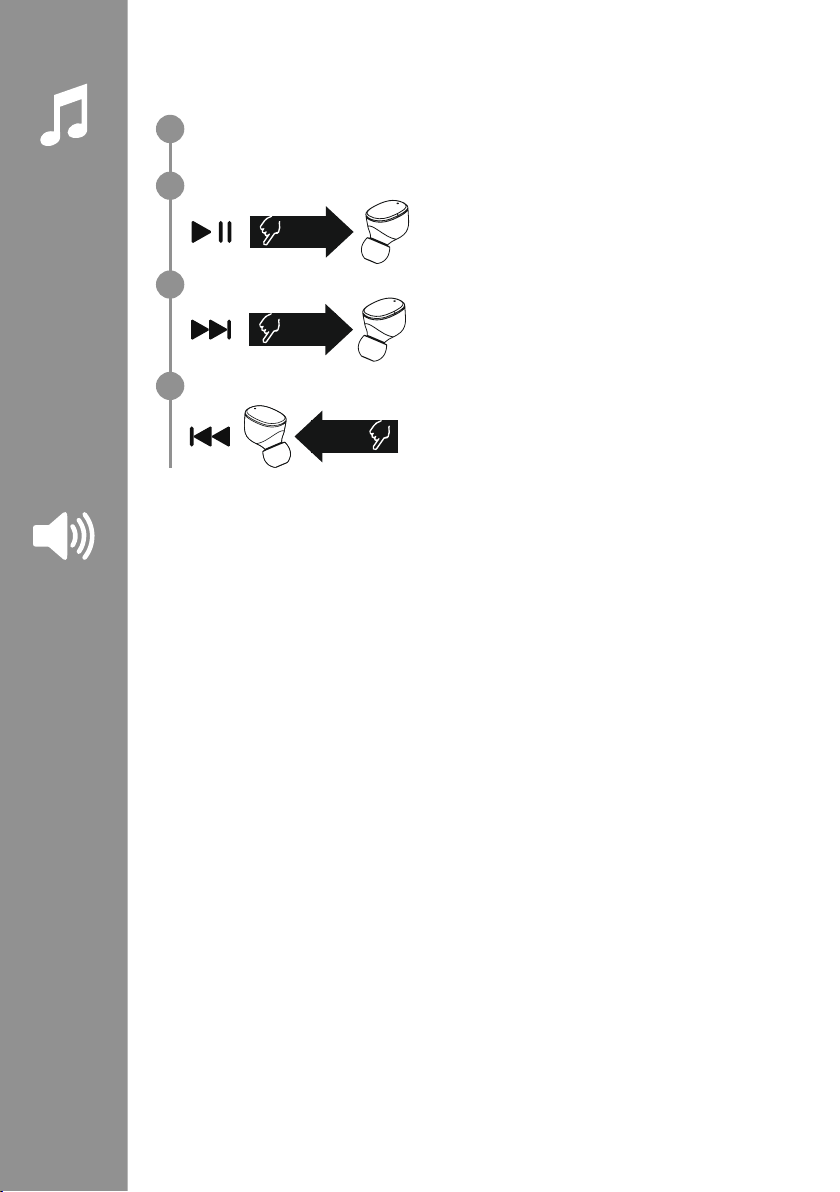
78
7.3. Hanglejátszás
Indítsa el a lejátszást az eszközön.
Lejátszás/Szünet
A hanglejátszás elindításához vagy megállításához
koppintson kétszer a bal vagy jobb fülhallgatón található
többfunkciós érintésérzékelőre (4)�
Következő szám
A következő számra ugráshoz koppintson háromszor a jobb
fülhallgatón található többfunkciós érintésérzékelőre (4)�
Előző szám
Az előző számra ugráshoz koppintson háromszor a bal
fülhallgatón található többfunkciós érintésérzékelőre (4)�
7.4. Hangerősség-szabályozás
A hangerősség a hangvezérlés funkcióval (7�1�) szabályozható�
Alternatív megoldásként eszközéről is vezérelheti a hangerőt�
2x
3x
R
3x
L
1
2
3
4
Page 81

79
8. Műszaki adatok
Bluetooth®fülhallgatók
Bluetooth-technológia Bluetooth
®
v5
�0
Támogatott prolok A2DPV1�3, AVRCP 1�6, HFP V1�7, SPP V1�2
A Bluetooth
®
-átvitelek
frekvenciája
2 402–2 480 MHz
Hatótávolság < 10 m
Akkumulátor
Akkumulátortípus 3,7V Li-polimer
Min. kapacitás
Fülhallgatók/töltődoboz
45
mAh/480mAh
Áramfelvétel max� 5 V
330mA
Fülhallgatók feltöltési ideje ~ 2 óra
Töltődoboz feltöltési ideje ~ 2,5 óra
Nyugalmi állapot* ~ 70 óra
Zenehallgatás (töltődoboz)* ~ 5
óra (25 óra)
Beszéd (töltődoboz)* ~ 3,5
óra (17,5 óra)
Fülhallgatók súlya kb� 4 g fülhallgatónként
Töltődoboz súlya
fülhallgatókkal
kb
� 44g
* teljes feltöltés után
Page 82
80
9. Karbantartás és gondozás
A terméket csak szöszmentes, kissé nedves kendővel tisztítsa, és ne használjon agresszív tisztítószert
�
10. Szavatosság kizárása
A Hama GmbH & Co KG semmilyen felelősséget vagy szavatosságot nem vállal a termék szakszerűtlen
telepítéséből, szereléséből és szakszerűtlen használatából, vagy a használati útmutató és/vagy a
biztonsági utasítások be nem tartásából eredő károkért
�
11. Szerviz és támogatás
A termékkel kapcsolatos kérdéseivel forduljon a Hama terméktanácsadáshoz�
Ügyfélszolgálat: +49 9091 502-0 (német/angol)
További támogatási információt itt talál: www
�hama�com
12. Megfelelőségi nyilatkozat
A Hama GmbH & Co KG igazolja, hogy a [00184108, 00184109] típusú rádióberendezés
megfelel a 2014/53/EU irányelvnek� Az EU-megfelelőségi nyilatkozat teljes szövege a
következő internetes címen érhető el:
www
�hama�com-> 00184108, 00184109-> Downloads�
Frekvenciasáv(ok) 2 402–2 480 MHz
Maximális sugárzott jelerősség 3,28 dBm
Page 83
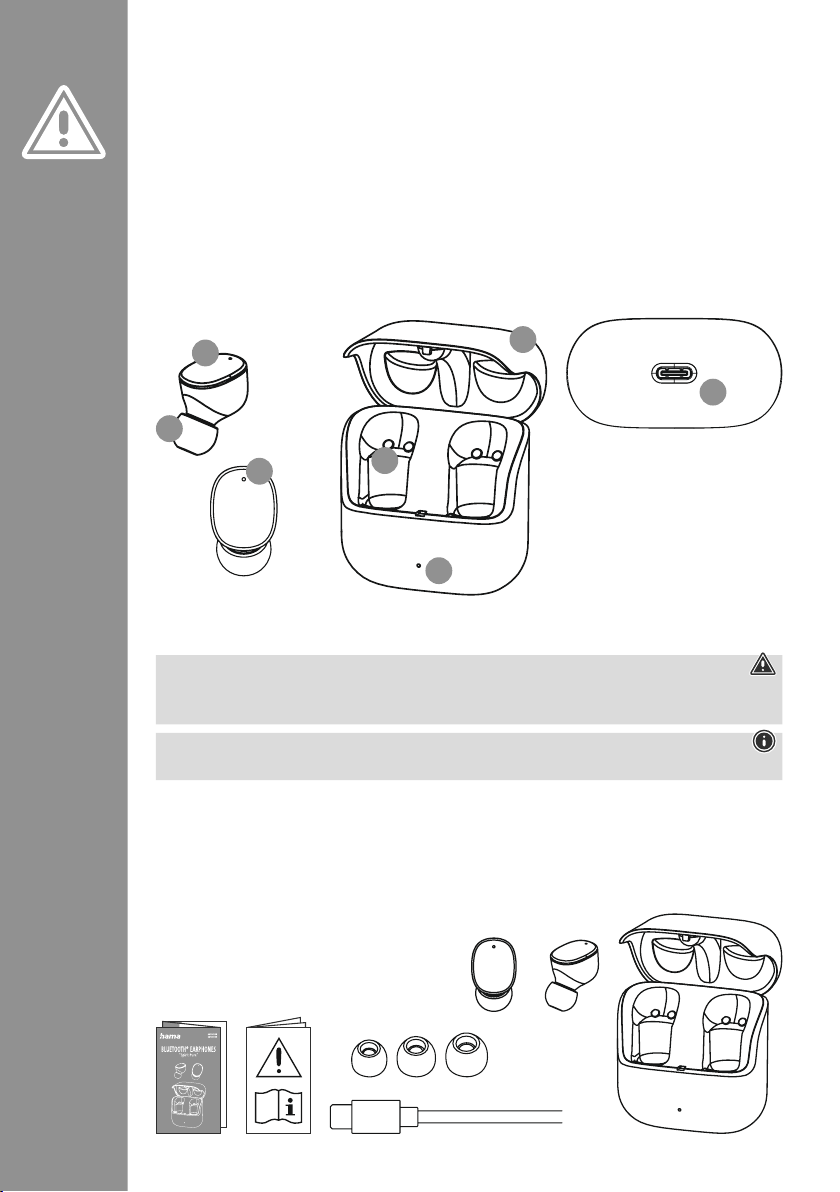
81
Vă mulțumim pentru faptul că v-ați decis în
favoarea unui produs Hama!
Vă rugăm să vă luați timpul necesar pentru a citi
următoarele instrucțiuni și indicații în totalitate
�
Păstrați aceste instrucțiuni de utilizare mai apoi
într-un loc sigur, pentru a le putea consulta în caz
de necesitate
� În cazul în care doriți să înstrăinați
aparatul, transmiteți aceste instrucțiuni de
utilizare noului proprietar
�
Elementele de operare și afișaje
1� Caseta de încărcare
2� LED stare casetă de încărcare
3� LED stare căști
4
� Senzor tactil multifuncțional
5� Capitonare din silicon pentru căști
6� Contactele de încărcare
7
� Mufă USB-C
1. Explicarea simbolurilor de avertizare și a indicațiilor
Avertizare
Este utilizat pentru a marca indicațiile de securitate sau pentru a atrage atenția asupra pericolelor și
riscurilor speciale
�
Indicație
Este utilizat pentru a marca suplimentar informații sau indicații importante�
2. Conținutul ambalajului
1x căști True Wireless Bluetooth®"Spirit Pure"
1x casetă de încărcare
1x cablu de încărcare USB-C
3 perechi de pernuțe pentru ureche în dimensiuni diferite (S/M/L)
1x instrucțiuni rezumate
1x indicații de avertizare și siguranță
M Instrucțiuni de utilizare
S
M
L
5
3
4
2
6
7
1
Page 84
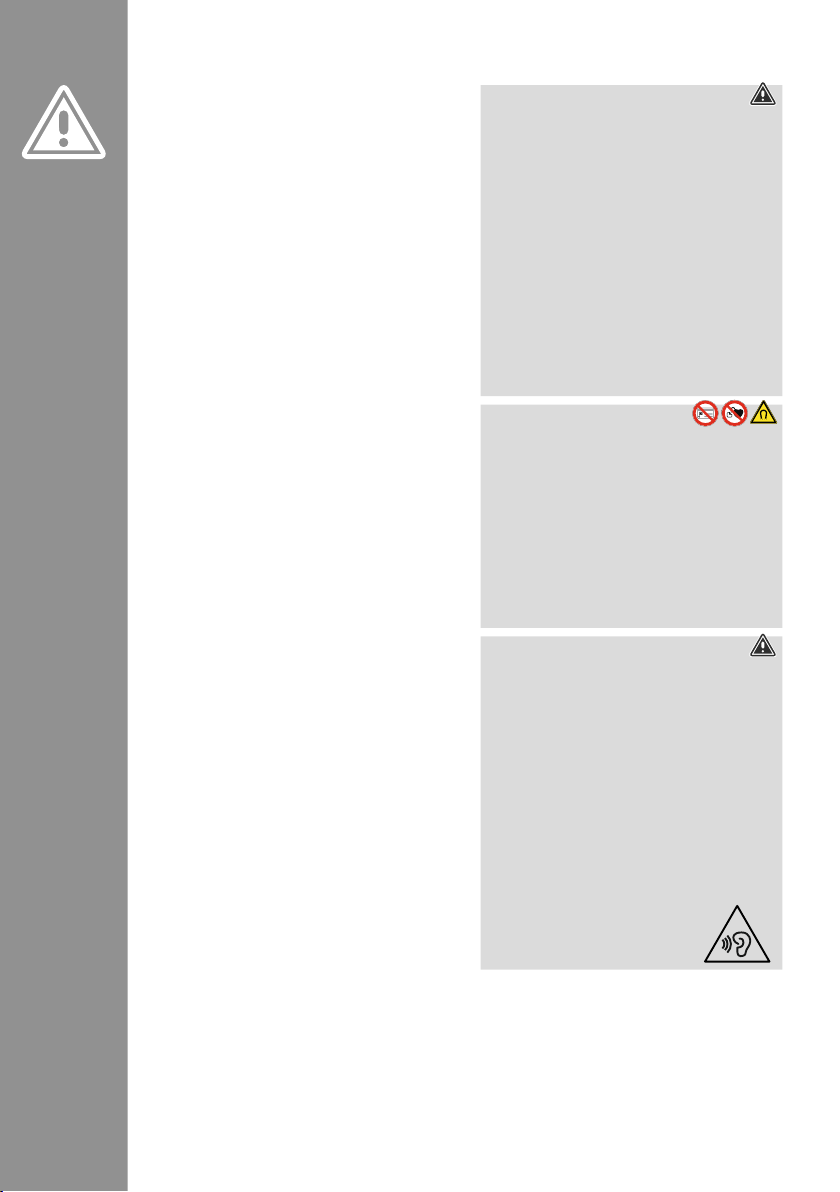
82
3. Indicații de securitate
• Produsul este conceput pentru utilizarea casnică,
necomercială
�
• Utilizați produsul numai pentru scopul prevăzut
pentru acesta
�
• Copiii trebuie supravegheați, pentru a vă asigura
că nu se joacă cu produsul
�
• Nu folosiți produsul în zone în care nu sunt
admise aparate electronice
�
• Nu încercați să reparați sau să întrețineți produsul
în regie proprie
� Orice lucrări de întreținere sunt
executate numai de personal de specialitate
responsabil
�
• Nu deschideți produsul și nu continuați să îl
operați, dacă prezintă deteriorări
�
• Nu îndoiți și nu striviți cablul�
• Nu lăsați produsul să cadă și nici nu îl expuneți
unor vibrații puternice
�
• Eliminați ambalajele imediat, conform
prescripțiilor locale valabile de eliminare a
deșeurilor
�
• Nu aduceți modicări produsului� Aceasta ar duce
la pierderea oricăror drepturi pe baza garanției
�
• Protejați produsul de murdărie, umiditate și
supraîncălzire și utilizați-l numai în medii uscate
�
• Nu operați produsul în imediata apropiere a
sistemului de încălzire, a altor surse de căldură
sau în razele directe ale soarelui
�
• Utilizați articolul numai în condiții climaterice
moderate
�
• Acest produs, ca toate produsele electrice, nu are
ce căuta pe mâinile copiilor!
• Operați produsul numai în limita capacităților sale
indicate în cadrul datelor tehnice
�
• Nu folosiți produsul în mediu umed și evitați
stropirea cu apă
�
• Nu permiteți să vi se distragă atenția de către
produs pe parcursul deplasării cu un autovehicul
sau echipament sport și acordați atenție situației
tracului și mediului
�
• Acumulatorul este încorporat ferm și nu poate
îndepărtat, eliminați întregul produs, conform
prevederilor legale aplicabile
�
• Nu aruncați acumulatorul, respectiv produsul în
foc
�
• Nu modicați, deformați, încălziți sau dezmembra
bateriile/acumulatoarele
�
• Nu utilizați produsul pe parcursul procesului de
încărcare!
Avertizare – Acumulator
• Pentru încărcare folosiți numai încărcătoare
adecvate sau cabluri USB�
• Nu utilizați încărcătoare defecte sau cabluri
USB defecte și nici nu încercați să le reparați
�
• Nu supraîncărcați sau descărcați complet
produsul�
• Evitați depozitarea, încărcarea și utilizarea la
temperaturi extreme și la o presiune extrem
de mică a aerului (ca de ex� la înălțimi foarte
mari)
�
• În cazul unei depozitări îndelungate,
reîncărcați la intervale regulate (cel puțin
trimestrial)�
Avertizare – Magneți
• Produsul generează câmpuri magnetice�
Persoanelor cu stimulatoare cardiace pot
inuențate li se recomandă să ceară sfatul
medicului înaintea folosirii acestui produs,
pentru a nu afecta funcționarea acestuia
�
• Nu păstrați carduri bancare sau produse
similare cu benzi magnetice în apropierea
casetei de încărcare
� Datele de pe cartele pot
deteriorate sau șterse�
Avertizare – volum înalt
• Volumul acustic cel mai înalt!
• Există pericolul de vătămare auzului�
• Pentru a preveni pierderea auzului, evitați
ascultatul la un volum foarte înalt pe perioade
lungi de timp�
• Reglați sonorul la o intensitate rezonabilă�
Intensitatea ridicată a sonorului – chiar și de
scurtă durată – poate duce la tulburări ale
auzului
�
• Utilizarea produsului vă limitează capacitatea
de percepere a zgomotelor înconjurătoare�
Acesta este motivul pentru care
nu trebuie să operați vehicule
sau mașini
�
Page 85
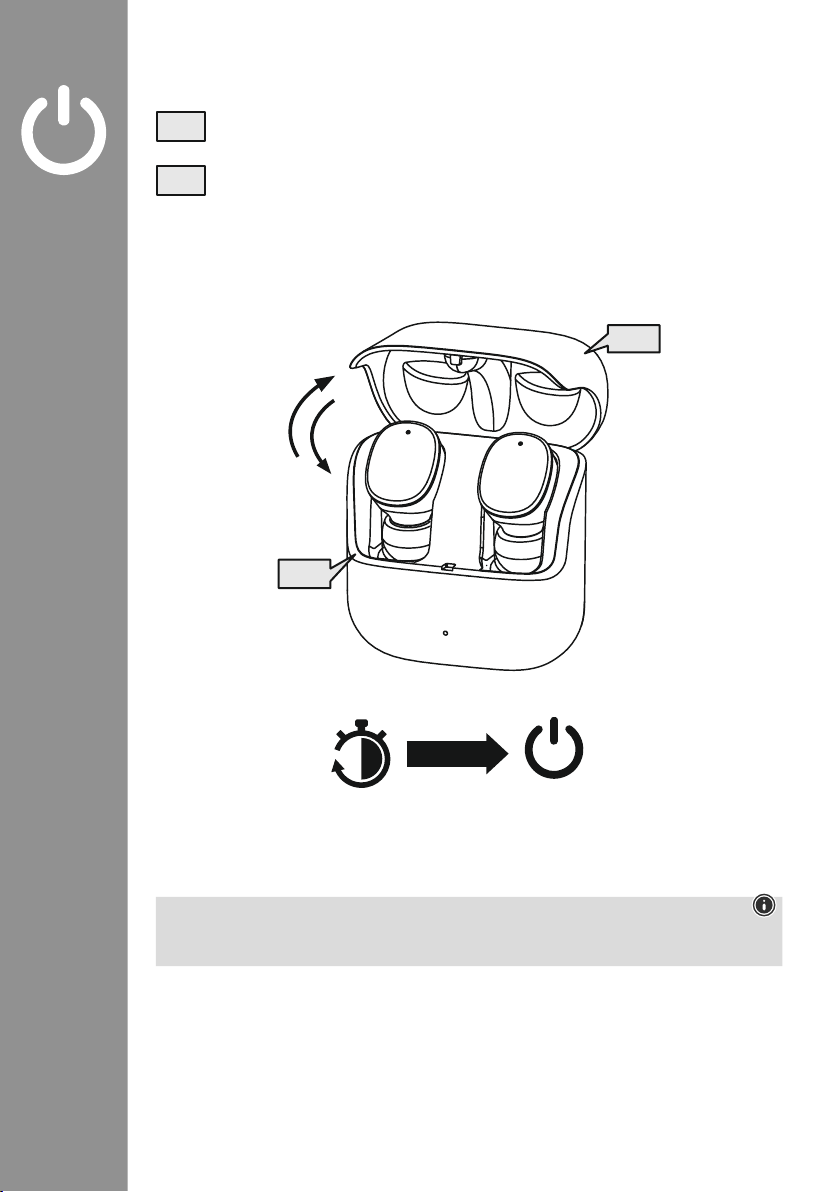
83
4. Pornirea/oprirea
Dacă deschideți caseta de încărcare, căștile pornesc automat și declanșează procesul de
conectare�
Pentru deconectare, introduceți căștile pur și simplu înapoi în caseta de încărcare� Acordați în
acest context atenție introducerii căștilor conform marcajelor L/R� La nal, închideți caseta de
încărcare
�
zZz
STANDBY
3min
ON
OFF
ON
OFF
Indicație – Oprirea automată a produsului
Produsul este echipat cu un sistem automat de deconectare
� Dacă pe parcursul a 3 de minute nu se
realizează o legătură cu terminalul, acesta se oprește automat�
Page 86
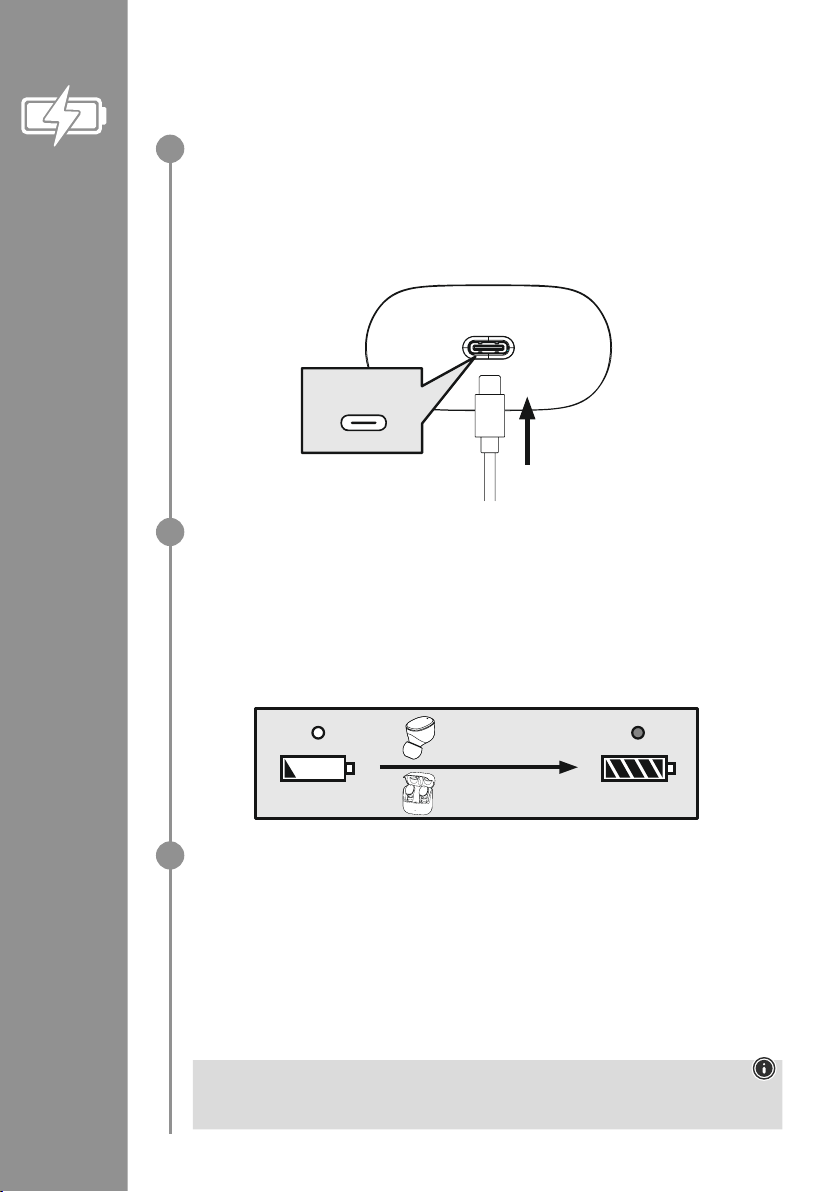
84
5. Încărcare
Înainte de prima utilizare, încărcați căștile și caseta de încărcare o dată complet
�
Introduceți căștile, închideți caseta de încărcare și conectați-o
Introduceți căștile în caseta de încărcare� Acordați în acest context atenție introducerii căștilor
conform marcajelor L/R� La nal, închideți caseta de încărcare�
Conectați cablul de încărcare USB-C alăturat la mufa de încărcare (7) a casetei de încărcare�
Conectați ștecărul liber al cablului de încărcare USB-C la un încărcător USB adecvat� Acordați
atenție în acest sens instrucțiunilor de utilizare ale încărcătorului USB utilizat�
Procesul de încărcare al casetei de încărcare și al căștilor
LED-ul de stare ale casetei de încărcare (2) luminează intermitent alb pe parcursul procesului de
încărcare� După încărcarea completă a casetei de încărcare, LED-ul casetei de încărcare luminează
permanent alb�
Căștile se încarcă numai cu caseta de încărcare închisă�
Încărcarea completă a acumulatoarelor poate să dureze până la 2 ore (căști) și până la 2,5 ore
(caseta de încărcare)�
Capacitatea acumulatorului
Caseta de încărcare
În cazul în care acumulatorul este descărcat, LED-ul de stare (2) al casetei de încărcare se aprinde
intermitent alb�
Căștile
Când acumulatorul este descărcat, veți auzi un semnal sonor o dată pe minut, iar LED-ul de stare
(3) al căștii va se va aprinde intermitent alb�
Durata efectivă de exploatare a acumulatorului depinde de utilizarea produsului, de setările și de
temperaturile ambiante (acumulatoarele au o durată de exploatare limitată)�
Indicație
Dacă nu ați utilizat produsul timp de câteva luni, este posibil să dureze 15 – 30 de minute, până
ce LED-urile de stare (2) încep să lumineze roșu pe parcursul procesului de încărcare�
USB-C
CHARGING CHARGED
2h:00m
2h:30m
1
2
3
Page 87
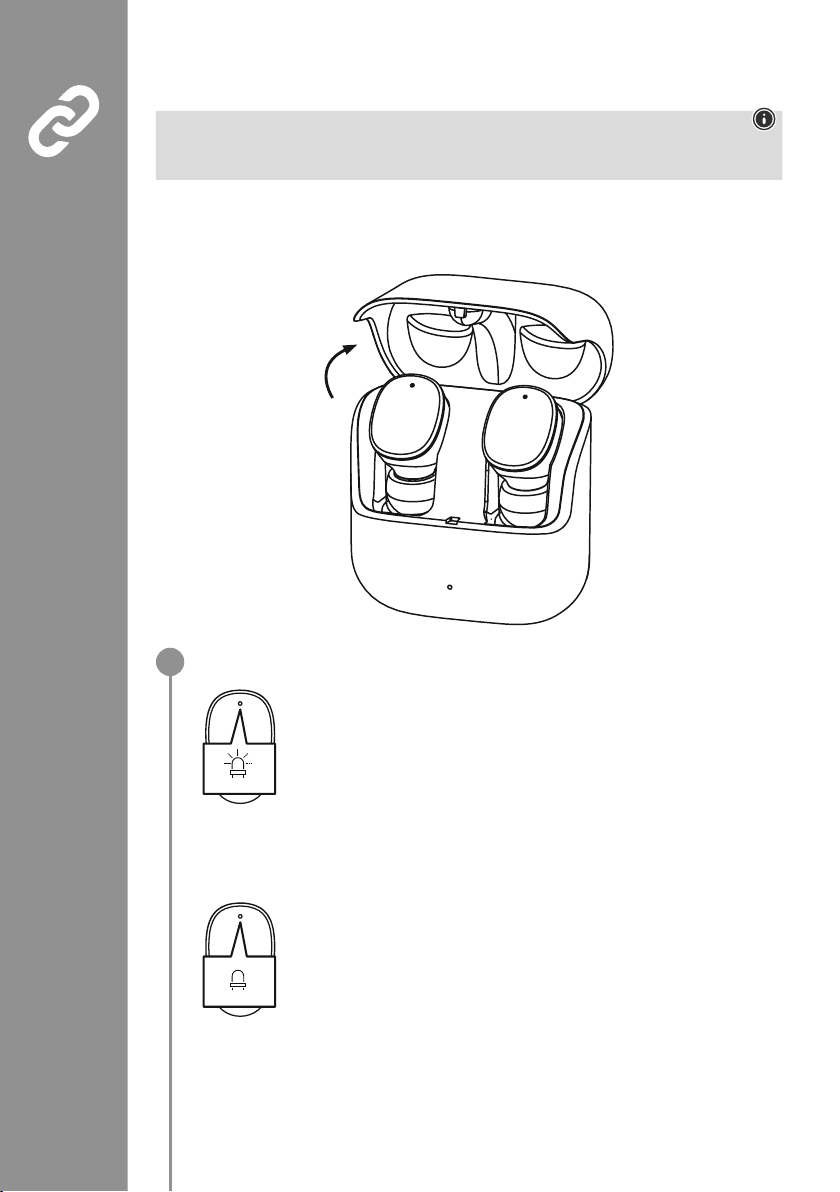
85
6. Prima conectare Bluetooth®(Pairing)
Indicație – Conectarea (Pairing)
• Asigurați-vă că terminalul dvs� Bluetooth
®
este conectat și funcția Bluetooth®este activată�
• Acordați în acest sens atenție instrucțiunilor de utilizare ale terminalului dvs�
Nu mențineți căștile și terminalul la mai mult de 1 metru unele de altele� Cu cât este distanța mai mică,
cu atât mai bine�
Asigurați-vă că sunt pornite căștile�
Verificați starea LED-ului de stare (3)
Când LED-urile de stare (3) al căștilor se aprind intermitent alternativ:
Căștile sunt în căutarea unei conexiuni Bluetooth
®
�
Dacă LED-urile de stare (3) se aprind intermitent și se sting în încheiere:
Căștile sunt deja conectate la un terminal Bluetooth
®
�
Blue/red
off
1
Page 88
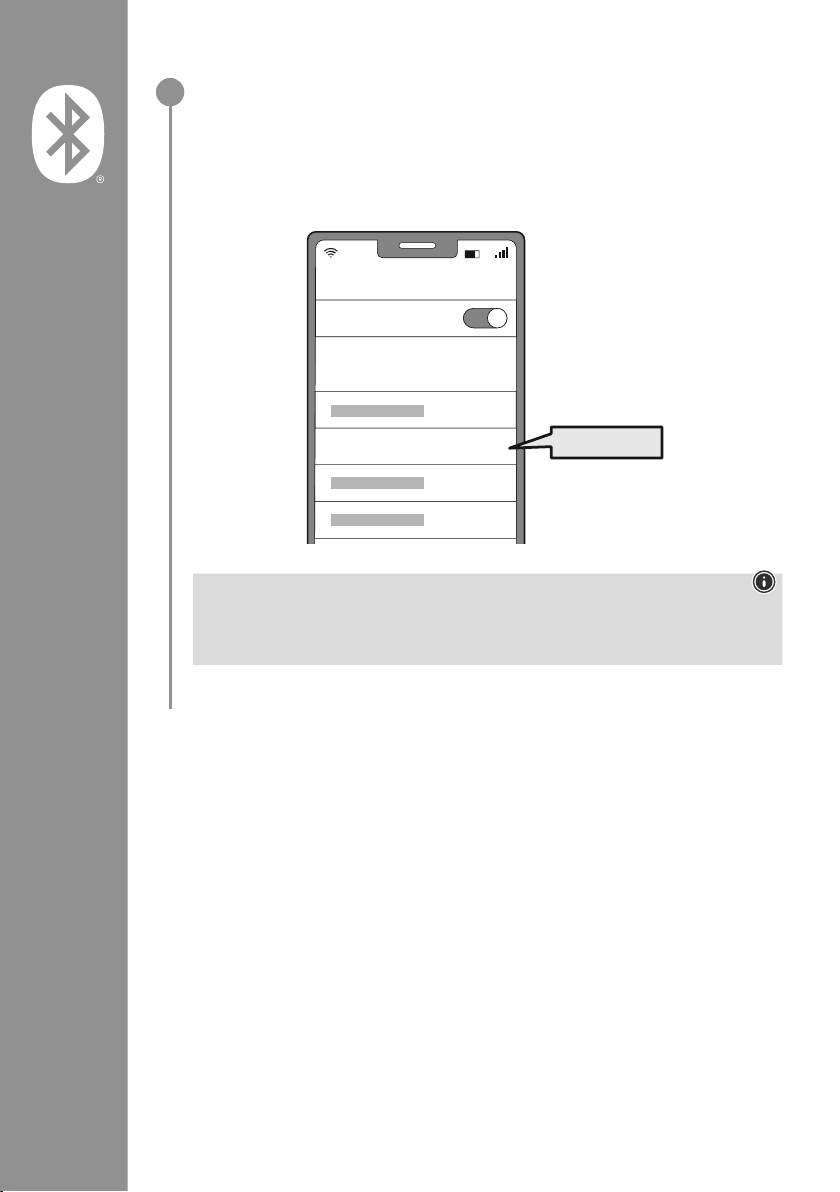
86
Căutarea căștilor prin intermediul terminalului (necesară numai la prima conectare)
Deschideți setările Bluetooth
®
de pe terminalul dvs
� și așteptați până ce în lista
aparatelor Bluetooth
®
găsite este așat Hama Spirit Pure�
Selectați Hama Spirit Pure și așteptați până ce căștile dvs� apar ca ind conectate în
setările Bluetooth
®
ale terminalului dvs� Auziți un sunet de semnalizare scurt�
Indicație – Parola Bluetooth
®
Unele terminale necesită pentru realizarea conexiunii cu un alt aparat Bluetooth®de o parolă
�
• Pentru conectarea cu căștile, introduceți parola 0000, dacă terminalul dvs� solicită introducerea
acesteia
�
2
Password
Bluetooth
Hama Spirit Pure
ON
0000
Page 89
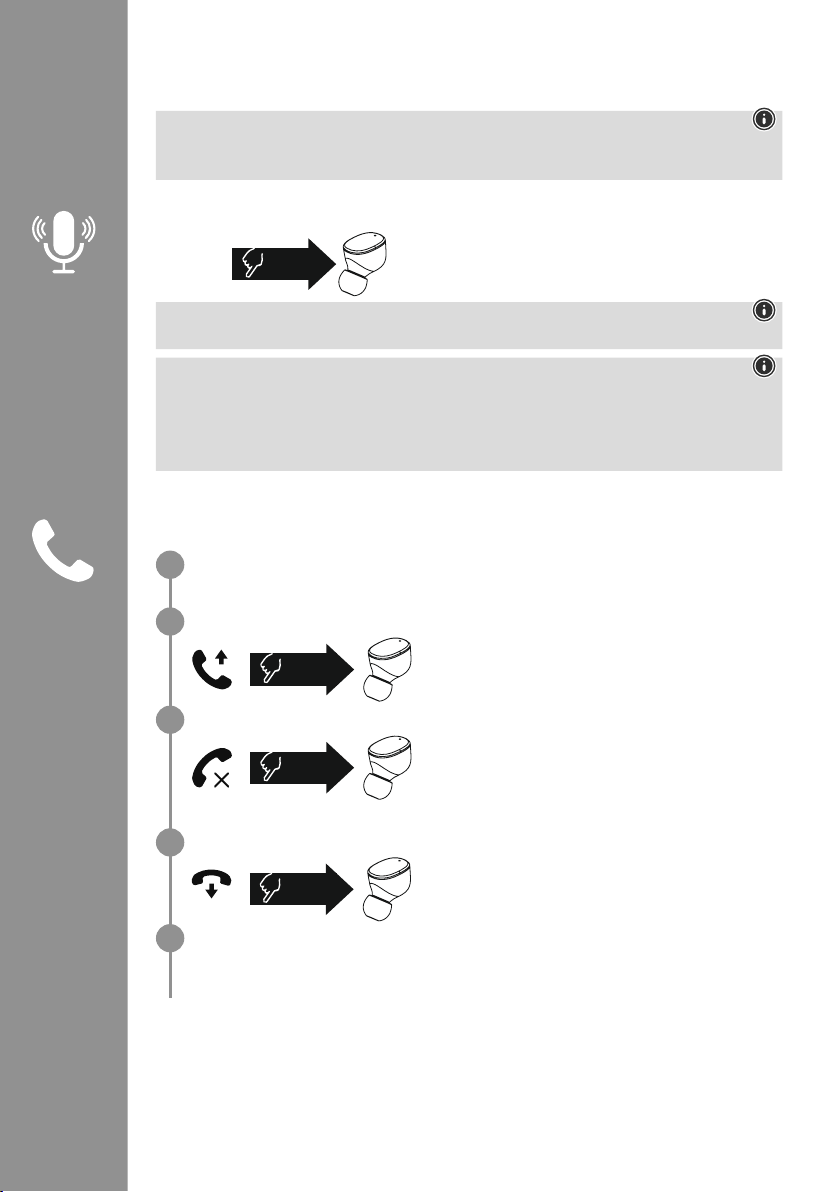
87
7. Elementele de operare
Indicație
• Aveți în vedere faptul că suportarea anumitor funcții depinde de terminalul dvs�
• Acordați în acest sens atenție instrucțiunilor de utilizare ale terminalului dvs�
7.1 Funcția de asistent vocal
Apăsați de o dată pe senzorul tactil multifuncțional (4) de
pe casca din dreapta, pentru a iniția comunicarea cu Siri sau
Google Assistant
�
Indicație – Siri
Siri este disponibilă numai pe terminalele cu iOS 5 (mai noi de iPhone 4s) sau superioare�
Indicație – Google Assistant
• Google Assistant este disponibil numai pe terminalele adecvate cu Android 5.0 sau superior cu
Google Play Services, > 1,5 GB memorie liberă și o rezoluție minimă a ecranului de 720P�
• Google Assistant App trebuie să e disponibil pe terminalul dvs� și setat ca și asistent vocal
standard�
7.2 Funcția mâini libere
Există posibilitatea de a utiliza căștile pe post de dispozitiv tip mâini libere, pentru terminalul dvs�
Efectuarea unui apel
Selectați numărul direct prin intermediul terminalului, pentru a efectua un apel�
Acceptarea unui apel
Apăsați de două ori senzorul tactil multifuncțional (4) de pe
casca din stânga sau din dreapta pentru a accepta un apel�
Auziți un sunet de semnalizare scurt�
Respingerea unui apel
Pentru respingerea unui apel recepționat, apăsați de trei ori
senzorul tactil multifuncțional (4) de pe casca din stânga
sau din dreapta� Auziți un sunet de semnalizare scurt�
Încheierea unui apel
Apăsați senzorul tactil multifuncțional (4) de pe casca
din stânga și din dreapta în timpul unui apel, pentru a-l
încheia
� Auziți un sunet de semnalizare scurt�
Reapelarea
Puteți reapela ultimul număr apelat prin intermediul funcției Asistent Vocal (7�1)�
1x
Siri/
Google
2x
3x
2x
1
2
3
4
5
Page 90
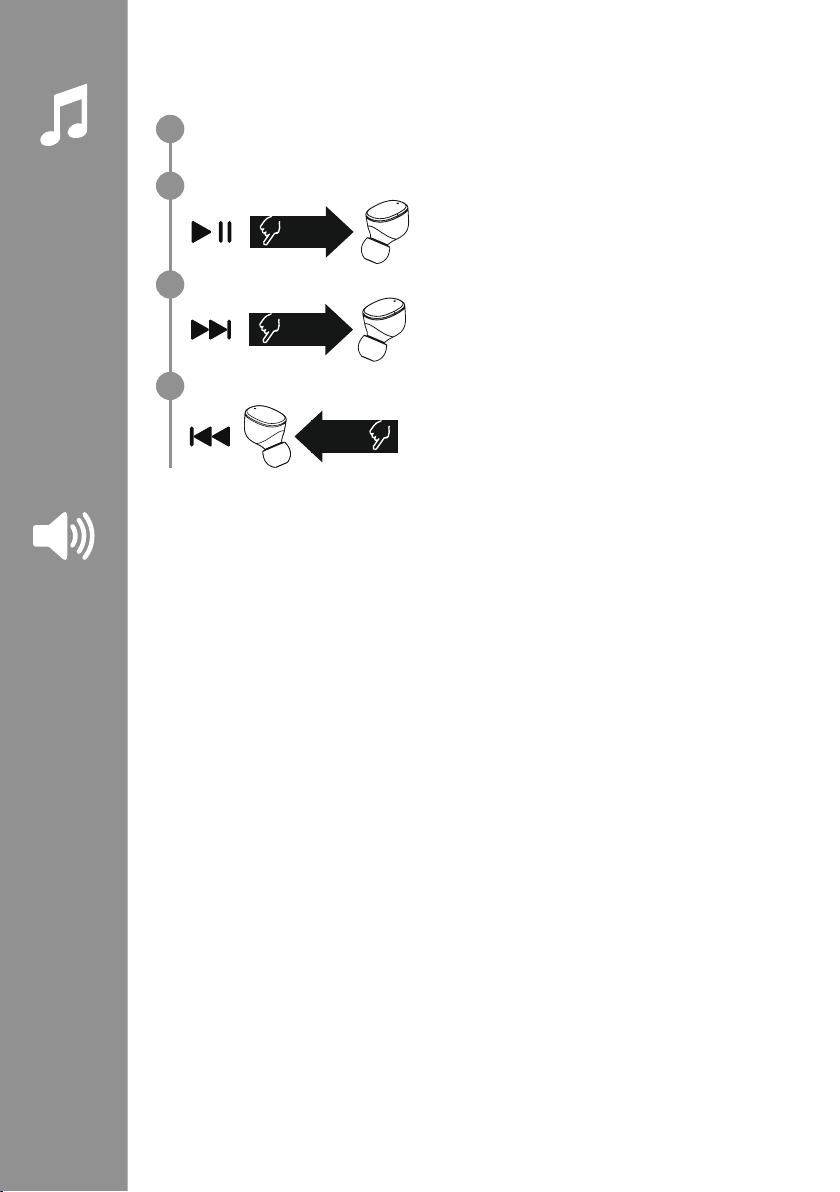
88
7.3 Redarea audio
Începeți redarea pe terminalul dvs.
Redare/Pauză
Apăsați de două ori senzorul tactil multifuncțional (4) de
pe casca din stânga și din dreapta, pentru a porni sau opri
redarea audio�
următoarea piesă
Apăsați senzorul tactil multifuncțional (4) de pe casca din
dreapta de trei ori, pentru a trece la piesa următoare�
piesa anterioară
Apăsați senzorul tactil multifuncțional (4) de pe casca din
stânga de trei ori, pentru a trece la piesa anterioară�
7.4 Reglarea volumului
Comanda volumului se realizează prin intermediul funcției Asistent Vocal (7�1)�
În mod alternativ, este posibilă comanda volumului și prin intermediul terminalului dvs�
2x
3x
R
3x
L
1
2
3
4
Page 91

89
8. Date tehnice
Căștile Bluetooth
®
Tehnologie Bluetooth Bluetooth®v5
�0
Prole suportate A2DPV1�3, AVRCP 1�6, HFP V1�7, SPP V1�2
Frecvența pentru Bluetooth
®
-
Transferuri
2402–2480 MHz
Raza de acțiune < 10 m
Tipul
Tipul bateriei 3,7
V Li-Polimer
Capacitate min.
Căștile / caseta de încărcare
45
mAh / 480 mAh
Consumul electric max� 5 V
330mA
Durata de încărcare a căștilor ~ 2 h
Durata de încărcare a casetei
de încărcare
~ 2,5 h
Starea de repaus * ~ 70
h
Durată redare muzică (casetă
de încărcare) *
~ 5 h (25h)
Durată de convorbire (casetă
de încărcare)*
~ 3,5 h (17,5h)
Greutatea căștilor Fiecare cască cca� 4 g
Greutatea suportului de
încărcare
incl. căști
cca� 44g
*după încărcarea completă
Page 92
90
9. Întreținerea și îngrijirea
Curățați produsul numai cu o lavetă ce nu lasă scame, ușor umezită și nu utilizați detergenți agresivi
�
10. Excluderea răspunderii
Hama GmbH & Co KG nu își asumă nicio răspundere sau garanție pentru daunele, ce rezultă din
instalarea, montajul, utilizarea inadecvată a produsului sau nerespectarea instrucțiunilor de utilizare și/
sau a indicațiilor de securitate
�
11. Service și suport
În cazul în care aveți întrebări referitoare la produs vă puteți adresa serviciului de consultanță pentru
produse Hama�
Linia de asistență: +49 9091 502-0 (Ger/Eng)
Informații suplimentare de suport puteți găsi aici: www�hama�com
12. Declarație de conformitate
Prin prezenta declară Hama GmbH & Co KG, că tipul de instalație cu emisii radio [00184108,
00184109] corespunde Directivei 2014/53/UE� Textul integral al declarației UE de
conformitate este disponibil la următoarea adresă internet:
www
�hama�com-> 00184108, 00184109-> Downloads�
Banda (benzile) de frecvențe 2402–2480 MHz
Puterea maximă 3,28 dBm
Page 93
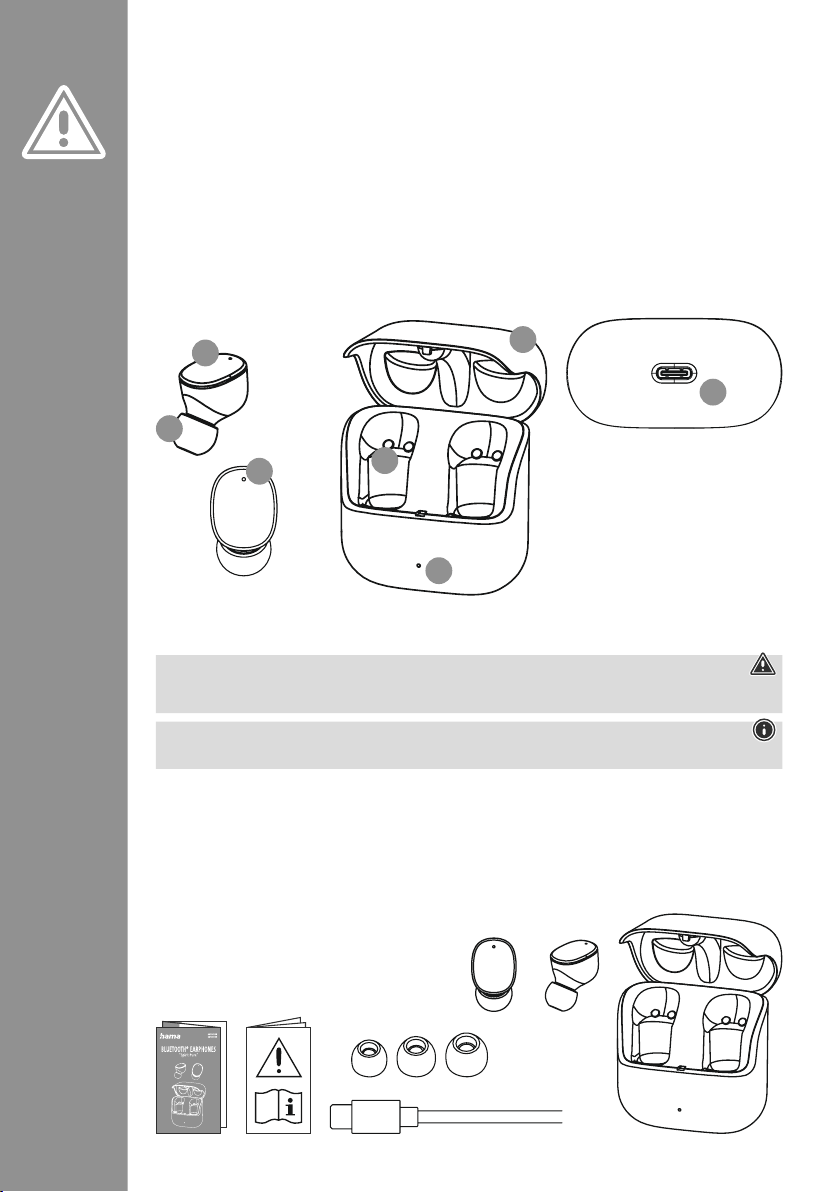
91
Děkujeme, že jste si vybrali výrobek Hama!
Najděte si čas a přečtěte si prosím nejprve
následující pokyny a upozornění
� Uchovejte tento
návod k obsluze v dosahu na bezpečném místě,
abyste do něj mohli v případě potřeby nahlédnout
�
Pokud výrobek prodáte, předejte tento návod k
obsluze novému majiteli�
Ovládací prvky a indikace
1� Nabíjecí stanice
2� Stavová LED Nabíjecí stanice
3� Stavová LED Sluchátka do uší
4
� Multifunkční dotykový senzor
5� Silikonové náušníky
6� Nabíjecí kontakty
7
� Přípojka USB-C
1. Vysvětlení výstražných symbolů a pokynů
Výstraha
Používá se pro označení bezpečnostních upozornění nebo pro upozornění na zvláštní nebezpečí a rizika
�
Upozornění
Používá se pro označení dalších informací nebo důležitých pokynů
�
2. Obsah balení
1x True Wireless Bluetooth®sluchátka do uší "Spirit Pure"
1x nabíjecí stanice
1x nabíjecí kabel USB-C
3 páry silikonových náušníků v různých velikostech (S/M/L)
1x stručný návod
1x výstražné a bezpečnostní pokyny
C Návod k použití
S
M
L
5
3
4
2
6
7
1
Page 94
92
3. Bezpečnostní pokyny
• Výrobek je určen pro soukromé a neprůmyslové
použití
�
• Výrobek používejte výlučně k účelu, ke kterému
byl stanoven
�
• Děti by měly být pod dohledem, aby bylo možné
zajistit, aby si s výrobkem nehrály
�
• Výrobek nepoužívejte na místech, kde není
používání elektronických přístrojů dovoleno
�
• Nepokoušejte se výrobek sami ošetřovat nebo
opravovat
� Veškeré úkony údržby přenechejte
příslušnému odbornému personálu
�
• Výrobek neotvírejte a v případě poškození ho již
dále nepoužívejte
�
• Kabel neohýbejte a nelámejte�
• Zabraňte pádu výrobku a výrobek nevystavujte
silným otřesům
�
• Obalový materiál likvidujte ihned podle platných
místních předpisů o likvidaci
�
• Na produktu neprovádějte žádné změny� Ztratíte
tím jakékoli nároky na záruční plnění
�
• Chraňte výrobek před znečištěním, vlhkostí
a přehřátím a používejte ho pouze v suchém
prostředí
�
• Výrobek nepoužívejte v bezprostřední blízkosti
topení, jiných zdrojů horka nebo na přímém
slunci
�
• Výrobek používejte pouze v mírných klimatických
podmínkách
�
• Tento výrobek, stejně jako všechny elektrické
produkty, nepatří do dětských rukou!
• Výrobek neprovozujte mimo meze výkonu uvedené
v technických údajích
�
• Výrobek nepoužívejte ve vlhkém prostředí a
zabraňte styku se stříkající vodou
• Při jízdě s motorovým vozidlem nebo sportovním
zařízením se nenechejte rozptýlit vaším produktem
a věnujte pozornost dopravní situaci a okolí
�
• Akumulátor je pevně zabudován a nemůže být
odstraněn, produkt likvidujte jako celek podle
zákonných ustanovení
�
• Nevhazujte akumulátor, popř� výrobek do ohně�
• Na akumulátorech/bateriích neprovádějte změny
a/nebo je nedeformujte/nezahřívejte/nerozebírejte
�
• Produkt nepoužívejte během procesu nabíjení!
Výstraha – akumulátor
• Pro nabíjení používejte pouze vhodné
nabíječky nebo USB přípojky�
• Defektní nabíjecí přístroje nebo USB připojení
všeobecně již nepoužívejte a nepokoušejte se
je opravovat
�
• Výrobek ani nepřebíjejte, ani ho zcela
nevybíjejte
�
• Zabraňte skladování, nabíjení a používání při
extrémních teplotách a při extrémně nízkém
tlaku vzduchu (jako např
� ve velkých výškách)�
• V případě delšího skladování je pravidelně
(minimálně jednou za čtvrt roku) dobíjejte�
Varování – Magnety
• Produkt generuje magnetická pole� Osoby s
kardiostimulátorem by měly konzultovat použití
tohoto výrobku s lékařem, zda by tím mohla
být narušena funkce kardiostimulátoru
�
• V blízkosti nabíjecí stanice nebo sluchátek
do uší neuchovávejte žádné EC karty nebo
podobné karty s magnetickými proužky
� Může
dojít k poškození nebo ke smazání dat na
kartách�
Varování – Vysoká hlasitost
• Vysoký akustický tlak!
• Existuje riziko poškození sluchu�
• Aby bylo možné zabránit ztrátě sluchu,
zamezte poslechu při vysoké hlasitosti po
dlouhá období�
• Hlasitost udržujte vždy na přiměřené úrovni�
Vysoká hlasitost může, i při krátkém trvání,
způsobit poškození sluchu�
• Používání výrobku vás omezuje ve vnímání
okolních zvuků� Proto během
používání neobsluhujte žádná
vozidla nebo stroje�
Page 95
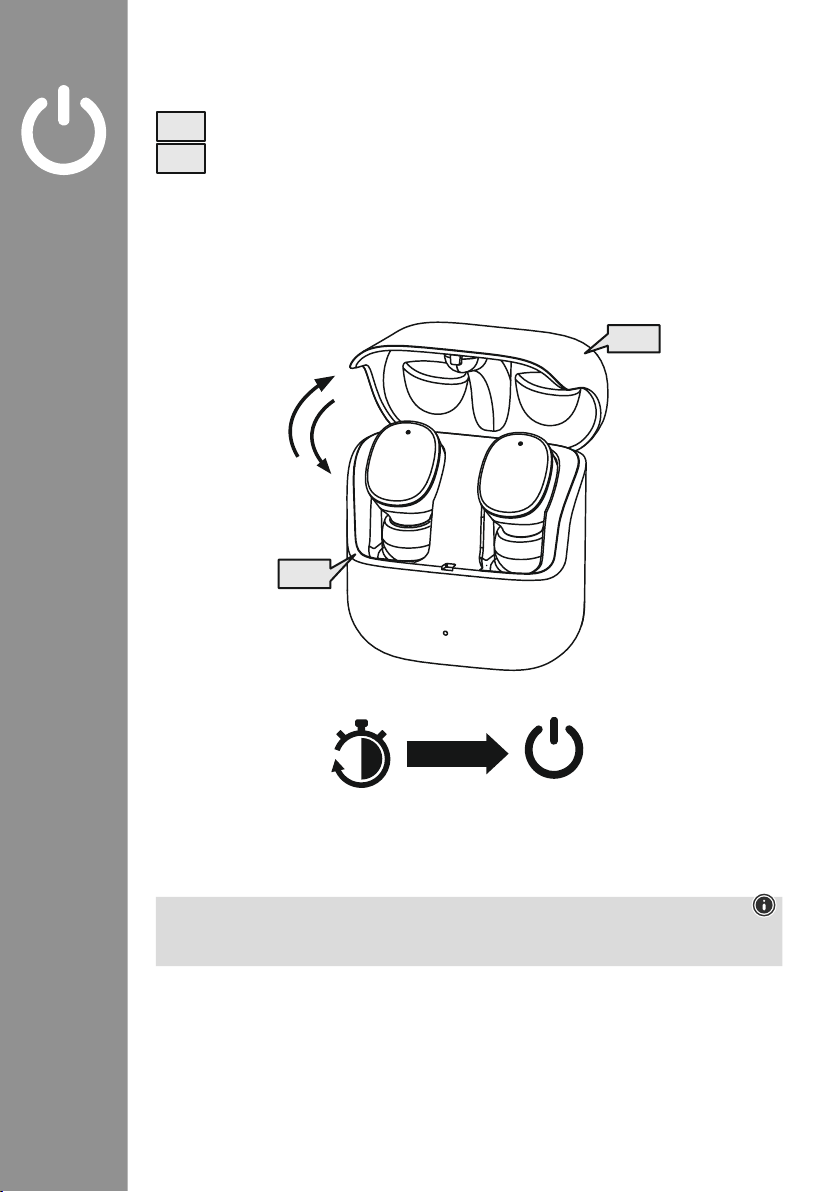
93
4. Zapnutí/vypnutí
Otevřete nabíjecí stanici, sluchátka se automaticky zapnou a zahájí párování�
Pro vypnutí položte sluchátko do uší jednoduše zpět do nabíjecí stanice� Respektujte přitom
vložení sluchátek správnou stranou podle označení L/R� Následně zavřete nabíjecí stanici�
zZz
STANDBY
3min
ON
OFF
ON
OFF
Upozornění – Automatické vypnutí produktu
Produkt je vybaven automatickým vypnutím
� Pokud není během 3 minut provedeno žádné spojení s
vaším koncovým přístrojem, tento se automaticky vypne�
Page 96
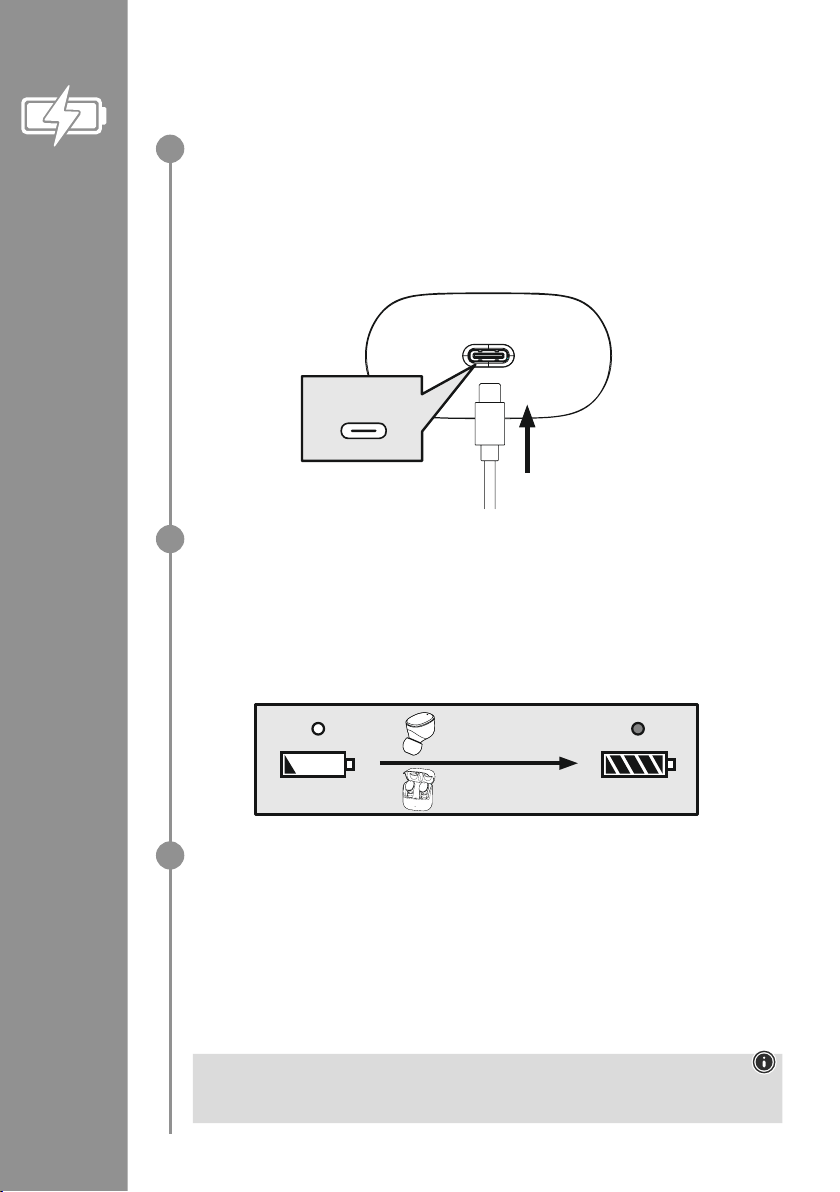
94
5. Nabíjení
Před prvním použitím sluchátka do uší, jakož i nabíjecí stanici jednou zcela nabijte
�
Vložte sluchátka, zavřete nabíjecí box a připojte
Vložte sluchátka do nabíjecího boxu� Respektujte přitom vložení sluchátek správnou stranou podle
označení L/R� Následně zavřete nabíjecí stanici�
Přiložený nabíjecí kabel USB-C připojte ke zdířce nabíjení (7) nabíjecí stanice�
Volný konektor nabíjecího kabelu USB-C připojte k vhodné USB nabíječce� Respektujte přitom
návod k obsluze používané USB nabíječky�
Proces nabíjení nabíjecí stanice a sluchátek do uší
Stavová LED nabíjecí stanice (2) během procesu nabíjení bliká bíle� Po úplném nabití nabíjecí
stanice svítí LED dioda nabíjecího boxu nepřetržitě bíle�
Nabíjení sluchátek probíhá jen při zavřené nabíjecí stanici�
Může trvat až 2 hodiny (sluchátka do uší) a až 2,5 hodiny (nabíjecí stanice), dokud nebudou
akumulátory zcela nabité�
Kapacita akumulátoru
Nabíjecí stanice
V případě nízkého stavu akumulátoru bliká stavová LED (2) nabíjecí stanice bíle
�
Sluchátka do uší
V případě nízkého stavu akumulátoru uslyšíte jednou za minutu signální tón
a stavová LED (3) sluchátka do uší bliká bíle
�
Skutečná životnost akumulátoru je různá vždy podle používání přístroje, podle nastavení a podle
okolních podmínek (akumulátory mají omezenou životnost)�
Upozornění
Pokud nebudete produkt po dobu několika měsíců používat, může trvat 15–30 minut, dokud
nebude stavová LED (2) při procesu nabíjení svítit červeně�
USB-C
CHARGING CHARGED
2h:00m
2h:30m
1
2
3
Page 97
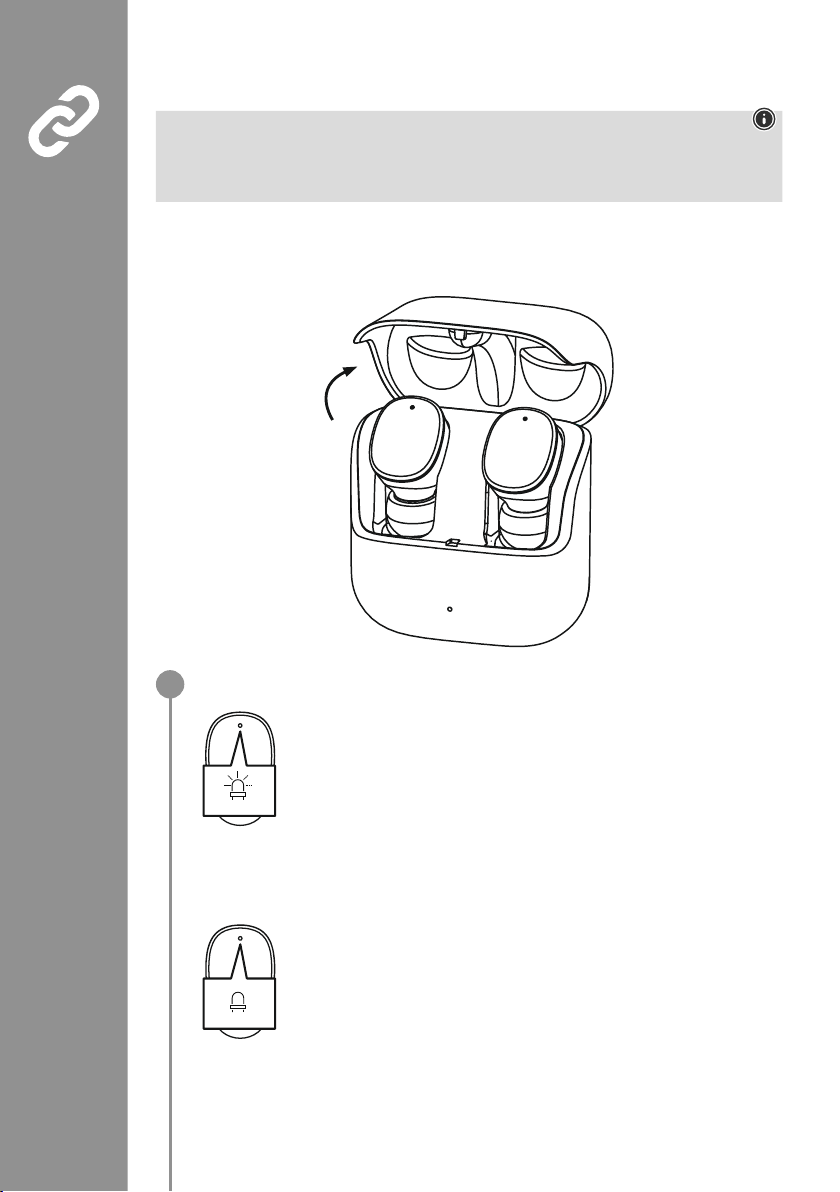
95
6. Spojení Bluetooth®(párování)
Upozornění – Párování
• Zajistěte, že je zařízení s podporou technologie Bluetooth
®
zapnuté a že je aktivována funkce
Bluetooth
®
�
• Dodržujte pokyny uvedené v návodu k obsluze koncového zařízení�
Sluchátka do uší a koncový přístroj by neměly být navzájem vzdáleny více než 1 metr� Čím menší bude
vzdálenost, tím lépe�
Zajistěte, aby byla sluchátka do uší zapnuta�
Zkontrolujte stav stavové LED (3)
Pokud stavové LED (3) na sluchátek do uší blikají střídavě:
Sluchátka do uší hledají spojení Bluetooth
®
�
Pokud stavové LED (3) blikají a poté zhasnou:
Sluchátka do uší jsou již spojena s koncovým zařízením s technologií Bluetooth
®
�
Blue/red
off
1
Page 98
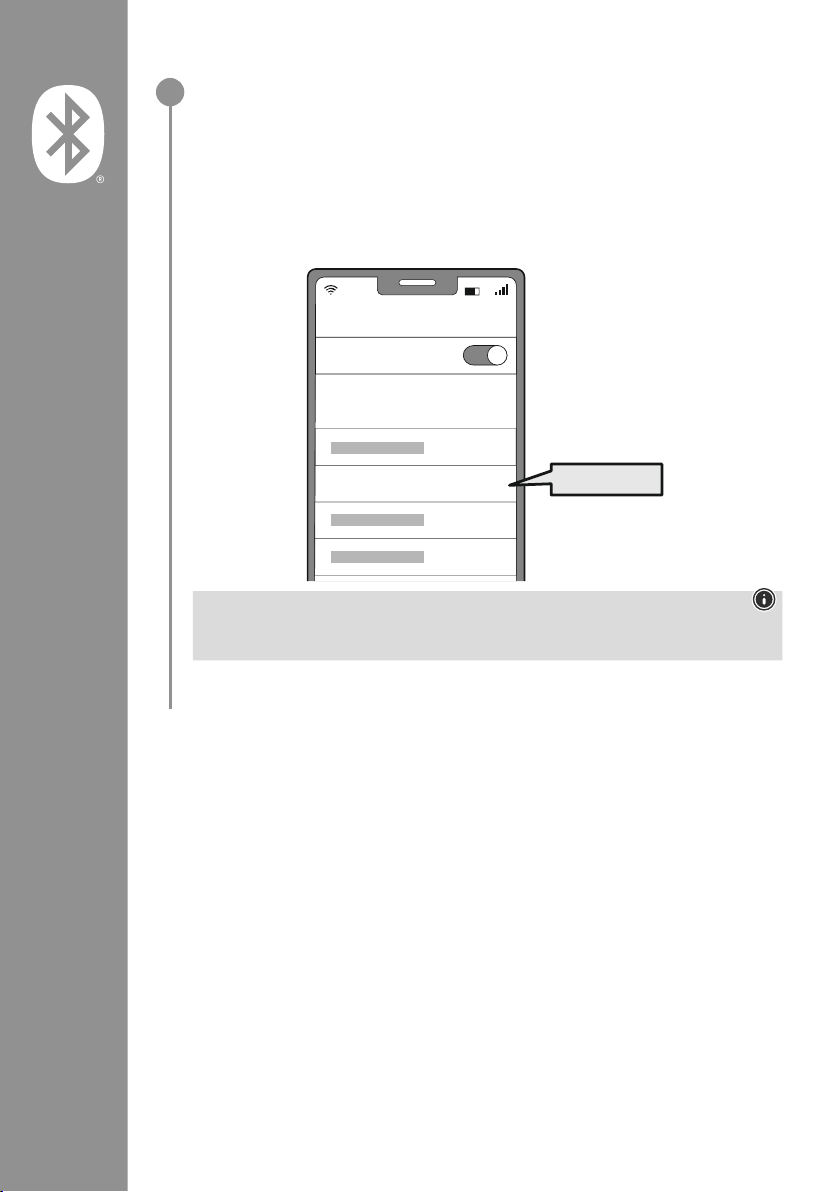
96
Hledejte se svým koncovým zařízením sluchátka do uší (toto je zapotřebí pouze při
prvním spojení)
Na svém koncovém zařízení otevřete nastavení Bluetooth
®
a vyčkejte, dokud se v seznamu
nalezených přístrojů Bluetooth
®
nezobrazí Hama Spirit Pure
�
Vyberte Hama Spirit Pure a počkejte, dokud se sluchátka do uší nezobrazí jako připojený v
nastavení
Bluetooth
®
Vašeho koncového zařízení� Uslyšíte krátký signální tón�
Upozornění – Heslo Bluetooth
®
Některá koncová zařízení vyžadují pro navázáni spojení s jiným zařízením s Bluetooth®heslo
�
• Pro spojení se sluchátky zadejte heslo 0000, pokud vás k tomu vyzve vaše koncové zařízení�
2
Password
Bluetooth
Hama Spirit Pure
ON
0000
Page 99
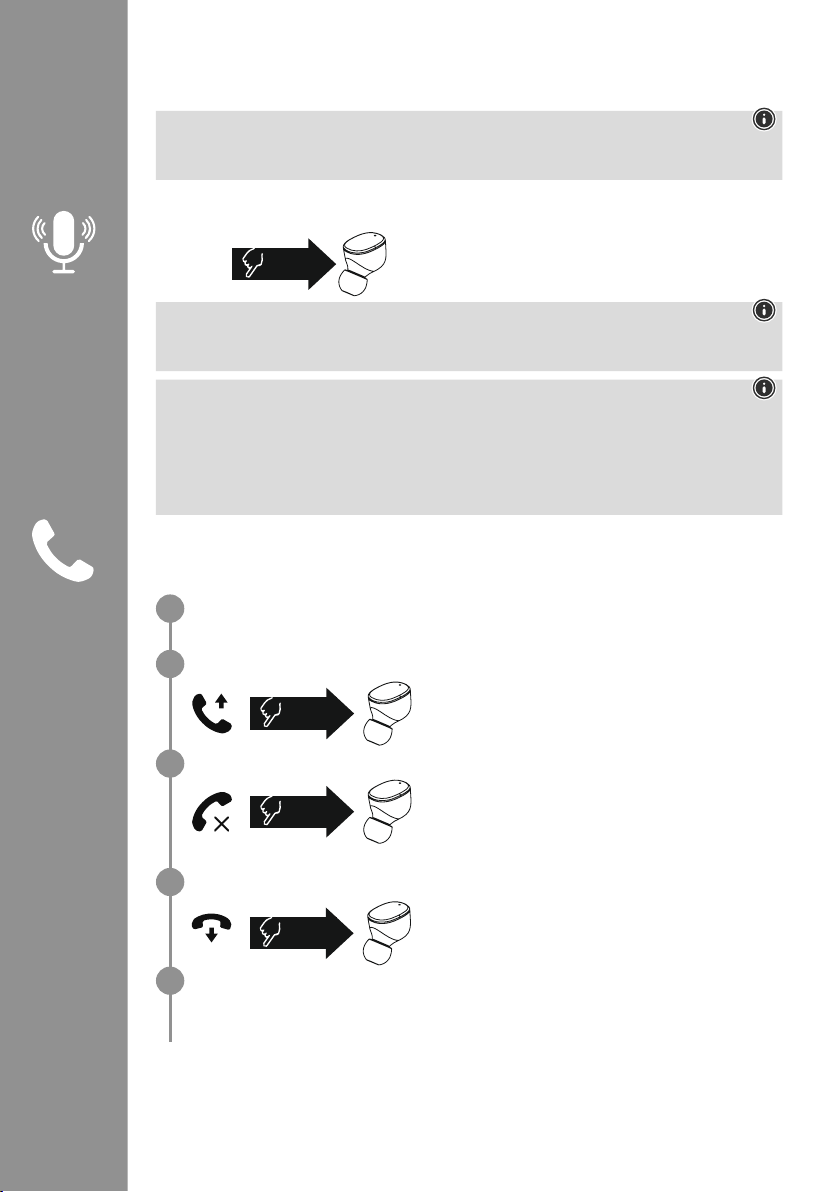
97
7. Obslužné prvky
Upozornění
• Respektujte, že podpora některých funkcí je závislá na vašem koncovém zařízení�
• Dodržujte pokyny uvedené v návodu k obsluze koncového zařízení�
7.1 Funkce hlasového asistenta
Stiskněte jednou multifunkční dotykový senzor (4) na pravém
sluchátku, abyste spustili komunikaci se svým asistentem Siri
nebo s Google Assistant
�
Upozornění – Siri
Siri je k dispozici pouze na vhodných koncových zařízeních se systémem iOS 5 (od iPhone 4s) nebo
vyšším
�
Upozornění – Google Assistant
• Google Assistant je k dispozici pouze na vhodných koncových zařízeních se systémem Android 5.0
nebo vyšším s Google Play Services, > 1,5 GB volné paměti a s minimálním rozlišením obrazovky
720P�
• Aplikace Google Assistant musí být k dispozici na vašem koncovém zařízení a musí být nastavena
jako standardní hlasový asistent
�
7.2 Funkce handsfree
Existuje možnost používat sluchátka do uší jako zařízení handsfree pro vaše koncové zařízení�
Realizovat hovor
Zvolte číslo přímo prostřednictvím svého koncového zařízení, abyste mohli realizovat hovor�
Přijmout hovor
Stiskněte dvakrát multifunkční dotykový senzor (4) na
levém nebo pravém sluchátku, abyste přijali příchozí hovor�
Uslyšíte krátký signální tón�
Odmítnout hovor
Pro odmítnutí příchozího hovoru stiskněte třikrát
multifunkční dotykový senzor (4) na levém nebo pravém
sluchátku do uší� Uslyšíte krátký signální tón�
Ukončit hovor
Stiskněte během hovoru dvakrát multifunkční dotykový
senzor (4) na levém nebo pravém sluchátku, abyste hovor
ukončili
� Uslyšíte krátký signální tón�
Opakování vytáčení
Naposledy vytáčené číslo můžete vytočit znovu pomocí funkce hlasového asistenta (7�1)�
1x
Siri/
Google
2x
3x
2x
1
2
3
4
5
Page 100
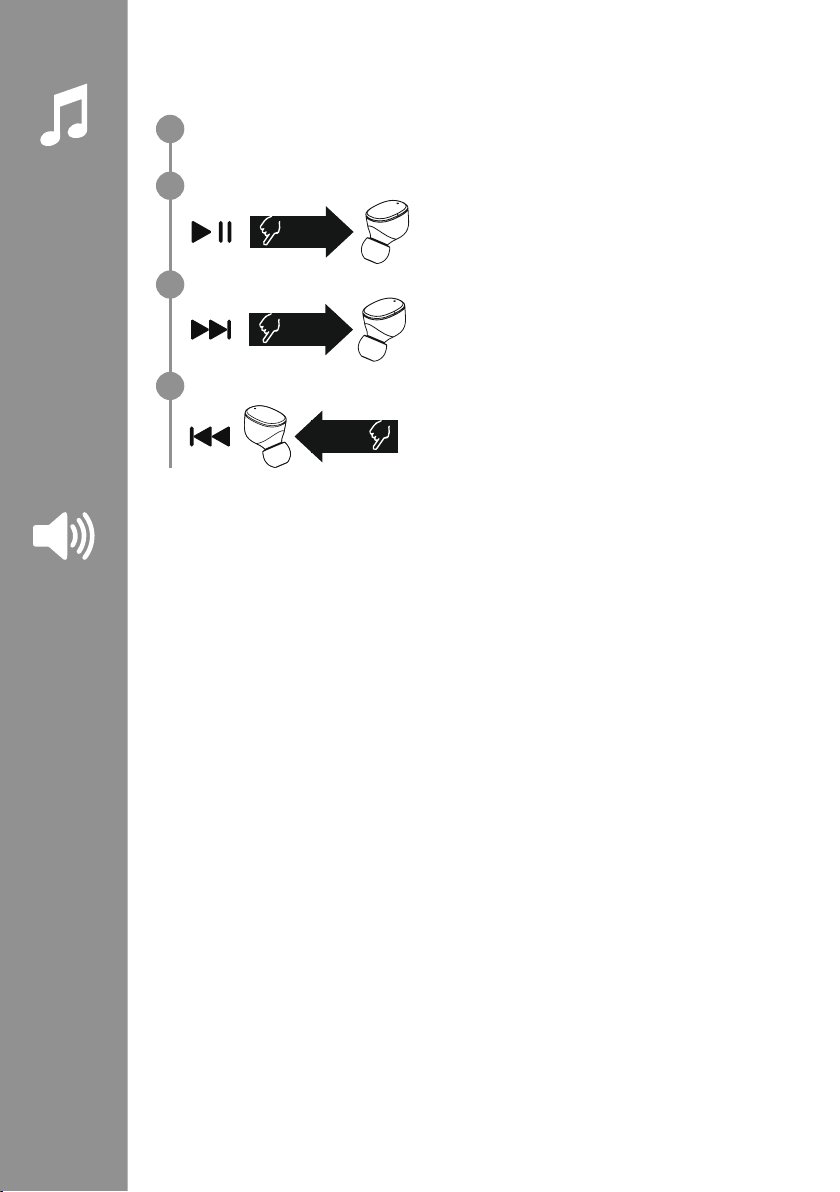
98
7.3 Přehrávání audia
Spusťte přehrávání audia na svém koncovém zařízení.
Přehrát/Pauza
Stiskněte dvakrát multifunkční dotykový senzor (4) na
levém nebo pravém sluchátku, abyste spustili nebo zastavili
přehrávání audia�
Další skladba
Stiskněte třikrát multifunkční dotykový senzor (4) na pravém
sluchátku, abyste přešli k další skladbě�
Předchozí skladba
Stiskněte třikrát multifunkční dotykový senzor (4) na levém
sluchátku, abyste přešli k předchozí skladbě�
7.4 Regulace hlasitosti
Hlasitost se řídí pomocí funkce hlasového asistenta (7�1)�
Alternativně je možné hlasitost řídit i pomocí vašeho koncového zařízení�
2x
3x
R
3x
L
1
2
3
4
 Loading...