

Page 1

Welcome
ConnecttotheworldwiththenewHaierHC-D1600CDMA.Slimlinesbeliethepowerpackedinto
itssleekergonomicframe.Uniqueauto-answerfacility.Easyformatscheduleorganizer.Call
restriction.Sophisticatedfeaturesgiveyoueverypracticaladvantageintoday'sworldoffast
pacedcommunication.Enhanceyourroutineandgiveyourselfanewhorizontoexperiencelife
onthego.So,beforeyouunleashthepowerinyourhand,Haierrecommendsthatyoureadthis
UserGuide.Itwillallowyoutoenjoythefulladvantagesofyourphone.
PDF created with pdfFactory trial version www.pdffactory.com
Page 2

1
1
1
4
6
8
10
13
14
15
17
17
17
18
18
19
19
1.1Safetyguidelines
1.2Careandmaintenanceinformation
2.1Idlemodescreen
2.2Battery
2.3RUIMcard
2.4Makingandreceivingacall
2.5Switchingyourphoneon/off
3.1Enteringdigits(123)
3.2Enteringlowercaseanduppercaseletters(abc\ABC)
3.3Typingbywordassociation(en\En)
3.4Enteringsymbolsandspecialcharacters
4.1List
Contents
1.EssentialInformation
2.Handsetguide
3.Inputmethod
4.Names
Contents
1
PDF created with pdfFactory trial version www.pdffactory.com
Page 3

20
20
21
21
22
22
23
23
24
24
25
27
27
28
28
28
29
5.Messages
4.2Addnew
4.3Search
4.4Multicopy
4.5Groups
4.6Eraseall
4.7Speeddial
4.8Memorystatus
4.9Mynumber
5.1Writemessage
5.2Inbox
5.3Outbox
5.4Draft
5.5Templates
5.6Erasemessages
5.7Voicemail
5.8Messagesetting
2
PDF created with pdfFactory trial version www.pdffactory.com
Page 4

31
31
32
32
32
32
33
33
34
34
34
35
36
36
37
37
37
6.Callhistory
7.Tools
8.Settings
5.9Multimediabox
5.10Memorystatus
6.1Missedcalls
6.2Receivedcalls
6.3Dialledcalls
6.4Eraselists
6.5Calltimers
7.1Scheduler
7.2Alarmclock
7.3Calculator
7.4Tipcalculator
7.5Stopwatch
8.1Ringers
8.2Profiles
3
PDF created with pdfFactory trial version www.pdffactory.com
Page 5

38
39
42
44
44
45
45
47
49
49
49
49
52
9.Radio
10.Game
11.SMSservices
12.FrequentlyAskedQuestions(FAQ)
13.TroubleShooting
8.3Display
8.4Security
8.5Callsetup
8.6Phoneinfo
8.7Keyguard
9.1Commonmode
9.2Prestoremode
10.1Kongming
4
PDF created with pdfFactory trial version www.pdffactory.com
Page 6

1
1.EssentialInformation
Trafficregulations
Switchoffyourphoneatfillingstationsandsensitiveareas
Givenhereisessentialinformationthatwillhelpyouintheoptimumoperationofyourmobile
phone.Byadheringtotheseguidelinesyouwillbeprotectingyourselffromunnecessarypersonal
orfinancialdamagesorinfringementsofthelaw.KindlyreadtheUserGuideinitsentiretyfor
completeinformation.
Trafficandroadsafetyregulationsprohibityourusageofthephonewhiledriving.If,however
theneedarises,pleasedomakeuseofthehands-freesettingsormoveyourcartothesideof
theroadoutoftheflowoftraffic.Incaseyouuseanairbagequippedvehicle,pleasedonotplace
yourphoneintheairbagdeploymentarea,itcouldresultinseriouspersonalinjuryandpossible
propertydamage.
Areaswithapotentiallyexplosiveatmosphereareoften,butnotalways,clearlymarked.These
includefuellingareassuchasfuelfillingstations,belowdecksonboats,fuelorchemicaltransfer
orstoragefacilities,vehiclesusingliquefiedpetroleumgas(suchaspropaneorbutane),areas
wheretheaircontainschemicalsorparticles,suchasgrain,dust,ormetalpowders;oranyother
areawhereyouwouldnormallybeadvisedtoturnoffyourvehicle'sengine.Electricorstatic
1.1Safetyguidelines
PDF created with pdfFactory trial version www.pdffactory.com
Page 7

2
Switchoffyourphoneinhealthcarefacilitieswhenanyregulationspostedintheseareasinstruct
youtodoso.Hospitalsorhealthcarefacilitiesmaybeusingequipmentthatcouldbesensitive
toexternalRFenergy.
TheHealthIndustryManufacturersAssociation(USA)recommendsthataminimumseparation
ofsixinches(15centimetres)bemaintainedbetweenahandheldwirelessproductandmedical
implants(electronic)suchasaPacemakertoavoidpotentialinterferencewiththeimplant.
Theserecommendationsareconsistentwiththeinternationalrecommendationsgoverningthe
usageofwirelesstechnology.
AdvisoryforpersonswithPacemakers:
ALWAYSkeepthephonemorethansixinchesfromyourpacemakerwhenthephoneis
turnedon.
sparksinsuchareascouldcauseanexplosionorfireresultinginseriousinjuryorevenfatalities.
Followairlineadvisoriesonphoneusage.RadioFrequencyemissionsfromwirelessdevices
suchasyourphonecancauseelectronicinterferenceordisturbanceinthedelicatecommunication
andcontrolelectronicequipmentoftheaircraft.
Switchoffyourphoneonaircraft
Switchoffyourphoneinthehospital
Pacemakersandmedicalimplants
PDF created with pdfFactory trial version www.pdffactory.com
Page 8

3
Donotcarrythephoneinabreastpocket.
Preferablyusetheearoppositethepacemakertominimizethepotentialforinterference.
Ifyouhaveanyreasontosuspectinterferenceisoccurring,switchoffyourphoneimmediately.
Ifyouuseanyotherpersonalmedicaldevice,doconsultthemanufacturerofthemedicaldevice
todetermineifitisadequatelyshieldedfromexternalRFenergy.Yourphysicianmaybeableto
assistyouinobtainingthisinformation.
Alwaysfollowphoneetiquetteinpublicplaces.Switchoffyourphonewheretheuseofmobile
phonesisexplicitlyforbidden,asitmaybeasafetyriskormightinfringeonthelaw.
Emergencycallprocedure:
Typeinthelocalemergencynumberandpressthesendkey.
EmergencycallnumbersinIndiaare:Police100/FireBrigade101/Ambulance102.
MostmodernelectronicequipmentsareshieldedfromRadioFrequency(RF)energyemissions.
However,certainelectronicequipmentmaynotbeshieldedagainsttheRFsignalsemittedby
yourphoneandcaremustbetakeninusageofyourphonenexttosensitiveelectronicequipment.
OtherMedicalDevices
Followmandatorysigns
Emergencycalls
Electronicdevices
PDF created with pdfFactory trial version www.pdffactory.com
Page 9

4
1.2Careandmaintenanceinformation
Yourphoneisanelectronicdevicethatshouldbetreatedwithduecareduringusage.The
guidelinesgivenherewillhelpyouincaringforyourphoneandkeepitunderwarrantycoverage.
Protectyourphonefromdust,temperature,humidityandotherextremeenvironmental
conditionsasitwillaffecttheperformanceordamagetheinstrument.Donotuseorstoreyour
phoneinalowtemperatureenvironmentasmoisturewillcondenseinthephoneanddamage
circuitboard.
Avoidstriking,shakingorcausingphysicalshocktothephone.
Protectyourphonefromrain,spilledbeveragesorotherformsofmoisturethatcan
damagetheelectronicsofyourphone.
UsethebatteriesandfittingsmanufacturedbyHaierTelecomCompanyonly.Theuse
ofotherfittingsmaycausedangerousaccidentsandvoidallwarranties.
the
PDF created with pdfFactory trial version www.pdffactory.com
Page 10

5
Donotdisassemblethephoneoritsaccessories.Ifserviceorrepairisrequired,contact
aHaierauthorizedservicecentre.
Donotinadvertentlycauseshort-circuitbyplacingmetalorconductivematerialacross
oronbatteryterminals.
Keepyourphoneandaccessoriesoutofthereachofchildren.
Donotusechemicalsolventsordetergentstocleanyourphone.
PDF created with pdfFactory trial version www.pdffactory.com
Page 11

6
2.Handsetguide
TheillustrationbelowdisplaysthemaincomponentsofyourHaierHC-D1600CDMAphone.
Speaker
Display
Fourwaysnavigationkey
Rightsoftkey
Power/Endkey
Keypad
Leftsoftkey
Sendkey
ABC
DEF
GHI
JKL
MNO
TUV
PQRS WXYZ
FrontView
Chargingport
1
.
,
PDF created with pdfFactory trial version www.pdffactory.com
Page 12

7
ThelistbelowprovidesashortdescriptionofthekeypadfunctionsonyourHaierHC-D1600CDMA
phone.
Description
Dialoransweracall
Entertherecentcalllist
Pressandholdtoswitchyourphoneon/off
Endacallduringaphonecall
Rejectanincomingcall
Returntostandby
Selectorconfirmoption
Enterthemainmenufunction
Deleteenteredcharacters/digitsfromthescreenonebyone
Cancelthecurrentoperationandreturntothepreviousmenu
Enterthenameslist
QuickintoSMSservices,Scheduler,SettingsandMessagesmenu
Controlthecursordirections
Enterthemainmenufunction
Entertheselectedfunction
·
·
·
·
·
·
·
·
·
·
·
·
·
·
·
·
Pressandholdtodeleteallenteredcharacters/digits
Key
1
PDF created with pdfFactory trial version www.pdffactory.com
Page 13

Enterthedigits0to9
Entertheassociatedcharactersorperformassociatedfunctions
Pressandholdtolockthephone,andpress123tounlock
Enterthecharacter*
Activatesymbolmode
PressandholdtoentertheCallmodemenu
Enterthecharacter#
Presstoswitchbetweendifferentinputmethod
·
·
·
·
·
·
·
·
Dependingonyourphonewirelessserviceprovider,someorallofthefollowingindicatorsand
iconsmayappearinidlemode.
Whenthephoneispoweredon,thefollowingiconsmaybedisplayed.
2.1Idlemodescreen
2.1.1Screenindicatorsandicons
Indicatesthenetwork'ssignalstrength
Indicatesthebatterychargestrength
Description
Icon
-
WXYZ
8
.
,
PDF created with pdfFactory trial version www.pdffactory.com
Page 14
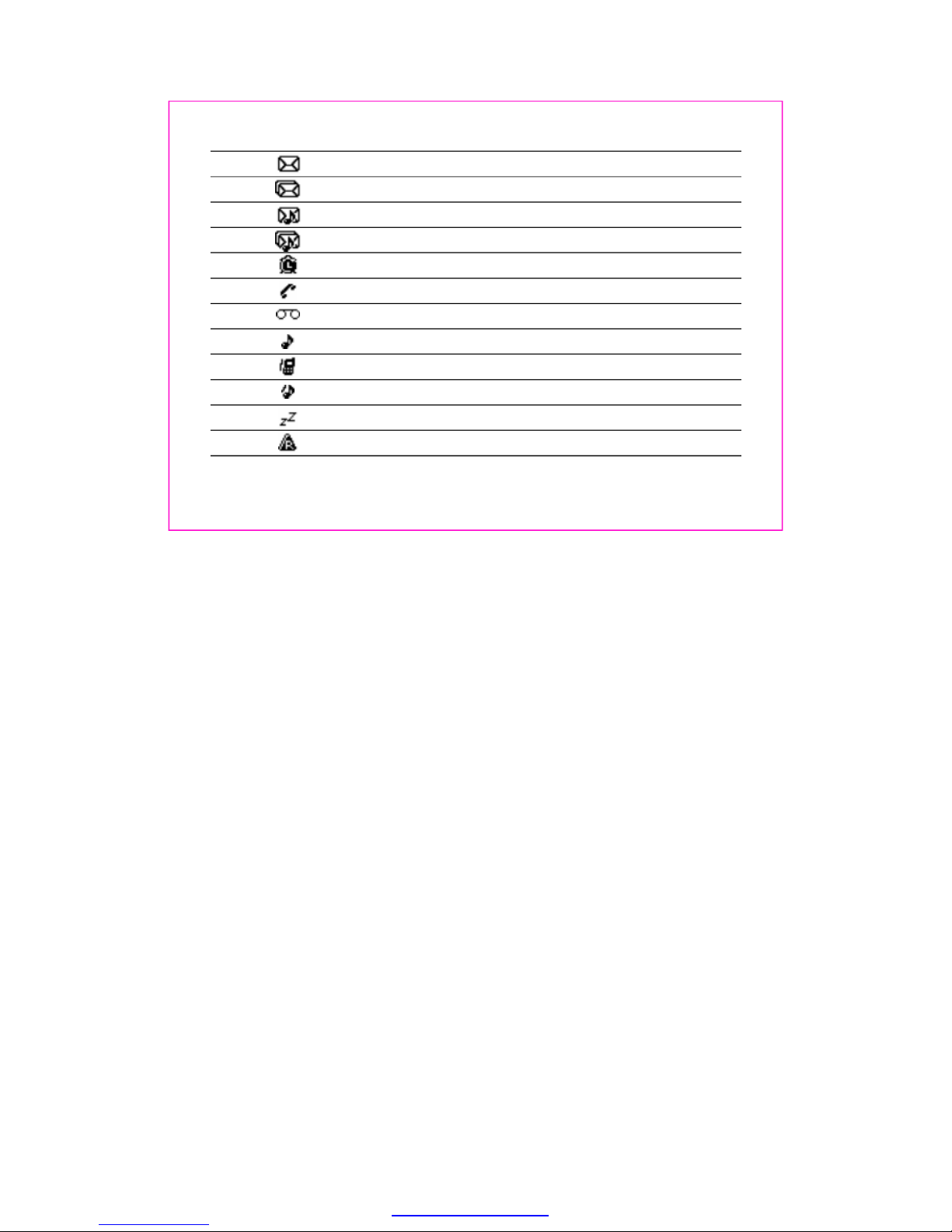
Indicatesthenewtextmessagearrival
IndicatesSMSstoragefull
Indicatesanewsmartmessagearrival
Indicatesanewsmartmessageandtextmessagearrival
Indicatesalarmsettingison
Indicatesacallisconnected
Indicatesvoicemailarrival
Indicatesringermode
Indicatesvibrationmode
Indicatesvibr.thenringmodeorringandvibratemode
Indicatessilencemode
Indicatesroamingstate
9
PDF created with pdfFactory trial version www.pdffactory.com
Page 15

Themobilephoneentersidlemodewithoutanyoperationsafterthephoneisswitchedon.You
canviewthecurrenttimeanddateinidlemode.
Themissedcallsandtheirnumberswillbeshownonscreen.
Whenthenewmessageisreceived:
1)Yourphonemakesalerttones(ringer,vibrationorsilence).
2)Yourphonewillalertyounewmessagearrivalandtheirnumbers.
ThenewSMSmessagewillbestoredinMessagesInbox.
ThenewvCardorringtonemessagewillbestoredinMessagesMultimediaboxvCardor
Ringtone.
1.Removethebatterycoverbypressingtheblackbuttonandslidingthecoverdownwards.
2.Placethebatteryinthebatterycompartmentandclosethecover.
2.1.2Idlemodescreenevents
2.2.1Installingandremoving
1.Idlemode
2.Missedcalls
3.Newmessage
Toinstallthebattery
Toremovethebattery
2.2Battery
10
PDF created with pdfFactory trial version www.pdffactory.com
Page 16
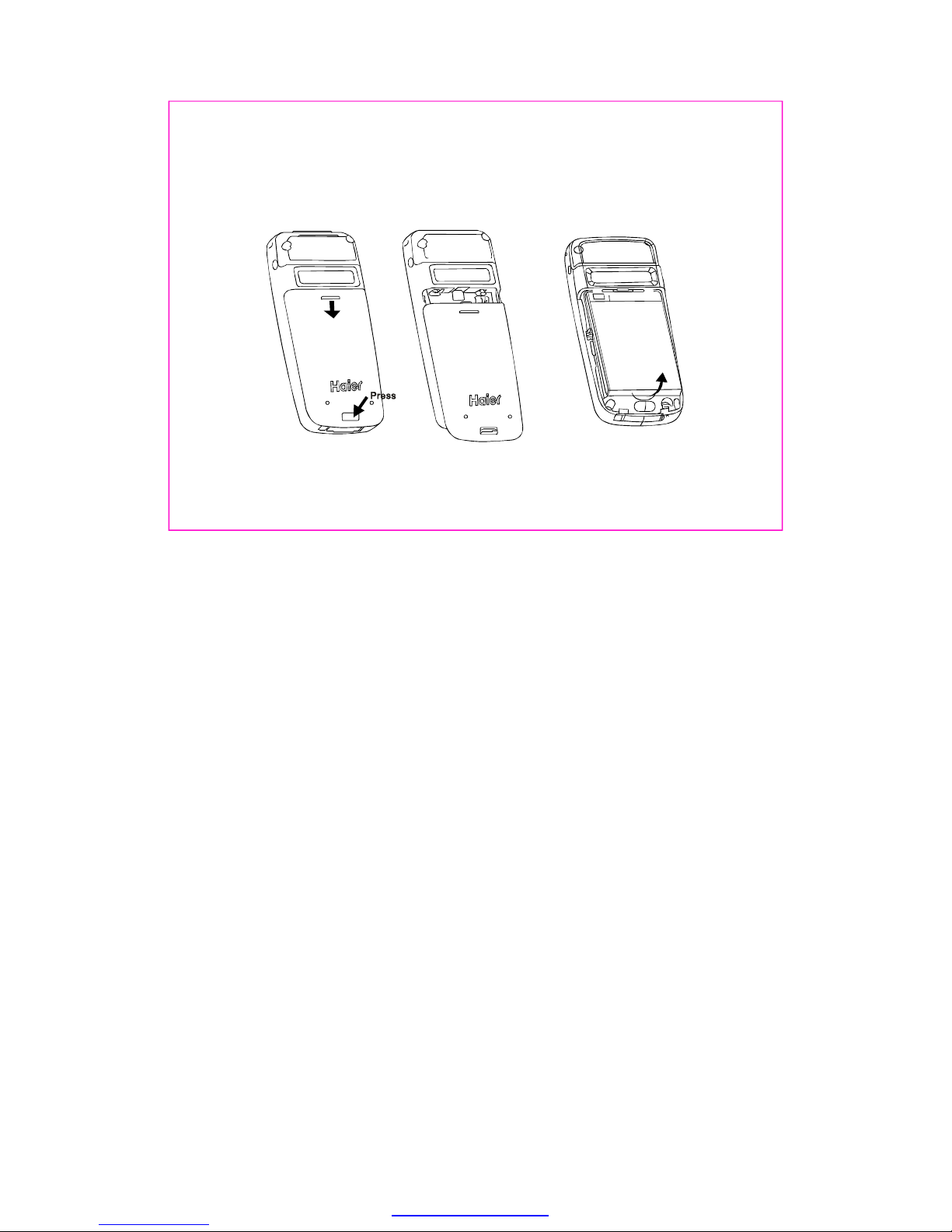
1.Ensureyourphoneisturnedoff.
2.Removethebatterycover.
3.Useyourfingernailtogentlylifttheloweredgeofthebatteryoutwards.
4.Takeoutthebattery.
11
PDF created with pdfFactory trial version www.pdffactory.com
Page 17

TheHC-D1600canbechargedeitherwhenitisswitchedonoroff.
1.Plugthechargertransformerintoastandardoutlet.
2.Insertthechargeroutputintochargingportofthebottomofthephone.
3.Therollingoftheelectricquantitybarindicatesthatthephonebeginstocharge.
4.Whenthebatterylevelisfullandtheelectricquantitybarstopsroll,thephonewilldisplay
'BatteryFull'.
5.Afterchargingiscomplete,switchofftheelectricsupply.Pinchtogetherthespringclamps
onbothsidesofthecharger'sjackandpulloutthecharger'sjack.
Whenthebatterylevelislow,thephonedisplays'BatteryLow!'
Thebatterycanbechargedwheneveryouwant.However,using
yourphonewhilechargingcanincreasethechargingtime.
Itisrecommendedthatyouchargethebatteryforthreehours
(fullchargingperiod)beforeyouuseit.
Donotpullouttheplugofthechargerduringchargingtoavoid
electricaldamagetothephoneandthecharger.
2.2.2Chargingthebattery
Note:
12
ABC
DEF
GHI
JKL
MNO
TUV
PQRS
WXYZ
1
.
,
PDF created with pdfFactory trial version www.pdffactory.com
Page 18

PurchaseaRUIMcardfromnetworkoperator.Yourphonenumberandregistrationinformation
arestoredinyourRUIMcard.YourRUIMcardcanbeusedinanyCDMAphone.Yournumber
andinformationwillnotchange.
1.Makesuretoswitchoffyourphonebeforetakingoutthebattery.
2.TurnthemetalfaceoftheRUIMcarddownandslideitintotheslotprovidedbyyourphone.
3.Reinstallthebattery.
1.Removethebatteryafterswitchingoffyourphone.
2.SlideouttheRUIMcardfromtheRUIMslot.
3.Reinstallthebattery.
2.3RUIMcard
2.3.1ToinserttheRUIMcard
2.3.2ToremovetheRUIMcard
13
UIM
CARD
UIM
CARD
UIM
CARD
UIM
CARD
InserttheRUIMcard RemovetheRUIMcard
PDF created with pdfFactory trial version www.pdffactory.com
Page 19

Youcanusethefunctiononlyafterthenetwork-promptingiconisshownonscreen.
Selectadesiredentryfromthenameslistordirectlytypeinthephonenumberinidlemode,
presskeytodial.
Pressandholdkeyuntil"+"appearsonscreen.
Inputthecountrycode,areacode(withoutprefixzero)andphonenumber.
Presskeytodial.
Youcanendacallatanytimebyholdingdownthekeytillthecallhasbeenterminated.
Whenanincomingcallarrives,phonewillalertyou.Hereyoucanoperatetheoptionsgiven
below:
1.Presskeytoanswerthecalldirectly.
Orpress[Silence]oncetocloseincomingringer,press[Accept]againtoreceive
theincomingcall.
2.Presskeytoendcall.
2.4Makingandreceivingacall
2.4.1Tomakeacall
2.4.2Toreceiveacall
1.Dialling
2.Makinganinternationalcall
3.Endingacall
14
PDF created with pdfFactory trial version www.pdffactory.com
Page 20

15
Orpress[Ignore]torejecttheincomingcall.IfMessagesMessagesettingsend
defaultmessageissetto'On',heredefaultmessagewillbesenttocaller'shandsetautomatically.
Duringaphonecall,bypressingkey,youcanviewthefollowingoptions:
AllowyoutoaccesstheNamesmenu.
AllowyoutoentertheMessagesmenu.
Temporarilyturnsthemicrophoneoffduringaphonecall.Reselectthisoption
toresumeyourconversation.
Toswitchyourphoneonoroff,pressandholddownkey.
IfthereisnoRUIMcardinserted,thephonedisplays'PleaseinsertRUIM'.Presskeyto
onlydialemergencycall.
Youcansetprotectioncode(PINcode)inordertopreventrandomusageofyourphonebyothers.
Eachtimeyourestartyourphone,thephonewillpromptyoutoenterPINcode(thedefaultis
1234).Inthiscondition,presskeytodialemergencycall.
InputPINcodeandpresskey.(Forsecurity,an*willbedisplayedonscreentoinplace
thenumberyouinput.)of
2.4.3Duringaphonecall
2.5.1EnteringPINcode
1.Names:
2.Messages:
3.Mute/Unmute:
2.5Switchingyourphoneon/off
PDF created with pdfFactory trial version www.pdffactory.com
Page 21

16
Ifyoumakeawrongentry,youcanpresskeytore-enterthecode.
IfyouhaveenteredPINcodeincorrectlycontinuouslyfifteentimes,RUIMcardwillbe
automaticallylocked.ThephonewillpromptforPUK(PINunlockingkey)here.YoucangetPUK
fromyourmobilephoneserviceprovider.
IftheRUIMcardisinvalid,thephonedisplays'MINoutofrange-pleaseinsertvalidRUIM',
pleasecontactyournetworkserviceprovider.
Thephonelockcodeisusedtoprotectyourphonefromunauthorizeduse.
Itcanbesettoautomaticallylockyourphoneeachtimeitispoweredonorwheninidlemode.
Youmustpresskeytoinputcorrectphonelockcode,andthenaccessthephonemenu(the
defaultis0000).
ThePINcodeandphonelockcodecanbechanged.See'8.4Security'section.
Note:
2.5.2Enteringphonelockcode
PDF created with pdfFactory trial version www.pdffactory.com
Page 22

YourphoneprovideseZiinputmethod.Youcanenteralphanumericcharacterswhenworking
withthenamesorwhenyouareusingthemessagingservice,etc.
Underthetext-editingmode,presskeytoswitchtheinputmethod.Thephoneprovidesthe
followinginputmethods.
1.Intext-editingmode,presskeyseveraltimesuntil'123'isdisplayedatthetop-rightcorner
ofthescreen.
2.Pressthenumerickeystoinputnumbers.
1.Tapkeyseveraltimesuntil'abc'isdisplayedatthetop-rightcornerofthescreen,youcan
typeinlowercaselettershere.
2.Tapkeyseveraltimesuntil'ABC'isdisplayedatthetop-rightcornerofthescreen,you
cantypeinuppercaselettershere.
3.Tapdesirednumberkeyseveraltimes(nolongerthan0.5secondsbetweentwoclicks)to
enteraspecifiedletter(asprintedonthekey).
4.Aslongasthecursorisnotvisible,youcankeeptappingakeytochangethecurrentcharacter
tonextcharacterofsamekey.Currentcharacterwillbeenteredwhenthecursorappears.
3.Inputmethod
3.1Enteringdigits(123)
3.2Enteringlowercaseanduppercaseletters(abc\ABC)
17
PDF created with pdfFactory trial version www.pdffactory.com
Page 23

5
Bypressingkey,andchoosing'en'or'En'youcancreateawordwithouthavingtotypein
allthecharactersofthatword.
1)The'en'optionallowsyoutotypepredictivetextwiththefirstletterinlowercase.
2)The'En'optionallowsyoutotypepredictivetextwiththefirstletterinuppercase.
Associatedwordsshouldbedisplayedafteryouhavetotypeinasingleletterorfirstfewletters
ofthewordyouwanttotype.Thenyoucaninsertthedesiredwordbypressingkeyandsingle
pressingcorrespondingnumberkey.
If,however,yourdesiredwordisnotavailableviawordassociation,youmayhavetotypeinthe
wordusingthesameprocedureasdescribedin3.2.
1.Presskeytoenterthespecialcharacterlibrary.
2.Press4-waysnavigationkeytoviewthesymbolyouneed.
3.Pressthecorrespondingnumberkeytoselect.
3.3Typingbywordassociation(en\En)
3.4Enteringsymbolsandspecialcharacters
.Ifyouwanttoenteraletter,whichisonthesamekey,youcanwaitfor0.5secondsuntilthe
cursorappears,orpressleft/rightnavigationkeytomovethecursor,sothatyoucantapthe
keyagain.Ifyouwanttoenteraletterthatisonadifferentkey,youcantapthekeydirectly.
18
.
,
PDF created with pdfFactory trial version www.pdffactory.com
Page 24

Youcanstorenamesandphonenumbersasentriesinnameslist.Theseentriesarestoredin
yourphoneorRUIMcardmemory.Oncestored,anumbercanbequicklyretrievedanddialled.
Yourphonememorycapacityis200entriesandtheRUIMcardmemorydependsonthenetwork
serviceproviders.
ToaccesstheentriessavedinthephoneorRUIMcardmemory.
Allowyoutovieweachentry'scontents.
Allowyoutosendamessagetotheselectednumber.
Allowyoutocalltheselectednumber.
Allowyoutochangetheselectedoptionandtosave.
Allowyoutoerasetheselectedentry.
AllowyoutocopytheselectedentrytoRUIMcardmemoryorphonememory
4.Names
4.1List
4.1.1Details
4.1.2Sendmessage
4.1.3Call
4.1.4Edit
4.1.5Erase
4.1.6Copy
19
PDF created with pdfFactory trial version www.pdffactory.com
Page 25

AvCardisanelectronic(orvirtual)businesscard.Itisapowerfulnewmeansofallowingpeople
exchangetheirpersonalinformationwitheachother.
Withthisfeature,youcansendtheselectednumberasvCardformattoothers.
WiththeAddnewfunction,youcanchooseeithertheRUIMnamesorPhonenamestostorethe
newitem.
Ifyouaddanewitemtothephonenames,youneedtoenteroneofthefollowingoptions:Number,
Email,Address,URLandNote.IfyouaddanewitemtoRUIMnames,youneedtoenterNumber
option.
Thisfunctionallowsyoutoquicklyfindpreferredcontactfromthenameslist.
1.Inputinitialletterorfirstfewlettersofthenameyouwishtofindtobeginsearch.
2.Thematchedorthenearestmatchingentrywillbedisplayed.
3.Accordingtotherequirementpress4-waysnavigationkeytosearchtheneededcall.
4.Ifthereisn'tanynamematchingyourentry,thescreenwilldisplay'Nomatchesfound!'
4.1.7SendasvCard
4.2Addnew
4.3Search
20
PDF created with pdfFactory trial version www.pdffactory.com
Page 26

Withthemulticopyfunction,youcancopyrecordsfromtheRUIMcardtothephonememoryand
viceversa.
Byselecting'Copyall'youcancopyalloftheentriesbetweenRUIMcardandphonememory.
Byselecting'Copyselected',youcanselectoneormoreoftheentriesfromthenameslistto
copyit.Afterselectinganentry,presskeytoviewoptionsasbelow:
Presskeytovalidatemakingtickincheckbox.Presskeyagaintocancelthisoperation,
checkboxbecomesblankagain.
Presskeytovalidatethatallticksincheckboxbecanceled.
Presskeytovalidatemakingticksinallcheckbox.
Presskeyandthenthephonedisplaystheconfirmation,askingyouifyouwishtocopyor
not.Presskeytoconfirmcopy.
Yourmobilephoneprovides7groupsinwhich5groupsarebydefaultother2groupscanbeadded.
Defaultgroupsare'Nogroup','Family','Friends','Colleagues'and'VIP'.
4.4Multicopy
4.5Groups
1.Select/Unselect
2.Cancelall
3.Selectall
4.Copy
the
21
PDF created with pdfFactory trial version www.pdffactory.com
Page 27

22
YoucanViewgroup,Addgroupname,ChangegroupnameandErasegroupnamehere.
Bydefaultthenameslistareallocatedtothe'Nogroup'.
Beforeaccessingthisoption,youwillbeaskedtoenterlockcode(Bydefaultis0000).This
featureallowscompleteerasingofallcontactseitherinRUIMcardmemoryorPhonememory,
theinformationthusdeletedisunrecoverable.
Speeddialisafastwaytocalloneofyourspecialnumbers.
Yourmobilephonehas99speeddialentriesinwhich5speeddialentriesarebydefault.
1.Toassignaspeeddialnumber
Youcanfollowthestepsgivenhere:
NamesSpeeddialOptionsSetentrySelect
2.Toerasespeeddialentry
Youcanoperateasperthefollowingsteps:
NamesSpeeddialOptionsErase/EraseallSelect
3.Todialaspeeddialnumber
Toaccesscontactnumbersthathavebeenassignednumbersfrom1to9,pressandholddown
4.6Eraseall
4.7Speeddial
PDF created with pdfFactory trial version www.pdffactory.com
Page 28

23
theassignednumber,andthecontactnumberwillautomaticallybedialled.
Toaccesscontactnumbersthathavebeenassignednumbersfrom10to99,typetheassigned
numberfollowedbykeyandthenpresskey.
Forexample,tospeeddialthe11thentry,type11#andpresskey.
Defaultspeeddialnumbersare:
1=Voicemail
2=VoiceStat.
3=C.CarePrePd
4=C.CarePostPd
5=Dir.Assist.
Ifyouwanttorestorethespeeddiallisttodefaultsettings,youcanuse'Resettodefault'
function.Referto'8.4.3Resettodefault'.
Thisfunctionhelpsyoutocheckthenumberofentriesstoredinthenameslists.
YoucancheckthememorystatusoftheRUIMcardandphonememory,includingtotalmemories
andfreememories.
Thisfunctionallowsyoutoadd,editanderaseyourmobilenumber.
Note:
4.8Memorystatus
4.9Mynumber
PDF created with pdfFactory trial version www.pdffactory.com
Page 29

Allowyoutoedittextmessage.Whencomposingtextmessages,checkthenumberofcharacters
allowedinthetop-rightcornerofthescreen.Thecharacterlimitforasinglemessageis160
characters.Whenthislimitisreached,thephonesoundsatonealertanddisplayspop-upmessage
'Sorry,nomorespace!'
Pressnumerickeytoinputcorrespondingcharacters,andthenpresskeytoaccessthe
followingmessageoptions:
5.Messages
5.1Writemessage
5.1.1Send
5.1.2Inserttemplates
5.1.3Sendtomany
Afterwritingthemessage,pressSendoptiontoinputtherecipient'snumberorretrieveanumber
fromthephonebook.Hereyoucansetsinglemessagesetting,including'Priority','Deferred
delivery','Validityperiod'and'Deliveryreports'.ThenselectSendoptiontosendthemessage.
WhencomposinganSMSmessage,youcanusetheInserttemplatesoption,scrollthrougha
listofprewrittenmessagesandselecttheoneyouwanttoinsertintoyournewtextmessage.
TheoptionofSendtomanyallowsyoutosendasinglemessagetomulti-recipients(nomore
than10).
24
PDF created with pdfFactory trial version www.pdffactory.com
Page 30
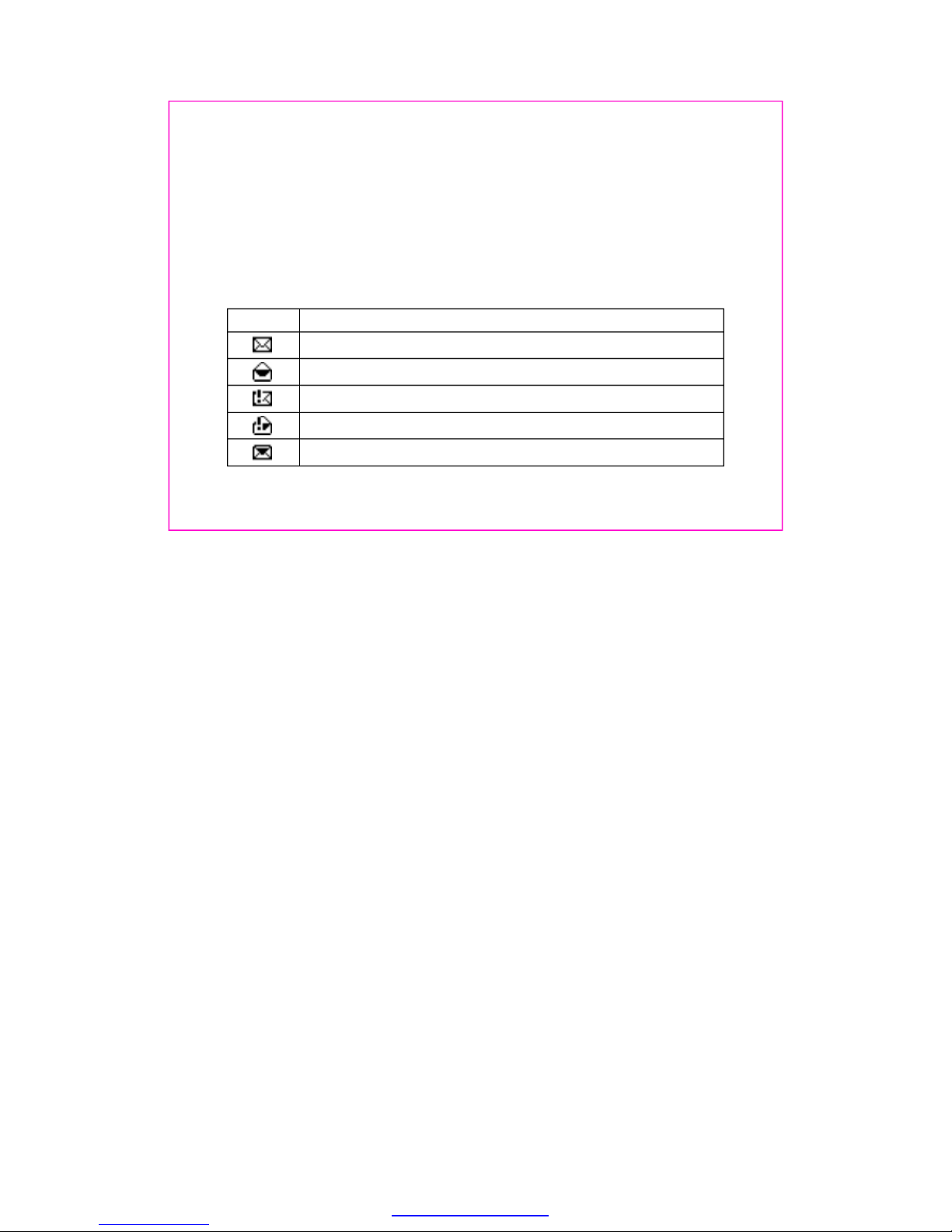
Themessageiconsininbox
IndicatesanewnormalmessagewhichisstoredinRUIMcardmemory.
IndicatesanoldnormalmessagewhichisstoredinRUIMcardmemory.
IndicatesanewurgentmessagewhichisstoredinRUIMcardmemory.
IndicatesanoldurgentmessagewhichisstoredinRUIMcardmemory.
Indicatesanewnormalmessagewhichisstoredinphonememory.
DescriptionIcon
25
5.1.4Insertnumber
5.1.5Save
TheInsertnumberoptionallowsyoutoinsertacontactnumberdirectlywhilecomposingthe
message.
TheSaveoptionallowsyoutosavethecontentsoftheeditedmessagetotheDraft.
5.2Inbox
Inboxcontainsthereceivedmessages.
PDF created with pdfFactory trial version www.pdffactory.com
Page 31

Fromthemessageview,youcanpresskeytoaccessthefollowingoptions:
Allowyoutoreplybacktothemessagereceived.Onceyouhavecomposedyourmessage,press
keytosendyourreplymessage.
Allowyoutoforwardthereceivedand/oreditedmessagestodesirednumber.
Allowyoutosaveorcallthephonenumberofthesender,ortosendmessage.
Allowyoutoerasetheselectedmessage.
5.2.1Reply
5.2.2Forward
5.2.3Usenumber
5.2.4Erase
Indicatesanoldnormalmessagewhichisstoredinphonememory.
Indicatesanewurgentmessagewhichisstoredinphonememory.
Indicatesanoldurgentmessagewhichisstoredinphonememory.
26
PDF created with pdfFactory trial version www.pdffactory.com
Page 32
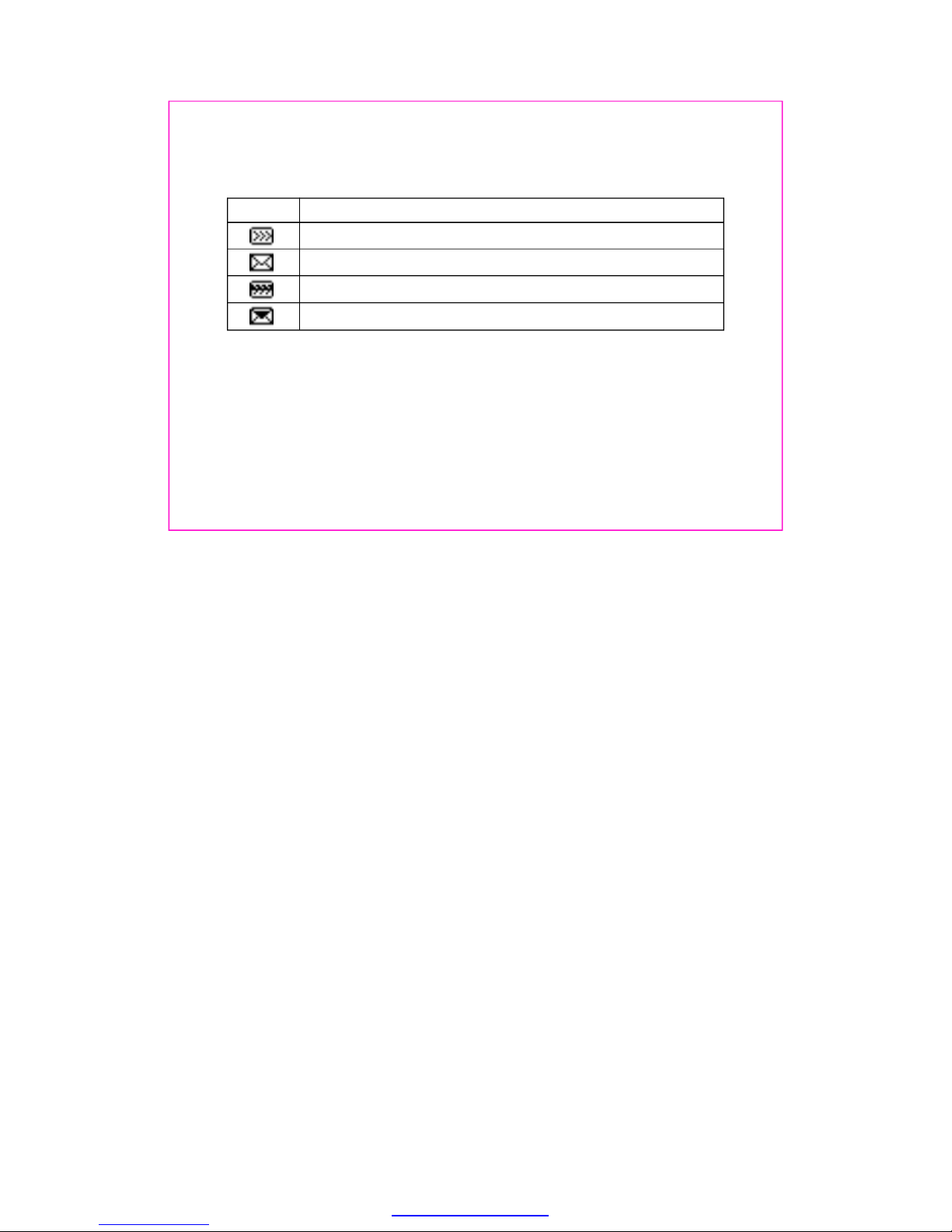
Themessageiconsinoutbox
IndicatesasentmessagewhichisstoredinRUIMcardmemory.
IndicatesanunsentmessagewhichisstoredinRUIMcardmemory.
Indicatesasentmessagewhichisstoredinphonememory.
Indicatesanunsentmessagewhichisstoredinphonememory.
DescriptionIcon
Outboxcontainssentandunsentmessages.
Youcanretrievethesemessagesandforwardthemtoothercontactsorerasethemessageifit
isnolongerrequired.ErasingmessagesfromtheOutboxcanfreeupadditionalmemoryonyour
phone.
Youcanaccessthefollowingoptions:Forward,Usenumber,Erase.Foroperationpleaserefer
toInbox.
Draftcontainssavedmessages.
Youcanaccessthefollowingoptions:Forward,Usenumber,Erase.Foroperationpleaserefer
toInbox.
5.3Outbox
5.4Draft
27
PDF created with pdfFactory trial version www.pdffactory.com
Page 33

Forconvenience,thephoneoffersyoualistof9shortprewrittenmessages.Youcancustomize
12newtemplates.Youcanselecttheoneyouwanttoinsertintoyournewtextmessagefora
quickreply.
Forviewinganytemplate,youcanoperatethefollowingoptions:Edit,Erase,AddnewandSend.
AccesstheErasemessagesoptiontospecifyexactlywhichtypeofmessageyouwanttoerase.
Byselecting,youcanerasemessagesfromtheinboxfolder.
Byselecting,youcanerasemessagesfromtheoutboxfolder.
Byselecting,youcaneraseallthemessagesinthedraftfolder.
Byselecting,youcaneraseallthereadmessages.
Byselecting,youcanquicklyeraseallmessagesstoredinyourphoneorRUIMcard
memory.
ShouldyousubscribetotheVoicemailservice,yourmobilephoneserviceproviderwillfurnish
youwithauniquevoicemailboxnumber.Youwillneedtosavethisnumbertoyourphoneto
accessyourvoicemailmessages.Whenyoureceiveavoicemessage,yourphoneletsyou
5.5Templates
5.6Erasemessages
5.7Voicemail
Inbox
Outbox
Draft
Eraseallreadmessages
Eraseall
28
PDF created with pdfFactory trial version www.pdffactory.com
Page 34

knowbybeeping,displayingamessage,orboth.Ifyoureceivemorethanonemessage,your
phoneshowsthenumberofmessagesyouhavereceived.
Tolistentovoicemailyouhavereceived,youwillneedtopressandholddownkey.
Youcancustomizethewayyouwouldlikeyourmessagestoappearorbereceived.Bypressing
key,youcanaccessthefollowingoptions:
unsentmessagesintheOutbox(subjecttomemoryavailable).
Allowyoutoselect'On'or'Off'option.Ifyouselect'On'option,themessagesintheOutboxare
deletedautomaticallywhenthememorybecomesfull.
YouhavetheoptionofselectingthemessagepriorityasNormalorUrgent.
Youcaneditorsavethevoicemailnumber.
5.8Messagesetting
5.8.1Autosave
5.8.2Autodelete
5.8.3Priority
5.8.4Voicemailbox
Allowyoutoselect'On'or'Off'option.Ifyouselect'On'option,yourphonewillsavethesentor
29
PDF created with pdfFactory trial version www.pdffactory.com
Page 35

Oftenyouwouldliketoknowwhetheryourmessagehasbeendeliveredorisstillpending.You
cancheckthisstatusbysettingtheDeliveryreportsoptionto'On'or'Off'.BysettingittoOn,
youwillreceiveadeliveryconfirmationwhenthemessageisdelivered.
Thisfunctionisdependedontheserviceprovider'snetwork.
YoucanselectstoragedeviceinwhichtheSMScanbestoredinRUIM,Phone,RUIMandphone
device.
Youcanchoosethetimewhenyouwantyourmessagetobedelivered.Theoptionsavailable
are'Immediate','After1h','After5h'and'After1d'.
Thisfunctionisdependedontheserviceprovider'snetwork.
YoucansettheValidityperiodforyourmessages,thatis,howlongtheyshouldbeavailableto
thereceiver.
Allowyoutoselect'Default''30minutes''1hour''2hours''12hours''1day''2days''3days'
options.
5.8.5Deliveryreports
5.8.6Storagedevice
5.8.7Deferreddelivery
5.8.8Validityperiod
Note:
Note:
30
PDF created with pdfFactory trial version www.pdffactory.com
Page 36

Ifthisfeaturecanbesetto'On',whenyouignoretheincomingcall,thedefaultmessagewillbe
automaticallysenttothecaller'sphonenumber.
Bydefaultitscontentsare'I'mbusy.Pleasecallmeaftersometime.'Youcaneditit.
vCardcontainsreceivedvCardmessages.
ThisfeatureallowsyoutoviewthevCarddetails,andtoeraseoreraseallthevCard.
Ringtonecontainsreceivedringtonemessages.
Youcanplayandrenametheselectedringtoneordeletetheringtoneifitisnolongerrequired.
YoucancheckthememorystatusoftheRUIMcardandphonememory,includingtotalmemories
andfreememories.
5.8.9Senddefaultmessage
5.8.10Defaultmessage
5.9.1vCard
5.9.2Ringtone
5.9Multimediabox
5.10Memorystatus
31
PDF created with pdfFactory trial version www.pdffactory.com
Page 37

Yourphonecanrecordrecentcallactivityandsaveatotalof30received,dialedandmissed
calls.
Thisoptionallowsyoutoviewthelistofrecentmissedcalls.Youalsohavetheoptionofsaving
themissedcallnumberorsendingareplymessage.See'Detailedcallrecords'.
Youcanviewthelistofallrecentincomingcalls.Youalsohavetheoptionofsavingthenumber
andreplyingwithamessage.See'Detailedcallrecords'.
Youcanviewthelistofallrecentoutgoingcalls.Youalsohavetheoptionofsavingthenumber
andsendingamessage.See'Detailedcallrecords'.
Youcanviewtheselectedcallrecorddetails.
Iftheselectedphonenumbercan'tbestoredinthenameslist,youcansaveit.
Youcansendamessagetotheavailablenumber.
6.Callhistory
6.1Missedcalls
6.2Receivedcalls
6.3Dialledcalls
Detailedcallrecordsasfollowing:
1.Details
2.Sendmessage
32
PDF created with pdfFactory trial version www.pdffactory.com
Page 38

Allowyoutocalltheavailablenumber.
Youcanerasetheselectedcallrecord.
Thisfunctioncanbeusedtoeraseallthemissed/dialled/receivedcallshistory.
Youcaneraseallyourrecentcallhistories.
ThisfunctionallowsyoutodisplaythedurationofyourLastcall,Receivedcalls,Dialled.
callsandTotalairtime,andalsotoresetyourtimecountertozero.
Byselectingtheoptionyoucanviewthedurationofthelastcall.
Byselectingtheoption,youcanviewthetotaltimeforallincomingcallssince
thetimerwasreset.
Byselectingtheoptionyoucanviewthetotaltimeusedforalloutgoingcalls
sincethetimerwasreset.
Selectingtheoptionclearsthecallhistoryandresetsthehistorytimerstozero.
Selectingtheoptiondisplaysthetotaltimeusedforallincomingandoutgoing
callssincethetimerwasreset.
3.Call
4.Erase
5.Eraseall
Lastcall
Receivedcalls
Dialledcalls
Resettimer
Totalairtime
6.4Eraselists
6.5Calltimers
33
PDF created with pdfFactory trial version www.pdffactory.com
Page 39

ToolsmenuoffersyouthefunctionsoftheScheduler,Alarmclock,Calculator,Tipcalculator,
Stopwatch.
Youcanusetheschedulerfunctiontosetreminder/alertsforvariousevents,meetingsand
more.
Thetimeentryisavailableina12-hourformatonly.
1.SelectToolsSchedulerAddnew
2.Editthedateyouprefer,thenpressOkkeytosave.
3.Addthedescriptionofthescheduleyouwishtoassign,andthenpressOkkey.
4.SetalarmtimeandpressOkkey.
Ifthealarmtimecanbesettopasttime,thephonepopsupmessage'Failed!Thetime
shouldbelaterthannow'.
AllowyoutoView/Edit/Erasetheentrieslistofscheduleaspertheirtimesequence.
Thefunctioncanbeusedtoerasethewholeentrylist.
Youcansetanalarmbyusingthephone'sbuilt-inalarmclockfunction.
7.Tools
7.1Scheduler
7.2Alarmclock
7.1.1Addnew
7.1.2Listall
7.1.3Eraseall
Note:
34
PDF created with pdfFactory trial version www.pdffactory.com
Page 40

Thealarmclockisbasedonthesystemnetworkclock.Itsoundsanalertatanytimeyouwant.
Thisfunctionallowsyoutoswitchanalarmonoroff.
Youcansetthealarmtimebyusingthisfeature.
1.Off
Itcanbesettoturnoffthealarmcompletelybypressinganykeywhenthealarmwakesup.
2.10minutes/15minutes/20Minutes
Whenthealarmgoesoff,selectSnoozetopostponethealarmfor10/15/20minutes.
Thecalculatorfunctionperformsthe4arithmeticcalculationsusingupto12digits,addition(+),
subtraction(-),multiplication(),division().
1.Enterthecalculatormaininterface.
2.Keyoperationsforcalculationareasfollows:
Enterthefirstnumber.Pressnumberkeytoinputthenumber,presskeytoinput
thedecimalpointandkeyfornegativesign.Thenselecttheoperationbypressing
oneofthefourdirectionkeys.Inputthesecondnumberafterthat.
7.2.1Enable/Disable
7.2.2Settime
7.2.3Snoozemode
7.3Calculator
×÷
.
,
35
PDF created with pdfFactory trial version www.pdffactory.com
Page 41

Tocleartheenterednumberoroperand,presskey[Clear].
Tocalculatetheresult,presskey.
3.Ifyouwishtostartanewcalculation,presskey[Options]toselectReset.
4.Ifyouclosethecalculatorfunction,presskey[Back].
Foralimiteddegreeofaccuracy,thisfunctionshouldonlybeusedforreference.
Thisfunctionallowsyoutoquicklycalculatorthetipalongwithbillamountaswellasanoption
tosplitthetotalbill.
1.SelectToolsTipcalculator
2.Selectthe'Next'
3.Selectratetoselectapercentageoftip.
4.Presskeytogetthetotalresultplusthetip.
5.Tosplitthetotalbillplustip,selectthe'Options'softkeythenselect'Split'tosplittheamount.
1.Select'Start'tostartthetimecountinsecond.
2.Select'Pause'tostopthetimecountorpress'Split'everytimeyouneedtocountalap.
3.Select'Resume'torestartthetimecountfromlaststoppedpositionorselect'Reset'toreset
thetimecountertozero.
4.Select'Quit'toreturntopreviousmenu.
Note:
7.4Tipcalculator
7.5Stopwatch
36
PDF created with pdfFactory trial version www.pdffactory.com
Page 42

YoucanallocatedifferentringersforCall,SMSorAlarm.
Profilesallowyoutocustomizeyourphoneasperyourpreferences.Youcancustomizeawhole
rangeofsettingsasperyourdailylifestyleneeds.
Youcansetalertsforincomingcallsbyusingthisfunction.
Thephoneprovidesfiveoptions:Ringer/Vibration/Vibr.thenring/Ringandvibrate/Silence.
YoucansetalertsforincomingSMSmessagesbyusingthisfunction.
Thephoneprovidesthreeoptions:Ringer/Vibration/Silence.
ThisfunctionallowsyoutoadjustthevolumeoutputoftheRinger,KeybeeporEarpiece.
Thisfeatureallowsyoutoselectthekeytonemode:Normal(theprolongedsoundandthebrief
soundarefixed.),Long(whenyouarepressingthekey,thekeytoneisalerteduntilun-pressing).
8.Settings
8.1Ringers
8.2Profiles
8.2.1Callpromptmode
8.2.2Messagepromptmode
8.2.3Volume
8.2.4Keytone
37
PDF created with pdfFactory trial version www.pdffactory.com
Page 43

Youcanchangethestatusofalertsdetailedbelow.
Whenthealertfor'Servicechange'isenabled,itmeansthateverytimeyourphonehaslostthe
service(NetworkSignal)orregainedtheservice(NetworkSignal)aphonealertissounded.
Whenthealert'Minutebeep'isenabled,duringaphonecall,asyourcallnearsaminute's
duration,analertwillsound10secondsbeforeeverytime.
Whenthealertfor'Callconnect'isenabled,thephonewillsoundanalertduringthe
conversation.
Ifanalertfor'Callend'isenabled,whenacallisended(eitherbyyouorbecausethecallis
dropped),analertwillsound.
Ifthealertfor'Failonoutgoing'isenabled,thealertwillsoundwhenthecallisnotconnected.
Ifthechargerbeepis'On',everytimeyourphoneisconnectedordisconnectedtothecharger,
analertwillsound.
Youcancustomizeyourdisplaybycreatingabanner,adjustingthebacklight,selectingthe
8.2.5Alerts
1.Servicechange
2.Minutebeep
3.Callconnect
4.Callend
5.Failonoutgoing
6.Chargerbeep
8.3Display
38
PDF created with pdfFactory trial version www.pdffactory.com
Page 44

Youcaneditthebannerthatwillbedisplayedbelowyourmobilephoneserviceprovider's
name.
Youcanspecifythedurationofthebacklight.
Thephoneprovides5timers(Alwaysoff,7seconds,15seconds,30secondsandAlwayson)to
allowyoutoselect.
Thisfunctionallowsyoutosetthedisplayedlanguages.
CurrentlythephonesupportsonlytheEnglishlanguage.
YoucanadjustLCDcontrastfrom0~9level.
Beforeaccessingthisoption,youwillbeaskedtoenterlockcode(Bydefaultis0000).
Thisoptionisusedtosetthelockcode.
languageoradjustLCDcontrast.
8.3.1Banner
8.3.2Backlight
8.3.3Language
8.3.4Contrast
8.4.1Phonelock
8.4Security
39
PDF created with pdfFactory trial version www.pdffactory.com
Page 45

Thelockcodecanbesettoprotectyourphonefromunauthorizeduse.Itcanbesetto
automaticallylockyourphoneeachtimeitisswitchedonorisinidlemode.
Thelockcodeisafourdigitnumberwhichissetat0000.Thiscanbechangedatanytime
byusingthe'Changecode'option.
Thisoptioncanbeusedtosetthelockcodedisable.
Thisoptioncanbeusedtoimmediatelylockyourphone.Onceselected,yourphonewillbe
unusableuntilthephonelockcodeisenteredcorrectly.
Thisoptioncanbeusedtoautomaticallylockyourphoneeachtimeitisswitchedon.
Thisoptionisusedtochangethelockcode.
Afterselectingthisoption,youwillbeaskedtoenternewlockcodetoreplacetheoldcode.The
newlockcodemustbeenteredagainasconfirmation.
Thisfunctionallowsyoutorestoreyourphonetothefactorysettings.
WiththeCallrestriction,youwillbeaskedtoenterpasswordbeforeaccessingtheparticular
1.Unlock
2.Lock
3.Onpowerup
8.4.2Changecode
8.4.3Resettodefault
8.4.4Callrestriction
40
PDF created with pdfFactory trial version www.pdffactory.com
Page 46

restrictedoption.
Ifitissetto'Yes',alloutgoingcallsexceptemergencycallswillbeprohibited.
Ifitissetto'Yes',allincomingcallswillberestrictedtoanswer.
Ifitissetto'Yes',beforeaccessingtheNamesmenu,youwillbeaskedforenteringpassword.
Defaultpasswordis0000butusercanchangeitbyusingthisfeature.
Beforeaccessingthisfunction,youwillbeaskedtoenterpassword.
ThisoptionisusedtosetandchangethePINcode.
ThePINcodeisusedtoprotectyourRUIMcardfromrandomusingbyothers.IfsettoEnable,
accesstoyourRUIMcardwillberestrictedeachtimethephoneispoweredon.
IfuserenablesthePIN,thephonewillaskforPINeachtimeitisswitchedon.Bydefaultthe
RUIMPINis1234.
TheRUIMcardwillbelockedafterenteringthePINcodeincorrectlyfifteentimesinarow.
Inthiscondition,phonewillaskforPUK(PINunlockingkey),whichisavailablefromtheservice
provider.
Thisfunctionincludesthefollowingoptions:
1.Dialledcalls
2.Receivedcalls
3.Phonebook
4.Passwordsetting
Note:
1.EnablePIN
Note:
8.4.5PINmanagement
41
PDF created with pdfFactory trial version www.pdffactory.com
Page 47

ThisoptioncanbeusedtosetthePINdisable.
ThisoptionisusedtochangetheRUIMcardPINcode.
The'PINmanagement'optionmustbesettoEnablePINandyoumustentertheoldPINcode
beforeyoucanproceed.
ThephonewillaskforenteranewfourdigitcodetoreplacetheoldPINcode.ThenewPIN
codemustbeenteredagainasconfirmation.
Usingthisfunctionyoucansettheincoming/outgoingcallsetupgivenbelow.
Auniquefeatureofthephoneistheabilitytoansweranincomingcallautomaticallyafter3
seconds.
Selecting'Off'shutsofftheautoanswerfunction.
Selecting'After3sec'willautomaticallyanswertheincomingcall.
Ifyourmobilephoneserviceprovidersupportsthisfeature,thisvoiceprivacyfeatureprotects
theprivacyofyourcurrentphoneconversationfromothercallerswhoareplacingphonecalls
onthesamenetworkasyours.
2.DisablePIN
3.ChangePIN
8.5Callsetup
8.5.1Autoanswer
8.5.2Voiceprivacy
42
PDF created with pdfFactory trial version www.pdffactory.com
Page 48

Thissettingallowsyoutoautomaticallyredialthenumberifthefirstattemptwasunsuccessful.
YoucanansweracallbypressingAnykeyorSendkey.
Thisfunctionincludes'Hide'and'Show'options.Ifitcanbesetto'Show',thephonedisplays
thedurationofthecurrentcall.
Callforwardisanetworkservice.
Thisserviceisusedtoforwardincomingcallstoyourvoicemailserviceortoanothernumber
dependingoncertainconditionsinwhichyourphoneisunavailableoryoudon'twanttoreceive
anycall.
Thisfunctionwillunconditionallyforwardallincomingcallstovoicemailortoothers.
Thissettingwillforwardincomingcallswhenyouareonacall.
Thisfunctionwillforwardincomingcallsifyoudon'tanswerthecalloryourphoneisoutof
8.5.3Autoredial
8.5.4Answercall
8.5.5Showcalltime
8.5.6Callforward
“”“”
1.Immediate
2.Whenbusy
3.Noreply/Notreachable
43
PDF created with pdfFactory trial version www.pdffactory.com
Page 49

networkserviceorswitchedoff.
Ifyourmobilephoneserviceprovidersupportsthisfeature,thecallwaitingnotifiesyouofan
incomingcallevenwhileyouareonacall.Youcanaccept,reject,orignoretheincomingcall.
Byusingthisfunction,youcansetthelocalinternationaldialingprefixcode.
Byselectthisoption,whendialanumberwithprefixcode'+','+'willbedecidedbynetwork.
Ifyousettheprefixcodebyhand,whendialanumberwithprefixcode'+','+'willautomatically
changeintocodeyouinput.
YoucanviewtheSW/HW/PRLversionnumberbyusingthismenu.
Thisfunctionallowsyoutolockthekeypadwhenphoneisnotinuse.Youcanalsocustomize
keypadlocktimeinminutes.
8.5.7Callwaiting
8.5.8Internationalcall
1.Automatic
2.Manual
8.6Phoneinfo
8.7Keyguard
44
PDF created with pdfFactory trial version www.pdffactory.com
Page 50

WithFMradiofeature,youcanuseyourphonetotune,savechannels,andlistentoFMradio
stationswhenheadsetispluggedintoyourphone.
InidlemodepressMenuRadioSelecttoentertheradiomaininterface,heretheradiois
automaticallyturnedon.
Bydefault,theradioisincommonmode.
Herepressup/downnavigationkeytoadjustthevolumeandpressleft/rightnavigationkeyto
move0.1MHzforwards/backwardsalongthecurrentFMband.
PressOptionstoenterthefollowingfunctions:
Turntheradiooff.
Settheradiotoprestoremode.
Bydefault,thechannellistisempty,sophonedoesn'tallowyoutoselectthismode.
Fordetails,pleasereferto9.2Prestoremode.
9.Radio
9.1Commonmode
9.1.1Switchoff
9.1.2Prestoremode
“”
Note: Whentheradioisturnedon,inidlemode,thecurrentfrequencyandtheheadseticonare
displayed.
45
PDF created with pdfFactory trial version www.pdffactory.com
Page 51

Saveafavouritechanneltochannellist.
Allowyoutoinputafrequencymanually.Thedigitsyouinputwillbeautomaticallysettothe
currentfrequency.
SearchanavailablechannelupwardsalongthecurrentFMband.
SearchanavailablechanneldownwardsalongthecurrentFMband.
Automaticallysearchforandsaveavailablechannelstochannellist.Previouslysavedchannels
willbereplaced.
Afterfinishingit,theradiomodeautomaticallychangesfromcommontoprestore.
Phoneprovides5areas:India,China,Japan,KoreaandOther.
9.1.3Savechannel
9.1.4Setfrequency
9.1.5Searchup
9.1.6Searchdown
9.1.7Autotuning
9.1.8Settings
1.Bandsetting
46
PDF created with pdfFactory trial version www.pdffactory.com
Page 52

Indifferentcountry,therangeofbandisdifferent.
Phoneprovides3options:Low,MidandHigh.
ItcanbeusedtotuneFMstationaccordingtoradiosignalstrength.
Phonecansaveupto20channels.
ByusingthisfunctionallowyoutoAdd,Edit,Erase,Eraseallsavedchannel.
Whenthereareradiochannelssavedinchannellist,phoneallowsyoutosetradiotoprestore
mode.
Hereinradiomaininterfacepressup/downnavigationkeytoadjustthevolumeandpressleft/
rightnavigationkeytosearchthenextfrequencywhichissavedinchannellist.
PressOptionstoenterthefollowingfunctions:
Turntheradiooff.
2.Tuningprecision
3.Channellist
9.2Prestoremode
9.2.1Switchoff
9.2.2Commonmode
47
PDF created with pdfFactory trial version www.pdffactory.com
Page 53

Setradiotocommonmode.
Referto9.1Commonmode.
Inputthecurrentchannelnameandsaveit.
Automaticallysearchforandsaveavailablechannelstochannellist.Previouslysavedchannels
willbereplaced.
Pleasereferto9.1.8Settings.
“”
“”
9.2.3Renamechannel
9.2.4Autotuning
9.2.5Settings
48
PDF created with pdfFactory trial version www.pdffactory.com
Page 54

IfyouhavesavedaKongminggame,youcanchoosetostartthegameorresumethegame,
orselectthegametostartitagain.
1.Startgame
2.Resumegame
3.Selectgame
4.Gamesound
5.Instructions
Useup/2,down/8,left/4,right/6tocontrolthecursor.Use5toselectachessman.When
chessmanXmovesoverChessmanYnexttoit.Yisremovedfromthechessboard.Onlyone
chessmancanberemovedatonetime.Theplayerwinsifthereisonlyonechessmanleftin
thecenterofthechessboard.
Thisfunctionisthemobileserviceprovider'svalueaddedserviceforCDMAenabledphones.
HereyouwillfindanswerstoquestionsthatyoumayhaveaboutyourHaierHC-D1600mobile
phone.
Q.WhatismySecurityCode?
A.TheDefaultSecuritycodeis0000.However,itissuggestedthatyouchangethiscode
immediately.Certainfeaturescanbeusedonlyafterthecorrectsecuritycodehasbeen
successfullyentered.
10.Game
11.SMSservices
12.FrequentlyAskedQuestions(FAQ)
10.1Kongming
49
PDF created with pdfFactory trial version www.pdffactory.com
Page 55

Q.HowdoIchangetheSecurityCode?
A.SettingsSecurityEnterLockcode(ByDefaultis0000)ChangecodeEnter
Lockcode(enteranycodewhichyouareabletoremembereasily)ConfirmLockcode
Select
Q.WhatistheRUIMLock?
A.TheRUIMlockcodeenablesyoutolockyourRUIM,thuspreventingsomeoneelsefrom
usingit.TheDefaultRUIMLockis1234,however,itissuggestedthatyouchangethiscode
immediately.
Q.HowtochangetheRUIMLock?
A.SettingsSecurityEnterLockcode(ByDefaultLockcodeis0000)PINmanagement
ChangePINEnteroldPIN(ByDefaultPINis1234)EnternewPINRepeatnew
PINOk
Q.HowtoenableRUIMCardLock?
A.SettingsSecurityEnterLockcode(ByDefaultLockCodeis0000)PINmanagement
EnablePINSelect
Q.HowtodisabletheRUIMLock?
A.SettingsSecurityEnterLockcode(ByDefaultlockCodeis0000)PINmanagement
DisablePINEnterPIN(ByDefaultPINis1234)Ok
50
PDF created with pdfFactory trial version www.pdffactory.com
Page 56

A.Youcanlockthekeypadbyfollowingtheproceduregivenhere.
SettingsKeyguardCustomizeSettime(entertheamountoftimeinminutesafter
whichthekeypadlockisactivated)Ok
Or
Pressandholddownthe*keyinidlemodetoenablethekeypadlockimmediately.
Q.HowdoIunlockthekeypad?
A.Tounlockthekeypad,press123tounlock.
Q.HowdoIincreasethevolumeofthephoneringer?
A.SettingsProfilesVolumeRingerSelectHigh
Q.HowdoIchangetheRinger?
A.SettingsRingersSelect
Q.HowdoIassignakeytospeeddialling?
A.NamesSpeeddialOptionsSetentrySelectnumberfromphonebookSelect.
Q.HowdoIresetmyphone'scalltimer?
A.CallhistoryCalltimersResettimerYes.
Q.HowdoIlockthekeypad?
51
PDF created with pdfFactory trial version www.pdffactory.com
Page 57

Q.HowdoIfindmyphone'sESN(electronicserialnumber)?
A.Turnoffyourphone.Removethebatteryfromthebackofthephone.Yourphone'sESN
numberisprintedonthestickerthatispastedontherearcover,andislabeled"ESN."
Q.HowdoIcheckthefreememoryavailableonthephone?
A.NamesMemorystatusSelect
Q.HowdoIcallmyvoicemailboxnumber(Retrievevoicemessages)?
A.Whenyourphonealertsyoutonewvoicemessages,pressandholddownthe1key.
Followthephoneinstructionstolistentoyourvoicemail.
Q.HowdoIstoremyvoicemailboxnumber?
A.MessagesMessagesettingVoicemailboxSave.
Iftherearetroubleswhenusingyourphone,pleaserefertothefollowingtable.Iftherearestill
questions,pleasedialHaierservicetelephonetosolve.
13.TroubleShooting
52
PDF created with pdfFactory trial version www.pdffactory.com
Page 58

ProblemSolution
Thephonecannotbe
switchedon.
PleaseInsertRUIM.
TheRUIMcardis
locked.
Inputthephonelock
code.
Nonetwork.
Thephonehaspoor
receptionanddrops
calls.
Makesurethebatteryisinstalledcorrectlyandcharged.
Thecontactsonthebatteryandchargermustbecleananddry.
ThereisnoRUIMcardinthephone,oryouhaveinsertedit
incorrectly.
TheRUIMcardwillbelockedafterenteringthePINcode
incorrectlyfifteentimesinarow.YoumustenterPUKcodefrom
theserviceprovidertounlock.
Inidlemode,presstherightsoftkeytoinputthephonelockcode
(thedefaultis0000).
Makesurethenetworkhascoveragethecurrentlocation.Ifthe
receivedsignalistooweak,movetoanopenspaceornearthe
window.
Thereceivedsignalofcurrentlocationisnotgood(i.e.,inacar
ortrain).Movetoanareawithastrongersignaltouseyourphone.
53
PDF created with pdfFactory trial version www.pdffactory.com
Page 59

Cannotmakeor
receiveacall.
Cannotsendorreceive
message.
Thebatterycannotbe
charged.
Checkthesignalstrengthindicatoronscreen.Ifthesignalistoo
weak,moveoutdoortoobtainastrongsignal.
Avoidelectricalinterferenceandobstructionssuchastallbuildings,
bridges,i.e.
ChecktheCallrestrictionsettings.
IfSOSisdisplayedonscreen,youwon'tusethenetworkservice.
Butyoucandialtheemergencycall.
Makesureyouhavesubscribedforthisservice,otherwise,
contactyournetworkserviceprovider.
Thephonememorymaybefull.Deletesomemessagestofree
memory.
Makesurethechargerconnectorhasbeenproperlyconnectedto
thephone.
Checkthebatteryandchargercontactstomakesuretheyare
cleananddry.
Checkthebatterytemperature.Toavoidchargingthebatteryin
extremetemperature.
Ifthebatteryorchargerisanoldone,itsperformancewilldecline
afterseveralyearsuse.Youmustchangeanewone.
54
PDF created with pdfFactory trial version www.pdffactory.com
Page 60

Checkthebatterytomakesureitisinstalledproperlyand
charged.
Makesureyourphoneisnotsettosilencemode.
Makesureyoudonotblockthemicrophone.
Checkifyouareoutofthenetworkrange.
Thephoneswitches
itselfoff.
Theotherpartyis
unabletohearwhat
youaresaying.
55
PDF created with pdfFactory trial version www.pdffactory.com
 Loading...