

Page 1
‘GF’ Series
Water Softener
INSTALLATION, OPERATION,
AND MAINTENANCE MANUAL
COMPLETE FOR FUTURE REFERENCE:
MODEL NO:
SERIAL NO:
DATE INSTALLED:
DEALER:
8-569 G&F R2
Page 2

LIMITED WARRANTY
FOR W A TER CONDITIONERS AND FIL TERS
LIMITED WARRANTY
Pressure Vessel - TEN YEARS
Manufacturer guarantees to the original consumer buyer that the water conditioner or filter fiberglass pressure vessel
will not rust, corrode, leak or burst during the first ten years of original installation, provided that the conditioner or filter
is installed in accordance with manufacturers’ printed instructions and is not subjected to water pressure
exceeding 125 psi and/or water temperature exceeding 120
misuse, alteration, neglect, freezing, fire or accident, and further providing the vessel is not damaged by an act of nature
such as, but not limited to, a flood, hurricane or tornado.
If during the first ten years of original installation the pressure vessel proves, after inspection by Manufacturer, to be defective in material or workmanship, Manufacturer will furnish to the original consumer buyer a new replacement vessel
without charge. You pay freight one way and local labor charges. No allowance is made for consequential
damage, labor, or expense incurred as a result of proven defect.
Brine Tank, Brine Cabinet, or Solution Container - FIVE YEARS
Manufacturer also guarantees to the original consumer buyer, that the water conditioner brine tank or brine cabinet or
filter chemical solution container, to be free from defects in material or workmanship for five years after original installation provided that the brine tank, cabinet, or solution container is not subjected to misuse, alteration, neglect, freezing,
fire or accident, and further providing the same is not damaged by an act of nature such as, but not limited to, a flood,
hurricane, tornado, or ultra-violet ray attack.
If during the five year period the brine tank, cabinet, or solution container proves, after inspection by Manufacturer, to
be defective in materials or workmanship, Manufacturer, will replace the same with a new brine tank, cabinet, or solution container without charge. You pay freight one way and local labor charges. No allowance is made for consequential
damage, labor, or expense incurred as a result of proven defect.
o
F, providing further that the vessel is not subjected to
Valve Module - FIVE YEARS
Manufacturer also guarantees to the original consumer buyer that the water conditioner or filter, noryl plastic
module valve or brass valve to be free from defects in material and workmanship for five years after original installation.
If during this five year period the valve module proves, after inspection by Manufacturer, to be defective in materials
or workmanship, Manufacturer will replace or, at Manufacturer’s sole option, repair the same without charge. You pay
freight one way and local labor charges. No allowance is made for consequential damage, labor, or expense incurred as
a result of proven defect.
General Provisions
Manufacturer assumes no responsibility with respect to any portion of these warranties in the event of abuse, misuse or
negligence by the original consumer buyer or for failure to meet the terms of these warranties caused by strikes,
government regulations, material shortages or circumstances beyond Manufacturer’s control.
The warranties set forth herein are contingent upon receipt by Manufacturer of written notice of any defect within thirty
days after the same is discovered and upon the proper installation and operation of the water conditioner in
accordance with factory specifications and applicable plumbing codes and ordinances. Manufacturer’s sole obligation
under these warranties is to repair or replace the component or part in question which proves to be defective in material
or workmanshipwithin the time periods specified. Manufacturer IS NOT LIABLE FOR CONSEQUENTIAL OR INCIDENTAL
DAMAGES. No Manufacturer dealer, agent, representative, or other person is authorized to alter, extend or to expand
these warranties.
THE EFFECTIVE PERIODS OF ANY APPLICABLE IMPLIED WARRANTIES ARE LIMITED TO THE EFFECTIVE PERIODS
OF THE WRITTEN WARRANTIES AS SPECIFIED HEREIN. This warranty gives you specific legal rights and you may also
have other rights which vary from state to state.
Page 3

“GF” SERIES AUT OMA TIC W ATER CONDITIONERS
TABLE OF CONTENTS
SYSTEM INFORMATION
Specication Table ........................................................................................................................................................1
INSTALLATION
Installation Diagram .......................................................................................................................................................2
Installation Fitting Assemblies .......................................................................................................................................3
Installation Procedures .................................................................................................................................................4
OPERATION
Control Valve Function and Cycles of Operation ..........................................................................................................7
Control Valve Programming .......................................................................................................................................... 8
Flow Diagrams ............................................................................................................................................................12
Bypass Valve Operation ..............................................................................................................................................13
MAINTENANCE
Valve Assembly ...........................................................................................................................................................14
Injector ........................................................................................................................................................................16
Brine System and Tank ................................................................................................................................................18
Water Meter and Meter Plug .......................................................................................................................................19
Bypass Valve Parts ..................................................................................................................................................... 20
Fittings ........................................................................................................................................................................21
Troubleshooting ...........................................................................................................................................................22
Page 4
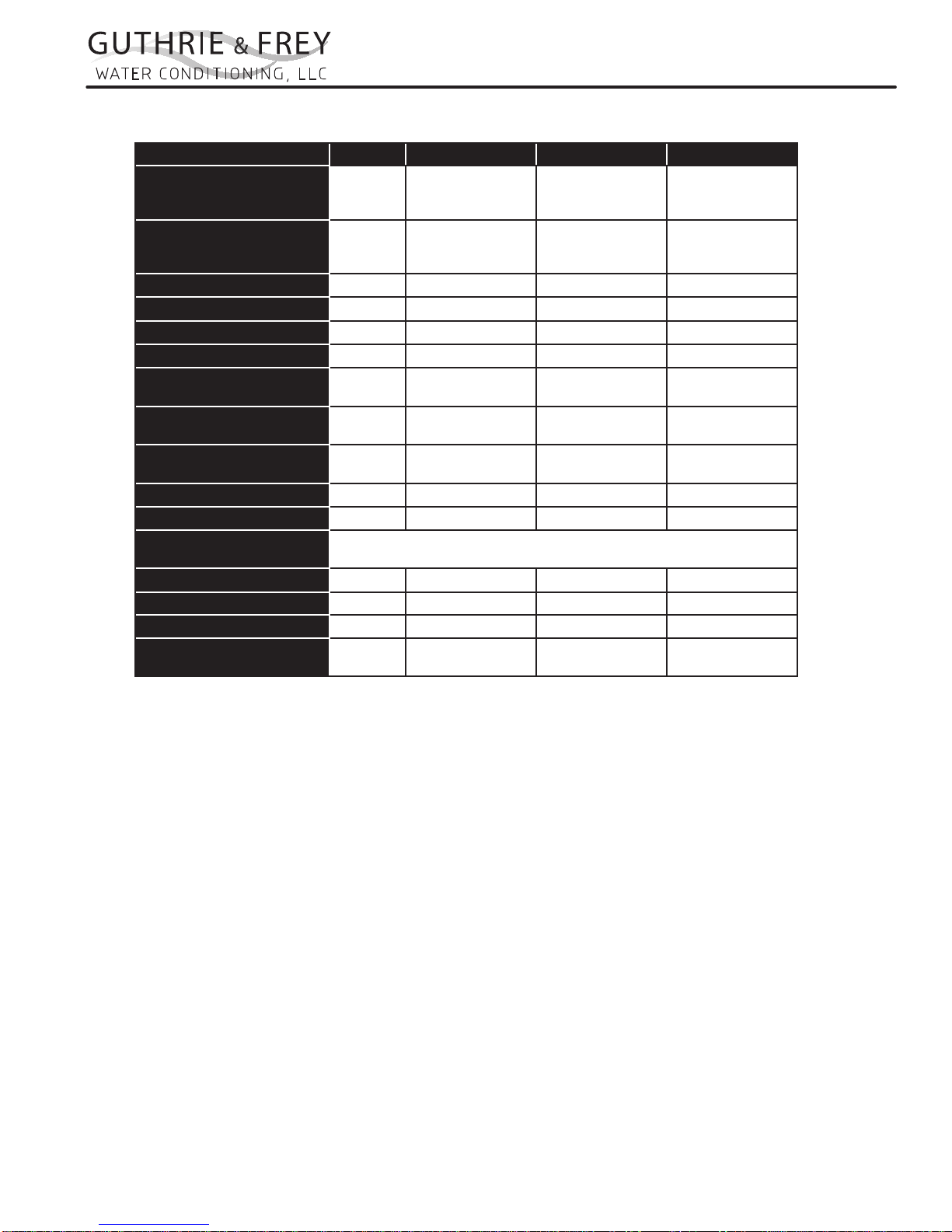
Specications
MODEL NUMBER UNITS GF24 GF40 GF50
EXCHANGE CAPACITY
(KILOGRAINS)
SALT PER REGENERATION
(LBS. / REGEN)
MAX SERVICE FLOW (1) GPM
PIPE SIZE - IN/OUT INCHES
DRAIN SIZE INCHES
OPERATING PRESSURE MAX PSI
OPERATING TEMPERATURE
MAX
MINERAL TANK SIZE
(DIA. X HT.) (2)
BRINE TANK SIZE
(DIA. X HT.) (3)
SALT STORAGE LBS.
RESIN VOLUME CU. FT.
ELECTRICAL (VOLTAGE,
CYCLE)
SHIPPING WEIGHT LBS.
FLOOR SPACE INCHES 27x18 28x18 31x18
OVERALL HEIGHT INCHES 52 55 60
MAX FLOW TO DRAIN
DURING REGENERATION (4)
“GF” SERIES AUT OMA TIC W ATER CONDITIONERS
SYSTEM INFORMATION
MAX
MID
MIN
MAX
MID
MIN
DEG F 110 110 110
INCHES 8X44 10x47 12x52
INCHES 18x40 18x40 18x40
GPM 1.7 2.2 3.2
24,030
21,020
17,120
11.5
7.5
4.5
13.2 14.7 19.1
1 1 1
3/4 3/4 3/4
125 125 125
450 450 450
0.75 1.3 1.6
120 Volts 60 Hz
72 106 137
41,650
36,175
29,560
19.5
13.0
8.0
51,260
44,500
36,350
24.0
16.0
9.5
(1) Pressure drop at 15 psi.
(2) Pressure vessels are seamless and made of reinforced fiberglass, pressure-tested at 300 psi.
(3) Brine tanks are fabricated of seamless, rigid, tough, high-impact, non-toxic polyethylene.
(4) 50 psi inlet pressure.
NOTE: This water softener is not intended to be used for treating water that is microbiologically
unsafe or of unknown quality without adequate disinfection before or after treatment.
1
Page 5
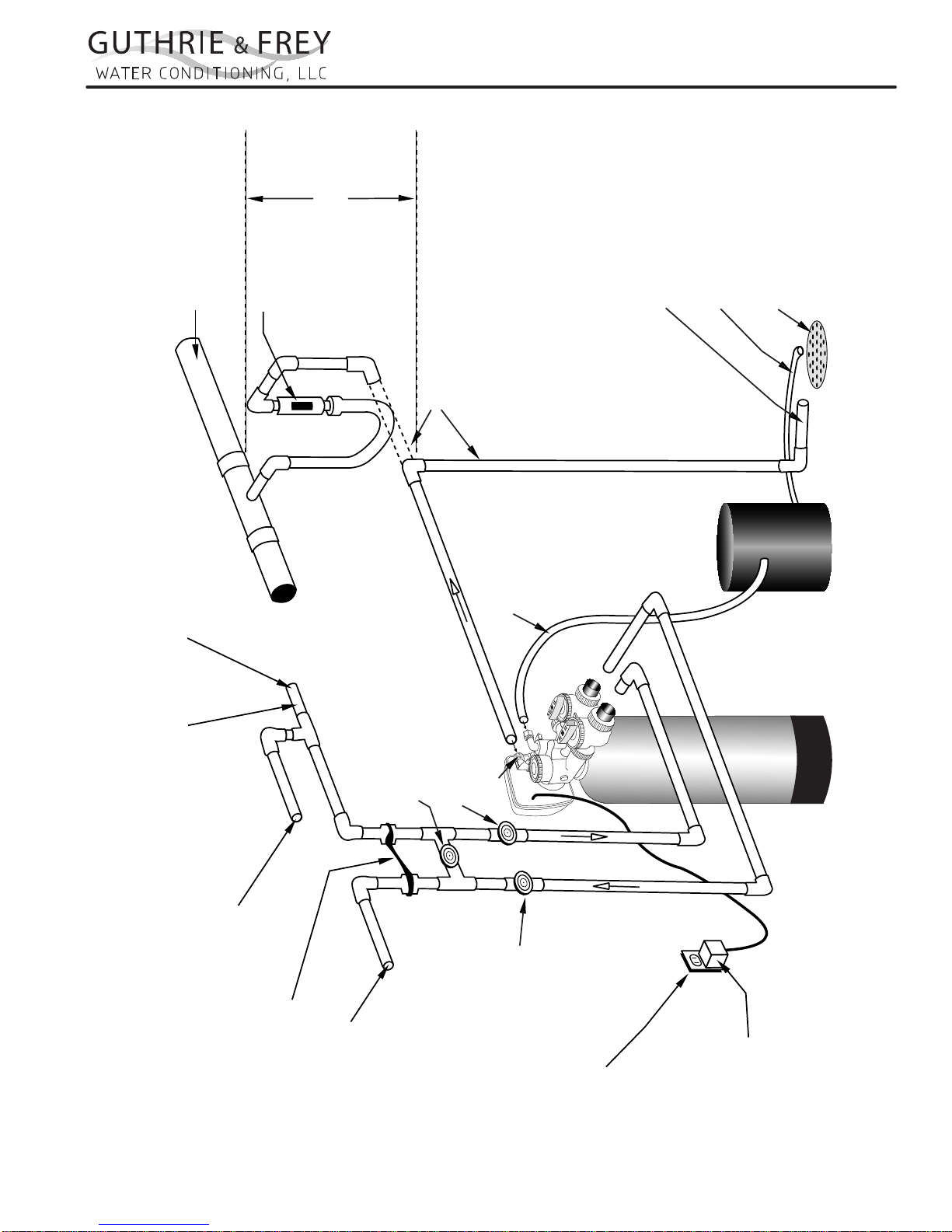
Assembly
Assembly
Maximum drain pipe
elevation above drain
Connection to sanitary sewer line
(optional)
Sanitary sewer line
Air gap device
port is 5 ft.
“GF” SERIES AUT OMA TIC W ATER CONDITIONERS
INSTALLATION
Sanitary Drain, Floor Drain or
Laundry Tubs are acceptable.
Do not make a direct connection
to the drain. An air gap must
be present.
Drain
Brine Tank Overflow drain 1/2”
diameter minimum size
Drain line 1/2” diameter
minimum size
(gravity flow)
Drain Trap
Cold hard water inlet
30 p.s.i. minimum pressure
1/2” minimum pipe size
High Pressure Warning:
If feedwater pressure is known to be above
100 p.s.i. it is strongly recommended that a
pressure reducing valve be installed at this point.
Manual Bypass Valve
(Normally Closed)
(optional)
Manual Inlet Valve
Drain Port
(optional)
Softener Tank
Brine Line Tubing
Brine Tank
Typical Water Softener Installation
Hard water to Sprinklers and any
dersired unsoftened fixtures
Ground Strap
Softened Water Outlet
Manual Outlet Valve
(optional)
110-125 Volt
Continuous Power Supply
Transformer
2
Page 6

“GF” SERIES AUT OMA TIC W ATER CONDITIONERS
INSTALLATION
Installation Fitting Assemblies
1. Installation ttings connect to the control valve or the bypass valve using nuts that only require hand tightening.
Hand tightened nut connections between control valve and installation ttings, control valve and bypass valve, and
bypass valve and installation ttings allow for ease serviceability. Do not use a pipe wrench to tighten nuts on
installation ttings. Hand tighten only.
2. Split ring retainer design holds the nut on and allows load to be spread over the entire nut surface area reducing
the chance for leakage. The split ring design, incorporated into the installation ttings allows approximately 2
degrees off axis alignment to the plumbing system. The installation ttings are designed to accommodate minor
plumbing misalignments but are not designed to support the weight of a system or the plumbing.
3. When assembling the installation tting package, connect the tting to the plumbing system rst and then attach the
nut, split ring and o-ring. Heat from soldering or solvent cements may damage the nut, split ring or o-ring. Solder
joints should be cool and solvent cements should be set before installing the nut, split ring and o-ring. Avoid getting
primer and solvent cements on any part of the o-rings or split rings, bypass valve or control valve. Solvent cements
and primers should be used in accordance with the manufacturer’s instructions.
Slip the nut onto the tting rst, then the split ring second and the o-ring last. hand tighten the nut. If the tting
is leaking, tightening the nut will not stop the leak. Remove the nut, remove the tting, and check for damage or
misalignment of the o-ring.
Do not use the pipe dope or other sealant on threads. Teon tape must be used on the threads of the 1”
NPT elbow and the 1/4” NPT connection and on the threads for the drain line connection. Teon tape is not
necessary on the nut connection or caps because of o-ring seals.
Do not use Vaseline, oils or other hydrocarbon lubricants oanywhere on the control valve or resin tank
assembly. A silicon lubricant may be used on black o-rings, but is not necessary.
Bypass Valve
1. The bypass valve easily connects to the control valve body using nuts that only require hand tightening. Hand
tighten nut connections between control valve and ttings, control valve and bypass valve, and bypass valve and
installation ttings allow for easy serviceability. The split ring retainer design holds the nut on and allows load to
be spread over the entire nut surface area reducing the chance for leakage. The split ring design, incorporated into
the bypass, allows approximately 2 degrees off axis alignment to the plumbing system. The bypass is designed to
accommodate minor plumbing misalignments but is not designed to support the weight of a system or the plumbing.
Avoid getting primer and solvent cements on any part of the o-rings or split rings, bypass valve or control
valve. Do not use pipe dope or other sealant on threads. Teon tape is not necessary on the caps because of
o-ring seals.
Do not use Vaseline, oils or other hydrocarbon lubricants oanywhere on the control valve or resin tank
assembly. A silicon lubricant may be used on black o-rings, but is not necessary.
Connecting Fittings
CAUTION: Care must be used when working with copper tubing. Do not allow the ame from torch to contact any por-
tion of the Valve assembly.
1. Attach 1/2” drain line to drain elbow with insert and nut. Use optional 3/4” drain ttings if drain run
exceeds 25 ft.
2. Do not elevate the drain line over 5’ above the top of the valve (8’ on municipal systems) or to exceed 25’ in
length at either height.
CAUTION: An air gap must be provided upon sewer entry. (Conform to local plumbing and sanitation codes and ordi-
nances).
3. The salt storage cabinet or brine tank provides an overow. Attach 1/2” ID exible plastic tubing to the overow
tting and direct it to the drain. DO NOT connect to the main drain line. Use a separate gravity ow line.
3
Page 7
“GF” SERIES AUT OMA TIC W ATER CONDITIONERS
INSTALLATION
Installation Procedures
Please see page 3 for installation of tting assemblies.
All installation procedures must conform to local plumbing, electrical and sanitation codes and ordinances.
A. Planning Installation
1. It is recommended that outside faucets for lawn
service be on a hard water line, ahead of the softener. This will conserve softened water, save salt
www.Marlo-Inc.com
and prevent lawn damage. If this is not practical,
use the convenient integral bypass valve assembly
during irrigation ows.
2. CAUTION: The inlet water temperature MUST
NOT EXCEED 110° F.
3. DO NOT locate the softener where ambient temperature drops below 40° F.
4. Allow space around the softener for ease of servicing.
5. Softener drain lines must never be solidly connected to the sewer line (always provide an air gap
at the END of the drain line).
6. The drain line must NOT be elevated over 5’ from
the top of the softener on well systems, and 8’ on
municipal water systems.
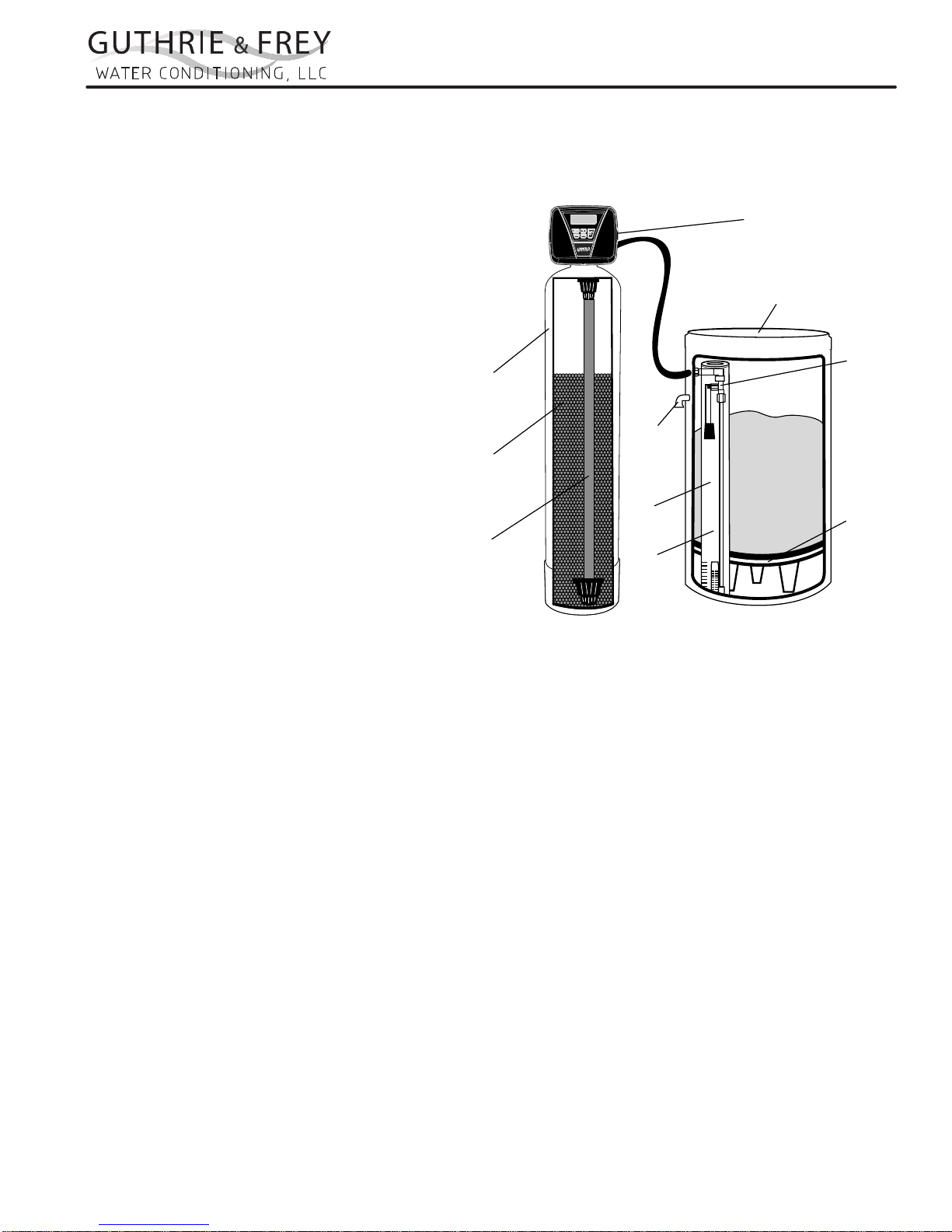
Resin
Tank
Ion
Exchange
Media
Distributor
Tube
Assembly
Overflow
Drain
Brine
Well
Air
Check
7. Drain line must not extend more than 20’ in length.
If longer runs are required increase the drain size
to 1”.
8. The brine tank or salt storage cabinet is a gravity drain. This drain line must be lower than the drain tting on
the side wall of the brine tank or cabinet.
Control
Valve
Brine Tank
Safety
Brine
Valve
Brine
Grid
Plate
B. General Installation
1. Turn off the main water supply before making any plumbing connections to existing piping.
2. Move the softener into position, making sure it is on a clean level surface. If shims are needed you may use
those to create a level installation. DO NOT USE METAL SHIMS
3. When installing the unit, be sure to connect the inlet and outlet to the correct ports on the valve. The bypass
valve and the control valve are both marked with arrows that indicate the direction of water ow. If water lines
are reversed resin maybe forced from the water softener and into household plumbing system. Should this
occur, the plumbing system would need to be ushed.
4. Install the bypass valve assembly. The control valve is designed to accommodate minor plumbing misalignments. It is not designed to support the weight of the unit.
5. Please see page 3, item 3 for assembling and soldering of ttings.
6. Install an appropriate grounding strap across the inlet and outlet piping of the water conditioning system to
ensure that a proper ground is maintained.
7. Move the brine tank into place. Making sure that the oor is clean of any debris. Sharp objects such as rocks
can cause punctures to the brine tank over a period of time. This would not be covered under Marlo’s warranty.
(DO NOT ADD SALT AT THIS TIME).
8. Connect one end of the brine line (brine line is located inside the brine tank. Marlo units come with 5’ of brine
line) to the brine elbow of the brine tank and the other end to the brine elbow on the control valve. The brine
elbow on the control valve is black in color and located on the top of the control valve. The brine elbow swivels
to allow the brine tank to be placed in a convenient position.
9. The drain line connector is located on the top of the control valve and is black in color. The water softener comes
standard with 5/8 insert and nut if installer is using a poly tube. The drain elbow is threaded, so a ¾” drain line
may also be used. NOTE: If soldering the drain line use caution so as not to cause damage to the drain elbow.
4
Page 8

“GF” SERIES AUT OMA TIC W ATER CONDITIONERS
INSTALLATION
10. An overow tting is attached to the outside of the brine tank (overow elbow is white in color). Attach a 5/8
drain line (do NOT connect overow tubing with drain line tubing). The overow tting is installed in case the
unit would malfunction and water would continually run to the brine tank. The overow (if tubing is connected)
would allow the excess water to be run to the drain rather than overow onto the oor. Do NOT run overow
tubing above the overow elbow at any point.
C. Installation and Start Up
1. Make sure all connections have been made: Inlet, outlet, brine line installed and connected to the brine tank
and control valve, drain line installed, and over ow drain tubing connected and run to the drain. (DO NOT
CONNECT DRAIN LINE AND OVERFLOW TUBING)
2. If the unit is not in bypass please do so now. If using a bypass purchased with the unit the unit will be in the
bypass position when the two arrows on the handles of the bypass are pointing towards each other (see gure
2 page 12).
3. Turn on your main water supply. Locate a cold soft water tap and turn it on, allow the water to run until all excess air and foreign material is removed from the water.
4. Add seven (7) gallons of water to the brine tank.
5. Plug the water softener into the designated receptacle. Program the current time of day (see page 9 for instructions).
6. Press and hold the REGEN button (located in the upper right hand corner) until the unit starts a regeneration
(depending on how the unit is programmed the rst cycle may be back wash or brine ll). Once the piston
stops moving and the unit is counting down press the REGEN key again. This will advance the unit to the next
cycle. Repeat this process until you see the word RINSE in the upper left hand corner. Slowly open the inlet
side of the bypass (see page 13 gure 3). Let the water run to the drain until the water runs clear.
7. Place the bypass back into the bypass mode (see page 13 gure 2)
8. Press the REGEN button again to cycle the unit to the next cycle. Wait for the piston to stop moving and press
the REGEN button again. Repeat this until the unit is at the home screen. The home screen will be blue in
color.
9. Press and hold the REGEN button again until the unit starts a regeneration. Depending on how the unit it set
up you might have to wait for the piston to stop moving and press the REGEN button again repeating several
times till the word BACKWASH appears in the upper left hand corner. On most units BACKWASH should appear at the rst screen.
10. Slowly turn the handle of the incoming water (See page 13 gure 3) until the bypass valve is completely
opened. Once you have a solid ow of water to the drain, open the outlet side of the bypass (see page 13
gure 1) to duplicate the normal operation.
11. Press the REGEN button again to cycle the unit to the next cycle. Wait for the piston to stop moving and press
the REGEN button again. Repeat this until the unit is at the home screen. The home screen will be blue in
color.
12. Set the incoming hardness of the water, time of regeneration and calendar override. See page 8 Steps 1I
through 6I.
13. Add salt to brine tank.
5
Page 9

“GF” SERIES AUT OMA TIC W ATER CONDITIONERS
INSTALLATION
D. Manual Regeneration
The user can initiate manual regeneration.
Pressing and holding the REGEN button for approximately 3 seconds will immediately start the regeneration. The
user cannot cancel this request.
NOTE: Program Timer “Lockout” Feature
The Program Timer is initially set to allow access to all Programming, Diagnostic and History screens. The Installer
can limit access to (lockout) most screens by activating the Lockout Feature.
Activating “Lockout” allows the user to view and change only Water Hardness, Days Override, Time of Regeneration and Time of day.
Activate “Lockout” Feature: Press DOWN then NEXT then UP then CLOCK in sequence. LOCK will briey appear in the display.
De-activate “Lockout” Feature: Press DOWN then NEXT then UP then CLOCK. UNLOCK will briey appear in
the display.
When in operation normal user displays are time of day, gallons remaining, days remaining before regeneration,
or current ow rate are shown. The user has the option to choose which screen is displayed by pressing the NEXT
button. When stepping through a procedure if no buttons are pressed within ve minutes the display returns to a
normal user display. Any changes made prior to the ve minute time out are incorporated. The one exception is
current ow rate display under the diagnostic procedure. The current ow rate display has a 30 minute time out
feature.
6
Page 10

“GF” SERIES AUT OMA TIC W ATER CONDITIONERS
OPERATION
Control Valve Function and Cycles of Operation
This glass lled Noryl1 fully automatic control valve is designed as the primary control center to direct and regulate
all cycles of a water softener or lter. When the control valve is set up as a softener, the control valve can be set
to perform down ow or up ow regeneration with the proper piston. When the control valve is set up as a lter,
the control valve can be set to perform down ow regeneration or simply backwash. The control valve can be set
to regenerate on demand (consumption of a predetermined amount of water) and/or as a time clock (passage
of a particular number of days). The control valve can be set so that the softener can meet the Water Quality
Association (WQA) or NSF International efciency rating.
The control valve is compatible with a variety of regenerants and resin cleaners. The control valve is capable of
routing the ow of water in the necessary paths to regenerate or backwash water treatment systems. The injector
regulates the ow of brine or other regenerants. The control valve regulates the ow rates for backwashing,
rinsing and the replenishing of treated water into a regenerant tank, when applicable.
The control valve is designed to deliver high service (27 gpm @ 15 psig) and backwash (27 gpm @ 25 psig) ow
rates when the bypass has straight ttings and a 1.050” distributor. The control valve uses no traditional fasteners
(e.g. screws), instead clips, threaded caps, nuts and snap type latches are used. Caps and nuts only need to
be rmly hand tightened because radial seals are used. Tools required to service the valve include one small
blade screwdriver, pliers and a pair of hands. Disassembly for servicing takes much less time than comparable
products currently on the market. Control valve installation is made easy because the distributor tube can be cut
1/2” above to 1/2” below the top of the tank thread. The distributor tube is held in place by an
o-ring seal and the control valve also has a bayonet lock feature for upper distributor baskets.
The transformer power pack comes with a 15-foot power cord and is designed for use with the control valve. The
transformer power pack is for dry location use only. The control valve remembers all settings for up to 8 hours if
the power goes out and the battery is not depleted. After 8 hours, the only item that needs to be reset is the time
of day; other values are permanently stored in the nonvolitile memory. If a power loss lasts less than 8 hours and
the time ashes on and off, the time of day should be reset and the non rechargeable battery should be replaced.
The replacement battery is a commercially available 3 volt Lithium coin cell type 2032.
Table 3 shows the order of the cycles when the valve is set up as a softener. When the control valve is used as
a down ow softener, two backwashes always occur. When the control valve is used as an up ow softener, only
one backwash occurs after brining. The installer has the option of having the regenerant rell after the rinse cycle
or have the regenerant prell before regeneration. If the installer chooses to have the regenerant prell before
regeneration, the prell starts two hours before the regeneration time set. During the 2-hour period in which the
brine is being made, treated (softened) water is still available. For example: regeneration time = 2:00 A.M., prell
option selected, downow softener. Fill occurs at 12:00 A.M., start of backwash cycle occurs at 2:00 A.M.
1 - Noryl is a trademark of General Electric
Regeneration Cycles
1st Cycle: Backwash Normal
2nd Cycle: Regenerate
3rd Cycle: Backwash Normal
5th Cycle: Rinse
6th Cycle: Fill
Table 3
7
Page 11

“GF” SERIES AUT OMA TIC W ATER CONDITIONERS
Page 20 MA Man u al
Installer Display Settings
RETURN TO NORMAL MODE
OPERATION
STEP 1I
STEP 1I - Press NEXT and UP simultaneously for 3 seconds.
STEP 2I
STEP 2I – Hardness: Set the amount of hardness in grains of hardness as calcium carbonate per
gallon using DOWN or UP. The default is 20 with value ranges from 1 to 150 in 1 grain increments.
Note: The grains per gallon can be increased if soluble iron needs to be reduced. This display will not
show if “FILTERING” is selected in Step 2F or if ‘AUTO’ is not selected in Set Volume Capacity in
OEM Softener System Setup. Press NEXT to go to step 3I. Press REGEN to exit Installer Display
Settings.
STEP 3I
STEP 3I – Day Override: When volume capacity is set to “OFF”, sets the number of days between
regenerations. When volume capacity is set to AUTO or to a number, sets the maximum number of
days between regenerations. If value set to “OFF”, regeneration initiation is based solely on volume
used. If value is set as a number (allowable range from 1 to 28) a regeneration initiation will be
called for on that day even if suf cient volume of water were not used to call for a regeneration. Set
Day Override using DOWN or UP:
• number of days between regeneration (1 to 28); or
• “OFF”.
See Setting Options Table for more detail on setup. Press NEXT to go to step 4I. Press REGEN to
return to previous step.
STEP 4I
STEP 5I
STEP 6I
STEP 4I – Next Regeneration Time (hour): Set the hour of day for regeneration using DOWN
or UP. AM/PM toggles after 12. The default time is 2:00 AM. This display will show “REGEN
IMMEDIATE ON ZERO GAL” if “IMMEDIATE” is selected in Set Regeneration Time Option in
OEM Softener System Setup Step 9S or OEM Filter System Setup Step 8F. Press NEXT to go to step
5I. Press REGEN to return to previous step.
STEP 5I – Next Regeneration Time (minutes): Set the minutes of day for regeneration using DOWN
or UP. This display will not be shown if “IMMEDIATE” is selected in Set Regeneration Time Option
in OEM Softener System Setup Step 9S or OEM Filter System Setup Step 8F. Press NEXT to go to
Step 6I. Press REGEN to return to previous step.
STEP 6I – Energy Saver operation. When set to OFF, the display backlight is always on. When set
to ON, the display backlight will go off after 5 minutes of no keypad activity. A valve error or salt
level alert will activate the display backlight, and prevent deactivation until the error or alert is reset
by the user. Press NEXT to exit Installer Display Settings. Press REGEN to return to the previous
step.
8
Page 12

“GF” SERIES AUT OMA TIC W ATER CONDITIONERS
MA Manual Page 21
User Display Settings
OPERATION
NOTE: SALT LEVEL screen
only appears if programmed.
When the system is operating, several displays may be shown.
Pressing NEXT will alternate between the displays. One of the
displays is the current time of day. CAPACITY REMAINING
is the gallons that will be treated before the system goes through
a regeneration cycle. Pressing DOWN while in the Capacity
Remaining display will decrease the capacity remaining in
10 gallon increments and will also increase the volume used
impacting the recorded values in Diagnostics Steps 3D, 4D
and 5D and Valve History, Step 4VH. DAYS TO A REGEN
is the number of days left before the system goes through a
regeneration cycle. Pressing UP or DOWN while in this screen
will temporarily increase or decrease the displayed value by 1 day.
Another display shows the current treated water ow rate through
the system. Contact information will be displayed if it was edited.
For concerns with phone number or banner text displays, contact
OEM for instructions. The fth display will show either DP or
HOLD if the dP switch is closed. If the system has called for a
regeneration that will occur at the pre-set time of regeneration,
the words REGEN TODAY will alternate with the header on the
display. If a water meter is installed, GPM ashes (and alternates
with the ow rate) on the display when water is being treated (i.e.
water is owing through the system). If Salt Level Monitor has
been set to ON in Step 16S, the Salt Level screen will appear. To
adjust the salt level, press CLOCK, and use UP or DOWN to set
the current value. The salt level is adjustable from 0 to 500 lbs. in
10 lb. increments.
GPM and ow rate
will ash while water
is being treated.
REGEN PENDING will be displayed in Alternator Systems whenever a unit is waiting to
initiate the rst cycle step of regeneration.
STAND BY will be displayed in Alternator Systems when a valve is in Standby state.
DELAYED RINSE+FILL PENDING will be displayed whenever a zero-capacity tank has
transferred to an off-line state and is currently waiting to initiate the second portion of a
regeneration cycle. Viewed only when Delayed Rinse and Fill is set to ON.
9
Page 13

“GF” SERIES AUT OMA TIC W ATER CONDITIONERS
Page 22 MA Man u al
Set Time of Day
The user can also set the time of day. Time of day should only need to be set if the battery has been depleted because of extended
power outages or when daylight saving time begins or ends. If an extended power outage occurs, the time of day will ash on and
off which indicates the time of day should be reset. The non rechargeable battery should also be replaced.
Regeneration Mode
Typically a system is set to regenerate at a time of low water usage. An example of a time with
low water usage is when a household is asleep. If there is a demand for water when the system is
regenerating, untreated water will be used.
When the system begins to regenerate, the display will change to include information about the step of the regeneration
process and the time remaining for that step to be completed. The system runs through the steps automatically and will reset
itself to provide treated water when the regeneration has been completed.
Manual Regeneration
Sometimes there is a need to regenerate the system sooner than when the
system calls for it, usually referred to as manual regeneration. There may
be a period of heavy water usage because
of guests or a heavy laundry day.
To initiate a manual regeneration at the preset delayed regeneration time, when the regeneration time option is set to
“DELAYED REGEN” or “DELAY + IMMEDIATE”, press and release “REGEN”. The words “REGEN TODAY” will
periodically be shown on the display to indicate that the system will regenerate at the preset delayed regeneration time. If you
pressed the “REGEN” button in error, pressing the button again will cancel the request. Note: If the regeneration time option
is set to “IMMEDIATE” there is no set delayed regeneration time so “REGEN TODAY” will not activate if “REGEN” button
is pressed.
To initiate a manual regeneration immediately, press and hold the “REGEN” button for three seconds. The system will begin
to regenerate immediately. The request cannot be cancelled.
Note: For softeners, if brine tank does not contain salt, ll with salt and wait at least two hours before regenerating.
STEP 1U
STEP 1U – Press CLOCK.
STEP 2U
STEP 2U - Current Time (hour): Set the hour of the day using DOWN or UP. AM/PM toggles after
12. Press NEXT to go to Step 3U.
STEP 3U
STEP 3U - Current Time (minutes): Set the minutes of the day using DOWN or UP. Press NEXT to
exit Set Time of Day. Press REGEN to return to previous step.
RETURN TO NORMAL MODE
OPERATION
10
Page 14

“GF” SERIES AUT OMA TIC W ATER CONDITIONERS
MA Manual Page 23
OPERATION
Power Loss
If the power goes out the system will keep time until the battery is depleted. If an extended power outage occurs, the time of day
will ash on and off which indicates the time of day should be reset and the non rechargeable battery replaced. The system will
remember the rest.
Error Message
If the word “ERROR” and a number are displayed contact the Installer for help. This indicates that the valve was not able to function
properly. If the number and banner text in the Contact Screens has been edited, the two displays below will alternate.
11
Page 15

“GF” SERIES AUT OMA TIC W ATER CONDITIONERS
FLOW DIAGRAMS
OPERATION
ow diagram...service
OUTLET PORT FOR
SERVICE WATER
SUPPLY
WATER
INLET
CONDITIONED WATER
FROM DISTRIBUTOR
SUPPLY WATER TO
TOP OF TANK
ow diagram...downow brine
REGENERANT IN
REGENERANT
IS SIPHONED IN
REGENERANT TRAVELS
THROUGH MANIFOLD
TO THE INJECTOR
PISTON ROD IS BOTTOMED
OUT IN “HOME” POSITION
SUPPLY
WATER
MANIFOLD
ow diagram...backwash
TO DRAIN
OUTLET PORT FOR
SERVICE WATER
SUPPLY WATER
INLET
SUPPLY WATER
TO DISTRIBUTOR
TO DRAIN
PISTON ROD IS
BELOW 3rd STEP DOWN
BACKWASH WATER
TO DRAIN
PISTON ROD IS
BELOW 2nd STEP DOWN
SUPPLY
WATER
OUTLET PORT FOR
SERVICE WATER
ow diagram...rinse
OUTLET PORT FOR
SERVICE WATER
CONDITIONED WATER
FROM DISTRIBUTOR
SUPPLY WATER TO
TOP OF TANK
WASTE WATER
FROM DISTRIBUTOR
SUPPLY WATER
INLET
TO DRAIN
CONDITIONED WATER
TO REGENERANT TANK
PISTON ROD IS
4th STEP DOWN
SUPPLY
WATER
SUPPLY WATER
INLET
SUPPLY WATER AND REGENERANT
TO TOP OF TANK
ow diagram...ll
OUTLET PORT FOR
SERVICE WATER
CONDITIONED WATER
FROM DISTRIBUTOR
SUPPLY WATER
INLET
SUPPLY WATER TO
TOP OF TANK
PISTON ROD IS
BELOW 1st STEP DOWN
12
Page 16

“GF” SERIES AUT OMA TIC W ATER CONDITIONERS
OPERATION
Bypass Valve
The bypass valve is typically used to isolate the control valve from the plumbing system’s water pressure in order to perform control valve repairs or maintenance. The WS1 bypass valve is particularly unique in the water treatment
industry due to its versatility and state of the art design features. The 1” full ow bypass valve incorporates four positions
including a diagnostic position that allows service personal to work on a pressurized system while still providing untreated
bypass water to the facility or residence. Its completely non-metallic, all plastic, design allows for easy
access and serviceability without the need for tools.
The bypass body and rotors are glass lled Noryl and the nuts and caps are glass lled polypropylene. All seals are
self-lubricating EPDM to help prevent valve seizing after long periods of non-use. Internal o-rings can easily be replaced
if service is required.
The bypass consists of two interchangeable plug valves that are operated independently by red arrow shaped handles.
The handles identify the ow direction of the water. The plug valves enable the bypass valve to operate in four positions.
Figure 1
NORMAL OPERATION
“Treated”
Water Exits
Supply
Water Enters
BYPASS OPERATION
“Untreated”
Water Exits
Figure 2
Supply
Water Enters
Normal Operation:
The inlet and outlet handles point in the direction of ow indicated by
the engraved arrows on the control valve. Water ows through the
control valve during normal operation and this position also allows the
control valve to isolate the media bed during the regeneration cycle.
Figure 3
DIAGNOSTIC MODE
Supply
Water Exits
Diagnostic:
The inlet handle points in the direction of ow and the outlet handle
points to the center of bypass valve, system water pressure is allowed
to the control valve and the plumbing system while not allowing water to
exit from the control valve to the plumbing.
Supply
Water Enters
Bypass:
The inlet and outlet handles point to the center of the bypass, the control
valve is isolated from the water pressure contained in the plumbing
system. Untreated water is supplied to the plumbing system.
Figure 4
SHUT OFF MODE
No
Water Exits
Shut Off:
The inlet handle points to the center of the bypass valve and the outlet
handle points in the direction of ow, the water is shut off to the plumbing
system. If water is available on the outlet side of the softener it is an
indication of water bypass around the system (i.e. a plumbing
connection somewhere in the building bypasses the system).
Supply Water is shut off
from the house and the
valve
13
Page 17

“GF” SERIES AUT OMA TIC W ATER CONDITIONERS
MAINTENANCE
t
t
14
t
Regenerant Piston and Spacer Stack Assembly
& Front Cover and Drive Assembly
Drive Cap Assembly, Downow Piston,
14
Page 18

“GF” SERIES AUT OMA TIC W ATER CONDITIONERS
MAINTENANCE
Drive Cap Assembly, Downow Piston, Upow Piston,
Regenerant Piston and Spacer Stack Assembly
Item No. Part No. Description Quantity
1 A2466034 *Spacer Stack Assembly w/o o-rings 1
2 A2080077 Drive Cap Assembly 1
3 B1213022 O-Ring 228 (use Valve O-ring Kit) 1
4 A2309040 Piston Downow Assembly 1
p
5 A2438033 Regenerant Piston 1
V
6 B1213022 O-Ring 337 (use Valve O-ring Kit) 1
B1213022
15
Item #4 identied with “DN” code.
p
Item #5 not used with Backwash Only lter applications.
V
O-Ring 215
Front Cover and Drive Assembly
Item No. Part No. Description Quantity
7 A2103160 Front Cover ASSY V3948-01 1
8 A2085050 Motor 1
9 A2328046 Drive Bracket & Spring Clip 1
10 A2341035 PC Board V3955MA-BOARD 1
11 A2393046 Drive Gear 12 x 36 3
12 A2103132 Drive Gear Cover 1
13 A2491086 Service Tool 1
14 A2242054 Transformer 110V - 12V 1
(use Valve O-ring Kit)
1
15
Page 19

“GF” SERIES AUT OMA TIC W ATER CONDITIONERS
Injector Cap, Injector Screen, Injector, Plug ,
O-Ring, Rell and Rell Port Plug,
&Drain Line - 3/4”
Part of Kit, O-ring (Item #51, pg. 20)
t
18
16
17
MAINTENANCE
28
23
24
21
27
20
31
25a, 25b
19
30
32
33
34
35
26
Proper ow washer orientation
directs water ow towards the
washer face with rounded edge.
Flow washer indentication
numbers must be visible after
installation.
22
29
16
Page 20

“GF” SERIES AUT OMA TIC W ATER CONDITIONERS
MAINTENANCE
Injector Cap, Injector Screen, Injector, Plug and O-Ring
Item No. Part No. Description Quantity
16 A2080079 Injector Cap 1
17 Use Item 51 O-Ring 135 (Use Valve O-ring Kit) 1
t
18 A2142016 Injector Screen 1
19 A2079059 Injector Assembly Z Plug See note 1
A2079060 Injector Assembly A Black
A2079048 Injector Assembly B Brown
A2079046 Injector Assembly C Violet
A2079045 Injector Assembly D Red
20 A2079049 Injector Assembly E White
A2079047 Injector Assembly F Blue
A2079050 Injector Assembly G Yellow
A2079055 Injector Assembly H Green
A2079062 Injector Assembly I Orange
A2079063 Injector Assembly J Light Blue
*The injector plug and the injector each contain one 011 (lower) and 013 (upper) o-ring.
Note: For downow brine, injector is located in the down hole and injector plug in the up hole.
A2079064 Injector Assembly K Light Green
For a lter that only backwashes injector plugs are located in both holes.
Rell and Rell Port Plug
Drawing No. Order No. Description Quantity
21 A2287059 Rell Port Plug Assembly This part is required for backwash only systems
22 A2411015 Elbow Locking Clip 1
23 A2409016 Polytube insert 3/8 1
24 A2095071 Nut 3/8 1
25a A2080078 Elbow Cap 3/8 (use w/ 3/8” tubing) 1
25b A2129100 Elbow 1/2” with nut and insert (use w/ 1/2” tubing) Option
26 Use Item 51 O-Ring 019
t
27 A2104033 RFC Retainer Assembly* 1
28 A2253108 RFC Brine Rell Flow Washer 1
*Assembly includes RFC.
(
Use Valve O-ring Kit
)
1
1
Drawing No. Order No. Description Quantity
29 A2411015 Elbow Locking Clip 1
30 A2409013 Polytube insert 5/8 Option
31 A2095065 Nut 3/4 Drain Elbow Option
32 A2099056 Drain Elbow 3/4 Male Assembly 1
33 Use Item 51 O-Ring 019 (Use Valve O-ring Kit) 1
t
34 A2104034 Drain Flow Washer Retainer Assembly 1
A2253114 Drain Flow Washer 0.7 gpm for 3/4
A2253099 Drain Flow Washer 1.0 gpm for 3/4
A2253084 Drain Flow Washer 1.3 gpm for 3/4
A2253083 Drain Flow Washer 1.7 gpm for 3/4
35
A2253081 Drain Flow Washer 2.2 gpm for 3/4
A2253082 Drain Flow Washer 2.7 gpm for 3/4
A2253085 Drain Flow Washer 3.2 gpm for 3/4
A2253086 Drain Flow Washer 4.2 gpm for 3/4
A2253087 Drain Flow Washer 5.3 gpm for 3/4
Drain Line - 3/4”
One
DLFC
must be
used if 3/4
tting is
used
17
Page 21

“GF” Series
Media Tank Jacket
w/ Cover
12
“GF” SERIES AUT OMA TIC W ATER CONDITIONERS
1
Media Tank
10
Brine Tank Cover
Valve (Metered Shown)
2
MAINTENANCE
Brine
13
Valve
Assembly
Distributor Tube
w/ Screen
Media Tank
Base
11
10
Media
Brine Line Hosing
7
Brine Well Caps
4
Brine Tank
Brine Grid
(Optional)
Brine Well
2
15
3
Brine Valve Safety
8
Overflow Drain
5
Brine Tube
6
w/ Air Check
PARTS LISTING
Part Number No. Description
Contact Factory 1 Valve Metered (Complete - Specify Model)
A2042018 2 Brine Tank w/ Cover
A2071005 3 Brine Well
A2072003 4 Brine Well Cap
A2250003 5 Overflow Elbow
A2118010 6 Brine Tube w/ Air Check
B1020001 7 Brine Line Hose w/ Inserts
A2005058 8 Brine Valve Safety
A2107022 9 Brine Float
A2126201 10 Media Tank - GF-22K (8” x 44”)
A2126203 10 Media Tank - GF-30K (9” x 48”)
A2126205 10 Media Tank - GF-40K + Combo (10” x 47”)
A2126206 10 Media Tank - GF-45K (10” x 54”)
A2126208 10 Media Tank - GF-60K (12” x 52”)
A2255101 10 Media Tank - GF-22KC
A2255102 10 Media Tank - GF-30KC
B1023056 11 Distributor Tube Assembly
Contact Factory 12 Media Tank Jacket w/ cover - Optional
B1017003 13 Brine Valve Assembly - Complete - Includes #6. #8, & #9
A2284002 15 Grid (Optional)
A2121047 16 Media (Specify Model)
Brine Float
9
6
Brine Tube w/
Air Check
8
Brine
Valve
Safety
18
Page 22

Water Meter and Meter Plug
Item No. Part No. Description Quantity
36 A2095069 Nut 1” Quick Connect 1
*37 A2360039 Meter Assembly 1
38 A2100027 Turbine Assembly 1
39 use item 51 O-Ring 215 (Use Valve O-ring Kit) 1
40 A2287077 Meter Plug Assembly (Time clock option) 1
*Item #37 includes Items #38 & #39.
“GF” SERIES AUT OMA TIC W ATER CONDITIONERS
MAINTENANCE
t
Part of Kit, O-ring (Item 51, pg. 20)
t
39
40
38
37
36
19
Page 23

“GF” SERIES AUT OMA TIC W ATER CONDITIONERS
MAINTENANCE
Item No. Part No. Description Quantity
41 A2095069 Nut 1” Quick Connect 2
42 A2453012 Split Ring 2
l
43 use item 52 O-Ring 215 (Kit available - see Item #10) 2
44 A2607004 Bypass 1” Rotor 2
45 A2080090 Bypass Cap 2
46 A2395009 Bypass Handle 2
47 A2104036 Bypass Rotor Seal Retainer 2
l
48 use item 52 O-Ring 135 (use Bypass Valve Kit) 2
l
49 use item 52 O-Ring 112 (use Bypass Valve Kit) 2
l
50 use item 52 O-Ring 214 (use Bypass Valve Kit) 2
l
Part of Kit, O-ring By-Pass(Item 52)
Valve O-ring Kit
s
51 B1213022 KIT O-ring (contains 1 each of 3, 6, 15, 17, 26, & 33) 1 per valve
Bypass Valve O-ring Kit
l
52 B1213021 KIT O-ring Bypass (Incl. 2 ea. of items 43,48,49,& 50) 1 per valve
(Not Shown) Description Bypass Vertical Adapter Assembly
46
45
46
5
49
l
l
48
l
44
50
l
47
41
42
43
l
49
48
l
44
50
l
47
41
42
43
l
20
Page 24

“GF” SERIES AUT OMA TIC W ATER CONDITIONERS
MAINTENANCE
Description: Fitting 1” PVC Male NPT Elbow Assembly
Order No: A2129080 (Optional)
Drawing No. Order No. Description Quantity
1 A2095069 Nut 1” Quick Connect 2
2 A2453012 Split Ring 2
3 A2077178 O-Ring 215 2
4 A2129101 Fitting 1”PVCMaleNPT Elbow 2
Order No: A2435068 (Standard)
Description: Fitting 1” Brass Sweat Assembly
Order No: A2099054 (Optional)
Description: Fitting 3/4” & 1” PVC Solvent 900 Asy
Drawing No. Order No. Description Quantity
1 A2095069 Nut 1” Quick Connect 2
2 A2453012 Split Ring 2
3 A2077178 O-Ring 215 2
4 A2569008 Fitting 3/4&1 PVC Solvent 90 2
Order No: A2435072 (Optional)
Description: Fitting 3/4” Brass Sweat Assembly
Drawing No. Order No. Description Quantity
1 A2095069 Nut 1” Quick Connect 2
2 A2453012 Split Ring 2
3 A2077178 O-Ring 215 2
4 A2569006 Fitting 1” Brass Sweat 2
Drawing No. Order No. Description Quantity
1 A2095069 Nut 1” Quick Connect 2
2 A2453012 Split Ring 2
3 A2077178 O-Ring 215 2
4 A2569008 Fitting 3/4&1 PVC Solvent 90 2
21
Page 25

“GF” SERIES AUT OMA TIC W ATER CONDITIONERS
Table 15
Troubleshooting Procedures
Problem Possible Cause Solution
MAINTENANCE
1. Timer does not display
time of day
2. Timer does not display
correct time of day
3. No softening/ltering
display when water is
owing
4. Control valve regenerates
at wrong time of day
5. Display screen will
turn red and ash the
Installer’s Name and
phone number to call for
service.
ERROR followed by
code number
101 Error Code -
Unable to recognize start
of regeneration
102 Error Code Unexpected stall
103 Error Code -
Motor ran to long, timed
out trying to reach next
cycle position
104 Error Code -
Motor ran to long, timed out
trying to reach home
position
If other Error Codes display
contact the factory
ERROR Reset Procedure:
1. Correct error condition.
2. Press NEXT and
REGEN simultaneously
for three seconds.
a. Transformer unplugged
b. No electric power at outlet
c. Defective transformer
d. Defective PC board
a. Switched outlet
b. Power outage
c. Defective PC board
a. Bypass valve in bypass position
b. Meter connection disconnected
c. Restricted/stalled meter turbine
d. Defective meter
e. Defective PC board
a. Power outages
b. Time of day not set correctly
c. Time of regeneration incorrect
d. Control valve set at “on 0”
(immediate regeneration)
e. Control valve set at NORMAL +
on 0
a. Control valve has just been ser-
viced
b. Foreign matter is lodged in control
valve
c. High drive forces on piston
d. Control valve piston not in home
position
e. Motor not inserted fully to engage
pinion, motor wires broken or
disconnected, motor failure
f. Drive gear label dirty or damaged,
missing or broken gear
g. Drive bracket incorrectly aligned
to back plate
h. PC board is damaged or defective
i. PC board incorrectly aligned to
drive bracket
a. Connect power
b. Repair outlet or use working outlet
c. Replace transformer
d. Replace PC board
a. Use uninterrupted outlet
b. Reset time of day
c. Replace PC board
a. Put bypass valve in service position
b. Connect meter to PC board
c. Remove meter and check for rotation
or foreign material
d. Replace meter
e. Replace PC board
a. Reset control valve to correct time of
day
b. Reset to correct time of day (a.m./p.m.)
c. Reset regeneration time (a.m./p.m.)
d. Check control valve set-up procedure
regeneration time option
e. Check control. valve set-up procedure
regeneration time option
a. Press NEXT and REGEN for 3
seconds or unplug power source jack
(black wire) and plug back in to reset
control valve
b. Check piston and spacer stack as-
sembly for foreign matter
c. Replace piston(s) and spacer stack
assembly
d. Press NEXT and REGEN for 3
seconds or unplug power source jack
(black wire) and plug back in to reset
control valve
e. Check motor and wiring. Replace
motor if necessary
f. Replace or clean drive gear(s)
g. Reseat drive bracket properly
h. Replace PC board
i. Ensure PC board is correctly snapped
on to drive bracket
22
Page 26

“GF” SERIES AUT OMA TIC W ATER CONDITIONERS
Troubleshooting Procedures
(continued)
Problem Possible Cause Solution
MAINTENANCE
6. Control valve stalled in
regeneration
7. Control valve does not
regenerate automatically
when REGEN button is
depressed and held
8. Control valve does not
regenerate automatically
but does when REGEN
button is depressed
9 Time of day ashes on
and off
a. Motor not operating
b. No electric power at outlet
c. Defective transformer
d. Defective PC board
e. Broken drive gear or drive cap
assembly
f. Broken piston retainer
g. Broken main or regenerant piston
a. Transformer unplugged
b. No electric power at outlet
c. Broken drive gear or drive cap
assembly
d. Defective PC board
a. By-pass valve in bypass position
b. Meter connection disconnected
c. Restricted/stalled meter turbine
d. Defective meter
e. Defective PC board
f. Set-up error
a. Power has been out more than
two hours, the transformer was
unplugged and then plugged
back into the wall outlet, the
transformer plug was unplugged
and then plugged back into the
board or the NEXT and REGEN
buttons were pressed to reset the
valve.
a. Replace motor
b. Repair outlet or use working outlet
c. Replace transformer
d. Replace PC board
e. Replace drive gear or drive cap as-
sembly
f. Replace drive cap assembly
g. Replace main or regenerant piston
a. Connect transformer
b. Repair outlet or use working outlet
c. Replace drive gear or drive cap as-
sembly
d. Replace PC board
a. Put control valve in service position
b. Connect meter to PC board
c. Remove meter and check for rotation
or foreign material
d. Replace meter
e. Replace PC board
f. Check control valve set-up procedure
a.. Reset the time of day
23
Page 27

“GF” SERIES AUT OMA TIC W ATER CONDITIONERS
NOTES
Page 28

8-569 G&F R2
 Loading...