

Page 1

1
USER MANUAL
THERMOPROTM TP9 IR Thermal Camera
Page 2
2
Thanks for selecting us, we advise you to read the user manual carefully before using the camera, which will help
you to use it properly. Please contact us if you have any questions.
The Quality Management System of Wuhan Guide Infrared Co., Ltd. is approved to ISO9001:2000 for the design
and manufacturing, stockholding, in-house repair and site servicing of non-contact temperature measuring
instrumentation.
Wuhan Guide Infrared Co., Ltd. reserves the right to make changes and improvements on any of the products
described in this manual without prior notice.
THERMOPRO
TM
TP9 Thermal Camera complies with current European directives relating to
electromagnetic compatibility and safety. (EMC directive 89/336/EEC; Low voltage directive
73/23/EEC).
Copyright
© Wuhan Guide Infrared Co., Ltd, 2008. All rights reserved worldwide. No parts of the products may be
reproduced, transmitted, transcribed or translated into any language or computer language in any form or by any
means, electronic, magnetic, optical, manual or otherwise, without the prior written permission of Wuhan Guide
Infrared Co., Ltd.
This manual must not, in whole or part, be copied, photocopied, reproduced, translated or transmitted to any
electronic medium or machine readable form without prior consent, in writing, from Wuhan Guide Infrared Co.,
Ltd.
Page 3

3
Table of Contents
1. Cautions ............................................................................................................................................................ 4
2. System Configuration ........................................................................................................................................ 5
3. Technical Specification ...................................................................................................................................... 5
4. System Features ................................................................................................................................................ 7
5. Parts Described ................................................................................................................................................. 9
6. Assembly/Disassembly LCD ............................................................................................................................ 10
7. SD card In /Out ............................................................................................................................................... 11
8. Load in/Load out Battery ................................................................................................................................ 11
9. Charging Battery ............................................................................................................................................. 12
10. Operation Button Instruction ................................................................................................................ 13
11. Quick Start Guide ................................................................................................................................... 14
12. Operation Instruction ............................................................................................................................ 14
13. Instruction on Configure the USB Driver ............................................................................................... 33
14. Data Transfer to PC ................................................................................................................................ 40
15. TP9 wireless network connection method ............................................................................................ 40
16. Troubleshooting ..................................................................................................................................... 42
17. Typical Emissivity Values ........................................................................................................................ 43
Page 4

4
1. Cautions
The following cautions must be adhered to at all times and must be considered in addition to any advised
precautions issued at the relevant worksite or work area
Keep the THERMOPROTM TP9 IR Thermal Camera steady during operation.
Do not use the THERMOPROTM TP9 IR Thermal Camera in temperature exceeding its working and storage
temperature ranges.
Do not direct the THERMOPROTM TP9 IR Thermal Camera at very high intensity radiation sources such as
the sun, carbon dioxide lasers or arc welders etc.
Do not expose the THERMOPROTM TP9 IR Thermal Camera to dust and moisture. When operating the unit
near water, ensure that the unit is adequately guarded against splashes. Always replace the lens cap when
the unit is not in operation.
When the THERMOPROTM TP9 IR Thermal Camera is not in use or is to be transported, ensure that the unit
and its accessories are stored in the protective carry case.
Do not jam the holes or loudspeaker on the camera body.
Do not re-switch on the camera until 15 seconds later after switching it off.
Do not throw, knock or vibrate intensely the camera and its components in order to keep them from
damage.
Do not attempt to open the camera body, as this action will void the warranty.
Keep the SD memory card for the exclusive use of the camera.
The THERMOPROTM TP9 IR Thermal Camera utilizes a Lithium Ion (Li-Ion) rechargeable battery pack. The
following safety precautions must be adhered to at all times to ensure the safe use of this equipment:
Do not disassemble or attempt to open the battery under any circumstances.
Do not expose the battery to fire or high temperatures.
Do not make the battery short circuit.
Do keep the battery off moisture or water.
Charging of the battery should only be carried out by using the recommended or supplied charging device.
Page 5
5
2. System Configuration
Please ensure that the following items have been correctly supplied:
Standard Configuration:
IR Camera with visual camera, laser locator
35mm IR lens
5.7” VGA LCD Screen, 0.6” OLED viewfinder, touch pen
SD card & card reader
Two rechargeable Li-ion batteries and one special battery charger
AC Adapter & cable
VGA cable
USB extension cable
RS232/TV video cable
Guide IrAnalyser
®
analysis software
User manual
Packing box
Optional Configuration:
80mm Tele-lens
19mm Wide angle lens
2000℃ High temperature lens
Car adapter
3. Technical Specification
Imaging Performance
THERMAL
Detector type:
Uncooled FPA microbolometer (640× 480 pixels, 25μm)
Spectral Range:
8-14μm
Thermal Sensitivity:
0.05°С at 30°С
Field of View/ Focus:
25.8°× 19.5°/ 35mm
11.5°× 8.6°/ 80mm
45.7°× 35.1°/ 19mm
Focus:
Automatic or motorized
Electronic Zoom:
×2, ×4, x8
VISUAL
Built-in Digital Video:
5M
Page 6
6
Image Presentation
External Display:
5.7″ high resolution color VGA LCD, 640× 480 pixels
Viewfinder
0.6″ built-in high resolution color OLED, 640× 480 pixels
Video Output:
60Hz VGA/ 50Hz PAL/ 60Hz NTSC switchable
Measurement
Temperature Range:
Filter 1: -20 °С- +250°С; (Down to -40°С optional)
Filter 2: 200°С- +800°С (up to +2000°С optional)
Accuracy:
Filter 1: ±1°С or ±1% of reading;
Filter 2: ±2°С or ±2% of reading
Measurement Modes:
Auto hot spot & auto alarm in live/ zoomed image & video; 8
movable spots, 8 movable & changeable areas displaying either
max, min, or average, vertical & horizontal line profile, histogram &
isotherm in live/zoomed/frozen/saved image & video
Emissivity Correction:
Variable from 0.01 to 1.00 (in 0.01 increment)
Measurement Features:
Automatic correction based on distance, relative humidity,
atmospheric transmission and external optics
Optics Transmission Correction:
Auto, based on signals from sensors
Image Storage
Type:
16GB SD card (8GB/32GB for optional)
File Format:
JPEG (An individual file consists of infrared image, visual image,
voice annotation and remarks if any)
Voice Annotation:
Up to 60 seconds per file
Remark Annotation:
Selected from preset marks
Video Record:
H.264 Compressed Video With Temperature Measurement
MPEG4 Compressed Vide Without Temperature Measurement
Laser Locator
Classification Type:
Class 2 semiconductor laser
Power System
Battery Type:
Rechargeable Li-ion Camcorder battery, field- replaceable
Charging System:
In camera or in battery charger, Vehicle Power Adapter (optional)
Battery Operating Time:
Over 2 hours continuous operation
External Power Operation:
9V DC
Environmental Specification
Operating Temperature:
-15°С- +50°С
Storage Temperature:
-20°С- +60°С
Humidity:
Operating and storing 10% to 95%, non- condensing
Encapsulation:
IP54 IEC 529 housing
Page 7
7
Shock:
Operational: 25G, IEC 68-2-29
Vibration:
Operational: 2G, IEC 68-2-6
Interfaces
USB 2.0:
Real-time data transfer to PC; Image/Video transfer to PC
Video Output
VGA/PAL/NTSC
Wi-Fi
Built in 802.11.a/b/g
Illuminator
Built in adjustable LED
Physical Characteristics
Housing:
Magnalium
Weight:
0.85kg (excluding battery & LCD); 1.1kg(including battery & LCD)
Size:
186mm×106mm× 83mm (Standard Model)
Tripod interface:
1/4″- 20
4. System Features
4.1 New features
The highest-performance un-cooled IR detector (640×480 pixels, 25 microns) offers performance 300%
higher than traditional detectors of 320*240 pixels, 45 microns, more details is shown because of the small
pitch.
640*480 VGA LCD screen and 640*480 OLED viewfinders enable flexible high-resolution image
presentation.
Three options of the SD card (8G/16G/32G) enable the video storage in your IR camera.
Easily switchable VGA/ PAL/ NTSC video output simplifies video viewing; simultaneous video output on VGA
LCD screen, OLED viewfinder, a VGA display and a TV display is available.
Camera can be controlled by touch screen, voice, remote control handle or joystick & buttons, enabling the
camera use in any demanded application.
Intelligent auto speech recognition system and intuitive touch screen free hands or at least reduce hand
operation.
High-speed USB2.0 interface enables real-time data transfer, live video recording and camera control.
Real-time radiometric thermal video recording and JPEG image storage facilitate further analysis and report
generation.
Windows-style man-machine interface & status display screen showing component status reinforce the
user-friendly feature.
Compact & durable magnalium camera casing raises reliability and operation easiness.
4.2 Imaging Performance
Display 256-level gray and color thermal image on both VGA LCD screen and viewfinder.
Display 2
24
true color visual images.
Page 8

8
Transfer live thermal video into PC via USB cable.
Auto or manual focusing of IR lens, manual focus on visual camera.
4.3 Temperature Measurement
Auto hot-spot tracing and center-cursor temperature measurement pinpoint the problem.
Auto calibration ensures high accuracy.
Up to 8 spots can be analyzed simultaneously in live or zoomed or frozen or saved images.
Up to 8 areas can be analyzed simultaneously in live or zoomed or frozen or saved images, showing
respective Max, Min or Average temperature within each area.
Line analysis can be done in live or zoomed or frozen or saved images; line profile can be switched into
horizontal or vertical coordinates system.
Isotherm analysis can be done in live or zoomed or frozen or saved images.
4.4 Image Storage
Live images can be frozen to be static images to do multiple-spot analysis, multiple-area analysis, line
analysis and isotherm analysis.
Frozen images, comprising radiometric data, infrared image, visual image, voice annotation and text
annotation, can be saved into 2GB SD card or the built-in flash memory in standard JPEG format.
Up to 60-second digital clip of voice can be recorded and saved for each image.
SD card can accommodate 1000 images and the built-in flash memory can store 450 images.
Live thermal video can be recorded onto PC via USB cable. Temperature measurement and different kinds
of analysis can be done on recorded video.
4.5 Image Playback
Images saved into SD card or the built-in flash memory can be replayed on the camera.
Temperature measurement and different kinds of analysis can be done on replayed images.
Voice annotation, text annotation and visual images saved together with thermal images can be replayed as
well.
Recorded thermal video can be replayed on PC.
Images saved in SD card and the built-in flash memory can be downloaded to PC for further analysis and
report generation with software Guide IrAnalyser®.
Page 9
9
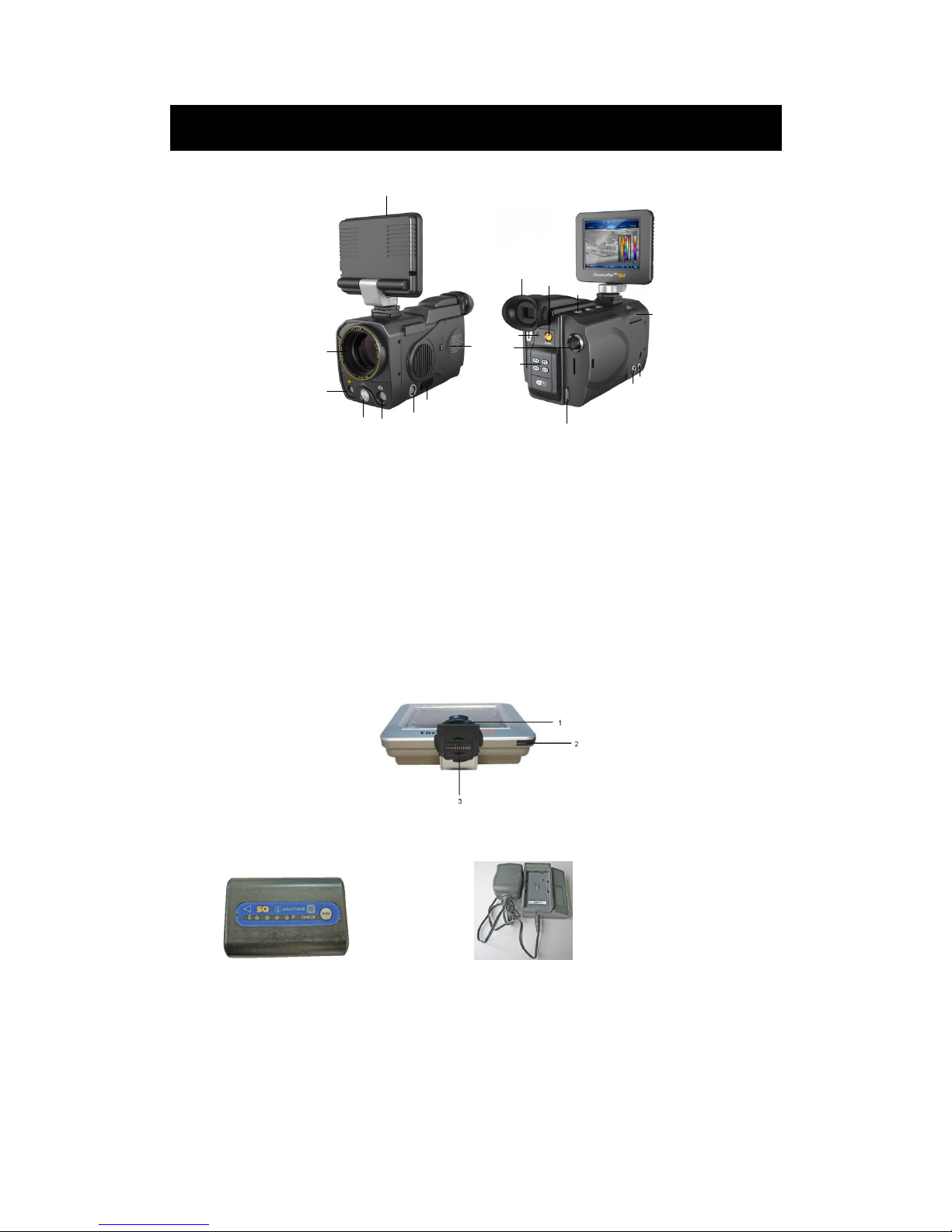
5. Parts Described
1
2
3
4
5
6
7
8
9
10
11
12
13
14
15
16
17
18
1. VGA LCD touch screen 2. IR lens
3. Laser indicator 4. Illuminator
5. Visual light 6. VGA video interface/ joystick interface
7. USB2.0 interface 8. Battery door
9. View finder 10. Microphone to record voice annotation
11. Joystick 12. F1~F4 keys
13. Shoulder strap interface 14. RS232/ TV video interface
15. External power supply interface 16. SD card slot
17.Button S、Button C、Button A 18. Power on button
1. Tightening gear; 2. Touch pen; 3. Hot shoe contact pins;
Lithium rechargeable battery Battery charger
Page 10
10
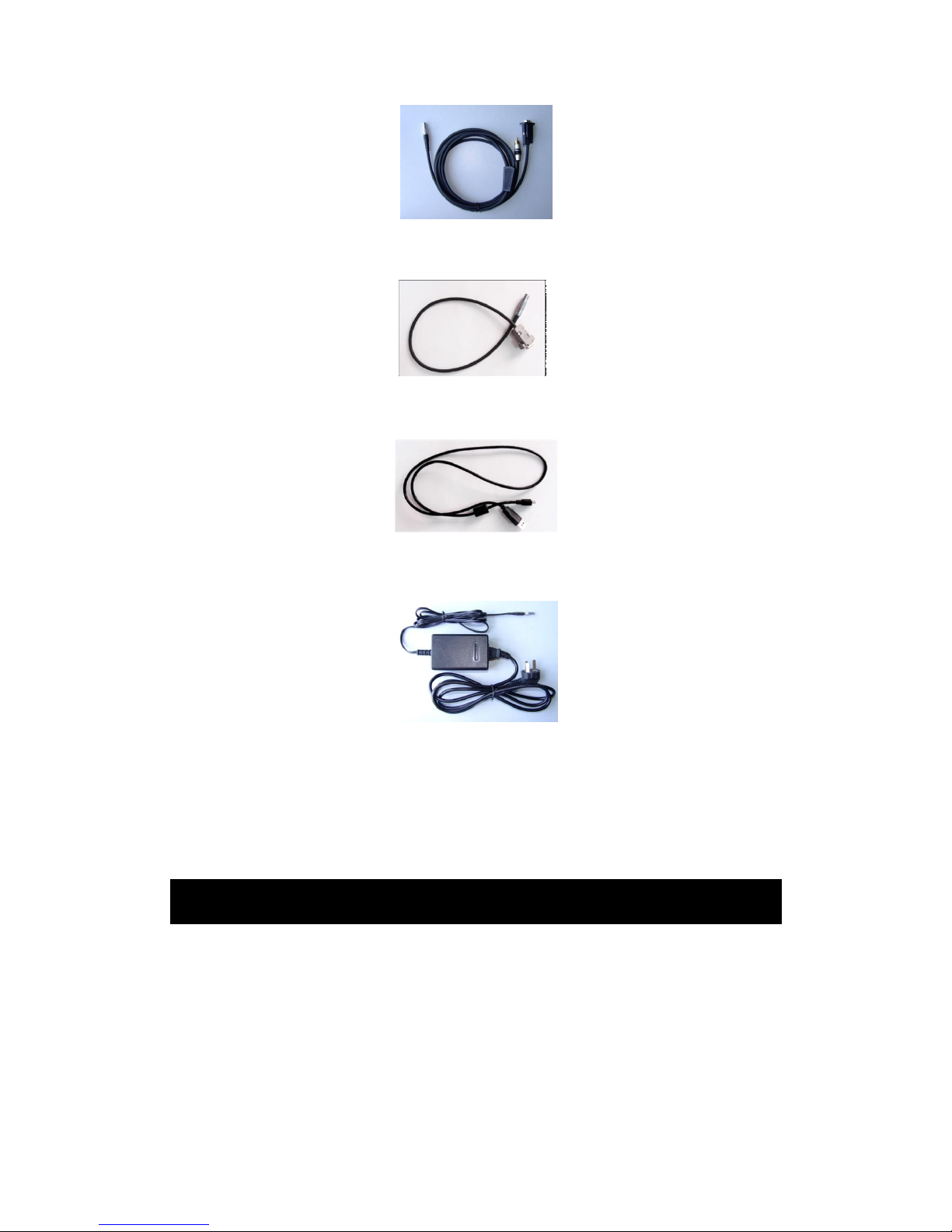
RS232 / TV video cable
External VGA video cable
USB cable
AC adapter
If connecting the VGA cable and the video interface of RS232/ TV video cable to corresponding devices,
such as a VGA display device and a TV video display device, you can view the live video taken by the camera
simultaneously on VGA LCD touch screen, OLED viewfinder, the VGA display device and the TV video display
device.
6. Assembly/Disassembly LCD
The camera adopts the advanced Hot-shoe technology to realize the connection between the LCD and the
host, so cables are saved.
Put the hot-shoe connector into the guide rail on the top-end of the camera until the end.
Rotate the fixed rotary knob in a clockwise direction to make the hot-shoe connector and connecting base
match and locked.
LCD can support pitch adjusting around the horizontal axis, in order to reach a convenient observation
angle.
If you want to remove LCD, rotate the fixed knob in an anti-clockwise direction to break the lock between
Page 11
11
the hot-shoe connector and the connecting base.
Slightly press the hot-shoe connector at the front end of the camera, and push it forward until it is
completely out of the guide rail of the hot-shoe connecting base.
Note:
Don’t forcefully install or disassemble LCD to avoid damaging the metal touch of the hot shoe.
Push LCD into the guide rail of the hot shoe, and make sure the fixed knob is locked well to avoid the bad
connect or separation of LCD.
Install or disassemble LCD in the shutdown mode.
7. SD card In /Out
Under power-off or boot-up status is both available for the SD card operation.
Open SD card door for the operation.
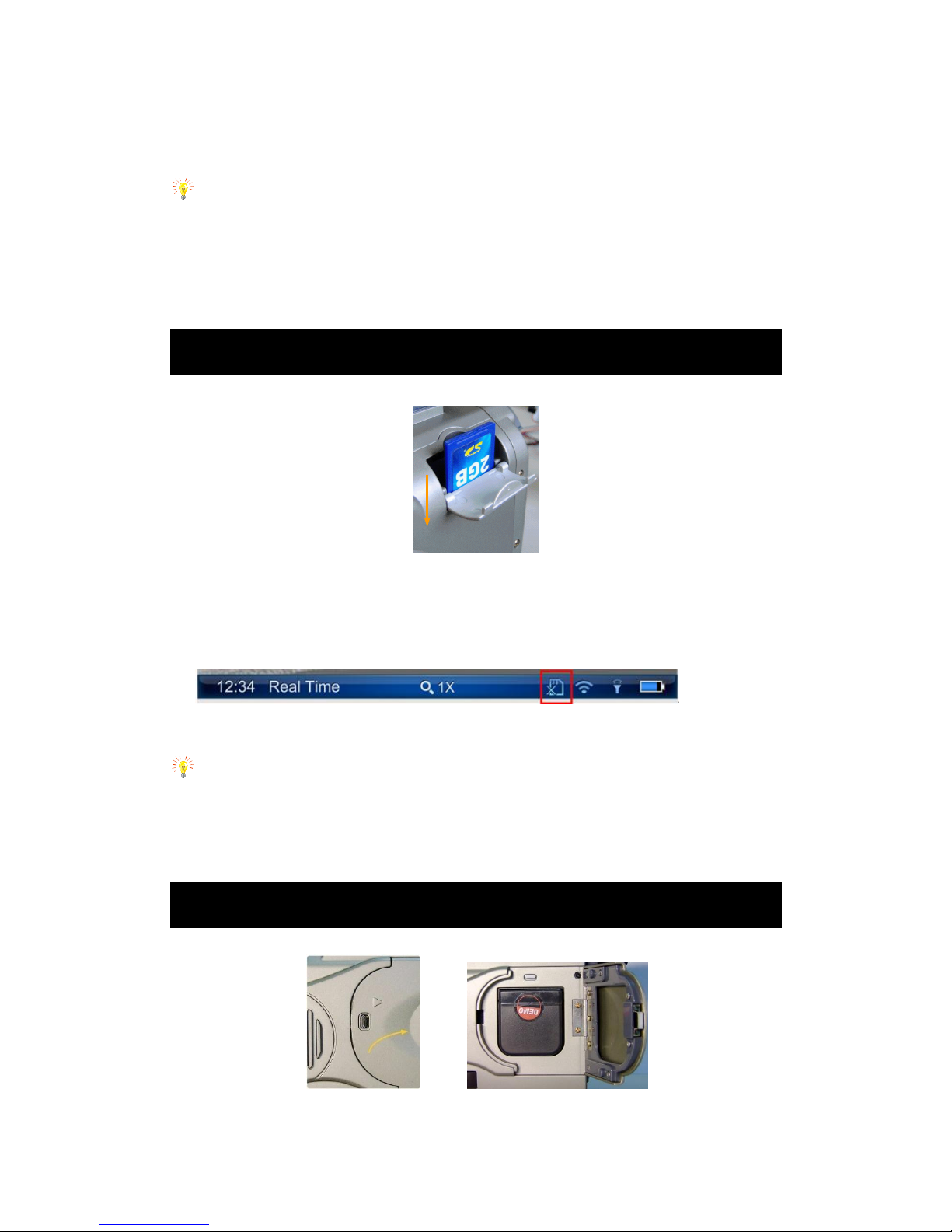
Insert SD card,please insert metal part into it and push it inside.
Take out SD card, press down and release it. Then it would be jump out.
If there is no SD card inside camera, the information bar will display as follows:
If there is a SD card inside it,this icon will disappear.
Caution:
Please do not turn off the camera when it is saving, opening and deleting images.
Please do not get out of SD card when it is saving, opening and deleting images.
Do not use this SD card for non-infrared thermal camera application.
8. Load in/Load out Battery
Pull out lock catch to open the battery compartment.
Push one battery metal part inside it until it knocked, and then close the battery gate.
Page 12
12
Please turn off the camera before changing the battery.
Pull out of battery lock catch, and then take out the battery.
9. Charging Battery
There are only one way to charge battery:
Charging battery with the special battery charger
Charging battery with battery charger
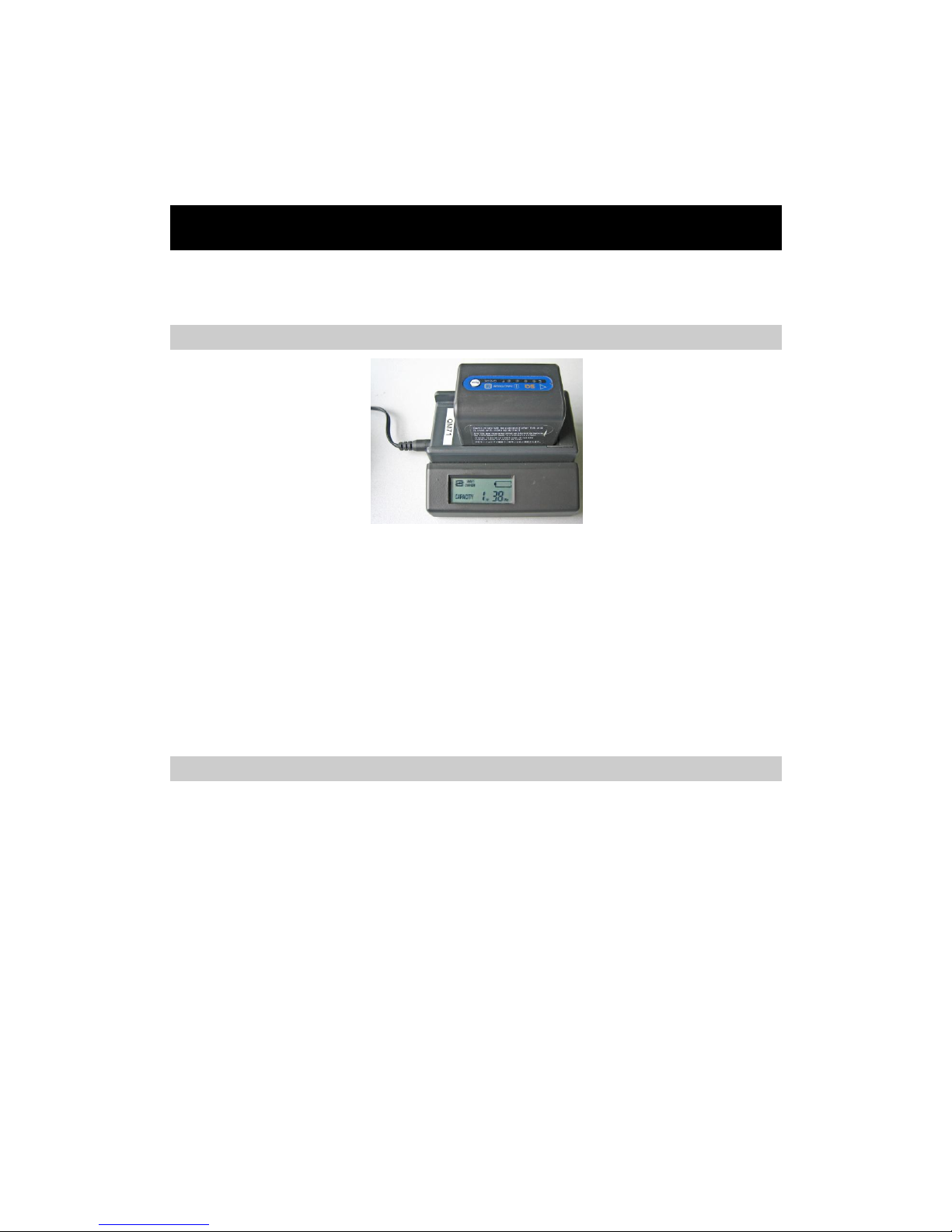
Put the battery on the battery charger.
Connecting battery charger power.
The battery charger will make a sound after it starts charging, it will display “**Hr**Min” on the screen to
show battery capacity status.
The battery charger will also make a sound when battery charging finishes. It will display “FULL” on the
screen to show battery capacity full.
Take out the battery to put it into the camera.
We don’t recommend using the battery uncharged fully, for it will reduce the effective capacity.
Notes
The capacity of charging battery would be reduced when it is not using. Please recharge it when it is not
used for a long time.
Please remove battery out when infrared thermal camera isn’t used, and put it under dry environment.
Please use dry soft cloth to wipe metal contact of the battery.
Please do not try to open or disassemble the battery.
Please do not let the battery short circuit.
Page 13

13
10. Operation Button Instruction
Power on/off
Press this button for 2 seconds to turn on/off the camera.
Joystick: Multifunctional Joystick
When it is under real-time infrared thermal status,moving up/down the joystick is manual focus, moving
right/left the joystick is zoom in.
Moving down the joystick to enter menu or parameter option,then moving the joystick to switch from each
menu and subsidiary menu, or changing the parameter value.
When the options on the menu are in high light, pressing the joystick vertically represents entering this menu or
the option.
When the tools bar is in high light, pressing the joystick vertically represents selecting and carrying out the
operations in these options.
Button S: Freeze/ Save
Press button S to freeze the image in real infrared thermal status, and press button again to save the picture into
SD card.
Button C: Cancel/Exit
Press button C to cancel without changing any parameters.
Press button C for 2 seconds in real infrared thermal status, then it will calibrate.
Button A: Palette/Filter
When it is in real time with basic information, shortly press button A for 2 seconds to swift from “auto” mode to
“manual” mode.
Press button A to switch from “max” to “min”, moving up/down joystick to change temperature value.
Press button A in real time without menu, then it could switch from standard temperature filter to high
temperature filter (250℃~800℃).
Button F1:
If the light option is on in the parameter setting,press “F1” button to open/close the light and adjust lightness.
Button F2: Infrared thermal image/Visual image
When there is no menu on the screen, press button“F2” to switch from thermal image to visual image.
Button F3: Laser Indication
When it is in real time without menu and laser indication option is on,pressing“F3”button to open/close the laser
indication.
Button F4: Auto Focus
When it is in real time without menu,press button“F4” to perform auto focus to make the image clear. (If the
Page 14
14
target has no obvious contrast, auto focusing effect isn’t very good.)
11. Quick Start Guide
Ensure that the battery is fully charged and the SD memory card is inserted in the camera.
Insert the VGA LCD screen into the hot shoe and ensure it has locked into place.
Press button On/ Off for 2 seconds to switch on the camera.
Wait till the boot-up screen image disappears and uncover lens cap.
Aim the camera at the target. Press button F4 to automatically focus or move the joystick up or down to
manually focus.
Press button A for 2 seconds to switch between Auto and Manual modes. In manual mode, press button A
to shift between T-max and T-min and up or down the joystick to setup the values. Follow the
above-mentioned methods to adjust the display effect if required.
Use touch pen to touch the palettes and make selection among the 8 choices. Click the palette type and the
right-side palette, and then the set palette type can be changed.
In the auto mode, long press button A for 2 seconds to shift between temp-range filter, which adapts for
the different temperature range.
Press button F2 to switch between live visual image and thermal image. The visual light camera is in auto
mode without manual operation.
Press button S to freeze the live image.
Press button S to store the frozen image into SD memory card.
Press button S for 2 seconds to enter video recording menu in real-time mode and in no menu mode.
12. Operation Instruction
Power-on the camera
Press button On / Off for 2 seconds to power on the camera.
Then the loading image and boot-up screen flash for about one minute appear in the screen as shown below:
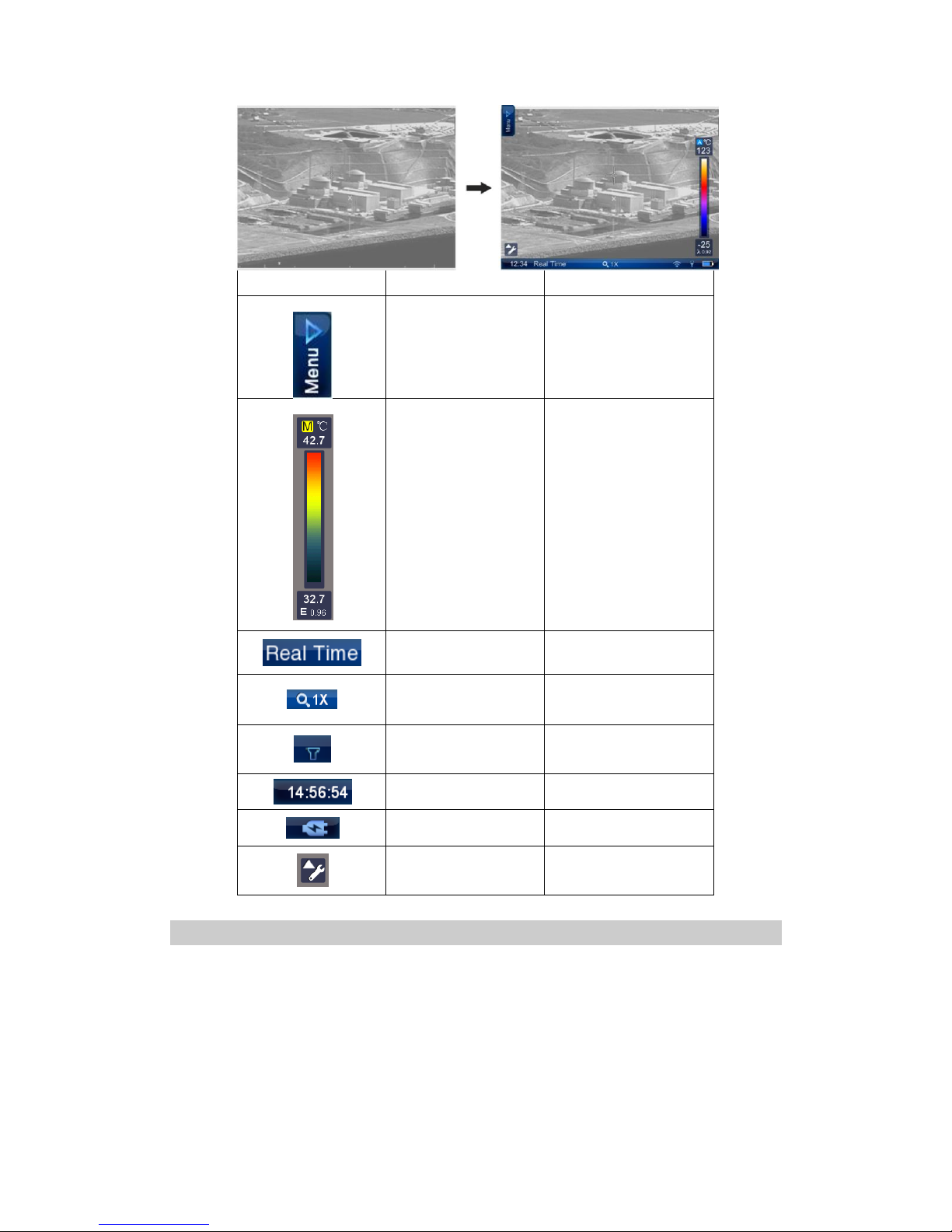
After the boot-up screen flash disappears, live image as shown below is displayed. Touch the screen or move the joystick
downward, basic information will be shown.
Page 15
15
Icon
Significance
Function
Menu
Bring up the main menu upon
click of the touch pen
General Parameter
Display the mode
(auto/manual),temperature
unit and adjust T-max, palette,
T-min and emissivity for the
current image
Status bar
Show the status of the current
image: live, frozen, saved, auto
mode, manual mode, etc.
Zoom bar
Indicate the magnification of
the current image
Illuminator
Indicate on/off of the
illuminator and the
brightness level
Time
Indicate the local time
Battery Status
Indicate the power supply
type and the capacity
Tool Bar
Touch it to display tool
menu to operate
temperature analysis
Non Uniformity Calibration (NUC)
After powering on the camera and the boot screen flash disappears, the camera will automatically perform
a Non Uniformity Calibration (NUC). 3 times NUC will perform with 1min after power on. During operation,
NUC will perform regularly and the icon of NUC will display on the screen.
If necessary, manual NUC can be performed. To perform a NUC manually, keep button C depressed and
then press button S when there is no menu or dialog box in live thermal image.
During the NUC the live image pauses temporarily, whilst a shutter is placed in front of the detector
This process takes only a couple of seconds, however for best results, please ensure that camera is pointed
Page 16
16
at a low temperature uniform surface or the lens cap
Focusing
Thermal camera focusing
There are two methods to adjust focus in live image: manual and automatic focusing. Before focusing, ensure the lens cap is
uncovered and there is no menu or dialog box displayed in live thermal image.
To manually focus, aim the lens at the target and then move the joystick up or down
To automatically focus, keep button F4 depressed till a frame appears in the image, aim the frame at the target and
then release button F4, then the camera will automatically focus till getting a clear image of the target.
Note: When the temperature difference between the target and its surroundings is not obviously, it is advisable to focus
manually to get a clear image of the target.
Temperature range, Filter and Palette
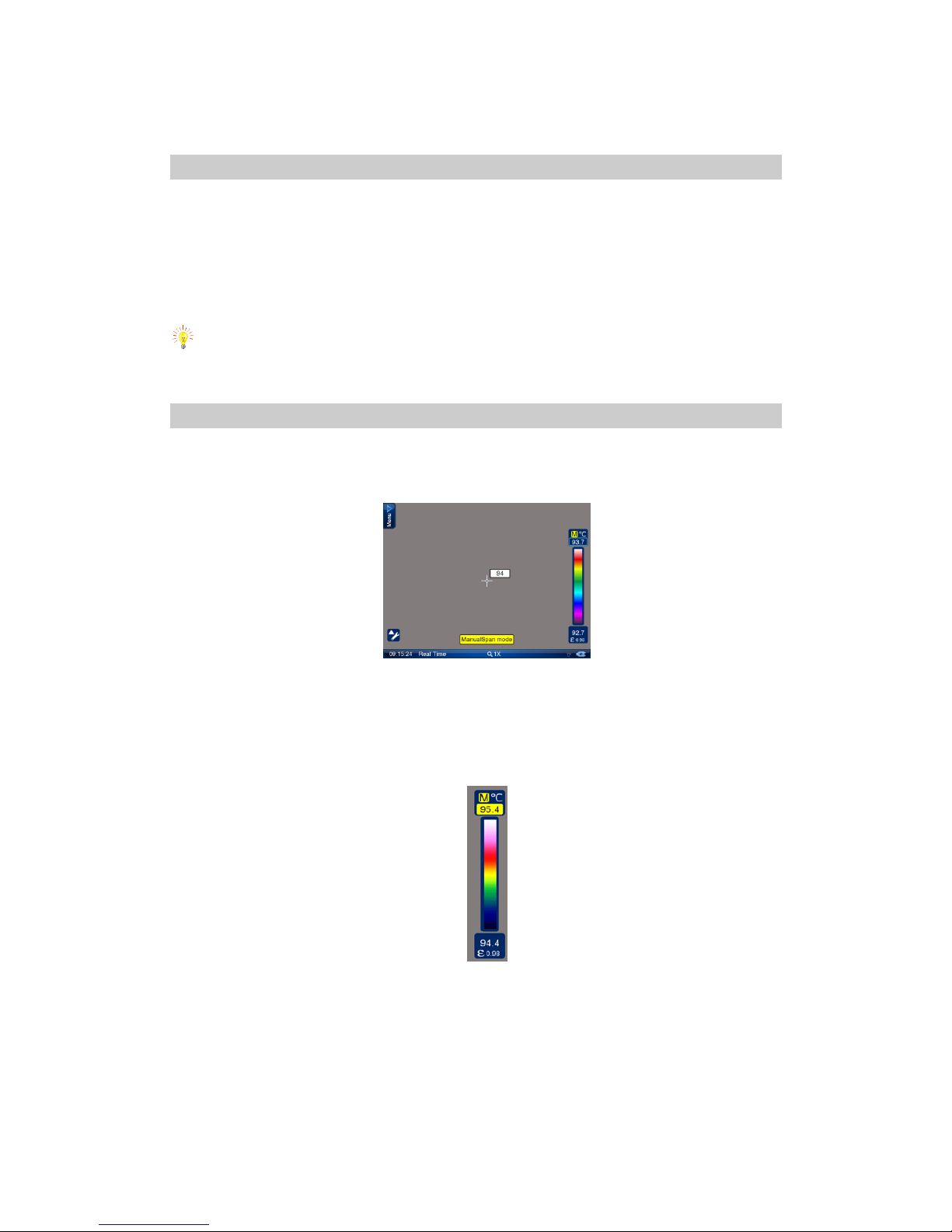
When there is no menu displayed in live thermal image, press button A for 2 seconds and then release it to switch
between auto and manual modes. The prompt “Auto” or “Manual” will appear in the status bar at the bottom of the
screen. Or, touch the icon A/M in general menu to make the selection.
In Auto mode, contrast and brightness of the image are controlled automatically by the camera itself through T-max and
T-min. In manual mode, you can adjust the contrast and brightness manually by altering the values of T-max and T-min.
Switch from auto mode to manual mode, T-max or T-min will be highlighted by dark blue box, indicating being selected.
Press button A to shift between T-max and T-min and upward/downward the joystick to adjust the value, when the
background will be in yellow and the value will be in black.
In manual mode, use touch pen to slide upwards/downwards, the background of T-max/T-min value will be highlighted
in yellow, and the value will be in black and change meanwhile.
There are 8 palettes for selection. The object with different temperature will show strong contrast under the severely
changeable palette. Then the image noise will become manifest. The smooth transition palette will lead the image soft
with small contrast and unobvious noise.
Page 17
17
Click the palette with the touch pen, then the palette select menu is shown, select the needed menu, then
click the palette on the ride side of screen, then you could change the palette:
The standard temperature range of the camera is -20 to 800°C, which is divided into two filter ranges. The
range for filter position 1 is –20 to 250°C; the range for filter position 2 is 250 to 800°C
If the target temperature is beyond the current filter range, the symbol “+++” or “---” will appear in the
temperature display bar under the live image. It indicates that the filter range should be changed manually.
To change the filter range manually, go to the live thermal image, and press button A for an instant to
select the filter ranges.
While the live image under filter range 1 in auto model, the camera will automatically switch to filter range
2 when the object in the imaging area is higher than 250°C for 2 seconds. It is to protect the detector. In
manual mode, filter range shall not be changed automatically.
After changing the option values, press button C to save the change and exit the menu.
Emissivity setting
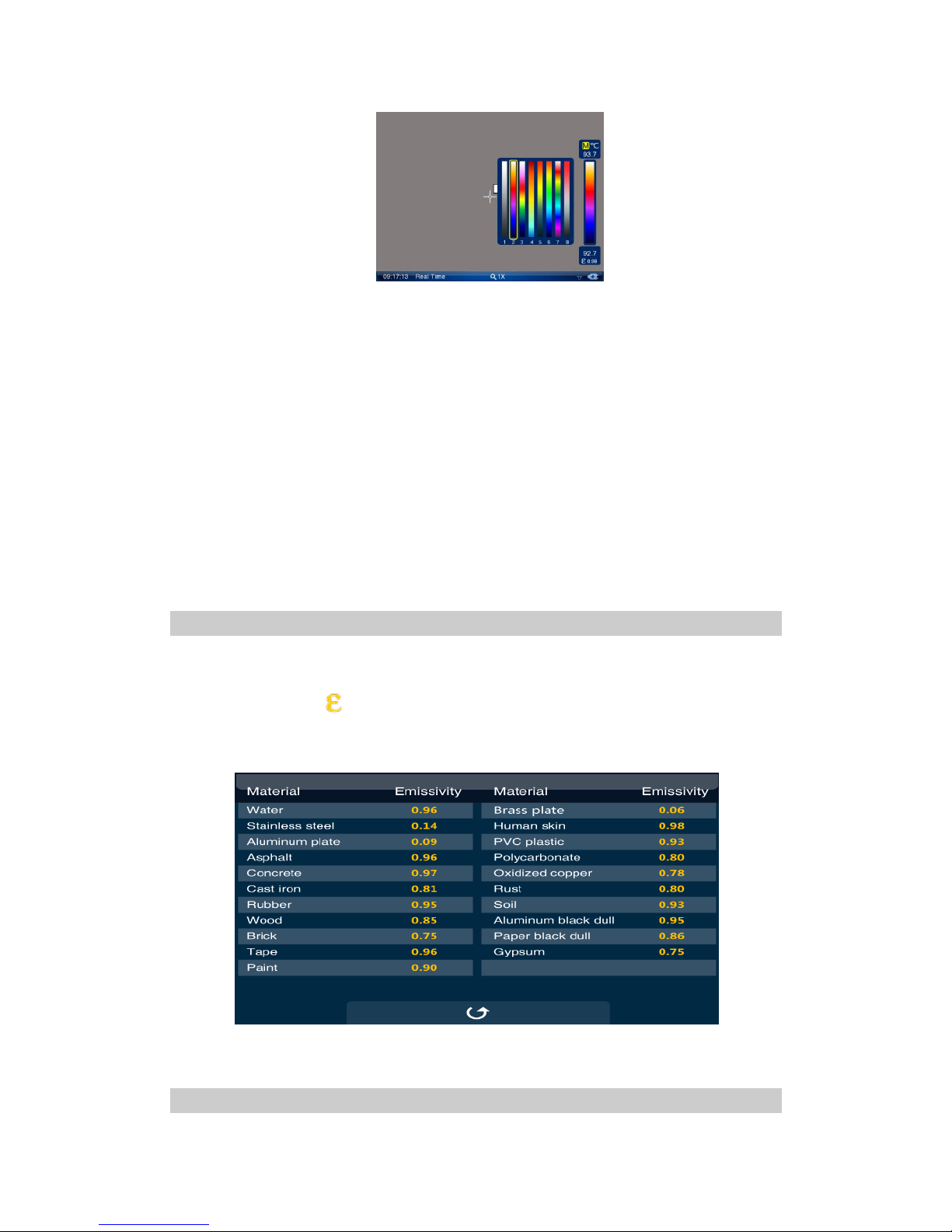
The emissivity is different for different surface materials. To obtain the true surface temperature we must divide
the actual output by the emissivity value before we convert to temperature.
Click the emissivity symbol on the right side via the touch pen, the emissivity value list will be shown which
includes the normal objects. Find the correct value and click return or Button C to quit the emissivity list.
It will be introduced in the menu introduction to set the emissivity on the sub menu.
Manually change the emissivity value also realizable. Click the emissivity value by touch pen and slide to up/down
and change the value.
Basic Temperature Measurement
Page 18
18
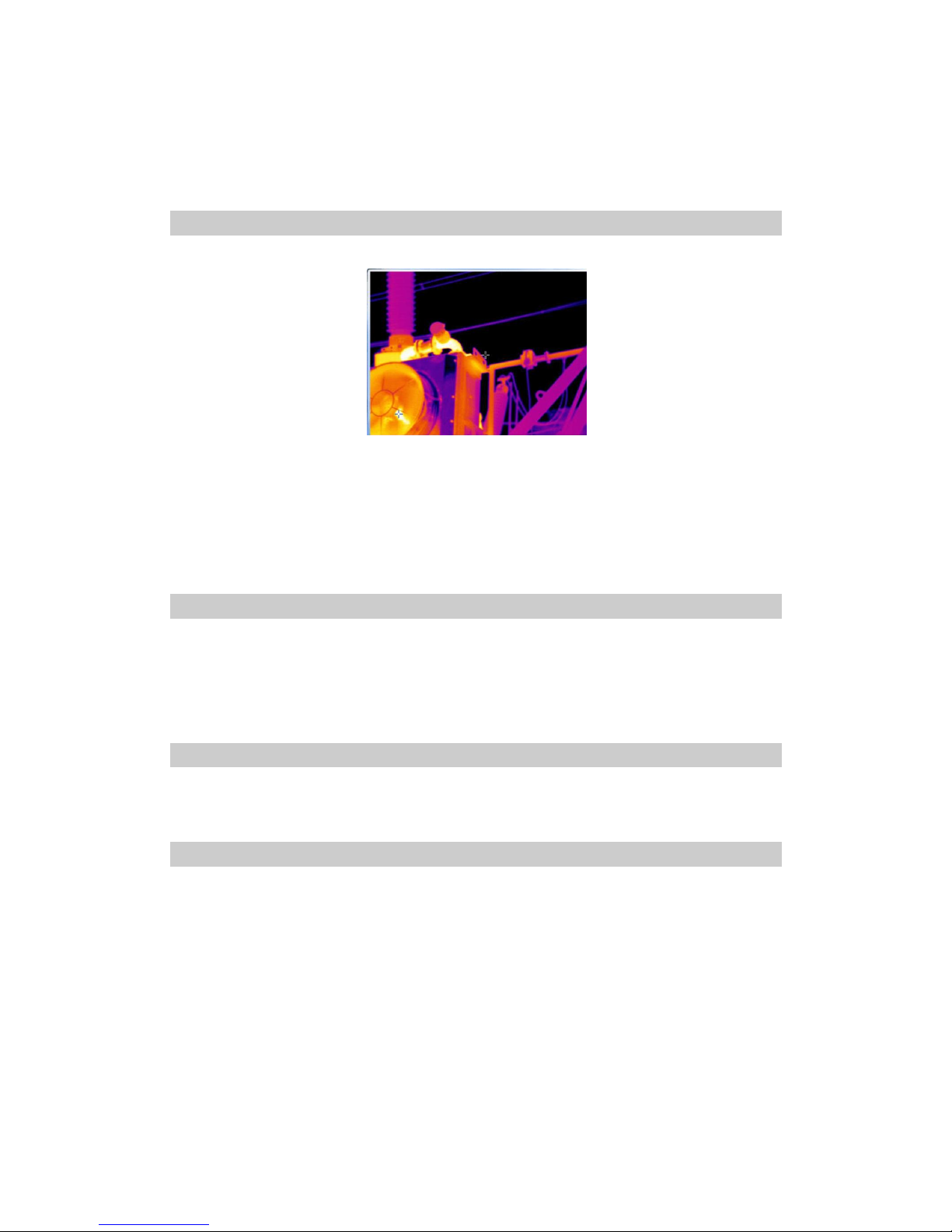
For basic temperature measurement, first ensure that a suitable temperature range is set and the image is in
focus. Two methods are available, dynamic real-time temperature measurement and static temperature
measurement
Dynamic real-time temperature measurement
It is to measure the temperature of real-time thermal image in this method.
There are two cursors on the live thermal image. One is always fixed in the centre of image; the other is
always tracing the hottest spot of the image. Under the live thermal image, two temperature values are
present on one side of the cursors.
There are several analyses for real-time thermal image: spot analysis, line analysis, area analysis, isotherm
analysis and etc. These will be introduced in farther below.
Static Temperature Measurement
This method is available when there is no menu displayed in frozen or saved thermal images.
Keep the camera steady when you have the image in focus or choose and open a saved image. Analysis the
temperature measurement via the spot, line, area function in the tool bar. The detailed introduction is
farther below
Adjusting temperature range of frozen/ saved image
Temperature range of a frozen or saved image can be changed as well to adjust the image quality when frozen or
replay the thermal image.
Image zoom
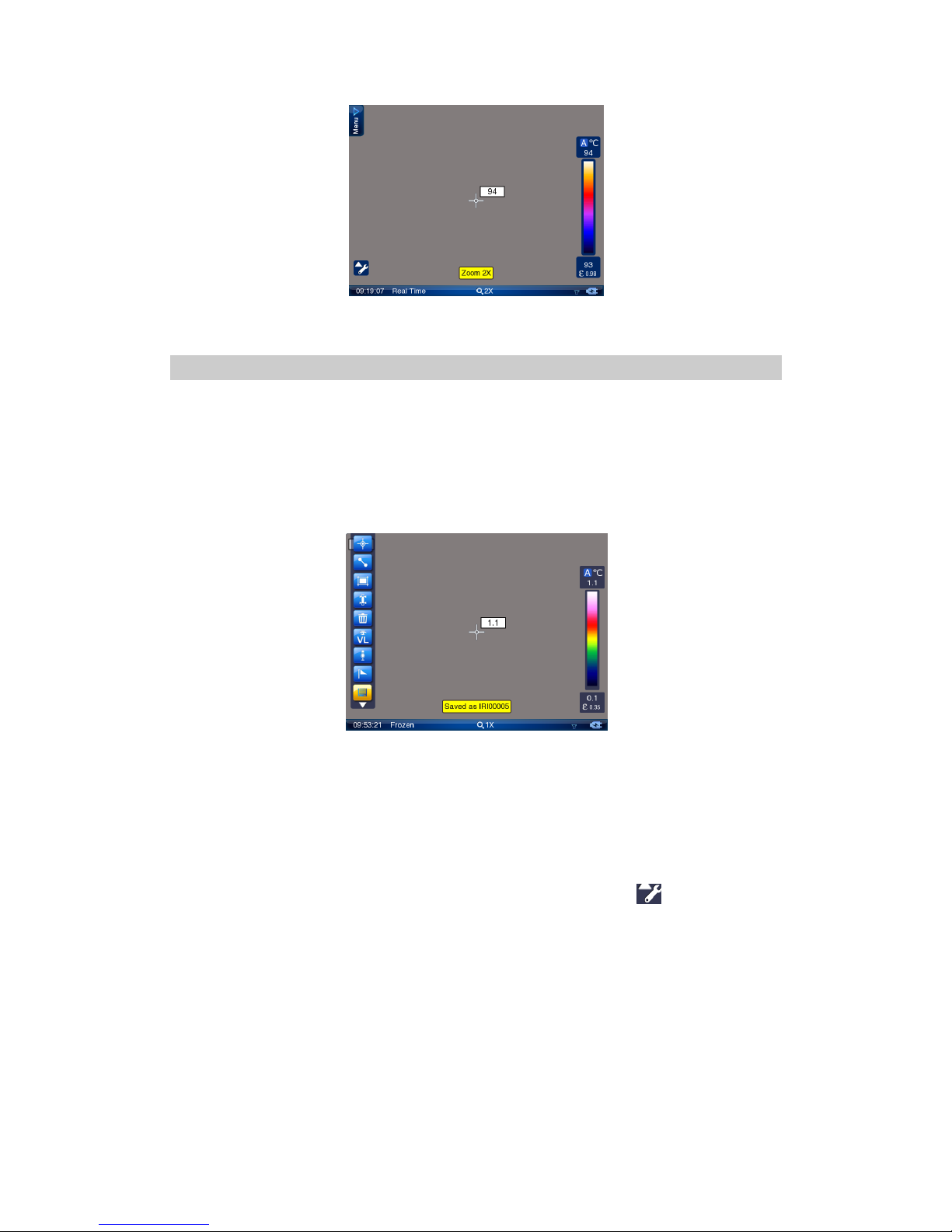
When there is no menu displayed in live thermal image, move the joystick up or down to adjust focus and left or
right to zoom in or out the image continuously, with the current magnification shown in the zoom bar under the
image. TP9 is available for x2, x4, x8 zooming.
Page 19
19
Operation on the x1 image is also available for the zoomed image.
Note: for Infra-fusion function, the image must at original rooming x1.
Frozen live images and save images
Keep the camera steady when you have the image in focus, then press Button S to freeze the live image.
Now the image status changes to be frozen. Prompt Frozen is shown in the status bar under the image
screen.
Pressing button S again can save the frozen image directly into SD card. Then the camera will be back to live
image. The name of the saved image “IR*******” will be displayed in the status bar under image screen for
2 seconds.
Or you can do multiple kinds of operation on the frozen image before saving it into the memory media, such
as static temperature measurement, temperature range adjustment, spot analysis, line analysis, area
analysis, isotherm analysis, visual image display, recording and playback of voice annotation, adding text
annotation, histogram analysis, etc.
When there is no menu displayed on the frozen image, you can do static temperature measurement and
temperature range adjustment as per instruction aforesaid.
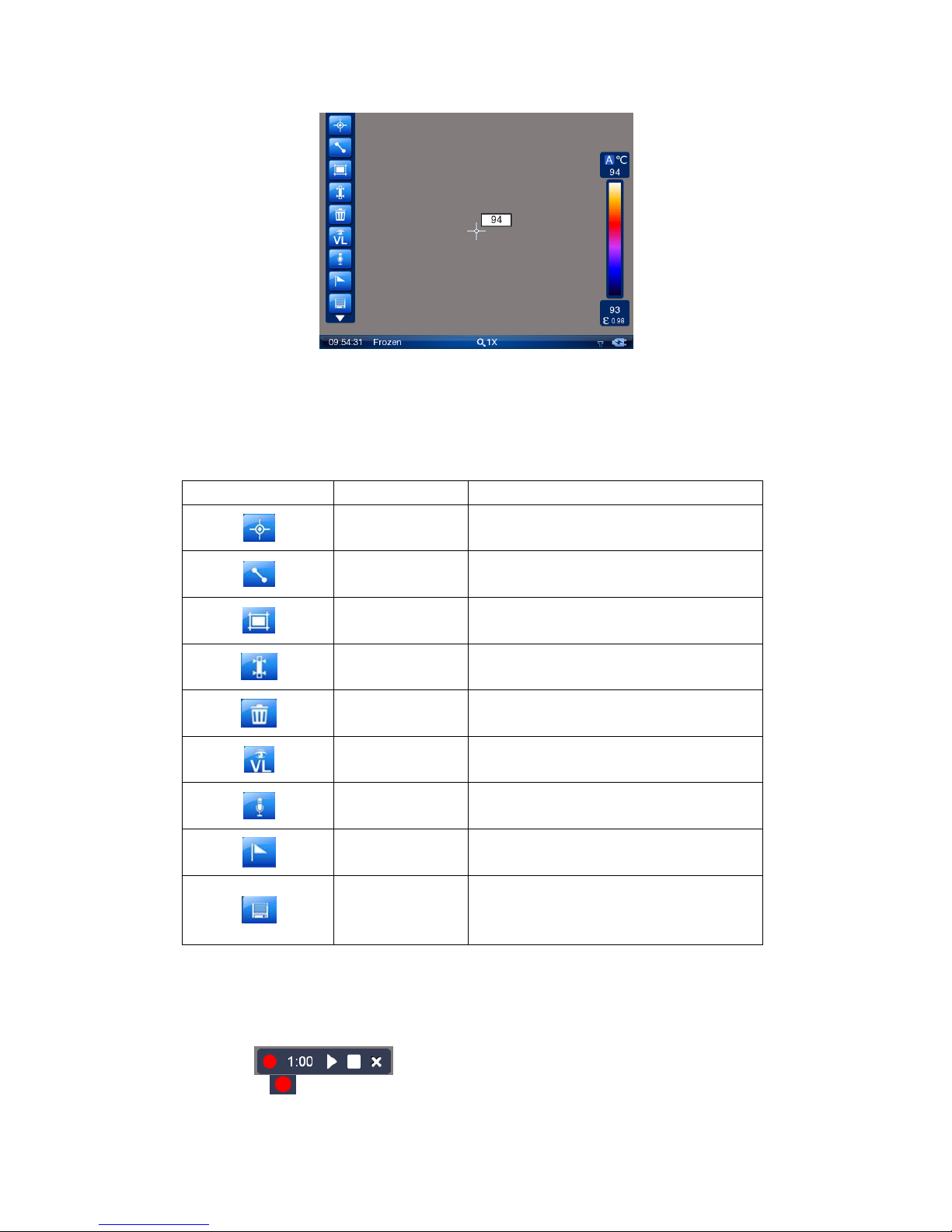
To do the left operation listed above, press the joystick or use the touch pen to click at the bottom left of
the screen to bring up the frozen toolbar as shown below.
Page 20
20
Functions of the icons in the toolbar are listed below. Moving the joystick up, down, left or right can toggle
between each icons, pressing the joystick can select an icon and execute its command. Then the button will
change to yellow. Or you can simply use the touch pen to click each icon to select a certain one. Here is the
brief description. “Press” includes the cooperation of joystick and touch pen.
Button
Description
Function
Spot analysis
Multi-spot temperature analysis on static image
Line analysis
Direct line temperature analysis on static image
Area analysis
Multi-area temperature analysis on static image
Isotherm analysis
Isotherm analysis on static image
Delete
Delete the spot, line or area analysis objects on
static image
Visual image
Display the corresponding visual image of current
frozen infrared image
Voice recording
Record voice annotation
Special mark
Mark the special image
Save
Save the frozen image into storage media, including
infrared image, digital visual image, voice
annotation (if any) and text annotation (if any).
Spot analysis, line analysis, area analysis and isotherm analysis will be explained in latter chapters. Voice
annotation and special mark will be introduced here.
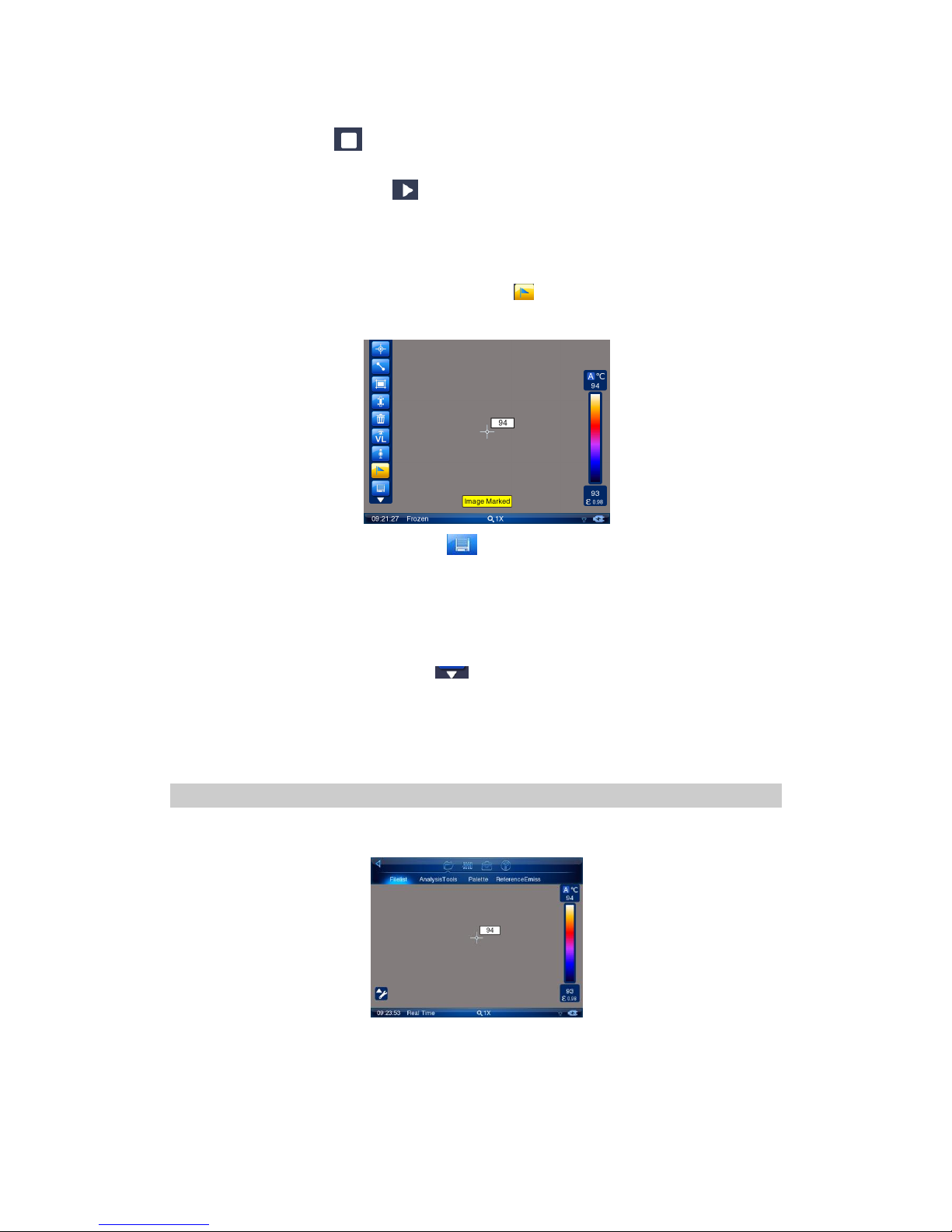
If voice annotation is needed, press button “voice recording”, and, the voice recording menu will display as
follows:
Click button , the voice recording start with time count down. During recording, the red button will
always flicker.
Page 21
21
For each image, max 60 seconds of voice annotation can be added. If voice annotation is less than 60
seconds, press button to stop voice recording. If it is not stopped until 60 seconds, the voice
recording will be stopped automatically.
After voice recording, click button to replay the recorded speech. During replaying, you can also click
“stop” button to stop replaying.
If you are unsatisfied with the voice annotation, you can repeat the steps above to get satisfied voice
annotation.
Special mark on certain image is available. Click button , it will show “the image is annotated”, this
means this image is with special market. It will be shown with small icon in image list.
After image annotation is done, click button or press button “S” at frozen image status, this image
will be saved into storage media. If the image is with voice annotation or text annotation, all the
information will be saved. The saved image name “IR******” will be shown at bottom of screen for 2
seconds. The saved image format is JPEG, with temperature information, digital visual image, voice
annotation (if any) and text annotation (if any).
To exit the frozen toolbar, click the button or press button C directly. Under frozen status, if there is
no menu, press button C will return to real-time working mode.
If SD card space is not enough, when you save image, there will be prompt of SD card full. If any error
happens during storage, there will be prompt of error.
Replay image
The saved image can be replayed or deleted from infrared camera.
Enter the main menu, select “File list” under sub-menu “File”.
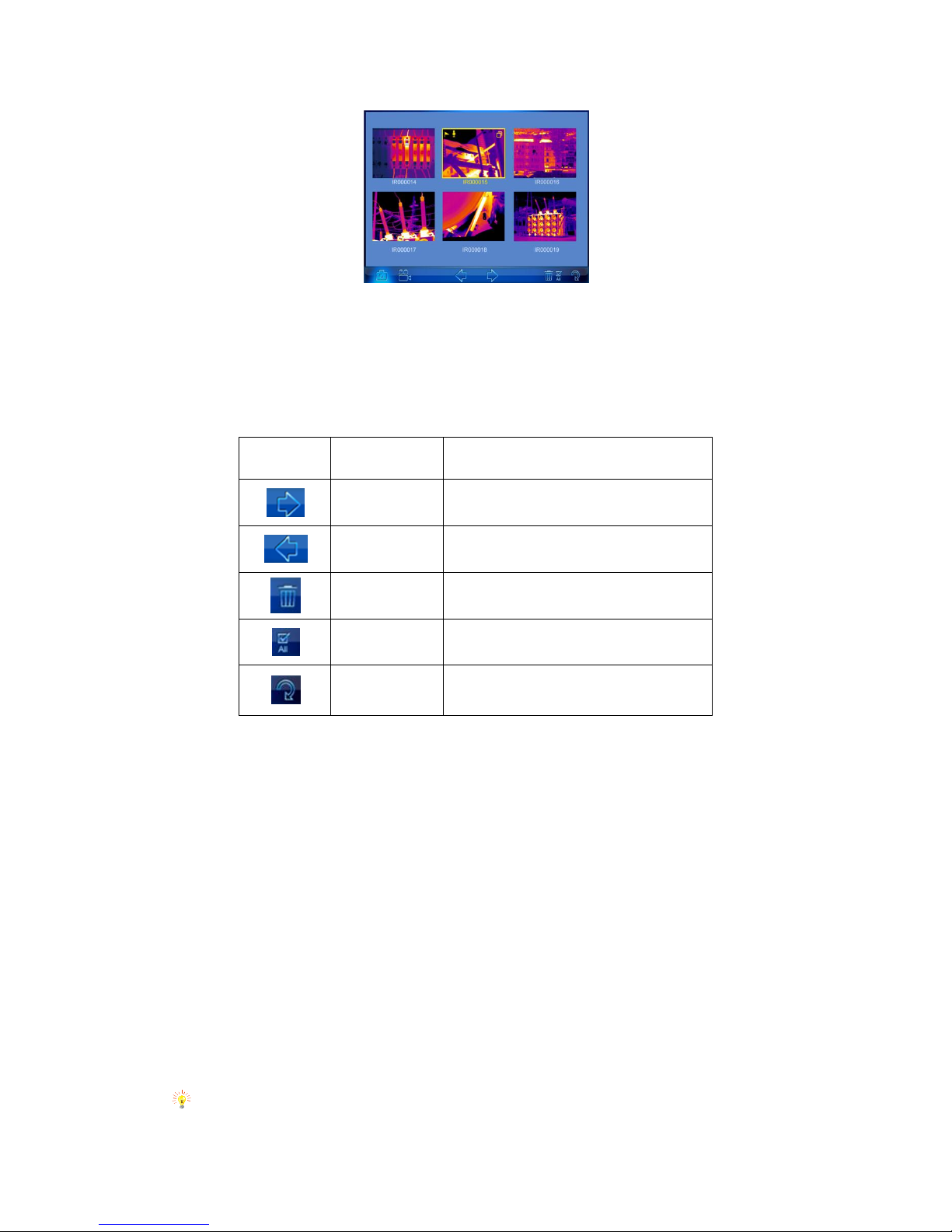
Now the thumbnail images are displayed in the screen (6 per screen) and the file toolbar is displayed under the image
screen. If the image is with voice annotation or special mark, there will be corresponding icons at the left top corner of
the image.
Page 22
22
To toggle between the 6 images within one screen, click them with the touch pen or move the joystick up, down, left or
right. To select a certain image, click the image or press confirm button to display the image on full screen.
To toggle between each icons of the file toolbar, click them with the touch pen or move the joystick left or right to
highlight the required tool and press the joystick to execute the corresponding function.
Functions of the icons are listed below:
Button
Description
Function
Forward
Forward to next screen
Back
Back to last screen
Delete
Delete selected file
Delete all
Delete all the files
Exit
Exit and return to file list or real-time working
mode
If more than 6 images are saved, the images will be displayed by more than 1 screen. To toggle between the screens,
select icon forward direction or icon back direction.
To delete a selected image, choose the icon Delete file. Then a dialog box “Delete this image?” will appear in the screen.
Choose button Yes to delete it or button No to cancel deletion.
To delete all the saved images, choose the icon Delete all. Then a dialog box “Delete all images?” will appear in the screen.
Choose button Yes to confirm or button No to cancel deletion.
Multiple kinds of analysis can be performed on replayed image, such as static temperature measurement, spot analysis,
area analysis, line analysis, isotherm analysis, visual image replay, voice annotation replay, text annotation replay, etc.
To do static temperature measurement, please refer to the sections Static temperature measurement.
To do the other analysis, bring up the replay toolbar by clicking icon Menu at the right top corner of the screen with the
touch pen or pressing the joystick to enter submenu “File” and then “Analysis tools”. The toolbar offers similar options to
the frozen toolbar, whose functions are introduced below. Clicking each icon with the touch pen can select them
respectively. Or move the joystick up, down, left or right to highlight one option first and press the joystick to select the
highlighted option.
Note: If the image is without voice annotation, the voice replay icon will be dark, means can’t be selected; If
Page 23
23
the image is without text annotation, the text annotation icon will also be dark, means can’t be selected.
Video recording
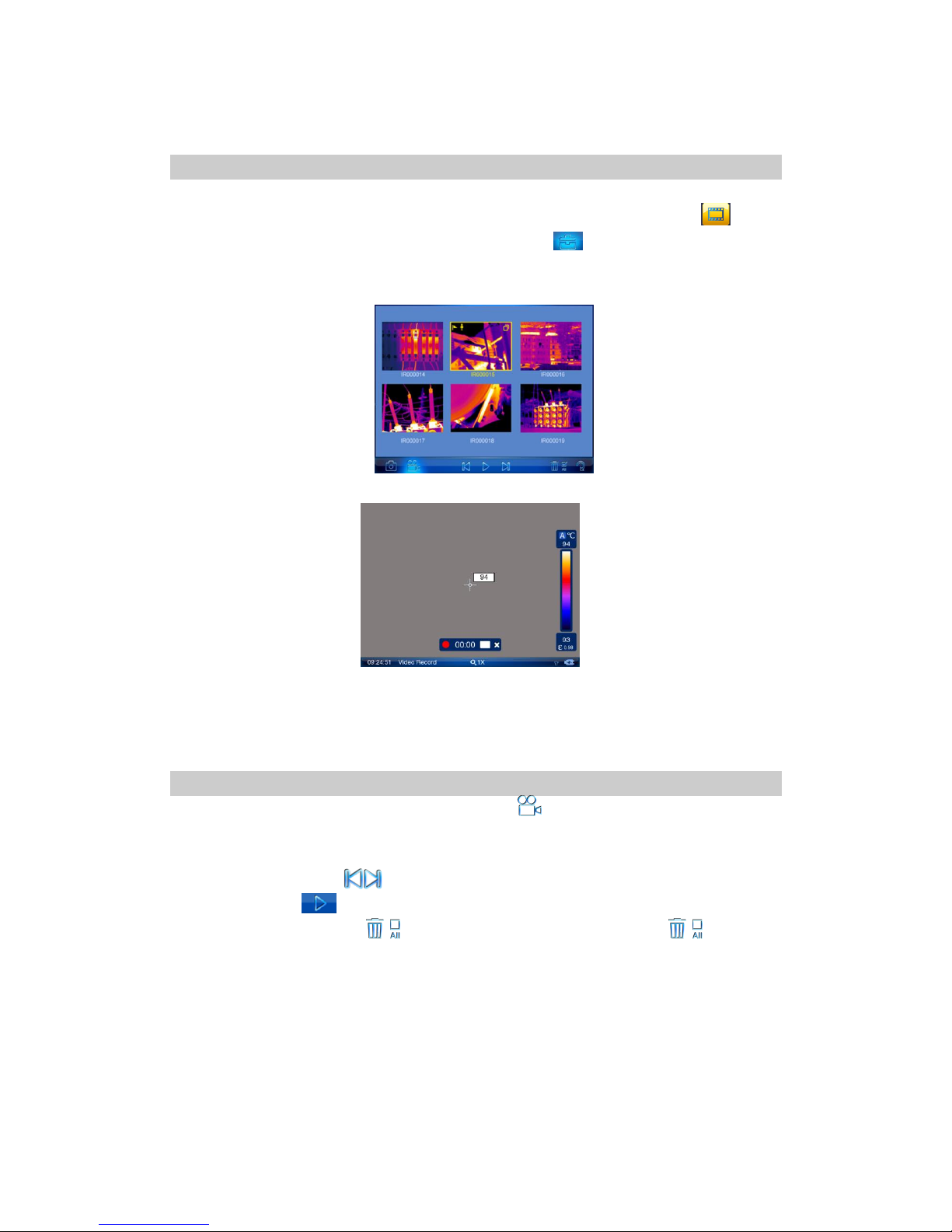
After well-focused, keep the camera body stable, click the shortcut button on toolbar at left bottom corner
(or enter main menu, select analysis tool option in submenu “File”) to display toolbar, click to bring
out video recording menu. It is also available at main menu, sub-menu, click “video recording”,
shows like below:
Press joystick to confirm recording, press button “S” to stop video recording and saved into SD card
automatically. Or, you can also click the red button by touch pen to start video recording, click the white
square button to stop video recording and save the video clip automatically.
Video Replay
Under file list, move joystick left or right to highlight icon , press joystick (or click this icon directly) to
enter video clip list.
Move rectangular box to icon (or click on this icon), press the Enter key to move backward or forward operating.
Click the play button or Press joystick enter key to play the selected video
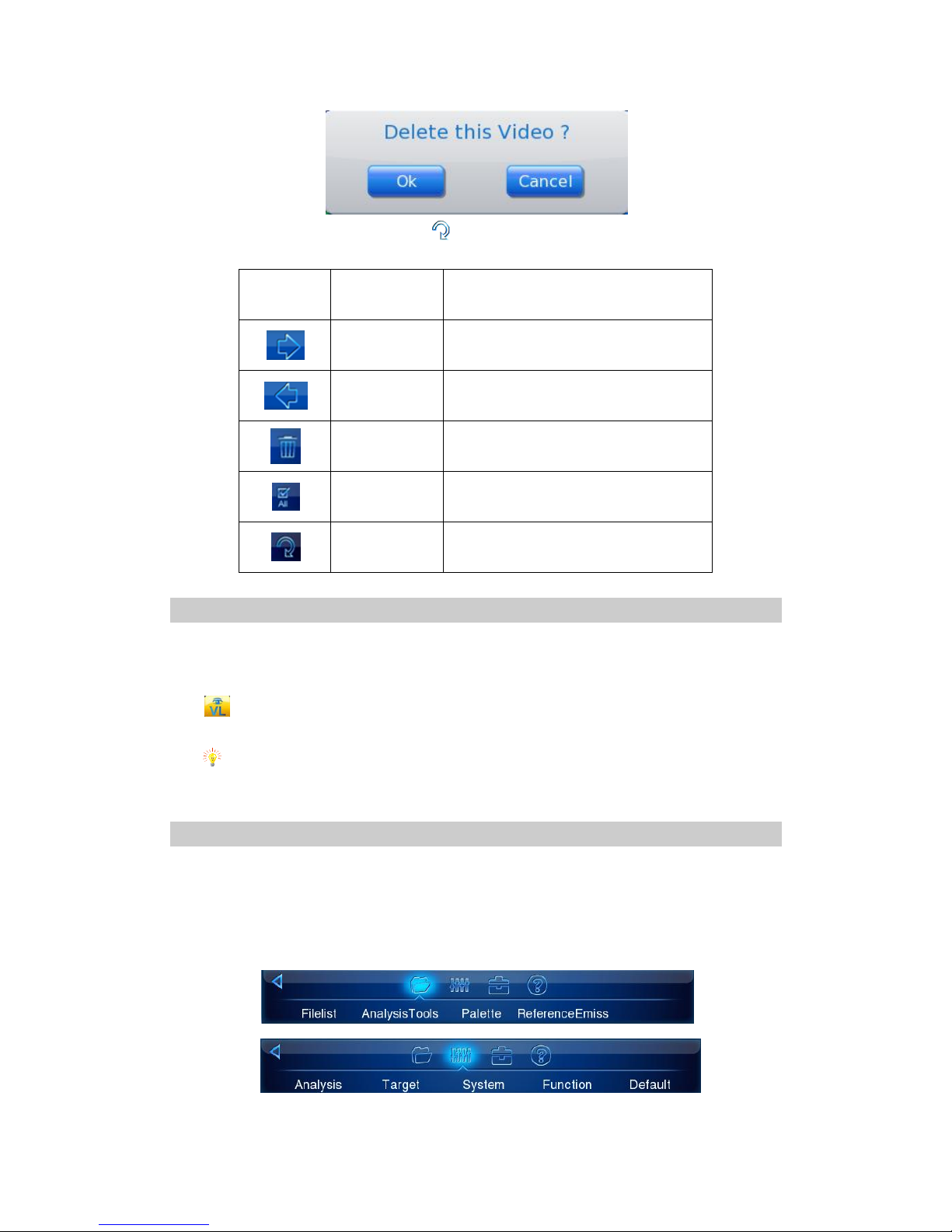
Move the rectangle box to icons (or click on this icon), press the Enter key. The icons are respectively
deleting the selected video and all video files. When the delete button is pressed, the middle of the screen will pop up
below prompt dialog box, click "Yes" means to delete the image, click on the "No", do not delete the video and return to
the list mode.
Page 24
24
Moved the selected rectangle box to the icon (or click on this icon), press the Enter key to return the real-time
mode.
Button
Description
Function
Forward
Forward to next screen
Back
Back to last screen
Delete
Delete selected file
Delete all
Delete all the files
Exit
Exit and return to file list or real-time working
mode
Visual Image
With visual image display function, the thermal imager can switch between the infrared image and visible image in
real-time, freeze or playback image state.
When there is no menu in screen, press F2 to switch between the infrared image and visual image directly, or press
in the freeze toolbar or playback toolbar to switch to the visible image from the infrared image.
Press F2 directly to switch to infrared image from visible image.
Note: Without any manual operation, the visual imaging system can obtain a clear picture with auto
focus function.
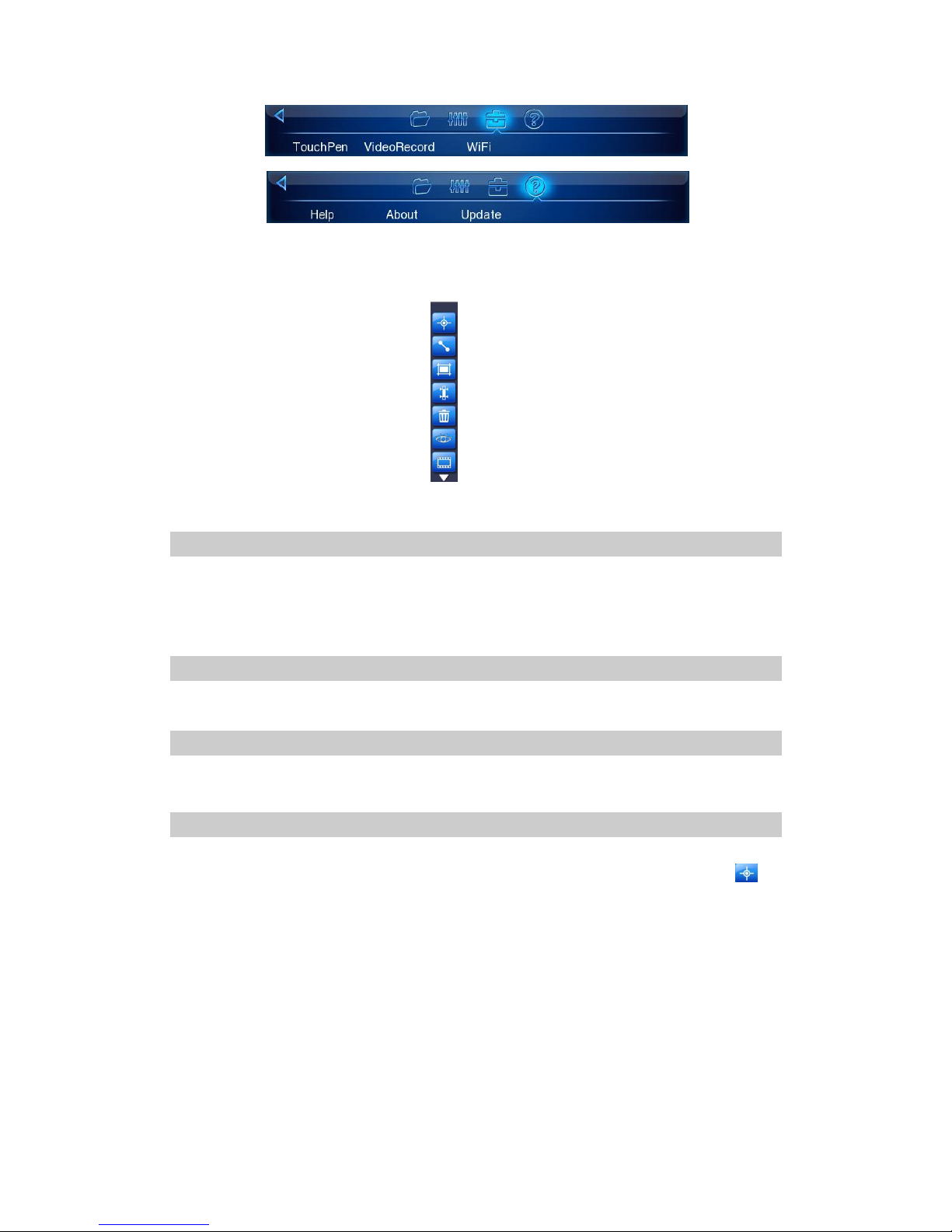
Main Menu Introduction
The camera offers a user-friendly Windows-style main menu. The basic information column is brought up on the screen
by either clicking the screen or pressing the joystick at real-time. Again press the joystick or click “Menu” on the upper
left corner of the screen with touch screen can bring up the main menu
The menu contains four submenus. The submenus can be navigated by either clicking with the touch pen or moving the
joystick up or down.
Page 25
25
In each submenu, options are navigated by either clicking with the touch pen or moving the joystick left or right. The
highlighted option is confirmed by clicking with the pen or pressing the joystick.
To exit the menu system and return to a live thermal image, press button C or click the icon “Menu” at the right top
corner of the screen.
“File” submenu
Move joystick up and down or use touch screen to select “File” submenu.
“File” submenu has two options, “File list” and “Analysis tool”. Select each option by moving joystick left and right or
using touch screen.
“File list”
“File list”: please see above chapter on image & video playback
“Analysis Tool”
Select “Analysis tool”, and press the joystick or click it with touch pen, the toolbar will appear as below.
“Spot Analysis”
Spot Analysis can be performed on live or zoomed or frozen or saved images.
In real-time image, bring up the main menu, select “Analysis tool” under submenu “File”, and then select spot to
do spot analysis.
In frozen images, bring up the frozen toolbar with the touch screen or joystick. Click the icon spot analysis to do spot
analysis.
In saved images, spot analysis can be done when the images are replayed. Bring up the replay toolbar and select spot
analysis to do spot analysis.
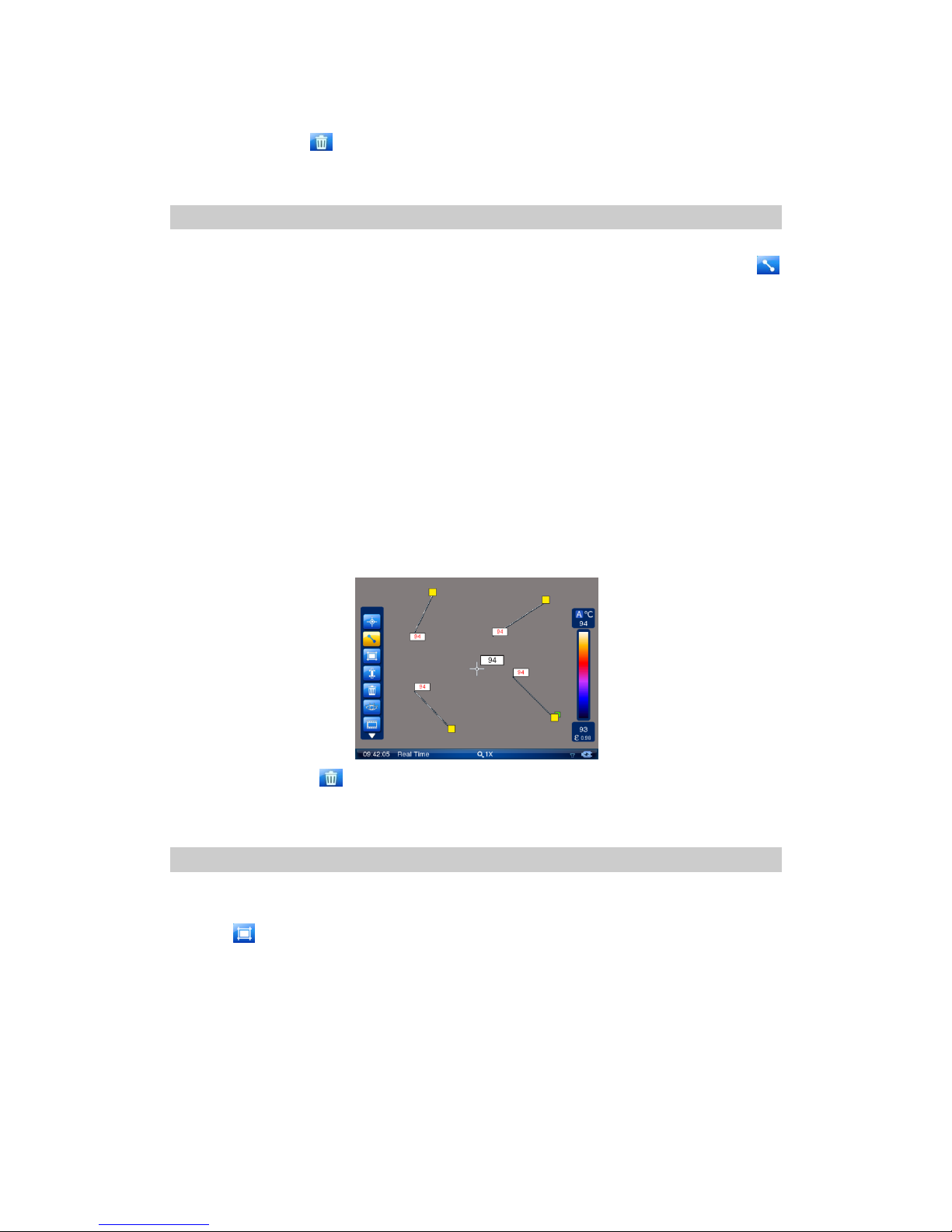
One spot can be added by clicking icon spot analysis; total 8 spots can be showed in screen.
Each point temperature value is displayed in the side of the point, use the touch pen to switch between various points,
the temperature value of selected point is shown in red.
To move the selected point, use the touch pen to drag the point to the desired position and release, the temperature of
Page 26
26
selected point will change with the point moving.
Press the Delete key to delete the selected point.
Press C key to exit point analysis and return to real time thermal image.
“Line Analysis”
Line analysis can be performed on live or zoomed or frozen or saved images.
In live image, bring up the main menu, select “Analysis tool” under submenu “File”, and then select
to do line analysis.
In frozen image, bring up the frozen toolbar, and select line analysis to do line analysis.
In saved images, bring up the Playback toolbar, select line analysis to do line analysis.
One line can be added by clicking icon line analysis; total 8 lines can be showed in screen.
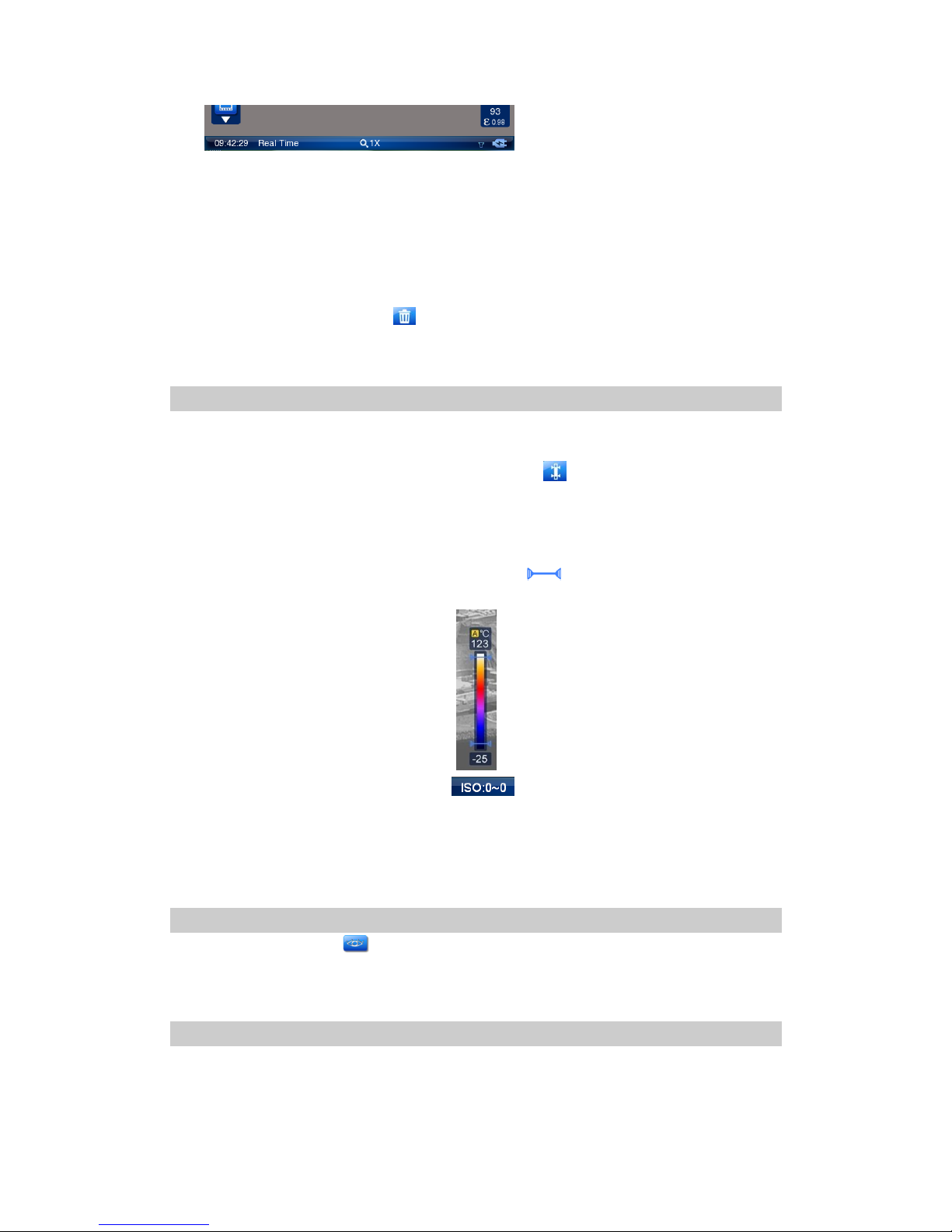
Many lines will be showed in screen with the yellow box at one end after line adding. When one line is
select, the green arrow will be at the corner of yellow box. To move the line, use the touch pen to drag the
line to the desired position and release. Drag the green right angle to adjust the line angle, and drag the
yellow box to adjust the line length.
Line analysis contains the maximum temperature, minimum temperature and average temperature. The
highest temperature is in red, the lowest temperature is in blue and the average temperature is in black.
The temperature of the line is showed at one end. Maximum, minimum, average temperature function can
be set in the menu.
Press the Delete key to delete the selected line.
Press the C key to exit line analysis and return to real time infrared image.
Area Analysis
Area analysis can be performed on live or zoomed or frozen or saved images.
In live images, bring up the main menu, select “Analysis Tool” under submenu “File”, and then select the
icon to do area analysis.
In frozen images, bring up the frozen toolbar, select area analysis to do area analysis.
In saved images, bring up the replay toolbar, select area analysis to do area analysis.
One rectangle area can be added by clicking icon area analysis, total 8 rectangle areas can be showed in
screen.
Use touch pen to switch between the rectangle areas. Green rectangular icon will be showed for the
selected area. The maximum temperature is showed in red, minimum temperature is showed in blue with
automatic tracking. The average temperature is showed in black at the upper-right corner of the rectangle.
Page 27
27
Maximum, minimum, and average temperature function can be set in the menu.
To move the area, use the touch pen to drag the area Centre to the desired position and release. The
temperature of area selected will change with the area moving.
change the size of a selected area: click one of its four corners with stylus, drag the corner to the desired
position and then release it
Areas can be set to display the Maximum, Average or Minimum temperature. This is done by setting the
value of sub-option Area Function in option Analysis under submenu Parameter.
Delete the selected area by clicking .
Press C to exit and return to infrared image.
Isotherm Analysis
Isotherm analysis highlights the areas with same temperature in same color.
Isotherm Analysis can be performed on live images.
In live images, enter the main menu, select option Isotherm under submenu “File” to activate this
function.
In frozen images, bring up the frozen toolbar and choose the icon Isotherm analysis to activate this function.
In saved images, bring up the frozen toolbar and choose the icon Isotherm analysis to activate this function.
After entering Isotherm Analysis, there will be two icons on the right palette used to show the
temperature range that needed to be analyzed. Drag these icons by stylus to analyze in different scenes.
Temperature range is shown in the status bar on below of the screen.
There are three isotherm colors to choose from. This is done by setting the value of sub-option IsoColor in
option Analysis under submenu Parameter
Press C to exit and return to infrared image.
Infra Fusion Analysis
In live image mode, click icon in toolbar to enter infra fusion menu. Infra fusion transparent percentage
and distance can be set.
Parameter submenu
Camera setup parameters can be set for the camera. Click the icon menu at the right top corner of the
screen with the stylus to bring up the main menu and then click the submenu Parameter. Or press the
joystick to bring up the main menu and move the joystick up or down to select the submenu Parameter.
Page 28
28
Five options Analysis, Target, System, Function and Default are present in the screen. Clicking them
respectively with the touch pen or moving the joystick left or right can toggle between them
Analysis: Allows for temperature analysis parameters for live and zoomed images to be set up
Target: Allows for temperature measurement parameters of the target to be set up
System: Allows for parameters of the camera functions to be set up
Function: Allows for some camera functions to be set up
Default: Resumes the factory configured values of all the parameters
Analysis
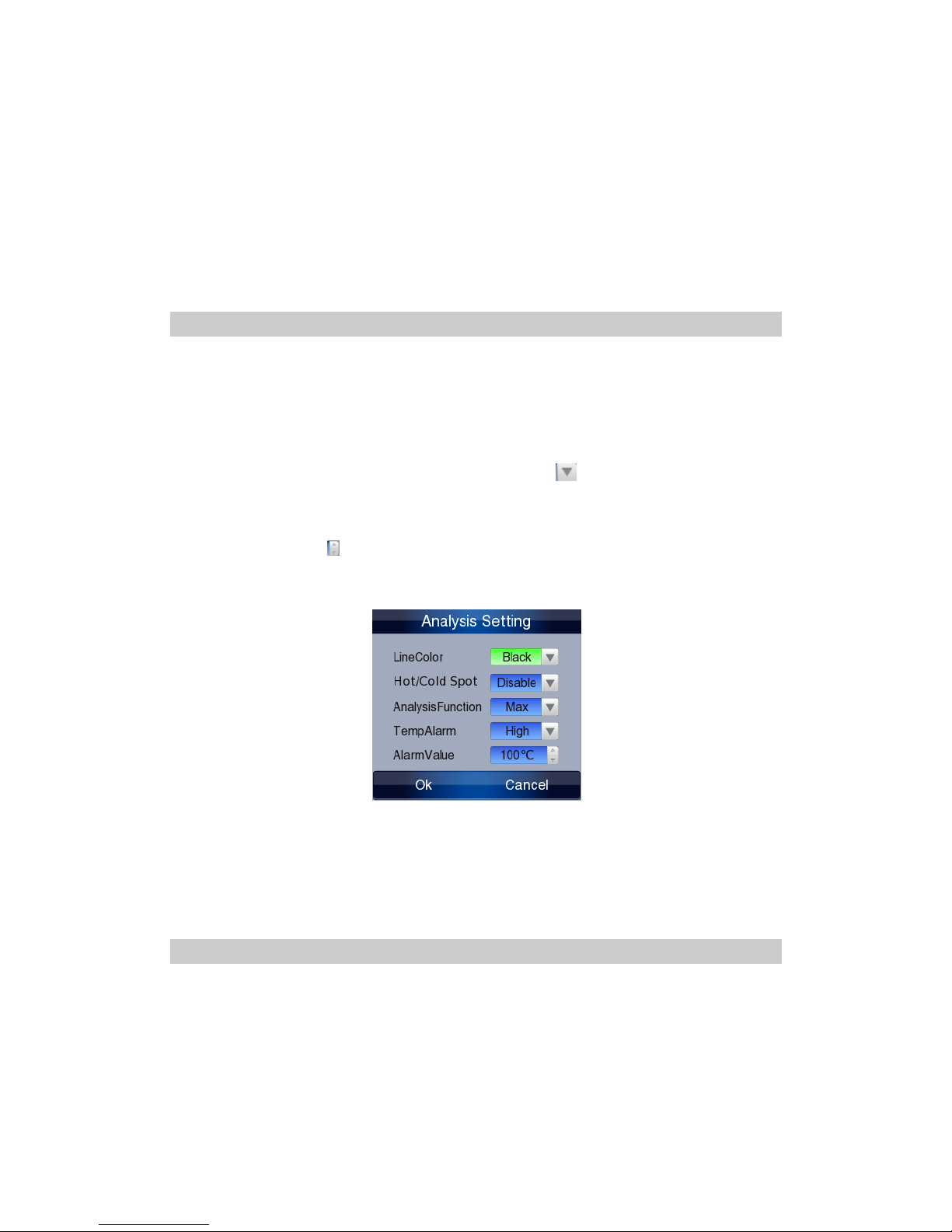
Click option Analysis with stylus or press the joystick to select it. Then the Analysis dialog box appears on
the screen.
Clicking by stylus or moving the joystick up or down to switchover sub-options in parameter box. The
chosen option will be highlighted. Press the joystick or click by stylus to choose the option, the option value
can be changed and shown in yellow.
If there are several values to choose from for an option, click in parameter column with stylus to
choose the needed values. Moving the joystick up or down can also alter values of the option
Moving the joystick left or right can toggle between each digit of the option values if the values contain
several digits. Clicking with stylus can also change the option values.
Press enter button to save the parameters; press button C to cancel the changes on parameters. Then the
dialog box will be closed and the original image status will be resumed.
IsoColor: To choose a certain color for isotherm, black, white or green
AreaFunc: To set the temperature type of areas in area analysis, maximum, minimum or average
AudioAlarm: To activate or inactivate the audio alarm for live thermal images
AlarmTemp: To set the scene temperature threshold above which the audio alarm will sound
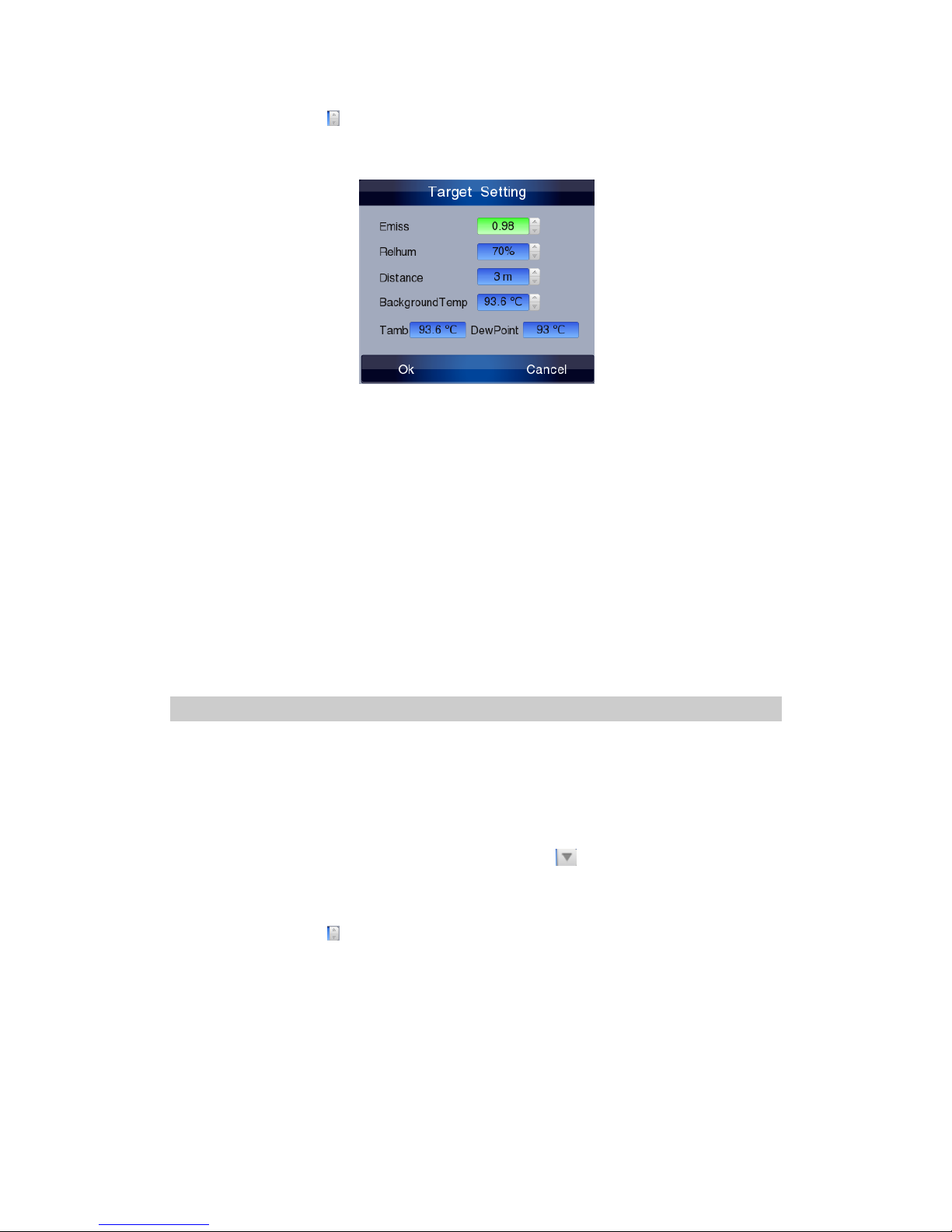
Target Option
Click option Target with the touch pen or press the joystick to select it. Then the Target dialog box appears
on the screen
Clicking by stylus or moving the joystick up or down to switchover sub-options in parameter box. The
chosen option will be highlighted. Press the joystick or click by stylus to choose the option, the option value
can be changed and shown in yellow.
Moving the joystick left or right can toggle between each digit of the option values if the values contain
Page 29
29
several digits. Clicking with stylus can also change the option values.
Press enter button to save the parameters; press button C to cancel the changes on parameters. Then the
dialog box will be closed and the original image status will be resumed.
Emiss: To set emissivity value between 0.01 and 1.00 (Note: this emissivity is only the target emissivity of
center point, spot analysis, line analysis and area analysis, not the emissivity of all points on screen.)
RelHum: To set relative humidity percentage value between 0 and 100
Distance: To set distance for target. (As the application of advanced automatic correction distance algorithm,
the negative effects of distance to the temperature measurement will be revised automatically.)
Background temperature: To set distance by referring to the background temperature, the temperature
reading can be revised.
Ambient temperature: This temperature is obtained from inside temperature sensor, which has nothing to
do with temperature measurement.
Dew-point Temperature: This temperature is obtained from inside temperature sensor, which has nothing
to do with temperature measurement.
System Option
Click option System with stylus or press the joystick to select it. Then the System dialog box appears on the
screen
Clicking by stylus or moving the joystick up or down to switchover sub-options in parameter box. The
chosen option will be highlighted. Press the joystick or click by stylus to choose the option, the option value
can be changed and shown in yellow.
If there are several values to choose from for an option, click in parameter column with stylus to
choose the needed values. Moving the joystick up or down can also alter values of the option
Moving the joystick left or right can toggle between each digit of the option values if the values contain
several digits. Clicking with stylus can also change the option values.
Press enter button to save the parameters; press button C to cancel the changes on parameters. Then the
dialog box will be closed and the original image status will be resumed.
Page 30
30
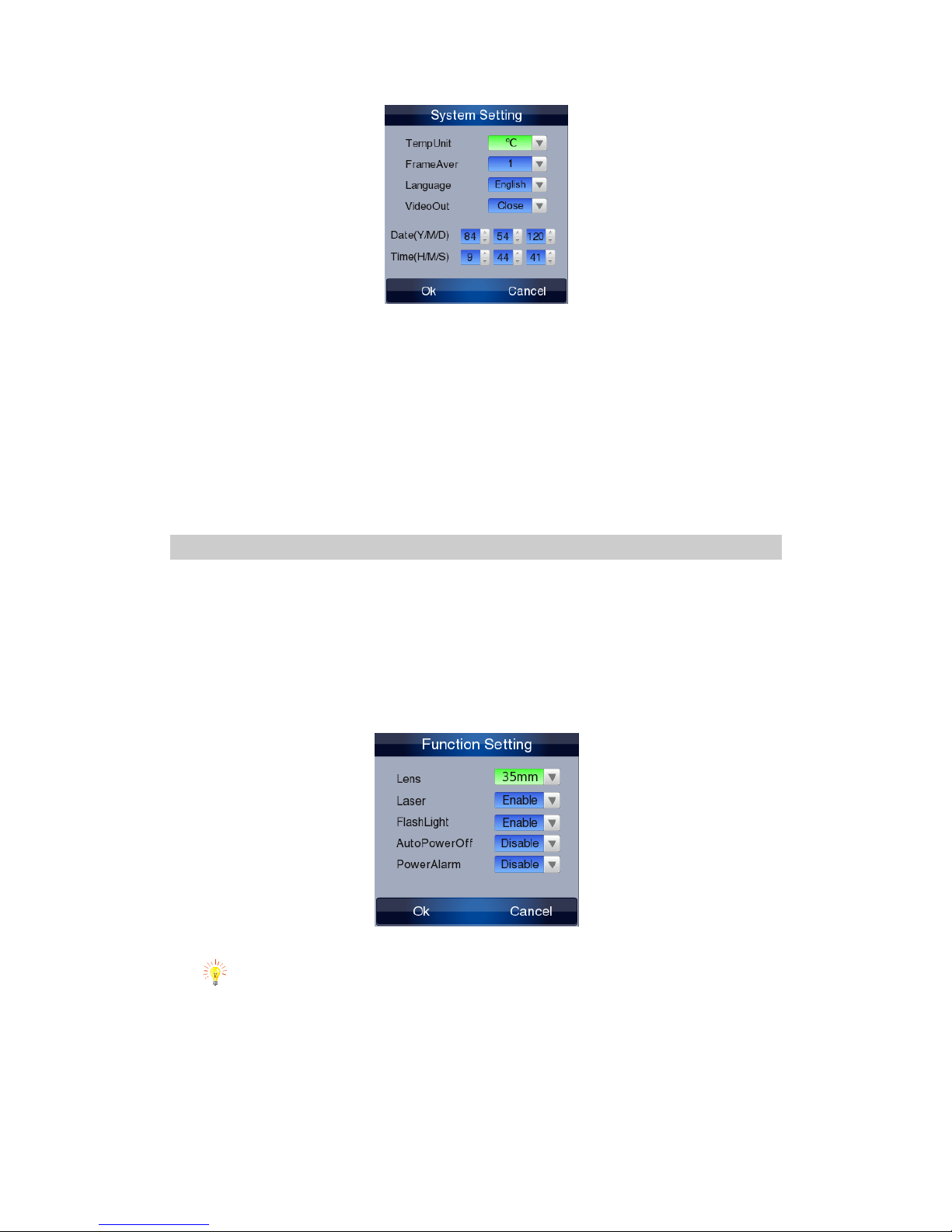
TempUnit: To set the temperature unit for measurement, degrees Celsius or Fahrenheit
FrameAver: To set the number of frames for frame averaging algorithm to freeze image,The value are 1,4,8,16, the
larger the value , the less noise of the thermal image, but meanwhile, the possibility of blurred thermal
image by camera shaking, so keep as much as steady when you chose a large value.
Language: To select the language for man-machine communication
VideoOut: To turn on or off the video output function. PAL and NTSC can be selected as per requirements. The default
setting is off.
Date&Time: To set date and time for the camera. After setup, date of the camera will automatically update.
Function option
Click option Function with the touch pen or press the joystick to select it. Then the Function dialog box appears on the
screen
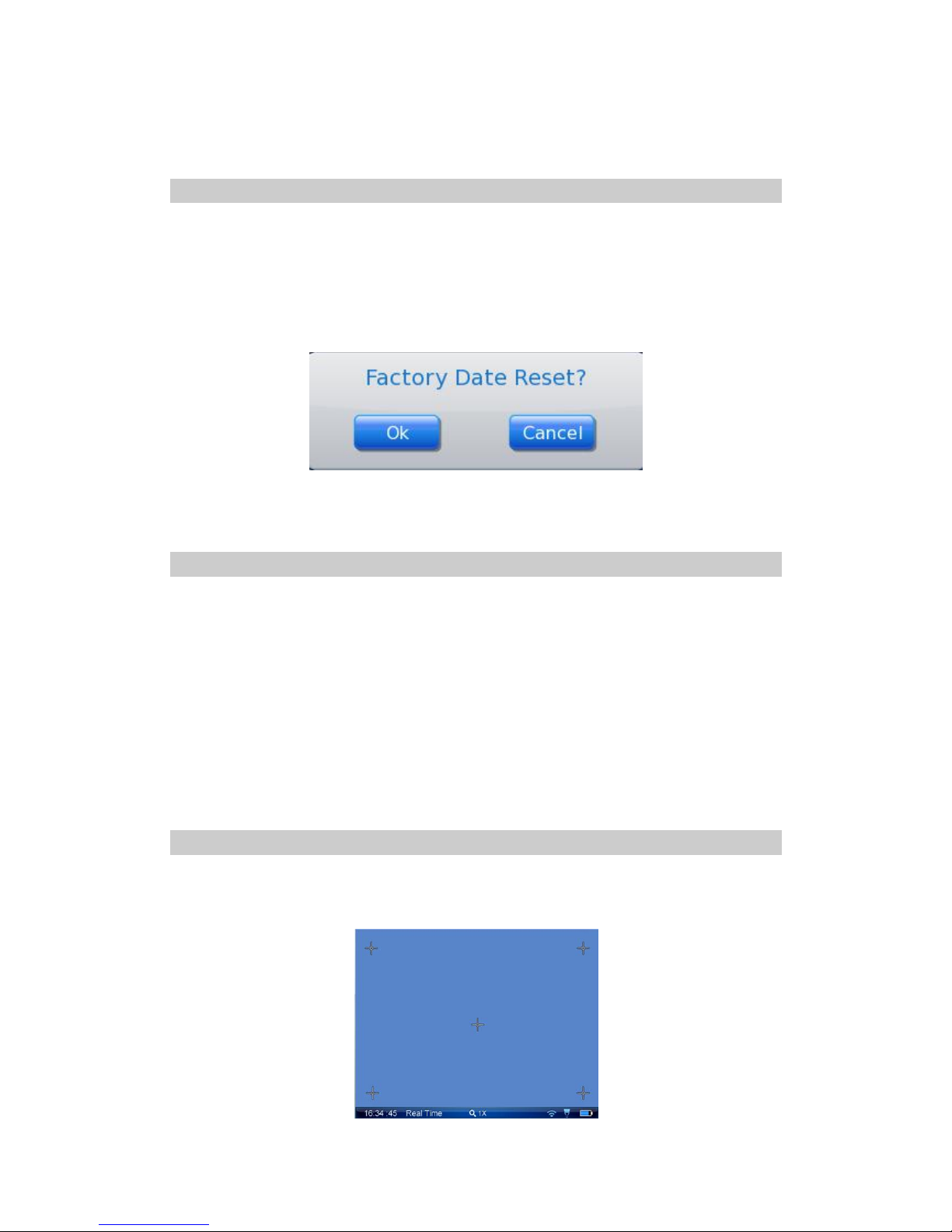
Clicking each option box with the touch pen or pressing button S can toggle between the options. Clicking each value
respectively with the touch pen or moving the joystick up or down can alter values of the option.
When press the joystick vertically, the parameter will be saved and the will exit the parameter dialog. If you
abandon the revised parameter setting, press button C or click cancel button, the parameter will keep the
same as before.
Laser: To turn on or off the laser locator. After setting On, keep button F3 depressed to turn on the laser locator.
Attention: the light from the Laser may harm human eyes, don’t aim human eyes during this operation.
Illuminator: Turn on and off the illuminator function. When the function is on, in the real time operation,
press F1 can turn on or off this function.
Auto off:To turn on or off the auto turnoff function. There are 3 options of auto off: 10 Min, 30Min or 60Min. the
camera will automatically turn off if there is no operation on it in successive 10 minutes, 30 minutes or 60 minutes.
PowerAlarm: To turn on or off the power alarm function. If setting on, the power alarm will sound every one minute
Page 31
31
when the battery is to use up. If you keep using, the camera will be turn off after 10 minutes to protect the battery
useful time.
“Default” option
User can modify the parameter, most of the parameter can be effectively used, but some parameters will be
modified irrelevantly then will influent the camera working status, even leads the camera can’t work
appropriately. In this condition, you can use the Default option to make the camera come back to normal
working status.
Click option Default with the touch pen or press the joystick to select it. Then the Default dialog box appears
on the screen.
Press the joystick vertically, the parameter will recover to default value. Press C will cancel this operation
and exit this menu.
Menu Tools
In real time mode, when there is no menu on the screen, press the joystick vertically or click the “Menu”
button by using the touch pen, which can bring up the main menu. Move the joystick up or down to select
the submenu Tools, or use the touch pen directly.
There are three options under the “Parameter” submenu, they are “Touch pen adjust”, “Video recording”
and WiFi, move the joystick right or left to highlight and chose.
Touch pen adjust: To adjust the touch pen with the cursor to improve the operation accuracy of the pen.
Video recording: Take thermal video
Wi-Fi: Transmit image and video in real time.
“Touch pen adjust” option
Only in real time thermal mode can operate touch pen adjusting.
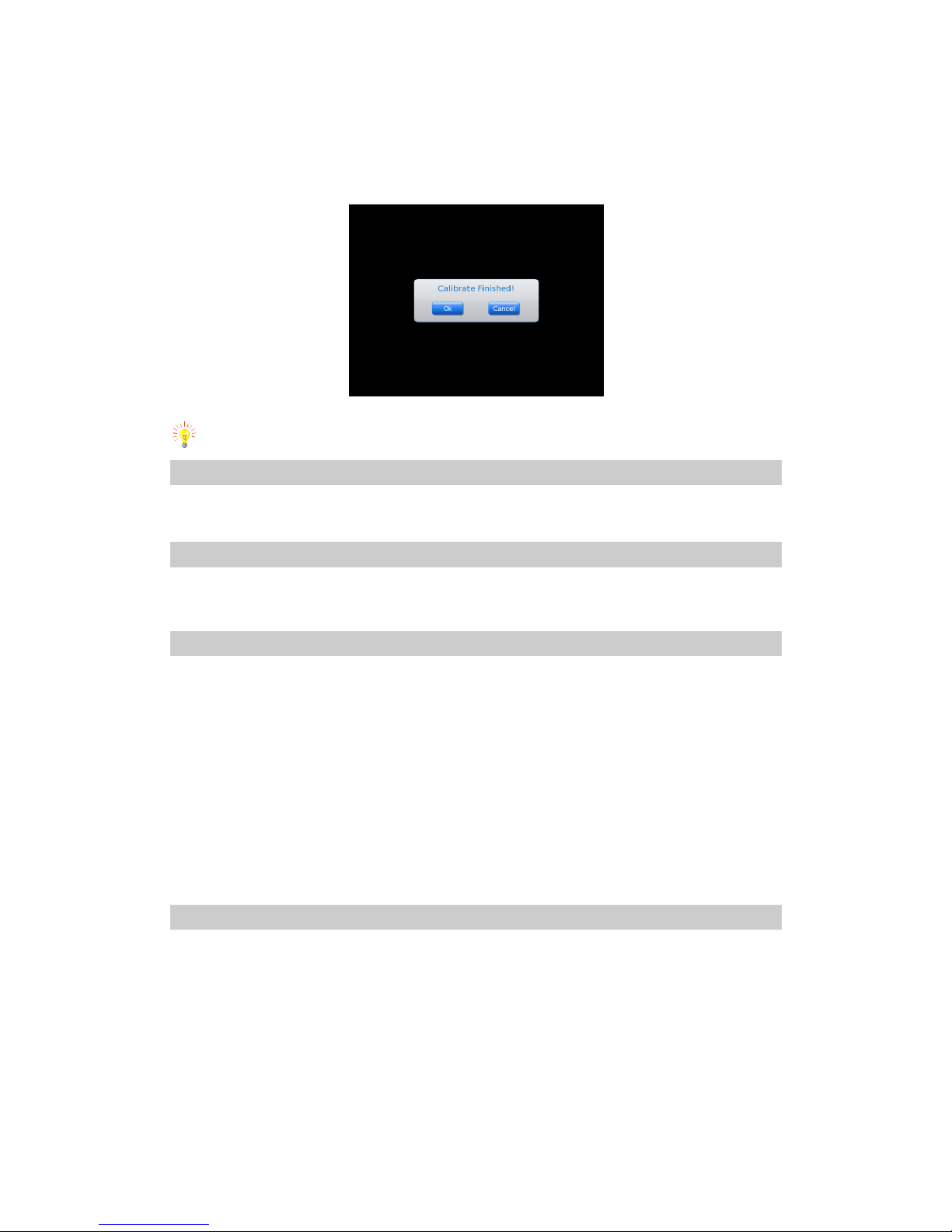
Select “Touch pen adjust” and press joystick vertically, or use the touch pen to click, then you will enter the
adjust interface.
Page 32
32
There are 5 cursors on the screen, click the center of the cursors(touch the cursor and remove the pen
quickly, then move to next one)
After click the cursors, a dialog will pop up to inform the adjusting is finished. Chose button Confirm, the
camera will remember the touch pen parameter and come back to the real time mode.
Chose Cancel or pres button C, you can exit the adjusting interface and come back to the real time mode.
Error calibration may cause touch pen cannot work, please us buttons to do the operation.
Video recording
Please refer to the Video recording operation.
Wi-Fi Option
Click Wi-Fi option in main menu to enter the set up interface.
Help submenu
In live image mode, click the icon Menu at the right top corner of the screen with the touch pen to bring up the main
menu and then click the submenu Help. Or press the joystick to bring up the main menu and move the joystick up or
down to select the submenu Help.
Under “Help” submenu there are two options: “Help” and “About”. Move joystick right or left to highlight
the item and chose.
Help: Select “help” you will see the basic operation, in details please refers to user manual.
About: Select “about”, information such as version number will pop up.
System update: when system update file is saved in certain directory, enter this menu can update the
system.
Powering off the camera
To power off the camera after use, keep button Power depressed till the progress bar “Power off” moves and disappear
in 3 seconds.
Under the case that no progress bar is displayed in the screen, keep button Power depressed for 5 seconds. Then the
camera will switch off.
Page 33
33
13. Instruction on Configure the USB Driver
Remarks: This instruction could used to configure TP9 USB Driver on Mricrosoft Windows in any version incluidng Windows 7
(32 bits/64 bits), Windows 8.
Please config the USB Driver for TP9 by the following instructions.
a).Starting the config process, please switch on TP9 and connect it to PC by USB cable.
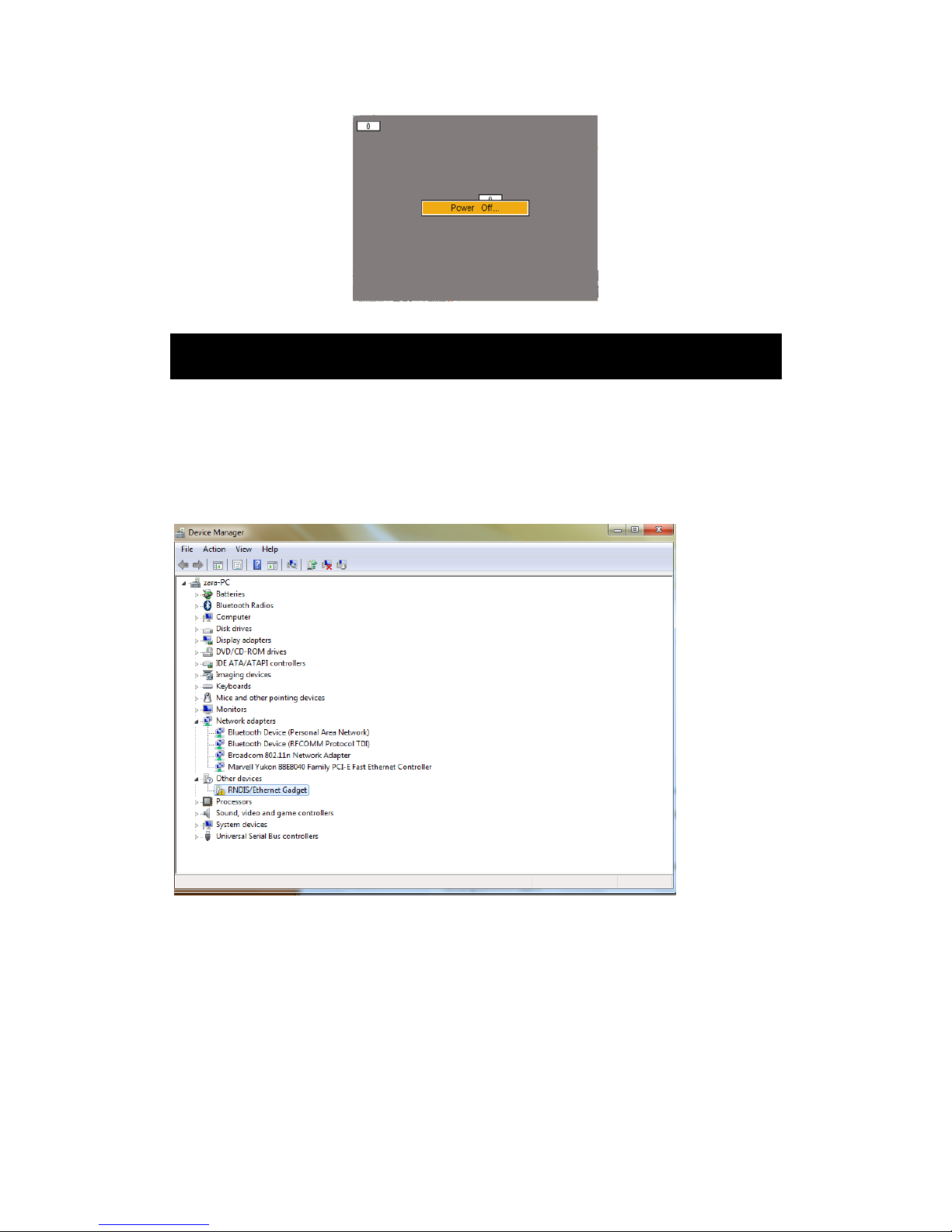
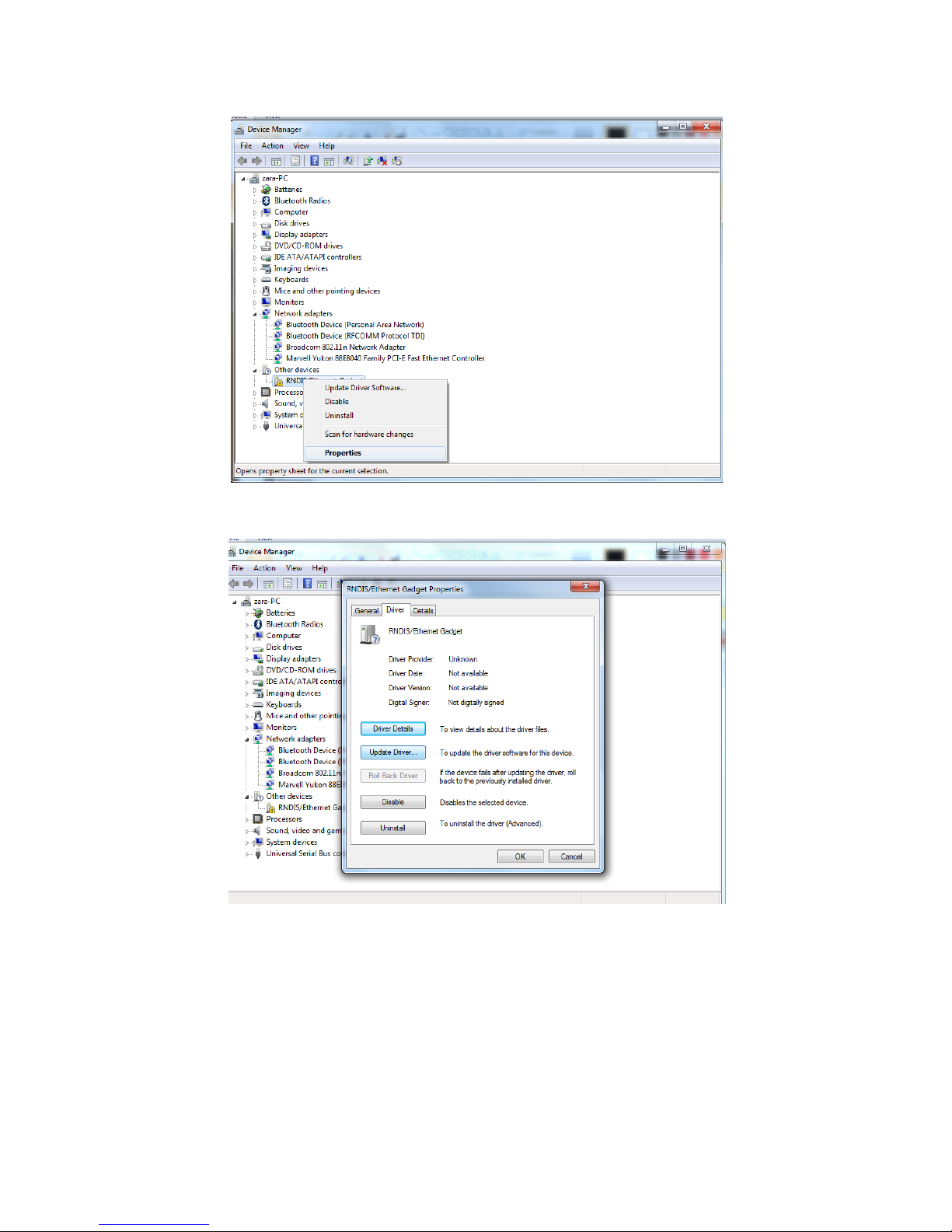
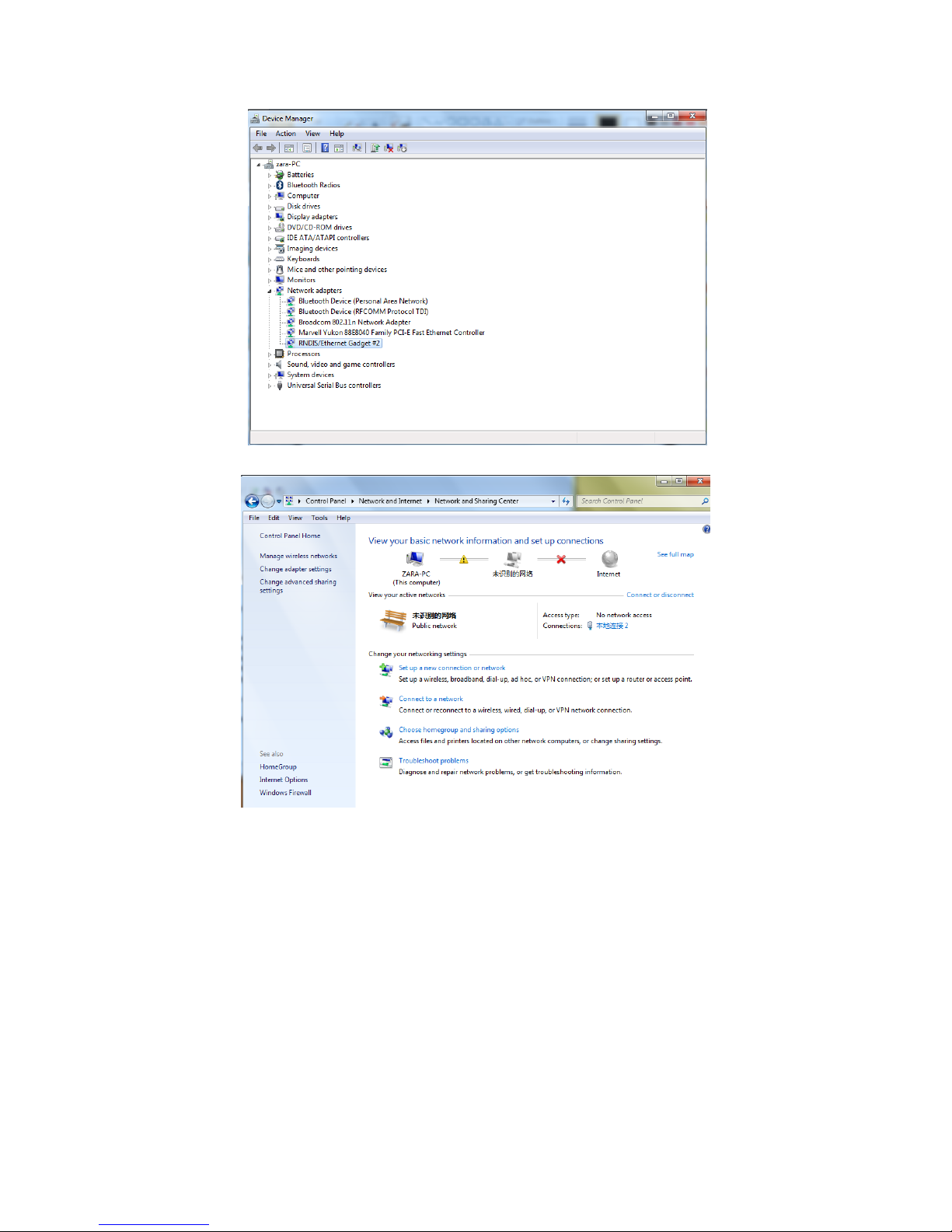
b). Open Device Manager on PC and you will found an unrecognized device named RNDIS/Ethernet Gadget which is the device
we needs to config.
c).Select the device and click the right mouse button. Select Properties to continue.
Page 34
34
d).Click Update Driver to install the driver.
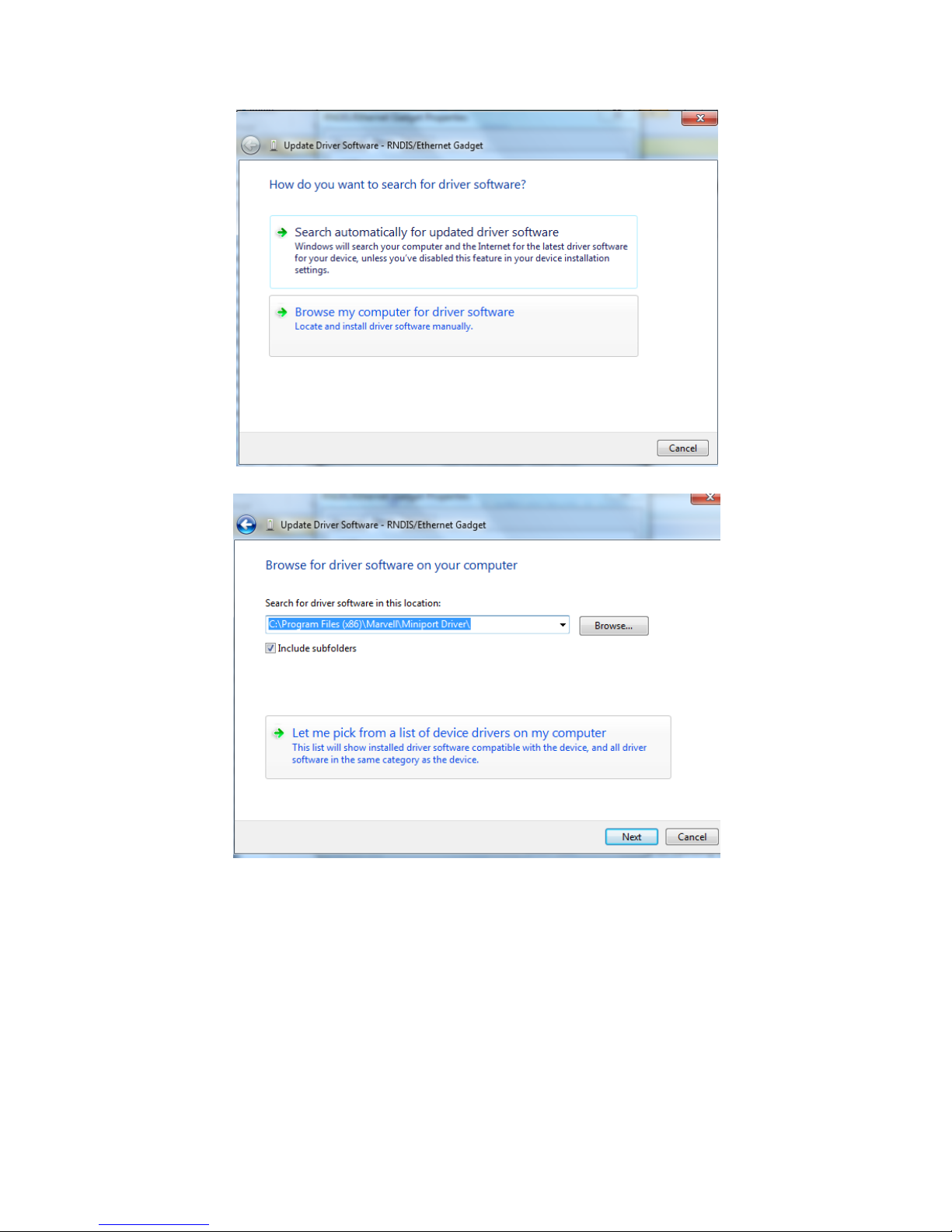
e).Click Browse my computer for driver software to continue.
Page 35
35
f).Click Let me pick from a list of device drivers on my computer to continue.
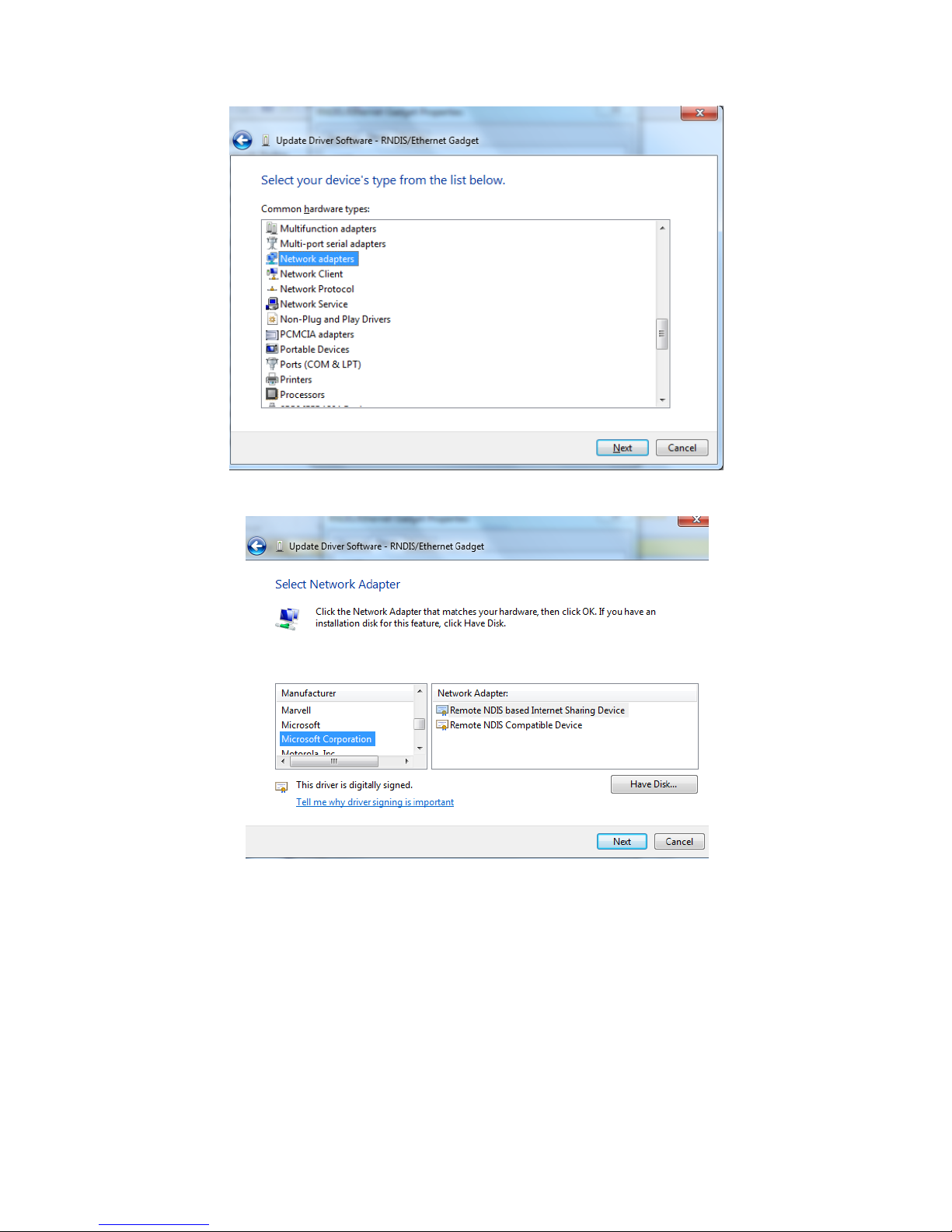
g).Click Network adapters to continue.
Page 36
36
h).Click Microsoft Corporation and you will found the list of device at the right side bar.
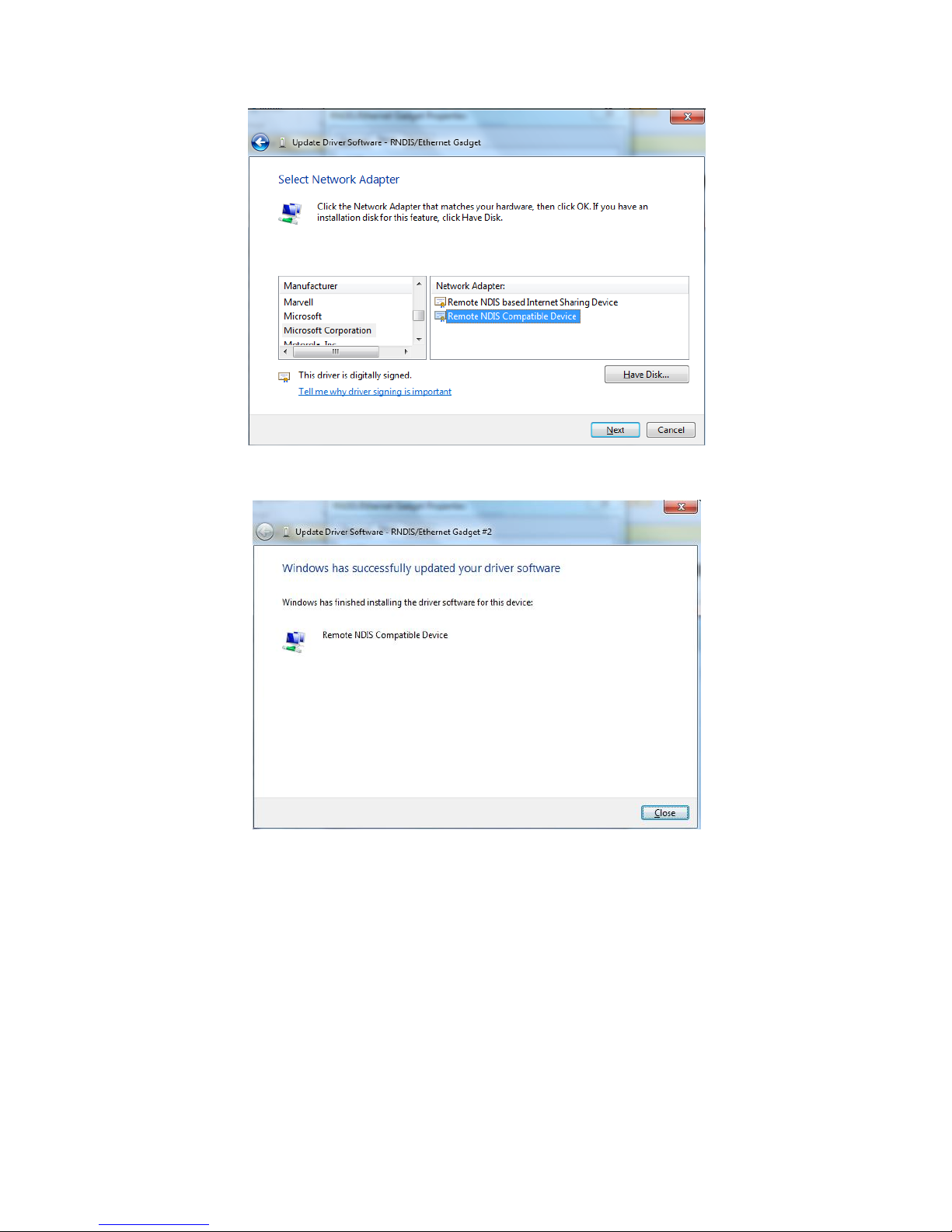
i).Click Remote NDIS Compatible Device to install the driver.
Page 37
37
j).The PC will update the driver automatically and will remind you after the driver installed.
k).The PC will recognize the device after driver installed.
Page 38
38
l).Enter Network and Sharing Center and click Change adapter settings to config the USB Driver.
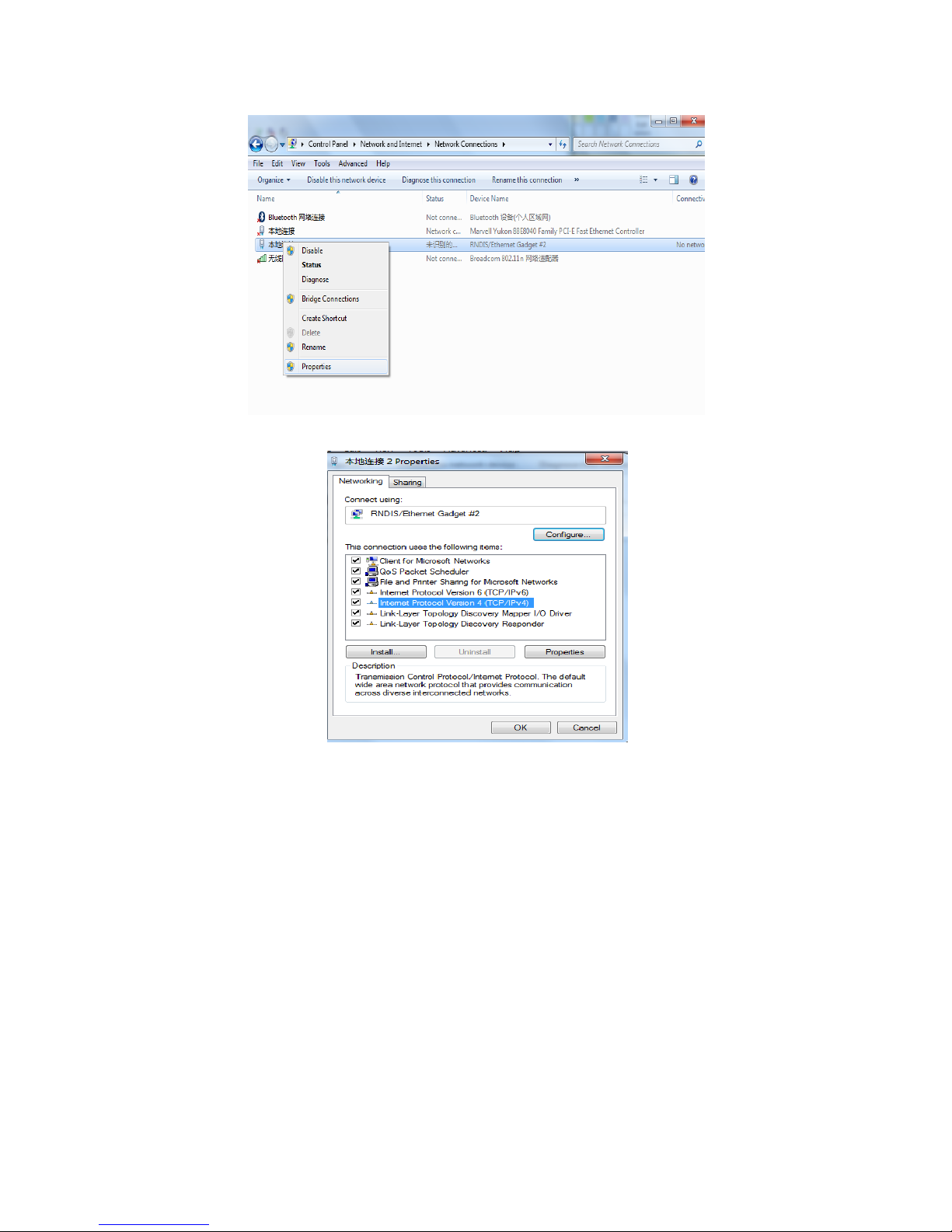
m).You will found a new device in the Local Area Connection which named RNDIS/Ethernet Gadget. Click it by mouse right
button and click Properties to continue.
Page 39
39
n). Click Internet Protocol Version 4 (TCP/IPv4) to config the IP of the USB.
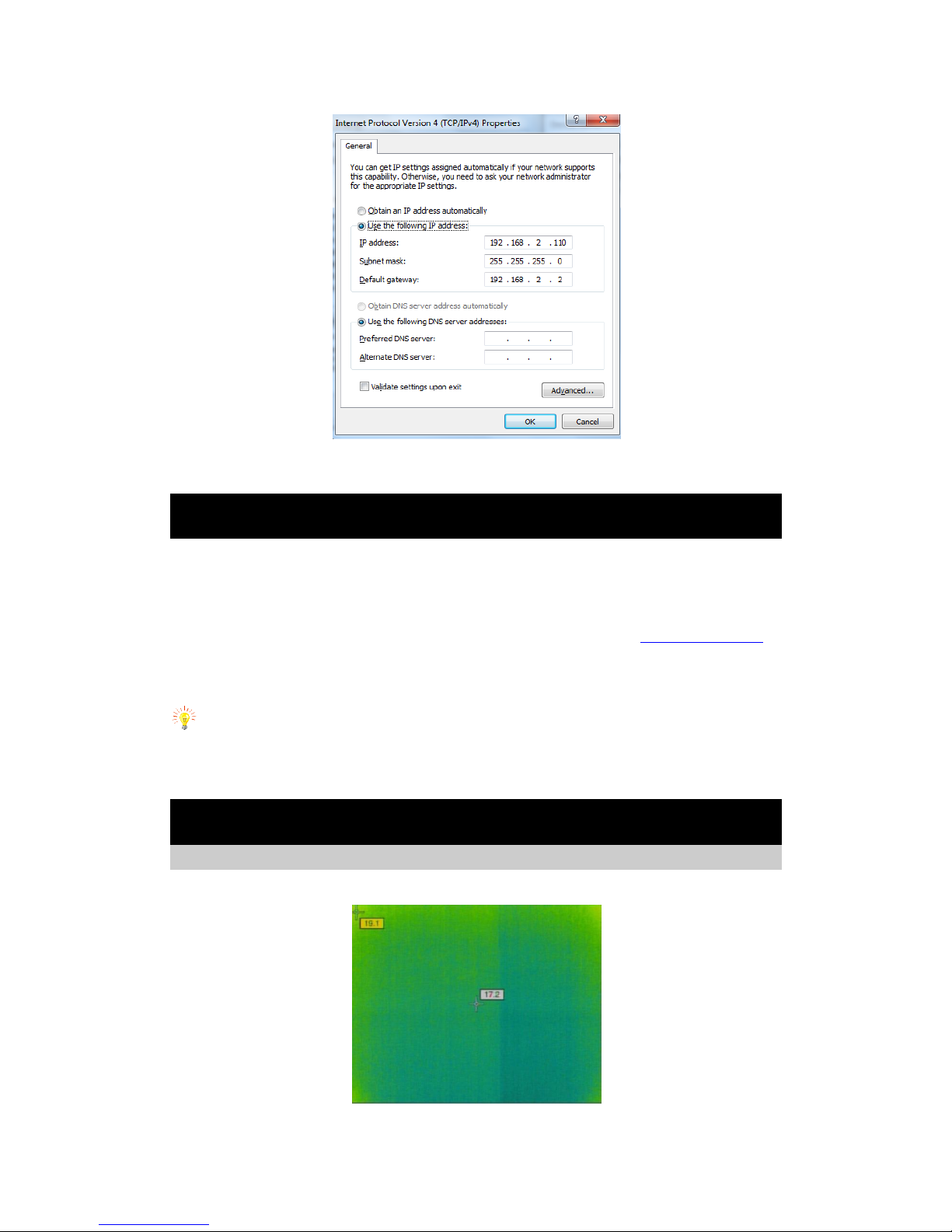
o).Config the IP address as below. Click “OK “ to finish USB Driver configuration.
IP address: 192.168.2.110
Subnet mask: 255.255.255.0
Default gateway: 192.168.2.2
Page 40
40
After Configure USB correctly, user was enable yo transfer data including images, recorded videos and real-time video to PC
14. Data Transfer to PC
Ensure there is USB2.0 interface in the PC
There have two way to transfer data from TP9 to PC:
a) To transfer the data saved in SD card into PC, use the SD card reader to process.
b) Connect TP9 with PC via USB cable, click My Computer and input the path ftp://192.168.2.109:20 to
enter the SD card.
To format the SD card, please select FAT32 file system before format or the SD card cannot be used in the
camera.
To operate the camera via IrAnalyser®, USB driver must be installed in the PC first.
15. TP9 wireless network connection method
TP9 wireless network connection method
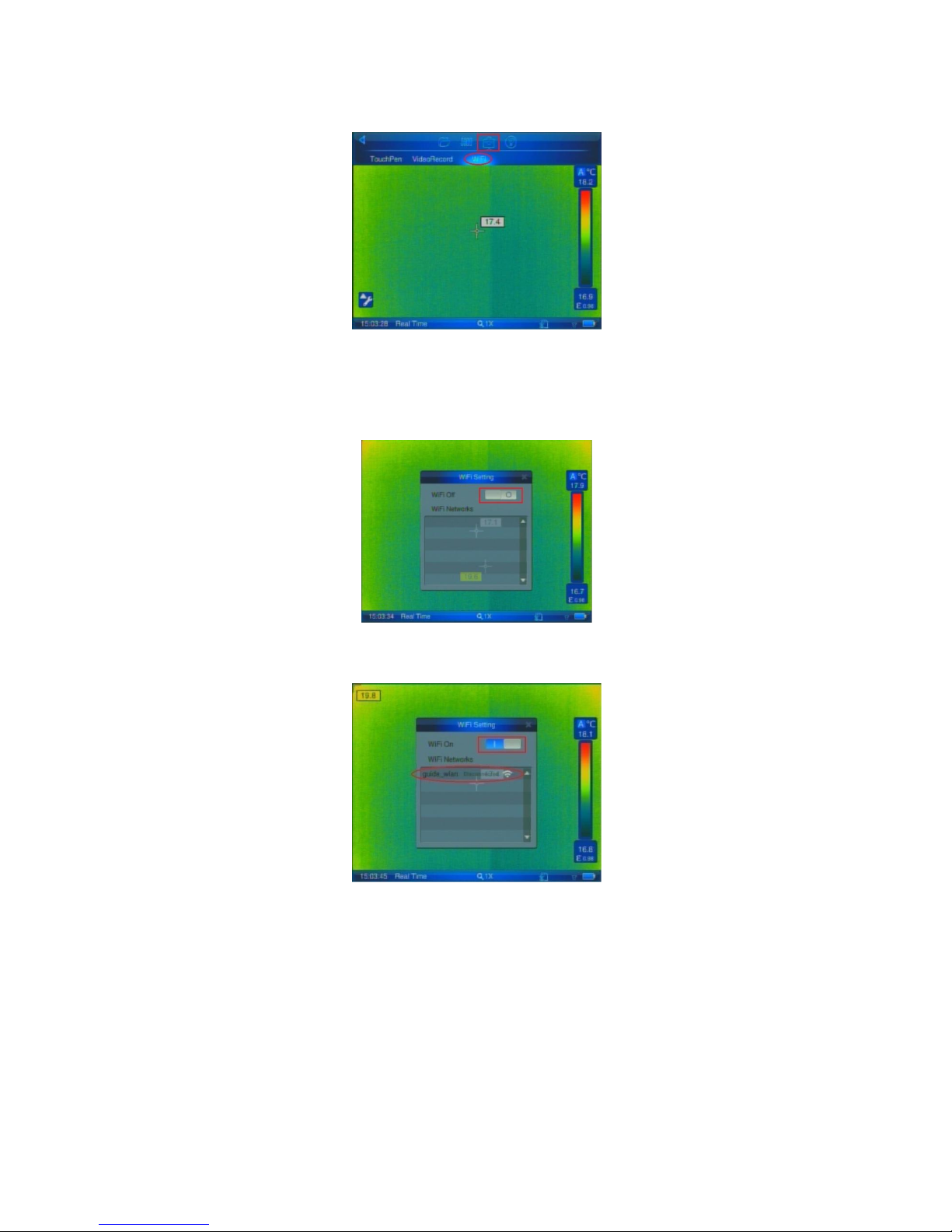
Long press the power button to boot up the camera until real-time screen appears, shown below:
Page 41
41
Press the middle button of Joystick parts or click anywhere on the screen to pop up the following screen:
Press the left and right button of the Joystick, after selecting the red box icon on the above image to press
the middle button of joystick , Enter into submenu Setting option, then the cursor is fixed in the sub-option;
Press the left and right button of Joystick, after selecting the red ellipse icon in above photo, press the
middle button of Joystick to enter into the Wi-Fi settings interface, shown below:
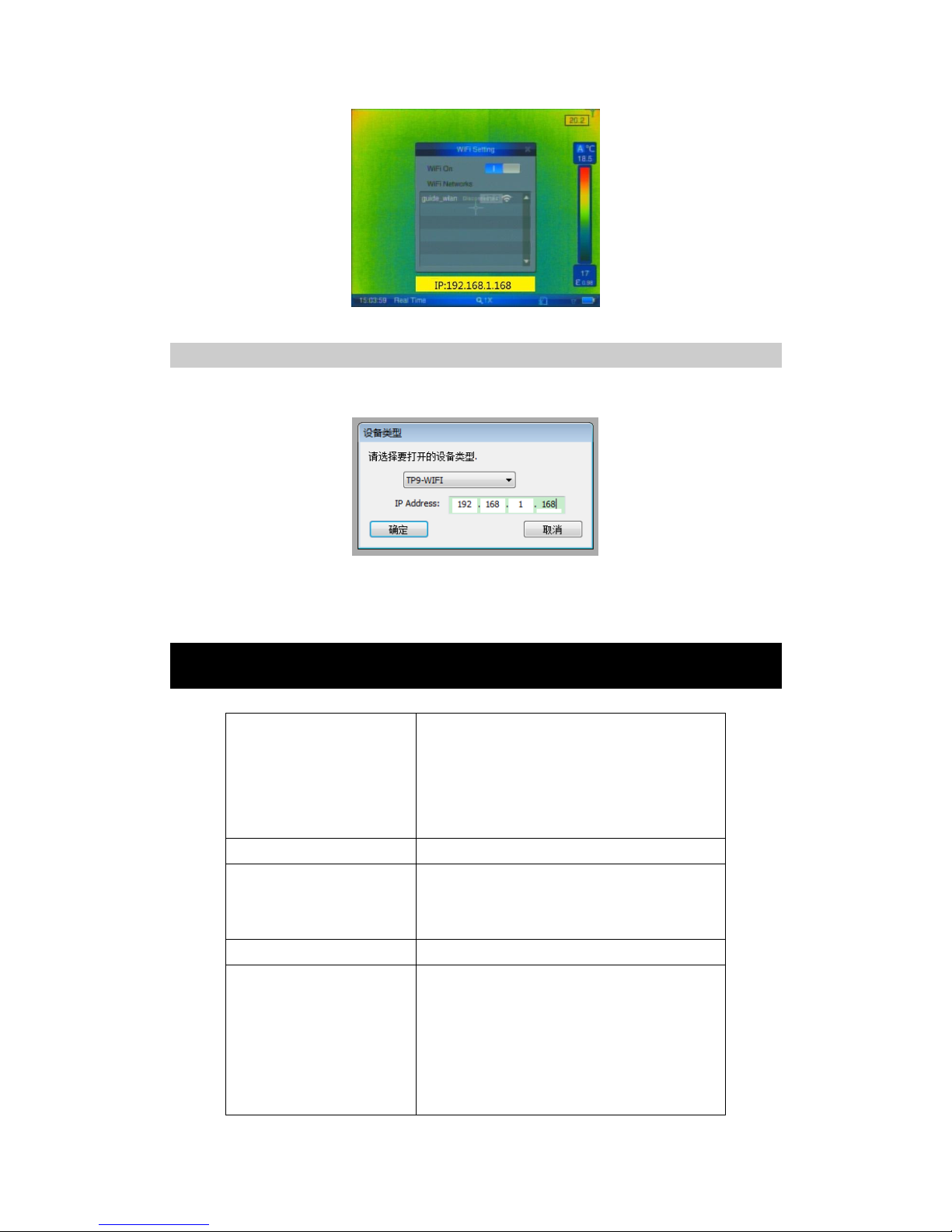
Using the touch pen to press the above-mentioned red box area, open the Wi-Fi, the camera will
automatically search for Wi-Fi network, shown below:
At this time, Wi-Fi network is under disconnecting status, Using touch pen to click the red ellipse area on
above photo, to connect Wi-Fi network, shown as below:
Page 42
42
So far, Wi-Fi network configuration and connection of TP9 camera is completed.
Operation methods for IR analysis software connected to TP9
Open infrared analysis software, select "File" -> "Infrared Video" -> "From device video ...", the following
dialog box will pop up:
In the above dialog box, Input TP9 Wi-Fi to obtain IP address (e.g. 192.168.1.16), and click "OK" to complete
the connection between TP9 camera and infrared analysis software.
16. Troubleshooting
The camera does not turn on
Battery improperly installed (i.e. battery is not locked in
place). Remove battery and install correctly.
Battery contacts are dirty. Clean battery contacts.
Battery charge is low. Recharge battery or replace with fully
charged item.
Battery performance is poor
Battery may be defective. Replace battery.
Image is blurry
The target is not in focus. Adjust focus.
Brightness and contrast are inappropriate. Adjust T-min and
T-max
Visual image is blurry
The target is not in focus. Adjust focus of the visual camera.
Image contrast is low or there is no
image
Temperature set points T-min and T-max are inappropriate.
Change the lower set point and upper set point to values that
are more consistent with target temperatures.
Emissivity setting is incorrect. This affects the temperature
range set points. Check and amend the emissivity setting.
The lens cap is on. Remove lens cap.
Page 43
43
Condensation on camera lens. Place camera in a dry area at
room temperature until condensation evaporates.
Non-uniformity appears in the image. Perform a
non-uniformity calibration
Temperature measurement is
inaccurate
Emissivity setting is incorrect. Check and amend the
emissivity setting.
Filter range is inappropriate. Select a filter range that is
suitable for the target temperature being measured.
The target is not in focus. Adjust focus.
Condensation on camera lens. Place camera in a dry area at
room temperature until condensation evaporates.
Non-uniformity is severe. Press non-uniformity calibration.
17. Typical Emissivity Values
Aluminium
0.05
Tungsten
0.13
Oxidized
0.3
Zinc
0.05
Chromium
0.15
Oxidized
0.11
Cobalt
0.18
Refractories
Gold
0.02
Alumina
0.4
Iron & Steel
0.18
Red Brick
0.93
Oxidized
0.85
Alloys
Lead
0.16
Brass
0.1
Oxidized
0.63
Oxidized
0.61
Magnesium
0.12
Miscellaneous
Nickel
0.15
Asphalt
0.9
Platinum
0.1
Carbon
>0.90
Silver
0.03
Soot
0.95
Tin
0.09
Cement & Concrete
0.9
Titanium
0.3
Cloth
0.85
Page 44

44
Wuhan Guide Infrared Co., Ltd.
No. 6 , Huanglong Hill South Road, East Lake Development Zone,
Wuhan, 430205,
P.R. China
Telephone: +86-27-8767 6897
Email: [email protected]
Internet: www.guideinfared.com
© Wuhan Guide Infrared Co., Ltd.
 Loading...