

Page 1

© GIS Australasia Pty Limited
GIS099 QLD WR3 User Instructions
Version 5.3
Responsibility: Admin Dept.
Initial Release: 1 December 2010
Current Release: 16 December 2016
QMS – QLD Quality Plan
Only electronic copy on server is controlled
Page 1 of 50
Guardian Interlock Systems Australasia Pty Limited ABN 47 062 932 932
8/11 Packard Avenue, Castle Hill, NSW, 2154 Tel: 02 8853 6200
Email: [email protected] Fax: 02 8853 6201
QLD Interlock Program
WR3 USER MANUAL
NOTICES
Servicing is your responsibility. A “Missed Service”
message indicates the date after which it will go into
PERMANENT LOCKOUT. Ensure that you arrange for
service to be completed prior to this date.
ROAD SAFETY
PULL OVER TO THE SIDE OF THE ROAD BEFORE
PROVIDING A RETEST
Page 2

2
Page 3

3
CONTENTS
1. Caution ......................................................................................... 5
2. Economy of Operation................................................................ 5
3. Concession & Financial Assistance ......................................... 5
4. Operating Instructions................................................................ 6
4.1 General ................................................................................... 6
4.2 Taking a Test .......................................................................... 6
4.3 Failed Test .............................................................................. 8
5. Trouble Shooting Your Testing Technique .............................. 8
6. Stall Protect Feature ................................................................... 9
7. Retests ....................................................................................... 10
7.1 Failed Retest ........................................................................ 11
7.2 Retests not Taken ................................................................ 12
8. Illegal Starting of Vehicle ......................................................... 12
9. Servicing and Recalls ............................................................... 13
9.1 Scheduled Servicing ............................................................. 13
9.2 Checking Service Dates ....................................................... 13
9.3 Early Service ........................................................................ 14
9.4 Immediate Recall .................................................................. 14
9.5 Entering Codes ..................................................................... 15
10. Non-Compliance with Program Conditions............................ 15
11. Power Aspects .......................................................................... 16
11.1 Disconnecting the Vehicle Battery........................................ 16
12. Disconnecting the Handset ...................................................... 16
12.1 Sleep Mode .......................................................................... 17
13. Care of the WR3 ........................................................................ 18
14. Other Servicing of Your Vehicle .............................................. 19
15. Program Violations ................................................................... 19
16. Additional Functions ................................................................ 20
16.1 Volume Control ..................................................................... 20
16.2 Clock Adjustment (Daylight Savings) ................................... 21
16.3 Automatic Wake Up .............................................................. 21
16.4 Standby ................................................................................ 22
17. Service Centres ......................................................................... 23
Page 4

4
18. Complaints ................................................................................. 23
19. Privacy ....................................................................................... 24
20. Removal of Interlock ................................................................. 24
20.1 Removal of Interlock Condition ............................................ 25
21. General Assistance ................................................................... 25
21.1 24 Hour Technical Support Line ........................................... 25
21.2 Electrical Interference ........................................................... 26
22. Override ..................................................................................... 26
23. Emergency Override ................................................................. 26
24. Messages Displayed ................................................................. 30
24.1 Unscheduled Service Recall Messages ............................... 30
24.2 Messages A-Z ...................................................................... 32
25. TERMS AND CONDITIONS ....................................................... 36
QLD INTERLOCK PROGRAM – FEE SCHEDULE ......................... 47
Notes:
1. Before reading the rest of this manual, the user should be aware of
the difference between the ‘Press’ command and the ‘Press and
Hold’ command. The ‘Press’ command is a press and release of
the button, whereas the ‘Press and Hold’ command, is a prolonged
pressing of the button.
2. Read all instructions completely before operating the interlock.
3. Try to avoid others using the interlock as you will be held
accountable for all events on the log.
4. If you are uncertain of any aspect of the operation of the interlock
please contact Guardian or your service centre.
Page 5

5
1. Caution
Blood Alcohol Content (BAC) can rise for up to two hours after your last
drink. Users of the Guardian WR3 interlock are advised that care should be
taken if a BAC reading close to their designated BAC lockout level is
indicated.
It can take ten hours or more for the blood alcohol level to return to zero
after a high blood alcohol level has been reached. This may lead to failed
tests that will show on your record.
Mouthwash and some medications generate high levels of BAC readings
for short periods of time – please ensure that you wait at least 15 minutes
after using mouthwash or taking medication before attempting a test.
Rinsing your mouth with water may reduce chances of receiving a high
BAC from these products when attempting a test.
Many foods and drinks generate low level BAC readings for short periods
of time – please ensure that you wait at least 5 minutes after eating or
drinking anything before attempting a test. If possible, rinse your mouth out
with some water.
2. Economy of Operation
Installation and monitoring costs are significant and non-compliance could
result in additional fees. Please read these instructions carefully, and
comply with the service dates so that you don’t become locked out by your
own actions, and end up paying extra (and avoidable) fees.
3. Concession & Financial Assistance
There is a concession available for participants who hold a valid Centrelink
Health Care Card issued by the Australian Government. The Queensland
Department of Transport and Main Roads (TMR) may also provide other
financial assistance for eligible interlock drivers. For further details and the
latest information please contact TMR on 13 23 80 or visit the following
website:
www.tmr.qld.gov.au/interlocks
Page 6
6
4. Operating Instructions
4.1 General
The WR3 is designed to prevent a driver operating the vehicle if there is
alcohol present, and a BAC of 0.02%BAC or above is recorded. The WR3
displays information to the operator by an LCD screen, tones and colours
displayed on the handset connector where the handset plugs in.
4.2 Taking a Test
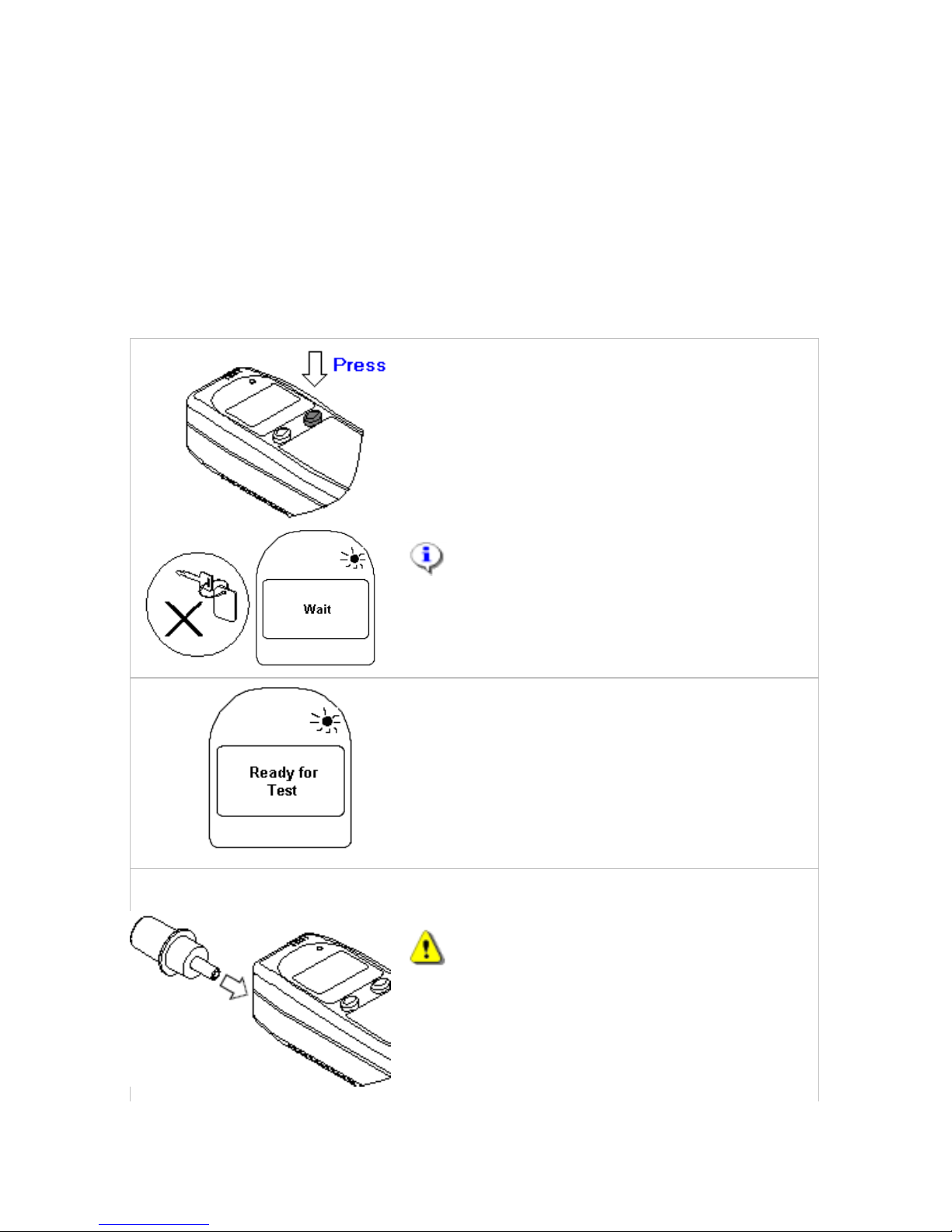
1
To begin, press the right button if the
display screen is blank. The screen will
display “Wait” and the status light will be
flashing orange.
(Alternatively, you can disconnect and then
reconnect the handset to wake-up the unit)
NOTE: The ignition key must be in the
OFF position before proceeding further.
2 Wait for the Handset to display “Ready for
Test” and the status light to change to
flashing green. The wait time will vary
depending on the ambient temperature (this
may take up to 3 minutes, particularly in
cold weather).
3
Insert a mouthpiece into the Handset.
You should not eat or drink anything
for at least 5 minutes before taking a test.
Page 7
7
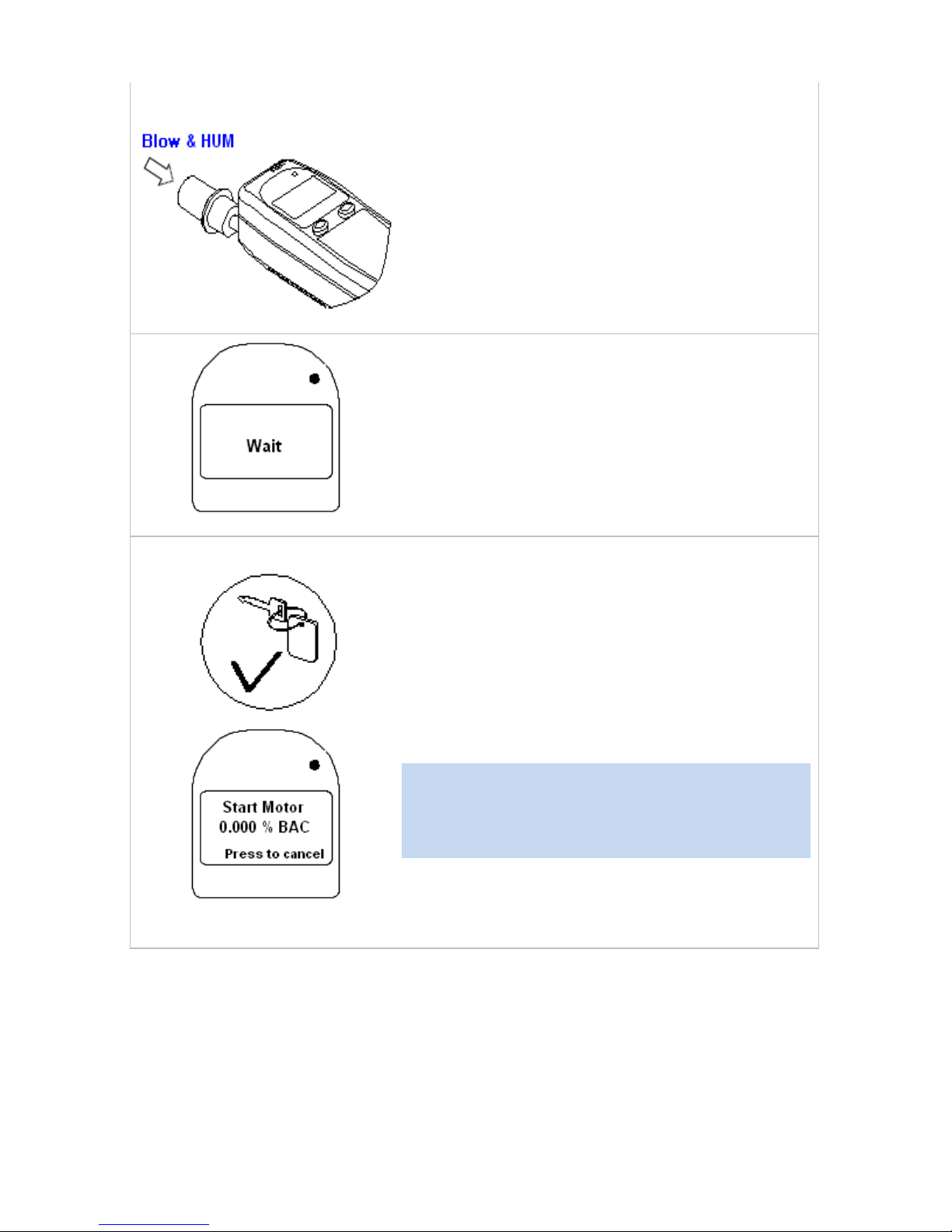
4
Blow into the mouthpiece with moderate
and constant force while simultaneously
making a “Hum” sound. When the correct
technique is used, the WR3 will generate a
continuous tone to indicate adequate air
flow. Do not stop blowing until you hear a
beep from the Handset. The Handset will
display “Wait”, followed by the test result
within 10 seconds of test completion.
If you blew incorrectly, the Handset will
display “Hum Louder”, “Blow Softer”
“Blow Longer” or “Blow Longer and
Harder”. Wait for the Handset to display
“Ready for Test” before trying again.
If “Start Motor” is displayed and the status
light is solid green, you passed the breath
test. The BAC reading result will appear on
the display. A pass BAC is between 0.00
and 0.019% BAC.
You must now start the vehicle in the
normal fashion.
Important: Attempting to turn the ignition
on in the vehicle prior to the “Start Motor”
message appearing will result in “Key off”
message.
Once the WR3 detects the motor running, a
“Drive Safely” message will be displayed.
Page 8
8
4.3 Failed Test
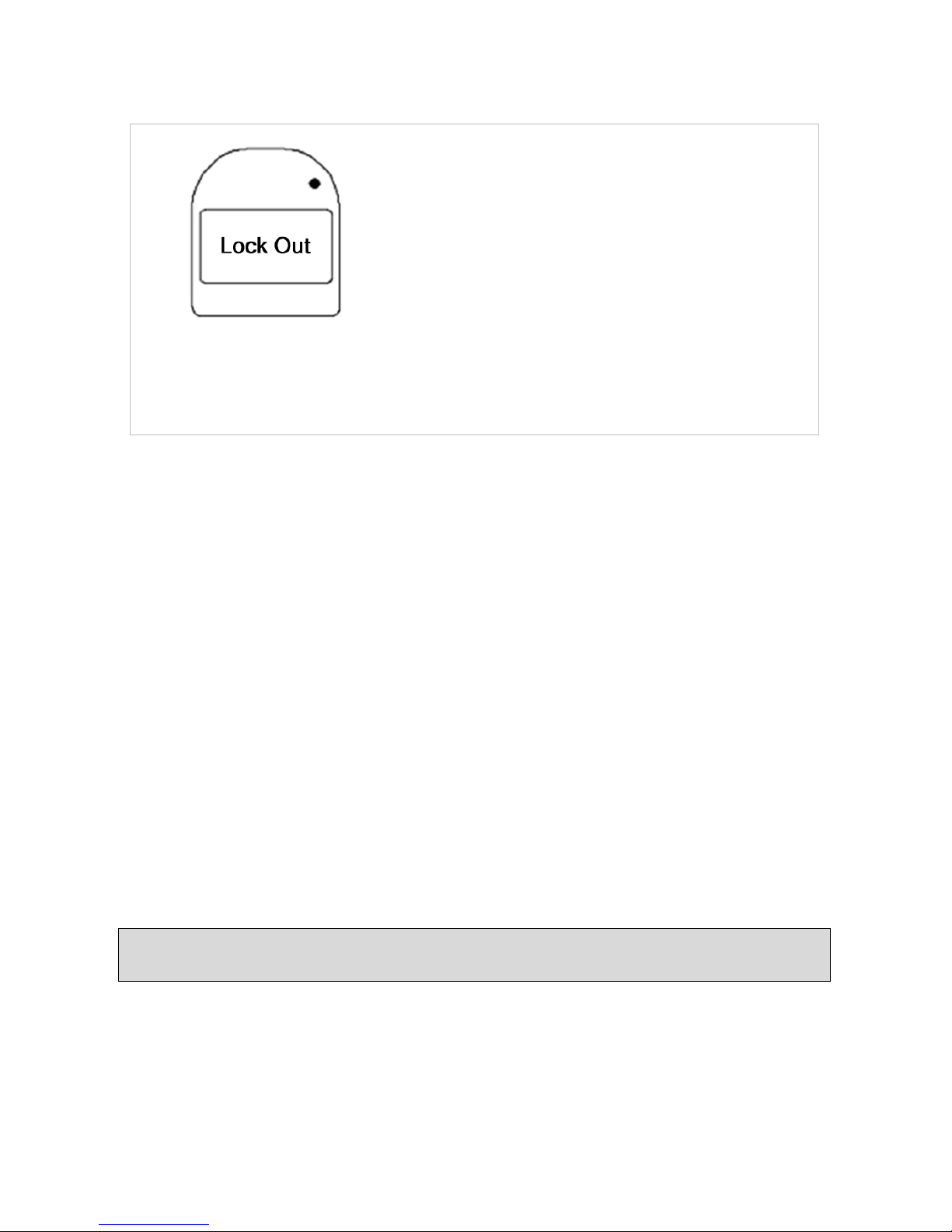
A fail will be followed by a “Lock Out”
message on the display followed by the
BAC reading recorded. The vehicle cannot
be started and the driver will be prevented
from attempting another test for at least 5
minutes (countdown will appear on the LCD
screen).
If a second fail BAC test follows, a Lockout
period of 30 minutes will apply (countdown
will appear on the LCD screen). A fail BAC
is 0.020%BAC and above.
5. Trouble Shooting Your Testing Technique
Taking the test can be daunting once “you’re on your own” and it is easy to
become flustered. There are four parts to the test, namely:
a) Pressure – a blow of sufficient pressure is indicated by a tone. The
aim should be to conduct the test at as low a pressure as possible.
b) Duration – you have to provide an adequate breath sample for about
five seconds, or until the handset clicks.
c) Hum – you have to hum as you are blowing. You will need to
maintain your breath level throughout the test while humming.
d) Breath band – the device will accept breath pressures between
upper and lower levels – The display and associated tones will guide
you if you are not doing it correctly. “Blow Softer” means just that,
to blow softer. “Blow Longer and Harder” normally means “don’t
let your breath drop off midway through the test”.
Hint: Get rid of all distractions, or if you can’t, try focusing on the handset
when taking the test to give a better chance of success.
Page 9
9
6. Stall Protect Feature
If the motor is turned OFF for a short time, you can restart it within three
minutes without taking another breath test. This is a safety feature called
“Stall Protect” which allows you to quickly restart the motor if it stalls.
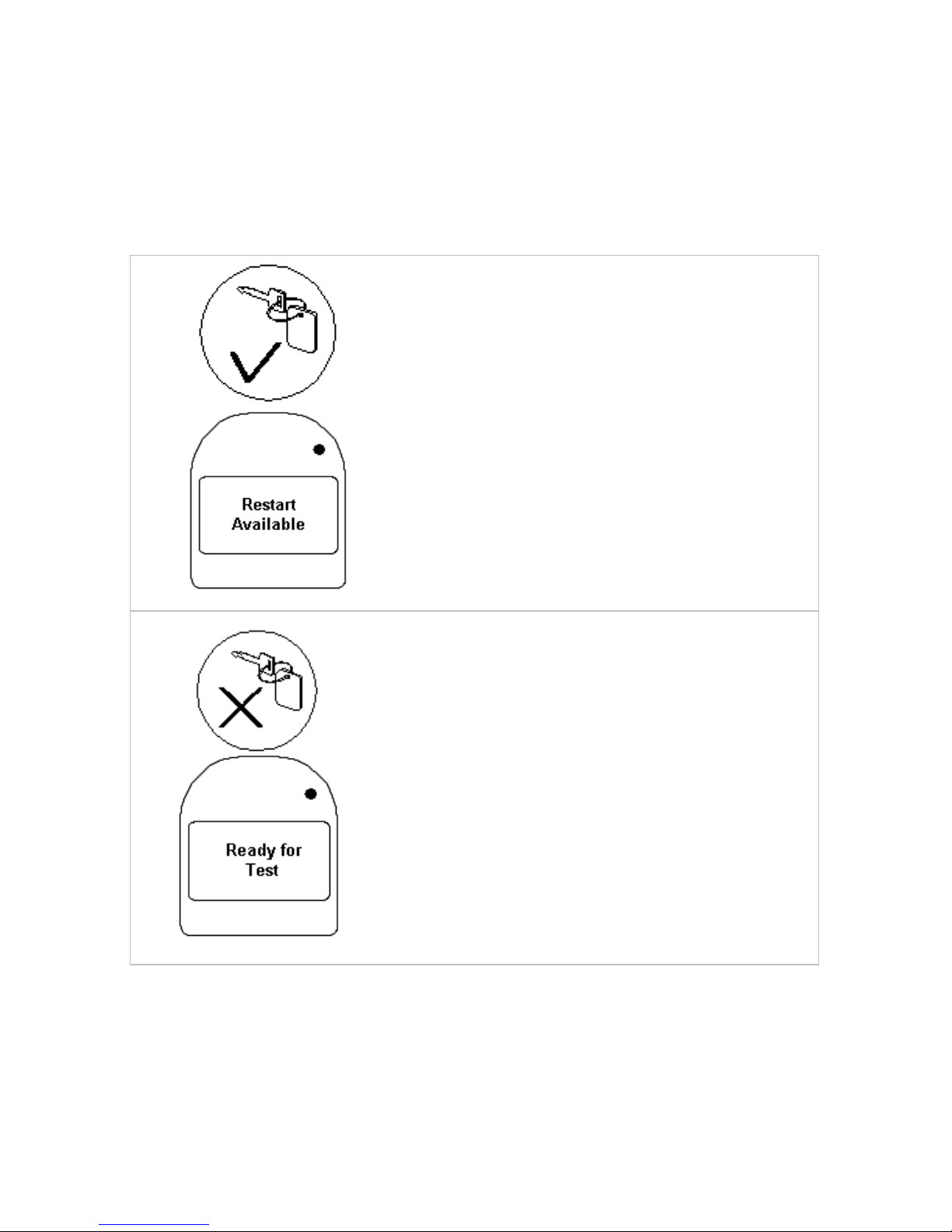
1a
Attempt to start the vehicle by using the
ignition key. If the unit is in stall protect, it will
restart without a test.
Or, check the message displayed on the
Handset - if “Restart Available” is displayed,
you can start the vehicle without a breath
test.
To cancel the Restart feature, press and hold
the right button.
1b If “Ready for Test” is displayed, you need to
pass a breath test to start the vehicle.
Page 10
10
7. Retests
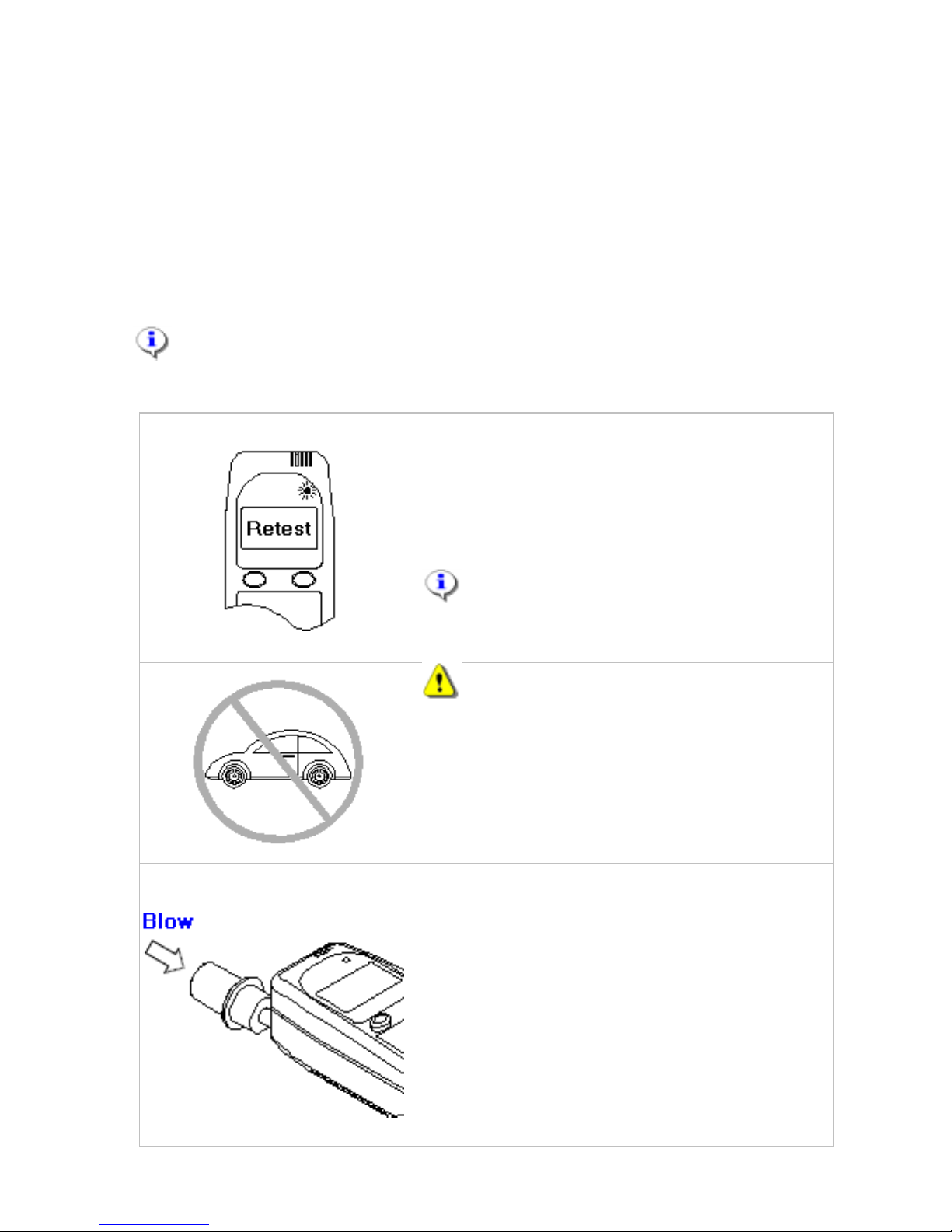
The system will require retests on a random time basis as long as the
vehicle remains in operation. The display will indicate “Retest” and a
double beep will sound. The first retest will occur 3 to 10 minutes from
starting the vehicle. Subsequent retests will be 15 to 60 minutes after a
pass result.
The technique involved in taking a retest is the same as a test prior to
starting the vehicle.
NOTE: If a retest request does occur, the driver must properly
complete a test, otherwise a recorded program violation may occur.
1 The Handset will display “Retest”, and the
status light will be flashing green.
The retest must be conducted with the
vehicle stopped, and within 7 minutes of the
retest request indication.
NOTE: Retests will be required at
random times whenever the motor is
running.
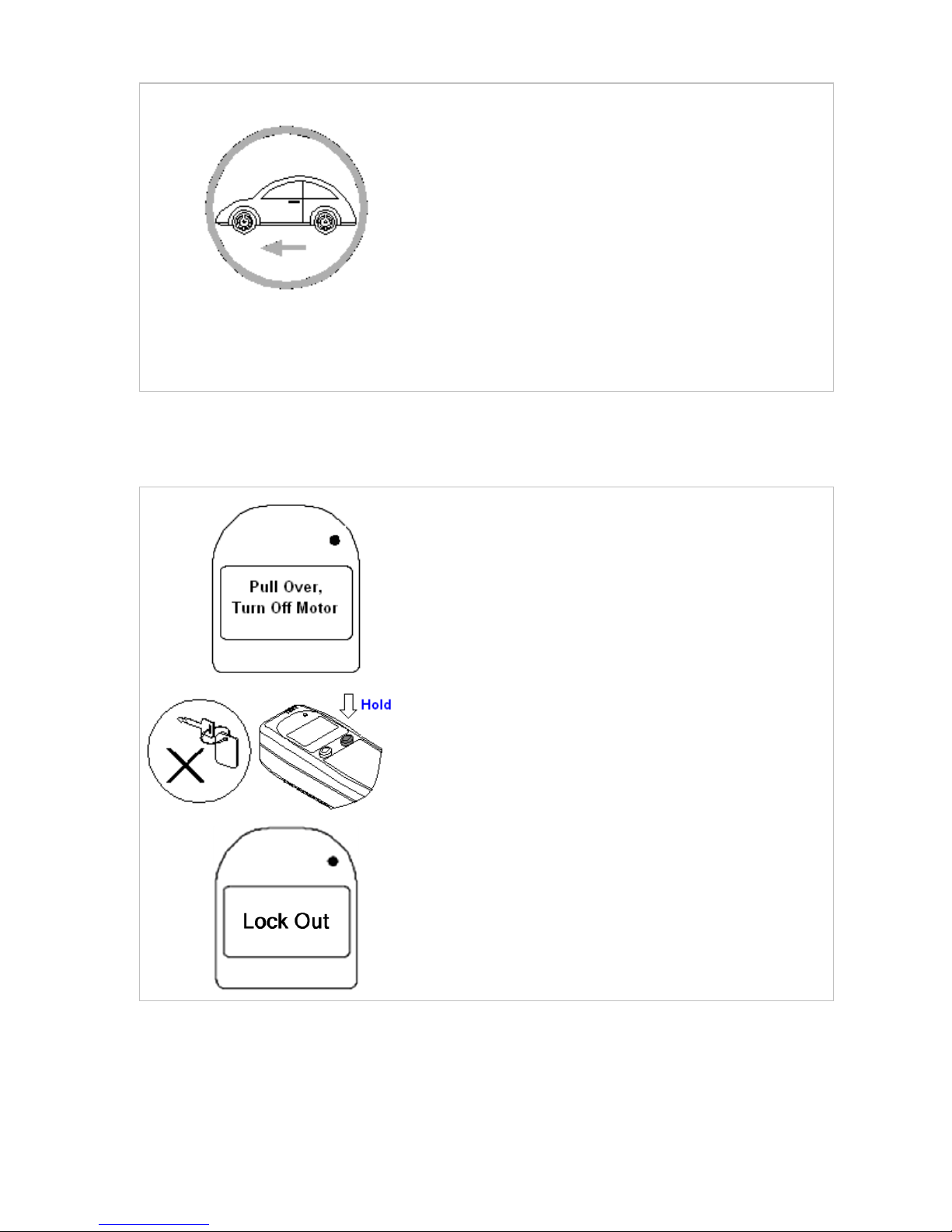
2
WARNING:
Do not take a retest while driving. Always
bring the vehicle to a safe stop off the
roadway before attempting a retest. You
will have several minutes to do this.
Do not turn off the engine for a retest.
3
Blow into the mouthpiece with moderate
force while simultaneously making a “Hum”
sound. Do not stop blowing until you hear a
beep from the Handset. The Handset will
display “Wait”, followed by the test result.
If you blew incorrectly, the Handset will
display “Hum Louder”, “Blow Softer” or
“Blow Longer and Harder”. Wait for the
Handset to display “Retest” before trying
again.
Page 11
11
4a
Observe the message displayed on the
Handset.
If “Drive Safely” is displayed and the status
light is solid green, you passed the breath
test.
The driver should not leave the vehicle
while the retest request indication is active
because a program violation could result.
Once the retest has been successfully
completed, you may continue on your way.
7.1 Failed Retest
5.1b
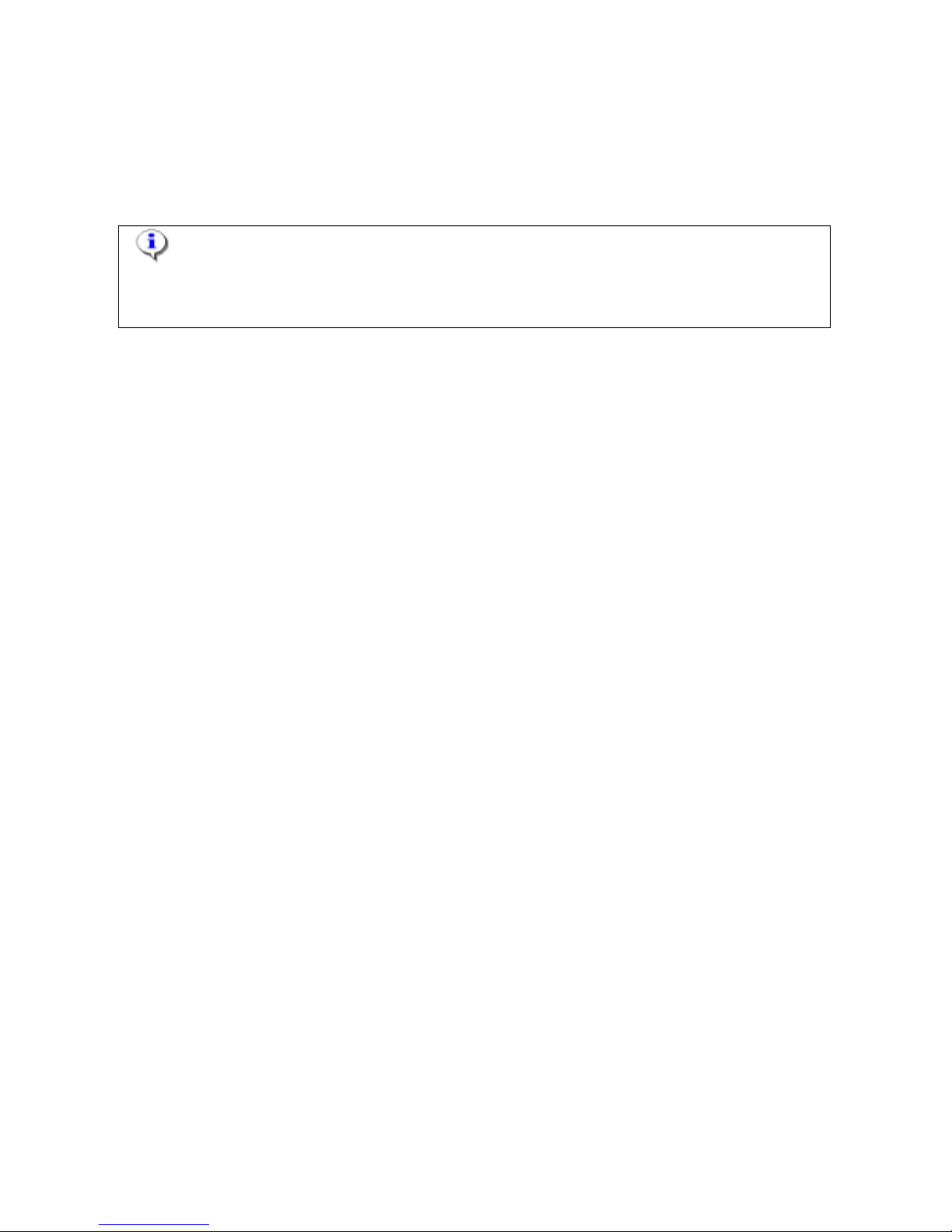
If a BAC result occurs during a retest, a
“Pull Over, Turn Off Motor” message is
displayed, the status light will flash red and
a tone will sound to indicate the driver has
3 minutes to turn the engine off.
You must safely park the vehicle and turn
OFF the motor, then press and hold the
right button to cancel the Restart feature.
“Lockout” will be displayed on the
Handset, and the status light will be solid
red. You cannot restart the vehicle, and
must wait until the lockout period expires
before attempting another test. A
countdown timer shows the lockout time
remaining.
Failure to turn off the engine within the 3 minute period will trigger the
alarm to sound, indicators flash, and an immediate recall will be initiated.
The service reminder will be reset to the day of the event, and the display
will indicate “Immediate Recall 6” along with the final date the vehicle can
be driven before the interlock will enter Permanent Lockout.
Page 12
12
An “Immediate Recall 1” will be triggered where 1 failed retest is recorded,
see section 25. Messages Displayed for further details. The interlock will
need to be serviced at the participant’s expense.
NOTE: Do not attempt another breath test until you are sure your
alcohol level is below the fail limit. A second or subsequent failed test may
result in a longer lockout period (approximately 30 minutes).
7.2 Retests not Taken
If a retest is not taken and passed within 7 minutes after a retest is
requested, the interlock will enter a Missed Retest condition. “Missed
Retest” will be displayed, and the alarm horn will sound, and hazard lights
will flash. To stop the alarm, you may either provide a breath test, or turn
the ignition off and hold the right hand button on the interlock in until the
alarm stops.
If the test is not passed, or the motor is not shut off and the right button
pressed, the service reminder will be reset to 7 days, and the display will
indicate “Immediate Recall 5” along with the final date the vehicle can be
driven before the interlock will enter Permanent Lockout. This message
means that the interlock will need to be reset by the Service Centre at the
Program Participant’s additional expense before the date displayed.
8. Illegal Starting of Vehicle
If the vehicle is started by hot wiring, or push-starting, the display will
indicate “Start Violation”. This is a program violation and will trigger an
immediate recall. The service reminder will be reset to 7 days, and the
display will indicate “Immediate Recall 7” along with the final date the
vehicle can be driven before the interlock will enter permanent lockout.
This message means that the interlock will need to be reset by the Service
Provider at the program participant’s additional expense within 7 days,
after which the device will enter a Permanent Lockout condition. This is a
recorded program violation and will incur additional charges for the
participant.
Page 13

13
9. Servicing and Recalls
9.1 Scheduled Servicing
7 days before the scheduled service date, after every retest, the display will
indicate “Service Due” and the date and time that the vehicle is required
for routine service. This will appear every time the interlock device is
powered up as well as for 5 minutes after the motor is shut off. You can
also check this date prior to this reminder period by holding the left hand
button to access the menu, use the left button to scroll to “Service Dates”
and selecting with the right hand button.
You should contact the service centre and confirm your appointment. A
Missed Appointment fee may be applied if you return for your service after
the given date.
If the vehicle is not serviced on the Service date, the display will indicate
“Missed Service” and the final date the vehicle can be driven before the
interlock will enter Permanent Lockout. This new date will be 7 days after
the original due date for service, the WR3 will enter a PERMANENT
LOCKOUT after this date and time. This is a recorded program violation
and will incur additional charges for the participant.
Failure to return to the Service Centre for inspection of the interlock device
and downloading of data as required is a Program Violation. Queensland
Department of Transport and Main Roads (TMR) will be advised and they
may apply the appropriate program sanctions.
9.2 Checking Service Dates
The WR3 interlock must be serviced at regular intervals, as specified by
TMR. A service reminder will be displayed on the handset starting 7 days
before the service date. The next service date, as well as the time of your
service appointment, can also be viewed in the user menu as follows:
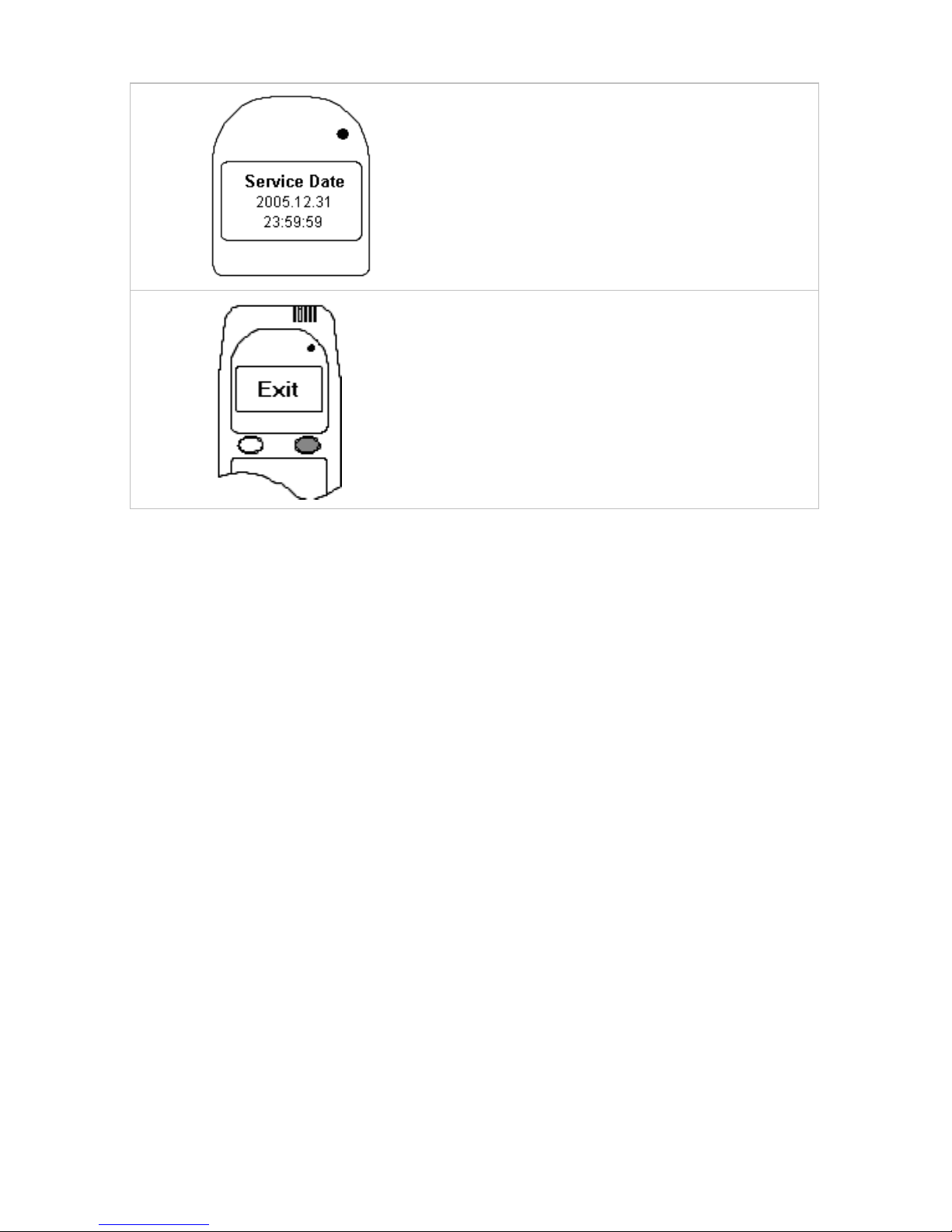
1
Press and hold the left button to access
the user menu.
Use the left button to scroll to Service
Date.
Press the right button to select this
option.
Page 14
14
2
Press the left button until the Service
Date is displayed.
You need to return for service before the
date and time displayed expires.
3
After you are finished reviewing the
date, press and hold the right button to
exit the Service Date submenu.
Select “Exit” to return to normal
operations.
9.3 Early Service
If an event has occurred that requires corrective action, an Early Recall
message will be displayed. It will show a number for the recall and a
date/time. The reference number given is the reason for the early service,
and the date is 7 days after the event. If the vehicle is not brought in on the
due date, the display will indicate "Missed Service" and the missed
appointment date. 7 days after the due date for service, the interlock
device will enter a PERMANENT LOCKOUT. This is a recorded program
violation and will incur additional charges for the participant. TMR will be
advised and they will apply the appropriate program sanctions.
9.4 Immediate Recall
If a Program Violation occurs an Immediate Recall message will be
displayed. It will show a reference number and a date/time. The number
displayed is the reason for the Immediate Recall, and the date is the date
of the lockout. The vehicle is immediately in the “Missed Service”
situation. After this date, the interlock will enter a PERMANENT
LOCKOUT, and will incur additional charges for the participant. TMR will
be advised and they will apply the appropriate program sanctions.
Page 15

15
9.5 Entering Codes
Once a code has been obtained from Guardian head Office, and
payment made. Follow the below instructions to enter the code.
Press and hold the left button.
Scroll through the options pressing the left button until the
desired option is displayed on the screen (e.g. “Reset”).
Press the right button to enter. “RESET CODE” and “0000
OK?” will be displayed.
The code must now be entered.
o Press the right button to scroll through to the correct
numerical value for the first number.
o Press the left button to move the cursor to the next
number.
o Continue for all digits.
Once all 4 numbers are correct press the left
button until the cursor is under the “OK?”. Press the right
button to accept the entry.
For the Reset code, you will now be required to enter the sub code.
This is entered the same way as the previous code.
Upon successful entry of both codes, the WR3 will make a high
beep and display the new lockout date and return to “Wait” or
“Ready for Test”. The new service date has been set.
10. Non-Compliance with Program Conditions
The interlock device fitted to your car is meant to keep you under
supervision and control. Its features and performance have been
developed to ensure that any non-compliance is recorded, and will
generate an EARLY or IMMEDIATE RECALL, or potentially, a
PERMANENT LOCKOUT in the event of circumvention or tampering.
EARLY or IMMEDIATE recalls will incur additional expenses to the user. In
addition, the Installers, Service Providers and Guardian are required to
advise TMR of any tampering or circumvention detected.
TMR expects participants to return their vehicle on, or before, the
scheduled service date (printed on your invoice). While there is a period of
Page 16

16
grace, the period is not intended to allow participants to become noncompliant. Where vehicles enter PERMANENT LOCKOUT because
participants have gone past their service date, and the only options are
towing the vehicle to a Service Centre (at the participant’s expense) or
contacting GIS for additional assistance, additional fees will apply.
11. Power Aspects
Depending on the Sleep Timer setting, the interlock unit will automatically
power off at the point ranging from 30 minutes to 2 hours after the motor is
shut off. Alternately, the driver can manually power off the WR3 by
pressing and holding both buttons at once. If “Retest Available” is
displayed on the LCD, it will be necessary to hold the right hand button
until “Ready for Test” is displayed to complete the power off sequence.
11.1 Disconnecting the Vehicle Battery
Disconnecting the vehicle’s battery for more than 15 minutes (or 3 “Power
Off” events lasting 5 minutes or longer) will trigger an early service.
Depending on the circumstances, this may be considered a Program
Violation. The service reminder will be reset 7 days and the display will
either indicate “Early Recall 8” (3 X 5 minute power off events) or “Early
Recall 14” (1 X 15 minute power off event) along with the final date the
vehicle can be driven before Permanent Lockout. This message means
that the interlock will need to be reset by the Service Centre: otherwise the
WR3 will enter a PERMANENT LOCKOUT.
Battery “boosting” is permitted. However, in the event that it becomes
necessary to disconnect the battery for more than 15 minutes, Participants
should first contact Guardian to advise of the situation. It is advised to
contact your Service Centre if you need advice on battery boosting.
12. Disconnecting the Handset
If you wish to disconnect the handset for any reason, follow these instructions.
NOTE: Be sure to put the handset into Sleep Mode before
disconnecting it. (Please see instructions on how to use Sleep Mode).
WARNING: The handset should never be removed while the motor is
running.
Page 17
17
1
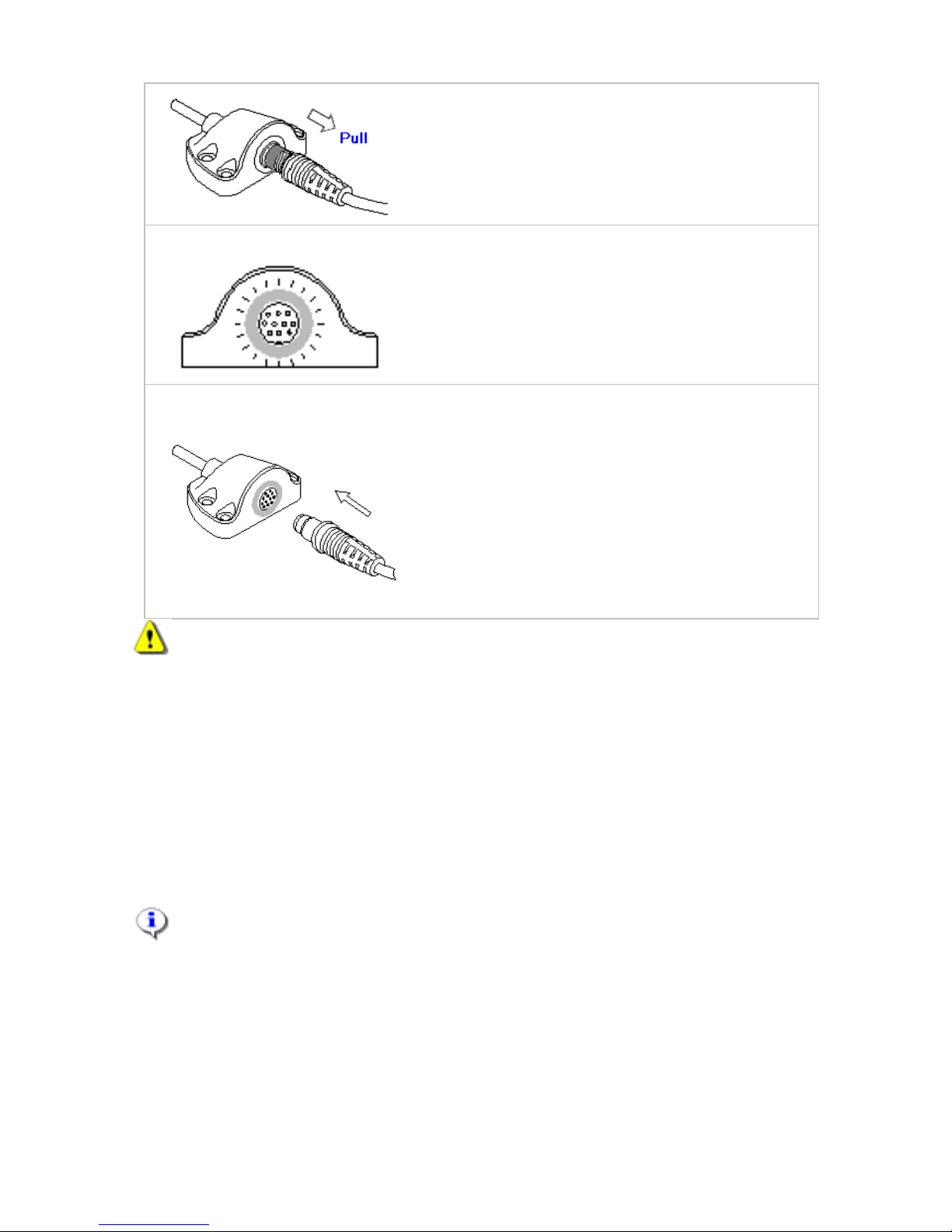
To disconnect the handset pull back on
the slide and withdraw the handset.
1a
The Interface Module will beep twice
every 15 seconds to remind the driver
that the handset is disconnected while the
motor is running.
The receptacle will also flash green.
2
Ensure to match up the green lines on the
Handset and receptacle. Use low force to
plug the handset into the receptacle.
Once the handset has powered on, it will
display “Wait”, and after a test will be
followed by the appropriate message
based on the current vehicle state e.g.
“Ready For Test”, or “Restart Available”.
WARNING: Do not pull on the handset cord. The connectors can only
be disengaged by sliding back the release sleeve.
12.1 Sleep Mode
The WR3 can be placed into sleep mode after the motor has been turned
OFF. It will automatically go into sleep mode when the sleep timer expires.
Extending the sleep time will allow the interlock to remain ready for longer
periods. You can chose from 4 sleep times as described below. The WR3
can also be put into sleep mode manually by pressing and holding the left
and right buttons at the same time.
NOTE: It is advised that good judgement should be used when setting
the sleep time due to the fact that it will take a little current from the
vehicles battery while awake. If the vehicle battery is not in good condition,
setting a 2 hour sleep time may cause the car battery to go flat.
Page 18
18
1
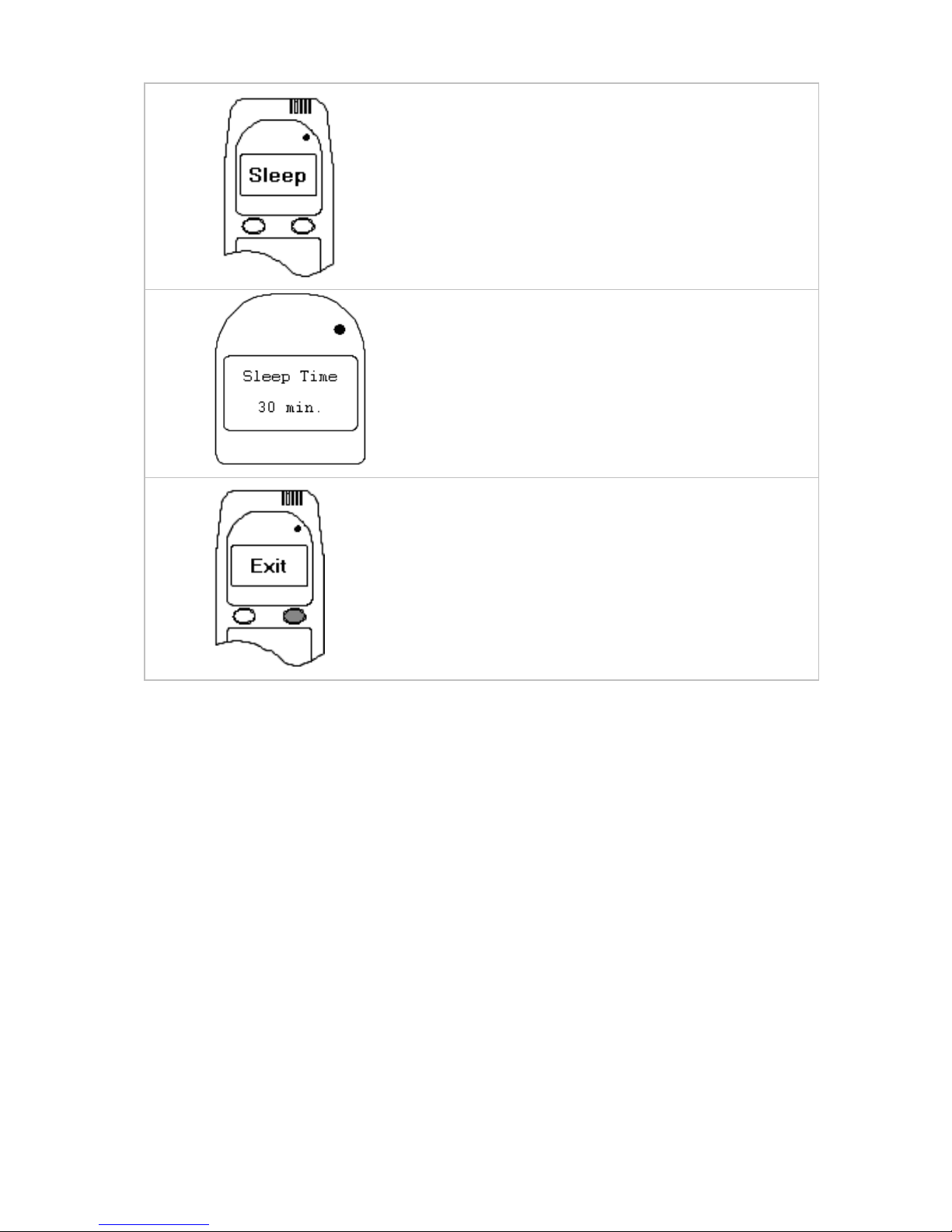
Press and hold the left button to access
the user menu.
Use the left button to scroll to Sleep.
Press the right button to select this option.
2 The Sleep submenu contains 4 pre-
programmed sleep times: 30, 60, 90 and
120 minutes.
Use the right button to browse through
them.
3
Press and hold the right button to exit the
Sleep submenu.
Select Exit to return to normal operations.
13. Care of the WR3
The WR3 equipment is designed to operate in extremes of temperature,
and in the typical environment in a motor vehicle. It has been designed to
withstand dust and vibration. The equipment is leased to you under the
Terms and Conditions supplied later in this handbook, and for which you
have signed during installation.
Like any electronic equipment, it will not stand abuse, and will cause early
recalls if damaged. The cost of repairing damaged equipment will be
recovered from participants.
The equipment can be cleaned with a damp cloth, and you should keep
your mouthpieces free from condensation or any obstructions. You should
be given two new mouthpieces at every service.
Page 19

19
14. Other Servicing of Your Vehicle
If you need to have repairs or maintenance work
done on your vehicle, your mechanic should
contact Guardian for further information. Your
mechanic may be able to obtain a TPM (Third Party
Maintenance) code from Guardian. Contact us for
further details.
15. Program Violations
Guardian is required to report Program Violations to TMR who administer
the interlock program. Program participants are reminded that Program
Violations may result in extension of the required period of interlock use,
and/or removal of the interlock device. Program Violations include:
a. Tampering.
Tampering is defined as “an unlawful act or attempt to disable or
circumvent the legal operation of the ignition interlock device”. Without
limiting the generality of this definition, the following are examples of
Tampering:
Cutting and/or disconnecting any of the wires connecting the
ignition interlock device to the vehicle.
Removal of the tamper seals from the interlock, interlocks wiring,
or alarm horn.
Covering and/or disabling the alarm horn.
Unauthorised disconnecting of the vehicle battery from the
interlock device for more than 15 minutes on a single occasion or 3
such events lasting 5 minutes or longer.
Hot wiring or push-starting the vehicle.
Damage to or loss of the interlock, interlock wiring, or alarm horn.
b. Program Violations
10 failed start-up breath tests (0.02 or more)
5 failed start-up breath test (0.05 or more)
1 failed running retests and/or 3 running retest refusals
a single instance of attempted or successful circumvention
a single instance of the override function.
Failure to return to the Service Provider for inspection of the
interlock device and downloading of data as required.
Failure to comply with retest requirements Failure to comply with a
“Pull Over, Turn Off Motor” message in the event or a Fail BAC
result on a retest.
Page 20
20
NOTE: Should any Tampering occur as a result of work done by a
certified auto repair facility the program participant must bring a receipted
invoice or work order to the Service Provider indicating business name,
vehicle, work carried out, time in and time out. Times of the violation must
match the time of service on the invoice or work order. If a program participant
is working on his/her own Vehicle, the Guardian must be notified in advance.
16. Additional Functions
16.1 Volume Control
The WR3 has a volume control feature which can be set by the user for
their handset only. These settings do not affect the Interface Module
volume.
1
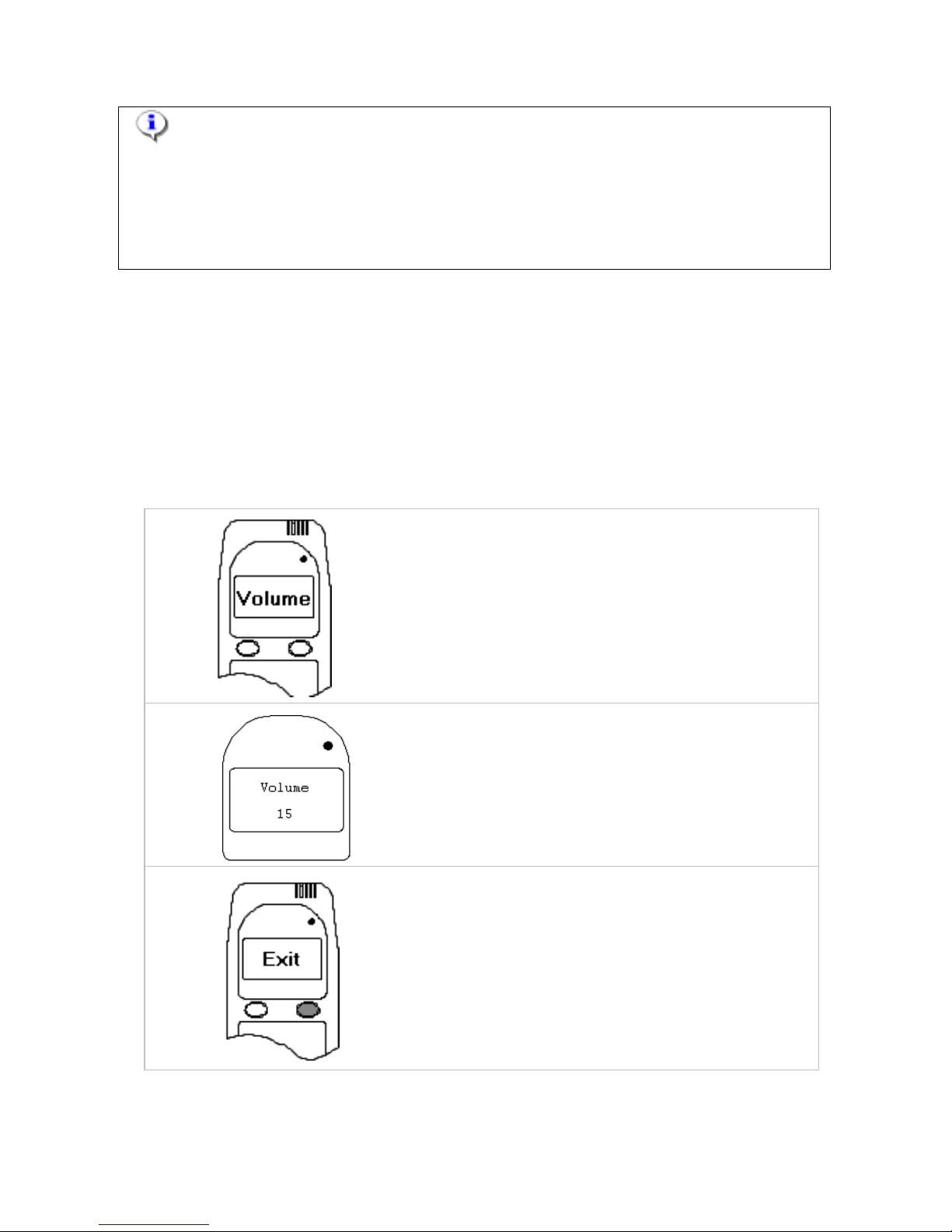
Press and hold the left button to access
the user menu.
Use the left button to scroll to Volume.
Press the right button to select this option.
2
Use the buttons to adjust the volume of
the Handset.
Left button decreases the volume. Right
button increases the volume.
3
Press and hold the right button to exit the
Volume submenu.
Select “Exit” to return to normal
operations.
Page 21
21
16.2 Clock Adjustment (Daylight Savings)
The clock of the WR3 can be changed by the user in half hour increments.
This allows for time changes to/from Daylight sa ving Time. It also allows
the Handset clock to be set to the local time, when travelling through
different time zones. Adjusting to the correct local time will ensure that the
WR3 wakes up at the correct selected times.
1
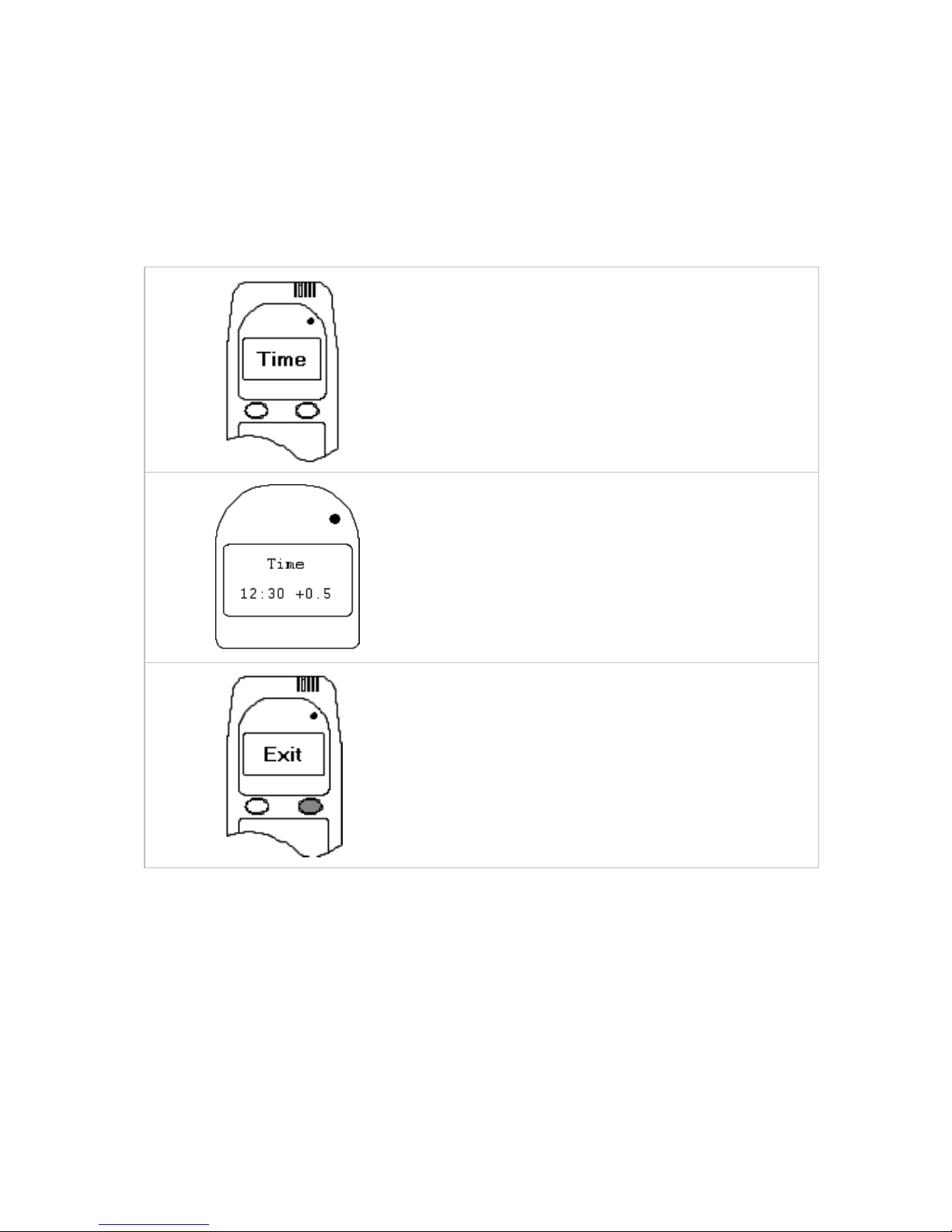
Press and hold the left button to access
the user menu.
Use the left button to scroll to “Time”.
Press the right button to select this option.
2
Use the buttons to adjust the clock. You
can only adjust the clock in 0.5 hour
increments; up to a maximum ± 3 hours.
New clock adjustments will affect the
programmed wake-up times.
3
Press and hold the right button to exit the
Time submenu.
Select “Exit” to return to normal
operations.
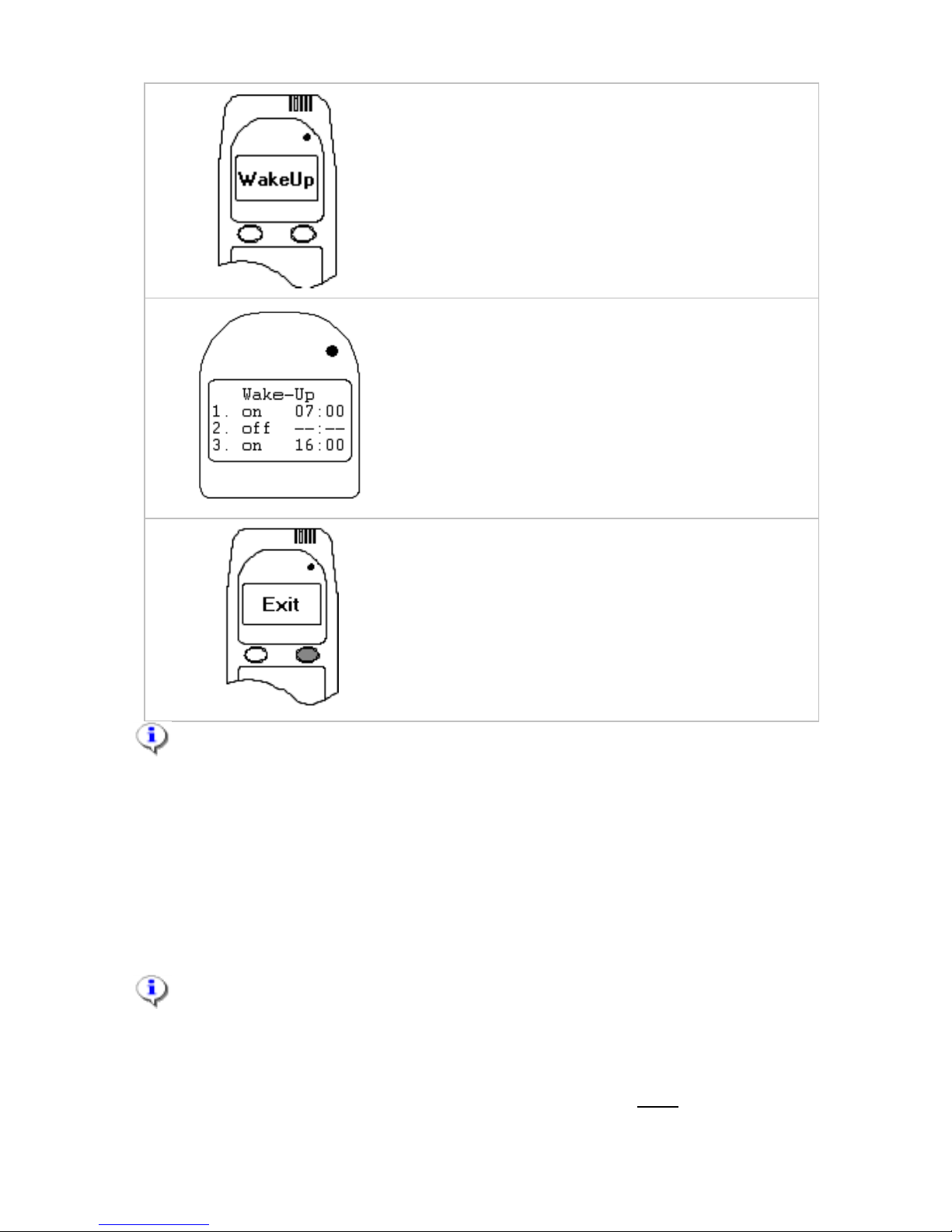
16.3 Automatic Wake Up
The WR3 can be programmed to wake-up 3 times a day. This feature
ensures that the Handset is warmed to operating temperature before you
enter the vehicle. Programming instructions are provided below. The wakeup feature will be temporarily disabled if the WR3 is not used for 3
consecutive days.
Page 22
22
1
Press and hold the left button to access
the user menu.
Use the left button to scroll to “Wake-Up”.
Press the right button to select this option.
2
Select a time slot by placing the cursor
underneath an “on/off” setting. If
necessary, change the setting to “on”.
Set the wake-up time for that time slot.
Left button moves the cursor, right button
changes the value.
3
Press and hold the right button to exit the
Wake-Up submenu.
Select “Exit” to return to normal
operations.
NOTE: The Handset needs to remain connected for the Automatic
Wake Up Feature to activate.
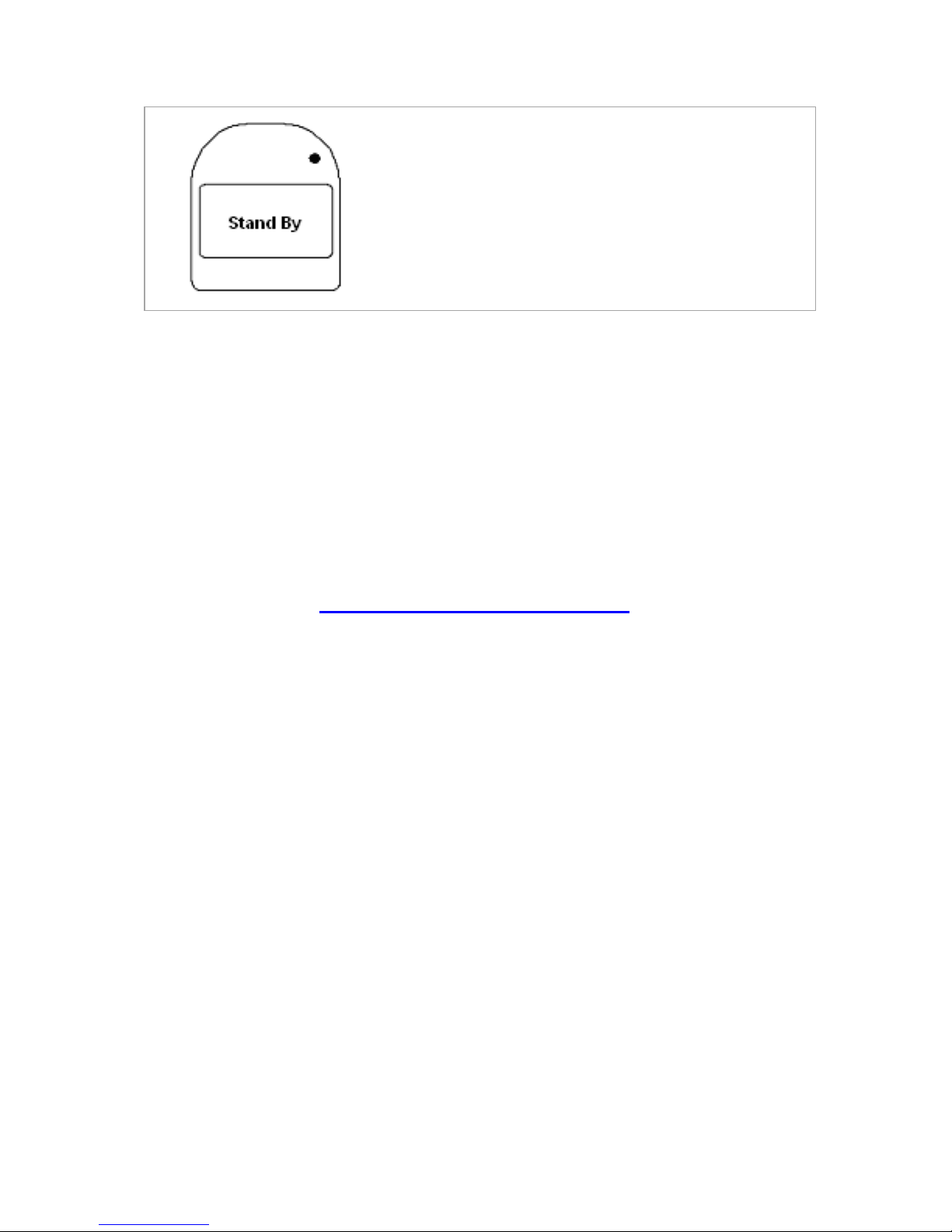
16.4 Standby
Stand By is an OPTIONAL feature available for commercial vehicles only to
allow you to leave the vehicle idling without a retest occurring. If you would
like to apply for this feature to be added, contact your Service Centre to
arrange.
Please note that a monthly fee will apply for use of this feature.
To enable Stand By the vehicle idle must be lower than the preset limit set
by the Ignition Interlock Service Centre (this may take several minutes in
cold weather). The following instructions will only work after the “Stand By”
option has been set by your Service Centre.
Page 23
23
Press and hold the left button on the
Hand Set until the words “Stand By”
appear. The retest will not occur unless
the left button is pressed, or the vehicle
idle rises above the preset limit, or the
vehicle stalls. It is the client’s
responsibility that they do not use Stand
By unless their vehicle idles properly.
17. Service Centres
There is a list of Service Centres in the Information Brochure issued at
installation. The list was current at the time of your training, but the number
of centres may change. You may use any approved service centre in NSW,
Northern Territory, South Australia, Victoria, Tasmania or Western
Australia. If you wish to know of any new centres, please contact Guardian
(02) 8853 6200 for updated information or visit our website:
www.guardianinterlock.com.au
Servicing your interlock is a simple task. Please contact the centre where
you wish to have your unit serviced, and make an appointment. While
normally you will be able to be accommodated, it is in your interest to book
into busy centres, as other planned work may preclude you. For this very
reason, you should not leave servicing until the last minute or you may find
yourself locked out.
18. Complaints
We provide a high level of service, consistent with the program rules. If we
aren’t meeting your expectations, please contact either your Installer, or
Guardian. Our aim is to fix problems as soon as possible, with the least
fuss. Part of your training included how to make a complaint about the
equipment or service. You have also been issued a brochure called “Tell
Us What you Think” where you can write to us and let us know any
concerns you may have with your interlock.
Page 24

24
19. Privacy
We respect your privacy, and will only collect information that we need to
do our job. We will only use the information for the reason we sought it, or
to provide reports required by the Program. Access to a program requires
individuals to provide personal information required for commercial
transactions. We collect, hold and use, information related to your
commercial and consumer creditworthiness from credit reporting bodies
(CRB), for all purposes permitted by law. We also disclose information to
them. This activity is conducted for the purpose of assessing your credit
capacity, eligibility or history in connection with an application or an
obligation as a guarantor, collecting payments from you, and managing our
credit relationship. We also hold and collect information about the way you
have used the interlock device (from the device’s data logger)
Guardian will only collect personal information directly from you, and from
the interlock device allocated to you, for use solely in program
management. This will mainly be done at Service Centres by authorised
staff. Guardian will provide copies of the personal information held at each
service in the form of an invoice, and will correct any anomalies on request.
In the event of any non-compliant data log entries, Guardian will provide
copies of any such events, and offer you the opportunity to comment on
the event for inclusion on your report. By doing this Guardian ensures that
you share information that it has on file, as well as a correct record of your
program.
Information will be collected in files held at the Guardian’s Adelaide office,
and electronically on Guardian computers (including central storage in
Canada), and is available to TMR. Where your personal information is
transferred between users, the Australian privacy provisions will always
apply, and all data transfer is encrypted and protected by the most secure
methods available.
Guardian has stringent rules about access to personal information, and any
Guardian or service centre personnel, with access to personal information
in any form, has to complete a Confidentiality Pledge before having any
such access. Participants should be aware that Guardian is obliged to
provide some personal information to the authorities for program
management. Please contact Guardian if you have any concern about
privacy.
20. Removal of Interlock
If you wish to have the interlock removed for any reason, please contact
Guardian. We can advise you on options for removal and costs involved.
Page 25

25
Remember that driving without an interlock in your vehicle is against the
conditions of your licence. Penalties apply for Program participants who
drive:
unlicensed;
a vehicle that has not been fitted with a prescribed interlock;
a vehicle that has not been nominated to TMR; or
if they hold an interlock exemption
Once your Interlock Condition period has expired, take your car to your
Guardian service centre, where they will remove the interlock from your
car. Any outstanding fees will have to be paid before the interlock can be
removed.
20.1 Removal of Interlock Condition
Once you have successfully completed the required period on the Interlock
Program, TMR will supply you with a Completion Notice. Take this to your
service centre to have your interlock removed. Alternatively, you should
contact TMR on 13 23 80 to confirm your end of program date.
You must go to TMR and be issued a licence with the “I” condition
removed, or you could be penalised with unlicensed driving.
21.General Assistance
Please contact the service centre shown on your servicing documents, or
Guardian. You can contact Guardian on a 24 hr basis, but repairs are on a
“next business day” basis.
21.1 24 Hour Technical Support Line
Guardian provides a 24 hour Technical Support line in case of technical
emergency situations. If you are having any technical difficulties with your
interlock, call Guardian 1300 881 005 (cost of a local call).
After hours support is only to be used for technical equipment or
emergency situations such as an Interlock break down. An
Administration Fee may be applied to non-emergency calls received.
(Permanent Lockout is no classified as an emergency and will need to
be resolved within business hours)
In the case of other general enquiries, please contact GIS during working
hours, between 8.30am and 5.30pm Monday to Friday.
Page 26
26
21.2 Electrical Interference
Mobile phones and mobile radios produce high RF noise and may cause
the interlock to abort the test. Do not park near transmission towers or
electrical sub-stations as this can stop the interlock from allowing you to
take a test in order to start your vehicle.
WARNING:
Ensure mobile phones and mobile radios
are shut off during a breath test as an RF
signal is still produced as long as the device
is on.
If you do experience trouble starting because of
transmission towers or electrical sub-stations, you may
need to have your vehicle towed away from the area to
allow normal function of the interlock.
22. Override
To provide for situations where the vehicle needs to be started where other
methods of assistance are not appropriate, an Override feature is available
from Guardian. The override feature allows the user to start the vehicle
without a breath test, however the alarm will sound and lights will flash
while the engine is running. This feature is only available where telephone
contact is available.
The Override feature may only be used once between servicing of the
interlock.
Participants should contact Guardian on 1300 881 005 and explain why
they need the Override. The code will only be provided where the operator
is convinced that an emergency exists. Use of the Override feature will
be treated as a program violation that will require an immediate recall
that will incur additional fees. TMR will demand an explanation from
the participant.
23. Emergency Override
To provide for situations where the vehicle needs to be started and other
methods of assistance are not appropriate, and telephone contact is not
available, an Emergency Override feature is available. The Emergency
Override feature allows the user to start the vehicle without a breath test,
Page 27
27
however the alarm will sound and lights will flash while the engine is
running. This feature should not be used where telephone contact is
available.
The Emergency Override feature can be accessed in the vehicle by
stepping through the WR3 menu until the Emergency Override screen is
reached. As soon as the Emergency Override is selected, the alarm will
sound and lights will flash and a violation will be recorded, requiring an
immediate recall that will incur fees. Use of the Override feature will be
treated as a program violation that will require an immediate recall
that will incur additional fees. TMR will demand an explanation from
the participant.
The participant should follow the prompts on the interlock to implement the
feature. The vehicle may be restarted for up to 60 minutes without a test.
The Emergency Override feature may only be used once between
servicing of the interlock.
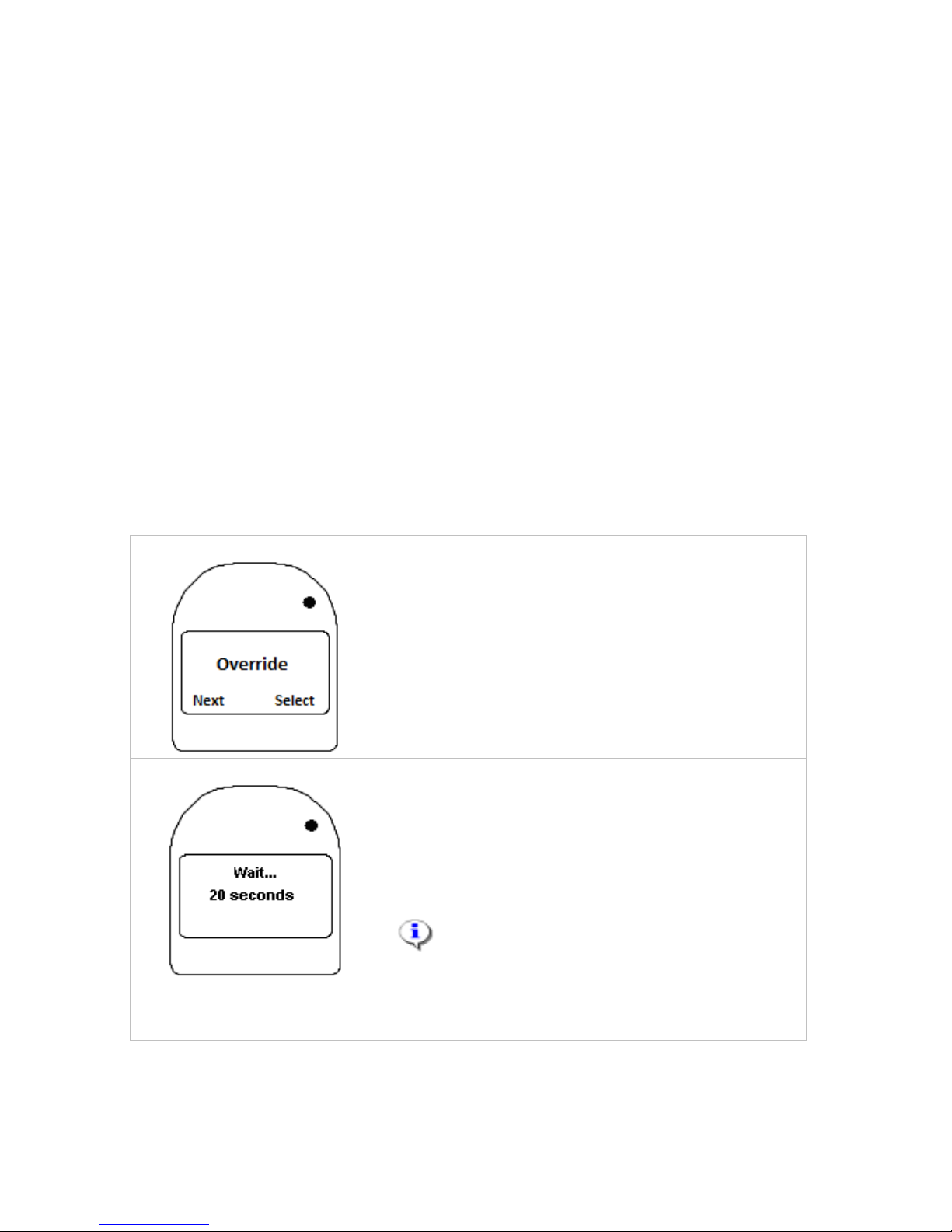
1.
Press and hold the left button to access the
user menu.
Use the left button to scroll to Override.
Press the right button to select this option.
The alarm will sound and lights will
immediately start flashing.
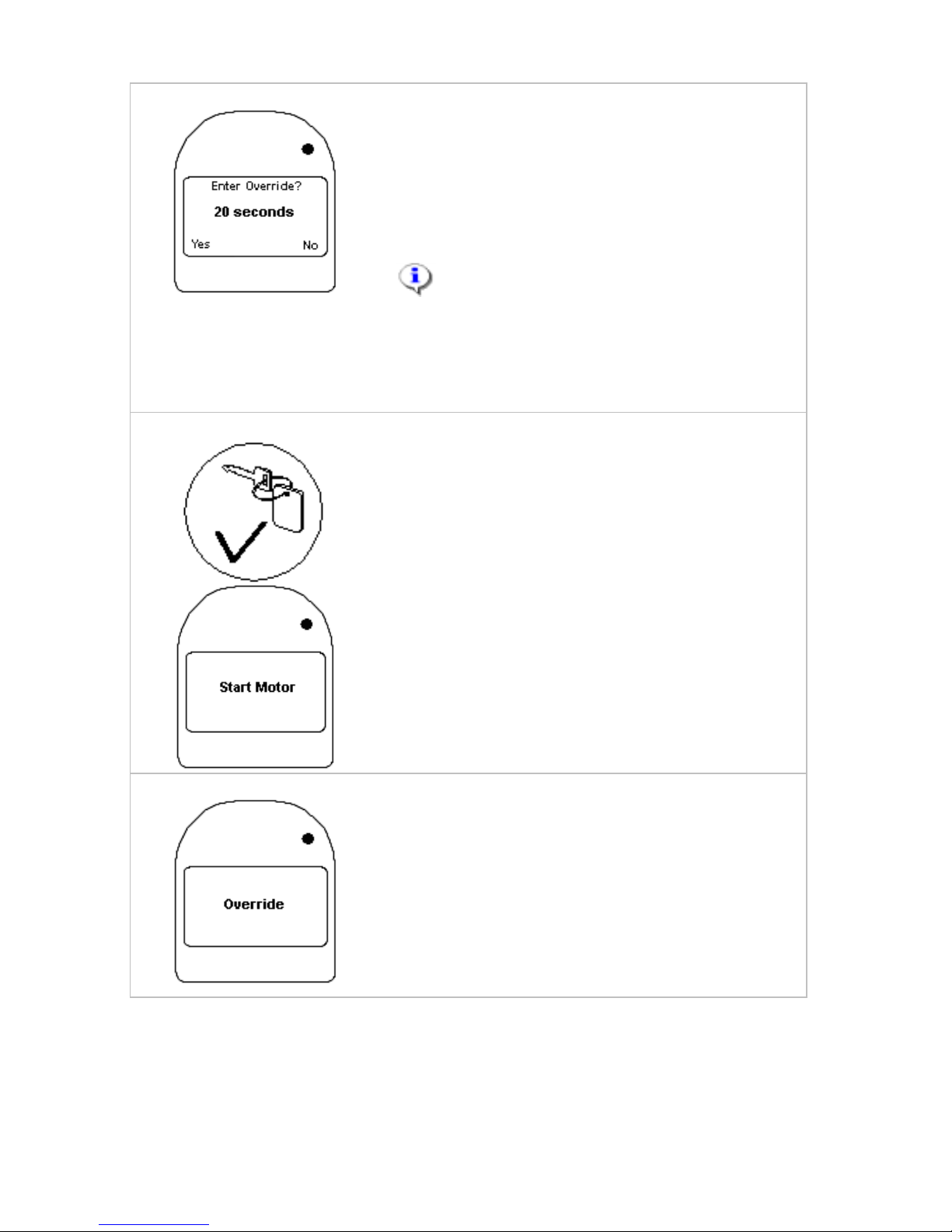
2.
Wait… will be displayed and a timer will start a
20 second countdown. During the countdown
you may exit Override and return to the user
menu by pressing and holding the right button.
To continue with Override wait until the
countdown is over.
NOTE: Selecting Override will trigger an
audible and visual alarm. The alarm will remain
active unless the user exits Override or turns off
the motor.
Page 28
28
3.
Once the initial countdown is over, Enter
Override? will be displayed and you will
then have an additional 20 seconds to
confirm your intention to activate Override.
Press the left button to activate Override.
Press the right button to exit Override and
return to the user menu.
NOTE: If the user does not press
either the left or right button before an
additional 20 seconds period expires, the
WR3 will automatically exit Override and
return to the user menu.
4.
Once Override is activated, the motor may
be started without a breath test. Start
Motor is displayed on the screen. An
audible and visual alarm will be active
whenever the motor is running.
5.
While in Override, the vehicle may be
driven without a breath test. Once the
motor is turned off, the vehicle may be
restarted for up to 60 minutes without a
breath test. After that, the WR3 will
automatically exit Override and a breath
test will be required to start the vehicle.
Page 29
29
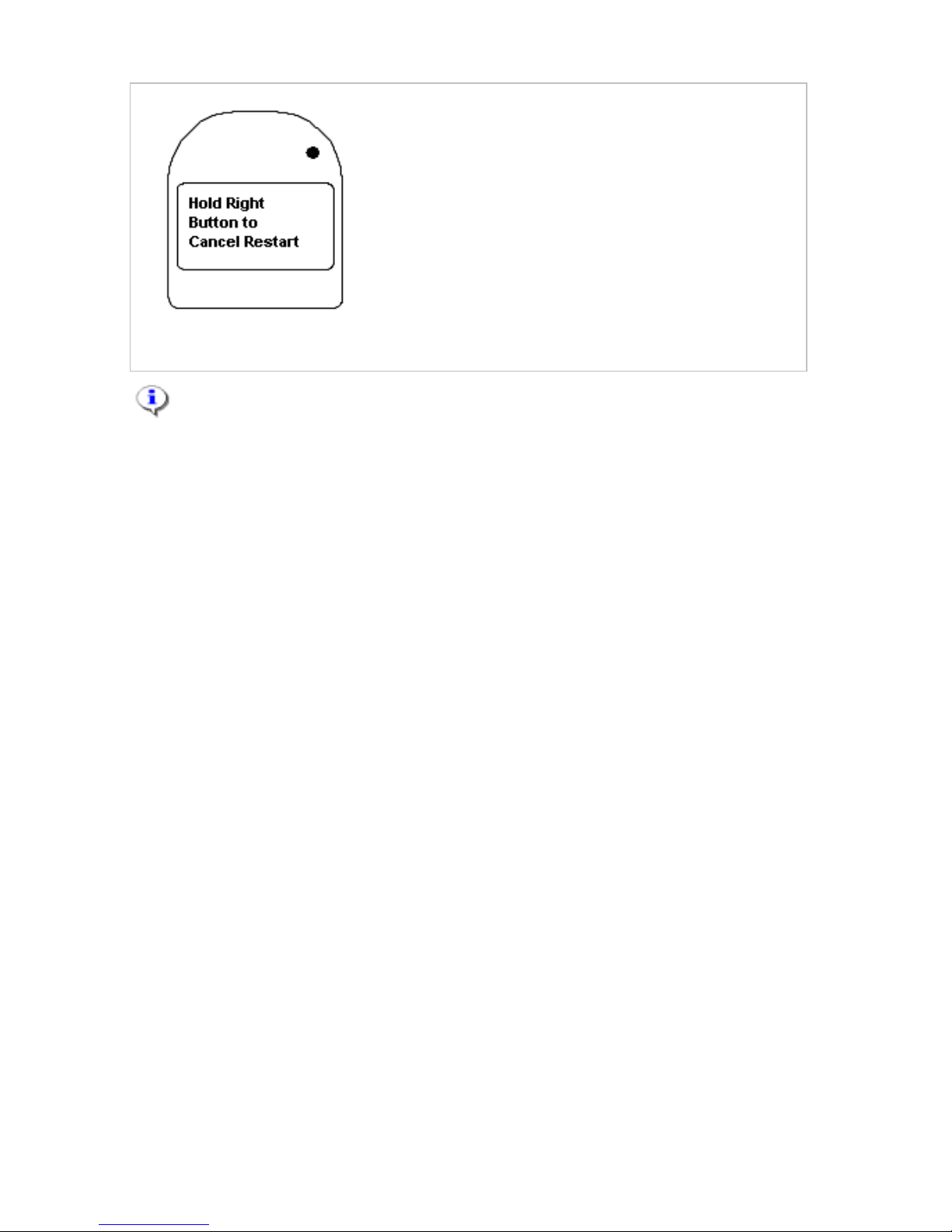
6.
Once the motor has been started following
activation of Override, the WR3 will display
Hold Right Button to Cancel Restart
whenever the motor is shut off. This
message will be displayed for up to 60
minutes, during which time you can restart
the vehicle without a breath test or press
the right button to exit Override. After 60
minutes, the WR3 will automatically exit
Override. A breath test will then be
required to restart the vehicle.
NOTE: After exiting Override, this feature cannot be activated again
until the WR3 has been reset by the interlock service centre.
Use of the Emergency Override feature will trigger an immediate
recall which will incur additional fees. Guardian is required to report
use of any Override or Tampering events to TMR.
Page 30

30
24. Messages Displayed
24.1 Unscheduled Service Recall Messages
MESSAGE
DISPLAYED
DESCRIPTION
ACTION
Immediate
Recall 01
Unscheduled service reminder – Initiated because of Fail
BAC results on a retest. The display will indicate the
Lockout date if the vehicle is not returned for service prior
to this date/time.
Call the Service Centre to arrange for an
appointment before the date displayed and
the interlock enters Permanent Lockout.
Early Recall 02
Unscheduled Service Reminder – Initiated because a
running motor was not detected 3 minutes after pass breath
test. The display will indicate the Lockout date if the vehicle
is not returned for service prior to this date/time
Call the Service Centre to arrange for an
appointment before the date displayed and
the interlock enters Permanent Lockout.
Immediate
Recall 03
Unscheduled service reminder – Initiated because of 5
high Fail BAC results (0.05% +) have been recorded. The
display will indicate the Lockout date if the vehicle is not
returned for service prior to this date/time.
Call the Service Centre to arrange for an
appointment before the date displayed and
the interlock enters Permanent Lockout.
Immediate
Recall 05
Immediate recall reminder – Initiated due to Missed
Retests recorded in the service period. The final date the
vehicle can be driven before the interlock will enter
Permanent Lockout is displayed.
Call the Service Centre to arrange for an
appointment before the date displayed and
the interlock enters Permanent Lockout.
Immediate
Recall 06
Immediate recall reminder – Initiated because of the Pull
Over Failed retest of more than 3 minutes. The final date
the vehicle can be driven before the interlock will enter
Permanent Lockout is displayed.
Call the Service Centre to arrange for an
appointment before the date displayed and
the interlock enters Permanent Lockout.
Immediate
Recall 07
Immediate recall reminder – initiated by a Start Violation.
The final date the vehicle can be driven before the
interlock will enter Permanent Lockout is displayed (7
days after recorded event).
Call the Service Centre to arrange for an
appointment before the date displayed and
the interlock enters Permanent Lockout.
Page 31

31
MESSAGE
DISPLAYED
DESCRIPTION
ACTION
Early Recall 08
or 14
Unscheduled service reminder – Initiated because of
Power Disconnection/s (vehicles battery). The display will
indicate the Lockout date if the vehicle is not returned for
service prior to this date/time.
Call the Service Centre to arrange for an
appointment before the date displayed and
the interlock enters Permanent Lockout.
Early Recall 09
Early service reminder – Initiated because of 25 consecutive
HUM aborts. The display will indicate the Lockout date if the
vehicle is not returned for service prior to this date/time.
Call the Service Centre to arrange for an
appointment before the date displayed and
the interlock enters Permanent Lockout.
Early Recall 10
Unscheduled service reminder – Initiated because the
interlock log has reached 80% capacity. The display will
indicate the Lockout date if the vehicle is not returned for
service prior to this date/time.
Call the Service Centre to arrange for an
appointment before the date displayed and
the interlock enters Permanent Lockout
Immediate
Recall 11
Immediate recall reminder – Initiated because an override
code was used. The final date the vehicle can be driven
before the interlock will enter Permanent Lockout is displayed.
Call the Service Centre to arrange for an
appointment before the date displayed and
the interlock enters Permanent Lockout.
Early Recall 12
Early service reminder – Initiated because of the problem
with the ignition switch. The display will indicate the
Lockout date if the vehicle is not returned for service prior
to this date/time.
Call the Service Centre to arrange for an
appointment before the date displayed and
the interlock enters Permanent Lockout.
Immediate
Recall 13
Immediate recall reminder – Initiated because the
Emergency Override (with no code) was activated. The
display will indicate the Lockout date if the vehicle is not
returned for service prior to this date/time.
Call the Service Centre to arrange for an
appointment before the date displayed and
the interlock enters Permanent Lockout.
Early Recall 15
Unscheduled service – Initiated because after the TPM
code used
Call Guardian to confirm action before the
date displayed and the interlock enters
Permanent Lockout.
Early Recall 16
Unscheduled service reminder – Initiated because the
ignition was switched on but engine not started after 3
minutes of passed test. The display will indicate the
Call the Service Centre to arrange for an
appointment before the date displayed and
the interlock enters Permanent Lockout.
Page 32

32
MESSAGE
DISPLAYED
DESCRIPTION
ACTION
Lockout date if the vehicle is not returned for service prior
to this date/time.
Immediate
Recall 17
Unscheduled service reminder – Initiated because of a
combination of 10 Fail BAC results recorded within a
service period – includes failed retest, high range (0.05
%+) or mid-range (0.02–0.049%). The display will indicate
the Lockout date if the vehicle is not returned for service
prior to this date/time.
Call the Service Centre to arrange for an
appointment before the date displayed and
the interlock enters Permanent Lockout.
24.2 Messages A-Z
MESSAGE
DISPLAYED
DESCRIPTION
ACTION
ABORT 10
Possible issue caused by moisture.
If persistent, possible problem with the Handset.
Attempt test again. Call the Service
Centre if this message appears frequently
to arrange for a replacement Handset.
ABORT 30
Possible issue caused by moisture.
If persistent possible problem with the Handset.
Attempt test again. Call the Service
Centre if this message appears frequently
to arrange for a replacement Handset.
ABORT 40
Possible issue with moisture or dirt causing piston in
Handset to stick. May also be caused by low voltage in
vehicle battery.
Possible problem with the Handset. (one abort 40 per
100 tests is considered normal).
Shake handset to loosen piston.
Attempt test again. Call the Service
Centre if this message appears frequently
to arrange for a replacement Handset.
ABORT 45
Possible low voltage in vehicle battery – insufficient for
interlock to function effectively.
Possible problem with the Handset. (one abort 45 per
100 tests is considered normal).
Check vehicle battery, charge if required.
Attempt test again. Call the Service
Centre if this message appears frequently
to arrange for a replacement Handset.
Page 33

33
MESSAGE
DISPLAYED
DESCRIPTION
ACTION
ABORT 50
Possible issue with piston stuck in Handset. May also be
caused by low voltage in vehicle battery.
Possible problem with the Handset. (one abort 50 per
100 tests is considered normal).
Shake handset to loosen piston. Attempt
test again. Call the Service Centre if this
message appears frequently to arrange
for a replacement Handset.
ACS
Where this message remains on the screen, there is
insufficient voltage in the vehicle battery to power interlock.
Charge or replace the vehicle battery
Blank Screen
The interlock unit is in the Power Off State. Alternatively,
insufficient vehicle battery to power to the interlock.
Press right button on the Handset.
Charge or change vehicle battery.
Blow Softer
Blowing pressure above maximum threshold at some
point during the 5 second breath Sample time period.
Blow softer during test. Ensure mobile
phone is off.
Blow Longer and
Harder
Breath test was not performed for the last second of the
Sample period.
Blow for the entire duration of the test. Try
not to let your breath drop off during test.
Cal Due
Displays the date that the calibration on the Handset will
expire. It is important to return to the service centre
regardless of your service date, as once calibration
expires the interlock will be unable to operate.
Call the Service Centre to arrange for an
appointment before the “Cal Due” date
shown expires and the interlock is unable
to be operated.
Cal Expired
Calibration on the Handset has expired and requires
calibration before normal use of interlock can continue.
Call the Service Centre to arrange an
appointment to calibrate the Handset.
Calibration
Expiry
Displays the date that the calibration on the Handset will
expire. It is important to return to the service centre
regardless of your service date, as once calibration
expires the interlock will not be able to operate.
Call the Service Centre to arrange for an
appointment before the date shown.
Drive Safely
After a breath test is taken and a Pass result is obtained,
the vehicle may be started. A retest timer is activated.
Operate vehicle normally. Take the retest
breath tests as requested.
Hold to Cancel
Restart (right
button)
Occurs 5 Seconds after the ignition switch has been
turned off following a Missed Retest or a Fail BAC Retest.
A Breath Test cannot be taken until the button has been
pressed and “Ready for Test” is displayed.
Switch ignition switch off, wait 6 seconds
then press and hold the right button.
Take a breath test after the “Ready for
Test” message is displayed.
Page 34

34
MESSAGE
DISPLAYED
DESCRIPTION
ACTION
Hum Louder
Hum tone not detected at some point during the breath
Sample time period.
Hum while blowing during the entire test.
Ensure mobile phone is off.
Invalid Sample
Improper test condition.
Perform another breath test.
Disconnect the handset for 10 minutes the
test again.
If the message continues, call Guardian.
Lockout 5 or 30
Minutes.
A completed breath test resulting in a Fail BAC reading
will be indicated by the Fail LED light accompanied by a
distinctive tone. Lockout message will then be displayed,
indicating that the device will not accept another breath
test for the period of time shown.
Wait until the end of the Lockout period.
Do not attempt another test if alcohol has
been consumed.
Missed Retest
Occurs when a retest is not properly completed within the
required period (7 minutes). An alarm tone continues to
sound until the driver completes the test or shuts off the
motor. This will generate an Immediate Recall 05.
Complete the breath test as required or
switch off the ignition key and press the
right button on the Handset after “Hold
button to Cancel Restart” is displayed.
Missed Service
If the interlock is not serviced by the Service Due date,
the device will display a Missed Service message, for the
next 7 days (the Grace Period) Missed Service message
will be displayed. If the interlock device still has not been
serviced by the end of the Grace Period, it will enter a
Permanent Lockout condition.
Call the Service Centre to arrange for an
appointment before the “Missed Service”
date shown expires and the interlock
enters Permanent Lockout.
Permanent
Lockout
Service reminder period has expired. The device will not
accept a breath test until it has been reset by the Service
Centre. Until then, the vehicle cannot be started.
Contact Guardian for assistance options.
The vehicle may have to be towed. Call the
Service Centre to make an appointment.
Pull Over Turn
Off Motor
Occurs when a Fail BAC result is recorded on a retest.
The driver has 3 minutes to park and shut off the motor
before the interlock alarm will sound.
Safely park the vehicle, wait for the “Hold
Right Button to Cancel Restart”
message, then press the right button to
start the Lockout countdown.
Page 35

35
MESSAGE
DISPLAYED
DESCRIPTION
ACTION
Ready for Test
The device is ready for a breath test.
Breath test may be attempted.
Turn Key Off
Ignition Key is turned on before a breath test is taken.
Turn Ignition Key off until a breath test is
completed and Start Motor appears.
Service Due
Reminder of appointment for scheduled service, noting
the required service. This message will be displayed for
the period, starting 7 days prior to a scheduled service
whenever the interlock is powered on, after the engine is
started and after each Retest.
Plan your appointment with the Service
Centre on or before the service date and
time, wherever possible.
Start Motor
Following a successful breath test signalled by a PASS
result on the LED, the display indicates that the vehicle may
be started. NOTE: Turning the ignition on for 3 minutes
without starting the vehicle will cause an Early Service.
Start the motor and operate vehicle
normally.
Try Again
Improper test condition. Possible RF signal interference.
Ensure mobile phone is off and attempt test
again. Call Guardian if the problem persists.
Restart Available
After the Ignition Key is switched off, a 3 minute Stall
Protect timer begins. During this time, the vehicle may be
started without a breath test.
Option to start motor.
Retest
A double beep tone sounds and the display indicates the
‘Retest’. The driver has 7 minutes to safely pull over and
complete a breath test. In the final 2 minutes the tone will
have more urgent sound.
Take the retest as required.
START
VIOLATION
If a breath test is not taken but the vehicle is started (hot wire
or push start) the display will indicate START VIOLATION
for 10 seconds while a speaker tone sounds. The display will
then indicate ‘Retest’, and will initiate a Retest sequence.
Take the breath test as requested and
notify the Service Centre to arrange an
unscheduled service immediately.
Wait
The interlock unit is in Power on mode and/or preparing to
enter a Ready state.
Wait for “Ready for Test". If unit remains
in Wait - disconnect Handset. Reconnect
after a few minutes.
Page 36

36
25. TERMS AND CONDITIONS
1. Acknowledgements
The Provider is Guardian Interlock Systems Australasia Pty Ltd (“the Provider”).
The Client is an approved participant in the Queensland Interlock Program (“the
Program”). This Program involves the installation in the nominated vehicle (“the
Vehicle”) of an ignition interlock system (“the System”) comprising the leased
equipment (“the Equipment”) including any equipment or components that may from
time to time be substituted or installed as replacements. The Program also involves
monitoring the use and function of the System by means of a built-in events logger,
having monitoring checks performed and events log data retrieved at regular
intervals, and providing Department of Transport and Main Roads (“TMR”) with
reports and/or other information pertaining to the Client’s participation in and
compliance or non-compliance with the requirements of the Program. The Interlock
Driver Contract (IDC) is governed by the laws of the State of Queensland in
Australia and each party submits to the jurisdiction of the courts of the State of
Queensland.
The function of the System is to prevent the Client from operating the Vehicle
after consuming alcohol. The System requires a breath test prior to operating the
Vehicle, followed by a series of retests at random intervals. If the driver fails the
initial test, the System will enter a Lockout state that prevents the Vehicle from
being operated for a period of time. If, after starting the Vehicle, the driver fails a
retest or does not take a retest when required, an audible and visual alarm will be
activated until the retest is taken and passed or the engine shut off.
Attempts to tamper with or circumvent the System are recorded in the events log.
Clients are required to have a scheduled monitoring check carried out every
month (or other specified period set in the Equipment memory), provided that in
the event of specific circumstances identified in the User Instructions for the
Equipment, additional servicing will also be required. Failure to comply with
monitoring and/or service requirements will result in the System entering a
Permanent Lockout condition.
Use of the System, and participation in the Program is subject to the Client
holding a valid driver’s licence or permit, and the Client having been required to
only drive a motor vehicle with an approved alcohol interlock.
The service centre providing the interlock services to the Participant is the
authorised agent of the Provider for purposes of executing this Agreement and
receiving monies payable by Client hereunder.
Manufacturer’s Instructions
The client must:
a. Enter the IDC for the entire Interlock Period;
b. Pay all costs relevant to the installation, monitoring, servicing, calibration and
removal of the device before each activity, unless approved for, and covered
by, the Financial Assistance Scheme;
c. Operate the device in accordance with the User Instructions issued with the
device, and as amended;
Page 37

37
d. Follow the instructions displayed on the screen of the device;
e. Follow the schedule of maintenance and data collection set out in the IDC;
f. Not attempt to circumvent the device, or any of its peripheral devices, or allow
anyone else to do so;
g. Not remove, alter, render unusable or cause to be removed, altered, or
rendered unusable the device, or it’s peripheral devices, described in the
lease contract, or allow anyone else to do so;
h. Not drive the nominated motor vehicle with any alcohol in his/her system;
i. Accept that the data collected by the device shall be presumed to result from
its use by the participant in default of proof by him/her to the contrary;
j. Remain responsible for damages to the device caused by the actions of
anyone or anything;
k. Demonstrate the operational state of the device upon request by a Police
Officer;
l. Inform the Service Centre or Guardian of any proposed work to be conducted
on the nominated vehicle before the work commences;
m. Return the interlock equipment to Guardian at the end of their interlock
program participation;
n. Abide by Guardian’s Multiple Driver rules where multiple users are nominated
to use the same vehicle installed with an interlock;
o. In Multiple Driver situations, establish, maintain, and retain the Interlock Driver
Record (TMR Form F4847);
p. In Multiple Driver situations, provide their Interlock Driver’s Record (TMR Form
F4847) to Guardian at the time of each service of the shared System;
q. If receiving funding under the Financial Assistance Scheme, meeting all costs
not covered by the scheme.
2. Privacy Act 1988
The Client agrees for the Provider to obtain from a credit reporting body (CRB) a
credit report containing personal credit information (e.g. name, address, D.O.B,
occupation, previous credit applications, credit history) about the Client in relation
to credit provided by the Provider.
The Client agrees that the Provider may exchange information about the Client
with those credit providers and with related body corporates for the following
purposes:
(a) to assess an application by the Client; and/or
(b) to notify other credit providers of a default by the Client; and/or
(c) to exchange information with other credit providers as to the status of this
credit account, where the Client is in default with other credit providers;
and/or
(d) to assess the creditworthiness of the Client including the Client’s repayment
history in the preceding two years.
The Client consents to the Provider being given a consumer credit report to
collect overdue payment on commercial credit.
The Client agrees that personal credit information provided may be used and
retained by the Provider for the following purposes (and for other agreed
purposes or required by):
Page 38

38
(a) the provision of Goods; and/or
(b) analysing, verifying and/or checking the Client’s credit, payment and/or
status in relation to the provision of Goods; and/or
(c) processing of any payment instructions, direct debit facilities and/or credit
facilities requested by the Client; and/or
(d) enabling the collection of amounts outstanding in relation to the Goods.
The Provider may give information about the Client to a CRB for the following
purposes:
(a) to obtain a consumer credit report;
(b) allow the CRB to create or maintain a credit information file about the Client
including credit history.
The information given to the CRB may include:
(a) personal information as outlined in 2. above;
(b) name of the credit provider and that the Provider is a current credit provider
to the Client;
(c) whether the credit provider is a licensee;
(d) type of consumer credit;
(e) details concerning the Client’s application for credit or commercial credit
(e.g. date of commencement/termination of the credit account and the
amount requested);
(f) advice of consumer credit defaults, overdue accounts, loan repayments or
outstanding monies which are overdue by more than sixty (60) days and for
which written notice for request of payment has been made and debt
recovery action commenced or alternatively that the Client no longer has
any overdue accounts and the Provider has been paid or otherwise
discharged and all details surrounding that discharge(e.g. dates of
payments);
(g) information that, in the opinion of the Provider, the Client has committed a
serious credit infringement;
(h) advice that the amount of the Client’s overdue payment is equal to or more
than one hundred and fifty dollars ($150).
The Client shall have the right to request (by e-mail) from the Provider:
(a) a copy of the information about the Client retained by the Provider and the
right to request that the Provider correct any incorrect information; and
(b) that the Provider does not disclose any personal information about the Client
for the purpose of direct marketing.
The Provider will destroy personal information upon the Client’s request (by email) or if it is no longer required unless it is required in order to fulfil the
obligations of this agreement or is required to be maintained and/or stored in
accordance with the law.
The Client can make a privacy complaint by contacting the Provider via e-mail.
The Provider will respond to that complaint within seven (7) days of receipt and
will take all reasonable steps to make a decision as to the complaint within thirty
(30) days of receipt of the complaint. In the event that the Client is not satisfied
with the resolution provided, the Client can make a complaint to the Information
Commissioner at www.oaic.gov.au.
Page 39

39
The Provider is also required to notify TMR of any privacy complaint.
The Client agrees to the following collection, storage, use and disclosure of the
Client’s Data
Definition
Data means all information, including personal information (for example images),
in connection with the use or maintenance of the Interlock. It includes (without
limitation) communications about the use of the Interlock and Program
participation and data logged by the Interlock (for example breaches of the
Program)
Offshore Data Storage
The Provider may store Data in offshore hosted databases for purposes of
providing the Program. The Data is currently stored in Ontario, Canada.
Client Responsibilities for Third Parties
If the Client permits a third party to use the client’s Interlock device then the Client
warrants that it has provided a copy of these privacy terms to that person and
obtained their consent.
3. Ownership of Equipment
The Equipment is a Guardian Interlock System consisting of one sampling module
and one control module, together with an alarm siren, cable connector, flasher unit
and any other equipment identified in the records of Guardian or its agents. The
equipment always remains the property of Guardian, and the Client shall not,
directly or indirectly, encumber or otherwise impair Guardian’s title to the
Equipment. “Vehicle” refers to the vehicle identified above, which is the property of
the client, or for which written permission to fit tan interlock has been provided by
the owner.
Upon termination of this Agreement the Client shall take the Vehicle to a Service
Centre within 5 days thereafter for removal of the System. In the event that the
Client does not comply with this provision, the Service Provider shall have the
right to recover possession of the System from the Vehicle, and the Client hereby
appoints the Service Provider as his/her lawful agent for such purpose, with full
authority to gain access and entry to the Vehicle, and remove the System from
the Vehicle, by whatever means required. It is expressly acknowledged and
agreed that Guardian shall not be liable for any loss or damage occasioned by
the lawful removal of the System from the Vehicle, and the Client hereby
undertakes to indemnify and save Guardian from and against any liability arising
there from.
4. Payments
The Client agrees to pay to Guardian all fees and charges in accordance with
Schedule “A” as may from time to time be applicable.
In addition to the fees and charges set out in Schedule “A”, the Client will pay all
charges, costs and expenses reasonably incurred by or on behalf of Guardian in
collecting or attempting to collect fees due under this Agreement, or otherwise
Page 40

40
taking steps to enforce this Agreement, including recovery of the System in the
event that it is not returned at the end of the Term or as otherwise required.
All payments are to be made in the form of cash, bank cheque or postal money
order, debit card or by major credit card, except American Express and Diners
Club. Personal cheques will not be accepted. In Multiple Driver arrangements,
only credit/debit card pre-authorised payments will be accepted. The lease fee
payable for the period until the next scheduled monitoring check, together with
applicable taxes, is due and payable in advance at the time of each scheduled
monitoring check, provided that the lease fee for the initial period shall be due
and payable in advance on the date that the System is installed or Serviced.
Payment for any other charges, including applicable taxes thereon, is due in full in
advance at the time such charges are incurred. The Client acknowledges that
Guardian is under no obligation to perform any services until payment for such
services, together with any outstanding payment if applicable, is made.
4.1 Payment Default
If the Client delays or defaults in respect of any payment, the Provider reserves
the right, in addition to other remedies it may have, to charge interest at the rate
of 2.5% per month on outstanding monies and shall apply after as well as before
any judgement. Such interest shall compound monthly at such a rate and is to be
calculated from the date of invoice to the date of full payment by the Client. Any
payment by the Client will be credited first against the interest accrued to the date
of payment.
The Provider may demand payment of interest by the Client at any time. Failure
to demand interest does not constitute a waiver of the entitlement to interest.
4.2 Credit Facilities
The Client agrees that in processing an application for credit, the Provider may
seek from a credit reporting body information about their personal credit
arrangements. The Client understands that this information may include personal
credit information and credit history that credit providers are allowed to exchange
under the Privacy Act, 1988. The exchange of information will only be used by the
Provider for the purpose of processing the credit application.
The Provider may request the Client to nominate referees and reserves the right
to withdraw credit facilities if, in the Provider’s opinion, there have been deliberate
acts or omissions in respect to the credit application. The Provider also reserves
the right to withdraw credit facilities where payment has not been received
4.3 Concessions
Eligible concession cardholders will be entitled to a concession in accordance
with Clause 6. FEES AND PAYMENT of the Breath Alcohol Ignition Interlock
Device Agreement issued by the Queensland Government. That clause states as
follows:
6.2 Subject to clause 6.3, the Provider will be entitled to obtain a partial or full
reimbursement from the Department pursuant to the Assistance Scheme for
the Installation Costs, Scheduled Servicing costs and Removal Costs of the
Prescribed Interlock set out in the Authorisation Document issued by the
Department for an Interlock Driver who is eligible for financial assistance
under that scheme (“eligible Interlock Driver”), as follows:
Page 41

41
(a) 65% of such cost if an eligible Interlock Driver is the holder of a
valid Commonwealth Health Care Card; or
(b) in all other cases, 100% of such cost.
6.3 The Provider will not be entitled under the Assistance Scheme to
reimbursement from the Department for any costs, charges, fees or expenses
which may be incurred by an eligible Interlock Driver, relating to any of the
following:
(a) any bond payable by an eligible Interlock Driver to the Provider or
Prescribed Interlock Installer;
(b) Unscheduled Servicing;
(c) damage, theft or loss of the Prescribed Interlock;
(d) failure of an eligible Interlock Driver to pay any amount due to the
Provider or a Prescribed Interlock Installer; or
(e) any other additional costs, charges, fees or expenses incurred by
an eligible Interlock Driver in relation to the Prescribed Interlock.
All applications for concessions under the program must be supported by the
submission of a valid and current Commonwealth Health Care Card and a signed
Centrelink e-Business authority that allows Guardian to validate the concession
claim. The Provider reserves the right to delay granting of concessions where
doubt about validity of the entitlement exists.
5. Monitoring Checks (Scheduled Service)
Scheduled Servicing The Client must take the Vehicle to a Service Centre for
scheduled monitoring checks. The first monitoring check will be scheduled for one
month after installation of the System. Subsequent monitoring checks may be
scheduled every two months. The date, time and Service Centre location for the
next monitoring check will be confirmed with the Client each time service is
performed. In the event that the Client wishes to change the date, time or location
of a scheduled monitoring check, he or she must contact the Service Centre at
least 48 hours in advance; otherwise the Client may not be able to obtain another
service appointment prior to the due date, and/or may be subject to a
cancelled/missed appointment charge. In the case of Multiple Drivers, the fees
will be charged to the driver presenting the vehicle.
Unscheduled Servicing In the event that unscheduled service is required for any
reason, the Client must contact the Service Centre to make suitable
arrangements for service, and should be prepared to allow up to 48 hours before
an appointment can be scheduled. Where the Unscheduled Service falls with the
activities identified by TMR, specified Violation Fees will apply, and these may
also incur hourly rates. In the case of Multiple Drivers, the fees will be charged to
the driver presenting the vehicle. Unscheduled Servicing is not covered in the
Financial Assistance Scheme.
6. Provider’s Responsibility
Guardian agrees that the System will be installed and serviced in a good and
workmanlike manner, provided that neither the Provider nor any Service Centre
(including their respective employees and agents) shall be held responsible for any
loss or damage to the Vehicle or its contents during installation or removal of the
Page 42

42
System, other than loss or damage caused by the negligence, breach of contract or
unlawful action of Guardian or Service Centre. The liability of Guardian shall be
limited to repair or replacement of defective components. Such work shall be
carried out during normal business hours and by prior arrangement with the Service
Centre. In no event shall Guardian or any Service Centre (including their respective
employees and agents) be liable for any consequential loss or damage to the
person or property of the Client or anyone else, other than loss or damage caused
by the negligence, breach of contract or unlawful action of Guardian or Service
Centre.
Liability of the Client for repair or replacement of the System is limited to a
maximum of $2,580.00. The cost of replacing individual components of the
System is listed in the Schedule of Fees. IN the case of Multiple Drivers, liability
will be the joint responsibility of all authorised users of the System.
The foregoing is in lieu of any warranty by Guardian, express or implied, including
any warranty of fitness for a particular purpose. This agreement represents the
entire agreement between the parties hereto, and there are no collateral
representations or warranties except as expressly set out herein.
Without limiting the generality of the foregoing, the Client understands that neither
Guardian nor Service Centre warrant the ability of the Client or other permitted
users of the Vehicle to operate the Vehicle safely with the System. Operation of
the Vehicle is the sole responsibility of the Client. The Client also understands
that neither Guardian nor the Service Centre warrant the ability of the System to
prevent the Client or any other user of the Vehicle from operating the Vehicle in
violation of the Program, Federal or State laws while in an alcohol impaired
condition. THE CLIENT SHALL NOT ATTEMPT TO START OR OPERATE THE
VEHICLE AFTER CONSUMING BEVERAGE ALCOHOL.
7. Security and Charge
In consideration of the Provider agreeing to supply the Goods, the Client charges
all of its rights, title and interest (whether joint or several) in any land, realty or
other assets capable of being charged, owned by the Client either now or in the
future, to secure the performance by the Client of its obligations under these
terms and conditions (including, but not limited to, the payment of any money).
The Client indemnifies the Provider from and against all the Provider’s costs and
disbursements including legal costs on a solicitor and own client basis incurred in
exercising the Provider’s rights under this clause.
The Client irrevocably appoints the Provider and each director of the Provider as
the Client’s true and lawful attorney/s to perform all necessary acts to give effect
to the provisions of this clause 7 including, but not limited to, signing any
document on the Client’s behalf.
a. Personal Property Securities Act 2009 (“PPSA”)
In this clause financing statement, financing change statement, security
agreement, and security interest has the meaning given to it by the PPSA.
Upon assenting to these terms and conditions in writing the Client acknowledges
and agrees that these terms and conditions constitute a security agreement for
Page 43

43
the purposes of the PPSA and creates a security interest in all Goods that have
previously been supplied and that will be supplied in the future by the Provider to
the Client.
The Client undertakes to:
(a) promptly sign any further documents and/or provide any further information
(such information to be complete, accurate and up-to-date in all respects)
which the Provider may reasonably require to;
i. register a financing statement or financing change statement in relation
to a security interest on the Personal Property Securities Register;
ii. register any other document required to be registered by the PPSA; or
iii. correct a defect in a statement referred to in clause 0(a)i or 0(a)ii;
(b) indemnify, and upon demand reimburse, the Provider for all expenses
incurred in registering a financing statement or financing change statement
on the Personal Property Securities Register established by the PPSA or
releasing any Goods charged thereby;
(c) not register a financing change statement in respect of a security interest
without the prior written consent of the Provider;
(d) not register, or permit to be registered, a financing statement or a financing
change statement in relation to the Goods in favour of a third party without
the prior written consent of the Provider;
The Provider and the Client agree that sections 96, 115 and 125 of the PPSA do
not apply to the security agreement created by these terms and conditions.
The Client waives their rights to receive notices under sections 95, 118, 121(4),
130, 132(3)(d) and 132(4) of the PPSA.
The Client waives their rights as a grantor and/or a debtor under sections 142 and
143 of the PPSA.
Unless otherwise agreed to in writing by the Provider, the Client waives their right
to receive a verification statement in accordance with section 157 of the PPSA.
The Client must unconditionally ratify any actions taken by the Provider under
clauses a, b, c,& d above.
Subject to any express provisions to the contrary nothing in these terms and
conditions is intended to have the effect of contracting out of any of the provisions
of the PPSA.
8. Indemnification
The Client agrees to indemnify and hold harmless Guardian and Service Centre
(including their respective employees and agents) from any and all claims,
demands, actions, costs and expenses whatsoever that may arise, directly or
indirectly, out of any act or omission of the Client, other users of the Vehicle, or
persons under their care, custody or control, relating to the Client’s participation in
the Program, other than claims, demands, actions, costs and expenses caused
by the negligence, breach of contract or unlawful action of Guardian or Service
Centre.
This obligation shall continue after termination of this Agreement. Neither
Guardian nor Service Centre (including their respective employees and agents)
shall be held liable for any loss, injury or damage of any nature whatsoever that
Page 44

44
may be suffered by the Client, other users of the Vehicle, or any other person,
resulting directly or indirectly from the Client’s participation in the Program, other
than loss, injury or damage caused by the negligence, breach of contract or
unlawful action of Guardian or Service Centre.
Guardian will indemnify interlock driver and the owner of the nominated vehicle in
relation to any claim or loss they may suffer as a result of any wilful, unlawful or
negligent act or omission of the Provider or a prescribed interlock installer in
connection with the interlock or the services provided pursuant to the Interlock
Driver Contract.
9. Early Termination
This Agreement may be terminated by the Client at any time prior to the end of
the Term upon notice to the Provider. An Early Termination Fee applies.
This Agreement may be terminated by the Provider at any time prior to the end of
the Term, upon notice to the Client, in the following circumstances:
a) Failure by Client to pay any fees or other charges arising under this
Agreement when due;
b) Failure by Client to have a monitoring check carried out within 7 days after
the scheduled date therefore;
c) Damage to or loss of the System caused by a wilful act or omission on the
part of the Client or a permitted user of the Vehicle;
d) Attempts by the Client to circumvent or tamper with the System or the
Equipment;
e) Any sale, lease, assignment or transfer of title, or other transfer of legal or
equitable ownership or possession of the Vehicle by the Client or registered
owner without the Provider having been given sufficient notice of the
intended sale, lease, assignment or transfer to enable it to make
arrangements for the removal of the System out of the Vehicle;
f) Any actual or threatened seizure, impoundment, or repossession of the
Vehicle;
g) Any other material breach of this Agreement by the Client.
In the event of early termination of this Agreement, the Client shall not be entitled
to any refund of prepaid fees or other charges, and the Early Termination Fee
shall become immediately due and payable. Any termination of this Agreement,
whether initiated by the Client or the Provider will be reported to the TMR. Where
the Provider removes the unit because of participant behaviour, damage to the
System, or non-compliance with program conditions or user instructions, etc, the
Provider will not reimburse fees.
The Client acknowledges that early termination of this Agreement may result in a
loss of driving privilege.
10. General Provisions
It is acknowledged that there are no representations, warranties or agreements,
express or implied, save and except as set out herein. This Agreement shall not be
amended or varied, and any purported amendment or variation shall be null and
void.
Page 45

45
This Agreement is personal to the Client, and shall not be transferred or assigned,
directly or indirectly. Any purported transfer or assignment of this Agreement shall
be null and void.
In the event of default by the Client, the Provider may, but is not obliged to, resort
to any legal or equitable remedy that may be available to it in order to enforce this
Agreement, and shall not be required to exhaust any remedies before pursuing
any other remedies. No action or forbearance by Guardian shall result in an
estoppel or waiver of rights, and shall not preclude Guardian from requiring full
and strict compliance with this Agreement at any time.
If any provision of this Agreement is prohibited by law, or found to be invalid, it
shall not affect the remaining provisions.
Section headings are included in this Agreement for convenience only, and have
no independent meaning or effect.
Any notice given pursuant to this Agreement shall be sufficient if in writing and
delivered personally or sent by ordinary prepaid mail to the address of Guardian or
the Client, as the case may be, set out herein. In the event that notice is given by
mail, it shall be deemed to have been received on the third business day after
mailing.
In no event shall TMR be responsible for any action or omission of Guardian
hereunder. Without limitation, TMR shall not be held liable in the event that a
permit authorising the Client to operate a vehicle equipped with an ignition
interlock device is not issued or, having been issued, is subsequently revoked.
Notwithstanding anything to the contrary in this Agreement, the Client expressly
authorises and consents to Guardian removing the System from the Vehicle in
the event that Guardian is directed to do so by TMR, either explicitly or by
implication through the conditions of general application.
11. Loss Protection Plan (Optional)
The Client acknowledges and accepts financial responsibility for damage to, or
loss of, the System, however caused, provided that upon payment of the Loss
Protection Plan fee, the Client’s financial responsibility for damage to, or loss of,
the System shall be limited to a maximum of $500.00 per occurrence.
Notwithstanding the foregoing, purchase of the Loss Protection Plan shall not limit
the Client’s financial responsibility for damage to, or loss of, the System caused
by a wilful act or omission on the part of the Client or other permitted users of the
Vehicle. The Client must present a copy of police report, along with any other
evidence of loss, and pay the $500.00 liability limit within 72 hours of loss. If the
Client declines the Loss Protection Plan the Client is responsible for any loss or
damage to the System to a maximum of $2,580.00 (Inc GST) in the event of a
complete loss. The LPP does not cover outstanding lease fees.
12. Privacy Notice
Guardian is collecting your personal information directly from you also via the
Interlock device in you Nominated Vehicle to be able to provide the Interlock
services to you. This collection is consistent with the Alcohol Ignition Interlock
Page 46

46
scheme established by Chapter 5, Part 3B of the Transport Operations (Road
Use Management Act 1995 (Qld).
This information will be provided to the Department of Transport and Main Roads
in order for it to administer that scheme. The Department may also use this
information for evaluating the scheme at a future point in time and may provide
this information to third party research bodies that are engaged by the
Department to undertake such work.
The information may also be provided to other Interlock Drivers who also use the
same Interlock device in the same Nominated Vehicle during the same period.
13. Complaints
Complaints will be handled in accordance with the established Guardian
Complaints and Disputes Policy provided.
Page 47

47
QLD INTERLOCK PROGRAM – FEE SCHEDULE A
(Inc GST) – January 2017
Charges
Inspection (single user) Free
Standard Installation (2 hour install, Inc. training) $192.00
Non-standard Installation Cost of additional parts,
plus $99 per hour over 2 hours
DTS Sensor (required for diesels, etc.) $120.00
Removal Fee $110.00
Temporary Removal & Reinstall $302.00
Lease Fees
Monthly Fee (includes interlock rental, monitoring,
recalibration and reporting – 30 days.) $165.00
Missed appointment $40.00
Loss Protection Plan (Optional)
Monthly – per 30 day month (limits liability to $8.14
$500.00 provided client meets Terms and Conditions)
Unscheduled & Early Services
Early Service (power disconnects, etc.) $71.50
Violation reset (Fail BACs – Consecutive / retest, etc.) $71.50
Administration Fee $60.00
Equipment malfunction under normal use Free
Exceeding memory under normal use Free
Unscheduled Service report (hourly) $100.00
All other work involved with unscheduled servicing $99.00 per hour
Multiple Driver Fees (each additional driver)
Inspection Fee (before establishing program) $71.50
Program Administration Fee (establishing program) $100.00
Program Fee – 30 days (includes admin & reporting) $154.39
Loss Protection Plan (Compulsory) – per 30 days $8.14
End of Program Fee $100.00
Damage to Equipment
Equipment Repair Minimum charge $100.00
Replacement of Handset $1424.50
Replacement of Interface Module $984.50
Replacement of Coiled Cable / Cable Assembly $220.00
Alarm Horn $33.00
Flasher $18.00
Total Loss $2,580.00
Notes: 1. Discounts for eligible Health Care Card holders may apply on
presentation of their card
2. Financial Assistance Scheme may apply to specified services
Page 48
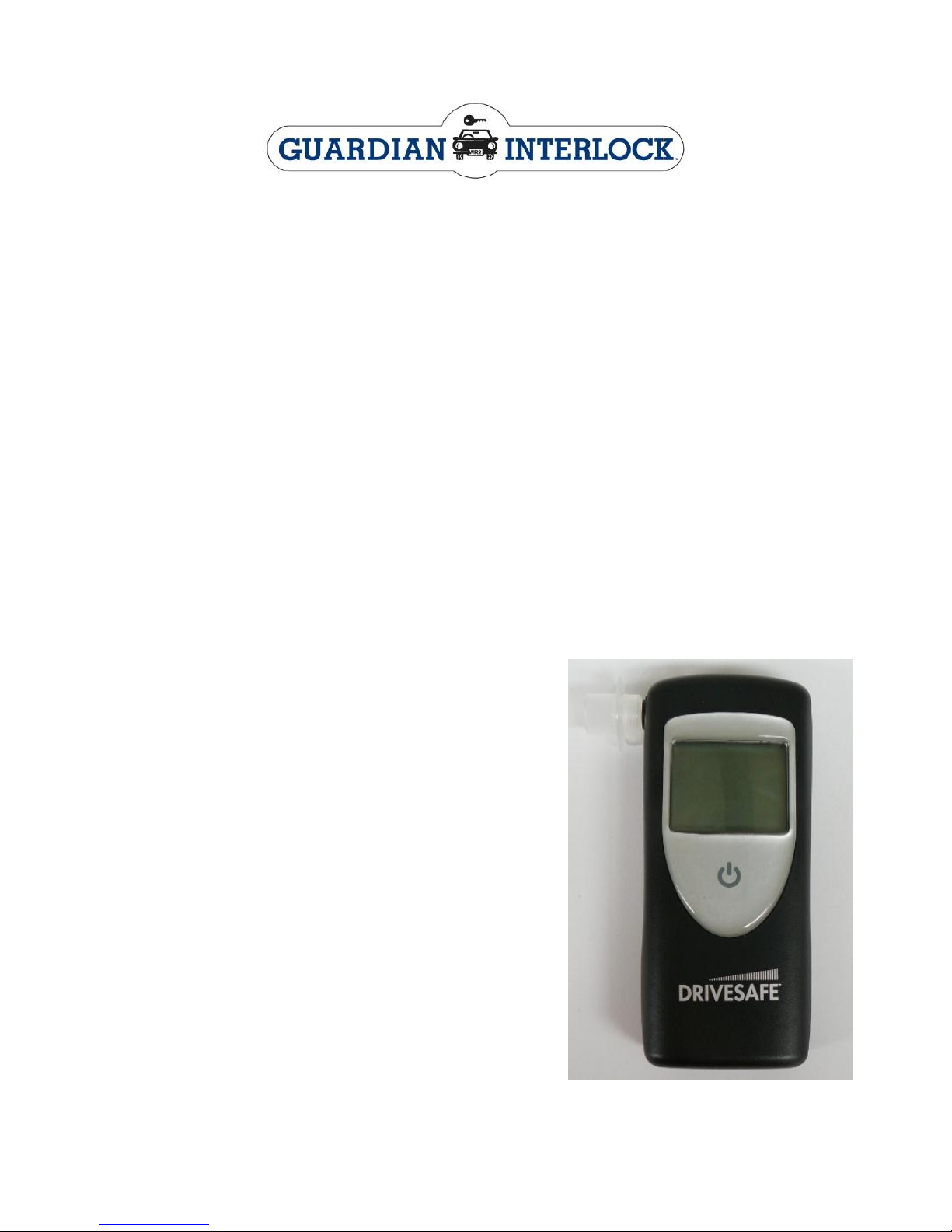
DRIVESAFE NEW CLIENT PROMOTIONAL OFFER
Purchase a DRIVESAFE and send in the voucher on the back of this
page to receive $30 off your next month’s monitor fees.
We appreciate that you have selected Guardian as your Interlock provider
and value you as a new client. Your program could be extended if the
Interlock records BAC readings, to assist you in completing your program
on time we strongly recommend that you consider purchasing a
DRIVESAFE portable breath alcohol tester from your Guardian Service
Centre.
The DRIVESAFE breath alcohol tester is a portable device that is simple to
use and gives an accurate and reliable result. It has a variety of
applications and is ideal for the budget conscious buyer who is seeking
quality and reliability. The DRIVESAFE is certified by Australian Standards
for 180 days calibration and can be serviced by any Guardian Service
Centre.
The DRIVESAFE is one of the only breath
alcohol testers engineered for the
personal market that uses an
electrochemical sensor. These fuel cells,
are known for their stability over longer
periods of time resulting in higher
accuracy levels and reduced calibration
intervals compared to a less sophisticated
semi-conductor sensor.
The DRIVESAFE is small and uses 2 AA
alkaline batteries so that it can be used
anywhere. Mouthpieces are supplied, and
additional mouthpieces are available.
Simply push the button and observe the
automatic circuit testing. The LCD shows
“READY” when the unit is ready. Take a
deep breath and blow into the mouthpiece
at a constant speed and pressure. The
DRIVESAFE will measure your breath
alcohol and provide an accurate reading on the LCD.
Page 49

The Bottom Line – WHY TAKE THE RISK?
DRIVESAFE NEW CLIENT PROMOTIONAL OFFER VOUCHER
Purchase a DRIVESAFE Portable Breath Alcohol Tester and
receive $30 off your next month’s monitor fees
Participant Name ______________________________________
Address _____________________________________________
Contact Number _______________________________________
Licence Number _______________________________________
DRIVESAFE Serial Number ______________________________
Service Centre Confirmation of Sale________________________
(stamp or initial)
ONLY WHILE STOCKS LAST
This offer is only available to participants on the Alcohol Interlock Program
with a Guardian WR3 unit installed. This offer is only available on the
DRIVESAFE product and does not apply for previous purchases. This offer
can be withdrawn at any time. Guardian Interlock will not be responsible for
lost vouchers. The Serial Number must be included.
Voucher must be sent to Guardian Interlock Systems, 8/11 Packard
Avenue, Castle Hill NSW 2154 or faxed on 02 8853 6201 for redemption.
A credit will be applied and appear on your next monitor invoice.
Page 50

 Loading...