

Page 1

Mobile1 User Guide
General
All efforts have been made to ensure the accuracy of material provided in this document at the
time of release. However, the items described in this document are subject to change without
notice and do not represent a guarantee on the part of GTX Corp. GTX Corp will not be
responsible for any losses or damages incurred related to the use of information contained in this
document.
The Mobile1 device (“Product”) is not intended for use in life support appliances, devices, or
systems in which a malfunction of the Product can reasonably be expected to result in personal
injury. GTX Corp customers who use and / or sell this Product for use in such life support
applications do so at their own risk, and agree to fully indemnify GTX Corp for any damages
resulting from the Product’s illegal use or resale.
Copyright
It is the user’s responsibility to comply with all applicable copyright laws. Complying with all
applicable copyright laws is the responsibility of the user. Without limiting the rights under
copyright, no part of this document may be reproduced, stored in or introduced into a retrieval
system, or transmitted in any form or by any means (electronic, mechanical, photocopying,
recording or otherwise), or for any purpose, without the express written permission of GTX
Corp.
GTX Corp may have patents, patent applications, trademarks, copyrights or other intellectual
property rights covering subject matter in this document. Except as expressly provided in any
written license agreement with GTX Corp, the furnishing of this document does not give you any
license to these patents, trademarks, copyrights or other intellectual property.
©2008, GTX Corp. All rights reserved.
GTX Corp and the GTX Corp logo are registered trademarks of GTX Corp in the United States.
GTX Corp shall not be liable for the consequential or incidental damages, injury to any person or
property, anticipated or lost profits, loss of time, or other losses incurred by the customer or any
third party in connection with the use of GTX Corp’s products or the customer’s failure to
comply with the information and instructions contained herein.
1
Page 2

How does the Mobile1 work?
The Mobile1 device is a quad-band GPRS wireless data transceiver. The Mobile1 uses signals
from the U.S. Government’s Global Positioning Satellite (GPS) constellation to determine the
geographic location of the device on the Earth. Then, the Mobile1 transmits the device location
information over a wireless GPRS network to the GTX Corp Tracking Portal. GTX Corp
provides user location information to GTX Corp subscribers, who may access a user’s location
by logging into the GTX Corp Tracking Portal and viewing the user’s location in real time on a
map.
Definitions
User – The person assigned to wear the Mobile1 tracking device.
Subscriber – The person who manages the user’s device and/or views the device location via the
GTX Corp tracking portal.
Mobile1 – A tracking device worn on the user’s belt.
GPS (Global Positioning System) – A "constellation" of 24 well-spaced satellites that orbit the
Earth and make it possible for people with ground receivers to pinpoint those person’s
geographic location.
GPRS – A wireless protocol used to transmit packet data.
Tracking Portal – A web-enabled mapping service that is accessible through an Internet capable
computer, PDA or cellular phone.
Using the Mobile1 device
The Mobile1 was designed purposely to be simple for the event or training day user. There are
no buttons or settings on the device. The user’s start up procedure is the following:
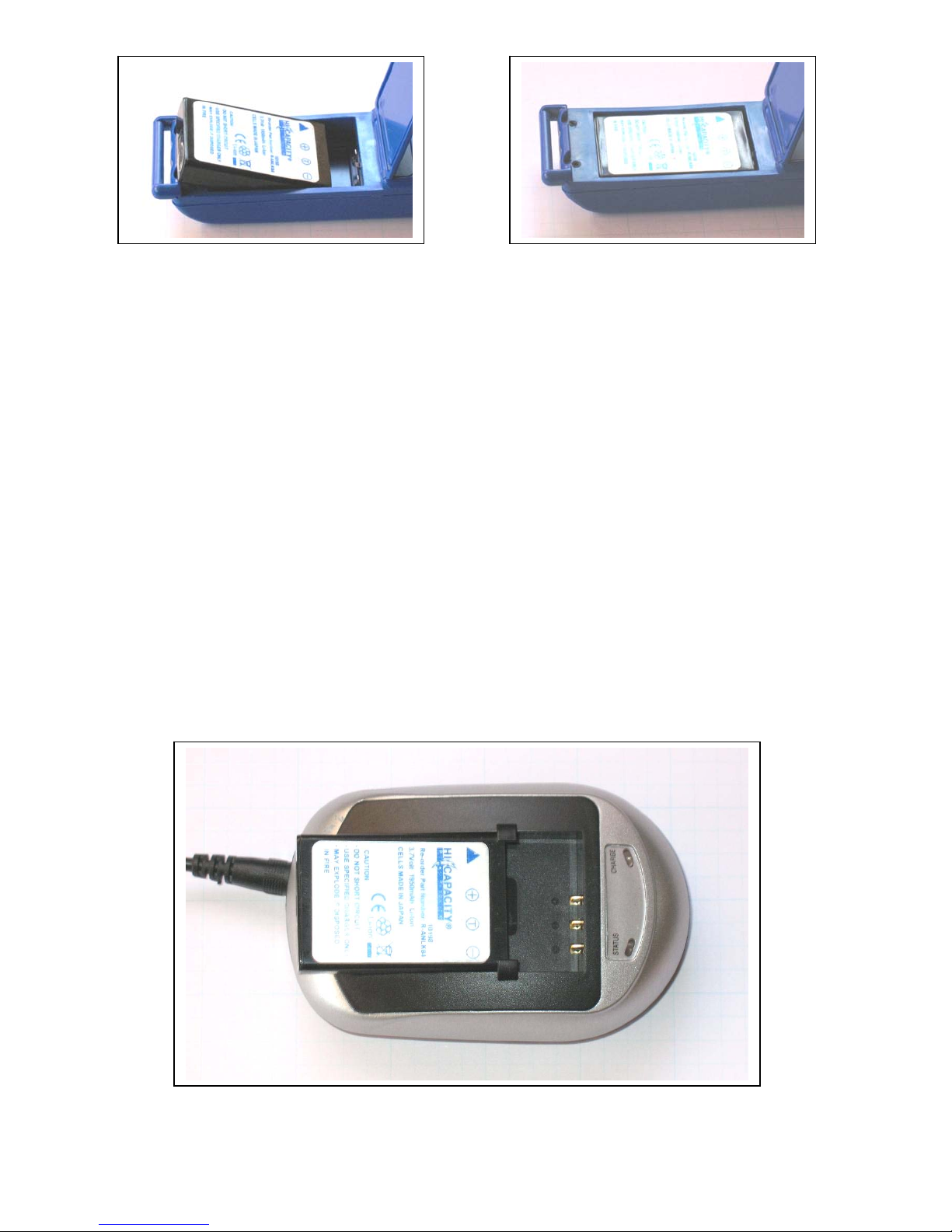
1. Install the Battery.
a. Remove the screws in the battery door with a Phillips style screwdriver.
b. Open the battery door.
c. EXAMINE THE BATTERY TO LOCATE THE THREE CONTACTS, PLACED
ON ONE END. MATCH THE THREE CONTACTS WITH THE BATTERY
CONNECTORS INSIDE THE DEVICE. INSERT THE BATTERY WITH THE
SILVER LABEL SIDE FACING OUT AND WITH THE BATTERY
CONNECTORS IN LINE WITH THE BATTERY CONTACTS. IMPROPER
INSERTION OF THE BATTERY MAY RESULT IN PERMANENT DEVICE
FAILURE.
d. Close the battery door and reinstall the screws.
2
Page 3
2. Place the Mobile1 in a free and open space with a clear view of the sky. Situate the
antenna in a location perpendicular to the ground. This may be accomplished by standing the
device upright on a surface, or by wearing the device as intended while standing. The Mobile1
unit must prelock onto available GPS signals prior to use. Limit movement of the Mobile1 for
10-15 minutes to ensure the lock is complete.
3. Remove the battery within an hour of completing an event or training session.
Note: The GPS satellite constellation does not provide a signal sufficient to support indoor use.
The Mobile1 is designed to provide the best GPS performance possible for a belt worn device
and in some cases may work indoors but is not guaranteed to do so. For best results the Mobile1
should be used in areas with a clear view of the sky.
Installing battery Correct placement of battery
Charging the battery
1. Remove the battery from the Mobile1.
2. Match the battery contacts with the charger connectors, then slide the battery contacts first,
with the silver label facing up, into the charging sled.
3
Page 4
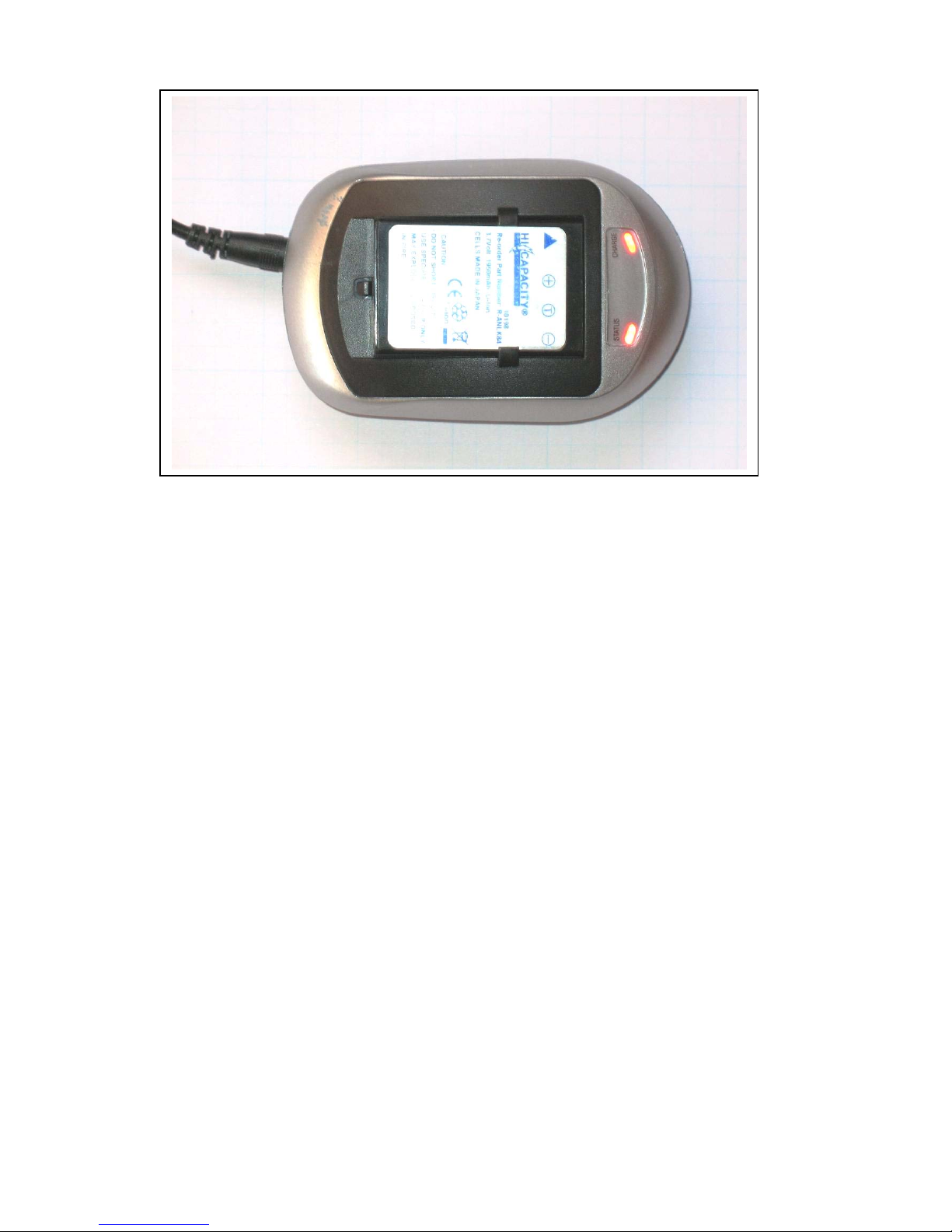
3. With the battery properly installed the lights on the charging sled should be illuminated.
4. The red indicator light will become green once the battery is fully charged. The normal charge
cycle takes 2.5 to 3.5 hours.
BATTERY WARNING
Do not short circuit the battery
Use specified charger only
The battery may explode if disposed of in fire
The supplied battery meets or exceeds the standards set forth in IEEE 1725. Do not attempt to
use any battery other than the unit which was furnished with the Mobile1. Additional batteries
are available at a nominal cost. Please contact GTX Corp for more information.
RF Exposure
WARNING
Please read this information before using your wireless device.
Your Mobile1 is a radio transmitter and receiver. It is designed and manufactured not to exceed
the emissions limits for exposure to radio frequency (RF) energy set by the Federal
Communications Commission (FCC) of the U.S. Government. These limits are part of
comprehensive guidelines and establish permitted levels of RF energy for the general population.
These guidelines are based on the safety standards previously set by the U.S. and international
standards bodies. The standards include a substantial safety margin designed to assure the safety
of all persons, regardless of age and health.
The exposure standard for wireless RF devices, such as the Mobile1, employs a unit of measure
known as the Specific Absorption Rate, or SAR. The SAR limit set by the FCC is 1.6W/kg. SAR
values at or below that limit are considered safe for the general public.
4
Page 5

Before a wireless RF device is made available for sale to the Public, it must be tested and
certified to the FCC that is does not exceed the SAR limits established by the FCC. Tests for
SAR are conducted using the positions and locations (e.g., worn on the body) as required by the
FCC for each device model. The Mobile1 has been tested and meets the FCC RF exposure
guidelines when worn on the body using only the approved belt. Other uses may not ensure
compliance with FCC RF exposure guidelines.
WARNING
The Mobile1 is intended to be worn on the body using the approved belt. Use of any other
unauthorized method to attach the Mobile1 would be unsafe. Do not wear the device on or
near your head. The SAR ratings have not been approved for use in this manner.
FCC Compliance Statement
This device complies with Part 15 of the FCC Rules. Operation is subject to the following two
conditions: (1) This device may not cause harmful interference; and (2) This device must accept
any interference received, including interference that may cause undesired operation.
This equipment has been tested and found to comply with the limits pursuant to Part 15 Subpart
B, Part 22, and Part 24 of the FCC rules. These limits are designed to provide reasonable
protection against harmful interference in an appropriate installation. This equipment generates,
uses, and can cause harmful radiation to radio communication. There is no guarantee that
interference will not occur in a particular use. If the equipment does cause harmful interference
in radio and television reception, the user is encouraged to try to correct the interference by one
or more of the following measures:
A. Increase the separation distance between the equipment and the receiver.
B. Contact GTX Corp Technical Support for assistance at (800) 555-1212.
Changes or modifications without the express consent of the manufacturer may void any
applicable warranty and the user’s authority to operate the equipment.
Product Safety Instructions
Please follow all safety instructions outlined below. Failure to follow these instructions may
result in serious personal injury and/or property damage.
Always obey all applicable regulations in any area where the Mobile1 may be used. Turn your
Mobile1 off by removing the battery in areas where its use is prohibited or where it may cause
interference or danger to anyone.
Use of radio equipment is prohibited in hospitals and may interfere with the use of medical
equipment. Do not use the Mobile1 in Hospitals or near medical equipment. The Health Industry
Manufacturers Association recommends that a minimum separation of six inches (6”) be
5
Page 6

maintained between a handheld wireless device and a pacemaker to avoid potential interference
with the pacemaker.
When boarding a plane, follow all instructions of the flight crew on the use of wireless devices.
FCC regulations prohibit using your wireless device during any air flight. Turn off your Mobile1
during flight and at all other times as requested by the flight crew by removing the battery.
Do not use the Mobile1 in the vicinity of blasting areas where it might interfere with remote
control RF devices used to set off explosives.
Although it is rare, wireless devices can generate sparks. Do not use or store your Mobile1
around flammable or explosive gas, liquids, chemicals or any other such materials.
6
Page 7

7
 Loading...