

Page 1

Installation Manual for the
L
I
S
T
E
D
US
Automatic Gate Operator
WARNING!
This equipment is similar to other gate or door equipment and meets or exceeds
Underwriters Laboratory Standard 325 (UL 325). However, gate equipment has
hazards associated with its use and therefore by installing this product the installer
and user accept full responsibility for following and noting the installation and
safety instructions. Failure to follow installation and safety instructions can result
in hazards developing due to improper assembly. You agree to properly install this
product and that if you fail to do so GTO, Inc. shall in no event be liable for direct,
indirect, incidental, special or consequential damages or loss of profits whether
based in contract tort or any other legal theory during the course of the warranty
or at any time thereafter. The installer and/or user agree to assume responsibility
for all liability and use of this product releasing GTO, Inc. from any and all
liability. If you are not in agreement with this disclaimer or do not feel capable
of properly following all installation and safety instructions you may return this
product for full replacement value.
READ ALL INSTRUCTIONS CAREFULLY AND COMPLETELY before
attempting to install and use this automatic gate opener. This gate opener
produces a high level of force. Stay clear of the unit while it is operating and
exercise caution at all times.
All automatic gate operators are intended for use on vehicular gates only and
should never be used by pedestrians.
This product meets and exceeds the requirements of UL 325, the standard which regulates gate opener safety,
as established and made effective March 1, 2000, by Underwriters Laboratories Inc.
GTO/PRO • 3121 Hartsfield Road • Tallahassee, Florida, USA 32303
Telephone GTO/PRO Sales: 1-800-543-GATE (4283) or (850) 575-0176 • Fax (850) 575-8912
or GTO/PRO Technical Service: 1-800-543-1236 or (850) 575-4144 • Fax (850)575-8950
www.gtopro.com
©
2007 GTO, Inc.
R2500INST
rev - 04/18/07
Page 2

The GTO/PRO SW-2500 Gate Opener is intended for use with vehicular swing gates. The opener can be used in Class
I, Class II, Class III and Class IV applications.
VEHICULAR GATE OPENER CLASS CATEGORIES
Residential Vehicular Gate Opener-Class I: A vehicular gate opener (or system) intended for use in a home of
one-to-four single family dwelling, or a garage or parking area associated therewith.
Commercial/General Access Vehicular Gate Opener-Class II: A vehicular gate opener (or system) intended
for use in a commercial location or building such as a multifamily housing unit (five or more single family units),
hotel, garages, retail store, or other building servicing the general public.
Industrial/Limited Access Vehicular Gate Opener–Class III: A vehicular gate opener (or system) intended for
use in an industrial location or building such as a factory or loading dock area or other locations not intended to
service the general public.
Restricted Access Vehicular Gate Opener–Class IV: A vehicular gate opener (or system) intended for use in
a guarded industrial location or building such as an airport security area or other restricted access locations not
servicing the general public, in which unauthorized access is prevented via supervision by security personnel.
Conversion Chart
Converting Metric Units to English Equivalents
When You Know Multiply By To Find Symbol
centimeters 0.3937 inches in. (or ")
meters 3.2808 feet ft. (or ')
kilograms 2.2046 pounds lb. (or #)
Converting English Units to Metric Equivalents
When You Know Multiply By To Find Symbol
inches 2.5400 centimeters cm
feet 0.3048 meters m
pounds 0.4535 kilograms kg
Converting Temperature
deg. Celsius (ºC x 1.8) + 32 deg. Fahrenheit ºF
deg. Fahrenheit (ºF-32) ÷ 1.8 deg. Celsius ºC
FOR YOUR RECORDS
Please record the product serial number (located on the right hand side of the control box),
and the date and place of purchase in the spaces provided below. Refer to this information
when calling GTO/PRO for service or assistance with your automatic gate opener.
Serial Number ____________________ Date of Purchase ____________________
Place of Purchase ____________________
Remember to keep all receipts for proof of purchase.
Page 3

Table of Contents
Gate Opener Class Categories ------------------------------------------------------------- inside cover
Units and Standards Conversion Chart ---------------------------------------------------inside cover
PLEASE READ THIS FIRST! --------------------------------------------------page iii
Important Safety Instructions --------------------------------------------------page 1
KEEP THESE INSTRUCTIONS FOR FUTURE REFERENCE
Disconnecting the Opener -------------------------------------------------------------page 1
Important Safety Instructions for the Consumer ----------------------------------- Secondary Means of Protection Against Entrapment ------------------------------ page 5
Required Safety Precautions for Gates -----------------------------------------------page 6
Warning Signs and Labels -------------------------------------------------------------page 7
page 2
Installation --------------------------------------------------------------------------page 8
Parts List ---------------------------------------------------------------------------------page 8
Technical Specifications -------------------------------------------------------------page 10
Installation Overview ------------------------------------------------------------------ page 11
Installation of the Mounting Hardware ----------------------------------------------page 12
Mounting the Opener ------------------------------------------------------------------- page 16
Installation of the Closed Position Stop ---------------------------------------------page 16
Mounting the Control Box -------------------------------------------------------------page 17
Connecting the Power Cable --------------------------------------------------------- page 18
Powering the System --------------------------------------------------------------page 19
Solar Chart -------------------------------------------------------------------------------page 19
Connecting the Transformer -----------------------------------------------------------page 21
Control Board Settings ----------------------------------------------------------page 22
DIP Switches --------------------------------------------------------------------------- Setting the Closed Position ----------------------------------------------------------- Stall Force -------------------------------------------------------------------------------
page 22
page 23
page 24
Setting Your Personal Transmitter Code -------------------------------------page 25
Installing the Receiver -----------------------------------------------------------page 26
Connecting Additional Safety Devices ----------------------------------------page 27
Connecting Accessories ----------------------------------------------------------page 29
Push to Open Installation --------------------------------------------------------page 31
Maintenance & Troubleshooting Guide --------------------------------------page 34
Repair Service ---------------------------------------------------------------------page 37
Column Installation Information ----------------------------------------------page 37
Accessory Catalog ----------------------------------------------------------------page 38
Page 4

PLEASE READ THIS FIRST!
Thank you for purchasing a GTO/PRO-SW2500 When correctly installed and properly used, your GTO/PROSW2500 Operator will give you many years of reliable service. Please read the following information to ensure you
have the correct system for your particular needs. This manual will enable you to properly install your GTO/PROSW2500 Automatic Gate Operator.
The GTO/PRO-SW2500 Operator is designed for installation on a pull-to-open single leaf gate (gates that open
into the property). By purchasing an accessory bracket, the GTO/PRO-SW2500 Operator can accommodate a push-
to-open single leaf gate (gates that open out from the property). The gate must not exceed 16 feet in length (per leaf)
nor weigh more than 500 pounds (per leaf) (please see Technical Specifications on page 10). The GTO/PRO-SW2500
Operator can be used on vinyl, aluminum, chain link, farm tube, and wrought iron gates. Use on solid (wood) gates
is not recommended. Solid surface gates have a high resistance to the wind. If the wind is strong enough, the operator
will obstruct and stop.
The GTO/PRO-SW2500 Operator accommodates extra transmitters, digital keypads, solar panels, push buttons,
automatic gate locks, and other access control products. These optional accessories (see the enclosed GTO/PRO®
Accessory Catalog) are available.
The GTO/PRO-SW2500 Operator features adjustable obstruction sensing. This safety feature makes the gate
stop and reverse direction within 2 seconds when it comes in contact with an obstruction. MIN is the factory setting;
meaning the gate will exert the minimum force on an obstruction before it stops and reverses direction.
The GTO/PRO-SW2500 Operator also has an adjustable auto-close feature. After the gate reaches the fully open
position, it can be set to remain open up to 120 seconds before automatically closing. Pressing the transmitter button
at any time after the gate opens fully will cause it to close immediately. OFF is the factory setting; meaning the gate
will stay open until you press the transmitter (or keypad, etc.) again.
Please call GTO/PRO at (800) 543-GATE [4283] or (850) 575-0176 for more information about our GTO/PRO®
professional line of gate operators and accessories. Our Sales Department will be glad to give you the name and phone
number of a GTO/PRO® dealer near you.
PLEASE NOTE—If your application requires any of the following:
Swing gates longer than 16 feet or weighing more than 500 pounds;
Slide gates;
Heavy duty or commercial uses;
Professional installation;
please call GTO at (800) 543-GATE [4283] or (850) 575-0176 for information about our GTO/PRO professional
line of gate openers and accessories. Our Sales Department will be glad to give you the name and phone number of a
GTO/PRO dealer near you.
BEFORE YOU BEGIN TO INSTALL YOUR AUTOMATIC GATE OPENER:
watch the enclosed videotape and read these instructions carefully and completely
to become familiar with all parts and installation steps. The video tape is only designed as
a overview of the installation procedure. You must read the installation manual for detailed
instructions on gate opener safety and proper use of the gate opener.
iii
Page 5
IMPORTANT SAFETY INSTRUCTIONS
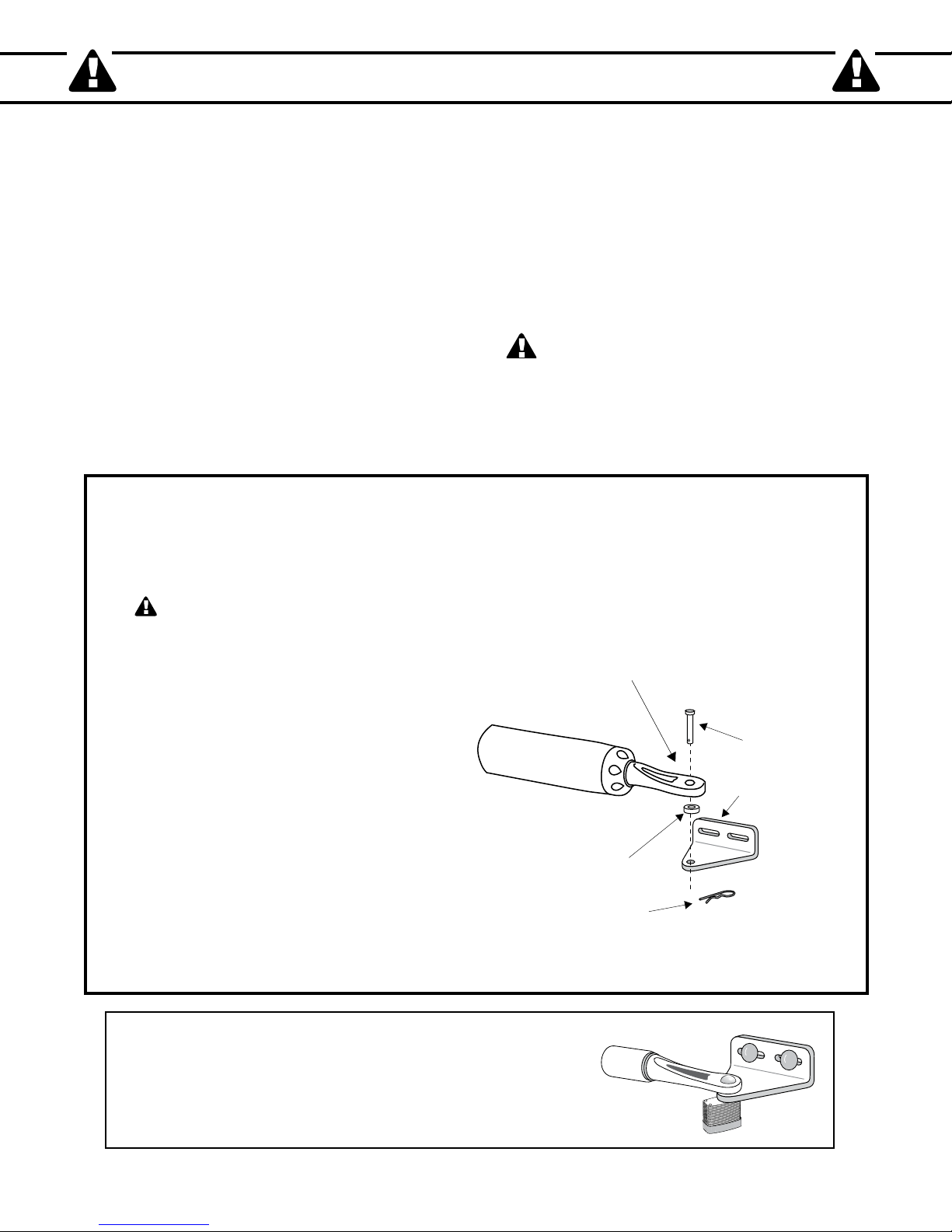
Clevis Pin
Hairpin Clip
Gate Bracket
Front or Rear Mount
Bushing
Because automatic gate openers produce high levels of force, consumers need to know the potential hazards associated with
improperly designed, installed, and maintained automated gate opener systems. Keep in mind that the gate opener is just
one component of the total gate operating system. Each component must work in unison to provide the consumer with
convenience, security, and safety.
This manual contains various safety precautions and warnings for the consumer. Because there are many possible
applications of the gate opener, the safety precautions and warnings contained in this manual cannot be completely exhaustive
in nature. They do, however, provide an overview of the safe design, installation, and use of this product. CAREFULLY
READ AND FOLLOW ALL SAFETY PRECAUTIONS, WARNINGS, AND INSTALLATION INSTRUCTIONS TO
ENSURE THE SAFE SYSTEM DESIGN, INSTALLATION, AND USE OF THIS PRODUCT.
Precautions and warnings in this manual are identified with this warning symbol. The symbol identifies conditions
that can result in damage to the opener or its components, serious injury, or death.
Because GTO/PRO automatic gate openers are only part of the total gate operating system, it is the responsibility of
the consumer to ensure that the total system is safe for its intended use.
To Manually Open and Close the
Gate, Follow the Procedure Below:
CAUTION: The gate will move freely and uncontrolled when the gate operator is
removed from the gate. ONLY disconnect the operator when the operator power
switch is OFF and the gate is NOT moving.
Disconnecting the operator
1. Turn operator power switch OFF.
2. Remove hairpin clip, clevis pin, and bushing
from the front mounting point.
3. Remove the operator from the mount.
The gate can be opened and closed manually
when the operator is disconnected.
IMPORTANT:
the front mount - it will break from the arm weight.
CAUTION: Because the GTO/PRO gate operator is
battery powered, disconnect the operator ONLY when the
power switch on the operator is turned OFF. Unplugging
the transformer does not turn power to the operator OFF.
NEVER allow operator arm to hang by
NOTE: Substitute a Pin Lock for the clevis pin on the front
mount of the gate opener to prevent unauthorized removal of the
opener from the gate (see Accessory Catalog).
1
Page 6

IMPORTANT SAFETY INSTRUCTIONS
Gate in the
Open Position
ZONE 2
ZONE 3
ZONE 4
ZONE 5
Driveway
ZONE 1
For The Consumer
WARNING: To reduce the risk of injury or death:
1. READ AND FOLLOW ALL INSTRUCTIONS. Failure to meet the requirements set forth in the instruction
manual could cause severe injury and/or death, for which the manufacturer cannot be held responsible.
2. When designing a system that will be entered from a highway or main thoroughfare, make sure the system is placed
far enough from the road to prevent traffic congestion.
3. The gate must be installed in a location that provides adequate clearance between it and adjacent structures when
opening and closing to reduce the risk of entrapment. Swinging gates must not open into public access areas.
4. The gate and gate opener installation must comply with any applicable local codes.
I. Before Installation
1. Verify this opener is proper for the type and size of gate, its frequency of use and the proper class rating.
2. Make sure the gate has been properly installed and swings freely in both directions. Repair or replace all worn or
damaged gate hardware prior to installation. A freely moving gate will require less force to operate and will enhance
the performance of the opener and safety devices used with the system.
3. Review the operation of the system to become familiar with its safety features. Understand how to disconnect the
opener for manual gate operation (see page 1).
4. This gate opener is intended for vehicular gates ONLY. A separate entrance or gate must be installed for pedestrian
use (see page 6).
5. Always keep people and objects away from the gate and its area of travel. NO ONE SHOULD CROSS THE
PATH OF A MOVING GATE.
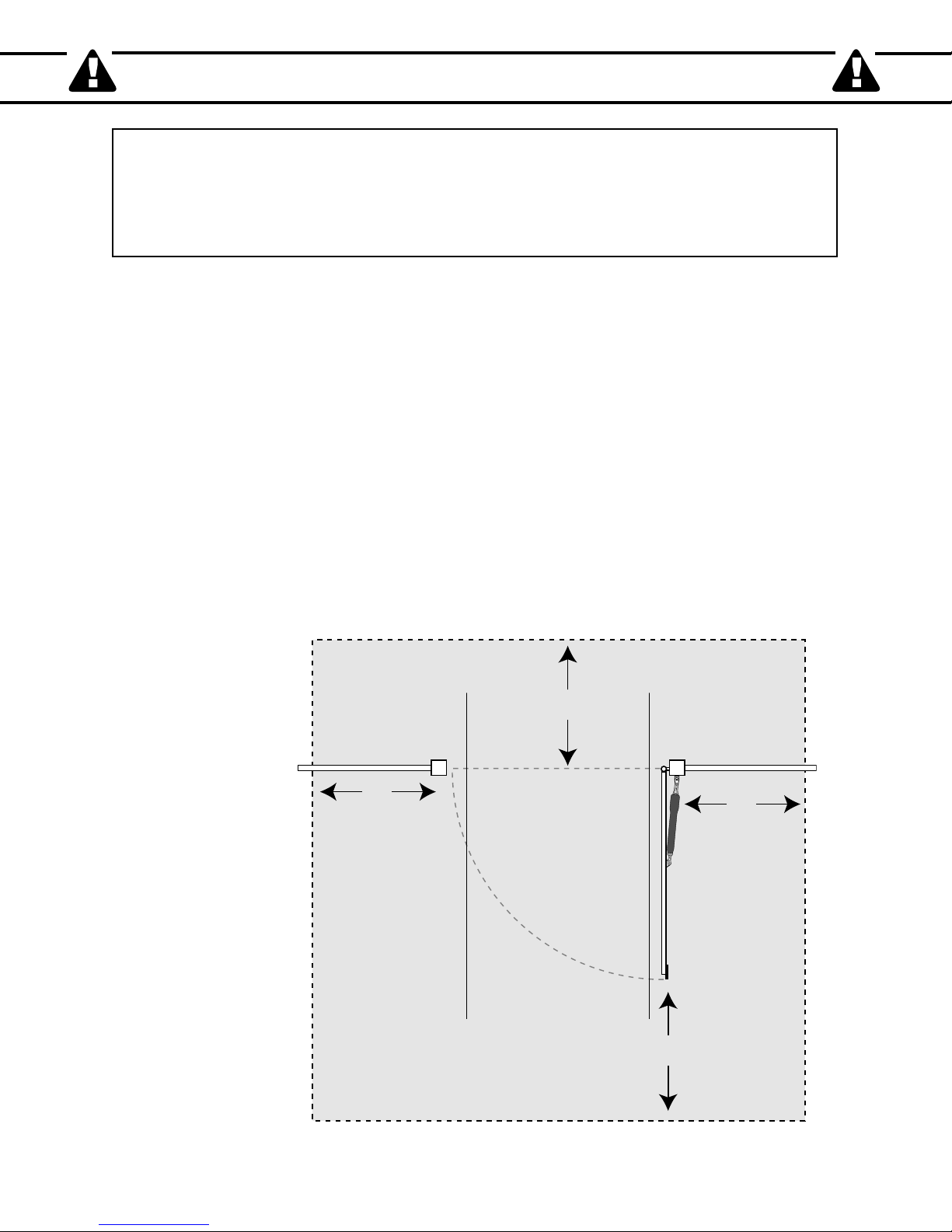
6. Pay close attention to the diagram below and be aware of these areas at all times.
Entrapment
Zones for a
Pull-To-Open
Application
2
Page 7
IMPORTANT SAFETY INSTRUCTIONS
Moving Gate
Area
Driveway
10'
10'
10'
10'
NEVER INSTALL
any control device
within gray area
Entrapment Zones for a proper Pull-To-Open installation:
Zone 1 – leading edge of the gate and the fence post.
Zone 2 – between the gate and the gate post.
Zone 3 – the path of the gate.
Zone 4 – the space between the gate in the open position and any object such as a wall, fence, tree, etc.
Zone 5 – pinch points between the opener and gate.
II. During Installation
1. Install the gate opener on the inside of the property and fence line. DO NOT install an opener on the outside of the
gate where the public has access to it.
2. Be careful with moving parts and avoid close proximity to areas where fingers or hands could be pinched.
3. Devices such as contact sensors (safety edges) and non contact sensors (photo beams) provide additional protection
against entrapment.
4. If push buttons or key switches are installed, they should be within sight of the gate, yet located at least 10 feet from
any moving part of the gate (see diagram below). Never install any control device where a user will be tempted to
reach through the gate to activate the gate opener.
5. Do not activate your gate opener unless you can see it and can determine that its area of travel is clear of people,
pets, or other obstructions. Watch the gate through its entire movement.
6. Secure outdoor or easily accessed gate opener controls in order to prohibit unauthorized use of the gate.
Pull-To-Open
Application
3
Page 8
IMPORTANT SAFETY INSTRUCTIONS
III. After Installation
1. Attach the warning signs (included) to each side of the gate to alert the public of automatic gate operation. It is
your responsibility to post warning signs on both sides of your gate. If any of these signs or warning decals become
damaged, illegible or missing, replace them immediately. Contact GTO/PRO for free replacements.
2. The gate is automatic and could move at any time, posing a serious risk of entrapment. No one should be in contact
with the gate when it is moving or stationary.
3. Do not attempt to drive into the gate area while the gate is moving; wait until the gate comes to a complete stop.
4. Do not attempt to "beat the gate" while the gate is closing. This is extremely dangerous.
5. Do not allow children or pets near your gate. Never let children operate or play with gate controls. Keep the
remote controls away from children and unauthorized users; store controls where children and unauthorized users do
not have access to them.
6. KEEP GATES PROPERLY MAINTAINED. Always turn power to opener OFF before performing any
maintenance. Clean the push-pull tube with a soft, dry cloth and apply silicone spray to it at least once per month.
7. Service the gate and gate opener regularly. Grease hinges, spray push/pull tube with high quality silicone spray and
replace the battery every 3-5 years.
8. To operate this equipment safely, YOU must know how to disconnect the opener for manual gate operation
(see page 1). If you have read the instructions and still do not understand how to disconnect the opener, contact the
GTO/PRO Service Department.
9. Disconnect the opener ONLY when the power is TURNED OFF and the gate is NOT moving.
10. Make arrangements with local fire and law enforcement for emergency access.
11. Distribute and discuss copies of the IMPORTANT SAFETY INSTRUCTIONS section of this manual with all
persons authorized to use your gate.
12. IMPORTANT: Save these safety instructions. Make sure everyone who is
using or in the vicinity of the gate and gate opener are aware of the dangers
associated with automated gates. In the event you sell the property with the
gate opener or sell the gate opener, provide a copy of these safety instructions
to the new owner.
Should you lose or misplace this manual, a copy can be obtained by
downloading one from the GTO/PRO web site (www.gtopro.com), by
contacting GTO/PRO, at 3121 Hartsfield Road, Tallahassee, Florida 32303
or by calling 1-800-543-4283 and requesting a duplicate copy. One will be
4
Page 9

IMPORTANT SAFETY INSTRUCTIONS
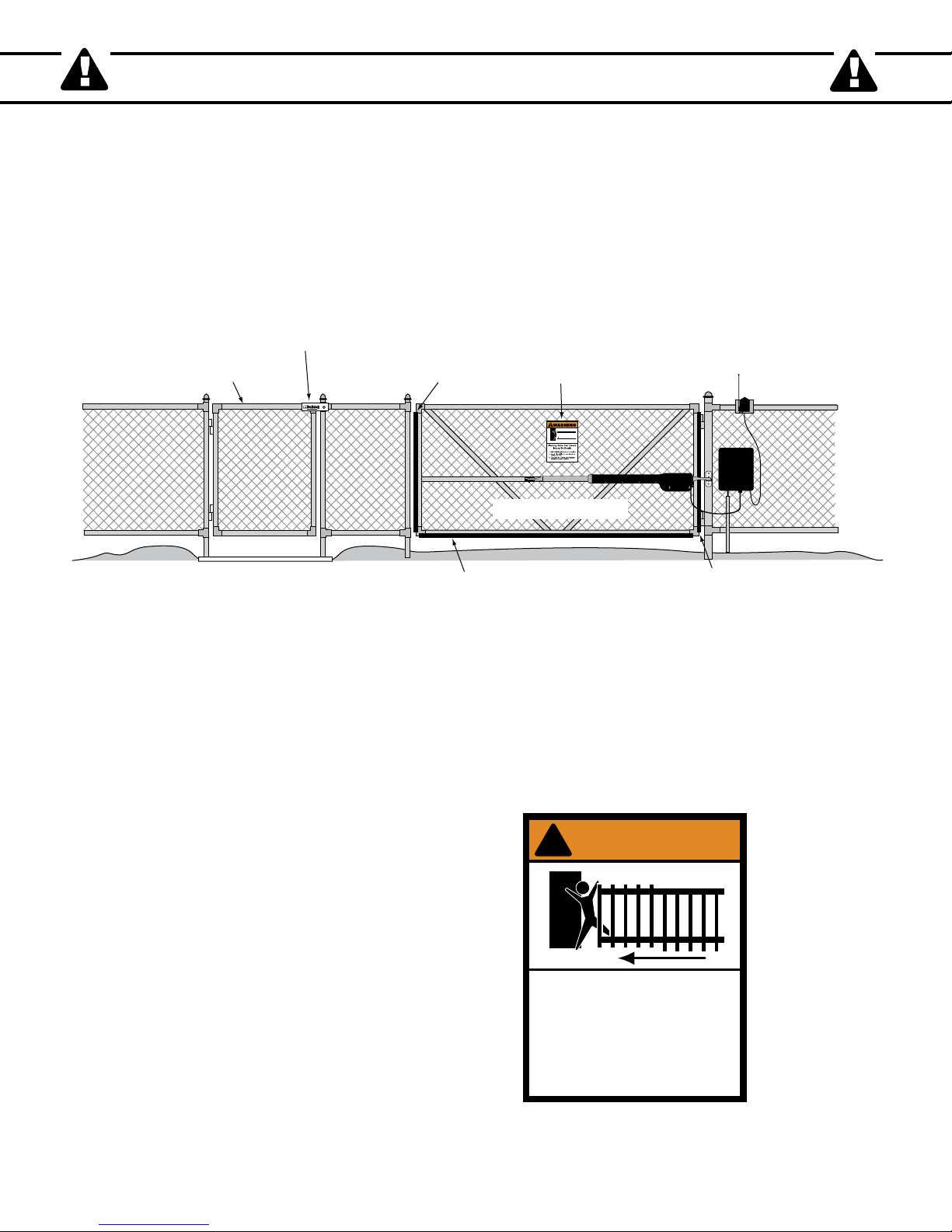
Vehicular Gate
Leading Edge Contact Sensor
on both sides of the gate
Bottom Edge Contact Sensor
on both sides of the gate
Post Edge Contact Sensor
on both sides of the gate
Secondary Means of Protection Against
Entrapment
As specified by Gate Opener Safety Standard, UL 325 (30A.1.1), automatic gate openers shall have an inherent entrapment
sensing system, and shall have provisions for, or be supplied with, at least one independent secondary means to protect
against entrapment. GTO/PRO gate operators utilize Type A, an inherent (i.e., built-in) entrapment sensing system as the
primary type of entrapment protection. Also, the GTO/PRO gate operator has provisions for the connection of Type B2
protection to be used as the secondary type of entrapment protection, if desired.
1. For gate openers utilizing a contact sensor (e.g., safety edge sensor– Type B2) in accordance with UL 325 (51.8.4 [i]):
A. One or more contact sensors shall be located at the leading edge, bottom edge, and post edge, both inside and
outside of a vehicular swing gate system.
B. A hard wired contact sensor shall be located and its wiring arranged so that the communication between the
sensor and the gate opener is not subjected to mechanical damage.
C. A wireless contact sensor such as one that transmits radio frequency (RF) signals to the gate opener for
entrapment protection functions shall be located where the transmission of the signals are not obstructed or
impeded by building structures, natural landscaping or similar obstruction. A wireless contact sensor shall
function under the intended end-use conditions.
ENTRAPMENT ALARM (UL 325; 30A.1.1A)
The GTO/PRO Gate Opener is designed to stop and reverse within 2 seconds when the gate comes in contact with
an obstruction. Additionally, these openers are equipped with an audio entrapment alarm which will activate if the
unit obstructs twice while opening or closing. This alarm will sound for a period of 5 minutes, or until the opener
receives an intended signal from a hardwired entry/exit source (e.g. push button control or keypad) and the gate
returns to a fully open or fully closed position. Turning the power switch on the control box OFF and back ON will
also deactivate the alarm. Wireless controls such as transmitters and wireless keypads will not deactivate the alarm.
5
Page 10
IMPORTANT SAFETY INSTRUCTIONS
1. KEEP CLEAR! Gate may move at any time.
2. Do not allow children to operate gate or
play in gate area.
3. This gate is for vehicles only. Pedestrians
must use a separate entrance.
Moving Gate Can Cause
Injury Or Death
WARNING
!
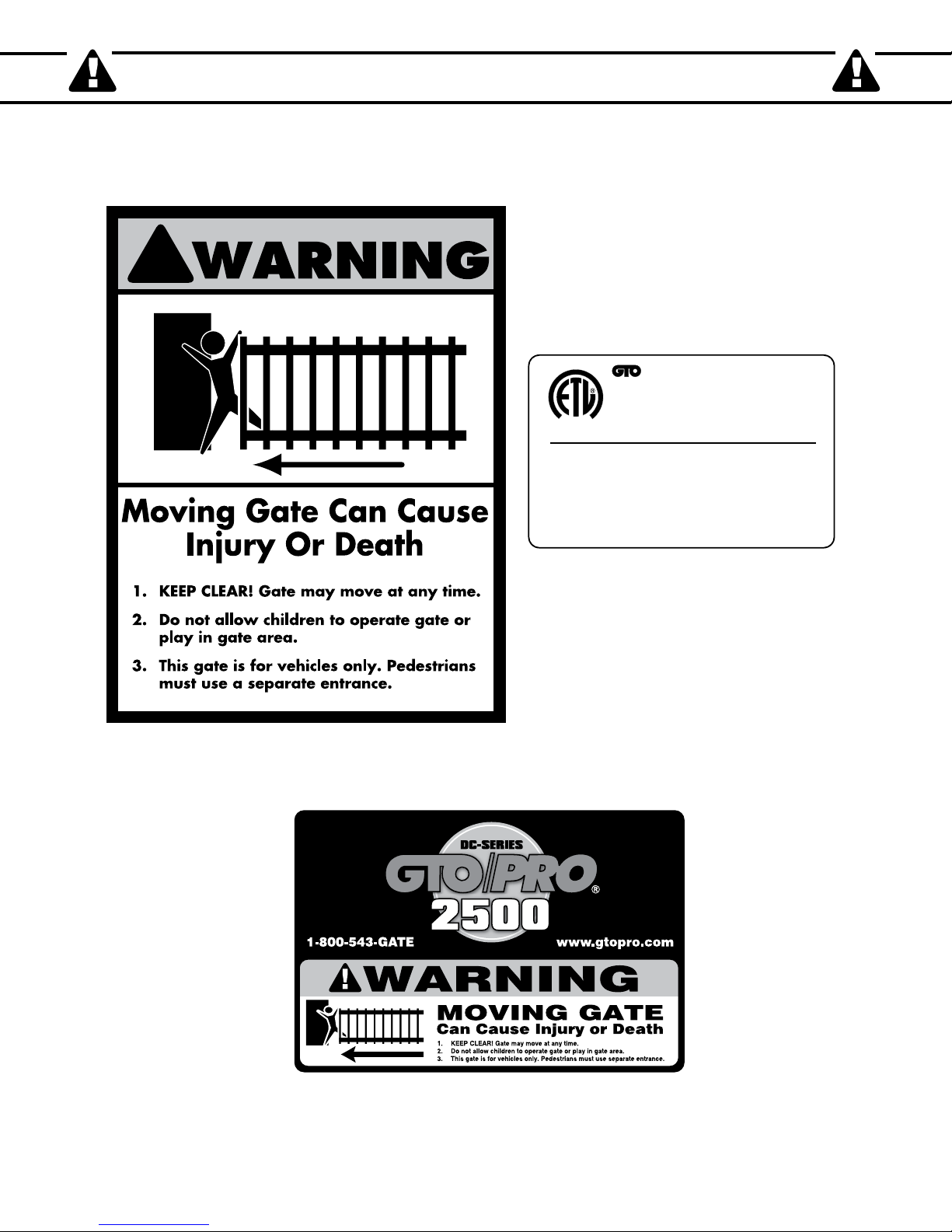
Warning Sign
Pedestrian Gate
Bulldog Pedestrian
Gate Lock
Vehicular Gate
Contact Sensor
(recommended, not included)
Contact Sensor
(recommended, not included)
Contact Sensor
(recommended, not included)
(recommended, not included
)
Required Safety Precautions for Gates
Install Warning Signs
Warning signs alert people of automatic gate operation and are required when installing the GTO/PRO gate operator.
Furthermore, a walk-through gate must be installed if pedestrian traffic is expected near the vehicular gate. We recommend
using the GTO/PRO Bulldog Pedestrian Gate Lock (Call the GTO/PRO Sales Department) for controlled access.
Entrapment Protection
GTO/PRO’s inherent obstruction settings, even when properly adjusted, may not be sensitive enough to prevent bodily injury
in some circumstances. For this reason, safety devices such as safety edge sensors (or photoelectric sensors), which stop and
reverse gate direction upon sensing an obstruction, are suggested for enhanced protection against entrapment.
Warning Signs
The warning signs (at right) must
be installed on both sides of the
gate (see page 7 for details).
6
Page 11
!
Maximum Gate: 500 lb. (226.7 kg); 16 ft. (4.8 m)
Voltage: 12 Vdc; Frequency: 0 Hz; Power: 25 W
Class I, II, III and IV Vehicular Swing Gate Operator.
Serial Number: XXXXXXXXXX
#xxxxxxx
Conforms to UL 325 STANDARDS
TO MANUALLY OPEN AND CLOSE THE GATE:
1. Turn control box power switch OFF.
2. Disconnect front or rear mount from gate bracket.
3. Pull opener away from front or rear mount.
DC 2500 Series
GTO, Inc. Tallahassee, Florida USA
Disconnect operator ONLY when the control box power
switch is OFF and the gate is NOT moving.
L
I
S
T
E
D
US
C
Warning signs (2 enclosed) to be installed on each side
of the gate (3–5 feet above the bottom of the gate)
Product identification and manual operation instruction
label (1) installed on the right hand side of the control box.
Logo and warning labels (2) installed on each side of operator housing.
IMPORTANT SAFETY INSTRUCTIONS
These warning labels should be found at the
locations specified below. If any of them are
missing, immediately contact GTO/PRO for
replacements.
7
Page 12
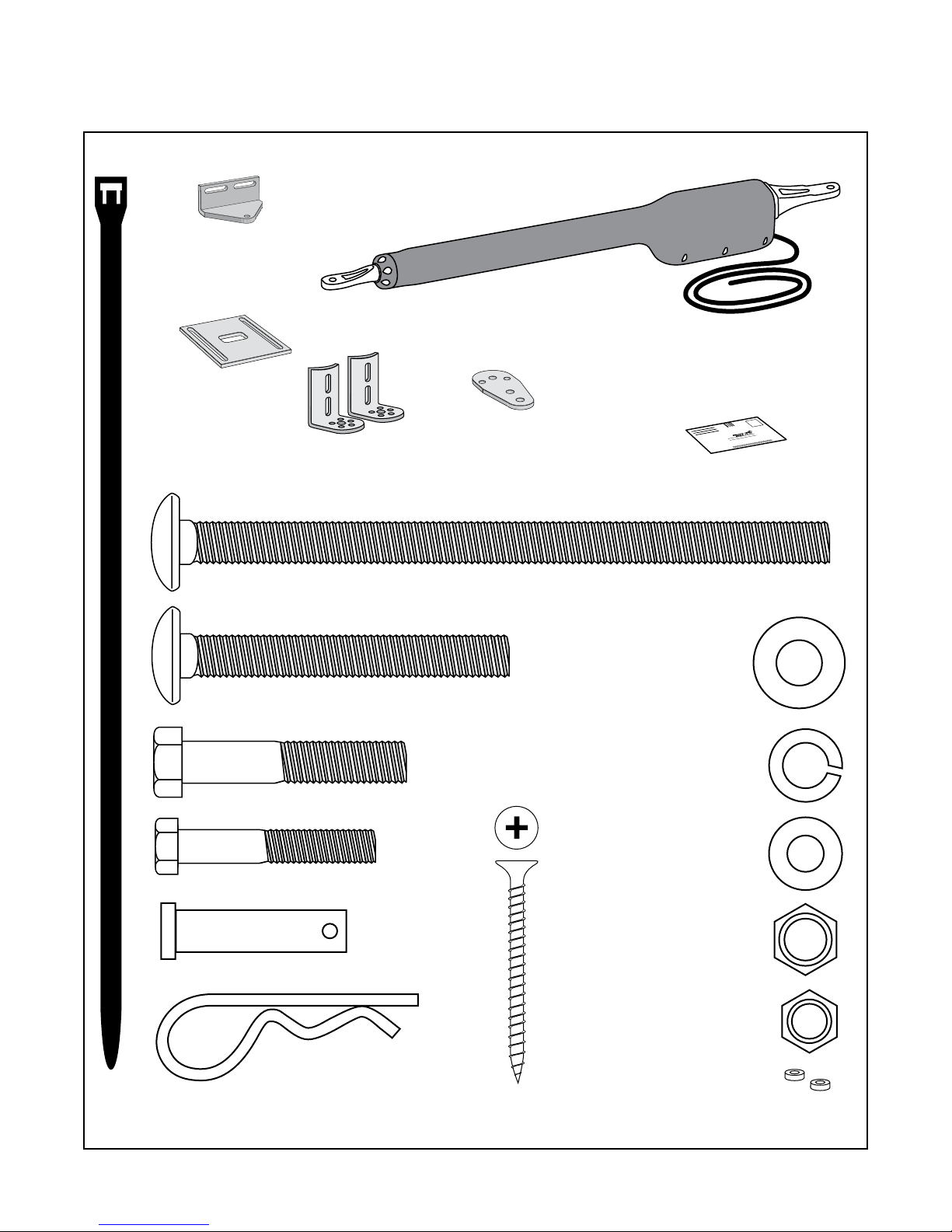
Single Gate Opener Parts List
Hairpin Clip (2)
3/8" x 1-1/2" Clevis Pin (2)
5/16" x 1-3/4" Bolt (1)
3/8" x 2" Bolt (1)
3/8" x 3" Bolt (2)
3/8" x 8" Bolt (4)
8" Nylon Cable Tie (14)
3/8" Washer (9)
3/8" Lock Washer (7)
5/16" Washer (1)
3/8" Nut (7)
5/16" Nut (1)
Hardware
Gate Opener Arm (1)
w/ 6' Power Cable
Gate Bracket (1)
Post Pivot Bracket (1)
3/8" Bushings (2)
Customer Support Card (1)
Post Bracket (2)
Closed Position
Stop Plate (1)
2" Mounting Screw (5)
®
E
-
Z
G
A
T
E
O
P
E
N
E
R
Opener and Mounting Hardware
8
Page 13
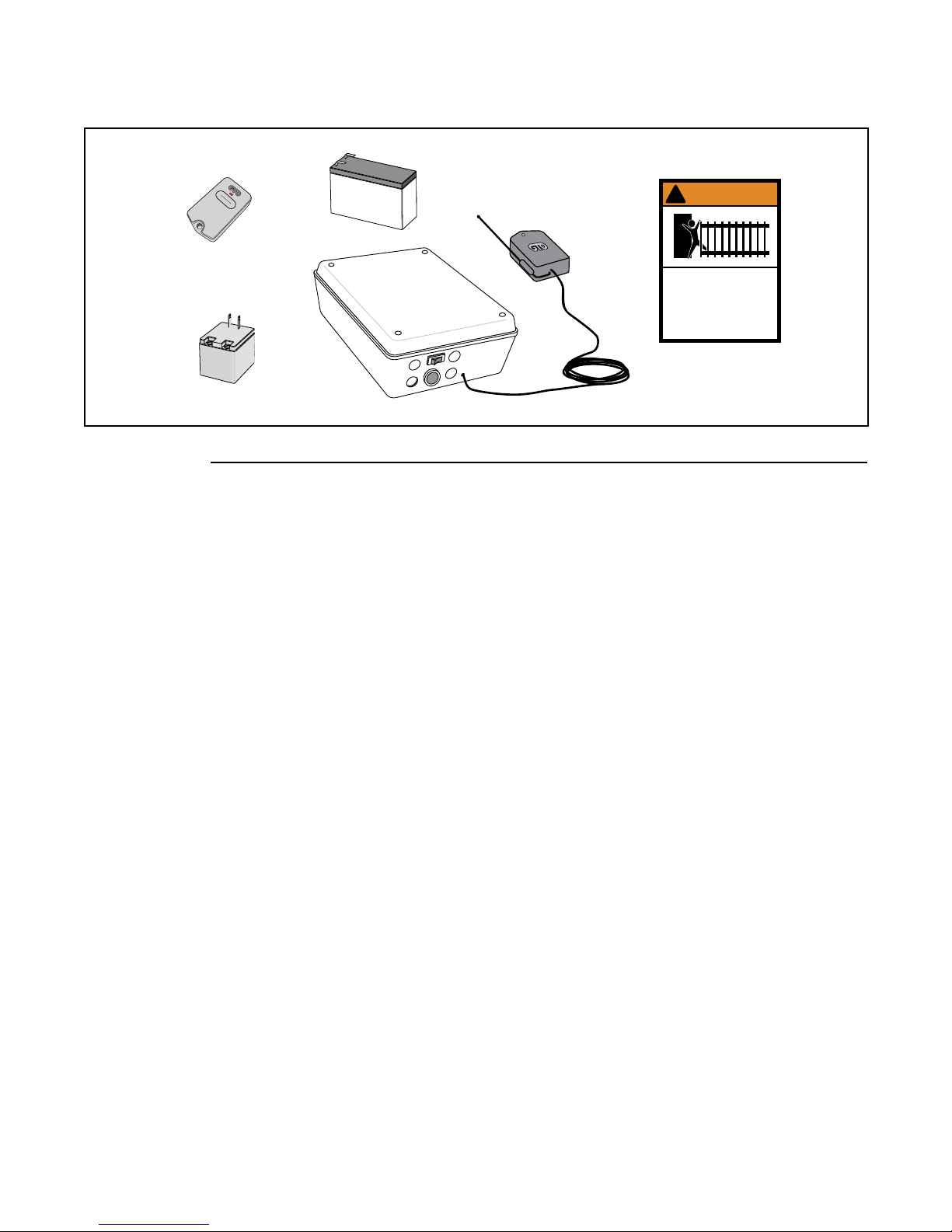
Single Gate Opener Parts List (continued)
Transformer (1)
Battery (1)
Control Box (1)
Warning Signs (2)
GTO Transmitter(1)
1. KEEP CLEAR! Gate may move at any time.
2. Do not allow children to operate gate or
play in gate area.
3. This gate is for vehicles only. Pedestrians
must use a separate entrance.
Moving Gate Can Cause
Injury Or Death
WARNING
!
Receiver (1)
Control Box and Electrical Components
Tools Needed
• Power Drill
• Open End Wrenches — 3/8", 7/16", 1/2", and 9/16"
• 3/8" Drill Bit
• Hacksaw or Heavy Duty Bolt Cutters
• Small (Flat Bladed) Screwdriver
• Phillips Screwdriver
• Tape Measure
• Level
• Wire Strippers
• C-Clamps — small, medium, and large
• Center Punch
• Extra person will be helpful
YOU MAY ALSO NEED THESE ITEMS BEFORE YOU BEGIN THE INSTALLATION
(Some of these items can be found in the Accessory Catalog page 38):
• Low voltage wire will be needed to run from the transformer to the control box; length depends upon the distance between
the transformer power supply and the control box. See Powering the System on page 19, and the Accessory Catalog.
• PVC conduit.
• If your gate is more than 1000' away from an ac power source you will need to use at least one GTO/PRO 5 watt Solar
Panel to trickle charge the battery. See the Accessory Catalog.
• If your fence post is made of wood and is less than 6" in diameter or 6" square, see page 12.
• If your fence post is larger than 6" in diameter you will need threaded rods or carriage bolts longer than 8".
See page 15.
• If you have thin walled tube or panel gates, see Recommended Reinforcement Examples on page 12.
• Depending on the type of gate, a horizontal cross member or mounting plate may be needed to mount the front of the
opener and gate bracket to the gate. See page 11, step 2; page 15, step 10.
• Surge protection for transformer.
• Some types of installations require U-Bolts.
• If the gate is a push-to-open refer to page 31.
• Additional washer or a metal plate may be needeed for wooden post.
• For Push-to-open applications, you'll need the push-to-open bracket 347IH.
9
Page 14

Technical Specifications
Gate Weight
Gate Length
Number of Cycles Per Day
GTO/PRO SW2500 Gate Capacity / Cycle Chart
Estimated number of daily cycles, based on use with a transformer and one(1) 12 Volt battery.
500 lbs.
400 lbs.
300 lbs.
200 lbs.
150 lbs.
100 lbs.
50 lbs.
165
175
185
195
205
215
225
5’ - 6’
155
165
175
185
195
205
215
8’
145
155
165
175
185
195
205
10’
135
145
155
165
175
185
195
12’
125
135
145
155
165
175
185
14’
100
125
135
145
155
165
175
16’
GTO/PRO 2500 GATE OPERATOR
DRIVE
• Low friction screw drive (linear actuator) rated for -5 ºF to +160 ºF (-21 ºC to +71 ºC).
• Powered by a 12 V motor with integral case hardened steel gear reducer. Motor speed reduced to 260 rpm. Generates 680
ft. lb. of torque at 12 V.
• Maximum opening arc of 110º. Approximate opening time (90º): 20 seconds, depending on weight of gate.
POWER
• The system is powered by a 12 Vdc, 7.0 Ah, sealed, rechargeable lead acid battery.
• Battery charge is maintained by a 120 Vac input, 18 Vac output transformer rectified to 14.5 Vdc (40 VA) through the
GTO/PRO control board. One (1) blade-style control board fuse is rated for 25 A.
NOTE: The transformer should not be directly connected to any battery. Do not replace fuses
with higher ampere rated fuses; doing so will void your warranty and may damage your control board.
• Battery charge is maintained by a GTO/PRO Solar Panel Charger: float voltage of 14.5 Vdc output is from a solar panel.
Generates a minimum of 5 W at 300 mA. A gated diode on the control board prevents battery discharge.
CONTROL
• GTO/PRO microprocessor-based control board is set for single leaf, pull-to-open gate installations. DIP switches can be
adjusted to accommodate an optional kit for push-to-open gates (see Accessory Catalog).
• Control board has temperature compensated circuits.
• A circuit on the control board regulates charging. "Sleep draw" is 15 mA; "active draw" is 2 to 5 A.
• Auto-memorization of digital transmitter code.
• GTO/PRO remote-mounted RF receiver tuned to 318 MHz.
• Opener length with push-pull tube fully retracted is 40
• Adjustable auto-close timer, and obstruction sensitivity.
• Power terminal block accommodates a transformer or solar panels.
• DIP switches simplify setup of gate opener.
• Accessory terminal lock is fully compatible with push button controls, digital keypads, safety loops, etc.
• Control board allows connection of safety edge sensors and photoelectric sensors.
• Audio entrapment alarm sounds if unit encounters an obstruction twice while opening or closing.
1
/
4", mounting point to mounting point. Push/pull tube extends 22".
OPERATIONAL CAPACITY
• The Gate Capacity Chart shows approximate cycles, per day, you can expect from the GTO/PRO SW-2500 Automatic
Gate Operator when powered with a transformer. Actual cycles may vary slightly depending upon the type and condition
of gate and installation.
IMPORTANT: BALL BEARING HINGES SHOULD
BE USED ON ALL GATES
WEIGHING OVER 250 Lbs.
To determine the number of cycles the gate opener will perform using solar panels, please see the specifications
listed on page 19 or call (800) 543-1236 or (850) 575-4144 for more information.
* An operation cycle is one full opening and closing of the gate.
These specifications are subject to change without notice.
10
Page 15

Installation Overview
Horizontal Cross Member
Vertical Cross Member
Horizontal Cross Member
Gate Swings Evenly and Freely
Hung Firmly and Plumb
Receiver
Post Bracket Assembly
Control Box with Battery
Gate Bracket
Single Gate Opener
Fence Post Set in Concrete
Run 1000' (max.) of low
voltage wire to control
box from transformer
(wire not included).
Power Cable
Closed Position Positive Stop Plate
120 Volt indoor
Transformer
(surge protector
not supplied)
PVC conduit (not included)
to protect wire from lawn
mowers and weed eaters.
Warning Sign
Pull-to-Open Gates (Gate Opens into the Property)
The diagram shown below is an example of a pull-to-open installation on a chain link fence and single gate. Mounting the
opener on a masonry column requires special procedures; see Column Installation Information on page 37 if you intend
to mount the opener on a column. Furthermore, if you have a push-to-open gate, you will need to purchase a push-to-open
bracket (see Accessory Catalog) to properly configure your system. See Push to Open Installation on page 31 before
proceeding.
Preparation of the Gate
Step 1
The gate must be plumb, level, and swing freely on its
hinges. Wheels must not be attached to the gate. The
gate must move throughout its arc without binding or
dragging on the ground. Note that gates over 250 lb.
should have ball bearing hinges with grease fittings.
Step 2
The fence post must be secured in the ground with
concrete so it will minimize twist or flex when the
opener is activated. We recommend you position the
opener near the centerline of the gate to keep the gate
from twisting and flexing. The addition of a horizontal
or vertical cross member (if one is not already in place)
to provide a stable area for mounting the gate bracket is
also important.
11
Page 16

Installation of Mounting Hardware
Post
Bracket
Post
Pivot Bracket
Metal Plate
Wooden Post
Post
Bracket
Post
Pivot Bracket
Metal Plate
Wooden Post
Center of Gate Hinge
Pull-to-Open Installation
Larger than 6" diameter post
Thin Walled Tube Gate
Steel Pipe Cut in Half
Gate Bracket
Gate Bracket
Wood or Metal
Reinforcement
Gate Bracket
Panel Gate
1" x 6" Wood Reinforcement
(not supplied)
(not supplied)
The position of the post bracket determines the leverage and efficiency of the opener. The post bracket position also sets the
clearance between the opener and gate in the open and closed positions (minimum 2 inches for safety reasons).
The curved design of the post bracket works well for installations on round and square fence posts. Because the post bracket
carries the entire thrust of the active opener, bolts that completely penetrate the fence post must be used.
On wooden posts, place a metal plate or washer
(not supplied) between the nuts and the fence
post to prevent the thrust of the opener from
pulling the bolts and washers out of the wood.
NOTE: A fence post smaller than 6" in diameter
or 6" square should be made of metal instead
of wood so that it will remain stable while the
opener is moving the gate.
On round posts of 6" diameter or larger, the post pivot bracket may
not be necessary for the installation. In this instance, the two post
brackets are mounted by themselves.
IMPORTANT:
We strongly recommend using steel pipe, wood or metal to reinforce thin walled tube gates or wood to reinforce panel gates
as shown. These reinforcement methods will prevent damage to the opener and gate when the opener is installed.
Recommended Reinforcement Examples
12
Page 17

Clevis Pin
Hairpin Clip
Post Bracket Assembly
Bushing
Rear Mount
Opener
Clevis Pin
Hairpin Clip
Bushing
Gate Bracket
Front Mount
Determining the Mounting Position
3/8" x 2" Bolt
3/8" Nut
Post Pivot Bracket
Post Bracket
Post Bracket
3/8" Lock Washer
Post Bracket Assembly
3/8" Washer
Level Opener
Fence Post
Gate In Open Position
LEVEL horizontal cross member
Post Bracket Assembly
Gate Bracket
of the Post Bracket Assembly and the Gate Bracket
Step 3
Insert the 3/8" x 2" bolt through
the center hole of the post
brackets and post pivot bracket
as shown. Fasten a 3/8" lock
washer, 3/8" washer and 3/8" nut
on the end of the bolt. DO NOT
overtighten the nut because the
post pivot bracket will have to be
NOTE: The following steps are
intended for pull-to-open gate
installations. If you are mounting
your opener on a push-to-open gate
(e.g., a gate on a sloped driveway)
you will need to purchase a Push
To Open bracket (see Accessory
catalog). Also, see Push-to-Open
Installation beginning on page 31.
adjusted later.
Step 4
Attach post bracket assembly and gate bracket to the opener with the clevis pins and bushings. Secure the clevis pins with
hairpin clips.
Step 5
With the gate in the open position (up to 110º from its closed position), and the opener fully retracted, adjust the post
bracket assembly and gate bracket until the opener is level. While holding the opener level, use C-clamps to temporarily
keep the post bracket assembly and gate bracket in their respective positions on the fence post and gate.
13
Page 18

Gate in the
CLOSED POSITION
Pinch Area
Gate in the
OPENED POSITION
Pinch Area
2" minimum
2" minimum
Be sure gate opener
and bracket don't bind.
IMPORTANT: While determining the mounting point for the post pivot bracket assembly, be sure that the position allows
for a minimum of 2 inches of clearance between the gate and the opener in both the open and closed positions, as shown in
the diagrams below. This clearance will give the opener the most efficient leverage point for opening and closing the gate and
more importantly provides the least possible pinch area.
Step 6
When you have achieved the required position for the post pivot bracket in the open position, insert the 5/16" x 1-3/4" bolt
through the aligned holes of the post bracket and post pivot bracket to hold it in place. Remove the clevis pin from the front
mount and while supporting the gate opener, swing the gate and gate opener to the closed position. With the gate and gate
opener in the closed position, check the clearance and be sure that the gate opener is not binding at the post pivot bracket.
If you don't have 2 inches of clearance or the gate opener is binding on the post pivot bracket, remove the 5/16" x 1-3/4" bolt
and readjust the pivot bracket until you can achieve these important clearances.
With the post pivot bracket in the optimum position for clearance and freedom of movement, reattach the opener to the gate
bracket in the open position and recheck the gate opener level and make sure the brackets are clamped securely.
TIP: Turning the pivot bracket over gives
more hole alignment options for the post
pivot bracket assembly. You can also move
the entire post pivot bracket assembly to
different positions on the gate post to help
achieve the proper clearances.
14
Page 19

Installing the Post Bracket Assembly and Gate Bracket
Gate In Open Position
LEVEL horizontal cross member
Mark cross member through middle of
gate bracket slots and drill 3/8" holes
Round Tube & Chain Link Gate
Square Tube Gate
Mounting Plate
Created for
Decorative Gate
(required but not
supplied)
Remove excess bolt length
with hacksaw or bolt cutters
FRONT VIEW
SIDE VIEW
FRONT VIEW
SIDE VIEW
Round Metal Post
Round Wood Post
Square Metal Post
Square Wood Post
Remove excess bolt length
with hacksaw or bolt cutters
SIDE VIEW
TOP VIEW
EXAMPLES
Post Bracket
Assembly
Mark fence post through
middle of bracket slots
and drill 3/8" holes
Step 7
Mark reference points for bolt holes on the fence post through
middle of bracket slots. Marking reference points in this manner
allows room for adjustment when mounting the post bracket
assembly and gate bracket. After marking your reference points,
remove the opener and brackets from the fence and gate.
Step 8
Drill 3/8" holes into fence post as marked.
Step 9
Fasten post bracket assembly to the fence post using
(4) 3/8" x 8" bolts, washers, lock washers, and nuts (provided).
Remove excess bolt length extending beyond the tightened nuts
with a hacksaw or bolt cutters.
NOTE: In cases where the fence post has a diameter larger than
6", threaded rods or carriage bolts longer than 8"
(not supplied) must be used.
Step 10
Mark reference points for bolt holes on the gate cross member
through middle of gate bracket slots. Drill 3/8" holes into the
gate cross member as marked.
Mount gate bracket using (2)
3
/8" x 3" bolts, washers, lock washers, and
nuts (provided). Cut off excess bolt length
extending beyond the tightened nuts.
Gate Bracket Mounting Examples
15
Page 20

Mounting the Opener
Level Opener
Gate In Open Position
LEVEL horizontal cross member
Post Bracket Assembly
bolted to fence post
Clevis Pin, Bushing, and Hairpin Clip
Clevis Pin, Bushing, and Hairpin Clip
Gate Bracket bolted
to gate cross member
Fence Post
Closed Position
Stop Plate
Closed Position Stop Plate mounted
on metal post with U-bolts.
Gate Hinge
The gate can open
up to 110º (max.)
Fence Post
Gate Post
TOP VIEW
SIDE VIEW
Step 11
Attach the opener to the securely bolted post bracket assembly and gate bracket using clevis pins, bushings, and hairpin
clips, or optional Pin Locks (see Accessory Catalog). Verify that the opener is level and adjust the post bracket assembly if
necessary.
Installation of the Closed Position Stop
The GTO/PRO® Gate Opener firmly holds the gate in the closed position using the positive stop plate. The
positive stop helps stabilize the gate leaf in the closed position. To further enhance the stability and security of
your gate, install the optional GTO/PRO® Automatic Gate Lock (see Accessory Catalog).
Step 12
Remove hairpin, clevis pin, and bushing from front mount
and close the gate (remember to support opener). Fasten
the closed position stop plate to the end of the gate frame on
the gate centerline, but do not tighten it completely. Slide
the stop plate toward the fence post until they touch (see
illustration). Once you have moved the stop plate to the
correct position, tighten its hardware completely.
Use the appropriate hardware for your type of gate (use
U-bolts if you have a tube or chain link gate; wood or
lag screws for wood gates; etc.). This hardware is not
provided.
16
Page 21

At this stage of the installation, the opener should be installed on the
Use mounting
holes and screws
provided to mount
control box to a
secure surface.
25
FUSE
BATT+
BATT-
1 2 3 4
ON
DIP
STATUS
LEARN RMT
RECEIVER
LEARN
MAST LIMIT
LEARN
SLV LIMIT
S3
S4
ALM
S2
OFF
SOFT START OFF
WARNING OFF
OPEN PULL
SLV OPEN DLY.
MODE1 OFF
MODE2 OFF
ON
ON
PUSH
SIMULT.
ON
ON
120
MIN
MAX
CHARGING
PWR IN
GTO RCVR.
WHT
BLU
BRN
ORG
RED
BLK
GRN
WHT
BLU
BRN
ORG
RED
BLK
GRN
COM
GRN
BLK
RED
CYCLE
SAFETY
EXIT
SHADOW
OPEN
EDGE
COM
GTO
TRANSF
LOCK
PWR
AUX
RLY
POWER
INPUTS
CONTROL
OUTPUTS
MASTER CABLE
SLAVE CABLE
CONTROL INPUTS
AUTO CLOSE
TIME
STALL FORCE
CLOSE
EDGE
18 VAC
or
SOLAR
GTO
LOCK
AUX
1
2
3
4
5
6
7
Horizontal Cross Member
Gate Swings Evenly and Freely
Hung Firmly and Plumb
Post Bracket Assembly
Gate Bracket
Single Gate Opener
Fence Post Set in Concrete
Closed Position Positive Stop Plate
gate and the closed position stop should be in place.
Check List
• The gate is plumb, level, and swings smoothly on its hinges.
• A plate or support was added for the gate bracket (if necessary).
• The opener is level and mounted on the centerline of the gate.
Mounting the Control Box
Step 13
Mount the control box using the screws (provided) or another
secure mounting method. The control box must be mounted at
least 3 feet above the ground to protect it from rain splash, snow,
etc., and at least 3 feet from an AC power source to prevent
electrical interference.
NOTE: The battery that came with your GTO/PRO
®SW2500, MUST be placed in the top (horizontal)
battery slot with the terminals on the RIGHT. The
extra (vertical) battery slot is for an optional second
battery. An optional second battery is recommended for
solar and/or high traffic applications, if needed.
17
Page 22

Power Cable from
the Master Arm
RECEIVER
GTO RCVR.
WHT
BLU
BRN
ORG
RED
BLK
GRN
COM
GRN
BLK
RED
CYCLE
SAFETY
EXIT
SHADOW
OPEN
EDGE
COM
MASTER CABLE
CONTROL I NPUTS
CLOSE
EDGE
Correct
Wrong Wrong
Wire
Terminal
Block
Terminal
Block
Terminal
Block
Wire Wire
Connecting Opener Power Cable
Sealing Nut
Hub
Lock Nut
Strain Relief
RED wire to POSITIVE (+) terminal
BLACK wire to NEGATIVE (–) terminal
RED
BLACK
25
FUSE
BATT+
BATT-
1 2 3 4
ON D IP
STATUS
LEARN RMT
RECEIVER
LEARN
MAST LIMIT
LEARN
SLV LIMIT
S3
S4
ALM
S2
OFF
SOFT START OFF
WARNING OFF
OPEN PULL
SLV OPEN DLY.
MODE1 OFF
MODE2 OFF
ONONPUSH
SIMULT.ONON
120 MIN MAX
CHARGING
PWR IN
GTO RCVR.
WHT
BLU
BRN
ORG
RED
BLK
GRN
WHT
BLU
BRN
ORG
RED
BLK
GRN
COM
GRN
BLK
RED
CYCLE
SAFETY
EXIT
SHADOW
OPEN
EDGE
COM
GTO
TRANSF
LOCK
PWR
AUX
RLY
POWER
INPUTS
CONTROL
OUTPUTS
MASTER CABLESLAVE CABLE
CONTROL INPUTS
AUTO CLOSE TIME STALL FORCE
CLOSE
EDGE
18 VAC
or
SOLAR
GTO
LOCK
AUX
1
2
3
4
5
6
7
Operator Power Cable
Strain Relief
Battery wires for
optional second battery.
12 Volt Battery
(included)
Space for optional
second 12 Volt battery
(see Accessory Catalog)
Step 1
Make sure the control box power switch is in the OFF position.
The ON/OFF Switch is located on the bottom of the control
box. Remove the control box cover and slide the battery into
position with its terminals to the RIGHT (see illustration).
Connect the BLACK battery wire to the NEGATIVE (–) battery
terminal. Connect the RED battery wire to the POSITIVE (+)
terminal. Pay close attention to the color of the wires. If the wires
are connected incorrectly, the control board will be damaged.
NEVER insert the battery with the terminals to the left.
Step 2
Strip approximately 3/16" of insulation from each wire of
the opener power cable. Twist each exposed wire tightly
(there are seven [7] wires inside the power cable sheath).
Loosen sealing nut on strain relief hub at bottom of
control box. Insert power cable into control box through
strain relief. Thread approximately 6" of the power cable
into the control box and retighten sealing nut until the
power cable locks into place.
Step 3
Insert the stripped power cable wires into the
appropriate terminals on the MASTER CABLE
terminal block. The green wire should be inserted
into the GRN terminal, the white wire into WHT,
the blue wire into BLU, brown wire into BRN, and
the orange wire into the ORG terminal, red wire into
RED, and black wire into BLK.
Tighten the set screws against the end of the wires.
A dab of petroleum jelly on each terminal will help
prevent corrosion.
18
Page 23

Powering the System
ON/OFF Switch
Installation of the Transformer
IMPORTANT:
• The transformer is designed and intended for indoor use. If the transformer can be plugged only into
an outside electrical outlet, a weatherproof cover or housing (available at local electrical supply stores)
must be used.
• All low voltage wire used with the GTO/PRO® Gate Opener must be 16 gauge dual conductor,
multi-stranded, direct burial wire (see page 20 and the Accessory Catalog). Do not run more than
1000 feet of wire.
• If your gate is more than 1000 ft. from an ac power source, you will need to use at least one 5 watt
Solar Panel to charge the battery (see Accessory Catalog). Refer to the Solar Panels and Gate
Activity chart below.
Optional Solar Panels and Gate Activity
The table and map
illustrate the maximum
number of gate cycles
to expect per day in a
particular area when
using from 5 to 30 watts
of solar charging power.
(see Accessory Catalog).
The figures shown are
for winter (minimum
sunlight) and do not account for the use of any
accessory items. Accessories connected to
your system will draw additional power from
the battery.
NOTE: A maximum of 30 watts of solar
charging power can be connected to the
GTO/PRO® Gate Opener. Consult Solar
Panel Installation Instructions for further
information.
Winter Ratings Zone 1 Zone 2 Zone 3
12 v single gate (5 watts) solar charger 4 8 13
12 v single gate (10 watts) solar charger 8 16 26
12 v single gate (15 watts) solar charger 11 20 30
12 v single gate (20 watts) solar charger 14 28 38
12 v single gate (25 watts) solar charger 17 36 46
12 v single gate (30 watts) solar charger 20 44 54
Step 1
Make sure the power switch is OFF before proceeding to the next step.
Step 2
Select the electrical outlet into which you will plug the transformer.
Measure the distance from this outlet to the control box following the
path where the wire will be laid. After you have measured how much
wire is needed, cut the wire to the appropriate length.
19
Page 24

IMPORTANT INFORMATION ABOUT LOW VOLTAGE WIRE
Power Cable
from Opener Arm
WHT
BLU
BRN
ORG
RED
BLK
GRN
WHT
BLU
BRN
ORG
RED
BLK
GRN
POWER
INPUT
LOCK
PWR
AUX
RLY
CONTROL
OUTPUTS
MASTER CABLESLAVE CAB LE
GTO 18VOLT
TRANSFORMER
OR SOLAR
GTO
LOCK
AUX
1
2
3
4
5
6
7
RED
BLACK
RED
BLACK
Low Voltage Wire
from AC Transformer
or Solar Panel
Low Voltage Wire
from Transformer
Power Cable from
Opener Arm
PVC Pipe
25
FUSE
BATT+
BATT-
1 2 3 4
ON DIP
STATUS
LEARN RMT
RECEIVER
LEARN
MAST LIMIT
LEARN
SLV LIMIT
S3
S4
ALM
S2
OFF
SOFT START OFF
WARNING OFF
OPEN PULL
SLV OPEN DLY.
MODE1 OFF
MODE2 OFF
ONONPUSH
SIMULT.ONON
120 MIN MAX
CHARGING
PWR IN
GTO RCVR.
WHT
BLU
BRN
ORG
RED
BLK
GRN
WHT
BLU
BRN
ORG
RED
BLK
GRN
COM
GRN
BLK
RED
CYCLE
SAFETY
EXIT
SHADOW
OPEN
EDGE
COM
GTO
TRANSF
LOCK
PWR
AUX
RLY
POWER
INPUTS
CONTROL
OUTPUTS
MASTER CABLESLAVE CABLE
CONTROL INPUTS
AUTO CLOSE TIME STALL FORCE
CLOSE
EDGE
18 VAC
or
SOLAR
GTO
LOCK
AUX
1
2
3
4
5
6
7
The only wire acceptable for use with GTO products is 16 gauge multi-stranded, low voltage, PVC
sheathed wire. This particular gauge enables the transformer to provide an adequate charge through the
control board to the battery at distances up to 1000 ft.
DO NOT use telephone wire or solid core wire. Unlike multi-stranded wire, these types of wire are
inadequate for use with your gate opener system. Telephone wire and solid core wire do not deliver
enough voltage for your gate opener to function and will cause the system to go into a condition known
as "low voltage lockout."
NEVER splice wires together. Splicing permits corrosion and seriously degrades the wire's ability to
carry an adequate current.
Step 3
Lay the measured length of low voltage wire in a trench following a path from
the selected electrical outlet to the control box. Wires coming up from the
ground should be run through PVC conduit to protect them from lawn mower
blades, weed eaters, and grazing animals. Be sure to bury the wire laid in the
trench.
Step 4
Feed the low voltage wires upward through the strain relief opening on the
lower left of the control box. Pull 6" to 8" of wire into the control box and
tighten the strain relief screw to secure the wires.
WARNING! DO NOT PLUG THE TRANSFORMER
INTO AN OUTLET DURING THIS STEP! THE
TRANSFORMER MUST ONLY BE PLUGGED INTO
AN OUTLET DURING STEP 7!
Step 5
Strip 3/16" off the ends of the low voltage wire and
twist tightly. Attach these ends to the POWER
INPUT (GTO Transformer) terminals located on the
POWER INPUTS (GTO Transformer) terminal block
(see illustration at right). Be certain not to let the
exposed wires touch each other!
Insert one transformer wire into a POWER INPUT
terminal. Insert the other transformer wire into
the remaining POWER INPUT terminal. The
transformer wires can be connected to the POWER
INPUT terminals regardless of polarity or color.
Tighten set screws against exposed end of wires. A
dab of household petroleum jelly on each terminal will
help prevent corrosion.
20
Page 25

Step 6
SURGE PROTECTOR
Transformer
1
Strip
/2" of insulation from the ends of the low voltage
wire. Attach these stripped ends to the transformer
terminals.
A dab of household petroleum jelly on each terminal will
help prevent corrosion.
Make sure the exposed wires do not touch each other!
Step 7
Plug the transformer into the electrical outlet.
(Use of a surge protector with the transformer is strongly
recommended.)
HINT: Keep a few mothballs in the control box to
discourage insects from entering it and damaging the
control board.
21
Page 26

ON
OFF
1
ON DIP
2 3 4
1 2 3 4
ON DIP
STATUS
LEARN RMT
LEARN
MAST LIMIT
LEARN
SLV LIM IT
S3
S4
S2
OFF
SOFT STA RT OF F
WARNING OFF
OPEN PUL L
SLV OPE N D LY.
MODE1 OFF
MODE2 OFF
ON
ON
PUSH
SIMULT.
ON
ON
120 MIN MAX
1
2
3
4
O
N DI
P
LEAR
N
MAST LI MIT
LEARN
S
LV LIMI T
S
S
4
S2
OFF
SO
FT START OFF
WARNING OFF
OPEN PUL L
S
LV OPEN DLY
.
MODE1 OFF
MODE2 OFF
ON
ON
PUSH
S
IMULT.
O
N
O
N
120
MIN
MAX
S3
1 2 3 4
ON DIP
OFF
OFF
ON
ON
PUSH
SIMU
ON
ON
120 MIN
CONTROL BOARD SETTINGS
Auto Close Time Pot
1 2 3 4
ON DIP
STAT US
LEARN RMT
LEARN
MAST LIMIT
S3
S2
OFF
SOFT START OF F
WARNING OFF
OPEN PULL
SLV OPE N DLY.
MODE1 OFF
MODE2 OFF
ON
ON
PUSH
SIMULT.
ON
ON
120 MIN MAX
AUTO CLOSE TIME STALL FORCE
DIP Switches
Main DIP Switch Settings (MODES)
DIP Switch #1 - Soft Start/Stop
ON - Soft start enabled (factory preset).
OFF - Soft start disabled.
The Soft Start/Stop feature slowly starts the
gate as it begins to open and slows the gate as it
comes to the closed position. This saves wear and
tear on the gate and gate opener system.
DIP Switch #2 - Warning Buzzer
ON - Buzzer warning enabled (factory preset).
OFF - Buzzer warning disabled.
The Warning Buzzer alerts you when the gate
opener is beginning to either open or close the
gate. It sounds for the first 2 seconds in each
direction. It also sounds a warning when the gate
obstructs two times in one cycle. Switching this
to OFF only disables the open and close warning
not the obstruction warning.
DIP Switch #3 - Push/Pull-to-Open
ON - Push to open.
OFF - Pull to open (factory preset).
If your gate opens into the property the DIP
Switch is set to the OFF position (factory
setting). If your gate opens out from the property
the DIP Switch must be set to the ON position.
NOTE: if you have a Push-to-Open gate
application you will need a Push-to-Open bracket
(see Push-to-Open Instructions on page 31).
DIP Switch #4 - Dual Operation
ON - Slave opens simultaneously with master.
OFF - Slave opens after master.
Note: Not applicable for single gate operator.
Auto Close
The 'AUTO CLOSE TIME' pot controls
auto close feature.
Turning the pot all the way counter-clockwise
will turn auto close feature off. The minimum
auto close time is 3 seconds. The maximum
(turn the pot all the way clockwise) auto close
time is 120 seconds.
22
Page 27

Setting the Closed Position Limit
1 2 3 4
ON D IP
STATUS
LEARN RMT
LEARN
MAST LIMIT
LEARN
SLV LIM IT
S3
S4
S2
PULL
OFF
OFF
ON
ON
PUSH
SIMULT.
ON
ON
120 MIN MAX
Learn Master Limit
Button
for Pull to Open Applications
TURN CONTROL BOX ON
Your GTO/PRO® has two Limit Settings
1) OPEN Limit setting: (Gate in the OPEN POSITION / the limit is FACTORY SET and NOT ADJUSTABLE) The open
limit setting is the fully open position.
2) CLOSED Limit setting: (Gate in the CLOSED POSITION) To achieve optimum closed position, you are required
to complete the following FOUR STEPS:
NOTE: Customer may need to adjust the stall force in order to set the limits.
Step 1
Confirm that the power switch is in the ON position and the gate
is in the OPEN POSITION.
Step 2
Activate your opener by pressing the entry transmitter button.
Your gate should now be moving from the fully open position
toward the closed position. Prepare to STOP the gate by pressing
the entry transmitter button again when the gate reaches the
desired closed position. This step may be repeated until desired
close position is achieved. Once the desired CLOSED position
has been achieved, proceed to step 3.
Step 3
With the gate in the desired closed position PRESS & HOLD
the “LEARN MAST LIMIT" button on the control board for 5
seconds or until buzzer sounds.
Step 4
Press the transmitter button and allow the gate to return to the
fully open position. YOUR GATE’S CLOSED POSITION LIMIT
IS NOW PROGRAMMED.
TESTING YOUR CLOSED LIMIT SETTING:
Press your entry transmitter and allow your gate to close. If the CLOSED position is not correct or needs to be changed, you
will need to CLEAR your CLOSED LIMIT settings and follow Steps 1-4 again.
CLEARING THE PROGRAMMED CLOSED LIMIT SETTING:
If you make a mistake and set the limit at the wrong position – press your transmitter to return the gate to the fully opened
position, then press and hold the "LEARN MAST LIMIT" button for 5 seconds. This will clear the memory for the closed
limit position. Follow Steps 1-4 again.
23
Page 28

Stall Force Potentiometer
1 2 3 4
ON DIP
OFF
SOFT START OFF
WARNING O FF
OPEN PULL
SLV OPE N DLY.
MODE1 OFF
MODE2 OFF
ON
ON
PUSH
SIMULT.
ON
ON
120 MIN
AUTO CLOSE TIME STALL FORCE
1 2 3 4
ON
ON
MIN MAX
STALL FORCE
IMPORTANT: For safety reasons
the obstruction setting or Stall
Force on the GTO/PRO® control
board comes from the factory set at
MIN (minimum). In many gate installations this setting will need to
be adjusted to overcome the weight
and size of the gates.
The Stall Force potentiometer on
the control board operates like a
volume control on a radio. It controls the obstruction
sensitivity (or the amount of force the opener will apply to an
obstruction) before it automatically stops and reverses direction for
approximately two (2) seconds.
Use a small slotted screwdriver to turn the arrow in the center of the
potentiometer. Adjust the stall force from the MINIMUM position
where the gate operates without obstructing from its own weight or the
wind conditions in your area.
ALWAYS KEEP SAFETY AT THE TOP OF YOUR LIST WHEN ADJUSTING OR
SERVICING YOUR AUTOMATIC GATE OPENER!
24
Page 29

1
2
3 4 5 6 7 8
9
EC
E
A23S 12V
ALKALINE BA
TT
ER
Y
+
0
–
LE
D
Setting Your Personal Transmitter Code
1 2 3 4
ON DIP
STATUS
LEARN RMT
LEARN
MAST LIMIT
LEARN
SLV LIM IT
S3
S4
S2
PULL
OFF
OFF
ON
ON
PUSH
SIMULT.
ON
ON
120 MIN MAX
Learn Remote
Button
+
0
ECE
1 2 3 4 5 6 7 8 9
All GTO transmitters are set to a standard code at the factory and are ready to operate your GTO/PRO® Gate Opener®. For
your safety and security, however, we strongly recommend that you replace the factory setting with your own personal code.
Follow the directions below:
1. Remove the Transmitter Cover
On the back of the transmitter use a small phillips head screw driver to remove
the two screws on the sides of the visor clip and separate the front cover from the
transmitter. With the front cover removed, the battery and the DIP switches will
be exposed. To set a new code, use a small screwdriver to move the switches.
2. Set the transmitter DIP Switches
There are nine (9) transmitter DIP switches; each can be placed in three different
positions (+, 0, –). DO NOT set all the switches in the same position, such as all +,
all 0, or all –. Once the DIP switches have been set to a personal code, replace front
cover.
WARNING: No other adjustments should be made inside the transmitter.
3. “Teach” the New Code to Control Board Memory
A. Press and hold transmitter button.
B. Press and hold the LEARN RMT (Learn Remote) button
on the control board until the buzzer sounds.
C. Release transmitter button. The new code
is stored in control board memory.
D. Release the LEARN RMT (Learn Remote) button.
25
Page 30

Installing the Receiver
Use the transmitter to check the range of the receiver before permanently mounting it.
Consider the following when mounting the receiver:
• Standard receiver cable length is 10 feet (receivers with a longer cable are available as
special order items; call the GTO Sales Department). NEVER splice receiver cable!
• Run the cable through PVC conduit to protect it from damage.
• DO NOT run cable through metal conduit because the receiver signal range will be
decreased.
• DO NOT run cable in conduit containing ac wiring.
• The receiver range can vary from 50 to 100 feet depending upon weather, topography,
and external interference.
• DO NOT mount upside down.
• DO NOT mount on metal fence.
• MOUNT so that you have line of sight between remote and antenna.
• MOUNT 3 feet away from AC voltage.
• MOUNT as high as possible for optimum range.
FCC Regulation
This device complies with FCC rules Part 15. Operation is subject to the following
conditions:
1. This device may not cause harmful interference.
2. This device must accept an interference that may cause undesired operation.
Transmitter distance may vary due to circumstances beyond our control. NOTE:
The manufacturer is not responsible for any radio or TV interference caused by
unauthorized modifications to this equipment. Such modifications could void the
user’s authority to operate the equipment.
26
Page 31

Connecting Additional Safety Devices
Wire from Contact Sensor
(open safety edge)
Wire from Contact Sensor
(close safety edge)
RECEIV ER
ALM
GTO RCVR.
BLK
COM
GRN
BLK
RED
CYCLE
SAFETY
EXIT
SHADOW
OPEN
EDGE
COM
CONTROL INPUT S
CLOSE
EDGE
Although GTO strongly recommends the use of additional safety devices, we do not endorse any
specific brand names. Only use products that are certified and listed to be in compliance with any
applicable UL standards (Underwriters Laboratories) and national and regional safety codes.
Call GTO Sales at 1-800-543-4283 for information on compatible
products for your specific application.
The GTO/PRO® SW-2500 will ONLY accept accessory devices with normally open dry contact output.
Contact Sensors (safety edges)
If not installing a contact sensor skip to next section.
PLEASE NOTE: Contact sensors are not included with the GTO/PRO® SW-2500.
The GTO/PRO® SW-2500 is equipped with built-in obstruction sensitivity. The opener is designed to stop and reverse the
gate within 2 seconds when it comes in contact with an obstruction. However, obstruction sensitivity, although functioning
properly, may not be sensitive enough to prevent bodily injury in some circumstances. To augment your protection against
entrapment, GTO recommends using some form of additional safety device. When installed, contact sensors must be
mounted in compliance with UL 325, Underwriters Laboratories safety standard for gate openers. Review page 5 for information about mounting requirements for safety edges ("contact sensors").
Refer to the sensor manufacturer’s instructions for
information about installing these devices on a vehicular
gate.
Make sure the power switch to the opener is
turned off before connecting safety device
wiring to the terminal blocks. Unplugging the
transformer does not turn power to the opener
OFF.
Contact Sensor Input Connection:
Connect one of the OPEN EDGE contact sensor wires to the
COMMON (COM) terminal and the other to the OPEN
EDGE terminal on the GTO/PRO® SW-2500 control board.
Connect one of the CLOSE EDGE contact sensor wires to the
COMMON (COM) terminal and the other to the CLOSE
EDGE terminal on the GTO/PRO® SW-2500 control board.
Activation of a contact sensor while the gate is in motion
will cause the gate to stop and reverse within two (2)
seconds.
NOTE: If the close edge is contacted when the gate is opening, nothing happens. If the close edge is
contacted when the gate is closing, then it reverses. If the open edge is contacted when the gate is closing, nothing happens. If the open edge is contacted when the gate is opening, then it reverses.
27
Page 32

Non-Contact Sensors (photo beams/loop detectors)
Wire from Non-Contact
Sensor (photo beam/loop detector)
RECEI VER
ALM
GTO RCVR.
BLK
COM
GRN
BLK
RED
CYCLE
SAFETY
EXIT
SHADOW
OPEN
EDGE
COM
CONTROL INPUTS
CLOSE
EDGE
Wire from Loop Detector
RECEI VER
ALM
GTO RCVR.
BLK
COM
GRN
BLK
RED
CYCLE
SAFETY
EXIT
SHADOW
OPEN
EDGE
COM
CONTROL INPUTS
CLOSE
EDGE
If not installing a non-contact sensor skip to next section.
PLEASE NOTE: Non-contact sensors are not included with the GTO/PRO® SW-2500.
The GTO/PRO® SW-2500 can also accept "Safety" input from normally open "dry-contact" output devices such as photo
beams or loop detectors connected to the SAFETY input terminal.
Refer to the sensor manufacturer’s instructions for information
about installing these devices on a vehicular gate.
Make sure the power switch to the opener is turned
off before connecting safety device wiring to the
terminal blocks. Unplugging the transformer does
not turn power to the opener OFF.
Non-Contact Sensor Connection:
Connect one of the non-contact sensor dry contact output wires to
the COMMON (COM) terminal and the other to the SAFETY
terminal on the GTO/PRO® SW-2500 control board.
This input is ONLY monitored when the gate
is closing. Activating the non-contact sensor
(obstructing the safety beam path) will cause the gate
to reverse to the fully open position. The gate will
remain open as long as the contact is held.
Shadow Loop
If not installing a shadow loop skip to next section.
PLEASE NOTE: Non-contact sensors are not included with the GTO/PRO® SW-2500.
The GTO/PRO® SW-2500 can also accept "Shadow Loop" input from a Loop Detector that provides normally open "drycontact" connected to "Shadow" input terminal.
Refer to the sensor manufacturer’s instructions for information
about installing these devices on a vehicular gate.
Make sure the power switch to the opener is turned
off before connecting safety device wiring to the
terminal blocks. Unplugging the transformer does
not turn power to the opener OFF.
Shadow Loop Connection:
Connect the COM wire from the Loop Detector to the
COMMON (COM) terminal and the other normally open wire
from the Loop Detector to the SHADOW terminal on the
GTO/PRO® SW-2500 control board.
The SHADOW LOOP is a detector located within the moving
path of the gate to prevent the gate from closing when a vehicle is
in the path.
This input is ONLY monitored when the gate is at
the fully open position. Activating this will prevent
the gate from closing.
28
Page 33

Connecting Accessories
OPEN STOP CLOSE STOP
Wire from Accessory
(push button, key pad, etc.)
RECEI VER
ALM
GTO RCVR.
BLK
COM
GRN
BLK
RED
CYCLE
SAFETY
EXIT
SHADOW
OPEN
EDGE
COM
CONTROL INPU TS
CLOSE
EDGE
Wire from Exit/Entry Device
(GTO Wand, Loop Detector etc.)
RECEI VER
ALM
GTO RCVR.
BLK
COM
GRN
BLK
RED
CYCLE
SAFETY
EXIT
SHADOW
OPEN
EDGE
COM
CONTROL INPU TS
CLOSE
EDGE
If not connecting accessories skip to next section.
Cycle Input
The GTO/PRO® SW-2500 can accept NORMALLY OPEN, DRY-CONTACT accessories, such as; Push Button Entry Devices and Key Pads.
Refer to the sensor manufacturer’s instructions for information about installing these devices on a vehicular gate.
Make sure the power to the opener is turned off
before connecting cycle input device wiring to
the terminal blocks. Unplugging the transformer
does not turn power to the opener OFF.
Cycle Input Connection:
Connect one of the accessory wires to the COMMON
(COM) terminal and the other to the CYCLE
terminal on the GTO/PRO® SW-2500 control board.
Each activation of the accessory will cause the
gate to cycle as follows:
Free Exit Input
The GTO/PRO® SW-2500 can accept NORMALLY OPEN,
DRY-CONTACT free exit/entry devices such as GTO Wand
and Loop Detector
Refer to the sensor manufacturer’s instructions for
information about installing these devices on a
vehicular gate.
Make sure the power to the opener is turned off
before connecting safety device wiring to the
terminal blocks. Unplugging the transformer
does not turn power to the opener OFF.
Free Exit Connection:
Connect Exit Wand BLK wire to the COMMON (COM)
terminal and the Exit Wand BLU wire to the EXIT
terminal on the GTO/PRO® SW-2500 control board.
Activation of this input will cause the gate to
open to the fully opened position. As long as
contact is held, the gate will remain open.
29
Page 34

GT
O L
OCK
SOLAR
or
18 VAC
ORGBLUEWHTGRN BRN
SLAVE INPUT
LOCK
GTO AUX
GTO
TRANSF
LOCK
PWR
AUX
RLY
POWER
INPUTS
CONTROL
OUTPUTS
SLAVE CAB
Wire from
Automatic GTO Lock
Connecting GTO Automatic Gate Lock
If not connecting gate lock skip to next section.
GTO Lock:
For use exclusively with GTO Lock (FM143 or FM144).
Connecting other devices to these terminals may cause incorrect
operation and void your warranty.
GTO Lock Connection:
Connect the red and black leads from the lock to the GTO LOCK
terminal on the GTO/PRO® SW-2500 control board. You do not
use the lock's control board when using GTO's board.
Aux:
• These 2 terminals are normally open 'dry-contact'
(no voltage) relay ouput.
• These 2 terminals are ON (shorted) whenever the gate is
moving and OFF (opened) otherwise.
• These 2 terminals maximum rating is 24Vdc, 1 Amp.
30
Page 35

Push to Open Installation
3/8" x 2" Bolt
3/8" Nut
Push-To-Open Bracket
(optional accessory)
Post Bracket
Post Bracket
3/8" Lock Washer
Post Bracket Assembly
3/8" Washer
Gate in the Closed Position
Pinch Area (gray)
Gate in the Open Position
Pinch Area (gray)
2" minimum
2" minimum
Determining The Mounting Position
of The Post Bracket Assembly
Swinging gates shall not open into public access areas!
A "Push-to-Open" gate opens out from the property.
A Push-to-Open Bracket is required for this type of installation (see
Accessory Catalog). If you have a pull-to-open gate (gate opens into the
property), return to page 13; step 3.
In a PUSH-TO-OPEN installation, the openers are installed while the gates
are in the closed position.
Step 1
With the gates closed, adjust the post bracket assembly and the gate
bracket until the opener is level. While holding the opener level, use
C-clamps to temporarily keep the post bracket assembly and gate
bracket in their respective positions on the fence post and gate.
IMPORTANT: While determining the mounting point for the post
pivot bracket assembly, be sure that the position allows for maximum
clearance between the gate and the opener in both the open and closed
positions, as shown in the diagrams below. This clearance will give the
opener the most efficient leverage point for opening and closing the gate
and more importantly provides the least possible pinch area.
Step 2
After verifying that you have the best position
for the post pivot bracket, insert the 5/16" x 1 3/4"
bolt through the aligned holes of the post bracket
and post pivot bracket and fasten it with the 5/16"
washer and nut.
IMPORTANT: If you loosened the clamp on
the post bracket to achieve the optimum position,
tighten it in its new position and recheck the gate
bracket with the gate in the open position (move the
gate bracket and re-clamp it if necessary).
31
Page 36

Step 3
Operator
Fence Post
Gate Post and Gate Cross Member
(In Closed Position)
POST PIVOT BRACKET level with the
horizontal surface of the GATE BRACKET
LEVEL
LEVEL
LEVE
L
ON
OFF
DIP#3
ON Push-to-open operation.
OFF Pull-to-open operation (factory setting).
1
ON DIP
2 3 4
1 2 3 4
ON
OFF
SOFT S TART OF F
WARNING OFF
OPEN PULL
SLV OPEN DLY.
MODE1 OFF
ONONPUSH
SIMULT.
ON
120 MIN MAX
AUTO CLOSE TIME STALL FORCE
1 2 3 4
N
F
F
FT
S
TART
O
F
F
LV
O
PEN DLY
.
N
N
U
S
H
IM
U
LT
.
2
0
MI
N
A
X
T
O
C
L
OS
E TIME
1 2 3 4
ON DIP
OFF
OFF
ONONPUS
SIMUONON
120 MIN
With the gate in the fully closed position and the opener retracted, swing the opener to the gate. Mark reference points for
bolt holes on gate cross member through middle of gate bracket slots. The opener must be level. (Some vertical adjustment
is possible by sliding the post bracket assembly up and down.) Drill 3/8" holes into the gate cross member as marked. Fasten
gate bracket to cross member using (2) 3/8" x 3" bolts, washers, lock washers, and nuts. Attach the opener to the post bracket
assembly and gate bracket using clevis pins, bushings, and hairpins clips.
Step 4
Make sure the control box power switch is OFF. Use a small screwdriver to move the Number 3 DIP switch from
the factory setting (OFF / Pull-To-Open) to ON for Push-To-Open. Turn power switch ON. The control board is now
configured to push the gate open.
32
Page 37

1 2 3 4
ON D IP
STATUS
LEARN RMT
LEARN
MAST LIMIT
LEARN
SLV LIM IT
S3
S4
S2
PULL
OFF
OFF
ON
ON
PUSH
SIMULT.
ON
ON
120 MIN M AX
Learn Master Limit
Button
Setting the Open Position Limit
Step 1
Confirm that the power switch is in the ON position, and the gate is in the CLOSED POSITION.
Step 2
Activate your opener by pressing the entry transmitter button. Your gate should now be moving from the closed position
toward the open position. Prepare to STOP gate by pressing the entry transmitter button again when the gate reaches the
desired open position. This step may be repeated until desired open position is achieved. Once the desired OPEN position has
been achieved, proceed to Step 3.
Step 3
With the gate in the desired open position PRESS & HOLD the “LEARN MAST LIMIT" button on the control board for 5
seconds.
Step 4
Press the transmitter button and allow the gate to return to the closed position. YOUR GATE’S OPEN POSITION LIMIT IS
NOW PROGRAMMED.
TESTING YOUR OPEN LIMIT SETTING:
Press your entry transmitter and allow your gate to open. If the
OPEN position is not correct or needs to be changed, you will
need to CLEAR your OPEN LIMIT settings and follow steps
one (1) to four (4) again.
CLEARING PROGRAMMED
OPEN LIMIT SETTING:
If you make a mistake and set the limit at the wrong position
– press your transmitter to return the gate to the fully closed
position, then press and hold the "LEARN MAST LIMIT"
button for 5 seconds. This will clear the memory for the
open limit position. Follow steps one (1) to four (4) again.
33
Page 38

Troubleshooting Guide
If your gate opener does not function properly after it is installed, use this guide before calling the GTO Service Department.
Audible Feedback
Symptom Diagnosis Check:
1 short beep upon
activation
1 short beep upon
power up
Continuous
Uninterrupted Alarm
1 beep with 10
seconds off
1 beep then 2 beeps
1 beep then 3 beeps
1 beep with 2 seconds
off
2 beeps with 2
seconds off
3 beeps with 2
seconds off
4 beeps with 2
seconds off
Blown Fuse
Low or Bad Battery
Loose Battery
Connection
Circuit Board
Powered Up & Ready
Circuit Board Senses
an Obstruction
Low Battery
Condition
Master Motor
Terminals Shorted
Slave Motor
Terminals Shorted
Master Arm Limit
Switch Error
Slave Arm Limit
Switch Error
Master Arm Rev
Counter Error
Slave Arm Rev
Counter Error
Fuse
Battery Under Load
Battery Harness Connections
Normal Operation
Path of Gate
Gate for Level and Plumb
Stall Force Adjustment
Disconnect Safety Devices
Rev Counter
Fuses
Battery Harness Connections
Battery Under Load
• Connections to Master Inputs
• Master Arm Power Cable
• Motor
• Circuit Board
• Connections to Master Inputs
• Master Arm Power Cable
• Motor
• Circuit Board
• Connections to Master Inputs
• Master Arm Power Cable
• Master Input ORG & GRN, BRN & GRN voltage
with wires disconnected. 11VDC across each
terminal.
• Connections to Slave Inputs
• Slave Arm Power Cable
• Slave Input ORG & GRN, BRN & GRN voltage
with wires disconnected. 11VDC each across each
terminal.
• Connections to Master Inputs
• Master Arm Power Cable
• Rev Counter
• Connections to Master Inputs
• Master Arm Power Cable
• Rev Counter
34
Page 39

Visual Feedback
-Symptom
Status (clear) 1
blink
Status (clear) 2
blinks
Status (clear) 3
blinks
Status (clear) 4
blinks
Status (clear) 5
blinks
Status (clear) 6
blinks
RF (yellow)
Flickers
RF (yellow) OFF
Power (green)
ON
Power (green)
OFF
Diagnosis Check:
Cycle Terminal
Shorted
Safety Terminal
Shorted
Exit Terminal
Shorted
Shadow Terminal
Shorted
Close Edge
Terminal Shorted
Open Edge
Terminal Shorted
Receiving 318
MHz RF
No 318 MHz RF
Received
AC or Solar
Power Present
No AC or Solar
Power
Disconnect the push button, keypad, intercom keypad, or any other accessory
wired to this terminal. Try the remote. If the remote works, then the problem
is the accessory.
Disconnect the loop detector, photo beam, or any other accessory wired
to this terminal. Try the remote. If the remote works, the problem is the
accessory.
Disconnect exit wand, loop detector, photo beam, Knox box, or any other
accessory wired to this terminal. Try remote. If the remote works, the
problem is the accessory.
Disconnect the loop detector, photo beam, or any other accessory wired to
this terminal. Try remote. If the remote works, the problem is the accessory.
Disconnect the edge sensor, photo beam, or any other accessory wired to this
terminal. Try the remote. If the remote works, the problem is the accessory.
Disconnect edge sensor, photo beam, or any other accessory wired to this
terminal. Try the remote. If the remote works, the problem is the accessory.
Normal operation when remote or wireless keypad is used.
• Battery in Remote
• Program Remote
• Antenna Receiver Connections
• Antenna Receiver
Normal Operation
Transformer:
• Breaker or GFI
• Power at AC outlet.
• Output of Transformer.
• Voltage on wire at 18 VAC Input
Charge (red) ON
Charge (red)
Fast Blinking
Charge (red)
Fast Charging
Mode
Soak Charging
Mode
Float Charge Battery Voltage should be ~13.8 VDC when connected to the circuit board
Slow Blinking
Charge (red)
OFF
Battery Not
Being Charged
Solar:
• Solar Panel Wires Reversed
• Weather
• Solar Panel Placement
• Output of Solar Panel
• Voltage on wire at Solar Input
Battery Voltage should be ~14.8 VDC when connected to the circuit board
Battery Voltage should be ~14.1 VDC when connected to the circuit board
AC power
Transformer
Solar Panel
Charging Circuit
35
Page 40

Repair Service
If your GTO/PRO SW-2500 Gate Opener is not operating properly, please follow the steps below:
1. First use the procedures found in the Troubleshooting Guide (see page 34).
2. If you are unable to solve the problem, call the GTO/PRO Service Department at (800) 543-1236, or (850) 575-4144.
Refer to the serial number (located on the right hand side of the control box) and date of purchase when calling for
assistance.
3. If repair or replacement of your gate opener is necessary, the Service Department will assign a Return Goods
Authorization (RGA) number to you for warranty repair.
4. Securely pack the component(s) authorized for return to the factory. Write the RGA number issued to you on the outside
of the package in LARGE BOLD PRINT. Ship the package(s) freight prepaid to:
GTO/PRO, 3121 Hartsfield Road, Tallahassee, Florida, USA 32303.
NOTE: Products returned to GTO/PRO without a Return Goods Authorization (RGA) number in LARGE
BOLD PRINT on the outside of the package WILL NOT be accepted. Also, items returned to GTO/PRO
The GTO, Inc. Technical Service Department is open
Monday – Friday 8:00 A.M. – 7:00 P.M. (Eastern Time)
1-800-543-1236 • FAX (850)575-8950
e-mail: techsupport@gtoinc.com
36
Page 41

Column Installation Information
Column
Pivot Bracket
Gate
A
B
Column Mount Example
(A + B can not exceed 14 inches)
Example: If A is 2" then B cannot exceed 12"
Hinge
IF THIS OPENER WILL BE USED WITH GATES THAT ARE MOUNTED ON
MASONRY, BRICK, OR ROCK (etc.) COLUMNS:
READ THE FOLLOWING CAREFULLY BEFORE PROCEEDING
A. The simplest solution is to install the opener in a push-to-open configuration (requires Push-To-Open Bracket,
see Accessory Catalog). The minimum clearance is easier to achieve and clearance is no longer a problem,
since the opener will be pushing the gate away from the column instead of pulling it toward the column. It
is recommended that you place a steel plate between the opener mounting brackets and masonry surface for
additional strength.
B. If a push-to-open installation is impossible due to traffic hazards, terrain, etc., another option is to re-hang the
gate. You may hang it on a post, either in the center of the column or at the back corner, or move the gate to the
back corner of the columns.
C. The most difficult solution is to cut a notch in the column to accommodate the opener and power cable. This
job is NOT for the inexperienced!
The GTO, Inc. Technical Service Department is open
Monday – Friday 8:00 A.M. – 7:00 P.M. (Eastern Time)
Telephone (800) 543-1236
Telephone (850) 575-4144
Fax (850) 575-8950 • Web site: www.gtopro.com
E-Mail: techsupport@gtoinc.com
37
Page 42

ACCESSORIES
AUTOMATIC
G
ATE
L
OCK
®
ELECTRONIC SECURITY L
OCK
1
2
ABC
3
DEF
4
GHI
5
JKL
6
MNO
7
PRS
8
TUV
9
WXY
0
POW
E
R
K
e
y
p
a
d
B
a
t
t Lo
w
Gran
t
Pe
rm
i
ssio
n
An
s
w
er
D
V
9V
A
CC
ES
S CONTR
OL
S
YS
T
E
MS
1-
80
0
-5
4
3
-
4
2
8
3
Solar Panel (FM123), (FM122)
The Solar Panel is a 10 watt solar powered battery charger for use with the all GTO/PRO DC gate
operator systems. Particularly suited for remote installations, each Solar Panel comes with tubular
steel support, mounting clips, wire connectors, and 8 ft. of low voltage wire (see Low Voltage Wire
for additional wire). The GTO/PRO® control board has clearly labeled terminal connections for easy
installation of the Solar Panel. Installation in some regions of the world will require multiple solar
panels for adequate charging power. Solar Panel (FM122) is a 5 watt solar powered battery
charger with all the same features as (FM123).
Push Button Control (RB101)
Unlit doorbell button for remote entry or exit control. Wires directly to the control board and uses 16
gauge multi-stranded, dual conductor low voltage wire (sold separately).
Pin Lock (FM345)
The Pin Lock substitutes for the clevis pin at the front end of the GTO/PRO® 2500 gate operator.
Helps prevent theft of the operator from the gate, while allowing quick release of the operator.
Key Chain Two Button Transmitter (RB742)
The Key Chain Mini Transmitter is a miniature version of the GTO/PRO® entry transmitter and has
the same adjustable code settings. Used for remote control of multiple separate gate operators, and/or
garage door operator(s) (see Garage Door Receiver). 9 Volt battery included. 12 Volt battery included.
Single Button Transmitter (RB741)
The GTO/PRO® entry transmitter, with adjustable code settings, is standard equipment with all GTO/
PRO® systems. 12 Volt battery included.
Digital Keypad (F310)
The specially designed digital keypad can be easily installed as a wireless or wired keypad. It can be
programmed to use up to 25 different personal identification number (PIN) codes. Each code is face
programmable with additional security features built in. Wired installations require 16 gauge, low
voltage, multi-stranded, dual conductor, direct burial wire (sold separately). Requires 3 AA batteries
(not included).
GTO/PRO 50' Exit Wand (FM139), 100' Exit Wand (FM140), 150' Exit Wand (FM141)
The GTO/PRO® Exit Wand is designed for residential and agricultural applications and is compatible
with all GTO/PRO® automatic gate operator models. The wand is an electromagnetic sensor, which
offers 'hands free' operation of the GTO/PRO® Gate Operators with a 12 ft. radius of detection of
vehicles in motion.
Automatic Gate Lock Pull-to-Open (FM144)
A MUST for added security. Solenoid driven, with a steel housing. Unlocks and locks automatically as
gates open and close. Used with GTO/PRO® DC swing gate operating systems for maximum stability
and security. Comes with a keyed manual release. Recommended for gates over 8 ft. long. Ideal for
animal enclosures or high wind areas.
Wireless Entry Intercom / Keypad (F3100MBC)
Allows owner to screen guest at the gate before allowing access to the property. Keypad also allows
owner to give up to 25 programmable entry codes to family, friends or approved delivery personnel.
Codes can be permanent of temporary. Can be wireless up to 500 feet or hard wired up to 1000 feet.
38
Page 43

ACCESSORIES
HEDDOLF
UNIVERSAL
RECEIVER
MODEL 294
Replacement Battery (RB500)
Standard 12 volt, 7.0 amp-hour, maintenance-free battery for the GTO/PRO® 2500, GTO/PRO® 2000XL,
GTO/PRO® 3000, GTO/PRO® 4000 gate operator systems. This is the only battery approved for use with the
GTO/PRO® gate operator systems. Life expectancy is 3-5 years.
Low Voltage Wire (RB509)
The 16 gauge, multi-stranded, dual conductor Low Voltage Wire is for connecting the AC powered
transformer, or the Solar Panel to the control board. Also used for the connection of accessories, such as locks,
keypads, push buttons and other wired control devices. This specially designed wire is UV treated, PVC coated
and ready for direct burial. Available in 1000' rolls or special lengths.
Push to Open Bracket (347 IH)
Required when GTO/PRO® 2500 gate operator(s) must push the gate open, such as on a sloping driveway or where
space prevents gate(s) from opening inward (pulled open). Order two PTO brackets for conversion of a dual swing
gate installation.
Column Mount Lock Receiver (433IH)
For mounting the Automatic Gate Lock on brick columns, walls, or for other applications with limited space
between gate and post.
Replacement Transformer (RB570)
Standard 18 volt AC transformer for maintaining the battery included with the GTO/PRO® 2500 gate operator. This
is the only transformer approved for use with all UL325 GTO/PRO® gate operator systems.
Garage Door Receiver (RB709)
The Garage Door Receiver allows you to use the same GTO/PRO® entry transmitter (see Two Button Transmitter) to
operate your gate operator and your garage door operator. Compatible with most garage door operators.
If you have a question about GTO/PRO accessories
just call 1-800-543-GATE!
The contents of all material available on this installation manual are copyrighted by GTO, Inc. (“GTO”), unless otherwise indicated. All rights are reserved by GTO, and content may not be reproduced,
downloaded, disseminated, published, or transferred in any form or by any means, except with the prior, written permission of GTO. Any reprinting of GTO publications is by permission only. Copyright
GTO®, GTO/PRO®, Bulldog® are registered trademarks of GTO, Inc. Professional Access Systems™ is a trademark of GTO, Inc. and are the exclusive property of GTO, Inc. (“GTO”).
All rights are reserved by GTO, and these marks may not be used, in any for without the prior, written permission of GTO.
infringement is a violation of federal law.
39
 Loading...