

Page 1
Page 2

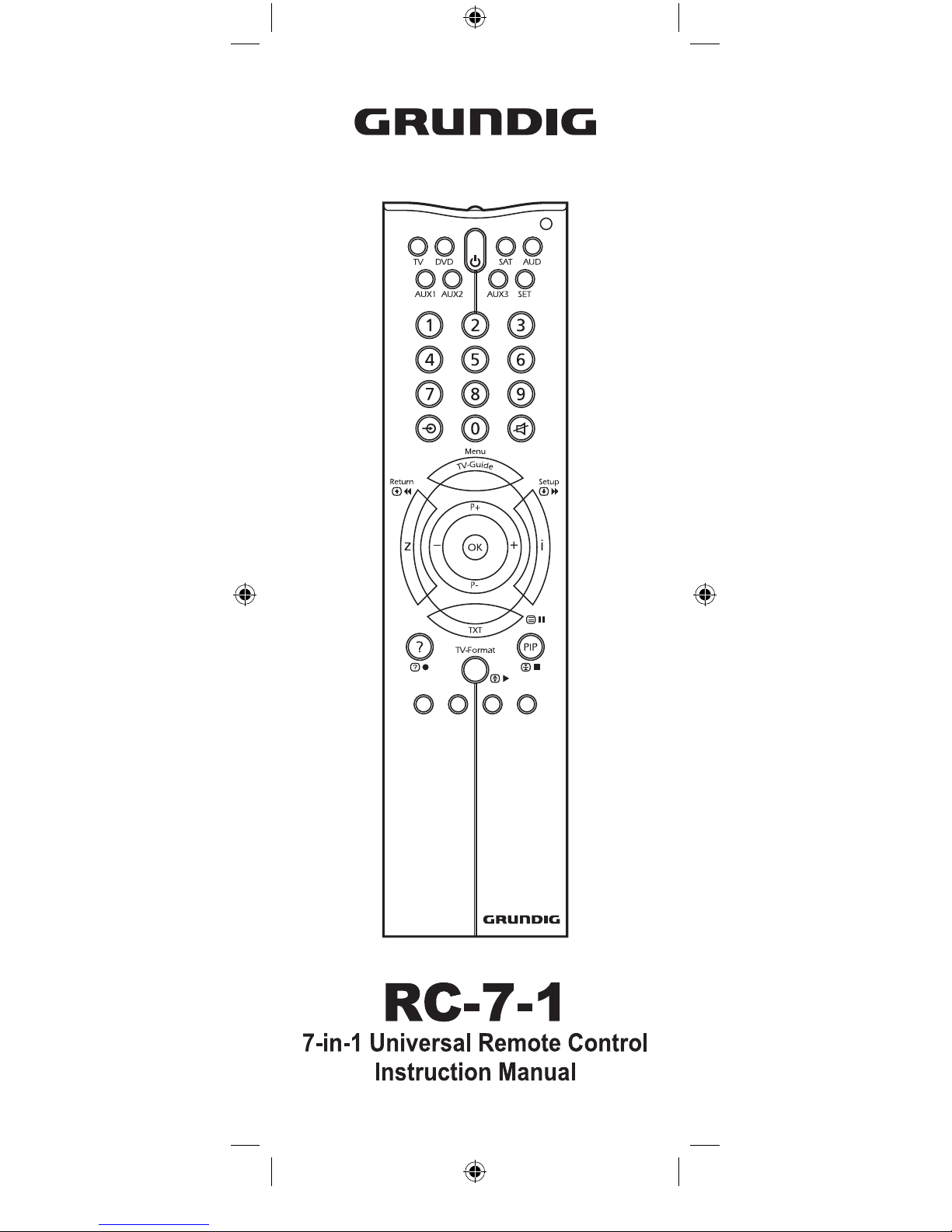
1. IR Transmitter
2. POWER Key
3. Device Keys
4. Number Keys
5. TV/AV Key
6. Video Recorder Keys
7. LED indicator
8. SET-UP Key
9. Mute Key
10. Fastext Keys
Thank you for purchasing the RC-7-1 universal remote con-
trol.Before you can use your new remote, you will need to pro-
gram it to operate the specic A/V home entertainment equip-
ment you wish to control. Simply enter proper device codes for
your equipment and it is ready to use.
• BATTERY INSTALLATION / CHANGE
1. On the back of the RC-7-1,
pull the battery compartment cover.
2. Insert two (2) AAA new Alkaline
batteries.
3. Match the (+) and (-) poles correctly
aligned into the battery compartment.
4. Close the battery compartment.
NOTE: Removing the batteries for
more than 2 minutes will require you to reprogram your re-
mote.
• SETTING UP BY DIRECT ENTRY
To program your RC-7-1 to operate your TV:
1. Turn on your TV.
2. Press & hold the key and press the key once. At this
time, the red LED light will light up.
3. Release the key and key.
4. Enter the 4-Digit TV code from the code list for your brand
equipment. If you perform this procedure correctly, the red
LED light will go out. Otherwise, the red LED ashes 2
times.
5. Aim the RC-7-1 at your TV and press key. Your TV should
turn off. If none of the keys or only some of the keys operate
your TV, repeat Steps 2-4, trying each code listed for your
brand until you nd the one that operates your TV.
6. Your RC-7-1 is now programmed to operate your TV. Write
down your TV code on the label at the back of the RC-7-1
for future reference.
7. To program other equipment, repeat the Steps 1-6 for your
DVD, SAT, AUDIO and or your second TV or DVD.
NOTE: To leave the SETUP during the code entering, just
press any of the [DEVICE] keys once. In other cases, if no
code is entered within 10 seconds, the red LED light will go
out automatically.
• SETTING UP BY AUTO SEARCH
This auto search method checks all its preprogrammed codes
to nd the code that will operate your equipment automatically.
This method may take a few minutes.
1. Turn on your TV and press the device mode as .
2. Aim the RC-7-1 at your TV.
3. Press & hold the key and key at the same time for 3
seconds until the red LED lights up. Then release the key
and key. AUTO SEARCH is now performed.
A
Page 3
Thank you for purchasing the RC-7-1 universal remote control.Before you can use your new remote, you will need to program it to operate the specic A/V home entertainment equipment you wish to control. Simply enter proper device codes for
your equipment and it is ready to use.
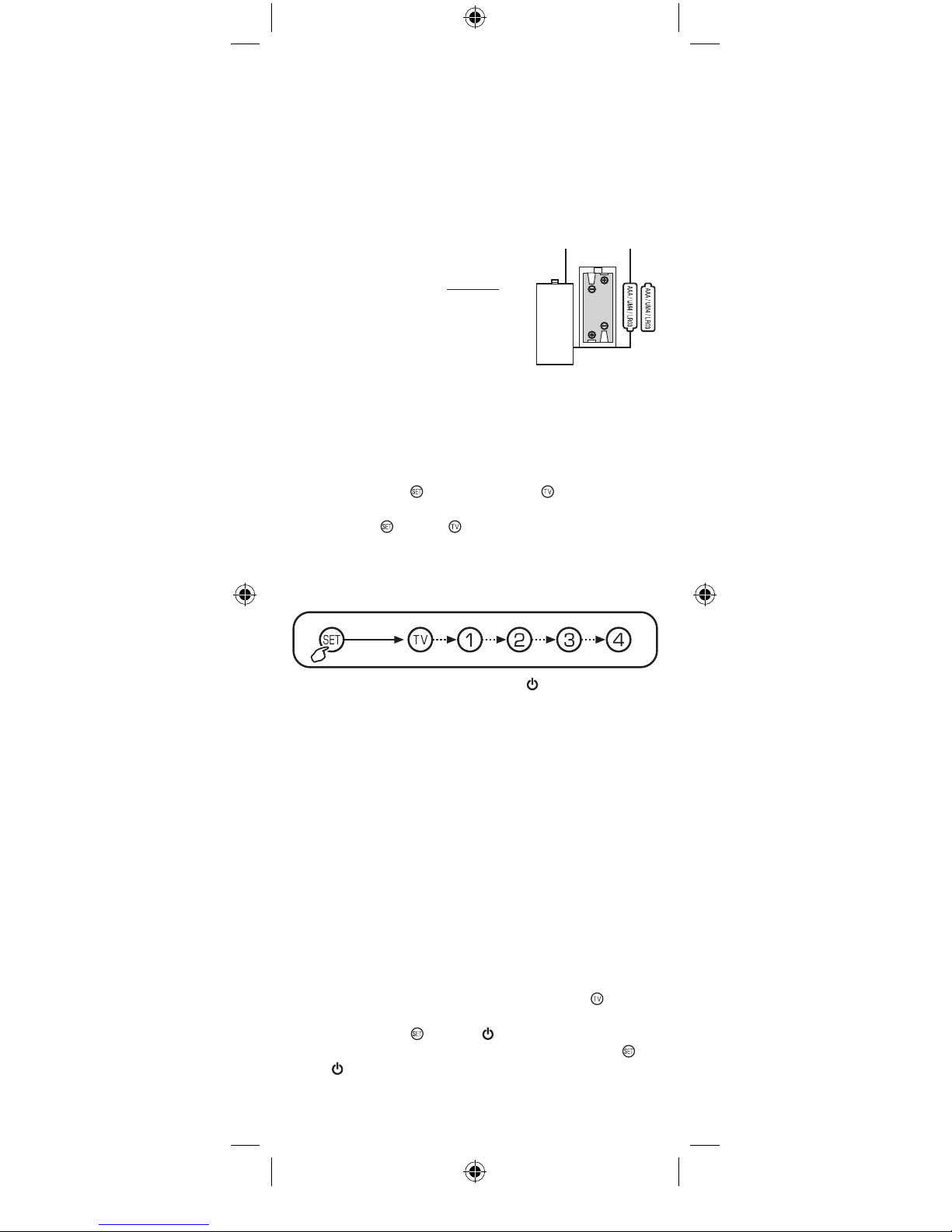
• BATTERY INSTALLATION / CHANGE
1. On the back of the RC-7-1,
pull the battery compartment cover.
2. Insert two (2) AAA new Alkaline
batteries.
3. Match the (+) and (-) poles correctly
aligned into the battery compartment.
4. Close the battery compartment.
NOTE: Removing the batteries for
more than 2 minutes will require you to reprogram your remote.
• SETTING UP BY DIRECT ENTRY
To program your RC-7-1 to operate your TV:
1. Turn on your TV.
2. Press & hold the
key and press the key once. At this
time, the red LED light will light up.
3. Release the
key and key.
4. Enter the 4-Digit TV code from the code list for your brand
equipment. If you perform this procedure correctly, the red
LED light will go out. Otherwise, the red LED ashes 2
times.
5. Aim the RC-7-1 at your TV and press key. Your TV should
turn off. If none of the keys or only some of the keys operate
your TV, repeat Steps 2-4, trying each code listed for your
brand until you nd the one that operates your TV.
6. Your RC-7-1 is now programmed to operate your TV. Write
down your TV code on the label at the back of the RC-7-1
for future reference.
7. To program other equipment, repeat the Steps 1-6 for your
DVD, SAT, AUDIO and or your second TV or DVD.
NOTE: To leave the SETUP during the code entering, just
press any of the [DEVICE] keys once. In other cases, if no
code is entered within 10 seconds, the red LED light will go
out automatically.
• SETTING UP BY AUTO SEARCH
This auto search method checks all its preprogrammed codes
to nd the code that will operate your equipment automatically.
This method may take a few minutes.
1. Turn on your TV and press the device mode as
.
2. Aim the RC-7-1 at your TV.
3. Press & hold the
key and key at the same time for 3
seconds until the red LED lights up. Then release the
key
and
key. AUTO SEARCH is now performed.
Keep
press
A
Page 4
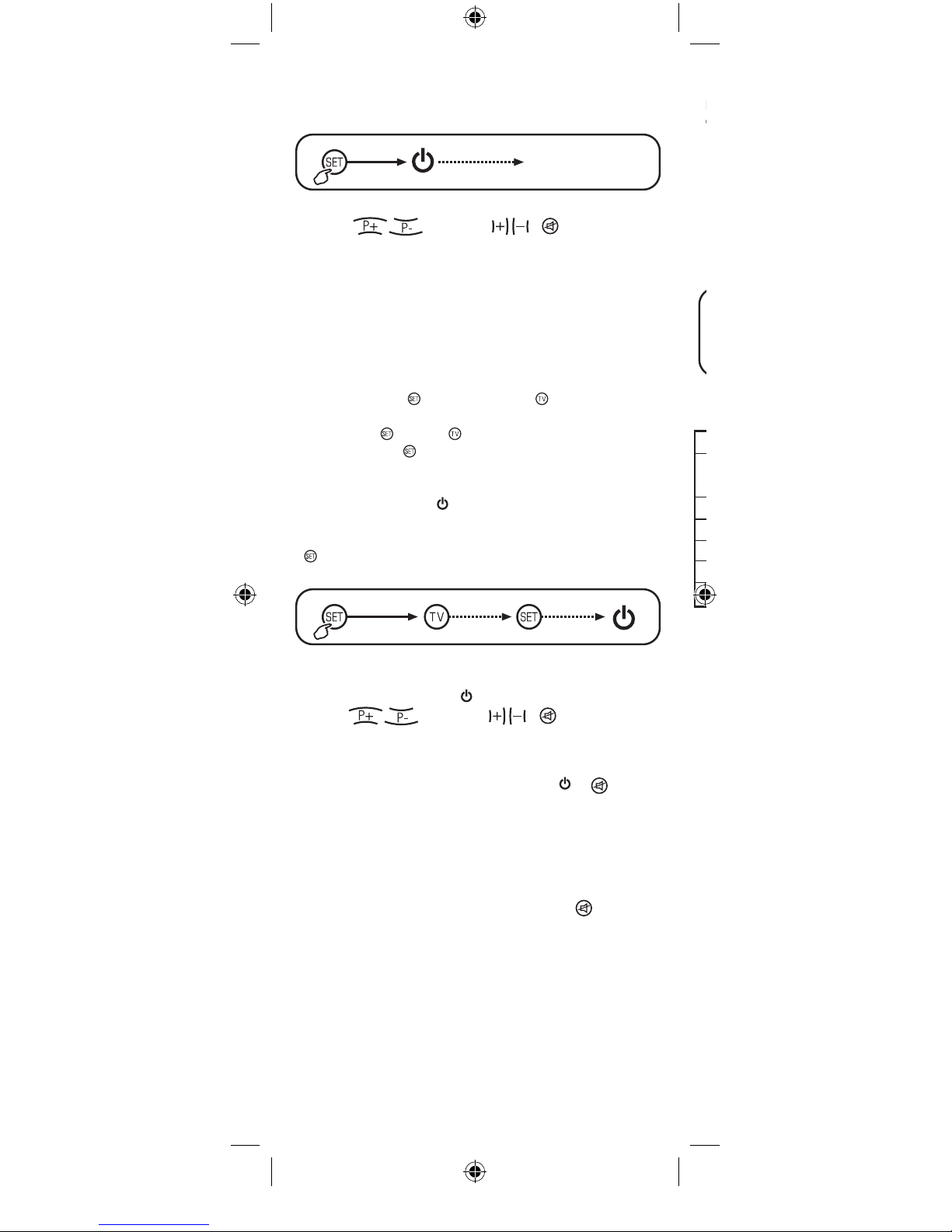
4. If the TV turns off. This indicates that the RC-7-1 is now set
to your TV.
5. Press any key to exit and the red LED will go out automati-
cally. The RC-7-1 is now ready to operate your TV.
6. To check the code, press to ON position. Press
CH+/-,
, VOL+/-, ,
and other appli-
cable keys. If no function, repeats Steps 1-5.
7. To program other equipment, repeat the Steps 1-6 for your
DVD, SAT, AUDIO and or your second TV or DVD.
• SETTING UP BY MANUAL SEARCH
This manual search method checks all its preprogrammed
codes to nd the code that will operate your equipment. This
method may take a few minutes.
1. Turn on your TV.
2. Press & hold the
key and press the key once. At this
time, the red LED light will light up.
3. Release the
key and key.
4. Again press the
key once, the red LED light will ash
continuously.
5. Aim the RC-7-1 at your TV.
6. Now, press & release
key until the TV turns off. This indi-
cates that the RC-7-1 is now set to your TV.
HINT: During the Manual Search mode, you can use the
key as forward/backward toggle switching to locate the
correct code of your TV in a quick way.
7. Press the [Device] key once. The red LED will go out
automatically. The RC-7-1 is now ready to operate your TV.
8. To check the code, press
to ON position. Press
CH+/-,
, VOL+/-, , and other appli-
cable keys. If no function, repeat Steps 1-8.
9. To program other equipment, repeat the Steps 1-8 for your
DVD, SAT, AUDIO and or your second TV or DVD.
NOTE 1: For DVD, press & release either
or key.
NOTE 2: To leave the MANUAL SEARCH during the code
searching, just press any of the [DEVICE] key once. In
other cases, if no code is entered within 30 seconds, the
red LED light will go out automatically.
• PUNCH THROUGH
It allows you to operate teh TV’s VOLUME and
function
simultaneously without having to switch the device modes
repeatedly. You can adjust the TV sound source while opera-
ting the DVD, Satellite Receiver, or Audio equipment. Right at
your ngertips.
• FASTEXT
The function of FASTEXT should operate exactly as your original remote.
• PREPROGRAMMED CODE DISPLAY
This method displays its 4-digit preprogrammed codes that will
operate your equipment. You can control the display of each
position in an easy way. For example, press key for 1st
digit of code, press key for 2nd digit of code, press key
for 3rd digit of code and press key for 4th digit of code.
1. Select the desired [DEVICE] key.
2. Press & hold the key, then press the desired digit code
you want to display.
3. Release the key.
4. The red LED will ash according to the count of digit code.
(No ash for digit 0).
5. Repeat Steps 2-4 for next display.
• TECHNICAL SPECIFICATIONS
Communication Mode: Infrared
Power Requirement: 3V ( 2 x AAA, IEC-LR3,
UM-4 size alkaline batteries)
Effective Range: 7M, ±20 degrees
Max. Operating Temperature: 0°C to + 50°C
Max. Storage Temperature: -25°C to +125°C
Dimension: 48(W) x 17(H) x 193(L)mm
Weight (without batteries): 60 g.
Printed in China
Keep 4 Sec.
Key released
and enter
AutoSearch Mode
press
Keep
press
Page 5
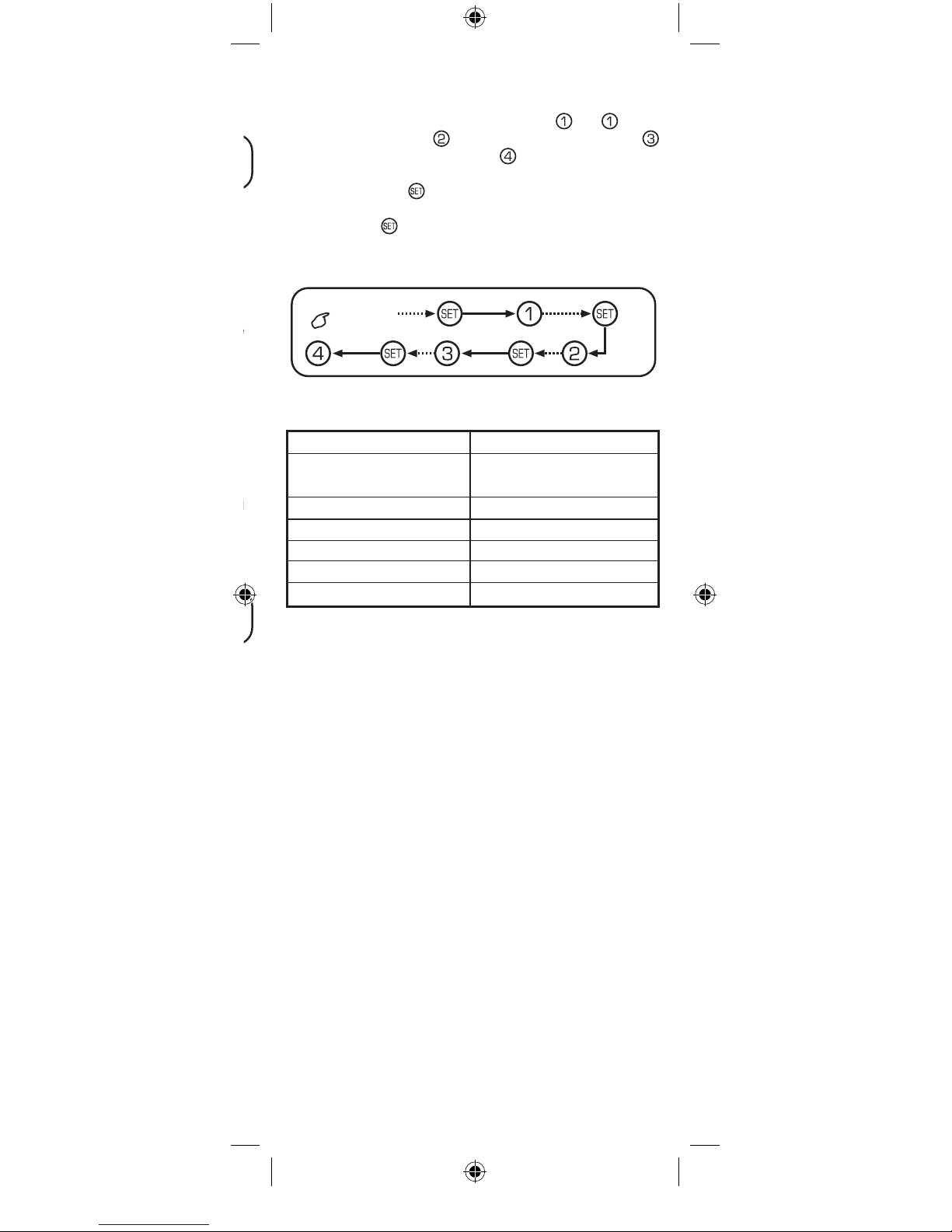
• PREPROGRAMMED CODE DISPLAY
This method displays its 4-digit preprogrammed codes that will
operate your equipment. You can control the display of each
position in an easy way. For example, press
key for 1st
digit of code, press key
for 2nd digit of code, press key
for 3rd digit of code and press key
for 4th digit of code.
1. Select the desired [DEVICE] key.
2. Press & hold the
key, then press the desired digit code
you want to display.
3. Release the
key.
4. The red LED will ash according to the count of digit code.
(No ash for digit 0).
5. Repeat Steps 2-4 for next display.
• TECHNICAL SPECIFICATIONS
Communication Mode: Infrared
Power Requirement: 3V ( 2 x AAA, IEC-LR3,
UM-4 size alkaline batteries)
Effective Range: 7M, ±20 degrees
Max. Operating Temperature: 0°C to + 50°C
Max. Storage Temperature: -25°C to +125°C
Dimension: 48(W) x 17(H) x 193(L)mm
Weight (without batteries): 60 g.
Printed in China
Keep
DEVICE
Keep Keep
Keep
press
press press
press
Page 6
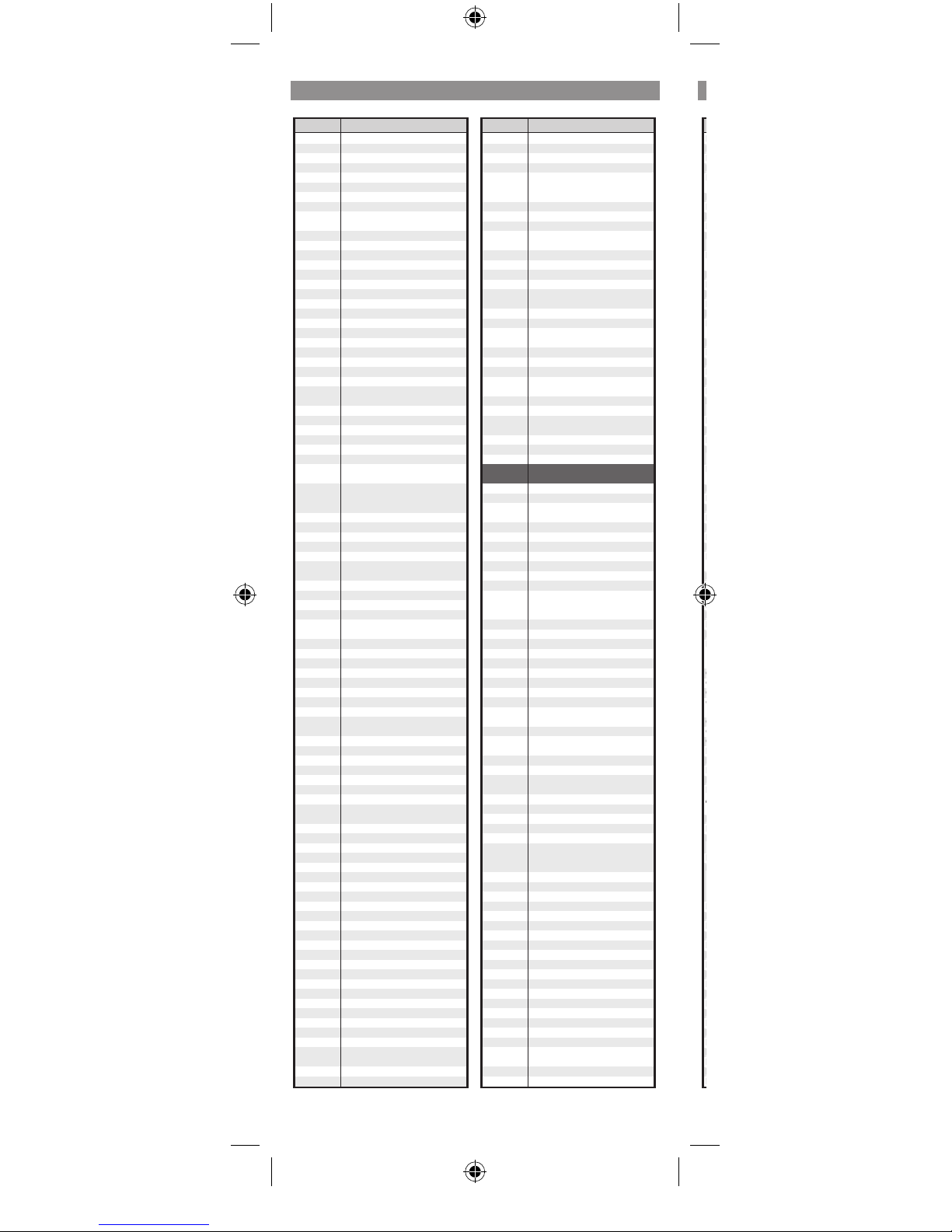
Codes Codes
TV/TXT TV/TXT
Codes
TV / TXT
BRAND BRAND
Accend 0711
ACE 0713
Admiral 0032,0155,1011
Adyson 0730
Agashi 0730
Aiko 0707,0711,0730
Aim 0711
Aiwa 0261
Akai 0005,0159,0169,0707,0711,0730,0731,
0745,1020
Akiba 0711,0731,0742
Akito 0711
Akura 0711,0731,0738,0740
Alaron 0730
Alba 0705,0711,0730,0731,0738,0744
Albiral 0001
Allstar 0711
Amplivision 0739
Amstrad 0006,0711,0731,0740,1011
Anam 0711
Anam National
0711
Anitech 0711
Ansonic 0711
Aristona 0711
A.R Systems 0711
Arthur Martin 0739
ASA 0007,0009,0013,0032,0094,0155,0161,
1010
Asberg 0711
Asuka 0731
Atlantic 0711,0730
Auchan 0739
Audiosonic 0160,0711,0731
Ausind 0008
Autovox 0004,0007,0012,0014,0015,0078,0079,
0104,0153
AWA 0026,0027,0033,0159,0160,0189,0220,
0706,0708,0709,0711,0714,0730,0740,
1006
Baird 0162,0737
Basic Line 0163,0711
Baur 0711,1017,1037
BEKO 0170,0226,0711,0719,1018,1024
BEST 0741
Blaupunkt 0010,0017,0018,0020,0054,0231,0232,
0233,0234,0236,0241,1004
Blue Sky 0711,0719,0738,0742,0744
BPL 0026,0160,0162,0163,0711
Brandt 0733,0735,0746
Brinkmann 0711
Brionvega 0104,0155,0164,0165,0200,0201,0257,
0711,1011
Britannia 0730
Bruns 0158
BSR 0016,0019,0021
Bush (UK) 0022,0711,0738
Cabletime 0246,0247,0251
Carad 0717
Carena 0742
Century 0145,0146,0155
CGE 0019,0023,0024,0145,0151,0169,0170,
0231,1004
CGM 0093
Chaparral 0216
Clarivox 0001,0166,0167
Clatronic 0705,0711
CODIAM 0138
Condor 0711,0730
Contec 0033,0016,0730
Continental 0733,0744
Edison
Crosley 0024,0025,0145,0155,0231,1004
Crown 0705,0711,0741,0744,1008
CS Electronics
0730
CTC Clatronic
0096
Daewoo 0168,0209,0711,0730
Dainichi 0730
Dansai 0707,0711,0730
Dansette 0740
DSE (Digitor) 0026,0027,0033
Decca (UK) 0002,0004,0026,0028,0031,0258,0711
Dual 0255,0258,0711,0737,1011,1017
Dual-Tec 0004,0011,0019,0029
Dumont 0155,1010,1023
Elbe 0001,0171,0711,0717
Elbe-Elbit 1011
Elektronika 1008
Elin 0730,0745
Elite 0108,0711,1004
Elman 0019,0029,1023
Elta 0730
Emerson 0146,0155,0711,1010
Euroman 0711,0730,0741,1008
Europa 0711
Europhon 0000,0004,0019,0029,0030,0146,0711,
1023
Expert 0739
Fenner 0033,0193,0240
Ferguson 0733,0735,0746
Fidelity (UK) 0003,0034,0229,0711,0730
Filmnet 0202,0248
Finlandia 0745,1010
Finlux 0007,0008,0009,0013,0025,0026,0029,,
0035,0094,0161,0169,0221,0711,1010,
1023
Firstline 0711,0730,0738
Fisher 0025,0036,0155,0167,0170,0255,1017
Flint 0742
Formenti- 0003,0008,0025,0037,0038,0159,0730,
Phoenix 1004,1023
France Telecom
0266
Friac 0741
Funai 0016,0160,1019
Galaxis 0711
GBC 0002,0004,0019,0025,0026,0031,0033,
0039,0040,0041,0042
Geant Casino
0739
GEC (UK) 0711
Geloso 0004,0019,0025,0032,0033,0039,0149,
0150
General 0733,0743
Genexxa 0740
Goldhand 0730
Goldstar 0003,0004,0043,0080,0153,0172,0252,
0700,0701,0711,0730,1011
Goodmans 0199,0707,0711,0737,0744
Gorenje 0170,0173,0741,1008
Granada(UK) 0002,0004,0027,0041,0044,0045,0046,
0047,0048,0049,0711,0735,0739,1010
Grandin 0705,0711,0717,0719,0739,0742
Great Wall 0253
Grey 1025
Grundig 0003,0010,0018,0020,0045,0050,0051,
0053,0054,0056,0094,0711,0744,1038
Halifax 0730
Hampton 0730
Hanseatic 0025,0027,0037,0044,0052,0055,0258,
0711
Hantarex 0000,0711
Harwood 0740
Hauppaugel 0026,0711
HCM 0740
Hemmermann
0057
Hinari 0033,0044,0058,0059,0060,07
11,0744
Hisawa 0739,0742
Hitachi 0004,0040,0041,0042,0044,0047,0055,
0061,0062,0063,0064,0065,0066,0067,
0068,0174,0221,0222,0710,0711,0737
Hitsu 0742
Hoshai 0742
Hotel TV 0704
Huanyu 0730
Hygashi 0730
Hyper 0003,0004,0033,0153,0193,0730
Hypson 0739,0742
ICE 0730
Ices 0730
Imperial 0019,0023,0024,0145,0151,0169,0170,
0231,0711,1004
Ingelen 0717,0744
Inno Hit 0000,0004,0031,0043,0060,0146,0175,
0711,1004
INTER (256) 0725
Intercord 1017
Interfunk 0005,0027,0040,0045,0046,0052,0069,
0070,0071,0073,0075,0155,0711
Intervision 0711,0742,0744,1023
Irradio 0008,0039,0043,0060,0153,0262,0711
Iskra 1023
IT 0723
ITS 0730
ITT-Nokia 0005,0032,0033,0040,0041,0045,0049,
0069,0070,0071,0072,0074,0076,0162,
0168,0176,0177,0717,0745
Janco 0249,0250
JEC 0707
JVC 0077,0119,0178,0179
Kaisui 0163,0711,0730,0742
Kamp 0730
Karcher 0159,0163,0175,0711,0717,0741,1008
Kawasho 0730
Kendo 0146,0711,0717,1011
Kennedy 0025,0078,0079,1011
Kingsley 0730
Kneissel 0711,0717
KONIG 0027
Konka 0711
Kontakt 0744
Korting 0037,0155,0157,0741
Kotron 0740
Kuba 1017
Kyoshu 0740
Lenco 0033,0039,0183,0238,0239,0240,0711,
1023
Lecson 0711,0718
Lenoir 0004
Page 7
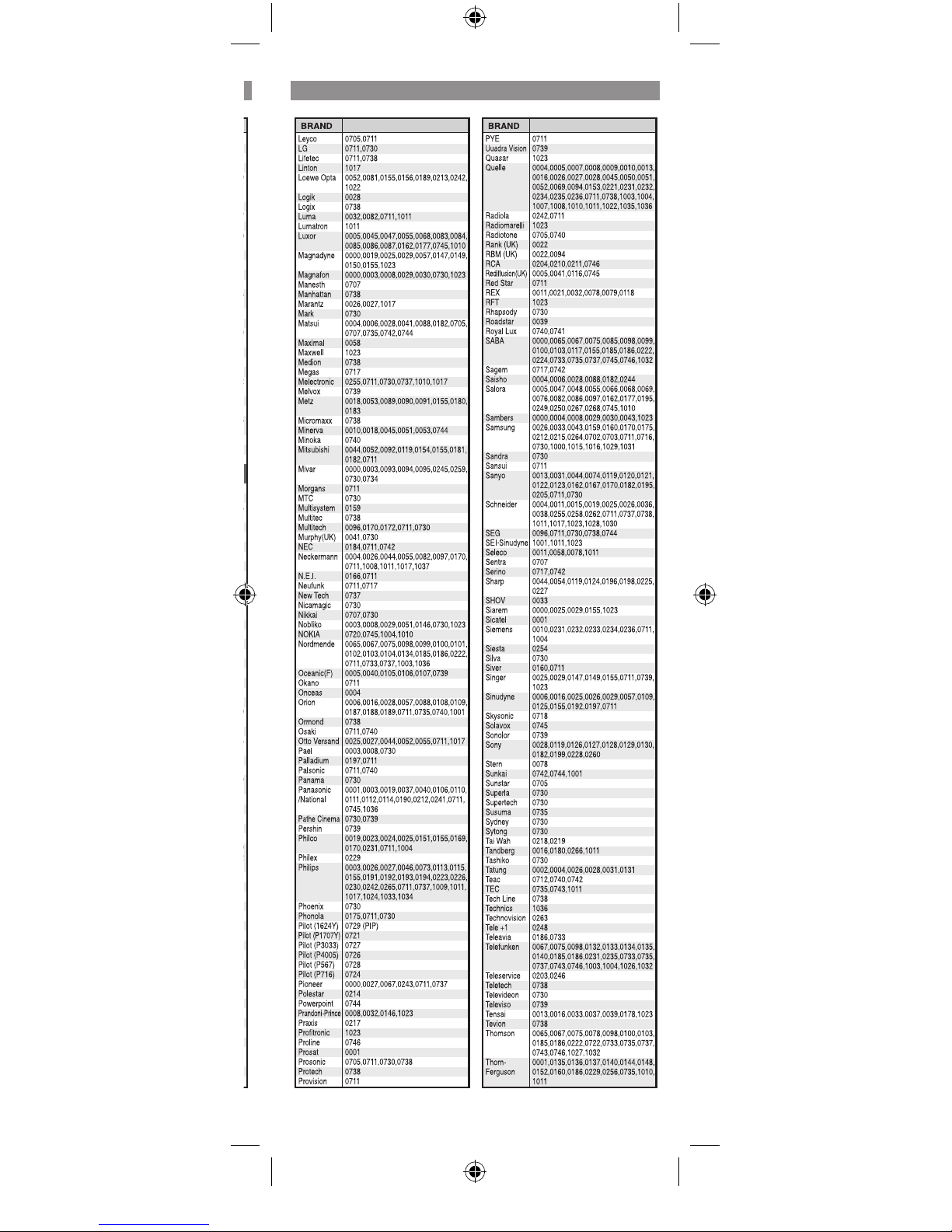
Page 8
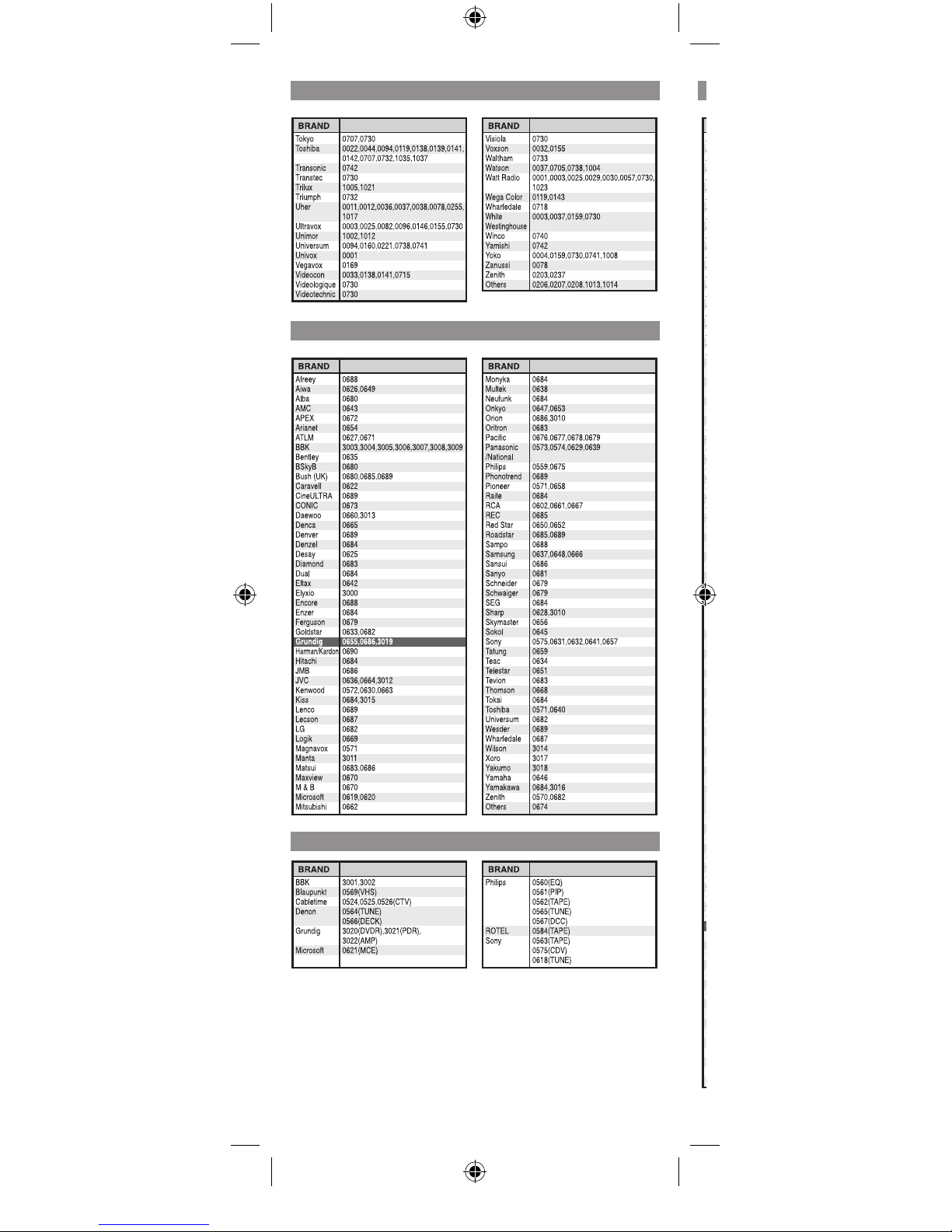
Codes Codes
TV/TXT SAT/DSS
LD/DVD
AUX
Page 9
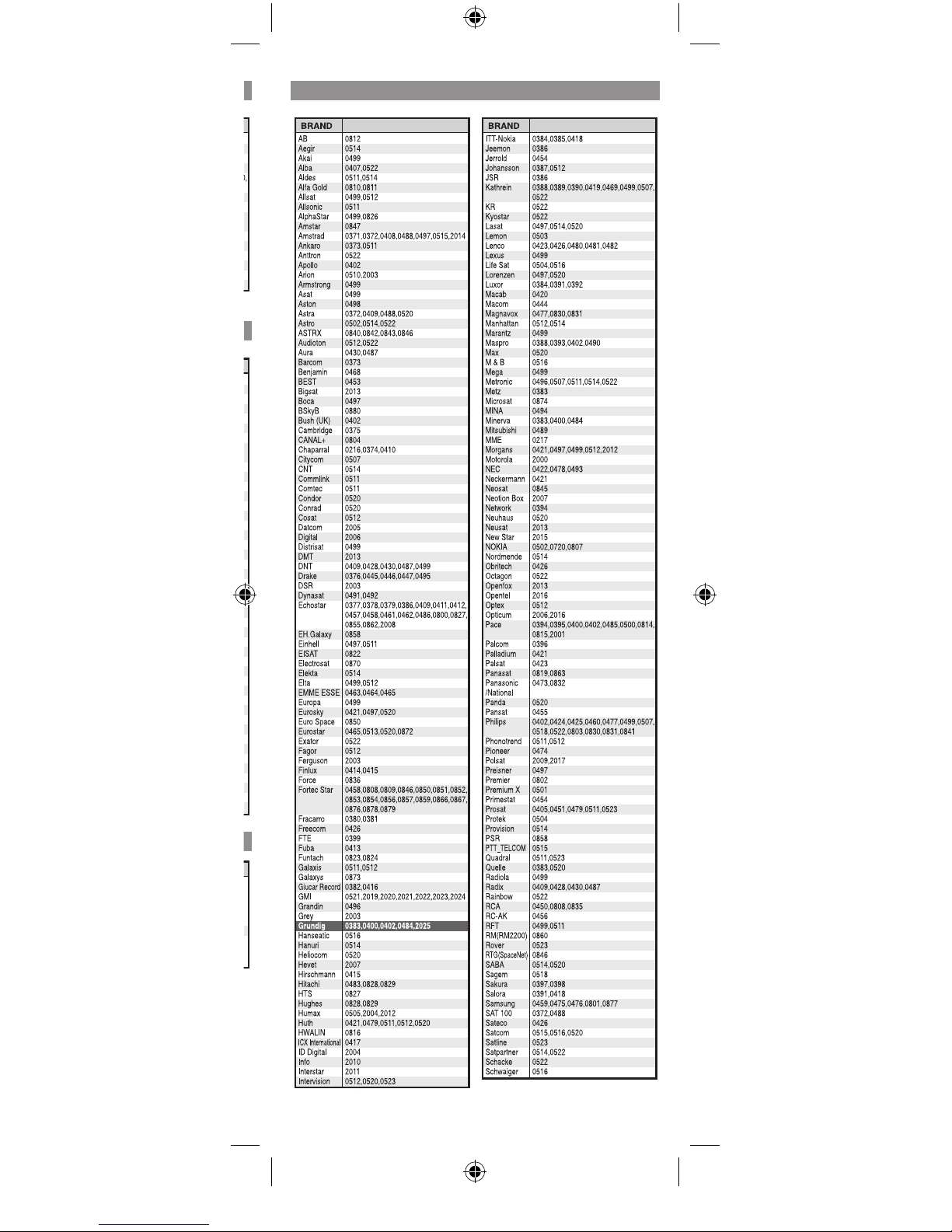
Page 10
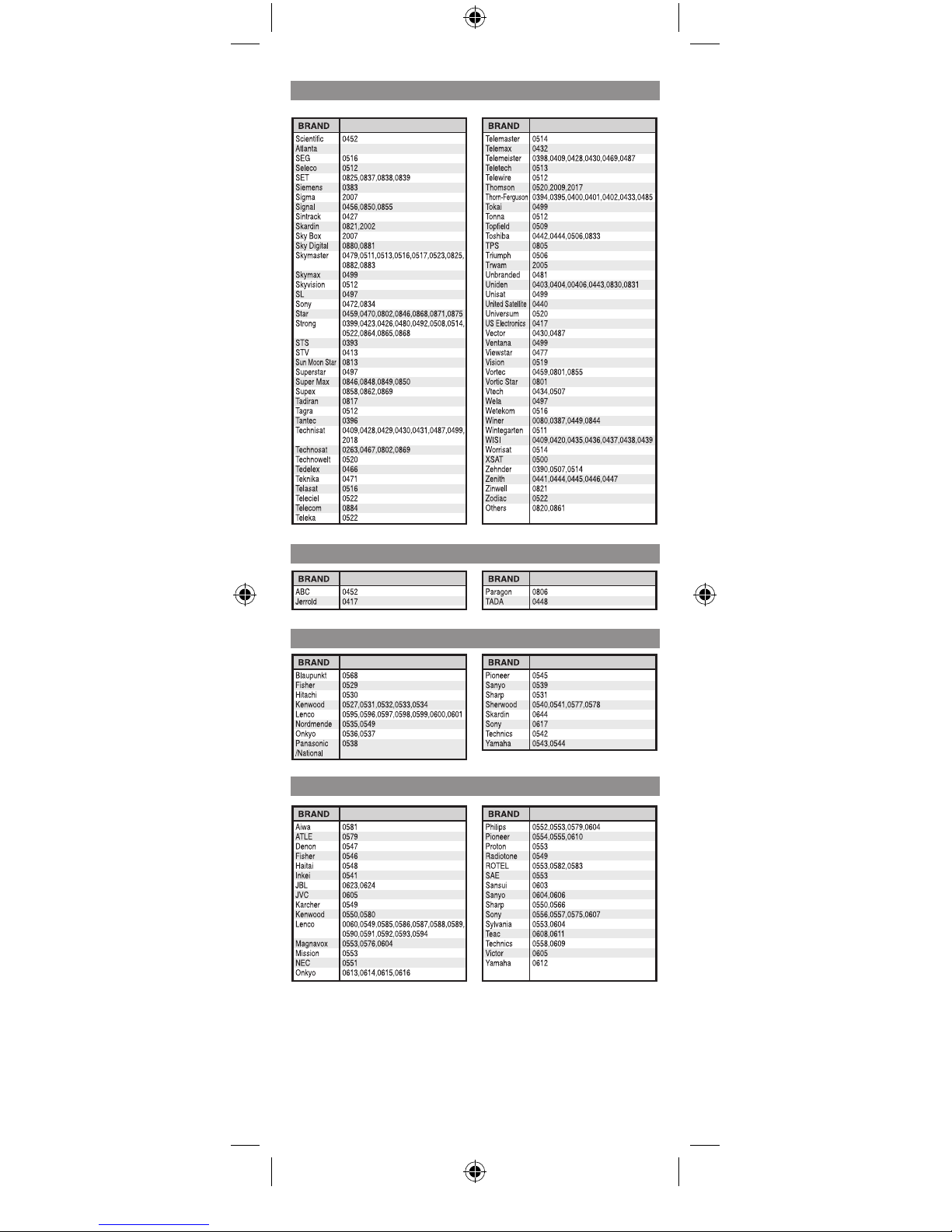
Codes
SAT/DSS
CABLE
Hi FI
CD
Page 11

Page 12

 Loading...