

Page 1
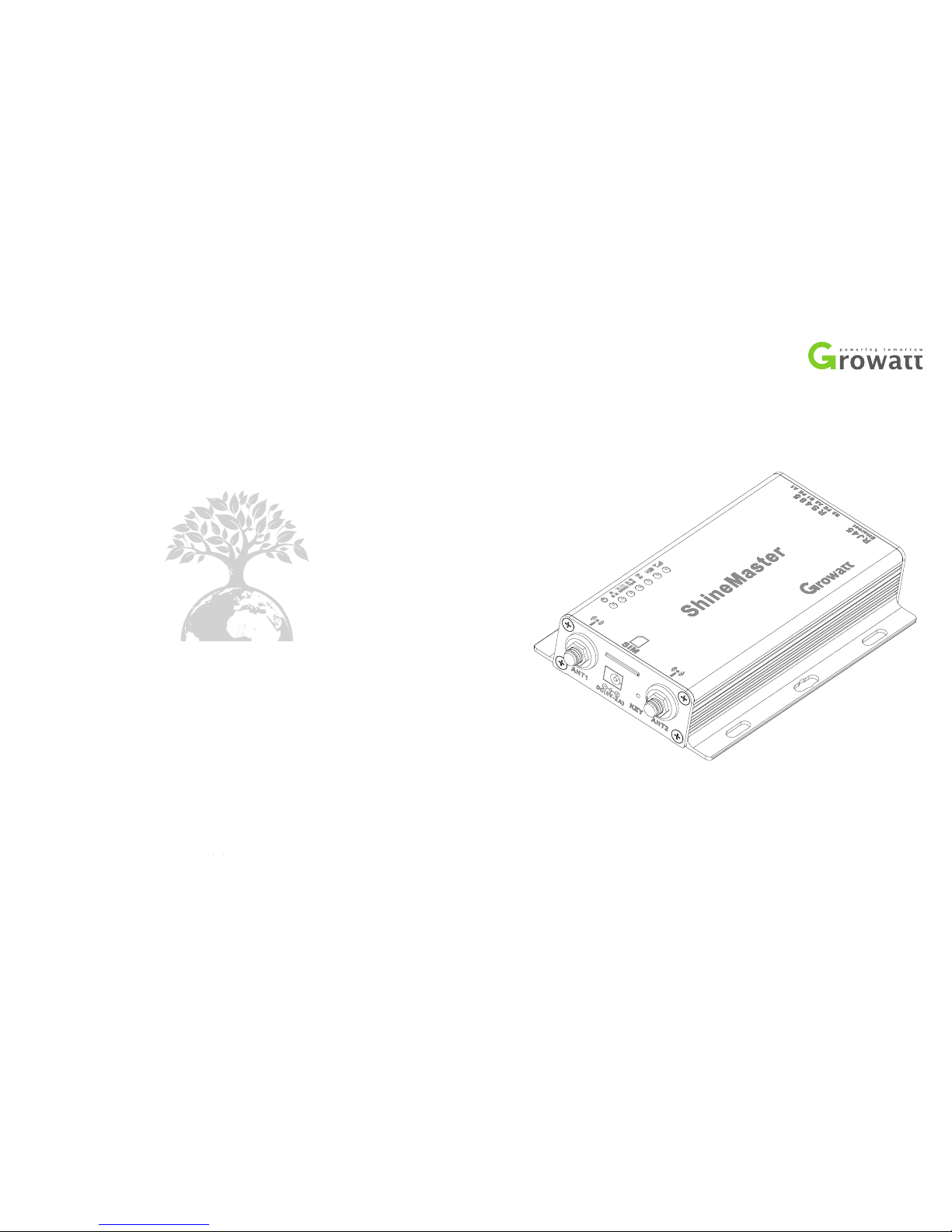
ShineMaster User Manual
SHENZHEN GROWATT NEW ENERGY TECHNOLOGY CO.,LTD
86 755 2747 1942+
+ 86 755 2747 2131
[email protected]
www.ginverter.com
T
F
E
W
No. 28 Guan gming R oad, Sh iyan St reet, B ao’ an Dist rict,
She nzhen , P.R.C hina
Page 2

About the user man ual
1.1 Man ual des cr ipt io n
1.2 Cop yr ig ht statem en t
1.3 App li ca ble perso nn el
1.4 Man ua l us e
3.1 Shi neMas te r ins ta lla ti on
envir onm en t
3.2 Shi neMas te r ins ta lla ti on meth od
3.3 Con nect to t he p hot ov olt ai c devic e
Installation a nd
Connection
CONTENT
ShineMaster bu ilt-in page
parameter sett ing
2.1 Dev ice Ove rv iew
2.2 Unp ackin g
2.3 Shi neMas te r Net wo rk
Intro duc ti on
Product descript ion
1
2
3
4
4.1 Shi neMas te r IP ad dress q uery
4.2 Shi neMas te r bui lt -in p ag e acces s
4.3 Shi neMas te r Sta tu s View
4.4 Shi neMas te r Dat al ogg er m anagi ng
4.5 Bau d Rate Se tt ing
4.6 Ser ver Ad dre ss a nd Shin e Ma ster
IP sett in g
Page 3
Server: Shines erver’s
operation
5.1 Reg is tr ation and l og in
5.2 Vie w mo nit or ing d at a
5.3 Add o r Delet e Mo nit or ing d ev ices,
chang e the Shi ne Mas te r Bau d ra te
7.1 Shi neMas te r spe ci fic at ion
Technical specif ications
Contact us
6.1 Com mon f aul ts and tr oub lesho oting
6.2 Mai nte nan ce
Device Mainten ance
5
6
7
8
1 About the user manual
1.1 Manual descr ip ti on
1.4 Manual usage
Pleas e rea d th is m anu al c are fu lly b ef ore u si ng Shin eMast er. At t he s ame tim e, p lea se k eep
this ma nu al in a s afe pl ace s o th at o per at ors a nd m ai nte na nce p er sonne l ca n find ou t. T he
conte nts o f the manu al will be c ont in uousl y upd at ed an d c or rec te d. It is i nev it able that
there wil l be sl ig ht i na ccu ra cie s o r er rors i n the a ctual conte nt s. U se rs s ho uld ref er to t he
ac tu al prod uct pu rc ha se d. The la te st use r man uals can be dow nl oa de d fr om
www.gi nvert er.c om, and can also be obtain ed th rou gh Growa tt's sal es or se rv ice
chann els.
1.2 Copyright st at em en t
1.3 Applicable p er so nn el
1
Dear us er s, t han k yo u ve ry m uc h for using t he S hi neM as ter dat a lo gg er ( her einaf te r
ref er red t o as Shi neMas te r) d eve lo ped and pro duc ed b y Sh en zhe n Gr owatt N ew E ne rgy
Co., Lt d. ( he rei nafte r re fer red to a s Gro wa tt). We sin cerel y ho pe that thi s produ ct w il l
meet yo ur n ee ds a nd expe ct y ou g ive more op inion s on t he p er forma nce and fun ct ion of
the pro duct. The p ur pose of thi s ma nu al i s to p rov id e us ers wit h de taile d pr odu ct
infor matio n an d in struc tions for i ns talla ti on, ope ra tio n, a nd m ainte na nce .
This us er m an ual is copy ri ght ed b y Gr owa tt . An y un it or indiv id ual may not e xc erpt or
copy pa rt o r al l of t hi s us er's ma nu al w ith ou t th e wr itt en p er mis si on o f th e compa ny. It
may not be tran sm itt ed i n an y fo rm, inclu ding mate rials and p ub licat io ns. Inf ri nge me nt
must be inv es tig at ed.
The ver si on o f th is manu al i s V1 .1. Gro wa tt owns the f in al i nterp ret at ion rig ht o f th is
user ma nu al. If t her e is a ny c ha nge in prod uct par am ete rs , ap pea ra nce, pa ck aging , et c.,
the lat es t in for ma tion of the com pa ny s hal l pr eva il w it hou t no ti ce.
This ma nu al i s fo r pro fe ssi on al t echni cians who i ns tall, c om missi on, and maint ain the
Shine Maste r an d fo r us ers who per fo rm d ail y op er ati on s. T his man ua l does not incl ude
elect rical con necti on s for inver ters, com bi ner box es , weath er s tatio ns , smart met ers, and
anti- ref lu x de vic es , as w ell as rela te d pre ca uti on s. I f ne ces sa ry, re fer to Grow att 's
corre spo nd ing use r ma nu al or instr uc tio n.
Page 4
Product description 2
2.1 Device Overv ie w
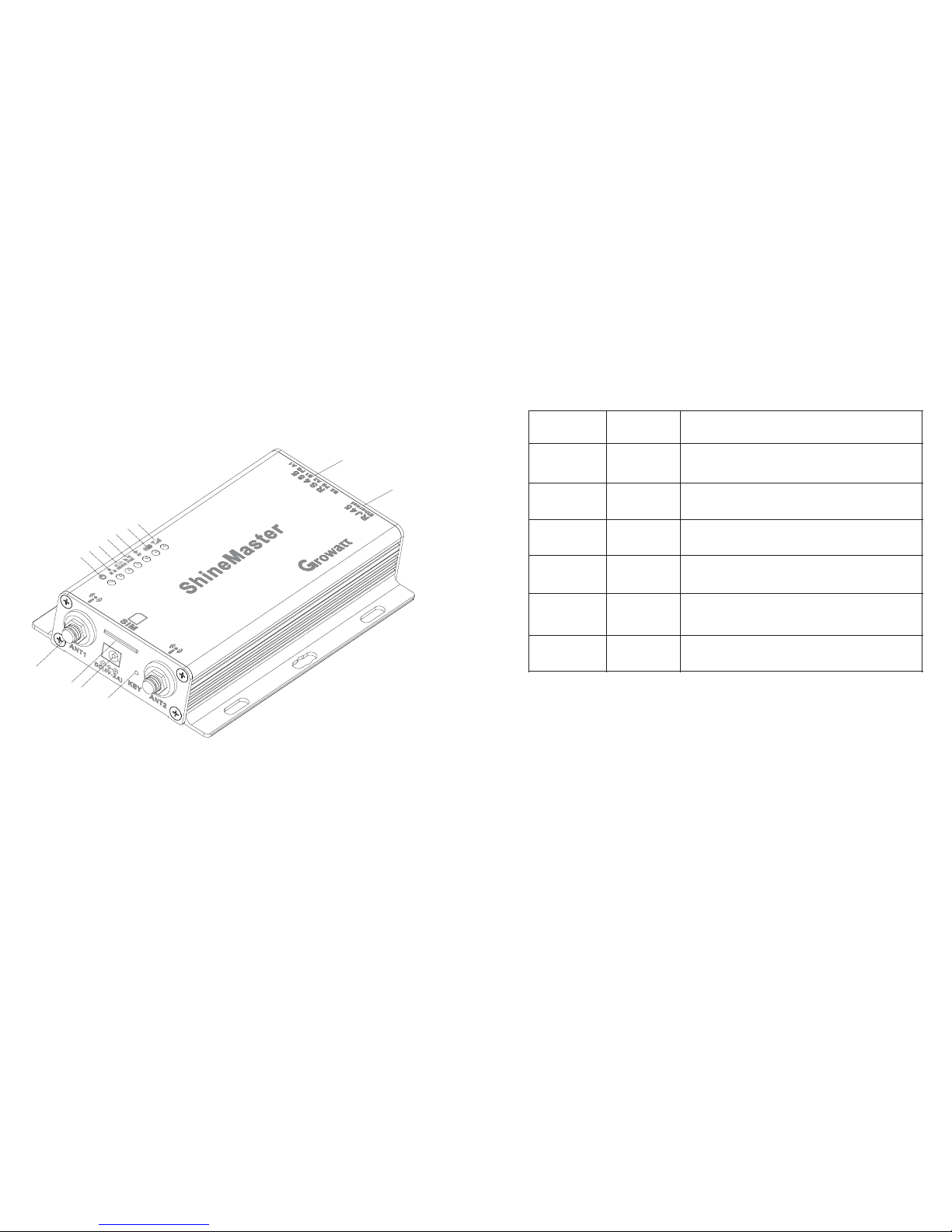
Fig.2 -1
2.1.1 Interfac e
The int erfac e of S hin eM ast er, as s ho wn in f ig ure 2 -1 a bov e.
The fun ction al d esc ri pti on o f each in terfa ce i s sho wn i n tab le 2 -1.
Item
Name
Funct ion
A
POWER
Power s upply p or t
B
KEY
Reset b utton ( te mpo ra ril y un avail able)
C
SIM
SIM car d slo t
D
ANTEN NA
Anten na, use d to re ce ive wir ele ss s ign al s
(Tempor arily n ot s upp or ted )
E
LAN
RJ45 po rt:Conn ec t Shi ne S hin eM aster t o the loc al
netwo rk area o f Shi ne S erver t hro ug h RJ4 5 ca ble
F
RS-48 5
Two- way R S4 85 in te rface
2.1.2 Indicato r Le d
Shine Maste r is e qu ipped w it h se ven LED ind ic ato rs . Th e st atu s of the Shi neMas te r can be
displ ayed by the LED ind ic ato r. As s hown in fig ure 2-1 and tab le 2 -2 a bove.
Table 2-1
2
3
A
B
C
D
E
F
G
H
I
J
K
L
M
Page 5
Item
Name
Funct ion
G
Power L ED
Power i ndica to r lig ht , con st ant on me ans pow er
suppl y is norm al
H
Netwo rk LED
Netwo rk ligh t:
1: off me ans f ai l to ob ta in IP add res s;
2: fl as hing me ans con ne cti ng t o the ser ver
3:o n me ans con ne cti on t o the s er ver suc cessf ul ly
;
I
Devic e LED
The num ber of th e LE D con ti nuo us ly flas hing me an s
the dev ice num be r con ne cte d to t he Shin eMast er
J
Confi gurat io n
LED
Flash ing whe n co nfi gu rat io n , if succ essfu l , th e LED
will be o ff (te mp ora ri ly unav ailab le)
K
RF
RF sign al indi ca tor (t em por ar ily una vaila bl e)
L
Wi Fi
Wi Fi sign al indi ca tor(t em por ar ily una vaila bl e)
M
2G/4G
2G/4G s ignal i nd ica to r(tem po raril y unava il abl e)
table 2 -2
2.2 Unpacking
2.2.1 Packing Li st
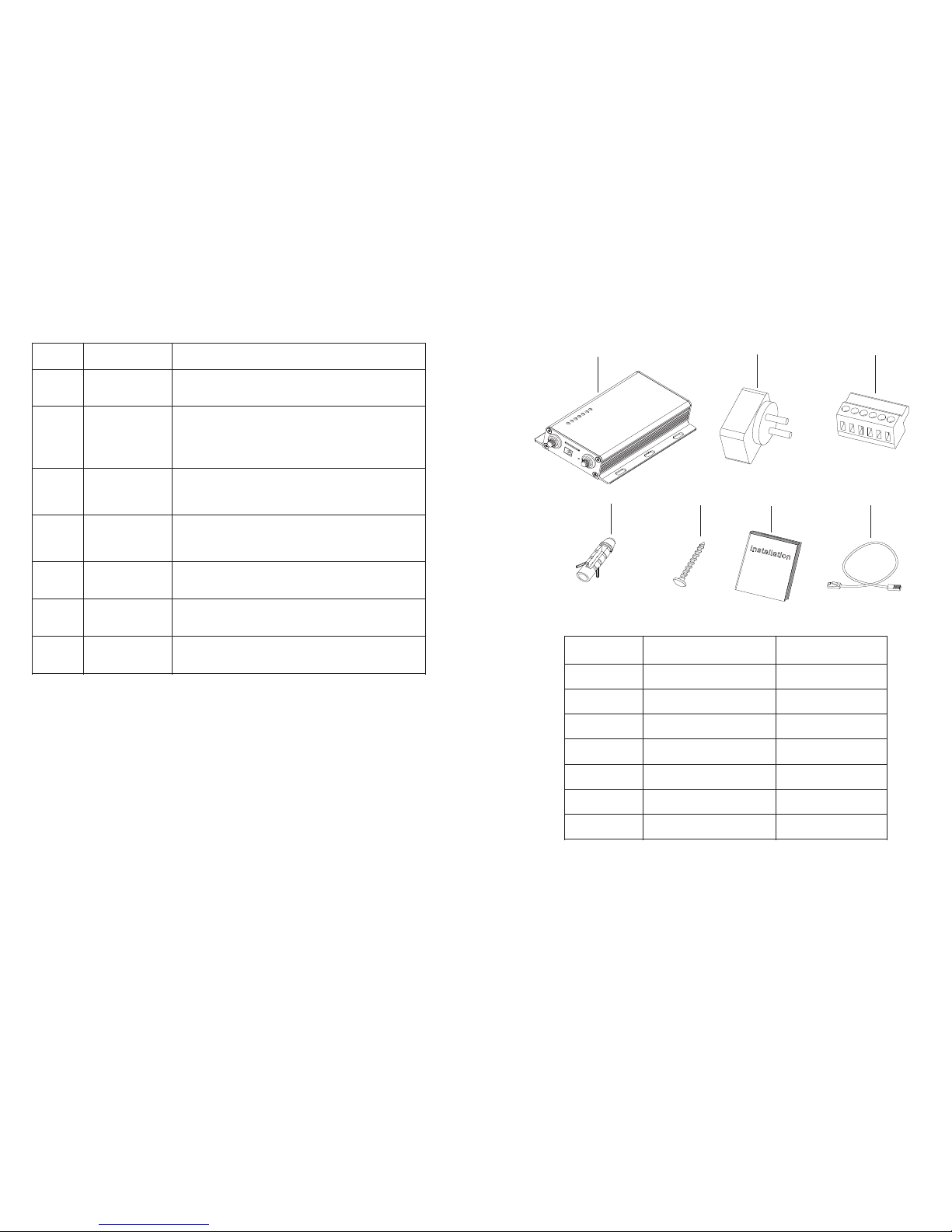
Shine Maste r an d acc es sor ie s can be fo und as be lo w fig ure 2-2:
Fig 2-2
Item
Name
Amoun t
A
Shine Maste r
1 pcs
B
5V powe r adapt er
1 pcs
C
Termina l RS485
1 pcs
D
Wal l pla st ic colu mn
4 pcs
E
M3.5* 20 scre w
4 pcs
F
Shine Maste r us er ma nu al
1 pcs
G
Ether ne t cable
1 pcs
Table 2-4
4 5
A
B
C
D
E
F
G
Page 6
2.2.2 Serial No. a nd C he ck C od e
The Shine Ma ste r se ri al N o. ( S/N) an d ch eck co de(C /C)i s ti cked o n th e Sh ineMa ster’s
packa ge b ox , wh ich ha ve 1 0 di gi ts m ix ed u p wi th let ters a nd n umber s. the ser ia l No . an d
check co de for each devic e a re uni que, to i de ntify ea ch Shi ne Mas te r. Wh en you want to
uploa d the data of S hi neM as ter to t he serv er, you need the se rial No. a nd ‘che ck co de’
corre spo nd ing t o regis te r on th e se rve r
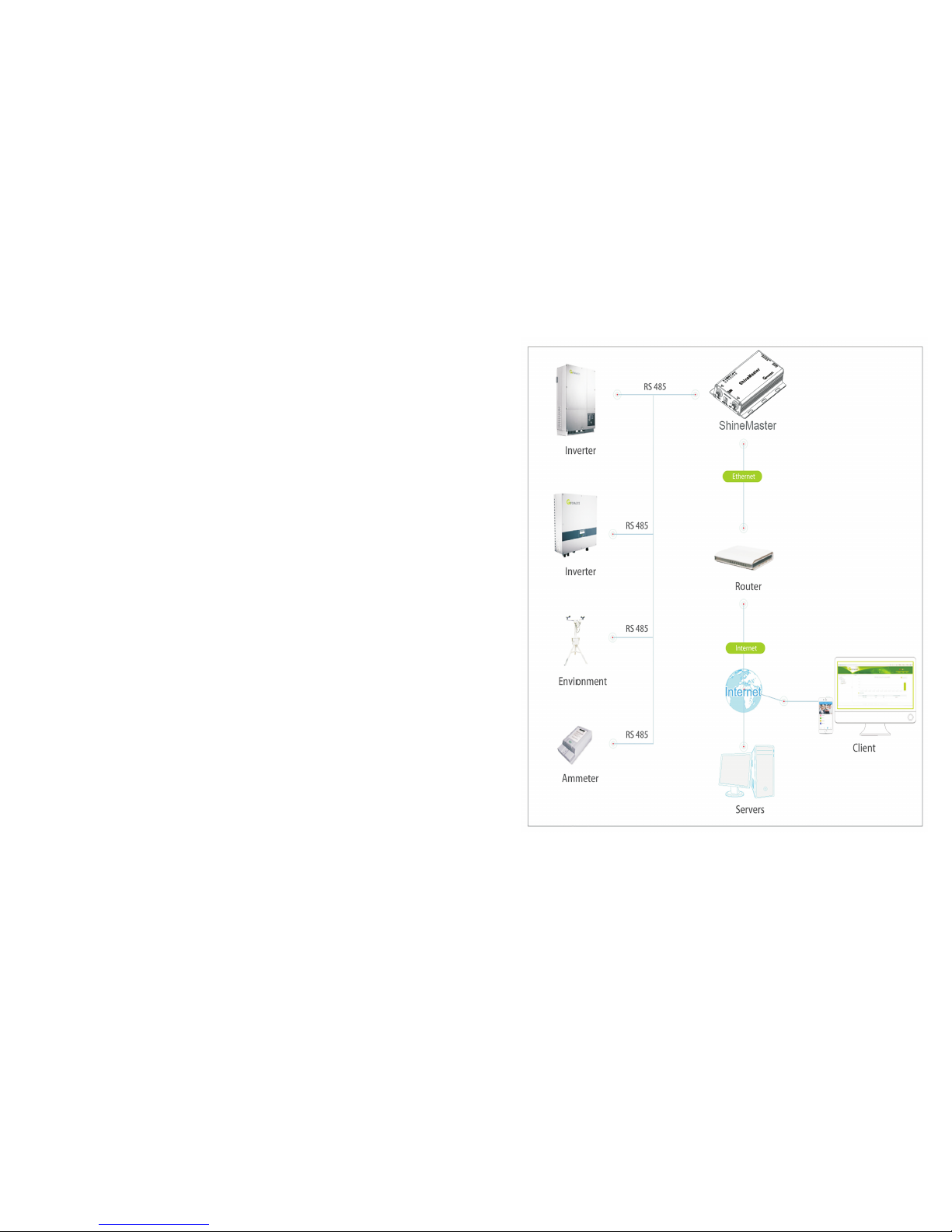
Shine Maste r support s network com munic ation , which can be comm un icate d via wi red
WLAN, wireles s Wi Fi, 2G/4 G, GPRS and clo ud server. Upl oad t he monitor ed da ta to the
serve r of Gro wa tt, and then a cce ss the ser ve r's do mai n name . Re al ize indus trial com mo n
commu nicat io n mo de RS485 and wire less RF co mmu ni catio n, als o su pport s wired and
wirel ess commun ic ati on ways to mo ni tor and set s lav e d evi ce s an d perf or m on line
upgra des o n devic es . By ac ces si ng Shin eMa st er' s in ter nal IP addre ss , you can en ter t he
built -in p ag e f or para met er sett ing and de vice addit io n v ie win g (pl ea se refer to s ec tio n
4.4 bel ow).
Shine Maste r moni tor s the phot ovolt ai c de vices thr oug h RS48 5 and RF(t emp or ari ly not
suppo rted) . The dia gr am bel ow sh ows th e schema tic diag ram of netw ork mo ni tor in g
throu gh wi red RS4 85.
Note: The pre condi ti on o f lo cal ac ces s is that t he a ddres s of PC and S hin eM aster mus t be
in the sa me doma in , the reby bu ildin g up a l oca l mo nit or ing sys tem.
Fig 2-5
6
7
2.3 ShineMaste r Ne tw or k In troduc ti on
Page 7
3.3.1 RS485 cabl e co nn ec ti on
3 Installation and Connection
3.1 ShineMaste r in st al la ti on
The ins ta llati on e nviro nme nt o f Sh in eMa st er a nd comm un ica ti on w ith oth er d evice s:
(1) Ind oo r in sta ll ation , te mpera ture - 40 ~ 60℃ , avoid m oi sture a nd d ire ct s un lig ht .
(2) Cab le R S4 85 i n maxim um 5 00 m.
3.2 ShineMaste r in st al la ti on
3.2.1 Installa ti on P rocedure
The ins talla ti on st ep s are a s follo ws :
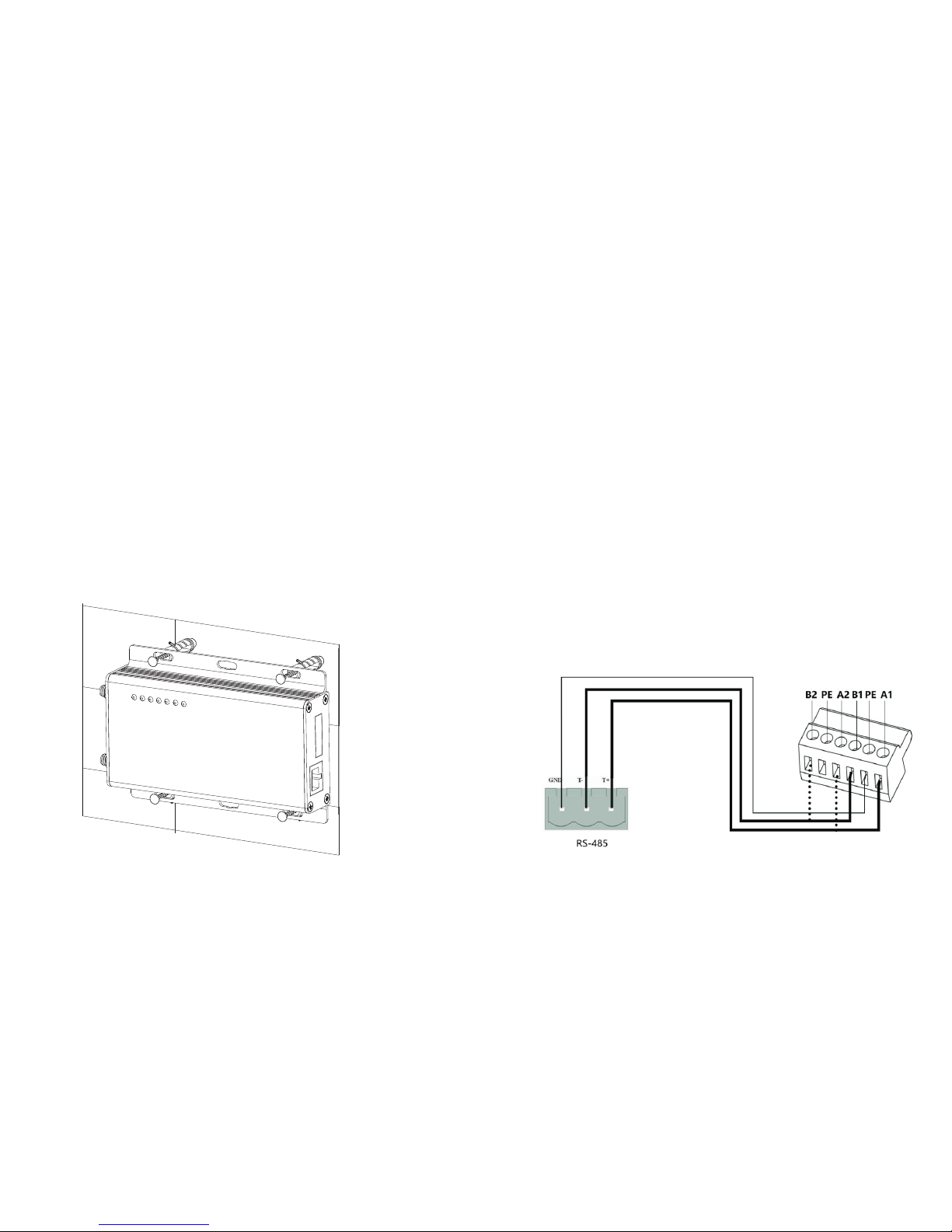
Insta ll Shin eM ast er o n a ver ti cal pla ne or hor iz ont al p lan e.
Conne ct c ab les betwe en RS4 85 i nt erf ac e an d RS 48 5 in te rfa ce on S hin eM aster (pl ea se
ref er t o 3.3 .1 b elo w fo r detai ls)
(1)
(2)
(3) Conn ect the netw ork cabl e ( in ser t t he net wor k l in e i nto the LAN inte rface on
Shine Maste r) .
(4) Co nn ect the Pow er s up ply (c on nec t t he powe r c ord to t he Powe r i nterf ac e on
Shine Maste r) .
3.3 Connect to the p ho to vo lt ai c de vi ce
Shine Maste r ca n com mu nic at e with th e inver te r, weathe r st ati on , sma rt m eter, com bi ner
box and o ther ph ot ovo lt aic d ev ices to a chiev e th e pur po se of d at a colle ction .
1.Shi neMas te r (mast er ) commu ni cat es w it h sl ave dev ic es via RS48 5 wi red con ne cti on .
485A+ o n th e RS 48 5 port of the sla ve d ev ice cor respo nds to A 1+ o r A2 + on t he
Shine Maste r 48 5 po rt, 485 B- a nd S hi neM as ter 485 on the RS48 5 po rt o f th e sl ave dev ic e.
Corre spo nd ing to B1- or B2- . Th e fo ll owi ng i s a sche matic dia gr am of the con ne ction
betwe en t he S hin eM aster a nd t he i nv ert er :
Note: t he R S4 85 s hie ld ed w ire m us t be g rou nd ( PE ) fo r lo ng dist an ce comm un ica ti on, so
as n ot t o aff ec t th e co mmu ni cat io n st abi li ty.
8
9
Page 8
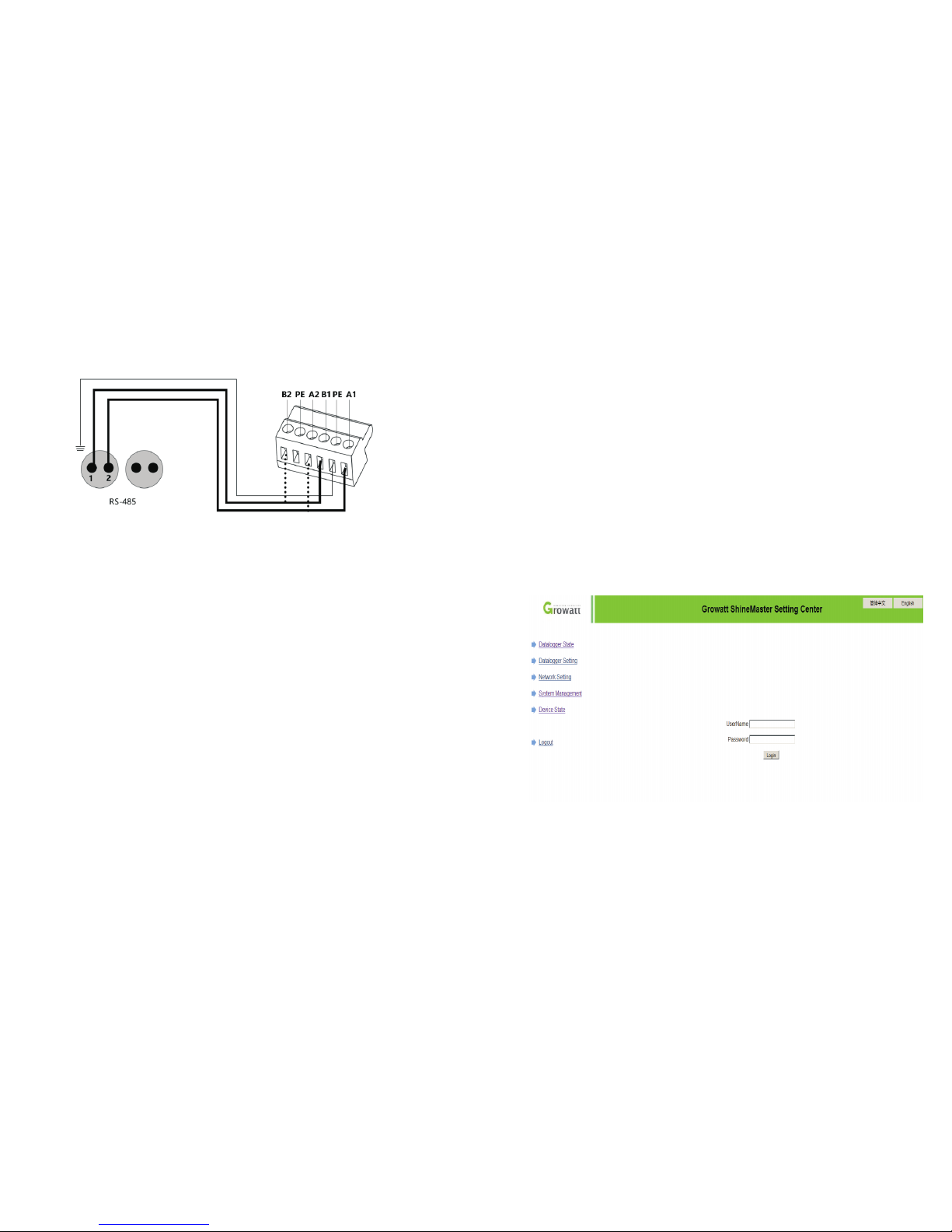
Fig 4-1
2. Note t hat the i nv ert er a lso h as a n inter face li ke t he on e be low :
3.The i nv erter s are conne cted to the Shi ne Maste r vi a RS 485 ser ia l co nne ct ion. Us in g th e
RS485 w ired comm unica ti on conn ec tio n, t he S hi neM as ter can mon it or up to 3 2 in ver te rs
stabl y.
4.The w ay s of S hi neM as ter con ne cti on t o Sm ar t me ter, c ombin er b ox a nd e nvi ronme nt al
monit or a re simi lar to t he c onn ec tion of inv er ter s. T he w ea the r st at ion can be conn ected
to t he i nve rt er i n serie s, a nd t he c ommun icati on l ine of t he s mar t me te r ca n be d ire ct ly
conne cted to the Shi ne Mas te r RS 485 por t.
Note: T he w ea the r st at ion , co mb ine r, an d smart met er m anufa cture rs m ust be
desig nated by Gr owatt , ot herwi se m on ito ri ng w ill not be po ss ible.
4 ShineMaster Inter nal Page
4.1 ShineMaste r IP a dd ress query
1. Conn ect the P C co mpu te r and t he S hineM aster L AN p ort t o th e net wo rk port o f the
rou te r thr ough th e netwo rk c abl e so t hat t he y are i n th e sam e LA N.
2. G o to t he rout er 's m ana ge men t pa ge a nd c heck the "I nt er net hos t li st " to q uery the IP
addre ss of the Shi ne Maste r IP a dd res s wi th t he s eri al n um ber of t he Shin eM ast er a s th e
devic e na me. Thi s IP add res s is the IP addr ess ass ig ned by the ro ut er to the Shi ne Maste r. If
you do n ot know how t o do thi s, c on tac t yo ur n etwor k ad mi nis tr ato r to per fo rm the
opera tion.
Note: T he r outer n ee ds t o en abl e au to mat ic I P as si gnm en t, t hat is, ope n th e DH CP
funct ion
3. E nte r th e Sh in eMa st er I P ad dre ss i n th e bro ws er t o en ter the Shi neMas te r inter nal pa ge
4.2 ShineMaste r bu il t- in p ag e ac ce ss
Befor e acces si ng, che ck w hethe r th e co mmuni ca tio n ca bl e betwe en t he d evice s is
secur ely con ne cte d. the n yo u ca n en te r the Shine Maste r IP a dd res s in the I E br owser t o
acces s th e bu ilt -i n pa ge o f Sh ine Ma ste r. As l ong as t he S hin eM ast er i s on the s am e
domai n as t he c om put er y ou a re a cce ss ing , yo u ca n ac cess the Shin e WebBo x bu ilt-i n
serve r.
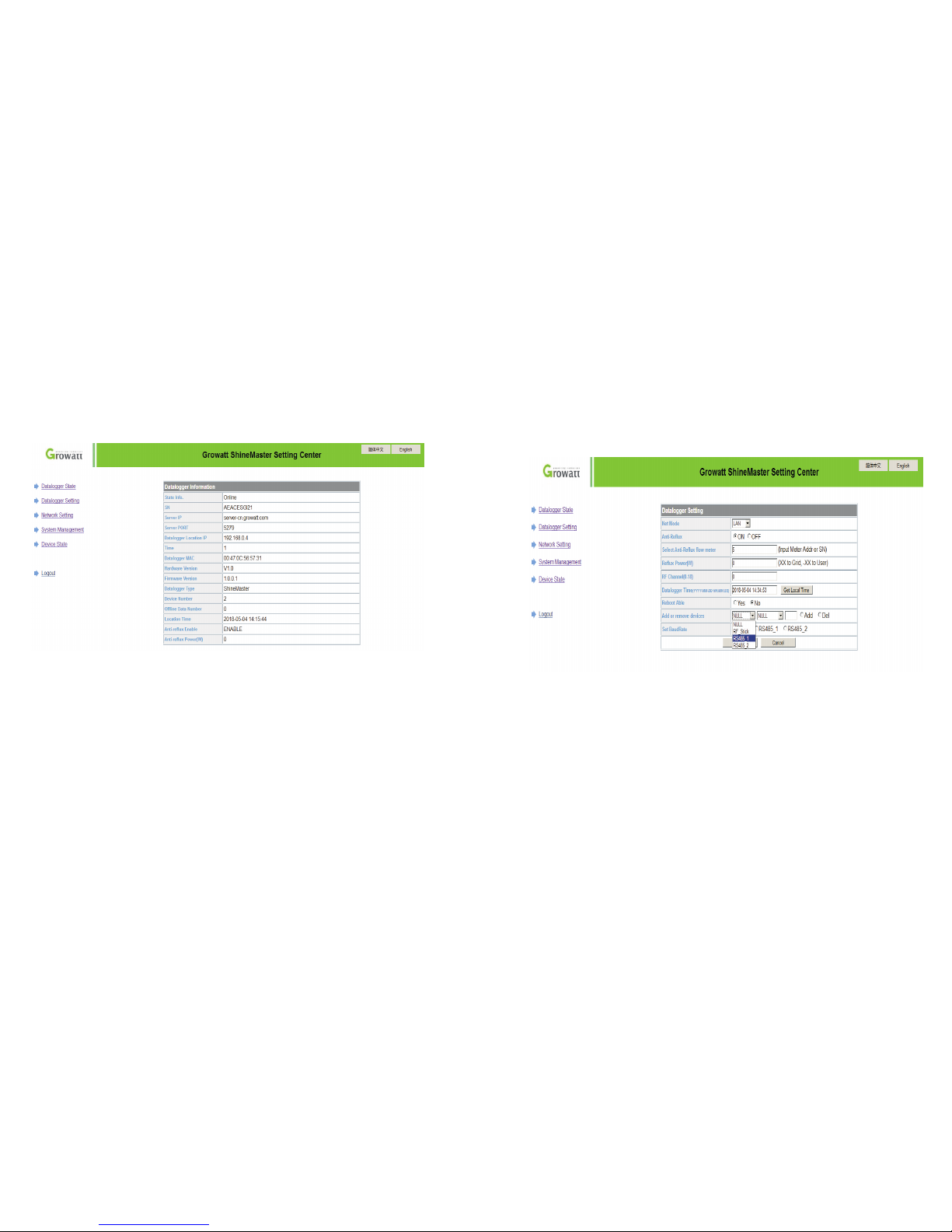
1.If th e us er s uc ces sf ull y ac ce ss t he S hin eM ast er i nt er nal pag e, y ou c an d ire ct ly ente r th e
built -in page lo gi n in ter fa ce, as s how n in Fig ure 4-1
2.Enter t he user n am e and p as swo rd, the d ef aul t lo gin u se r name: a dmin pa ss wor d:
admin , fill in a nd c lic k on l ogi n to e nter th e Gro wa tt Sh in eMast er syst em p age .
10
11
Page 9
4.3 ShineMaste r St at us V ie w
Click t he S hi neM as ter dat al ogger S ta tus to v iew inf or mat io n su ch a s the “Syst em S tatus
Infor matio n” , “Seri al N umber ”, “ Serve r Ad dre ss ”, “ Num be r of C on nec te d De vic es ”,
etc. of the Shi ne Mas te r
4.4 ShineMaste r Da ta lo gg er m an ag ing
Devic es s hould b e ad de d in ‘ Sh ine Ma ste r da ta log ge r se tti ng ’ in ter fa ce i n in ter nal pa ge
prior t o mo ni tor in g
4.4.1 Add device
(1) Bef ore Shine Maste r mo nitor s ph ot ovo lt aic equ ip men t, i t is nec essar y to ent er t he
“S hin eM aster D at a Co lle ct or S ett in gs” page of the bui lt -in pag e to add d ev ices.
(2) In th e secon d dro p- down li st, sel ec t the t yp e of mo ni tored d evi ce
12 13
Devic e types p ar ame te r inf or matio n
INVER TE R GRO WATT I nve rt er;
SDM12 0 singl e phase m et er;
SDM63 0 three p has e me ter ;
Batte rBox ba ttery B ox ;
Surve ymete r Surve y Me ter.
:
:
:
:
:
:
Page 10
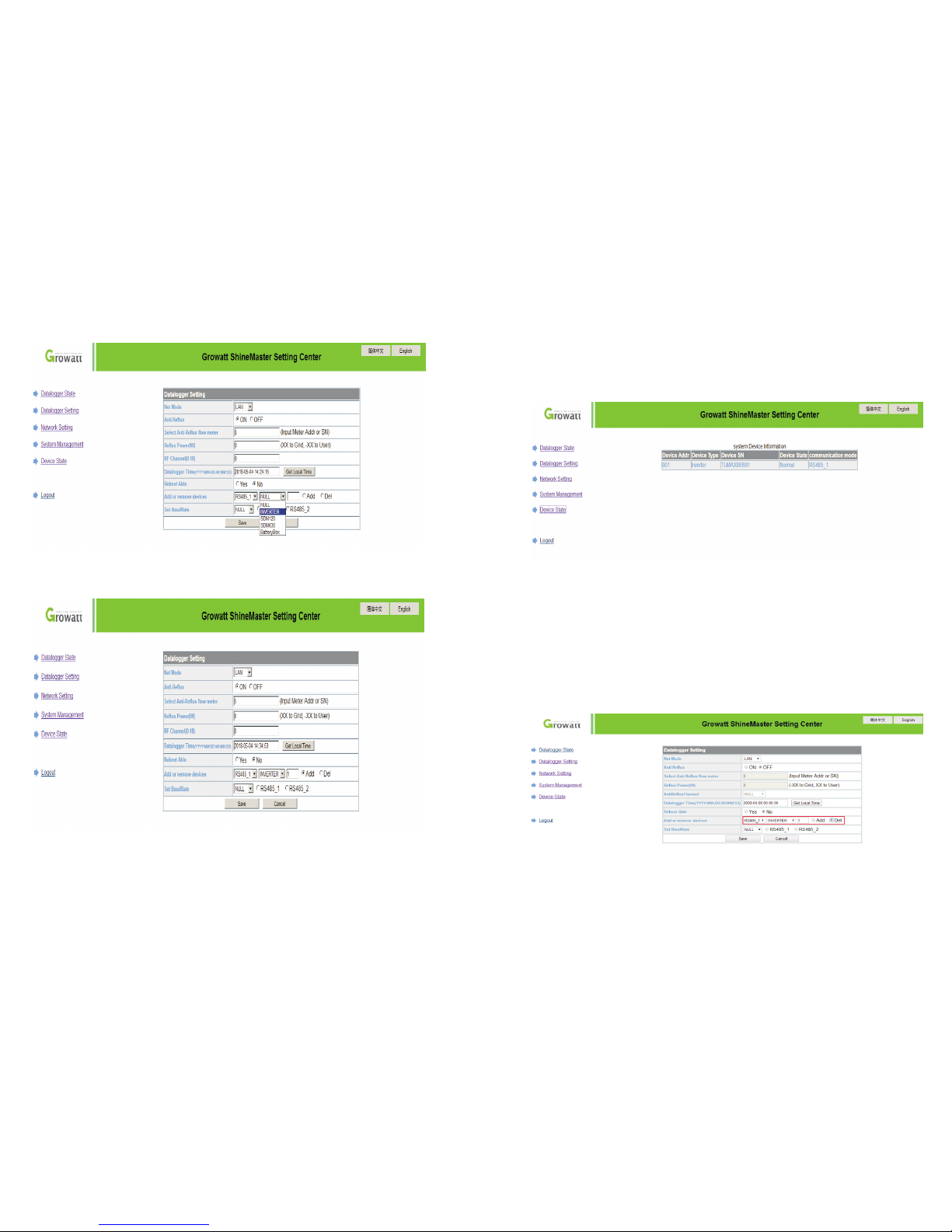
(3) In th e third d rop -down l is t, fi ll i n the c om munic ation a dd res s of moni tored d evi ce
(4) Sel ect "Ad d" a nd cl ic k Sav e.
(5) Aft er s uc ces sf ully sa vi ng, ent er t he " De vic e St at us" pag e to con fi rm whet he r the
devic e is a dd ed s ucc es sfu ll y.
4.4.2 Remove dev ic e
(1) Sel ec t th e mo nit or ing met ho d fo r mo nit or ing PV devi ce s in t he f irst dr op-do wn l ist of
"Add or Rem ov e De vic es ".
(2) In t he seco nd d rop -d own lis t, s el ect the typ e of P V pl an t be ing mon it ore d.
(3) Fil l in the PV de vi ce c ommun icati on a ddres s in t he t hird dr op- do wn l ist .
(4) Sel ec t "D el" and cli ck S av e to f inish r emovi ng o f th e de vice.
(5) Aft er s uc ces sf ully sa vi ng, ent er t he " De vic e St at us" pag e to con fi rm whet he r the
devic e is s uc ces sf ully de le ted.
As s how n in the pic ture:
14 15
Page 11
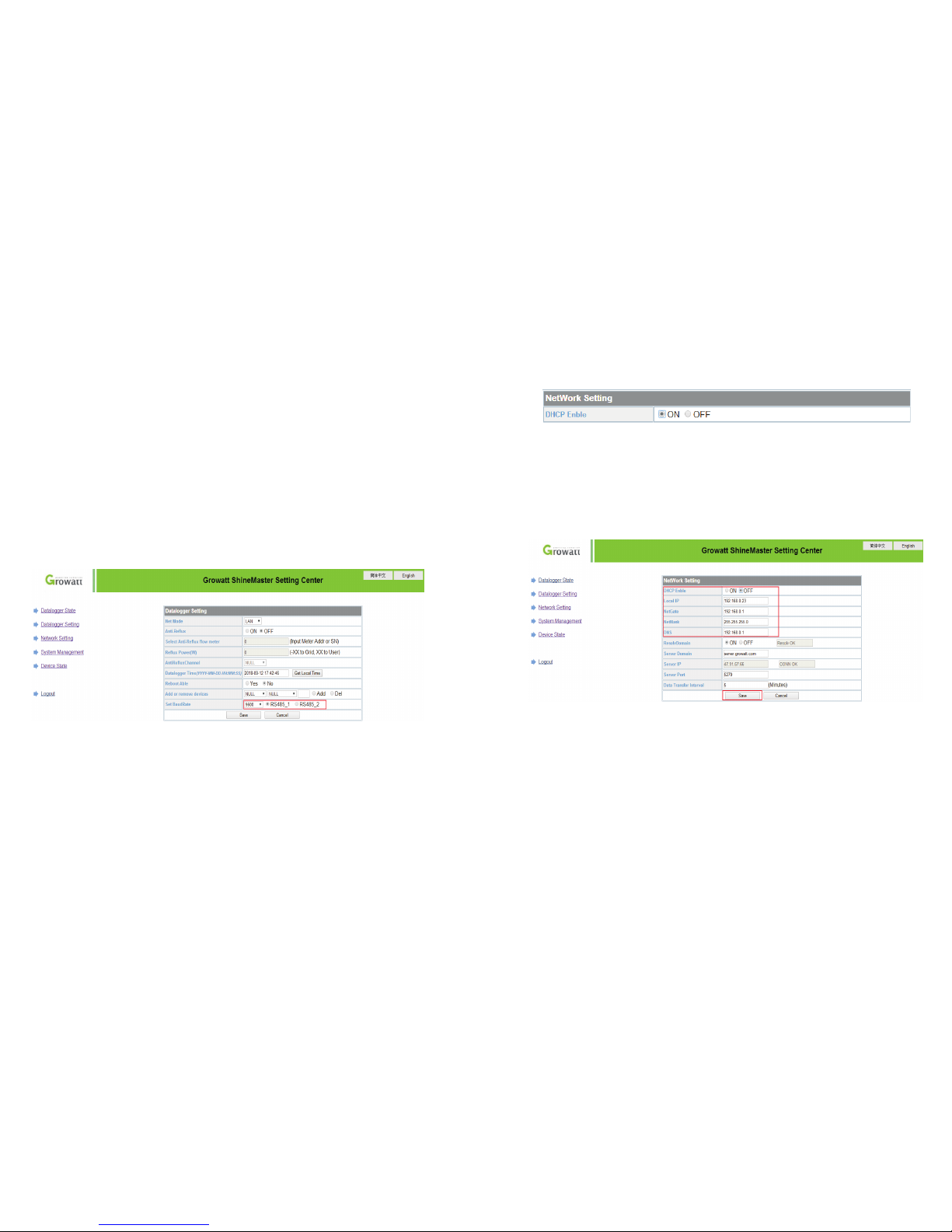
Add and d elete d ev ice :
When yo u need de le te a de vi ce, a ll t he opti ons sho ul d be th e sa me wi th t he mome met
you add t his dev ic e lik e: 4 85 ch an nel, de vice ty pe , add ress, i f you are n ot su re abou t th is
you can c heck th e de vic e st atu s fi rst.
2. When o ne addr ess i s oc cupie d, you ca nn ot ju st p ast e th e new dev ice, yo u ha ve to d el ete
the old d evice a nd u se th is a ddr ess.
1.
4.5 Baud Rate Sett in g
The Def ault tw o ch ann el s’ Ba ud R ate are b oth 9 60 0, yo u ca n adjus t the Bau d Ra te fo r
diffe ren t scena rios.
Choos e the Bau d ra te at t he “ Bau d ra te sett ing ”Ba r.
Choos e the cor res po nding c hanel s RS 485 _1 o r RS4 85 _2.
Set the B aud rat e to 9 600 a s RS 485 _1
(1)
(2)
4.6 Server Address and Shine Master IP s et ti ng
4.6.1 Data logge r IP S et ti ng
(1) Shi neMas te r’s Def au lt se tt ing of th e DHCP fu nc tio n is “ ON” i t wi ll auto matic al ly ge t IP
addre ss. Sh ine Ma ster
(2) If yo u need a fi xe d IP ad dress y ou need f ol low in g ste ps
(2.1) Tur n off the “ Dy namic I P” to shu t do wn th e DH CP fu nc tion
(2.2) P ut in the f ix ed IP, netwo rk mana ge men t, n et ma sk a nd DNS th en clic k “S ave ”
4.6.2 Server Add ress Setting
The Ser ver Add res s wi ll choo se two me th ods , on e is IP a nd o ne is dom ain nam e, y ou ca n
only us e one at a ti me .
When yo u are u si ng Se rv er IP to co nnect t he s erv er p lea se t ur n off t he “dom ai n nam e
analy sis fun ct ion ”, s et th e se rver as 1 20.77 .1 27. 13 5.
(1)
16
17
Page 12
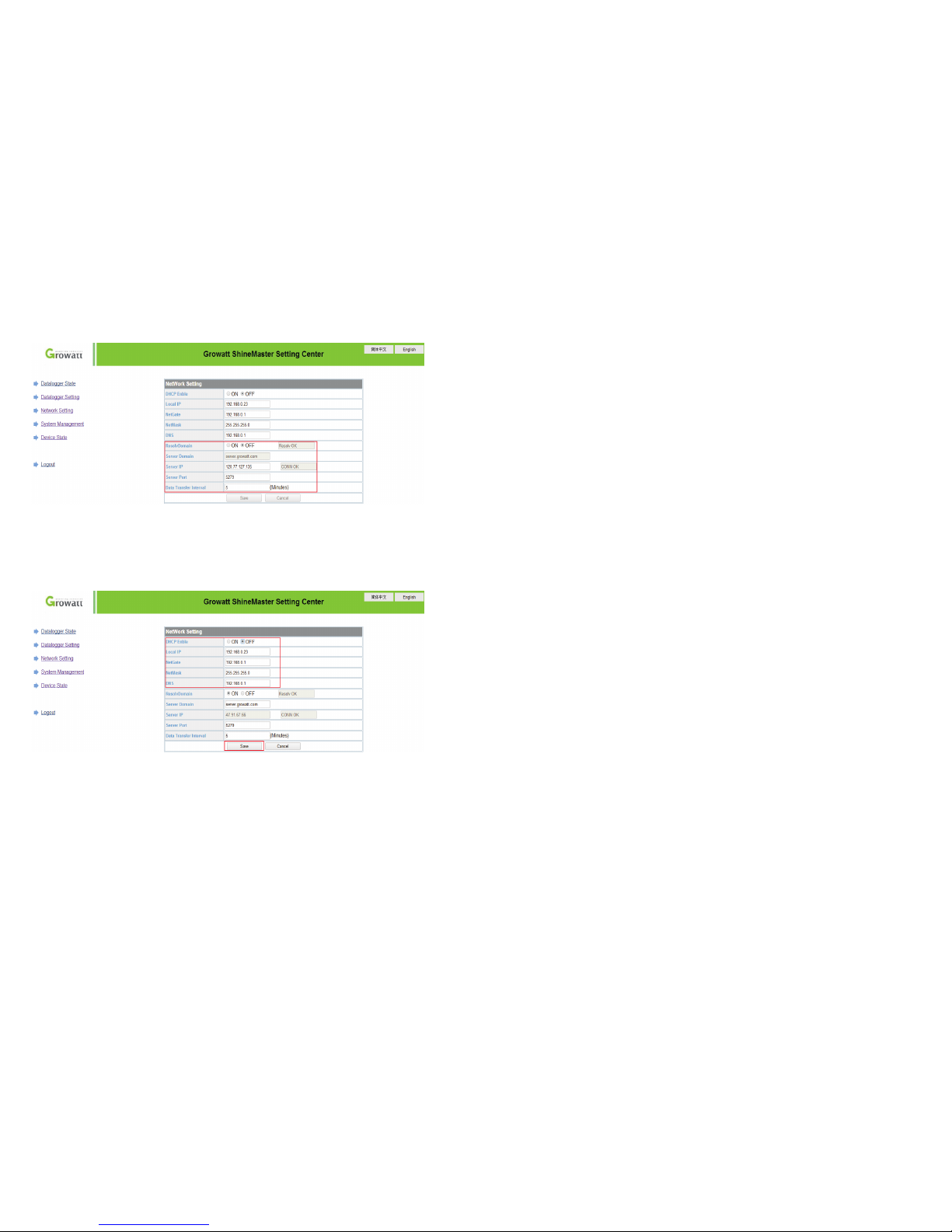
(2) whe n you are u sin g th e domai n name to c on nec t se rve r yo u can cho ose on at
“Doma in Name A na lys is F unc ti on” set t he serv er a s ser ve r-cn .g row at t.c om
Serve r port na me a nd da ta u pgr ad e inter val are f ixe d ca nnot be c hange d
Caust ion:
1)If you ad d a devic e, a fte r sa vin g th ere i s no re fresh me nt, p le ase d is conne ct the da ta
logge r and res tar t it .
5 Server: Shineserver’s operation
5.1Registrat io n an d lo gi n
(1) Ent er t he a dd res s of t he s er ver on the comp uter brow ser to ente r th e Sh ineSe rver
login p ag e. I f yo u are log gi ng i n for the fir st t im e, regi ster the us er n am e fi rst . En te r th e
domai n na me a cce ss p ag e, a s sh own in Figu re 5-1.
The Chi nese us er s erv er d oma in n ame is: h ttp:/ /s erv er- cn. growa tt .co m
The ove rseas u se r ser ve r dom ai n name is : http: // ser ve r.gro wa tt.co m
18 19
If need ed to the d at alo gg er an d al l monit oring d ev ice s fo r dat a di splay, mo ni torin g, and
set up pa ramet er s by th e se rve r, you n ee d to fi rs t add dat alogg er t o the s er ver, w hen
Shine maste r ad ded t o th e ser ve r, if th e sub se quent n eed to mo di fy so me p ara me ters of
The dat alogg er o r ena bl e, di sa ble a fun ction c an b e don e th rou gh the se rv er.
Page 13
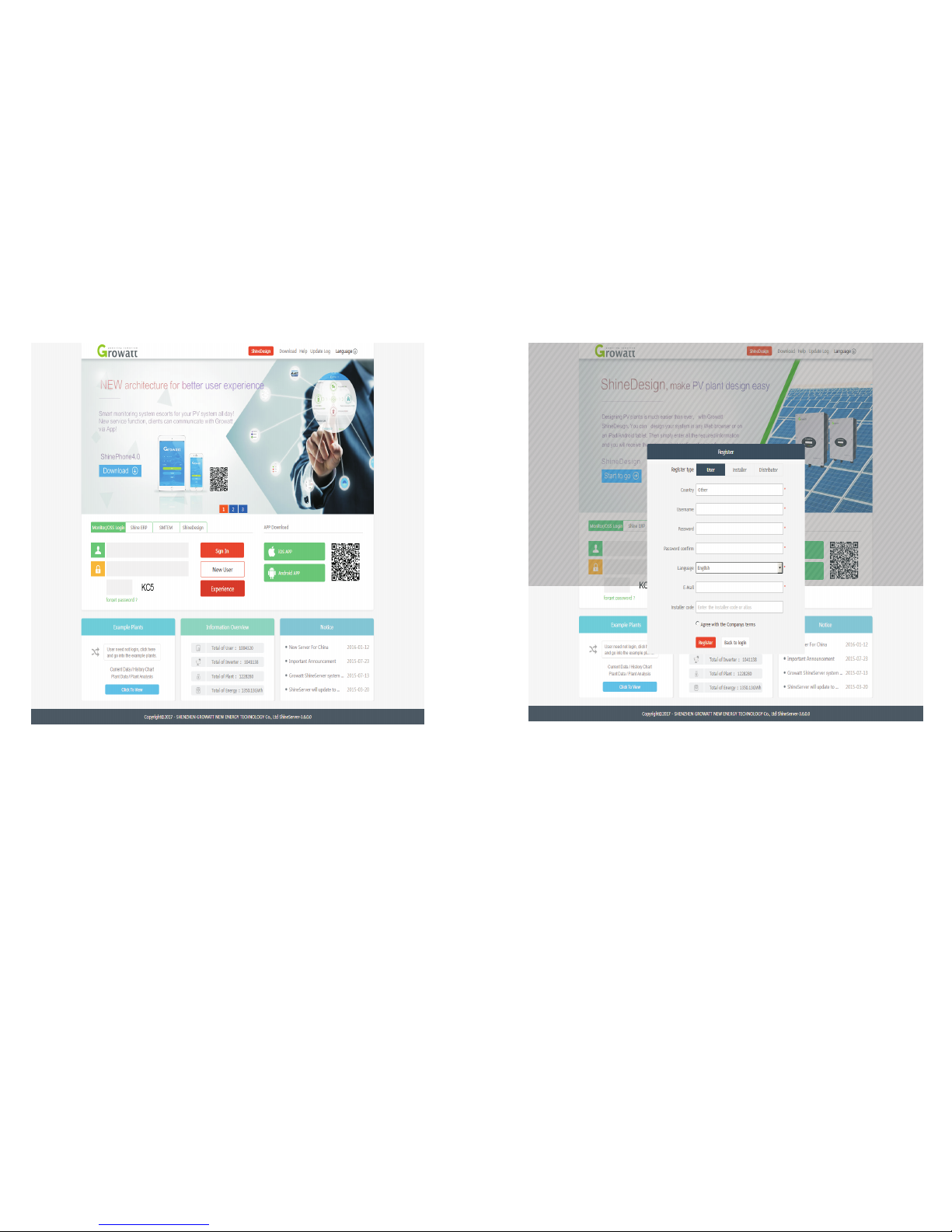
Figur e 5-1 S hi ne Se rv er logi n page
(2) Reg is ter the use r na me a nd i nput the user i nf ormat ion accor din g to the pop -up. Afte r
the inf or matio n is c om ple te d, c lic k “R eg ister ”.
Note: “ Sh ineMa ster seri al n umber ” an d “d atalo gger chec k co de” see n on the pac ka ge
box.
Fig 5-2
5.2 View mon it or in g da ta
(1) Aft er t he r egi st ratio n is c om plete d, i t wi ll a uto ma tic al ly j ump to t he Shin eS erv er m ai n
inter face. Cli ck " plant " → "p la nt d ata " , and the di sp layed i nf ormat ion is t he t ota l po we r
chart o f th e pl an t on t he d ay. Th e dr op- do wn l ist “Se le ct c oll ec tor ” ca n be use d to v ie w
the dai ly p ow er c har t of a singl e in verte r in t he p ow er s tat io n.
20 21
Page 14
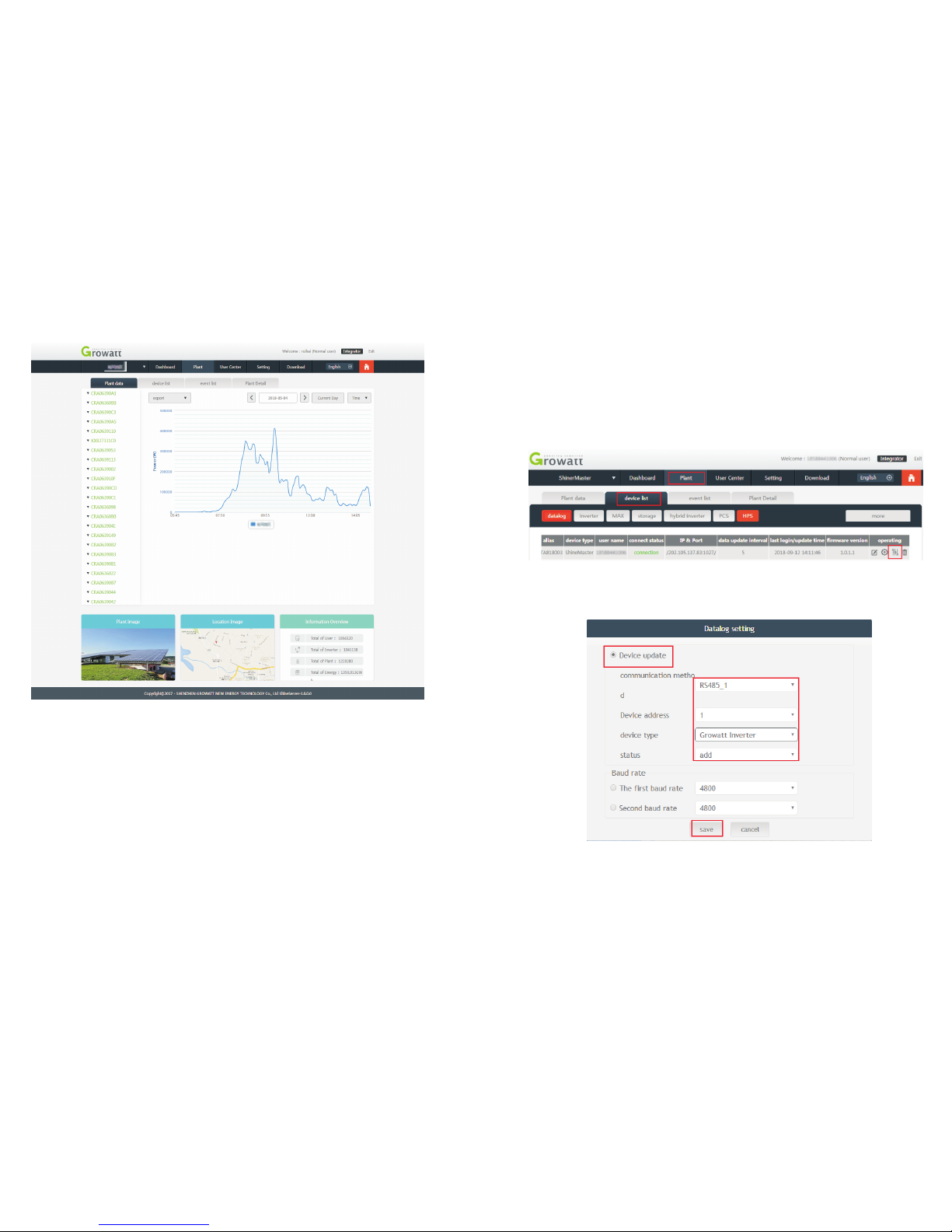
Fig 5-3
(2) Cli ck "pla nt " → "De vice li st " to se e real- time da ta m oni to red b y datal og ger,
"Inve rter" , "We at her sta tion" , "S mar t Me ter ", a nd "Com bined B ox " "MA X" .
22 23
5.3 Add or Delete Mo ni to ri ng d ev ic es , change the ShineMaster
Baud rate
5.3.1 Add or Delet e Mo ni to ri ng d ev ic e
(1) In t he S erv er p ag e click the “ De vice Mana gemen t” a nd t hen cli ck “ Da ta L ogg er ”.
In t hi s page clic k se t th e de vic e up da tin g ic on .
(2) Add one dev ic e, a dd one Grow att inv er ter set the 485 c om munic ation add res s is 1.
Page 15
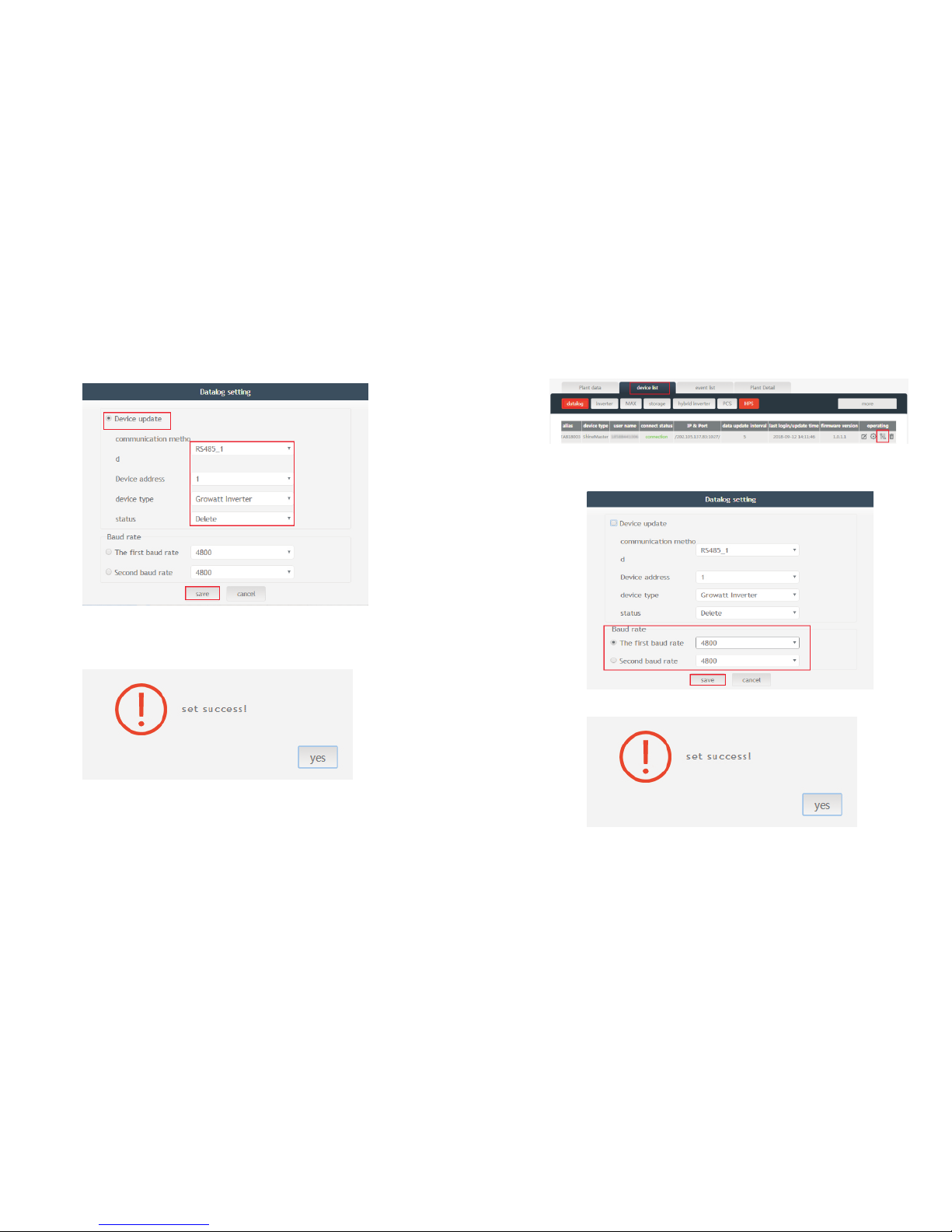
(3) Del et e on e de vic e, j us t li ke foll ow ing fig ure.
(4) Abo ve a dd ing or d ele ti ng d evi ce s if s ucces s fo ll owi ng f ig ure w il l po p out.
5.3.2 Change Shi ne Ma st er B au d ra te .
(1) In t he S erv er p ag e click “De vice Mana ge men t” t he n click “Da ta L ogger ”, c lick the
Ba ud r ate set ti ng icon .
(2) Set cho se n ch ann el ’s bau d ra te.
(3) If s ucc es s fo llo wi ng f igu re w ill pop out .
Note: T he s ec ond cha nn el o f Ba ud rate set ting woul d be t he s am e as t he f ist cha nn el.
24 25
Page 16

6 Device Maintenance
6.2 Common fault s an d troubleshoot in g
Fault
Cause
Sugge stion
Canno t enter t he
Shine Maste r
inter na l page
Shine Maste r ca n not
obtai n the IP
1.Ena ble Rou te r DHC P Fu nct io n
2.PC an d the Shi ne Mas te r mus t be i n
the sam e domai n.
Shine Maste r
built -in pag e
"Syst em Stat us
Infor matio n"
shows n ot
conne cted
Unabl e to conn ec t to
serve r
1.Che ck whet he r the r outer n etwor k is
conne cted to t he I nte rn et .
2.Che ck if the " se rve r ad dre ss" is co rre ct
The Chi nese us er s erv er d oma in n ame is:
http: //ser ve r-cn .g row att.c om
The ove rseas u se r ser ve r dom ai n name is :
http: //ser ve r.gro wa tt. co m
Shine Maste r is
onlin e, but th e
monit ore d de vic e
is disc onnec te d
after l oggin g in t o
the acc ount
1.Mon itor co nn ect io n
faile d
2.No ac cess to t he
built -in pag e to
add equ ipmen t
3.Inc onsis te nt
Photo volta ic
equip ment ad dre ss
and add ed
equip ment ad dre ss
4.Ill egal PV d ev ice
seria l numbe r
1.Che ck the co mm uni ca tio n li ne is in
conta ct with t he s tab il ity
2.Ent er the bu il t-i n pa ge "d at alogg er
setti ngs" to a dd p hot ov olt ai c devic es
3.On th e "Devi ce S tat us " pag e of t he
built -in pag e, c hec k wh eth er t he
devic e's com mu nic at ion a dd res s is
consi stent w it h the a dd ed de vi ce.
4.Che ck whet he r the s er ial n um ber of
the mon itore d PV eq ui pment i s 10
digit s. It can o nl y con ta in En gl ish
lette rs and nu mb ers , an d the re are no
illeg al char ac ter s.
Long ti me no
ref res h in terfa ce
after o perat io n
Confi gurat io n pag e
does no t res po nd
Refre sh th e pa ge or l og in in aga in.
6.3 Maintenanc e
1. Avoi d frequ en t switc hi ng o f power sup ply, gen tly han dl e, t o pre ve nt d ama ge ;
2. S hin eM aster i s a prod uct for ind oo r us e. Do not pla ce S hi neMas ter in a h um id
envir onm en t or i n di rec t su nl igh t.
6.1 Reset ShineMas te r
If y ou p res s th e “rese t” b utton f or f iv e se con ds , it w il l erase all t he r egist ere d de vi ce
infor matio n. A ll t he i nfo rm ation f or t he s er ver com mu nic at ion par t wi ll b e ke pt .
Gener al spec if ica ti on
7 Technical specifications
7.1 ShineMaste r sp ec if ic at io n
Lengt h * width * h ei ght
130mm *84mm *2 5mm
Net Wei ght
180±g
Pro te cti on g rad e
IP30
Opera ting en vi ron ment
Ambie nt temp er atu re
-40℃~ + 60℃
Insta llati on
Indoo r
26 27
Page 17

8 Contact us
Gro wa tt New Ener gy p rov id es c ust om ers wit h a full r an ge o f te chn ic al s upp or t. U ser s ca n
conta ct t he n ear est Gro wa tt n ew ener gy o ffi ce o r cu stome r se rv ice poi nt , or t hey can
conta ct t he c omp an y's cus to mer ser vi ce c enter d irect ly.
Name: S HE NZHEN G RO WATT N EW E NER GY T EC HNO LO GY C O., LTD
Addre ss: No. 28 G uangm in g Road, Shi ya n Stree t, B ao’ an D is tri ct , Sh enz he n, P.R. China
Custo mer Servi ce H otlin e: + 86 7 55 2 747 19 42
E-mai l:ser vi ce@ gi nve rt er.c om
Compa ny w ebsit e: w ww.gin verte r.co m
Commu nicat io n
Wi rel in e com mu nic at ion
RS485 m aximu m st abi li ty mo ni torin g 32
inver ters
Wi rer le ss co mm uni ca tion
Not sup porte d te mpo ra ril y
RS485 c ommun ic ati on d ist an ce
500 met ers max im um (t wi ste d sh ielde d
cable )
28
 Loading...