

Page 1

URANIUM SERIES
SQ AMPLIFIER
GZUA 2SQ
GZUA 4SQ
GZUA 6SQ
Owner´s Manual
(AWV2.2)
English Version
1
Page 2
GROUND ZERO GZUA SQ AMPLIFIER
URANIUM SERIES
Introduction
Thank you for choosing a GROUND ZERO product and welcome to your new URANIUM series amplifier! This
is the owner´s manual providing instructions on the operation & installation of this amplifier. Please, read it
carefully. If you have any further questions, please contact your local GROUND ZERO dealer or our regional
distribution partner at your country. Amplifiers are one of the most important parts of your car audio system.
However, they won´t deliver its full performance, unless each part of the whole system is tuned carefully
matching each other. Therefore, we recommend consulting a car audio specialist to compile the desired sound
system, as well as for installation and individual, correct sound tuning.
We hope you will enjoy the sound quality of one more enthusiastic development by the
GROUND ZERO engineering team!
URANIUM Series – Amazing Sound Quality
Products belonging to the GROUND ZERO URANIUM series stand for high-end sound quality or extreme power
handling capability. Each product of the URANIUM series has been developed carefully to fulfill the demands
of music enthusiasts with high audiophile expectations at a reasonable price level. Applying GROUND ZERO´s
experience from sound quality competitions at tuning the product details carefully, results in emotional and
amazing audio reproduction. These distinguished products point out the main purpose by their designation: SQ
beyond the average.
The limited warranty for this product is covered by GROUND ZERO´s regional distribution partners and their
terms and conditions. For further information contact your local retailer or regional distributor.
Terms of Warranty
General installation instructions
• As a precaution, it is recommended to disconnect the vehicles battery before mounting the amplifier.
Note: For new vehicles, disconnecting the battery might cause various errors in your vehicle´s electric
system that can be cleared only by authorized service partners of your vehicle´s manufacturer! Please ask
your service partner first before disconnecting the battery!
• The power supply wire (+12 V) has to be protected within max. 20 cm / 8” by a main fuse holder with a
fuse value matching the recommendation for your amplifier
Note: If there is more than one amplifier connected using this power wire, the main fuse value must be
equal to the sum of the recommended fuses of all connected devices. However, make sure the diameter
of your power wire will be enough for the required current!
• If necessary, replace a defective fuse by a fuse with identical quality and value
• Never drill holes to the vehicle´s gas tank, brake lines, to wirings or any other important vehicle parts!
• Never pass wires over sharp edges or vehicle parts due avoid any kind of damage
• Keep the wiring away from the antenna and electronic devices contributing to radio reception
• Lay the power supply wiring always separated from speaker wiring to avoid disturbance
• The amplifier contains a temperature protection circuit that turns the device off in case of overheating. After
a certain cooling time, it will turn on automatically. To avoid heat build-up, enough air supply for cooling
must be provided. Never cover the surface of the amplifier´s heatsink entirely
• The amplifier should
This might lead to malfunction due to loosened electrical parts inside the amplifier
• Some amplifiers offer a high-level input option, however if a pre-amplified output (RCA) is available (at the
head unit), it is strongly recommended to make use of them
NEVER be mounted onto a vibrating part or surface such as a subwoofer enclosure.
Page 3
URANIUM SERIES
URANIUM SERIES
GROUND ZERO GZUA SQ AMPLIFIER
SQ AMPLIFIER
GZUA 2SQ
GZUA 4SQ
GZUA 6SQ
Common Features
• 2-ohms stable (stereo mode)
• *1-ohm stable (stereo mode)
• Adjustable BIAS control
• High-performance OPA 2134 operational amplifiers
• High-end WIMA® capacitors
• Status LED indication
• Wide-band adjustable high pass & low pass filters
• Band-pass feature with activated LPF & HPF
• Adjustable input sensitivity
• Soft delayed remote turn-on
• *Wired bass level remote control
• *Phase shift control
• *Bass boost control (0 - 12dB @ 45 Hz)
• Thermal / short circuit / overload protection
* for GZUA 2SQ only
Page 4
GROUND ZERO GZUA SQ AMPLIFIER
URANIUM SERIES
Model
GZUA 2SQ
GZUA 4SQ
GZUA 6SQ
Amplifier Type
Output Power (RMS) @ 4
CEA-2006-A (@ 1 kHz)
Output Power (RMS) @ 2 Ω
CEA-2006-A (@ 1 kHz)
Output Power (RMS) @ 1 Ω
CEA-2006-A (@ 1 kHz)
Max. Output Power
(bridged mode)
Low Pass Filter
High Pass Filter
Band Pass Filter
Frequency Response
Signal-to-Noise Ratio (SNR)
Overall Distortion (THD+N)
Damping Factor
Input Sensitivity
Recommended Loudspeaker Wiring
Recommended Power Wiring
Fuse(s)
Dimensions (w x h x l)
Specifications
SQ Class A/B Amplifier
Ω
2x 175 W
(1% THD+N)
2x 300 W
(1% THD+N)
2x 485 W
(1% THD+N)
1180 W @ 2 Ω
(10% THD+N)
20 Hz – 400 Hz / 200 – 4000 Hz (x10)
20 Hz – 400 Hz / 200 – 4000 Hz (x10)
110 dB (@ 100 Watts A-weighted)
< 0.005% < 0.01%
4x 115 W
(1% THD+N)
4x 185 W
(1% THD+N)
n/a n/a
2x 440 W @ 4Ω
(10% THD+N)
20 Hz – 4000 Hz
10 Hz – 70 kHz ( -3dB)
4x 110 + 2x 160 W
(1% THD+N)
4x 175 + 2x 280 W
(1% THD+N)
2x 425 + 650 W @ 4Ω
(10% THD+N)
> 800
0.8 – 6 V
≥ 2.5 mm² ≥ 1.5 mm² ≥ 1.5 /2.5 mm²
≥ 25 mm² ≥ 25 mm² ≥ 35 mm²
3x 30A 2x 40A 4x 30A
209 x 48 x 360 mm
8.23” x 1.89” x 14.17”
BIAS setting
209 x 48 x 360 mm
8.23” x 1.89” x 14.17”
209 x 48 x 550 mm
8.23” x 1.89” x 21.65”
The BIAS setting affects the operation mode of the amplifier. It is continuously adjustable from <MIN> (actual
Class A/B mode) to <MAX> (close to Class A mode). An amplifier in Class A mode sounds warm and creates
a pleasant atmosphere. Compared to that, the Class A/B mode of an amplifier sounds more direct and dynamic.
Depending on the BIAS setting, the current consumption of the amplifier is growing the closer the operation
comes to the Class A mode leading to an increased temperature. The power rating however, remains identical.
The BIAS can be set using the control on the bottom of the amplifier for each pair of channels, independently.
Page 5
GROUND ZERO GZUA SQ AMPLIFIER
URANIUM SERIES
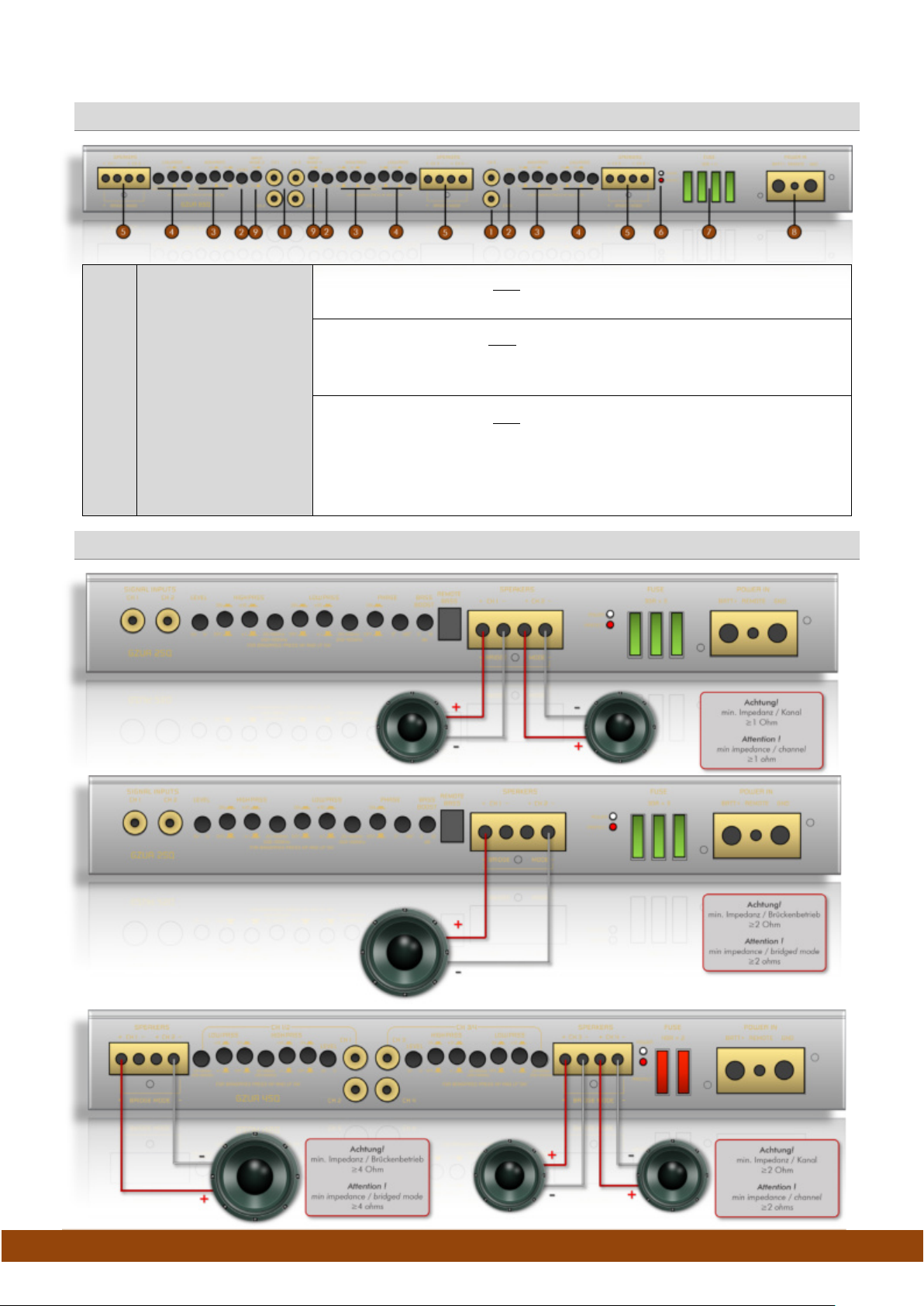
1
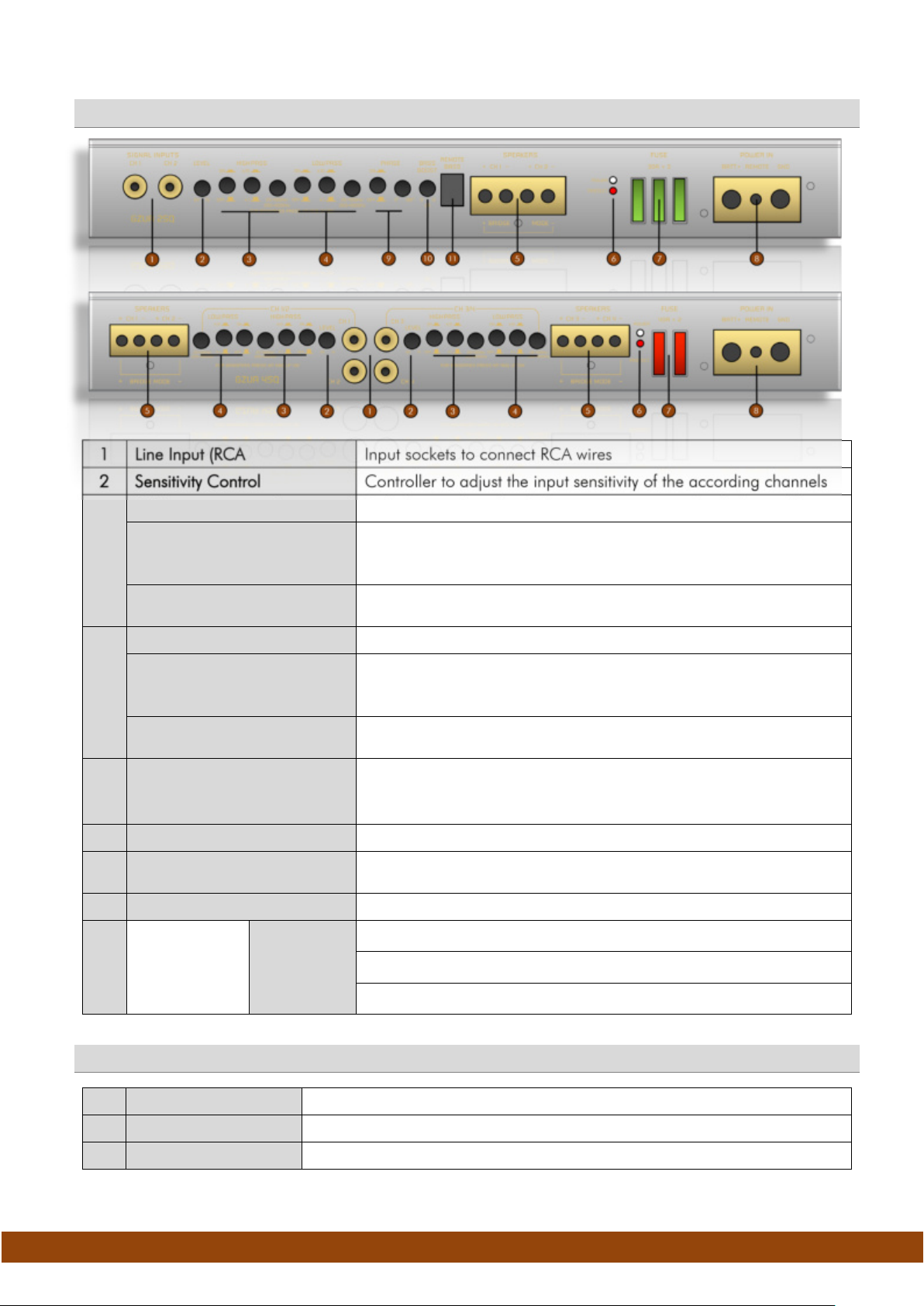
Line Input (RCA
2
Sensitivity Control
3
HPF activation switch
HPF multiplication switch
Push the switch to the x10 position to multiply the frequency by the
20~400 Hz to 200~4000 Hz
HPF filter controller
Adjust the required crossover point using the controller.
4
LPF activation switch
LPF multiplication switch
Push the switch to the x10 position to multiply the frequency by the
~
LPF filter control
Adjust the required crossover point using the controller.
*
BPF feature
5
Loudspeaker Terminal
6
Status LED
POWER -> white -> ok (correct operation)
PROTECT -> red -> error / protection
7
Fuse(s)
8
Power
Terminal
BATT +
REMOTE
GND
9
Phase Switch/Control
10
Bass Boost Control
11
Bass Remote Socket
Common Controls & Features
Input sockets to connect RCA wires
Controller to adjust the input sensitivity of the according channels
Push the switch to the ON position to activate the high pass filter
factor of 10. The crossover frequency range will be swapped from
Frequencies below the selected crossover point will be filtered
Push the switch to the ON position to activate the low pass filter
factor of 10. The crossover frequency range will be swapped from
400 Hz to 200~4000 Hz
20
Frequencies above the selected crossover point will be filtered
Activating the high and the low pass filter results in a band pass
filter. Depending on the multiplication switches the band pass filter
range varies from 20~4000 Hz
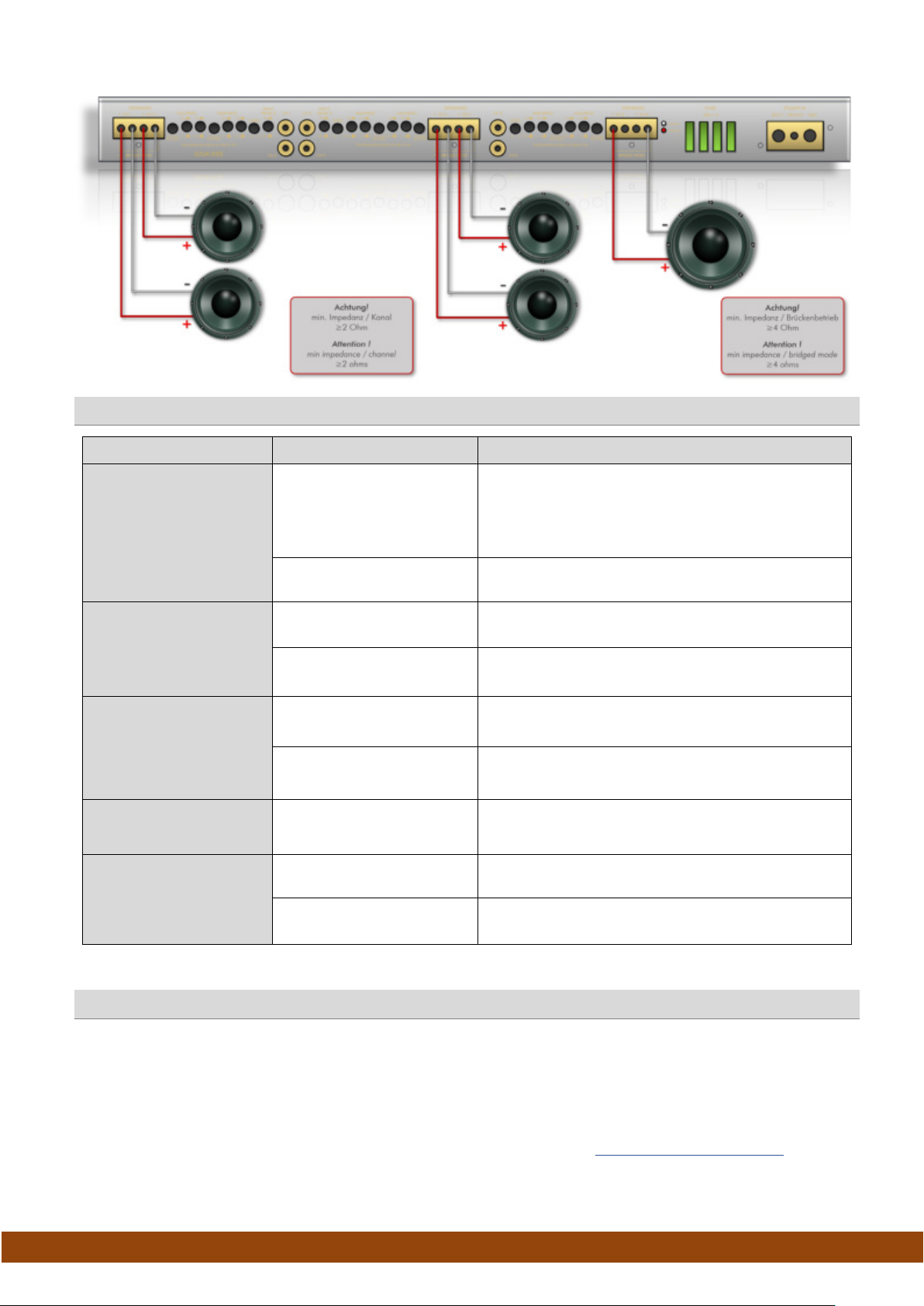
To connect the loudspeaker wires in stereo or in bridged mode
Replace a defective fuse only by a new fuse with identical value
To connect to a positive power wire from the battery terminal
To connect the remote switch output wire of the head unit
To connect to a ground wire from the battery or to chassis ground
Additional Features of GZUA 2SQ
To activate phase adjustment (0°~180˚)
To adjust the bass boost level ( from 0~12 dB @ 45 Hz)
To connect the wired bass level remote control
Page 6
GROUND ZERO GZUA SQ AMPLIFIER
URANIUM SERIES
9
Input Mode Switches
INPUT MODE 2 “OFF” and INPUT MODE 4 ”OFF”
INPUT MODE 2 “ON” and INPUT MODE 4 ”ON” or “OFF”
INPUT MODE 2 “OFF” and INPUT MODE 4 ”ON”
GZUA 2SQ – stereo mode
GZUA 2SQ – bridged mode
GZUA 4SQ – stereo & bridged mode
Additional Features of GZUA 6SQ
Each input channel provides signal to the according channel
Input CH1 provides signal to CH1 & CH3 & CH5
Input CH2 provides signal to CH2 & CH4 & CH6
Input CH1 provides signal to CH1
Input CH2 provides signal to CH2
Input CH3 provides signal to CH3 and CH5
Input CH4 provides signal to CH4 and CH6
Loudspeaker Wiring
Page 7
GROUND ZERO GZUA SQ AMPLIFIER
URANIUM SERIES
Symptoms
Check
Action
No audible sound
turned to red?
Device does not turn on
No sound on one
channel
Device turns off at
medium / high volume
Status LED turned on
red
GZUA 6SQ – stereo & bridged mode
Trouble shooting guide
Check protection fuse(s) of the amplifier (harness)
Does the POW LED turn
to green?
Check remote wire connection (RCA input mode)
Check +12 Volt power supply wire connection
Check ground wire connection
Did the PROTECT LED
Power supply of the
amplifier?
Remote wire powered?
(RCA input mode)
Speaker wiring
undamaged?
Input signal on each RCA
lead?
Load impedance of each
loudspeaker correct?
Temperature protection
circuit active
Speaker wires short /
speaker damaged
Safety instructions
Check for speaker short or amplifier overheating
Check power wire or connections
Check remote wire connection to the head unit
Check for short circuit or open connections
Reverse left and right RCA inputs to check the
audio input signal
Check if each speaker load impedance matches
the technical specifications of the amplifier
Decrease head unit´s volume / wait for cooling
Check speaker / wires and insulate if necessary
Safety Instructions: Do not expose the device to extreme temperatures, fire, high humidity or direct contact with liquids. Do
not use the device if it has been damaged or exposed to liquids. Keep the device, packaging and accessories away from
children and pets to prevent accidents and suffocation.
Manufacturer‘s declaration: Herewith Ground Zero GmbH declares that this product complies with the directive
2014/30/EU (EMC) and further declares that this product is in conformity with the rules of the EU directives (including all
applicable amendments) 2011/65/EU RoHS2 and 2001/95/EC General Product Safety directive. The full text of the
Declaration of Conformity (EU) is available at the following internet address:
www.ground-zero-audio.com. Electronic
products contain valuable raw materials and must not be disposed of with normal household waste. At the end of its service
life, please bring the device to your local recycling facility.
Page 8
GROUND ZERO GZUA SQ AMPLIFIER
URANIUM SERIES
Listening to music can be emotional, impressive, relaxing or
enjoyable. At that, it doesn´t really matter what kind of music is the
personal favorite, whether it´s Instrumental, Jazz, Electro, Latin,
Classic, Rock or any other music direction. However, audio
reproduction quality at each desired volume is elementary. Some
music styles require higher levels while others prefer the soft tones.
GROUND ZERO considers all the different wishes of customers
during the development of new products. Along with this, the target
is to create the most realistic sound, to transfer the soul of the music
and the intention of the performer. Summarized to one phrase:
RESPECT THE MUSIC!
GROUND ZERO Produkte werden in Deutschland entwickelt
GROUND ZERO products are engineered in Germany
GROUND ZERO - international sponsor of
Ground Zero GmbH
Erlenweg 25, 85658 Egmating, Germany
Tel. +49 (0)8095/873 830 Fax -8310
www.ground-zero-audio.com
 Loading...