

Page 1
HYDROGEN SERIE
5-Kanal Class D Verstärker
mit integriertem DSP
GZHA MINI FIVE-DSP
Anleitung
Ausstattungsmerkmale
• Hocheffizienter 5-Kanal Class D Verstärker mit 8-Kanal DSP
• 2 Ohm stabil (Kanäle 1-4)
• 1 Ohm stabil (Subwoofer Kanal)
• 2x Stereo Cinch & 4-Kanal Hochpegeleingang / Stereo Cinch Ausgang
• Auto-on Funktion (bei Nutzung des Hochpegeleinganges)
• Thermische- / Kurzschluss- und Überlast-Schutzschaltung
• Digitaler Klangprozessor (DSP)
• Einfache Echtzeit-Bedienung sämtlicher Funktionen (über PC oder APP*)
• Übersichtliche PC-Software (Windows® kompatibel)
• Kanalgetrennter, parametrischer Equalizer (8x 10-Band)
(AWV2.0)
• Kanalgetrennte Laufzeitkorrektur (0-8 ms / 0-272 cm)
• Regelbare Frequenzweiche (HPF/LPF/BPF im Bereich 20 Hz – 20 kHz)
• Wählbare Flankensteilheit der Frequenzweiche (6-24 dB/Okt.)
• 3 Filtervarianten (Butterworth/Bessel/Linkwitz-Riley)
• Wählbare Phasenkorrektur je Kanal (0° oder 180°)
• 6 Speicherplätze für individuelle Einstellungen
• Optionale kabelgebundene Fernbedienung GZDSP REM 4-8XII(-S)
• Optionaler Adapter GZDSP BTS 4-8XII für kabellose Musikübertragung
HYDROGEN SERIE
Page 2
2
GROUND ZERO GZHA MINI FIVE-DSP
Vielen Dank, dass Sie sich für ein GROUND ZERO Produkt entschieden haben! Wir wünschen Ihnen viel
Freude mit ihrem neuen Produkt aus der HYDROGEN Serie.
Die Bedienungsanleitung beinhaltet alle notwendigen Informationen zur Verwendung dieses Produktes.
Bitte lesen sie diese daher sorgfältig durch, um das bestmögliche Ergebnis zu erzielen. Fragen zum Produkt
beantwortet der Fachhandel oder unser Customer Support.
Verstärker sind ein wichtiger Bestandteile Ihres Car-Audio-Systems. Bitte bedenken Sie jedoch, dass diese
ihre volle Leistungsfähigkeit nur erreichen können, wenn alle weiteren Komponenten des gesamten
Systems sorgfältig aufeinander abgestimmt sind. Daher wird empfohlen, für die Zusammenstellung der
Anlage sowie deren Einbau und Abstimmung den Fachhandel oder eine spezialisierte Fachwerkstatt
aufzusuchen.
HYDROGEN Serie – High-Grade Technology
Einleitung
Produkte der GROUND ZERO HYDROGEN Serie erfüllen auch die Anforderungen besonders
anspruchsvoller Kunden. Eine erstaunliche Performance, großartige Klangqualität und bei Bedarf enorm
hoher Schalldruck zeichnen alle Modelle der Linie aus. Die Subwoofer wurden entwickelt, um selbst unter
Wettbewerbsbedingungen erfolgreich eingesetzt werden zu können, aber auch im täglichen Betrieb sehr
hohe Verstärkerleistungen zu bewältigen und damit enorme Basspegel zu erreichen. Für beengte
Platzverhältnisse beinhaltet die HYDROGEN Serie leistungsstarke, aber kleine und installationsfreundliche
Verstärker für nahezu alle Anwendungen.
Sicherheitshinweise
Sicherheitshinweise: Halten Sie alle Teile des Lieferumfanges sowie die Verpackung von Kindern und Haustieren fern, um Unfälle
und Erstickungsgefahr zu vermeiden. Dauerhaft hohe Lautstärkepegel von über 85 dB können zu irreparablen Schäden des
Gehörs führen. Musikanlagen mit hoher Verstärkerleitung können Pegel von 130 dB oder mehr erreichen. Hohe Lautstärkepegel
können außerdem die Wahrnehmung von wichtigen Verkehrsgeräuschen behindern und vom Verkehrsgeschehen ablenken. Die
Ground Zero GmbH sowie deren Vertriebspartner übernehmen ausdrücklich keine Verantwortung für Gehörschäden, körperliche
Schäden oder jegliche Sach- und Folgeschäden, die aus dem unsachgemäßen oder unbedachten Gebrauch oder durch eine
nicht fachgerechte Art und Weise der Installation seiner Produkte entstehen. Insbesondere verfallen jegliche Ansprüche durch die
Verwendung unter Wettbewerbsbedingungen.
Herstellererklärung: Hiermit erklärt die Ground Zero GmbH, dass dieses Gerät der Richtlinie 2014/30/EU (EMV)
entspricht. Hiermit wird außerdem erklärt, dass dieses Produkt mit den Regeln folgender EU-Direktiven (einschließlich
aller anwendbaren Änderungen) konform ist: 2011/65/EU RoHS2 und 2001/95/EC - Richtlinie über die allgemeine
Produktsicherheit. Der vollständige Text der EU-Konformitätserklärung ist auf www.ground-zero-audio.com verfügbar.
Elektronische Produkte enthalten wertvolle Rohstoffe und dürfen nicht über den normalen Hausmüll entsorgt werden.
Bitte bringen Sie das Gerät nach Ende der Lebensdauer zu Ihrer lokalen Recyclingeinrichtung.
Garantie und Gewährleistungsbestimmungen
Die Gewährleistung entspricht der gesetzlichen Regelung. Eine Rücksendung kann nur nach vorheriger Absprache
und in der Originalverpackung erfolgen. Bitte unbedingt einen maschinell erstellten Kaufbeleg und eine
Fehlerbeschreibung beilegen. Von der Gewährleistung ausgeschlossen sind Defekte, die durch Überlastung,
unsachgemäße Behandlung oder bei Teilnahme an Wettbewerben entstanden sind. Wir behalten uns das Recht vor,
zukünftig nötige Änderungen oder Verbesserungen an dem Produkt vorzunehmen, ohne die Kunden darüber zu
informieren.
HYDROGEN SERIE
Page 3
Lautsprecherleitungen
min 1.5 mm² / 2.5 mm² für Subwoofer
Stromversorgungsleitungen
min 35.0 mm²
High-Level Eingangsleitung
min 1.00 mm²
Remote Leitung
min 0.75 mm²
GROUND ZERO GZHA MINI FIVE-DSP
• Als Vorsichtsmaßnahme wird empfohlen, die Fahrzeugbatterie vor der Installation zu trennen!
(Hinweis: Bei einigen neueren Fahrzeugen kann das Trennen der Batterie zu Fehlermeldungen der
Bordelektrik führen, welche ausschließlich durch eine autorisierte Fachwerkstatt gelöscht werden
können. Bitte beachten Sie Hinweise in der Betriebsanleitung des Fahrzeuges oder fragen Sie einen
Servicepartner für Ihr Fahrzeug, bevor Sie die Batterie trennen!)
• Das Hauptstromkabel muss innerhalb der ersten 20 cm nach dem Anschluss und der Batterie durch
eine geeignete Sicherung mit dem in der Anleitung genannten Wert abgesichert werden.
(Hinweis: Wenn das Hauptstromkabel mehrere Verbraucher versorgt, sollte der Wert der Summe
aller empfohlenen Sicherungswerte entsprechen. Hierbei muss gewährleistet sein, dass der
gewählte Kabelquerschnitt für eine entsprechende Stromstärke geeignet ist)
• Wenn notwendig, sollten defekte Sicherungen ausschließlich durch neue Sicherungen derselben
Qualität und mit identischem Sicherungswert ersetzt werden
• Niemals Löcher in den Tank, die Bremsleitung, Kabel oder andere wichtige Fahrzeugteile bohren!
• Kabel niemals über scharfe Kanten führen, die zu Beschädigungen führen könnten
• Signal- und Lautsprecherkabel nicht in der Nähe von Antennen-Elektronik oder Antennenleitungen
verlegen, die für den Radioempfang wichtig sind
• Signal- und Lautsprecherkabel weitestgehend getrennt von stromführenden Kabeln verlegen
• Der Verstärker verfügt über eine thermische Schutzschaltung, welche bei zu hoher Temperatur das
Gerät abschaltet; nach der Abkühlung schaltet sich dieses wieder selbstständig ein. Um einen
Wärmestau zu vermeiden, sollte für ausreichende Luftzufuhr zur Kühlung gesorgt werden. Die
Oberfläche des Kühlkörpers darf nicht vollflächig abgedeckt werden
• Der Verstärker sollte NIEMALS auf stark vibrierenden Bauteilen oder Oberflächen montiert werden,
z.B. Subwoofer-Gehäusen. Dies könnte zu Fehlfunktionen aufgrund sich gelöster Bauteile führen
Allgemein Montagehinweise
Inhalt
• 1 x GZHA MINI FIVE-DSP
• 1 x USB Kabel (A auf B Stecker)
• 1x Kabelsatz für Hochpegeleingang
• 1 x CD-ROM (Software & Treiber) kompatibel mit
Microsoft Windows® XP SP3, Vista, 7, 8, 8.1 and 10
• 2 x Anleitung (Deutsch/Englisch)
• 1 x Befestigungssatz
Separat als Zubehör erhältlich
• *GZDSP BTS 4-8XII Adapter zur kabellosen Musikübertragung
Empfohlener Kabelquerschnitt
und Nutzung der APP (USB Dongle)
• GZDSP REM 4-8XII(-S) kabelgebundene Fernbedienung
HYDROGEN SERIE
Page 4
4
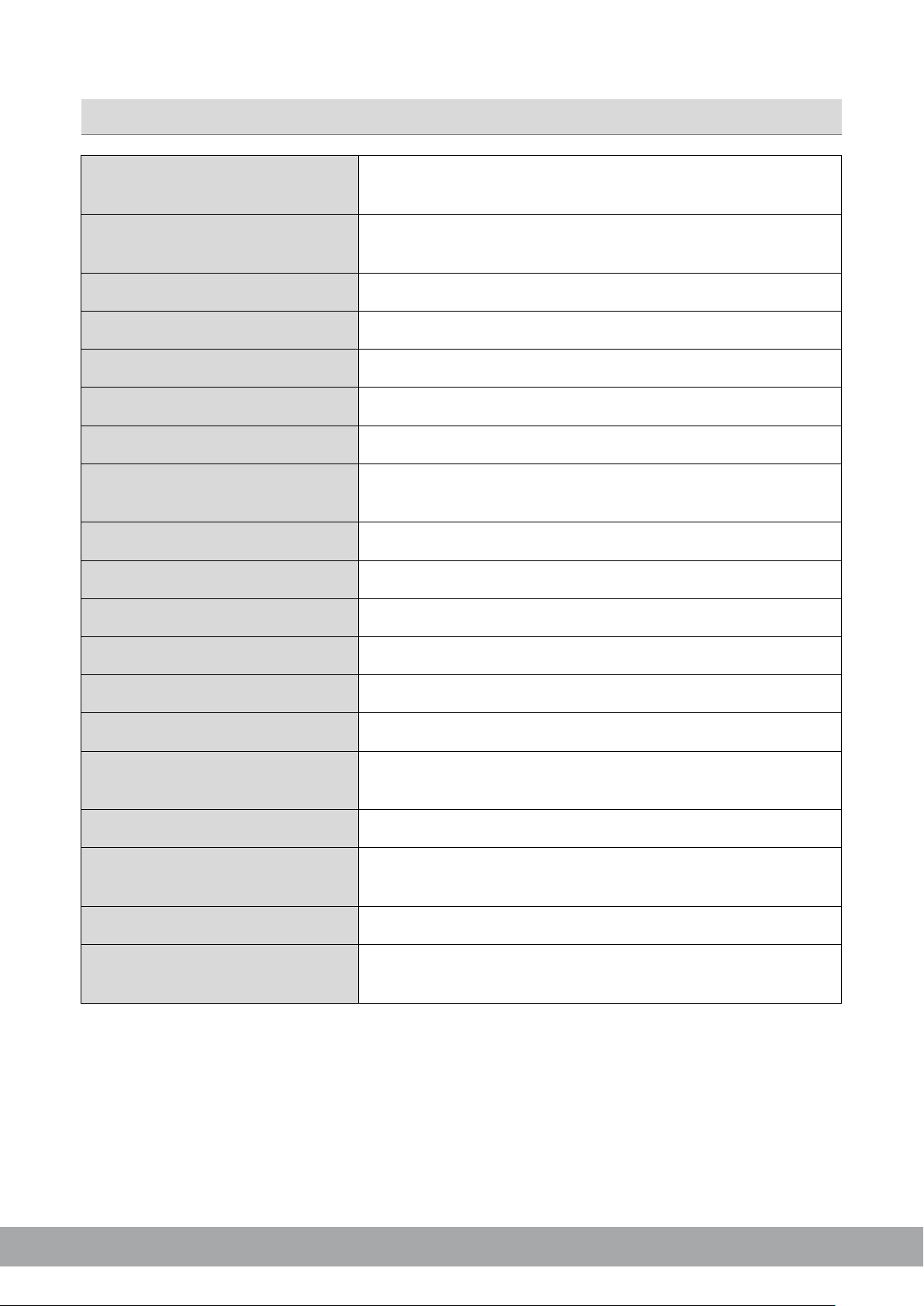
Modell
GZHA MINI FIVE-DSP
Typ
5-Kanal Class D Verstärker
mit integriertem 8-Kanal DSP
RMS Leistung @ 4 Ω (Kanal 1-4)
basierend auf dem CEA Standard (CEA-2006-A)
RMS Leistung @ 2 Ω (Kanal 1-4)
basierend auf dem CEA Standard (CEA-2006-A)
RMS Leistung @ 4/2/1
Dämpfungsfaktor
Frequenzgang
Eingangsempfindlichkeit (Cinch)
Kabelgebundene Pegelfernbedienung
Sicherung(en)
Abmessungen B x H x L (mm)
Technische Daten
4 x 75 W (1% THD+N)
4 x 125 W (1% THD+N)
GROUND ZERO GZHA MINI FIVE-DSP
Ω (Subwoofer Kanal)
basierend auf dem CEA Standard (CEA-2006-A)
190/320/500 W (1% THD+N)
600 W @ 1 Ω (10% THD+N)
> 100
20 Hz – 20 kHz
300 mV – 1.0 V
available separately
2x 40A (intern)
135 x 52 x 322
HYDROGEN SERIE
Page 5
Typ
8-Kanal Klangprozessor (DSP) mit 4 Eingängen
Frequenzgang
20 Hz – 20 KHz
SNR / Cinch-Eingang
SNR / Hochpegel-Eingang
Klirrfaktor / Cinch-Eingang
Klirrfaktor / Hochpegel-Eingang
Prozessor
Eingangsimpedanz
Cinch (RCA) ≥20 kΩ
Remote Eingangsspannung
Lautsprecher Einschalt-Spannung
Einschalt-Verzögerung
Software Kompatibilität
Preset-Speicher
Gain Bandbreite
Equalizer
8x parametrischer 10-Band EQ (20 Hz – 20 kHz) mit
Laufzeitkorrektur
Frequenzweiche
6 / 12 / 18 / 24 dB/Okt. Flankensteilheit mit wählbarer
Phasenumschaltung
Optionales Zubehör
GZDSP BTS 4-8XII
GROUND ZERO GZHA MINI FIVE-DSP
Technische Daten des DSP
Sampling Frequenz 48 kHz / Auflösung 56-bit
(-3 dB)
≥115 dB
≥105 dB
0.002 %
0.010 %
2x Analog Devices SigmaDSP
Hochpegel-Eingang 39 Ω
>10 V
>1.3 V
8 Sekunden
Microsoft Windows™ XP SP3, Vista, 7, 8, 8.1,10
6 individuell benennbare Speicherplätze
-60 bis +6 dB
wählbarer Güte
0 – 8 ms / 0 – 272 cm
Charakteristik
0° / 180°
GZDSP REM 4-8XII(-S)
HYDROGEN SERIE
Page 6
6
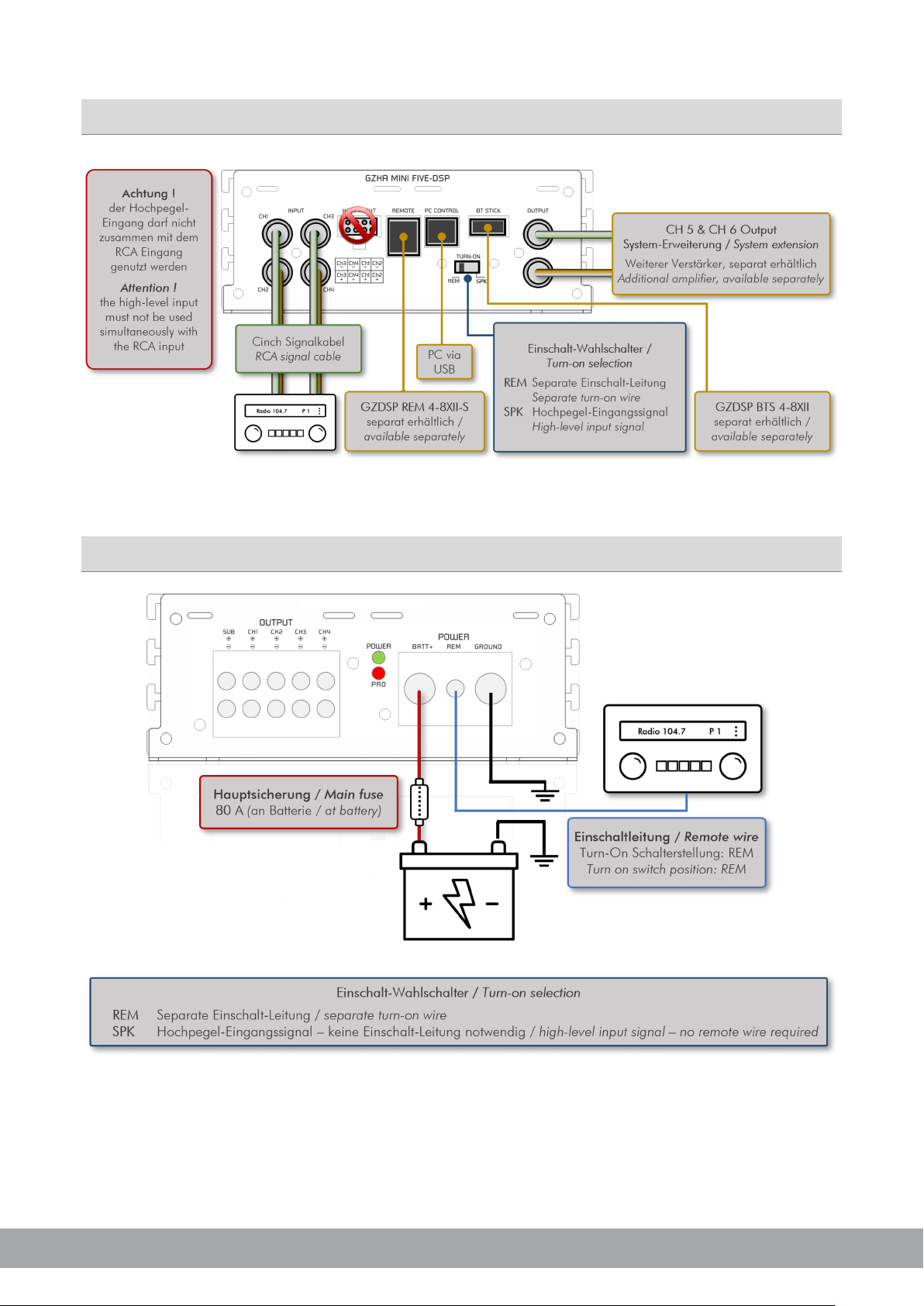
Anschlüsse
GROUND ZERO GZHA MINI FIVE-DSP
Stromversorgung
HYDROGEN SERIE
Page 7
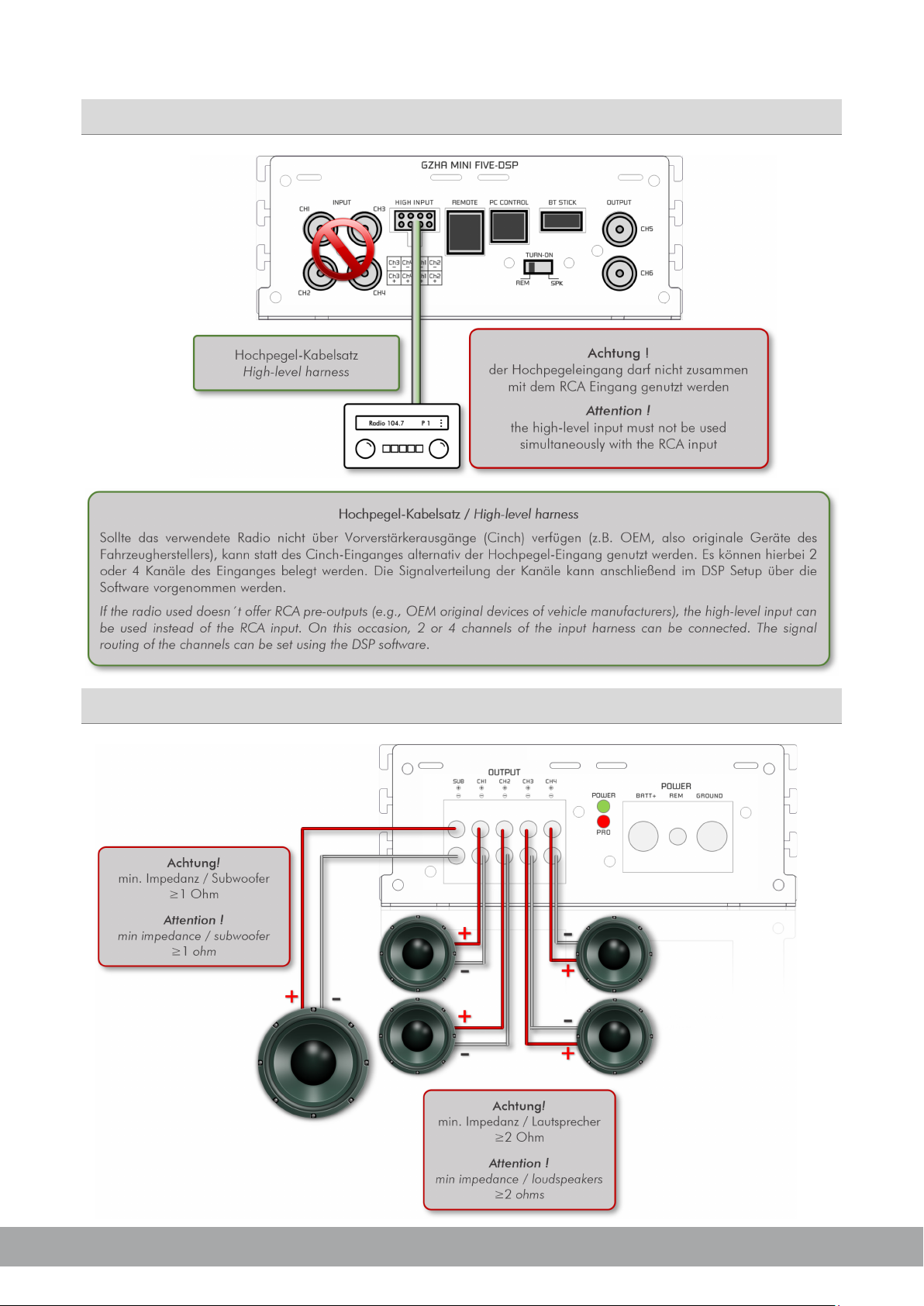
Hochpegeleingang
GROUND ZERO GZHA MINI FIVE-DSP
Lautsprecherverkabelung
HYDROGEN SERIE
Page 8

8
-4-
Installation der Software
Die DSP Software ist mit Windows™ Betriebssystemen (ab XP) kompatibel*. Es wird ein USB-Anschluss und
ca. 25 MB freier Speicherplatz benötigt. Die zur Installation notwendigen Dateien befinden sich auf der
beiliegenden CD-ROM. Falls kein Laufwerk vorhanden sein sollte, kann die Software wahlweise über die
GROUND ZERO Webseite heruntergeladen werden.
*kompatible Betriebssysteme: Microsoft Windows® XP SP3 / Vista / 7 / 8 / 8.1 / 10
Hardwarevoraussetzungen: min. 1.5 GHz Prozessor mit 1 GB Arbeitsspeicher (RAM) und Grafikkarte
mit einer Auflösung von min. 1024x600
Nachdem die setup.exe gestartet wurde, führt der Installationsassistent durch die üblichen Schritte.
Hinweis! Es sollte immer die neueste verfügbare Software-Version genutzt werden. Diese steht auf der
Webseite zum Download bereit.
GROUND ZERO GZHA MINI FIVE-DSP
USB Verbindung
Hinweis zur USB Verbindung: Das im Lieferumfang befindliche USB Kabel sollte nicht verlängert werden,
da die Kommunikation zwischen DSP und PC beeinträchtigt werden könnte.
Zur Konfiguration des DSP muss dieser mittels des mitgelieferten USB-Kabels mit einem PC, auf welchem
zuvor die DSP-Software installiert wurde, verbunden werden. Nun kann die Software durch Doppelklick auf
das Icon auf dem Desktop oder durch Auswahl aus der Programmliste gestartet werden. Beim
Programmstart erscheint das Hauptfenster.
Hinweis zur Windows® Benutzerkontensteuerung: Sollte das Betriebssystem so eingestellt sein, dass eine
Sicherheitsfreigabe zum Starten einer Software aus unbekannter Quelle notwendig ist, erscheint bei jedem
Programmstart ein Sicherheitshinweis zur Freigabe des Programmes. Bestätigen Sie die Frage bitte indem
Sie >Ja< wählen, um das Programm zu starten.
USB Anschluss und COM Port
Zur Nutzung der Software wird eine Kommunikation zwischen dem PC und dem DSP des
GZHA MINI FIVE-DSP aufgebaut. Hierzu ist eine freie USB-Buchse am PC notwendig. Beim Anschließen
des USB-Kabels wird während der Verbindung seitens des Betriebssystems ein sogenannter USB-Port
zugewiesen. Dies erfolgt automatisch.
HYDROGEN SERIE
Page 9
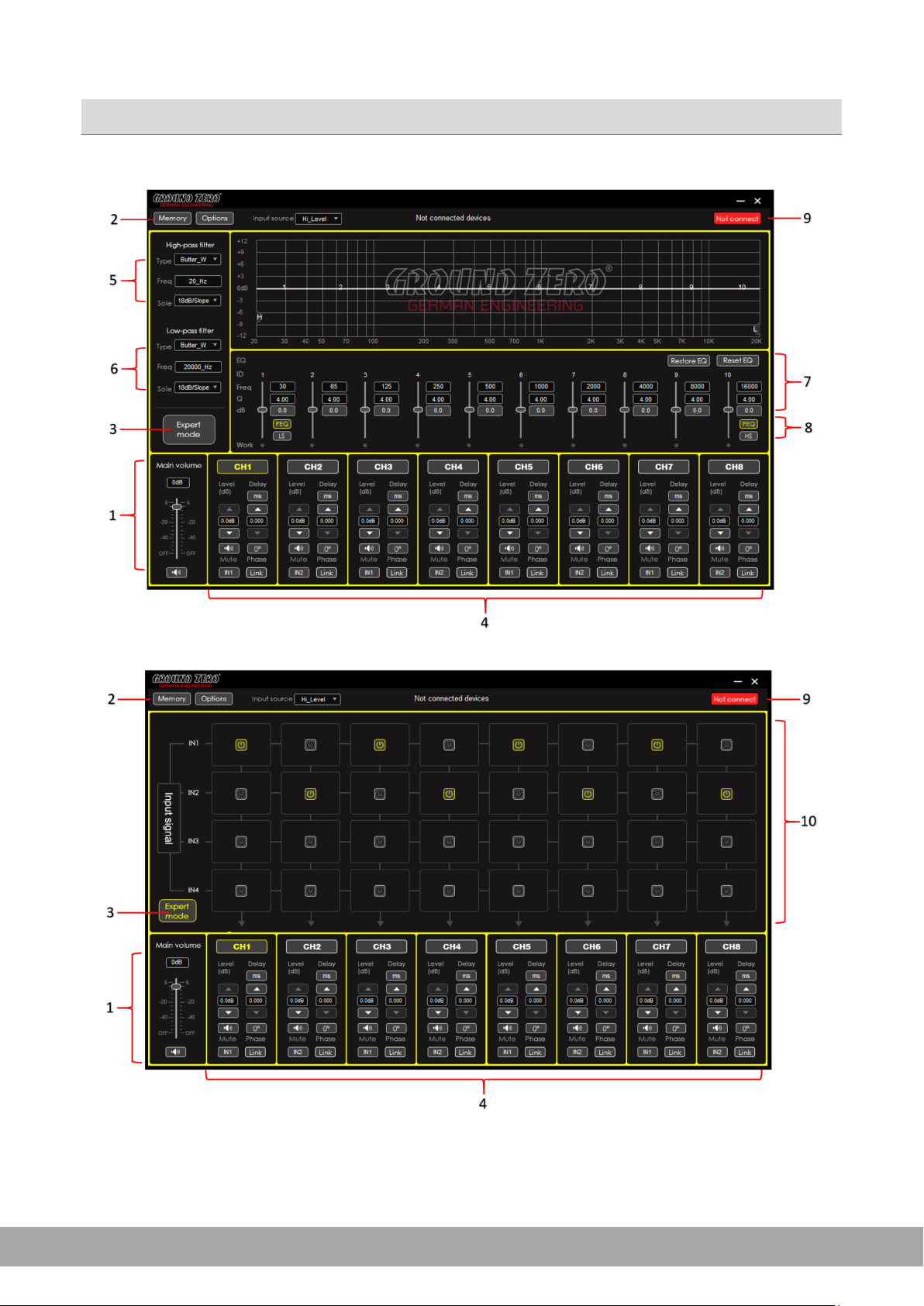
Grafische Benutzeoberfläche (GUI)
GROUND ZERO GZHA MINI FIVE-DSP
HYDROGEN SERIE
Page 10
10
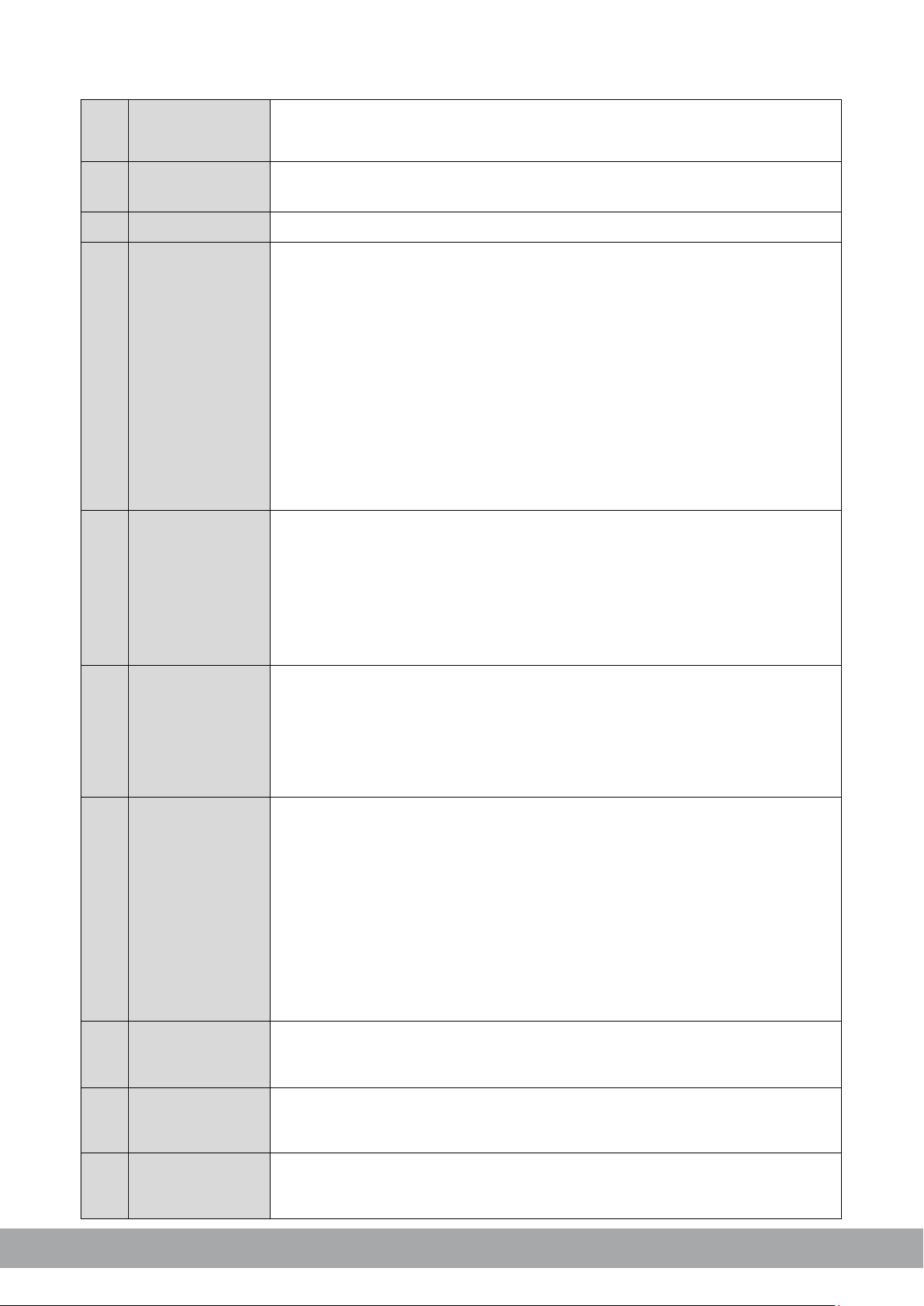
1
Main Level
60 bis
2
Memory / Options
3
Expert Mode
4
Channel
Channel
Level:
Mute:
Input:
Delay:
Phase:
Link:
5
Hochpass-Filter
Type:
Freq:
Slope:
Hinweis:
6
Tiefpass-Filter
Type: Über das Dropdown-Menü wird eine Filter-Charakteristik gewählt
Freq:
Slope:
Hinweis:
einstellen
7
Equalizer
Sobald Änderungen am Equalizer vorgenommen werden, erscheint die Schaltfläche:
Bypass EQ:
Restore EQ:
Reset EQ:
Freq/Q/dB:
Hinweis:
Viele Funktionen lassen sich auch mit der PC-Maus direkt in der Grafik ändern
8
PEQ oder LS/HS
Durch die Auswahl eines der beiden verfügbaren Modi für das erste (1) bzw. letzte (10)
PEQ
LS/HS
9
Connect /
Disconnect
auch im oben im
10
Input Signal
GROUND ZERO GZHA MINI FIVE-DSP
Einstellung des Gesamtpegels (Regelung der Eingangsempfindlichkeit) von -
Regelung
Dropdown Menü
Einstellungen
Einstellungen
+6 dB (diese Einstellung entspricht der Regelung über die Fernbedienung. Das
Betätigen des MUTE Buttons schaltet alle Ausgänge stumm
Die Schaltflächen öffnen jeweils ein Dropdown Menü. Weitere Informationen hierzu
finden sich im entsprechenden Abschnitt
Wechsel zur Kanalzuordnung. Weitere Informationen finden sich unter Punkt 10
: Der zu bearbeitende Kanal wird über die Schaltfläche ausgewählt
Mittels der Pfeile kann der Pegel des Kanals eingestellt werden
Das Betätigen der Schaltfläche schaltet den Kanal stumm
Die Schaltfläche zeigt den gewählten Eingangskanal an. Durch
wiederholtes Betätigen wird einer der vier Eingangskanäle gewählt
Die Schaltfläche zeigt die gewählte Einheit der Laufzeitverzögerung
an. Durch wiederholtes Betätigen kann die Einheit gewählt werden
(ms/cm/inch). Mittels der Pfeile kann die Laufzeitverzögerung
eingestellt werden. Wahlweise kann der Wert über die Tastatur auch
direkt in das Anzeigefeld eingetragen werden
Jeder Klick auf die Schaltfläche dreht die Phasenlage um 180°
Das Betätigen der Schaltfläche verbindet das jeweilige Kanalpaar
(z.B.1 mit 2 oder 3 mit 4 etc.), um Einstellungen für beide Kanäle
gleichzeitig vornehmen zu können (außer Delay)
Im Dropdown-Menü wird die Filter-Charakteristik gewählt
Der gewünschte Wert kann über die Tastatur direkt in das Feld
eingetragen oder über das Scroll-Rad der Computer-Maus verändert
werden. Die Frequenzgangkurve zeigt die entsprechenden
Änderungen grafisch an ( H = Hochpassfilter )
Über das Dropdown-Menü kann eine Flankensteilheit gewählt oder
deaktiviert werden
Die Filter lassen sich mit der PC-Maus direkt in der Grafik einstellen
Der gewünschte Wert kann über die Tastatur direkt in das Feld
eingetragen oder über das Scroll-Rad der Computer-Maus verändert
Einstellungen
Einstellungen
HYDROGEN SERIE
Auswahl
Schaltfläche
werden. Die Frequenzgangkurve zeigt die entsprechenden Änderungen
grafisch an ( L = Tiefpassfilter )
Über das Dropdown-Menü wird eine Flankensteilheit gewählt
Die Filter lassen sich auch mit der PC-Maus direkt in der Grafik
Setzt die Einstellungen des Equalizers vorübergehen auf die Werks einstellungen zurück.
Wenn obige Funktion aktiviert wurde, erscheint die Schaltfläche:
Durch Betätigung werden die vorherigen Einstellungen wiederhergestellt
Alle Equalizer-Einstellungen werden auf die Werkseinstellung gesetzt
Der gewünschte Wert kann über die Tastatur direkt in das Feld ein getragen oder über das Scroll-Rad der Computer-Maus verändert
werden. Die Frequenzgangkurve zeigt die entsprechenden Änderungen
grafisch an
Band, kann statt der werksseitig eingestellten Standard-Funktion (
Shelf-Filter (
Durch das Betätigen der Schaltfläche wird die Verbindung zum Gerät über die USBSchnittstelle aufgebaut bzw. getrennt. Der Status der Verbindung wird
Fenster angezeigt
Über die Matrix kann für jeden Ausgangskanal der gewünschte Eingangskanal oder
mehrere ausgewählt werden. Bei der Auswahl mehr als eines Eingangskanals zeigt die
Schaltfläche des gewählten Ausgangskanals dies anhand des MIX-Symbols an
) mit einer Flankensteilheit von 6 oder 12 dB/Oktave gewählt werden
), ein variables
Page 11
Load DSP unit Preset
Save as DSP unit Preset
Delete DSP unit Preset
Load PC preset file
Save as PC preset file
Load all presets
Save all presets
Factory Reset
Achtung:
Problem
Kontrolle
Hilfe
Kurzschluss am Lautsprecher
Gerät defekt
Sicherung prüfen (unter dem Gehäuseboden)
12V Spannung und Masse prüfen
Keine Spannung am
Verstärker schaltet
bei Lautstärke ab
Lautsprecherimpedanz
prüfen
Prüfen Sie, ob der Widerstand am LS Terminal von
2 Ohm nicht unterschritten wird
Lautstärke verringern oder Gerät einige Zeit
abschalten
Language
Update
Auswahl der Update
Datei auf dem PC
Help
About
Software Version
-6-
-7-
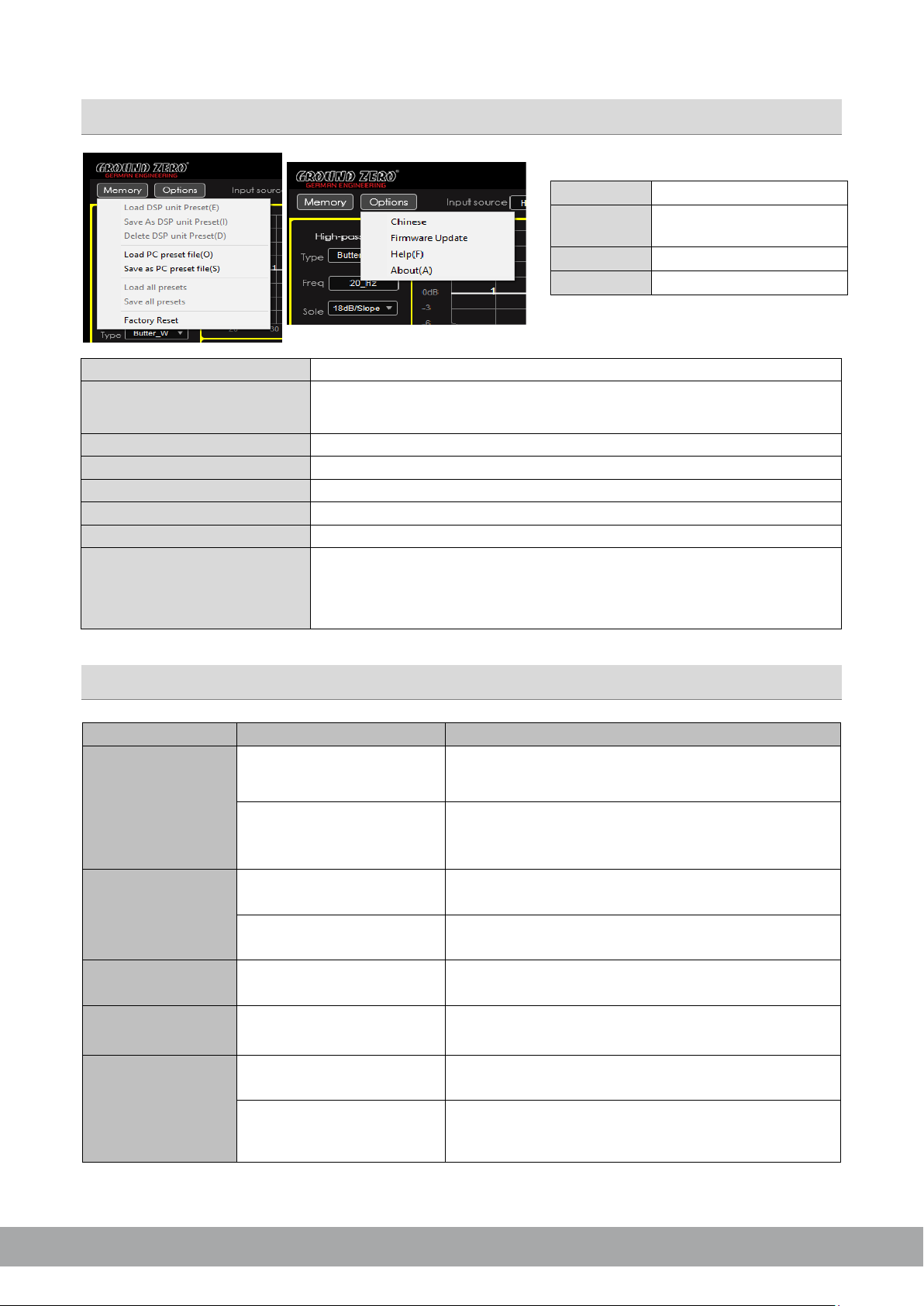
Speichernutzung / Options Dropdown-Menü
GROUND ZERO GZHA MINI FIVE-DSP
Laden eines Presets aus dem Speicher des Gerätes
Speichern der aktuellen Einstellung als Preset auf dem Gerät. Zusätzlich kann
ein individueller Name vergeben werden
Löschen eines Presets aus dem Speicher des Gerätes
Laden eines Presets aus dem Speicher des PC
Speichern der aktuellen Einstellung als Preset auf dem PC
Laden aller Presets aus dem Speicher des PC
Speichern aller Presets auf dem PC
English/ Chinese
Webseiten-Browser
Kein Ton
Verstärker schaltet
nicht ein
Setzt das Gerät auf die Werkseinstellungen zurück.
das Gerät mehrere Routinen und öffnet verschiedene Fenster. Nach ca. 15
Sekunden ist der Vorgang abgeschlossen
Fehlerdiagnose
Leuchtet die POW LED?
Leuchtet die PRO LED?
Keine Stromzufuhr
Remote
Hierbei durchläuft
Sicherung/Remote- und 12V Spannung prüfen
Masse prüfen
Gerät überhitzt
Remote Ausgang am Radio prüfen
Ton fehlt an einem
Kanal
Cinchkabel und
Lautsprecherkabel prüfen
Verstärker überhitzt
Protection LED
leuchtet
Kurzschluss am
Lautsprecheranschluss
Kabel/Stecker beschädigt
Lautsprecherkabel auf Kurzschluss prüfen
HYDROGEN SERIE
Page 12
12
GROUND ZERO GZHA MINI FIVE-DSP
Respect the Music
Musik hören kann unter anderem emotional, beeindruckend, entspannend oder
unterhaltsam sein. Dabei spielt es kaum eine Rolle, welche Art von Musik der
jeweils persönliche Favorit ist, also ob es sich um instrumentale Musik, Jazz, Electro,
Latin, Klassik, Rock oder eine andere Musikrichtung handelt. Die
Wiedergabequalität bei dem jeweils gewünschten Pegel spielt dabei hingegen eine
wichtige Rolle. Manche Musik verlangt nach gehobenen Pegeln, während andere
eher leisere Töne bevorzugt.
GROUND ZERO berücksichtigt all die unterschiedlichen Wünsche der Kunden bei
der Entwicklung neuer Produkte. Hierbei gilt stets die Zielsetzung, einen möglichst
realistischen Sound zu erzeugen und damit die Seele der Musik und die Intention
des Künstlers zu vermitteln. Zu einem einzigen Satz zusammengefasst: RESPECT
THE MUSIC!
HYDROGEN SERIE
GROUND ZERO products are engineered in Germany
GROUND ZERO - international sponsor of
Ground Zero GmbH
Erlenweg 25, 85658 Egmating, Germany
Tel. +49 (0)8095/873 830 Fax -8310
www.ground-zero-audio.com
Page 13

HYDROGEN SERIES
5-channel class D amplifier
with built-in DSP
GZHA MINI FIVE-DSP
Owner´s Manual
• High-efficient 5-channel class D amplifier with built-in 8-channel DSP
• 2 ohms stable (channels 1-4)
• 1 ohm stable (subwoofer channel)
• 2x stereo RCA input / 1x stereo RCA output / 4-channel high-level input
• Auto-on function (available for speaker input only)
• Thermal protection / short circuit protection / overload protection
• Digital signal processor (DSP) / 2x Analog Devices SigmaDSP
• Realtime setup of all functions (via PC or APP*)
• Simple handling, one-page graphical user interface (Windows® compatible)
• Parametric equalizer for each channel (8x 10 bands)
(AWV2.0)
Main Features
• Time alignment (0-8 ms / 0-272 cm / 0-107”) for each channel
• Adjustable crossover (HPF / LPF / BPF from 20 Hz to 20 kHz)
• Selectable crossover slope (6 to 24 dB/oct)
• 3 filter characteristics (Butterworth/Bessel/Linkwitz-Riley)
• Selectable phase shift for each channel (0˚ or 180°)
• Memory for 6 user presets (selectable via remote control, PC or APP*)
• Wired multifunction remote control GZDSP REM 4-8XII-S available separately
• Wireless music streaming via GZDSP BTS 4-8XII-S available separately
HYDROGEN SERIES
Page 14
GROUND ZERO GZHA MINI FIVE-DSP
2
Thank you for choosing a great GROUND ZERO product! We hope you will enjoy this product from
the HYDROGEN series.
This owner´s manual contains information you need to use this product. Please read it carefully in
order to achieve the best possible result. Your car audio specialist or our customer support will answer
further questions about the product and its use.
Amplifiers are an important part of your car audio system. Please keep in mind, however, that they
can only achieve their full performance if all other components of the entire system are carefully
coordinated with one another. It is therefore recommended consulting a car audio specialist dealer or
workshop for the assembly of the system and its installation and sound adjustments.
HYDROGEN series – High-Grade Technology
Introduction
Products of the GROUND ZERO HYDROGEN series meet the requirements of even the most
demanding customers. All models are characterized by an astonishing performance, great
sound quality and extremely high sound pressure whenever required. The subwoofers have been
developed to handle a huge amount of input power reaching extremely high bass levels to be
used successfully even under competition conditions but also for everyday music reproduction.
For limited installation space, the HYDROGEN series offers powerful but small and installationfriendly amplifiers for most applications.
Safety instructions
Safety instructions: Keep all parts of the content and the packaging away from children and pets to avoid
accidents and the risk of suffocation. Permanently extreme levels of over 85 dB can lead to irreparable
damage to the hearing. Music systems with high amplifier output power can reach levels of 130 dB or
more. Extreme levels can also hinder the perception of important traffic noises and distract from what is
happening on the road. Ground Zero GmbH and its sales partners expressly assume no responsibility for
hearing damage, physical damage or any damage to property or consequential damage resulting from
improper or careless use or improper installation of its products. In particular, any claims are forfeited
through the use under competitive conditions.
Manufacturer‘s declaration: Herewith Ground Zero GmbH declares that this product complies with the
directive 2014/30/EU (EMC) and further declares that this product is in conformity with the rules of the EU
directives (including all applicable amendments) 2011/65/EU RoHS2 and 2001/95/EC General Product
Safety directive. The full text of the Declaration of Conformity (EU) is available at the following internet
address: www.ground-zero-audio.com. Electronic products contain valuable raw materials and must not
be disposed of with normal household waste. At the end of its service life, please bring the device to your
local recycling facility.
Terms of warranty
The limited warranty for this product is covered by GROUND ZERO´s regional distribution partners and
their terms and conditions. For further information contact your local retailer or distributor
HYDROGEN SERIES
Page 15
GROUND ZERO GZHA MINI FIVE-DSP
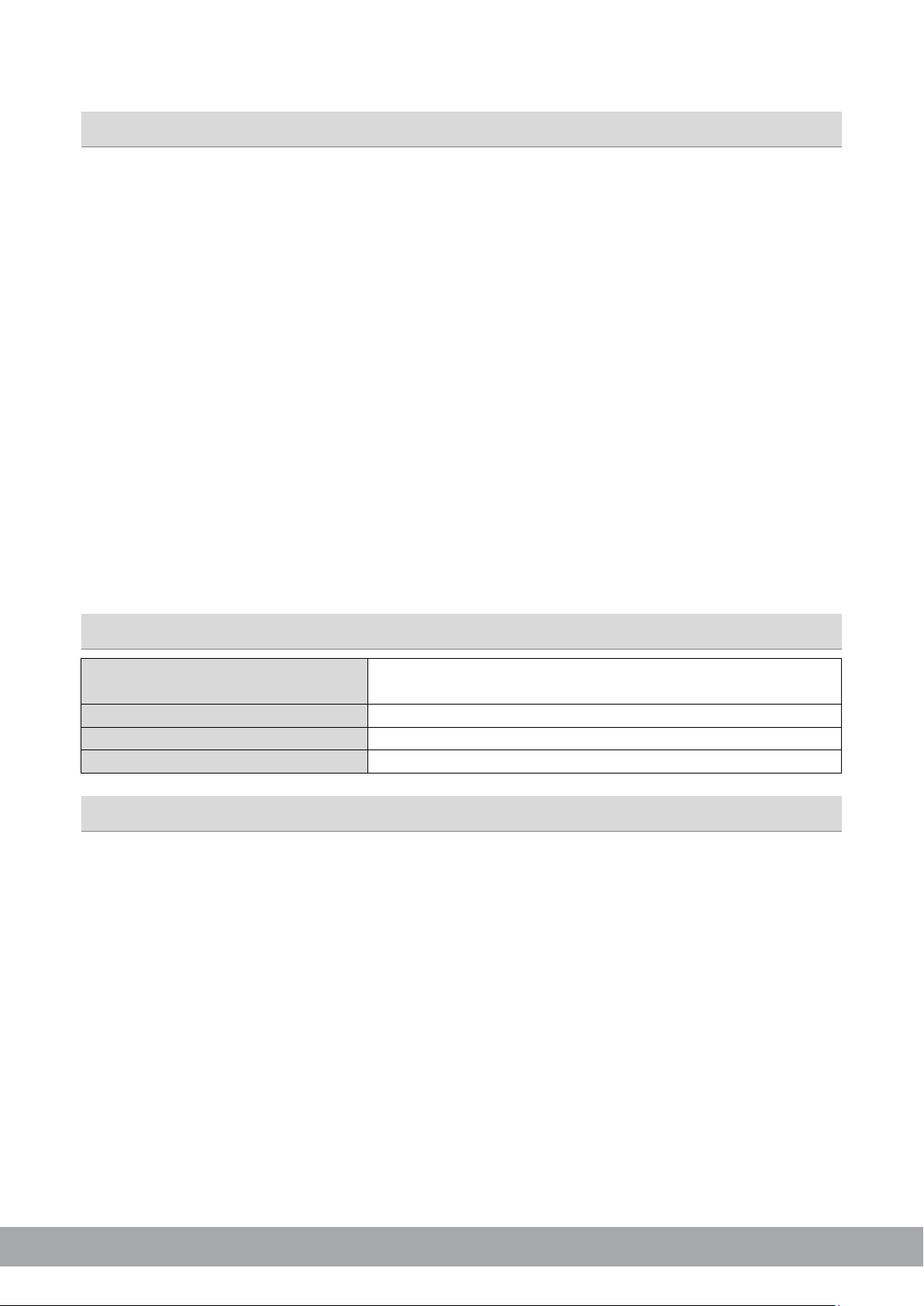
Speaker wires
min 1.5 mm² / 2.5 mm² for subwoofer channel
min 13 AWG / 12 AWG for subwoofer channel
Power supply wires
min 35.0 mm² / 2 AWG
High-level input wires
min 1.00 mm² / 18 AWG
Remote wire
min 0.75 mm² / 20 AWG
• As a precaution, it is recommended to disconnect the vehicles battery before mounting the amplifier.
Note: For new vehicles, disconnecting the battery might cause various errors in your vehicle´s electric
system that can be cleared only by authorized service partners of your vehicle´s manufacturer! Please
ask your service partner first before disconnecting the battery!
• The power supply wire (+12 V) has to be protected within max. 20 cm / 8” by a main fuse holder with
a fuse value matching the recommendation for your amplifier
Note: If there is more than one amplifier connected using this power wire, the main fuse value must
be equal to the sum of the recommended fuses of all connected devices. However, make sure the
diameter of your power wire will be enough for the required current!
• If necessary, replace a defective fuse by a fuse with identical quality and value
• Never drill holes to the vehicle´s gas tank, brake lines, to wirings or any other important vehicle parts!
• Never pass wires over sharp edges or vehicle parts due avoid any kind of damage
• Keep the wiring away from the antenna and electronic devices contributing to radio reception
• Lay the power supply wiring always separated from speaker wiring to avoid disturbance
• The amplifier contains a temperature protection circuit that turns the device off in case of overheating.
After a certain cooling time, it will turn on automatically. To avoid heat build-up, enough air supply
for cooling must be provided. Never cover the surface of the amplifier´s heatsink entirely
• The amplifier should
enclosure. This might lead to malfunction due to loosened electrical parts inside the amplifier.
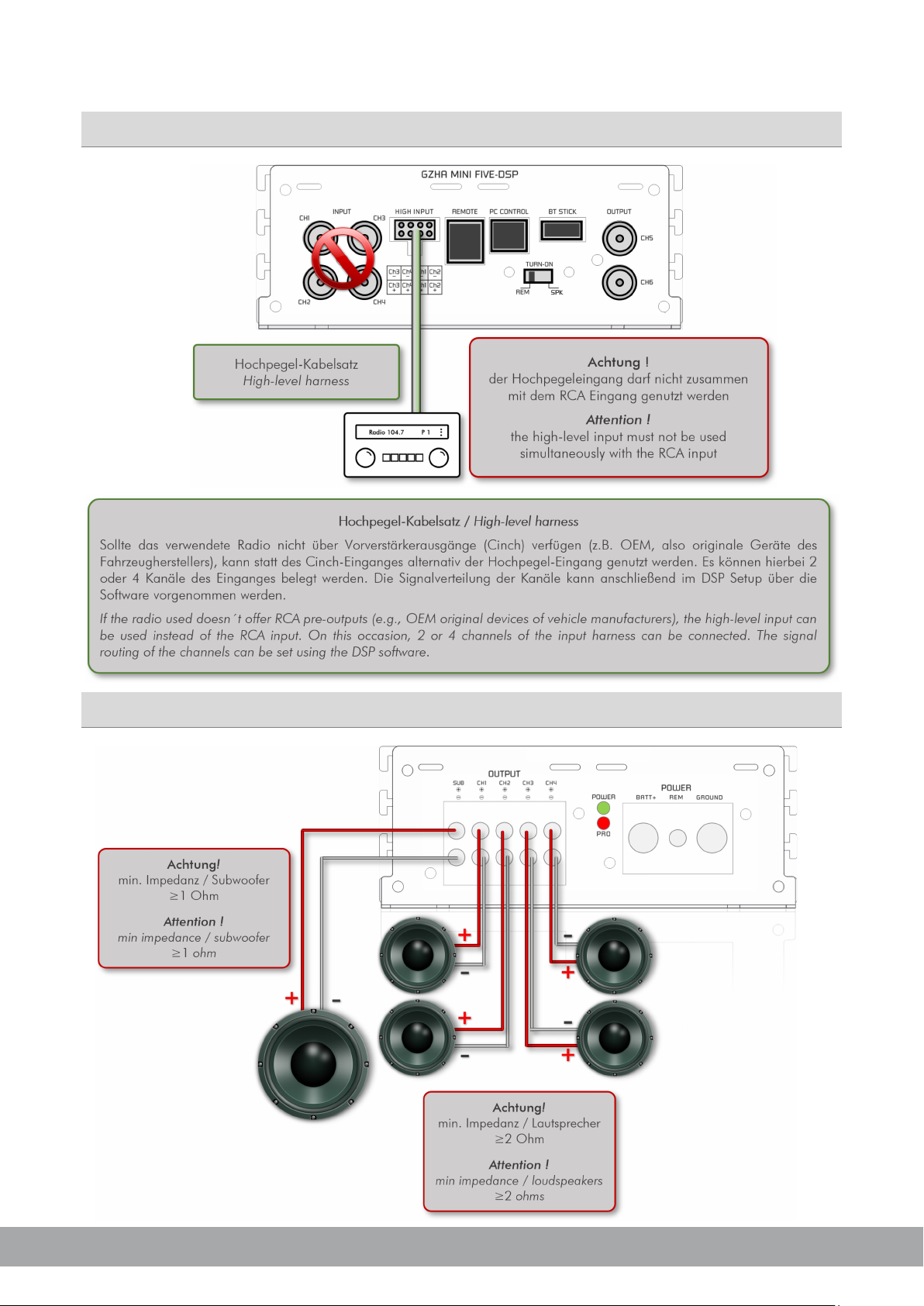
• Some amplifiers offer a high-level input option, however if a pre-amplified output (RCA) is available
(at the head unit), it is strongly recommended to make use of them.
General mounting instructions
NEVER be mounted onto a vibrating part or surface such as a subwoofer
List of content
• 1 x GZHA MINI FIVE-DSP
• 1 x USB cable (A to B connector)
• 1x High-level input harness
• 1 x CD-ROM (software & drivers) compatible with
Microsoft Windows® XP SP3, Vista, 7, 8, 8.1 and 10
• 2 x Owner’s manual (German/English)
• 1 x Fastening kit (screws and washers)
Available separately
Recommended wiring
• *GZDSP BTS 4-8XII wireless music streaming
and app control interface (USB dongle)
• GZDSP REM 4-8XII(-S) wired remote control
HYDROGEN SERIES
Page 16
GROUND ZERO GZHA MINI FIVE-DSP
4
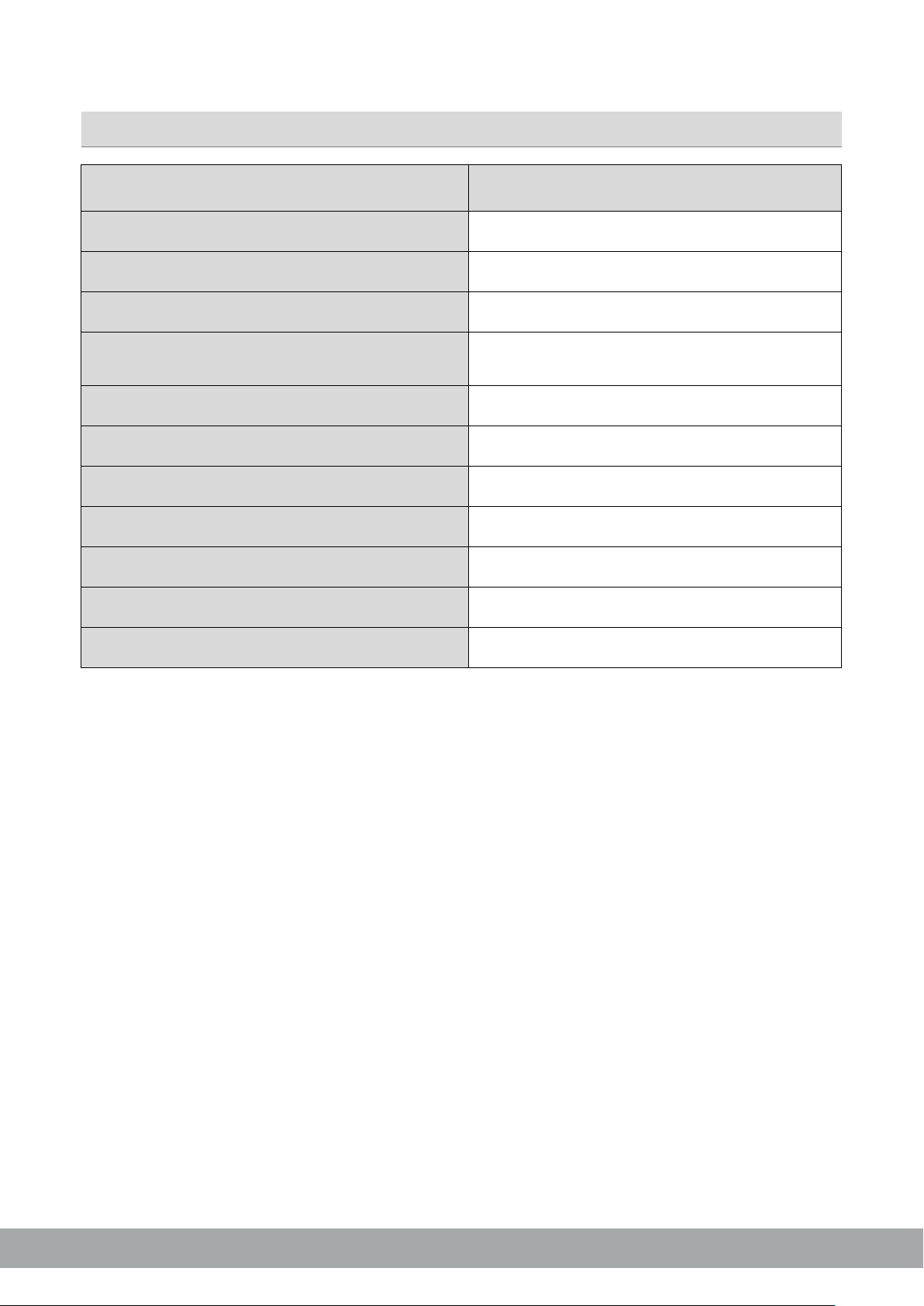
Model
GZHA MINI FIVE-DSP
Amplifier type
RMS Power @ 4 Ω CEA Standard (CEA-2006-A)
RMS Power @ 2 Ω CEA Standard (CEA-2006-A)
RMS Power @ 4/2/1
(CEA-2006-A)
Subwoofer channel
Damping factor
Frequency response
Input sensitivity (RCA)
Wired multi-function remote control
Fuse(s)
Dimensions w x h x l (mm)
Dimensions w x h x l (inch)
Specifications of the amplifier
5-ch class D amplifier with built-in 8-ch DSP
4 x 75 W (1% THD+N)
4 x 125 W (1% THD+N)
Ω
190/320/500 W (1% THD+N)
600 W @ 1 Ω (10% THD+N)
> 100
20 Hz – 20 kHz
300 mV – 1.0 V
available separately
2x 40A (internal)
135 x 52 x 322
5.32 x 2.05 x 12.68
HYDROGEN SERIES
Page 17
GROUND ZERO GZHA MINI FIVE-DSP
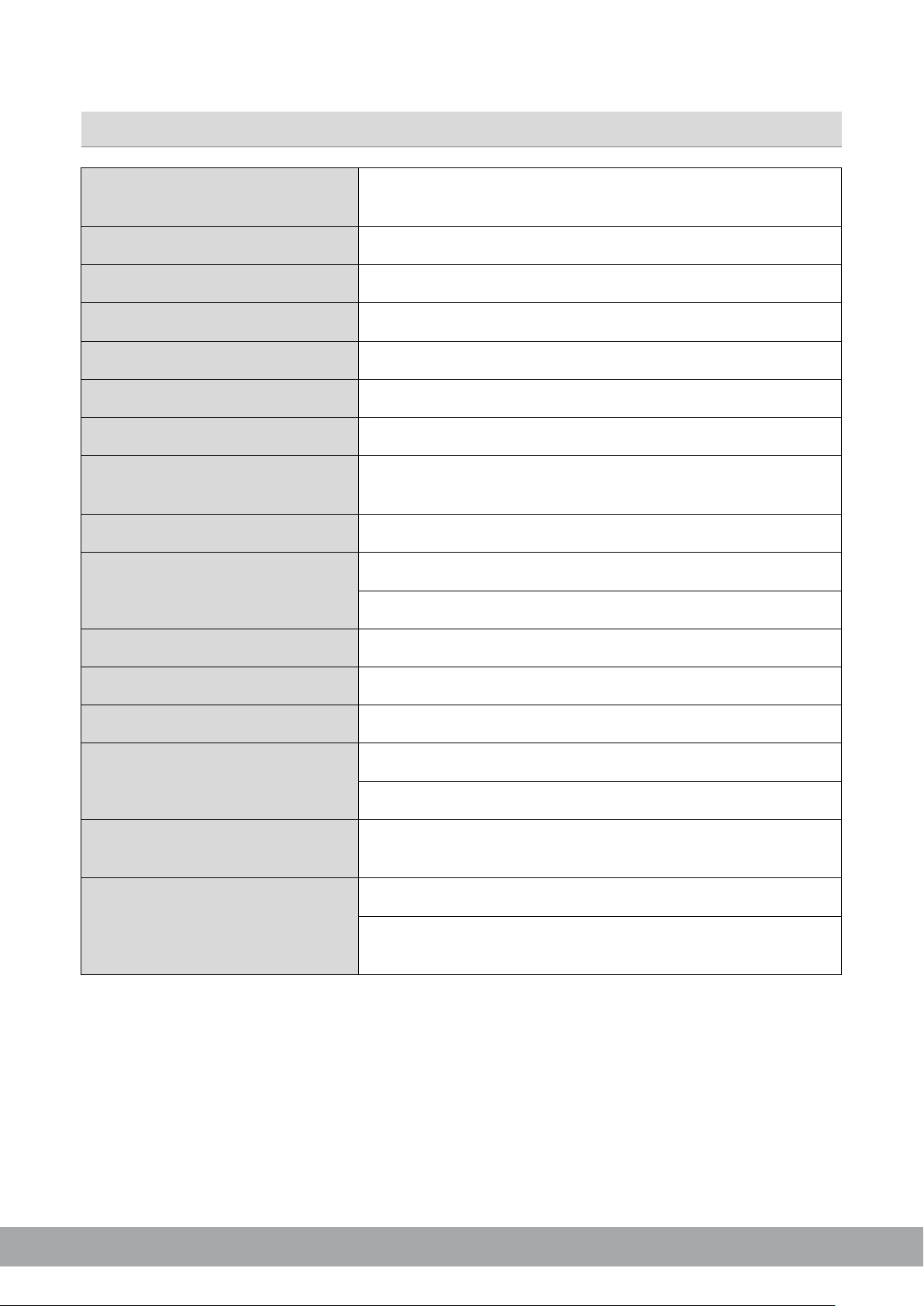
Type
8-channel signal processor (DSP) with 4 input channels
Frequency range
SNR / line input
SNR / high level input
THD / line input
THD / high level input
DSP chipset
Input impedance
Line input (RCA) ≥20 kΩ
Remote input voltage
Switching voltage / speaker input
Turn on delay
Software compatibility
Preset memory
Gain range
Equalizer
Time delay
Crossover
6 / 12 / 18 / 24 dB/oct. slope with selectable filter
Phase correction
Optionally available accessory
GZDSP BTS 4-8XII
Specifications of the internal DSP
Sampling frequency 48 kHz / 56-bit resolution
20 Hz – 20 kHz (-3 dB)
≥115 dB
≥105 dB
0.002 %
0.010 %
2x Analog Devices SigmaDSP
High-level input 39 Ω
>10 V
>1.3 V
8 seconds
Microsoft Windows™ XP SP3, Vista, 7, 8, 8.1,10
6 presets (individually assignable)
-60 bis +6 dB
8x 10 band EQ (20 Hz – 20 kHz) with adjustable Q
0 – 8 ms / 0 – 272 cm / 0 – 107“
characteristic
0° / 180°
GZDSP REM 4-8XII-S
HYDROGEN SERIES
Page 18
GROUND ZERO GZHA MINI FIVE-DSP
6
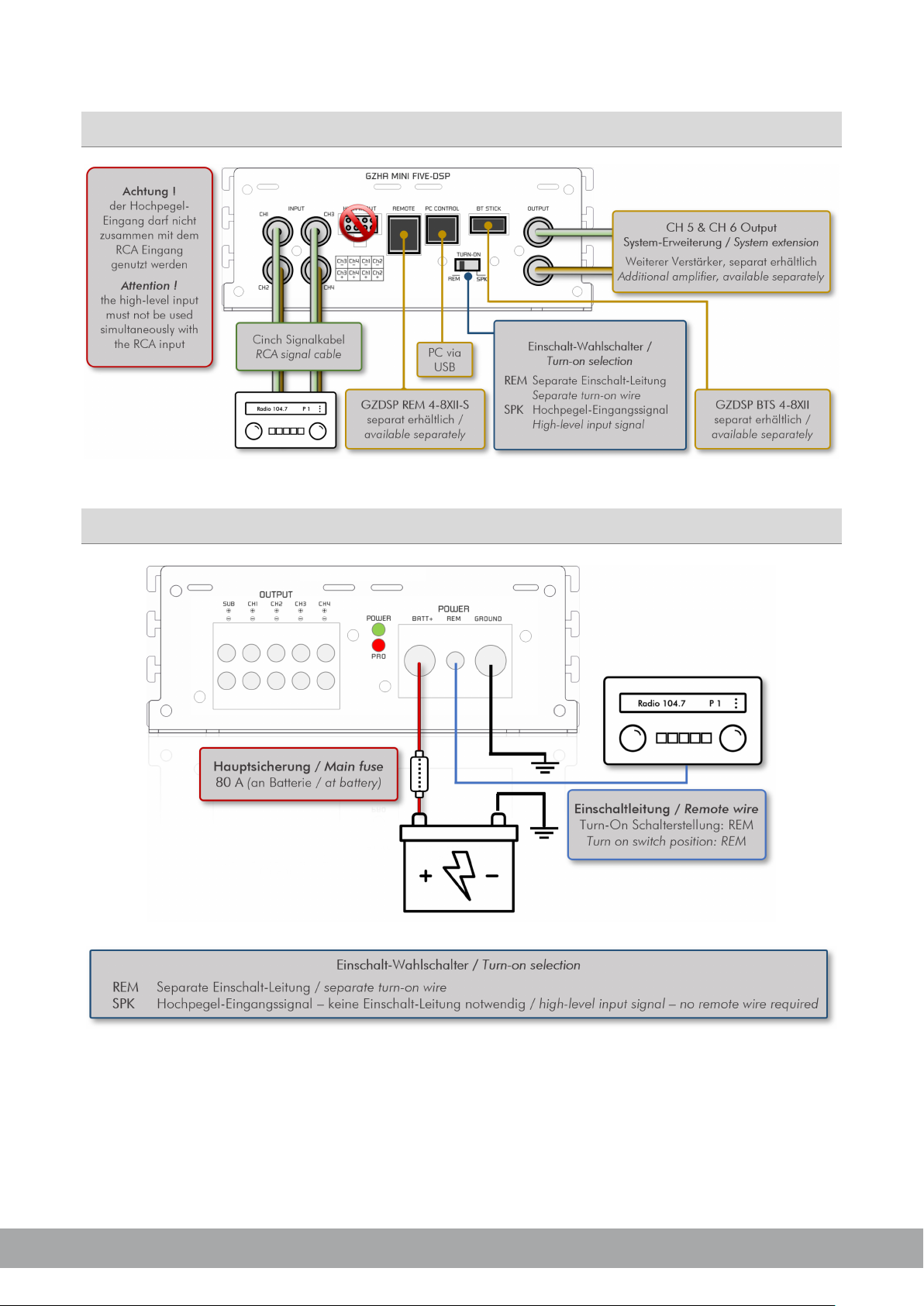
Connections
Power supply wiring
HYDROGEN SERIES
Page 19
GROUND ZERO GZHA MINI FIVE-DSP
High-level input
Loudspeaker wiring
HYDROGEN SERIES
Page 20
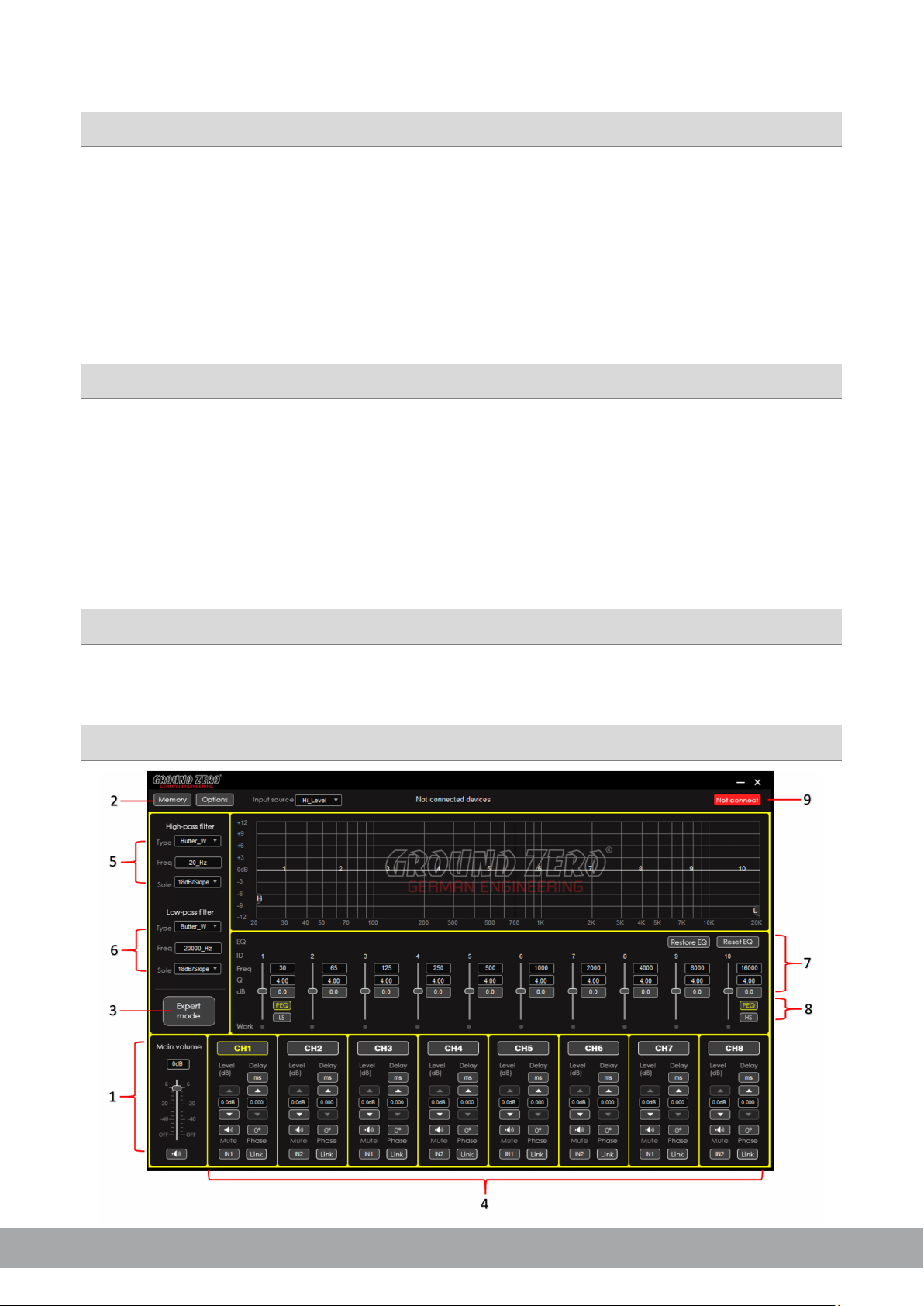
GROUND ZERO GZHA MINI FIVE-DSP
8
-4-
The PC software is compatible* to Windows™ XP (SP3) operating systems (or later). One USB port and 25
MB free memory space is required for the installation. The files are located on the included CD-ROM. If
there is no CD drive available, the software can be downloaded from the Ground Zero web page:
www.ground-zero-audio.com
* compatible operating systems: Microsoft Windows® XP SP3 / Vista / 7 / 8 / 8.1 / 10
PC requirements: min. 1.5 GHz processor with 1 GB main memory (RAM) and graphic cards
with a resolution of 1024x600 pixels or more
Run the
Note: We strictly recommend using the latest DSP software available from the web page.
setup.exe file. The installation wizard will guide through the installation process.
USB connection
USB connection: We don´t recommend using any passive extension cable together with the included USB
wire, as the proper function can´t be ensured.
DSP setting: The unit must be connected to a PC with the DSP software installed using the included USB
wire. To adjust any setting the unit must be in operation mode. Click the program icon on the desktop or
PC software installation
select the program from the software list to start. The starting window appears.
Windows® user account control (UAC): In case the PC operating system is set to restricted security
clearance regarding software with unknown source or without digital signature a window will appear each
time at the program is starting. Please confirm with >Yes< (language depends on your local setting) to
run the program
In order to use the software, a communication to the PC must be established. Therefore, an
unused USB port is required. During the connection of the USB cable the system will assign a USB
port, automatically.
Graphical user interface (GUI)
USB port
HYDROGEN SERIES
Page 21
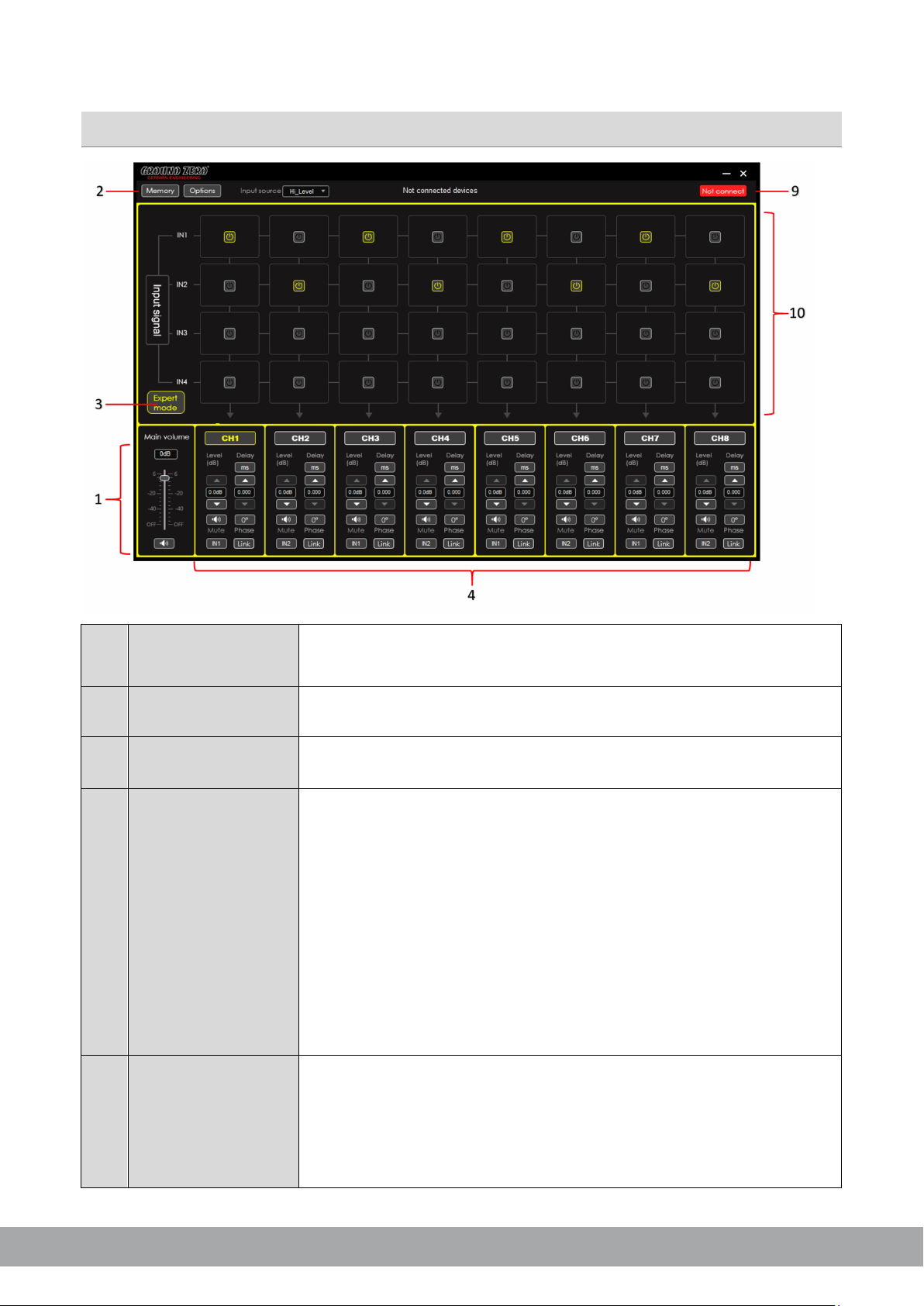
GROUND ZERO GZHA MINI FIVE-DSP
1
Main level
Setting the main level (input sensitivity) in between the range of -60 up to
and 66). The MUTE button deactivates the output
2
Memory / Options
3
Expert mode
4
Channel
Channel: Select the required channel tapping the according button
Level:
Mute:
Input:
Delay:
Phase:
Link:
Note: At factory setting channels 7 and 8 are linked for the subwoofer out
5
High pass filter
Type:
Freq:
Slope:
Note:
-5-
Graphical user interface (GUI)
adjustment
+6 dB (the adjustment is equal to the remote control setting between 0
Tap the button to open the dropdown menu. Further information about
dropdown menu
the dropdown menu is to be found at the section below
Switch to the channel matrix. Further information about the dropdown
menu can be found below (at the Memory / Options topic)
Use the up/down buttons to adjust the output level of the channel
Tap the button to deactivate the selected channel
The button is indicating the selected input channel. Tap repeatedly
to select a channel
The button indicates the selected unit of the time delay. Tap
settings
repeatedly to select a unit.
Use the up/down buttons to adjust the time delay. The value can be
entered to the display field directly, as well.
Each tap inverts the phase (0°/180°)
Tap the button to link each pair of channels (e.g. 1 with 2, 3 with 4,
etc.) to adjust both channels simultaneously
settings
Select the filter characteristic from the dropdown menu
The required value can be entered to the display directly or selected
using the scroll wheel of the PC mouse. The frequency chart shows the
adjustments graphically (H=high pass)
Select crossover slope by dropdown menu or deactivate the filter
Adjusting filters using the PC mouse at the frequency chart, directly
HYDROGEN SERIES
Page 22
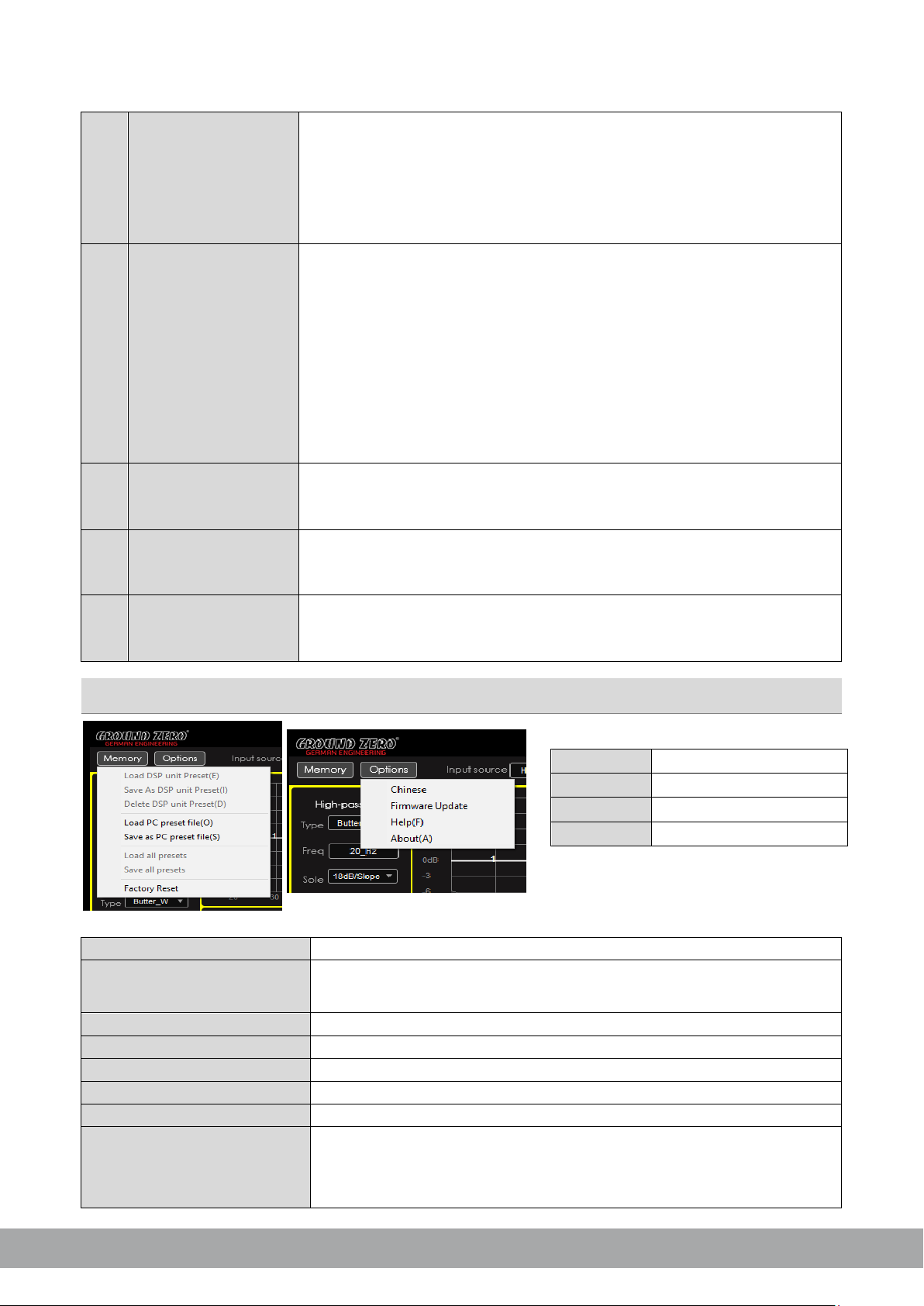
GROUND ZERO GZHA MINI FIVE-DSP
10
6
Low pass filter
Type:
Freq:
Slope:
Note:
7
Equalizer
Bypass EQ:
Restore EQ:
Reset EQ:
Freq / Q / dB:
Note:
8
PEQ or LS/HS
PEQ
9
Connect /
Disconnect
10
Input signal
Load DSP unit Preset
Loading a setup from the DSP memory
Save as DSP unit Preset
Delete DSP unit Preset
Deleting a preset from the DSP memory
Load PC preset file
Loading a preset from the PC memory
Save as PC preset file
Saving a setup to the PC memory
Load all presets
Loading all presets (from the PC to the DSP)
Save all presets
Saving all presets (from the DSP to the PC)
Factory Reset
Caution:
Language
Update
Help
About
-6-
Select the filter characteristic from the dropdown menu
The required value can be entered to the display directly or selected
using the scroll wheel of the PC mouse. The frequency chart shows the
settings
settings
selection
button
adjustments graphically (L=low pass)
Select crossover slope by dropdown menu or deactivate the filter
Adjust filters using the PC mouse at the frequency chart, directly
As soon as the equalizer setting is changed from default, the following
button appears
Resets the adjustments temporarily to default setting. At
bypass position:
Restores the previous setting of the equalizer
Resets the equalizer setting to default
Enter the required value to the display field directly or
select the value using the scroll wheel of the PC mouse. The frequency
chart shows the adjustments graphically
Settings can be changed at the chart directly using the PC mouse
Selecting one of the available modes for the first (1) and last (10) band,
the default setting (
) can be set to a variable shelf filter (LS/HS)
instead with a slope of 6 or 12 dB/octave
Tap the button to establish or separate the connection between the DSP
unit and the PC via USB cable. The connection status is displayed at the
top of the window
Using the matrix, one or more input channels can be assigned for each
output channel. If more than one channel is selected, the MIX-icon will be
visible at the button
Memory / Options dropdown menu
HYDROGEN SERIES
Select the GUI language
To select the update file
Webpage browser
Software version
Saving a setup to the DSP memory
Preset can be named individually
The unit will run through a number of routines. Some windows will
appear and disappear. The process will last for about 15 seconds.
Page 23
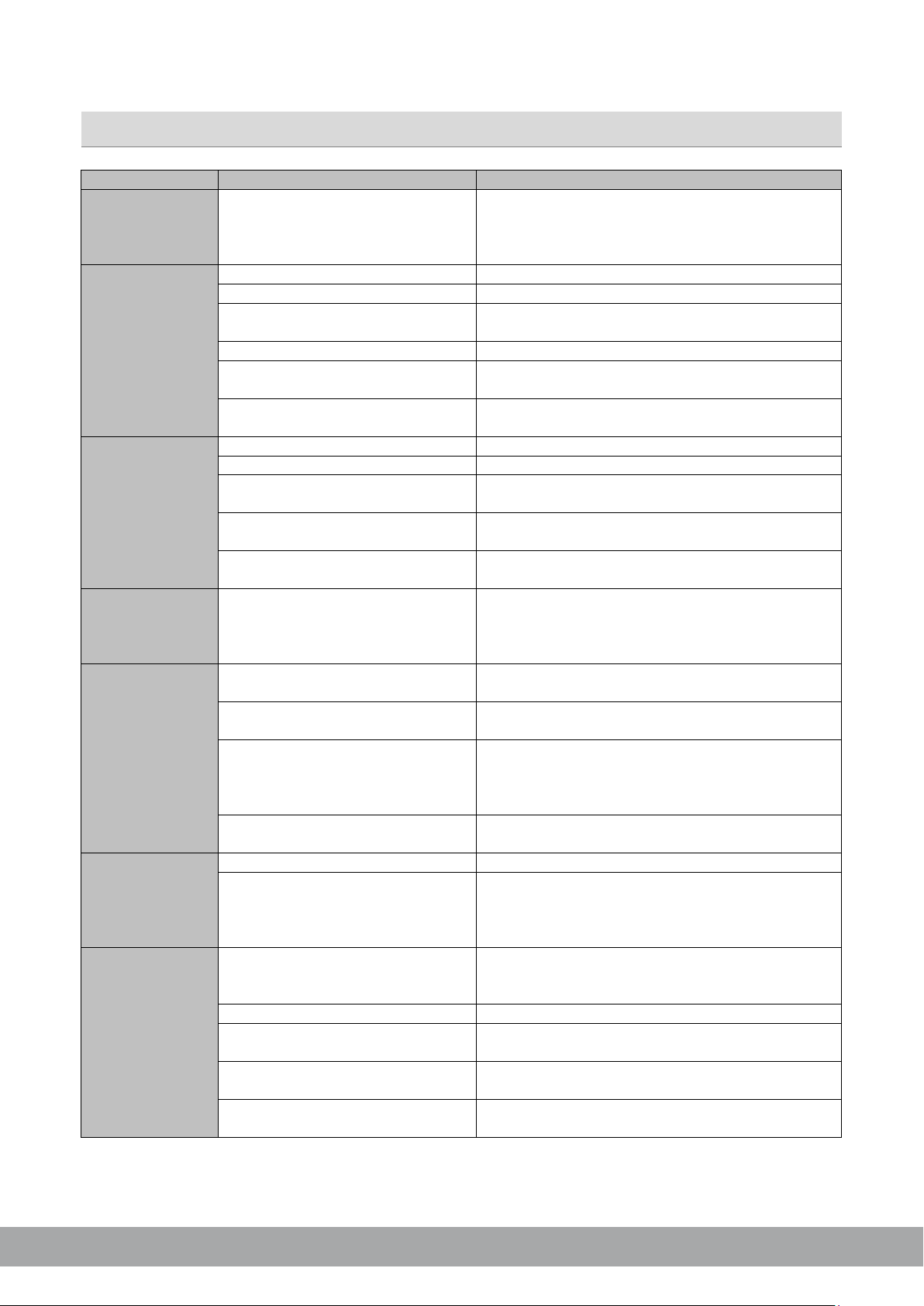
GROUND ZERO GZHA MINI FIVE-DSP
Error
Control
Help / Solution
-check the fusing
-check the ground connection and wire
Signal wire no contact or broken
-check the contact or replace the wire
No audio signal from the head-unit
-check the audio output signal of the head-unit
-check the remote out of the DSP
-check the amplifiers power supply
Non-operational source selected
-check the setting
Activated >MUTE< function (User
Interface)
Adjusted level on optional remote
control unit too low
Signal wire no contact or broken
-check the contact or replace the wire
No audio signal from the head-unit
-check the audio output signal of the head-unit
Balance or fader control of the headunit not in center position
Wrong setup of input and output
mode
>GAIN< level too low or >Mute<
function (user interface) active
-check the polarity of the speaker connection
-check the >TIME ALIGNMENT< adjustment
-reduce the volume level
-check the high pass filter and slope
-select the correct input mode
-pay attention to the input sensitivity of the DSP unit
-reduce the volume level of the head-unit
-deactivate the >Loudness< function of the head-unit
-check the amplifiers input sensitivity
-reduce the level
>GAIN< level too high
-reduce the >GAIN< level
-select a superior quality head-unit
unit
-the head-unit, the DSP and each amplifier should be
connection
Signal wire no contact or broken
-check the contact or replace the wire
-let the audio store or manufacturer check the headunit
-let the audio store or manufacturer check the
amplifier
DSP unit or amplifier mounted close
to an automotive control unit
-7-
Error diagnosis
No function PWR LED on?
Amplifier not switched on
No sound
(PWR LED on)
Single channels
with no function
Impure sound,
incorrect stereo
reproduction
Inverted phase of one or more
speakers
-check the remote wire
-check the +12 Volt connection and wire
-check the setting
-check the setting
-check the setting of the head-unit
-check the setting
-check the setting
-check the polarity of the high-level input
-check the >PHASE< setting
Distorted sound
quality
Increased
noise level
Car specific
interferences
audible through
the audio system
Speaker overload
DSP input override (distortion)
Head-unit output override (distortion)
Amplifier override (clipping)
Head-unit creates noise
Diverse power supplies or ground
connection
Head-unit defective
Amplifier defective
-set the sound controls of the head-unit to center
position
-use the optical output (if available)
-let the audio store or manufacturer check the head-
wired up to a common ground and +12 Volt
-choose another mounting position
HYDROGEN SERIES
Page 24
GROUND ZERO GZHA MINI FIVE-DSP
12
Respect the Music
Listening to music can be emotional, impressive, relaxing or enjoyable. At
that, it doesn´t really matter what kind of music is the personal favorite,
whether it´s Instrumental, Jazz, Electro, Latin, Classic, Rock or any other
music direction. However, audio reproduction quality at each desired
volume is elementary. Some music styles require higher levels while others
prefer the soft tones.
.
GROUND ZERO considers all the different wishes of customers during the
development of new products. Along with this, the target is to create the
most realistic sound, to transfer the soul of the music and the intention of
the performer. Summarized to one phrase: RESPECT THE MUSIC!
HYDROGEN SERIES
GROUND ZERO products are engineered in Germany
GROUND ZERO - international sponsor of
Ground Zero GmbH
Erlenweg 25, 85658 Egmating, Germany
Tel. +49 (0)8095/873 830 Fax -8310
www.ground-zero-audio.com
 Loading...