

Page 1
GROUND ZERO GZDSP 6-10SQ
DSP SERIES
DSP SERIES
Quickstart Guide
AWV4.2
10-Channel Digital Sound Processor
GZDSP 6-10SQ
Page 2

GROUND ZERO GZDSP 6-10SQ
DSP SERIES
General information
The information and advice contained in this guide may be deviate from the delivery condition of the device.
This is due to constant further development of the product.
Content
• GZDSP 6-10SQ
•
USB cable, type A to type B (1,5 m)
• Power supply and high-level input harness
• Built-in BT antenna
• Quickstart Guide
Safety
• As a precaution, it is recommended to disconnect the vehicles battery before mounting the DSP. (Note: For
new vehicles, disconnecting the battery might cause various errors in your vehicle´s electric system that can
be cleared only by authorized service partners of your vehicle´s manufacturer! Please ask your service
partner first before disconnecting the battery!)
• The p ower supply wire (+12 V) has to be protected within max. 20 cm / 8” by a main fuse holder with a
fuse value matching the recommendation for your amplifier
(Note: If there is more than one DSP connected using this power wire, the main fuse value must be equal to
the sum of the recommended fuses of all connected devices. However, make sure the diameter of your
power wire will be sufficient for the required current!)
• If necessary, replace a defective fuse by a fuse with identical quality and value
• Never drill a hole to the vehicle´s gas tank or brake lines, to wirings or any other important vehicle parts!
• Never pass wires over sharp edges or vehicle parts to avoid any kind of damage
• Keep the wiring away from the antenna and electronic devices contributing to radio reception
• Lay the power supply wiring always separated from spea ker wiring to avoid disturbance
Page 3

GROUND ZERO GZDSP 6-10SQ
DSP SERIES
• Digital signal processor (DSP)
• High Performance Analog Devices SigmaDSP Audio Processor
• Premium DAC with differential signal routing
• High-quality OP-amps with lowest noise and distortion behaviour
• 6-channel line input (RCA)
• 6-channel high-level input (with auto-on function)
• Coaxial and optical S/PDIF input
• 10-channel line output (RCA)
• Realtime setup of all functions (via PC or app)
• Simple handling graphical user interface (Windows® compatible)
• Input equalizer (7 bands per source)
• Input channel time alignment
• Output equalizer (10 x 31 bands)
• Time alignment (0-20 ms / 0-692 cm / 0-272”) for each channel
• Adjustable crossover (HPF / LPF / BPF from 20 Hz to 20 kHz)
• Selectable crossover slope (6 to 48 dB/oct)
• 3 filter characteristics (Butterworth/Bessel/Linkwitz-Riley)
• Selectable phase shift for each channel (0˚ or 180°)
• Memory for 10 user presets (selectable via remote control, PC or app)
• Group selectable EQ settings
• Optional wired remote control GZREM 6-10 available separately
• BT 5.0 for wireless music streaming and DSP settings
The GZDSP 6-10SQ is a digital signal processor that can significantly improve the sound quality of a car
music system under certain conditions. The basis for this is a 32-bit SigmaDSP in conjunction with six 32-bit
analog-to-digital and ten digital-to-analog converters. Thanks to the free combination of up to 6 input
channels and a 31-band equalizer for ea ch outp ut channel, the GZDSP 6-10SQ can be integrated into almost
any factory system. The source-specific, 7-band input equalizer also helps optimize the input signal.
In addition to the 6 analog high- and low-level connections, the GZDSP 6-10SQ also offers an optical, digital
and BT interface.
App control & music streaming
To use your mobile device controlling the unit and changing the adjustments, please install the GROUND ZERO
GZDSP 6-10SQ control app on your device (Android / iOS) and connect the separately available music
streaming interface. Check the web page for further information and to download the app´s owner´s manual.
Specifications
Product description
Terms of warranty
The limited warranty for this product is covered by GROUND ZERO´s regional distribution partners and their
terms and conditions. For further informati on contact your local retailer or distributor.
Page 4
GROUND ZERO GZDSP 6-10SQ
DSP SERIES
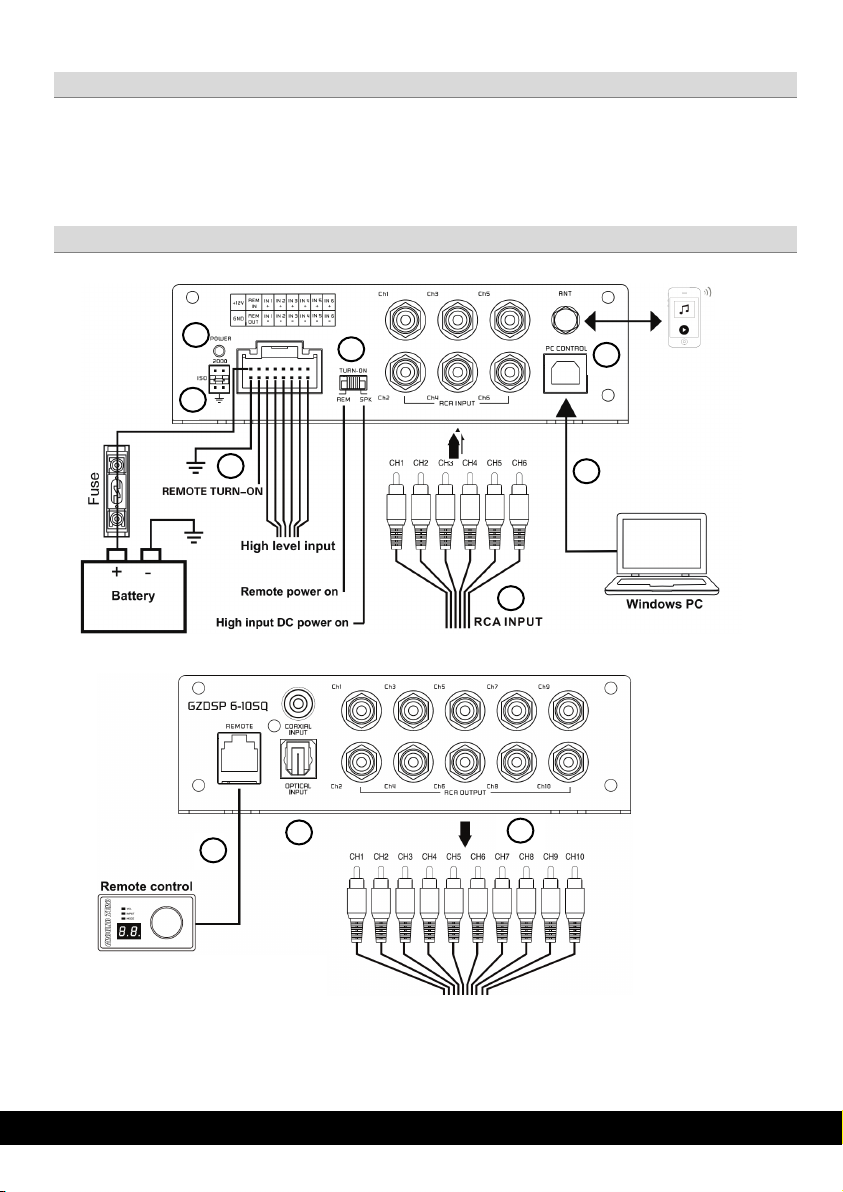
1
RCA OUTPUT
(optional)
2
3 4 5 8 6 7 9
10
• To avoid heat build-up, sufficient air supply for cooling must be provided. Never cover the surface of the
heatsink entirely.
• The DSP unit should NEVER be mounted onto a vibrating part or surface such as a subwoofer enclosure.
This might lead to malfunction due to loosened electrical parts inside the amplifier.
General installation note
Connections
Page 5
GROUND ZERO GZDSP 6-10SQ
DSP SERIES
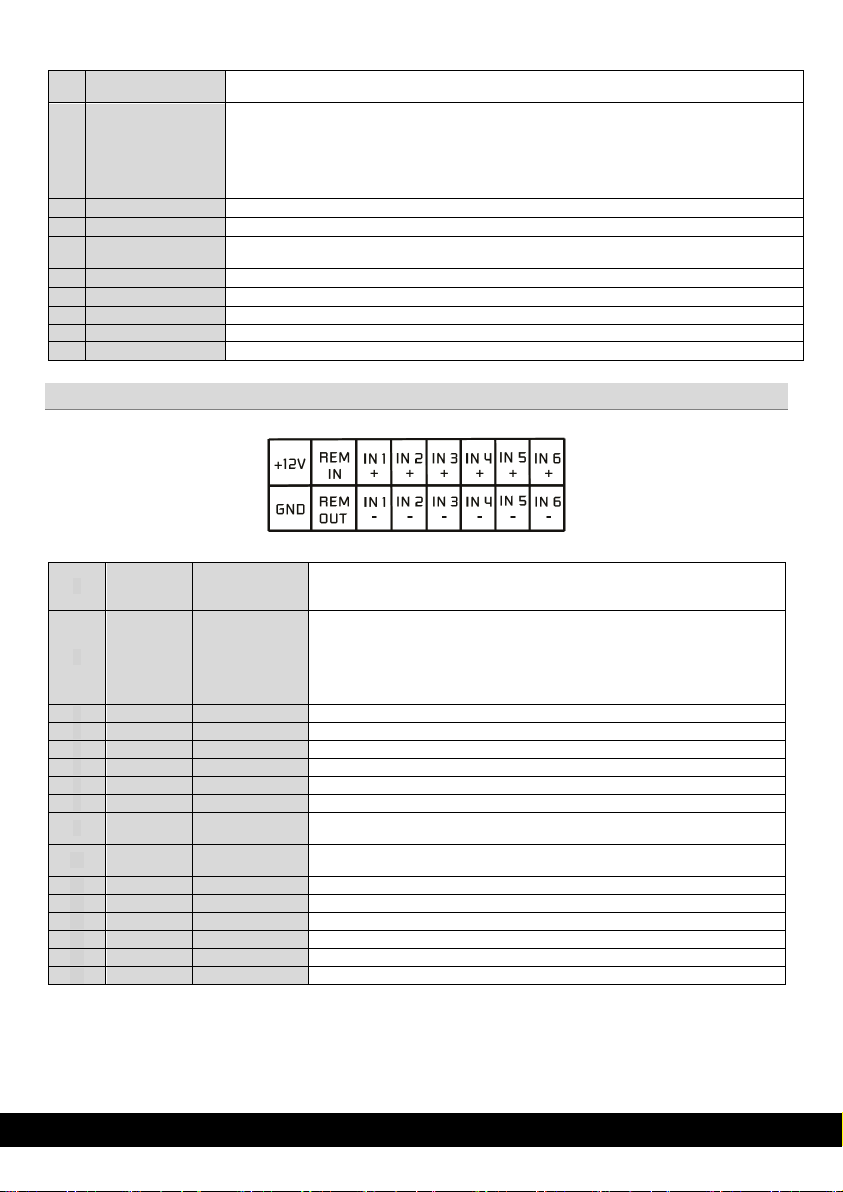
1
Harness connection
2
TURN-ON switch
Caution: The high-level input and the line input cannot be used simultaneously. This may lead to
malfunction and cause serious damage to the DSP unit.
3
Power indication
4
Line input (RCA)
To connect the head -unit´s pre-amplified line output audio signal (RCA)
5
Signal-Ground
Jumper
Separates the signal ground from power ground. Presetting is 50 Ω. In case of having system noise or
engine noi se the jumper can be selected to 200Ω or 0Ω.
6
USB por t
To connect the supplied USB cable to a compatible Windows PC´s USB port
7
BT Antenna
8
Remote socket (opt.)
To connect the optional wired remote control
9
S/PDIF input
To connect a S/PDIF signal source
10
Line output (RCA)
To connect one or more amplifiers using RCA signal cables
1
Yellow
+ 12 V
Power supply
Connect the unit to the positive pole (+) of the vehicle´s b atter y. Use adequate
fuse) not further than 30 cm / 12” away from the terminal of the battery
2
Blue
Remote input
3
White
Channel 1 (+)
To connect the left front tweeter output (+)
4
Grey
Channel 2 (+)
To connect the right front tweeter output (+)
5
Green
Channel 3 (+)
To connect the left front speaker output (+)
6
Purple
Channel 4 (+)
To connect the right front speaker output (+)
7
Brown
Channel 5 (+)
To connect the left r ear speaker output (+)
8
Orange
Channel 6 (+)
To connect the right rear speaker output (+)
9
Black
Ground (GND)
To connect to a gr ound point. A sufficiently dimensioned cable should be used for
this (mind. 1 mm²)
10
Blue/
Black
Remote o utput
To be used with additional system equipment like amplifi ers to turn on together with
the DSP unit. The current is limited to 500 mA ma x.
11
White/bl
Channel 1 (-)
To connect the left front tweeter output (-)
12
Grey/bl
Channel 2 (-)
To connect the right front tweeter output (-)
13
Green/bl
Channel 3 (-)
To connect the left front speaker output (-)
14
Purple/bl
Channel 4 (-)
To connect the right front speaker output (-)
15
Brown/sw
Channel 5 (-)
To connect the left r ear speaker output (-)
16
Orange/sw
Channel 6 (-)
To connect the right rear speaker output (-)
1
8
To connect the pow er and speaker input harness (check the pinout on the next page).
This unit offers automatic turn-on. Using the feature, it´s unnecessary to connect a remote wire. Set the
switch to the RCA position for line input using the Remote cable or SPK position for the high-level input
turn-on sensing.
Indicating the operation status
BT connection to control the device via APP and to stream music
Harness connector pinout
9
16
wiring gauge (not less than 1.0 mm² / 17 AWG) with an additional fuse holder (5 A
Using the line input (RCA), a remote wire can be connected to turn on the DSP unit.
In this case, set the TURN-ON switch to the REM position. Setting the switch to the
SPK position activates the auto-on function, in that case a remote wire is
superfluous.
Page 6

GROUND ZERO GZDSP 6-10SQ
DSP SERIES
The software can be downloaded from the support area at our Ground Zero web page: www.ground-zero-audio.com
* compatible operating systems: Microsoft Windows
PC requirements: min. 1.5 GHz processor with 1 GB main memory (RAM) and graphic cards
with a resolution of 1024x600 pixels or more
Note: We strictly recommend using the latest DSP software available from the web page.
USB connection: We don´t recommend using any passive extension cable together with the included USB wire, as the proper
function can´t be ensured.
DSP setting: The unit must be connected to a PC with the DSP software installed using the included USB wire. To adjust any
setting the unit must be in operation mode. Click the program icon on the desktop or select the program from the software list
to start. The starting window appears.
Windows® user account c ontrol (UAC): In case the PC operating system is set to restricted security clearance regarding
software with unknown source or without digital signature a window will appear each time at the program is starting. Please
confirm with >Yes< (language depends on your local setting) to run the program
In order to use the software, a communication to the PC must be established. Therefore, an unused USB port is required. During
the connection of the USB cable the system will assign automatically an USB port.
PC software installation
®
XP SP3 / Vista / 7 / 8 / 8.1 / 10 / 11
USB connection
USB port
Software
The manual of the Software usage is available separate.
Please download from our web page at the support area: www.ground-zero-audio.com
Password
Default password for the iOS/Android app: 666666
Safety Ins tructions: Use the device only in environments where wireless technology is permitted. Do not use the d evice if it has
been damaged or exposed to liquids. Do not expose the device to extreme temperatures, fire or humidity. Keep the device,
packaging and accessories away from children and pets to prevent accidents and suffocation.
Manufacturer‘s declaration: Herewith Ground Zero GmbH declares that the radio system type GZDSP 6-10SQ complies with
the directive 2014/30/EU and further declares that this product is in conformity with the rules of the EU directives (including all
applicable amendments) 2011/65/EU RoHS2 and 2001/95/EC General Product Safety Directive. The full text of the EU
Declaration of Conformity is available at the following internet address: www.ground-zero-audio.com. Electronic products
contain valuable raw materials and must not be disposed of with normal household waste. At the end of its service life, please
bring the device to your local recycling facility.
Safety instructions / Manufacturer´s declaration
Page 7
GROUND ZERO GZDSP 6-10SQ
DSP SERIES
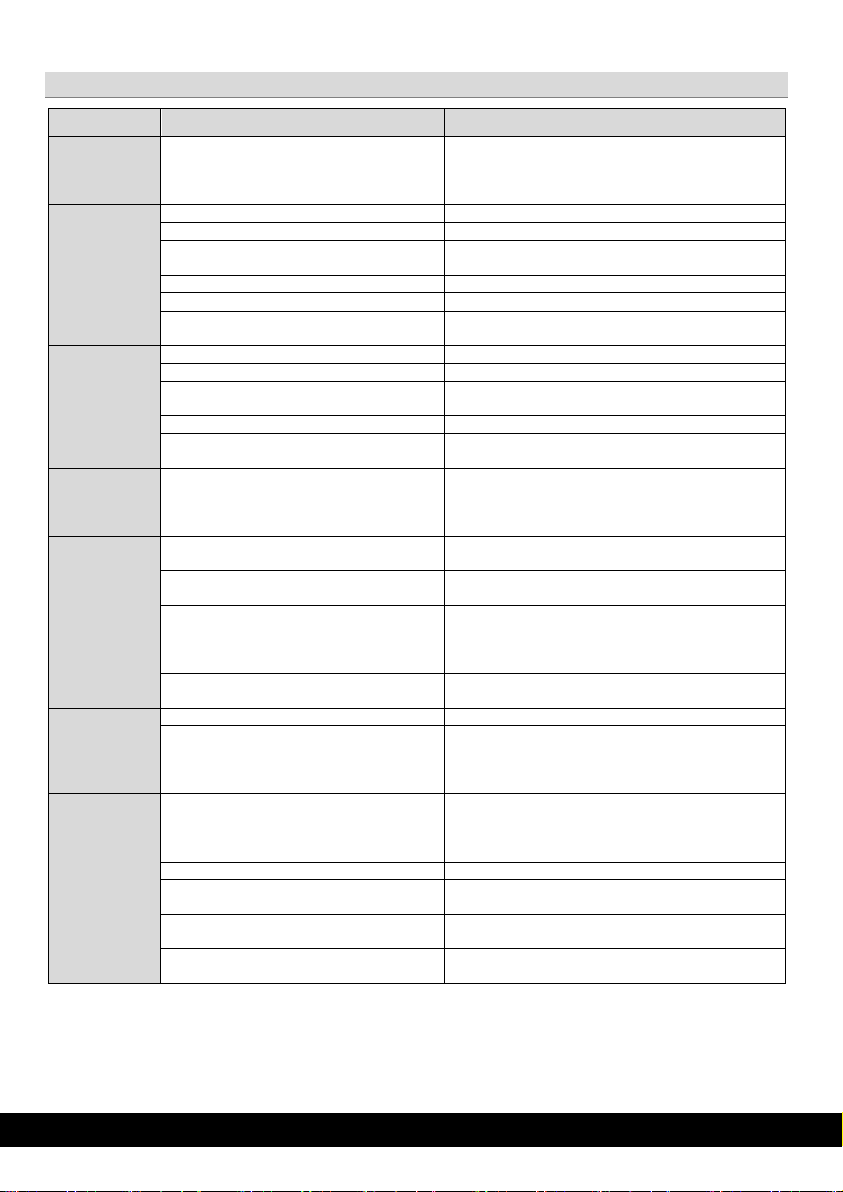
Failure
Control
Help / Solution
-check the fusing
-check the ground connection and wire
signal wire no contact or broken
-check the conta ct or replace t he wire
no audio signal from the head-unit
-check the audio output signal of the head-unit
-check the remote out of the DSP
-check the amplifiers power supply
non operational source selected
-check the setting
activated >MUTE< function (User Interface)
-check the setting
adjusted level on optional remot e control
unit too low
signal wire no contact or broken
-check the conta ct or replace t he wire
no audio signal from the head-unit
-check the audio output signal of the head-unit
balance or fader control of the head-unit not
in center position
wrong setup of input and output mode
-check the setting
>GAIN< level too low or >Mute< function
(user interface) active
-check the polarity of the speaker connection
-check the >TIME ALIGNMENT< adjustment
-reduce the volum e level
-check the highpass filter and slope
-select th e corr ect input mode
-pay attention to the input sensitivity of the DSP unit
-reduce the volum e level of th e head-unit
-deactivate the >Loudness< function of the head-unit
-check the amplifiers input sensitivity
-reduce the level
>GAIN< level too high
-reduce the >GAIN< level
-select a superior quality head-unit
unit
-the head-unit, the DSP and each amplifier should be
- Change signal ground jumper position
signal wire no contact or broken
-check the conta ct or replace t he wire
-let the audio store or manufacturer check the headunit
-let the audio store or manufacturer check the
amplifier
DSP unit or amplifier mounted close to an
automotive contr ol unit
Failure Diagnosis
No function PWR LED on?
No sound
(PWR LED on)
Single channels
with no
function
Impure sound,
incorrect stereo
reproduction
Distorted
sound
quality
Increased
noise level
amplifier not switched on
inverted phase of one or more speakers
speaker overload
DSP input override (distortion)
head-unit output override (distortion)
amplifier override (clipping)
head-unit creates noise
-check the remote wire
-check the +12 Volt connection and wire
-check the setting
-check the setting of th e head-unit
-check the setting
-check the polarity of the high-level input
-check the >PHASE< setting
-set the sound controls of the head-unit to center
position
-use the optical output (if available)
-let the audio store or manufacturer check the head-
Car specific
interfer ences
audible
through
the audio
system
diverse power supplies or ground connection
head-unit defective
amplifier defective
wired up to a common ground and +12 Volt
connection
-choose another mounting position
Page 8
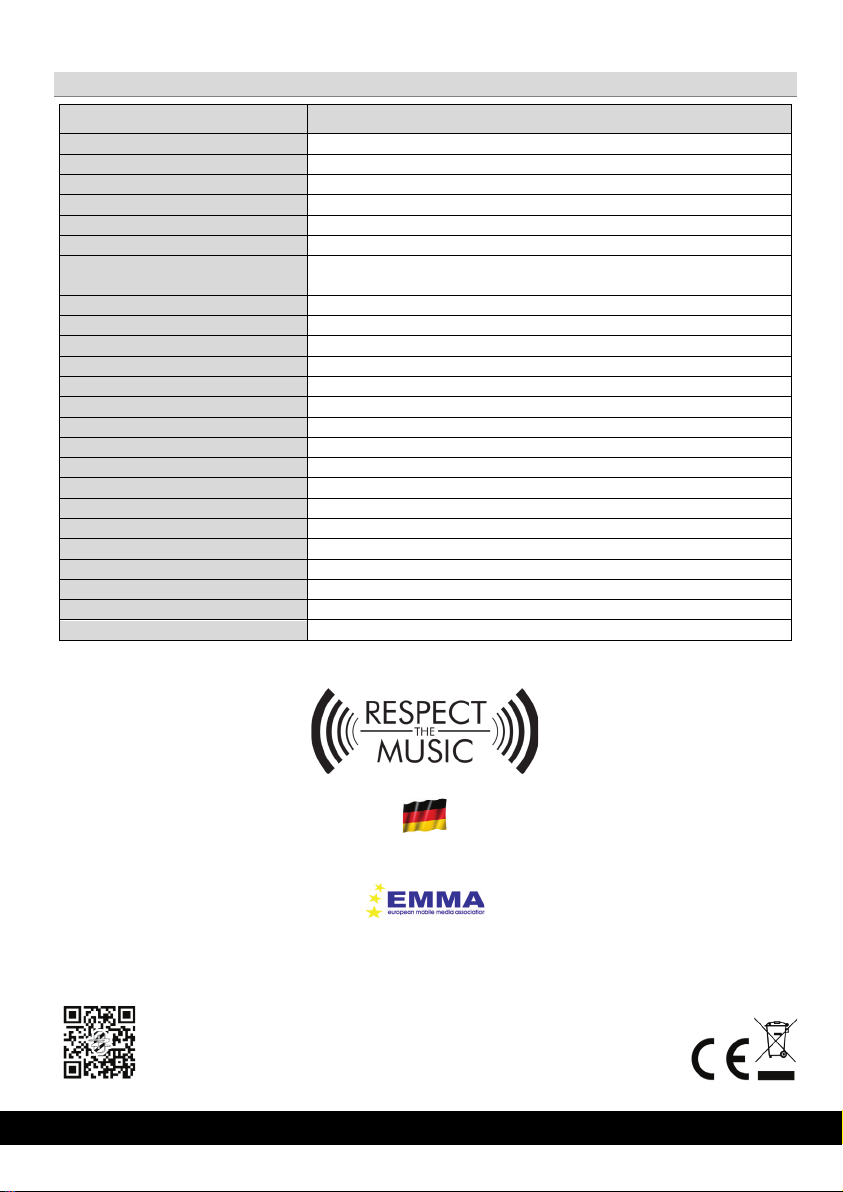
GROUND ZERO GZDSP 6-10SQ
DSP SERIES
Model
GZDSP 6-10SQ
Type
10-channel signal processor (DSP) with 6 inputs
Frequency range
20 Hz – 20 KHz (-3 dB)
SNR / line input
≥110dB (A-weighted)
SNR / opt. and coaxial input
≥113dB (A-weighted)
THD
0.002 %
DSP chipset
Analog Devices SigmaDSP
Sensitivity
Line input (RCA) max. 3V RMS
Input impedance
Line input (RCA) ≥20 kΩ
Output voltage / channel
≥3,8 V
Remote current
max. 500 mA
Remote input voltage
>3 V
Switching voltage / speaker input
>3,2 V
Turn on delay
6 seconds
Recommended fuse value
5 A
Operating voltage
8.5 – 16 V
Dimensions
132 x 143 (171) x 40 mm / 5.20” x 5.63 (6.73)” x 1.57” (w x l x h)
Software compatibility
Microsoft Windows™ XP SP3, Vista, 7, 8, 8.1,10,11
Preset memory
10 presets (individually assignable)
Gain range
-60 bis 0 dB
Equalizer
10x parametric 31 band EQ (20 Hz – 20 kHz) with adjustable Q
Time delay
0 – 20 ms / 0 – 692 cm / 0-272 inch
Crossover
6 – 48 dB/oct. slope with selectable filter characteristic
Phase correction
0° / 180°
Optionally available accessory
Wired remote control GZREM 6-10
Technical Specifications
High level input max. 8.0 V RMS
GROUND ZERO products are engineered in Germany
GROUND ZER O - international sponsor of
Ground Zero GmbH
Erlenweg 25, 85658 Egmating, Germany
Tel. +49 (0)8095/873 830
www.ground-zero-audio.com
 Loading...