

Page 1
BASIC OPERATION – PM PID
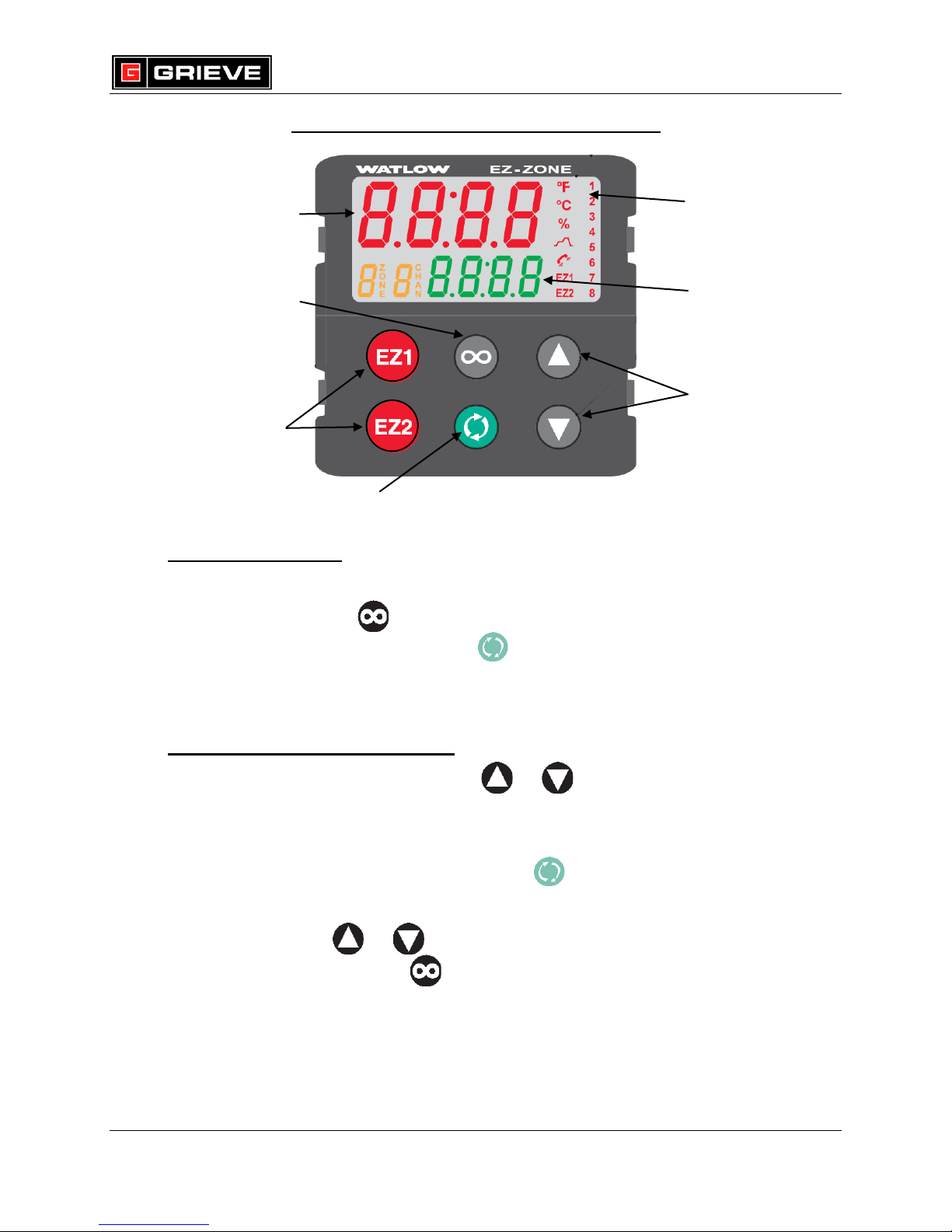
EZ KEY(S)
(PROGRAMMABLE)
ADVANCE KEY
(ADVANCES THROUGH PROMPTS)
LOWER DISPLAY
(DISPLAYS SET POINT
DURING OPERATION OR
PARAMETER WHOSE
VALUE APPEARS IN UPPER
DISPLAY
UP AND DOWN ARROW KEYS
(MOVE UP/INCREASE AND
MOVE DOWN/DECREASE)
INDICATOR LIGHTS:
(DISPLAY TEMPERATURE
UNIT, OUTPUT, PROFILE AND
COM ACTIVITY)
UPPER DISPLAY
(DISPLAYS PROCESS VALUE
DURING OPERATION OR VALUE
OF PARAMETER SHOWN IN
LOWER DISPLAY.)
INFINITY KEY
(PRESS TO BACK UP
ONE LEVEL)
WATLOW PM PID KEYS (1/4 DIN SHOWN)
A. BASIC OPERATION
1. If you ever reach a point on the controller where you do not want to be,
press and hold for 2 seconds to return to the HOME PAGE.
2. From the HOME PAGE, press to scroll through the display
parameters.
B. STATIC SET POINT OPERATION
1. From the HOME PAGE, press or to change the set point.
2. To enable static set point operation after running a profile, perform the
following steps:
a. From the HOME PAGE, press until C.M is shown on the lower
display and oFF is shown on the upper display.
b. Press or until AUto is shown on the upper display.
c. Press and hold to return to the HOME PAGE.
REV E – 2/26/15 Page 1 of 4
Z:\Electrical\INSTRUCT\INSTRUMENT\WATLOW\PM\BASIC OPERATION - PM PID rev E.doc
Page 2
C. PROFILE OPERATION
***ONLY APPLICABLE IF CONTROLLER HAS PROFILE OPTION
1. From the HOME PAGE, press to start a profile. will light up to
indicate a profile is running.
2. Press to terminate a profile from the HOME PAGE.
D. CHANGE TEMPERATURE UNITS
***NOT REQUIRED FOR NORMAL OPERATION
1. From the HOME PAGE, press and hold and for 6 seconds to
enter the SETUP PAGE. Ai is shown on the upper display and SEt is
shown on the lower display.
2. Press until gLbL is shown in the upper display. Press to enter
gLbL menu.
BASIC OPERATION – PM PID
3. Press until C_F is shown on the lower display.
4. Press or to change to the desired temperature unit.
5. Press and hold for 2 seconds to exit SETUP PAGE. The process
value, set point, upper and lower limits will automatically change according
to the temperature unit selected.
E. VIEW PERCENT OUTPUT
1. From the HOME PAGE, press once. The percent output is shown on
the upper display and h.Pr is shown on the lower display.
2. Press once to return to the HOME PAGE.
REV E – 2/26/15 Page 2 of 4
Z:\Electrical\INSTRUCT\INSTRUMENT\WATLOW\PM\BASIC OPERATION - PM PID rev E.doc
Page 3
F. PERFORM AUTOTUNE
***NOT REQUIRED FOR NORMAL OPERATION
1. Once oven is powered on, load parts into oven and set oven to required
set point.
2. From the HOME PAGE, press and hold and for 3 seconds to
enter the OPERATIONS PAGE. Ai is shown on the upper display and
oPEr is shown on the lower display.
3. Press until LooP is shown in the upper display. Press to enter
LooP menu.
4. Press until no is shown on the upper display and AUt is shown on
the lower display.
5. Press or to change to YES.
6. Press and hold twice to exit OPERATIONS page. Autotune will begin
BASIC OPERATION – PM PID
momentarily. The display will alternate between showing the input value
and set point and showing tUn1 and Attn. Once autotune is completed
(‘tUnE’ will no longer be displayed), the controller will run at the set point
with the new tuning constants.
G. CHANGE SET POINT LIMITS
***NOT REQUIRED FOR NORMAL OPERATION
1. From the HOME PAGE, press and hold and for 6 seconds to
enter the SETUP PAGE. Ai is shown on the upper display and SEt is
shown on the lower display.
2. Press until LooP is shown in the upper display. Press to enter
LooP menu.
3. Press until L.SP is shown on the lower display.
4. Press or to change to the set point lower limit.
5. Press until H.SP is shown on the lower display.
6. Press or to change to the set point upper limit.
7. Press and hold for 2 seconds to exit SETUP PAGE.
REV E – 2/26/15 Page 3 of 4
Z:\Electrical\INSTRUCT\INSTRUMENT\WATLOW\PM\BASIC OPERATION - PM PID rev E.doc
Page 4

H. VIEW PID SETTINGS
***NOT REQUIRED FOR NORMAL OPERATION
1. From the HOME PAGE, press and hold and for 3 seconds to
enter the OPERATIONS PAGE. Ai is shown on the upper display and
oPEr is shown on the lower display.
2. Press until LooP is shown on the upper display. Press to enter
LooP menu.
3. Press until h.Pb is shown on the lower display. The setting shown on
the upper display is your heat proportional band setting.
4. Press until ti is shown on the lower display. The setting shown on
the upper display is your heat integral setting.
5. Press until td is shown on the lower display. The setting shown on
the upper display is your heat derivative setting.
BASIC OPERATION – PM PID
6. Press and hold for two seconds to exit OPERATIONS page.
REV E – 2/26/15 Page 4 of 4
Z:\Electrical\INSTRUCT\INSTRUMENT\WATLOW\PM\BASIC OPERATION - PM PID rev E.doc
 Loading...