

Page 1
Page 2

Copyright
© GridSense Inc 2010-2012
The material presented in this manual is copyright protected by GridSense Inc.
Any reproduction in whole or in part for any purpose without the prior written consent of
GridSense Inc is strictly prohibited.
Information in this document is subject to change without notice.
All trademarks are the property of their respective owners.
Highv Camera Manual -v1Nov7 2012.Docx page 1 of 18
Page 3

Table of Contents
Section Page
Table of Contents..............................................................................................................................................2
1 General Information .................................................................................................................................. 3
1.1 Introduction ................................................................................................................................... 3
1.2 Warranty ........................................................................................................................................ 3
1.3 Applications ................................................................................................................................... 3
1.4 Approach Limits............................................................................................................................. 3
1.5 Camera Components ..................................................................................................................... 5
1.6 Specifications ................................................................................................................................ 7
1.7 Cautions......................................................................................................................................... 7
2 Using the HighV Camera .......................................................................................................................... 9
2.1 Assembly ...................................................................................................................................... 9
2.2 Operation .................................................................................................................................... 10
2.3 Camera Battery Removal for Charging or Replacement ............................................................... 13
2.4 Battery Charging for Camera ....................................................................................................... 14
2.5 Battery Charger LED Status ......................................................................................................... 14
3 Troubleshooting ...................................................................................................................................... 16
3.1 Android Tablet does not find camera ........................................................................................... 16
3.2 Android Tablet is stuck in “negotiating connection” mode .......................................................... 16
4 Content Checklist .................................................................................................................................... 17
• Camera ........................................................................................................................................ 17
• Battery module ............................................................................................................................ 17
• Camera Battery charger ............................................................................................................... 17
• Android tablet/ rugged rubber case ............................................................................................. 17
• Android charger ........................................................................................................................... 17
• Hotstick attachment for tablet..................................................................................................... 17
• Automotive DC inverter for charging camera and tablet .............................................................. 17
Highv Camera Manual -v1Nov7 2012.Docx page 2 of 18
Page 4

1 General Information
1.1 Introduction
Thank you for purchasing the HighV Inspection Camera. This booklet has been written to
help you familiarize yourself quickly and easily with the full range of features and
applications that this
The HighV Inspection Camera uses a shielded, high resolution wireless camera
providing the user with a tool to conduct close up inspections of live electricity assets
up to 345kV phase to phase.
The camera is installed on a hotstick and guided from the ground or bucket truck
surveying energized lines or equipment. A live wireless image is transmitted back to
an Android® tablet running the GridSense HighV Camera App either attached to the
user end of the hotstick or alternatively hand held by supporting personnel.
The live image streaming from the camera can be captured by the touch of a button
within the Android App. The images are stored to an SD card within the tablet for further
inspection or use in a report.
product
has to offer.
1.2 Warranty
The HighV Inspection Camera is covered by a 1 year manufacturer’s
warranty. Please contact GridSense in order to make a warranty claim.
Please inspect this new product for any damage. Report any defects to your supplier, or
refer to the contact numbers in part 4 of this booklet for manufacturer details.
1.3 Applications
For more information on applications please refer to the product overview document or
contact your local supplier.
1.4 Approach Limits
The Live Line Inspection Camera is manufactured for safe use on energized equipment
up to and including 345kV phase to phase.
Highv Camera Manual -v1Nov7 2012.Docx page 3 of 18
Page 5

Users must observe hotstick manufacturer’s ratings and standard approach
limits when using the HighV Camera. The HighV Camera offers NO user
protection.
• We advise that users add an additional 300mm/1’ clearance to the
standard hotstick approach limits at all times when mounting the screen to
the hotstick.
Highv Camera Manual -v1Nov7 2012.Docx page 4 of 18
Page 6
1.5 Camera Components
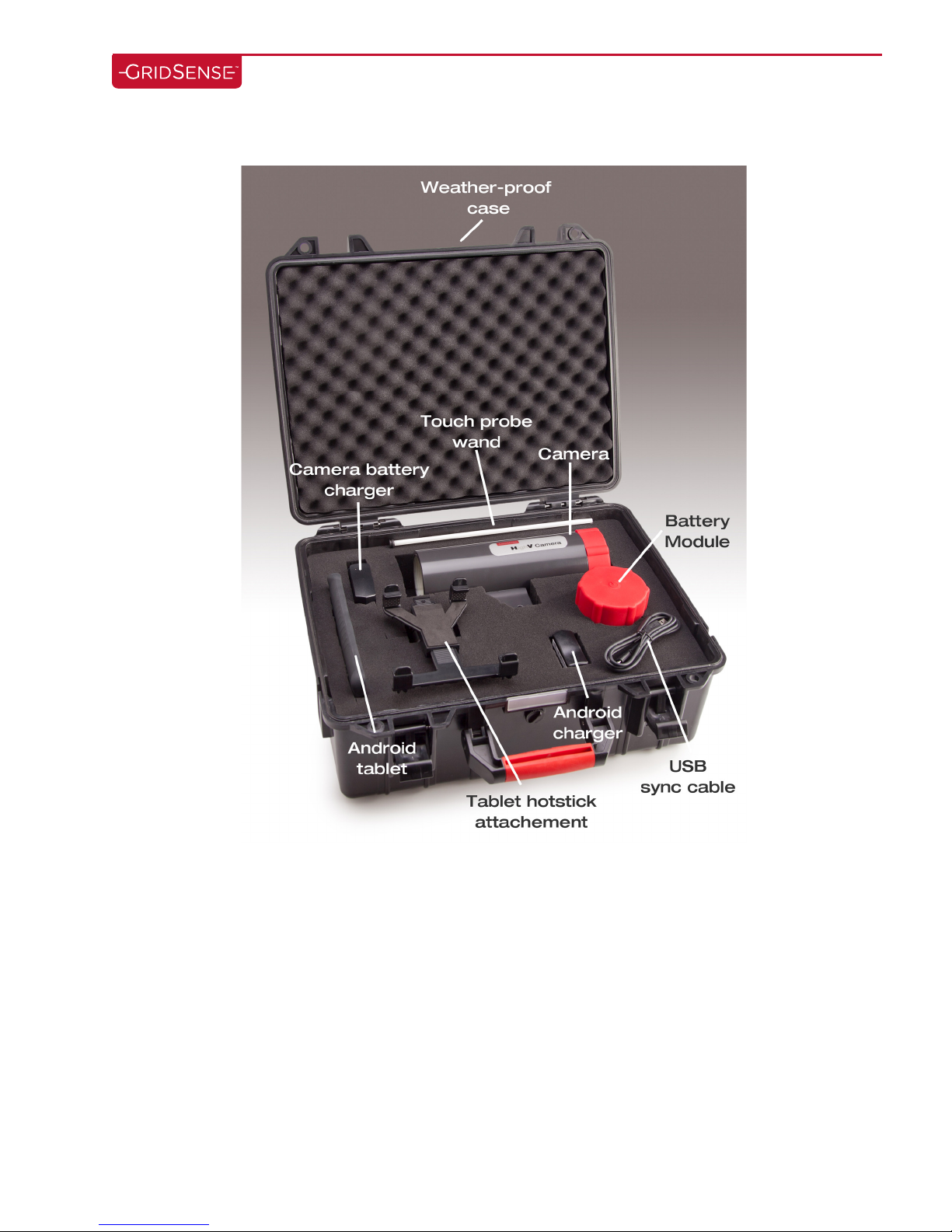
• Camera: A high resolution camera and transmitter are housed in an
insulated case that uses a standard universal spline (32mm) sunrise
attachment for connection to a hotstick. A fiberglass rod (touch probe)
attaches to the mounting bracket and is set to the camera’s focal length,
protecting the camera from direct lens damage. In addition, a high intensity
LED light ring is embedded in the camera for use in low light applications.
Battery life of the camera is approximately 2 hours from full charge
(without LED illumination).
Highv Camera Manual -v1Nov7 2012.Docx page 5 of 18
Page 7

• Android Tablet: The Android Tablet is used as the video receiver and image
capture device. The Android Tablet provides the operator with a live
streaming high-resolution video from the camera that can be handheld or
alternatively for single operator applications, attached to the lower part of
the hotstick with the supplied bracket. The “snapshot” button within the
Android Tablet App records images directly onto the Android Tablet. The
Android Tablet includes a rechargeable lithium ion battery pack that
provides 7 hours continuous use from full charge.
• Battery Chargers: The Camera and Android Tablet are supplied with individual
charging devices. This includes charging at:
o 100 - 240V @ 50/60Hz
Also included in the kit is a DC Inverter to provide in-vehicle charging of the Android
tablet and the Camera battery pack.
• Carry Case: For safe transport, the camera comes in a fully protective,
watertight, hard cover case.
Highv Camera Manual -v1Nov7 2012.Docx page 6 of 18
Page 8
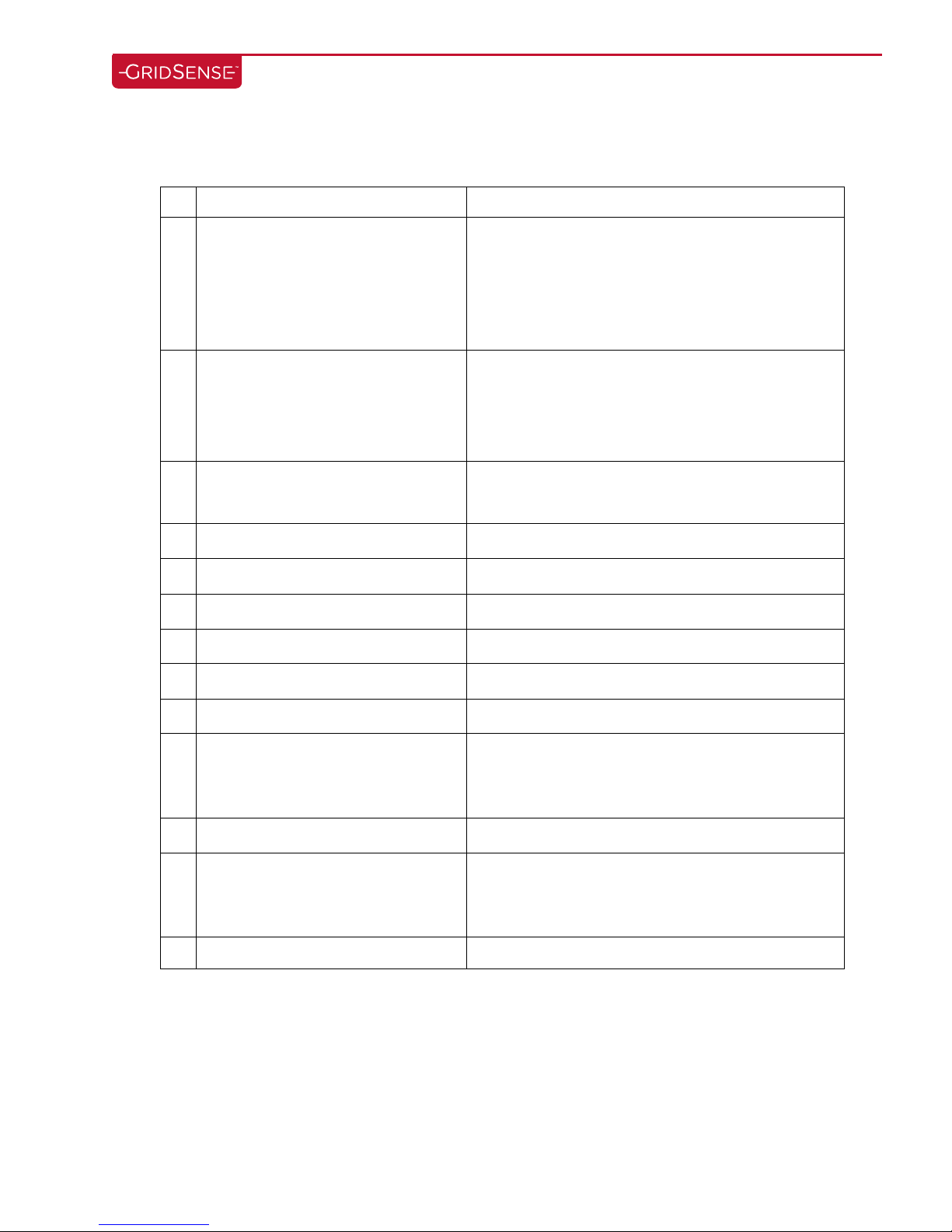
Phase
to Phase
Rating
345kV
Typical Kit Includes
• Touch probe rod
Hot
Stick Mount
T
ransmission
Universal Sunrise
fitting
Transmission
Standa
rds
License
-
free WiFi
Camera
Type ¼” Sony
®
Super HAD CCD
-
400 line
resolution
Camera Power
DC 12V +
-
10% (3.6W)
Zoom
10x
Focus Control
Auto
Android
®
Tablet
7” TFT
active matrix
– LED Backlight
Battery
Lithium
Ion rechargeable
battery pack
Camera
Battery Performance
Tablet
2 hours perf
ormance
Housing Material
Polymer
resin
Housing
Dielectric
Strength
> 25kV/mm
Image Recording Format
JPEG,
AVI
1.6 Specifications
• Android Tablet
• hot-stick mount
• Camera and Tablet AC chargers
• Protective transportation case
Frequency Transmission
Range Transmission Power
Camera Battery Charging
Camera Enclosure Rating
2.4Hz GHz
Up to 65ft (20m) line of site
< 10mW EIRP
Compliant to FCC, C Tick and CE standards
6 hours
NEMA4/IP65
Operating Temperature
Working Humidity
1.7 Cautions
• Rating: The HighV Camera is rated for use on energized equipment up to 345 kV
phase to phase. At no time should it be used around or come into contact with
higher voltages.
Highv Camera Manual -v1Nov7 2012.Docx page 7 of 18
-10° C to +50° C
0% - 96%
Page 9

• Inspecting Energized Equipment: When using the camera to inspect energized
equipment, the operator must adhere to all safety requirements and ratings of all
equipment including (but not limited to) the hotstick, bucket truck, approved
clearances, approach limits and work practice standards.
• Touch Probe Rod: When operating the HighV Camera, the touch probe MUST be
installed and used at all times. This rod not only ensures the optimum focused
distance for viewing equipment, but also protects the lens, lens cover and LED lights
from impact damage.
Highv Camera Manual -v1Nov7 2012.Docx page 8 of 18
Page 10
2 Using the HighV Camera
2.1 Assembly
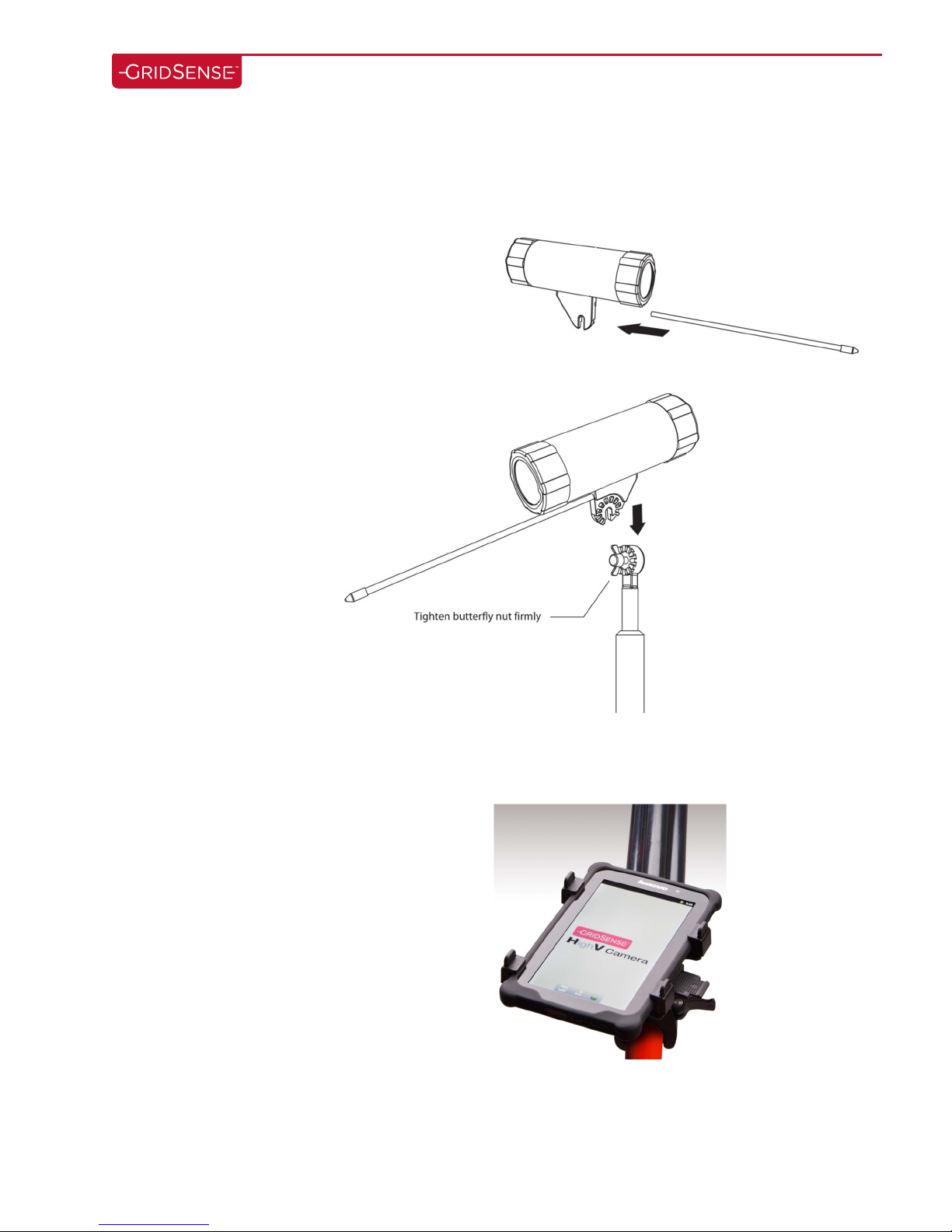
• Camera
1. Remove camera and touch probe
2. Insert touch probe into hole in mounting
bracket
3. Mount camera to sunrise attachment on
hotstick and tighten butterfly nut firmly
• Android Tablet
1. Remove Tablet and hotstick attachment from case
2. Attach bracket to hotstick
3. Insert Tablet into mount
Highv Camera Manual -v1Nov7 2012.Docx page 9 of 18
Page 11
2.2 Operation
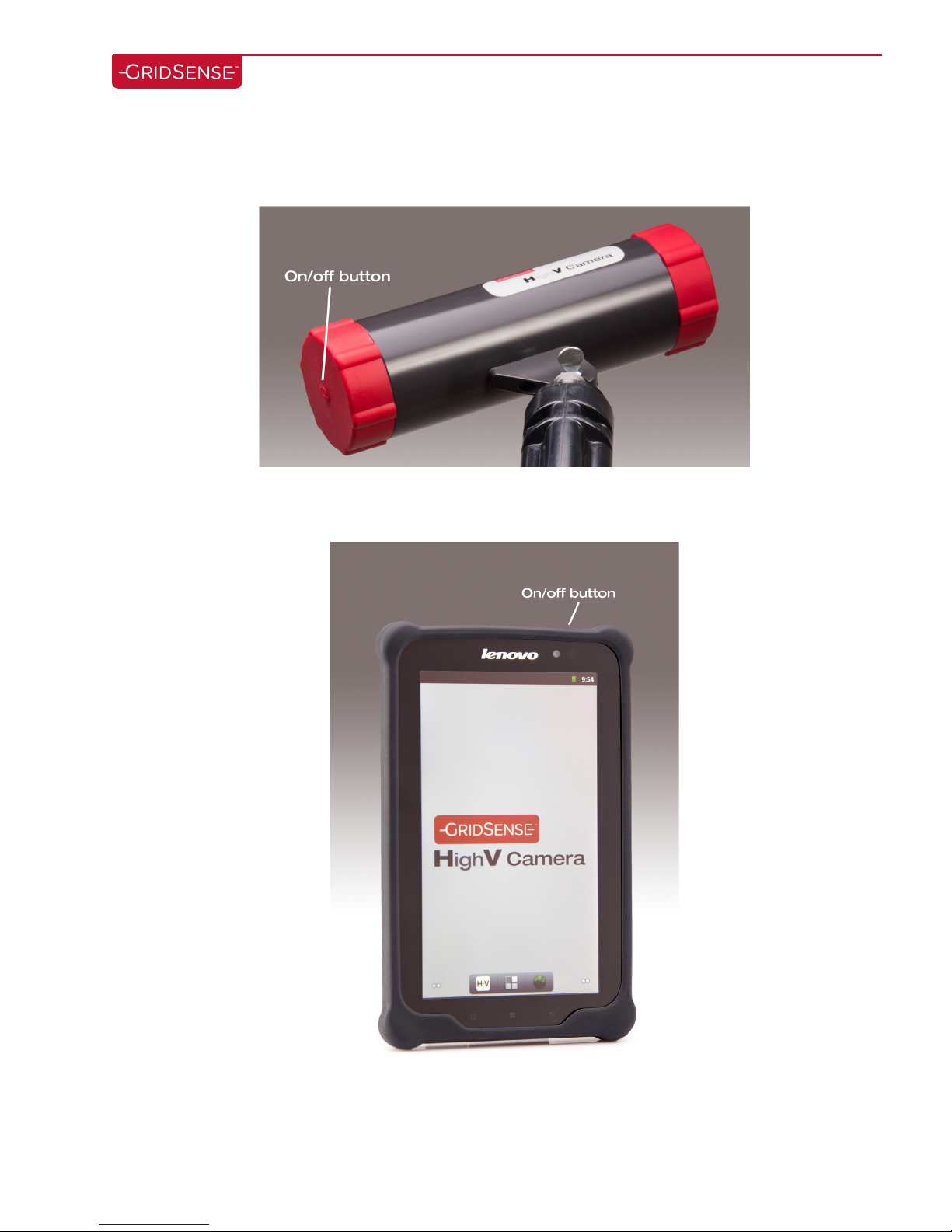
• To Power Camera On/Off:
Press the power button located on the battery module.
• To Power Android Table On/Off:
Press the power button on the top of the tablet.
PL
Highv Camera Manual -v1Nov7 2012.Docx page 10 of 18
Page 12
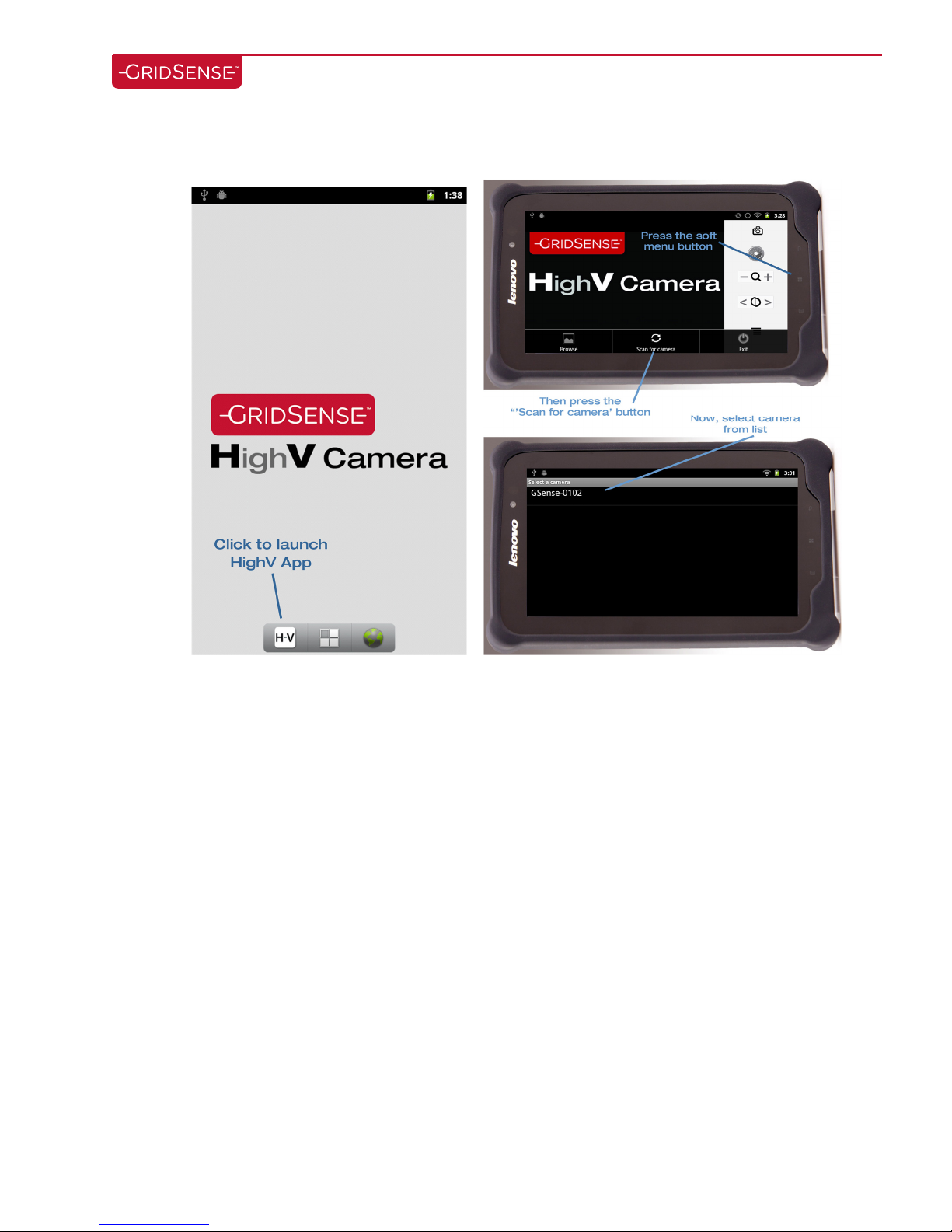
• To begin using the HighV Camera, start the HighV Application from the tablet.
Highv Camera Manual -v1Nov7 2012.Docx page 11 of 18
Page 13
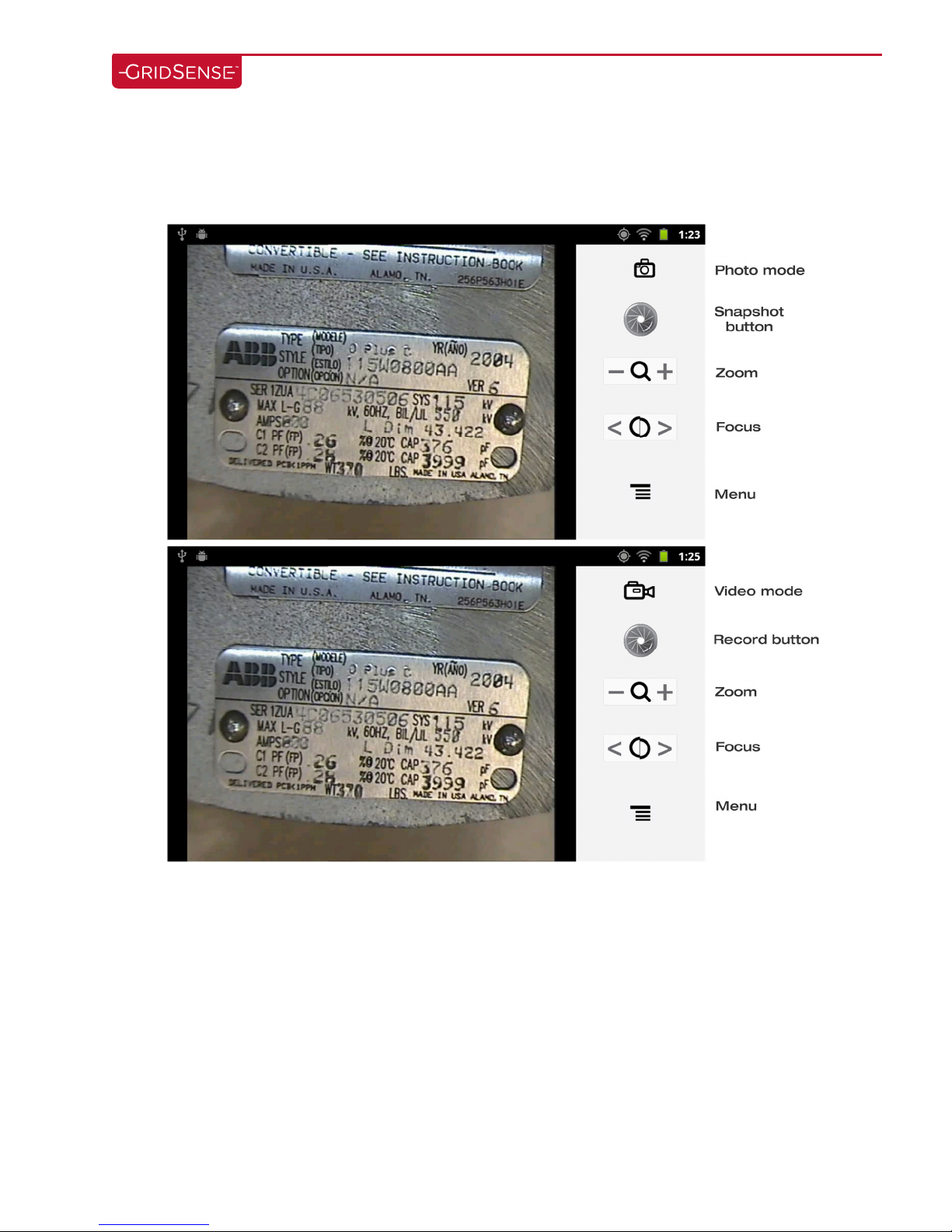
• Recording Images:
1. Press the snapshot button for a still image or the record button for video.
Highv Camera Manual -v1Nov7 2012.Docx page 12 of 18
Page 14
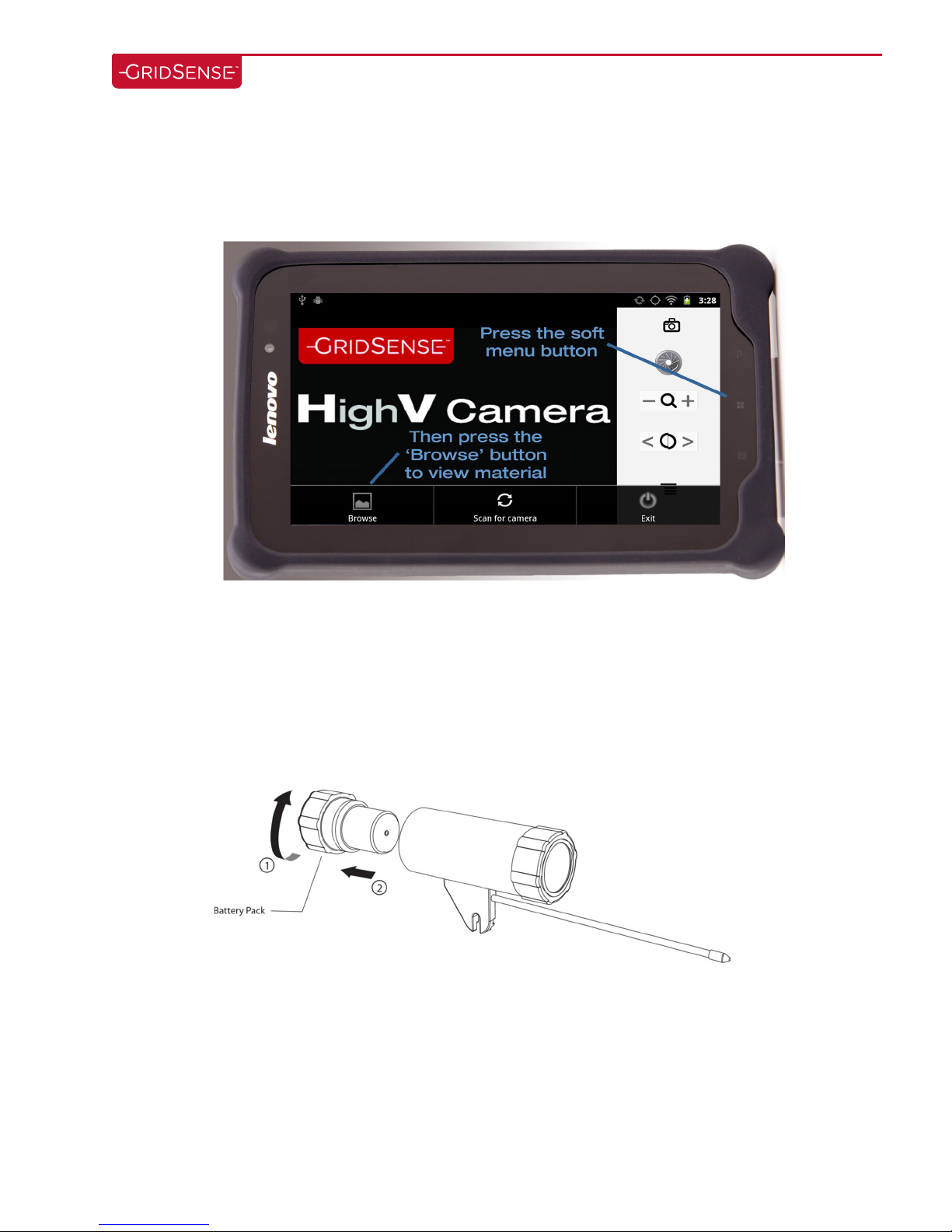
After capturing images or videos, they can be viewed by pressing the soft menu key and then
2.
pressing the browse button.
2.3 Camera Battery Removal for Charging or Replacement
1. Rotate battery module counter-clockwise
2. Gently pull battery out from the camera housing
Highv Camera Manual -v1Nov7 2012.Docx page 13 of 18
Page 15
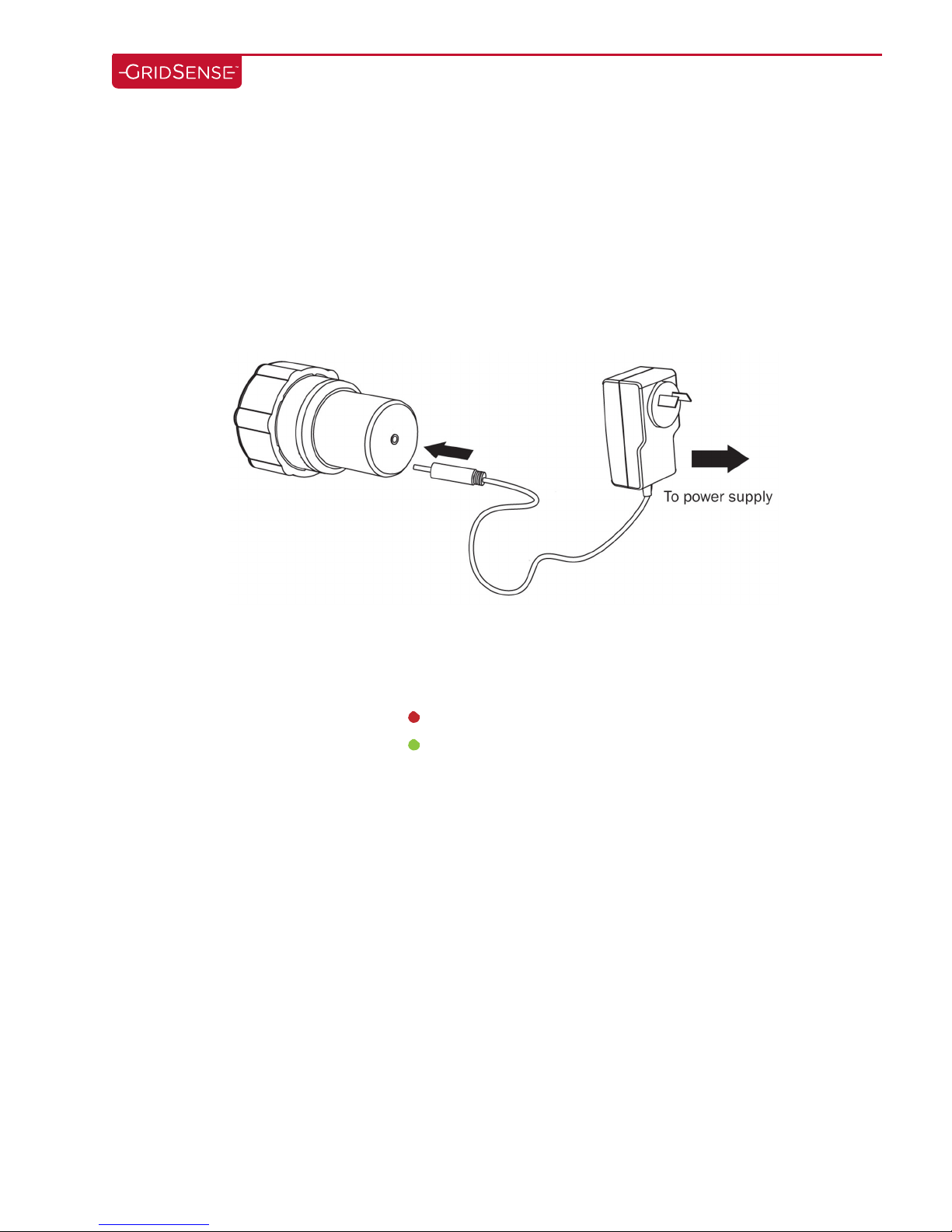
2.4 Battery Charging for Camera
1. Remove quick change battery module from camera (as shown on previous page)
2. Plug supplied charger into wall outlet
3. Connect the charger lead to the charge socket on the battery module
4. Switch on the Battery Module
5. Check status light on the charger for charge status
2.5 Battery Charger LED Status
Solid Red (Charging)
Solid green (Charging complete)
Highv Camera Manual -v1Nov7 2012.Docx page 14 of 18
Page 16

Highv Camera Manual -v1Nov7 2012.Docx page 15 of 18
Page 17

3 Troubleshooting
3.1 Android Tablet does not find camera
1. Check that the camera is turned on and that the LED’s are illuminated
2. Re-scan for camera
3.2 Android Tablet is stuck in “negotiating connection” mode
1. Restart the HighV Camera App
a. If the problem persists:
i. Power the camera on/off
ii. Verify that camera battery is charged
Highv Camera Manual -v1Nov7 2012.Docx page 16 of 18
Page 18

4 Content Checklist
€ Camera
€ Battery module
€ Camera Battery charger
€ Android tablet/ rugged rubber case
€ Android charger
€ Hotstick attachment for tablet
€ Automotive DC inverter for charging camera and tablet
Highv Camera Manual -v1Nov7 2012.Docx page 17 of 18
 Loading...