

Page 1
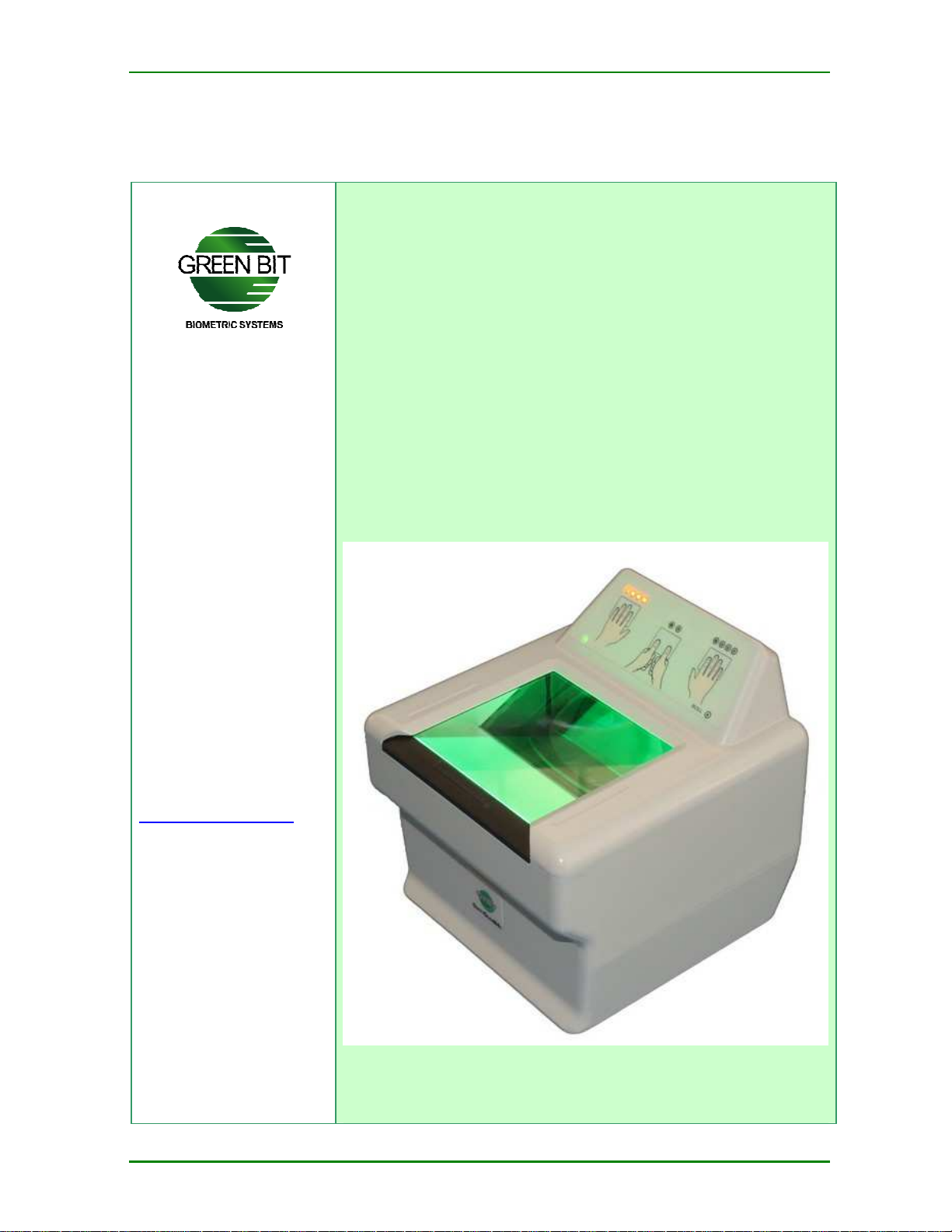
DactyScan84c
Produced by:
Green Bit S.p.A.
Via Rivalta 9
10095 Grugliasco (TO)
Tel: +39 011 7703811
Fax: +39 011 7703880
DactyScan
DactyScan84
DactyScanDactyScan
84cccc
8484
Operator’s Manual
Rev. 1.0 July 2012
Page 2

General index
General index
1 Introduction _______________________________________ 3
1.1 Warnings ____________________________________________________ 3
1.2 Acronyms and Abbreviations _____________________________________ 3
2 Safety Regulations __________________________________ 4
2.1 General rules _________________________________________________ 4
2.2 Electromagnetic emissions_______________________________________ 5
2.3 Environmental protection (European Union) _________________________ 5
2.4 Compliance with Directives and Regulations _________________________ 6
3 Warranty _________________________________________ 7
4 Description and Characteristics ________________________ 8
4.1 Description of the product _______________________________________ 8
4.2 Identification _________________________________________________ 8
4.3 Technical characteristics ________________________________________ 9
4.3.1
Power supply ___________________________________________________ 9
4.3.2
Operating and storage conditions ___________________________________ 9
4.3.3
Physical characteristics ___________________________________________ 9
4.3.4
Four slaps and two thumbs acquisition ______________________________ 10
4.3.5
Rolled finger acquisition _________________________________________ 10
5 Installation _______________________________________ 11
5.1 PC Requirements _____________________________________________ 11
5.2 Packaging___________________________________________________ 11
5.3 External appearance __________________________________________ 12
6 Use _____________________________________________ 13
7 Maintenance ______________________________________ 14
7.1 Cleaning of the casing _________________________________________ 14
7.2 Cleaning of the scanner ________________________________________ 14
DactyScan84c
Operator’s Manual
Rev. 1.0 July 2012 2
Page 3
1 Introduction
This manual is intended to provide instructions for correct installation and use
of the Green Bit DACTYSCAN84C device.
This manual is considered to be updated at the date of publication and is valid
only for the devices to which it is attached and must not be used for any other
similar models.
Green Bit reserves the right to modify, integrate or improve the manual
without implying that this publication is inadequate.
Operators who use the device must have access to the manual and know its
contents. The manual must be carefully preserved and must always accompany
the device in the case of any change of destination or ownership.
1.1 Warnings
The following graphic symbols have been used to highlight certain parts of the
text considered to be particularly important:
Introduction
This symbol indicates dangerous situations that, if
proper precautions are not taken, may cause serious
risks to personal health and safety.
This symbol indicates dangerous situations which, if
proper precautions are not taken, may cause serious
damage to the DACTYSCAN84C device or to the
equipment connected to this.
This symbol indicates suggestions or particularly
important technical information which must not be
neglected.
1.2 Acronyms and Abbreviations
The following acronyms or abbreviations have been used in this manual:
IAFIS Integrated Automated Fingerprint Identification System
IQS Image Quality Specifications
P/N Part Number
S/N Serial Number of each device
PC Personal Computer
DANGER
WARNING
NOTE
:
:
:
DactyScan84c
Operator’s Manual
Rev. 1.0 July 2012 3
Page 4
2 Safety Regulations
ectric shocks or dispersion, always insert
not a trained maintenance engineer. Always consult
Read the following notes carefully and comply with the recommendations
indicated, thereby helping us to guarantee your safety and to prevent damage
to the equipment.
2.1 General rules
Safety Regulations
DANGER
To avoid el
the power cable of PC in outlets with a ground
connection. Never tamper with the ground
connection. Always use a three-pole cable if an
extension is to be used.
To avoid the risk of electric shock, never carry out
maintenance or configuration operations during a
storm.
Check that the connection cables do not impede or
obstruct the transit of persons.
:
WARNING:
Never attempt to operate on the device if you are
the manual
All device cleaning operations must be carried out
with the device OFF and disconnected from the PC
Never insert any object in the outlets of the device.
This may cause damage to the appliance as result
of internal short-circuits.
The DACTYSCAN84C device is designed for indoor
use and must be protected against water and other
liquids.
Green Bit shall not be held responsible for any
damage caused by improper use of the
DACTYSCAN84C device.
DactyScan84c
Operator’s Manual
Rev. 1.0 July 2012 4
Page 5

2.2 Electromagnetic emissions
All electronic devices generate free-space radiated electromagnetic emissions
due to the electric or magnetic activity of the device.
These electromagnetic emissions may interfere with other appliances, such as
personal computers or radiofrequency systems, causing loss of data or
downgrading of performance.
This disturbance is known as electromagnetic interference (EMI), while
electromagnetic compatibility (EMC) defines the ability of electronic devices to
operate correctly in the presence of electromagnetic fields, tolerating and
limiting electromagnetic interference.
Although the DACTYSCAN84C device has been designed in full compliance with
current regulations, in particular cases, electromagnetic interference may be
caused mainly by two phenomena: closeness to other appliances and electrical
interference in power lines.
If this happens, the phenomenon can be corrected as follows:
Insulation
Devices characterized by strong radiation of electromagnetic waves must
be kept at reasonable distance from the DACTYSCAN84C device.
Safety Regulations
Radiation
If the DACTYSCAN84C device is close to receivers/transmitters, modify
the direction of the antenna.
Dedicated circuits
Connect the DACTYSCAN84C device on separate power lines from other
devices with high electric noise such as, for example, conditioners.
2.3 Environmental protection (European Union)
This symbol, applied to the product or packaging, indicates that
the product belongs to the category of electric and electronic
equipment.
The product contains potentially hazardous substances for the
environment and health and must never be disposed of together
with ordinary solid waste. In compliance with current legislation
and the WEEE Directive 2002/96/CE, waste electric and
electronic equipment must be managed according to the
procedures established.
The user is responsible for disposal of this product which must be sent to
collection centers specialized in the recycling of electric and electronic
equipment, thus contributing to re-use of equipment that could have
dangerous effects on the environment and on health.
For further information regarding collection and recycling points in your area,
contact the authorities of your city or the Green Bit customer assistance service
or your retailer for information on withdrawal of the device.
DactyScan84c
Operator’s Manual
Rev. 1.0 July 2012 5
Page 6
2.4 Compliance with Directives and Regulations
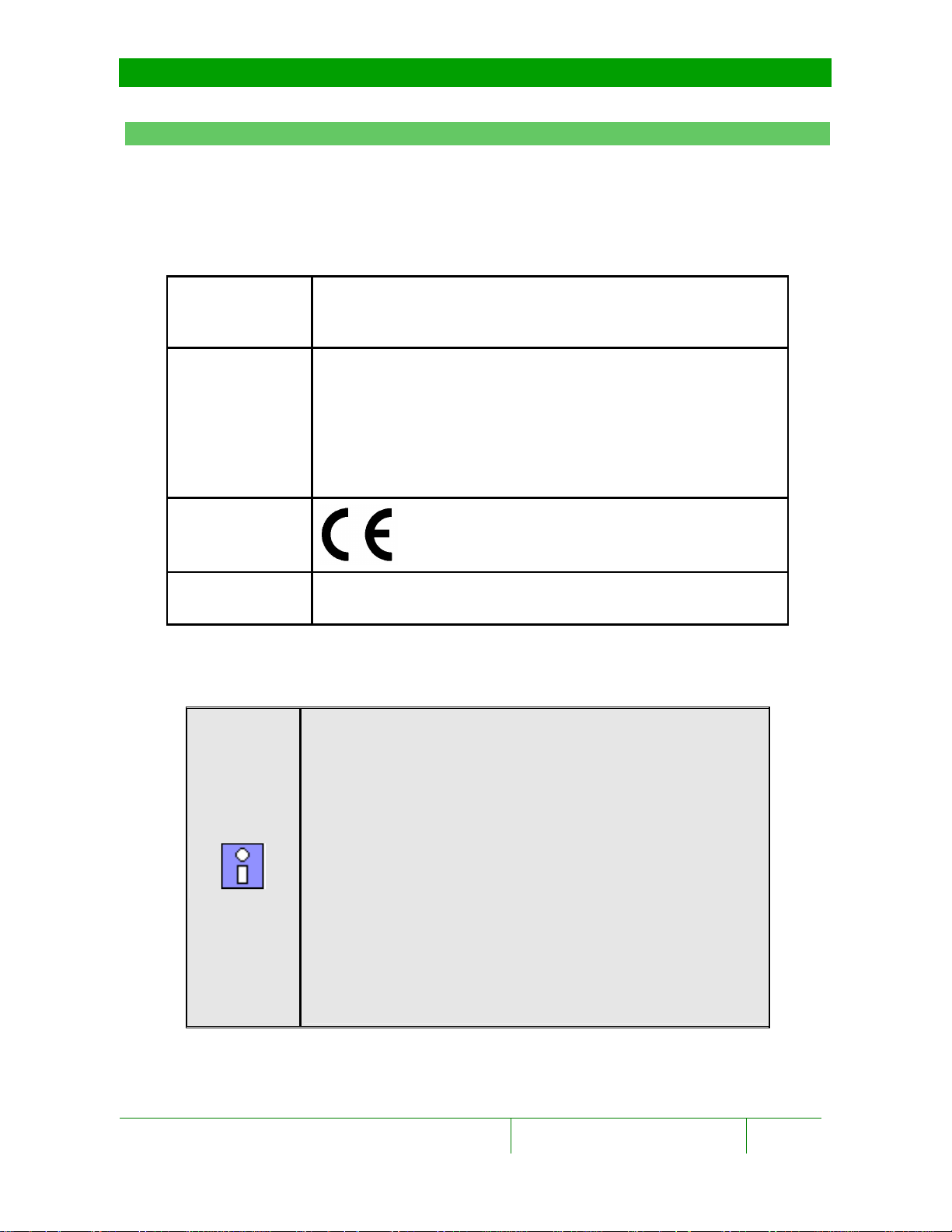
Low-Voltage Directive 2006/95/EC
Electrical safety
EMC/EMI
EN 60950
IEC 60950-1
Electromagnetic Compatibility Directive 2004/108/CE
EN 55022, EN 55024
EN 61000-4-2
EN 61000-4-3
EN 61000-4-5
EN 61000-4-6
EN 61000-4-11
Safety Regulations
Marking
Fingerprint
image
Compliant with IAFIS- IQS regulations
(FBI CJIS-RS-0010, appendix F)
NOTE
:
FCC Regulations
NOTE: This equipment has been tested and found to
comply with the limits for a Class A digital device,
pursuant to Part 15 of the FCC Rules. These limits are
designed to provide reasonable protection against
harmful interference when the equipment is operated
in a commercial environment. This equipment
generates, uses, and can radiate radio frequency
energy and, if not installed and used in accordance
with the instruction manual, may cause harmful
interference to radio communications. Operation of
this equipment in a residential area is likely to cause
harmful interference in which case the user will be
required to correct the interference at his own
expense.
DactyScan84c
Operator’s Manual
Rev. 1.0 July 2012 6
Page 7

3 Warranty
Green Bit S.p.A. warrants the devices for a period of 12 (twelve) months from
the date of delivery. Such warranty covers only free supply of parts that, after
checking at our offices, are found to be faulty.
The warranty, with exclusion of any liability for direct or indirect damages, is
restricted only to material defects and is no longer valid if the parts returned
have been disassembled, tampered with or repaired by third parties not
authorized by Green Bit S.p.A.
Replacement of parts under warranty shall not in any case extend the terms
thereof.
Alterations, modifications of performance or the application of new equipment
to the device to which this manual refers without the written authorization of
Green Bit S.p.A. are absolutely forbidden.
Damage caused by negligence, neglect, misuse or improper use of the device
or by improper operation by the user is excluded from this warranty. In the
case of tampering with the safety elements of the device, the warranty is
automatically forfeited and Green Bit S.p.A. shall no longer be held responsible.
Warranty
DactyScan84c
Operator’s Manual
Rev. 1.0 July 2012 7
Page 8
Description and Characteristics
DactyScan84c
C8XXXXXXXXXX
: Green
Bit S.p.A.
| | || | | | | |||||| | | | ||||||||
4 Description and Characteristics
4.1 Description of the product
The DACTYSCAN84C device is a portable appliance consisting of one optical live
fingerprint scanner without any mechanical movements:
To operate, the DACTYSCAN84C must be connected to a Personal Computer
(application station) via a USB 2.0 interface.
Via the USB interface and the function selected, the following images can be
acquired:
The two four slaps and the two thumbs (4-4-2 acquisition)
Single flat and rolled fingerprint
The fingerprint images comply with IAFIS IQS regulations (FBI CJIS-RS-0010,
appendix F).
4.2 Identification
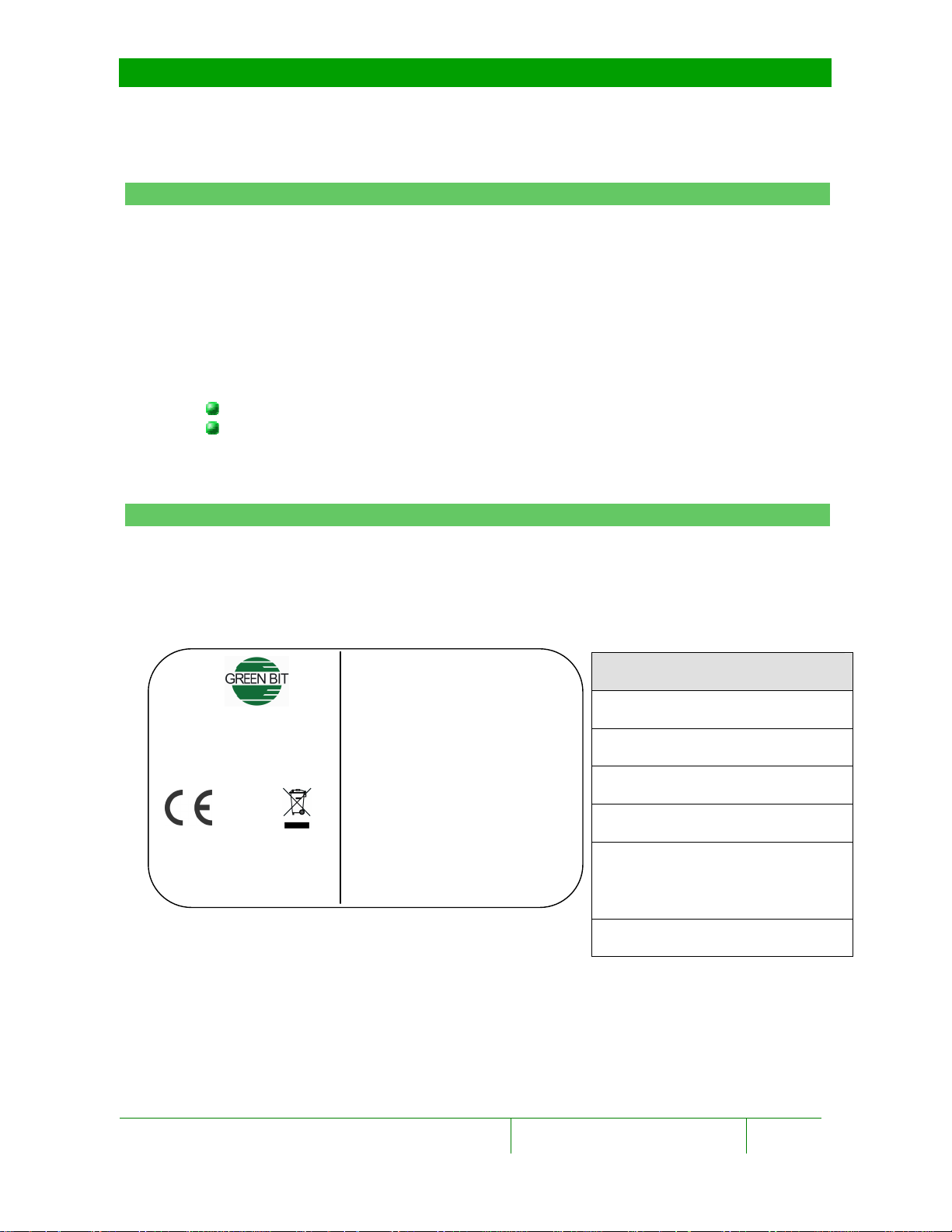
Product identification data are indicated on an adhesive label applied to the
back of the device; the label is shown in the figure below:
This data must be indicated in the case of requests for assistance or the supply
of spare parts.
This device complies with Part
15 of the FCC Rules. Operation
is subject to the following two
conditions: (1) this device may
not cause harmful interference,
and (2) this device must accept
any interference received,
including interference that may
cause undesired operation.
Description of label
Green Bit logo
Name of the product
Manufacturer
Place of construction
The PNSN, serial number of
the product and bar-code
format
FCC note
DactyScan84c
Operator’s Manual
Rev. 1.0 July 2012 8
Page 9

4.3 Technical characteristics
60
50
4.3.1 Power supply
The DACTYSCAN84C device is powered throught the USB 2.0 interface
4.3.2 Operating and storage conditions
Parameter Description Min. Max.
Tst Storage temperature (ºC) -20
Top Operating temperature (ºC) 0
RH
4.3.3 Physical characteristics
Relative humidity (without
condensation)
Description and Characteristics
10% 90%
Width: 148 mm
Dimensions
Color Computer Gray: RAL-9018
Weight 1400 g
Height: 148 mm
Depth: 152 mm
DactyScan84c
Operator’s Manual
Rev. 1.0 July 2012 9
Page 10
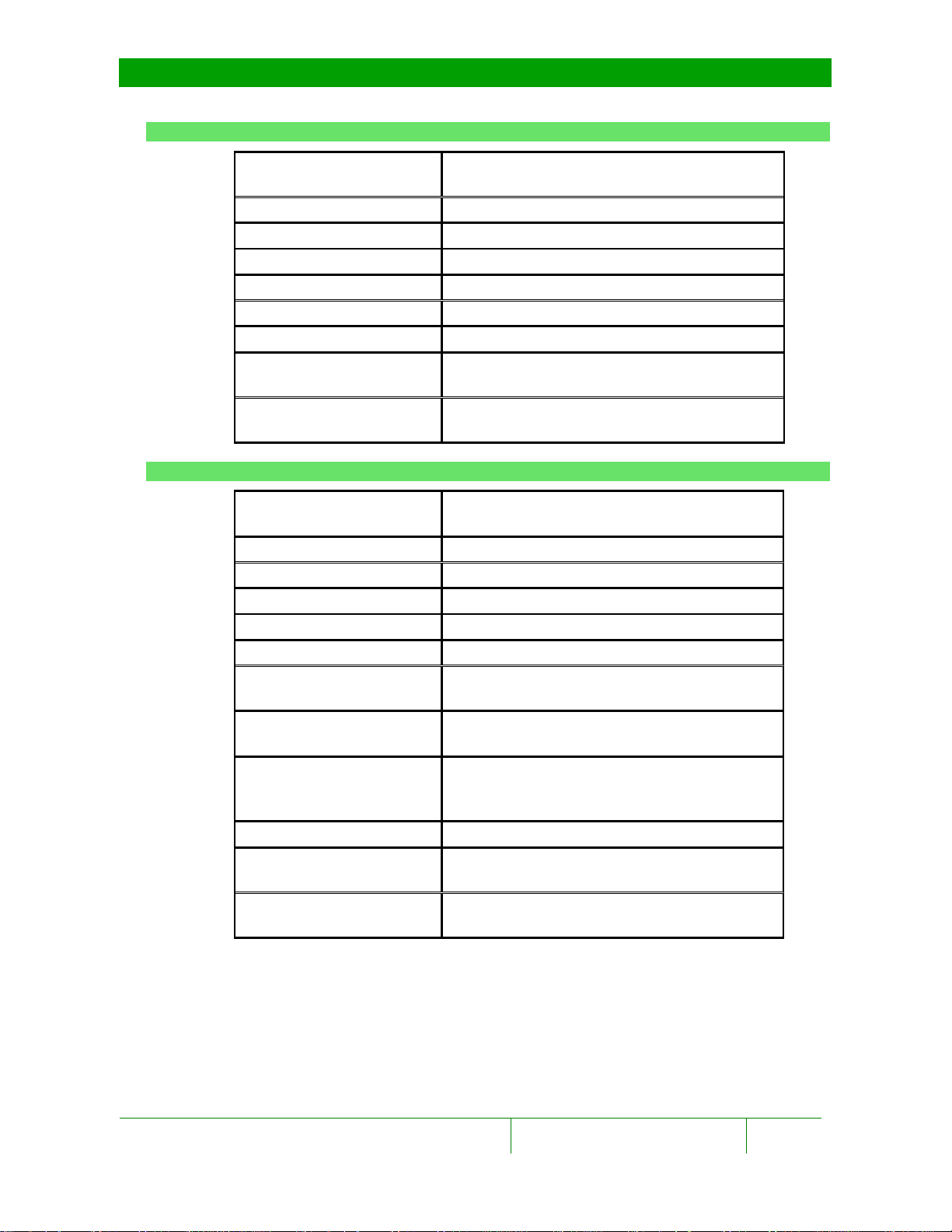
4.3.4 Four slaps and two thumbs acquisition
Description and Characteristics
Quality Standard of the
image
Resolution 500 dpi ±1%
Dynamics 8-bit, 256 shades of gray
Image area 3.2” x 3” (81.2 mm x 76.2 mm)
Size of image 1600 x 1500 pixels
Scanning speed 8,6 fps (27 fps preview mode)
Display Real time
Contrast and brightness
adjustment
Elimination of latent
print
4.3.5 Rolled finger acquisition
Quality Standard of the
image
Resolution 500 dpi ±1%
Dynamics 8-bit, 256 shades of gray
Image area 1.6” x 1.6” (40.6 x 40.6 mm)
Size of image 800 x 800 pixels
Scanning speed 25 fps
Capture of rolled
fingerprint
Max. speed rolled
fingerprint
Max. time for rotation
(time out from start of
acquisition)
Display Real time
Contrast and brightness
adjustment
Elimination of latent
print
Compliant with IAFIS- IQS regulations
(FBI CJIS-RS-0010, appendix F)
Automatic
Automatic
Compliant with IAFIS- IQS regulations
(FBI CJIS-RS-0010, appendix F)
Automatic
10 mm/s
Automatic stop at end of acquisition
Automatic
Automatic
DactyScan84c
Operator’s Manual
Rev. 1.0 July 2012 10
Page 11
5 Installation
This chapter explains how to install the Green Bit DACTYSCAN84C device.
Installation
Before connecting the DACTYSCAN84C device to the
Personal Computer, the software driver must be
installed. Consult the MultiScan SDK software manual.
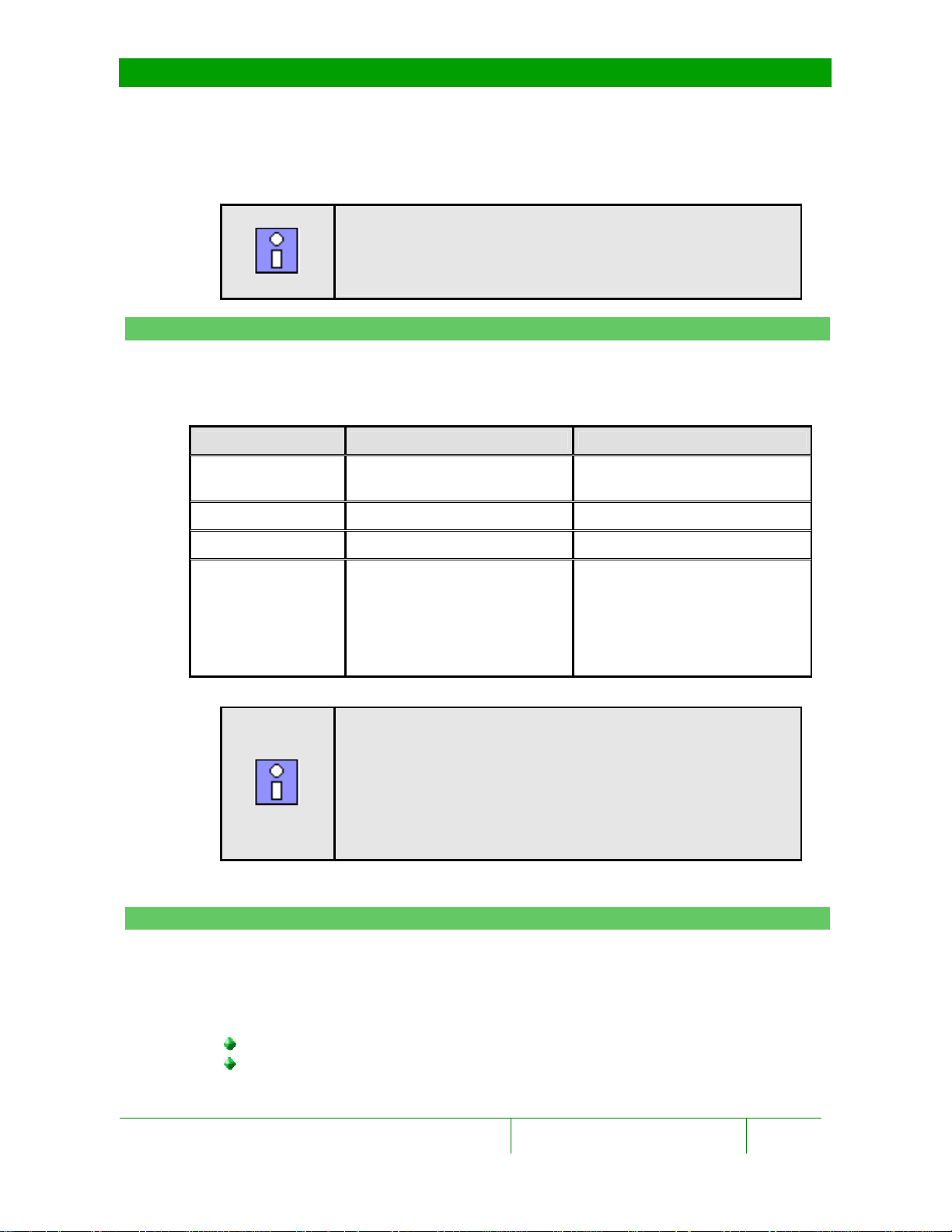
5.1 PC Requirements
Prior to installation, check that the Personal Computer is suitable for the
device. For the characteristics of the Personal Computer, refer to the table
below:
Minimum requirements Recommended
Processor
RAM 256 MByte 512 Mbyte
Interface USB 2.0 USB 2.0
Operating system Windows 2000 ® SP3
NOTE
Pentium IV @2,8 GHz or
equivalent
Windows XP ® SP1 (32 bit)
Windows XP ® SP1 (64 bit)
Windows 2003® Server SP1
(64 bit)
Windows Vista (32 bit)
:
Intel ® Core 2 Duo @1.8GHz
or equivalent
Windows XP ® SP2 (32 bit)
Windows 7 ® (32 bit)
5.2 Packaging
Check that the packaging of the DACTYSCAN84C is undamaged, without
evident signs of impacts, tears or traces of damp. If one or more of these
conditions is not complied with, contact the assistance service. The supply
includes the following parts:
Green Bit DACTYSCAN84C electronic device.
Green Bit USB 2.0 High Speed cable with disturbance suppression
ferrite
DactyScan84c
Operator’s Manual
NOTE
The requirements indicated above are valid for desktop
PCs. For portable PCs, correct functioning is not
guaranteed as their performance level is lower than
that of desktop PCs with the same characteristics.
Therefore, before using the device with a portable
computer, it is advisable to run tests
:
.
Rev. 1.0 July 2012 11
Page 12

Installation
A
B
B) Graphical user interface
C
C)
USB 2.0 connector
Use of accessory components other than those
furnished by Green Bit does not guarantee compliance
with current Directives and legislation
5.3 External appearance
The device is housed in an ergonomically-designed case with, on the surface,
one optical, as shown in the photos:
WARNING
A) Optical scanner
(3.2” x 3”)
:
.
DactyScan84c
Operator’s Manual
Rev. 1.0 July 2012 12
Page 13

6 Use
After installation, the DACTYSCAN84C device is ready for use.
Use
NOTE
Image acquisition and quality control is carried out and
checked by specific application software; for further
information, refer to the MultiScan SDK software
documentation and the user manual of the application
for installation and use.
:
DactyScan84c
Operator’s Manual
Rev. 1.0 July 2012 13
Page 14

7 Maintenance
The DACTYSCAN84C device does not require any particular maintenance.
However, particular attention must be dedicated to cleaning the unit and
surface scanners.
Maintenance
Cleaning must be carried out with the device OFF and
disconnected from the Personal Computer.
7.1 Cleaning of the casing
Clean with a soft cloth moistened with water and dry any excess water.
Do not use solvents, alcohol, ammonia or domestic
cleaning products as they contain substances that
could damage the acquisition surface of the device.
7.2 Cleaning of the scanner
For normal functioning, the acquisition surface of the scanner need not be
perfectly clean as a slight film of dust, grease or moisture is compensated
electronically; it is advisable to clean the acquisition surface of the scanner only
in the case of evident signs of dirt or if highlighted by the diagnostics of the
device.
For routine cleaning of the scanner, use the specific Cleaning Accessories Kit
provided.
WARNING
WARNING
:
:
Proceed as follows:
1. Take a tissue for cleaning the acquisition surface of the scanner.
2. Check the acquisition surface of the scanner for any particles of dust or
other substances that could scratch the acquisition surface during
cleaning. Remove the particles by blowing on the scanner or using the
dry tissue, delicately cleaning the glass surface.
3. Moisten the tissue with the acquisition surface cleaning solution, clean
without rubbing too hard, removing all traces of dust and grease.
4. Dry any excess liquid.
DactyScan84c
Operator’s Manual
Rev. 1.0 July 2012 14
Page 15

Green Bit S.p.A.
Via Rivalta 9
10095 Grugliasco (TO)
Tel: +39 011 7703811
Fax: +39 011 7703880
 Loading...