

Page 1

USERS MANUAL
DUAL PRE
Page 2

USER MANUAL PURPOSE
This user manual is dedicated to the use of the bass pedal preamp DUAL PRE.
The manual includes the following information:
• General information (technical data and packaging);
• Description of the amplifier’s functions.
All the informations described on this user manual are
verified. The manufacturer reserves the right to update
or modify their product without any notice.
2
Page 3

PACKAGING AND STORAGE
PACKAGING
DUAL PRE is packed in a special cardboard box. The box
contains only the pedal.
TRASPORT
Please handle the box with care. A specific position during the transport is not required.
STORAGE
Please keep the amplifier in a dry and ventilated place.
Ideal storage conditions: temperature within -20C and
40C, Humidity 20% to 80%.
PRODUCT DISPOSAL
Please follow the disposal instruction issued by your
local council. In accordance with European Directive 2002/96 / EC, all electrical and electronic products
should be disposed of by specific collection facilities appointed by the government or the local authorities.
DECLARATION OF CONFORMITY
The product complies with the following European directive:
2014/35 / EU - Electrical Safety
2014/30 / EU - Electromagnetic Compatibility
2011/65 / EU - Limited use of certain hazardous substances in electrical and electronic equipment
A full copy of the declaration of conformity is available
from the manufacturer.
The manufacturer is not responsible for any damage due
to an improper use of the product.
3
Page 4

DESCRIPTION
The GR-DUAL PRE bass preamp pedal offers the best
compromise between portability and versatility for the
modern bass player.
This powerful amp holds two separate channels (each
with dedicated functionality), giving the possibility to
setup your rig in many different ways.
Ch1 and Ch2: Gain, 4 Band EQ. (with 4 frequencies selec-
table for mid range), Deep Boost, Bright
Boost, Master Volume, Compressor Section with the possibility of adjusting ratio,
threshold, release and volume.
Extra on Ch1: Pure Sound (by-pass of all EQ functionali-
ty), Send/Return and Headphones.
Extra on Ch2: Overdrive section with low cut, two distor-
tion modes and blend function.
Extra Features: Tuner, Dedicated Volumes to the Balance
D.I. outputs, Switch GND/LIFT, Dedicated
Volume and EQ Section to the phone
output, Trough Output (Parallel Output),
Aux IN
Power Requirement:
9V VDC (power supply not included)
Dimensions:
11” x 5,3” x 2,6” / 28 X 13,5 X 6,5
4
Page 5

WHAT CAN YOU DO?
You can switch from one channel to another with two different instruments or with the same instrument, but also
to mix the two channels in a single output to your amplifier to have an extreme saturation but which preserves all
the definition and attack of the clean channel.
You can send these two signals even separately to the P.A.
through two independent D.I. outputs a function that in
the studio will allow you to simultaneously and separately
record a clean and a distorted track (or if you want to mix
them in a single D.I.).
Through the “parallel output” you can have a further output with the sound of your untreated instrument.
The DUAL PRE has a high quality compressor with the
possibility of adjusting ratio, threshold, release and volume, not the single compressor pot that you usually find
on some bass preamp.
Allows you to have a headphone output with its own
separate equalization (volume, treble and bass) that you
can use as a monitor if necessary or to study when you
are traveling and play along thanks to the aux in that will
allow you to connect a smartphone or a media player.
Allows you to take advantage of all these functions through four separate footswitches in order to avoid complicated combinations or unmanageable manual switches
during a concert. And in addition, you can choose two
different switching modes between the two channels
(channel 1/2 and channel 1 + 2 or channel 1 and channel 2)
9) Allows you to have your Gr sound always with you even
when for transport needs you use external Backlines, a
real portable Gr Dual in a bass pedal.
The DUAL PRE integrates a Chromatic Tuner very fast and
accurate
5
Page 6
26
25
3
4568
24
10 15 17
211312 2220197 9
14
29 3216 1831
2
HIGH
Mix DI
Dual DI
BRIGHT
30
LIFT
THRESH
OVERDRIVE
RETURNSEND
VOL
ratio
BLEND
mode
release
hpf
MASTER
COMPDRIVE
High
PRE
dual
Low
VOL
PHONE
GAIN LOW
DEEP
OUTPUT
PARALLEL
OUTPUT
Ch1 / Ch2 Ch1 + Ch2
MUTE
1128 27 27 28
LINE 2
LEVE LLINE 1 LEVELGND
MID Low
MID High
PURE
FREQ
FREQ
FREQ
FREQ
bypass
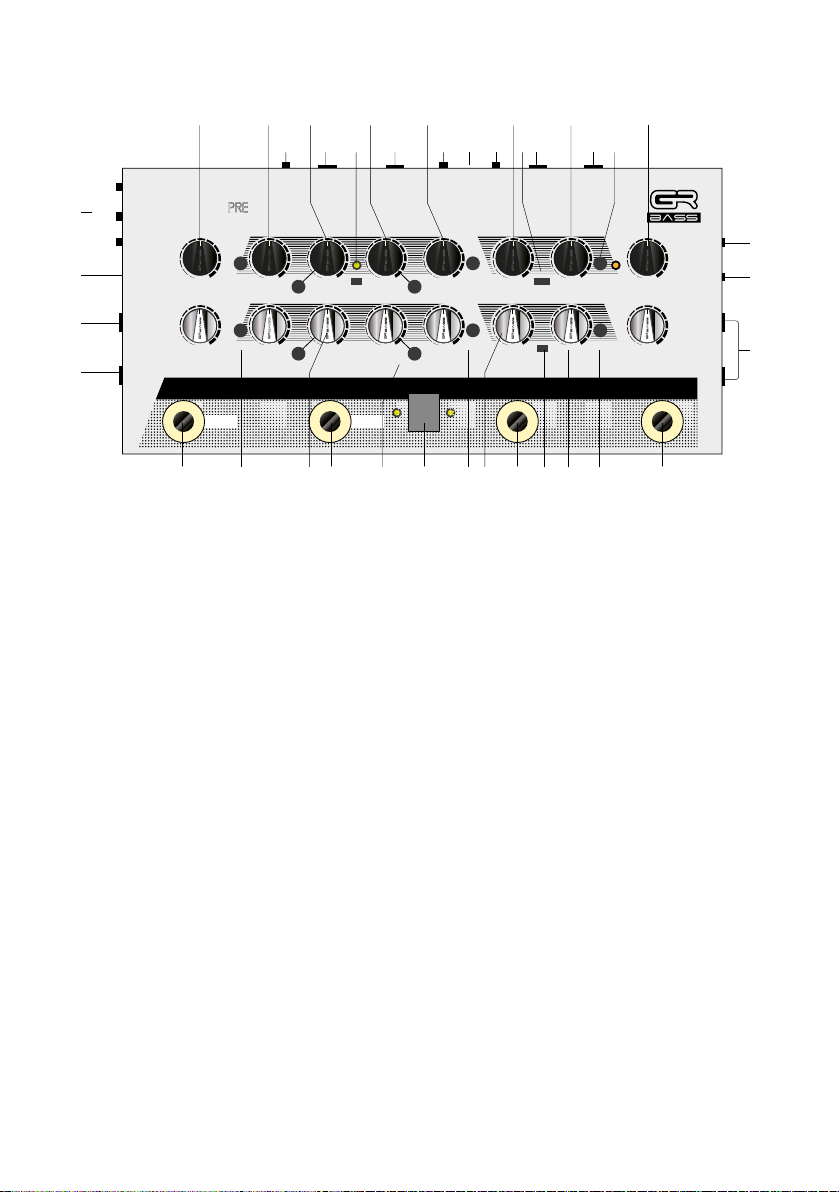
CONTROLS DESCRIPTION
1. INPUT CH1 and CH2
Input jack for your instruments. We suggest to use a good
quality cable, in order to obtain the best audio performance
9V
AUX IN
CH2
1
CH1
3736333534
2. AUX IN
3.5mm jack Auxiliary input to connect an external audio
device
3. 9V VDC
Input for the 9V power supply (Power supply not included)
4. GAIN CONTROL KNOB CH1 and CH2
Sets the input signal amount of the pre-amp
5. BASS CONTROL KNOB CH1 and CH2
Increases or reduces the bass frequencies of the signal
low ± 13 dB max @ 50 Hz, f3dB = 250 Hz
6. MID Low CONTROL KNOB CH1 and CH2
Increases or reduces the mid-low frequencies of the signal (±
12 max dB)
6
Page 7

7. MID Low FREQUENCY SELECTOR CH1 and CH2
You can select which mid-low frequency to use, 185 Hz or
800 Hz
8. MID High CONTROL KNOB CH1 and CH2
Increases or reduces the mid-high frequencies of the
signal (± 12 max dB)
9. MID High FREQUENCY SELECTOR CH1 and CH2
You can select which mid-high frequency to use, 600 Hz
or 1800 Hz
10. HIGH CONTROL KNOB CH1 and CH2
Increases or reduces the high frequencies of the signal
High ± 13 dB max @ 7.6k Hz, f3dB = 1k Hz
11. PURE SWITCH
Allows to bypass all the equalization filters of the preamplifier. The pure-mode activation is signaled by the white
LED on the top of the button
12. DEEP BUTTON CH1 and CH2
Gives a more deep sound
Push off = flat
Push on = +5 dB @ 50 Hz, +3 dB @ 170 Hz
13. BRIGHT BUTTON CH1 and CH2
Gives a more bright sound
Push off = flat
Push on = +3 dB @ 2.7k Hz, +6 dB @ 9.6k Hz
14. MASTER KNOB CH1 and CH2
Controls the overall volume of the channel 1 and channel
2
15. THRESHOLD CONTROL KNOB
Threshold is the point set for when the compressor actually starts compressing once the volume of the signal
reaches above that level
16. RATIO SELECTOR
The ratio determines how much gain reduction the compressor applies when the signal passes a threshold level
Left / Center / Right = 1:2 / 1:4 / 1:8
7
Page 8

17. COMPRESSOR VOLUME KNOB
Volume determines how much gain to apply to the compressed output signal, to compensate for the volume loss
due to the compression itself
18. RELEASE BUTTON
The release controls how long it takes for the compressor
to return it to an uncompressed state
Push off = slow
Push on = fast
19. OVERDRIVE KNOB
Increases or reduces the amount of distortion
20. DRIVE MODE SELECTOR
Select the type of distortion (soft/hard clipping)
21. BLEND KNOB
Select the clean/distorted ratio of the signal
22. HPF (HIGH PASS FILTER)
Cuts low-end frequencies (High-pass filter) before the
OVERDRIVE stage to make more clear and intelligible
distorted sound
23. OUTPUT
Sends effected or uneffected signal to amp rig or power
amp, depending on the orientation of the Footswitch
24. PARALLEL OUTPUT
Instruments signal passes through always unworked to
the input of your amplification system
25. HEADPHONES OUTPUT
3.5mm plug for headphones
26. HEADPHONES EQ SECTION
Equalization section dedicated to the headphones output
27. DI OUTPUT CH1 and CH2
Independent balanced XLR outputs. Sends effected or
uneffected signal to mixing console/recorder, depending
on the orientation of the Footswitch
8
Page 9

28. LEVEL DI OUTPUT CH1 and CH2
Controls the DI volumes
29. MIX DI / DUAL DI
Allows to mix the two signals into a single DI output
30. GND LIFT BUTTON
Isolates the DI outputs from the ground wire
31. SEND
6.35mm jack plug to connect an external effect’s input
32. RETURN
6.35mm jack plug to connect an external effect’s output
33. CHROMATIC TUNER / CLIP SIGNAL
When mute mode is activated, the chromatic tuner is
automatically activated. The display shows the note being
played and the LEDs indicate the accuracy of the tuning.
Only left LED = the note is too low
Only right LED = the note is too high
Both LEDs in blue light = the note is in tune
Both LEDs in red light in mute mode = the note is in tune
in sharp
Both LEDs in red light not in mute mode = high level of
the input signal (clip)
34. CH1 / CH2 FOOTSWITCH
Pressing the footswitch switches from CH1 to CH2. Pressing and holding for 3 seconds switches to mute mode
and activates the chromatic tuner
35. CH1 + CH2 FOOTSWITCH
Pressing the footswitch activates both channels simultaneously. Press and hold for 3 seconds to switch to bypass
mode
36. DRIVE FOOTSWITCH
Pressing the footswitch activates the overdrive section
37. COMP FOOTSWITCH
Pressing the footswitch activates the compressor section
9
Page 10

LIMITED WARRANTY
The warranty covers a period of five years.
The warranty covers any defects in material or workmanship under normal use during the warranty
period. Any shipping cost to/from the repair service
centre is the customer’s responsibility.
In the event of an irreparable damage or repeated failure of the same type, the manufacturer may replace
the unit, within the term of the original warranty.
The warranty does not cover parts which may result
faulty due to:
- Negligence or careless use
- Improper installation and maintenance
- Tampering made by unauthorized personnel
- Damages that might not be related to manufacturing defects.
The manufacturer accepts no responsibility for any
damage due to persons, animals or things, as consequence of the failure to comply with all the installation requirements and /or use indicated in this user
manual.
10
Page 11

11
Page 12
 Loading...