

Page 1
FHS1D02/03
User's Guide to the FHS1D02/03
Dual-wavelength Lase r Sour ce
English Version
Page 2

User's Guide to the FHS1D02/03
Dual-wavelength Laser Source
Page 3

1 Introduction
2 Warranty
3 Safety Information
4 Preparing for Operation
5 Operation
6 Specifications
7 Maintenance
2.1One Year Limited Warranty
2.2 Exclusions
2.3 Returning Product
2.4 Contact us
4.1 Unpacking the instrument
4.2 Power Supply
5.1 Display and controls
5.2 Turning the instrument on and off
5.3 Switching the wavelength
5.4 Frequency Output
5.5 Switching backlighting of the LCD on and off
5.6 Connecting with Optical Power Meter
CONTENTS PAGE
.................... 1
.................... 2
....................4
....................5
....................7
....................15
....................17
....................
....................
....................
....................
....................
....................
....................
....................
....................
....................
....................
....................
Page 4
1
1 Introduction
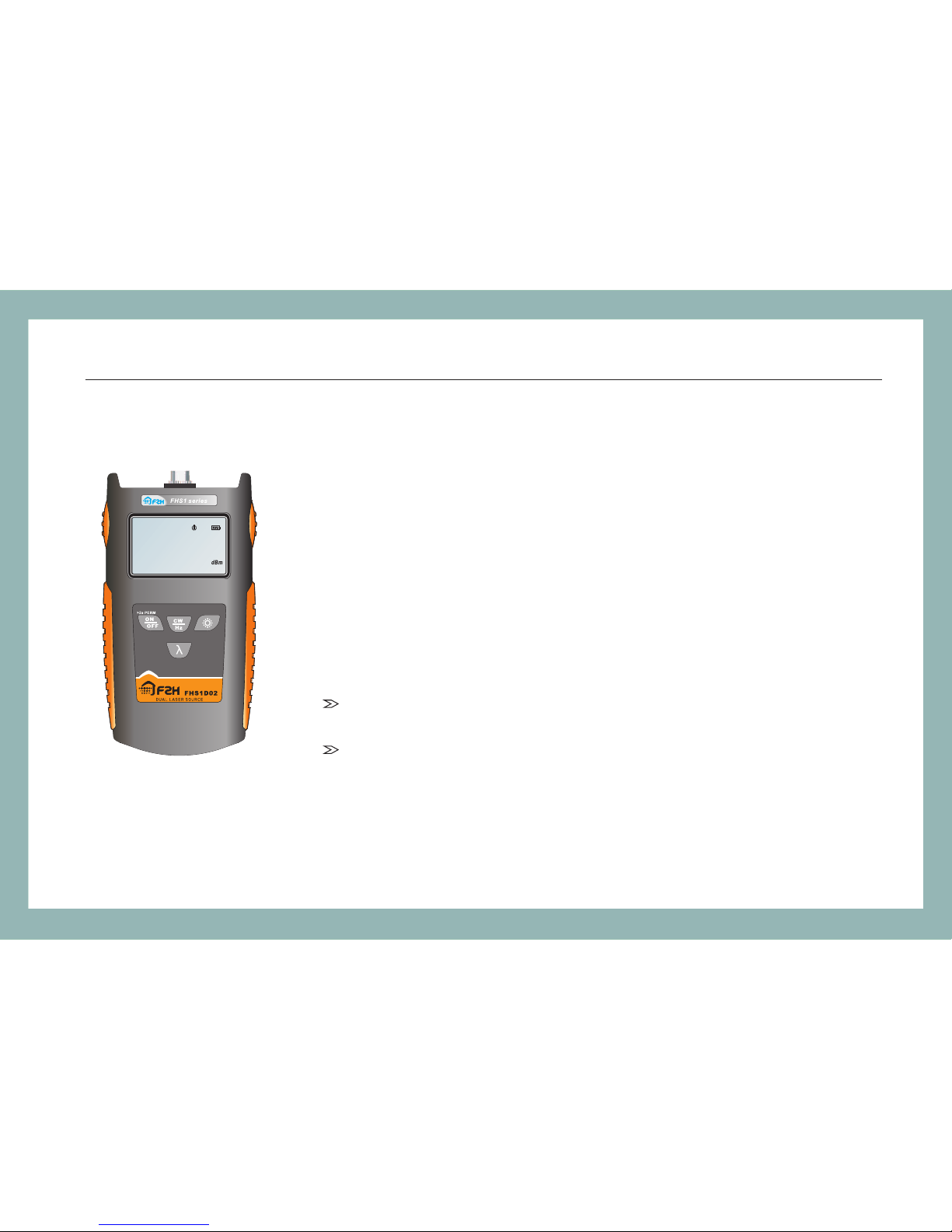
The FHS1D series mini-sized dual-wavelength laser
sources offe r ex cellent stability and por tab ili ty for
accurate fiber optic testing. Single output port provides
stable laser power at dual-wavelength. The compact unit
operates in either continuous wave (CW) mode or
modulated mode. A low battery indicator reminds the user
of replacing the battery.
Main Features:
Single output, providing with CW and modulation of
270Hz, 1kHz and 2kHz
Supply with backlighting, 4pcs of AAA battery, LCD
screen and auto-off at the low-battery capacity
FHS1D02/03 / Introduction
.8.8.8.8
18 8 8
-
nm
270Hz 1kHz 2kHz
Page 5

2.Warranty
One Year Limited Warranty
Grandway products are warranted against the defective components and workmanship
for a period of one year from the date of delivery to the original customer. Any product
found to be defective within the warranty period would be returned to Grandway
authorized service center for repair, replacement and calibration.
Exclusions
The warranty on your equipment shall not apply to defects resulting from the following:
Unauthorized repair or modification including battery replacement
Misuse, negligence, or accident
Returning Product
To return product, you may contact Grandway to obtain additional information if
necessary. To serve you better, please specify the reasons for the return.
All delivery and mails should be sent to the following address:
2
FHS1D02/03 / Warranty
Page 6

Grandway Customer Service
6F, Xin'an building No. 99 Tianzhou Road
Shanghai, 200233 P.R. China
Contact Us
Tel: +86-21-54451260/61/62/63
Fax: +86-21-54451266
E-mail: [email protected]
Website: www.grandway.com.cn
3
FHS1D02/03 / Warranty
Page 7

3 Safety Information
Warnings!
Never look directly into optical outputs or a fiber while the equipment is on.
Invisible laser beam may damage your eyes.
Do not short-circuit the terminal of AC adapter / charger and the batteries.
Excessive electrical current may cause personal injury due to fumes,electric
shock or equipment damage.
Do not operate the equipment near hot objects, in hot environments, in dusty/
humid atmosphere or when condensation is present on the equipment. This
may result in electric shock , product malfunction or poor performance.
4
FHS1D02/03 / Safety Information
Page 8

4 Preparing for Operation
4.1 Unpacking the instrument
Packing material
We suggest that you keep the original packing material. Using the original packing
material is your guarantee of protecting the instrument during transit.
Checking the package contents
The standard accessories of FHS1D02/03 are as follows:
5
Main unit
Quality Check Report
4pcs of AAA Battery
Carrying Case
User's Guide
FC/PC(ST/PC, SC/PC optional)
Checking for damage in transit
After unpacking the instrument, check to see whether it was damaged in transit.
This is particularly likely if the outer casing is clearly damaged. If there is damage,
do not attempt to operate the instrument or to repair it without authorization. Doing
so can cause further damage and you may lose your warranty qualification.
FHS1D02/03 / Preparin g for Operation
Page 9
4.2 Power Supply
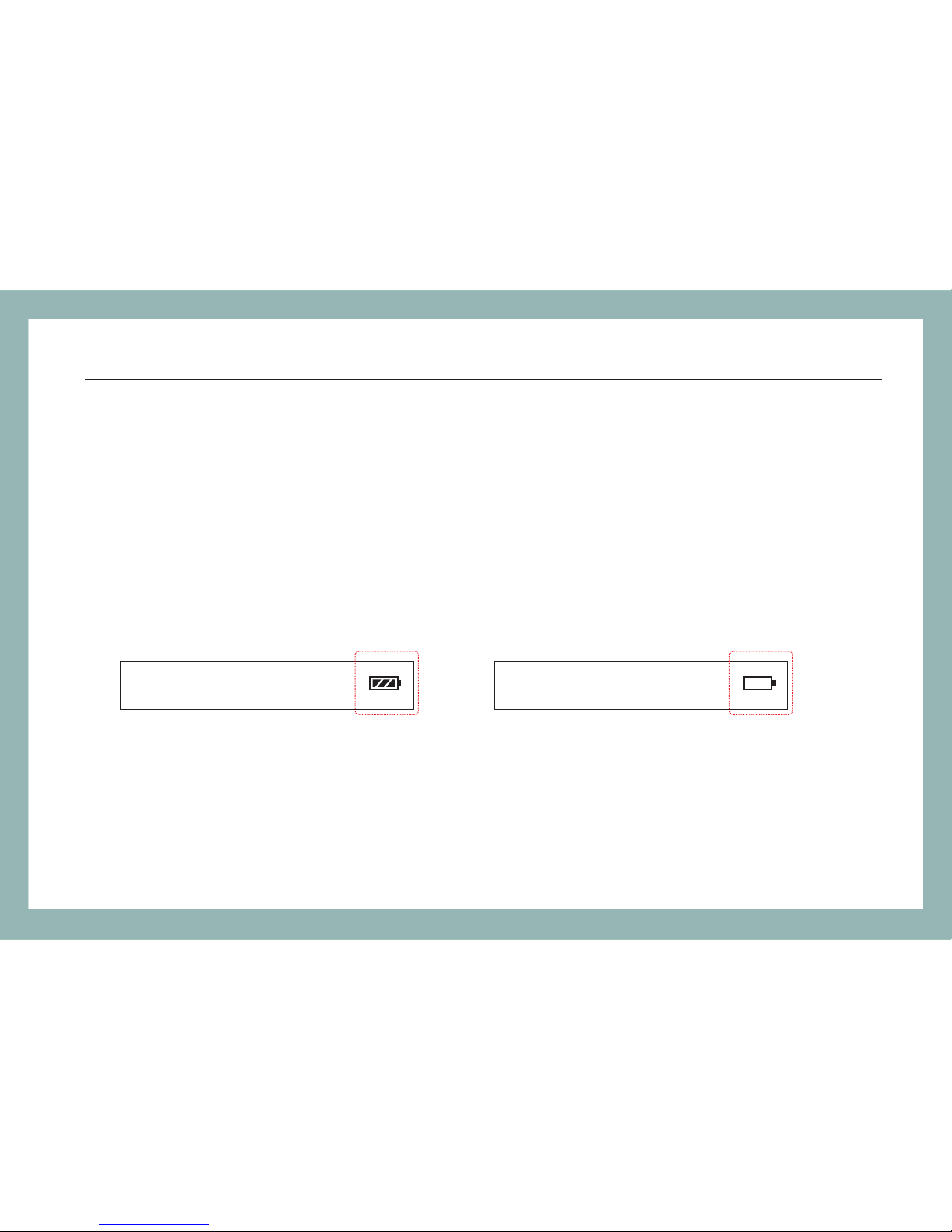
The instrument is power supplied by 4pcs of AAA battery ,and when you use the
battery, the battery indicator on the screen will show the remaining charge. An empty
battery indicator means the power is almost out. When the battery charge is
extremely low to supply the necessary power, the instrument will automatically switch
off . Please change the battery.
6
FHS1D02/03 / Preparin g for Operation
nm
18 8 8
nm
18 8 8
Page 10
5 Operation
5.1 Display and controls
5.1.1 Front(Panel Board)
7
FHS1D02/03 / Operatio n
.8.8.8.8
18 8 8
-
nm
270Hz 1kHz 2kHz
KeyNo.
Function
1
2
3
4
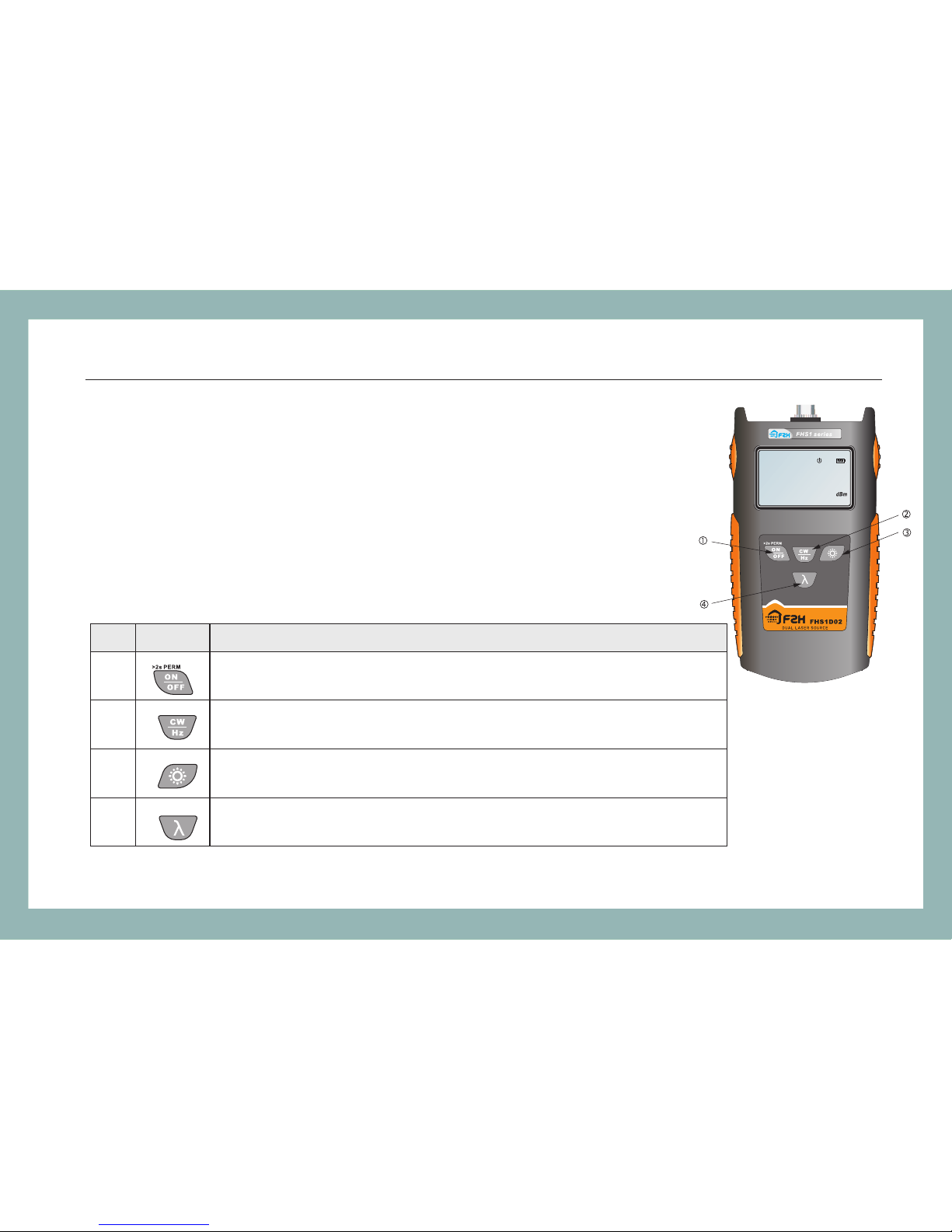
Switches instrument on /off. Lon g keyp ress w hile p owering
on to activate the instrument wi thou t auto -off func tion .
Modulated wavelength s hift ing ke y: swi tche s modu lated wavelength
and continuous wavelen gth.
Switches backlightin g on/o ff.
Wavelength shifting key: s witc hes wo rkin g wave leng th between 1310nm
and 1550nm(FHS-1D02) o r betw een 85 0nm an d 1300 nm(FHS-1D03).
Page 11
8
FHS1D02/03 / Operatio n
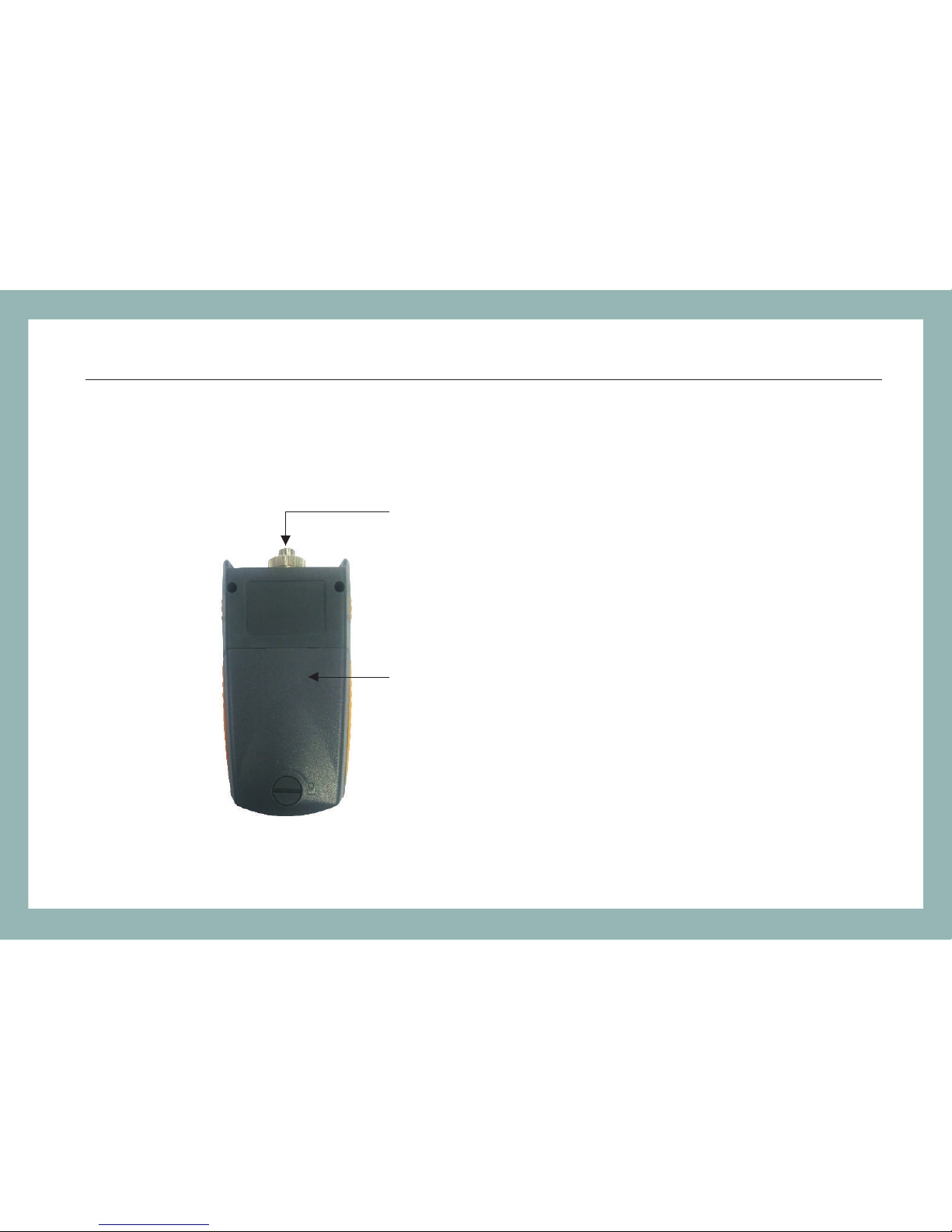
5.1.2 Back & top
FC/PC Connector(SC/PC, ST/PC optional)
Battery Plate
Page 12
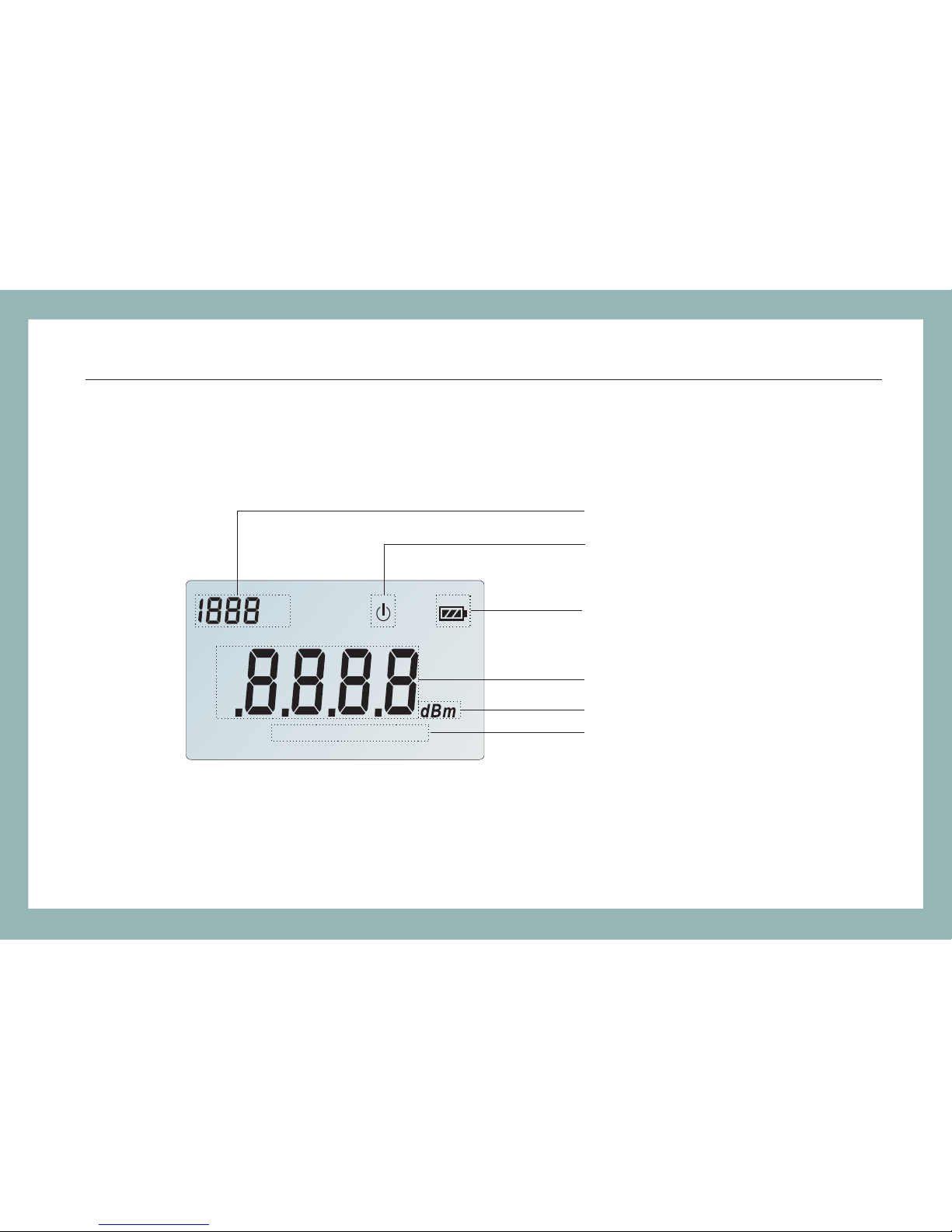
5.1.3 LCD
Wave length
Auto-off
Battery Charge
9
FHS1D02/03 / Operatio n
-
nm
270Hz 1kHz 2kHz
Power
Measurement Unit(dBm)
Modulation
Page 13
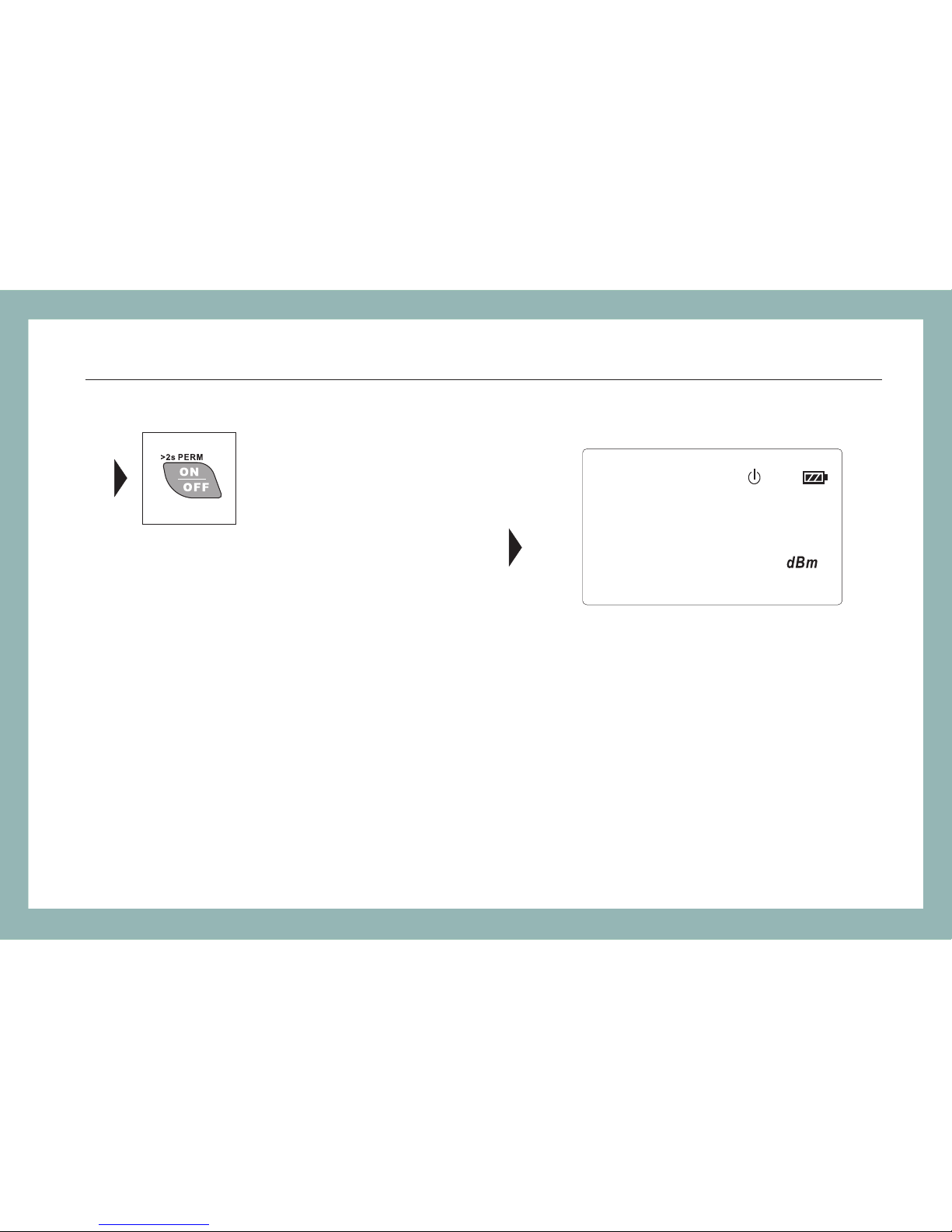
5.2 Turning the instrument on and off
Press the “ON/OFF” key briefly.
The instrument powers on.(See the figure)
Press the “ON/OFF” key briefly again.
The instrument powers off.
Note: Auto-off function
1 The instrument powers off automatically if no key press in 10 minutes.
2 Press the “ON/OFF” key for about 2 seconds to power on the instrument with
"Auto-off" function deactivated.
.8.5.5.0
13 10
-
10
FHS1D02/03 / Operatio n
nm
2kHz
Page 14
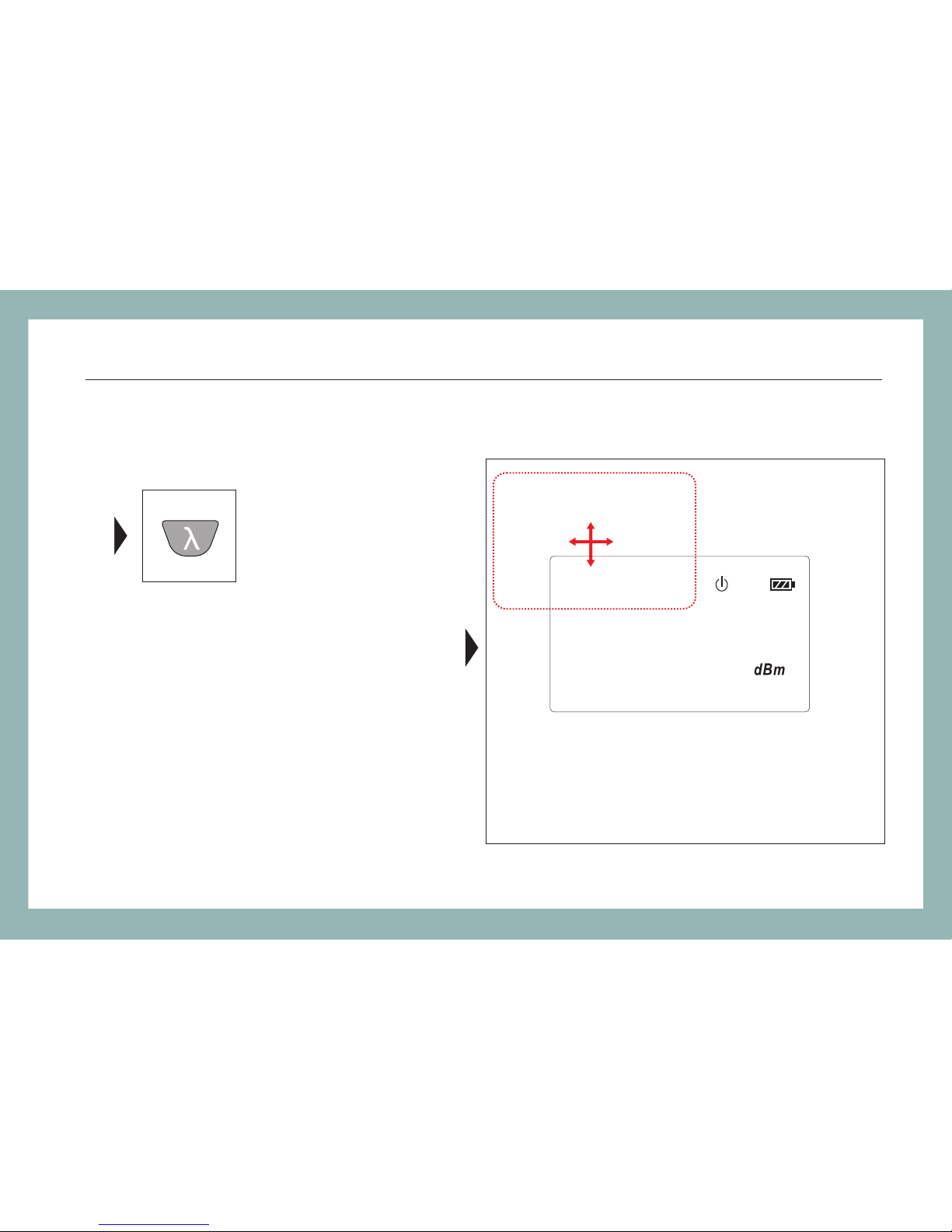
5.3 Switching the wavelength
Press the “λ” Key to switch the
wavelength between 1310nm and
1550nm(FHS1D02), 850nm and
1300nm(FHS1D03).
1550
11
FHS1D02/03 / Operatio n
850 1300
nm
2kHz
.8.5.5.0
13 10
-
Page 15
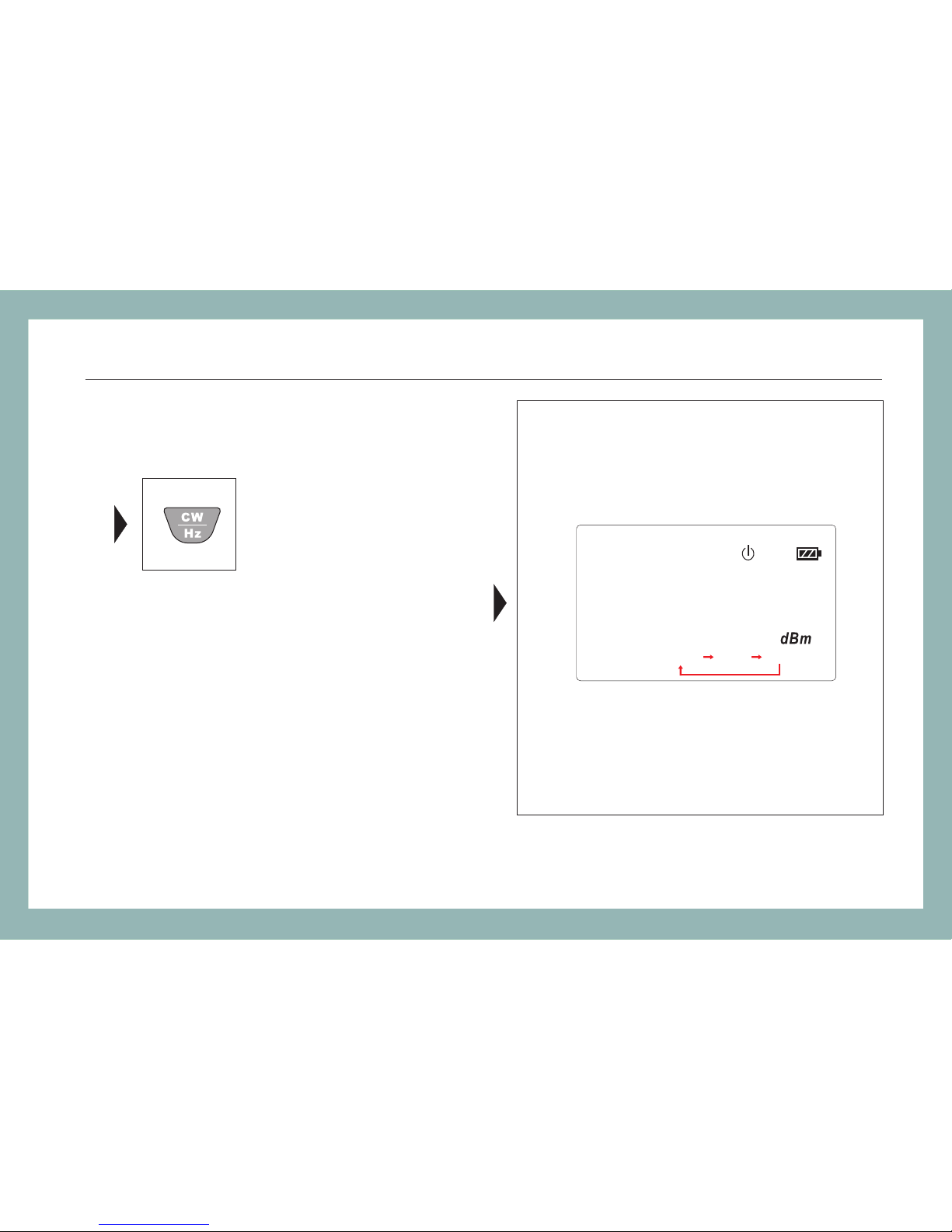
5.4 Frequency Output
The instrument defaults to CW when it
switch on. When it is set to CW, there is
no frequency on display.
Press the "CW/Hz" Key to select the
output among 270Hz, 1kHz and 2kHz.
12
FHS1D02/03 / Operatio n
1."CW" is not displayed on the LCD
nm
.8.5.5.0
13 10
-
270Hz 1kHz 2kHz
Page 16
13
FHS1D02/03 / Operatio n
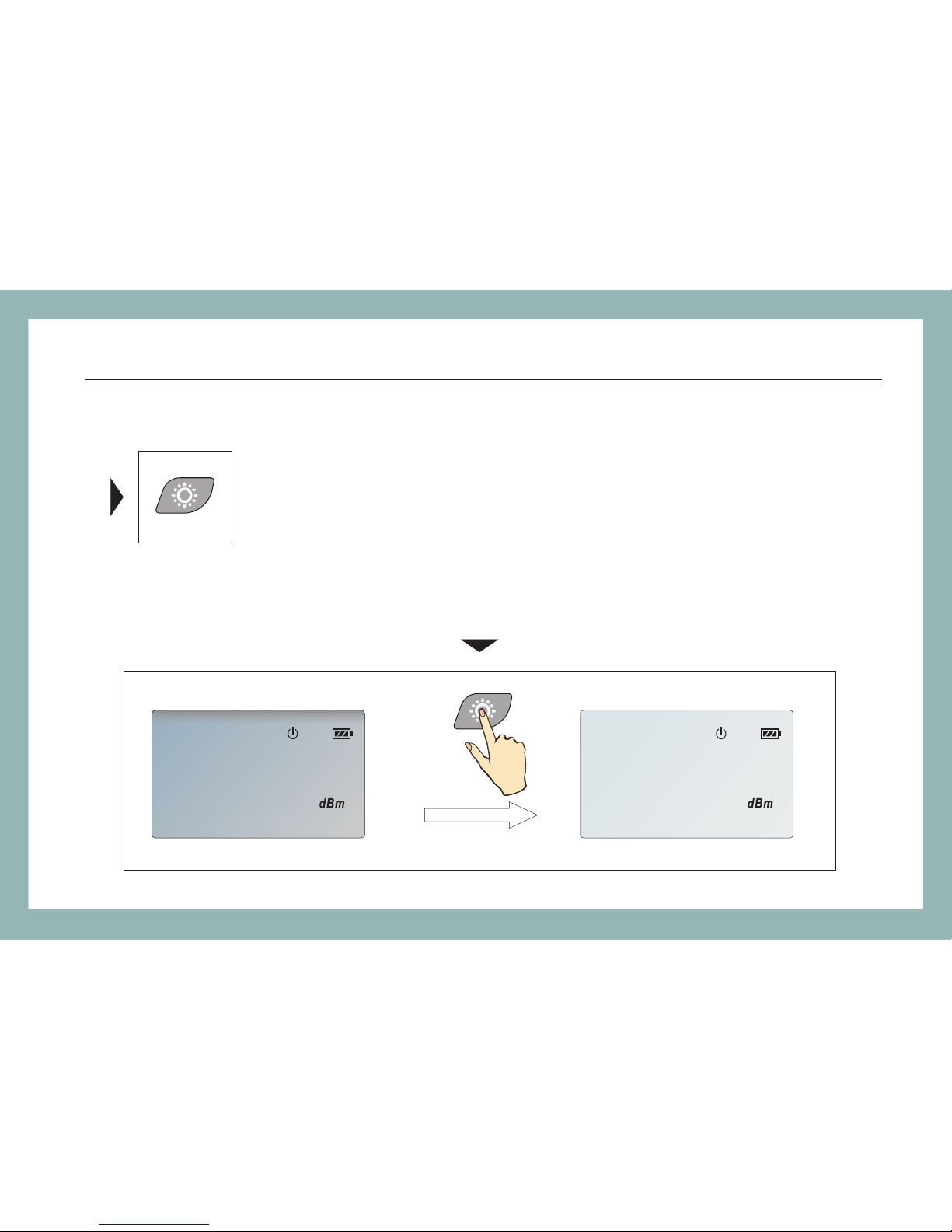
5.5 Switching backlighting of the LCD on and off
Press the Key to switch the backlighting of the LCD on and off.backlighting
-
nm
2kH z
5.0
13 10
-
nm
2kHz
5.0
13 10
Page 17
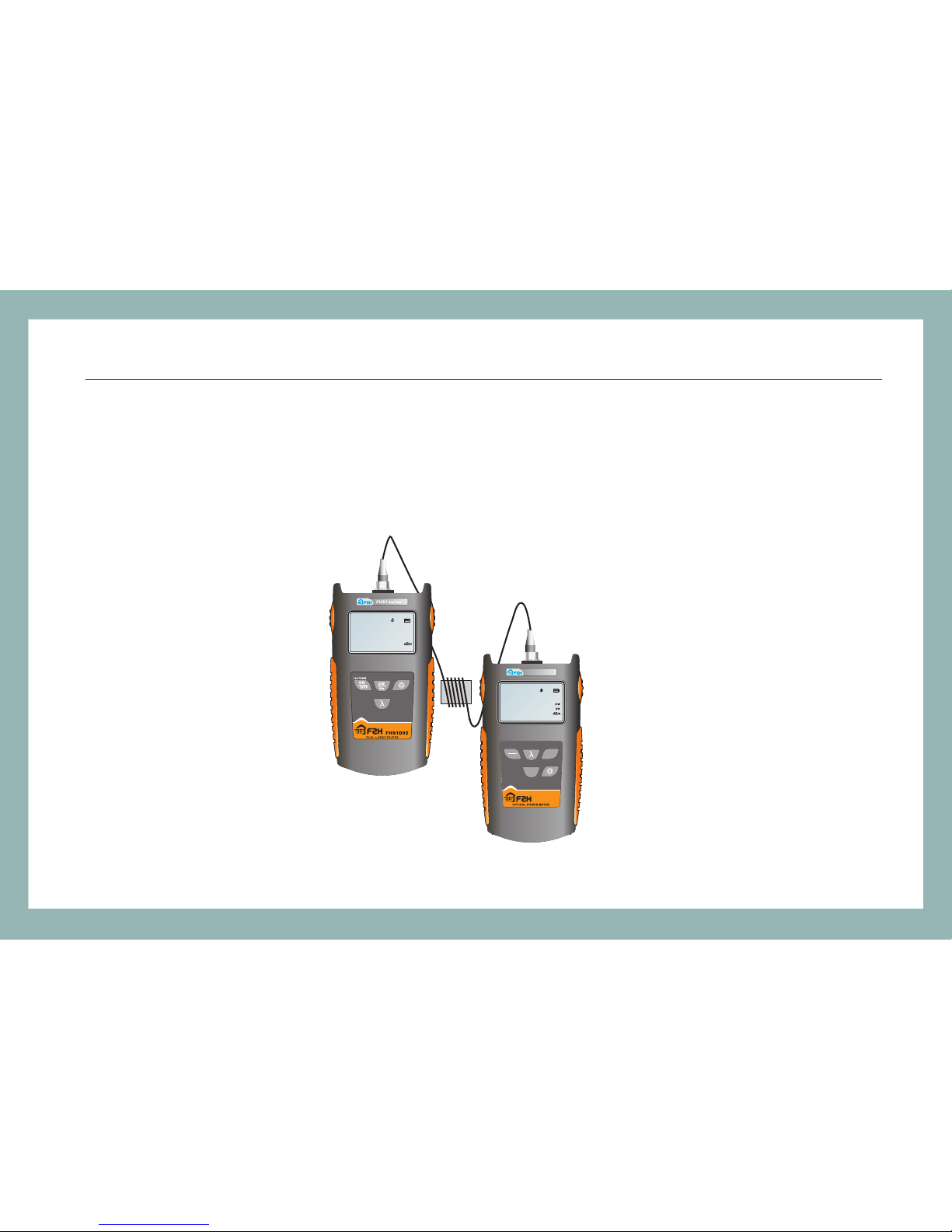
5.6 Connecting with Optical Power Meter
Connecting with FHP1 serie s optical power meter, FHS1 series dua l-wavelength laser source can
make accurate measuremen t of the fiber loss at the largest distan ce of more t han 300km(@1550).
On-the-spot measuremen t will differ with the work ing wavelength, fiber attenuati on and the testing
environment.
14
FHS1D02/03 / Operatio n
.8.8.8.8
18 8 8
-
nm
270Hz 1kHz 2kHz
FHP1 A02
.8.8.8.8
REF
18 8 8
-
nm
FHP1 se ries
ON
dBm/
REF
dB/mw
OFF
>2s PERM
>2s SET
Page 18
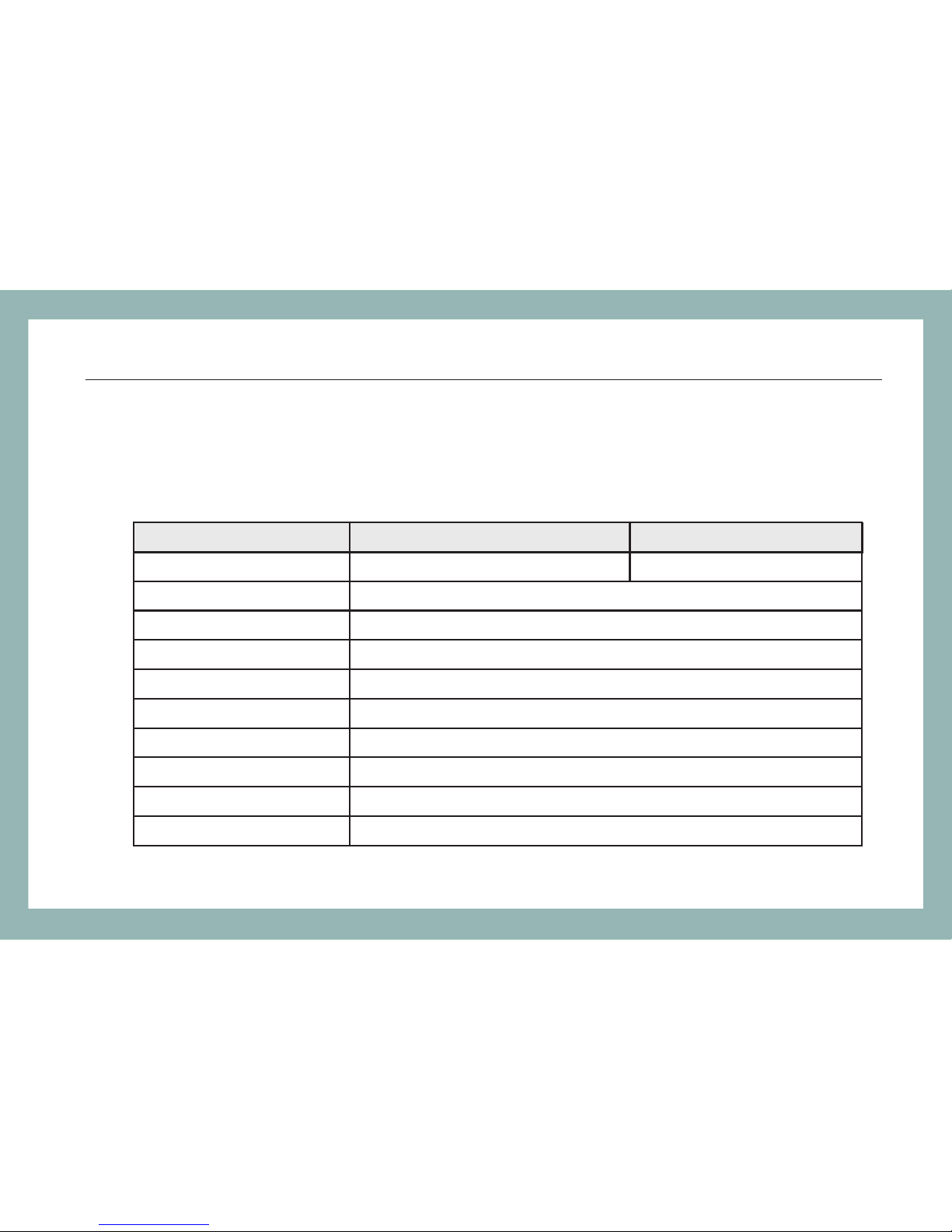
6 Specifications
Optical Specifications
15
FHS1D02/03 / Specifications
Output wav elength (nm)
Emitter Type
Connecto r
Output Sta bility
Central Wavel ength
Spectral W idth
Output Fre quency (Hz)
Output Pow er
Auto Power -off
Back-lig ht
FHS -1D02 FHS -1D03
1310 & 1550 850 & 1300
LD
FC/PC
1310/1550/850/1 300±20nm
3nm
270,1K,2 K
-5dBm±0. 5dB
Yes
Yes
Short Term(15minutes ):<0 .1dB L ong Term(5H ours o r abov e):< 0.2d B
Page 19
General Specifications
16
FHS1D02/03 / Specifications
Operatin g Tempera ture
Storage Temperatu re
Power supp ly
Dimensio n (mm)
Net Weight
℃
℃
-10 to +50
-20 to +70
4pcs of AAA batt ery
115L*65W*30H
140g
Page 20

7 Maintenance
Please cover the protective dust cap once you finish using
It is a good idea to clean the connector and the instrument when they get
dirty through use. Optical cleaning pads and anhydrous alcohol is
recommended. And please be careful not to get the detergent inside the
instrument.
To ensure the measurement accuracy, please send the instrument to
Grandway Service Center for calibration once a year.
17
FHS1D02/03 / Maintenance
 Loading...