

Page 1
GRANDVIEW REPRODUCING GENUINE COLORS
GRANDVIEW REPRODUCING GENUINE COLORS
Manual Instruction
for Table-Top Screen
U-WORK
Grandview Crystal Screen Canada Ltd.
#11- 3751 N orth Fraser Way,
Marin e Way Bus ines s Cent re,
Burna by, BC, Canada V5J 5G4
Tel: 1-604-412- 9777 F ax: 1- 604- 412- 9796
Websi te: www.grandview scre en.c a
Guangzhou Grandview Crystal Screen Co., Ltd.
P.O. 511400 Fede ral In d. Zon e No. 36 3, Yushan We st Roa d,
Shiqiao, Pa nyu Di stri ct, Gu angz hou, Guangdong, C hina
Tel: +8620-8489 -949 9 Fax: + 8620 -848 0-3343
Websi te: www.grandview scre en.c om
ISO9001:2000
International Certification
Model: PT-Uxx
Page 2
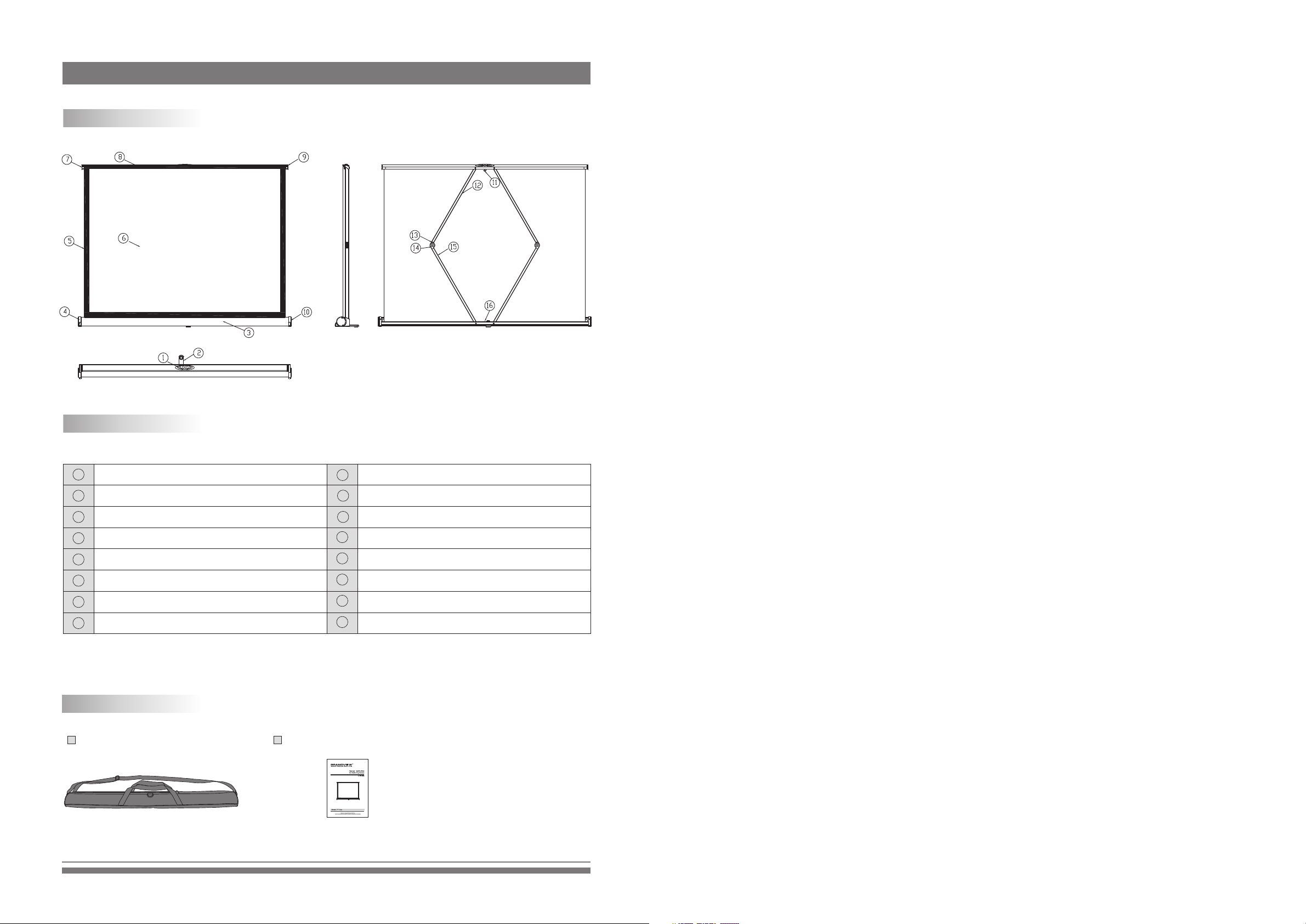
Description
Illustration
Front RearSide
Part name
1
Opener
2
Foot
3
Casing
4
Left End Cap
5
Black Border
6
Fabric
7
End Cap
8
Cover
12
13
14
15
16
9
End Cap
10
Right End Cap
11
Conjugation
Support Lever
Joint
Joint
Support Lever
Locker
Accessories
Bag (1pcs) Manual Instruction (1psc)
1
Page 3
Note
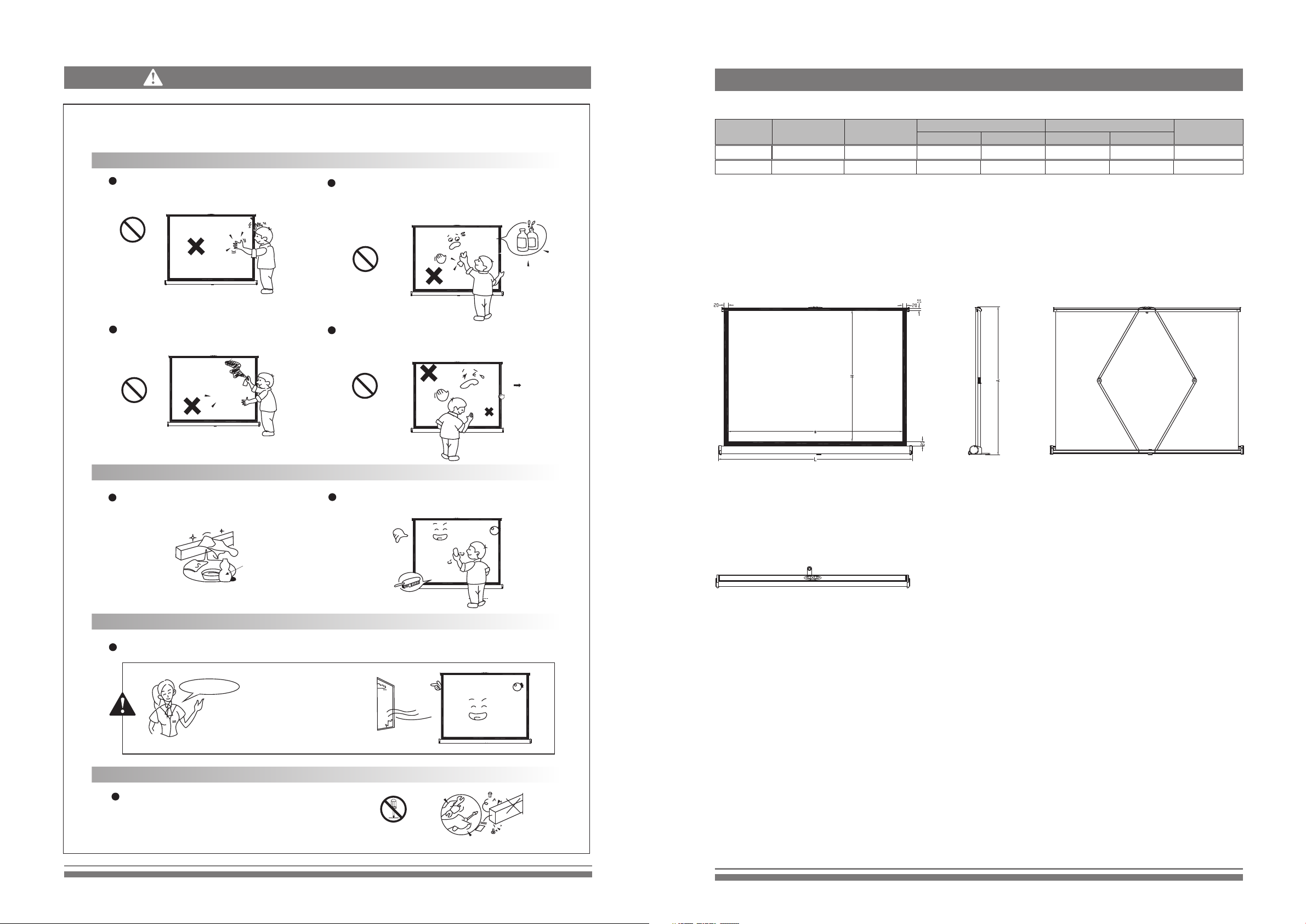
Specifications
The surface of screen is processe d to achieve good perform ance of the reflector. Any
damage of surface will in fluen ce projection effects so please use this product in r ight wa y.
Caution
Please do not shake the screen by hand.
Prohibited
Please do not make any marks on screen
surface.
Prohibited
Please do not use any cloth with water, volatile oil and
corrosive cleaning agents to clean the screen, because
they will make the surface metamorphism and paint off.
Prohibited
Please do not pull the screen strongly that it will cause
the risk of damage.
Prohibited
Net weight
(kg)
1.13
1.46
Format Model
4:3
4:3
PT-U-32
PT-U-40
Specification
(In)
32
40
Viewing area
W (mm)
650
813
488
610
Screen dimension
L (mm) H (mm) A (mm)
742
905 688
566
Note: Sizes and specifications are subject to change at any time. Refer to real product for exact data.
The tolerance for L is ± 5mm.
Maintenance
Any stains on the casing, please use dry-cloth to
clean softly. If too serious, please use soft-cloth
with water-diluted neutral detergent to clean.
Neutral
Detergent
Please use a brush to clean the dust of screen surface
softly.
Location Caution
Please keep the screen far away from sunshine,dust and wet. Avoid using the screen in strong wind.
Tips
The surface of screen is dried
before shipment; if have any
strong smell, please open the
windows.
Caution
Plea se co nta ct yo ur local dea ler f or re pai ring an d
repl aci ng. P lea se contact u s if yo u hav e any questi ons .
Avoi d takin g apa rt th e fix ture yours elf .
5
Proh ib it ed
Taking Ap ar t
2
Page 4
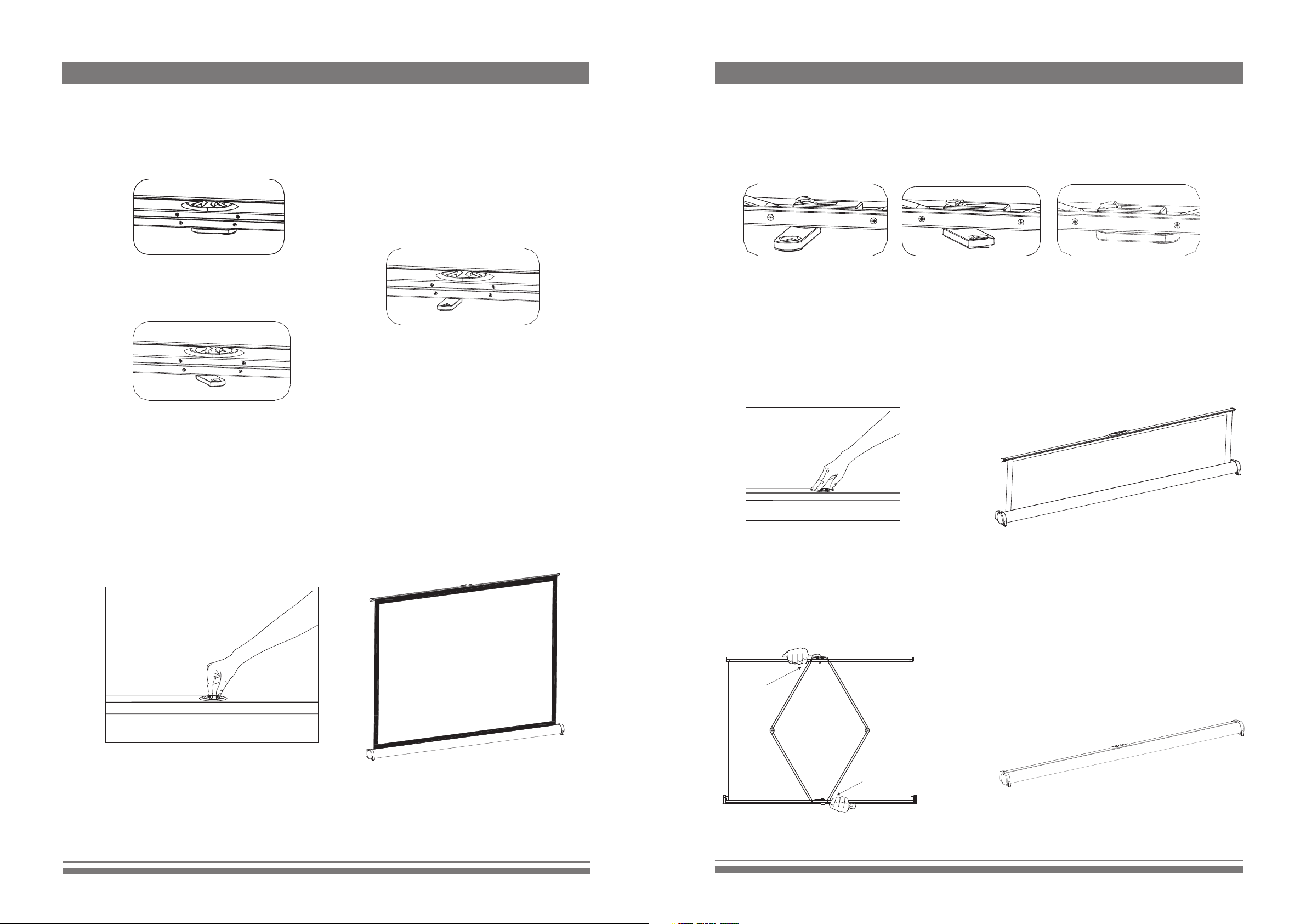
Expanding
1. Stay the screen on suitable position and the scre en faces to project or, and the set up the
foot of screen (figure 1, 2 and 3)
收 合 银 幕
Retracting
1. According to figure 3-1 and 3-2, following the steps to close the screen.
Figure1
Figure 3
Figure 2
2. According to figure 2-1, use fingers to hold the opener, and then pull the screen up to your desired
position slowly (figure 2-2)
Figure 3-1 Figure 3-2 Figure 3-3
2. According to figure 4-1, using fingers to hold the opener and push the screen down (figure 4-2). Please
ensure that the cover is locked to the casing that the retracting is completed (figure 4-4).
Figure4-1
Figure4-2
Figure 2-1
Note: Avoid hurting fingers while running those operations(figure 4-3).
Be careful
Figure 2-2
Figure4-3
3
Be careful
Figure4-3
4
 Loading...