

Page 1
Protecting your Screen:
To ensure long lasting viewing enjoyment keep the
screen rolled up when not in use. Check both the front
and back surfaces before retracting into the case to
make sure it is free of dust, dirt, insects or other foreign
matter. Use a soft brush or cloth to lightly remove any
foreign particles.
Cleaning your Screen:
Use warm water with a mild detergent to remove any
marks on the surface (only dab, do not rub) or screen
casing. Immediately dry the screen with a soft cloth or
towel. Do not leave it to air dry.
Never use any solvents, chemicals or abrasive cleaners
on the screen surface as they can permanently damage
the screen surface.
Note: Warranty does not cover un-installing
or re-installing unit.
For more information please go to
www.projectisle.com.
au or call 1300 88 11 79
Aug 2009 V.2.1
Grandview
Deluxe Pull Down
User Manual
Page 2
To the owner
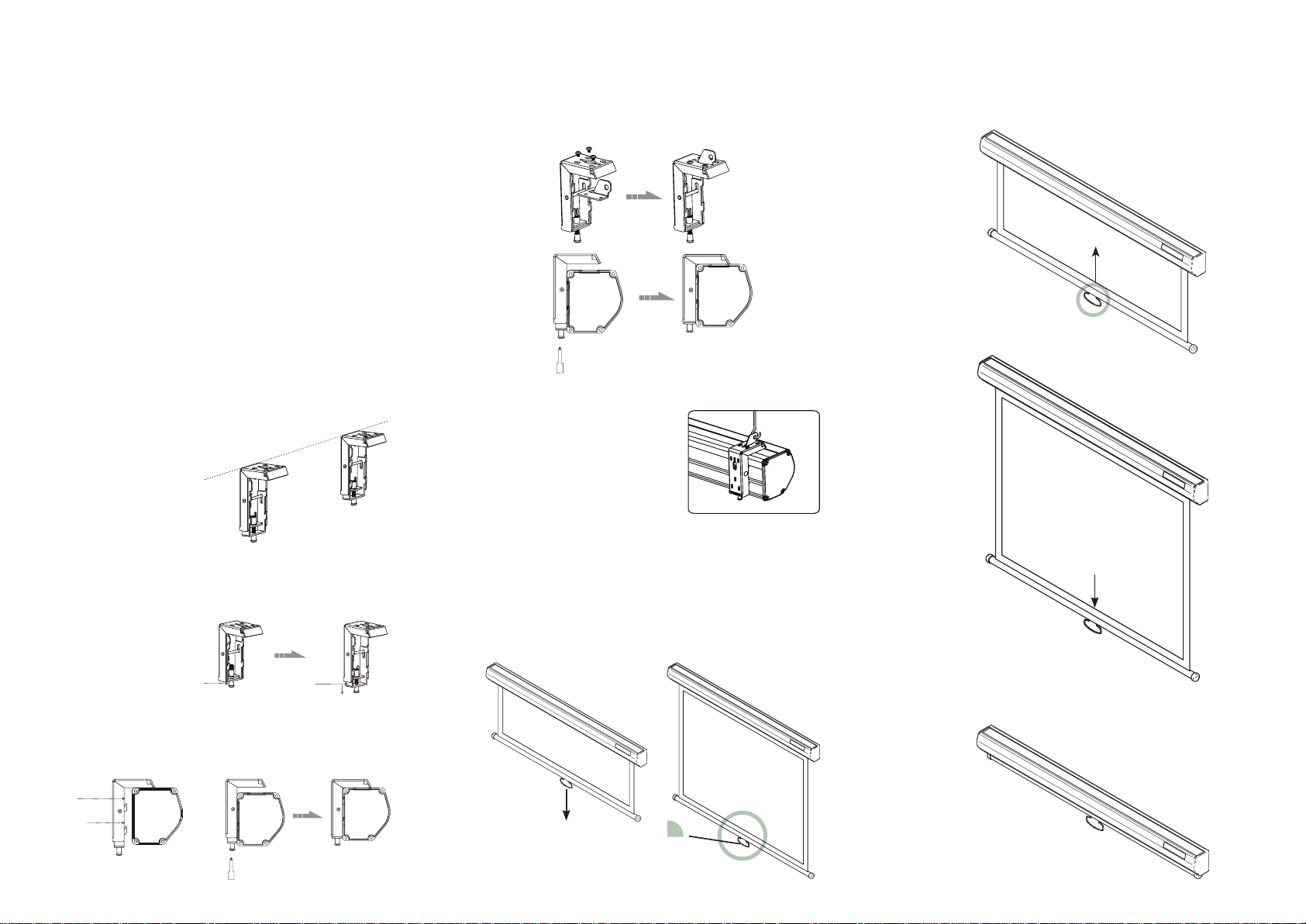
Locking screwLocking piece
Up groove
Down groove
Congratulations on purchasing a Grandview Deluxe Pull
Down Screen, This screen is designed to produce the
sharpest, most pleasing pictures with
maximum convenience.
Before you start
Use the correct tools: a level, a measuring tape and •
a pencil to mark with.
Measure the bracket position accurately before •
attaching to the wall or ceiling.
Do not mount the brackets the full width of the •
casing, allow at least 100mm at each end for
horizontal picture alignment.
Wall mount
Mount the brackets firmly eg: into wall studs or bricks.
Ensure the brackets are in level.
Ceiling installation
Attach the ceiling brackets as shown.
Slide the screen and lock
Ensure the wall bracket is
secured to the casing of the
screen before hanging.
Retract the screen by pulling down the handle and then
let go of it. The screen will retract at a controlled speed.
Undo the screen as shown below.
Slide the screen onto the brackets and snap into the
groove and tighten the screw.
Operation
Lower the screen by pulling down the handle. Once
in position, hold for 3 seconds: the self locking
mechanism will lock screen into position.
3 Sec.
Screen retracting slowly.
Screen fully retracted.
 Loading...