

Page 1
Protecting your Screen:
To ensure long lasting viewing enjoyment, always
keep the screen rolled up in its protective case when
not in use. Always examine both the front and back of
surface before retracting the screen into its case to
make sure it is free of dust, dirt, insects or foreign
matter. Use a soft brush or cloth to gently remove any
foreign particles.
Cleaning your Screen:
NEVER attempt to use any solvents, chemicals or
abrasive cleaners on the screen.
Use a mild detergent with warm water to remove
any marks on the surface or screen case. Always
immediately dry the screen with a soft cloth or towel
after cleaning.
Note:
Warranty does not cover un-installing or
re-installing unit.
For more information please go to
www.projectisle.com.au
or call 1300 88 11 79
GV_Classic_Pull_Down_Mar11_v1
Grandview
Classic Pull Down
User Manual
Page 2
To the owner
Congratulations on purchasing a Grandview
projection screen, designed and engineered to
produce the sharpest, most pleasing pictures with
maximum convenience.
Before you start
• Use the correct tools: a spirit level, a measuring tape
and a pencil to mark with.
• Measure the bracket position accurately before
attaching to the wall or ceiling.
Mecanical Installation
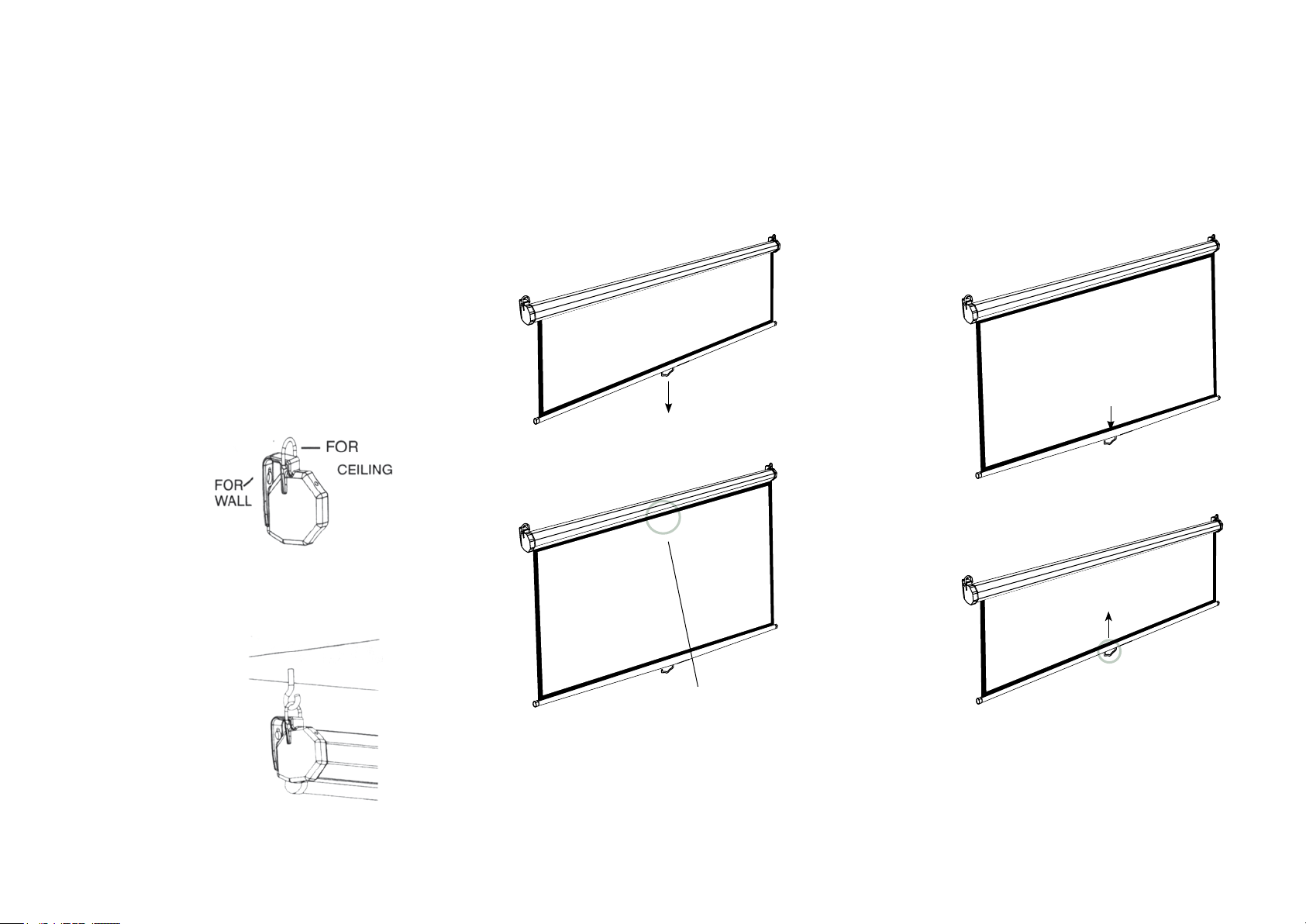
Grandview screens may be mounted on the wall, or from
the ceiling to suit your requirements. Always ensure the
screen is mounted level and that the back of the case is
parallel to the wall.
Wall Installation
Use the keyhole slot at
the back of the hanging
bracket for flush wall
suspension. Position
screws or other suitable
fasteners into the wall
and hang the screen
using the slots as
shown to the right.
Operating Instructions
Lowering the screen:
Using the pull down handle, lower the screen with
a gentle even action. Stop when 20mm of black
appears above the image area.
DO NOT PULL THE SCREEN DOWN MORE THAN THIS.
The screen will retract slightly before locking in place.
Raising the screen:
Using the handle, pull down the screen a small way,
then allow the screen to raise quickly.
CAUTION: Do not let go of the handle until the screen is
fully retracted. Damage from retracting too rapidly can
occur. Do not allow the dropper bar to hit the screen
case when retracting.
Ceiling Installation
Two screw hooks placed in
a beam or other solid mount
can be used to mount the
screen as shown to the right.
20mm
 Loading...