

Page 1

VoIPon Solutions www.voipon.co.uk [email protected] Tel: +44 (0) 1245 600560
Grandstream Networks, Inc.
Analog IP Gateway GXW-410x
4 or 8 FXO Ports w/Video Surveillance
Page 2

TABLE OF CONTENTS
VoIPon Solutions www.voipon.co.uk [email protected] Tel: +44 (0) 1245 600560
GXW-410X USER’S MANUAL
1.0 WELCOME.............................................................................................................................................4
2.0 PACKAGING & INSTALLATION...........................................................................................................5
2.1. Packaging..........................................................................................................................................5
Safety Compliances...................................................................................................................................5
Warranty ....................................................................................................................................................5
2.2 Installation...........................................................................................................................................5
3.0 APPLICATION DESCRIPTION..............................................................................................................5
4.0 FEATURES............................................................................................................................................8
4.1 Software Features: .............................................................................................................................8
4.2 Hardware Specification......................................................................................................................8
5.0 CONFIGURATION GUIDE.....................................................................................................................9
5.1 Configuration with Web Browser ........................................................................................................9
5.1.1 Accessing the Web Configuration Menu ........................................................................................9
5.1.2 End User Configuration ..................................................................................................................9
5.2 Advanced User Settings...................................................................................................................13
5.2.1 Advanced User Configuration.......................................................................................................13
5.2.2. Saving the Configuration Changes..............................................................................................26
5.2.3. Rebooting from Remote................................................................................................................26
6. SOFTWARE UPGRADE........................................................................................................................26
6.1 Upgrade through HTTP ....................................................................................................................26
6.2 Upgrade through TFTP.....................................................................................................................27
7. RESTORE FACTORY DEFAULT SETTING .........................................................................................28
8. EXAMPLES OF GXW-410X CONFIGURATIONS.................................................................................29
9. GLOSSARY OF TERMS........................................................................................................................31
Grandstream Networks, Inc. GXW-410x User’s Manual Page 2 of 34
Firmware 1.0.0.32
Page 3

TABLE OF FIGURES
VoIPon Solutions www.voipon.co.uk [email protected] Tel: +44 (0) 1245 600560
GXW-410X USER’S MANUAL
Figure 1: Functional Diagram of IP-PBX (Asterisk) & GXW-410x ...............................................................6
Figure 2: Hardware Specification of GXW-410x..........................................................................................8
Figure 3: Screen-shot of GXW-410x Log-in Screen – End User Configuration...........................................9
Figure 4: Screen-shot of GXW-410x Configuration Page..........................................................................10
Figure 5: Web Log-in Definitions................................................................................................................11
Figure 6: Screen-shot of GXW-410x Device Status Page.........................................................................12
Figure 7: Status Page Definitions ..............................................................................................................12
Figure 8: Screenshot of Advanced User Configuration .............................................................................13
Figure 8: Screenshot of Advanced Configuration Page.............................................................................14
Figure 9: Advanced Configuration Page Definitions..................................................................................15
Figure 10: Screen-shot of GXW-410x FXO Lines Configuration Page......................................................17
Figure 10a: Screen-shot of GXW-410x Channel Dialing...........................................................................17
Figure 11: FXO Lines Configuration Definitions ........................................................................................18
Figure 12: Screen- shot of GXW-410x Channels Page.............................................................................19
Figure 13: Channels Page Definitions .......................................................................................................20
Figure 14: Screen-shot of Grandstream Configuration Page ....................................................................22
Figure 15: Grandstream Configuration Page Definitions...........................................................................24
Grandstream Networks, Inc. GXW-410x User’s Manual Page 3 of 34
Firmware 1.0.0.32
Page 4

1.0 Welcome
VoIPon Solutions www.voipon.co.uk [email protected] Tel: +44 (0) 1245 600560
Thank you for purchasing the Grandstream GXW-410x Analog FXO IP Gateway. You’ve made an
excellent choice and we believe you will find the GXW-410x easy to use and easy to manage.
Gateway GXW-410x Overview
The GXW-410x offers an easy to manage, easy to configure IP communications solution for any business
with virtual and/or branch locations. The GXW-410x is a next generation IP voice and video gateway that
features full interoperability with leading IP-PBXs, SoftSwitches and SIP platforms.
The Analog Gateway GXW-410x series converts SIP/RTP IP calls to traditional PSTN calls. There are
two models - the GXW-4104 and GXW-4108, which have either 4 and 8 FXO ports respectively. The
installation is the same for either model. Either model can be configured to work with any leading SIP
server, for a pure media gateway to access PSTN networks.
This document is subject to changes without notice. The latest electronic version of this user manual is
available for download from the following location: http://www.grandstream.com/user_manuals/GXW-
410x.pdf
Grandstream Networks, Inc. GXW-410x User’s Manual Page 4 of 34
Firmware 1.0.0.32
Page 5

2.0 Packaging & Installation
VoIPon Solutions www.voipon.co.uk [email protected] Tel: +44 (0) 1245 600560
2.1. Packaging
The GXW-410x package includes:
1) One GXW-410x Unit
2) One universal power adaptor
3) One Ethernet cable
Safety Compliances
The GXW-410x is compliant with various safety standards including FCC/CE. Its power adaptor is
compliant with UL standard. Warning: use only the power adapter included in the GXW-410x package.
Using an alternative power adapter may permanently damage the unit.
Warranty
Grandstream has a reseller agreement with our reseller customer. End users should contact the company
from whom you purchased the product for replacement, repair or refund.
If you purchased the product directly from Grandstream, contact your Grandstream Sales and Service
Representative for a RMA (Return Materials Authorization) number. Grandstream reserve s the right to
remedy warranty policy without prior notification.
2.2 Installation
1. Connect power and cables
2. Connect Ethernet cable to a hub and power adapter to power wall outlet
3. Assign GXW-410x IP Address
4. Use another Ethernet cable to connect your PC to the same hub that GXW-4100 is connected.
5. Assign your PC to a static IP that is within the same subnet of default IP address of GXW-4100
192.168.0.160. i.e. 192.168.0.x. X can be any number between 2 and 254 except 160.
6. Launch web browser and type http://192.168.0.160
at Address of web browser. This will let you to
connect to build-in web server of GXW-4100.
You may change to use DHCP or PPPoE connection or another static IP address according to your local
network environment.
3.0 Application Description
A SIP proxy server such as Asterisk or a SIP registrar server can be deployed with the GXW-410x series.
In this environment, the SIP server handles SIP registration and call control and the GXW-410x
processes media conversion between IP and PSTN calls. By design, the system support s the North
American call progress tones and signaling standards on PSTN sides.
Figure 1 illustrates how the GXW-410x can be deployed in a typical enterprise topology.
Grandstream Networks, Inc. GXW-410x User’s Manual Page 5 of 34
Firmware 1.0.0.32
Page 6
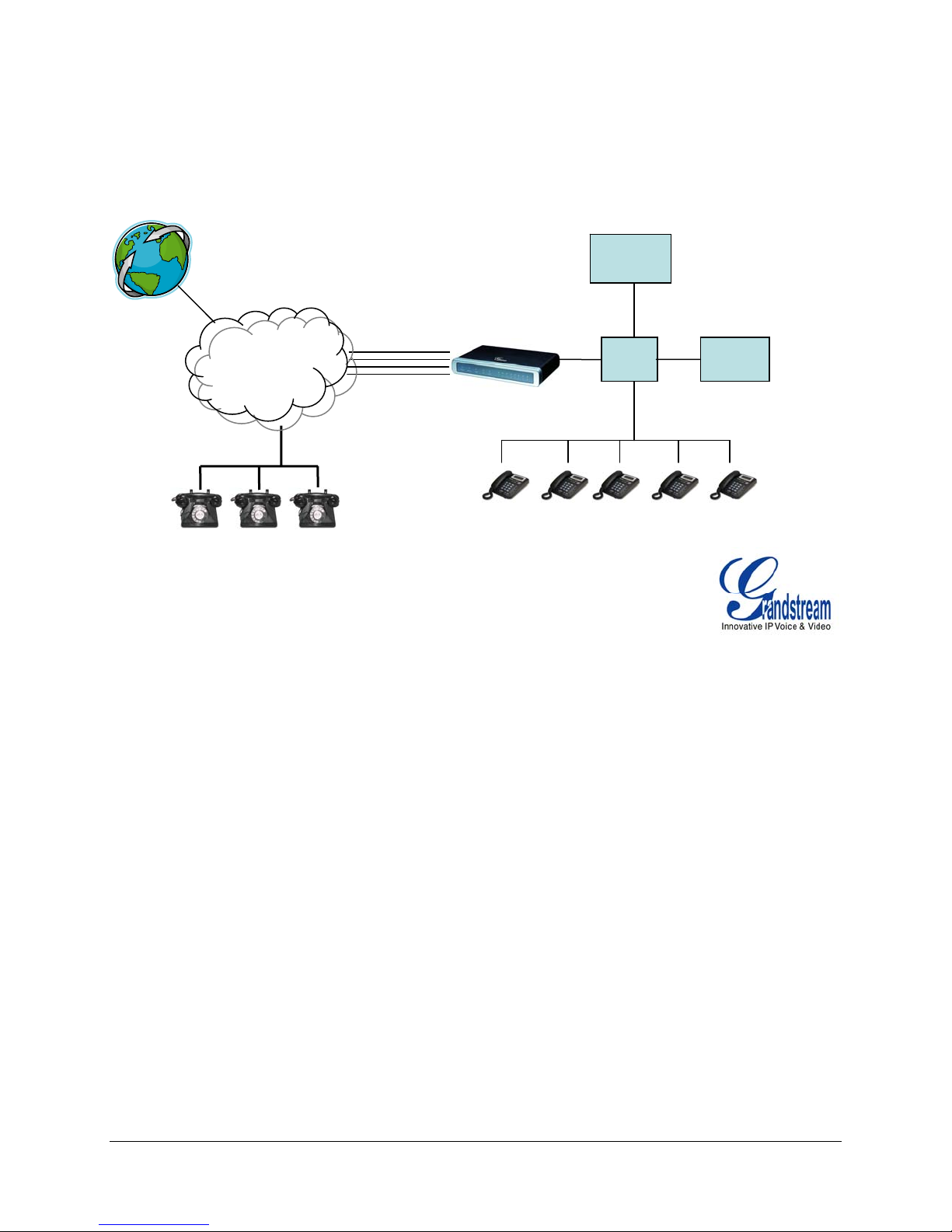
Figure 1: Functional Diagram of IP-PBX (Asterisk) & GXW-410x
VoIPon Solutions www.voipon.co.uk [email protected] Tel: +44 (0) 1245 600560
Anywhere in the world
IPPBX or
SIP Server
PPSSTTNN
CClloouudd
PSTN Analog Lines
FXO Lines
4 or 8 Ports
IP/LAN IP/WAN
GXW-410x
Grandstream IP Phones
Grandstream Networks, Inc. GXW-410x User’s Manual Page 6 of 34
Firmware 1.0.0.32
Page 7

Simple Configuration: Media Gateway to Access PSTN Networks
VoIPon Solutions www.voipon.co.uk [email protected] Tel: +44 (0) 1245 600560
GXW-410x can be configured to work with any leading SIP server, for a pure media gateway to access
PSTN networks. In such applications, the user only needs to configure GXW-410xgateway Stage Dialing
field and Sip Server field.
For a simple set-up, users only need to configure a SIP server field for default SIP Profile 1. This field
should be configured to point to the SIP server to be used with the GXW-410x.
For advanced applications, the user is required to choose at least one
SIP server field from the SIP
profiles and one stage dialing under system Channel configuration table. On SIP server sides, the SIP
server must be configured to forward user PSTN calls to the GXW-410x.
Please be aware that by default, the system uses North American PSTN settings and TWO STAGE
dialing to access PSTN networks for VOIP to PSTN calls and PSTN to VOIP calls. Two stage dialing
means the end-user will hear dial-tone twice. First dial-tone is used to let users to input destination
number in the same network of the calling networks. Second dial-tone is used to let users to input final
destination number.
The GXW-410x also supports ONE STAGE
dialing, which means users only need to input one final PSTN
number when first dial-tone is heard for calls from VOIP to PSTN. This requires configuring both SIP
server and GXW-410x to one stage dialing (see last section of quick guide and user manual for one stage
dialing). For one stage PSTN to VOIP calls, user needs to configure off-hook auto dial field (see last
section on sample configuration
Extensive Configuration: Media Gateway Configuration for Multiple Users
The GXW-410x can be configured to work with a variety of SIP server features and traditional PBX on
PSTN networks, with a different SIP server on each physical port. Each port may have its own voice
setting, dialing settings, PSTN termination setting, and DTMF transmission settings.
Off-hook Auto Dial
The FXO interface currently does not support direct inward dialing (DID). The GXW-410x implements an
off-hook auto dial feature for each physical port. Configure off-hook auto dial to forward PSTN incoming
call to a specific SIP number, call center or hunt group.
Sample Configurations - IP PBX Peers with GXW-410x
There are 2 methods to configure GXW to work with IP PBX:
1) Configure GXW with SIP Accounts in IP PBX, this will enable you to put GXW behind a
NAT/Firewall.
2) Configure GXW without SIP Accounts in IP PBX, this makes GXW function as a PEER gateway.
Please see the Quick Install Guide
at www.grandstream.com.
Note: In regions other than North American, the user is also required to configure call progress tones and
PSTN line termination fields. Check with local PSTN service carriers on values service p ro viders use on
the lines. If service provider doesn’t provide those values and users don’ t know what the correct values
are, please use the default values. Contact product support if you still have questions about configuring
your GXW-410x.
Grandstream Networks, Inc. GXW-410x User’s Manual Page 7 of 34
Firmware 1.0.0.32
Page 8

4.0 Features
VoIPon Solutions www.voipon.co.uk [email protected] Tel: +44 (0) 1245 600560
The Gateway series includes the GXW-4104 and GXW-4108, each offering superb voice and video
quality, traditional telephony functionality, easy deployment, and 4 or 8 FXO ports respectively. The
GXW-410x is the only small business gateway that offers a video surveillance component in the industry.
A complete list of features can be found at www.grandstream.com
.
4.1 Software Features:
• TFTP and HTTP firmware upgrade support
• Multiple SIP accounts (8), Eight total number of physical line ports, each account corresponding to
one SIP user id and belonging to one of multiple SIP profile
• Multiple SIP profiles, max of 3 profiles per system. Each profile hosts 0 to multiple number of SIP
accounts, depending on user need
• One stage and two stage dialing
• VoIP to PSTN call setup and teardown
• PSTN to VoIP call setup and teardown
• Configurable Channel Voice Settings. [Voice volume (db), Audio input (db), Silence suppression,
Line echo cancellation]
• Codec Support: G711u, G711a, G729, G723, and GSM (pending)
• Line echo canceller g.168 support
• Flexible DTMF transmission method (In-audio, RFC2833, and SIP Info)
• VoIP to PSTN : channel configurable for one stage or two stage dialing
• Configurable channel dialing to improve dial-out reliability [digit length (ms), digit volume (db), dial
pause between digits (ms), wait for dial-tone]
• Configurable PSTN Termination [Current Disconnect, AC Termination Impedance, Busy/Re-order
tones]
• Configurable Call Progress/Termination tones via Pattern Matching
4.2 Hardware Specification
Figure 2: Hardware Specification of GXW-410x
GXW-410x
LAN interface 2xRJ45 10/100Base-T
LED 8 LEDs in RED color
Universal Switching
Power Adaptor
Input: 100-240V AC, 50/60Hz, 0.5A Max
Output: 12V DC, 1.25A
UL certified
Dimension 230mm (L)
134mm (W)
32mm (H)
Weight 0.29 lbs (3.5 oz)
Temperature 32~104°F
0~40°C
Humidity 10% - 90%
(non-condensing)
Compliance FCC, CE
Grandstream Networks, Inc. GXW-410x User’s Manual Page 8 of 34
Firmware 1.0.0.32
Page 9

5.0 Configuration Guide
VoIPon Solutions www.voipon.co.uk [email protected] Tel: +44 (0) 1245 600560
5.1 Configuration with Web Browser
The GXW-410x has an embedded Web server that will respond to HTTP GET/POST requests. It also has
embedded HTML pages that allow a user to configure the IP phone through a Web browser such as
Microsoft’s IE.
5.1.1 Accessing the Web Configuration Menu
1. Use another Ethernet cable to connect your PC to the same hub that GXW-410x is
connected.
2. Assign your PC to a static IP that is within the same subnet of default IP address of
GXW-410x 192.168.0.160. i.e. 192.168.0.x. X can be any number between 2 and
254 except 160.
3. Launch web browser and type http://192.168.0.160
at Address of web browser. This
will let you to connect to build-in web server of GXW-410x.
4. You may change to use DHCP or PPPoE connection or another static IP address
according to your local network environment.
The Gateway Web Configuration Menu can be then accessed by the following URI: http://Gateway-IP-
Address where the Gateway-IP-Address is the IP address of the Gateway.
NOTE: To type IP address into browser to get into the configuration page, please strip out the leading “0”
as the browser will parse in octet. e.g.: if the IP address is: 192.168.001.014, please type in:
192.168.1.14.
5.1.2 End User Configuration
Once this HTTP request is entered and sent from a Web browser, the GXW-410x will respond with the
following login screen:
Figure 3: Screen-shot of GXW-410x Log-in Screen – End User Configuration
Grandstream Device Configuration
Password
Login
All Rights Reserved Grandstream Networks, Inc. 2005-2006
The password is case sensitive with maximum length of 25 characters and the factory default password
for End User is “123”.
After a correct password is entered in the login screen, the embedded Web server will respond with the
Configuration page which is explained in details below.
Grandstream Networks, Inc. GXW-410x User’s Manual Page 9 of 34
Firmware 1.0.0.32
Page 10
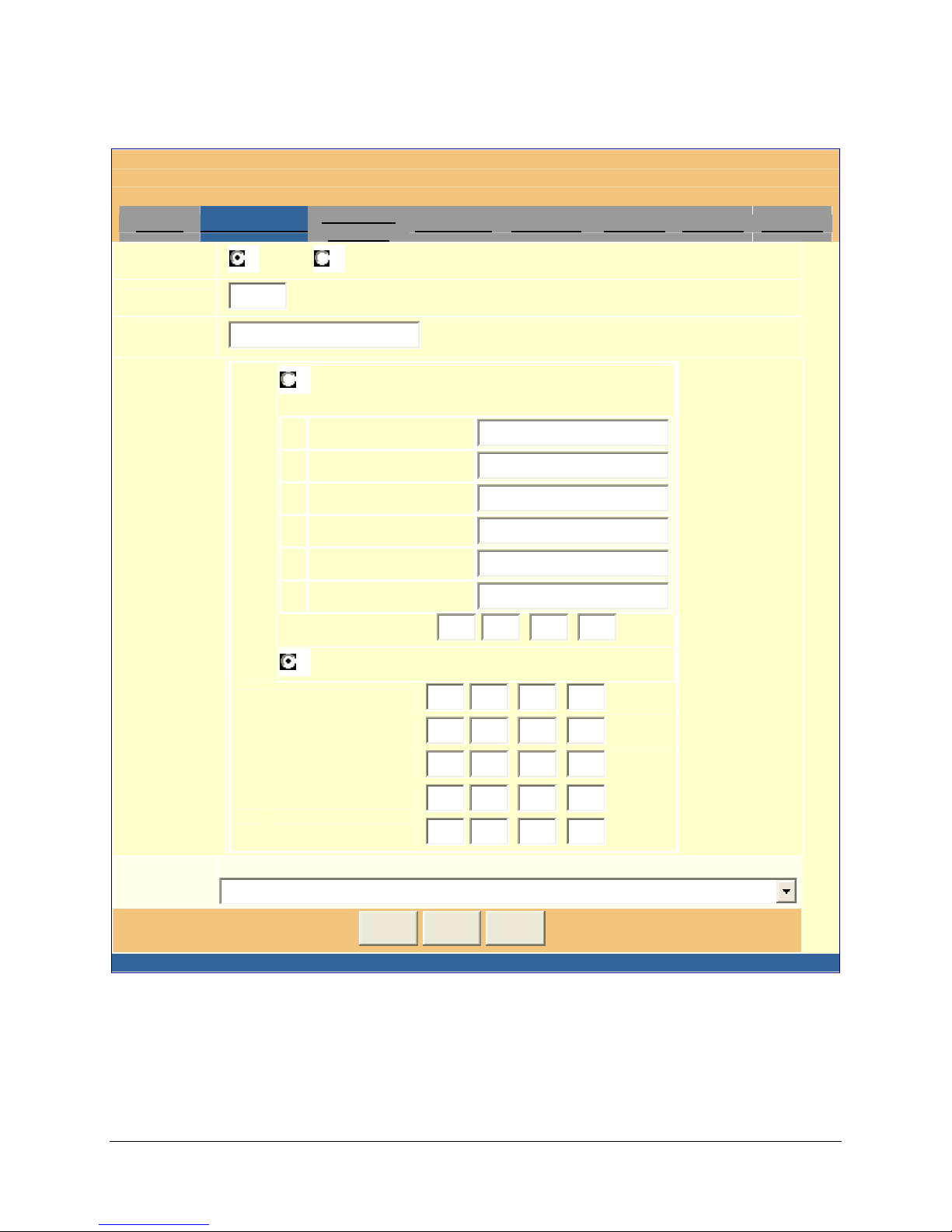
Figure 4: Screen-shot of GXW-410x Configuration Page
VoIPon Solutions www.voipon.co.uk [email protected] Tel: +44 (0) 1245 600560
Grandstream Device Configuration
Status Basic Settings
Web Access:
Web Port:
HTTP HTTPS
80
End User
Password:
(purposely not displayed for security protection)
IP Address:
Advanced
Settings
FXO Lines Channels Profile 1 Profile 2 Profile 3
(default for HTTP is 80 and HTTPS is 443)
dynamically assigned via DHCP (default) or PPPoE
(will attempt PPPoE first if PPPoE setting is non-blank)
DHCP hostname:
DHCP domain:
DHCP vendor class ID:
Grandstream GXW-4108
PPPoE account ID:
PPPoE password:
PPPoE service name:
0
Preferred DNS server:
0
.
0
.
0
.
statically configured as:
192.168 .0
0
.
0
.
0
.
0
.
0
.
0
.
0
.
0
.
Time Zone:
IP Address:
Subnet Mask:
Default Router:
DNS Server 1:
DNS Server 2:
GMT-5:00 (US Eastern Time, New York)
Update Cancel Reboot
All Rights Reserved Grandstream Networks, Inc. 2005-2006
0
0
0
0
.
.
.
.
.
160
0
0
0
0
Grandstream Networks, Inc. GXW-410x User’s Manual Page 10 of 34
Firmware 1.0.0.32
Page 11

Figure 5: Web Log-in Definitions
VoIPon Solutions www.voipon.co.uk [email protected] Tel: +44 (0) 1245 600560
Web Access
Web Port
Select HTTP or secure HTTPS protocol for Web Access
By default, HTTP uses port 80 and HTTPS uses port 443. This field is
for customizable web port.
End User Password
This contains the password to access the Web Configuration Menu.
This field is case sensitive with a maximum length of 25 characters.
IP Address
There are two modes under which the GXW-410x can operate:
If DHCP mode is enabled, then all the field values for the Static
IP mode are not used (even though they are still saved in the Flash
memory.) The GXW-410x will acquire its IP address from the first
DHCP server it discovers from the LAN it is connected.
To use the PPPoE feature the PPPoE account settings need to
be set. The GXW-410x will attempt to establish a PPPoE session if any
of the PPPoE fields is set.
If Static IP mode is enabled, then the IP address, Subnet Mask,
Default Router IP address, DNS Server 1 (primary), DNS Server 2
(secondary) fields will need to be configured. These fields are set to
zero by default.
Time Zone
This parameter controls how the date/time is displayed according to the
specified time zone.
In addition to the Basic Settings configuration page, the end user also has access to the Device Status
page. The following is a screen shot of the device Status Page.
Grandstream Networks, Inc. GXW-410x User’s Manual Page 11 of 34
Firmware 1.0.0.32
Page 12
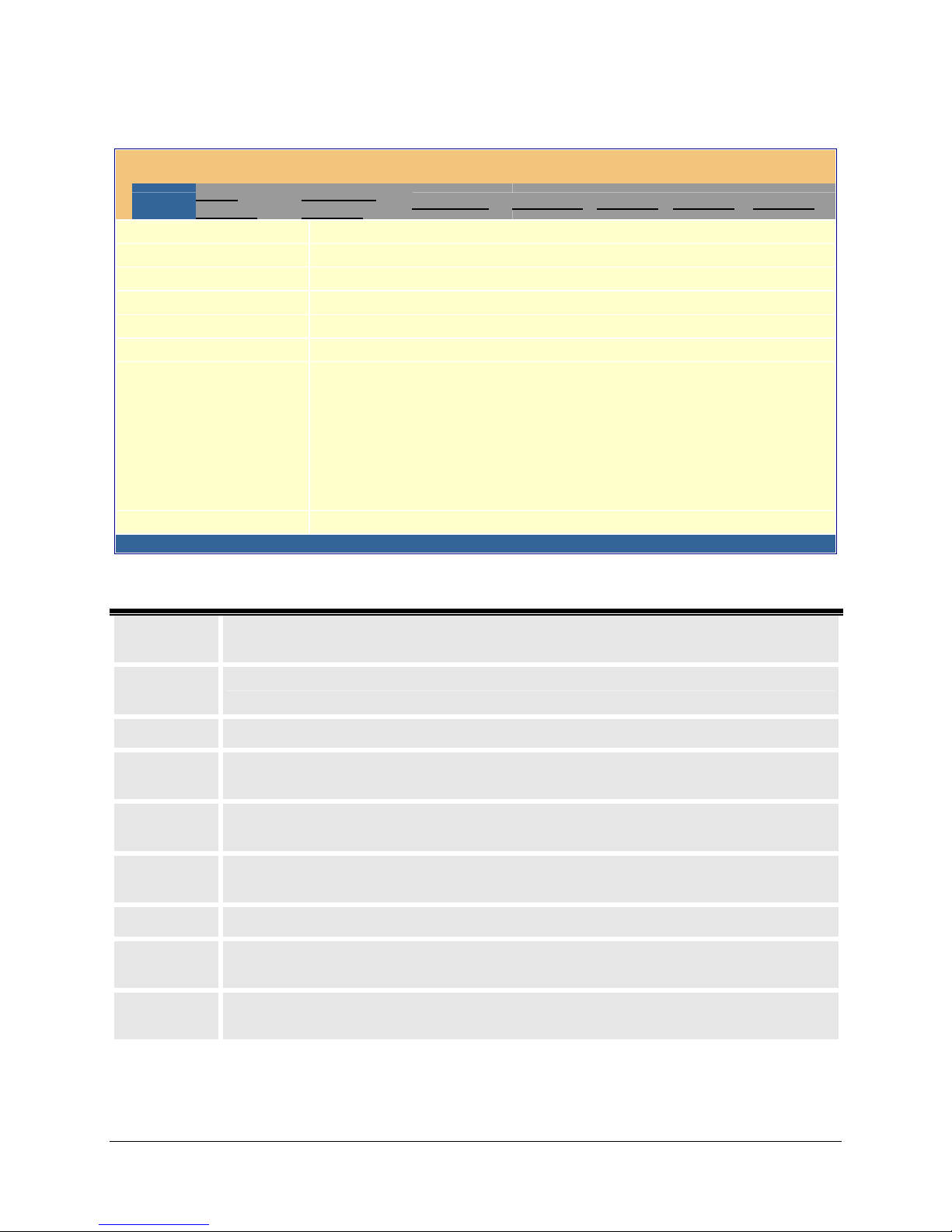
Figure 6: Screen-shot of GXW-410x Device Status Page
VoIPon Solutions www.voipon.co.uk [email protected] Tel: +44 (0) 1245 600560
Grandstream Device Configuration
Status
Basic
Settings
Hardware Revision:
MAC Address:
IP Address:
Product Model:
Software Version:
System Up Time:
Registered:
Advanced
Settings
FXO Lines Channels Profile 1 Profile 2 Profile 3
Main-- 0.1 Rev A Interface-- 0.0 Rev A
00.0B.82.08.A5.19
72.72.74.217
GXW-410x
Program-- 1.0.0.31 Loader-- 1.0.0.3 Boot-- 1.0.0.13
0 day(s) 3 hour(s) 28 minute(s)
Phone Number 1: Yes
Phone Number 2: Yes
Phone Number 3: Yes
Phone Number 4: Yes
Phone Number 5: Yes
Phone Number 6: Yes
Phone Number 7: Yes
Phone Number 8: Yes
PPPoE Link Up:
disabled
All Rights Reserved Grandstream Networks, Inc. 2005-2006
Figure 7: Status Page Definitions
Hardware
Revision
MAC
Address
IP Address
Product
Model
Software
Version
System Up
Time
Registered
PPPoE Link
Up
Detected
NAT Type
Hardware version number: Main Board, Interface Board
The device ID, in HEX format. This is a very important ID for ISP troubleshooting.
This field shows LAN IP address of GXW-410x
This field contains the product model info.
gram: This is the main software release, its number is always used for firmware upgrade.
tloader: This is normally not changed.
This field shows system up time since the last reboot.
This field indicates whether the device is registered to the SIP server(s).
This field shows whether the PPPoE connection is up if connected to DSL modem.
This field shows what kind NAT the GXW-410x is connected to via its LAN port. It is
based on STUN protocol.
Grandstream Networks, Inc. GXW-410x User’s Manual Page 12 of 34
Firmware 1.0.0.32
Page 13

5.2 Advanced User Settings
VoIPon Solutions www.voipon.co.uk [email protected] Tel: +44 (0) 1245 600560
5.2.1 Advanced User Configuration
To login to the Advanced User Configuration page, please follow the instructions in section 5.2.1 to get to
the following login page. The password is case sensitive with a maximum length of 25 characters and the
factory default password for Advanced User is “admin”.
Figure 8: Screenshot of Advanced User Configuration
Grandstream Device Configuration
Password
Login
All Rights Reserved Grandstream Networks, Inc. 2005-2006
Advanced User configuration includes not only the end user configuration, but also advanced configuration
such as SIP configuration, Codec selection, NAT Traversal Setting and other miscellaneous configuration.
Grandstream Networks, Inc. GXW-410x User’s Manual Page 13 of 34
Firmware 1.0.0.32
Page 14
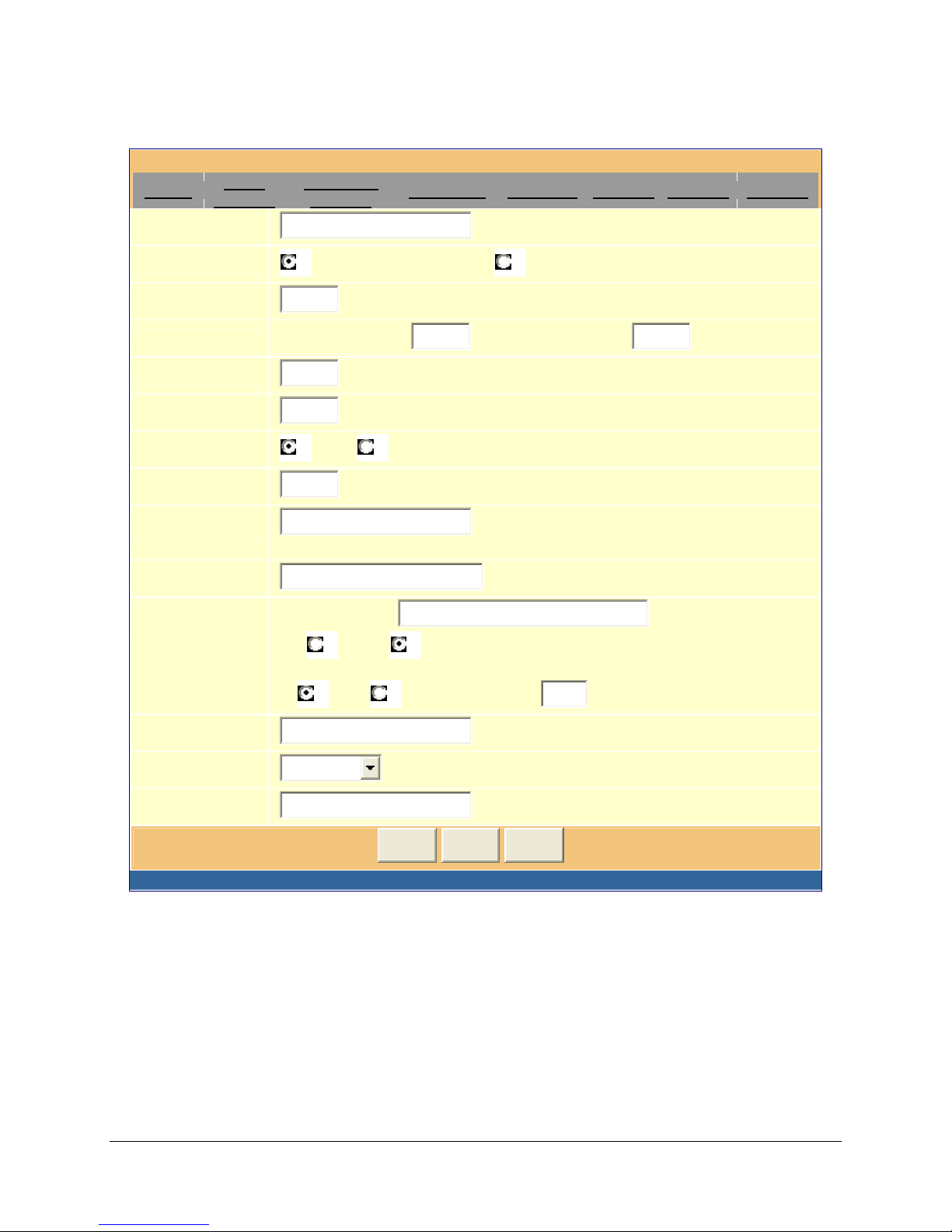
Figure 8: Screenshot of Advanced Configuration Page
0
VoIPon Solutions www.voipon.co.uk [email protected] Tel: +44 (0) 1245 600560
Grandstream Device Configuration
Status
Basic
Settings
Admin Password:
Advanced
Settings
FXO Lines Channels Profile 1 Profile 2 Profile 3
(not displayed for security reason)
G723 rate:
Layer 3 QoS:
Layer 2 QoS:
Inter-digit Timeout:
local RTP port:
Use random port:
keep-alive interval:
Use NAT IP
STUN server:
Firmware
Upgrade:
6.3kbps encoding rate 5.3kbps encoding rate
48
802.1Q/VLAN Tag
(Diff-Serv or Precedence value)
0
802.1p priority value
4
(No Key Entry Timeout in seconds, default is 4 seconds)
5004
(1024-65535, default 5004)
0
(0-7)
No Yes
20
(in seconds, default 20 seconds)
(if specified, this will be used in SIP/SDP
message)
(URI or IP: port)
Upgrade Server:
fm.grandstream.com /gs
Via TFTP HTTP
Automatic Upgrade:
No Yes, upgrade every
1008
minutes (default 7 days)
Syslog Server:
Syslog Level:
NTP Server:
NONE
time.nist.gov
Update Cancel Reboot
(URI or IP address)
All Rights Reserved Grandstream Networks, Inc. 2005-2006
Grandstream Networks, Inc. GXW-410x User’s Manual Page 14 of 34
Firmware 1.0.0.32
Page 15

Figure 9: Advanced Configuration Page Definitions
VoIPon Solutions www.voipon.co.uk [email protected] Tel: +44 (0) 1245 600560
Admin
Password
g723 Rate
Layer 3 QoS
Layer 2 QoS
Inter Digit
Timeout
Local RTP port
Use Random
Port
Keep-alive
interval
Administrator password. Only the administrator can configure the “Advanced Settings”
page. Password field is purposely left blank for security reason after clicking update and
saved. The maximum password length is 25 characters.
g723 encoding rate (6.3kbps or 5.3kbps)
This field defines the layer 3 QoS parameter which can be the value used for IP
Precedence or Diff-Serv or MPLS. Default value is 48.
This contains the value used for layer 2 VLAN tag. Default setting is
blank.
Default is 4 seconds.
This parameter defines the local RTP-RTCP port pair the GXW-410x will listen and
transmit. It is the base RTP port for channel 0. When configured, channel 0 will use this
port _value for RTP and the port_value+1 for its RTCP; channel 1 will use port_value+2
for RTP and port_value+3 for its RTCP. The default value is 5004.
This parameter, when set to Yes, will force random generation of both the local SIP and
RTP ports. This is usually necessary when multiple GXW-410xs are behind the same
NAT.
This parameter specifies how often the GXW-410x sends a blank UDP packet to the
SIP server in order to keep the “hole” on the NAT open. Default is 20 seconds.
Use NAT IP
STUN Server
Firmware
Upgrade &
Provisioning
Via TFTP Server
Via HTTP Server
NAT IP address used in SIP/SDP message. Default is blank.
IP address or Domain name of the STUN server.
This radio button will enable GXW-410x to download firmware or configuration file
through either TFTP or HTTP.
This is the IP address of the configured TFTP server. If selected and it is non-zero or
not blank, the BudgeTone 200 will attempt to retrieve new configuration file or new code
image from the specified TFTP server at boot time. It will make up to 3 attempts before
timeout and then it will start the boot process using the existing code image in the Flash
memory. If a TFTP server is configured and a new code image is retrieved, the new
downloaded image will be verified and then saved into the Flash memory.
Note: Please do NOT interrupt the TFTP upgrade process (especially the power supply)
as this will damage the device. Depending on the network environment this process
can take up to 15 or 20 minutes.
The URL for the HTTP server used for firmware upgrade and configuration via HTTP.
For example, ttp://provisioning.mycompany.com:6688/Grandstream/1.0.0.26
Here “:6688” is the specific TCP port that the HTTP server is listening at, it can be
omitted if using default port 80.
Note: If Auto Upgrade is set to No, GXW-410x will only do HTTP download once at
boot up.
Grandstream Networks, Inc. GXW-410x User’s Manual Page 15 of 34
Firmware 1.0.0.32
Page 16

Automatic
VoIPon Solutions www.voipon.co.uk [email protected] Tel: +44 (0) 1245 600560
Upgrade
Choose Yes to enable automatic upgrade and provisioning. In “Check for new firmware
every” field, enter the number of days to enable GXW-410x to check the server for
firmware upgrade or configuration in the defined period of days. When set to No, GXW410x will only do upgrade once at boot up.
“Always check for New Firmware.” Check New Firmware only when F/W pre/suffix
changes”
Syslog Server
Syslog Level
The IP address or URL of System log server. This feature is especially useful for ITSP
(Internet Telephone Service Provider)
Select the ATA to report the log level. Default is NONE. The level is one of DEBUG,
INFO, WARNING or ERROR. Syslog messages are sent based on the following
events:
1. product model/version on boot up (INFO level)
2. NAT related info (INFO level)
3. sent or received SIP message (DEBUG level)
4. SIP message summary (INFO level)
5. inbound and outbound calls (INFO level)
6. registration status change (INFO level)
7. negotiated codec (INFO level)
8. Ethernet link up (INFO level)
9. SLIC chip exception (WARNING and ERROR levels)
10. memory exception (ERROR level)
The Syslog uses USER facility. In addition to standard Syslog payload, it contains the
following components:
GS_LOG: [device MAC address][error code] error message
Here is an example: May 19 02:40:38 192.168.1.14 GS_LOG: [00:0b:82:00:a1:be][000]
Ethernet link is up
NTP server
URI or IP address of the NTP (Network Time Protocol) server, which will be used by the
phone to synchronize the date and time.
Grandstream Networks, Inc. GXW-410x User’s Manual Page 16 of 34
Firmware 1.0.0.32
Page 17
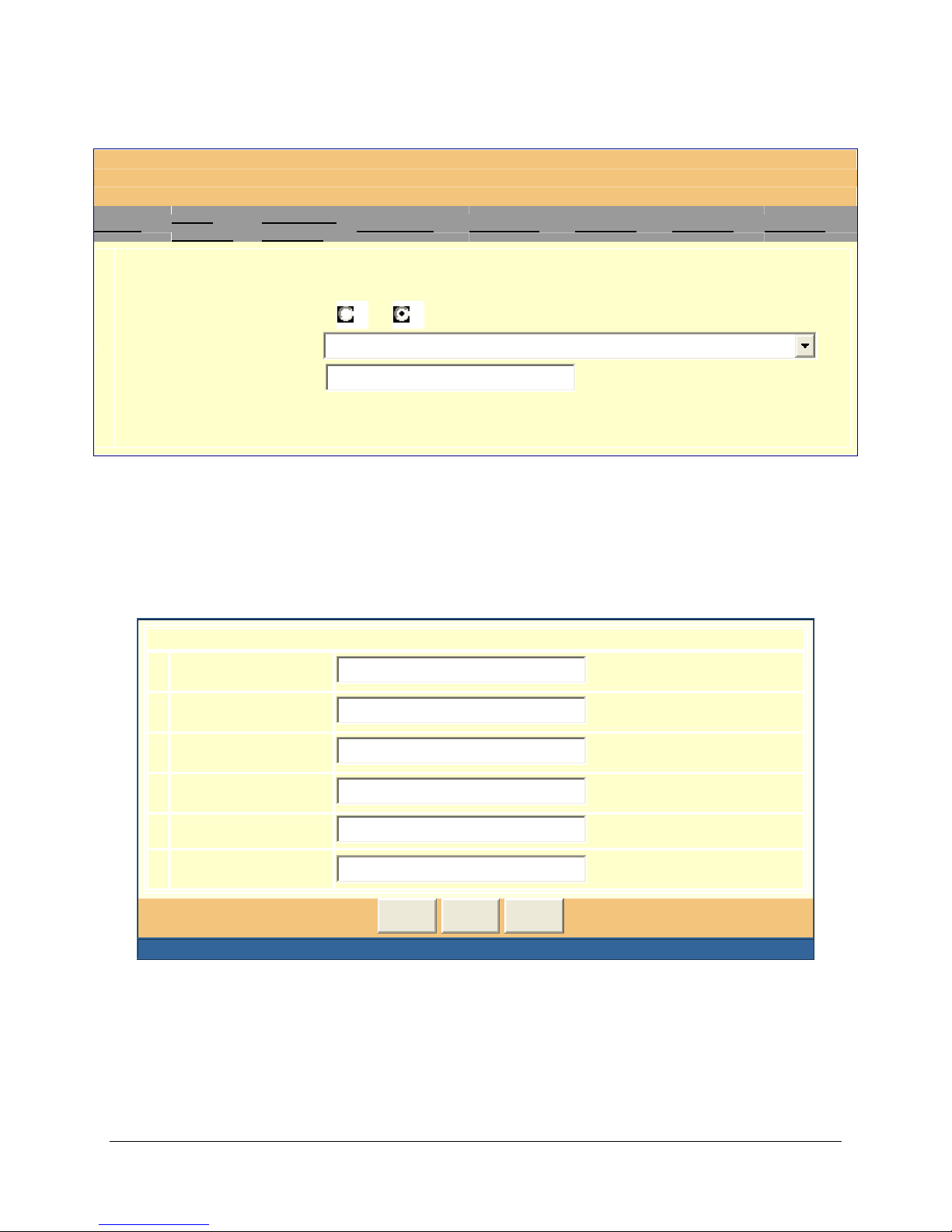
Figure 10: Screen-shot of GXW-410x FXO Lines Configuration Page
VoIPon Solutions www.voipon.co.uk [email protected] Tel: +44 (0) 1245 600560
Grandstream Device Configuration
Status
Basic
Settings
Advanced
Settings
FXO Lines Channels Profile 1 Profile 2 Profile 3
FXO Termination
Enable Current Disconnect: No Yes (Default Yes)
AC Termination Impedance:
Silence Timeout(X1s):
600 Ohm (North America)
ch1-8:60;
Figure 10a: Screen-shot of GXW-410x Channel Dialing
Channel Dialing
1. DTMF Digit
Length(X10ms):
2. DTMF Digit
Volume(dB):
3. DTMF Dial
Pause(X10ms):
4. Wait DialTone(Y/N):
5. Dialing Stage(1/2):
6. Off-hook Auto
Dial(VoIP):
ch1-8:10;
ch1-8:-11;
ch1-8:10;
ch1-8:Y;
ch1-8:2;
ch1-8:605;
Update Cancel Reboot
All Rights Reserved Grandstream Networks, Inc. 2005-2006
(default 60s)
(1-200, default 10)
(-31-0, default -11)
(1-200, default 10)
(default Yes)
(default 2)
Grandstream Networks, Inc. GXW-410x User’s Manual Page 17 of 34
Firmware 1.0.0.32
Page 18

Figure 11: FXO Lines Configuration Definitions
VoIPon Solutions www.voipon.co.uk [email protected] Tel: +44 (0) 1245 600560
Enable Current
Disconnect
AC Termination
Impedance
Silence Timeout
DTMF Digit
Length
DTMF Digit
Volume
DTMF Dial Pause
Wait Dial-tone
Dialing Stage
Off-hook Auto
Dial
When set to Y, Current Disconnect is enabled. Certain PSTN Cos require
this to be enabled, in order to realize correct disconnect for PSTN side.
Default it Y.
Selects the impedance of the analog Line connected to the FXO port on the
GXW-410x.
Terminate call after long silence detected. Default is 60 seconds, max
65536.
Default value is 100ms.
Default value is -11dB.
Default value is 100ms.
It is recommended to set this to Y in case Dialing stage is set to 1.
Dialing stage can be set to 1 or 2. Note:- When set to 1, the Server needs
to be configured to allow forwarding and receipt of SIP messages from GXW
IP address directly.
This parameter allows users to configure a User ID or extension number to
be automatically dialed upon off-hook. Please note only the user part of the
SIP address needs to be entered here. The GXW-410x will automatically
append the ‘@’ and host portion of the corresponding SIP address.
Grandstream Networks, Inc. GXW-410x User’s Manual Page 18 of 34
Firmware 1.0.0.32
Page 19
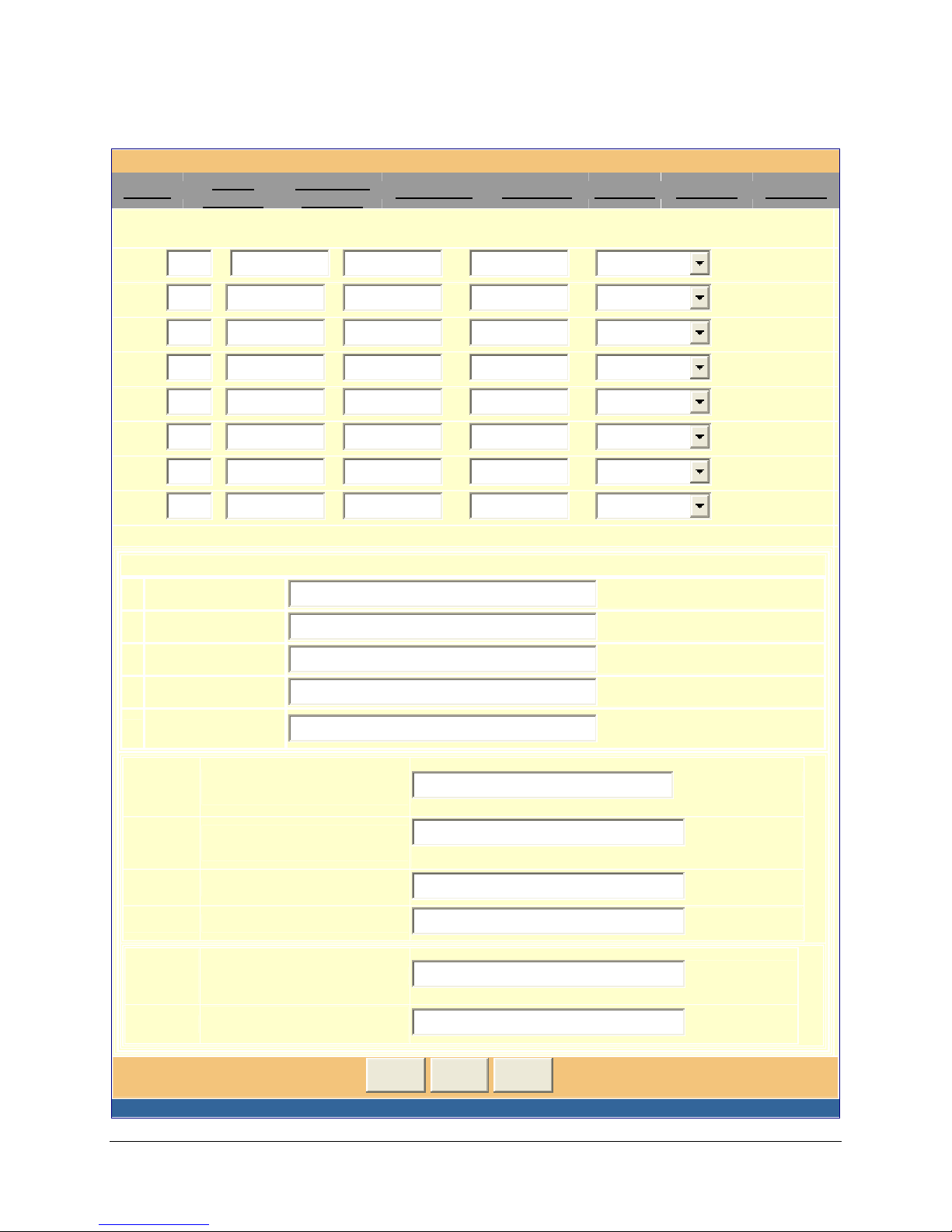
Figure 12: Screen- shot of GXW-410x Channels Page
VoIPon Solutions www.voipon.co.uk [email protected] Tel: +44 (0) 1245 600560
Grandstream Device Configuration
Status
Basic
Settings
Advanced
Settings
FXO Lines Channels Profile 1 Profile 2 Profile 3
Phone Number Settings
Channel(s) SIP User ID Authenticate ID Auth Password Profile ID
1.
2.
3.
1
2
3
4.
5.
6.
7.
8.
611
612
613
611
612
613
Profile 1
Profile 1
Profile 1
Profile 1
Profile 1
Profile 1
Profile 1
Profile 1
Call Progress Tones (Syntax: ch x-y: f1=val@vol,f2=val@vol,c=on1/off1-on2/off2-on3/off3;[...])
1. Dial Tone:
2. Ringback Tone:
3. Busy Tone:
4. Reorder Tone:
5. Confirmation
Tone:
Channel
Voice
Setting
1. Tx to PSTN Audio
Gain(dB):
2. Rx from PSTN Audio
Gain(dB):
3. Silence Suppression(Y/N):
4. Echo Cancellation(Y/N):
ch1-8:f1=350@-11,f2=440@-11,c=0/0;
ch1-8:f1=440@-11,f2=480@-11,c=200/400;
ch1-8:f1=480@-11,f2=620@-11,c=50/50;
ch1-8:f1=480@-11,f2=620@-11,c=25/25;
ch1-8:f1=350@-11,f2=440@-11,c=10/10;
ch1-8:1;
ch1-8:0;
0)
ch1-8:Y;
ch1-8:Y;
(-12-12, default 1)
(-12-12, default
(default Yes)
(default Yes)
Channel
Specific
Setting
1. DTMF Methods(1-7)
2. No Key Entry
Timeout(X1s):
Update Cancel Reboot
ch1-8:2;
ch1-8:4;
(default 1)
(1-9, default 4)
All Rights Reserved Grandstream Networks, Inc. 2005-2006
Grandstream Networks, Inc. GXW-410x User’s Manual Page 19 of 34
Firmware 1.0.0.32
Page 20

Figure 13: Channels Page Definitions
VoIPon Solutions www.voipon.co.uk [email protected] Tel: +44 (0) 1245 600560
SIP User ID
Authentication ID
Authentication
Password
Profile ID
Call Progress
Tones
Channel Voice
Settings
User account information, provided by VoIP service provider (ITSP), usually
has the form of digit similar to phone number or actually a phone number.
SIP service subscriber’s Authenticate ID used for authentication. Can be
identical to or different from SIP User ID.
SIP service subscriber’s account password for GXW-410x to register to
(SIP)
servers of ITSP.
Select the corresponding Profile ID (1/2/3)
Using these settings, user can configure tone frequencies according to their
preference. By default, the tones are set to North American frequencies.
Frequencies should be configured with known values to avoid
uncomfortable high pitch sounds. ON is the period of ringing (ON time in
ms) while OFF is the period of silence. In order to set a continuous ring,
OFF should be zero. Otherwise it will ring ON ms and a pause of OFF ms
and then repeat the pattern.
“Dial tone”
“Ringback tone”
“Busy/Re order tone”
“Confirmation tone”
Channel voice settings mentioned below.
Tx to PSTN
Audio Gain (dB)
Rx from PSTN
Audio Gain (dB)
Silence
Suppression
Echo
Cancellation
Channel specific
Setting
Allows user to set a value in dB for transmission to PSTN Audio Gain.
Allows user to set a value in dB for receive from PSTN Audio Gain.
This controls the silence suppression/VAD feature of G723 and G729. If set
to “Yes”, when a silence is detected, small quantity of VAD packets (instead
of audio packets) will be sent during the period of no talking. If set to “No”,
this feature is disabled.
When set to Y, Echo cancellation is enabled.
Channel specific settings mentioned below.
Grandstream Networks, Inc. GXW-410x User’s Manual Page 20 of 34
Firmware 1.0.0.32
Page 21

DTMF Method
VoIPon Solutions www.voipon.co.uk [email protected] Tel: +44 (0) 1245 600560
This parameter specifies the mechanism to transmit DTMF digits. There
are7 modes supported: in audio which means DTMF is combined in audio
signal (not very reliable with low bit-rate codec), via RTP (RFC2833), or via
SIP INFO. Multiple DTMF transmission schemas can be selected.
1 – in-audio
2 – RFC2833
3 – in-audio and RFC2833
4 – SIP Info
5 – in-audio and RFC2833
6 – SIP Info and RFC2833
7 – in-audio, RFC2833, and SIP Info
No Key Entry
Timeout
Default is 4 seconds.
Grandstream Networks, Inc. GXW-410x User’s Manual Page 21 of 34
Firmware 1.0.0.32
Page 22
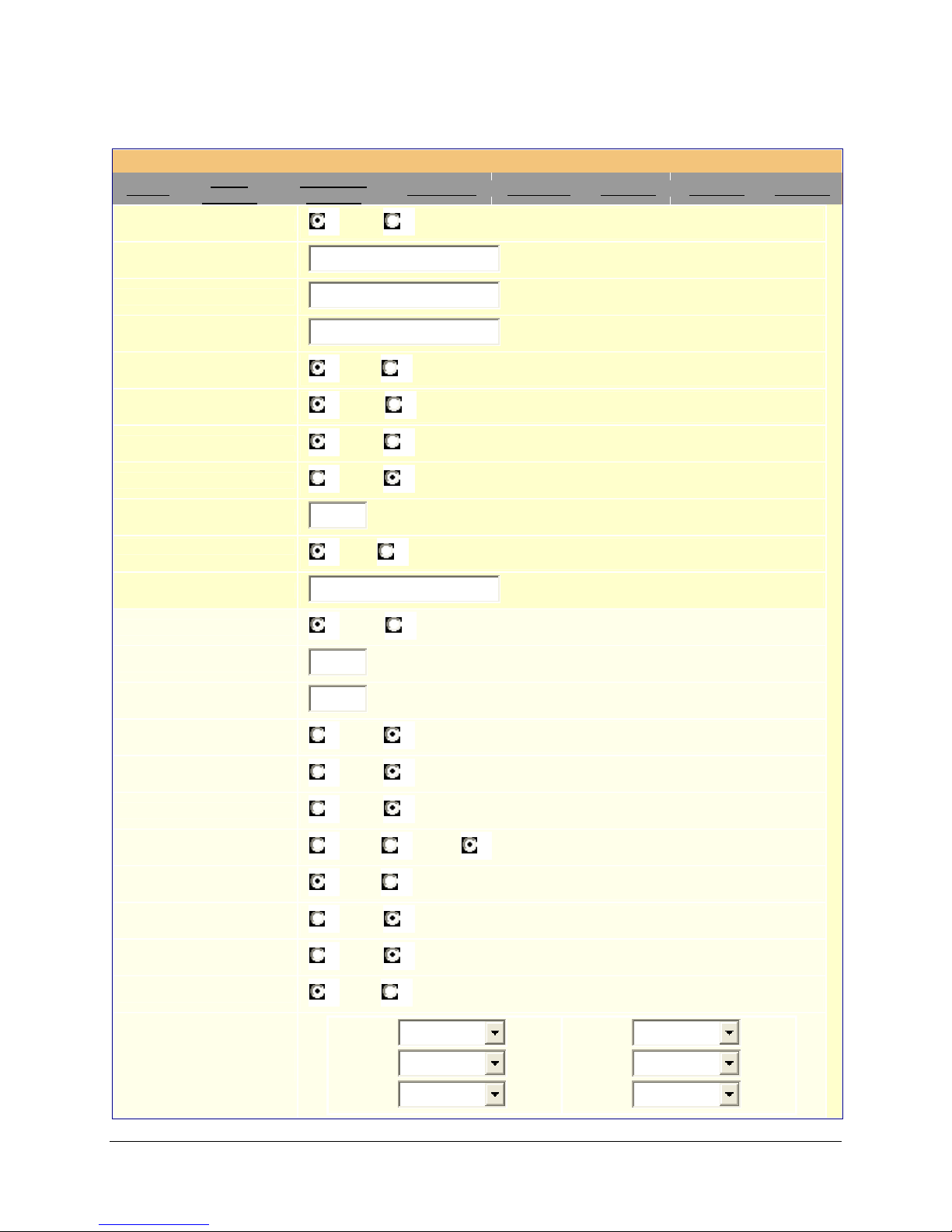
Figure 14: Screen-shot of Grandstream Configuration Page
VoIPon Solutions www.voipon.co.uk [email protected] Tel: +44 (0) 1245 600560
Grandstream Device Configuration
Status
Basic
Settings
Activate Profile:
Profile Name:
SIP Server:
Advanced
Settings
FXO Lines Channels Profile 1 Profile 2 Profile 3
Yes No
SIP Server - 1
sip.server1.com
(Optional, name of your profile)
(Server domain name or IP address)
Outbound Proxy:
Use DNS SRV:
User ID is phone number:
SIP Registration:
Unregister On Reboot:
Register Expiration:
NAT Traversal (STUN):
Proxy-Require:
Early Dial:
Session Expiration:
Min-SE:
Caller Request Timer:
Callee Request Timer:
(Domain name or IP address if in use)
No Yes
No Yes
Yes No
Yes No
60
(in minutes. default 1 hour, max 45 days)
No Yes
No Yes (use "Yes" onl y if proxy supports 484 response)
180
90
(in seconds. default 180 seconds)
(in seconds. default and minimum 90 seconds)
Yes No (R equest for timer when making outbound calls)
Yes No (When caller supports timer but did not request one)
Force Timer:
UAC Specify Refresher:
UAS Specify Refresher:
Force INVITE:
Enable 100rel:
Send Anonymous:
Preferred Vocoder:
(in listed order)
Yes No (Use timer even when remote party does not support)
UAC UAS Omit (Recommended)
UAC UAS (When UAC did not specify refresher tag)
Yes No (Al wa ys refresh with INVITE instead of UPDATE)
Yes No
No Yes (caller ID will be blocked if set to Yes)
choice 1:
choice 2:
choice 3:
PCMU
PCMA
G.723.1
Grandstream Networks, Inc. GXW-410x User’s Manual Page 22 of 34
Firmware 1.0.0.32
choice 5:
choice 6:
choice 7:
GSM
PCMU
PCMU
Page 23

choice 4:
VoIPon Solutions www.voipon.co.uk [email protected] Tel: +44 (0) 1245 600560
Special Feature:
All Rights Reserved Grandstream Networks, Inc. 2005-2006
Standard
G.729A/B
Update Cancel Reboot
choice 8:
PCMU
Grandstream Networks, Inc. GXW-410x User’s Manual Page 23 of 34
Firmware 1.0.0.32
Page 24

Figure 15: Grandstream Configuration Page Definitions
VoIPon Solutions www.voipon.co.uk [email protected] Tel: +44 (0) 1245 600560
Activate Profile
Profile Name
SIP Server
Outbound Proxy
Use DNS SRV:
User ID is Phone
Number
SIP Registration
Unregister on
Reboot
Register
Expiration
When set to Yes the SIP Profile is activated.
A name to identify a Profile.
SIP Server’s IP address or Domain name provided by VoIP service provider.
IP address or Domain name of Outbound Proxy, or Media Gateway, or Session
Border Controller. Used by GXW-410x for firewall or NAT penetration in different
network environments. If symmetric NAT is detected, STUN will not work and
ONLY outbound proxy can correct the problem.
Default is No. If set to Yes the client will use DNS SRV to look up server.
If the GXW-410x has an assigned PSTN telephone number, this field should be set
to “Yes”. Otherwise, set it to “No”. If “Yes” is set, a “user=phone” parameter will be
attached to the “From” header in SIP request.
This parameter controls whether the GXW-410x needs to send REGISTER
messages to the proxy server. The default setting is “Yes”.
Default is No. If set to yes, the SIP user’s registration information will be cleared on
reboot.
This parameter allows the user to specify the time frequency (in minutes) for the
GXW-410x to refresh its registration with the specified registrar. The default interval
is 60 minutes (or 1 hour). The maximum interval is 65535 minutes (about 45 days).
Local SIP port
NAT Traversal
Proxy-Require
Early Dial
Session
Expiration
This parameter defines the local SIP port the GXW-410x will listen and transmit.
The default value for Account 1 is 5060. It is 5062, 5064, 5066 for Account 2,
Account 3 and Account 4 respectively.
This parameter defines whether the GXW-410x NAT traversal mechanism will be
activated or not. If activated (by choosing “Yes”) and a STUN server is also
specified, then the GXW-410x will behave according to the STUN client
specification. Under this mode, the embedded STUN client inside the GXW-410x
will attempt to detect if and what type of firewall/NAT it is sitting behind through
communication with the specified STUN server. If the detected NAT is a Full Cone,
Restricted Cone, or a Port-Restricted Cone, the GXW-410x will attempt to use its
mapped public IP address and port in all of its SIP and SDP messages. If the NAT
Traversal field is set to “Yes” with no specified STUN server, the GXW-410x will
periodically (every 20 seconds or so) send a blank UDP packet (with no payload
data) to the SIP server to keep the “hole” on the NAT open.
SIP Extension to notify SIP server that the unit is behind the NAT/Firewall.
Default is No. Use only if proxy supports 484 response.
Grandstream implemented SIP Session Timer. The session timer extension
enables SIP sessions to be periodically “refreshed” via a SIP request (UPDATE, or
re-INVITE. Once the session interval expires, if there is no refresh via a UPDATE or
re-INVITE message, the session will be terminated. Session Expiration is the time
(in seconds) at which the session is considered timed out, if no successful se ssion
refresh transaction occurs beforehand. The default value is 180 seconds.
Grandstream Networks, Inc. GXW-410x User’s Manual Page 24 of 34
Firmware 1.0.0.32
Page 25

Min-SE
VoIPon Solutions www.voipon.co.uk [email protected] Tel: +44 (0) 1245 600560
The minimum session expiration (in seconds). The default value is 90 seconds.
Caller Request
Timer
Callee Request
Timer
Force Timer
UAC Specify
Refresher
UAS Specify
Refresher
Force INVITE
Enable 100rel
Send
Anonymous
If selecting “Yes” the phone will use session timer when it makes outbound calls if
remote party supports session timer.
If selecting “Yes” the phone will use session timer when it receives inbound calls
with session timer request.
If selecting “Yes” the phone will use session timer even if the remote party does not
support this feature. Selecting “No” will allow the phone to enable session timer only
when the remote party support this feature. To turn off Session Timer, select “No”
for Caller Request Timer, Callee Request Timer, and Force Timer.
As a Caller, select UAC to use the phone as the refresher, or UAS to use the Callee
or proxy server as the refresher.
As a Callee, select UAC to use caller or proxy server as the refresher, or UAS to
use the phone as the refresher.
Session Timer can be refreshed using INVITE method or UPDATE method. Select
“Yes” to use INVITE method to refresh the session timer.
The use of the PRACK (Provisional Acknowledgment) method enables reliability to
be offered to SIP provisional responses (1xx series). This is very important if PSTN
inter-networking is to be supported. A user’s request to use reliable provisional
responses is invoked by the 100rel tag which is appended to the value of the
required header of initial signalling messages.
If this parameter is set to “Yes”, the “From” header in outgoing INVITE message will
be set to anonymous, essentially blocking the Caller ID from displaying.
Preferred
Vocoder
Special Feature
The GXW-410x supports up to 5 different Vocoder types including G.711 A-/U-law,
GSM, G.723.1, G.729A/B. The user can configure Vocoders in a preference list
that will be included with the same preference order in SDP message. The first
Vocoder in this list can be entered by choosing the appropriate option in “Choice 1”.
Similarly, the last Vocoder in this list can be entered by choosing the appropriate
option in “Choice 8”.
Default is Standard. Choose the selection to meet some special requirements from
Soft Switch vendors like Nortel, Broadsoft, etc.
Grandstream Networks, Inc. GXW-410x User’s Manual Page 25 of 34
Firmware 1.0.0.32
Page 26
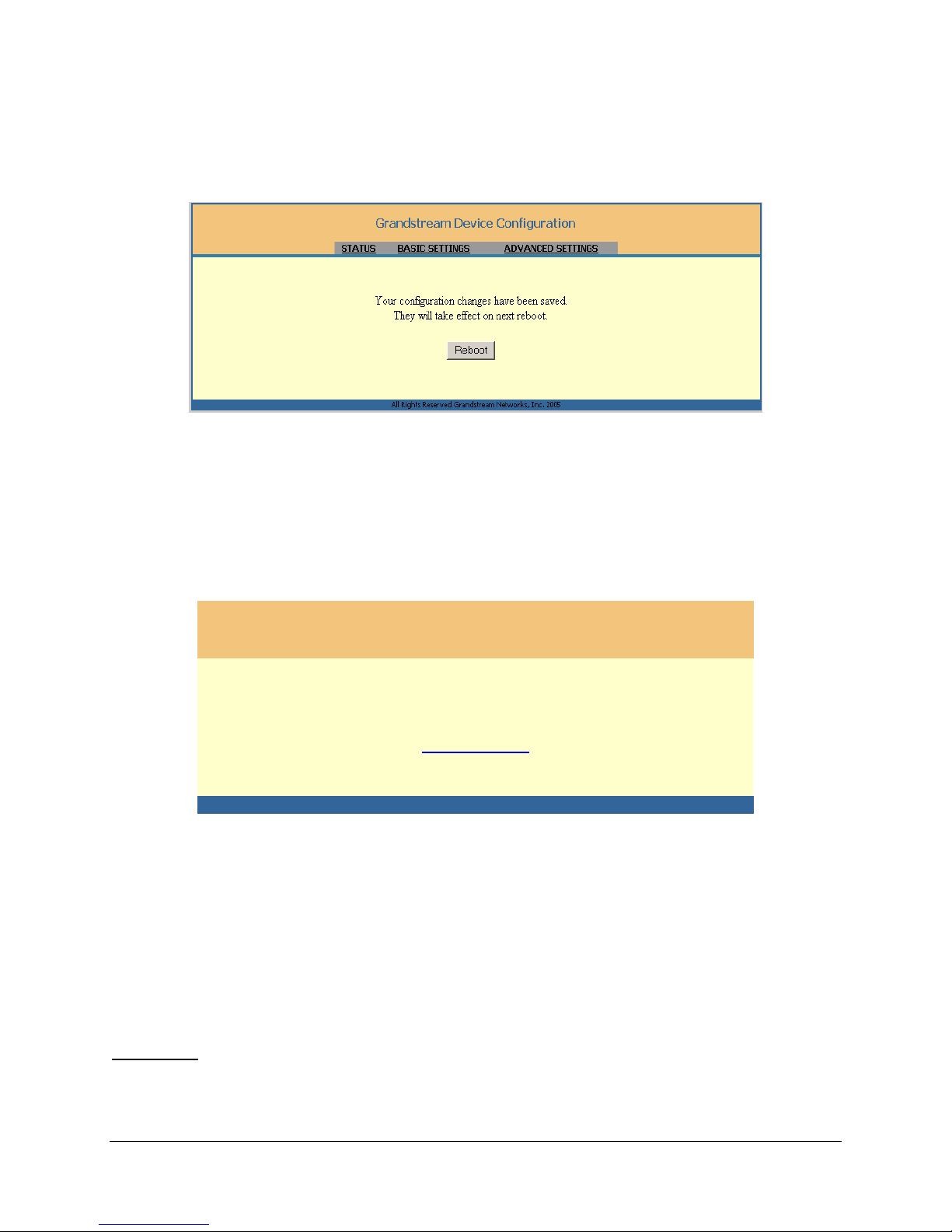
5.2.2. Saving the Configuration Changes
VoIPon Solutions www.voipon.co.uk [email protected] Tel: +44 (0) 1245 600560
Once a change is made, press the “Update” button in the Configuration Menu. The GXW-410x will then
display the following screen to confirm that the changes have been saved.
User is recommended to reboot or power cycle the GXW-410x after all the changes are made so that
those changes can take effect.
5.2.3. Rebooting from Remote
The administrator of the phone can remotely reboot the unit by pressing the “Reboot” button at the bottom
of the configuration menu. Once done, the following screen will be displayed to indicate that rebooting is
underway.
Grandstream Device Configuration
The device is rebooting now...
You may re-login by clicking on the link below in 30 seconds.
Click to re-login
All Rights Reserved Grandstream Networks, Inc. 2005
At this point, the user can re-login to the unit after waiting for about 30 seconds.
6. Software Upgrade
Software (or firmware) upgrade can be done either via TFTP or HTTP. The corresponding configuration
settings are on the configuration page. End users should NOT touch the configuration settings that are
useful for ITSPs.
6.1 Upgrade through HTTP
To upgrade firmware via HTTP, the field “Firmware Upgrade and Provisioning: Upgrade Via” needs to be
set to HTTP. The “Firmware Server Path” should be set to where the firmware files are located.
For example
, the user can use the following URL in the Firmware Server Path:firmware.mycompany.com:
6688/Grandstream/1.0.0.29 where firmware.mycompany.com is the FQDN of the HTTP server. It can
also be in IP address format. “:6688” is the TCP port the HTTP server listening to, default http server
listens to port 80. “/Grandstream/1.0.0.29” is the RELATIVE directory to the root dir on HTTP web server.
Grandstream Networks, Inc. GXW-410x User’s Manual Page 26 of 34
Firmware 1.0.0.32
Page 27

6.2 Upgrade through TFTP
VoIPon Solutions www.voipon.co.uk [email protected] Tel: +44 (0) 1245 600560
To upgrade firmware via TFTP, the field “Firmware Upgrade and Provisioning: Upgrade Via” needs to be
set to TFTP.
TFTP server can be configured in either IP address format or FQDN.
To configure the TFTP server via the Web configuration interface, open your browser to input the IP
address of the GXW-410x. Enter the admin password to enter the configuration screen. From there, enter
the TFTP server address or URL in the “Firmware Server Path” field near the bottom of the configuration
screen. Once the “Firmware Server Path” is set, user needs to update the change by clicking the
“Update” button. Then “Reboot” or power cycle the unit, the firmware files will be fetched upon booting up.
If the configured updating server is found and a new code image is available, the GXW-410x will attempt
to retrieve the new image files by downloading them into the GXW-410x’s SRAM. During this stage, the
GXW-410x’s LED will blink until the checking/downloading process is completed. Upon verification of
checksum, the new code image will be saved into the Flash. If TFTP fails for any reason (e.g., TFTP
server is not responding, there are no code image files available for upgrade, or checksum test fails, etc),
the GXW-410x phone will stop the TFTP process and simply boot using the existing code image in the
flash.
Firmware upgrading may take as long as 1 to 20 minutes over the Internet, or just 20+ seconds if it is
performed on a LAN. It is generally recommended to conduct firmware upgrade in a controlle d LAN
environment if possible.
For users who do not have a local TFTP server, Grandstream provides a NAT-friendly TFTP server on
the public Internet for users to download the latest firmware upgrade automatically. Please check the
Services section of Grandstream’s Web site to obtain this TFTP server IP address:
Alternatively, user can download and install free TFTP or HTTP server in his LAN to do firmware
upgrading.
A free Windows version TFTP server can be downloaded from:
http://support.solarwinds.net/updates/New-customerFree.cfm
.
Our latest official release can be downloaded from:
http://www.grandstream.com/y-firmware.htm
Unzip the file and put all of the files under the root directory of the TFTP server. Put the PC running the
TFTP server and the GXW-410x in the same LAN segment. Please go to File -> Configure -> Security to
change the TFTP server's default setting from "Receive Only" to "Transmit Only" for the firmware
upgrade. Start the TFTP server, in the phone’s web configuration page, configure the Firmware Server
Path with the IP address of the PC, update the change and reboot the unit.
You can also download the free HTTP server from http://httpd.apache.org/
or just use Microsoft IIS web
server.
Grandstream Networks, Inc. GXW-410x User’s Manual Page 27 of 34
Firmware 1.0.0.32
Page 28

7. Restore Factory Default Setting
VoIPon Solutions www.voipon.co.uk [email protected] Tel: +44 (0) 1245 600560
WARNING!
Restore the Factory Default Setting will DELETE all configuration information of the phone. Please
BACKUP or PRINT out all the settings before you approach to following steps. Grandstream will
not take any responsibility if you lose all the parameters of setting and cannot connect to your
VoIP service provider.
Please disconnect the network cable and power cycle the unit before trying to reset the unit to factory
default. In order to perform a Factory Reset, simply press the reset button for 8 seconds. The unit will
reboot automatically with configuration and settings back to original Factory defaults.
Grandstream Networks, Inc. GXW-410x User’s Manual Page 28 of 34
Firmware 1.0.0.32
Page 29
8. Examples of GXW-410x Configurations
C
VoIPon Solutions www.voipon.co.uk [email protected] Tel: +44 (0) 1245 600560
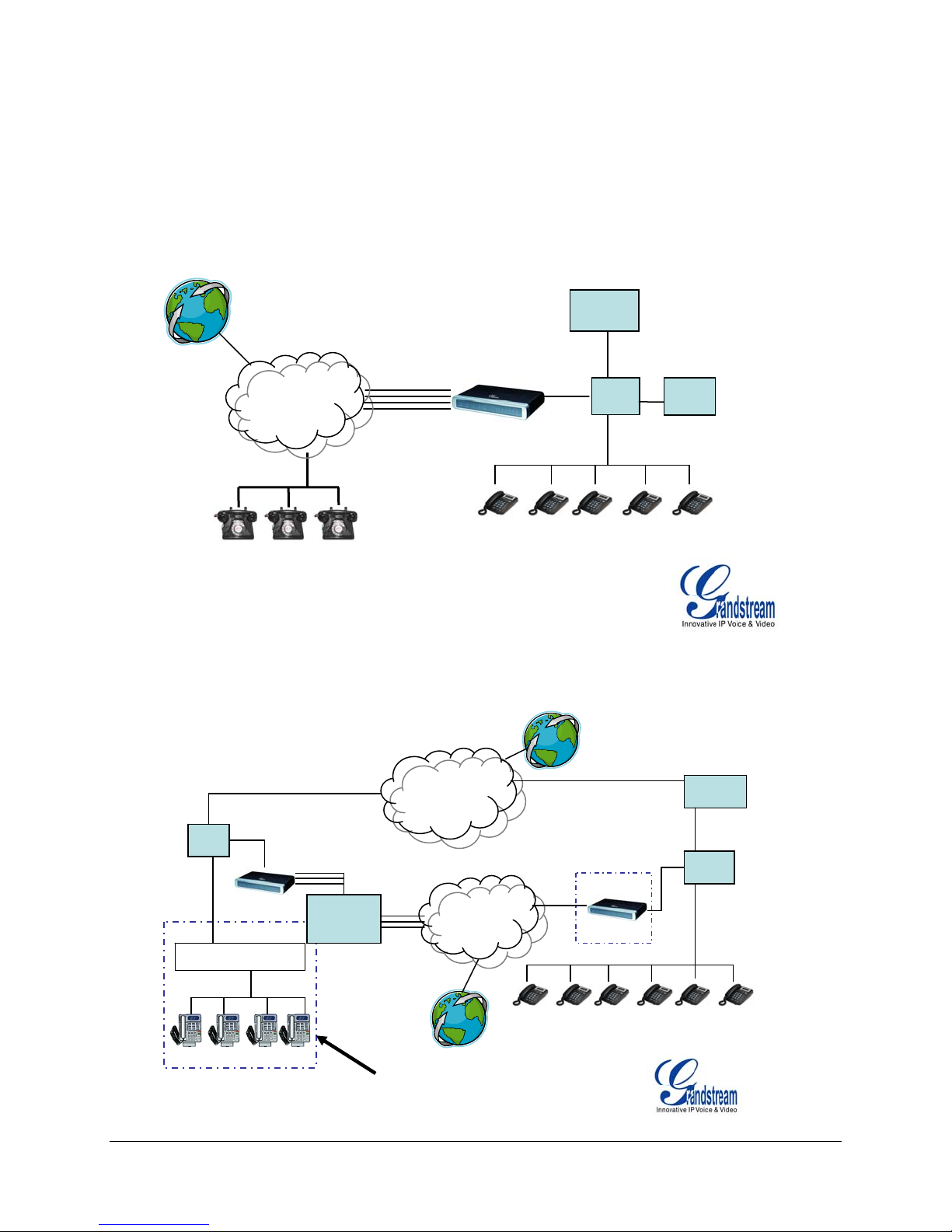
The GXW-410x can be used in several scenarios.
Scenario One: a business with a traditional phone system (with or without broadband access) and an IP
PBX or SIP Servers connecting to an Internet Telephone Service Provider (ITSP).
Anywhere in the world
IPPBX or
SIP Server
FXO Lines
4 or 8 Ports
PPSSTTNN
CClloouudd
IP/LAN IP/WAN
GXW-410x
Grandstream IP Phones
PSTN Analog
Scenario Two: a small business with traditional analog PBX lines and broadband access who want to
extend their traditional PBX to virtually anywhere in the world, using the internet. (Any SIP End point,
such as Grandstream BugeTone, HandyTone, GXP-2000 or GXV-3000 are needed in this scenario)
Company A - Boston, MA
6 employees
IP/LAN
IInntteerrnneett
CClloouudd
IPPBX or
SIP Server
FXO Lines
GXW-410x
FXS | IPPBX | SIP Platform
Any branch, anywhere
Traditional
PBX
FXO Lines
Any SIP endpoint
Grandstream Networks, Inc. GXW-410x User’s Manual Page 29 of 34
Firmware 1.0.0.32
PPSSTTNN
Clloouudd
Anywhere in the world
Optional
GXW-410x
Grandstream IP Phones
IP/LAN
Page 30
r
VoIPon Solutions www.voipon.co.uk [email protected] Tel: +44 (0) 1245 600560
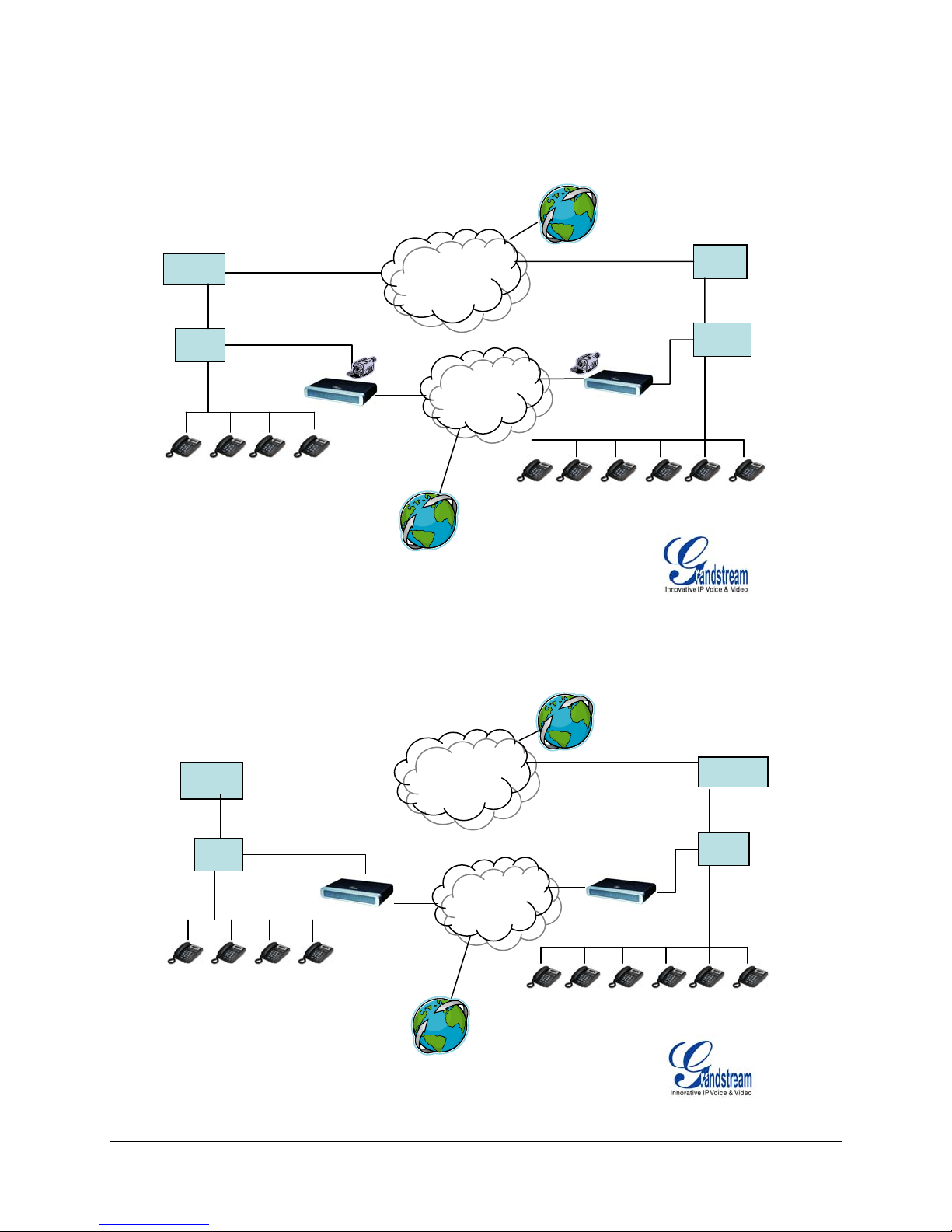
Scenario Three: The GXW-410x offers an additional video surveillance port which can be configured
for surveillance. It is the only small business analog gateway that offers this security feature.
Branch A – Boston, MA
6 employees
IPPBX or
SIP Server
IP/LAN
Grandstream IP
Branch B – Denver, CO
4 employees
GXW 410x
IInntteerrnneett
Anywhere in the world
PPSSTTNN
CClloouudd
GXW 410x
Grandstream IP
IPPBX or
SIP Server
IP/LAN
Scenario Four: The GXW-410x offers an IP to IP pure IP Communications System configuration, where
all locations use IP phones.
Branch A - Boston, MA
6 employees
IPPBX or
SIP Server
IP/LAN
Grandstream IP Phones
Branch B – Denver, CO
4 employees
GXW 410x
IInntteerrnneett
d
CClloouud
PPSSTTNN
CClloouudd
Anywhere in the world
GXW 410x
Grandstream IP Phones
IPPBX or
SIP Serve
IP/LAN
Grandstream Networks, Inc. GXW-410x User’s Manual Page 30 of 34
Firmware 1.0.0.32
Page 31

9. Glossary of Terms
VoIPon Solutions www.voipon.co.uk [email protected] Tel: +44 (0) 1245 600560
ADSL Asymmetric Digital Subscriber Line: Modems attached to twisted pair copper wiring that transmit
from 1.5 Mbps to 9 Mbps downstream (to the subscriber) and from 16 kbps to 800 kb ps upstream,
depending on line distance.
AGC Automatic Gain Control is an electronic
control the gain
of a system in order to maintain some measure of performance over a changing range of
system found in many types of devices. Its purpose is to
real world conditions.
ARP Address Resolution Protocol is a protocol used by the Internet Protocol (IP)
IPv4, to map IP network addresses
to the hardware addresses used by a data link protocol. The protocol
[RFC826], specifically
operates below the network layer as a part of the interface between the OSI network and OSI link layer. It
is used when IPv4 is used over Ethernet
ATA Analogue Telephone Adapter. Covert analogue telephone to be used in data network for VoIP, like
Grandstream HT series products.
CODEC Abbreviation for Coder-Decoder. It's an analog-to-digital (A/D) and digital-to-analog (D/A)
converter for translating the signals from the outside world to digital, and back again.
CNG Comfort Noise Generator, generate artificial background noise
communications to fill the silent
time in a transmission resulting from voice activity detection.
used in radio and wireless
DATAGRAM A data packet carrying its own address information so it can be independently routed from
its source to the destination computer
DECIMATE To discard portions of a signal in order to reduce the amount of information to be encoded or
compressed. Lossy compression algorithms ordinarily decimate while sub-sam pling.
DECT Digital Enhanced Cordless Telecommunications: A standard developed by the European
Telecommunication Standard Institute from 1988, governing pan-European digital mobile telephony.
DECT covers wireless PBXs, telepoint, residential cordless telephones, wireless access to the public
switched telephone network, Closed User Groups (CUGs), Local Area Networks, and wireless local loop.
The DECT Common Interface radio standard is a multi-carrier time division multiple access, time division
duplex (MC-TDMA-TDD) radio transmission technique using ten radi o frequency channels from 1880 to
1930 MHz, each divided into 24 time slots of 10ms, and twelve full-duplex accesses per carrier, for a total
of 120 possible combinations. A DECT base station (an RFP, Radio Fixed Part) can transmit all 12
possible accesses (time slots) simultaneously by using different frequencies or using o nly one frequency.
All signaling information is transmitted from the RFP within a multi-frame (16 frames). Voice signals are
digitally encoded into a 32 Kbit/s signal using Adaptive Differential Pulse Code Modulation.
DNS Short for Domain Name System (or Service or Server), an Internet
service that translates domain
names into IP addresses
DID Direct Inward Dialing. The ability for an outside caller to dial to a PBX extension without going
through an attendant or auto-attendant.
DSP Digital Signal Processor. A specialized CPU used for digital signal processing. Grandstream
products all have DSP chips built inside.
DTMF Dual Tone Multi Frequency. The standard tone-pairs used on telephone terminals for dialing
using in-band signaling. The standards define 16 tone-pairs (0-9, #, * and A-F) although most terminals
support only 12 of them (0-9, * and #).
Grandstream Networks, Inc. GXW-410x User’s Manual Page 31 of 34
Firmware 1.0.0.32
Page 32

FQDN Fully Qualified Domain Name. A FQDN consists of a host and domain name, including top-level
VoIPon Solutions www.voipon.co.uk [email protected] Tel: +44 (0) 1245 600560
domain. For example, www.grandstream.com
is a fully qualified domain name. www is the host,
Grandstream is the second-level domain, and and.com is the top level domain.
FXO Foreign eXchange Office. An FXO device can be an analog phone, answering machine, fax, or
anything that handles a call from the telephone company like AT&T. They should also operate the same
way when connected to an FXS interface.
• An FXO interface will accept calls from FXS or PSTN interfaces. All countries and regions
have their own standards.
• FXO is complimentary to FXS (and the PSTN).
FXS Foreign eXchange Station. An FXS device has hardware to generate the ring signal to the FXO
extension (usually an analog phone).
• An FXS device will allow any FXO device to operate as if it were connected to the phone
company. This makes your PBX the POTS+PSTN for the phone.
• The FXS Interface connects to FXO devices (by an FXO interface, of course).
DHCP The Dynamic Host Configuration Protocol (DHCP) is an Internet protocol for automating the
configuration of computers that use TCP/IP. DHCP can be used to automatically assign IP addresses, to
deliver TCP/IP stack configuration parameters such as the subnet mask and default router, and to provide
other configuration information such as the addresses for printer, time and news servers.
ECHO CANCELLATION Echo Cancellation is used in telephony
from a voice communication in order to improve voice quality on a telephone call. In addition to
echo
improving quality, this process improves bandwidth
preventing echo from traveling across a network
acoustic echo and hybrid echo. Speech compression
contribute to echo generation in telephone networks
savings achieved through silence suppression by
. There are two types of echo of relevance in telephony:
techniques and digital processing delay often
.
to describe the process of removing
H.323 A suite of standards for multimedia conferences on traditional packet-switched networks.
HTTP Hyper Text Transfer Protocol; the World Wide Web protocol that performs the request and retrieve
functions of a server
IP Internet Protocol. A packet-based protocol for delivering data across networks.
IP-PBX IP-based Private Branch Exchange
IP Telephony (Internet Protocol telephony, also known as Voice over IP Telephony) A general term for
the technologies that use the Internet Protocol's packet-switched connections to exchange voice, fax, and
other forms of information that have traditionally been carried over the dedicated circuit-switched
connections of the public switched telephone network (PSTN). The basic steps involved in originating a n
IP Telephony call are conversion of the analog voice signal to digital format and compression/ translation
of the signal into Internet protocol (IP) packets for transmission over the Internet or other packet-swit che d
networks; the process is reversed at the receiving end. The terms IP Telephony and Internet Telephony
are often used to mean the same; however, they are not 100 per cent interchangeable, since Internet is
only a subcase of packet-switched networks. For users who have free or fixed-price Internet access, IP
Telephony software essentially provides free telephone calls anywhere in the world. However, the
challenge of IP Telephony is maintaining the quality of service expected by subscribers. Session border
controllers resolve this issue by providing quality assurance comparable to legacy telephone systems.
IVR IVR is a software application that accepts a combination of voice telephone input and touch-tone
keypad selection and provides appropriate responses in the form of voice, fax, callback, e-mail and
perhaps other media.
Grandstream Networks, Inc. GXW-410x User’s Manual Page 32 of 34
Firmware 1.0.0.32
Page 33

MTU A Maximum Transmission Unit (MTU) is the largest size packet or frame, specified in octets (eight-
VoIPon Solutions www.voipon.co.uk [email protected] Tel: +44 (0) 1245 600560
bit bytes), that can be sent in a packet- or frame-based network such as the Internet. The maximum for
Ethernet is 1500 byte.
NAT Network Address Translation
NTP Network Time Protocol, a protocol to exchange and synchronize time over networks The port used
is UDP 123 Grandstream products using NTP to get time from Internet
OBP/SBC Outbound Proxy or another name Session Border Controller. A device u sed in VoIP
networks.
OBP/SBCs are put into the signaling and media path between calling and called party. The OBP/SBC
acts as if it was the called VoIP phone and places a second call to the called party. The effect of this
behavior is that not only the signaling traffic, but also the media traffic (voice, video etc) crosses the
OBP/SBC. Without an OBP/SBC, the media traffic travels directly between the VoIP phones. Private
OBP/SBCs are used along with firewalls
to enable VoIP calls to and from a protected enterprise network.
Public VoIP service providers use OBP/SBCs to allow the use of VoIP protocols from private networks
with internet
connections using NAT.
PPPoE Point-to-Point Protocol over Ethernet is a network protocol for encapsulating PPP frames in
Ethernet frames. It is used mainly with cable modem and DSL services.
PSTN Public Switched Telephone Network. The phone service we use for every ordinary phone call, or
called POT (Plain Old Telephone), or circuit switched network.
RTCP Real-time Transport Control Protocol, defined in RFC 3550
, a sister protocol of the Real-time
Transport Protocol (RTP), It partners RTP in the delivery and packaging of multimedia data, but does not
transport any data itself. It is used periodically to transmit control packets to participants in a streaming
multimedia session. The primary function of RTCP is to provide feedback on the quality of service being
provided by RTP.
RTP Real-time Transport Protocol defines a standardized packet format for delivering au dio and video
over the Internet. It was developed by the Audio-Video Transport Working Group of the IETF
published in 1996 as RFC 1889
and first
SDP Session Description Protocol is a format for describing streaming media
has been published by the IETF
as RFC 2327.
initialization parameters. It
SIP Session Initiation Protocol, An IP telephony signaling protocol developed by the IETF (RFC3261).
SIP is a text-based protocol suitable for integrated voice-data applications. SIP is designed for voice
transmission and uses fewer resources and is considerably less complex than H.323. All Grandstream
products are SIP based
STUN Simple Traversal of UDP over NATs is a network protocol
allowing clients behind NAT (or multiple
NATs) to find out its public address, the type of NAT it is behind and the internet side port associated by
the NAT with a particular local port. This information is used to set up UDP communication between two
hosts that are both behind NAT routers. The protocol is defined in RFC 3489
. STUN will usually work well
with non-symmetric NAT routers.
TCP Transmission Control Protocol is one of the core protocols of the Internet protocol suite
. Using TCP,
applications on networked hosts can create connections to one another, over which they can exchange
data or packets
. The protocol guarantees reliable and in-order delivery of sender to receiver data.
TFTP Trivial File Transfer Protocol, is a very simple file
basic form of FTP
; It uses UDP (port 69) as its transport protocol.
transfer protocol, with the functionality of a very
Grandstream Networks, Inc. GXW-410x User’s Manual Page 33 of 34
Firmware 1.0.0.32
Page 34

VoIPon Solutions www.voipon.co.uk [email protected] Tel: +44 (0) 1245 600560
UDP User Datagram Protocol (UDP) is one of the core protocols of the Internet protocol suite
UDP, programs on networked computers can send short messages known as datagrams
UDP does not provide the reliability and ordering guarantees that TCP
does; datagrams may arrive out of
. Using
to one another.
order or go missing without notice. However, as a result, UDP is faster and more efficient for many
lightweight or time-sensitive purposes.
VAD Voice Activity Detection or Voice Activity Detector is an algorithm used in speech processing
wherein, the presence or absence of human speech is detected from the audio samples.
VLAN A virtual LAN
on a single physical switch
, known as a VLAN, is a logically-independent network. Several VLANs can co-exist
. It is usually refer to the IEEE 802.1Q tagging protocol.
VoIP Voice over the Internet. VoIP encompasses many protocols. All the protocols do some form of
signaling of call capabilities and transport of voice data from one point to another. e.g.: SIP, H.323, etc.
Grandstream Networks, Inc. GXW-410x User’s Manual Page 34 of 34
Firmware 1.0.0.32
 Loading...