

Page 1

User Manual
HandyTone-286 Rev 3.0
Analog Telephone Adaptor
For Firmware Version 1.0.8.32
Grandstream Networks, Inc.
www.grandstream.com
Page 2

HandyTone -286 User Manual Grandstream Networks, Inc.
Table of Contents
1 WELCOME...................................................................................................................................... 4
2 INSTALLATION............................................................................................................................. 5
3 WHAT IS INCLUDED IN THE PACKAGE........ ........................................................................6
3.1 S
3.2 W
AFETY COMPLIANCES.................................................................................................................6
ARRANTY.................................................................................................................................. 6
4 PRODUCT OVERVIEW ................................................................................................................7
4.1 K
4.2 H
EY FEATURES............................................................................................................................. 7
ARDWARE SPECIFICATION .........................................................................................................8
5 BASIC OPERATIONS....................................................................................................................9
5.1 G
5.2 M
ET FAMILIAR WITH KEY PAD AND VOICE PROMPT ....................................................................9
AKE PHONE CALLS.................................................................................................................. 10
5.2.1 Calling Phone or Extension Numbers ................................................................................10
5.2.2 Direct IP Calls....................................................................................................................11
5.2.3 Call Hold ......... ... .......................................................................................... ... ...................11
5.2.4 Call Waiting.......................... ..............................................................................................11
5.2.5 Call Transfer....................................................................................................................... 12
5.2.5.1 Blind Transfer............................................................... .........................................................................................................12
5.2.5.2 Attended Transfer.......... ........................... ...................................................... ....................................... ........................... .....12
5.2.6 3-way Conferencing.................... ... ..................................................................................... 13
5.2.6.1 Bell style conference ....................... ........................... ....................................................... ....................................... .............13
5.2.6.2 Non-bell style conference .............................................. ....................................................... ................................................13
5.3 C
5.4 F
5.5 LED
ALL FEATURES.........................................................................................................................13
AX ............................................................................................................................................ 14
LIGHT PATTERN INDICATION............................................................................................. 14
6 CONFIGURATION GUIDE.........................................................................................................16
6.1 C
ONFIGURING HANDYTONE-286 IP THROUGH VOICE PROMPT..................................................16
6.1.1 DHCP Mode .......................................................................................................................16
6.1.2 STATIC IP Mode..................................... ... ............................................................ ... ..........16
6.1.3 TFTP Server Address.......................................................................................................... 16
6.2 C
ONFIGURING HANDYTONE-286 WITH WEB BROWSER .............................................................16
6.2.1 Access the Web Configuration Menu........................... ....................................................... 16
6.2.2 End User Configuration ................................................................................................... 177
6.2.3 Advanced User Configuration............................ ...... ...... ... ...... ...... ... ...... ...... ... ...... ...... ...... . 22
6.2.4 Saving the Configuration Changes..................................................................................... 33
6.2.5 Rebooting the HandyTone-286 from Remote .....................................................................33
6.3 C
ONFIGURATION THROUGH A CENTRAL SERVER........................................................................34
7 SOFTWARE UPGRADE WITH TFTP ......................................................................................35
7.1 F
7.2 C
7.3 F
IRMWARE UPGRADE THROUGH TFTP/HTTP............................................................................35
ONFIGURATION FILE DOWNLOAD ............................................................................................ 36
IRMW ARE AND CONFIGURATION FILE PREFIX AND POSTFIX.....................................................36
2
Page 3

HandyTone -286 User Manual Grandstream Networks, Inc.
7.4 M
8 RESTORE FACTORY DEFAULT SETTING...........................................................................37
9 GLOSSARY OF TERMS............. ............................................................ ... ................................ 388
ANAGING FIR MWARE AND CONFIGURATION FILE DOWNLOAD ............................................... 36
3
Page 4

HandyTone -286 User Manual Grandstream Networks, Inc.
1 Welcome
Congratulations on becoming an owner of HandyTone-286. You made an excellent choice and we
hope you will enjoy all its capabilities.
Grandstream's award-wining HandyTone-286 is innovative Analog Telephone Adaptor that offers a
rich set of functionality and superb sound quality at ultra-affordable pr ice. They are fully compatible
with SIP industry standard and can interopera te w ith m a ny other SIP compliant devices and software
on the market.
This document is subject to changes without notice. The latest electronic versio n of this user manual
can be downloaded from the following location:
http://www.grandstream.com/user_manuals/HandyTone.pdf
4
Page 5
HandyTone -286 User Manual Grandstream Networks, Inc.
2 Installation
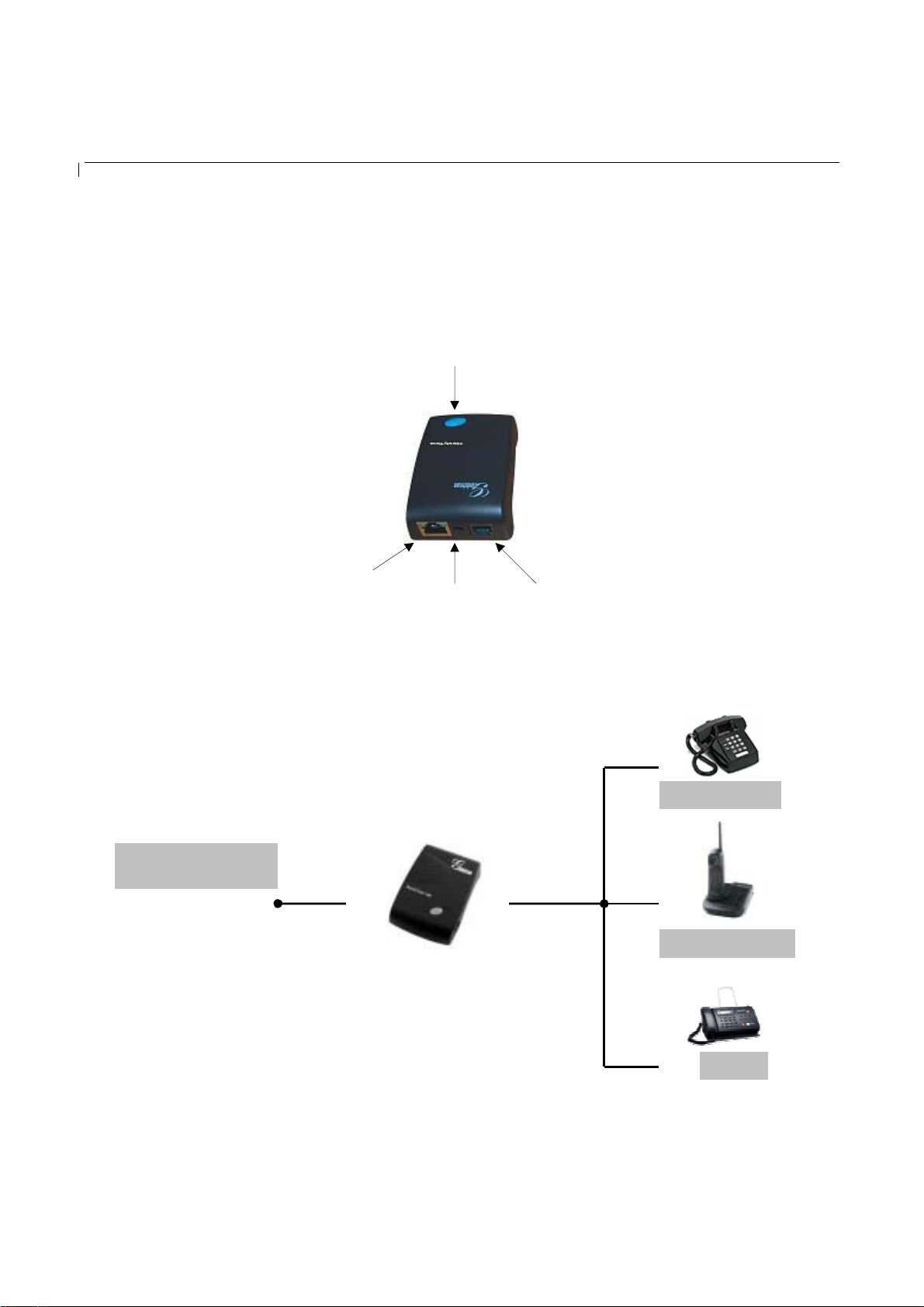
HandyTone-286 is a VoIP Analog Telephone Adaptor designed to work with an ordinary analog
telephone. The following photo illustrates the appearance of a HandyTone-286.
RJ45
10M Ethernet
Interconnection Diagram of the HandyTone-286:
Internet ADSL/Cable
Modem Ethernet
LAN
BUTTON/
RED LED/
GREEN LED
+5V/1200mA
RJ11
Telephone
Analog Phone
PHONE
Cordless Phone
Fax
5
Page 6
HandyTone -286 User Manual Grandstream Networks, Inc.
3 What is Included i n the Package
The HandyTone-286 package co ntains:
1) One HandyTone-286
2) One universal power adaptor
3) One Ethernet cable
3.1 Safety Compliances
The HandyTone-286 is com plia nt with various safety standards including FCC/CE and C-Tic k. Its
power adaptor is compliant with UL standard. The HandyTone ATA should only operate with the
universal power adaptor provided in the package.
3.2 Warranty
Grandstream has a reseller agreement with our reseller customer. End users should contact the
company from whom you purchased the product for replacement, repair or refund.
If you purchased the product directly from Grandstream, contact your Grandstream Sales and Service
Representative for a RMA (Return Materials Authorization) number.
Grandstream reserves the right to remedy warra nty policy without prior notification.
Warning: Please do not attempt to use a different power adaptor. Using other power adaptor may
damage the HandyTone-286.
Caution: Changes or modifications to this product not expressly approved by Grandstream, or
operation of this product in any way other than as detailed by this User Manu al, could void your
manufacturer warranty.
Information in this document is subject to change without notice. No part of this document may be
reproduced or transmitted in any form or by any means, electronic or mechanical, for any purpose without
the express written permission of Grandstream Networks, Inc..
6
Page 7

HandyTone -286 User Manual Grandstream Networks, Inc.
4 Product Overview
4.1 Key Features
• Supports SIP 2.0(RFC 3261), TCP/UDP/IP, RTP/RTCP, HTTP, ICMP, ARP/RARP, DNS,
DHCP (both client and server), NTP, PPPoE, STUN, TFTP, etc.
• Powerful digital signal processing (DSP) to ensure superb audio quality; advanced adaptive
jitter control and packet loss concealment technology
• Support various codecs including G.711 (PCM a-law and u-law), G.723.1 (5.3K/6.3K), G.726
(32K), G.729A and iLBC.
• Support Caller ID/name display or block, Call waiting caller ID, Hold, Call Waiting/Flash, Call
Transfer, 3-way conference (on Rev. 2.0), Call Forward, in-band and out-of-band DTMF, etc.
• Support fax pass throu gh (fo r PCMU and PCMA) an d T.3 8 FoIP (Fax over IP)
• Support Silence Suppression, VAD (Voice Activity Detection), CNG (Comfort Noise
Generation), Line Echo Cancellation (G.168), and AGC (Automatic Gain Control)
• Support standard encryption and authentication (DIGEST using MD5 and MD5-sess)
• Support for Lay er 2 (802.1Q VLAN, 802.1 p) and Layer 3 QoS (ToS, DiffServ, MPLS)
• Support automated NAT traversal without manual manipulation of firewall/NAT
• Support device configur atio n via built-in IVR, Web browser or encrypted configuration fi les
through TFTP or HTTP server
• Support firmware upgrade via TFTP or HTTP
• Support SIP Session Timer
• Support Syslog (on Rev.2.0)
• Ultra compact (wallet size) and lightweight design, great companion for travelers
• Compact, lightweight Universal Power adaptor
7
Page 8

HandyTone -286 User Manual Grandstream Networks, Inc.
4.2 Hardware Specification
The table below lists the hardware specification of HandyTone-286.
Model
LAN interface 1xRJ45 10Base-T
Button 1
LED GREEN & RED color
Universal
Power Adaptor
Dimension 65mm (W)
Weight 0.57 lbs (0.26kg)
Operating
Temperature
Humidity 10% - 95%
Compliance FCC/CE/C-Tick
HandyTone-286
Input: 100-240VAC
Output: +5VDC, 1200mA
UL certified
93mm (D)
27mm (H)
32 - 104oF
0 - 40oC
(non-condensing)
8
Page 9

HandyTone -286 User Manual Grandstream Networks, Inc.
5 Basic Operations
5.1 Get Familiar with Key Pad and Voice Prompt
HandyTone-286 stores a voice prompt menu for quick browsing and sim ple configuration. To enter
this voice prompt menu, simply press the button on the HandyTone-286 or pick up the phone and dial
“***”. The following table show s how to use the voice prompt menu to configure the device.
Menu Voice Prompt User’s Options
Main Menu “Enter a Menu Option” Enter “*” for the next menu option
Enter “#” to return to the main menu
Enter 01 – 06, 47, 86 or 99 Menu option
01 “DHCP Mode”, or
“Static IP Mode”
02 “IP Address “ + IP address The current WAN IP address is announced
03 “Subnet “ + IP address Same as Menu op tion 02
04 “Gateway “ + IP address Same as Menu option 02
05 “DNS Server “ + IP address Same as Menu option 02
07 Preferred Vocoder Enter “9” to go to the next selection in the list:
12 WAN Port Web Access Enter “9” to toggle between:
13 Firmware Server IP Address The current Firmware Server IP address is
14 Configuration Server IP
Address
15 Upgrade Protocol Upgrade protocol for firmware and
Enter ‘9’ to toggle the selection
If user selects “Static IP Mode”, user need
configure all the IP address information
through menu 02 to 05. If user selects
“Dynamic IP Mode”, the device will retrieve
all IP address information from DHCP server
automatically when user reboots the de v i ce.
Enter 12-digit new IP address if in Static IP
Mode.
- PCM U
- PCM A
- G-723
- G-729
- iLBC
- G-726
- enable
- disable
announced. Enter 12 digit new IP address.
The current Config Server Path IP address is
announced. Enter 12 digit new IP address.
configuration update. Enter “9” to toggle
between:
- TFTP
- HTTP
9
Page 10

HandyTone -286 User Manual Grandstream Networks, Inc.
16 Firmware Ver s i on Firmware version informat ion.
17 Firmware Upgrade Firmware upgrade mode. Enter “9” to rotate
among the following three options:
- always check
- check when pre/suffix changes
- never upgrade
47 “Direct IP Calling” When entered, user will be prompted a dial
tone, dial a 12-digit IP address to make a direct
IP call.
(For details, see “4.2.2 Make a Direct IP
Call”.)
99 “RESET” Enter “9” to reboot the device; or
Enter MAC address to restore factory default
setting (For details, see section 8.)
“Invalid Entry” Automaticall y returns to Main Menu
NOTES:
• Once the LED button is pressed, it enters voice prompt main menu. If the button is pressed
again while it is already in the voice prompt menu state, it jumps to “Direct IP Calling” option
and dial tone pla ys in th i s state
• “*” shifts down to the next menu option
• “#” returns to the main menu
• “9” functions as the ENTER key in many cases to confirm an option
• All entered digit sequences have known lengths - 2 digits for menu option and 12 digits for IP
address. Once all digits are accumulated, the device will automatically process them
• For IP address input, omit the dot and enter the digits directly, add 0 for those octets with less
than three digits. e.g.: IP: 192.168. 1.10, key in: 192168001010
• Key entry cannot be deleted but the phone may prompt error once it is detected
5.2 Make Phone Calls
5.2.1 Calling Phone or Extension Numbers
To make a phone or extension number call:
a) Dial the number directly and wait for 4 seconds (Default “No Key Entry Timeout”). Or
b) Dial the number directly, a nd press # (assuming that “Use # as dial key” is selected in web
configuration).
Examples:
To dial another extension on the same proxy, such as 1008, simply pick up the attached phone,
dial 1008 and then press the # or wait for 4 seconds.
To dial a PSTN number such as 6266667890, you might need to enter in some prefix number
followed by the phone number. Please check with your VoIP service provider to get the information. If
10
Page 11

HandyTone -286 User Manual Grandstream Networks, Inc.
you phone is assigned with a PSTN-like number such as 6265556789, most likely you just follow the
rule to dial 16266667890 as if you were calling from a regular analog phone, followed by pressing #
or wait for 4 seconds.
5.2.2 Direct IP Call s
Direct IP calling allows two parties, that is, a HandyTone with an analog phone and another VoIP
Device, to talk to each other in an ad hoc fashi on withou t a SIP prox y. This kind of VoIP calls can be
made between two parties if:
• Both HandyTone ATA and other VoIP De vice(i.e., another HandyTo ne AT A or Budgetone SIP
phone or other VoIP unit) ha ve public IP addresses, or
• Both HandyTone ATA and other VoIP Device are on the same LAN using private IP addresses,
or
• Both HandyTone ATA and other VoIP Device can be connected through a router using public
or private IP addresses (with necessary port forwarding or DMZ).
To make a direct IP call, first pick up the analog phone or turn on the speakerphone on the analog
phone, then access the voice me nu prompt by dial “***” or press the button on the HandyTone-286,
and dials “47” to access the direct IP call menu. User will hear a voice prompt “Direct IP Calling” and
a dial tone. Enter a 12-digit target IP address to make a call. Destination ports can be specified b y
using “*4” (encoding for “:”) followed by the port number.
Examples:
If the target IP address is 192.168.0.160, the dialing convention is
Voice Prompt with option 47, then 192168000160
followed by pressing the “#” key if it is configured as a send key or wait 4 seconds. In this case, the
default destination port 5060 is used if no port is specified.
If the target IP address/port is 192.168.1.20:5062, then the dialing convention would be:
Voice Prompt with option 47, then 192168001020 *45062 followed by pressing the “#” key if it is
configured as a send key or wait for 4 seconds.
5.2.3 Call Hold
While in conversation, pressing the “flash” button on the attached phone will put the remote end on
hold. Pressing the “flash” button again will release the previously held party and the bi-directional
media will resume.
5.2.4 Call Waiting
11
Page 12

HandyTone -286 User Manual Grandstream Networks, Inc.
If call waiting feature is enabled, while the user is in a conversation, he will hear a speci al stutter tone
if there is another incoming call. User can press the flash button to put the current call party on hold
and switch to the other call. Pressing flash button toggles between two active calls.
5.2.5 Call Transfer
5.2.5.1 Blind Transfer
Assuming that call party A and B are in conversation. A wants to Blind Transfer B to C:
1. A presses FLASH (on the analog phone, or Hook Flash for old model phones) to get a dial tone.
2. Then A dials *87 then dials C’s number, and then #(or wait for 4 seconds)
3. A can hang up.
NOTE: “Enable Call Feature” has to be set to “Yes” in web configuration page.
A can hold on to the phone and wait for one of the three following behaviors:
• A quick confirmation tone (temporarily using the call waiting indication tone) followed by a
dial tone. This indicates the transfer is successful (transferee has received a 200 OK from
transfer target). At this point, A can either hang up or make another call.
• A quick busy tone followed by a restored call (on sup p ort ed platforms only). This means the
transferee has rece iv ed a 4xx response for the INVI TE a nd we will try to recover the call. The
busy tone is just to indicate to the transferor that the transfer has failed.
• Busy tone keeps playing. This means we have failed to receive the second NOTIFY from the
transferee and decided to time out. Note: this does not indicate the transfer has been successful,
nor does it indicate the transfer has failed. When transferee is a client that does not support the
second NOTIFY (such as our own earlier firmware) , this will be the case. In bad network
scenarios, this could also happen, although the transfer may have been c ompleted successfully.
5.2.5.2 Attended Transfer
Assuming that call party A and B are in conversation. A wants to Attend Transfer B to C:
1. A presses FLASH (on the analog phone , or Hook Flash for old model phones) to get a dia l tone
2. A then dial C’s number then # (or wait for 4 sec onds).
3. If C answers the call, A and C are in conversation. Then A can hang up to complete transfer.
4. If C does not answer the call, A can press “flash” back to talk to B.
NOTE:
12
Page 13

HandyTone -286 User Manual Grandstream Networks, Inc.
• When Attended Transfer failed, if A hangs up, the HandTone-286 will ring user A again to
remind A that B is still on the call. A can pick up the phone to restore conversation with B.
5.2.6 3-way Conferencing
HandyTone-286 supports 3-way conference in two modes, which is configurable on the web
configuration.
5.2.6.1 Bell style conference
Assuming that call party A and B are in conversation. A wants to bring C in a conference:
1. A presses FLASH (on the analog phone, or Hook Flash for old model phones) to get a dial tone.
2. A dials C’s number then # (or wait for 4 seconds).
3. If C answers the call, then A presses “flash” to bring B, C in the conference.
4. If C does not answer the call, A can press “flash” back to talk to B.
5.2.6.2 Non-bell style conference
Use *23 as conference code to initiate conference. Assuming that call party A and B are in
conversation. A wants to bring C in a conference:
5. A presses FLASH (on the analog phone, or Hook Flash for old model phones) to get a dial tone.
6. A dials *23 followed by C’s number then # (or wait for 4 seconds).
7. If C answers the call, then A presses “flash” to bring B, C in the conference.
8. If C does not answer the call, A can press “flash” back to talk to B.
5.3 Call Features
Following table shows the ca l l fea t ures of HandyTone-286.
Key Call Features
*23 3-way conference code.
*87 Bland transfer
*30 Block Caller ID (for all subsequent calls)
*31 Send Caller ID (for all subsequent c a lls)
*67 Block Caller ID (per call)
*82 Send Caller ID (per call)
*50 Disable Call Waiting (for all subsequent calls)
*51 Enable Call Waiting (for all subsequent ca lls)
13
Page 14

HandyTone -286 User Manual Grandstream Networks, Inc.
*70 Disable Call Waiting. (Per Call)
*71 Enable Call Waiting (Per Call)
*72 Unconditional Call Forward.
To use this feature, dial “*72” and get the dial tone. Then dial
the forward number and “#” for a dial tone, then h ang up.
*73 Cancel Unconditional Call Forward
To cancel “Unconditional Call Forward”, dial “*73” and get
the dial tone, then hang up.
*90 Busy Call Forward
To use this feature, dial “*90” and get the dial tone. Then dial
the forward number and “#” for a dial tone, then h ang up.
*91 Cancel Busy Call Forward
To cancel “Busy Call Forward”, dial “*91” and get the dial
tone, then hang up
*92 Delayed Call Forward
To use this feature, dial “*92” and get the dial tone. Then dial
the forward number and “#” for a dial tone, then h ang up.
*93 Cancel Delayed Call Forward
To cancel this Forward, dial “*93” and get the dial tone, then
hang up
Flash/Hook When in conversation, this action will switch to the new
incoming call if there is a call waiting indication.
When in conversation without an incoming call, this action
will switch to a new channel for a new call.
5.4 Fax
HandyTone-286 supports FAX in two modes: T.38 (Fax over IP) and fax pass through. T.38 is the
preferred method because it is more reliable and works well in most network conditions. If the service
provider supports T.38, please use this method by selecting Fax mode to be T.38. If the service
provider does not support T.38, pass-through mode may be used. To send or receive faxes in fax pass
through mode, users will need to select all the Preferred Codecs to be PCMU/PCMA.
5.5 LED Light Pattern Indication
Following are the LED light pattern indications.
RED LED always indicates not abnormal status
DHCP Failed or WAN No Cable Button flashes every 2 seconds (if DHCP is
configured)
HandyTone-286 fails to register Button flashes every 2 seconds (if SIP server is
14
Page 15

HandyTone -286 User Manual Grandstream Networks, Inc.
configured)
Firmware Upgrading Button flashes every 2 seconds
Device Malfunctions Red light steady on
GREEN LED mostly indicates normal working status
Message Waiting Indication Button flashes every 2 seco nds
RINGING Button flashes at 1/10 second
RINGING INTERVAL Button flashes every second
In Conversation Green light steady on
15
Page 16

HandyTone -286 User Manual Grandstream Networks, Inc.
6 Configuration Guide
6.1 Configuring HandyTone-286 IP through Voice Prompt
6.1.1 DHCP Mode
Follow section 5.1 with voice menu option 01 to enable H a ndyTone-286 to use DHCP.
6.1.2 STATIC IP Mode
Follow section 5.1 with voice menu option 01 to enable HandyTone-286 to use STATIC IP mode, then
use option 02, 03, 04, 05 to set up IP address, Subnet Mask, Gateway and DNS server respectively.
6.1.3 TFTP Server Address
Follow section 5.1 with voice menu option 06 to configure the IP address of the TFTP server.
6.2 Configuring HandyTone-286 with Web Browser
HandyTone-286 has an embedded Web server that will respond to HTTP GET/POST requests. It also
has embedded HTML pages that allows a user to configure the HandyTone-286 through a Web
browser such as Microsoft’s IE and AOL’s Netscape.
6.2.1 Access the Web Configuration Menu
First, get the IP address of the HandyTone-286 through section 5.1 with menu option 02. Then access
the HandyTone-286’s Web Configuration Menu using the following URI:
http:// HandyTone-IP-Address
where the HandyTone-IP-Address is the IP address of the HandyTone-286.
NOTE:
• To type IP address into browser to get into the configuration page, please strip out the leading
“0” as the browser will parse in octet. e.g.: if the IP address is: 192.168.001.014, please type in:
192.168.1.14.
16
Page 17
HandyTone -286 User Manual Grandstream Networks, Inc.
6.2.2 End User Configuration
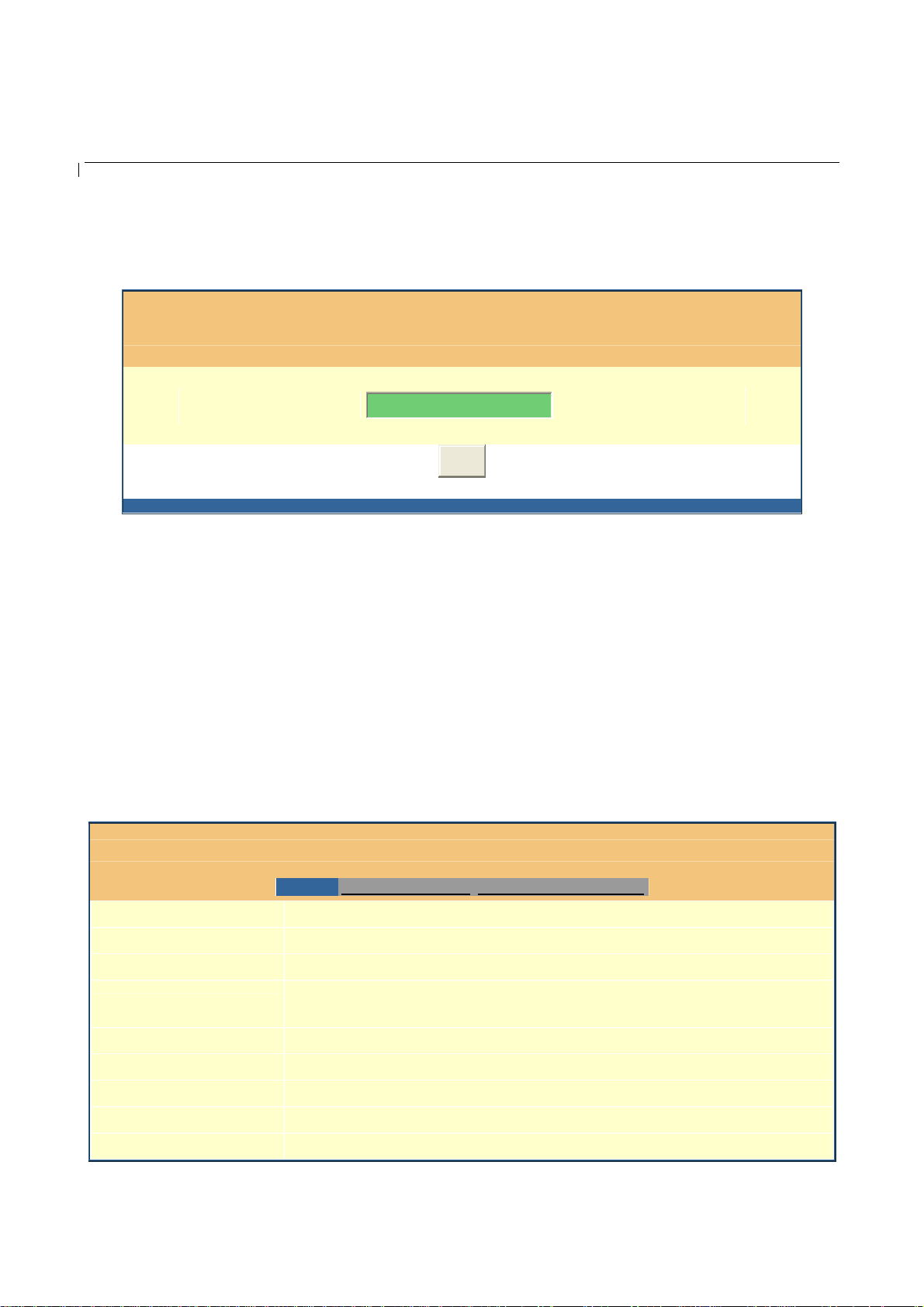
Once this request is entered and sent from a Web browser, the IP phone will respond with the
following login screen:
Grandstream Device Configuration
Password
Login
All Rights Reserved Grandstream Networks, Inc. 2005
The password is case sensi tive with maximum length of 25 characters. Th e factory default password
for End User and admini strator is “123” and “admin” resp ectively. Only administrator can get access
to “ADVANCED SETTING” configuration page.
NOTE:
If you cannot log into the configuration page by using default password, please check with the VoIP
service provider. Most likel y, the service provider has provis ioned the device and configured fo r you
and changed the default password.
• Status Page.
Grandstream Device Configuration
MAC Address:
IP Address:
Product Model:
Software Version:
System Up Time:
Registered:
PPPoE Link Up:
NAT:
NAT Mapped IP:
STATUS BASIC SETTINGS ADVANCED SETTING S
00.0B.82.08.74.D4
10.10.13.195
HT286 REV 3.0
Program-- 1.0.8.19 Bootloader-- 1.0.8.11 HTML-- 1.0.8.19 VOC--
1.0.0.10
0 day(s) 0 hour(s) 0 minute(s)
Yes
disabled
detected NAT type is full cone
123.45.6.789
17
Page 18

HandyTone -286 User Manual Grandstream Networks, Inc.
NAT Mapped Port:
Total Inbound Calls:
Total Outbound Calls:
Total Missed Calls:
60946
0
0
0
Total Call Time (in
minutes):
Total SIP Message
Sent:
Total SIP Message
Received:
Total RTP Packet Sent:
Total RTP Packet
Received:
Total RTP Packet Loss:
MAC Address
IP Address
Product Mod el
0
2
2
0
0
0
All Rights Reserved Grandstream Networks, Inc. 2005
The device ID, in HEX format. This is very important ID for ISP
troubleshooting.
IP address assigned on the device.
This field contains the product mode l info.
Software Version
System Uptime
Registered
PPPoE Link Up
NAT
NAT Mapped IP
Program: This should be consistent with the firmware version.
Bootloader: version number for bootloader, it could be lower than program
version.
HTML: This should be consistent with the firmware version.
VOC: This is the codec program, normally not changed.
This shows system up time since last reboot.
This shows whether the unit is registe red to voip service provider’s server.
This shows whether the PPPoE is up if conne cted to DSL modem
This shows what kind of NAT the HandyTone-286 is behind.
WAN side mapped IP if HandyTone-286 is connected to a NAT router.
18
Page 19
HandyTone -286 User Manual Grandstream Networks, Inc.
NAT Mapp ed Port
Statistical Status
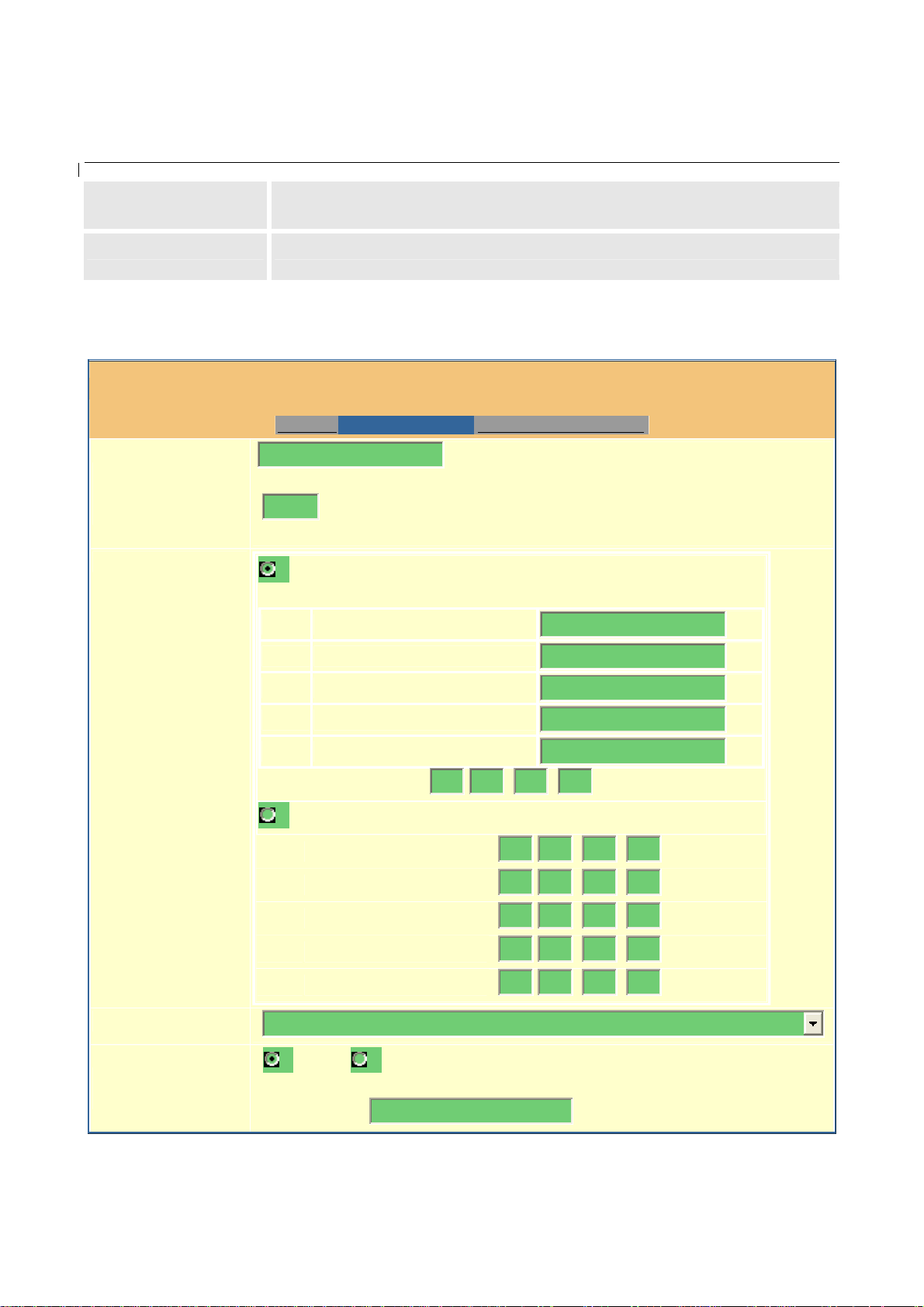
• Basic Settings.
End User
Password:
Web Port:
IP Address:
WAN side mapped port if HandyTone-286 is connected to a NAT router.
Self-explainable. Please refer to the page displayed.
Grandstream Device Configuration
STATUS BASIC SETTINGS ADVANCED SETTI NG S
(purposely not displayed for security protection)
80
(default for HTTP is 80)
dynamically assigned via DHCP (default) or PPPoE
(will attempt PPPoE if DHCP fails and following is non-blank)
DHCP hostname:
DHCP domain:
DHCP vendor class ID:
PPPoE account ID:
PPPoE password:
Preferred DNS server:
0
.
0
0
.
0
.
Time Zone:
Daylight Savings
Time:
statically configured as:
I P Address:
Subnet Mask:
Default Router:
DNS Server 1:
DNS Server 2:
GMT-5:00 (US Eastern Tim e, New York)
192.168 .0
0
.
0
.
0
.
0
.
0
.
0
.
0
.
0
.
160
.
0
0
.
0
0
.
0
0
.
0
0
.
No Yes (if set to Yes, display time will be 1 hour ahead of
normal time)
Optional Rule:
4,1,7,2,0;10,-1,7,2,0;60
19
Page 20

HandyTone -286 User Manual Grandstream Networks, Inc.
Update
All Rights Reserved Grandstream Networks, Inc. 2005
20
Page 21

End User
Password
This contains the password to access the Web Configuration Menu. This field is
case sensitive with max. 25 characters
Web Port
HandyTone -286 User Manual Grandstream Networks, Inc.
IP Address
This is the device’s internal HTTP server port. Default is 80.
There are 2 modes under which the IP phone can operate:
- If DHCP mode is enabled, then all the field for the Static IP mode are not
used (even though they are still saved in the Flash memory) and the IP phone
will acquire its IP address from the DHCP server in the network.
To use PPPoE feature please set the PPPoE account settings if the HT-286 is
connected directly to a DSL modem. The HT-286 will attempt to establish a
PPPoE session if any of the PPPoE fields is set.
- If Static IP mode is selected, then the IP address, Subnet Mask, Default
Router IP address, DNS Server 1 (mandatory), DNS Serve r 2 (optional) fields
will need to be configured .
DHCP hostname
This option specifies the name of the client. This field is optional but may be
required by some Internet Service Providers. Default is blank.
DHCP domain
This option specifies the domain name that client should use when resolving
hostnames via the Domain Name System. Default is blank.
DHCP vendor class
ID
This option is used by clients and servers to exchange vendor-specific
information. Default is blank.
PPPoE account ID
PPPoE password
Time Zone
Daylight Savings
Time
PPPoE username. Fill this field if your ISP requires you to use a PPPoE (Point
to Point Protocol over Ethernet) connection.
PPPoE account password.
This parameter controls how date/time is displayed according to the specified
time zone.
This parameter controls whether the displayed time will be daylight savings
time or not. If set to “Yes” and the Optional R ule is empt y, then the displayed
time will be 1 hour ahead of normal time. The “Automatic Daylight Saving
Time Rule” shall have the following syntax:
start-time;end-time;saving
Both start-time and end-time have the same syntax:
month,day,weekday,hour,minute
month: 1,2,3,..,12 (for Jan, Feb, .., Dec)
day: [+|-]1,2,3,..,3 1
weekday: 1, 2, 3, .., 7 (for Mon, Tue, .., Sun), or 0 which means the daylight
saving rule is not based on week days but based on the day of the month.
hour: hour (0-23),
minute: minute (0-59)
If “weekday” is 0, it means the date to start or end daylight savin g is at exactly
the given date. In that cas e, the “day” value must not be negative. If “weekday”
is not zero and “day” is positive, then the daylight saving starts on the first
“day” the iteration of the weekday (1st Sunday, 3rd Tuesday etc).
If “weekday” is not zero and “day” is negative, then the daylight saving starts
on the last “day”th iteration of th e weekday (last Sunday , 3rd last Tuesday etc).
The saving is in the unit of minutes. The savin g time may also be preceded by a
21
negative (-) sign if subtrac tio n is desired instead of addition.
The default value for “Automatic Daylight Saving Time Rule” shall be set to
“04,01,7,02, 00;10,-1,7,02,00;60” which is the rule for US.
Page 22
HandyTone -286 User Manual Grandstream Networks, Inc.
P
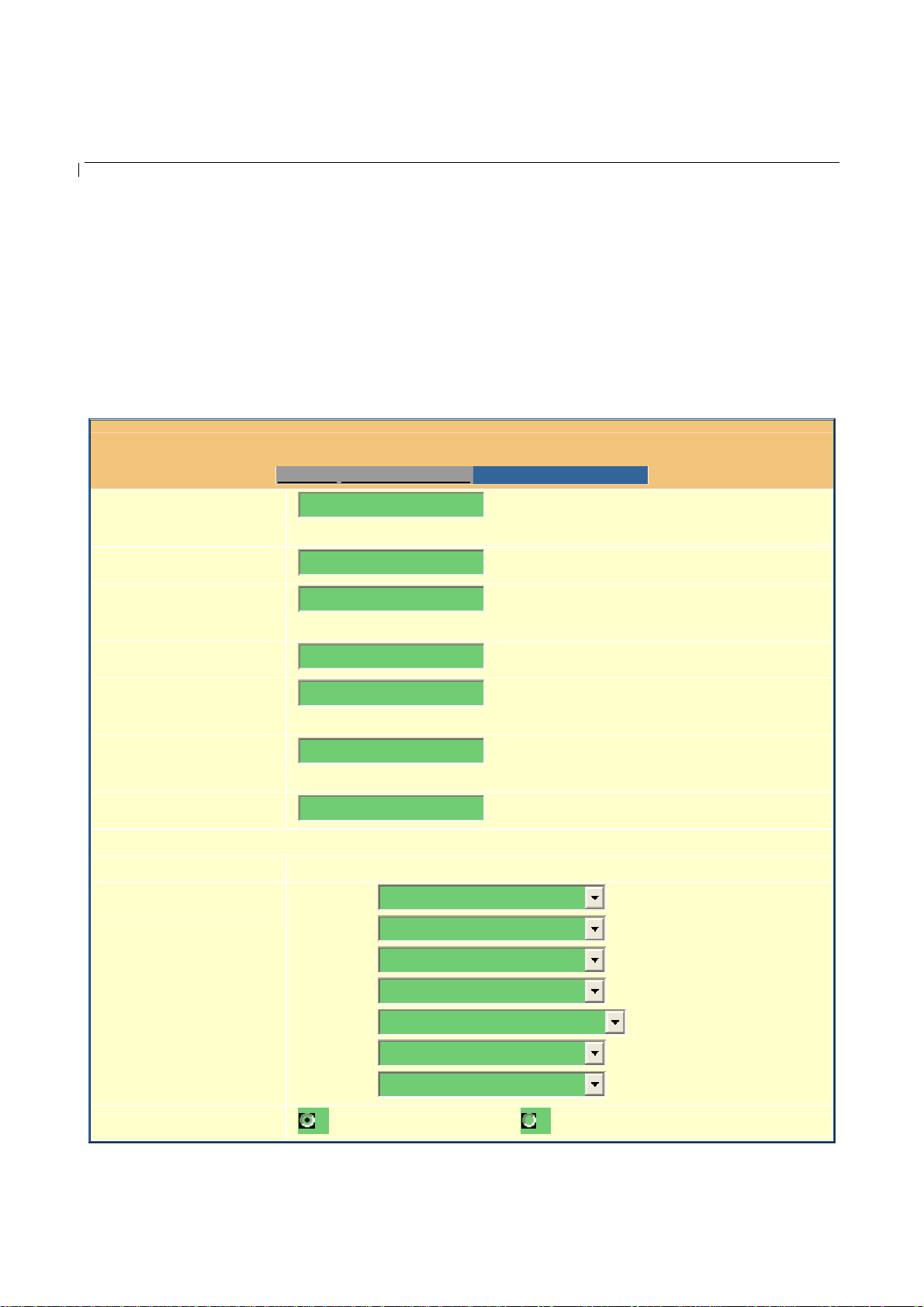
6.2.3 Adv a nc e d Us e r Co nf i g u ra t io n
To login to the Advanced User Configuration page, follow the instruction in section 6.2.1 to get to the
following login page. T he password is case sensit ive with a maximum len gth of 25 characters and the
factory default pa ssw ord for A dvanced User is “admin”.
Grandstream Device Configuration
Admin Password:
SIP Server:
Outbound Proxy:
SIP User ID:
Authenticate ID:
Authenticate Password:
Name:
Advanced Options:
referred Vocoder:
(in listed order)
STATUS BASIC SETTINGS ADVANCED SETTING S
(purposel y not dis p l ayed for security
protection)
sip.mycompany.com
(e.g., sip.mycompan y.com, or IP address)
(e.g., proxy.myprovider.com, or IP address, if
any)
123456789
123456789
(the user part of an SIP address)
(can be identical to or different from SIP User
ID)
(purposel y not dis p l ayed for security
protection)
(optional, e.g., John Doe)
choice 1:
choice 2:
choice 3:
choice 4:
choice 5:
choice 6:
choice 7:
current setting is " PCMU"
current setting is " PCMA"
current setting is " G723"
current setting is " G729"
current settin g i s " G 726-32"
current setting is " iLBC"
current setting is " PCMU"
G723 rate:
6.3kbps encoding rate 5.3kbps encoding rate
22
Page 23
HandyTone -286 User Manual Grandstream Networks, Inc.
F
L
L
R
E
D
iLBC frame size:
iLBC payload type:
Silence Suppression:
Voice Frames per TX:
ax Mode:
ayer 3 QoS:
ayer 2 QoS:
Allow incoming SIP
messages
from SIP proxy only:
Use DNS SRV:
User ID is phone
number:
SIP Registration:
20ms 30ms
97
(between 96 and 127, default is 97)
No Yes
2
(up to 10/20/32/64 for G711/G726/G723/other codecs
respectively)
T.38 (Auto De tec t ) Pass-Through
48
802.1Q/VLAN Tag
(Diff-Serv or Precedence value)
0
802.1p priority value
No Yes
No Yes
No Yes
Yes No
0
(0-7)
Unregister On Reboot:
egister Expiration:
arly Dial:
Allow outgoing call
without Registration:
ial Plan Prefix:
No Key Entry Timeout:
Use # as Dial Key:
local SIP port:
local RTP port:
Use random port:
NAT Tra versal:
keep-alive interval:
Yes No
3600
(in seconds. defau lt 1 hou r, max 45 days)
No Yes (use "Yes" only if proxy supports 484 response)
No Yes
(this prefix string is added to each dialed number)
4
(in seconds, default is 4 seconds)
No Yes (if set to Yes, "#" will function as the Dial key)
5060
(default 5060)
5004
(1024-65535, default 5004)
No Yes
No
Yes, STUN server is: (URI or IP:port)
20
(in seconds, defau lt 20 seconds)
Use NAT IP
(used in SIP/SDP message if specified)
23
Page 24
HandyTone -286 User Manual Grandstream Networks, Inc.
D
F
Proxy-Require:
SUBSCRIBE for MWI:
Offhook Auto-Dial:
Enable Call Features:
Use Bell-style
3-way Conference:
Disable Call-Waiting:
Send DTMF:
TMF Payload Type :
Send Flash Event:
Onhook Threshold:
XS Impedance:
Caller ID Scheme:
No, do not send SUBSCRIBE for Message Waiting Indication
Yes, send periodical SUBSCRIBE for Message Waiting Indication
(User ID/extension to dial automaticall y when
offhook)
No Yes (if Yes, Call Forwarding & Call-Waiting-Disable are
supported locally)
No Yes (if Yes, *23 will be disable d)
No Yes
in-audio via RTP (RFC 2833) via SIP INFO
101
No Yes (Flash will be sent as a DTMF event if set to Yes)
800 ms
600 Ohm (N o rth Am erica)
Bellcore (North America)
Onhook Voltage:
Polarity Reversal:
NTP Server:
Send Anonymous:
Anonymous Method:
Time to ring:
Special Feature:
Syslog Server:
Syslog Level:
Session Expiration:
Min-SE:
Caller Request Timer:
36V
No Yes (reverse polarity upon call establishment and
termination)
time.nist.gov
(URI or IP address)
No Yes (caller ID will be blocked if set to Yes)
Use From Header Use Privacy Header
60 seconds
Standard
NONE
180
90
(in seconds. default 180 s e conds)
(in seconds. default and minimum 90 seconds)
Yes No (Request for timer when making outbound calls)
24
Page 25
HandyTone -286 User Manual Grandstream Networks, Inc.
F
F
P
0
F
L
Callee Request Timer:
orce Timer:
UAC Specify Refresher:
UAS Specify Refresher:
Force INVITE:
irmware Upgrade and
rovisioning:
Yes No (When caller supports timer but did not request one)
Yes No (Use timer even when remote party does not support)
UAC UAS Omit (Recommended)
UAC UAS (W hen UAC did not specify refreshe r tag)
Yes No (Always refresh with INVITE instead of UPDATE)
Upgrade Via TFTP HTTP
Firmware Server Path:
Config Server Path:
fm.grandstream.com/gs
fm.grandstream.com/gs
Firmware File Prefix: Firmware File Postfix:
Config File Prefix: Config File Postfix:
Automatic Upgrade:
No Yes, check for upgrade every
1008
minutes (default 7
days)
irmware Key:
Authenticate Conf File:
ock keypad update:
Allow conf SIP Account
in Basic Settings:
Override MTU Size:
Volume Amplification:
Call Progress Tones:
Always Check for New Firmware
Check New Firmware only when F/W pre/suffi x changes
Always Skip the Firmware Check
(in Hexadecimal Representation)
No Yes (cfg file woul d be authenticated before acc eptance
if set to Yes)
No Yes ( configuration up date via keypad is dis abled if set
to Yes)
No Yes
0
TX
0dB default
RX
0dB default
Dial Tone
Recall Dial Tone
Frequency 1
(Hz)
350 440 0
350 440 10
Frequency 2
(Hz)
ON (x10ms)
(C1;C2;C3)
OFF (x1 0ms)
(C1;C2;C3)
0
10
25
Page 26

HandyTone -286 User Manual Grandstream Networks, Inc.
Admin Password
SIP Server
Message Waiting
Confirmation
Audible Rin gin g
Busy Tone
Reorder Tone
Receiver
Offhook Tone
All Rights Reserved Grandstream Networks, Inc. 2005
350 440 10
350 440 10
440 480 200
480 620 50
480 620 25
1400 2600 10
Update
10
10
400
50
25
10
Administrator password. Only administrator can configure the “Advanced
Settings” page. Password field is purposely left blank for security reason after
clicking update and save d. The maximum password length is 25 characters.
This field contains the URI string or the IP address. e.g. sip.my-voipprovider.com; 192.168.1.200:5066
Outbound Proxy
SIP Use r ID
Authenticate ID
Authenticate
Password
Name
Home NPA
Preferred Vocoder
This field contains the URI string or the IP of the outbound proxy. If there is no
outbound proxy, this field SHOULD be left blank. If it is not blank, all
outgoing requests will be sent to this outbound proxy.
This field contains the user part of the SIP address for this phone. e.g., if the
SIP address is: sip:my_user_id@my_provider.com, then the SIP User ID is:
my_user_id. Please do NOT include the preceding “sip:” scheme or the host
portion of the SIP address in this field. I t is g i ven by VoIP service provider.
SIP service subscriber’s Authenticate ID used for authentication. It can be
identical to or different from SIP User ID and given by VoIP service provider.
SIP service subscriber’s account password. It is given by VoIP service
provider.
SIP service subscriber’s name which will be used for Caller ID display.
Local area code for North American Dial Plan.
HandyTone-286 supports up to 7 different vocoder types including G711-ulaw
(PCMU), G711-alaw (PCMA), G723, G729A, G726-32, and iLBC. Depending
on the product model, some of these vocoders may not be provided in standard
release.
A user can configure vo coders in a preferen ce order that will be offered in SIP
INVITE message.
26
Page 27

HandyTone -286 User Manual Grandstream Networks, Inc.
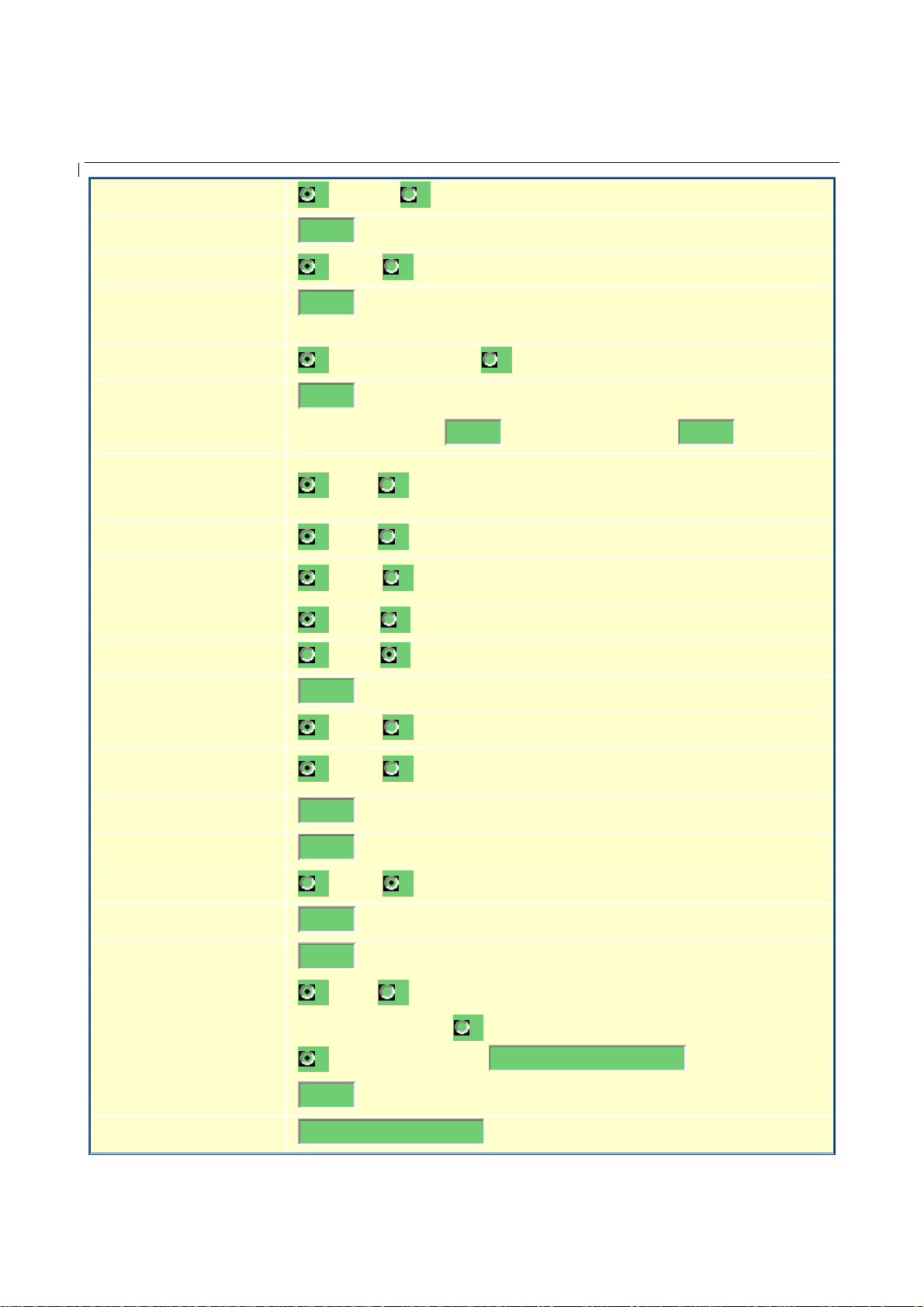
G723 Rate:
iLBC frame size
iLBC payload type
Silen ce Su pp r ess i on
Voice Frames per
TX
This defines the encoding rate for G723 vocoder. By default, 6.3kbps rate is
chosen.
This defines the size of the iLBC codec frame. The default setting is 20ms.
This defines the iLBC payl oad type. The default setting is 97. The valid range
is between 96 and 127.
This controls the silence su ppression/VAD feature o f G723 and G729. If set to
“Yes”, when a silence is detected, small quantit y of VAD packets (instead of
audio packets) will be sent during the period of no talking. If set to “No”, this
feature is disabled.
This field contains the number of voice frames to be transmitted in a single
packet. When setting this value, the user should be aware of the requested
packet time (used in SDP message) as a result of configuring this parameter.
This parameter is associated with the first vocoder in the above vocoder
Preference List or the actual used payload type negotiated between the 2
conversation parties at run time.
e.g., if the first vocoder is configured as G723 and the “Voice Frames per TX”
is set to be 2, then the “ptime” value i n the SDP message of an INVITE r equest
will be 60ms because each G723 voice frame contains 30ms of audio.
Similarly, if this field is set to be 2 and if the first vocoder chosen is G729 or
G711 or G726, then the “ptime” value in the SDP message of an INVITE
request will be 20ms.
If the configured voice f r am es p er TX ex ceeds th e maximum allowed value, the
phone will use and save the maximum allowed value for the corresponding first
vocoder choice. The maximum value for PCM is 10(x10ms) frames; for G726,
it is 20 (x10ms) frames; for G723, it is 32 (x30ms) frames; for G729/G728, 64
(x10ms) and 64 (x2. 5ms ) frames respectively.
Fax Mode
Layer 3 QoS
Layer 2 QoS
Allow incoming SIP
messages from SIP
proxy only
Use DNS SRV
T.38 (Auto Detect) FoIP by default, or Pass-Through (must use codec
PCMU/PCMA)
This field defines the layer 3 QoS parameter which can be the value used for IP
Precedence or Diff-Serv. Default value is 48
This setting includes two fields. The 802.1Q/VLAN Tag contains the value
used for layer 2 VLAN tag. Default setting is blank. And 802.1p priority value
contains the value of the priority value.
If set to “Yes”, the device will ignore any SIP message that does not come from
the IP address (Source IP in the IP header) that it is registered to. Default is
No.
This parameter controls whether the IP phone supports the DNS SRV route
function.
27
Page 28

HandyTone -286 User Manual Grandstream Networks, Inc.
User ID is phone
number
SIP Registration
Unregister On
Reboot
Registration
Expiration
Early Dial
If the HandyTone-286 has an assi gned PSTN tel ephone nu mber, then t his field
will be set to “Yes”. Otherwise, set it to “No”. If “Yes” is set, a “user=phone”
parameter will be attached to the “From” header in SIP request.
This parameter controls whether the IP phone needs to send REGISTER
messages to the proxy server. The default setting is “Yes”.
Default is No. If set to yes, the device will first send registration request to
remove previous bindings.
This parameter allows the user to specify the time frequency (in minutes) the
phone will refresh its registration with the specified registrar. The default
interval is 3600 seconds (or 1 ho ur). The maximum interval is 45 day s.
This parameter controls whether the phone will attempt to send an early
INVITE each time a key is pressed when a user dials a numbe r. If set to “Yes”,
an INVITE is sent using the dial-number collected thus far; Otherwise, no
INVITE is sent until the “(Re-)Dial” button is pressed or after about 5 seconds
have elapsed if the user forgets to press the “(Re-)Dial” button.
The “Yes” option shoul d be us ed ON LY if th ere is a SIP proxy configured and
the proxy server supports 484 Incomplete Address response. Otherwise, the call
will most likely be rejected by the proxy (with a 404 Not Found error).
Please note that this feat ure is NOT desi gned to work with and sho uld NOT be
enabled for direct IP-to-IP calling.
Dial Plan Prefix
No Key Entry
Timeout
Use # as
Send Key
Local SIP port
Local RTP port
Use Random Port
This value contains the dial plan prefix string (typically an ASCII numeric
string). If it is not blank, then this string will added to the dialed number.
Default is 4 seconds.
This parameter allows the user to configure the “#” key to be used as the
“Send”(or “Dial”) ke y. Once set to “Yes”, pressing this key will immediately
trigger the sending of dialed string collected so far. In this case, this key is
essentially equivalent to the “(Re)Dial” key. If set to “No”, this # key will then
be included as part of the dial string to be sent out.
This parameter defines the local SIP port the IP phone will listen and transmit
on. The default value is 5060.
This parameter defines the local RTP-RTCP port pair the IP phone will listen
and transmit on. It is the base RTP port for channel 0. When configured,
channel 0 will use this port value for RTP and the port_value+1 for its RTCP;
channel 1 will use port_value+2 for RTP and po rt_value+3 for its RTCP. The
default value is 5004.
This parameter, when set to Yes, will force random generation of both the local
SIP and RTP ports. This is usually necessary when multiple IP phones are
behind the same NAT.
28
Page 29

HandyTone -286 User Manual Grandstream Networks, Inc.
b
NAT Traversal
keep-alive interval
Use NAT IP
Proxy-Require
SUBSCRIBE for
MWI
Offhook
Auto-Dial
This parameter defines whether the phone NAT traversal mechanism will be
activated or not. If activated (b y choosing “Yes”) and a STUN server is also
specified, then the phone will behave according to the STUN client
specification. Under this mode, the embedded STUN client inside the phone
will attempt to detect if and what type of firewall/NAT it is behind by sen din g
appropriate request to the specified STUN server.
If this field is set to “Yes” with no specified STUN server, then the phone will
only periodically (every 20 seconds by default) send a blank UDP packet (with
no payload data) to the SIP ser ver to keep the mapped port open on the NAT.
The HandyTone-286 sends a UDP package to the SIP server periodically in
order to keep the port open on the router. This parameter defines the interval
time that HT286 send the UDP package. The def ault se tting is 20 seco nd.
NAT IP address is used in SIP/SDP message. Default is blank.
SIP Extension to notify SIP server that the unit is behind the NAT/F irewall.
Default is “No”. When set to “Yes” a SUBSCRIBE for Message Waiting
Indication will be sent periodically
This parameter allows the user to configure a User ID or extension n umber to
e automatically dialed upon offho ok. Please note that only the user part of a
SIP address needs to be entered here. The phone will automatically append the
“@” and the host portion of the corresponding SIP addre ss.
Enable Call Feature
Use Bell-style 3-way
conference
Disable Call
Waiting
Send DTMF
DTMF Payload
Type
Send Flash Event
FXS Impedance
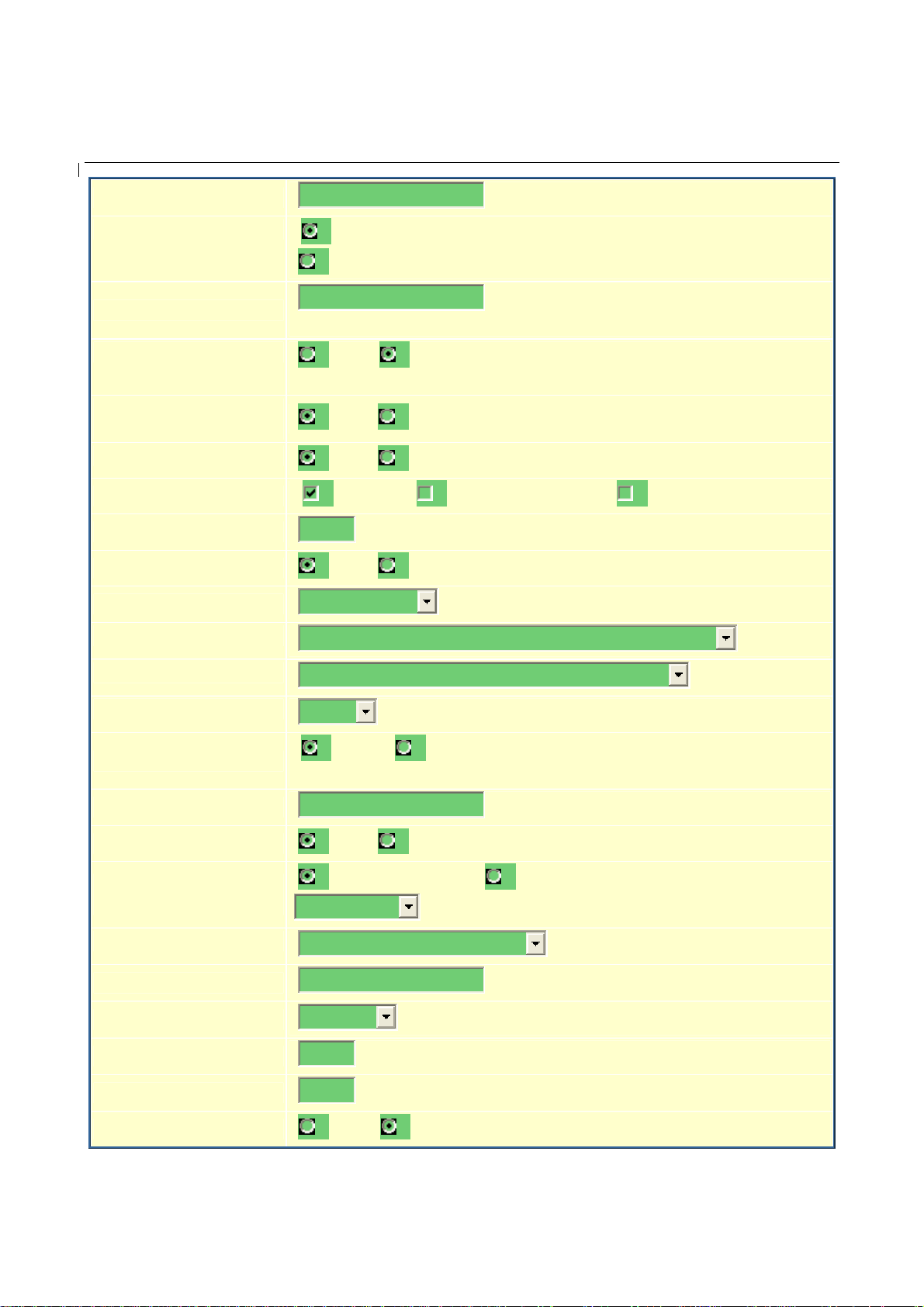
Default is YES. If set to “Yes”, call featu res ar e su pported locall y, such as callwaiting, transfer, 3-way conference, etc.
Conference mode, default option is No. If set to yes, the feature code for
coference *23 would be disabled.
Default is No.
This parameter specifies the mechanism to transmit DTMF digit. There are 3
modes supported: in audio which means DTMF is combined in audio signal
(not very reliable with low-bit-rate codec), via RTP (RFC2833), or via SIP
INFO.
This parameter sets the pa ylo ad type for DTMF using RFC2833
Default is NO. If set to yes, flash will be sent as DTMF event.
Selects the impedance of the analog telephone connected to the Phone port.
29
Page 30

HandyTone -286 User Manual Grandstream Networks, Inc.
Caller ID Scheme
Onhoo k Volt ag e
Polarity Reversal
NTP server
Send Anonymous
Anonymous Method
Select the Caller ID Scheme to suit the standard of different area.
• Bellcore (North America)
• CID (Canada)
• DTMF (Brazil)
• DTMF (Denmark)
• DTMF (Sweden)
• ETSI-FSK (France, Germany, Norway, Taiwan, UK-CCA)
• ETSI-DTMF (Finland, Sweden)
Select the onhook voltage to suit diffe rent area or PBX.
Select Polarity Reversal to adapt some call charge/billing system. Default is No.
This parameter defin es the URI or IP address of t he NTP server which the IP
phone will use to display the current date/time.
If this parameter is set to “Yes”, the device is employing the mechanism to
block its ID.
If it is set to “Use from header”. Callers’ SIP user ID will be sent as anonymous,
essentially block the Caller ID from displaying. If it is set to “User privacy header”,
the SIP INVIT E message con tains a “pr ivacy” hea der, and the s erver bloc ks the calle r
ID from the ca lled party.
Time to ring
Special Features
Syslog Server
Allow user to adjust the ring time of the phone. Default is 60 seconds.
Default is Standard. Choose the selection to meet some special requirements
from Soft Switch vendors like Nortel, Broadsoft, etc.
The IP address or URL of System log server. Thi s feature is especially useful
for ITSP (Internet Telepho ne Serv ice Prov id er)
30
Page 31

HandyTone -286 User Manual Grandstream Networks, Inc.
Syslog Level
Select the ATA to repor t the log level. Default is NONE. Th e level is one of
DEBUG, INFO, WARNING or ERROR. Syslog messages are sent based on
the following events:
• produc t model/version on boot up (INFO level)
• NAT related info (INFO level)
• sent or rece i ve d SIP message (DEBUG level)
• SIP message summary (INF O level)
• inbound an d outbound calls (INFO level)
• registration status change (INFO level)
• negotiated codec (INFO level)
• Ethernet link up (INFO level)
• SLIC chip exception (WARNING and ERROR levels)
• memory exception (ERR OR level)
The Syslog uses USER facility. In addition to standard Syslog pay load, it
contains the following components:
GS_LOG: [device MAC address][err or code] error message
Here is an example: May 19 02:40:38 192.168.1.14 GS_LOG:
[00:0b:82:00:a1:be][ 000] Ethernet link is up
Session Expiration
Min-SE
Caller Request
Timer
Callee Request
Timer
Grandstream implemented SIP Session Timer. The session timer extension
enables SIP sessions to be periodically “refreshed” via a re-INVITE request.
Once the session interval expires, if there is no refresh via a re-INVITE
message, the session will be terminated.
Session Expiration is the time (in seconds) at which the session is considered
timed out, if no successful session refresh transaction occurs beforehand. The
default value is 180 seconds.
The minimum session expiration (in seconds). The default value is 90 seconds.
If selecting “Yes” the phone will use session timer when it makes outbound
calls if remote party supports session timer.
If selecting “Yes” the phone will use session timer when it receives inbound
calls with session timer request.
31
Page 32

HandyTone -286 User Manual Grandstream Networks, Inc.
Force Timer
UAC Specify
Refresher
UAS Specify
Refresher
Force INVITE
Firmware Upgrade
and Provisioning
Firmware Server
Path
Config Server Path
Firmware File
Prefix
If selecting “Yes” the phone will use session timer even if the remote party
does not support this feature. Selecting “No” will allow the phone to enable
session timer only when the remote party support this feature.
To turn off Session Timer, select “No” for Caller Request Timer, Callee
Request Timer, and Force Timer.
As a Caller, select UAC to use th e phone as the refresher, or UAS to use the
Callee or proxy server as the refresher.
As a Callee, select UAC to use caller or proxy server as th e refresher, or UAS
to use the phone as the refresher.
Session Timer can be refreshed using INVITE method or UPDATE method.
Select “Yes” to use INVITE method to refresh the session timer.
Default HTTP. Firmware upgrading may take up to 10 minutes depends on
network environment. Do not interrupt the firmware upgrading process.
IP address or domain name of fir mwa re se rv er.
IP address or domain n a me o f con figuration server
Default blank. If it is configured, HT286 rev. 3.0 will request the firmware file
with the prefix. Useful f or ITSPs. End user should keep it blank.
Firmware File
Postfix
Config File Prefix
Config File Postfix
Automatic Upgrade
Firmware K ey
Authenticate Conf
File
Lock keypad
update
Allow conf SIP
Account
in Basic Settings
Override MTU size
Default is blank. End user should keep it blank.
Default is blank. End user should keep it blank.
Default is blank. End user should keep it blank.
Default is YES.
32 digit in Hexadecimal Representation. Useful for ITSP to encrypt firmware.
End user should keep it blank.
Default NO. End user should use default setting.
If this parameter is set to “Yes”, except for IVR MENU items 1 to 5, the
configuration update via keypad is disabled.
If set to Yes, these four fields: SIP User ID, Authenticate ID, Authenticate
Password and Name will be included in Basic Settings configuration page.
Override the MTU size.
32
Page 33

HandyTone -286 User Manual Grandstream Networks, Inc.
Volume
Amplification
Handset volume adjustment. RX is for receiving volume, TX is for
transmission volume. Default values are 0dB for both parameters. +6dB
generates the highest volume and -6dB generates the lowest volume.
Call Progress Tones
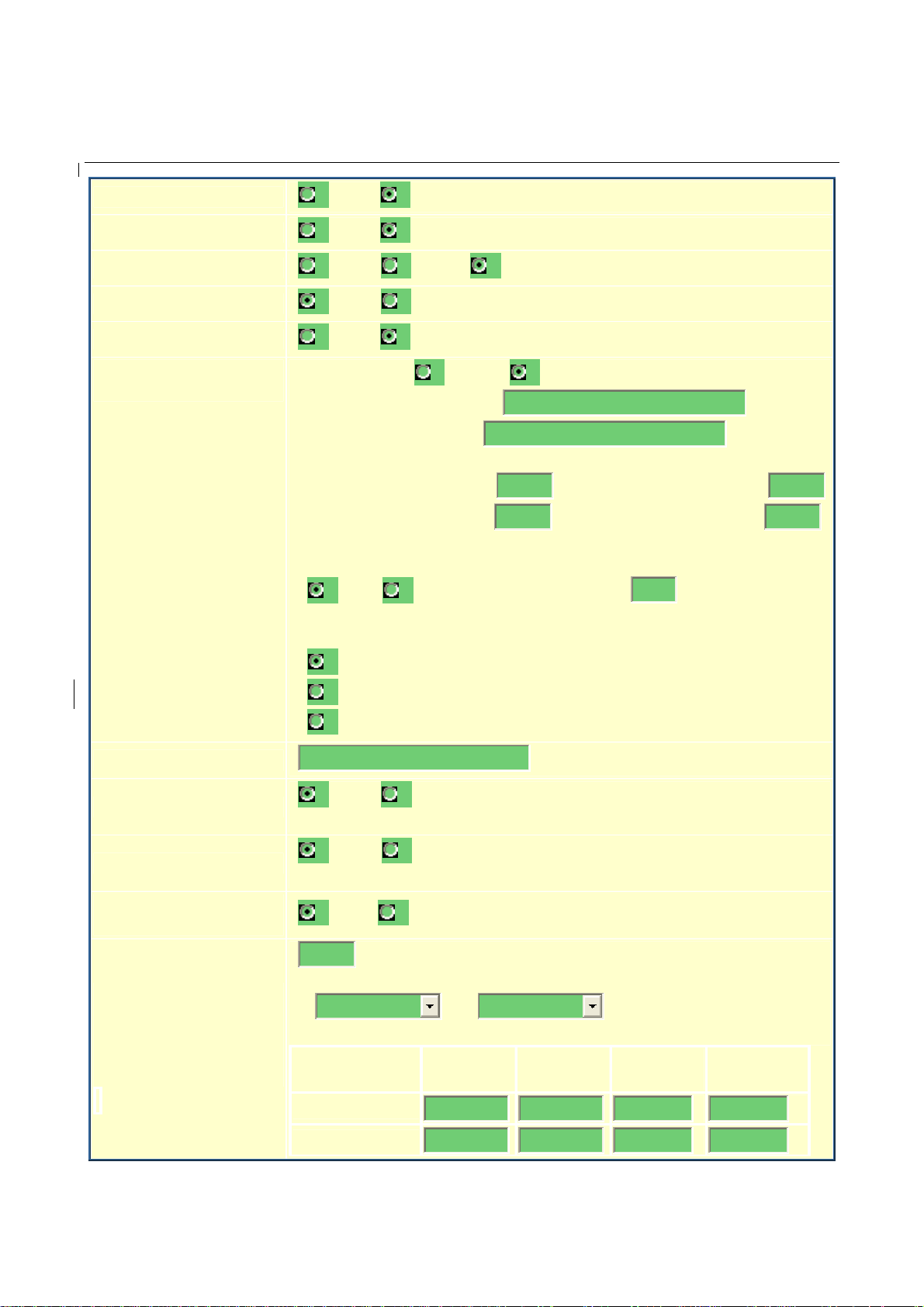
Using these settings, users can configure various call progress tone frequencies
and cadences according to their country standard. By default they are set to
North American standard.
Frequencies should be configured with known values to avoid uncomfortable
high pitch sounds. ON is the period of ringing (“On time” in ‘ms’) while OFF
is the period of silence. In order to set a continuous ring, OFF should be zero.
Otherwise it will ring ON ms and a pause of OFF ms and then repeat the
pattern. Up to three cadences are supported.
6.2.4 Saving the Configuration Changes
Once a change is made, the user should press the “Update” button in the Configura tion Menu. The IP
phone will then display the fo llow ing screen to c onfir m that the changes have been saved.
Grandstream Device Configuration
STATUS BASIC SETTINGS ADVANCED SETTINGS
Your configuration changes have been saved.
They will take effect on next re boot.
All Rights Reserved Grandstream Networks, Inc. 2005
Users are recommended to power cycle the HandyTone-286 after seeing the above message.
6.2.5 Rebooting the HandyTone-286 from Remote
The administrator of the phone can remotely reboot the phone by pressing the “Reboot” button at the
bottom of the configuration menu. Once done, the following screen will be displayed to indicate that
rebooting is under way.
33
Page 34

HandyTone -286 User Manual Grandstream Networks, Inc.
Grandstream Device Configuration
The device is rebooting now...
You may relogin by clicking on the link below in 30 seconds.
Click to relogin
All Rights Reserved Grandstream Networks, Inc. 2005
At this point, the user can relogin to the phone after waiting for about 30 sec onds.
6.3 Configuration through a Central Server
Grandstream HandyTone ATA can be automatically configured from a central provisioning system.
When HandyTone ATA boot up, it will send TFTP or HTTP request to download configuration file
“cfg000b82xxxxxx”, where “000b82xxxxxx” is the MAC address of the HandyTone ATA. The
configuration file can be loaded into devices via TFTP or HTTP from the central provisioning server,
so the service provider or an enterprise with large deployment of HandyTone ATAs can easily manage
the configuration and service provision to individual devices remotely .
Grandstream provides a lic e nse d provisioning system called GAPS that can be used to support
automated configurat io n of HandyTone ATA. GAPS (Grandstr eam Automated Provisioning System)
uses enhanced (NAT friendly) TFTP or HTTP (thus no NAT issues) an d other communication
protocols to communicate with each individual HandyTone ATA for firmware upgrade, remote reboot,
etc.
Grandstream provide GAPS (Grandstream Automated Provisioning System) service to VoIP service
providers. It could be either simple redirection or with certain special provisioning settings. Initially
upon booting up, Grandstream devices by default point to Grandstream provisioning server GAPS,
based on the unique MAC address of ea ch device, GAPS provision the devices with redire c tion
settings so that they will be redirected to customer’s TFTP or http server for further provisioning.
Grandstream also provide GAPSLite software package which contains our NAT friendly TFTP server
and a configuration tool to facilitate the task of generating device configuration files.
The GAPSLite configuration tool is now free to end users. The tool and configuration templates can be
downloaded fro m http://www.grandstream.com/DOWNLOAD/Configuration_Tool/.
For details on how GAPS works, please refer to the docum e ntation of GAPS product.
34
Page 35

HandyTone -286 User Manual Grandstream Networks, Inc.
7 Software Upgrade with TFTP
Software upgrade can be done via either TFTP or HTTP . The corresponding configur a tion settings are
in the ADVANCED SETTINGS configuration page.
7.1 Firmware Upgrade through TFTP/HTTP
To upgrade via TFTP or HTT P, the “Firmware Upgrade and Provisioning up grade via” field needs to
be set to TFTP or HTTP, respectively. “Firmware Server Path ” needs to be set to a valid URL of a
TFTP or HTTP server, s erver name can be in eith er FQDN or IP address format. He re are examp les of
some valid URL.
e.g. firmware.mycompany.com:6688/Grandstream/1. 0.8.19
e.g. 168.75.215.189
NOTES:
• TFTP server in IP address format c an be configured vi a IVR. Please refer to section 6.1 .3 for
instructions. If TFTP serve r is in FQDN format, it must be set v ia web configuration interface.
• Once a “Firmware Server Path” is set, user needs to update the settings and reboot the device.
If the configured firmware server is found and a new code image is available, the HandyTone
ATA will attempt to retrieve the new image files by downloading them into the HandyTone
ATA’s SRAM. During this stage, the HandyTone ATA’s LEDs will blink until the
checking/downloading process is completed. Upon verification of checksum, the new code
image will then be sav ed into the Flash. If TFTP/HTTP fail s for any r eason (e.g., TFTP/HTTP
server is not responding, there are no code image files available for upgrade, or checksum test
fails, etc), the HandyTone ATA will st op the TFTP/HTTP process and simply boot using the
existing code image in the flash.
• Firmware upgrade may take as long as 1 to 20 minutes over Internet, or just 20+ seconds if it is
performed on a LAN. It is recommended to conduct firmware upgrade in a controlled LAN
environment if possible. For users who do not have a local firmware upgrade server,
Grandstream provides a NAT-friendly TFTP server on the public Internet for firmware
upgrade. Please check the Services section of Grandstream’s Web site to obtain our public
TFTP server’s IP address.
• Alternatively, user can download a free TFTP or HTTP server and conduct local firmware
upgrade. A free windows version TFTP server is available for download from
http://support.solarwinds.net/updates/New-customerFree.cfm
downloaded from http://www.grandstream.com/y-firmware.htm. Unzip the file and put all of
them under the root directory of the TFTP server. Put the PC running the TFTP server and the
HandyTone ATA in the same LAN segment. Please go to File -> Configure -> Security to
change the TFTP server's default setting from "Receive Only" to "Transmit Only" for the
firmware upgrade. Start the TFTP server, in the HandyTone ATA’s web configuration page,
configure the Firmware Server Path with the IP address of the PC, update the change and
reboot the unit. Please be advised that our client will pull out firmware from the WAN side, if
. Our latest official release can be
35
Page 36

HandyTone -286 User Manual Grandstream Networks, Inc.
the TFTP server is connected to the device’s LAN port, the firmware upgrade will not work by
design.
7.2 Configuration File Download
Grandstream SIP Device can be configured via Web Interface as well as via Configuration File
through TFTP or HTTP. “Config Server Path” is the TFTP or HTTP server path for configuration file.
It needs to be set to a valid URL, either in FQDN or IP address format . The “Confi g Server Path” can
be same or different from the “Firmware Server Path”.
A configuration parameter i s associated with each particular field in the web configuration pa ge. A
parameter consists of a Capital letter P and 2 to 3 (Could be extended to 4 in the future) digit numeric
numbers. i.e., P2 is associated with “Admin Password” in the ADVANC ED SETTINGS pa ge. For a
detailed parameter list, plea s e refer to the corresponding fi rmware release configuration template.
When Grandstream Device boots up or reboots, it will issue request for configuration file named
“cfgxxxxxxxxxxxx”, where “xxxxxxxxxxxx” is the MAC address of the device, i.e.,
“cfg000b820102ab” . The configuration file name should be in lower cases.
7.3 Firmware and Configuration File Prefix and Postfix
Starting from firmware version 1.0.7.11 for HandyTone-286 Rev 3.0, adding prefix and postfix for
both firmware and configuration file is supported.
Firmware Prefix and Postfi x allows device to download the fi rmware name with the matchin g Prefix
and Postfix. This makes it the possible to store ALL of the firmware with different version in one
single directory. Similarly, Config File Prefix and Postfix allow s de vice to download the configuration
file with the matching Prefix and Postfix. Thus multiple configuration files for the same device can be
stored in one directory.
In addition, when the field “Check New Firmwar e only when F/W pre/suffix ch anges” is set to “Yes”,
the device will only issue firmware upgrade request if there are changes in the firmware Prefix or
Postfix.
7.4 Managing Firmware and Configuration File Download
When “Automatic Upgr ade” is set to “Yes”, Serv ice Provider can use P19 3 (Auto Check Interval, in
minutes, default and minimum is 60 minutes) to have the devices periodically check with either
Firmware Server or Config Server, whenever they are defin ed. This allows the device periodically
check if there are any new changes need to be taken on a scheduled time. By defining different
intervals in P193 for different d evices, Server Provider c an spread th e Firmware or Configuratio n File
download in minutes to reduce the Firmware or Provisioning Server load at any given time.
36
Page 37

HandyTone -286 User Manual Grandstream Networks, Inc.
8 Restore Factory Default Settin g
Warning !!!
Restore the Factory Default Setting will DELETE all configuration information of the device.
Please backup or print out all the settings before you approach to following steps. Grandstream will
not take any responsibility if you lose all the parameters of setting and cannot connect to your
service provider.
Please disconnect network cable and power cycle the unit before trying to reset the unit to factory
default. The steps are as follows:
Step 1:
Find the MAC address of the device. It is a 12 digits HEX number located on the bottom of the
unit.
Step 2:
Encode the MAC address. Please use the following mapping:
0-9: 0-9
A: 22
B: 222
C: 2222
D: 33
E: 333
F: 3333
For example, if the MAC addre ss is 000b8200e395, it should be encoded as
“0002228200333395”.
Step 3:
To perform factory reset:
a. Press “***” or the LED button for voice prompt.
b. Enter “99” and get the voice prompt “Reset ”.
c. Enter the encoded MAC address of the device.
d. Wait for 15 seconds.
The device will reboot automatically and restore to factory default setting.
37
Page 38

HandyTone -286 User Manual Grandstream Networks, Inc.
9 Glossary of Terms
ADSL
Asymmetric Digital Subscriber Line: Modems attached to twisted pair copper wiring that
transmit from 1.5 Mbps to 9 Mbp s downstream (to the subscriber) and from 16 kbps to 800
kbps upstream, depending on line distanc e.
AGC
Automatic Gain Control, is an electronic system found in many type s of devices. Its purpose is
to control the gain of a system in order to maintain so me measure of performance over a
changing range of real world conditio n s .
ARP
Address Resolution Protocol is a protocol used by the Internet Protocol (IP)
pecifically IPv4, to map IP network addresses
protocol. The protoc ol oper a t es below the network layer as a par t of the interface between the
OSI network and OSI link layer. It is used when IPv4 is used over Ethernet
ATA
Analogue Telephone Adapter. Covert analogue telephone to be used in data netwo rk for VoIP,
like Grandstream HT se ries products.
CODEC
Abbreviation for Coder- Deco der. It's an analog-to-digital (A/D) and digital-to-analog (D/A)
converter for translating the signals from the outside world to digital, and back again.
CNG
to the hardware addresses used by a data link
[RFC826],
Comfort Noise Generator, geneate artificial background noise used in radio and wireless
communications to fill the silent time in a transmission resulting from voice activity detection.
DATAGRAM
A data packet carrying its own address information so it can be inde pendently routed from its
source to the destination computer
DECIMATE
To discard portions of a sig nal in order to reduce the amount of information to be encoded or
compressed. Lossy compression algorithms ordinarily decimate while subsampling.
DECT
Digital Enhanced Cordless Tele c ommunications: A standard developed by the European
Telecommunication Standard Institute from 1988, governing pan-European digital mobile
telephony. DECT covers wireless PBXs, telepoint, residential cordless telephones, wireless
access to the public switched telephone network, Closed User Groups (CUGs), Local Area
38
Page 39

HandyTone -286 User Manual Grandstream Networks, Inc.
Networks, and wireless local loop. The DECT Common Interface radio standard is a
multicarrier time division multiple access, time division duplex (MC-TDMA-TDD) radio
transmission technique usin g ten radio frequency channels from 1880 to 1930 MHz, each
divided into 24 time slots of 10ms, and twe l ve full-duplex accesses per carrier, for a total of
120 possible combinations. A DECT base station (an RFP, Ra dio Fixed Part) can transmit all
12 possible accesses (time slots) simultaneously by using different frequencies or using only
one frequency. All signaling information is transmitted from the RFP within a multiframe (16
frames). Voice signals are digitally encoded into a 32 kbit/s signal using Adaptive Differential
Pulse Code Modula tion.
DNS
service that translates
DID
Short for Domain Name System (or Service or Server), an Internet
domain names
into IP addresses
Direct Inward Dialing
Direct Inward Dialing. The ability for an outside caller to dial to a PBX extension without
going through an attendant or auto-attendant.
DSP
Digital Signal Processing. Using computers to process signals such as sound, video, and other
analog signals which have be en converted to digital form.
Digital Signal Processor. A specialized CPU used for digital signal processing.
Grandstream products all have DS P chips bu ilt inside.
DTMF
Dual Tone Multi Frequency
The standard tone-pairs used on telephone terminals for dialing using in-band signaling. The
standards define 16 tone-pai rs (0-9, #, * and A-F) although most terminals support only 12 of
them (0-9, * and #).
FQDN
Fully Qualified Domain Name
A FQDN consists of a host and domain name, includ ing top-level domain. For example,
www.grandstream.com
is a fully qualified domain name. www is the host, grandstream is the
second-level domain, and.com is the top level domain.
FXO
Foreign eXchange Office
39
Page 40

HandyTone -286 User Manual Grandstream Networks, Inc.
An FXO device can be an analog phone, answering machine, fax, or anything that handles a
call from the telephone company like AT&T. They should also operate the same way when
connected to an FXS interface.
An FXO interface will accept calls from FXS or PSTN interfaces. All countries and regions
have their own standards.
FXO is complimentary to FXS (and the PSTN).
FXS
Foreign eXchange Station
An FXS device has hardwar e to generate the ring signal to the FXO extension (usually an
analog phone).
An FXS device will allow any FXO device to operate as if it were connected to the phone
company. This makes your PBX the POTS+PSTN for the phone.
The FXS Interface connects to FXO devices (by an FXO interface, of cour se).
DHCP
The Dynamic Host Configuration Protocol (DHCP) is an Internet protocol for automat in g the
configuration of computers that use TCP/IP. DHCP can be used to automatically assign IP
addresses, to deliver TCP/IP stack configuration parameters such as the subnet mask and
default router, and to provide othe r configuration information such a s the addresses for printer,
time and news servers.
ECHO CANCELLATION
H.323
HTTP
IP
Echo Cancellation is used in telephony to describe the process of removing echo from a voice
communication in order to im prove voice quality on a telephone call. In addition to improving
quality, this process im proves bandwidth savings achieved through silence suppression by
preventing echo from traveling across a network.
There are two types of echo of relevance in telephony: acoustic echo and hybrid echo. Speech
compression techniques and digital processing delay often contr ibute to echo generation in
telephone networks.
A suite of standards for multimedia conferences on traditional packet-switched networks.
Hyper Text Transfe r Protocol; the World Wide Web protoco l that performs the request and
retrieve functions of a server
Internet Protocol. A packet -based protocol for delivering data across networks.
40
Page 41

HandyTone -286 User Manual Grandstream Networks, Inc.
IP-PBX
IP-based Private Branch Exchan ge
IP Telephony
(Internet Protocol telephony, also known as Voice over IP Telephony) A general term for the
technologies that use the Internet Protocol's packet-switched connections to exchange voice,
fax, and other forms of information that have traditionally been carried over the dedicated
circuit-switched connections of the public switched telephone network (PSTN). The basic steps
involved in originating an IP Te lephony call are conversion of the analog voice signal to digital
format and compression/translation of the signal into Internet protocol (IP) packets for
transmission over the Internet or other packet-switched networks; the process is reversed at the
receiving end. The terms IP Telephony and Internet Te lephony are often used to me an the
same; however, they are not 100 per cent intercha ngeable, since Internet is only a subcase of
packet-switched networks. For users who have free or fixed-price Internet access, IP Telephony
software essentially provides free telephone calls any where in the world. However, the
challenge of IP Telephony is maintaining the quality of service expected by subscribers.
Session border controllers resolve this issue by providing quality assurance comparable to
legacy telephone systems.
IVR
IVR is a software application that accepts a combination of voice telephone input and touchtone keypad selection and provides appropriate responses in the form of voice, fax, callback, email and perhaps other media.
MTU
A Maximum Transmission Unit (MTU) is the largest size packet
(eight-bit bytes), that can be sent in a packet- or frame-based network such as the Internet. The
maximum for Ethernet is 1500 byte.
NAT
Network Address Translation
NTP
Network Time Pro tocol, a protocol to exchange and synchronize tim e over networks
The port used is UDP 123
Grandstream products using NTP to get time from Internet
OBP/SBC
Outbound Proxy or another name Session Border Controller. A de vice used in VoIP
OBP/SBCs are put into the signaling and media path between calling and called party. The
OBP/SBC acts as if it was the called VoIP phone and places a second call to the called party.
The effect of this behaviour is that not only the signaling traffic, but also the media traffic
(voice, video etc) crosses the OBP/SBC. Without an OBP/SBC, the media traffic travels
directly between the VoIP phones. Private OBP/SBCs are used along with firewalls
VoIP calls to and from a protected enterprise network. Public VoIP service providers use
or frame, specified in octets
networks.
to enable
41
Page 42

HandyTone -286 User Manual Grandstream Networks, Inc.
connections
PPPoE
PSTN
RTCP
RTP
SDP
OBP/SBCs to allow the use of VoIP protocols from private networks with internet
using NAT
.
Point-to-Point Protocol over Ethernet, is a network protocol for encapsulating PPP frames in
Ethernet frames. It is used mainly with cable modem and DSL services.
Public Switched Telephone Ne twork
i.e. the phone service we use f or every ordinary phone call, or called POT (Plain Old
Telephone), or circ uit sw itc hed network.
Real-time Transport Control Protocol, define d in RFC 3550
, a sister protocol of the Real-time
Transport Protocol (RTP), It partners RTP in the delivery and packaging of multimedia data,
but does not transport any data itself. It is used periodically to transmit control packets to
participants in a streaming multimedia session. The primary function of RTCP is to provide
feedback on the quality of service being provided by RTP.
Real-time Transport Protocol defines a standardized packet format for delivering audio and
video over the Internet. It was developed by the Audio-Video Transport Working Group of the
IETF
and first published in 1996 as RFC 1889
SIP
STUN
TCP
Session Description Protocol, is a form at for describing streaming media initialization
parameters. It has been published by the IETF as RFC 2327.
Session Initiation Protocol, An IP telephony signaling protocol developed by the IETF
(RFC3261). SIP is a text-based protocol suitabl e fo r inte grated vo ic e-data applications. SIP is
designed for voice transmission an d uses fewer resources and is considerably less complex than
H.323.
All Grandstream products are SIP based
Simple Traversal of UDP over NATs, is a network protoc ol
allowing clients behind NAT (or
multiple NATs) to find out its public address, the type of NAT it is behind and the internet side
port associated by the NAT with a particular local port. This information is used to set up UDP
communication between t wo hosts that are both behind NAT routers. The protocol is defined in
RFC 3489
. STUN will usually work good with non-symmetric NAT routers.
42
Page 43

HandyTone -286 User Manual Grandstream Networks, Inc.
. Using
. Using
to one
TFTP
UDP
VAD
VLAN
Transmission Control Protocol, is one of the core protocols of the Internet protocol suite
TCP, applications on networked hosts can create connections to one another, over which they
can exchange data or packets
. The protocol guaran tees reli able and in-order delivery of sender
to receiver data.
Trivial File Transfer Protocol, is a very simple file
very basic form of FTP
; It uses UDP (port 69 ) as its transpo rt protocol.
transfer protocol, with the functionality of a
User Datagram Protoc ol (UDP ) is one of the core protocols of the Internet protocol suite
UDP, programs on net worked computers can send s ho r t messages known as datagrams
another. UDP does not provide the reliability and ordering guarantees that TCP
does;
datagrams may arrive out of order or go missing without notice. However, as a result, UDP is
faster and more efficient for many lightweight or time-sensitive purposes.
Voice Activity Detection or Voice Activity Detector is an algorithm used in speech processing
wherein, the presence or absence of human speech is detected from the audio samples.
VoIP
A virtual LAN, known as a VLAN, is a logically-independent network. Several VLANs can coexist on a single physical switch. It is usually refer to the IEEE 802.1Q tagging protocol.
Voice over IP
VoIP encompasses many prot oc ols. All the protocols do some form of signalling of call
capabilities and transport of voice data from one point to another. e.g: SIP, H.323, etc.
43
 Loading...