

Page 1
SMVector - Frequency Inverter
Operating Instructions
Page 2

Contents
1 Safety Information ....................................................................................................3
2 Technical Data .......................................................................................................... 6
2.1 Standards and Application Conditions .................................................................................. 6
2.2 SMV Type Number Designation ............................................................................................7
2.3 Ratings ................................................................................................................................... 8
3 Installation ..............................................................................................................11
3.1 Dimensions and Mounting ...................................................................................................11
3.1.1 NEMA 1 (IP31) Models < 30HP (22kW) ...............................................................11
3.1.2 NEMA 1 (IP31) Models > 30HP (22kW) ...............................................................12
3.1.3 NEMA 4X (IP65) Models ...................................................................................... 13
3.1.4 NEMA 4X (IP65) Models with Disconnect Switch ................................................14
3.2 Electrical Installation ............................................................................................................ 15
3.2.1 Power Connections ..............................................................................................15
3.2.1.1 Mains Connection to 120VAC Single-Phase Supply ...........................15
3.2.1.2 Mains Connection to 240VAC Single-Phase Supply ...........................16
3.2.1.3 Mains Connection to Three-Phase Supply ..........................................16
3.2.1.4 Motor Connection ................................................................................16
3.2.1.5 Installation Recommendations for EMC Compliance .......................... 17
3.2.1.6 NEMA 4X (IP65) Input Terminal Block .................................................17
3.2.1.7 Dynamic Brake Connections ............................................................... 18
3.2.2 Fuses/Cable Cross-Sections ...............................................................................19
3.2.3 Control Terminals .................................................................................................20
4 Commissioning ......................................................................................................22
4.1 Local Keypad & Display ......................................................................................................22
4.2 Drive Display and Modes of Operation ...............................................................................24
4.3 Parameter Setting ................................................................................................................25
4.4 Electronic Programming Module (EPM) ..............................................................................25
4.5 Parameter Menu ..................................................................................................................26
4.5.1 Basic Setup Parameters ...................................................................................... 26
4.5.2 I/O Setup Parameters ..........................................................................................30
4.5.3 Advanced Setup Parameters ..............................................................................34
4.5.4 PID Parameters ....................................................................................................38
4.5.5 Vector Parameters ............................................................................................... 40
4.5.6 Network Parameters ............................................................................................42
4.5.7 Diagnostic Parameters ........................................................................................43
4.5.7.1 Terminal & Protection Status Display ......................................................44
4.5.7.2 Keypad Status Display ............................................................................44
4.5.8 Onboard Communications Parameters 15-60HP (11-45kW) ..............................45
4.5.9 Sequencer Parameters ........................................................................................46
4.5.9.1 Sequencer Flow Diagram Left ............................................................. 54
4.5.9.2 Sequencer Flow Diagram Right ..........................................................55
4.5.9.3 Sequencer Status ................................................................................56
5 Troubleshooting and Diagnostics ........................................................................ 57
5.1 Status/Warning Messages ...................................................................................................57
5.2 Drive Configuration Messages ............................................................................................58
5.3 Fault Messages ....................................................................................................................58
Appendix A .......................................................................................................................61
A.1 Permissable Cable Lengths ................................................................................................. 61
SV01M
1
Page 3
About These Instructions
This documentation applies to the SMV frequency inverter and contains important technical data regarding the
installation, operation, and commissioning of the inverter.
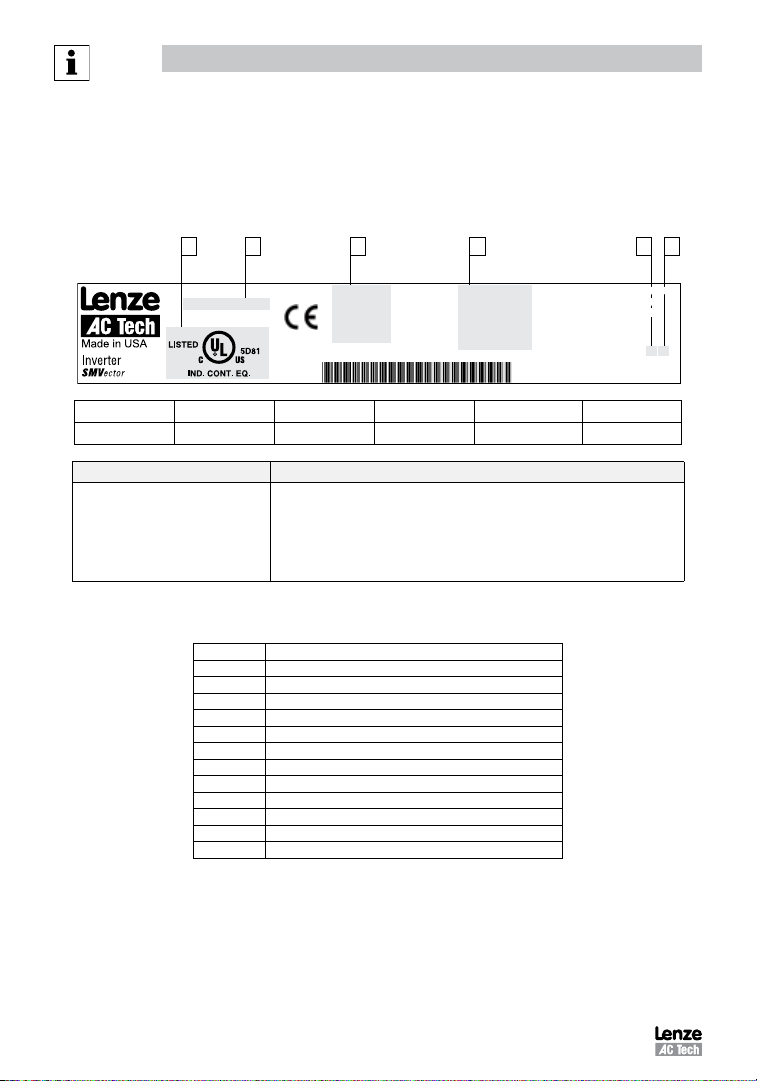
These instructions are only valid for SMV frequency inverters with software revision 4.23 or higher
For version 4.23 software, the drive nameplate illustrated below would show “42” in the “F” location.
Please read these instructions in their entirety before commissioning the drive.
C A B D E F
Type:
ESV751N0 4TXB
Id-No: 00000000
INPUT:
3 (3/PE)
400/480 V
2.9/2.5 A
50-60 HZ
TYPE-4X INDOOR USE ONLY
OUTPUT:
3 (3/PE)
0 - 400/460 V
2.4/2.1 A
0.75 KW/1HP
0 - 500 HZ
For detailed information
refer to instruction
Manual: SV01
000000000000000000
ESV751N0 4TXB000XX## ##
A B C D E F
Certifications Type Input Ratings Output Ratings Hardware Version Software Version
Scope of delivery Important
• 1 SMV Inverter
with EPM installed (see Section 4.4)
• 1 Operating Instructions manual
After receipt of the delivery, check immediately whether the items delivered match
the accompanying papers. Lenze AC Tech does not accept any liability for deficiencies
claimed subsequently.
Claim:
• visible transport damage immediately to the forwarder.
• visible deficiencies /incompleteness immediately to your Lenze AC Tech representative
Related Documents
The documentation listed herein contains information relevant to the operation of the SMVector frequency inverter. To obtain the latest
documentation, visit the Technical Library at http://www.lenzeamericas.com.
Document # Description
CMVINS01 SMVector Communications Module Installation Instruction
CMVMB401 SMVector ModBus RTU over RS485 Communications Reference Guide
CMVLC401 SMVector Lecom Communications Reference Guide
CMVCAN01 SMVector CANopen Communications Reference Guide
CMVDVN01 SMVector DeviceNet Communications Reference Guide
CMVETH01 SMVector EtherNet/IP Communications Reference Guide
CMVPFB01 SMVector PROFIBUS Communications Reference Guide
ALSV01 SMVector Additional I/O Module Installation and Operation Manual
DBV01 SMVector Dynamic Braking
PTV01 SMVector Potentiometer Install Instructions
RKV01 SMVector ESVZXK1 Remote Keypad
RKVU01 SMVector ESVZXH0 Remote Keypad (for NEMA 1 15-60HP (11-45kW) Drives)
Copyright © 2006 Lenze AC Tech Corporation
All rights reserved. No part of this manual may be reproduced or transmitted in any form without written permission from Lenze AC Tech
Corporation. The information and technical data in this manual are subject to change without notice. Lenze AC Tech Corporation makes no
warranty of any kind with respect to this material, including, but not limited to, the implied warranties of its merchantability and fitness for a
given purpose. Lenze AC Tech Corporation assumes no responsibility for any errors that may appear in this manual.
All information given in this documentation has been carefully selected and tested for compliance with the hardware and software described.
Nevertheless, discrepancies cannot be ruled out. Lenze AC Tech does not accept any responsibility nor liability for damages that may occur.
Any necessary corrections will be implemented in subsequent editions. This document is printed in the United States
2
SV01M
Page 4

Safety Information
1 Safety Information
General
Some parts of Lenze AC Tech controllers can be electrically live and some surfaces can be hot. Non-authorized removal
of the required cover, inappropriate use, and incorrect installation or operation creates the risk of severe injury to
personnel and/or damage to equipment.
All operations concerning transport, installation, and commissioning as well as maintenance must be carried out by
qualified, skilled personnel who are familiar with the installation, assembly, commissioning, and operation of variable
frequency drives and the application for which it is being used.
Installation
Ensure proper handling and avoid excessive mechanical stress. Do not bend any components and do not change any
insulation distances during transport, handling, installation or maintenance. Do not touch any electronic components
or contacts. This drive contains electrostatically sensitive components, which can easily be damaged by inappropriate
handling. Static control precautions must be adhered to during installation, testing, servicing and repairing of this drive
and associated options. Component damage may result if proper procedures are not followed.
To ensure proper operation, do not install the drive where it is subjected to adverse environmental conditions such as
combustible, oily, or hazardous vapors; corrosive chemicals; excessive dust, moisture or vibration; direct sunlight or
extreme temperatures.
This drive has been tested by Underwriters Laboratory (UL) and is UL Listed in compliance with the UL508C Safety
Standard. This drive must be installed and configured in accordance with both national and international standards.
Local codes and regulations take precedence over recommendations provided in this and other Lenze AC Tech
documentation.
The SMVector drive is considered a component for integration into a machine or process. It is neither a machine nor
a device ready for use in accordance with European directives (reference machinery directive and electromagnetic
compatibility directive). It is the responsibility of the end user to ensure that the machine meets the applicable
standards.
Electrical Connection
When working on live drive controllers, applicable national safety regulations must be observed. The electrical
installation must be carried out according to the appropriate regulations (e.g. cable cross-sections, fuses, protective
earth [PE] connection). While this document does make recommendations in regards to these items, national and local
codes must be adhered to.
The documentation contains information about installation in compliance with EMC (shielding, grounding, filters and
cables). These notes must also be observed for CE-marked controllers. The manufacturer of the system or machine is
responsible for compliance with the required limit values demanded by EMC legislation.
Application
The drive must not be used as a safety device for machines where there is a risk of personal injury or material damage.
Emergency Stops, over-speed protection, acceleration and deceleration limits, etc must be made by other devices to
ensure operation under all conditions.
The drive does feature many protection devices that work to protect the drive and the driven equipment by generating
a fault and shutting the drive and motor down. Mains power variances can also result in shutdown of the drive. When
the fault condition disappears or is cleared, the drive can be configured to automatically restart, it is the responsibility
of the user, OEM and/or integrator to ensure that the drive is configured for safe operation.
SV01M
3
Page 5
Safety Information
Explosion Proof Applications
Explosion proof motors that are not rated for inverter use lose their certification when used for variable speed. Due to
the many areas of liability that may be encountered when dealing with these applications, the following statement of
policy applies:
Lenze AC Tech Corporation inverter products are sold with no warranty of fitness for a particular purpose or warranty
of suitability for use with explosion proof motors. Lenze AC Tech Corporation accepts no responsibility for any direct,
incidental or consequential loss, cost or damage that may arise through the use of AC inverter products in these
applications. The purchaser expressly agrees to assume all risk of any loss, cost or damage that may arise from such
application.
Operation
Systems including controllers must be equipped with additional monitoring and protection devices according to the
corresponding standards (e.g. technical equipment, regulations for prevention of accidents, etc.). The controller may be
adapted to your application as described in this documentation.
DANGER!
• After the controller has been disconnected from the supply voltage, live components and power connection
must not be touched immediately, since capacitors could be charged. Please observe the corresponding notes
on the controller.
• Close all protective covers and doors prior to and during operation.
• Do not cycle input power to the controller more than once every two minutes.
• For SMVector models that are equipped with a Disconnect Switch (11th character in model number is L or M),
the Disconnect Switch is intended as a motor service disconnect and does not provide branch circuit protection
to the inverter or motor. When servicing the motor, it is necessary to wait 3 minutes after turning this switch
to the off position before working on motor power wiring as the inverter stores electrical power. To service the
inverter, it is necessary to remove mains ahead of the drive and wait 3 minutes.
Safety Notifications
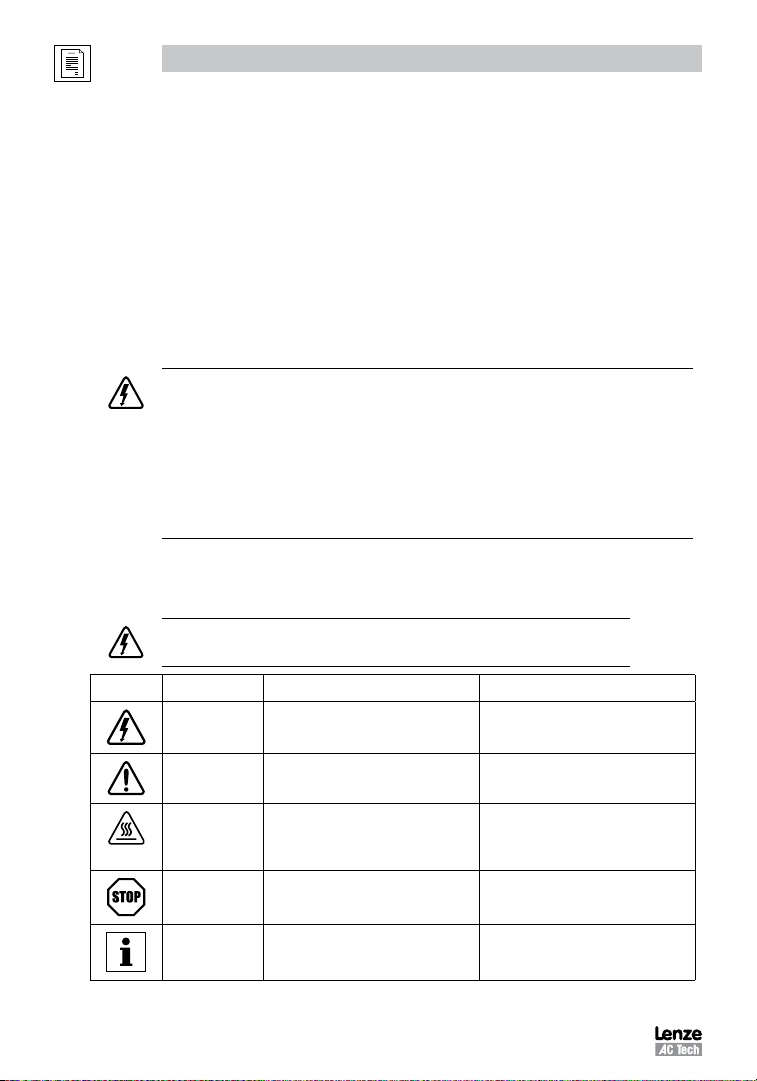
All safety information given in these Operating Instructions includes a visual icon, a bold signal word and a
description.
Signal Word! (characterizes the severity of the danger)
NOTE (describes the danger and informs on how to proceed)
Signal Word Meaning Consequences if ignored
Icon
DANGER!
WARNING!
WARNING!
Hot Surface
STOP!
NOTE
4
Warns of hazardous electrical voltage. Death or severe injuries.
Warns of potential, very hazardous
situations.
Warns of hot surface and risk of burns.
Labels may be on or inside the equipment
to alert people that surfaces may reach
dangerous temperatures.
Warns of potential damage to material and
equipment.
Designates a general, useful note. None. If observed, then using the controller/
Risk of severe injury to personnel and/or
damage to equipment.
Risk of severe injury to personnel.
Damage to the controller/drive or its
environment.
drive system is made easier.
SV01M
Page 6
Safety Information
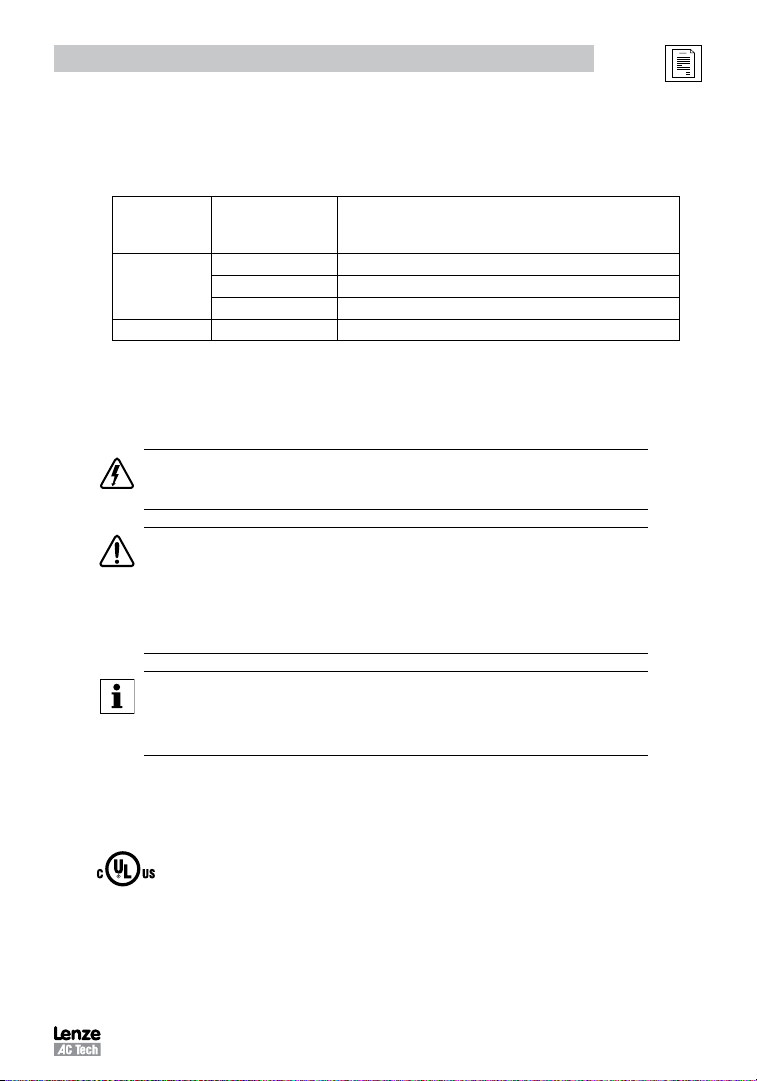
Harmonics Notification in accordance with EN 61000-3-2, EN 61000-3-12:
Operation in public supply networks (Limitation of harmonic currents i.a.w. EN 61000-3-2, Electromagnetic Compatibility
(EMC) Limits). Limits for harmonic current emissions (equipment input current up to 16A/phase).
Directive Total Power
EN 61000-3-2
EN 61000-3-12
connected to Mains
(public supply)
< 0.5kW with mains choke
0.5 ... 1kW with active filter
> 1kW complies without additional measures
16 ... 75amp Additional measures are required for compliance with the standard
(1) For compliance with EMC regulations, the permissable cable lengths may change.
(2) The additional measures described only ensure that the controller meets the requirements of the EN 61000-3-2.
The machine/system manufacturer is responsible for the machine’s compliance with the regulations.
Safety Information in accordance with EN 61800-5-1:
DANGER! Hazard of Electrical Shock
Capacitors retain charge for approximately 180 seconds after power is removed. Allow at least
3 minutes for discharge of residual charge before touching the drive.
WARNING!
• This product can cause a d.c. current in the PE conductor. Where a residual current-operated (RCD) or
monitoring (RCM) device is used for protection in case of direct or indirect contact, only an RCD or RCM
Type B is allowed on the supply side of this product.
• Leakage Current may exceed 3.5mA AC. The minimum size of the PE conductor shall comply with local
safety regulations for high leakage current equipment.
• In a domestic environment, this product may cause radio interference in which case supplementary
mitigation measures may be required.
Additional Measures Required for Compliance
(2)
NOTE
Control and communications terminals provide reinforced insulation (i.e. considered SELV or PELV, providing
protection in case of direct contact) when the drive is connected to a power system rated up to 300VAC between
phase to ground (PE) and the applied voltage on Terminals 16 and 17 is less than 150VAC between phase to
ground. Otherwise, control and communications terminals provide basic insulation.
Safety Information in accordance with UL:
Note for UL approved system with integrated controllers: UL warnings are notes which apply to UL systems. The
documentation contains special information about UL.
• Suitable for use on a circuit capable of delivering not more than 200,000 rms symmetrical amperes, at
the maximum voltage rating marked on the drive.
Warnings!
Torque Requirements (in accordance with UL) are listed in section 3.2.1, Power Connections.
• Use minimum 75 °C copper wire only.
• Shall be installed in a pollution degree 2 macro-environment.
• NEMA 1 (IP31) models shall be installed in a pollution degree 2 macro-environment.
• All models are suitable for installation in a compartment handling Conditioned Air (i.e., plenum rated).
SV01M
5
Page 7
Technical Data
2 Technical Data
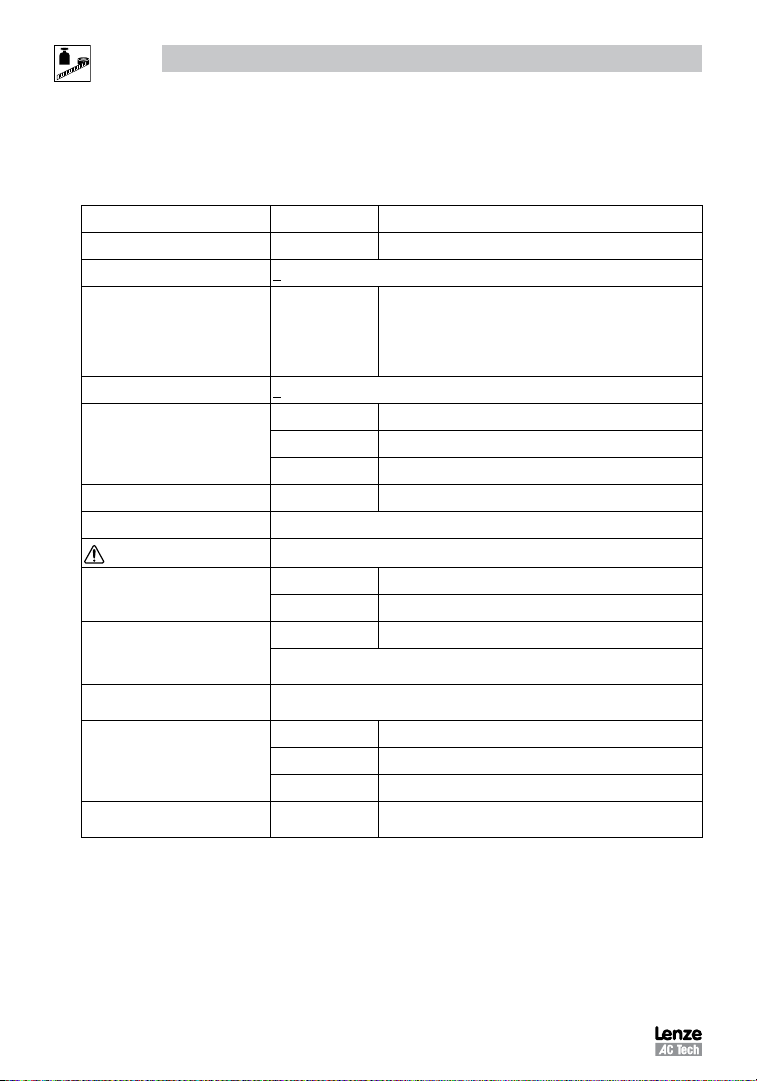
2.1 Standards and Application Conditions
Conformity
Approvals
Input voltage phase imbalance
Supported Power Systems
Humidity
Temperature range
Installation height
Vibration resistance
Earth leakage current
Max Permissable Cable Length
Enclosure
Protection measures against
Compliance with EN 61000-3-2
Requirements
Compliance with EN 61000-3-12
Requirements
Operation in public supply networks (Limitation of harmonic currents i.a.w. EN 61000-3-2, Electromagnetic Compatibility
(EMC) Limits). Limits for harmonic current emissions (equipment input current up to 16A/phase).
(1) The stated cable lengths are permissible at default carrier frequencies (refer to parameter P166).
(2) The additional measures described only ensure that the controller meets the requirements of the EN 61000-3-2.
(2)
(2)
The machine/system manufacturer is responsible for the machine’s compliance with the regulations.
CE Low Voltage (2006/95/EC) & EMC (2004/108/EC) Directives
UL508C Underwriters Laboratories -Power Conversion Equipment
< 2%
− For central grounded systems, operation is permitted
TT
TN
< 95% non-condensing
Transport -25 … +70°C
Storage -20 … +70°C
Operation -10 … +55°C (with 2.5%/°C current derating above +40°C)
0 - 4000m a.m.s.l. (with 5%/1000 m current derating above 1000m a.m.s.l.)
acceleration resistant up to 1.0g
> 3.5 mA to PE
<= 4.0 Hp (3.0 kW) 30 meters shielded, 60 meters un-shielded
(1)
=> 5.0 Hp (3.7 kW) 50 meters shielded, 100 meters un-shielded.
IP31/NEMA 1 IP65/NEMA 4X
NEMA 1 and NEMA 4X model enclosures are plenun rated in accordance with UL
508C and are suitable for installation in a compartment handling conditioned air.
short circuit, earth fault, phase loss, over voltage, under voltage,
motor stalling, over temperature, motor overload
< 0.5kW with mains choke
0.5 ... 1kW with active filter
> 1kW without additional measures
16 ... 75amp Additional measures required for compliance with EN 61000-3-12
without restrictions.
− For corner grounded 400/500V systems, operation is
possible but reinforced insulation to control circuits is
compromised.
6
SV01M
Page 8
Technical Data
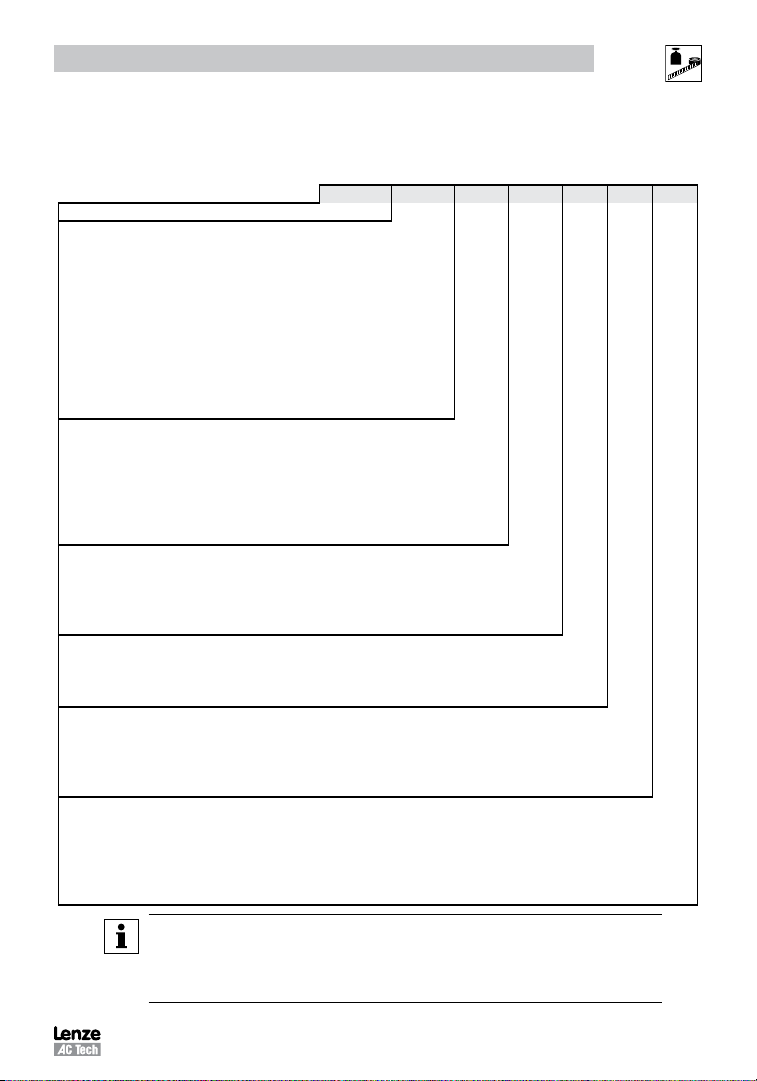
2.2 SMV Type Number Designation
The table herein describes the Type numbering designation for the SMVector Inverter models.
Electrical Products in the SMVector Series
Power Rating in kW:
251 = 0.25kW (0.33HP) 113 = 11.0kW (15HP)
371 = 0.37kW (0.5HP) 153 = 15.0kW (20HP)
751 = 0.75kW (1HP) 183 = 18.5kW (25HP)
112 = 1.1kW (1.5HP) 223 = 22.0kW (30HP)
152 = 1.5kW (2HP) 303 = 30.0kW (40HP)
222 = 2.2kW (3HP) 373 = 37.5kW (50HP)
302 = 3.0kW (4HP) 453 = 45.0kW (60HP)
402 = 4.0kW (5HP)
552 = 5.5kW (7.5HP)
752 = 7.5kW (10HP)
Installed I/O & Communication Module(s):
C_ = CANopen (Available all models) The “_” blank can be:
D_ = DeviceNet (Available all models) 0 = Standard Keypad
E_ = Ethernet/IP, (Available all models)
R_ = RS-485 / ModBus /Lecom (Avail all models)
P_ = ProfiBus-DP (Available all models)
N_ = No Communications installed
Input Voltage:
1 = 120 VAC (doubler output) or 240 VAC
2 = 240 VAC
4 = 400/480 VAC
6 = 600 VAC
Input Phase:
S = Single Phase Input only
Y = Single or Three Phase Input
T = Three Phase Input only
Input Line Filter
F = Integral EMC Filter
L = Integral EMC Filter and Integrated Disconnect Switch (NEMA 4X/IP65 Models only)
M = Integrated Disconnect Switch (NEMA 4X/IP65 Models only)
X = No EMC Filter/ No Disconnect Switch
Enclosure:
B = NEMA 1/IP31; Indoor only
C = NEMA 4X/IP65; Indoor only; Convection cooled
D = NEMA 4X/IP65; Indoor only; Fan cooled
E = NEMA 4X/IP65; Indoor/Outdoor; Convection cooled
F = NEMA 4X/IP65; Indoor/Outdoor; Fan cooled
NOTE
Prior to installation make sure the enclosure is suitable for the end-use environment
Variables that influence enclosure suitability include (but are not limited to) temperature, airborne
contaminates, chemical concentration, mechanical stress and duration of exposure (sunlight,
wind, precipitation).
ESV 152 N0 2 T X B
SV01M
7
Page 9
Technical Data
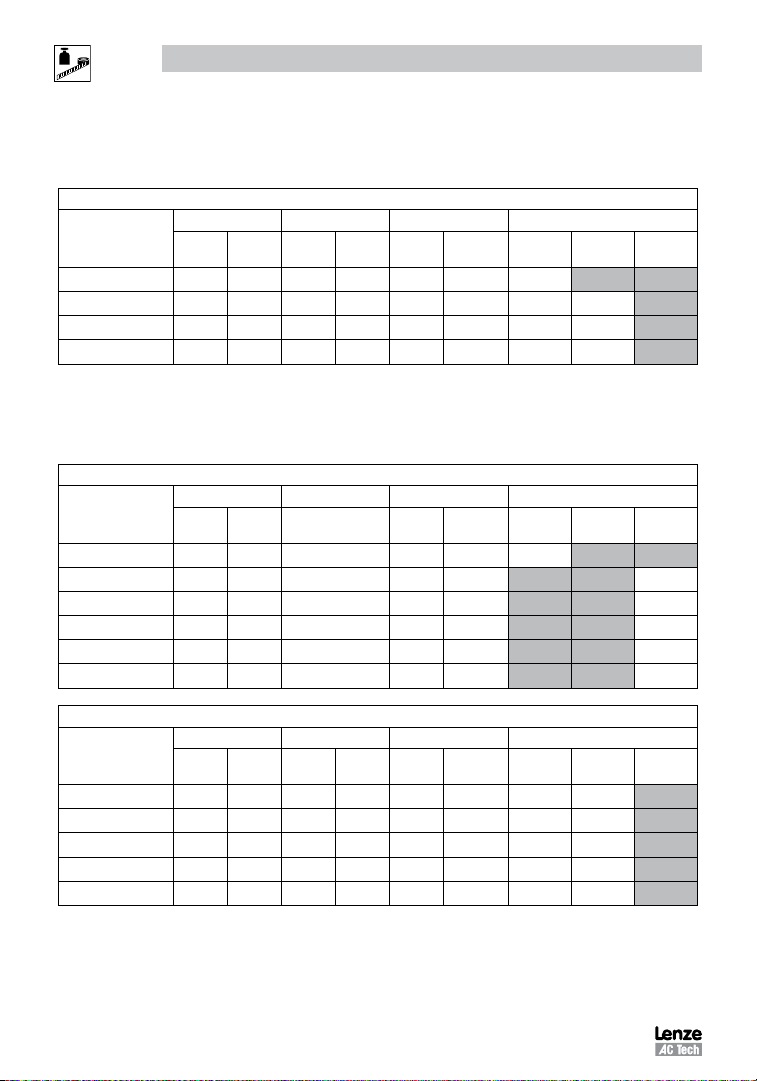
2.3 Ratings
120V / 240VAC Models
Mains = 120V Single Phase (1/N/PE) (90...132V), 240V Single Phase (2/PE) (170...264V); 48...62Hz
Type
ESV251--1S-- 0.33 0.25 6.8 3.4 1.7 200 24
ESV371--1S-- 0.5 0.37 9.2 4.6 2.4 200 32 32
ESV751--1S-- 1 0.75 16.6 8.3 4.2 200 52 41
ESV112--1S-- 1.5 1.1 20 10.0 6.0 200 74 74
NOTES:
Output Current: The Output Current Maximum (%) is a percentage of the Output Current Continuous Amps (In) rating
and is adjustable in parameter P171.
240VAC Models
Type
ESV251--2S-- 0.33 0.25 3.4 1.7 200 20
ESV371--2S-- 0.5 0.37 5.1 2.4 200 30
ESV751--2S-- 1 0.75 8.8 4.2 200 42
ESV112--2S-- 1.5 1.1 12.0 6.0 200 63
ESV152--2S-- 2 1.5 13.3 7.0 200 73
ESV222--2S-- 3 2.2 17.1 9.6 200 97
Power Mains Current Output Current Heat Loss (Watts)
Hp kW
120VA240VACont (In)AMax I%N1/IP31 N4X/IP65
No filter
Mains = 240V Single Phase (2/PE) (170...264V); 48...62Hz
Power Mains Current Output Current Heat Loss (Watts)
Hp kW
240V
A
)AMax I%N1/IP31 N4X/IP65
Cont (I
n
No filter
N4X/IP65
W/ filter
N4X/IP65
W/ filter
240V Single Phase (2/PE) (170...264V), 240V Three Phase (3/PE) (170...264V); 48...62Hz
Type
ESV371--2Y-- 0.5 0.37 5.1 2.9 2.4 200 27 26
ESV751--2Y-- 1 0.75 8.8 5.0 4.2 200 41 38
ESV112--2Y-- 1.5 1.1 12.0 6.9 6.0 200 64 59
ESV152--2Y-- 2 1.5 13.3 8.1 7.0 200 75 69
ESV222--2Y-- 3 2.2 17.1 10.8 9.6 200 103 93
8
Power Mains Current Output Current Heat Loss (Watts)
Hp kW
1~ (2/PE)A3~ (3/PE)
A
Cont (In)AMax I%N1/IP31 N4X/IP65
SV01M
No filter
N4X/IP65
W/ filter
Page 10
Technical Data
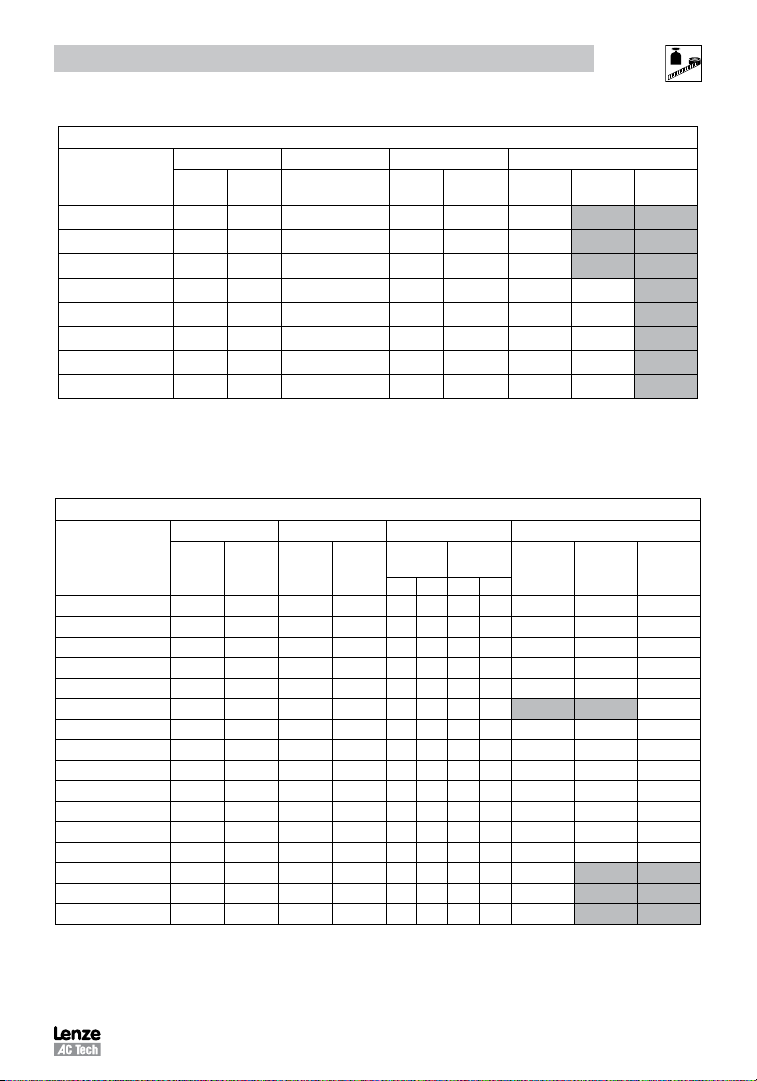
240V Three Phase (3/PE) (170...264V); 48...62Hz
Type
ESV112--2T-- 1.5 1.1 6.9 6 200 64
ESV152--2T-- 2 1.5 8.1 7 200 75
ESV222--2T-- 3 2.2 10.8 9.6 200 103
ESV402--2T-- 5 4.0 18.6 16.5 200 154 139
ESV552--2T-- 7.5 5.5 26 23 200 225 167
ESV752--2T-- 10 7.5 33 29 200 274 242
ESV113--2T-- 15 11 48 42 180 485 468
ESV153--2T-- 20 15 59 54 180 614 591
NOTES:
Output Current: The Output Current Maximum (%) is a percentage of the Output Current Continuous Amps (In) rating
and is adjustable in parameter P171.
400...480VAC Models
400 ... 480V Three Phase (3/PE) (400V: 340...440V), (480V: 340...528V); 48...62Hz
Type
ESV371--4T-- 0.5 0.37 1.7 1.5 1.3 1.1 175 200 23 21 25
ESV751--4T-- 1 0.75 2.9 2.5 2.4 2.1 175 200 37 33 37
ESV112--4T-- 1.5 1.1 4.2 3.6 3.5 3.0 175 200 48 42 46
ESV152--4T-- 2 1.5 4.7 4.1 4.0 3.5 175 200 57 50 54
ESV222--4T-- 3 2.2 6.1 5.4 5.5 4.8 175 200 87 78 82
ESV302--4T-- 4 3.0 8.3 7.0 7.6 6.3 175 200 95
ESV402--4T-- 5 4.0 10.6 9.3 9.4 8.2 175 200 128 103 111
ESV552--4T-- 7.5 5.5 14.2 12.4 12.6 11.0 175 200 178 157 165
ESV752--4T-- 10 7.5 18.1 15.8 16.1 14.0 175 200 208 190 198
ESV113--4T-- 15 11 27 24 24 21 155 180 418 388 398
ESV153--4T-- 20 15 35 31 31 27 155 180 493 449 459
ESV183--4T-- 25 18.5 44 38 39 34 155 180 645 589 600
ESV223--4T-- 30 22 52 45 46 40 155 180 709 637 647
ESV303--4T-- 40 30 68 59 60 52 155 180 1020
ESV373--4T-- 50 37.5 85 74 75 65 155 180 1275
ESV453--4T-- 60 45 100 87 88 77 155 180 1530
NOTES:
Output Current: The Output Current Maximum (%) is a percentage of the Output Current Continuous Amps (In) rating
and is adjustable in parameter P171.
For 400...480 VAC models, the output current maximum (%) in the 400V column is used when P107 = 0
For 400...480 VAC models, the output current maximum (%) in the 480V column is used when P107 = 1
Power Mains Current Output Current Heat Loss (Watts)
Hp kW
Power Mains Current Output Current Heat Loss (Watts)
Hp kW
240V
A
400VA480VACont (In)AMax I%N1/IP31 N4X/IP65
)AMax I%N1/IP31 N4X/IP65
Cont (I
n
400V 480V 400V 480V
No filter
No filter
SV01M
N4X/IP65
W/ filter
N4X/IP65
W/ filter
9
Page 11
Technical Data
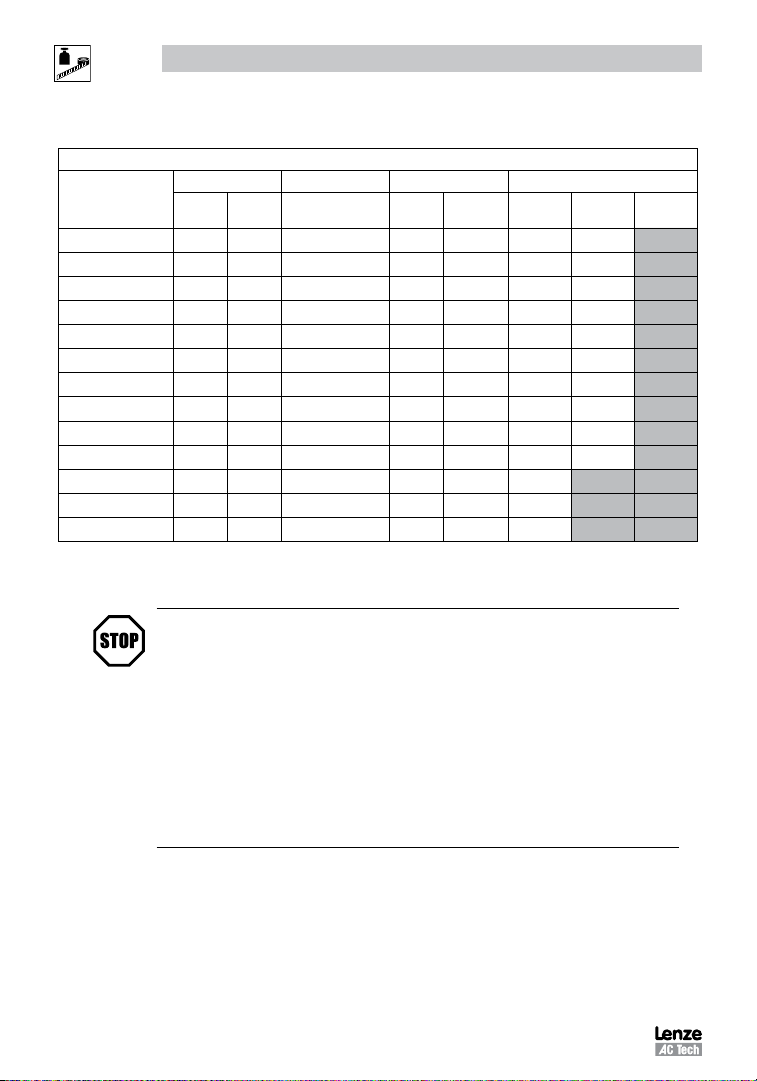
600VAC Models
600V Three Phase (3/PE) (425...660V); 48...62Hz
Type
ESV751--6T-- 1 0.75 2 1.7 200 37 31
ESV152--6T-- 2 1.5 3.2 2.7 200 51 43
ESV222--6T-- 3 2.2 4.4 3.9 200 68 57
ESV402--6T-- 5 4 6.8 6.1 200 101 67
ESV552--6T-- 7.5 5.5 10.2 9 200 148 116
ESV752--6T-- 10 7.5 12.4 11 200 172 152
ESV113--6T-- 15 11 19.7 17 180 380 356
ESV153--6T-- 20 15 25 22 180 463 431
ESV183--6T-- 25 18.5 31 27 180 560 519
ESV223--6T-- 30 22 36 32 180 640 592
ESV303--6T-- 40 30 47 41 180 930
ESV373--6T-- 50 37.5 59 52 180 1163
ESV453--6T-- 60 45 71 62 180 1395
NOTES:
Output Current: The Output Current Maximum (%) is a percentage of the Output Current Continuous Amps (In) rating
and is adjustable in parameter P171.
Power Mains Current Output Current Heat Loss (Watts)
Hp kW A
Cont (In)AMax I%N1/IP31 N4X/IP65
No filter
STOP!
• For installations above 1000m a.m.s.l., derate In by 5% per 1000m, do not
exceed 4000m a.m.s.l.
• Operation above 40°C, derate In by 2.5% per °C, do not exceed 55°C.
N4X/IP65
W/ filter
Output Current (In) derating for Carrier Frequency (P166) for NEMA 1 (IP31) Models:
- If P166=2 (8 kHz), derate In to 92% of drive rating
- If P166=3 (10 kHz), derate In to 84% of drive rating
Output Current (In) derating for Carrier Frequency (P166) for NEMA 4X (IP65) Models:
- If P166=1 (6 kHz), derate In to 92% of drive rating
- If P166=2 (8 kHz), derate In to 84% of drive rating
- If P166=3 (10 kHz), derate In to 76% of drive rating
10
SV01M
Page 12
3 Installation
Q
3.1 Dimensions and Mounting
WARNING!
Drives must not be installed where subjected to adverse environmental conditions such as: combustible, oily, or
hazardous vapors; corrosive chemicals; excessive dust, moisture or vibration; direct sunlight or extreme temperatures.
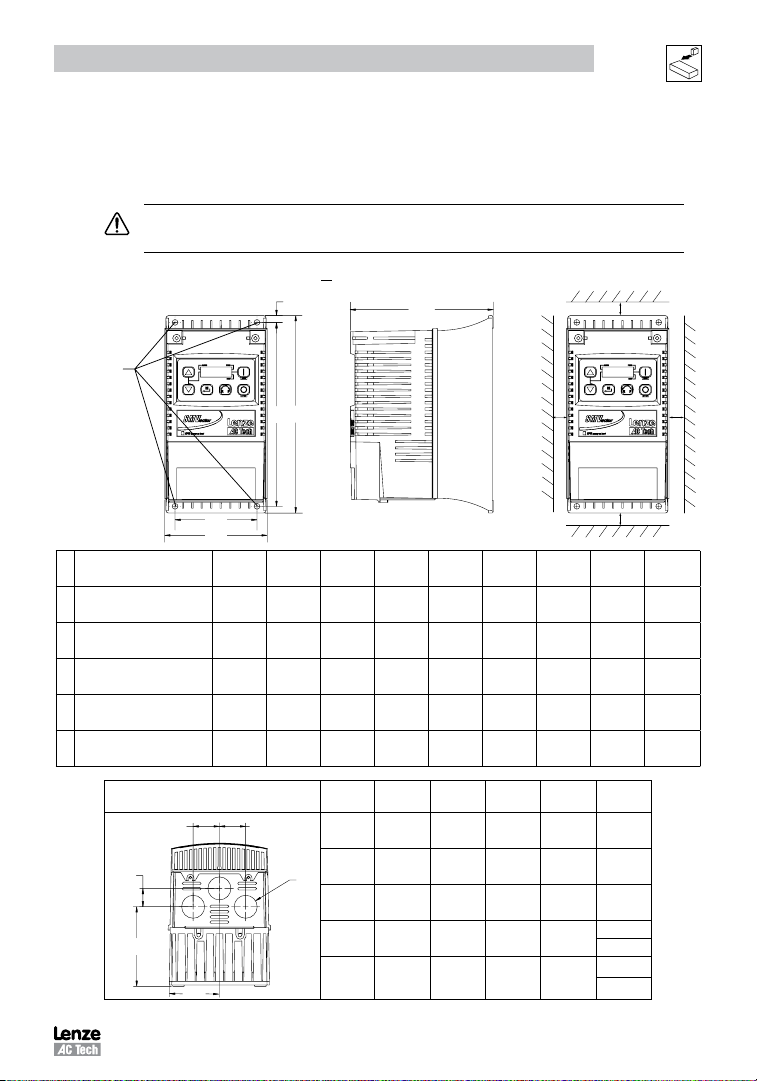
3.1.1 NEMA 1 (IP31) Models < 30HP (22kW)
Mounting Screws
4 x #10
18 lb-in
4 x M5
( )
20 Nm
b2
b1
b
c
Installation
s2
s1 s1
a1
a
a
Type
ESV251~~~~~B; ESV371~~~~~B
G1
ESV751~~~~~B
ESV112~~~~~B; ESV152~~~~~B
G2
ESV222~~~~~B
G3 ESV402~~~~~B 3.90 (99) 3.12 (79) 7.52 (191) 7.00 (178) 0.30 (8) 5.80 (147) 0.6 (15) 2.0 (50) 3.2 (1.5)
H1 ESV552~~~~~B; ESV752~~~~~B 5.12 (130) 4.25 (108) 9.83 (250) 9.30 (236) 0.26 (7) 6.30 (160) 0.6 (15) 2.0 (50) 6.0 (2.0)
ESV113~~~~~B; ESV153~~~~~B
J1
ESV183~~~~~B; ESV223~~~~~B
in (mm)
3.90 (99) 3.12 (79) 7.48 (190) 7.00 (178) 0.24 (6) 4.35 (111) 0.6 (15) 2.0 (50) 2.0 (0.9)
3.90 (99) 3.12 (79) 7.52 (191) 7.00 (178) 0.26 (7) 5.45 (138) 0.6 (15) 2.0 (50) 2.8 (1.3)
6.92 (176) 5.75 (146) 12.50 (318) 11.88 (302) 0.31 (8) 8.09 (205) 0.6 (15) 2.0 (50) 13.55 (6.15)
a1
in (mm)b in (mm)
Conduit Hole Dimensions Type
Q
P1
P
N
S
b1
in (mm)c in (mm)
N
b2
P1
in (mm)Q in (mm)S in (mm)
in (mm)
in (mm)
in (mm)P in (mm)
G1 1.84 (47) 1.93 (49) .70 (18) 1.00 (25) .88 (22)
G2 1.84 (47) 3.03 (77) .70 (18) 1.00 (25) .88 (22)
G3 1.84 (47) 3.38 (86) .70 (18) 1.00 (25) .88 (22)
H1 2.46 (62) 3.55 (90) .13 (3) 1.38 (35)
J1 3.32 (84) 4.62 (117) .73 (19) 1.40 (36)
s1
s2
s2
in (mm)m lb (kg)
1.13 (29)
.88 (22)
1.31 (33)
.88 (22)
SV01M
11
Page 13
Installation
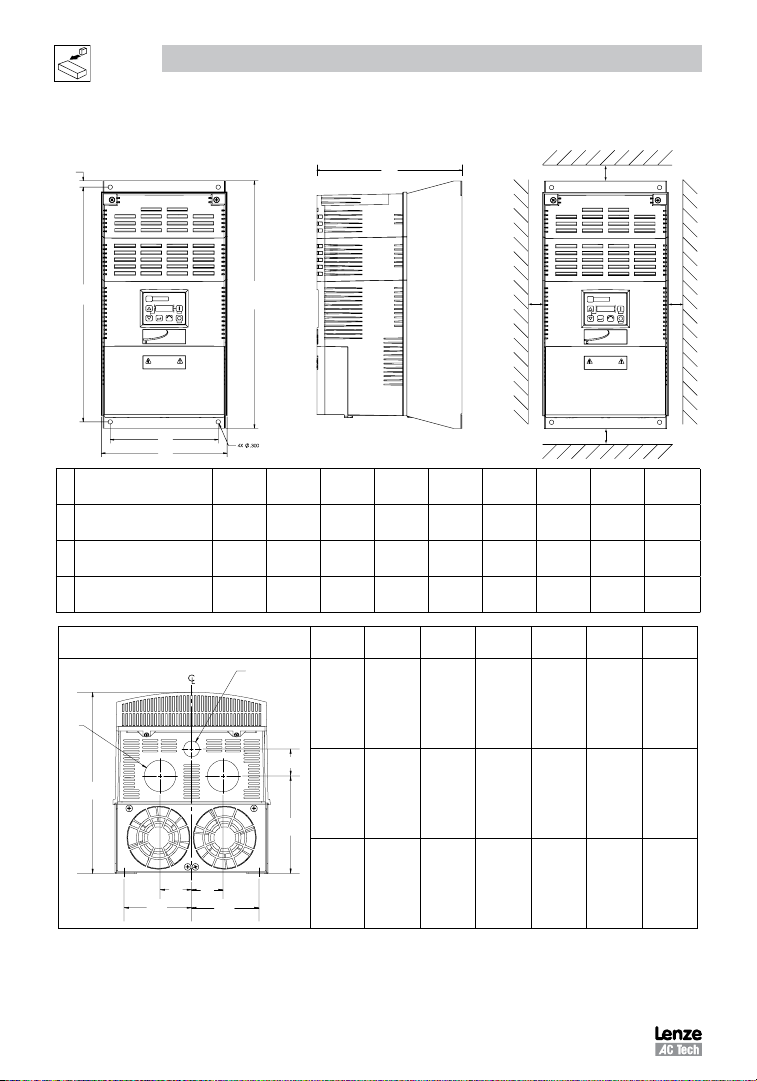
3.1.2 NEMA 1 (IP31) Models > 30HP (22kW)
b2
b1
SMV
a1
a
ESV303~~4~~B;
K1
ESV303~~6~~B
ESV373~~4~~B;
K2
ESV373~~6~~B
ESV453~~4~~B
K3
ESV453~~6~~b
Type
in (mm)
8.72 (221) 7.50 (190) 14.19 (360) 13.30 (338) 0.45 (11.4) 10.07 (256) 0.6 (15) 2.0 (50) 24 (10.9)
8.72 (221) 7.50 (190) 17.19 (436) 16.30 (414) 0.45 (11.4) 10.07 (256) 0.6 (15) 2.0 (50) 31 (14.1)
8.72 (221) 7.50 (190) 20.19 (513) 19.30 (490) 0.45 (11.4) 10.07 (256) 0.6 (15) 2.0 (50) 35 (15.9)
Conduit Hole Dimensions Type
S
b
a
in (mm)b in (mm)
S1
c
s1
a1
b1
in (mm)
N
in (mm)P in (mm)
K1 3.75 (95) 5.42 (137) 1.50 (38.1) 1.75 (44.4) 1.75 (44.4) 0.875 (22.2)
b2
in (mm)c in (mm)
P1
in (mm)Q in (mm)S in (mm)
s1
in (mm)
s2
SMV
s2
s2
in (mm)m lb (kg)
in (mm)
s1
S1
P1
C
Q
Q
N
N
12
K2 3.75 (95) 5.42 (137) 1.50 (38.1) 1.75 (44.4) 1.75 (44.4) 0.875 (22.2)
P
K3 3.75 (95) 5.42 (137) 1.50 (38.1) 1.75 (44.4) 1.75 (44.4) 0.875 (22.2)
SV01M
Page 14
Installation
Q
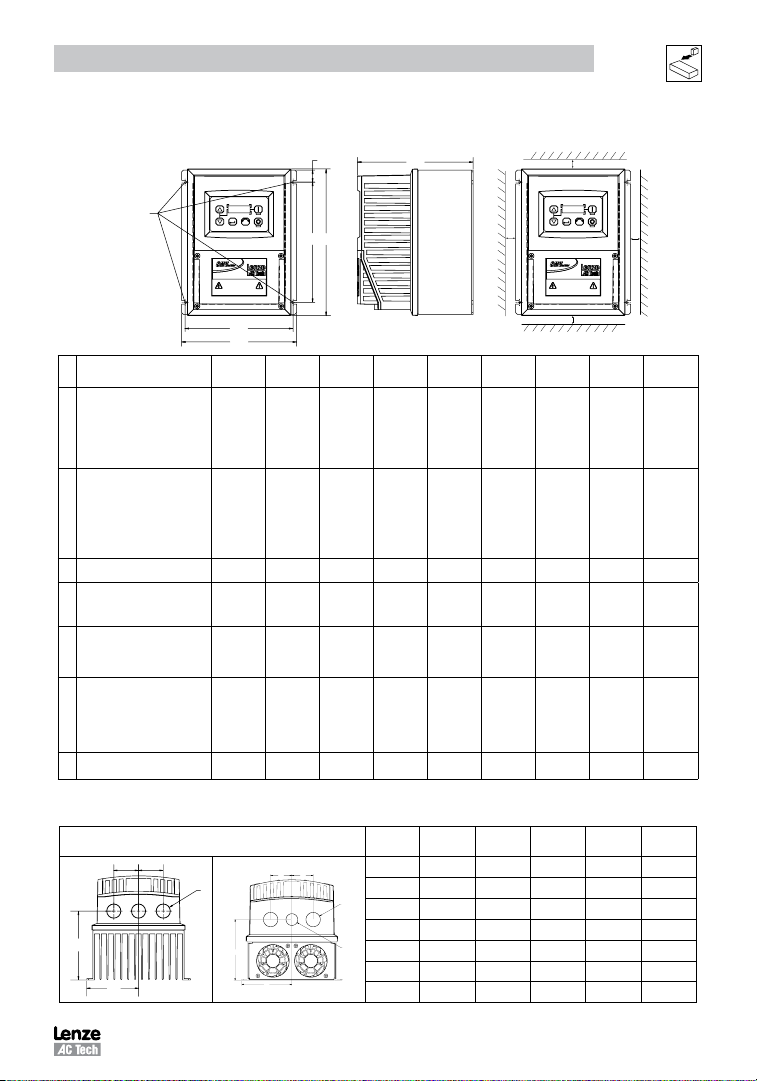
3.1.3 NEMA 4X (IP65) Models
b2
Mounting Screws
4 x #8 32
10 lb in
4 x M4
( )
1 2 Nm
Type
ESV371N01SX_; ESV751N01SX_;
ESV371N02YX_; ESV751N02YX_;
ESV371N04TX_; ESV751N04TX_;
R1
ESV751N06TX_; ESV371N02SF_;
ESV751N02SF_; ESV371N04TF_;
ESV751N04TF_;
ESV112N01SX_; ESV112N02YX_;
ESV152N02YX_; ESV112N04TX_;
ESV152N04TX_; ESV222N04TX_;
R2
ESV152N06TX_; ESV222N06TX_;
ESV112N02SF_; ESV152N02SF_;
ESV112N04TF_; ESV152N04TF_;
ESV222N04TF_; ESV302N04TF_;
a1
a
a
in (mm)
6.28 (160) 5.90 (150) 8.00 (203) 6.56 (167) 0.66 (17) 4.47 (114) 2.00 (51) 2.00 (51) 3.6 (1.63)
6.28 (160) 5.90 (150) 8.00 (203) 6.56 (167) 0.66 (17) 6.31 (160) 2.00 (51) 2.00 (51) 5.9 (2.68)
b
b1
a1
in (mm)b in (mm)
S1 ESV222N02YX_; ESV222N02SF_ 7.12 (181) 6.74 (171) 8.00 (203) 6.56 (167) 0.66 (17) 6.77 (172) 2.00 (51) 2.00 (51) 7.1 (3.24)
ESV552N02TX~; ESV752N02TX~
T1
ESV752N04TX~; ESV752N06TX~;
ESV752N04TF~
ESV402N02TX_; ESV402N04TX_;
ESV552N04TX_; ESV402N06TX_
V1
ESV552N06TX_; ESV402N04TF_;
ESV552N04TF_
ESV113N02TX~; ESV153N02TX~
ESV113N04TX~; ESV153N04TX~
ESV113N04TF~; ESV153N04TF~
W1
ESV113N06TX~; ESV153N06TX~
ESV183N04TX~; ESV183N04TF~
ESV183N06TX~
ESV223N04TX~; ESV223N04TF~
X1
ESV223N06TX~
_ = Last digit of part number: C = N4X Indoor (convection cooled) ~ = Last digit of part number: D = N4X Indoor (fan cooled)
E = N4X In/Outdoor (convection cooled) F = N4X In/Outdoor (fan cooled)
8.04 (204) 7.56 (192) 10.00 (254) 8.04 (204) 0.92 (23) 8.00 (203) 4.00 (102) 4.00 (102) 10.98 (4.98)
8.96 (228) 8.48 (215) 10.00 (254) 8.04 (204) 0.92 (23) 8.00 (203) 4.00 (102) 4.00 (102) 11.58 (5.25)
9.42 (240) 8.94 (228) 14.50 (368) 12.54 (319) 0.92 (24) 9.45 (241) 4.00 (102) 4.00 (102) 22.0 (10.0)
9.42 (240) 8.94 (228) 18.5 (470) 16.54 (420) 0.92 (24) 9.45 (241) 4.00 (102) 4.00 (102) 25.5 (11.6)
Conduit Hole Dimensions Type
Q
S
P
N
Q
Q
S
P
N
S1
c
b1
in (mm)
b2
in (mm)c in (mm)
N
in (mm)P in (mm)Q in (mm)S in (mm)
s2
s1
s2
s1
in (mm)
s1
s2
in (mm)m lb (kg)
in (mm)
R1 3.14 (80) 2.33 (59) 1.50 (38) .88 (22) n/a
R2 3.14 (80) 4.18 (106) 1.50 (38) .88 (22) n/a
S1 3.56 (90) 4.63 (118) 1.50 (38) .88 (22) n/a
T1 4.02 (102) 5.00 (127) 1.85 (47) 1.06 (27) n/a
V1 4.48 (114) 5.00 (127) 1.85 (47) 1.06 (27) n/a
W1 4.71 (120) 5.70 (145) 2.00 (51) 1.375 (35) 1.125 (28)
X1 4.71 (120) 5.70 (145) 2.00 (51) 1.375 (35) 1.125 (28)
S1
SV01M
13
Page 15
Installation
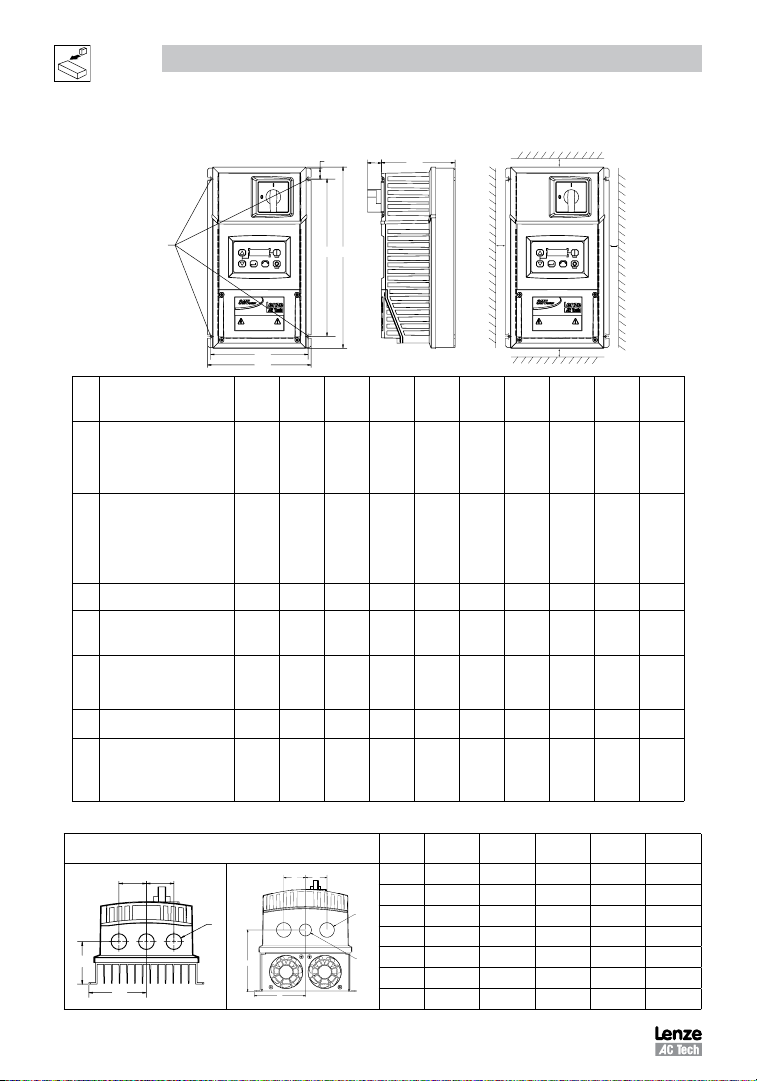
3.1.4 NEMA 4X (IP65) Models with Disconnect Switch
b2
c1
c
Mounting Screws
4 x #8 32
10 lb in
4 x M4
( )
1 2 Nm
Type
ESV371N01SM_; ESV371N02YM_;
ESV371N02SL_; ESV371N04TM_;
ESV371N04TL_; ESV371N06TM_;
AA1
ESV751N01SM_; ESV751N02YM_;
ESV751N02SL_; ESV751N04TM_;
ESV751N04TL_; ESV751N06TM_;
ESV112N01SM_; ESV112N02YM_;
ESV112N02SL_; ESV112N04TM_;
ESV112N04TL_; ESV152N02YM_;
AA2
ESV152N02SL_; ESV152N04TM_;
ESV152N04TL_; ESV152N06TM_;
ESV222N04TM_; ESV222N04TL_;
ESV222N06TM_; ESV302N04TL_;
AD1 ESV222N02SL_; ESV222N02YM_;
ESV552N02TM~; ESV752N02TM~
AB1
ESV752N04TM~; ESV752N06TM~;
ESV752N04TL~
ESV402N02TM_; ESV402N04TM_;
ESV552N04TM_; ESV402N06TM_;
AC1
ESV552N06TM_; ESV402N04TL_;
ESV552N04TL_
ESV113N04TM~; ESV153N04TM~,
AE1
ESV113N06TM~; ESV153N06TM~
ESV113N02TM~; ESV153N02TM~
ESV113N04TL~; ESV153N04TL~
AF1
ESV183N04TL~; ESV223N04TL~
ESV183N04TM~; ESV223N04TM~
ESV183N06TM~; ESV223N06TM~
a
in
(mm)
6.28
(160)
6.28
(160)
7.12
(181)
8.04
(204)
8.96
(228)
9.42
(240)
9.42
(240)
a1
a
a1
in
(mm)
5.90
(150)
5.90
(150)
6.74
(171)
7.56
(192)
8.48
(215)
8.94
(228)
8.94
(228)
b1
b
in
(mm)
10.99
(279)
10.99
(279)
10.99
(279)
13.00
(330)
13.00
(330)
14.50
(368)
18.5
(470)
b
b1
b2
in
(mm)
0.66
(17)
0.66
(17)
0.66
(17)
0.92
(23)
0.92
(23)
0.92
(24)
0.92
(24)
c
in
(mm)
4.47
(114)
6.31
(160)
6.77
(172)
8.00
(203)
8.04
204)
9.45
(241)
9.45
(241)
in
(mm)
9.54
(242)
9.54
(242)
9.54
(242)
11.04
(280)
11.04
(280)
12.54
(319)
16.54
(420)
_ = Last digit of part number: C = N4X Indoor (convection cooled) ~ = Last digit of part number: D = N4X Indoor (fan cooled)
Conduit Hole Dimensions Type
Q
Q Q
S
P
N
Q
S
P
N
S1
N
in (mm)P in (mm)Q in (mm)S in (mm)
AA1 3.14 (80) 2.33 (59) 1.50 (38) .88 (22) n/a
AA2 3.14 (80) 4.18 (106) 1.50 (38) .88 (22) n/a
AD1 3.56 (90) 4.63 (118) 1.50 (38) .88 (22) n/a
AB1 4.02 (102) 5.00 (127) 1.85 (47) 1.06 (27) n/a
AC1 4.48 (114) 5.00 (127) 1.85 (47) 1.06 (27) n/a
AE1 4.71 (120) 5.70 (145) 2.00 (51) 1.375 (35) 1.125 (28)
AF1 4.71 (120) 5.70 (145) 2.00 (51) 1.375 (35) 1.125 (28)
s1
c1
in
(mm)
.86
(22)
.86
(22)
.86
(22)
.86
(22)
.86
(22)
0.73
(19)
0.73
(19)
s2
s2
(mm)
s1
2.00
(51)
2.00
(51)
2.00
(51)
4.00
(102)
4.00
(102)
4.00
(102)
4.00
(102)
s1
s2
in
in
(mm)
2.00
(51)
2.00
(51)
2.00
(51)
4.00
(102)
4.00
(102)
4.00
(102)
4.00
(102)
m
lb
(kg)
4.7
(2.13)
7.9
(3.58)
9.0
(4.08)
13.9
(6.32)
14.7
(6.66)
23.0
(10.4)
28.5
(12.9)
S1
in (mm)
14
SV01M
Page 16
Installation
3.2 Electrical Installation
Installation After a Long Period of Storage
STOP!
Severe damage to the drive can result if it is operated after a long period of storage or inactivity
without reforming the DC bus capacitors.
If input power has not been applied to the drive for a period of time exceeding three years (due to
storage, etc), the electrolytic DC bus capacitors within the drive can change internally, resulting
in excessive leakage current. This can result in premature failure of the capacitors if the drive is
operated after such a long period of inactivity or storage.
In order to reform the capacitors and prepare the drive for operation after a long period of inactivity,
apply input power to the drive for 8 hours prior to actually operating the motor.
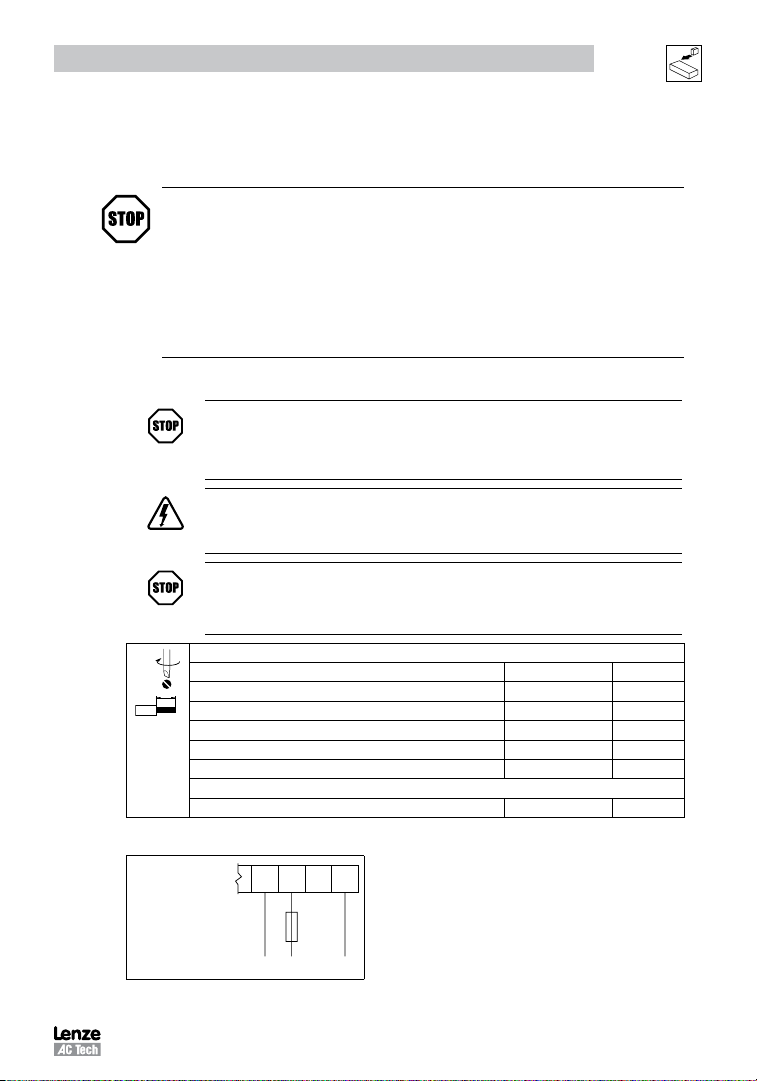
3.2.1 Power Connections
STOP!
If the kVA rating of the AC supply transformer is greater than 10 times the input kVA
rating of the drive(s), an isolation transformer or 2-3% input line reactor must be added
to the line side of the drive(s).
DANGER! Hazard of electrical shock!
Circuit potentials up to 600 VAC are possible. Capacitors retain charge after power is
removed. Disconnect power and wait at least three minutes before servicing the drive.
STOP!
• Verify mains voltage before connecting to drive.
• Do not connect mains power to the output terminals (U,V,W)! Severe damage to the drive will result.
• Do not cycle mains power more than once every two minutes. Damage to the drive may result.
Type Torque Strip Length
<5HP 12 lb-in (1.3 Nm) 5/16 in (8mm)
ESV552xx2T, ESV752xx2T, ESV113xx4/6, ESV153xx4/6, ESV183xx6, ESV223xx6 16 lb-in (1.8 Nm) 5/16 in (8mm)
ESV552xx4Txx, ESV752xx4Txx, ESV552xx6Txx, ESV752xx6Txx 12 lb-in (1.3Nm) 0.25 in (6mm)
ESV113xx2xxx, ESV153xx2xxx, ESV183xx4xxx, ESV223xx4xxx, ESV303xx4xxx 24 lb-in (2.7 Nm) 7/16 in (10mm)
ESV373xx4xxx, ESV453xx4xxx 27 lb-in (3.05 Nm) 0.75 in (19mm)
N4X/IP65 6-7 lb-in (0.67-0.79 Nm) 0.25 in (6mm)
3.2.1.1 Mains Connection to 120VAC Single-Phase Supply
Mains and Motor Terminations
Torque: N4X/IP65 Door Screws
ESV...N01S...
PE L1 L2 N
PE L1 N
SV01M
15
Page 17
Installation
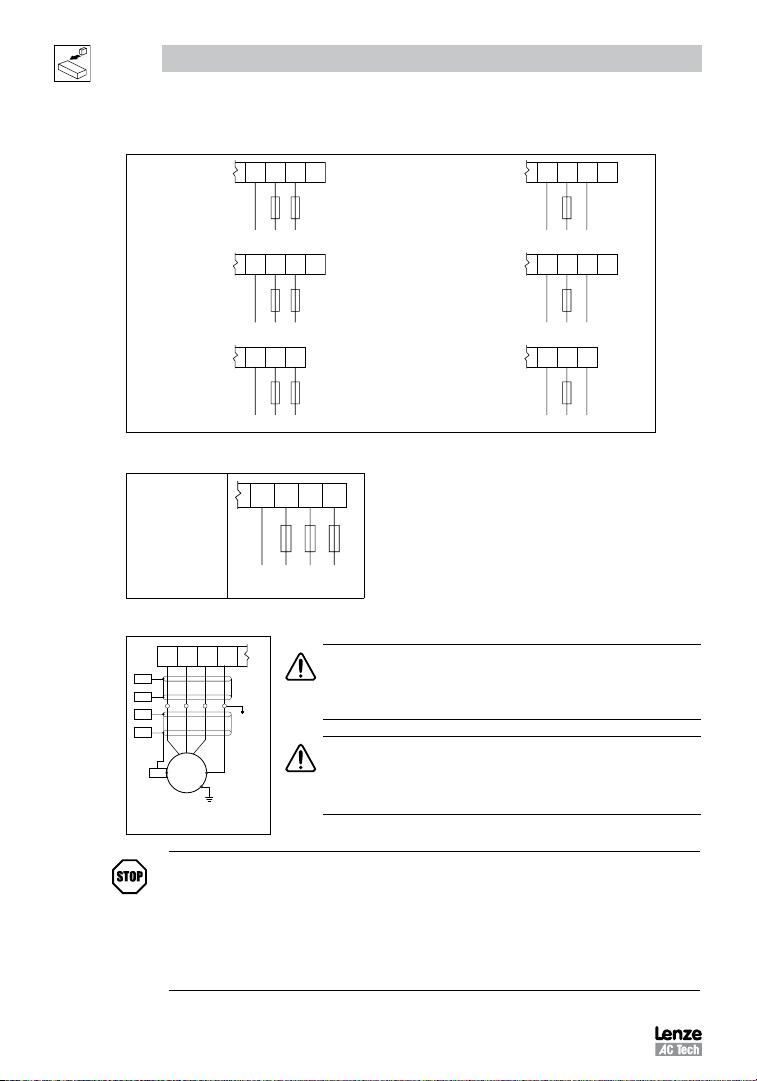
3.2.1.2 Mains Connection to 240VAC Single-Phase Supply
PE L1 L2 N
ESV...N01S...
ESV...N02Y...
(2/PE AC)
ESV...N02S...
(2/PE AC)
PE L1 L2
PE L1 L2 L3
PE L1 L2
PE L1 L2
PE L1 L2
ESV...N01S...
ESV...N02Y...
(1/N/PE AC)
ESV...N02S...
(1/N/PE AC)
3.2.1.3 Mains Connection to Three-Phase Supply
ESV...N02Y...
ESV...N02T...
ESV...N04T...
ESV...N06T...
(3/PE AC)
PE L1 L2 L3
PE L1 L2 L3
3.2.1.4 Motor Connection
U/T1 V/T2 W/T3 PE
PES
PES
PES
PES
M
PES
3~
PE
PES = Protective Earth Shielding
PE
WARNING!
If the cable connection between the drive and the motor has an in-line contactor or
circuit breaker then the drive must be stopped prior to opening/closing the contacts.
Failure to do so may result in 0vercurrent trips and/or damage to the inverter.
WARNING!
Leakage current may exceed 3.5 mA AC. The minimum size of the protective
earth (PE) conductor shall comply with local safety regulations for high leakage
current equipment.
PE L1 L2 N
PE L1 N
PE L1 L2 L3
PE L1 N
PE L1 L2
PE L1 N
STOP!
In the case of a Spinning Motor:
To bring free-wheeling loads such as fans to a rest before starting the drive, use the DC injection
braking function. Starting a drive into a freewheeling motor creates a direct short-circuit and may
result in damage to the drive.
Confirm motor suitability for use with DC injection braking.
Consult parameter P110 for starting / restarting into spinning motors.
16
SV01M
Page 18
Installation
L1
L2
PE
W
V
U
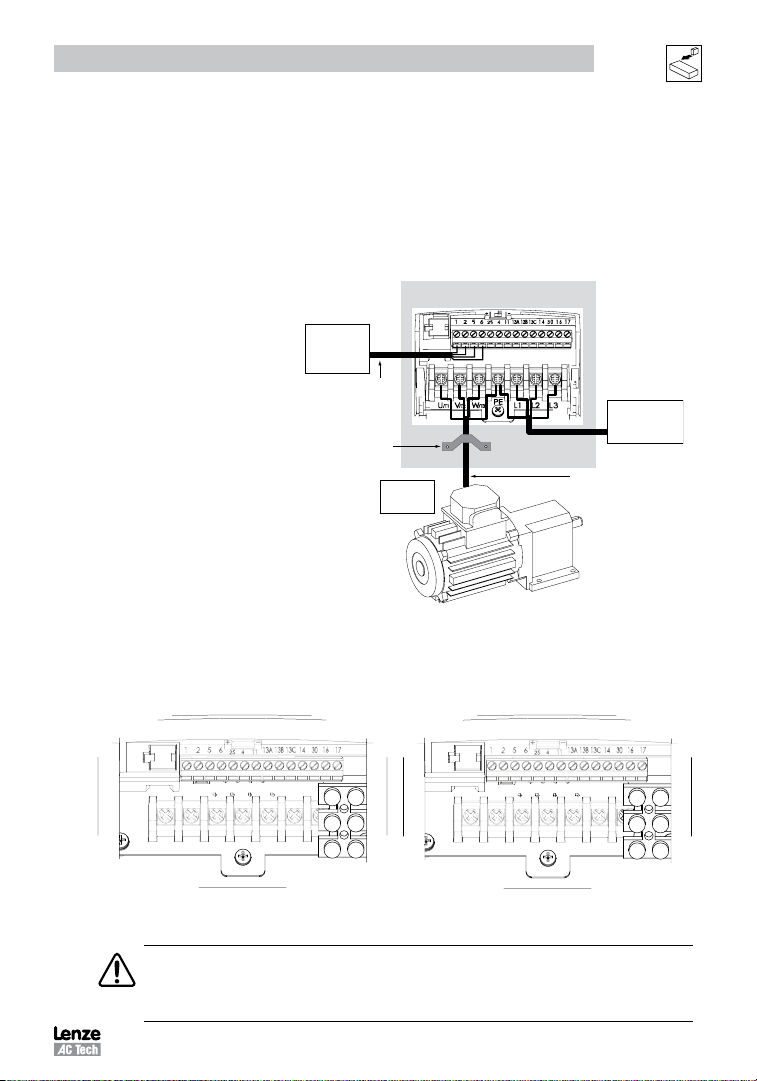
3.2.1.5 Installation Recommendations for EMC Compliance
For compliance with EN 61800-3 or other EMC standards, motor cables, line cables and control or communications
cables must be shielded with each shield/screen clamped to the drive chassis. This clamp is typically located at the
conduit mounting plate.
The EMC requirements apply to the final installation in its entirety, not to the individual components used. Because
every installation is different, the recommended installation should follow these guidelines as a minimum. Additional
equipment (such as ferrite core absorbers on power conductors) or alternative practices may be required to meet
conformance in some installations.
Motor cable should be low
capacitance (core/core <75pF/m,
core/shield <150pF/m). Filtered
drives can meet the class A limits
of EN 55011 and EN 61800-3
Category 2 with this type of motor
cable up to 10 meters.
NOTE: Refer to Appendix A for
recommended cable lengths. Any
external line filter should have its
chassis connected to the drive
External
Control
Circuits
Control and signal cabling
should be separated from
power cables by
a minimum of 300mm
360° shield termination to
backplate using saddle clamp
chassis by mounting hardware
or with the shortest possible wire
or braid.
3.2.1.6 NEMA 4X (IP65) Input Terminal Block
For NEMA 4X (IP65) models with integrated EMC filter and/or integrated line disconnect, the input terminal block is
located on the right-hand side of the SMV inverter in the NEMA 4 X (IP65) enclosure. The single and three phase models
are illustrated herein. Refer to paragraph 3.2.3 Control Terminals for pin out information.
Enclosure / Backplate
From
Motor
From
AC Supply
Screened motor cable
core/core <75pF/M
core/shield <150pF/M
L1
L2
L3
With Filter and/or integrated line disconnect
Single Phase (2/PE)
U V W
PE
Three Phase (3/PE)
With Filter and/or integrated line disconnect
WARNING
Power remains present for up to 3 minutes on power input terminals (L1, L2 and L3) and output
terminals (U, V and W) even when the disconnect switch is in the OFF position. Remove input power
ahead of the drive and wait 3 minutes before removing the terminal cover.
SV01M
17
Page 19
Installation
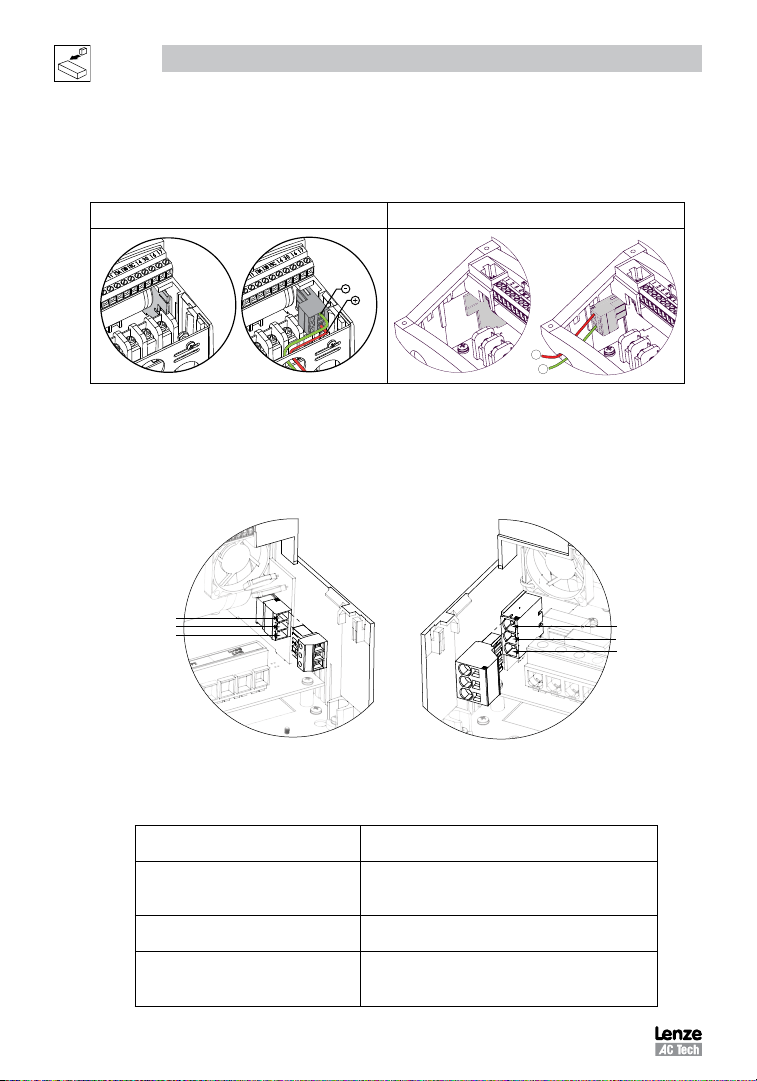
3.2.1.7 Dynamic Brake Connections
For NEMA 1 and NEMA 4X Drives rated up to 30HP (22kW) the Dynamic Brake connections are made as illustrated
herein. Refer to the SMV Dynamic Brake Instructions (DBV01) for complete information.
NEMA 1 (IP31) up to 30HP (22kW) NEMA 4X (IP65) up to 30HP (22kW)
+
-
The SMV 40...60Hp (30...45kW) models include a dynamic brake transistor as standard and only require the connection
of an external resistor kit for dynamic braking operation. The dynamic brake resistor connections for 40...60 Hp
(30...45kW) drives are standard built-in connections as illustrated in the diagram below. In the 40Hp (30kW) model
drives, the dynamic brake connector is on the right-hand side of the drive and the terminals from top to bottom are B-,
BRAKE and B+. In the 50/60HP (37.5/45 kW) model drives, the dynamic brake connector is on the left-hand side of the
drive and the terminals from top to bottom are B+, BRAKE and B-.
B
BRAKE
B+
B+
BRAKE
B
40HP (30kW)
50/60HP (37.5/45kW)
External resistor kits must be connected to terminals B+ and BRAKE (no connection to B-). Refer to the table herein
for external resistor kit selection. Refer to parameter P189 for enabling the dynamic brake function in the 40...60Hp
(30...45kW) models.
400/480 VAC SMV Inverter Resistor Kit
Type Hp kW Resistance (W) Power (W) Catalog # SAP#
ESV303**4T** 40 30 23.5 1020 841-013 13317724
ESV373**4T** 50 37 17 1400 841-015 13317626
ESV453**4T** 60 45 17 1400 841-015 13317626
600 VAC SMV Inverter Resistor Kit
Type Hp kW Resistance (W) Power (W) Catalog # SAP#
ESV303**6T** 40 30 35 1070 841-014 13317624
ESV373**6T** 50 37 24 1560 841-016 13317628
ESV453**6T** 60 45 24 1560 841-016 13317628
18
SV01M
Page 20
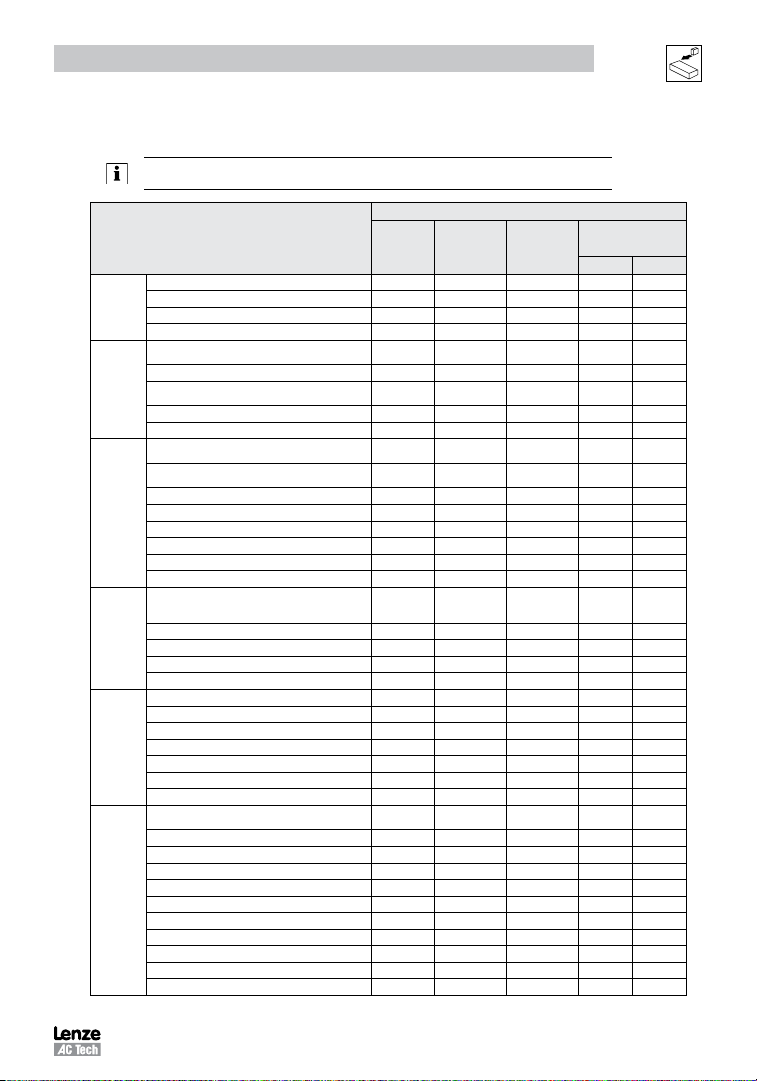
3.2.2 Fuses/Cable Cross-Sections
NOTE: Observe local regulations. Local codes may supersede these recommendations
Type
ESV251N01SXB M10 A C10 A 10 A 1.5 14
120V
ESV371N01SXB, ESV371N01SX* M16 A C16 A 15 A 2.5 14
1~
ESV751N01SXB, ESV751N01SX* M25 A C25 A 25 A 4 10
(1/N/PE)
ESV112N01SXB, ESV112N01SX* M32 A C32 A 30A 4 10
ESV 251N0 1SXB, E SV251 N02SX B, ESV37 1N01S XB,
ESV371N02YXB, ESV371N02SF*
ESV751N01SXB, ESV751N02YXB, ESV751N02SF* M16 A C16 A 15 A 2.5 14
240V
ESV 112N 02YX B, ESV 112N 02SF C, ESV 112N 01SX B
1~
ESV112N01SX*
(2/PE)
ESV152N02YXB, ESV152N02SF* M25 A C25 A 25 A 2.5 12
ESV222N02YXB, ESV222N02SF* M32 A C32A 30 A 4 10
ESV 371N 02YX B, ESV7 51N0 2YXB , E SV37 1N02 Y_*,
ESV751N02Y_*
ESV 112N0 2YXB , E SV15 2N02Y XB, ESV 112N 02TXB ,
ESV152N02TXB, ESV112N02Y *, ESV152N02Y *
ESV222N02YXB, ESV222N02TXB, ESV222N02YX* M20 A C20 A 20 A 2.5 12
240V
ESV402N02TXB, ESV402N02T_* M32 A C32 A 30 A 4.0 10
3~
(3/PE)
ESV552N02TXB, ESV552N02T_~ M40 A C40 A 35 A 6.0 8
ESV752N02TXB, ESV752N02T_~ M50 A C50 A 45 A 10 8
ESV113N02TXB, ESV113N02TX~, ESV113N02TM~ M80 A C80 A 80 A 16 6
ESV153N02TXB, ESV153N02TX~, ESV153N02TM~ M100 A C100 A 90 A 16 4
ESV371N04TXB ...ESV222N04TXB
ESV371N04T_* ...ESV222N04T_*
ESV371N04TF* ...ESV222N04TF*
400V
ESV302N04T_* M16 A C16 A 15 A 2.5 14
or 480V
ESV402N04TXB, ESV402N04T_* M16 A C16 A 20 A 2.5 14
3~(3/PE)
ESV552N04TXB, ESV552N04T_* M20 A C20 A 20 A 2.5 14
ESV752N04TXB, ESV752N04T_~ M25 A C25 A 25 A 4.0 10
ESV113N04TXB, ESV113N04T_~ M40 A C40 A 40 A 4 8
ESV153N04TXB, ESV153N04T_~ M50 A C50 A 50 A 10 8
ESV183N04TXB, ESV183N04T_~ M63 A C63A 70 A 10 6
400V
or 480V
ESV223N04TXB, ESV223N04T_~ M80 A C80 A 80 A 16 6
3~(3/PE)
ESV303N04TXB M100 A C100 A 100 A 25 4
ESV373N04TXB M125 A C125 A 125 A 35 2
ESV453N04TXB M160 A C160 A 150 A 35 1
ESV751N06TXB ...ESV222N06TXB
ESV751N06T * ...ESV222N06T *
ESV402N06TXB, ESV402N06T_* M16 A C16 A 12 A 1.5 14
ESV552N06TXB, ESV552N06T_* M16 A C16 A 15 A 2.5 14
ESV752N06TXB, ESV752N06T_~ M20 A C20 A 20 A 2.5 12
ESV113N06TXB, ESV113N06TX~, ESV113N06TM~ M32 A C32 A 30 A 4 10
600V
ESV153N06TXB, ESV153N06TX~, ESV153N06TM~ M40 A C40 A 40 A 4 8
3~(3/PE)
ESV183N06TXB, ESV183N06TX~, ESV183N06TM~ M50 A C50 A 50 A 6 8
ESV223N06TXB, ESV223N06TX~, ESV223N06TM~ M63 A C63 A 60 A 10 8
ESV303N06TXB M80 A C80 A 70 A 16 6
ESV373N06TXB M100 A C100 A 90 A 16 4
ESV453N06TXB M125 A C125 A 110 A 25 2
Installation
Recommendations
(2)
or
(3)
Input Power Wiring
(L1, L2, L3, PE)
[mm²] [AWG]
Miniature circuit
Fuse
breaker
M10 A C10 A 10 A 1.5 14
M20 A C20 A 20 A 2.5 12
M10 A C10 A 10 A 1.5 14
M16 A C16 A 12 A 1.5 14
M10 A C10 A 10 A 1.5 14
M10 A C10 A 10 A 1.5 14
Fuse
Breaker
(1)
(N. America)
SV01M
19
Page 21

Installation
ALsw
ALsw
ALsw
6 25 4 11
13A
13B
13C
TXA
51 2
14 30
2
AOUT
DIGOUT
2k … 10k
+10 V
+12 V
AIN
AIN
COM
COM
ALsw
17
16
TXB
13D
13D
13D
252
4 … 20 mA
52
0 … 10 V
1 2 4
13A 13B 13C
+12 VDC 0 %
+30 VDC + 0 %
ALsw
+15V
1 2 4
13A 13B 13C
ALsw
COM
4 5 lb in
(0 5 Nm)
0 25 in (6 mm)
AWG 26 16
(<1mm²)
Notes for Fuse and Cable Table:
(1) Installations with high fault current due to large supply mains may require a type D circuit breaker.
(2) UL Class CC or T fast-acting current-limiting type fuses, 200,000 AIC, preferred. Bussman KTK-R, JJN or JJS or equivalent.
(3) Thermomagnetic type breakers preferred.
_ 11th digit of part number: F = Integral EMC Filter
L = Integral EMC Filter and Integrated Disconnect Switch (NEMA 4X/IP65 Models only)
M = Integrated Disconnect Switch (NEMA 4X/IP65 Models only)
X = No EMC Filter/ No Disconnect Switch
* = Last digit of part number: C = N4X Indoor only (convection cooled)
E = N4X Indoor/Outdoor (convection cooled)
~ = Last digit of part number: D = N4X Indoor only (fan cooled)
F = N4X Indoor/Outdoor (fan cooled)
Observe the following when using Ground Fault Circuit Interrupters (GFCIs):
• Installation of GFCI only between supplying mains and controller.
• The GFCI can be activated by:
- capacitive leakage currents between the cable screens during operation (especially with long, screened motor cables)
- connecting several controllers to the mains at the same time
- RFI filters
3.2.3 Control Terminals
Control Terminal Strip for 0.33 - 10 HP (0.25 - 7.5 kW):
COM
4.5 lb-in
(0.5 Nm)
0.25 in (6 mm)
AWG 26…16
(<1mm²)
AIN
COM
5 1 2
2k … 10k
+10 V
AIN
6 25 4 11
13A
13B
13C
14 30
DIGOUT
16
AOUT
1 2 4
17
+12 VDC - 0 %
+30 VDC + 0 %
13A 13B 13C
+15V
PNP NPN
. . .
5 2
0 … 10 V
1 2 4
COM
4 … 20 mA
13A 13B 13C
25 2
Control Terminal Strip for 15HP (11 kW) and Greater Drives:
NOTE
Control and communications terminals provide basic insulation when the drive is connected to a power system rated up
to 300V between phase to ground (PE) and the applied voltage on terminals 16 and 17 is less than 250 VAC between
phase to phase and ground (PE).
20
SV01M
Page 22

Installation
Control Terminal Strip Descriptions
Terminal Description Important
1
Digital Input: Start/Stop input resistance = 4.3kW
2
Analog Common
5
Analog Input: 0...10 VDC input resistance: >50 kW
6
Internal DC supply for speed pot +10 VDC, max. 10 mA
25
Analog Input: 4...20 mA input resistance: 250W
4
Digital Reference/Common +15 VDC / 0 VDC, depending on assertion level
11
Internal DC supply for external devices +12 VDC, max. 50 mA
13A
Digital Input: Configurable with P121
13B
Digital Input: Configurable with P122
13C
Digital Input: Configurable with P123
13D*
Digital Input: Configurable with P124
14
Digital Output: Configurable with P142, P144 DC 24 V / 50 mA; NPN
30
Analog Output: Configurable with P150…P155 0…10 VDC, max. 20 mA
2*
Analog Common
TXA*
RS485 TxA
TXB*
RS485 TxB
16
Relay output: Configurable with P140, P144
17
* = Terminal is part of the terminal strip for the 15HP (11kW) and higher models only.
Assertion level of digital inputs
The digital inputs can be configured for active-high or active-low by setting the Assertion Level Switch (ALsw) and P120.
If wiring to the drive inputs with dry contacts or with PNP solid state switches, set the switch and P120 to “High” (+). If
using NPN devices for inputs, set both to “Low” (-). Active-high (+) is the default setting.
HIGH = +12 … +30 V
LOW = 0 … +3 V
NOTE
An F L fault will occur if the Assertion Level switch (ALsw) position does not match the parameter
P120 setting and P100 or any of the digital inputs (P121...P124) is set to a value other than 0.
input resistance = 4.3kW
AC 250 V / 3 A
DC 24 V / 2 A … 240 V / 0.22 A, non-inductive
SV01M
21
Page 23

Commissioning
4 Commissioning
4.1 Local Keypad & Display
SMV Models: 0.33-10HP (0.25-7.5kW) SMV Models: 15HP (11kW) and greater
4-Character Display
FWDAUTO
CTRL
REV
RUN
STOP
AUTO
4-Character plus CTRL Display
REMOTE
LOCAL
MAN
AUTO
Display START BUTTON
In Local Mode (P100 = 0, 4, 6), this button will start the drive.
RUN
STOP BUTTON
Stops the drive, regardless of which mode the drive is in.
STOP
WARNING!
When JOG is active, the STOP button will not stop the drive!
ROTATION
In Local Mode (P100 = 0, 4, 6), this selects the motor rotation direction:
- The LED for the present rotation direction (FWD or REV) will be on
- Press R/F; the LED for the opposite rotation direction will blink
- Press M within 4 seconds to confirm the change
- The blinking direction LED will turn on, and the other LED will turn off
When rotation direction is changed while the drive is running, the commanded direction LED will blink until the
drive is controlling the motor in the selected direction.
Rotation is set in P112. When P112 = 0, rotation is forward only. When P112 = 1 rotation is forward and reverse.
MODE
RPM
Hz
%
AMPS
/UNITS
FWD
RUN
REV
STOP
Used to enter/exit the Parameter Menu when programming the drive and to enter a changed parameter value.
UP AND DOWN BUTTONS
Used for programming and can also be used as a reference for speed, PID setpoint, or torque setpoint.
When the s and t buttons are the active reference, the middle LED on the left side of the display will be on.
22
SV01M
Page 24

Display INDICATING LEDs (on 4-character display)
FWD
FWD LED: Indicate the present rotation direction is forward. Refer to ROTATION description above.
REV LED: Indicate the present rotation direction is reverse. Refer to ROTATION description above.
REV
AUTO
AUTO LED: Indicates that the drive has been put into Auto mode from one of the TB13 inputs (P121…P124 set
to 1…7). Indicates that PID mode is active (if PID mode is enabled). Indicates that sequencer mode is active (if
sequencer mode is enabled).
RUN LED: Indicates that the drive is running.
RUN
s t LED: Indicates that the s t are the active reference.
NOTE
If the keypad is selected as the auto reference (P121…P124 is 6) and the corresponding
TB-13 input is closed, the AUTO LED and s t LEDs will both be on.
FUNCTIONS THAT FOLLOW ARE APPLICABLE TO SMV DRIVES 15HP (11kW) AND HIGHER
CTRL
CTRL
The CTRL pushbutton selects the start and speed reference control sources for the drive.
Press [
] mode button to accept the new control mode selection.
CTRL LEDs
MAN
REMOTE
LOCAL
REMOTE
LOCAL
REMOTE
LOCAL
REMOTE
LOCAL
AUTO
MAN
AUTO
MAN
AUTO
MAN
AUTO
[LOCAL] [MAN]
[LOCAL] [AUTO]
[REMOTE] [MAN]
[REMOTE] [AUTO]
If P100 = 6 the CTRL button is used to toggle
start control between the terminal strip [REMOTE]
and the keypad [LOCAL]
If P113 = 1 the CTRL button is used to toggle
reference control between the TB-13x setup
[AUTO] and P101 [MANUAL]
If P100 = 6 and P113 = 1, it is possible to
change the start and reference control sources at
the same time
Commissioning
START CONTROL REFERENCE CONTROL
Keypad P101 Settings
Keypad Terminal 13x Settings
Terminal Strip P101 Settings
Terminal Strip Terminal 13x Settings
- REM/LOC LED indicating the present start control source is ON
- Press [CTRL]; the LED for other start control source will blink
- Press [M] within 4 sec to confirm the change
- Blinking LED will turn ON (the other LED will turn OFF)
- AUT/MAN LED indicating present reference control is ON
- Press [CTRL]; the other reference control will blink
- Press [M] within 4 sec to confirm change
- Blinking LED will turn ON (the other LED will turn OFF)
SV01M
23
Page 25

Commissioning
Display START CONTROL
The REMOTE/LOCAL LEDs indicate the current start control source. If the start control source is a remote keypad
or the network, then both LEDs will be OFF.
REFERENCE CONTROL
The AUTO/MANUAL LEDs indicate the current reference control source.
IF P113 = 0 or 2, the AUTO/MANUAL LEDs will match the AUTO LED on the 4-character display. IF P113 = 0
and no AUTO reference has been setup on the terminal strip, the MANUAL LED will turn ON and the AUTO LED
will turn OFF.
IF P113 = 1, the AUTO/MANUAL LEDS show the commanded reference control source as selected by the [CTRL]
button. If the [CTRL] button is used to set the reference control source to AUTO but no AUTO reference has been
setup on the terminal strip, reference control will follow P101 but the AUTO LED will remain ON.
UNITS LEDs
HZ: current display value is in Hz In Speed mode, if P178 = 0 then HZ LED will be ON. If
%: current display value is in %
RPM: current display value is in RPM
AMPS: current display value is in Amps
/UNITS current display value is a per unit (i.e./sec,
/min, /hr, etc.)
4.2 Drive Display and Modes of Operation
Speed Mode Display
In the standard mode of operation, the drive frequency output is set directly by the selected reference (keypad, analog
reference, etc.). In this mode, the drive display will show the drive’s output frequency.
PID Mode Display
When the PID mode is enabled and active, the normal run display shows the actual PID setpoint. When PID mode is not
active, the display returns to showing the drive’s output frequency.
Torque Mode Display
When the drive is operating in Vector Torque mode, the normal run display shows the drive’s output frequency.
Alternate (Run-Screen) Display
When P179 (Run Screen Display) is set to a value other than 0, one of the diagnostic parameters (P501…P599) is
displayed. Example: if P179 is set to 1, then diagnostic parameter P501 (Software version) is displayed. If P179 =2,
then P502 (Drive ID) is displayed.
P178 > 0, the Units LEDs follow the setting of P177 when
the drive is in run (non-programming) mode.
In Torque mode, the HZ LED will be ON when the drive is
in run (non-programming) mode.
In Pid mode, the Units LEDs follow the setting of P203
when the drive is in run (non-programming) mode.
If P179 > 0, the Units LEDs will show the unit of the
diagnostic parameter that is being displayed.
24
SV01M
Page 26

Commissioning
4.3 Parameter Setting
Status/Fault messages Change Parameters
StoP
60.0
CL
Err
F.AF
F.UF
4.4 Electronic Programming Module (EPM)
The EPM contains the drives operational memory. Parameter settings are stored in the
EPM and setting changes are made to the “User settings” in the EPM.
An optional EPM Programmer (model EEPM1RA) is available that allows:
• An EPM to be copied directly to another EPM.
• An EPM to be copied to the memory of the EPM Programmer.
• Stored files can be modified in the EPM Programmer.
• Stored files can be copied to another EPM.
As the EPM Programmer is battery operated, parameter settings can be copied to an EPM and inserted into a drive
without power being applied to the drive. This means that the drive will be fully operational with the new settings on
the next application of power.
Additionally, when the drives parameter settings are burned into an EPM with the EPM Programmer, the settings are
saved in two distinct locations; the “User settings” and the “OEM default settings”. While the User settings can be
modified in the drive, the OEM settings cannot. Thus, the drive can be reset not only to the “factory” drive default
settings (shown in this manual), but can be set to the Original Machine settings as programmed by the OEM.
The user area contents of the EPM are what are copied into the OEM space by the EPM programmer. When parameter
modifications are made to the drive and then a copy made via the EPM Programmer, these are the settings that will
be available by the OEM selections from P199. The EPM Programmer is the only way to load the OEM area of the EPM.
While the EPM can be removed for copying or to use in another drive, it must be installed for the drive to operate (a
missing EPM will trigger an
1 fault)
M
PASS
0225
M
P194 = 0000
60 s
p100
p104
p541
M
15 s
20.0
12.0
M
EPM Module
in SMV Drive
V0106
SV01M
25
Page 27

Commissioning
4.5 Parameter Menu
4.5.1 Basic Setup Parameters
Code Possible Settings
No. Name Default Selection
Start Control Source 0 0 Local Keypad Use RUN button on front of drive to start
Stand ard Refer ence
Source
26
1 Terminal Strip Use start/stop circuit wired into the terminal strip.
2 Remote Keypad Only Use RUN button on optional Remote Keypad to start
3 Network Only • St art comm and must come from netwo rk
4 Terminal Strip or Local Keypad All ows start cont rol to be swit che d betwe en
5 Terminal Strip or Remote Keypad Allo ws star t contr ol to be switc hed between
6 CTRL button select Allo ws star t contr ol to be switc hed between
WARNING!
P100 = 0 disables TB-1 as a STOP input! STOP circuitry may be disabled if parameters are
reset back to defaults (see P199)
NOTE
• P100 = 4, 5: To switch between control sources, one of the TB-13 inputs (P121...P124)
must be set to 08 (Control Select);
TB-13x OPEN (or not configured): Terminal strip control
TB-13x CLOSED: Local (P100 = 4) or Remote (P100 = 5) keypad
• P100 = 0, 1, 4, 6: Network can take control if P121...P124 = 9 and the corresponding
TB-13x input is CLOSED.
• The STOP button on the front of the drive is always active except in JOG mode.
• TB-1 is an active STOP input if P100 is set to a value other than 0.
Refer to section 3.2.3
(Modbus, CANopen, etc)
• SMV models <15HP (11kW) require optional
communication module (refer to the network
module documentation).
• Must also set one of the TB-13 inputs to 9
(Network Enable); see P121...P124
terminal strip and local keypad using one of the
TB-13 inputs. See note below.
terminal strip and optional remote keypad using
one of the TB-13 inputs. See Note below
terminal strip and local keypad using the CTRL
button.
NOTE: P100 Selection 6 is applicable to SMV 15HP
(11kW) and higher models only.
• An fault will occur if the Assertion Level switch (ALsw) position does not match
the P120 setting and P100 is set to a value other than 0.
0 0 Keypad (Local or Remote) Select s the defaul t speed or t orque refere nce
1 0-10 VDC
2 4-20 mA
3 Preset #1 (P131)
4 Preset #2 (P132)
5 Preset #3 (P133)
6 Network
7 Preset Sequence Segment #1 (P710) Selections 7, 8 & 9 are not valid for PID setpoint
8 Preset Sequence Segment #2 (P715)
9 Preset Sequence Segment #3 (P720)
when no Auto Reference is selected using the
TB-13 inputs.
or torque reference.
SV01M
IMPORTANT
Page 28

Commissioning
Code Possible Settings
No. Name Default Selection
Minimum Frequency 0.0 0.0 {Hz} P103 • P102, P103 are active for all speed
0
Maximum Frequency 60.0 7.5 {Hz} 500
NOTE
• P103 cannot be set below Minimum Frequency (P102)
• To set P103 above 120 Hz:
- Scroll up to 120 Hz; display shows
- Release s button and wait one second.
WARNING!
Consult motor/machine manufacturer before operating above rated frequency. Overspeeding the motor/machine may cause
damage to equipment and injury to personnel!
- Press s button again to continue increasing P103.
Acceleration Time 1 20.0 0.0 {s} 3600 • P104 = time of frequency change from 0 Hz to
Deceleration Time 1 20.0 0.0 {s} 3600
EXAMPLE: IF P103 = 120 Hz, P104 = 20.0 s and P167 (base frequency) = 60 Hz; then the rate of frequency change from 0
Hz to 120 Hz = 40.0 s
S-Ra mp Inte gra tion
Time
(1)
Line Voltage Selection 1* 0 Low (120, 200, 400, 480VAC) * The default setting is 1 for all drives except
7
0.0 0.0 {s} 50.0 • P106 = 0.0: Linear accel/decel ramp
1 High (120, 240, 480, 600VAC)
Motor Overload 100 30 {%} 100 P108 = motor current rating x 100
NOTE
Do not set above rated motor current as listed on the motor dataplate. The motor thermal
overload function of the SMV is UL approved as a motor protection device. Cycling power after
an overload fault could result in significantly reducing the motor life.
references
• Wh en u sing an ana log spe ed
reference, also see P160, P161
(flashing).
P167 (base frequency)
• P105 = time of frequency change from P167
to 0 Hz
• For S-ramp accel/decel, adjust P106
• P106 > 0.0: Adjusts S-ramp curve for smoother
ramp
when using “Reset to 50Hz default settings”
(Parame ter P199, select ion 4) with 480V
models. In this case, the default setting is 0.
SMV output rating
Example: if motor = 3amps and SMV = 4amps,
then P108 = 75%
Motor Overload Type 0 0 Speed Compensation
100%
60%
IMPORTANT
Ir
1
0
1 No Speed Compensation
Exa mp le: Moto r is coo led by forced
ventilation as apposed to shaft mounted,
self cooling fans.
30 f
V0108
(1) Any changes to this parameter will not take effect until the drive is stopped.
SV01M
27
Page 29

Commissioning
Code Possible Settings
No. Name Default Selection
Start Method 0 0 Normal
1
WARNING!
Automatic starting/restarting may cause damage to equipment and/or injury to personnel! Automatic starting/restarting should
only be used on equipment that is inaccessible to personnel.
Stop Method 0 0 Coast Drive’s output will shut off immediately upon a stop
P 1
Rotation 0 0 Forward Only If PID mode is enabled, reverse direction is disabled
1
1 Start on Power-up D riv e will auto mat ically start when power is
2 Start with DC Brake When start command is applied, drive will apply
3 Auto Restart Drive will automatically restart after faults, or when
4 Auto Restart with DC Brake Combines settings 2 and 3
5 Flying Start/Restart - Type 1 • Drive will automatically restart after faults, or
6 Flying Start/Restart - Type 1
7 Flying Start /Restart - Type 2
for 2-pole motors requiring a flying
restart
8 Flying Start/Restart - Type 2
for 2-pole motors requiring a flying
restart
NOTE
• P110 = 0, 2: Start command must be applied at least 2 seconds after power-up;
fault will occur if start command is applied too soon.
• P110 = 1, 3…6: For automatic start/restart, the start source must be the terminal strip
and the start command must be present.
• P110 = 2, 4…6: If P175=999.9, dc braking will be applied for 15s.
• P110 = 3…6: Drive will attempt 5 restarts; if all restart attempts fail, drive displays
(fault lockout) and requires manual reset.
• P110 = 5, 6: If drive cannot catch the spinning motor, drive will trip into . fault.
• P110 = 5, 6: If drive trips into . fault, try P110 = 7 or 8.
1 Coast with DC Brake The drive’s output will shut off and then the DC
2 Ramp The drive will ramp the motor to a stop according
3 Ramp with DC Brake The drive will ramp the motor to 0 Hz and then
1 Forward and Reverse
applied.
DC braking accordin g to P174, P175 prior to
starting the motor
power is applied.
when power is applied.
• After 3 failed attempts, drive will Auto Restart
with DC brake.
• P110 = 5, 7: Performs speed search, starting
at Max Frequency (P103)
• P110 = 6, 8: Performs speed search, starting
at the last output frequency prior to faulting
or power loss
• If P111 = 0, a flying START is performed when
a start command is applied.
• P110 = 7, 8: Utilizes P280/281 to set Max
Current Level and Decel Time for restart
command, allowing the motor to coast to a stop
Brake will activate (refer to P174, P175)
to P105 or P126.
the DC Brake will activate (refer to P174, P175)
(except for Jog).
IMPORTANT
28
SV01M
Page 30

Commissioning
Code Possible Settings
No. Name Default Selection
Auto/Manual Control 0 0 Terminal Strip Control The reference is dictated by the settings and state
1
MOP Speed
1
Initialization at
Power-Up
1 Auto/Manual (CTRL button select) Allows the reference to be switched between auto
2 Manual Control Only Reference is dictated by P101 regardless of any
NOTE
P113 is applicable to SMV 15HP (11kW) and higher models only.
0 0 Set to last MOP speed at power up Output frequency at power-up = last MOP speed
1 Set to 0.0Hz at power up Output frequency at power-up = 0Hz
2 Set to Preset #3 (P133) at power up Output frequency at power-up = P133
of the TB-13x terminals. If no AUTO reference has
been setup on the terminal strip then reference
control is dictated by P101.
and manual using the CTRL pushbutton on the
drive keypad. If the CTRL pushbutton has selected
AUTO reference but no AUTO reference has been
setup on the terminal strip, then reference control
is dictated by P101.
AUTO source that may be selected by the TB-13x
terminals.
IMPORTANT
SV01M
29
Page 31

Commissioning
4.5.2 I/O Setup Parameters
Code Possible Settings
No. Name Default Selection
Assertion Level 2 1 Low P120 and the Assertion Level switch must both
2 High
TB-13A Digital Input
TB-13B Digital Input
2
(Priority > TB13A)
Same as TB13A except:
3 = Preset #2
23 = Seq Seg, #2
TB-13C Digital Input
(Priority > TB13B, A)
Same as TB13A except:
3 = Preset #3
23 = Seq Seg, #4
TB-13D* Digital Input
(Priority > TB13C, B, A)
Same as TB13A except:
3 = Preset #4
23 = Seq Seg, #8
NOTE: P124 is
applicable to SMV
15HP (11kW) and
higher models only
0 0 None Disables input
1 AUTO Reference: 0-10 VDC For frequency mode, see P160...P161,
2 AUTO Reference: 4-20 mA
3 AUTO Reference: Preset #1
* 13D: 3 = Reserved
4 AUTO Reference: MOP Up • Norm ally open : Close input to increase or
5 AUTO Reference: MOP Down
6 AUTO Reference: Keypad
7 AUTO Reference: Network
8 Control Select Use when P100 = 4, 5 to switch between terminal
9 Network Enable Required to start the drive through the network.
10 Reverse Rotation Open = Forward Closed = Reverse
11 Start Forward
12 Start Reverse
13 Run Forward
14 Run Reverse
15 Jog Forward Jog Forward speed = P134
16 Jog Reverse Jog Reverse speed = P135
17 Accel/Decel #2 Refer to P125, P126
18 DC Brake Refer to P174; close input to override P175
19 Auxiliary Ramp to Stop Normally closed: Opening input will ramp drive
20 Clear Fault Close to reset fault
21 External Fault
22 Inverse External Fault
23 AUTO Ref: Sequence Segment #1 Works in Speed Mode only
24 Start Sequence
25 Step Sequence Transition from non-asserted to asserted state
26 Suspend Sequence
.
.
match the desired assertion level unless P100,
P121…P124 are all set to 0. Otherwise an F.AL
fault will occur.
For PID mode, see P204…P205,
For vector torque mode, see P330
For frequency mode see P131...P137,
For PID mode, see P231…P233,
For torque mode see, P331…P333
decrease speed, PID or torque setpoint.
• MOP Up is not active while in STOP
strip control and local or remote keypad control.
Refer to Note for typical circuit
Refer to Note for typical circuit
Active even if P112 = 0
to STOP according to P127, even if P111 is set
to Coast (0 or 1).
Normally closed circuit; open to trip
Normally open circuit; close to trip
WARNING
Jog overrides all STOP commands! To stop the drive while in Jog mode, the Jog input must be deactivated or a
fault condition induced.
WARNING
If the input defined to “Start Sequence” is opened during a sequence, the drive will exit sequencer mode and will run
at the specified standard or alternate speed source (dependent on drive configuration).
IMPORTANT
30
SV01M
Page 32

Commissioning
REVSTOP
Code Possible Settings
No. Name Default Selection
NOTE
• When input is activated, settings 1...7 override P101
• When TB-13A...TB-13D are configured for Auto References other than MOP, TB-13D overrides TB-13C, TB-13C overrides
TB-13B and TB-13B overrides TB-13A. Any other Auto Reference will have priority over MOP.
• Settings 10...14 are only valid in Terminal Strip mode (P100 = 1, 4, 5, 6)
• If Start/Run/Jog Forward and Start/Run/Jog Reverse are both activated, drive will STOP
• If Jog input is activated while drive is running, the drive will enter Jog mode; when Jog input is deactivated, drive will STOP
• An
• An I fault will occur under the following conditions:
• Typical control circuits are shown below:
Acceleration Time 2 20.0 0.0 {s} 3600 • Selec ted using TB-13A ... TB- 13D (P121...
Deceleration Time 2 20.0 0.0 {s} 3600
P 26
Deceleration Time
7
for Auxiliary Ramp
to Stop
Automatic Accel/
Decel rate switch
threshold
Preset Speed #1 0.0 0.0 {Hz} 500
fault will occur if the Assertion Level switch (ALsw) position does not match the P120 setting and any of the digital
inputs (P121...P124) are set to a value other than 0.
- TB-13A...TB-13D settings are duplicated (each setting, except 0, 3 and 23, can only be used once)
- One input is set to “MOP Up” and another is not set to “MOP Down”, or vice-versa.
- One input is set to 10 and another input is set to 11…14.
- One input is set to 11 or 12 and another input is set for 13 or 14.
- If any input is set to 10, 12 or 14, P112 must be set to 1 for Reverse action to function.
Run / Stop
with Direction
P121 = 10
1 4
STOP
RUN
13A
FWD
REV
20.0 0.0 {s} 3600 • Sele cte d using TB -13 A.. .TB -13D (P121 ...
0.0 0.0 {Hz} 1000 If Actual Frequency < P129 Use Accel/decel time
Start Forward /
Start Reverse
P121 = 11, P122 = 12
13A 13B
1 4
FWD
P124 = 17)
• For S-ramp accel/decel, adjust P106
P124 = 19).
• For S-ramp accel/decel, adjust P106
• Once executed, this ramp time has priority over
P105 and P126.
#2 (P125/P126)
If Actual Frequency > P129 Use Accel/decel time
#1 (P104/P105)
PRESET
Preset Speed #2 0.0 0.0 {Hz} 500
Preset Speed #3 0.0 0.0 {Hz} 500
Preset Speed #4 0.0 0.0 {Hz} 500
4 (alternate) -- -- -- X
Preset Speed #5 0.0 0.0 {Hz} 500
Preset Speed #6 0.0 0.0 {Hz} 500
Preset Speed #7 0.0 0.0 {Hz} 500
7
Preset Speed #8 0.0 0.0 {Hz} 500
8 (alternate) -- X -- X
8 (alternate -- -- X X
• Speed setting is used by P158
• 13D available on 15HP (11kW) & higher drives.
IMPORTANT
Run Forward /
Run Reverse
P121 = 13, P122 = 14
1 4
SPEED
1 X -- -- --
13A 13B
RUN
FWD
13A 13B 13C 13D
2 -- X -- -3 -- -- X -4 X X -- --
5 X -- X -6 -- X X -7 X X X --
SV01M
RUN
REV
31
Page 33

Commissioning
Code Possible Settings
No. Name Default Selection
Relay Output
TB-16, 17
TB-14 Output 0 0...23 (same as P140)
0 0 None Disables the output
1 Run Energizes when the drive is running
2 Reverse Energizes when reverse rotation is active
3 Fault De-energizes when the drive trips, or power is
4 Inverse Fault Energizes when the drive trips
5 Fault Lockout P110 = 3...6: De-energizes if all restart attempts
6 At Speed Energizes when output frequency = commanded
7 Above Preset Speed #6 Energizes when output frequency > P136
8 Current Limit Energizes when motor current = P171
9 Follower Loss (4-20 mA) Energizes when 4-20 mA signal is < P164
10 Loss of Load Energizes when motor load drops below P145;
11 Local Keypad Control Active
12 Terminal Strip Control Active
13 Remote Keypad Control Active
14 Network Control Active
15 Standard Reference Active Energizes when P101 reference is active
16 Auto Reference Active Energizes when Auto Reference is activated using
17 Sleep Mode Active Refer to P240...P242
18 PID Feedback < Min. Alarm Energizes when PID feedback signal < P214
19 Inverse PID Feedback < Min. Alarm De-energizes when PID feedback signal < P214
20 PID Feedback > Max Alarm Energizes when PID feedback signal > P215
21 Inverse PID Feedback > Max Alarm De-energizes when PID feedback signal > P215
22 PID Feedback within
Min/Max Alarm range
23 PID Feedback outside
Min/Max Alarm range
24 Reserved
25 Network Controlled SMV models < 15HP (11kW) require an optional
26 Loss of 0-10V Input Energizes when 0-10V signal is < P158
27 Sequencer Controlled State set in individual sequencer segments
28 Sequencer Active
29 Sequencer Suspended
30 Sequence Done End Sequence
31 Output Frequency = 0.0Hz Output inactive
24 Dynamic Braking For use with Dynamic Braking option
25...31 (same as P140)
IMPORTANT
removed
fail
frequency
Refer to P146 also
Energizes when the selected source is active for
start control
TB-13 input; refer to P121...P124
Energizes when PID feedback signal is within the
Min/Max Alarm range; refer to P214, P215
Energizes when PID feedback signal is outside the
Min/Max Alarm range; refer to P214, P215
comm unic atio n module (refer to the netwo rk
module documentation).
32
SV01M
Page 34

Commissioning
Code Possible Settings
No. Name Default Selection
Digital Output
Inversion
NOTE
Inverting P140 or P142 when the parameter is set to NONE (0) will result in the output being
energized continuously.
NOTE
For SMVector drives rated at 0.33 to 10 HP (0.25 to 7.5 kW), P144 is only available with
Loss of Load
Threshold
Loss of Load Delay 0.0 0.0 {s} 240.0
Analog Output Offset 0.0 0 {%} 100 Scaled value. Example: P149 = 10%, Scaled
TB-30 Output 0 0 None 2-10 VDC signal can be converted to 4-20 mA with
TB-30 Scaling:
Frequency
TB-30 Scaling: Load 200 10 {%} 500 If P150 = 3 or 4, sets the Load (as a percent of
TB-30 Scaling:
Torque
TB-30 Scaling:
Power (kW)
software versions 3.0 and higher (refer to P501).
0 0 {%} 200 P140, P142 = 10: Output will energize if motor
1 0-10 VDC Output Frequency
2 2-10 VDC Output Frequency
3 0-10 VDC Load
4 2-10 VDC Load
5 0-10 VDC Torque
6 2-10 VDC Torque
7 0-10 VDC Power (kW)
8 2-10 VDC Power (kW)
9 Network Controlled SMV models < 15HP (11kW) require an optional
10 Sequencer Controlled Value set in individual sequencer segments
60.0 3.0 {Hz} 2000 If P150 = 1 or 2, sets the frequency at which output
100 10 {%} 1000 If P150 = 5 or 6, sets the Torque (as a percent of
1.0 0.1 {kW} 200.0 If P150 = 7 or 8, sets the power at which output
Invert
P144
P142
0 NO NO
1 NO YES
2 YES NO
3 YES YES
Invert
P140
Used to invert the selections for P140 (Relay Output)
and P142 (TB-14 Output).
EXAMPLE: When P140 = 6 (AT SPEED), the relay is
energized when output frequency = commanded
frequency. IF P144=1 or 3, then P140 is inverted
(INVERSE AT SPEED) and the relay is energized
when the output frequency does not equal the
command frequency.
load falls below the P145 value longer than the
P146 time
variable = freq, P150 = 1, P152 = 60Hz; then
TB30 = 0VDC below 6Hz
a total circuit impedance of 500 W
comm unic atio n module (refer to the netwo rk
module documentation).
equals 10 VDC
drive current rating) at which output equals 10 VDC.
motor rated torque) at which output equals 10 VDC
equals 10 VDC
IMPORTANT
SV01M
33
Page 35

Commissioning
4.5.3 Advanced Setup Parameters
Code Possible Settings
No. Name Default Selection
7
P
Analog Inputs
Configuration
TB5 (0-10V) Analog
Input Monitoring
Action
TB5 (0-10V) Analog
Input Monitoring
Level (ML)
0-10V Analog Input
Deadband
Speed at Minimum
Signal
0 0 TB5: (0-10 VDC); TB25: (4-20mA)
1 TB5: (0 - 5 VDC); TB25: (4-20mA)
2 TB5: (2 - 10 VDC); TB25: (4-20mA)
4 TB5: (0-10 VDC); TB25: (0-20mA)
5 TB5: (0 - 5 VDC); TB25: (0-20mA)
6 TB5: (2 - 10 VDC); TB25: (0-20mA)
0 0 No Action Selects the reaction to a loss of the 0-10V signal
1 If TB5 < P158 - Trip Fault F.FAU
2 If TB5 < P158 - Run Preset #8
3 If TB5 < P158 - Run Preset Seg. #16
4 If TB5 > P158 - Trip Fault F.FAU
5 If TB5 > P158 - Run Preset #8
6 If TB5 > P158 - Run Preset Seg. #16
0.0 -10.0 {VDC} 10.0 Negative input voltage is not currently supported.
0.0 0 {VDC} 10.0 Not active if [-10 to +10 VDC] option is selected.
0.0 -999.0 {Hz} 1000
IMPORTANT
at TB5
500ms is the minimum time above/below
Monitoring Level (P158) before triggering the
drive to trip or run at a preset speed.
For P157 = 3 or 6, the accel/decel time is set
in P786.
NOTE: P157 has priority over P163 and TB-13
presets/auto references (P121-P124)
f
P161
Speed at Maximum
P1
Signal
Analog Input Filter 0.01 0.00 {s} 10.00 • Adjusts the filter on the analog inputs (TB-5
p1
TB-25 (4-20mA)
P
Analog Input
Monitoring Action
34
60.0 -999.0 {Hz} 1000
NOTE
• P160 sets the output frequency at 0% analog input
• P161 sets the output frequency at 100% analog input
• P160 or P161 < 0.0 Hz: For scaling purposes only; does not indicate opposite direction!
• P160 > P161: Drive will react inversely to analog input signal
• The P162 delay time will affect the response
0 0 No Action • Selects the reaction to a loss of the 4-20 mA
1 If TB25 < P164 - Trip Fault
2 If TB25 < P164 - Run Preset #7
3 If TB25 < P164 - Run Preset Seg. #15
4 If TB25 > P164 - Trip Fault
5 If TB25 > P164 - Run Preset #7
6 If TB25 > P164 - Run Preset Seg. #15
• Signal is considered lost if it falls below the
• Digital outputs can also indicate a loss of 4-20
• For P163 = 3 or 6, the accel/decel time is
NOTE: P163 has priority over TB-13 presets/auto
0V
(4mA)
P160
and TB-25) to reduce the effect of signal noise
time of diagnostic parameters (P520-P523).
signal at TB-25.
value set in P164
mA signal; see P140, P142
set in P781.
references (P121-P124)
SV01M
10V
(20mA)
ref
V0111
Page 36

Commissioning
Code Possible Settings
No. Name Default Selection
TB-25 (4-20mA)
P1
Analog Input
Monitoring Level
Base Voltage 15 {V} 1000 Valid for V/Hz mode only.
P1
Carrier Frequency See
(1)
Base Frequency 60.0 10.0 {Hz} 1500
p
Fixed Boost 0.0 {%} 40.0
p
Accel Boost 0.0 0.0 {%} 20.0 Accel Boost is only active during acceleration
Slip Compensation 0.0 0.0 {%} 40.0 Increase P170 until the motor speed no longer
P 7
(1)
Current Limit Max I 30 {%} Max I • When the limit is reached, the drive displays
Current Limit
7
Reduction
Decel Override Time 2.0 0.0 {s} 60.0 Maximum time before drive trips into HF fault.
DC Brake Voltage 0.0 0.0 {%} 50.0 Setting is a percent of the nominal DC bus voltage.
P17
2.0 0.0 {mA} 20.0
0 4 kHz • As carrier frequency is increased, motor noise
Notes
1 6 kHz
2 8 kHz
3 10 kHz
NOTE
• P167 = rated motor frequency for standard applications
• P165, P168 = default setting depends on drive rating
0 0 Curre nt Limit R edu ction Acti ve -
Normal response
1 Current Limit Reduction Active - Fast
response
2 Current Limit Reduction Disabled -
Normal response
3 Current Limit Reduction Disabled -
Fast response
Set voltage for bus compensation in V/Hz mode
is decreased
• Observe derating in section 2.3
• Automatic shift to 4 kHz at 120% load
• NEMA 4X (IP65) Models: Default = 0 (4kHz)
• NEMA 1 (IP31) Models: Default = 1 (6kHz)
changes between no load and full load conditions.
time in creases or th e output fr equency
decreases.
• Digital outputs can also indicate when the limit
is reached; see P140, P142.
• Refer to section 2.3 for the maximum output
current Max I (%)
In field weakening, the Current Limit is inversely
proportional to the speed.
IMPORTANT
(Current Limit), and either the acceleration
V0112
(1) Any changes to this parameter will not take effect until the drive is stopped.
SV01M
35
Page 37

Commissioning
Code Possible Settings
No. Name Default Selection
DC Brake Time 0.0 0.0 {s} 999.9
p17
Keypad Setpoint
p
Single Press
Increment
)
Speed Units 0 0 Hz Select the UNITS LED that will be illuminated when
77
Display Frequency
p17
Multiplier
Run Screen Display 0 0 {Parameter Number} 599 • 0 = Normal Run Screen, this display depends
p
Oscillation Damping
Control
Skip frequency 1 0.0 0.0 {Hz} 500 • Drive will not run in the defined skip range;
Skip frequency 2 0.0 0.0 {Hz} 500
p
Skip frequency
bandwidth
Voltage Midpoint
V/Hz characteristic
Frequency Midpoint
V/Hz characteristic
Integrated Dynamic
Brake
NOTE: CONFIRM MOTOR SUITABILITY FOR USE WITH DC BRAKING
DC Brake voltage (P174) is applied for the time specified by P175 with the following exceptions:
• If P111=1, 3 and P175=999.9 the brake voltage will be applied continuously until a run
or fault condition occurs.
• If P110=2, 4…6 and P175=999.9, brake voltage will be applied for 15s
• If P121…P124=18 and the corresponding TB-13 input is CLOSED, brake voltage will be
applied until the TB-13 input is OPENED or a fault condition occurs.
0.1 0.1 100.0 Used for run screen setpoint editing only.
1 RPM
2 %
3 /UNITS
4 NONE
0.00 0.00 650.00 • Allows frequency display to be scaled
EXAMPLE
If P178 = 29.17 and actual frequency = 60 Hz, then Drive displays 1750 (rpm)
0 0 80 0 = Damping disabled
0.0 0.0 {Hz} 10.0
NOTE
Bandwidth (Hz) = fs (Hz) + P184 (Hz) fs = P181 or P182
EXAMPLE: P181 = 18 Hz and P184 = 4 Hz; skip range is from 18 to 22 Hz
0 0.0 {V} P165 Valid only when P300 = 0 or 2.
0.0 0.0 {Hz} P167 Valid only when P300 = 0 or 2.
0 Disabled
1 Enabled
If P176 >0.1 then scrolling of keypad setpoint
is disabled.
the drive is running in speed control mode. For this
parameter to be used, P178 must be set to a value
other than 0. IF P178 is set to 0, the Hz LED will
be illuminated regardless of the value set in P177.
• P178 = 0.00: Scaling disabled
• P178 > 0.00: Display = Actual Frequency
X P178
on mode of operation. Refer to section 4.2.
• Other selections choose a diagnostic parameter
to display (P501…P599).
• Parameters P560 - P564 are selec table if
the sequenc er is enabled (P700 is not 0).
P56 0- P56 4 are not vis ible unt il P700 is
enabled.
Compensation for resonances within drive
used to ski p over frequenc ies that cause
mechanical vibration
• P181 and P182 define the start of the skip
ranges
• P184 > 0 defines the bandwidth of both ranges.
Use with P187 to define midpoint on V/Hz curve.
Use with P185 to define midpoint on V/Hz curve.
IMPORTANT
(2) Parameter applicable to SMV models 15HP (11kW) and higher.
(3) Parameter applicable to SMV models 40HP (30kW) and higher.
36
SV01M
Page 38

Commissioning
Code Possible Settings
No. Name Default Selection
Motor Braking 0 Disabled
1 Braking with BUS threshold
2 Braking always on with deceleration
3 Braking with bus regulator
4 Special
Flux brake OFF.
When drive is in deceleration and V
the rated V
As long as drive is in deceleration, the flux brake will be ON.
When drive is in deceleration and V
of the rated V
the bus voltage. Determined by the value in P191, the speed
increment = slip speed * P191(%) / 37.
(Consult factory before using)
IMPORTANT
), the flux brake will be turned ON.
bus
), the motor speed will be increased to reduce
bus
WARNING
Flux braking can cause heat in the motor. To avoid damage to the motor, use a PTC to
Motor Brake Level 0 0 {%} 75
Motor Braking
9
Deceleration
Reduction Level
Password 0 0000 9999 • Must enter password to access parameters
P
Clear Fault History 0 0 No Action
P1
protect the motor. If the flux brake is used too frequently, the drive will trip fault “F_PF”.
(flux
braking
disabled)
0.0 0 P167
(base freq)
Raising the value of P191 reduces the
drive deceleration rate during flux braking.
Active when P190 > 0 and drive is in deceleration
mode. Use to reduce deceleration time on high
inertia loads.
NOT E: Ove r u sage of P19 0 can cau se frequ ent
‘overload’ trips “F.PF”
Not active for P300 = 5 (Torque mode)
Active when P190 > 0 and P192 > 0.0, Drive is
in deceleration mode. Use to reduce deceleration
time on high inertia loads.
NOTE: Usage of P192 can cause the drive to
decelerate faster than settings in P105/P127.
Not active for P300 = 5 (Torque mode)
• P194 = 0000: Disables password
1 Clear Fault History
Program Selection 0 Operate from User settings
p
1 Operate from OEM settings Refer to Notes 1, 2 and 3
2 Reset to OEM default settings Refer to Note 1
3 Reset to 60 Hz default settings • Refer to Note 4
4 Reset to 50 Hz default settings
5 Translate Refer to Note 5
WARNING!
Modification of P199 can affect drive functionality! STOP and EXTERNAL FAULT circuitry may
be disabled! Check P100 and P121...P124
NOTE 1
If the EPM does not contain valid OEM settings, a flashing GF will be displayed when P199
is set to 1 or 2.
NOTE 2
When P199 is set to 1, the drive operates from the OEM settings stored in the EPM Module
and no other parameters can be changed ( will be displayed if attempted).
NOTE 3
Auto Calibration is not possible when operating from OEM Settings.
NOTES 4 and 5 - on next page.
• Parameters are reset to the defaults listed in
this manual.
• For P199=4, the following exceptions apply:
- P103, P152, P161, P167 = 50.0 Hz
- P165 = 400V (400/480V drives only)
- P304 = 50 Hz
- P305 = 1450 RPM
- P107 = 0 (480 V drives only)
SV01M
bus
bus
> V
> V
decee a ion freeze
decee a ion freeze
(114% of
(114%
37
Page 39

Commissioning
Code Possible Settings
No. Name Default Selection
Program Selection NOTE 4
p1
Resetting to 50 and 60 Hz default settings will set the Assertion Level (P120) to “2” (High).
P120 may need to be reset for the digital input devices being used. An
if P120 and the Assertion switch are not set identically.
NOTE 5
If an EPM that contains data from a previous compatible software version is installed:
• The drive will operate according to the previous data, but parameters cannot be changed
( will be displayed if attempted)
• To update the EPM to the current software version, set P199 = 5. The parameters can now
be changed but the EPM is incompatible with previous software revisions.
IMPORTANT
4.5.4 PID Parameters
Code Possible Settings
No. Name Default Selection
PID Mode 0 0 Disabled • Normal-acting: As feedback increases, motor
PID Feedback Source 0 0 4-20 mA (TB-25) Must be set to match the PID feedback signal
p
PID Decimal Point 1 0 PID Display = XXXX Applies to P204, P205, P214, P215, P231...P233,
p
PID Units 0 0 % Select the UNITS LED that will be illuminated when
Feedback at
p
Minimum Signal
Feedback at
p
Maximum Signal
1 Normal-acting
2 Reverse-acting
3 Normal-acting, Bi-directional
4 Reverse-acting, Bi-directional
NOTE
To activate PID mode, one of the TB-13 inputs (P121...P124) must be used to select the
Auto Reference that matches the desired PID setpoint reference. If the selected PID setpoint
reference uses the same analog signal as the PID feedback (P201), an I fault will occur.
Example: The desired PID setpoint reference is the keypad (s and t). Set TB-13x = 6
(Auto Reference: Keypad):
• TB-13x = closed: PID mode is active
• TB-13x = open: PID mode is disabled and the drive speed will be controlled by the
reference selected in P101.
1 0-10 VDC (TB-5)
2 Drive Load (P507)
3 Feedback from Network
1 PID Display = XXX.X
2 PID Display = XX.XX
3 PID Display = X.XXX
4 PID Display = .XXXX
1 /UNITS
2 AMPS
3 NONE
0.0 -99.9 3100.0 Set to match the range of the feedback signal
100.0 -99.9 3100.0
speed decreases
• Reverse-acting: As feedback increases, motor
speed increases
• PID mode is disabled in Vector Torque mode
(P300 = 5)
• Selections 3, 4: If P112=1, PID controller output
sets the speed, (range -max freq to +max freq)
P242, P522, P523
the drive is running in PID control mode
being used
Example: Feedback signal is 0 - 300 PSI; P204 =
0.0, P205 = 300.0
(2) Parameter applicable to SMV models 15HP (11kW) and higher.
38
SV01M
IMPORTANT
fault may occur
Page 40

Commissioning
Code Possible Settings
No. Name Default Selection
Proportional Gain 5.0 0.0 {%} 1000.0 Used to tune the PID loop:
p
Integral Gain 0.0 0.0 {s} 20.0
p
Derivative Gain 0.0 0.0 {s} 20.0
NOTE
• Derivative Gain is very sensitive to noise on the feedback signal. Use with care.
PID Setpoint Ramp 20.0 0.0 {s} 100.0 • time of setpoint change from P204 to P205
Minimum Alarm 0.0 P204 P205 Use with P140, P142 = 18...23
p
Maximum Alarm 0.0 P204 P205
P
Preset PID Setpoint #1 0.0 P204 P205 TB-13A activated; P121 = 3 and P200 = 1 or 2
Preset PID Setpoint #2 0.0 P204 P205 TB-13B activated; P122 = 3 and P200 = 1 or 2
P
Preset PID Setpoint #3 0.0 P204 P205 TB-13C activated; P123 = 3 and P200 = 1 or 2
Preset PID Setpoint #4 0.0 P204 P205 TB-13D activated; P124 = 3 and P200 = 1 or 2
Sleep Threshold 0.0 0.0 {Hz} 500.0 • If drive speed < P240 for longer than P241,
P
Sleep Delay 30.0 0.0 {s} 300.0
Sleep Bandwidth 0.0 0.0 B
P
Feedback Sleep
43
Entry Threshold
Sleep Entry Mode 0 0 Enter SLEEP if Drive Speed <P240 For time longer than P241
44
Sleep Entry Stop
45
Type
Feedback Recovery
4
from Sleep Threshold
Sleep Recovery
47
Mode
• Derivative Gain is not normally required in pump and fan applications
Where: B
= |(P205 - P204)|
max
0.0 P204 P205 Active only when P244 = 1 or 2
1 Enter SLEEP if Feedback >P243 For time longer than P241 or same as Sel 0
2 Enter SLEEP if Feedback <P243 For time longer than P241 or same as Sel 0
0 0 Coast to Stop
1 Ramp to Stop
2 Stop with P111 settings
0.0 P204 P205 Active only when P247 = 1 or 2
0 0 Recovery if Speed Setpoint > P240
or if PID feedback differs from setpoint
by more than P242
1 Recovery only if Feedback < P246
2 Recovery only if Feedback > P246
• Increase P207 until system becomes unstable,
then decrease P207 by 10-15%
• Next, increase P208 until feedback matches
setpoint
• If required, increase P209 to compensate for
sudden changes in feedback
or vice versa.
• Used to smooth the transition from one PID
setpoint to another, such as when using the
Preset PID Setpoints (P231...P233)
output frequency = 0.0 Hz; drive display =
• P240 = 0.0: Sleep mode is disabled.
• P200 = 0…2: Drive will start again when speed
max
command is above P240
• P242 > 0.0: Drive will restart when the PID
feedback differs from the setpoint by more
than the value of P242 or when the PID loop
requires a speed above P240.
IMPORTANT
(2) Parameter applicable to SMV models 15HP (11kW) and higher.
SV01M
39
Page 41

Commissioning
Code Possible Settings
No. Name Default Selection
Auto Rinse in Sleep
Mode
Time Delay between
5
Auto Rinses
0 0 Disabled Activated in sleep mode only.
1 Enabled
30.0 0.0 {min} 6553.5 Time delay reset by re/entering sleep mode
Sleep Recovery cancels Auto Rinse
IMPORTANT
Auto Rinse Speed 0.0 -500.0 {Hz} 500.0 If P112 = 1, negative sign = reverse direction
Auto Rinse Time 0.0 0.0 {sec} 6553.5 Does not include time to decel back to speed
53
Current Level: Flying
Restart Type 2
Decel Time: Flying
Restart Type 2
Auto Pump Rinse Setup:
P250=1 (Enabled)
P251 =# m i n u tes b et we e n e ac h
PumpRinse
P252=Hz speed of Pump Rinse
P253=# seconds Pump Rinse duration
70.0 0.0 {%} P171 Maximum current during Type 2 flying restart
3.0 0.0 {sec} 3600.0 Deceleration rate used during Type 2 flying
De ay Time
between each
Pump Rinse
Output Frequency
P251
operation
restart operation
P104/
P125
Pump Rinse Speed
Pump Rinse Time
P253
4.5.5 Vector Parameters
Code Possible Settings
No. Name Default Selection
(1)
Drive Mode 0 0 Constant V/Hz Constant torque V/Hz control for general applications
3
(1)
Motor Rated Voltage 0 {V} 600
3
(1)
Motor Rated Current 0.1 {A} 500.0
3 3
1 Variable V/Hz Variable torque V/Hz control for centrifugal pump
2 Enhanced Constant V/Hz For single or multiple motor applications that require
3 Enhanced Variable V/Hz
4 Vector Speed For sing le-motor appl ica tions requ iri ng high er
5 Vector Torque For single-motor applications requiring torque control
NOTE
To configure the drive for either Vector mode or Enhanced V/Hz mode:
• P300 = 4, 5:
- Set P302...P306 according to motor nameplate
- Set P399 = 1 or 2 (if option 1 failed or in case of non-standard motor)
- Make sure motor is cold (20° - 25° C) and apply a Start command
- Display will indicate for about 40 seconds
- Once the calibration is complete, the display will indicate ; apply another Start
command to actually start the motor
- If an attempt is made to start the drive in Vector or Enhanced V/Hz mode before
performing the Motor Calibration, the drive will display 1 and will not operate
• P300 = 2, 3: Same as above but only need to set P302…P304
and fan applications
better performance than settings 0 or 1, but cannot
use Vector mode, due to:
• Missing required motor data
• Vector mode causing unstable motor operation
starting torque and speed regulation
independent of speed
• Default setting = drive rating
• Set to motor nameplate data
IMPORTANT
P252
P105/
P126
Time
(1) Any changes to this parameter will not take effect until the drive is stopped.
40
SV01M
Page 42

Commissioning
Code Possible Settings
No. Name Default Selection
(1)
Motor Rated
3 4
Frequency
(1)
Motor Rated Speed 1750 300 {RPM} 65000
3 5
(1)
Motor Cosine Phi 0.80 0.40 0.99
3
(1)
Motor Stator
3
Resistance
(1)
Motor Stator
3
Inductance
Dead Time
Compensation Factor
Torque Limit 100 0 {%} 400 When P300 = 5, sets the maximum output torque.
0
Preset Torque
1
Setpoint #1
Preset Torque
2
Setpoint #2
Preset Torque
Setpoint #3
(2)
Preset Torque
Setpoint #4
(1)
Current Loop P Gain 0.25 0.00 16.0 Changing these settings can adversely affect
3
(1)
Current Loop I Gain 65 12 {ms} 9990
(1)
Speed Loop Adjust 0.0 0.0 {%} 20.0
Slip Compensation
3 3
Response Filter
Motor Autocalibration
60 0 {Hz} 1000
Set to motor nameplate data
NOTE If motor cosine phi is not known, use one of the following formulas:
cos phi = motor Watts / (motor efficiency X P302 X P303 X 1.732)
cos phi = cos [ sin1 (magnetizing current / motor current) ]
0.00 {W} 64.00 • P310, 311 default setting depends on drive rating
0.0 {mH} 2000
0.0 -50.0 {%} +50.0 • Adjust dead time correction from internal default
• Will be automatically programmed by P399
• Changing these settings can adversely affect
performance. Contact factory technical support
prior to changing
• Takes effect when P399 = 3.
100 0 {%} 400 TB-13A activated; P121 = 3 and P300 = 5
100 0 {%} 400 TB-13B activated; P122 = 3 and P300 = 5
100 0 {%} 400 TB-13C activated; P123 = 3 and P300 = 5
100 0 {%} 400 TB-13D activated; P124 = 3 and P300 = 5
performance. Contact factory technical support
prior to changing.
99 90 {ms} 9999 Low pass filter time constant for varying the slip
0 0 Calibration Not Done • If P300 = 4 or 5, motor calibration must be
1 Standard Calibration Enabled
2 Advanced Calibration Enabled
3 Bypass Calibration, enable
operation in vector mode w/o Auto
Calibration
4 Standard Calibration Complete
5 Advanced Calibration Complete
NOTE: To run the Auto Calibration:
− Set P302...P306 according to motor nameplate
− Set P399 = 1 or 2 (if option 1 failed or in case of non-standard motor)
− Make sure motor is cold (20° - 25° C)
− Apply a Start command
− Display will indicate for about 40 seconds
− Once the calibration is complete, the display will indicate ; apply another
Start command to actually start the motor
− Parameter P399 will now be set to 4 or 5.
compensation response to changes in the motor
current.
performed if P399 is not set to 3 (bypass
calibration).
• If P300=2 or 3, motor calibration is
recommended.
• Use option 2 if option 1 failed or in case of nonstandard motors
• An alternating / will occur if:
- attempt motor calibration with P300 = 0 or 1
- motor calibration is attempted before
programming motor data
IMPORTANT
(1) Any changes to this parameter will not take effect until the drive is stopped.
(2) Parameter applicable to SMV models 15HP (11kW) and higher.
SV01M
41
Page 43

Commissioning
4.5.6 Network Parameters
Code Possible Settings
No. Name Default Selection
Network Protocol 0 Not Active This parameter setting is based upon the network
Module Type Installed 0 0 No Module Installed Modu le type format: 0xAABC; Drive Display:
Module Status 0 0 Not Initialized
Module Reset 0 0 No Action Returns module parameters 401…499 to the
Module Timeout Action 3 0 No Fault Action to be taken in the event of a Module/
Current Network Fault 0 No Fault
Proprietary Manufacturer specific
7 …
1 Remote Keypad
2 Modbus RTU
3 CANopen
4 DeviceNet
5 Ethernet
6 Profibus
7 Lecom-B
8 I/O Module
1 Basic I/O (0x0100, 1.0.0)
2 RS485/Rem. Keypad (0x0200, 2.0.0)
3 CANopen (0x0300, 3.0.0)
11 PROFIBUS (0x1100, 11.0.0)
12 Ethernet (0x1200, 12.0.0)
1 Initialization: Module to EPM
2 Initialization: EPM to Module
3 Online
4 Failed Initialization Error
5 Time-out Error
6 Initialization Failed Module type mismatch P401
7 Initialization Error Protocol selection mismatch P400
1 Reset parameters to default values
1 STOP (see P111)
2 Quick Stop
3 Fault (F_ntF)
1 F.nF1 NetIdle Mode
2 F.nF2 Loss of Ethernet I/O connection
3 F.nF3 Network Fault
4 F.nF4 Explicit Message Timeout
5 F.nF5 Overall Network Timeout
6 F.nF6 Overall Explicit Timeout
7 F.nF7 Overall I/O Message Timeout
Module Specific Parameters
or I/O module that is installed.
AA.B.C
AA = Module Type
B = Major revision
C = minor revision
default values shown in the manual
Drive Time-out.
Time is fixed at 200ms
STOP is by the method selected in P111.
Refer to the Communications Reference Guide
specific to the network or I/O module installed.
IMPORTANT
42
SV01M
Page 44

Commissioning
4.5.7 Diagnostic Parameters
Code
No. Name
Fault History • Displays the last 8 faults
Software Version Format: x.yz
Drive ID A flashing display indicates that the Drive ID stored in the EPM
Internal Code Alternating Display: xxx-; -yy
P
DC Bus Voltage 0 {VDC} 1500
Motor Voltage 0 {VAC} 1000
Load 0 {%} 255 Motor load as % of drive’s output current rating.
P
Motor Current 0.0 {A} 1000 Actual motor current
Torque 0 {%} 500 Torque as % of motor rated torque (vector mode only)
Output Power kW 0.00 {kW} 650.0
P
Total kWh 0.0 {kWh} 9999999 Alternating display: xxx-; yyyy when value exceeds 9999
Heatsink Temp 0 {°C} 150 Heatsink temperature
P
0-10 VDC Input 0.0 {VDC} 10.0 Actual value of signal at TB-5 (See P162)
4-20 mA Input 0.0 {mA} 20.0 Actual value of signal at TB-25 (See P162)
TB-5 Feedback P204 P205 TB-5 signal value scaled to PID feedback units (See P162)
TB-25 Feedback P204 P205 TB-25 signal value scaled to PID feedback units (See P162)
Network Feedback P204 P205 Network signal value scaled to PID feedback units
Analog Output 0 {VDC} 10.0 Refer to P150…P155
Actual Output
Frequency
Network Speed
Command
Terminal and
Protection Status
Keypad Status Indicates keypad button status using segments of the LED
Total Run Time 0 {h} 9999999 Alternating display: xxx-; yyyy when value exceeds 9999
Total Power On Time 0 {h} 9999999
Fault History 1 8 • Displays the last 8 faults
Fault History Time 0 {h} 999999 Display: “n.hh-” “hhhh” “mm.ss” = fault #, hours, seconds
P
Fault History Counter 0 255 Number of sequential occurrences of a fault.
Display Range (READ ONLY) IMPORTANT
• Format: n.xxx where: n = 1..8,
1 is the newest fault; xxx = fault message (w/o the
• Refer to section 5.3
does not match the drive model it is plugged into.
Refer to section 2.3.
0 {Hz} 500.0
0 {Hz} 500.0 Command speed if (Auto: Network) is selected as the speed
source
Indicates terminal status using segments of the LED display.
(Refer to section 4.5.7.1)
display. (Refer to section 4.5.7.2)
• Format: n.xxx where: n = 1..8,
1 is the newest fault; xxx = fault message (w/o the .)
• Refer to section 5.3
The “hhhh” screen is displayed after hours exceed 999.
For example: 3 external faults occur over a period of time
with no other errors occurring. Then P552 will indicate 3,
P550 will indicate the error EF and P551 will indicate the
time of the first fault occurrence.
.)
SV01M
43
Page 45

Commissioning
Code
No. Name
Sequencer: Currently
Active Segment
Sequencer: Time
since Start of Active
Segment
Sequencer: Time
Remaining in Active
Segment
Sequencer: Number
of cycles since start
Sequencer: Number
of cycles remaining
Display Range (READ ONLY) IMPORTANT
0 17
0.0 {P708} 6553.5
0 {P708} 65535
0.0 {P708} 6553.5
0 {P708} 65535
0 65535
0 65535
NOTE: Parameters P560-P564 are visible only when P700 > 0 (i.e. the sequencer is enabled)
4.5.7.1 Terminal & Protection Status Display
Parameter P530 allows monitoring of the control terminal
points and common drive conditions:
An illuminated LED segment indicates:
• the protective circuit is active (LED 1)
• the Logic Assertion Switch is set to High (+)
• input terminal is asserted (LED 2)
• output terminal is energized (LED 4)
• the Charge Relay is not a terminal, this segment will
be illuminated when the Charge Relay is energized
(LED 4).
Unit depends on P708 (0.1sec, sec or minutes)
Unit depends on P708 (0.1sec, sec or minutes)
Current Limit Diagnostic
Logic Assertion Switch
Input 1
Input 13B
Relay
Output 14
Input 13D*
1 2
LED #
* Input 13D available on 15-60HP (11-45kW) models only
3
Input 13C
Input 13A
Factory Reserved
Protective Diagnostic
4
Additional I/O Module only
Charge
Relay
Auxiliary Relay
Input 13F
Input 13E
4.5.7.2 Keypad Status Display
Parameter P531 allows monitoring of the keypad pushbuttons:
An illuminated LED segment indicates when the button is depressed.
LED 1 and LED 2 are used to indicate pushbutton presses on a remote
keypad that is attached to the drive. LED 3 and LED 4 indicate button
presses on the local drive keypad.
44
SV01M
CTRL
Page 46

Commissioning
4.5.8 Onboard Communications Parameters 15-60HP (11-45kW)
The P6xx Onboard Communication parameters are applicable to the 15HP (11kW) and higher models only.
Code Possible Settings
No. Name Default Selection
Network Enable 0 Disabled This parameter enables the onboard network
p 0
1 Remote Keypad
2 Modbus
7 Lecom
NOTE: Onboard Communications will be
disabled if:
- P600 = 0, or
- P600 = 1 and P400 = 1, or
- P600 = 2 and P400 = 2, 3, 4, 5, 6 or 7
Network Address 1 - 247 Modbus
P 0
Network Baud Rate 0 2400 bps 2 9600 bps Modbus
P 1
Network Data Format 0 8, N, 2 Modbus Only
P 2
Network Control
P 0
Level
Network Powerup
Start Status
Network Timeout 0.0 - 300.0 seconds Modbus
Network Timeout
P
Action
Network Messages
P 7
Received
- P600 = 7 and P400 = 2, 3, 4, 5, 6 or 7
1 - 99 Lecom
1 4800 bps 3 19200 bps
0 9600 bps Lecom
1 4800 bps
2 2400 bps
3 1200 bps
4 19200 bps
1 8, N, 1
2 8, E, 1
3 8, O, 1
0 Monitor Only Lecom Only
1 Parameter Programming
2 Programming and Setpoint Control
3 Full Control
0 0 Quick Stop Lecom Only
1 Controller Inhibit
0 - 65000 milliseconds Lecom
4 0 No action Modbus
1 Stop (P111)
2 Quick Stop
3 Controller Inhibit
4 Trip Fault, F.nF1
0 0 No action Lecom
1 Controller Inhibit
2 Quick Stop
3 Trip Fault, F.nF1
Read-Only: 0 - 9999 Valid network messages received
NOTE: When the number of messages exceeds 9999, the counter resets and resumes
counting from 0.
communications.
If the onboard communications are disabled,
the user will not have access to any of the other
P6xx parameters.
IMPORTANT
SV01M
45
Page 47

Commissioning
4.5.9 Sequencer Parameters
The P700 Sequencer parameters are listed herein. Refer to section 4.5.7 for P56x Sequencer Diagnostic Parameters.
The sequencer function consists of 16 step segments, each individual step segment can have its own ramp time, time
spent in individual segment and output frequency entered. The sequencer has 3 different modes to control how the
drive moves through each individual step segment: Timer Transition, Step Sequence or Timer and Step Sequence.
P700= 1 (Timer Transition)
Starting at the segment number entered in the “Start Segment” parameter, the drive will automatically move through
each of the segments. The time spent in each segment is determined by the values set in the individual “Time in
Current Step” parameters.
P700= 2 (Step Sequence)
Starting at the segment number entered in the “Start Segment” parameter the sequencer will only move to the next
segment when a rising edge is applied to the highest priority digital input which is programmed to “Step Sequence”
selection “24”.
P700= 3 (Timer Transition or Step Sequence)
Starting at the segment number entered in the “Start Segment” parameter, the drive will automatically move through
each of the segments. The time spent in each segment is determined by the values set in the individual “Time in
Current Step” parameters, however if a rising edge is applied to the highest priority digital input which is programmed
to “Step Sequence” selection “24” it will force the sequencer to step into the next segment.
NOTE: A value of ”0” in the “Time in current step” parameter (ex: P712), will result in the segment being skipped.
Code Possible Settings
No. Name Default Selection
Sequencer Mode 0 0 Disabled If P700 = 0 and no reference (P121, P101)
0
Sequencer: TB13A
1
Trigger Segment
Sequencer: TB13B
Trigger Segment
Sequencer: TB13C
Trigger Segment
(2)
Sequencer: TB13D
7
Trigger Segment
Sequencer: Action
after Stop/Start
transition or Fault
Restart
Sequencer: Number
7
of cycles
1 Enabled: transition on timer only
2 Enabled: transition on rising edge (P121,
122, 123 = 25 step sequence)
3 Enabled: transition on timer or rising
edge
1 1 - 16
TB13A = lowest priority
1 1 - 16
TB13B: higher priority than TB13A
1 1 - 16
TB13C: higher priority thanTB13B, A
1 1 - 16
TB13D: higher priority than TB13C, B, A
0 0 Restart at beginning of sequence Pointed by TB13x
1 Restart at beginning of current seg
2 Start at beginning of prior segment
3 Start at beginning of next segment
1 1 65535 1 = single scan; 65535 = continuous loop
points to any of the seque nce segmen ts,
then P701-P799 will not be displayed on the
local keypad.
Asserting TB13A with selec tion #24 (Start
Sequence), starts the sequence operation from
the segment specified in this parameter.
Asserting TB13B with select ion #24 (Start
Sequence), starts the sequence operation from
the segment specified in this parameter.
Asserting TB13C with select ion #24 (Start
Sequence), starts the sequence operation from
the segment specified in this parameter.
Asser ting TB13D with selecti on #24 (Start
Sequence), starts the sequence operation from
the segment specified in this parameter.
IMPORTANT
(2) Parameter applicable to SMV models 15HP (11kW) and higher.
46
SV01M
Page 48

Commissioning
Code Possible Settings
No. Name Default Selection
Sequencer: Time
units/scaling
0 0 0.1 {sec} 6553.5 Setup units/s caling for all sequenc er time
1 1 {sec} 65535
2 1 {min} 65535
NOTE:
P708 rescales the following sequencer related parameters:
- Segment Times in current step: P712, P717, P722, P727, P732, P737, P742, P747,
- Sequence diagnostic/status: P561, P562
Segment #1
Segment #1
Frequency Setpoint
Segment #1
1
Accel/Decel Time
Segment #1
Time in current step
Segment #1
Digital Output State
Segment #1 TB30
Analog Output
Value
0.0 -500.0 {Hz} 500.0 I f P112 = 1, nega tive sign forces reverse
20.0 0.0 {sec} 3600.0
0.000.0 {P708} 6553.5
0 {P708} 65535
0
Value set in P713 0 1 2 3 4 5 6 7
Relay (Bit 0) 0 1 0 1 0 1 0 1
TB14 (Bit 1) 0 0 1 1 0 0 1 1
I/O option Relay (Bit 2)
NOTE: P441 is the Relay Output (TB-19, 20, 21) of the
optional Digital I/O module (ESVZAL0, ESVZAL1).
0.00 0.00 {VDC} 10.00 TB30 configuration parameter must be set to
Segment #2
Segment #2
Frequency Setpoint
Segment #2
Accel/Decel Time
Segment #2
7
Time in current step
Segment #2
Digital Output State
Segment #2 TB30
Analog Output
Value
0.0 -500.0 {Hz} 500.0 I f P112 = 1, nega tive sign forces reverse
20.0 0.0 {sec} 3600.0
0.000.0 {P708} 6553.5
0 {P708} 65535
0
Value set in P718 0 1 2 3 4 5 6 7
Relay (Bit 0) 0 1 0 1 0 1 0 1
TB14 (Bit 1) 0 0 1 1 0 0 1 1
I/O option Relay (Bit 2)
NOTE: P441 is the Relay Output (TB-19, 20, 21) of the
optional Digital I/O module (ESVZAL0, ESVZAL1).
0.00 0.00 {VDC} 10.00 TB30 configuration parameter must be set to
IMPORTANT
related parameters
P752, P757, P762, P767, P772, P777, P782, P787, P792
direction
Scaling/units depend on P708
Skip segment if time = 0
bit = 0: OFF (De-energized)
bit = 1: ON (Energized)
0 0 0 0 1 1 1 1
The corresponding digital output/relay must be
set to accept data from the sequencer: P140,
P142, P441 = 27
accept this value: P150 = 10
direction
Scaling/units depend on P708
Skip segment if time = 0
bit = 0: OFF (De-energized)
bit = 1: ON (Energized)
0 0 0 0 1 1 1 1
The corresponding digital output/relay must be
set to accept data from the sequencer: P140,
P142, P441 = 27
accept this value: P150 = 10
SV01M
47
Page 49

Commissioning
Code Possible Settings
No. Name Default Selection
Segment #3
Segment #3
Frequency Setpoint
Segment #3
1
Accel/Decel Time
Segment #3
2
Time in current step
Segment #3
Digital Output State
Segment #3 TB30
Analog Output
Value
0.0 -500.0 {Hz} 500.0 I f P112 = 1, nega tive sign forces reverse
20.0 0.0 {sec} 3600.0
0.000.0 {P708} 6553.5
0 {P708} 65535
0
Value set in P723 0 1 2 3 4 5 6 7
Relay (Bit 0) 0 1 0 1 0 1 0 1
TB14 (Bit 1) 0 0 1 1 0 0 1 1
I/O option Relay (Bit 2)
NOTE: P441 is the Relay Output (TB-19, 20, 21) of the
optional Digital I/O module (ESVZAL0, ESVZAL1).
0.00 0.00 {VDC} 10.00 TB30 configuration parameter must be set to
Segment #4
Segment #4
Frequency Setpoint
Segment #4
Accel/Decel Time
Segment #4
7
Time in current step
Segment #4
Digital Output State
Segment #4 TB30
Analog Output
Value
0.0 -500.0 {Hz} 500.0 I f P112 = 1, nega tive sign forces reverse
20.0 0.0 {sec} 3600.0
0.000.0 {P708} 6553.5
0 {P708} 65535
0
Value set in P728 0 1 2 3 4 5 6 7
Relay (Bit 0) 0 1 0 1 0 1 0 1
TB14 (Bit 1) 0 0 1 1 0 0 1 1
I/O option Relay (Bit 2)
NOTE: P441 is the Relay Output (TB-19, 20, 21) of the
optional Digital I/O module (ESVZAL0, ESVZAL1).
0.00 0.00 {VDC} 10.00 TB30 configuration parameter must be set to
Segment #5
Segment #5
Frequency Setpoint
Segment #5
1
Accel/Decel Time
Segment #5
Time in current step
Segment #5
Digital Output State
Segment #5 TB30
Analog Output
Value
0.0 -500.0 {Hz} 500.0 I f P112 = 1, nega tive sign forces reverse
20.0 0.0 {sec} 3600.0
0.000.0 {P708} 6553.5
0 {P708} 65535
0
Value set in P733 0 1 2 3 4 5 6 7
Relay (Bit 0) 0 1 0 1 0 1 0 1
TB14 (Bit 1) 0 0 1 1 0 0 1 1
I/O option Relay (Bit 2)
NOTE: P441 is the Relay Output (TB-19, 20, 21) of the
optional Digital I/O module (ESVZAL0, ESVZAL1).
0.00 0.00 {VDC} 10.00 TB30 configuration parameter must be set to
0 0 0 0 1 1 1 1
0 0 0 0 1 1 1 1
0 0 0 0 1 1 1 1
IMPORTANT
direction
Scaling/units depend on P708
Skip segment if time = 0
bit = 0: OFF (De-energized)
bit = 1: ON (Energized)
The corresponding digital output/relay must be
set to accept data from the sequencer: P140,
P142, P441 = 27
accept this value: P150 = 10
direction
Scaling/units depend on P708
Skip segment if time = 0
bit = 0: OFF (De-energized)
bit = 1: ON (Energized)
The corresponding digital output/relay must be
set to accept data from the sequencer: P140,
P142, P441 = 27
accept this value: P150 = 10
direction
Scaling/units depend on P708
Skip segment if time = 0
bit = 0: OFF (De-energized)
bit = 1: ON (Energized)
The corresponding digital output/relay must be
set to accept data from the sequencer: P140,
P142, P441 = 27
accept this value: P150 = 10
48
SV01M
Page 50

Commissioning
Code Possible Settings
No. Name Default Selection
Segment #6
Segment #6
Frequency Setpoint
Segment #6
Accel/Decel Time
Segment #6
7
Time in current step
Segment #6
Digital Output State
Segment #6 TB30
Analog Output
Value
0.0 -500.0 {Hz} 500.0 I f P112 = 1, nega tive sign forces reverse
20.0 0.0 {sec} 3600.0
0.000.0 {P708} 6553.5
0 {P708} 65535
0
Value set in P738 0 1 2 3 4 5 6 7
Relay (Bit 0) 0 1 0 1 0 1 0 1
TB14 (Bit 1) 0 0 1 1 0 0 1 1
I/O option Relay (Bit 2)
NOTE: P441 is the Relay Output (TB-19, 20, 21) of the
optional Digital I/O module (ESVZAL0, ESVZAL1).
0.00 0.00 {VDC} 10.00 TB30 configuration parameter must be set to
Segment #7
Segment #7
Frequency Setpoint
Segment #7
1
Accel/Decel Time
Segment #7
Time in current step
Segment #7
Digital Output State
Segment #7 TB30
Analog Output
Value
0.0 -500.0 {Hz} 500.0 I f P112 = 1, nega tive sign forces reverse
20.0 0.0 {sec} 3600.0
0.000.0 {P708} 6553.5
0 {P708} 65535
0
Value set in P743 0 1 2 3 4 5 6 7
Relay (Bit 0) 0 1 0 1 0 1 0 1
TB14 (Bit 1) 0 0 1 1 0 0 1 1
I/O option Relay (Bit 2)
NOTE: P441 is the Relay Output (TB-19, 20, 21) of the
optional Digital I/O module (ESVZAL0, ESVZAL1).
0.00 0.00 {VDC} 10.00 TB30 configuration parameter must be set to
Segment #8
Segment #8
Frequency Setpoint
Segment #8
Accel/Decel Time
Segment #8
7
Time in current step
Segment #8
Digital Output State
Segment #8 TB30
Analog Output
Value
0.0 -500.0 {Hz} 500.0 I f P112 = 1, nega tive sign forces reverse
20.0 0.0 {sec} 3600.0
0.000.0 {P708} 6553.5
0 {P708} 65535
0
Value set in P748 0 1 2 3 4 5 6 7
Relay (Bit 0) 0 1 0 1 0 1 0 1
TB14 (Bit 1) 0 0 1 1 0 0 1 1
I/O option Relay (Bit 2)
NOTE: P441 is the Relay Output (TB-19, 20, 21) of the
optional Digital I/O module (ESVZAL0, ESVZAL1).
0.00 0.00 {VDC} 10.00 TB30 configuration parameter must be set to
0 0 0 0 1 1 1 1
0 0 0 0 1 1 1 1
0 0 0 0 1 1 1 1
IMPORTANT
direction
Scaling/units depend on P708
Skip segment if time = 0
bit = 0: OFF (De-energized)
bit = 1: ON (Energized)
The corresponding digital output/relay must be
set to accept data from the sequencer: P140,
P142, P441 = 27
accept this value: P150 = 10
direction
Scaling/units depend on P708
Skip segment if time = 0
bit = 0: OFF (De-energized)
bit = 1: ON (Energized)
The corresponding digital output/relay must be
set to accept data from the sequencer: P140,
P142, P441 = 27
accept this value: P150 = 10
direction
Scaling/units depend on P708
Skip segment if time = 0
bit = 0: OFF (De-energized)
bit = 1: ON (Energized)
The corresponding digital output/relay must be
set to accept data from the sequencer: P140,
P142, P441 = 27
accept this value: P150 = 10
SV01M
49
Page 51

Commissioning
Code Possible Settings
No. Name Default Selection
Segment #9
Segment #9
Frequency Setpoint
Segment #9
1
Accel/Decel Time
Segment #9
2
Time in current step
Segment #9
Digital Output State
Segment #9 TB30
Analog Output
Value
0.0 -500.0 {Hz} 500.0 I f P112 = 1, nega tive sign forces reverse
20.0 0.0 {sec} 3600.0
0.000.0 {P708} 6553.5
0 {P708} 65535
0
Value set in P753 0 1 2 3 4 5 6 7
Relay (Bit 0) 0 1 0 1 0 1 0 1
TB14 (Bit 1) 0 0 1 1 0 0 1 1
I/O option Relay (Bit 2)
NOTE: P441 is the Relay Output (TB-19, 20, 21) of the
optional Digital I/O module (ESVZAL0, ESVZAL1).
0.00 0.00 {VDC} 10.00 TB30 configuration parameter must be set to
Segment #10
Segment #10
Frequency Setpoint
Segment #10
Accel/Decel Time
Segment #10
7
Time in current step
Segment #10
Digital Output State
Segment #10 TB30
Analog Output
Value
0.0 -500.0 {Hz} 500.0 I f P112 = 1, nega tive sign forces reverse
20.0 0.0 {sec} 3600.0
0.000.0 {P708} 6553.5
0 {P708} 65535
0
Value set in P758 0 1 2 3 4 5 6 7
Relay (Bit 0) 0 1 0 1 0 1 0 1
TB14 (Bit 1) 0 0 1 1 0 0 1 1
I/O option Relay (Bit 2)
NOTE: P441 is the Relay Output (TB-19, 20, 21) of the
optional Digital I/O module (ESVZAL0, ESVZAL1).
0.00 0.00 {VDC} 10.00 TB30 configuration parameter must be set to
Segment #11
Segment #11
Frequency Setpoint
Segment #11
1
Accel/Decel Time
Segment #11
Time in current step
Segment #11
Digital Output State
Segment #11 TB30
Analog Output
Value
0.0 -500.0 {Hz} 500.0 I f P112 = 1, nega tive sign forces reverse
20.0 0.0 {sec} 3600.0
0.000.0 {P708} 6553.5
0 {P708} 65535
0
Value set in P763 0 1 2 3 4 5 6 7
Relay (Bit 0) 0 1 0 1 0 1 0 1
TB14 (Bit 1) 0 0 1 1 0 0 1 1
I/O option Relay (Bit 2)
NOTE: P441 is the Relay Output (TB-19, 20, 21) of the
optional Digital I/O module (ESVZAL0, ESVZAL1).
0.00 0.00 {VDC} 10.00 TB30 configuration parameter must be set to
0 0 0 0 1 1 1 1
0 0 0 0 1 1 1 1
0 0 0 0 1 1 1 1
IMPORTANT
direction
Scaling/units depend on P708
Skip segment if time = 0
bit = 0: OFF (De-energized)
bit = 1: ON (Energized)
The corresponding digital output/relay must be
set to accept data from the sequencer: P140,
P142, P441 = 27
accept this value: P150 = 10
direction
Scaling/units depend on P708
Skip segment if time = 0
bit = 0: OFF (De-energized)
bit = 1: ON (Energized)
The corresponding digital output/relay must
be set to accept data from the sequencer:
P140, P142, P441 = 27
accept this value: P150 = 10
direction
Scaling/units depend on P708
Skip segment if time = 0
bit = 0: OFF (De-energized)
bit = 1: ON (Energized)
The corresponding digital output/relay must be
set to accept data from the sequencer: P140,
P142, P441 = 27
accept this value: P150 = 10
50
SV01M
Page 52

Commissioning
Code Possible Settings
No. Name Default Selection
Segment #12
Segment #12
Frequency Setpoint
Segment #12
Accel/Decel Time
Segment #12
7
Time in current step
Segment #12
Digital Output State
Segment #12 TB30
Analog Output
Value
0.0 -500.0 {Hz} 500.0 I f P112 = 1, nega tive sign forces reverse
20.0 0.0 {sec} 3600.0
0.000.0 {P708} 6553.5
0 {P708} 65535
0
Value set in P768 0 1 2 3 4 5 6 7
Relay (Bit 0) 0 1 0 1 0 1 0 1
TB14 (Bit 1) 0 0 1 1 0 0 1 1
I/O option Relay (Bit 2)
NOTE: P441 is the Relay Output (TB-19, 20, 21) of the
optional Digital I/O module (ESVZAL0, ESVZAL1).
0.00 0.00 {VDC} 10.00 TB30 configuration parameter must be set to
Segment #13
Segment #13
Frequency Setpoint
Segment #13
1
Accel/Decel Time
Segment #13
Time in current step
Segment #13
Digital Output State
Segment #13 TB30
Analog Output
Value
0.0 -500.0 {Hz} 500.0 I f P112 = 1, nega tive sign forces reverse
20.0 0.0 {sec} 3600.0
0.000.0 {P708} 6553.5
0 {P708} 65535
0
Value set in P773 0 1 2 3 4 5 6 7
Relay (Bit 0) 0 1 0 1 0 1 0 1
TB14 (Bit 1) 0 0 1 1 0 0 1 1
I/O option Relay (Bit 2)
NOTE: P441 is the Relay Output (TB-19, 20, 21) of the
optional Digital I/O module (ESVZAL0, ESVZAL1).
0.00 0.00 {VDC} 10.00 TB30 configuration parameter must be set to
Segment #14
Segment #14
Frequency Setpoint
Segment #14
Accel/Decel Time
Segment #14
7
Time in current step
Segment #14
Digital Output State
Segment #14 TB30
Analog Output
Value
0.0 -500.0 {Hz} 500.0 I f P112 = 1, nega tive sign forces reverse
20.0 0.0 {sec} 3600.0
0.000.0 {P708} 6553.5
0 {P708} 65535
0
Value set in P778 0 1 2 3 4 5 6 7
Relay (Bit 0) 0 1 0 1 0 1 0 1
TB14 (Bit 1) 0 0 1 1 0 0 1 1
I/O option Relay (Bit 2)
NOTE: P441 is the Relay Output (TB-19, 20, 21) of the
optional Digital I/O module (ESVZAL0, ESVZAL1).
0.00 0.00 {VDC} 10.00 TB30 configuration parameter must be set to
0 0 0 0 1 1 1 1
0 0 0 0 1 1 1 1
0 0 0 0 1 1 1 1
IMPORTANT
direction
Scaling/units depend on P708
Skip segment if time = 0
bit = 0: OFF (De-energized)
bit = 1: ON (Energized)
The corresponding digital output/relay must be
set to accept data from the sequencer: P140,
P142, P441 = 27
accept this value: P150 = 10
direction
Scaling/units depend on P708
Skip segment if time = 0
bit = 0: OFF (De-energized)
bit = 1: ON (Energized)
The corresponding digital output/relay must be
set to accept data from the sequencer: P140,
P142, P441 = 27
accept this value: P150 = 10
direction
Scaling/units depend on P708
Skip segment if time = 0
bit = 0: OFF (De-energized)
bit = 1: ON (Energized)
The corresponding digital output/relay must be
set to accept data from the sequencer: P140,
P142, P441 = 27
accept this value: P150 = 10
SV01M
51
Page 53

Commissioning
Code Possible Settings
No. Name Default Selection
Segment #15
Segment #15
Frequency Setpoint
Segment #15
1
Accel/Decel Time
Segment #15
2
Time in current step
Segment #15
Digital Output State
Segment #15 TB30
Analog Output
Value
0.0 -500.0 {Hz} 500.0 I f P112 = 1, nega tive sign forces reverse
20.0 0.0 {sec} 3600.0
0.000.0 {P708} 6553.5
0 {P708} 65535
0
Value set in P783 0 1 2 3 4 5 6 7
Relay (Bit 0) 0 1 0 1 0 1 0 1
TB14 (Bit 1) 0 0 1 1 0 0 1 1
I/O option Relay (Bit 2)
NOTE: P441 is the Relay Output (TB-19, 20, 21) of the
optional Digital I/O module (ESVZAL0, ESVZAL1).
0.00 0.00 {VDC} 10.00 TB30 configuration parameter must be set to
Segment #16
Segment #16
Frequency Setpoint
Segment #16
Accel/Decel Time
Segment #16
7
Time in current step
Segment #16
Digital Output State
Segment #16 TB30
Analog Output
Value
0.0 -500.0 {Hz} 500.0 I f P112 = 1, nega tive sign forces reverse
20.0 0.0 {sec} 3600.0
0.000.0 {P708} 6553.5
0 {P708} 65535
0
Value set in P788 0 1 2 3 4 5 6 7
Relay (Bit 0) 0 1 0 1 0 1 0 1
TB14 (Bit 1) 0 0 1 1 0 0 1 1
I/O option Relay (Bit 2)
NOTE: P441 is the Relay Output (TB-19, 20, 21) of the
optional Digital I/O module (ESVZAL0, ESVZAL1).
0.00 0.00 {VDC} 10.00 TB30 configuration parameter must be set to
End Segment
End Segment:
Frequency Setpoint
End Segment:
1
Accel/Decel Time
End Segment: Delay
before P793, 794 &
795 activation
End Segment:
Digital Output State
0.0 -500.0 {Hz} 500.0 I f P112 = 1, nega tive sign forces reverse
5.0 0.0 {sec} 3600.0
0.0 {P708} 6553.5
0 {P708} 65535
Value set in P793 0 1 2 3 4 5 6 7
Relay (Bit 0) 0 1 0 1 0 1 0 1
TB14 (Bit 1) 0 0 1 1 0 0 1 1
I/O option Relay (Bit 2)
NOTE: P441 is the Relay Output (TB-19, 20, 21) of the
optional Digital I/O module (ESVZAL0, ESVZAL1).
0 0 0 0 1 1 1 1
0 0 0 0 1 1 1 1
0 0 0 0 1 1 1 1
IMPORTANT
direction
Scaling/units depend on P708
Skip segment if time = 0
bit = 0: OFF (De-energized)
bit = 1: ON (Energized)
The corresponding digital output/relay must be
set to accept data from the sequencer: P140,
P142, P441 = 27
accept this value: P150 = 10
direction
Scaling/units depend on P708
Skip segment if time = 0
bit = 0: OFF (De-energized)
bit = 1: ON (Energized)
The corresponding digital output/relay must be
set to accept data from the sequencer: P140,
P142, P441 = 27
accept this value: P150 = 10
direction
Scaling/units depend on P708
bit = 0: OFF (De-energized)
bit = 1: ON (Energized)
The corresponding digital output/relay must be
set to accept data from the sequencer: P140,
P142, P441 = 27
52
SV01M
Page 54

Commissioning
Code Possible Settings
No. Name Default Selection
End Segment: TB30
Analog Output
Value
End Segment:
Drive Action
0.00 0.00 {VDC} 10.00 TB30 configuration parameter must be set to
0 0 Keep Running Recovery: Toggling the START SEQUENCE will
1 Stop (based on P111)
2 Coast to Stop
3 Quick Stop (per P127)
4 Coast with DC Brake
5 Ramp with DC Brake
WARNING!
If P795 = 0 then toggling the start sequence input will also restart the sequencer cycle but
in the interim where TB13X is open the drive will ramp to the standard or specified alternate
speed source depending on the drive configuration.
WARNING
If the input defined to “Start Sequence” is opened during a sequence, the drive will exit sequencer mode
and will run at the specified standard or alternate speed source (dependent on drive configuration).
IMPORTANT
accept this value: P150 = 10
start the cycle from ‘end segment Stop’ or ‘end
segment DC Brake’.
SV01M
53
Page 55

Commissioning
4.5.9.1 Sequencer Flow Diagram Left
Sequencer Flow Diagram
Digital Input priority:
TB-13A - Lowest
TB-13B
TB-13C
Drive Stop/Start Control
Start from
Local Keypad
Start from
Terminal Strip
TB-13D - Highest
(2)
P100
0
1
2
Start from
Remote Keypad
(1)
Start from Network
(SMV communications
module)
(1)
Refer to relevant communications module user guide for starting from a
communications network, RS485 etc..
(2)
Refer to P100 description in the SMV Operating instructions for further
combinations of start sources.
(3)
TB-13D available on SMV models rated 15HP (11kW) or greater.
3
If none of the digital inputs (TB-13A,B,C or D) are asserted
but a start signal is given from the Start/Stop source (P100)
then the drive will run at the output frequency value governed by
the frequency reference source (P101).
> Selections shown as default values
P700
Notes
(3)
Sequencer
mode
disabled
0
1
2
3
WARNING
“Start Segment” number selection
TB-13A
P12124 P122
TB-13B
P123
24
TB-13C
TB-13D
Start
Segment
24
P701
Start
Segment
P702
Start
Segment
P703
Start
Segment
P704
1
2
3
4
5
6
7
8
9
10
11
12
13
14
15
16
1
2
3
4
5
6
7
8
9
10
11
12
13
14
15
16
1
2
3
4
5
6
7
8
9
10
11
12
13
14
15
16
1
2
3
4
5
6
7
8
9
10
11
12
13
14
15
16
P124
24
WARNING
If the input defined to “Start Sequence” is opened during a sequence, the drive will exit sequencer
mode and will run at the specified standard or alternate speed source (dependent on drive
configuration).
54
SV01M
Page 56

4.5.9.2 Sequencer Flow Diagram Right
Commissioning
Action after Stop/Start (P100) transition/digital input (if setup for
sequencer mode) transition or restart after trip.
P706
Action
Restart at beginning of sequence (pointed by TB13x)
0
Restart at beginning of current segment
1
2
Start at beginning of prior segment
3
Start at beginning of next segment
1
2
3
P
P712
P710
7
P
7
1
6
1
P715
1
P717
P7
P720
21
P7
P722
SUSPEND SEQUENCE
Asserting input will suspend
sequencer in the currently active
segment, and when un-asserted
sequencer will continue to complete
the time remaining in the segment
TB-13x
P121/2/3/4
26
Suspend Sequencer
5
P7
P732
P730
1
3
6
P
7
3
6
P735
P737
7
P
P742
7
4
P740
1
8
P
7
4
6
P747
P745
10
9
P
P750
7
5
1
6
5
P7
P755
P752
P757
4
2
6
P727
P725
Number of repeat Cycles P707
Ramp with DC Brake (See P174/P175)
Coast with DC Brake (See P174/P175)
Quick Stop (based on P128)
Keep running (based on P790)
(4)
The end segment is entered once the highest number segment with a non-zero value in the
“time in current segment” (P712/P711 etc..) parameter has completed and the number of
repeat cycles P707 has completed.
> A value of “0” in the segment time (P712 etc.) will result in the segment being skipped.
> Segment time and Accel/Decel (P712/P711 etc.) scaling is seconds as default.
> The sequencer will start from the segment pointed to by the digital input with the highest priority.
Notes
12
11
P
P760
7
6
1
6
6
7
P765
P
P767
P762
Coast to Stop
Stop (based on P111)
14
5
4
3
2
1
0
P
7
7
6
P775
P777
Segment
15
P780
1
8
7
P
P782
No
P791
(4)
End
P7
13
P770
1
77
P
P772
> Selections shown as default values.
16
P
7
8
6
P785
P787
Number of
cycles set
in P707
completed
?
Yes
P790
P792
95
SV01M
55
Page 57

Commissioning
4.5.9.3 Sequencer Status
Internal 0-10V reference
P150 = 10
Segment 1 active
Segment 2 active
Segment 3 active
Segment 4 active
Segment 5 active
Segment 6 active
Segment 7 active
Segment 8 active
Segment 9 active
Segment 10 active
Segment 11 active
Segment 12 active
Segment 13 active
Segment 14 active
Segment 15 active
Segment 16 active
End Segment active
End
Segment Delay
P792
Output Voltage
P714
Output Voltage
P719
Output Voltage
P724
Output Voltage
P729
Output Voltage
P734
Output Voltage
P739
Output Voltage
P744
Output Voltage
P749
Output Voltage
P754
Output Voltage
P759
Output Voltage
P764
Output Voltage
P769
Output Voltage
P774
Output Voltage
P779
Output Voltage
P784
Output Voltage
P789
Output Voltage
P794
TB30
NOTE
On the “End Segment”, the output voltage is not present until after the end segment delay P792
has expired. On the other segments the output voltage is present on entry to the segment. The
same is true for the digital outputs.
(1) The drive can only be restarted if the error message has been reset.
56
SV01M
Page 58

Troubleshooting and Diagnostics
5 Troubleshooting and Diagnostics
5.1 Status/Warning Messages
Status / Warning Cause Remedy
DC-injection brake active DC-injection brake activated
Drive ID warning The Drive ID (P502) stored on the EPM
Motor Auto-calibration active Refer to P300, P399 Motor Auto-calibration is being performed
L
An EPM that contains valid data from
a previous software version has been
installed
Current Limit (P171) reached Motor overload • Increase P171
L
Decel Override The driv e has sto pped dec ele ratin g
Error Invalid data was entered, or an invalid
Fast Current Limit Overload Verify drive/motor are proper size for
L
Flying Restart Attempt after Fault P110 = 5,6
OEM Settings Operation warning An attempt was made to change
OEM Defaults data warning An attempt was made to use (or reset to)
Fault Lockout The drive attempted 5 restarts after a
L
PID Deceleration Status PID setpoint has finished its ramp but
PID Mode Active Drive has been put into PID Mode. Refer to P200
Sleep Mode is active Refer to P240...P242
Start Pending The drive has tripped into a fault and
P
PID Mode disabled. Drive has been taken out of PID Mode.
Output frequency = 0 Hz
(outputs U, V, W inhibited)
• activation of digital input
(P121...P124 = 18)
• automatically (P110 = 2, 4...6)
• automatically (P111 = 1, 3)
does not match the drive model.
An attempt was made to change
parameter settings
to avoid tripping into H fault, due to
excessive motor regen (2 sec max).
command was attempted
parameter settings while the drive is
operating in OEM Settings mode.
the OEM default settings (P199 = 1 or 2)
using an EPM without valid OEM data.
fault but all attempts were unsuccessful
(P110 = 3...6)
the drive is still decelerating to a stop.
will automatically restart (P110 = 3...6)
Refer to P200.
Stop has been command ed from the
keypad, terminal strip, or network
Deactivate DC-injection brake
• deactivate digital input
• automatically after P175 time has
expired
• Verify motor data (P302…P306) and
perform Auto Calibration.
• Set drive mode (P300) to 0 or 1
• Reset the drive (P199 to 3 or 4) and
reprogram.
Parameter settings can only be changed after
the EPM data is converted to the current
version (P199 = 5)
• Verify drive/motor are proper size for
application
If drive trips into
• Increase P105, P126
• Install Dynamic Braking option
application
In OEM Settings mode (P199 = 1), making
changes to parameters is not permitted.
Install an EPM containing valid OEM Defaults
data
• Drive requires manual reset
• Check Fault History (P500) and correct
fault condition
To disable Auto-Restart, set P110 = 0...2
Apply Start command (Start Control source
depends on P100)
fault:
(1) The drive can only be restarted if the error message has been reset.
SV01M
57
Page 59

Troubleshooting and Diagnostics
5.2 Drive Configuration Messages
When the Mode button is pressed and held, the drive’s display will provide a 4-digit code that indicates how the
drive is configured. If the drive is in a Stop state when this is done, the display will also indicate which control source
commanded the drive to Stop (the two displays will alternate every second).
Configuration Display
Format = x.y.zz
Format = x
5.3 Fault Messages
The messages below show how they will appear on the display when the drive trips. When looking at the Fault History
(P500), the F_ will not appear in the fault message.
High Temperature fault Drive is too hot inside • Reduce drive load
A
Assertion Level fault • Assertion Level switch is changed
L
Personality fault Drive Hardware
b
Control fault An EPM has been installed that is either
C
Incompatible EPM fault An EPM has been installed that contains
Forced Translation fault An EPM from an old drive put in new drive
x = Control Source:
= Local Keypad
t = Terminal Strip
= Remote Keypad
n = Network
y = Mode:
= Speed mode
P = PID mode
= Torque mode
= Sequencer mode
zz = Reference:
P = Keypad s t
EU = 0-10 VDC (TB-5)
1 = 4-20 mA (TB-25)
= Jog
= Network
P = MOP
P1 7 = Preset 1...7
1 = Sequencer Segment
Example:
= Local Keypad Start control, Speed mode, Keypad speed reference
p = Terminal Strip Start control, PID mode, 0-10 VDC setpoint reference
1 = Terminal Strip Start control, Sequencer Operation (Speed mode), Segment #12
n .p = Network Start control, Vector Torque mode, Preset Torque #2 reference
= Network Start control, Speed mode, Speed reference from Sequencer segment #03
Stop Source Display
p = Stop command came from Local Keypad
= Stop command came from Terminal Strip
p = Stop command came from Remote Keypad
s p = Stop command came from Network
Fault Cause Remedy
• Improve cooling
during operation
• P120 is changed during operation
• P100 or P121...P124 are set to a value
other than 0 and P120 does not match
the Assertion Level Switch.
blank or corrupted
data from an incompatible parameter
version
causes drive to trip F_cFT fault.
• Make sure the Assertion Level switch and
P120 are both set for the type of input
devices being used, prior to setting P100 or
P121...P124.
Refer to 3.2.3 and P120.
• Cycle Power
• Power down and install EPM with valid data
• Reset the drive back to defaults (P199 = 3, 4)
and then re-program
• If problem persists, contact factory technical
support
Press [M] (mode button) twice to reset
(1)
58
SV01M
Page 60

Troubleshooting and Diagnostics
Fault Cause Remedy
Dynamic Braking fault Dynamic braking resistors are overheating • Increase active decel time
External fault • P121…P124 = 21 and that digital input
EPM fault EPM missing or defective Power down and replace EPM
1
Internal faults Contact factory technical support
F
has been opened.
• P121…P124 = 22 and that digital input
has been closed.
(P105, P126, P127).
• Check mains voltage and P107
• Correct the external fault condition
• Make sure digital input is set properly for NC
or NO circuit
1
Control Configuration Fault The drive is setup for REMOTE KEYPAD
TB25 (4-20 mA signal)
L
Threshold fault
OEM Defaults data fault Drive is powered up with P199 =1 and
G
High DC Bus Voltage fault Mains voltage is too high Check mains voltage and P107
f HF
Digital Input
1L
Configuration fault (P121...
P124)
Remote keypad fault Remote keypad disconnected Check remote keypad connections
J
Low DC Bus Voltage fault Mains voltage too low Check mains voltage
No Motor ID fault An attempt was made to start the drive
1
Module communication
fault
Network Faults Refer to the module documentation. for
control (P100=2 or 5) but is not setup to
communicate with a remote keypad
The drive is setup for NETWORK ONLY
control (P100=3) but is not setup for
network communications
4-20 mA signal (at TB-25) drops below the
value set in P164.
OEM settings in the EPM are not valid.
Decel time is too short, or too much regen
from motor
More than one digital input set for the same
function
Only one digital input configured for MOP
function (Up, Down)
PID mode is entered with setpoint
reference and feedback source set to the
same analog signal
One of the digital inputs (P121…P124) is
set to 10 and another is set to 11…14.
One of the digital inputs (P121…P124)
is set to 11 or 12 and another is set to
13 or 14.
PID enabled in Vector Torque mode (P200
= 1 or 2 and P300 = 5)
in Vector or Enhanced V/Hz mode prior to
performing the Motor Auto-calibration
Communication failure between drive and
Network Module.
Causes and Remedies.
Set P400 = 1, or P600 = 1
Set P400 or P600 to a valid network
communications protocol selection
• Check signal/signal wire
• Refer to parameters P163 and P164.
Install an EPM containing valid OEM Defaults
data or change P199 to 0.
Increase active decel time (P105, P126, P127)
or install Dynamic Braking option
Each setting can only be used once (except
settings 0 and 3)
One input must be set to MOP Up, another must
be set to MOP Down
Change PID setpoint reference (P121…P124) or
feedback source (P201).
Reconfigure digital inputs
PID cannot be used in Vector Torque mode
Refer to parameters P300…P399 for Drive Mode
setup and calibration.
Check module connections
(1)
SV01M
59
Page 61

Troubleshooting and Diagnostics
Fault Cause Remedy
Output fault:
O
Transistor fault
Output fault: Ground fault Grounded motor phase Check motor and motor cable
Motor Overload fault Excessive motor load for too long • Verify proper setting of P108
P
Flying Restart fault Controller was unable to synchronize with
Single-Phase fault A mains phase has been lost Check mains voltage
Start fault Start command was present when power
U
TB5 (0-10V signal)
Threshold fault
Output short circuit Check motor/motor cable
Acceleration time too short Increase P104, P125
Severe motor overload, due to:
• Mechanical problem
• Drive/motor too small for application
Boost values too high Decrease P168, P169
Excessive capacitive charging current of
the motor cable
Failed output transistor Contact factory technical support
Excessive capacitive charging current of
the motor cable
the motor during restart attempt; (P110
= 5 or 6)
was applied (P110 = 0 or 2).
0-10V signal (at TB5) drops below the value
set in P158.
• Check machine / system
• Verify drive/motor are proper size for
application
• Use shorter motor cables with lower charging
current
• Use low capacitance motor cables
• Install reactor between motor and drive.
Use shorter motor cables with lower charging
current
• Verify drive and motor are proper size for
application
Check motor / load
• Must wait at least 2 seconds after power-up
to apply Start command
• Consider alternate starting method (P110).
• Check signal/signal wire
• Refer to parameters P157 and P158
(1) The drive can only be restarted if the error message has been reset.
(1)
60
SV01M
Page 62

Appendix
Appendix A
A.1 Permissable Cable Lengths
The table herein lists the permissable cable lengths for use with an SMV inverter with an internal EMC filter.
NOTE
This table is intended as a reference guideline only; application results may vary. The values in this
table are based on testing with commonly available low-capacitance shielded cable and commonly
available AC induction motors. Testing is conducted at worst case speeds and loads.
Maximum Permissible Cable Lengths (Meters) for SMV Model with Internal EMC Filters
Mains Model 4 kHz Carrier
ESV251GG2SFG 38 12 35 10 33 5 30 N/A
ESV371GG2SFG 38 12 35 10 33 5 30 N/A
ESV751GG2SFG 38 12 35 10 33 5 30 N/A
(2/PE)
ESV112GG2SFG 38 12 35 10 33 5 30 N/A
240 V, 1-phase
ESV152GG2SFG 38 12 35 10 33 5 30 N/A
ESV222GG2SFG 38 12 35 10 33 5 30 N/A
ESV371GG4TFG 30 4 25 2 20 N/A 10 N/A
ESV751GG4TFG 30 4 25 2 20 N/A 10 N/A
ESV112GG4TFG 30 4 25 2 20 N/A 10 N/A
ESV152GG4TFG 30 4 25 2 20 N/A 10 N/A
ESV222GG4TFG 30 4 25 2 20 N/A 10 N/A
(3/PE)
ESV302GG4TFG 30 4 25 2 20 N/A 10 N/A
400/480 V,3-phase
ESV402GG4TFG 54 5 48 3 42 2 N/A N/A
ESV552GG4TFG 54 5 48 3 42 2 N/A N/A
ESV752GG4TFG 54 5 48 3 42 2 N/A N/A
(P166 = 0)
Class A Class B Class A Class B Class A Class B Class A Class B
6 kHz Carrier
(P166 = 1)
8 kHz Carrier
(P166 = 2)
10 kHz Carrier
(P166 = 3)
NOTE: The “GG” and “G” symbols are place holders in the Model part number that contain different information depending on
the specific configuration of the model. Refer to the SMV Type Number Designation table in section 2.2 for more information.
SV01M
61
Page 63

Notes
Page 64

Notes
Page 65

Notes
Page 66

Lenze AC Tech Corporation
630 Douglas Street • Uxbridge, MA 01569 • USA
Sales: 800 217-9100 • Service: 508 278-9100
www.lenzeamericas.com
Document: SV01M-e1
 Loading...