

Page 1
Instructions-Parts
334129B
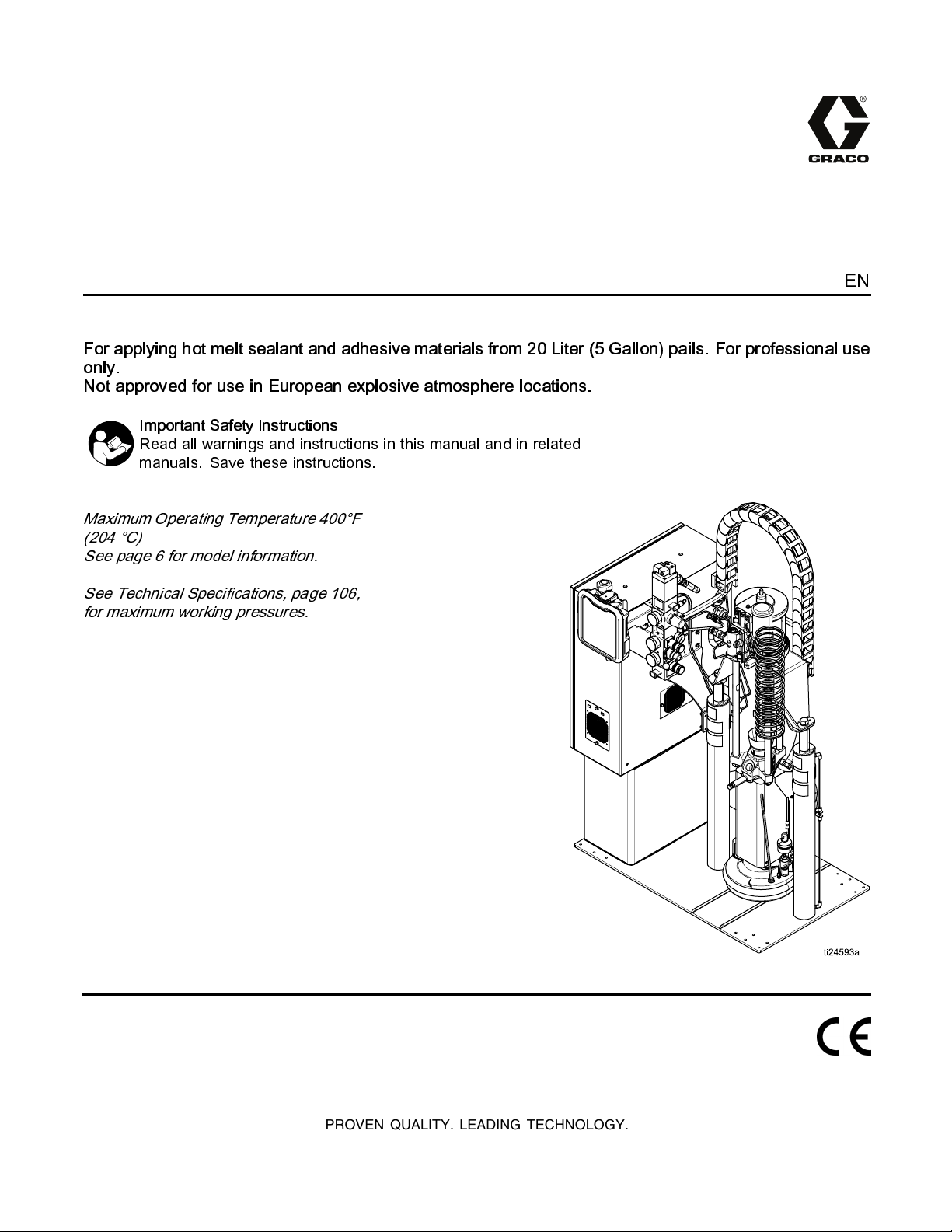
Therm-O-Flow® 20
For applying hot melt sealant and adhesive materials from 20 Liter (5 Gallon) pails. For professional use
only.
Not approved for use in European explosive atmosphere locations.
Important Safety Instructions
Read all warnings and instructions in this manual and in related
manuals. Save these instructions.
Maximum Operating Temperature 400°F
(204 °C)
See page 6 for model information.
EN
See Techni cal Specifica tio ns , page 106 ,
for maximum working pressures.
PROVEN QUALITY. LEADING TECHNOLOGY.
Page 2
Contents
Warnings ............................................................. 3
Models................................................................. 6
Related Manuals .................................................. 7
Component Identification....................................... 8
Advanced Display Module (ADM).................. 12
Overview............................................................15
Air and Fluid Hoses...................................... 15
Heat Control Zone........................................ 15
Setup ................................................................. 16
Unpack........................................................16
Location Requirements.................................16
Install System.............................................. 16
Mechanical Setup ........................................ 17
Install Heated Hose...................................... 18
Connect Multiple Devices ............................. 20
Connect Power............................................ 21
Grounding ................................................... 22
Connect Secondary System..........................22
Check Sensor Resistance ............................ 23
Check Heater Resistance............................. 24
Select ADM Settings .................................... 25
Connect PLC...............................................27
Operation........................................................... 30
Purge System.............................................. 30
Load Material...............................................31
Heat Up System........................................... 32
Prime Pump ................................................ 33
Prime System..............................................35
Setback Mode..............................................35
Pressure Relief Procedure............................ 36
Shutdown .................................................... 37
Schedule..................................................... 37
Change Pail................................................. 38
Troubleshooting..................................................39
Repair................................................................ 47
Replace Wipers ........................................... 47
Replace Platen RTD ....................................48
Separate the Air Motor and Pump ................. 49
Remove Platen............................................ 50
Replace Heater Bands and Pump
RTD...............................................51
Replace MZLP Fuse .................................... 52
Replace MZLP............................................. 52
Replace MZLP Daughter Card......................54
Replace AWB .............................................. 55
Replace Power Supply................................. 55
Replace Fan................................................ 56
Replace Transformer....................................57
Update Software.......................................... 59
Electrical Schematics .......................................... 60
Parts.................................................................. 66
Accessories and Kits...........................................87
Wiper Kits....................................................87
Applicators and Dispense Valves.................. 87
Air-OperatedHeated DispenseValves........... 87
Flow Control and Manifolds .......................... 87
Accessory Extension Cables......................... 87
Light Tower Kit, 24W589 .............................. 87
Tie Rod Kits.................................................87
8 Zone Upgrade Kit Installation..................... 91
12 Zone Upgrade Kit Installation...................93
Appendix A— ADM............................................. 94
Operation Screens....................................... 96
Setup Screens............................................. 97
Appendix B — USB Data .................................. 102
Download.................................................. 102
Access Files .............................................. 102
Upload ...................................................... 102
USB Logs.................................................. 103
System Settings File .................................. 103
System Language File................................ 104
Create Custom Language Strings ............... 104
Dimensions...................................................... 105
Notes ............................................................. 107
Technical Specifications.................................... 108
Graco Standard Warranty.................................. 110
2
334129B
Page 3
Warnings
Warnings
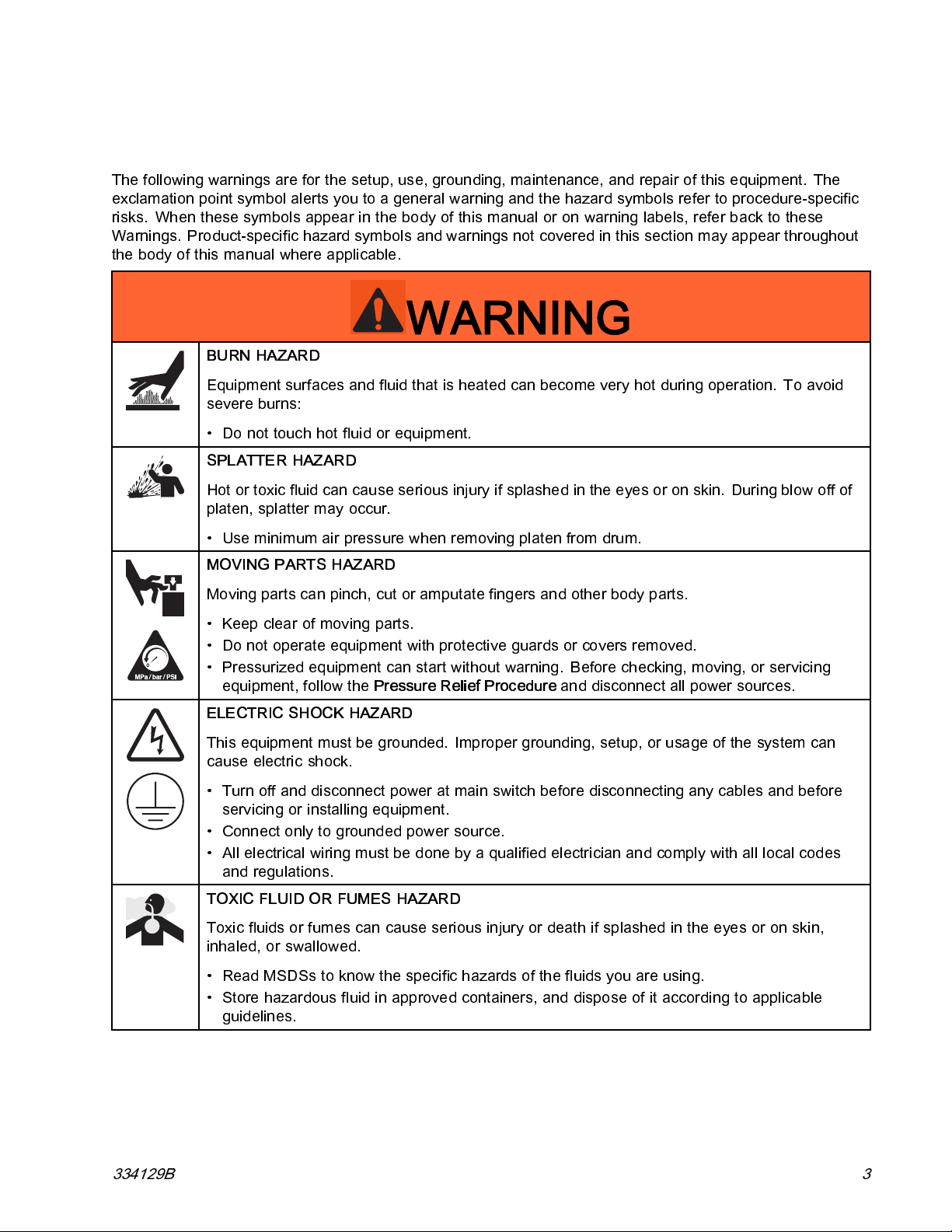
The following warnings are for the setup, use, grounding, maintenance, and repair of this equipment. The
exclamation point symbol alerts you to a general warning and the hazard symbols refer to procedure-specific
risks. When these symbols appear in the body of this manual or on warning labels, refer back to these
Warnings. Product-specific hazard symbols and warnings not covered in this section may appear throughout
the body of this manual where applicable.
WARNING
BURN HAZARD
Equipment surfaces and fluid that is heated can become very hot during operation. To avoid
severe burns:
• Do not touch hot fluid or equipment.
SPLATTER HAZARD
Hot or toxic fluid can cause serious injury if splashed in the eyes or on skin. During bl ow off of
platen, splatter may occur.
• Use minimum air pressure when removing platen from drum.
MOVING PARTS HAZARD
Moving parts c an pinch, cut or amputate fingers and other body parts.
• Keep clear of moving parts.
• Do not operate equipment with protective guards or co ve rs removed.
• Pressurized equipment can start without warning. Before checking, moving, or servicing
equipment, follow the
ELECTRIC SHOCK HAZARD
This equipment must be grounded. Improper grounding, setup, or usage of the system can
cause electric shock.
• Turn off and disconnect power at main switch before disconnecting any cables and before
servicing or installing equipment.
• Connect only to grounded power source.
• All electrical wiring must be done by a qualified electrician and comply with all local codes
and regulations.
TOXIC FLUID OR FUMES HAZARD
Toxic fluids or fumes can cause serious injury or death if splashed in the eyes or on skin,
inhaled, or swallowed.
• Read MSDSs to know the specific hazards of the fluids you are using.
• Store hazardous fluid in approved containers, and dispo s e of it according to applicable
guidelines.
Pressure Relief Procedure
and disconnect all power sources.
334129B 3
Page 4
Warnings
WARNING
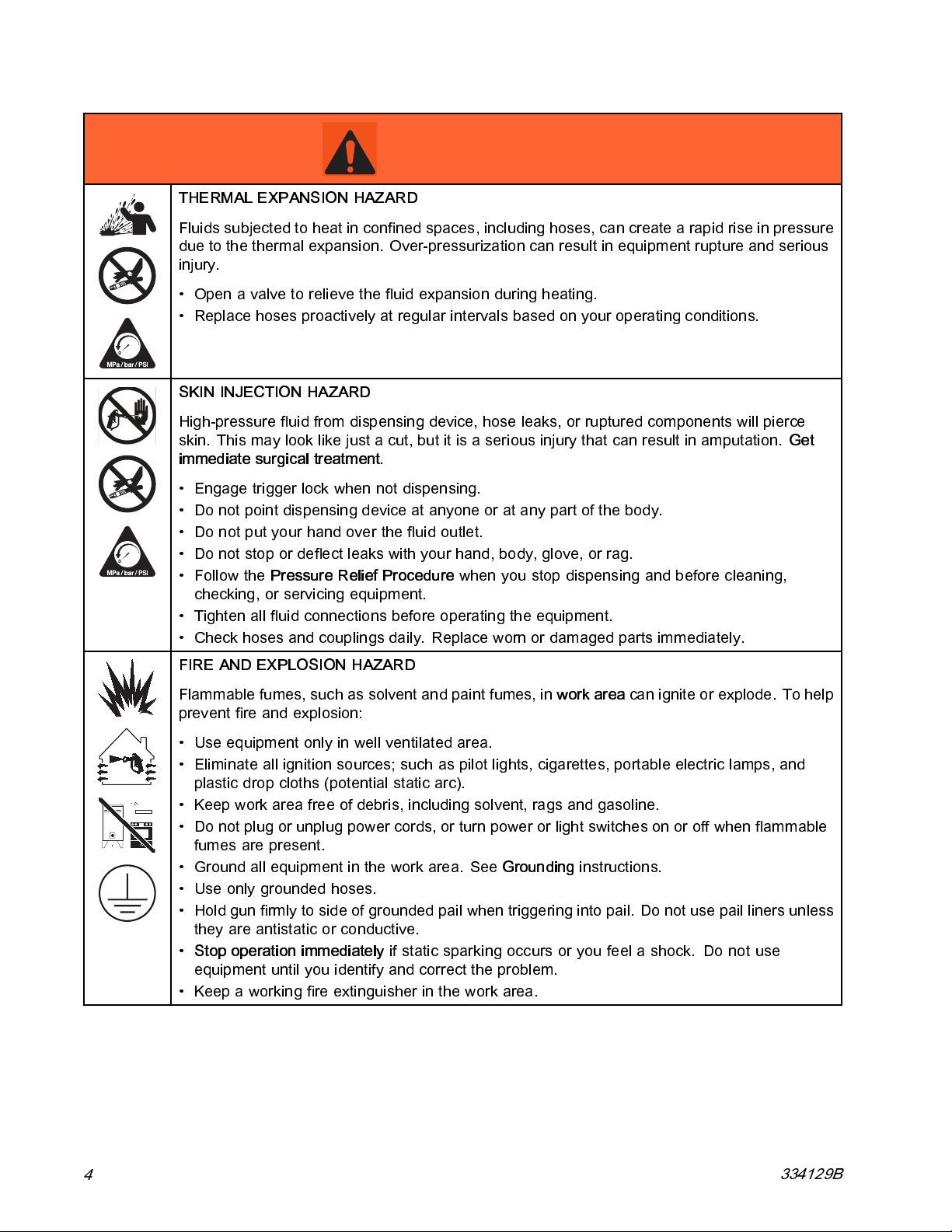
THERMAL EXPANSION HAZARD
Fluids subje cted to heat in confi ned spaces, including hoses, can create a rapid rise in pressure
due to the thermal expansion. Over-pressurization can result in equipment rupture and serious
injury.
• Open a valve to relieve the fluid expansion during heating.
• Replace hoses proactively at regular intervals based on your operating conditions.
SKIN INJECTION HAZARD
High-pressure fluid from dispensing device, hose leaks, or ruptured components will pierce
skin. This ma y look like just a cut, but it is a seriou s injury that can result in amputation.
immediate surgical treatment.
• Engage trigger lock when not dispensing.
• Do not point dispensing device at anyone or at any part of the body.
• Do not p ut your hand over the fluid outlet.
• Do not stop or deflect leaks with your hand, body, glove, or rag.
•Followthe
checking, or servicing equipment.
• Tighten all fl uid connections before operating the equipment.
• Check hoses and couplings daily. Replace worn or damaged parts immediately.
Pressure Relief Procedure
when you stop dispensing and before cleaning,
Get
FIRE AND EXPLOSION HAZARD
Flammable fumes, such as solvent and paint fumes, in
prevent fire and explosion:
• Use equipment only in well ventilated area.
• Eliminate all ignition sources; such as pilot lights, cigarettes, portable electric lamps, and
plastic drop cloths (potential static arc).
• Keep work area free of debris, including solvent, rags and gasoline.
• Do not plug or unplug power cords, or turn power or light switches on or off when flammable
fumes are present.
• Ground all equipment in the work area. See
• Use only grounded hoses.
• Hold gun firmly to side of grounded pail when triggering into pail. Do not use pail liners unless
they are antistatic or conductive.
•
Stop operation immediately
equipment until you identify and correct the problem.
• Keep a working fire extinguisher in the work area.
if static sparking occurs or you feel a shock.Donotuse
Grounding
work area
instructions.
canigniteorexplode.Tohelp
4
334129B
Page 5
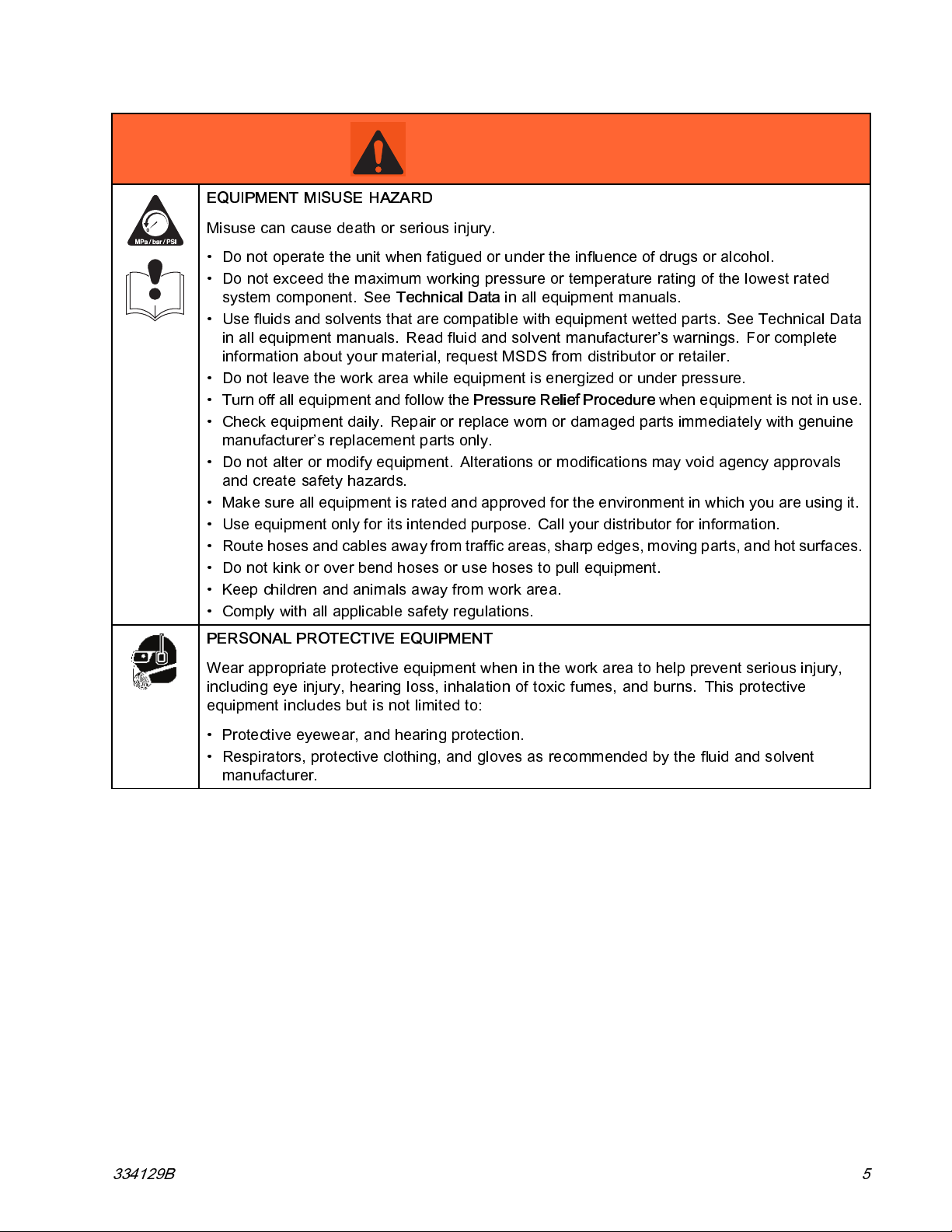
Warnings
WARNING
EQUIPMENT MISUSE HAZARD
Misuse can cause death or serious injury.
• Do not operate th e unit when fatigu ed or unde r the in flu ence of drugs or alcohol.
• Do not ex ceed the max im um working press ure or temperature rating of the lowest rated
system component. See
• Use fluids and solvents that are compatible with equipment wetted parts. See Technical Data
in a ll equipment manuals. Read fluid and solvent manufacturer’s warnings. For complete
information about your material, request MSDS from distributor or retailer.
• Do not leave the work area while equipment is energized or under pressure.
• Turn off all equipment and follow the
• Check equipment d aily. Repair or replace worn or damaged parts immediately with genuine
manufacturer’s replacement parts only.
• Do not alter or mo dif y equipmen t. Alterati ons or modifications may void agency approva ls
and create safety hazards.
• Make sure all equipment is rated and approved for the environment in which y ou are using it.
• Use equipment only for its intended purpose. Call your distributor for information.
• Route hoses and cables away from traffic areas, sharp edges, moving parts, and hot surfaces.
• Do not kink or over be nd hoses or use h os es to pull equipment.
• Keep children and animals away from work area.
• Comply with all applicable safety regulations.
Technical Data
Pressure Relief Procedure
in all equipm ent manu als.
when equipment is not in use.
PERSONAL PROTECTIVE EQUIPMENT
Wear appropriate protective equipment when in the work area to help prevent serious injury,
including eye injury, hearing loss, inhalation of toxic fumes, and burns. This protective
equipment includes but is not limited to:
• Protective eyewear, and hearing protection.
• Respirators, protective clothing, and gloves as recommended by the fluid and solvent
manufacturer.
334129B 5
Page 6
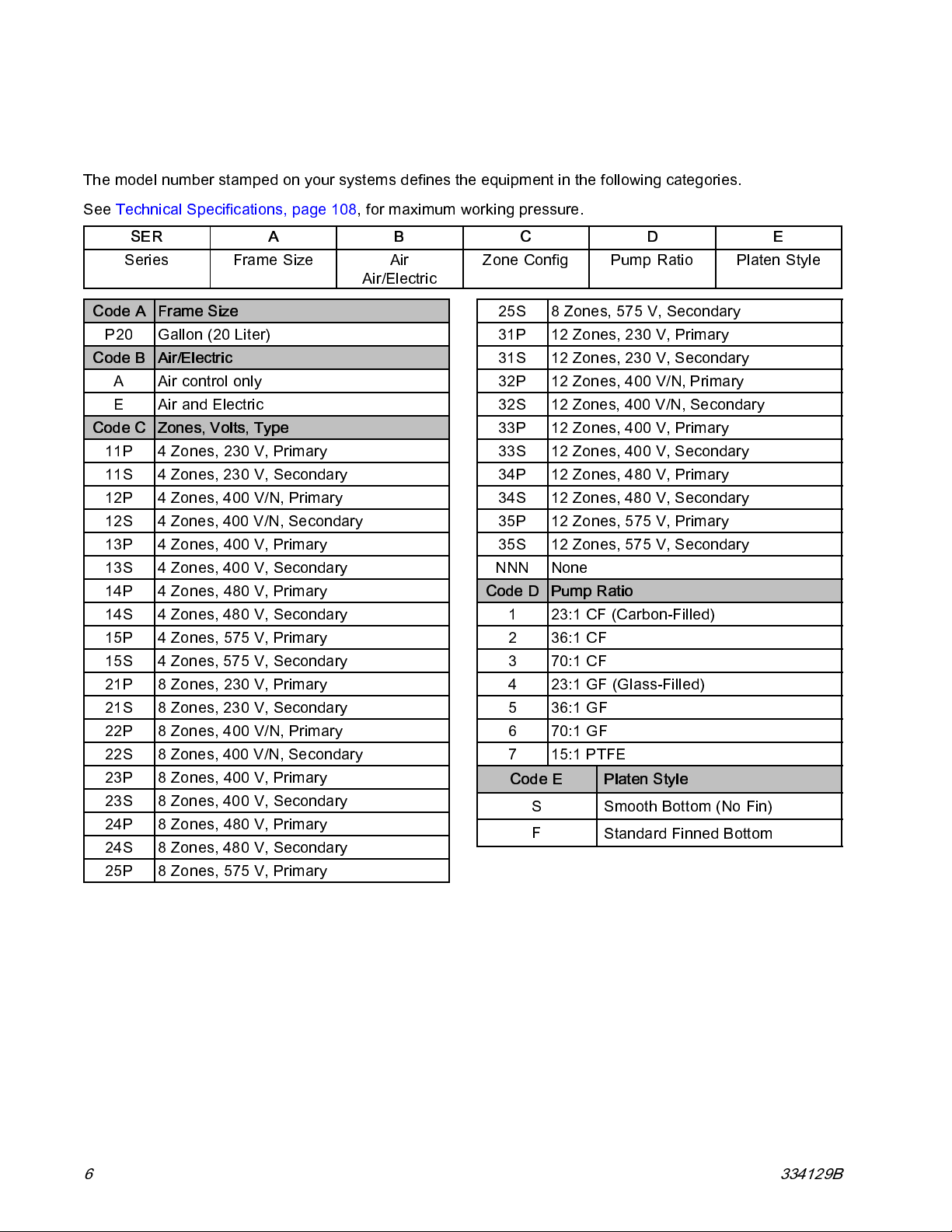
Models
Models
The model number stamped on your systems defines the equipment in the following categories.
See Technical Specifications, page 108, for maximum working pressure.
SER
Series Frame Size
Code A Frame Size
P20
Code B
Code C
11P 4 Zones , 230 V, Primary
11S 4 Zones , 230 V, Secondary
12P 4 Zones, 400 V/N, Primary
12S 4 Zones, 400 V/N, Secondary
13P 4 Zones , 400 V, Primary
13S 4 Zones , 400 V, Secondary
14P 4 Zones , 480 V, Primary
14S 4 Zones , 480 V, Secondary
15P 4 Zones , 575 V, Primary
15S 4 Zones , 575 V, Secondary
21P 8 Zones , 230 V, Primary
21S 8 Zones , 230 V, Secondary
22P 8 Zones, 400 V/N, Primary
22S 8 Zones, 400 V/N, Secondary
23P 8 Zones , 400 V, Primary
23S 8 Zones , 400 V, Secondary
24P 8 Zones , 480 V, Primary
24S 8 Zones , 480 V, Secondary
25P 8 Zones , 575 V, Primary
Gallon (20 Liter)
Air/Electric
A Air control only
E Air and Electric
Zones, Volts, Type
AB
Air
Air/Electric
C
Zone Config
25S 8 Zones, 575 V, Secondary
31P 12 Zones , 230 V, Primary
31S 12 Zones , 230 V, Secondary
32P 12 Zones, 400 V/N, Primary
32S 12 Zones, 400 V/N, Secondary
33P 12 Zones , 400 V, Primary
33S 12 Zones , 400 V, Secondary
34P 12 Zones , 480 V, Primary
34S 12 Zones , 480 V, Secondary
35P 12 Zones , 575 V, Primary
35S 12 Zones , 575 V, Secondary
NNN None
Code D
Pump Ratio
1
23:1 CF (Carbon-Fill ed)
2
36:1 CF
3
70:1 CF
4
23:1 GF (Gl ass-Filled)
5
36:1 GF
6
70:1 GF
7 15:1 PTFE
Code E Platen Style
S Smooth Bottom (No Fin)
F
DE
Pump Ratio
Standard Finned Bottom
Platen Style
6 334129B
Page 7
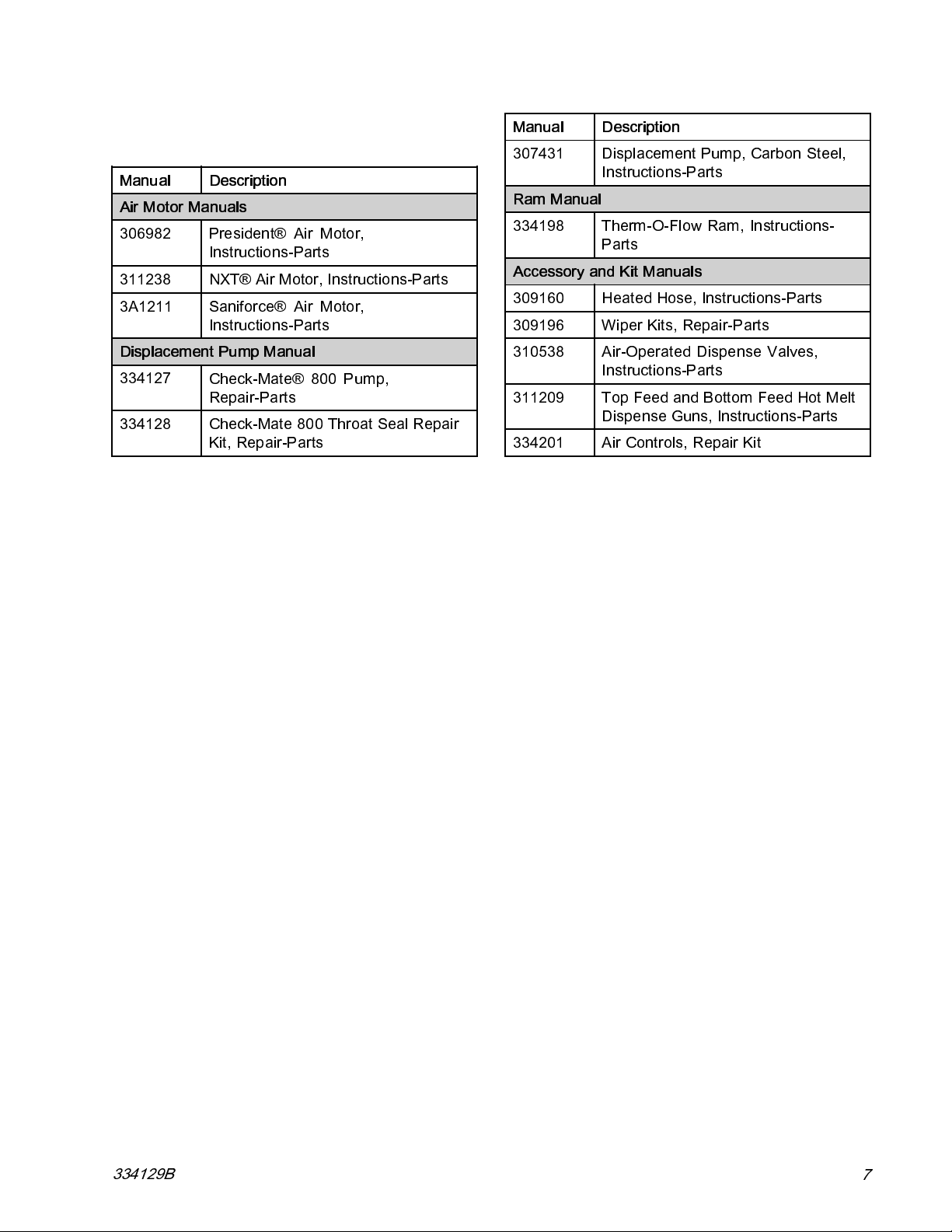
Related Manuals
Related Manuals
Manual Description
Air Motor Manuals
306982
311238
3A1211 Saniforce® Air Motor,
Displacement Pump Manual
334127
334128
President® Air Motor,
Instructions-Parts
NXT® Air Motor, Instructions-Parts
Instructions-Parts
Check-Mate® 800 P ump,
Repair-Parts
Check-Mate 800 Throat Seal Repair
Kit, Repair-Parts
Manual Description
307431
Ram Manual
334198 Therm-O-Flow Ram, Instructions-
Accessory and Kit Manuals
309160 Heated Hose, Instructions-Parts
309196 Wiper Kits, Repair-Parts
310538
311209 Top Feed and Bottom Feed Hot Melt
334201
Displacement Pump, Carbon Steel,
Instructions-Parts
Parts
Air-Operated Dispense Valves,
Instructions-Parts
Dispense Guns, Instructions-Parts
Air Cont rols, Repair Kit
334129B
7
Page 8
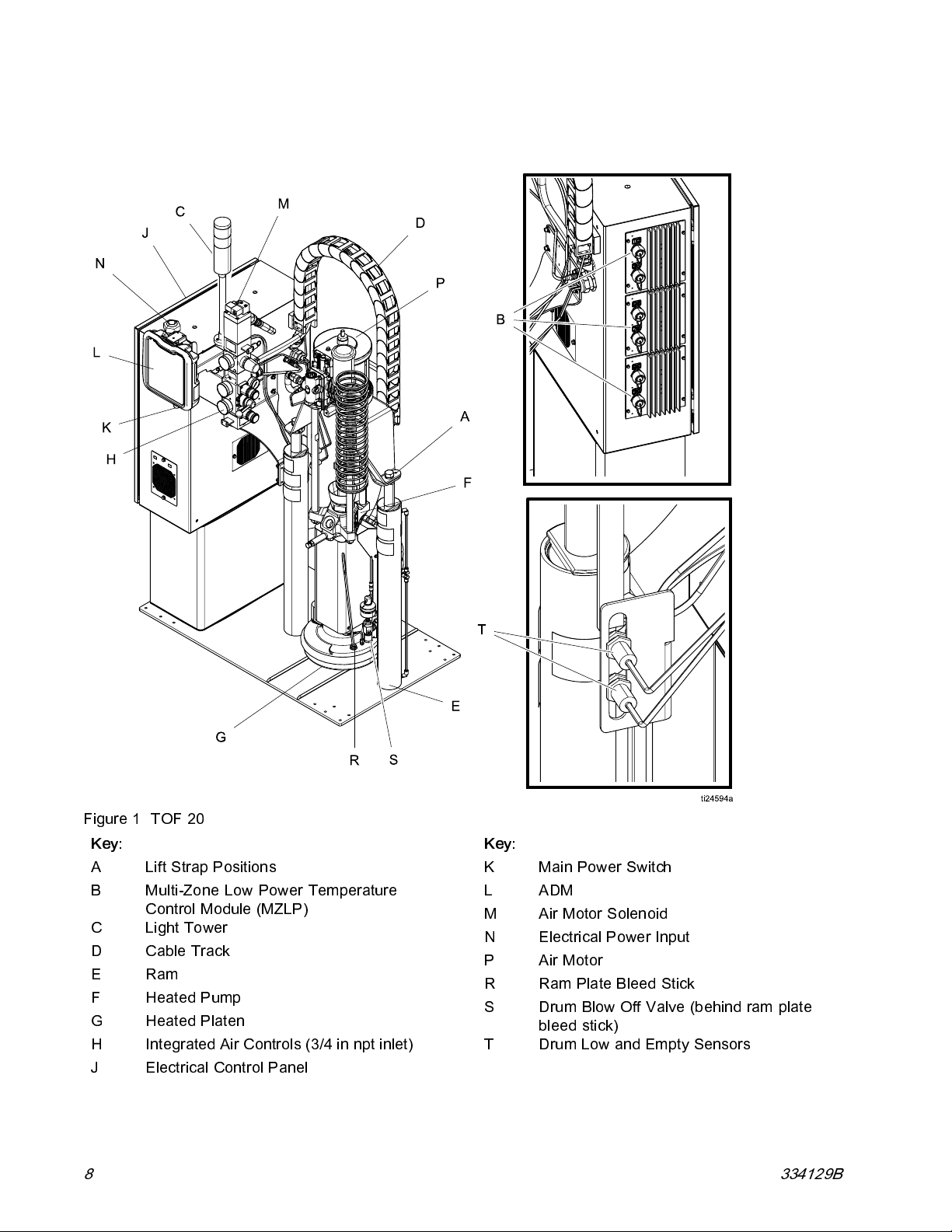
Component Identification
Component Identification
Figure 1 TOF 20
Key:
A
B Multi-Zone Low Power Temperature
C
D
ERam
F Heated Pump
G
H
J
8 334129B
Lift Strap Positions
Control Module (MZLP)
Light Tower
Cable Track
Heated Platen
Integrated Air Controls (3/4 in npt inlet)
Electrical Control Panel
Key:
K
LADM
M
N Electrical Power Input
PAirMotor
R
S Drum Blow Off Valve (behind ram plate
T
Main Power Switch
Air M otor Solenoid
Ram Plate Bleed Stick
bleed stick)
Drum Low and Empty Sensors
Page 9
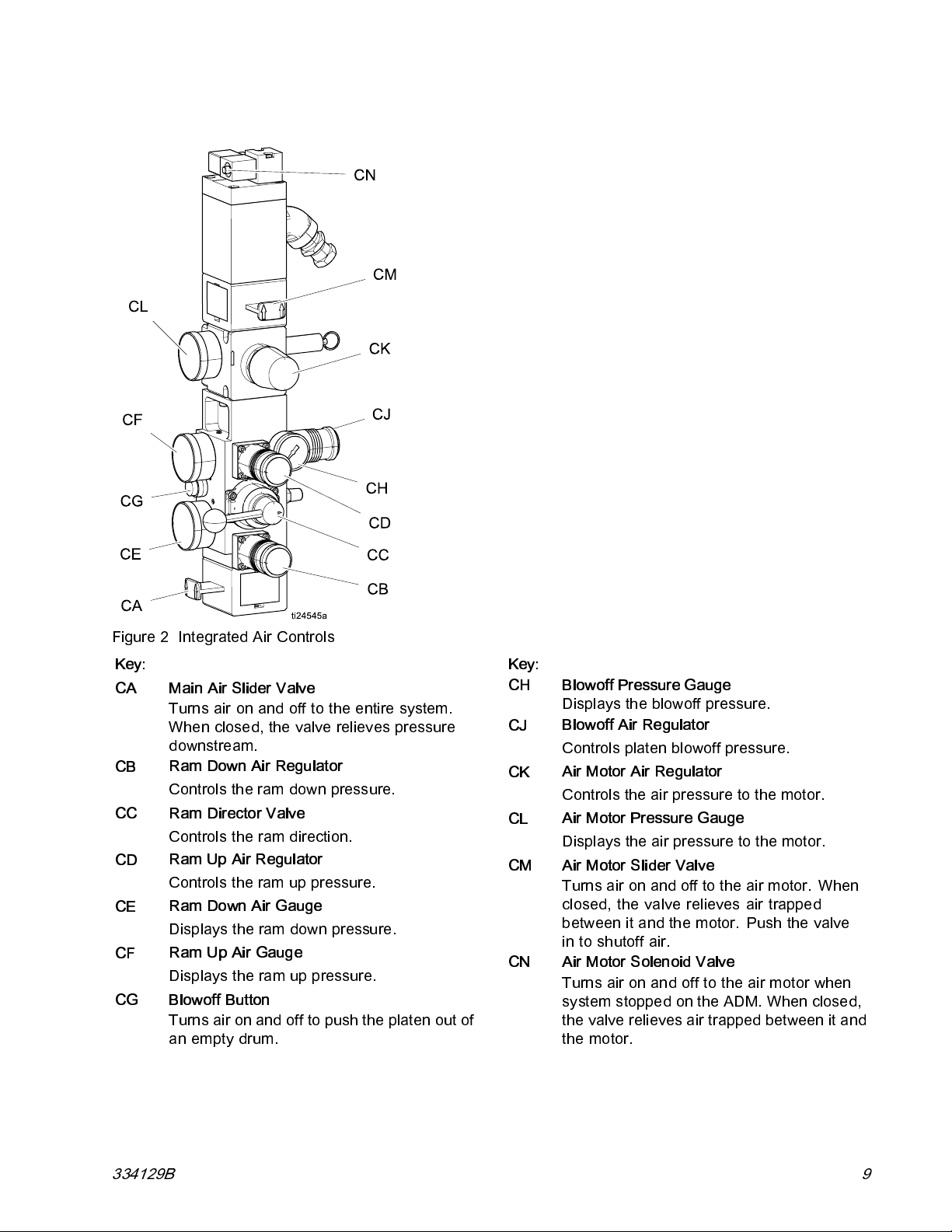
Integrated Air Controls
Component Identification
Figure 2 Integrated Air Controls
Key:
CA Main Air Slider Valve
Turns air on and off to the entire system.
When closed, the valve relieves pressure
downstream.
CB
CC Ram Director Valve
CD
CE
CF
CG Blowoff Button
Ram Down Air Regulator
Controls the ram down pressure.
Controls the ram direc tion.
Ram Up Air Regulator
Controls the ram up pressure.
Ram Down Air Gauge
Displays the ram down pressure.
Ram Up Air Gauge
Displays the ram up pressure.
Turns air on and off to push the platen out of
an empty drum.
Key:
CH Blowoff Pressure Gauge
Displays the blowoff pressure.
CJ
CK
CL
CM Air Motor Slider Valve
CN Air Motor Solenoid Valve
Blowoff Air Regulator
Controls platen blowoff pressure.
Air Motor Air Regulator
Controls the air pressure to the motor.
Air M otor Pressure Gauge
Displays the air pressure to the motor.
Turns air on and off to the air motor. When
closed, the valve relieves air trapped
between it and the motor. Push the valve
in to shutoff air.
Turns air on and off to the air motor when
system stopped on the ADM. When closed,
the valve relieves air trapped between it and
the motor.
334129B 9
Page 10
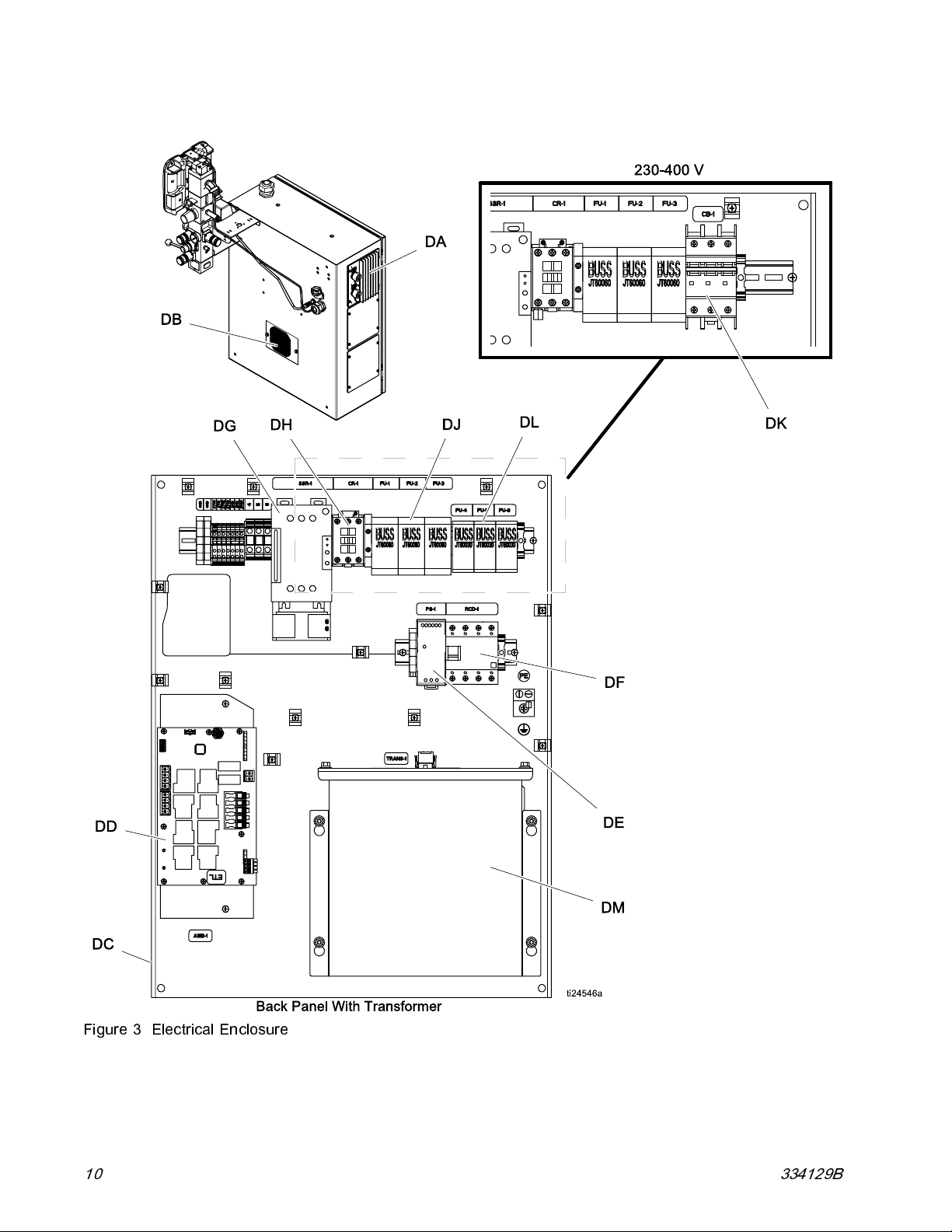
Component Identification
Electrical Control Enclosure
Figure 3 Electrical Enclosure
10 334129B
Page 11
Component Identification
Key:
DA Multi-Zone Low Power Temperature
Control Module (MZLP)
DB
DC Electrical C ontrol Panel
DD
DE
DF
Ventilation Grill
Automatic Wiring Board (AWB)
Power Supply (24V)
Residual Current Devic e (GFI), 63A
Key:
DGPlatenSSR(65A)
DH
DJPlatenFuse
DK
DL
DM
Platen Contactor
Transformer Circuit Breaker
Transformer Fuse
Transformer
334129B
11
Page 12
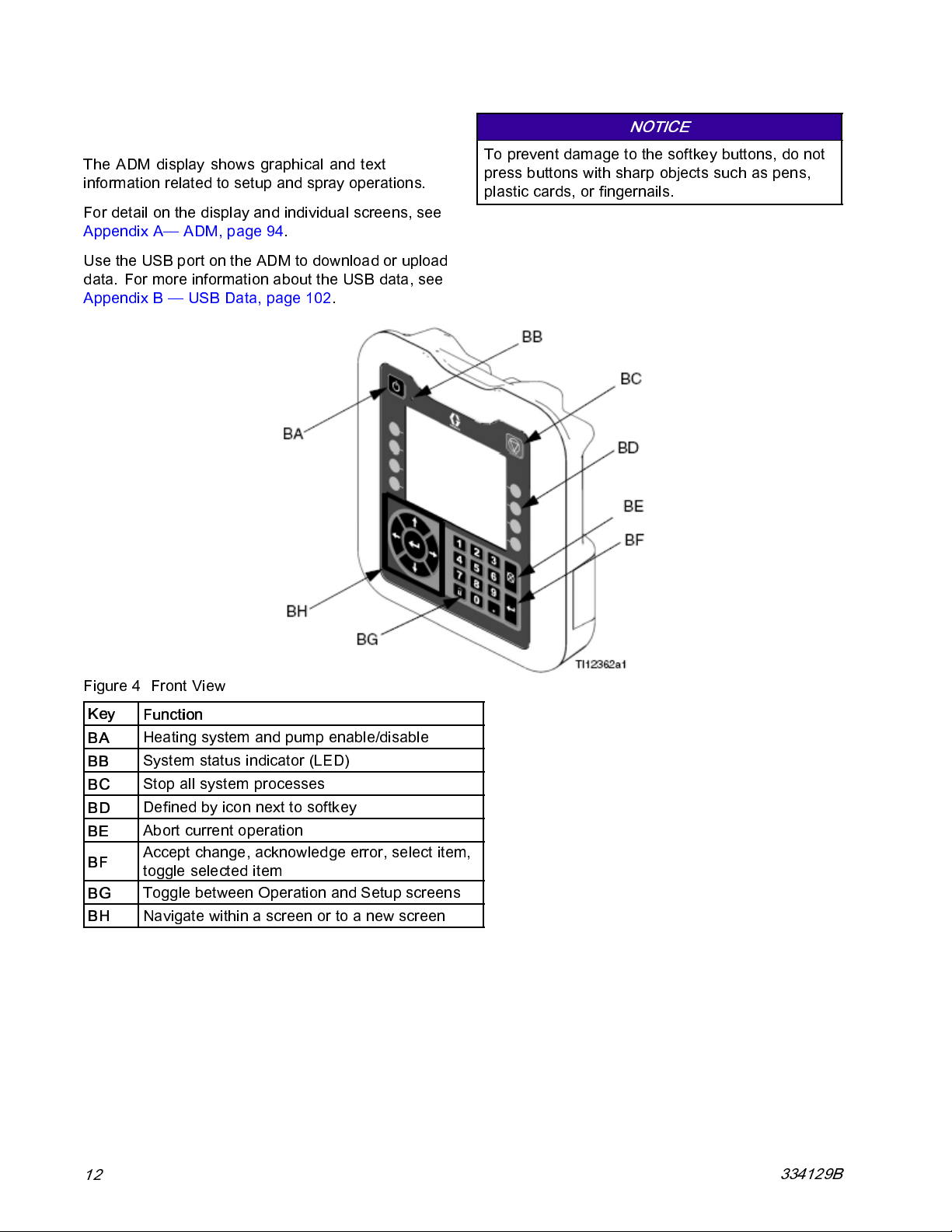
Component Identification
Advanced Display Module (ADM)
The ADM display shows graphical and text
information related to setup and spray operations.
For detail on the display and individual screens, see
Appendix A— ADM, page 94.
Use the USB port on the ADM to download or upload
data. For more information about the USB data, see
Appendix B — USB Data, page 102.
NOTICE
To prevent damage to the softkey buttons, do not
press buttons with sharp objects such as pens,
plastic cards, or fingernails.
Figure 4 Front View
Key
BA
BB
BC
BD
BE
BF
BG
BH
Function
Heating sy stem and pump enable/disable
m status i ndicator (LED)
Syste
ll system processes
Stop a
dbyiconnexttosoftkey
Define
current operation
Abort
Accept change, acknowledge error, select item,
toggle selected item
Toggle between Operation and Setup screens
Navigatewithinascreenortoanewscreen
12
334129B
Page 13
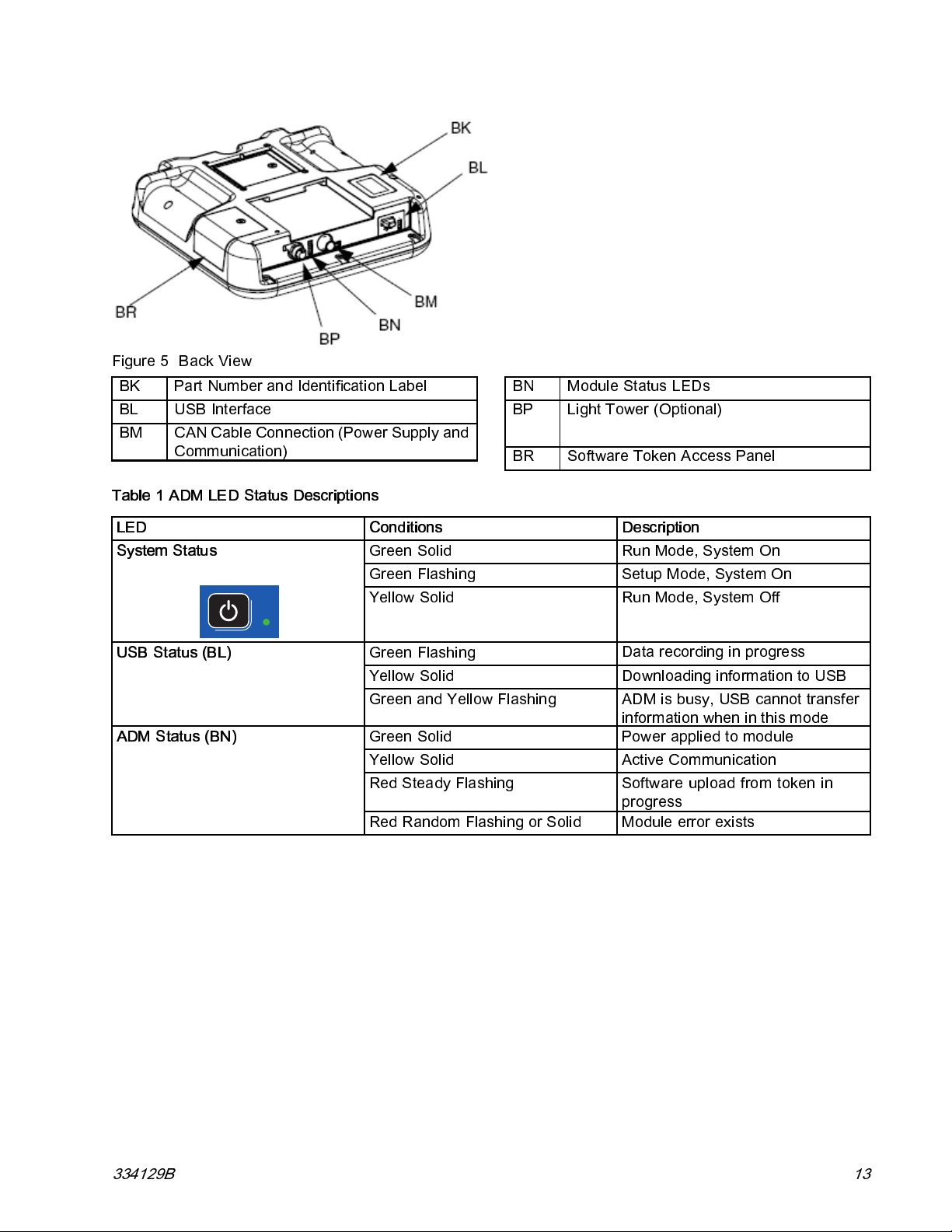
Figure 5 Back View
BK
BL
BM
Table 1 ADM LED Status Descriptions
Part Number and Identification Label
USB Interface
CAN Cable Connection (Power Supply and
Communication)
BN
BP
BR
Component Identification
Module Status LEDs
Light T ower (Optional)
Software Token Access Panel
LED
System Status
USB Status (BL)
ADM Status (BN)
Conditions
Green Solid Run Mo de, System On
Green Flashing Setup Mode, System On
Yellow Solid Run Mode, System Off
Green Flashing
Yellow Solid Downloading information to USB
Green an d Yellow Flashin g ADM is busy, USB cannot transfer
Green Solid
Yellow Solid Active Communication
Red Steady Flashing Software upload from token in
Red Random Flashing or Solid
Description
Data recording in progress
informationwheninthismode
Power applied to module
progress
Module error exists
334129B 13
Page 14
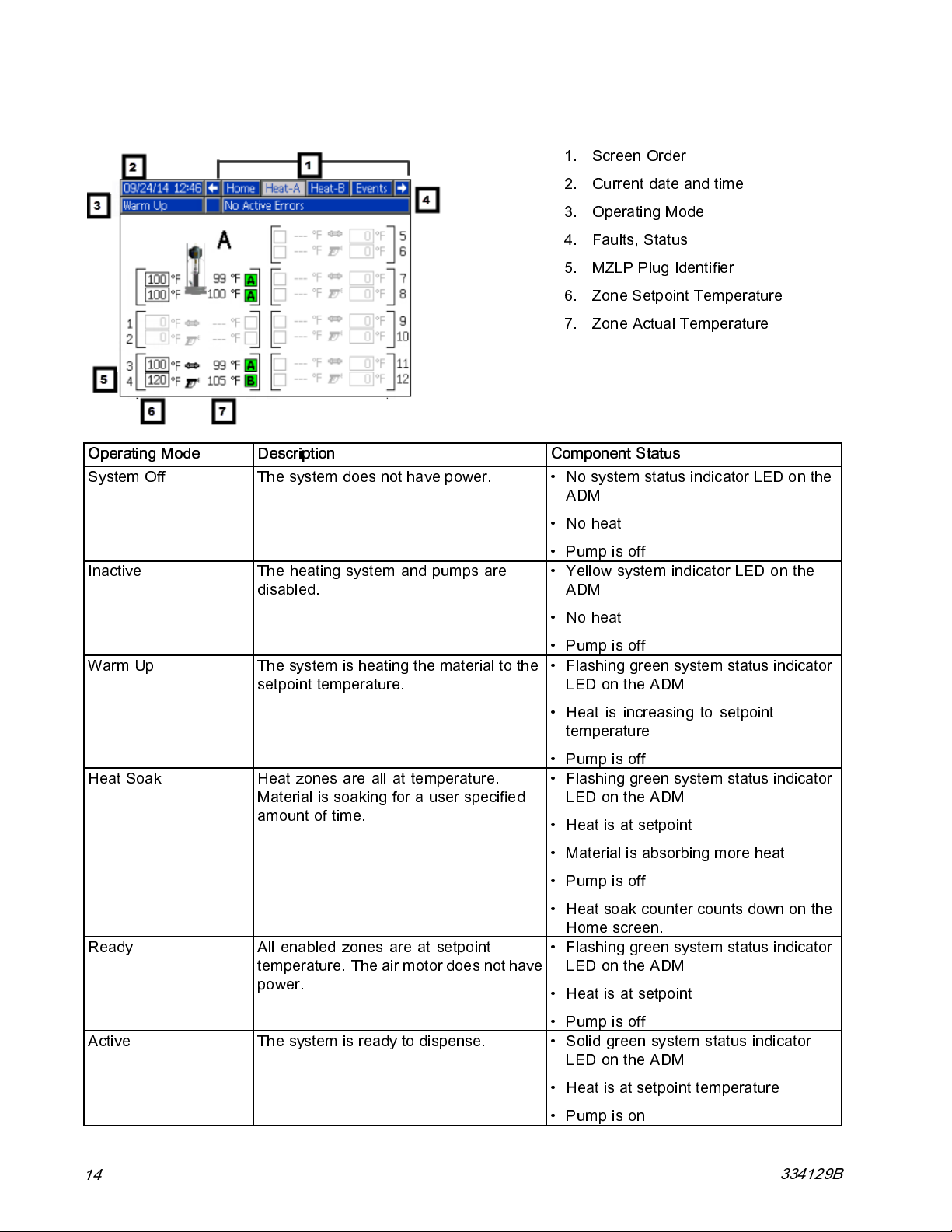
Component Identification
Screen Components
1. Screen Order
2. Current date and time
3. Operating Mode
4. Faults, Status
5. MZLP Plug Identifier
6. Zone Setpoint Temperature
7. Zone Actual Temperature
Operating Mode Description Component Status
System Off The system do
es not have power.
• No system sta
ADM
tus indicator LED on the
Inactive The heating system and pumps are
disabled.
Warm Up The system is heating the material to the
setpoint temperature.
Heat Soak
Ready All enabled zones are at setpoint
Heat zones are all at temperature.
Material is soaking for a user specified
amount of time.
temperature. The air motor does not have
power.
•Noheat
•Pumpisoff
• Yellow system indicator LED on the
ADM
•Noheat
•Pumpisoff
• Flashing green system status indicator
LED on the ADM
• Heat is increasing to setpoint
temperature
•Pumpisoff
• Flashing green system status indicator
LED on the ADM
• Heatisatsetpoint
• Material is abs orbing more heat
•Pumpisoff
• Heat so ak counter counts down on the
Home screen.
• Flashing green system status indicator
LED on the ADM
• Heatisatsetpoint
Act
14
ive
system is ready to dispense.
The
•Pumpisoff
• Solid green system status indicator
LED on the ADM
• Heatisatsetpointtemperature
•Pumpison
334129B
Page 15
Overview
A heated platen melts the sealant or adhesive and
directs the molten material to the pump inlet. The
material then travels through a heated pump and
heated fl u id moves to the application tool.
Air and Fluid Hoses
The Therm-O-Flow requires Graco single-circuit
material hoses rated at a maximum of 1250 watts.
Make s u re all air and fluid hoses are properly sized
for the system.
Heat Control Zone
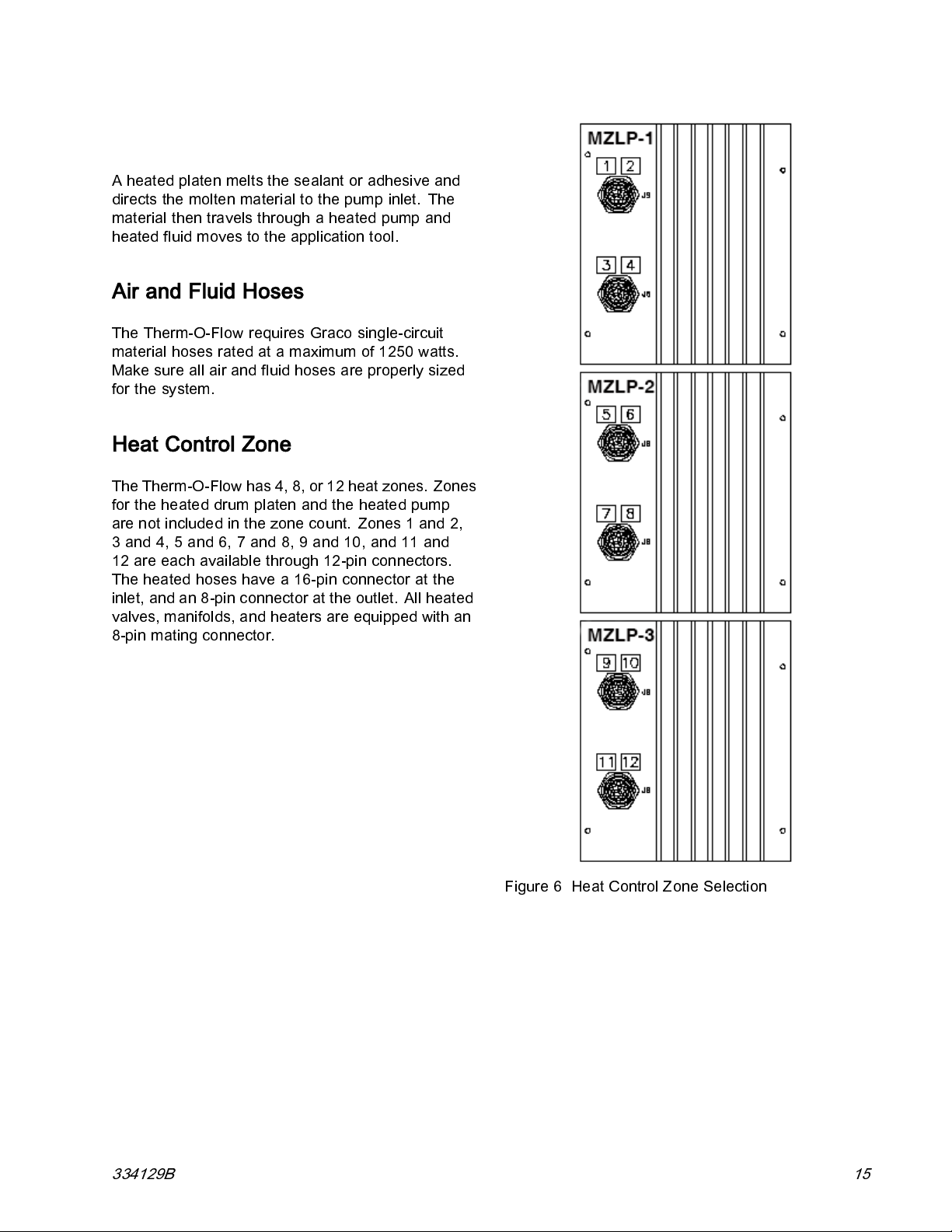
The Therm-O-Flow has 4, 8, or 12 heat zones. Zones
for the heated drum platen and the heated pump
are not included in the zone count. Zones 1 and 2,
3 and 4, 5 and 6, 7 and 8, 9 and 10, and 11 and
12 are each available through 12-pin connectors.
The heated hoses have a 16-pin connector at the
inlet, and an 8-pin connector at the outlet. All heated
valves, manifolds, and heaters are equipped with an
8-pin mating connector.
Overview
Figure 6 Heat Control Zone Selection
334129B 15
Page 16
Setup
Setup
1. Unpack the ram
2. Locate and Install the ram
3. Mechanical Setup
4. Connect hoses to electrical control panel
5. Connect el e ctrical control panel to power source
6. Ground system
7. Select ADM settings
Unpack
1. Inspect the shipping box carefully for damage.
Contact the carrier promptly if there is damage.
2. Open the box and inspect the contents carefully.
There should not be any l oose or damaged parts
in the box.
3. Compare the packing slip against all items in the
box. Report any shortages or other inspection
problems immediately.
4. Remove the unit from the skid and place it in the
desired location. See
Location Requirements
.
2. If you are installing a vent hood, make sure there
is sufficient horizontal clearance for it. Locate the
ram near a connection to the factory ventilation
system.
3. Make sure the integrated air controls for the
pump and ram are fully accessible, with room
to stand directly in front of the controls and the
ADM.
4. Make sure there is easy access to an appropriate
electrical power source. The National Electrical
Code requires 3 ft (0.9 m) of open space in front
of the electrical panel. Comply with all local
codes and regulations.
Install System
Refer to Dimensions, page 105, for mounting and
clearance dimensions.
Follow all Location Requirements, page 16,when
selecting a location for the ram.
1. Apply 50 psi download pressure to ram.
2. Wrap the bar with the lifting sling.
3. Lift the system off the pallet using a crane or a
forklift and place in desired location.
4. Level the base of the ram, using metal shims.
Location Requirements
1. Make sure there is sufficient overhead clearance
for the pump and ram when the ram is in the fully
raised pos ition (approximately 75 in. (190.5 cm).
5. Bolt the ram to the floor, usin g ancho rs that are
long enough to prevent the unit from tipping.
16 334129B
Page 17
Setup
Mechanical Setup
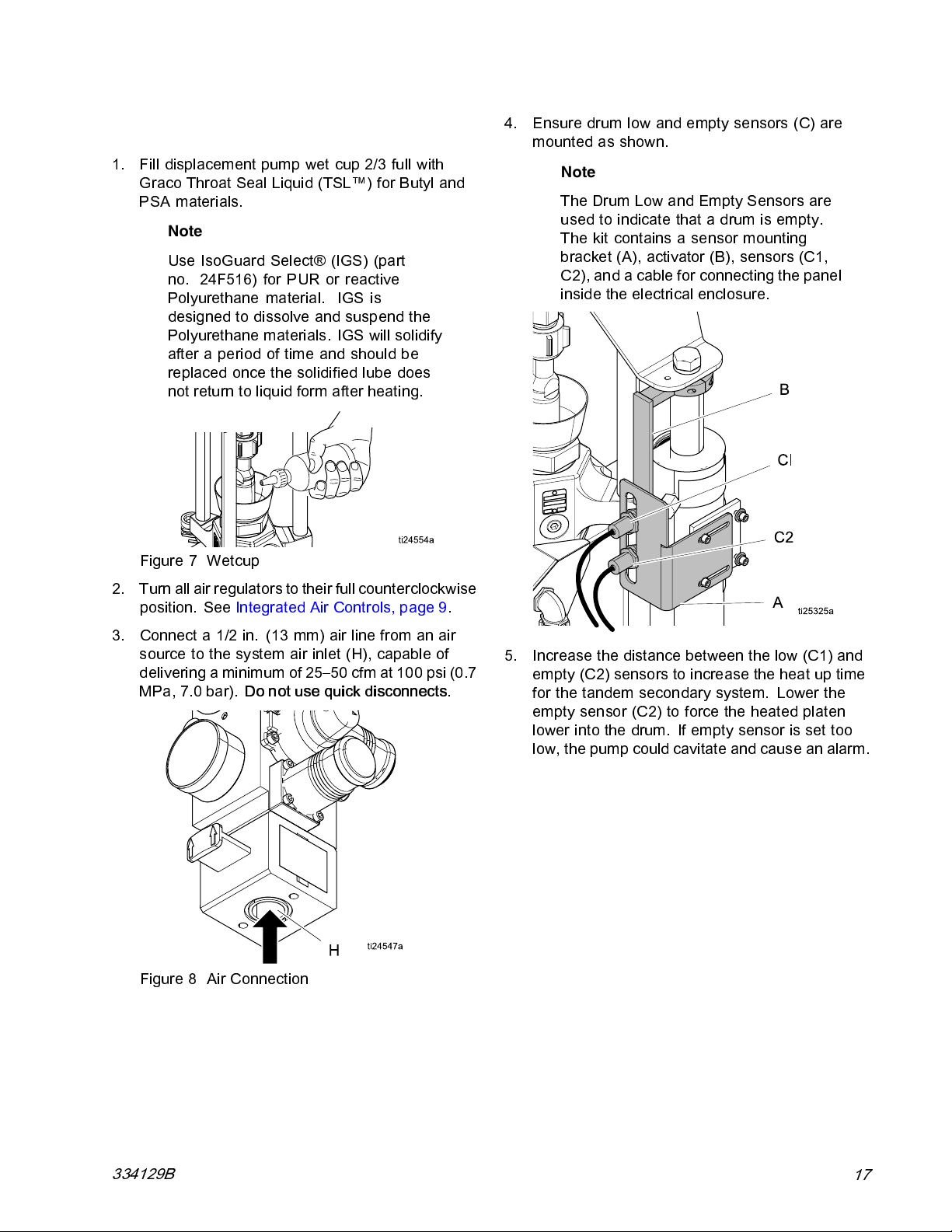
1. Fill displacement pump wet cup 2/3 full with
Graco Throat Sea l Liquid (TSL™) for Butyl and
PSA materials.
Note
Use IsoGuard Select® (IGS) (part
no. 24F516) for PUR or reactive
Polyurethane material. IGS is
designed to dissolve and suspend the
Polyurethane materials. IGS will so lidify
after a period of time and should be
replaced once the solidified lube does
not return to liquid form after heating.
Figure 7 Wetcup
4. Ensure drum low and empty sensors (C) are
mounted as shown.
Note
TheDrumLowandEmptySensorsare
used to indicate that a drum is empty.
The kit contains a sensor mounting
bracket (A), activator (B), sensors (C1,
C2), and a cable for connecting the panel
inside the electrical enclosure.
2. Turn all air regulators to their ful l counterclockwise
position. See Integrated Air Controls, page 9.
3. Connect a 1/2 in. (13 mm) air line from an air
source to the system air inlet (H), capable of
delivering a minimum of 25–50 cfm at 100 psi (0.7
MPa, 7.0 bar).
Figure 8 Air Connect ion
Do not use quick disconnects
.
5. Increase the distance betwee n the low (C1) and
empty (C2) sensors to increase the heat up time
for the tandem secondary system. Lower the
empty sensor (C2) to force the heated platen
lower into the drum . If empty sensor is set too
low,thepumpcouldcavitateandcauseanalarm.
334129B
17
Page 18
Setup
Install Heated Hose
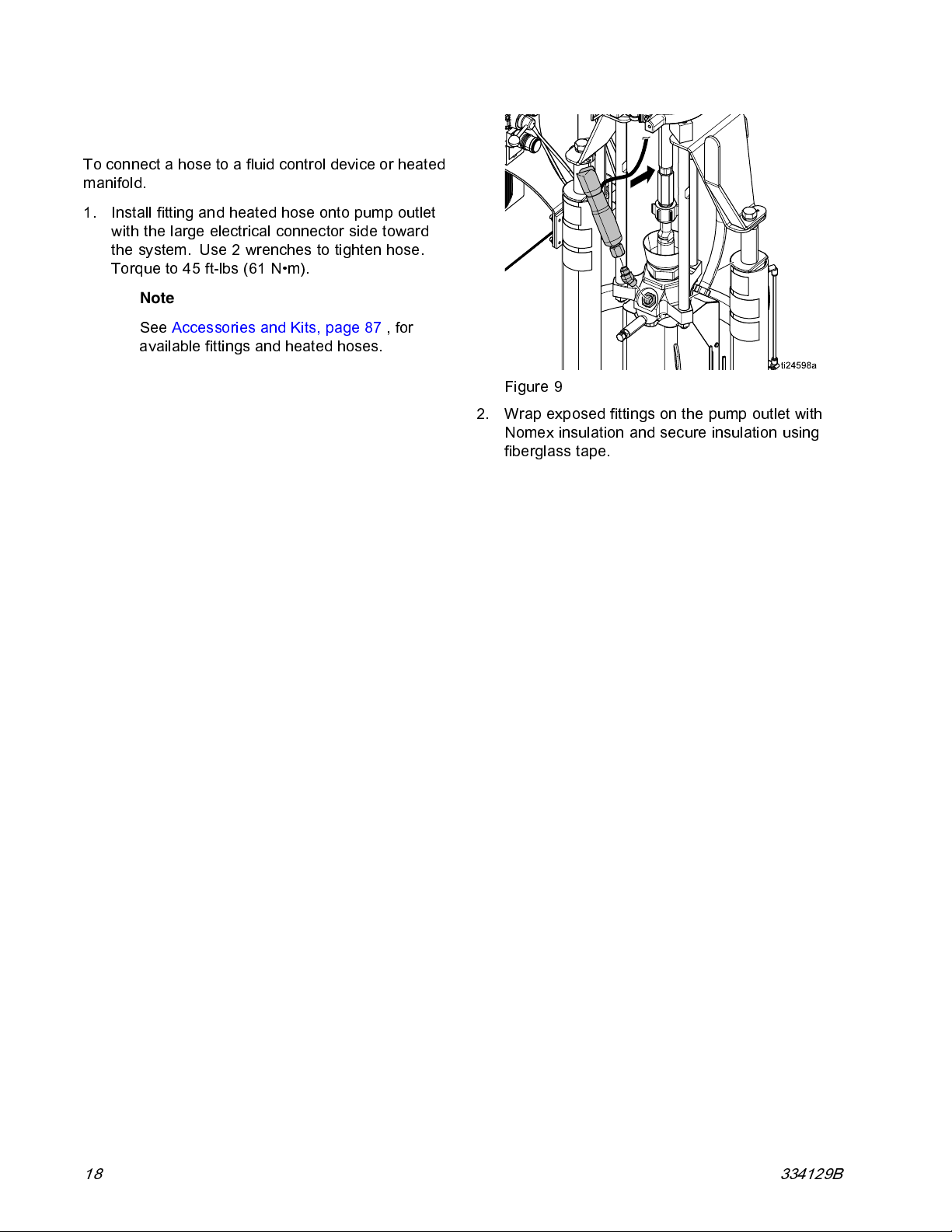
To connec t a hose to a fluid control device or heated
manifold.
1. Install fitting and heated hose onto pump outlet
with the large electrical connector side toward
thesystem.Use2wrenchestotightenhose.
Torque to 45 ft-lbs (61 N•m).
Note
See Accessories and Kits, page 87 ,for
available fittings and heated hoses.
Figure 9
2. Wrap exposed fittings on the pump outlet with
Nomex insulation and secure insulation using
fiberglass tape.
18 334129B
Page 19
Setup
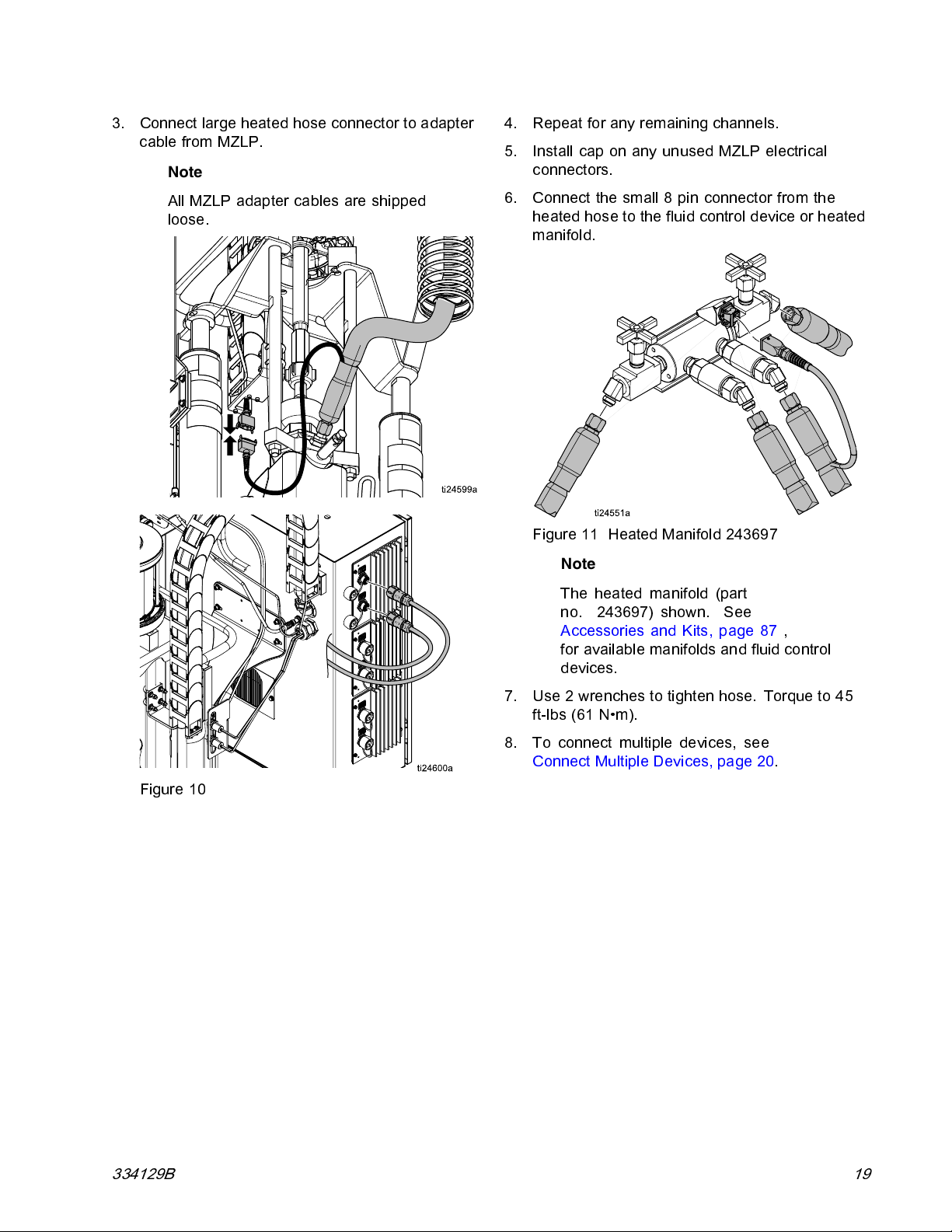
3. Connect large heated hose connector to adapter
cable from MZLP.
Note
All MZLP adapter cables are shipped
loose.
4. Repeat fo r any remaining channels.
5. Install cap on any unused MZLP electrical
connectors.
6. Connect the small 8 pin connector from the
heated hos e to the fluid control device or heated
manifold.
Figure 11 Heated Manifold 243697
Note
Figure 10
The heated manifold (part
no. 243697) shown. See
Accessories and Kits, page 87 ,
for available manifolds and fluid control
devices.
7. Use 2 wrenches to tighten hose. Torque to 45
ft-lbs (61 N•m).
8. To connect multipl e devices, see
Connect Multiple D ev ic es , page 20.
334129B 19
Page 20
Setup
Connect Multiple Devices
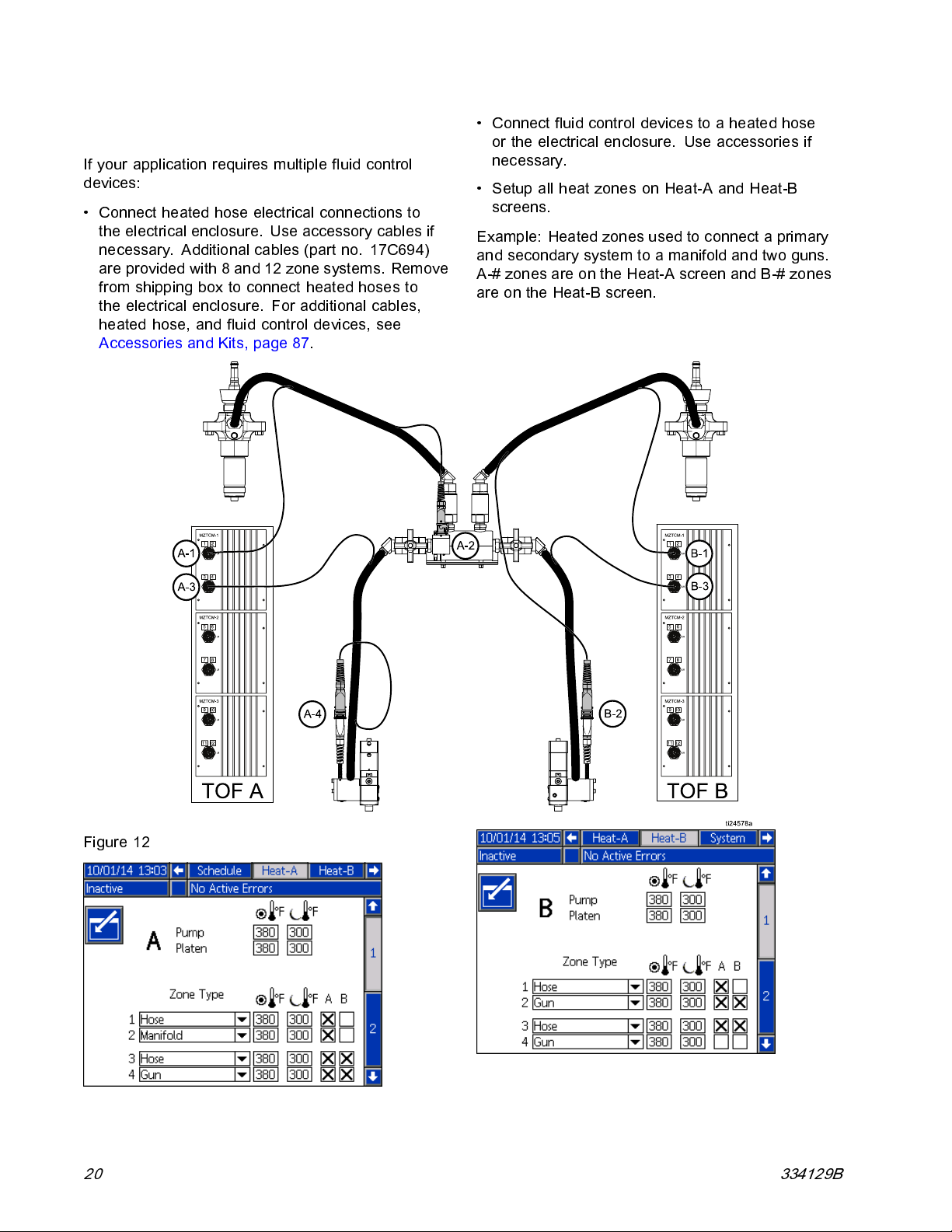
If your application requires multiple fluid control
devices:
• Connect heated hose electrical connections to
the electrical enclosure. Use accessory cables if
necessary. Additional cables (part no. 17C694)
areprovidedwith8and12zonesystems.Remove
from shipping box to connect heated hoses to
the electrical enclosure. For additional cables,
heated hose, and fluid control devices, see
Accessories and Kits, page 87.
• Connect fluid control devices to a heated hose
or the electrical enclosure. Use accessories if
necessary.
• Setup all heat zones on Heat-A and Heat-B
screens.
Example: Heated zones used to connect a primary
andsecondarysystemtoamanifoldandtwoguns.
A-# zon es are on the Heat-A screen and B-# zo nes
are on the Heat-B screen.
Figure 12
20 334129B
Page 21
Setup
Connect Power
The elec trical control panel comes already attached
and wired to the ram, however before the supply unit
becomes functional you must connect the electrical
control panel to a power source.
All electrical wiring must be done by a qualified
electrician and comply with all local codes and
regulations.
Note
Required voltage and amperage is noted on
the control panel label. Before running power
to the unit, make sure the plant electrical
service meets the machine’s electrical
requirements.
Table 2 Electrical Requirements
Elec-
trical
Panel
Voltage
220 /
240
380 /
400
470 /
490
Hz Phase Platen
50/60 3
50/60 3
50/60 3
EF, ES
EF, ES
EF, ES
Full
Load
Amps
39
20
19
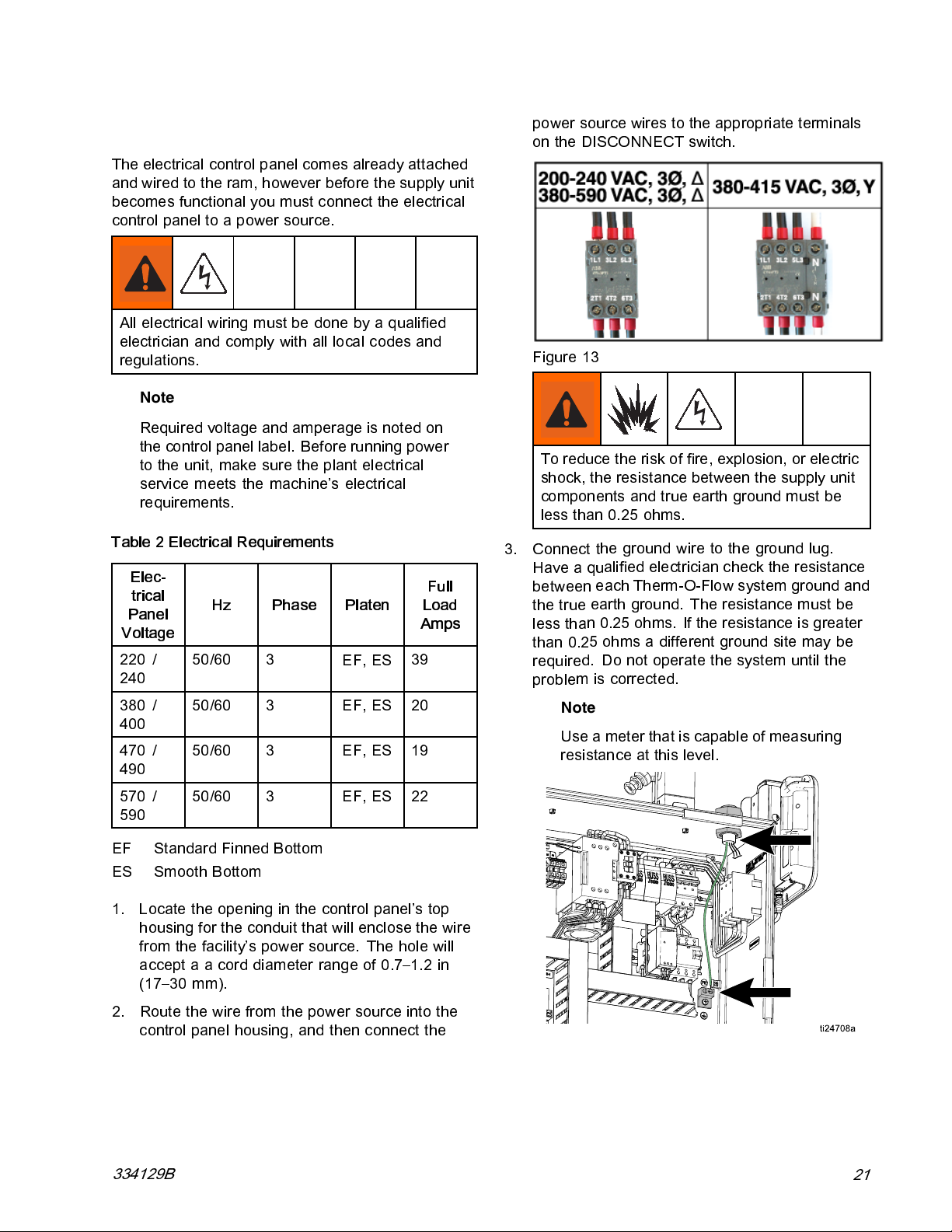
power source wires to the appropriate terminals
on the DISCONNECT switch.
Figure 13
To reduce the risk of fire, explosion, or electric
shock, the resis tance between the supply unit
components and true earth ground must be
less than 0.25 ohms.
3. Connect t
Haveaqu
between
the true
less tha
than 0.2
require
proble
he ground wire to the ground lug.
alified electrician check the resistance
each Therm-O-Flow system ground and
earthground. Theresistancemustbe
n 0.25 ohms. If the resistance is greater
5 ohms a different groun d site may be
d. Do not opera te the sy s tem until th e
m is corrected.
Note
Use a meter that is capable of measuring
resistance at this level.
570 /
590
EF Standard Finned Bottom
ES Smooth Bottom
1. Locate the opening in the control panel’s top
housing for the conduit that will enclose the wire
from the facility’s power source. The hole will
accept a a cord diameter range of 0.7–1.2 in
(17–30 mm).
2. Route the wire from the power source into the
control panel housing, and then connect the
334129B
50/60 3
EF, ES
22
21
Page 22
Setup
Grounding
Ground the unit as instructed here and in the
component manuals.
The e quipment must be grounded to reduce the
risk of static sparking and electric shock. Electric
or static sparking can cause fumes to ignite or
explode. Improper grounding can ca use electric
shock. Grounding provides an escape path for the
electric current.
System:
enclosure. See Connect Power.
Air and fluid hoses:
hoses.
Air compressor:
recommendations.
Spray gun/Dispense valve:
connection to a properly grounded fluid hose and
pump.
ground through ground lug in electrical
use only electrically conductive
follow manufacturer’s
ground through
Material drums:
drums placed on a grounded surface. Do not place
the drum on a nonconductive surface, such as
paper or cardboard, which interrupts the grounding
continuity.
To maintain grounding continuity when flushing
or relieving pressure:
separate gun manual for instructions on how to safely
ground your gun while flushing.
follow local code. Use only metal
follow instructions in your
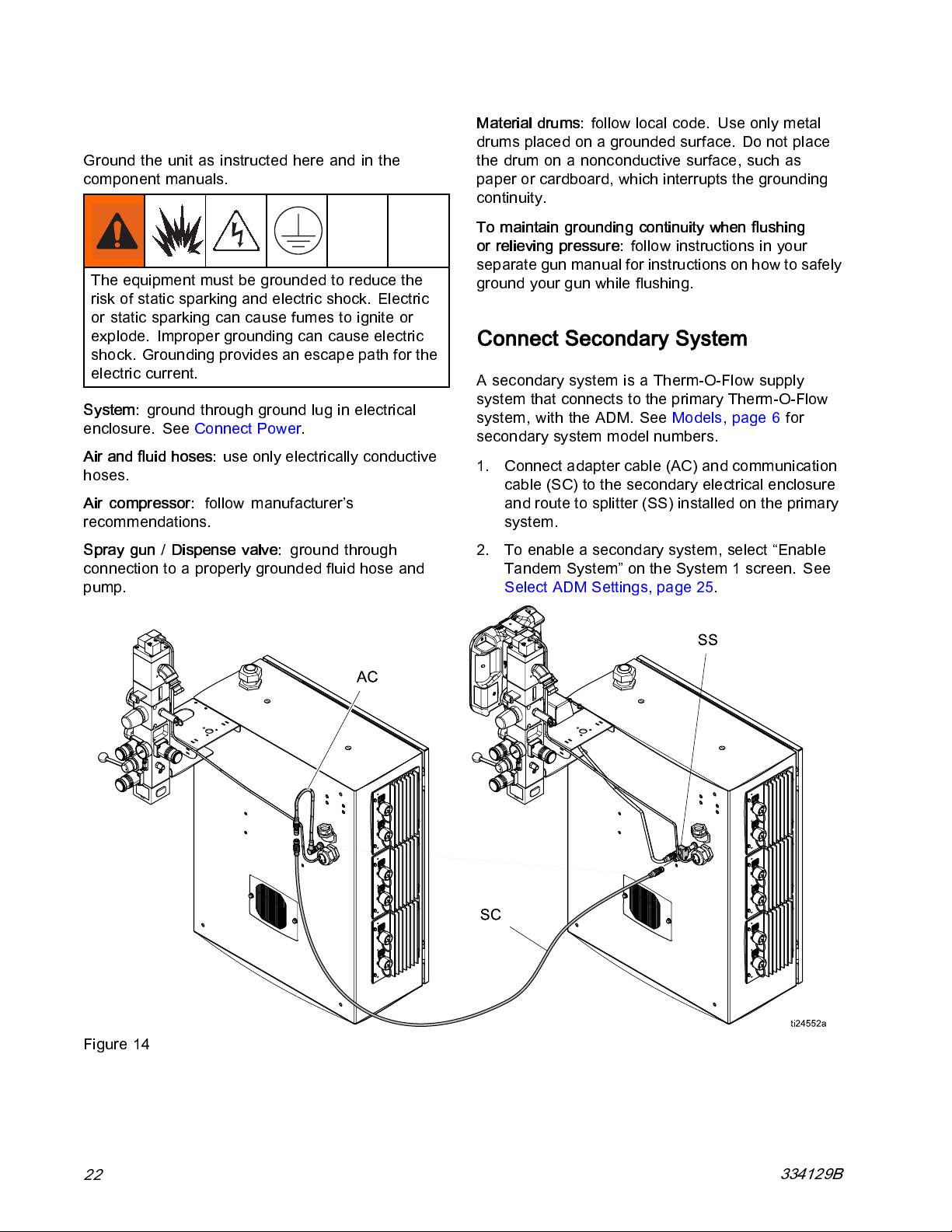
Connect Secondary System
A secondary system is a Therm-O-Flow supply
system that connects to the primary Therm-O-Flow
system, with the AD M. See Model s, page 6 for
secondary system model numbers.
1. Connect a dapter cable (AC) and communication
cable (SC) to the secondary electrical enclosure
androutetosplitter(SS)installedontheprimary
system.
2. To enable a sec ondary system, select “Enable
Tandem System” on the System 1 screen. See
Select ADM Settings, page 25.
Figure 14
22
334129B
Page 23
Setup
Check Sensor Resistance
To reduce risk of injury or damage to equipment,
conduct these electrical checks with the main
power switch OFF.
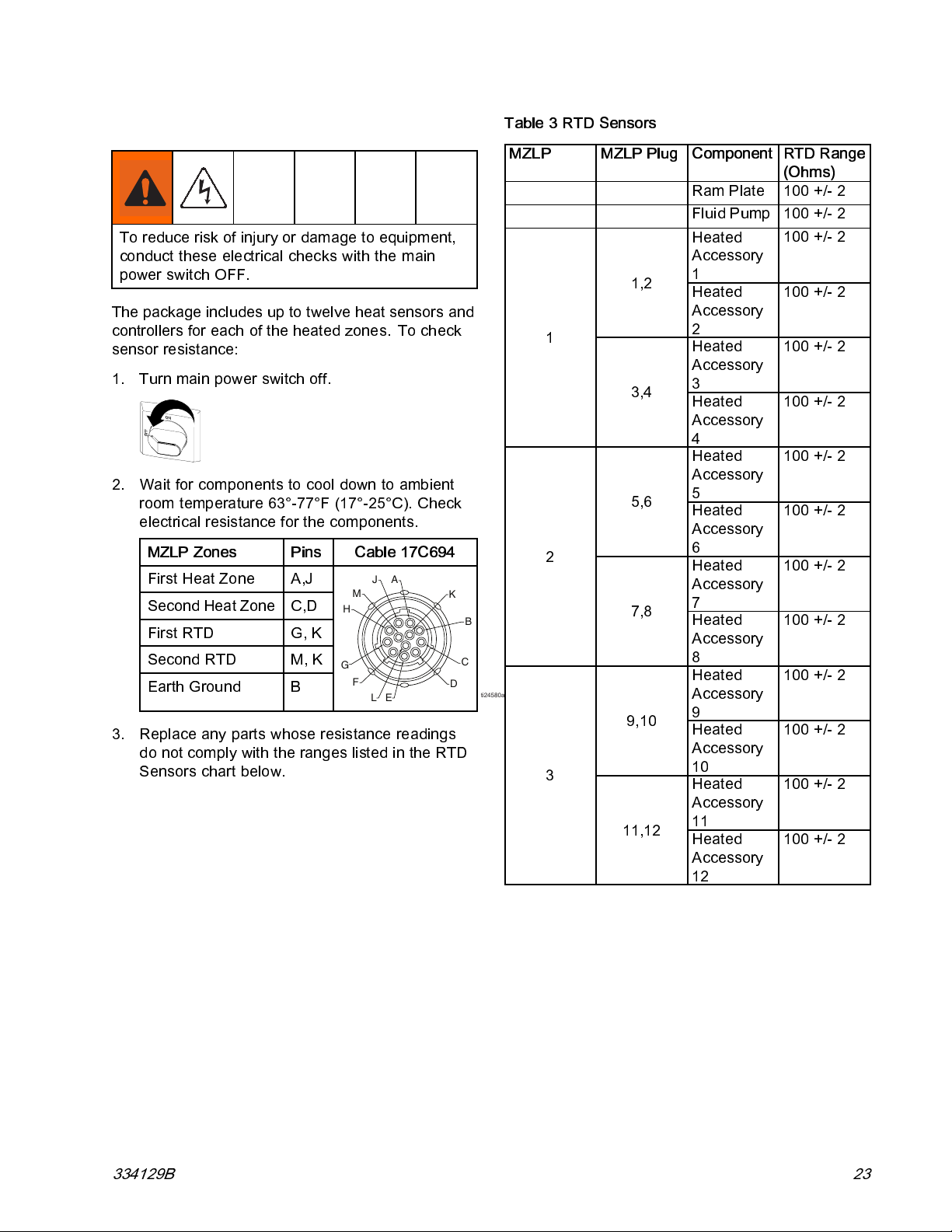
The packag e includes up to twelve heat sen sors and
controllers for each of the heated zones. To check
sensor resistance:
1. Turn mai n pow er switch off.
2. Wait for components to cool down to ambient
room temperature 63°-77°F (17°-25°C). C heck
electrical resistance for the components.
MZLP Zones Pins
First Heat Zone A,J
Second Heat Zone C,D
First RTD
Second RTD
Earth Ground
G, K
M, K
B
3. Replace any parts whose resistance readings
do not comply with the ranges listed in the RTD
Sensors chart below.
Cable 17C694
A
J
M
H
G
F
E
L
K
C
D
Table 3 RTD Sensors
MZLP MZLP Plug
1
2
B
ti24580a
3
1,2
3,4
5,6
7,8
9,10
11,12
Component
RTD Range
(Ohms)
Ram Plate 100 +/- 2
Fluid Pump 100 +/- 2
Heated
100 +/- 2
Accessory
1
Heated
100 +/- 2
Accessory
2
Heated
100 +/- 2
Accessory
3
Heated
100 +/- 2
Accessory
4
Heated
100 +/- 2
Accessory
5
Heated
100 +/- 2
Accessory
6
Heated
100 +/- 2
Accessory
7
Heated
100 +/- 2
Accessory
8
Heated
100 +/- 2
Accessory
9
Heated
100 +/- 2
Accessory
10
Heated
100 +/- 2
Accessory
11
Heated
100 +/- 2
Accessory
12
334129B 23
Page 24
Setup
Check Heater Resistance
To reduce risk of injury or damage to equipment,
conduct these electrical checks with the main
power switch OFF.
1. Turn main power switch off.
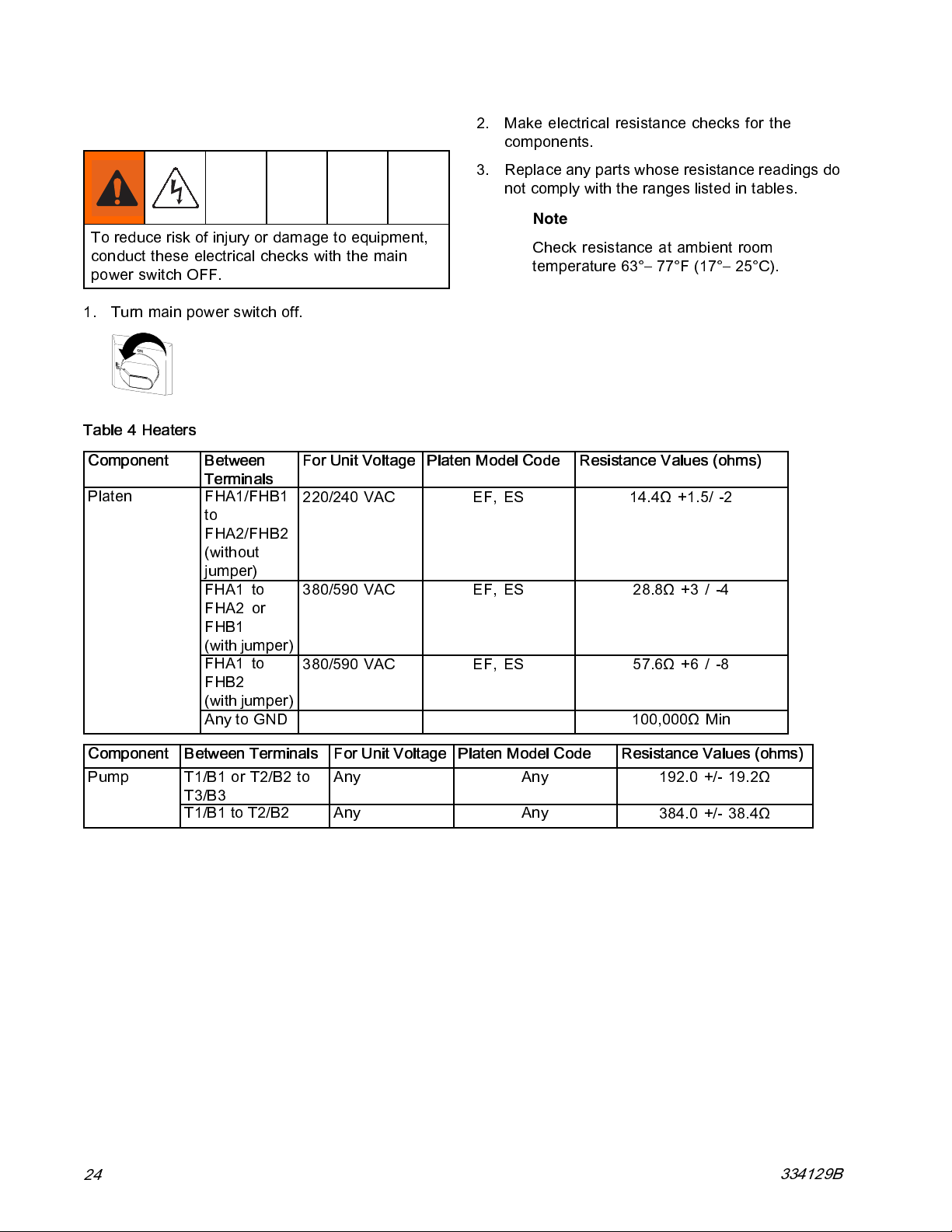
Table 4 Heaters
Component
Platen
Between
Terminals
FHA1/FHB1
to
FHA2/FHB2
(without
jumper)
FHA1 to
FHA2 or
FHB1
(withjumper)
FHA1 to
FHB2
(withjumper)
Any to GND 100,000Ω Min
For Unit Voltage
220/240 VAC EF, ES 14.4Ω +1.5/ -2
380/590 VAC EF, ES 28.8Ω +3 / -4
380/590 VAC EF, ES 57.6Ω +6 / -8
2. Make electrical resistance checks for the
components.
3. Replace a ny parts whose resistance readings do
not comply with the ranges listed in tables.
Note
Check resistance at ambient room
temperature 63°– 77°F (17°– 25°C).
Platen Model Code Resistance Values (ohms)
Component
Pump
24
Between Terminals For Unit Voltage
T1/B1 or T2/B2 to
T3/B3
T1/B1toT2/B2 Any Any
Any Any
Platen Model Code Resistance Values (ohms)
192.0 +/- 19.2Ω
384.0 +/- 38.4Ω
334129B
Page 25
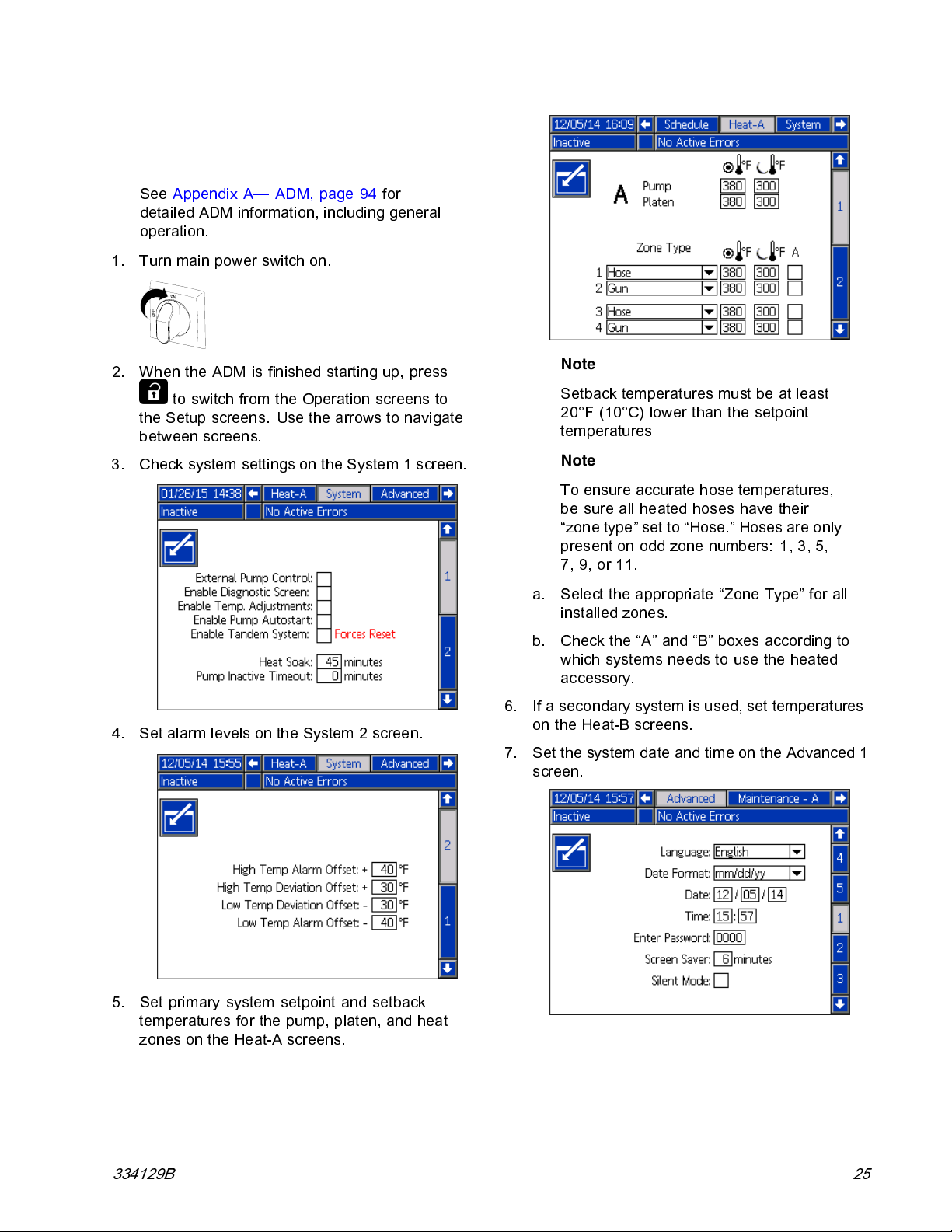
Select ADM Settings
Note
See Appendix A— ADM, page 94 for
detailed ADM information, i n cluding general
operation.
1. Turn mai n power switch on.
Setup
2. When the ADM is finished s tarting u p, press
to switch from the Operation screens to
the Setup sc reens. Use the arrows to navigate
between screens.
3. Check system settings on the System 1 screen.
4. Set alarm levels on the System 2 screen.
Note
Setback temperatures must be at least
20°F (10°C) lower than the setpoint
temperatures
Note
To ensure accurate hose temperatures,
be sure all heated hoses have their
“zone type” set to “Hose.” Hoses are only
present on odd zone numbers: 1, 3, 5,
7, 9, or 11.
a. Select the appropriate “Zone Type” for all
installed zones.
b. Check the “A” and “B” boxes according to
which systems needs to use the heated
accessory.
6. If a secondary system is used, set temperatures
on the Heat-B screens.
7. Set the system date and time on the Advanced 1
screen.
5. Set primary system setpoint and setback
temperatures for the pump, platen, and heat
zones on th e Heat-A scree ns.
334129B 25
Page 26
Setup
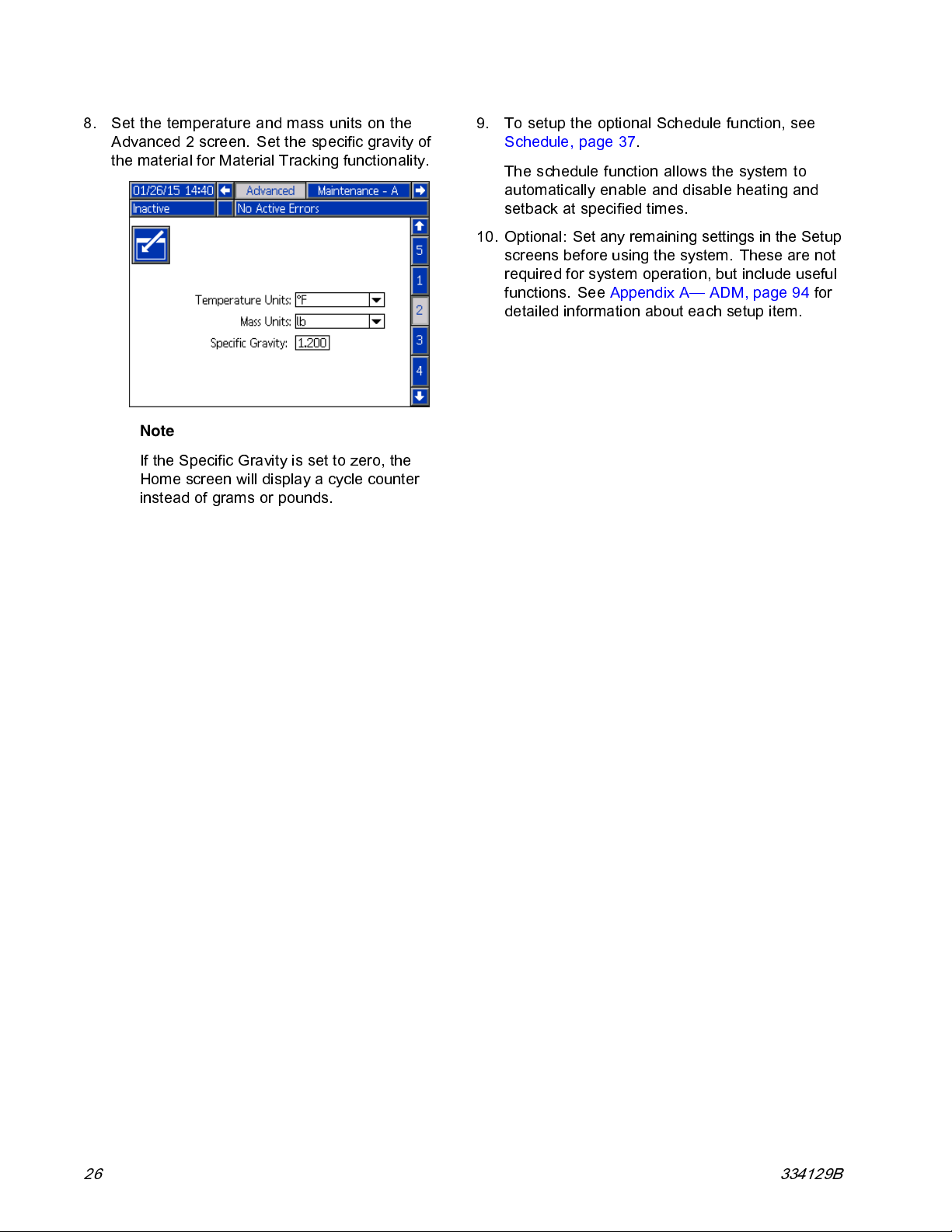
8. Set the temperature and mass units on the
Advanced 2 screen. Set the specific gravity of
the material for Material Tracking functionality.
Note
If the Specific Gravi ty is set to zero, the
Home screen will display a cycle counter
instead of gram s or pounds.
9. To setup the optional Schedule function, see
Schedule, page 37.
The schedule function allows the system to
automatically enable and disable heating and
setback at specified times.
10. Optional: Set any remaining settings in the Setup
screens before using the system. These are not
required for system operation, but include useful
functions. See Appendix A— ADM, page 94 for
detailed information about each setup item.
26 334129B
Page 27
Setup
Connect PLC
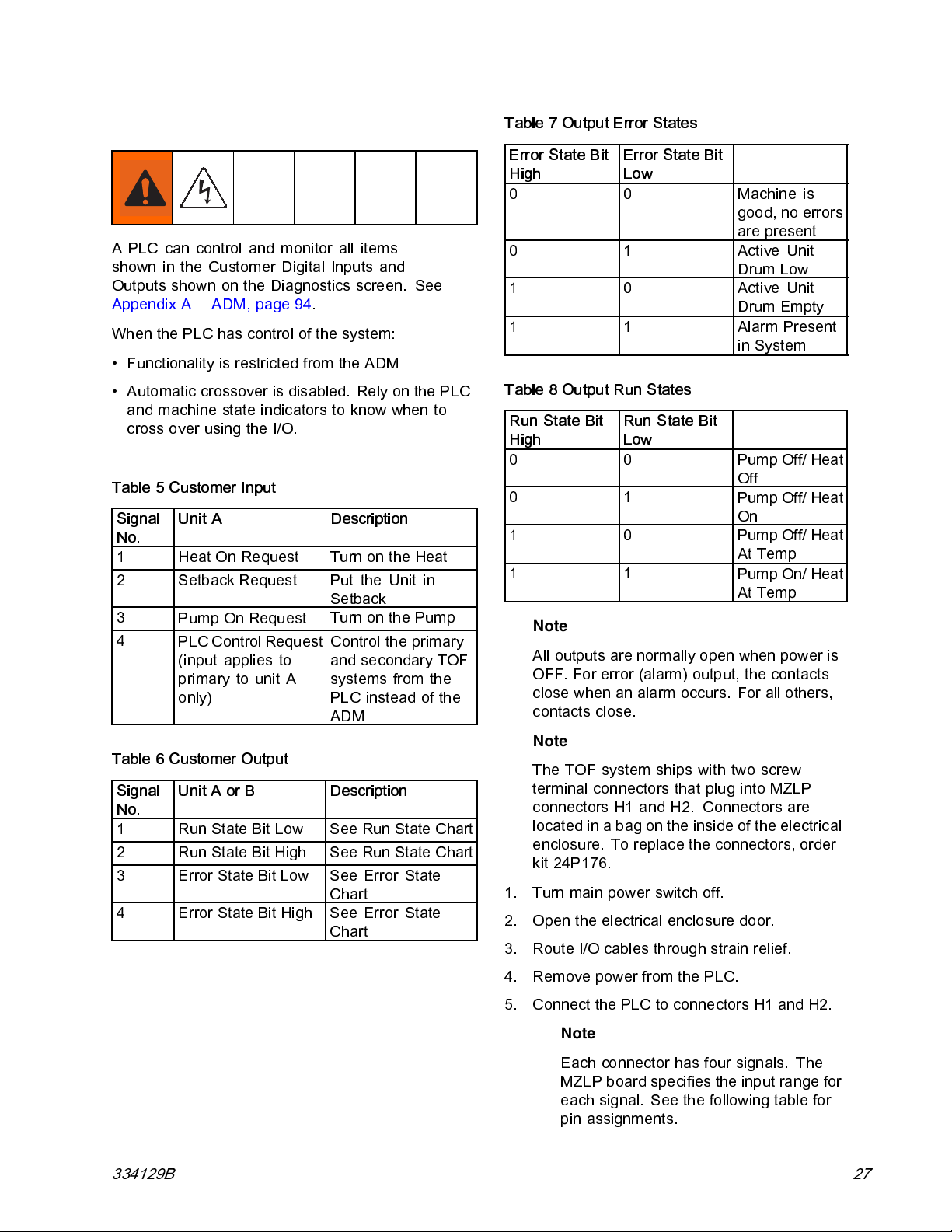
A PLC can control and monitor all items
shown in the Customer Digital Inputs and
Outputs shown on the Diagn ostics screen. See
Appendix A— ADM, page 94.
When the PLC has control of the system:
• Functionality is restricted from the ADM
• Automatic crossover is disabled. Rely on the PLC
and machine state indicators to know when to
cross over using the I/O.
Table 5 Customer Input
Signal
No.
1
2
3
4
Table 6 Customer Output
Signal
No.
1
2
3
4
Unit A Description
Heat On Request
Setback Request
Pump On Request
PLC Control Request
(input applies to
primary to unit A
only)
Unit A or B Description
Run State Bit Low See Run State Chart
Run State Bit High See Run State Chart
Error State Bit Low See Error State
Error State Bit High See Error State
Turn on the Heat
Put the Unit in
Setback
Turn on the Pump
Control the primary
and s econdary TOF
systems from the
PLC instead of the
ADM
Chart
Chart
Table 7 Output Error States
Error State Bit
High
0 0 Machine is
01ActiveUnit
10ActiveUnit
1 1 Alarm Present
Table 8 Output Run States
Run State Bit
High
00
01
10
11
Note
All out puts are normally open when power is
OFF. For error (alarm) output, the contacts
close when an alarm occurs. For all others,
contacts close.
Note
The TOF system ships with two screw
terminal connectors that plug into MZLP
connectors H1 and H2. Connectors are
locatedinabagontheinsideoftheelectrical
enclosure. To replace the connectors, order
kit 24P176.
1. Turn mai n power switch off.
2. Open the elec trical enclosure door.
3. Route I/O cables through strain relief.
Error State Bit
Low
good, no errors
are present
Drum Low
Drum Empty
in Sy stem
Run State Bit
Low
Pump Off/ Heat
Off
Pump Off/ Heat
On
Pump Off/ Heat
At Temp
Pump On/ Heat
At Temp
334129B
4. Remove power from the PLC.
5. Connect the PLC to connectors H1 and H2.
Note
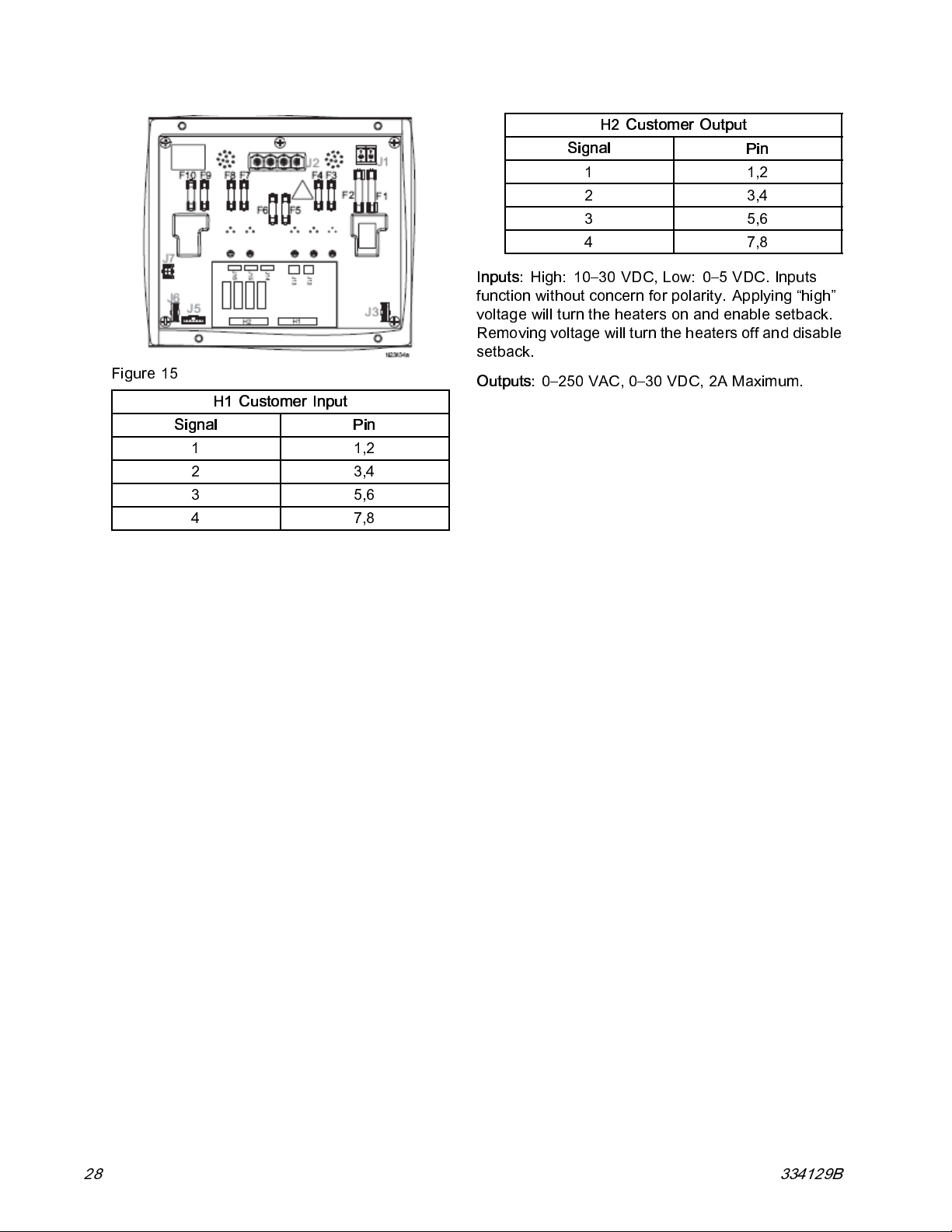
Each connector has four signals. The
MZLP board specifies the input range for
each signal. See the following table for
pin assignments.
27
Page 28
Setup
H2 Customer Output
Signal
11,2
23,4
35,6
47,8
Pin
Figure 15
Inputs:
function without concern for polarity. Applying “high”
voltage w ill turn the heaters on and enable setback.
Removing voltage will turn the heaters off and disable
setback.
Outputs:
H1 Customer Input
Signal
11,2
23,4
35,6
47,8
Pin
High: 10–30 VDC, Low: 0– 5 VDC. Inputs
0–250VAC,0–30VDC,2AMaximum.
28 334129B
Page 29
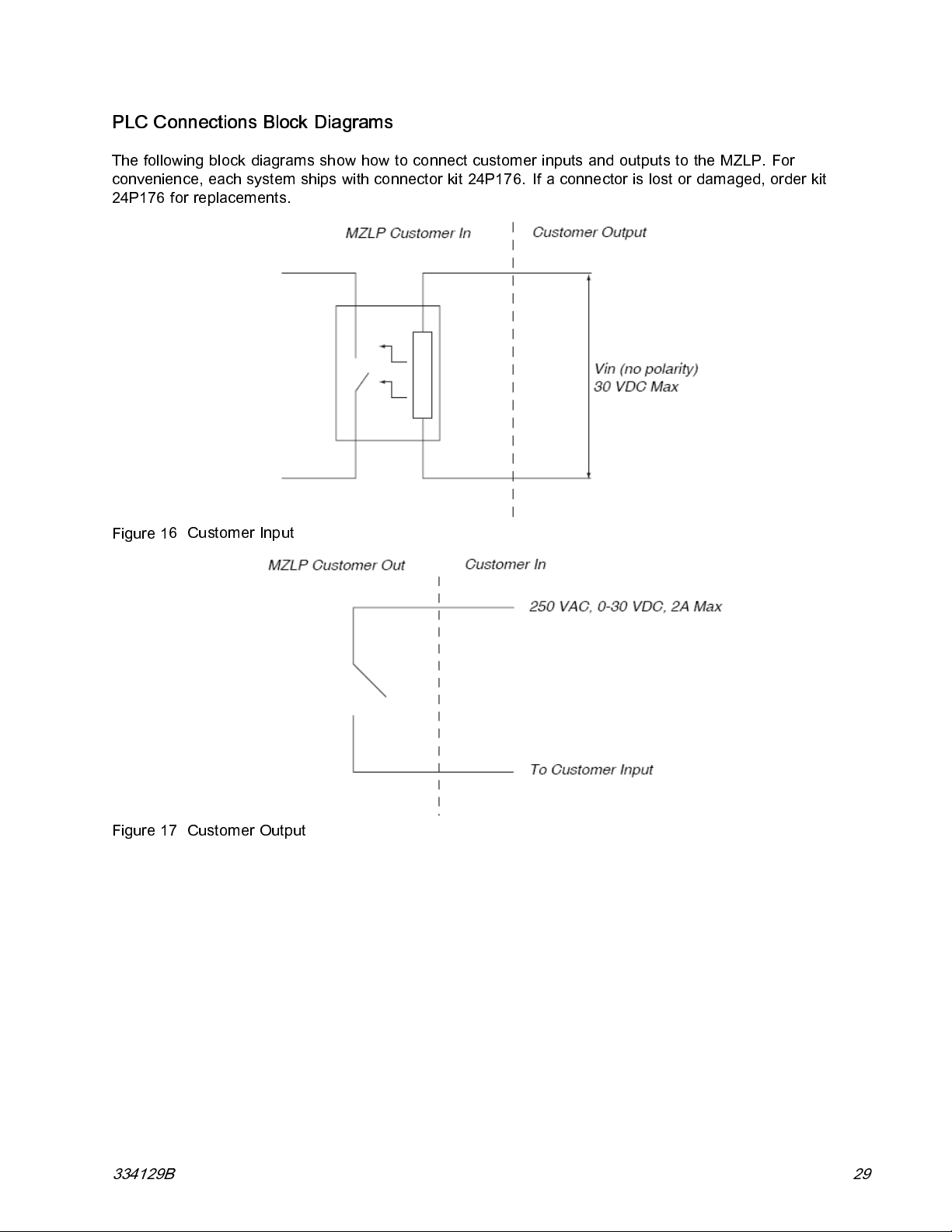
PLC Connections Block Diagrams
The following block diagrams show how to connect customer i nputs and outputs to the MZLP. For
convenience, each system ships with connector kit 24P176. If a connector is lost or damaged, order kit
24P176 for replaceme nts.
Setup
Figure 1
Figure 17 Customer Out put
6 Customer Inp ut
334129B 29
Page 30
Operation
Operation
1. Turn the main power switch ON. The Graco logo
will display u ntil comm unication and initialization
is complete.
2. Press the button. Verify the machine is
in “Warm Up” state, and that the temperatures
are increasing. Allow the system to reach the
“Ready” state before pumping. The pump will
automatically turn on, if autostart is enabled in
setup screens, when all the heat zones reach
their setpoint temperature.
Purge System
NOTICE
Use fluids that are chemically compatible with
the equipment wetted parts. See Technical
Specifications in all of the equipment manuals.
1. Select the material for the initial material load.
2. Verify whether the factory-test oil and the initial
material load are compatible:
a. If the two substances are compatible omit the
remaining steps in this procedure and refer
to the Load Material, page 31.
b. If the two substances are incompatible
perform the remaining steps in this procedure
to flush the system.
3. Select a pail of material that can eliminate the
factory-test oil from the system. If necessary,
check with Graco or the material supplier for a
recommended solvent.
4. Beforepurgingbesuretheentiresystem
and waste pail are properly grounded. See
Grounding, page 22.
5. Turn all heat zones’ setpoint temperature to the
material manufacturer’s recommended dispense
temperature, or a minimum of 100°F (37°C)
minimum.
Note
NOTIC
Purge the system before initial use and when
chemicals are changed to prevent material
contamination, which may cause the material to
fail or perform poorly. The system was factory-
tested using a light soluble oil, a soybean oil, or
some other oil as tagged. Flush the system to
avoid contaminating the material that has been
designated for initial material loading.
E
Remove any dispense valve orifices
before purging. Reinstall after purging
has been completed.
6. Purge the material through the system for
approximately 1 to 2 minutes.
7. Remove the pail if purge material was used. See
Change Pail, page 38.
30 334129B
Page 31

Operation
Load Material
NOTICE
To prevent damage to platen wipers, do not use a
pail of material that has been dented or damaged.
An empty pail clamp can interfere with up and
down operation of the ram.
make sure the pail clamp stays clear of the platen.
Note
Before loading material, make sure there is a
minimum overhead clearance of 75 in. (191
cm) and all air regulators are backed off to
their full counterclockwise position.
1. Open the main air slider valve (CA).
2. Set ram director valve (CC) to UP and slowly
turn the ram up regulator (CD) clockwis e until the
platen (G) begins to rise.
When raising the ram,
4. Fill displacement pump wet cup 2/3 full with
Graco Throat Seal Liquid (TSL™) for Butyl and
PSA materials.
Note
Use IsoGuard Select® (IGS) (part
no. 24D086) for PUR or reactive
Polyurethane material. IGS is
designed to dissolve and suspend the
Polyurethane materials. IGS will solidify
after a period of time and should be
replaced once the solidified lube does
not return to liquid form after heating.
Figure 19 Wetcup
5. Open pail, remove any packing material, and
inspect material for any contamination.
6. Slide the pail against the stops at the back of the
ram baseplate.
Figure 18 Raise the Platen
3. Apply a thin coating of high temperature grease
lubricant (part no. 115982) to the platen pail
seals.
334129B 31
Figure 20 Drum Placement
Page 32

Operation
7. Remove the platen bleed stick (R).
Figure 21 Platen Bleed Handle
8. Set ram director valve (CC) to down and lower
the platen.
Heat Up System
To reduce the risk of bursting a hose, never
pressurize a hot melt system before turning on the
heat. The air will be lock ed from the air motor until
all tem perature zones are within a preset window
of the tempe rature se tpoints.
Keep the dispense valve open over a waste
container while the system is heating up and also
when cooling down. This will prevent a pressure
build-up c aused by fluids or gases expanding from
the heat.
Note
Operate at the lowest temperature and
pressure necessary for your application.
1. Turn the main power switch on the electrical
control panel do or to the ON position.
Figure 22 Lower the Platen
9. Slowly turn the ram down air regulator (CB)
clockwise to approximately 5–10 psi (34–69 kpa,
0.3–0.7 bar). The platen will begin to lower into
the pail.
10. After the platen seals enter the material pail,
adjust the ram down air regulator (CB) to 30–50
psi (207–345 kPa, 2.1–3.4 bar).
11. When the ram stops, reinsert the platen bleed
stick (R) and hand tighten.
2. Press the button. The zones begin to
heat (provided they are enabled). Press
if the zones do not begin to heat.
Display status bar reads
temperature reaches setpoint, the display
status bar reads
the status will display in the status bar. See
Advanced Display Module (ADM), page 12,for
operation mode descriptions.
Note
The air will be locked from the air motor
until all temperature zones are within a
preset window of the temperature set
points, allowing the system to heat fully
and complete the material heat soak
period.
Heat Soak
Warm Up
.Whenheatison,
.When
32 334129B
Page 33

Prime Pump
1. Ensure that the system has completed the heat
soak cycle. The display status bar should read
Active
.
2. Adjust the air motor air regulator (CK) to 0 psi.
Operation
5. Adjust the air motor air regulator (CK) to
approximately 20 psi (138 kPa, 1.38 bar).
3. Ensure air motor solenoid valve (CN) is on. The
indicator light on the solenoid connector will only
be on if “Enable Pump Autostart” is selected on
the System 1 Setup screen.
4. Adjust the air motor slider valve (CM) to the open
position.
6. Place a waste container under the bleed stem
(Z). Using an adjustable wrench, open the bleed
stem counterclockwise 1/3 -1/2 turn.
334129B 33
Page 34

Operation
7. If a new pail was installed and the unit is equipped
with proximity sensors, press the Pump Ready
button . Press pause button on material tracking.
8. Adjust the air motor air regulator (CK) up by 5 psi
(34 kPa, 0.3 bar). Never adjust the regulator by
more than 5 psi (34 kPa, 0.3 bar) increments.
Make sure the pump begins to cycle and heated
material flows from the bleed stem (Z) after
several cycles of the pump.
9. Prime the pump until it moves smoothly in
both directions with no air popping or erratic
movement and close the main air slider valve
(CA).
10. Close the bleed stem (Z).
11. Press Play button on home screen to enable
material tracking.
34 334129B
Page 35

Operation
Prime System
1. Close the main air slider valve (CA).
2. If us ing a manual gun, lock the dispense valve
trigger o pen by pulling and securing the trigger
using the trigger retainer (Z).
7. Close the main air slider valve (CA) and release
trigger lock.
8. Engage trigger lock.
Figure 23 Trigger Lock Engaged
9. Press
10. Turn the air motor regul ator to operating
pressure.
Note
The system is now ready to operate.
to engage material tracking.
Setback Mode
3. Place the dispense valve over a waste container.
4. Press the pause material tracking button
on home screen.
5. Slowly open the main air slider valve (CA).
6. Prime the system until a smooth flow of material
dispenses from each dispense valve.
Note
On i nitial system startup, the pump will
cycle until the hos es are filled. If a new
drum was placed on the frame, the pump
will cycle until all air has been removed.
Set the ADM to setback mode if the system will only
be inacti ve for a few hours. This will reduce the time
system n eeds to return to setpoint temperatures.
1. Press
Note
The amount of time before the pump
is automatically placed in setback is
determined by the Pump Inactivity Timeout,
locatedonSystemSetupScreen1. See
Setup Screens, page 97.
to enter Setback Mode.
334129B 35
Page 36

Operation
Pressure Relief Procedure
Follow the Pressure Relief Procedure
whenever you see this symbol.
This equipment stays pressurized until pressure
is manually relieved. To help prevent serious
injury from pressurized fluid, such as skin injection,
splashing fluid and moving parts, follow the
Pressure Relief Procedure when you stop spraying
and before cleaning, checking, or servicing
equipment.
Note
If using a different dispense applicator, see
the applicator manual for pressure relief
instructions.
1. Engage the trigger lock.
3. Set the ram director valve (CC) to the neutral
position.
4. Disengage the trigger lock.
Figure 24 Engaged
2. Close the system master air slider valve (CA).
Figure 25 Disengaged
5. Holdametalpartofthegunfirmlytoagrounded
metal pail. Trigger the gun to relieve pressure.
6. Engage the trigger lock.
7. Open all fluid drain valves in the system, having
a waste container ready to catch drainage.
Leave drain valve(s) open until you are ready to
dispense again.
8. If you suspect the tip or hose is clogged or
that pressure has not been fully relieved after
following the steps above, VERY SLOWLY
loosen hose end coupling to relieve pressure
gradually, then loosen completely. Clear hose
or tip obstruction.
36 334129B
Page 37

Operation
Shutdown
1. Press to disable the heaters and pump.
The screen will say “Inactive”. If using the
Schedule function, the heaters and pump will be
disabled automatically at the set time. Only press
to disable the heating system before the
set time. If the heaters were manually disabled,
the Schedule function will automatically enable
them at the nex t set time.
Table 9 Schedule Screen Color Identification
Color Description
Green System on
Yellow Setback
Red System off
Gray Disabled
Set Schedule Times
Times are set using a 24–hour clock. Several on and
off times can be set each day.
Note
Do not perform step 2 if using the
Schedule function. Leave the power on.
2. Turn mai n pow er switch off.
Schedule
The Schedule function allows the user to specify
times when the system will automatically turn ON and
OFF th e hea ters and pump.
1. On the Schedul e screen (in the Setup screens),
set the ON times for each day of the week.
2. Set the OFF times for each day of the week.
3. Set the setback times for each day of the week.
Enable Schedule Function
The Schedule function is automatically enabled
when values are entered in the Schedule screen. To
disable a schedule d event, navigate to the event and
press
The event will appear gray on the screen when it
is d isabled. To re-enable an event, navigate to the
event and press
The event will appear red (system off), yellow (system
setback), or green (system on). If no events are
needed, turn the main power switch OFF to prevent
system from automatically enabling and disabling the
heaters.
.
.
Use the Schedule Function
At the end of the work day leave the main power
switch ON. The Schedule function will automatically
enable and disable the heaters and pump at the
specified times.
334129B 37
Page 38

Operation
Change Pail
To prev ent serious burns from dripping material,
never reach under the heated platen after the
platen is out of the pail.
Follow the procedure to change the pail on a fully
heated system.
NOTICE
Be sure to reload the empty supply unit with a full
pail of material immediately.
and remove the platen from the empty pail until
you are ready to immediately install a new pail.
Do not raise the ram and remove the platen from
the empty pail unless the supply unit is at full
operating temperature.
performed when the system is heated.
Donotraisetheram
Drum changes can only be
3. Set ram director valve (CC) to UP and raise
the platen (G) and immediately press and hold
the blowoff buttons (CG) until the platen is
completely out of the pail. Use minimum amount
of air pressure necessary to push the platen out
of the pail.
An empty pail clamp can interfere with the up
and down operation of the ram.
loweringtheram,makesurethepailclampstays
clear of the platen assembly.
Do not use a pail of material that has been dented
or otherwise damaged;
wipers can result.
All systems include Low/Empty Sensors:
• The air will shutoff to prevent the pump from
cavitation. If the light tower kit is installed, a solid
red light indicates that the pail is empty and ready
to change.
• In a tandem system, a flashing red light means
that both drums are empty and the system has
shutdown.
1. Press
2. Push in the air motor slider valve (CM) to stop
the pump.
to stop material tracking.
damage to the platen
When raising or
Excessive air pressure in the material pail
could cause the pail to rupture, causing serious
injury. The platen must be free to move out
of the pail. Never use pail blowoff air with a
damaged pail.
4. Release the blowoff air button and allow the ram
to rise to its full height.
5. Remove the empty pail.
6. Inspect platen and if necessary, remove any
remaining material or material build-up.
7. Follow steps in Load Material, page 31, and
Prime Pump, page 33.
38 334129B
Page 39

Troubleshooting
Light Tower (Optional)
Troubleshooting
Signal
Red Light Off If green light is also off, system power may be off or system operating mode is Inactive. If
Red Light On User interaction required — alarm, system is shut down
Red Light
Flashing
Green Light Off System is inactive
Green Light On System is ready to dispense. The heat and pump are on.
Green Light
Flashing
Description
green is o n or flashing, there are no active errors.
User in teraction required — advi sory, deviation, or system is in a state that could prohibit
dispensing.
System will be ready to dispense in time without user interaction (heat on, pump off, and
temperature control zones have not reached set point)
334129B 39
Page 40

Troubleshooting
Error Codes
There are three types of errors that can occur. Errors
are indicated on the display as well as by the optional
light tower.
Alarms are indicated by
a parameter critical to the process has reached a
level requiring the system to stop. The alarm needs
to be addressed immediately.
Deviations are indic at ed by
indicates a parameter critical to th e process has
reached a level requiring attention, but not sufficient
enough to stop the system at this time.
Advisories are indicated by
indicates a parameter that is not immediately critical
to the process. The advisory needs attention to
prevent more serious issues in the future.
To acknowledge the error, press
The thi
code, i
“
multi
rd digit, or sometimes the last digit of the error
ndicates which unit the error is active on. The
tar) character indicates the code applies to
★
”(s
ple system components.
Third or Last Digit “
AUnitA
BUnitB
★
. This condition indicates
. This condition
. This condition
.
” Codes Relates To:
The last digit of the error code indicates which
system component the error applies. The “#” (pound)
character indicates the code applies to multiple
system components.
Last Digit “#” Codes Relates To
System Component:
1MZLP1
2MZLP2
3MZLP3
5
6MZLP6
7
VAWBUnitA
WAWBUnitB
X Daughter Boa rd Unit A
Y Daughter Boa rd Unit B
The last digit of the error code indicates which
heat zone the error applies. The “_” (underscore)
character indicates the code applies to multiple
system components.
Last Digit “_” Codes Relates To Heat
1Zone1
2Zone2
3Zone3
4Zone4
5
6Zone6
7
8Zone8
9Zone9
AZone10
BZone11
CZone12
D Pump
EPlaten
MZLP 5
MZLP 7
Zone:
Zone 5
Zone 7
40 334129B
Page 41

Troubleshooting
Code
A3MF
A4C# High Current
A8★_
A8C
AM3 # High Current
AM4 # High Current
AM8# No Current
CAC# Comm Error
CACX
CACY
Description Type
AWB Clean Fan
Filter
Unit _ Zone _
Fan AWB, Unit
_
Unit _ Zone _
No Current Unit
_Zone_
AWB No Fan
★
Current
SSR MZLP _
Contactor
MZLP _
Contactor
MZLP _
MZLP _
DB Not Present
Unit A
DB Not Present
Unit B
Cause Solution
Alarm
Alarm Defective or
Deviation Fan is drawing
Alarm Unexpected
Alarm
Alarm
Alarm Excessive
Alarm
Alarm
Alarm
Alarm Daughter
Alarm Daughter
Cooling inlet
screen is dirty
shorted to
ground on
zone
too much
current
current flow to
zone
No Current
Flow to the
Zone
Cooling fan
not working
current flow
in the SSR
Defective or
shorted to
ground on
MZLP
No Current
Flow to the
Contactor
System not
responding to
ADM.
Board not
responding
Board not
responding
Clean inlet screen.
Verify accessory is rated for 240 VAC.A4★_ High Current
Verify heater resistance and check for shorts to
ground. Replace as necessary.
Verify there is not an air obstruction at the inlet/outlet
of enclosure. verify nothing is preventing fan rotation.
Replace fan if necessary.
Replace MZLP.A7★_ Unexp. Curr.
Faulty accessory heater. Measure resistance to
ground between heater leads.
Check fo r loose or disconnected wires or plugs.
Check for blown fuses on MZLP.
Check heater resi stance for open circuit.
Check for shorts between heater and ground.
Verify cable is plugged into zones 3–4. Replace
heater if necessary.
Verify fan is plugged in. Replace if necessary.
Check for shorts in harness to SSR. Check polarity of
wiring to SSR. Replace if necessary.
Check for shorts in the harness to contactor. Check
the polarity to contactor. Replace contactor if
necessary.
Ensure harness to MZLP is connected. Ensure wiring
to contactor is secure. Replace c ontactor if necessary.
System is not properly loaded with correct Software.
Dial not set correct on MZLP. Duplicate MZLP dial
positions (i.e. 1 to 1, 2 to 2, ect)
Check all CAN connections between the ADM and
missing MZLP.
Check if hardware exists on the network.
Replace MZLP if necessary.
Dial not set correct on MZLP 5. Set to 5 on boa rd with
daughter board.
Ensure c onn ectio ns between the AD M and hardware
are secure.
Replace Daughter Board.
Dial not set correct on MZLP . Set to 4 on board with
daughter board.
Ensure c onn ectio ns between the AD M and hardware
are secure.
Replace Daughter Board.
334129B
41
Page 42

Troubleshooting
Code
CACV
CACW
DA★X Pump Runaway
DE★X
DC★X
L1★X Material Level
L2★X Material Level
L3★X Material Level
MMUX
MN★XPump_
Description Type
AWB not
present Unit
A
AWB not
present Unit
B
Detected
Reed Switch
Failure
Detected
Pump Diving Alarm
Sensor Error
Empty
Low
USB Log Full
Requires
Maintenance
Cause Solution
Alarm AWB not
responding
Alarm AWB not
responding
Alarm
Alarm Reed switch
Alarm Machine is
Alarm Material drum
Deviation Material level
Advisory
Advisory User defined
Pump is
trying to feed
adhesive, no
adhesive to
feed.
Worn or
damaged
pump s eals
failed
Pump is
trying to feed
adhesive, no
adhesive to
feed.
Worn or
damaged
pump s eals
detecting an
empty state
without a low
state
is empty
is low
USB logs fulls.
Data loss will
occur if not
downloaded.
pump
maintenance
counter has
run out
Ensure c onnections between the ADM and hardware
are secure.
If a tandem system, ensure AWB 2 jumper is installed
at startup.
Replace AWB.
AWB 2 jumper was not in place at start up
Ensure c onnections between the ADM and hardware
are secure.
Replace AWB.
Adjust the drum empty level sensor to detect an
empty state.
Ensure the ram director valve is in the down position
and s ufficient air is forcing the ram down.
Melter at incorrect temperature, too low. Check
setpoint and set to manufactures recommendation.
Inspect pump seals and replace if necessary
Check that senso r cable is plugged into the daughter
board at J16.
Check for loose connection at reed switch. Ensure
reed switch is securely attached to the air motor.
Replace if necessary.
Adjust the drum empty level sensor to detect an
empty state.
Ensure the ram director valve is in the down position
and s ufficient air is forcing the ram down.
Melter at incorrect temperature, too low. Check
setpoint and set to manufactures recommendation.
Inspect pump seals and replace if necessary
Make sure the empty level sensor is not covered in
material
Verify the low level sensor is plugged into J15 of the
daughter board. Verify the low level sensor is close
enough to the metal bar; adjust if necessary.
Replace sensors.
Replace material container. If more material is
leftover, lower the empty level sens o r.
Replace at appropriate time.
Download USB data or disabl e the US B log errors on
theAdvancedscreen3.
Perform pump maintenance, then reset the counter
on the maintenance setup screen.
42
334129B
Page 43

Troubleshooting
Code
T1★_ Low Temp. Unit
T2★_ Low Temp. Unit
T3★_HighTemp.
T4C#
T4M#
T4★_HighTemp.
T6★_
T6C#
T8V _ No Temp. Rise
V1I# Low CAN
Description Type
_Zone_
_Zone_
Unit _ Zone _
AWB
Temperature
Runaway
Transformer
AWB High
Transformer
Temp
Unit _ Zone _
Sensor Err. Unit
_Zone_
AWB Invalid
Thermistor
Reading
Unit _ Zone _
Voltage, MZLP
_
Cause Solution
Alarm Zone
temperature
too low
Deviation Zone
temperature
too low
Deviation Temperature
reading has
risen too high
Alarm
Alarm
Alarm Temperature
Alarm Bad RTD
Alarm
Alarm Temperature
Alarm Bad or
Cooling fan
not working
or inlet is
blocked/dirty
Transformer
Temperature
is too High
reading has
risen too high
Reading
Transformer
thermistor
temperature
is incorrect
reading does
not change.
overloaded
power supply
Reduce flow rate.
Increase temperature of accessory upstream.
Faulty accessory heater measure resistance between
heater leads.
Change Low Temp Alarm.
Replace accessory.
Reduce flow rate.
Change Low Temp Alarm.
Add z one (temperature) upstream.
ChangeHighTempAlarm.
Verify setpoint upst ream is not hotter than this zone’s
setpoint.
Ensure inlet and outlets are not obstructed.
Verify fan is plugged in.
Ensure inlet and outlets are not obstructed.
Verify fan is plugged in.
ChangeHighTempAlarm.
Verify setpoint upst ream is not hotter than this zone’s
setpoint.
Check RTD wiring and harness/connector integrity.
Replace RTD.
Verify thermister is securely connected to J7 of the
AWB. Replace transformer i f necessary.
Check fuses on MZLP connected to that Zone.
Check wiring to device.
Check heater res istance on device.
Verify power supply voltage is 24 VDC. If voltage is
low, disconnect the power lines and re-check voltage
reading. If voltage is still low, replace power supply. If
voltage is correct after disconnecting the power lines.
Connect items one at a time until the voltage drops
to i solate the bad module.
V1M# Low Voltage
Line AWB, Unit
_
V4I# High CAN
Voltage, MZLP
_
334129B 43
Deviation The voltage
to the AWB
is below
threshold
Alarm Bad or
overloaded
power supply
Verify transformer voltage top matches incoming
voltage. Verify incoming voltage is correct.
Verify power supply voltage is 24 VDC. If voltage is
high, replace power supply unit.
Page 44

Troubleshooting
Code
V6M#
V8M#
WJ1
WJ2
WSUX Configuration
Description Type
Wiring Error
Line MZLP _
No Line Voltage
MZLP _
AWB High Line
Voltage
★
Pump _
Solenoid is
disconnected
★
Pump _
Solenoid High
Current
Error USB
Cause Solution
Alarm Incoming
power is wired
incorrectly
Alarm Incoming line
voltage is less
than 100VAC.
Alarm Incoming
voltage is too
high
Alarm Pump is not
turning on
when it should
Alarm
Advisory
Solenoid is
drawing too
much current
USB
configuration
is not loaded
Correct the Wiring.
Verify transformer has the correct tap selected.
Verify CB-1 or FU-4, FU-5, and FU-6 are not
tripped/blown.
Verify RCD-1 is not tripped.
Measure incoming power with system unplugged. If
line voltage is less than 100 VAC, contact qualified
electrician to correct the low voltage.
Verify the MZLP is plugged in at J2 and the AWB is
plugged in at J5 and J6.
Check i ncoming voltage is correct for configuration.V4M#
Verify the transformer has the correct tap (400, 480,
600) selected.
Verify harness is plugged into J13 of the daughter
board. Verify it is secured to the solenoid.
Replace Solenoid.
Inspect for short in harness. Inspect for a shorted
solenoid cable/short to the ground. Replace solenoid.
Install software.
44
334129B
Page 45

Ram Troubleshooting
Troubleshooting
Problem
Ram will not raise or lower.
Ram raises or lowers too fast.
Air leaks around cylinder rod. Worn rod seal.
Pump will not prime properly, or
pumps air.
Air pressure will not push platen out
of drum.
Closed main air valve or clogged air
line,
Not enough ram air pressure. Increase ram air pressure.
Worn or damaged ram piston.
Platen not fully up to temperature. Wait for full temperature.
Ram ai r pressure too high. Decrease ram air pressure.
Dented drum has stopped platen. Fix or replace drum.
Ram "up / down" air pressure too
high.
Ram ai r pressure too high. Decrease ram air pressure.Fluid squeezes past platen wipers.
Worn or damaged wipers. Replace wipers.
Closed main air valve or clogged air
line.
Not enough air pressure. Increase air pressure.
Worn or damaged ram piston.
Ram directional valve closed or
clogged.
Ram directional valve dirty, worn, or
damaged.
Directional valve not in the down
position.
Dented drum has stopped platen. Fix or replace drum.
Closed main air valve or clogged air
line.
Platen not fully up to temperature. Wait for full temperature.
Not enough blow-off air pressure. Increase blow-off air pressure.
Blow-off valve passage clogged. Clean valve passage.
Dented drum has stopped platen. Fix or replace drum.
Wipers bonded to drum or drum liner. Lubricate wipers with high
Cause Solution
Open air valve; clear air line.
Replace piston. See instruction
manual 310523.
Decrease ram air pressure.
Replace o-rings in guide sleeve. See
instruction manual 310523.
Open air valve; clear air line.
Replace piston. See instruction
manual 310523.
Open val ve; clear valve or exhaust.
Clean; repair valve.
Position handle in the down position.
Open air valve; clear air line.
temperature grease at every
drum change.
334129B 45
Page 46

Troubleshooting
Heated Pump Troubleshooting
See pump manual for additional pump troubleshooting information. See Related Manuals, p age 7.
Problem
Rapid downstroke or upstroke (pump
cavitation).
Material leaks around pump outlet.
Material leaks around bleed port.
Pump will not move up and down.
Leak a round pump wet-cup. Worn throat seals.
Material not heated to proper
temperature.
Air is trapped in pump. Bleed air from pump. See
Downstroke: Dirty or worn pump
intake valve.
Upstroke: Dirty or worn pump piston
valve.
Machine is out of material
Loose outlet fitting. Tighten outlet fitting.
Loose bleed port fitting. Tighten bleed p ort fitting.
Problem with air motor.
Foreign object lodged in pump.
Platen not fully up to temperature. Wait for full temperature.
Valve to air motor is off. Check gauges and valves to the air
Cause Solution
Check and adjust temperature to
proper set point. Wait for pump/platen
to heat up.
Prime Pump, page 33.
Clean or repair. See Pump Manual.
Clean or repair.
Adjust empty level sensor.
See Air Motor Manual.
Relieve press ure. See Pump Manual .
motor.
Replace throat seals. See Servicing
the Throat packings in manual
334127 or 334128.
Air Motor Troubleshooting
See air motor manual for additional air motor troubleshooting information. See Related Manuals, page 7
Problem
Air m otor will not run.
Air m otor stalled. Damaged mai n air valve spool or
Air con tinuously exhausting around
air m otor shaft.
Air con tinuously exhausting around
air valve/slide valve.
Air continuously exhausting from
muffler when motor is idle.
Icing on muffler.
Air motor soleno id is off. Wait for heat zones in use to reach
poppets.
Damaged ai r motor shaft seal. Replace air motor shaft seal. See
Air valve/slide valve gasket is
damaged.
Internal seal damage.
Air motor operating at high pressure
or hig h cycle rate.
Cause Solution
temperature setpoint values.
Inspect and clean poppets. See Air
Motor Manual.
Rebuild main air val ve. See Air
Motor Manual.
Air M otor Manual.
Replace the valve gasket. See Air
Motor Manual.
Rebuildairmotor. SeeAirMotor
Manual.
Reduce pressure, cycle rate, or duty
cycle of motor.
46 334129B
Page 47

Repair
Replace Wipers
1. To replace a worn or damaged wiper raise the
ram plate up out of the drum. Perform steps 1
through7ofChange Pail, page 3 8 .
2. Separate the wiper joint, and bend back the
strapping that covers the clamp (207).
3. Unscrew the worm gear and remove the wiper
(202).
4. Thread the strapping through the new wiper
(202).
5. Insert the strap end through the clamp (207) and
tighten.
6. Use a rubber mallet to pound the wiper around
the pl aten (201) until the wiper ends are butted
tightly together.
Repair
7. Apply a lubricant to the wiper (202). Use a
lubricant that is compatible with the material to
be pumped. Check with the material supplier.
Figure 26
334129B
47
Page 48

Repair
Replace Platen RTD
Reference Electrical Schematics, page 60 for wiring
connections.
1. If the m aterial pail has already been remo ved
from the supply unit, go to step 2. If you
need to remove the material pail, see
Change Pail, page 38.
2. Make sure the ram plate is down and the ram
hand valve is in the OFF position.
4. Remove th e front and right side pump cover.
Figure
27
5. Remove the platen RTD (616) from the platen.
6. Disconnect the platen RTD quick connect
terminal (62 5 ) from J5 connector on the AWB.
7. Attach the leads from the new sensor (616) to the
leads of the old sensor and pull the new sensor
leads through the cable pump shield, cable track,
and i nto the electric al enclosure.
To reduce the risk of injury or damage to
equipment, make sure the main power switch
is off before continuing with this procedure.
3. Turn main power switch off.
8. Install the new sensor (616) into the follower/tire
plate after coating with non-silicone heat sink
compound. Tighten compression nut. Ensure
RTD is fully inserted.
9. Reconnect the quick connect terminal (625).
10. Replace the pump covers.
48 334129B
Page 49

Repair
Separate the Air Motor and Pump
Thisproceduremustbedonewiththeunitstill
warm. The material and equipment will be hot!
1. If the material drum has already been removed
from the supply unit, go to step 2. If you need to
remove the material pail, perform steps 1 throu gh
6ofChange Pail, page 38.Pumpmustbeinthe
full down position (air motor shaft fully extended).
2. Make sure the ram plate is down and the ram
director va lve (CC) is in the neutral position.
6. Turn the main power switch off.
7. Disconnect all material hoses.
8. If system includes pump shield, rem ove the
pump shee t metal enclosure (A). See Fig 28.
a. Remove the cover screws (B).
b. Remove heater bands (HB) and disconnect
thegroundwire(R).
9. Pump must be in the full down position (air motor
shaft fully extended).
10. If vent hood is installed, remove it.
11. Disconnect electrical cable from air motor (X).
12. Remove air line from air motor a n d air lines to the
follower blow-off valve.
13. Remove nuts (F) from pump/air motor tie rods
at the pump end.
14. Remove nuts and bolts (T) holding cable tract to
air motor support plate. Slide end of cable track
outboard of the mounting plate .
3. Follow Pressure Relief Procedure, page 36.
4. Bleed off excess material and pressure in
the system by opening the dispense gun and
catching the material in a waste container.
5. On ADM, turn off the system heat (D).
15. Remove screws and washers from pump inlet.
16. Fully loosen pump rod coupler (G) to the air
motor rod.
17. Slowly raise elevator to achieve enough
separation of the pump (air motor) tie rods to
remove the pump.
18. Remove the pum p (P).
19. Reverse th is procedure to reinstall the new or
rebuilt air motor.
334129B 49
Page 50

Repair
Figure 28
Remove Platen
50 334129B
1. Turn the m ain power switch off.
2. Disconnect the platen power wires and the
ground wire from within the main control panel
and pull out of conduit.
3. Removetheplatenassemblyfromtheram.
4. Reverse this procedure to reinstall the new or
rebuilt platen assembly.
Page 51

Repair
Replace Heater Bands and Pump RTD
Replace Heater Band
1. If the material drum has already been removed
from the supply unit, go to step 2. If you need
to remove the material drum, perform steps 1
through 6 of the Change Pail, page 38.Pump
must be in the full down p osition (air motor shaft
fully extended).
2. Make sure the ram plate is down and the ram
hand valve is in the neutral position.
3. Follow Pressure Relief Procedure, page 36.
4. Bleed off excess material in the system by
opening t he applicator and catching the material
in a waste container.
5. On ADM, turn off the system heat (D).
6. Turn the main power switch off.
b. Tighten the heater band.
c. Re-connect heater wires and re-attach
ceramic caps that insulate terminal.
Figure 29
Replace Pump RTD
1. Turn the main power switch off.
7. Remove the pump covers.
8. Remove white cerami c caps and disconnect the
electrical wires from heater band (309a, 309b).
9. Remove the screw that holds the heater band
in place.
10. Remove the heater band (309a, 309b) from
pump.
11. Coat the inside of the heater with non silicone
heat sink compound before mounting. Maximum
thickness is 0.005 in. Coat only to within 3/4 in.
of vertical ends.
12. Install a new heater band (309a, 309b) in the
same l ocation as the old heater band:
a. Locate heater termin als so they line up with
back of pump.
2. Remove the screws that hold the front shroud in
place and remove front shroud.
3. If sensor wire is connected to electrical enclosure,
disconnect it.
4. Loosen the clamp (321) holding sens or on pump.
5. Tie the leads of the new sensor (320) to the old
sensor and remove the old sensor. The leads of
the new sensor will be easily drawn through the
conduit for reconnecting.
6. Replace the sensor (320) in clamp (321):
a. Place sensor approximately 30° counter
clock-wise from pump outlet.
b. Tighten clamp (321).
7. Re-connect s ensor wire to electrical enclosure.
334129B 51
Page 52

Repair
Replace MZLP Fuse
Each MZLP module comes with the following fuses:
J1
F1
J3
J7
J6
F10
J5
F9
F8
F7
F6
F5
J2
F4
F3
F2
3. Use a proper non-conductive f use puller tool to
remove the blown fuse.
NOTICE
Using an improper tool, such as screw drivers
or pliers, may break glass on fuse.
Note
F1andF2arewhiteceramicandindicate
25A on the barrel.
Note
F3-F10 are clear glass and indicate 8A
on the barrel.
4. Use a proper non-conductive f use puller tool to
install the new fuse
NOTICE
Using an improper tool, such as screw drivers
or pliers, may break glass on fuse.
5. Close electrical enclosure.
Figure 30 Fuse Loc ations
Fuse Kit Fuse Part
24V289
To prevent system damage, alway s use fast
acting fuses. Fast acting fuses are required for
short-circuit protection.
1. Turn the main power switch off.
2. Open electrical enclosure door.
F1, F2
F3-F10 250VAC, 8A, fast acting, clear
Spare fuse kit included with system.
250VAC, 25A, long, white
ceramic
glass
NOTICE
Replace MZLP
1. Turn the m ain power switch off.
2. Disconnect heated hose electrical connectors
from MZLP (111 or 112).
3. Note location of each cable, then unplug all
cables from the M ZLP (111 or 112) that will be
replaced.
4. Remove four screws (115) securing MZLP (111
or 112) to electrical enclosure then carefully
remove MZLP from electrical enclosure.
52 334129B
Page 53

Figure 31 MZLP Identification
5. Replace MZLP.
a. To replace MZLP #1, remove the daughter
card and standoffs, and re-install them on
the new MZLP #1.
Repair
8. Reconnect cables to MZLP.
Note
Do not force the electrical connection.
Minimal force is requ ired to seat the
connector. If resistance is felt, stop and
verify the connector orientation.
Note
If unable to determine connect or location,
see Electrical Schematics, page 60.
9. Connect heated hose electrical connectors to
new MZLP.
Note
MZLP may need updated software. See
Update Software, page 59.
Table10MZLPRotarySwitch
b. To replace MZLP #2 or #33, remove the
jumper(162)fromMZLP#2or#3J5
connector and reinstall it on the new MZLP
J5 connector.
6. To reas semble MZLP, Set MZLP rotary switch
based on location. See
Table
.
7. Use four screws (115) to install MZLP (111 or
112) to elec trical enclosure.
MZLP Rotary Switch
MZLP
#1 with
Daughter Card
#2
#3
System Rotary Switch
Primary 1
Secondary
Primary 3
Secondary
Primary 4
Secondary
5
6
7
334129B 53
Page 54

Repair
Replace MZLP Daughter Card
1. Turn the main power switch off.
2. Note location of each cable then unplug all cables
from MZLP daughter card on MZLP#1 (112).
3. Remove four mounting screws (112b) from
daughter card (112a) and set aside.
4. Unplug daughter card (112a) from the MZLP
#1 (112).
5. Plug new daughter card (112a) into the
MZLP (112).
6. Use screws (112b) to secure daughter card to
MZLP (112).
7. Connect cables to new daughter card (112a).
Note
Do not force the electrical connection.
Minimal force is required to seat the
connector. If resistance is felt, stop and
verify the connector orientation.
Note
If unable to determine connector location,
see Electrical Schematics, page 60.
Figure 3 2 MZLP Daughter Card
54 334129B
Page 55

Repair
Replace AWB
1. Turn the main power switch off.
2. Note location of each c a ble, then unplug all
cables from the AWB (205).
Note
For an AWB on a secondary system,
remove connector (182) and connect to
new AWB.
Replace Power Supply
1. Turn the main power switch off.
Figure 33 AWB Connections
3. Remove two screws (223) securing AWB (205)
to electric al panel then carefully remove AWB.
4. Install new AWB (205) and reconnect cables.
Note
Do n ot force the electrical connecti on.
Minimal force is required t o set the
connector. If resistance is felt, stop and
verify the connec tor orientation.
Note
See Electrical Schematics, page 60,
if unable to determine the connector
location.
2. Open electrical enclosure.
3. Remove power supply (208) from din rail (206).
Disconnect screw terminal connections between
the power supply and power supply harness.
Power Supply
Connection
V+ V+
V- V-
GND GND
LL
NN
4. Connect power supply harness to new power
supply.
5. Reattach power suppl y to din rail (206).
6. Torque terminals to 4.53–6.2 in-lbs (0.5–0.7
N•m).
7. Close electrical enclosure door.
Harness Label
334129B 55
Page 56

Repair
Replace Fan
1. Turn the main power switch off.
2. Disconnect plug from power outlet or turn off
circuit breaker for incoming power.
3. Open electrical enclosure door.
4. Remove connector from J7 connector on AWB
board. Remove red (+) and black (-) fan wires
from connector.
6. Remove screws (141), grill (137), four nuts (139),
rear fan grill (138), and fan (136).
7. Mount new fan (136), rear fan grill (138), and
nuts (139) on grill (137) with the arrow pointing
toward the grill (137).
8. Tie down fan wires onto tie down locations on
grill (137) using cable zip ties.
5. Cut any cable ties between the end of the fan
wirestothefan(136).
9. Route fan wires into the electrical enclosure.
Connect red and black fan wires to J7 connector.
Reconnect J7 connector to AWB. Use cable ties
to secure fan wires to other cables in electrical
enclosure.
Note
To prevent fan errors on ADM, remove
excess slack and ensure cabling and zip
ties do not contact fan blades.
10. Reinstall fan grill (137) and close the electrical
enclosure.
56 334129B
Page 57

Repair
Replace Transformer
See Fig 35, page 57.
1. Turn the main power switch off.
2. Open electrical enclosure door.
3. Disconnect incoming power harness (234) from
top of trans former (235).
4. Disconnect transformer (235) output pow er
harness wires (RCD-W1, -W2, -W3, -W4) from
RCD-1.
5. Disconnect transformer (235) ground wire from
the b ack panel ground lug.
6. Disconnect the red (+) and black (-) wire of fan
from pins 4 and 3 of J7 connector on AWB (205).
Disconnect J7 connector from AWB.
13. Connect transformer output power harness (234)
to power terminal connections. Torque to 25–27
in-lbs (2.8–3.1 N•m).
Table 11 Transformer Output Power Harness Connections
Power Harness Wires
RCD-W1
RCD-W2
RCD-W3 Terminal 3
RCD-W4
14. Install incoming power harness (234) to top of
transformer in voltage port specified on machine
serial number label.
RCD-1 Connections
Terminal N
Terminal 5
Terminal 1
7. Cut wire zip ties securing fan wires.
8. Remove flanged n uts (N) and transformer (235)
from the back panel (201).
9. Install transformer (235) onto mounting studs on
back panel (201) and secure with flanged nuts
(N).
10. Insert thermal sensor connector from transformer
(235) onto J7 connector on AWB (205).
11.Reconnectred(+)wirefromfanintopin4and
theblack(-)wireintopin3ofJ7connector.
12. Install transformer (235) ground wire onto ground
lug of b ack panel (201).
15. Verify all electrical connections, including earth
grounds, a re compete and tight. All connections
and plugs must be connected prior to applying
power.
16. Close the electrical control panel door.
17. Apply power to the machine. Turn on the main
power switch.
18. Restart the s ystem.
334129B 57
Page 58

Repair
Figure 34 Inside of Electrical Control Enclosure
58 334129B
Page 59

Repair
Update Software
When s oftwa re is u pda ted on the ADM the software
is then automatically updated on all connected
GCA components. A status screen is shown while
software is updati ng to indicate progress.
1. Turn sys tem main power switch OFF.
2. RemoveADMfrombracket.
3. Remove token access panel.
4. Insert and press software upgrade token (T)
firmly into slot.
First:
Software is checking
which GCA modules
will ta ke the available
updates.
Second:
Status of the update
with approximate time
until completion.
Third:
Updates are
complete. Icon
indicates update
success/failure. See
the following Icon
table.
Icon Description
Update successful.
Note
There is no preferred orientation of token
T
5. Install ADM into bracket.
6. Turn system main power switch ON.
NOTICE
A status is shown while software is updating to
indicate progress. To prevent corrupting the
software load, do not remove token until the
status screen disappears.
Note
When th e screen turns on, you will see
the fol lowing screens:
Update uns uccessful.
Update complete, no
changes necessary.
Update was
successful/complete
but one or more HCA
modules did n ot have
a CAN boot-loader
so software was
not updated on that
module.
7. Remove token (T).
8. Replace token access panel.
9. Press
to continue to the operation screens.
334129B 59
Page 60

Electrical Schematics
Electrical Schematics
230V, 3 Phase/60 Hz
60 334129B
Page 61

400V, 3 Phase/50 Hz
Electrical Schematics
334129B 61
Page 62

Electrical Schematics
400–600VV, 3 Phase/60 Hz
62 334129B
Page 63

AWB and MZLP#1
Electrical Schematics
334129B 63
Page 64

Electrical Schematics
MZLP #2, MZLP#3, Overtemp, and Pump Heaters
64 334129B
Page 65

MZLP Zones
Electrical Schematics
334129B 65
Page 66

Parts
Parts
Therm-O-Flow 20 Supply Unit
66 334129B
Page 67

Therm-O-Flow 20 Supply Unit
Parts
Part Description
Ref
1
2 24W870 KIT; air control; see
3
4
5
6
7 24W812 ADM 1
8 24W589
9
10
11 101864
12 100020
13 111820
---
---
---
---
C31065 SEAL
---
---
Frame 1
Air Control Assembly
CONTROL, electrical (not
used with air control only
systems)
MODULE, pump; see
Pump Modules
PLATEN; see
Heated Platens
KIT, light tower (optional);
see Accessories and Kits,
page 87
CABLE, track
BRACKET, cable track,
enclosure
SCREW, cap, sch
WASHER, lock
SCREW, cap, sch
Qty
1
1
1
1
1
1
1
1
4
6
6
Part Description
Ref
14 288543
15
16 112166
17 110755
18 100016
19
20 106285
21 100179 NUT, hex mscr 4
22 24V745
23
24
25
26
27
---
---
▲
15J076 LABEL, warning,
▲
15J074 LABEL, warning; moving
▲
15H668 LABEL, warning; hot
▲
15J075 LABEL, warning; hot
▲
184090 LABEL, warning 1
BRACKET, hose, spring
BRACKET, enclosure, ram
SCREW, cap, sch
WASHER, plain
WASHER, lock
BRACKET, cable track,
NXT
BOLT, u
SENSOR, level, low/empty
instructions
objects, pinch
surface, splatter
surface, shock
Qty
1
1
4
8
8
1
2
1
2
4
2
2
334129B 67
Page 68

Parts
Air Control Assembly
Integrated Control For
TOF With Electrical Enclosure
Ref
51 24W870
52 121235
53 17A557
Part Description
KIT, CONTROL, air, 3
regulator; see manual
334201
SOLENOID, air motor, ram
HARNESS, solenoid,
MZLP
▲
Replacement Warning labels, signs, tags, and
cards are available at no cost.
Qty
Integrated Control For
TOF Without Electrical Enclosure
Ref
54 113445
1
55
56 120375 ADAPTER, elbow, 3/4–14
1
1
Part Description
FITTING, elbow, street
121282
FITTING, swivel, straigh t
nptf x 1/2–14 npsm
Qty
1
1
1
68 334129B
Page 69

Electrical Module
Parts
334129B 69
Page 70

Parts
70 334129B
Page 71

Electrical Control Module Parts
Parts
Ref. Part Description Qty
101
103
104
105 125946
106 123967
107
108 100133
109 100307 NUT, hex 8
110 123396
111
112 24V510
112a 24R042 KIT, daugh
113
114 24P175 PLATE, blank
115 125856
116 16T440
117
118
119 100166
120
122 17A543
---
---
---
---
---
---
---
---
17C694 CAB LE, tof, lapp to souriau
---
---
ENCLOSURE, electrical 1
BUSHING, strain relief, m40
thread
NUT, strain relief, m40
thread
PLUG, hole, 1/2 in
KNOB, operat or disconnect
PANEL, elec, transformer
(transformer assemblies
only)
PANEL, elec, 400v/n
(400V modules only)
PANEL, elec, 230v
(230V modules only)
WASHER, lock, 3/8
NUT, flange, serrated,
3/8-16
MODULE, gca, mzlp w/
daughter board
MODULE, gca
(8 zone asse
Qty 1) (12 zo
only; Qty 2
GASKET, foam
(8 zone assemblies only;
Qty 1) (12 zone assemblies
only; Qty 2)
(4 Zone assemblies only;
Qty2)(8zoneassemblies
only; Qty 1)
SCREW, 8-32, serrated
flange
CAP, souriau, uts14
(4 Zone only; Qty 2) (8 zone
assemblies only; Qty 4) (12
zone assemblies only; Qty
6)
(4 Zone only; Qty 2) (8 zone
assemblies only; Qty 4) (12
zone assemblies only; Qty
6)
WIRE, groun ding, door 1
NUT, full hex
GASKET, hphm
HARNESS, power, mzlp1,
awb
,mzlp
mblies only;
ne assem blies
)
ter, board
12
Ref. Part Description Qty
123 17A544 HARNESS, power, mzlp2,
1
1
2
1
1
1
1
4
4
1
1
2
1
1
17A545
125
126
127 17A555
128 17A559
129 127511 CABLE, board, samtec
130 121226
131 121612
132 123969
134
136 24V911 FAN, 24
137 16X884 GRILL, fan
138 115836
139 127278 NUT, keps, hex
140 24V746
141 119865
142
143 24W812 ADM
144 15V551SHIELD, membran e, ADM
45121001
1
---
---
123968
---
17A547
--
awb
(8 zone assemblies only )
HARNESS, power, mzlp2/3,
awb
(12 zone assemblies only)
HARNESS, pump, mzlp1,
tb, tof
HARNESS, output, mzlp1,
ssr, contact
HARNESS, pump, reed
switch, tof
HARNESS, boar
comm
(8 zone assemblies only;
Qty 1) (12 zone assemblies
only; Qty 2)
CABLE, can, male / female,
0.4m
CONNECTOR, thru, m12,
mxf
SWITCH, disconnect, 100a
SWITCH, disconnect, ph
exp 100 A
(400V only)
HARNESS, disc, fuse,
230-600v
HARNESS
tof
(400V on
(400V o
(400V only)
GUARD, finger
(400V only)
(400V only)
GRILL, vent
(230V and 400V assemblies
only; Qty 2) (Transformer
assemblies only; Qty 1)
SCREW, mach, hex
serrated
-
CONTROL, air, assy; with
solenoid
(Primary assemblies only)
Primary assemblies only)
(
CABLE, can, female /
female 1.0m
(Primary assemblies only)
ly)
vdc,120mx120m
nly)
d, mxm,
, disc, cb, 400v/n,
1
1
1
1
1
1
1
1
1
1
1
1
1
1
1
4
4
1
1
0.1
1
334129B
71
Page 72

Parts
Part Description
Ref.
146
147 121250
148 102040 NUT, lock, hex
149 110755
150 121253 KNOB, display adj., ram
151
152 101550
153 100016
156 24V745
157
158
159
160 124654
161 121228
162 16W035 CONNE CTOR, jumper
163
---
---
---
---
---
---
BRACKET, mounting,
assembly
(Primary assemblies only)
SCREW, sh cs, 1/4uncx4.25
(Primary assemblies only)
(Primary assemblies only)
WASHER, plain
(Primary assemblies only)
pkgs
(Primary assemblies only)
BRACKET, pe ndant pivot,
(Primary assemblies only)
SCREW, cap, sch
(Primary assemblies only)
WASHER, lock
(Primary assemblies only)
SENSOR, level, low/empty
BUSHING, strain relief
NUT, b ushing 1
GROMMET, wire
CONNECTOR, splitter,
12(m) x m12(f)
(Secondary modules only)
CABLE, can, female/female,
15.0 m
(Secondary modules only)
(8 zone assemblies only;
Qty 1) (12 zone assemblies
only; Qty 2)
CONTACT, socket, 20-24
awg, crimp, tin
Qty
Part Description
Ref.
164
1
165
1
166 127771
1
1
167
1
168
1
169
4
170
▲
5
172
1
181
1
1
182 17C669 CONNECTOR, jumper,
1
1
183 123856
184
3
---
---
---
---
---
196548 LABEL, warning, shock 1
---
---
17C712 TOKEN
TUBE, 1/16 shrink tube 0.13
HARNESS, input, mzlp1,
RTD
BRIDGE, plug-in, 2pos,
ut16
(400V and Transformer
modules only)
FERRULE, wire, 10awg
(230V modules only; Qty
2) (400V and transformer
modules only; Qty 8)
FERRULE, wire, 16awg 6
FERRULE, wire, 18 awg,
long
ARTWORK, instructions,
wiring, ul
FERRULE, wire, 10awg,
twin
(Secondary assemblies
only)
male
(Secondary assemblies
only)
HARNESS, CAN, cable
(Secondary assemblies
only)
(Secondary assemblies
only)
Qty
1
1
6
1
3
1
1
1
▲
Replacement Warning labels, signs, tags, and
cards are available at no cost.
72
334129B
Page 73

Electrical Panel
230V 400V/N Transformer
Parts
Transformer Panel Shown
Torque terminals to 25–27 in-lbs (2.8–3.1 N•m).
1
Torque terminals to 13.3–16 in-lbs (1.5–1.8
2
N•m).
Torque terminals to 4.53–6.2 in-lbs (0.5–0.7
3
N•m).
334129B 73
Page 74

Parts
230V Panel 400V/N Panel
Torque termina ls to 25–27 in-lbs (2.8–3.1 N•m).
1
Torque terminals to 13.3–1 6 in-lbs (1.5–1.8
2
N•m).
Torque terminals to 4.53–6.2 in-lbs (0.5–0.7
3
N•m).
74
334129B
Page 75

Electrical Panel Parts
Parts
Ref.
201
202 117666 TERMINAL, ground 1
203 113783
204 100985
205 24V816
206
207 123363
208 126453
209
210 127712
211
212 126811
213
214 120399
215 123359 RELAY, contactor, 30a,
216 6690-24-
217 126818
218 126817
219 126819
220 127717
221 127718
222
223 103833
224 123452
225
Part Description
---
---
---
---
---
165
▲
17C137 LABEL, multi safety
---
PANEL, elec, tof, 11ga,
zinc
SCREW, machine, pn hd
WASHER, lock ext
MODULE, gca, awb
RAIL,din,6.5in 1
BLOCK, terminal, ground,
10mm
POWER SUPPLY, 24v
HARNESS, power supp ly,
awb
CIRCUIT, breaker, 63a,
4p, rcd
HARNESS, rcd, awb
BLOCK, clamp end
RAIL,din,19in 1
CONTROL, 65 amp,
120-600v
3p, 24vdc co
FUSE, fuse block buss
jt60060
BLOCK, t erminal 3-wire
COVER, end
BRIDGE, plug-in,
2-position
BLOCK, terminal, 2pos,
ut16
COVER, end, ut16
SCREW, mach, crbh
HOLDER, anc hor, wire tie,
nylon
HARNESS, wire, ground,
8awg
Qty.
33
12
Ref.
226
1
227
228
1
1
1
3
230
1
1
1
1
2
231 81/0196-
1
232 17A546
1
233 17A558
3
234 17A541
7
1
1
235 24V718
3
237 128014 FILTER, voltage, transient,
1
1
238 112380
239 81/0163
240 81/0164
1
Part Description
---
---
---
81/0196-
40/11
81/0196-
60/11
6690-24-
164
127744
127745
20/11
–B/11
–B/11
HARNESS,fuse,contactor
HARNESS, c ontactor, ssr
HARNESS, rcd, ssr fan
FUSE, class j, 40amp,
dual elmnt;
Transformer Panel only
FUSE, class j, 60amp,
dual elmnt;
only
FUSE, fuse block buss
jt60030
CIRCUIT, breaker, 3p,
32a, ul489;
only
CIRCUIT, breaker, 20a,
4p, ul489;
FUSE, class j, 20amp,
dual elmnt;
panel only
HARNESS, cb, rcd,
230-400V;
Panel only
HARNESS, cb, rcd,
400v/n;
HARNESS, fuses,
transformer;
panel only
TRANSFORMER,
multi-tap/230v, 6kva;
Transformer panel only
600V, 3P
SCREW, m ach, pn hd
WIREWAY, panduit 4
COVER, panduit
400V Panel only
400V Panel only
230V and 400V
Qty.
1
1
1
3229
400V and
3
230V Panel
3
1
230V Panel
1
3
Transformer
1
1
Transformer
1
1
2
4
▲
Replacement Warning labels, signs, tags, and
cards are available at no cost.
334129B 75
Page 76

Parts
Merkur 2200, 23:1 Pump Modules
Torque to 50–60 ft-lb (68–81 n•m).
1
Torque to 145–155 ft-lbs (196–210 n•m).
2
Coat mounting surface of sensor mounting
3
block with non-silicone heat sink compound. do
not coat sensor.
Prior to tightening band clamp (321) RTD
4
sensor (320 ) must be fully contained within the
Coat inside of heater (309a, 309b) only to within
5
3/4 in of verti cal ends, with non-silicone heat
sink compound before mounting.
Cap screw s (311) must be loose while tie rods
6
(307) are being torqued.
Torque to 150 ft-lbs (203 n•m).
7
Apply anaerobic sealant.
8
sensor mount (322).
76 334129B
Page 77

Merkur 2200, 23:1 Pump Modules
Parts
Ref. Part
301 24V530
302 155470
303
304 24X441
305 15H173
306 15H397
307 16A223
308 106166
309 120271
310 24W152
311 109211
312 17A637
315 102656
316 186925
317 184129
318 103345
319 100016
320 17F009
---
24W153 PUMP, tof200, gf; 24V575
Description
MOTOR, air, 6.0in, 4.75
strk, blue 1
FITTING, swivel, union, 90° 1
FASTENER, screw, slot
hex, #8-32 tap
SWITCH, reed assy
BRACKET, motor mount 1
ADAPTER, rod, pump
ROD,tie,vertdriver 3
NUT, mac h ,hex 3
HEATER, pump, 600 watt
PUMP, tof200, cf; 24V572
only
only
SCREW, cap, sch
BLOCK, sta ndoff, mountin g
MUFFLER 1
NUT, co upling
COLLAR, coupling
SCREW, cap, sch
WASHER, lock 4
SENSOR, RTD 1
Qty
1
1
1
2
1
1
3
3
1
2
2
Ref. Part
321
C31012
322
C03507
323
C38162
324
C38163
325
326
329 103347
330
331
333 206994
334 127766
365 127671
335 17B715
336 127671
337 122338
338 214056
339 16C009
---
---
C33049
---
Description
CLAMP 1
SUPPORT, sensor 1
SCREW, machine 1
WASHER, lock, ext. tooth 1
CONDUCTOR, g round
SHIELD, pu mp, tof20
VALVE, s afety, 100 psi
TAPE, adhesive, fibergl ass
LUBRICANT, high temp,
thermal 1
FLUID, tsl 8 oz bottle 1
FITTING, 45 elbow swivel,
1/2 npt(f) x 1/2 nps
SWITCH, ov er temp, fixed,
450°F (232°C)
SUPPORT, block,
overtemperature
SWITCH, ov er temp, fixed,
450°F (232°C)
SCREW, cap, socket bh
HOSE, coupled
HOOK 1
Qty
1.5
1
1
1
1
2
1
2
4
1
334129B
77
Page 78

Parts
Merkur 3400, 36:1 Pump Modules
Torque to 50–60 ft-lb (68–81 n•m).
1
Torque to 145–155 ft-lbs (196–210 n•m).
2
Coat mounting surface of sensor mounting
3
block with non-silicone heat sink compound.
do not coat sensor.
Prior to tighteni ng band clamp (321) RTD
4
sensor (320) must be fully contained within the
Coat inside of heater (309a, 309b) only to
5
within 3/4 in of vertical ends, with non-silicone
heat sink compound before mounting.
Cap screws (311) must be loose while tie rods
6
(307) are being torqu ed.
Torque to 150 ft-lbs (203 n•m).
7
Apply anaerobic sealant.
8
sensor mount (322).
78 334129B
Page 79

Merkur 3400, 36:1 Pump Modules
Parts
Part Description
Ref.
301 24R015
302
C20485 FITTING, nipple, hex
303
304 24X441
305 15H173
306 15H397 ADAPTER, rod, pump 1
307 16A223 ROD, tie, vert driver 3
308 106166 NUT, mach ,hex 3
309 120271 HEATER, pump, 600 watt 2
310 24W152 PUMP, tof20, long shaft, cf;
311 109211 SCREW, cap, sch 3
312 17A637 BLOCK, standoff, mounting 3
315 102656 MUFFLER 1
316 186925 NUT, coupling 1
317 184129 COLLAR, coupling 2
318 103345 SCREW, cap, sch 6
319 100016 WASHER, lock 6
---
24W153
MOTOR,assy,air,7.5in
,blue
FASTENER, screw, slot
hex, #8-32 tap
SWITCH, reed assy
BRACKET, motor mount,
tof 200
24V573 only
PUMP, tof20, long shaft, gf;
24V576 only
Part Description
Qty
1
1
1
1
1
1
Ref.
320 17F009
321
C31012 CLAMP
322
C03507 SUPPORT, sensor
323
C38162 SCREW, machine
324
C38163 WA SHER, lock, ext. tooth
325
326
327
329 103347
330
331
333 206994 FLUID, tsl 8 oz bottle 1
334 127766
335 17B715
336 127671
337 122338 SCREW, cap, socket bh 4
338 214656 HOSE, coupled 1
339 16C009 HOOK 1
---
---
---
C33049 TAPE , adhesive, fiberglass;
---
SENSOR, RTD
CONDUCTOR, g round
SHIELD, pump
LABEL, identification
VALVE, s afety, 100 psi
1.5 ft (x m)
LUBRICANT, high temp,
thermal
FITTING, 45 elbow, swivel,
1/2 npt(f) x 1/2 nps
SUPPORT, block,
overtemp
SWITCH, ov er temp, fixed,
450°F (232°C)
Qty
1
1
1
1
1
1
1
1
1
1
1
1
1
2
334129B 79
Page 80

Parts
NXT 6500, 70:1 Pump Modules
Torque to 50–60 ft-lb (68–81 n•m).
1
Torque to 145–155 ft-lbs (196–210 n•m).
2
Coat mounting surface of sensor mounting
3
block with non-silicone heat sink compound.
do not coat sensor.
Prior to tightening band clamp (412) rtd sensor
4
(410) must be fully contained within the sensor
Coat inside of heater (407a, 407b) only to
5
within 3/4 in of vertical ends, with non-silicone
heat sink compound before mounting.
Torque to 150 ft-lbs (203 n•m).
6
Apply anaerobic sealant.
7
mount (411).
80 334129B
Page 81

NXT 6500, 70:1 Pump Modules
Parts
Ref. Part
401 N65LR0
402 120375 ADAPTER, elbow, 3/4 NPTI
403 15J288
404 17A406
405 16A223
406 106166
407 120271
408 24W152 PUMP, tof 20, cf; 24V57 4
24W153
409 C19837
410 17F009
411 C03507
412 C31012
413 186925
414 184129
Description
MOTOR, 6500, low-noise,
remote 1
x1/2NPTE 1
BRACKET, mounting,
motor, tof20 2
ADAPTER, rod, pump, tof
ROD,tie,vertdriver 3
NUT, mac h, hex 3
HEATER, pump, 600 watt
only
PUMP, tof 20, gf; 24V577
only
SCREW, cap, socket hd
SENSOR, RTD 1
SUPPORT, sensor 1
CLAMP 1
NUT, co upling
COLLAR, coupling
Qty
1
2
1
1
4
1
2
Ref. Part
415
C38163
416 15H297
417
C38162
418 103345
419 100016
---
420
422 24V620
423 120588
424 120012
425 120996
426
C33049
428 206994
429 17B715
430 127671
431 122338
Description
WASHER, lock, ext. tooth 1
CONDUCTOR, g round
SCREW, machine 1
SCREW, cap, sch
WASHER, lock 6
LABEL, ID 1
SHIELD, pu mp, tof20
PLUG, pipe, rou nd
VALVE, safety, 50 psi
LUBRICANT, high temp,
thermal 1
TAPE, adhesive, fibergl ass
FLUID, tsl 8 oz bottle 1
SUPPORT, block,
overtemp
SWITCH, ov er temp, fixed,
450 2
SCREW, cap, socket bh
Qty
1
6
1
1
1
1.5
1
4
334129B 81
Page 82

Parts
Pump Shield
Ref
501
502
503
504
Part Description
---
---
---
C20474 SCREW, self-tapping
▲
Replacement Warning labels, signs, tags, and
cards are available at no cost.
COVER, p ump, bottom
COVER, pump, back
COVER, PUMP, front
Qty
1
1
1
6
Ref
505
506 104088 RIVET, blind 2
507
Part Description
▲
184090 LABEL, warning 1
▲
15J075
LABEL, safety, hot surface
and shock
Qty
1
82 334129B
Page 83

President, 15:1 Pump Module
Parts
Torque to 20–30 ft-lb (27–41 N•m).
1
Torque to 30–40 ft-lbs (41–54 N•m).
2
334129B 83
Page 84

Parts
Ref.
551 288505 PUMP, president 1
551a 24B229
551b
551c
551d 198369
551e 100340 NUT 3
551f
551g 298073 ADAPTER, pump 1
551h 156082
551j 112166
551k 100016
551m 207370
551n 198412
551p
551r 101946 PIN, cotter, sst 2
551s 206994
552 112756
553
554
Part Description
MOTOR, AIR, president
---
---
100133
C38225 PACKING, o-ring
---
▲
196548 LABEL, warning, shock 1
PUMP, hot melt mini-5 1
PLATE, president
mounting
ROD, standoff
WASHER, lock, 3/8
PACKING, o-ring, 112
SCREW, cap, sch
WASHER, lock
ROD, connecting
ROD, connecting
FLUID,TSL,8oz
SCREW, cap, socket hd
BRACKET, mounting,
junction box,
Qty
Ref.
555
556 100179 NUT, hex mscr 2
1
557
1
558
3
559 516587
3
560 154628
561 101015
2
562
2
563
2
564 155470
1
565 100016
1
566 103345
1
567
1
568 127732
4
2
569 214656
Part Description
100020
---
---
C19187
---
---
WASHER, lock
JUNCTION BOX, front
cover
FASTENER,
thread-cutting screw
BOLT,3/4-10x1.5hex
head
WASHER
WASHER,lock
NUT, hex 1
ADAPTER 1
FITTING, swivel, union,
90 degree
WASHER, lock
SCREW, cap sch
JUNCTION BOX, main
body
FITTING, 3/ 4 " knockout,
romex, pushin
HOSE, coupled, 61209,
10 ft
Qty
2
1
2
1
2
1
1
6
6
1
1
1
▲
Replacement Warning labels, signs, tags, and
cards are available at no cost.
84 334129B
Page 85

Heated Platens
24V742, Heated Drum Platen, Smooth Bottom (Code E- option S) 24V743, Heated Drum Platen, Standard Finned Bottom(Code E- option F)
Parts
Coat RTD sensor (616) with non-silicone heat
1
sink com pound. Coat from tip to 1 in from tip.
Label cables for identification. See Cable
3
Identification
Do not tighten heater terminal nuts down onto
4
ceramic insulators to prevent damage.
Coat botto m of overtemperature switch (627)
8
with non-si licone heat sink compound.
Label the wires on overtemperature switch
9
(627) 2732. 2740 at the opposite end of the
sensor.
334129B 85
Page 86

Parts
Ref
601 PLATEN — see table
602
603 207440 VALVE, dispenser 1
604 288855 HANDLE, bleed 1
605
606 514930
607
608
609 167730
610 100176
611 115948
612 115949
613
614
615
616 15K032
Part Description
below
★
C31052 HOSE, seal, Mini - 5
---
★
C31154 CLAMP, worm gear
---
---
---
---
ADAPTER, bushing 1
SCREW, cap, skt hd
PLATE, designation 1
GASKET, copper
BUSHING, hex
ELBOW, 1/4 npt(m), 5/16
OD tube
ELBOW, 1/4npt(m), 5/32
OD tube
TUBE, PTFE, 1/4 x 5/16;
14 ft (4.2 m)
TUBE, PTFE, 3/32 x 5/32;
14 ft (4.2 m)
CONDUIT, hi-temp, w/
fittings
SENSOR, RTD, temp,
w/connector
Qty
Ref
617
1
618
1
619
620 102931 NUT, mach. hex 4
621
3
623
2
624
625 17F011
1
1
626 100508
1
627 127671
628 122338
1
629 127689
1
630 127690
1
631 9704-03
1
632
1
Part Description
C38163 WAS HER, lock, ext. tooth
C19049 SCREW, mach, slotted,
rnd hd
15C171 GASKET
---
---
---
---
WASHER, lock, internal
tooth
CONDUCTOR, heater
CONDUCTOR, ground
CONDUCTOR, RTD, temp
w/ connector
SCREW, drive
SWITCH, overtemp, fixed
SCREW, cap, socket, bh
FITTING, adapter, 1/4 in x
5/32 in tube
FITTING, adapter, 5/16 in
tube x 1/4 in tube
HOSE,tubing;1/4inOD;
17 ft (5 m)
LUBRICANT, high
temperature, thermal
Qty
1
1
1
4
4
1
1
2
1
2
1
1
1
1
★
Parts included in Seal Kit C31065 (purchase
separately).
Platen Model Plate (601) Description Qty. Element Resistance
24V742 Standard Finned 1 28.8 ohms +3/-4
24V743 Smooth Bottom 1 28.8 ohms +3/-4
86 334129B
Page 87

Accessories and Kits
Accessories and Kits
Wiper Kits
Part No. Description
C31065 Seal Kit
Applicators and Dispense Valves
Part No. Description
249515
249514
249513
249512
Air-Operated Heated Dispense Valves
Part No. Description
243694 Automatic Dispense Valve, 240V,
244951 Automatic Endure Dis pense Valve,
244909 Automatic Endure Dis pense Valve,
243701
Manual Gun, Top Feed, 240V
Manual Gun, Bo ttom Feed, 240V
Manual Gun, Top Feed, Electric Switch,
240V
Manual Gun, Bottom Feed, Electric
Switch, 240V
Air-Operated Heated Dispense Valve
240V, Air-Operated High Flow Heated
Dispense Valve
240V, Air-Operated Snuff-Back Heated
Dispense Valve
45 in (114 cm) Distribution Header With
Valve, 240V
Part No. Description
243657
243697
289208
51:1 Heated Pressure Compensator
Valve, 240V
Heated Distribution Manifold, 240V
Includes (2) 3/4 npt(f) inlet check valves,
(1) npt 4–ported manifold, (2) 1 in npt(f)
outlet gate valves, mounting bracket,
400w 230 VAC heaters, RTD sensor,
and 8 pin connec tor box.
Compact Heated Regulator
Accessory Extension Cables
Use to connect fluid control devices and heated
hoses to the electrical control enclosure.
Part No. Description
Connect between controller and heated hose
196313 15ft,16pinto16pin
196314 25 ft, 16 to 16 pin
Connect betwe en controller and heated accessory
196315 15 ft, 16 pin to 8 pin
196316 25 ft, 16 pin to 8 pin
Connect between controller and heated devices
196317 15 ft, 16 pin to (2) 8 pin
196318 25 ft, 16 pin to (2) 8 pin
Light Tower Kit, 24W589
Tie Rod Kits
Flow Control and Manifolds
Part No. Description
243700
243656
334129B 87
Heated Air Operated Mastic Pressure
Regulator, 240V
23:1 Heated Pressure Compensator
Valve, 240V
UsetoretrofitCheck-Mate800DisplacementPump
to an existing Therm-O-Flow syst em.
Part No. Description
24V750
24V754
Bulldog® and Senator® Tie Rod Kit; see
manual 334131
NXT® Tie Rod Kit; see manual 334132
Page 88

Accessories and Kits
Heated Hoses and Fittings
Hose Diameter
Hose Length
3ft(1.5m)
6ft(1.8m)
10 ft (3 m)
15 ft (4.6 m)
20 ft (6 m)
25 ft (7.6 m)
30 ft (9 m)
Pump Fittings
TOF 20/2 00 PUMP 1-11
1/2 DUAL OUTLET ADD
120263
TOF MINI 5 PUMP 1/2
NPT DUAL OUTLET
ADD 120241
Hose to Hose Fittings
-6 Hose (.308 ID)
-8 Hose
-10Hose(.495ID)
-12Hose(.617ID)
-16 H
-20Hose(1.125ID)
(.401 ID )
ose (.687 ID)
-6
(9/16in-18
JIC)
None None None
None 115902 115875 None 115884 None
16J875 115873 115876 115880 115885 117821
None 115874 115877 115881 115886 117822
None None 115878 115882 115887 None
None None 115879 115883 115888 None
None None 121200 None None None
16V432
100380
16V432 C20678 C20679 C38006 6301-85
125778 123684 123683
123684 120241 120242 120244
123683 120242 120243 120246
123683
120265
123683
120265
120267
None
-8
(3/4 in -16
JIC)
253267 253268 120260 120261 120262
120244 120246 120247 120248
120244
120267
6308-82
126521
-10
(7/8 in -14
JIC)
120246
120267
120246
120267
120268
-12
(1-1/16 in
-12 JIC)
15C586
123683
120265
120248 120249
123135
126521
-16
(1-5/16 in
-12 JIC)
None None
123683
120265
120267
120244
120267
120246
120267
120249
120268
-20
(1-5/8 in -12
JIC)
6308-85
120268
None
6308-82
126521
6308-82
126521
123135
126521
120249
120268
120250
88 334129B
Page 89

Accessories and Kits
Hose Diameter
Fittings
Compensator 51:1,
243657
Compensator 23:1,
243656
Inlet & Outlet: 1-11 1/2
in NPTF
Distribution manifold,
243697
Inlet: 3/4 in NPTF
Distribution manifold,
243697
Outlet: 1-11 1/2 in NPTF
Compact Heated
Regulator, 289208
Inlet & Outlet: 3/8 in
NPTF
Mastic Regulator,
243700
Inlet & Outlet: 3/4 in
NPTF
Top and bottom feed
guns with and without
switch, 249512, 2 49513,
249514, 249515
Inlet: 7/8-14 (JIC -10)
male
Standard, High Flow &
Snuff-back Dispense
valves, 243694, 244951,
244909
Inlet: 1/2 NPTF
Distribution header,
243701
Inlet: 1/2 NPTF
Precision Gear Meter
PGM
Inlet: 1-5/16-12 o-ring
face seal
Precision Gear Meter
PGM
Outlet: 3/4 NPTF
PCF Metering System
Inlet & Outlet: 3/4 NTPF
-6
(9/16in-18
JIC)
16V432
100380
16V432
100896
16V432
100380
16V432
100896
16V432
100896
117677 120264 None 120265 None None
16V432 124287
16V432 124287
None None None 124238 124239 124240
16V432
100896
16V432
100896
-8
(3/4 in -16
JIC)
6308-82
124286 15Y934 C20708 125661
6308-82
121311 116765 116766
124286 15Y934 C20708 125661
124286 15Y934 C20708 125661
124286 15Y934
-10
(7/8 in -14
JIC)
123135
120266
123135
120266
C20768
C20768
-12
(1-1/16 in
-12 JIC)
123135 123854 15D936
123135 123854 15D936
94/1027/99 125662
94/1027/99 125662
C20708
-16
(1-5/16 in
-12 JIC)
116766
120267
125661
-20
(1-5/8 in -12
JIC)
125661
120268
116766
120267
120268
125661
120268
125662
120268
125662
120268
125661
120268
125661
120268
334129B 89
Page 90

Accessories and Kits
8 Channel Upgrade Kit, 24V755
Use this kit to upgrade a 4 Channel system to a 8 channel system.
Part Description
Ref
1
2 125856
3 16T440
4 127511
5 16W035
MODULE, GCA, MZLP
SCREW, 8–32, serrated
flange
CAP, s ouriau, UTS14
CABLE, board, samtec
CONNECTOR, jumper
Qty
1
4
2
1
1
Part Description
Ref
6 17A544
7 112190
8
17C712 TOKEN, software upgrade
9
17C694 CABLE, TOF, LAPP to
HARNESS, power, MZLP2,
AWB
STRAP, wrist, grounding
souriau
Qty
1
1
1
2
90 334129B
Page 91

Accessories and Kits
8 Zone Upgrade Kit Installation
1. Disconnect plug from power outlet or turn off
circuit breaker for incoming power.
2. Place grounding wrist strap (7) over your wrist
and secu re other end to a grounded surface.
3. Set the ki t’s MZLP (1 ) rotary switch to “3” on a
primary sy stem or “6” on a secondary system.
4. Remove screws (B), remove plate (A), and
gasket (C) from system. Use screws (2) to i nstall
MZLP (1) onto system as shown.
Note
The new MZLP (1) will be referred to
as MZLP 2, and the original MZLP that
came with the system will be referred to
as MZLP 1.
5. Open the elec trical enclosure door.
Note
Do not force the electrical connection.
Minimal force is requ ired to seat the
connector. If resistance is felt, stop, and
verify the connector orientation.
6. Connect cable (4) to J3 connector on MZLP 1
andJ6connectoronMZLP2.
7. Connect powe r harness (6) to MZLP 2 connector
J2 and J5 connector on AWB. Install jumper (5)
on the MZLP 2 J5 connector
8. Use fittings and hoses that meet yourhoserouting
needs. See Accessories and Kits, page 87.
9. To ensure your system has the latest
software, insert token (8) into the ADM. See
Update Software, page 59.
334129B 91
Page 92

Accessories and Kits
12 Channel Upgrade Kit, 24V756
Use this kit to upgrade a 8 channel system to a 12 channel system.
Part Description
Ref
1
2 125856
3 16T440
4 127511
5 16W035
MODULE, GCA, MZLP
SCREW, 8–32, serrated
flange
CAP, s ouriau, UTS14
CABLE, board, samtec
CONNECTOR, jumper
Qty
1
4
2
1
1
Part Description
Ref
6 17A545
7 112190
8
17C712 TOKEN, software upgrade
9
17C694 CABLE, TOF, LAPP to
HARNESS, power,
MZLP2/3, AWB
STRAP, wrist, grounding
souriau
Qty
1
1
1
2
92 334129B
Page 93

Accessories and Kits
12 Zone Upgrade Kit Installation
1. Disconnect plug from power outlet or turn off
circuit breaker for incoming power.
2. Place grounding wrist strap (7) over your wrist
and secu re other end to a grounded surface.
3. Set the ki t’s MZLP (1 ) rotary switch to “4” on a
primary sy stem or “7” on a secondary system.
4. Remove screws (B), remove plate (A), and
gasket (C) from system. Use screws (2) to i nstall
MZLP (1) onto system as shown.
Note
The new MZLP (1) will be referred to as
MZLP 3, and the other two that came
with the system will be referred to as
MZLP 1 and MZLP 2.
5. Open the elec trical enclosure door.
Note
Do not force the electrical connection.
Minimal force is requ ired to seat the
connector. If resistance is felt, stop, and
verify the connector orientation.
6. Connect cable (4) to J3 connector on MZLP 2
and J6 connector on MZLP (1). Remove existing
power cable from MZLP 2 J2 and AWB J5
connector.
7. Connect power harness (6) to MZLP 2 and MZLP
3 J2 connector and J5 connector on AWB. Install
8. See Install Heated Hose
, to connect a heated hose or fluid c ontrol device.
9. To ensure your system has the latest
software, insert token (8) into the ADM. See
Update Software, page 59.
334129B 93
Page 94

Appendix A— ADM
Appendix A— ADM
General Operation
ADM Power
The ADM automatically turns on when the main
power switch is turned on.
Screen Navigation
To switch between the Setup and Operation screens,
press
screens.
. Use the keypad to navigate between
Enable, Disable Heating System
To enable or disable the entire heating sy stem,
press
the heating system is enabled, use the Heat-A and
Heat-B Setup screens.
. To set which channels are active when
94 334129B
Page 95

Icons
Appendix A— ADM
Screen Icons
These are frequently used icons on the screens.
The f ollowing descriptions ex plain what each icon
represents.
Icon Description
Primary System= A
Secondary System = B
Heating Disabled
Warm Up, Actual temperature
is outside of Target
Temperature
Reached Target Temperature
Hose
Gun
Manifold
PGM
Softkey Icons
The fo llowing icons appear in the ADM, directly to
theleftorrightofthesoftkeywhichactivatesthat
operation.
Icon Function
Pause Material Tracking
Continue Material Tracking
Pump Ready
Setback
Reset Cycl
(press an
Add or edit event
Accept sc
Crossov
e Counter
dhold)
hedule
er for Tandem Systems
Flow Me
Pressure Regulator
Other
Advisory. See Error Codes
for more information.
Deviation. See Error Codes
for more information
Alarm. See Error Codes
for more information
ter
Erase or canc el schedule
Cancel
Clear
Schedule Event On/Off
Heat On/Off
334129B 95
Page 96

Appendix A— ADM
Operation Screens
Home
This screen shows the temperature state of the
system and material usage.
Note
If present, secondary systems will be shown
on the home page.
Color A and B Zone Status
Yellow
Green/Yellow Flashing
Outside of advisory
range
Warmup
Events
The Events screens store a maximum of 200 events.
The events list can be downloaded in the USB logs.
See Appendix B — USB Data, page 102.
Heat-A
This screen shows the target and actual temperatures
for all zones on the system.
Note
The Heat-B screen shows information for an
optional secondary system.
Color A and B Zone Status
White
Green On and at set point
Red Outside of alarm range
Off
temperature
Tracked Events
Custom Language Downloaded
Custom Language Uploaded
Fill Valve Closed
Fill Valve Open
Heat Off
Heat On
Logs Downloaded
Pump Cycles Total Reset
Pump Off
Pump On
RedStopButtonPressed
Setup Value Changed
System Power Off
System Power On
System Settings Downloaded
System Settings Uploaded
USB Disabled
USB Drive Inserted
USB Drive Removed
User M aintenance Count Reset
96 334129B
Page 97

Errors
The Errors screens store a maximum of 200 errors.
See Error Codes. Download the errors list in the USB
logs. See Appendix B — USB D ata, page 102.
Appendix A— ADM
CAN:
24 VDC power supply voltage reading (18–28
VDC)
DI:
System Digital Inputs
0: Drum Empty
1: Drum Low
2: Pump Cycle Switch Up
3:PumpCycleSwitchDown
DO:
System Digital Outputs
0: Pump Solenoid
1: Not Used
2: Not Used
3: Not Used
ISO DI:
See Connect PLC, page 27.
Customer Digital Inputs
Diagnostic-A
This screen shows details of various items to aid
in troubleshooting the system. This screen can be
hidden b y de-selecting “Enable Diagnostics Screen”
on the System 3 screen. The flow rate up dates every
15–20 seconds with average flow rate over the last
15–20 seconds.
Note
Diagnostic-B shows information for an
optional secondary system.
ISO DO:
See Connect PLC, page 27.
Fan:
Heat Soak:
has reached set temperature.
Life Cycles:
system
MZLP 1:
• 32–160°F(0–71°C)
Pump Sol:
• (0 mA - off)
• (150-250 mA - on)
Pump CPM:
USB DL%:
downloading USB data. 5 downloads will occur.
Weight:
system
XFMRTemp:
temperature sensor
Customer Digi tal Outputs
current to fan
set time for platen to heat after the platen
total number of pump cycles over life of
temperature on MZLP 1
Current draw of pump solenoid
Pump cycles per minute.
Percentage complete, only applies whe n
Weight of material dispensed over life of
Temperature of transformer
The following information is displayed.
Diagnostic Data
ACurrent Draw
B RTD Reading
uty Cycle
CD
334129B 97
Setup Screens
Note
It is important to se t all settings in the System
screens correctly to ensure optimal system
performance.
Page 98

Appendix A— ADM
Password
If the password is not “0000”, the pas sword must be
entered to access the setup screens.
System 1
Pump Inactive Timeout:
detected or either pump for (x) am ount of time, all
heated zones enter setback mode. After an additional
amount of time (x), the heat will turn off.
• (x) R ange: 0–120 minutes
• 0 disables heat soak
If no pump movement is
System 2
Enter low and high temperatures for an alarm or
warningtooccur.
External Pump Control:
automatically turns on and off the pump when using
a han dheld dispense gun with an integrated trigger
switch.
Enable Diagnostic Screen:
the Diagnostic screen .
Enable Temp. Adjustments:
adjustments on the Heat-A and Heat-B Run screens.
Enable Pump Autostart:
pump on after reaching setpoint temperature and
heat soak is complete.
Enable Tandem System:
system ADM screens.
Heat Soak:
reached their target temperatures. Pump cannot
turn on un til timer is complete. The heat soak is a
user-defined time.
• Range: 0–120 minutes
Time for to preheat after all zones have
Enable feature that
Choose whether to show
Allows temperature
Automatically turns the
Enable all secondary
Advanced 1
Language:
Date Format:
Date:
Time:
Enter Password:
be password protected.
Screen Saver:
amount of time.
Language d isplayed on the screen.
Choose format of the date.
Set the date.
Set the time.
If not “0000”, the Setup screens will
The scree n will go black after the set
• 0 disables heat soak
98 334129B
Silent Mode:
Disable ADM sounds.
Page 99

Appendix A— ADM
Advanced 2
Temperature Units:
temperatures.
Mass Units:
Specific Gravity:
dispensed to mass dispensed for tracking the total
weight and flow rate. When the specific gravity value
is popul ated, the total mass dispensed since the last
total weight reset is shown on the Home screen and
the mass flow rate is shown on the Diagnostic screen.
Units of measure for mass.
Units of measure for display ed
Required to convert the volume
Disable USB Downloads/Uploads:
the USB for downloading and uploading.
Disable USB Log Errors:
will not warn the user when logs are full. If the logs
are full, the oldest data will be overwritten.
Download Depth: Last ___ Days:
will provide data as old as the number of days
entered. Old data may be in memory but will not be
downloaded if older than the number of days entered.
When dis abled, the system
Disables use of
The USB download
Advanced 4 and 5
Note
If the Specific Gravity is set to zero, the
Home screen will display a cycle counter
instead of gram s or pounds.
Advanced 3
Advanced 4 screen shows the part number and
version of each installed software module on a
primary unit and Advanced 5 shows each module
on a secondary unit.
334129B 99
Page 100

Appendix A— ADM
Heat-A
Use these screens to set target and setback
temperatures for the pump, platen, and zones. Select
which system needs to use the heated accessory.
Zone Types:
•Hose
•Gun
•PGM
•Flowmeter
• Pressure Regulator
•Manifold
• Other
Note
To ensure accurate hose and gun
temperatures,sethoseaszone1,3,5,7,9,
or 11 whe n cable 17C694 is connected to
MZLP a nd a heated hose.
100 334129B
 Loading...