

Page 1
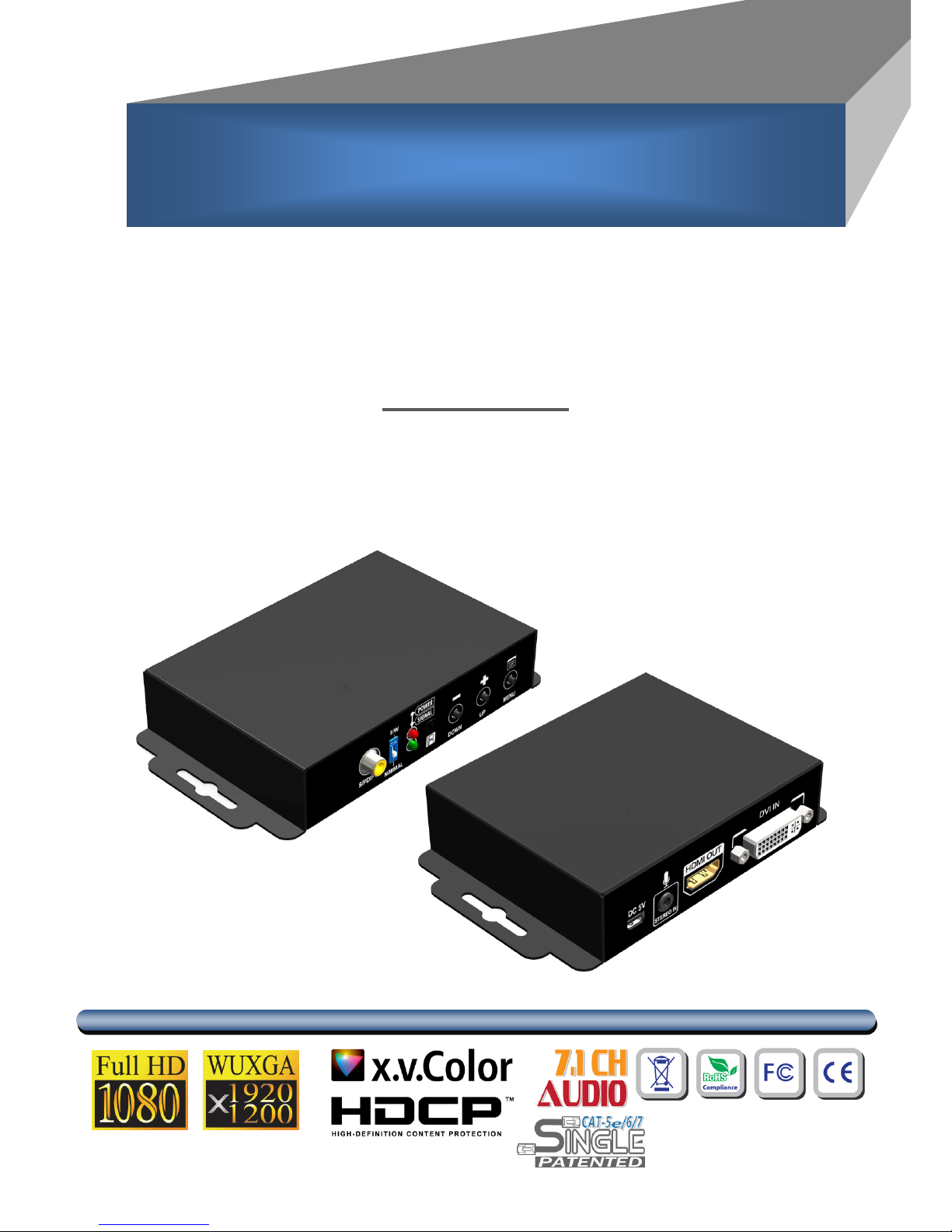
DVI to HDMI & Audio Scaler Converter
User Manual
rev: 130503
Made in Taiwan
C
C
V
V--
1
1
0
0
5
5
S
S
Page 2
The CV-105S DVI to HDMI & Audio Scaler Converter has been tested for conformance to safety
regulations and requirements, and has been certified for international use. However, like all
electronic equipments, the CV-105S should be used with care. Please read and follow the safety
instructions to protect yourself from possible injury and to minimize the risk of damage to the unit.
● Follow all instructions and warnings marked on this unit.
● Do not attempt to service this unit yourself, except where explained in this manual.
● Provide proper ventilation and air circulation and do not use near water.
● Keep objects that might damage the device and assure that the placement of this unit is on a
stable surface.
● Use only the power adapter and power cords and connection cables designed for this unit.
● Do not use liquid or aerosol cleaners to clean this unit. Always unplug the power to the device
before cleaning.
TABLE OF CONTENTS
INTRODUCTION ..................................................................................................................... 1
FEATURES .............................................................................................................................. 1
PACKAGE CONTENTS ........................................................................................................ 1
SPECIFICATIONS ................................................................................................................... 2
PANEL DESCRIPTION ........................................................................................................... 3
CONNECTION DIAGRAM ...................................................................................................... 4
OSD MENU ............................................................................................................................. 5
OPERATION APPROACH ...................................................................................................... 5
LIMITED WARRANTY ........................................................................................................... 10
Page 3

1
INTRODUCTION
The CV-105S DVI to HDMI & Audio Scaler Converter offers an easy and instant approach for
converting digital video (DVI-D) and both digital audio (S/PDIF) or analog stereo audio to digital HDMI.
With this module, DVI based devices such as PC with S/PDIF or analog stereo audio can readily connect
to your HDMI TV.
FEATURES
DVI 1.0 compliant
HDMI 1.3 complinat
IR remote control
Remote control via mini-USB
OSD control interface
Maximum pixel rate : 165MHz
Deinterlacer supported
Supports nosie reduction and video enhancement features
Video enhancement support
Over / Under scanning adjustable
Video H/V mirror supported
Active video area adjustment supported
Multiple VESA input resolutions available
USB firmware upgradable for expanding compatibility
Wall-mount housing design for easy installation
PACKAGE CONTENTS
1x CV-105S
1x 5V/2A power supply unit
1x User Manual
1x IR Remote control
1x Installation software CD
Page 4
2
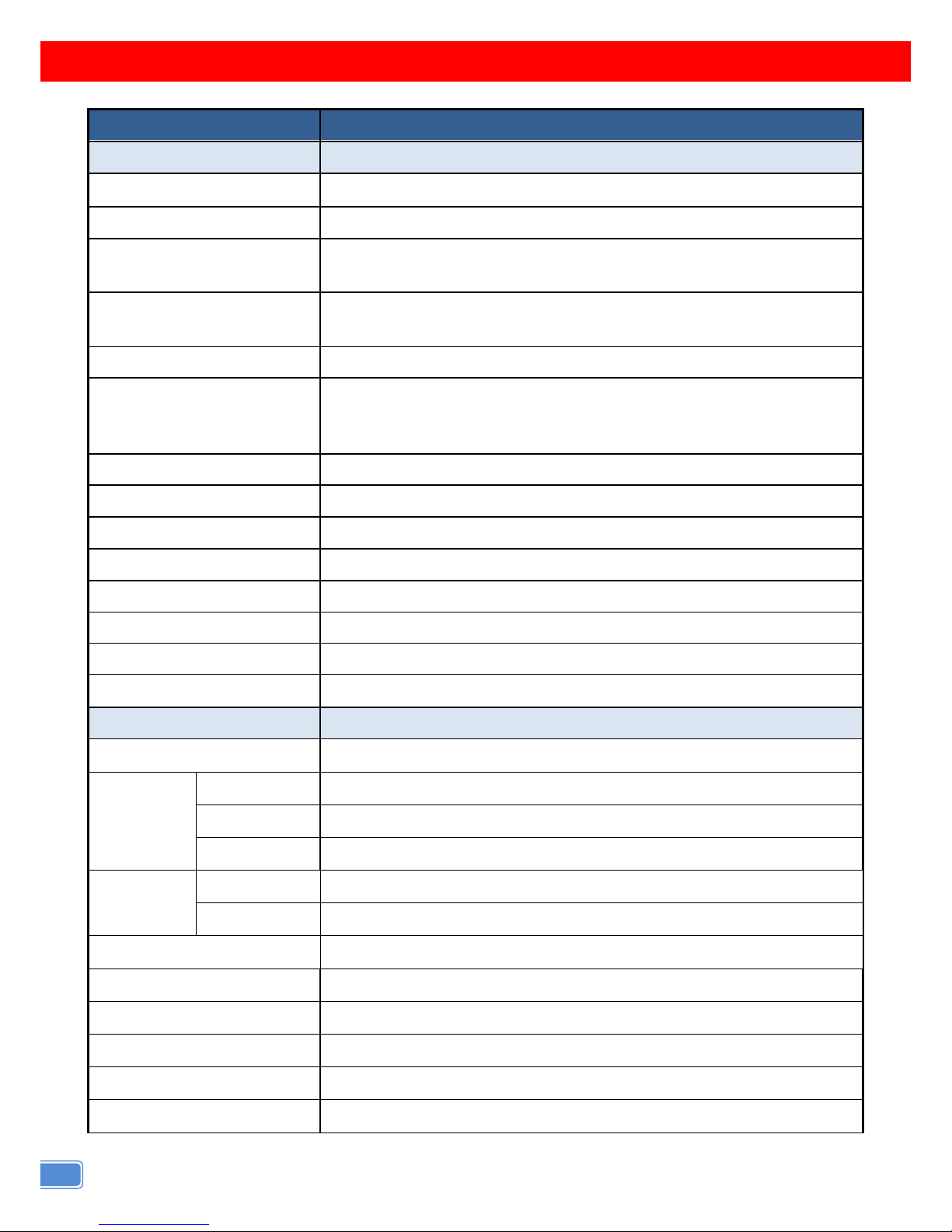
SPECIFICATIONS
Model Name
CV–105s
Technical
Role of usage
DVI to HDMI Converter
DVI compliance
DVI 1.0
Input Video Maximum Pixel
Rate
165 MHz
Output Video Maximum
Pixel Rate
165MHz
Audio support
Stereo PCM (48KHz)
ESD protection
[1] Human body model — ±19kV [air-gap discharge] & ±12kV
[contact discharge]
[2] Core chipset — ±2kV
PCB stack-up
4-layer board [impedance control — differential 100; single 50]
Firmware update
Feasible via USB Port
CEC Channel
N/A
Input
1x DVI+ 1x 3.5mm+ 1x RCA
Output
1x HDMI
DVI connector
DVI [29-pin female digital only]
HDMI connector
Type A [19-pin female]
USB connector
Mini B
Mechanical
CV–105s
Housing
Metal enclosure
Dimensions
[L x D x H]
Carton
420 x 400 x 300mm [1'8" x 1'4" x 11.8"]
Model
175 x 128 x 134mm [6.9” x 5” x 5.3”]
Package
662 x 366 x 290mm [2’2” x 1’2” x 1’]
Weight
Model
270g [9.5oz]
Package
520g [18.3oz]
Fixedness
Wall-mounting case with screws
Power supply
5V 2A DC
Power consumption
10 Watts [max]
Operation temperature
0~40C [32~104F]
Storage temperature
-20~60C [-4~140F]
Relative humidity
20~90% RH [no condensation]
Page 5
3
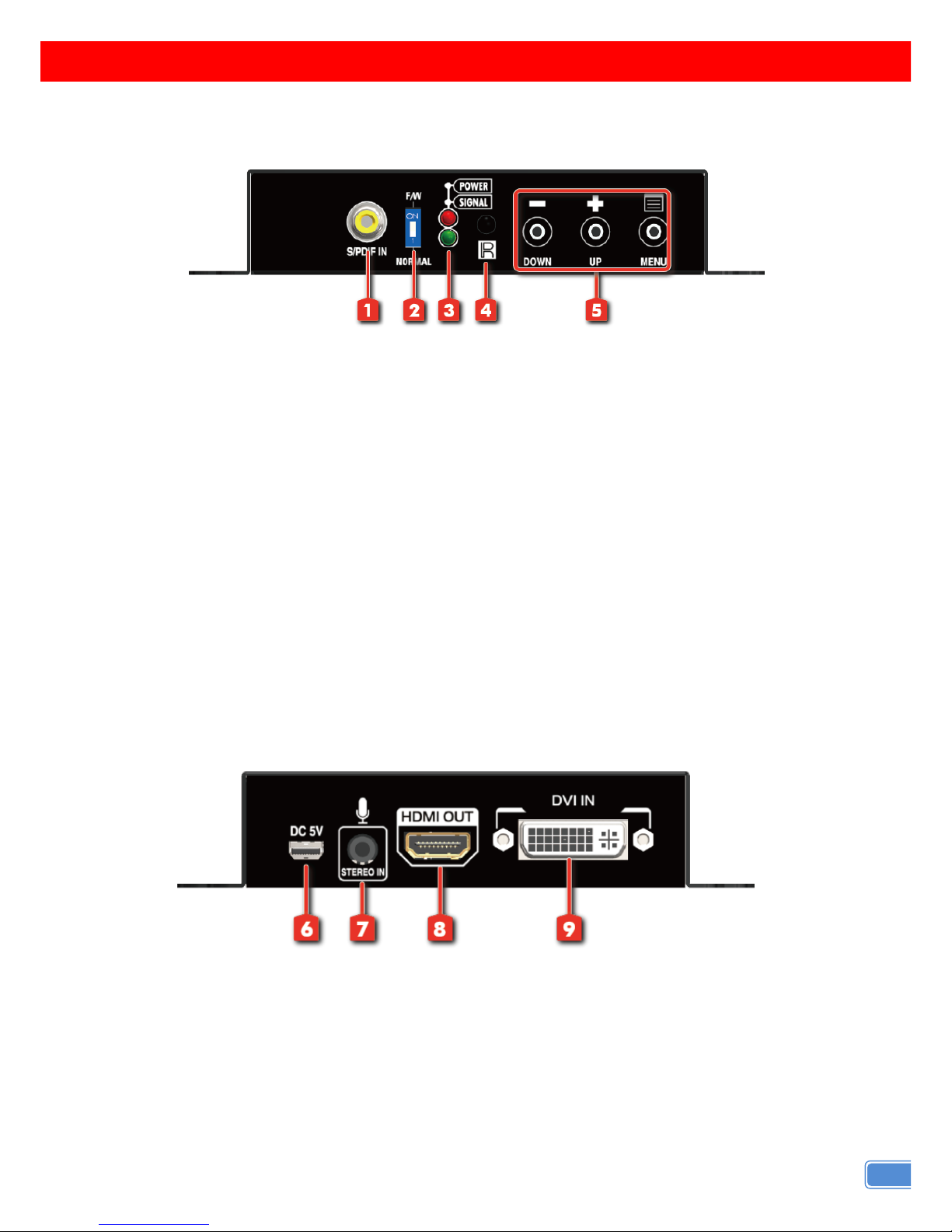
PANEL DESCRIPTION
Front Panel
1. S/PDIF AUDIO IN: connect to digital S/PDIF audio source.
2. DIP SWITCH: For firmware update
ON []: firmware update mode
OFF []: normal mode
3. LED INDICATOR:
[green]: signal indicator LED
[red]: power indicator LED.
4. IR SENSOR: IR sensor for receiving the IR commands from IR remote
5. PUSH BUTTON
[LEFT]: Down Button
[MID]: Up Botton
[RIGHT]: Menu/Enter Button
Rear Panel
6. Mini USB: Mini-USB port for 5V DC & control port
7. STEREO AUDIO IN: connect to analog stereo audio source.
8. HDMI OUT: connect to a HDMI display with a HDMI male-male cable here
9. DVI IN: Connect to a DVI source
Page 6
4
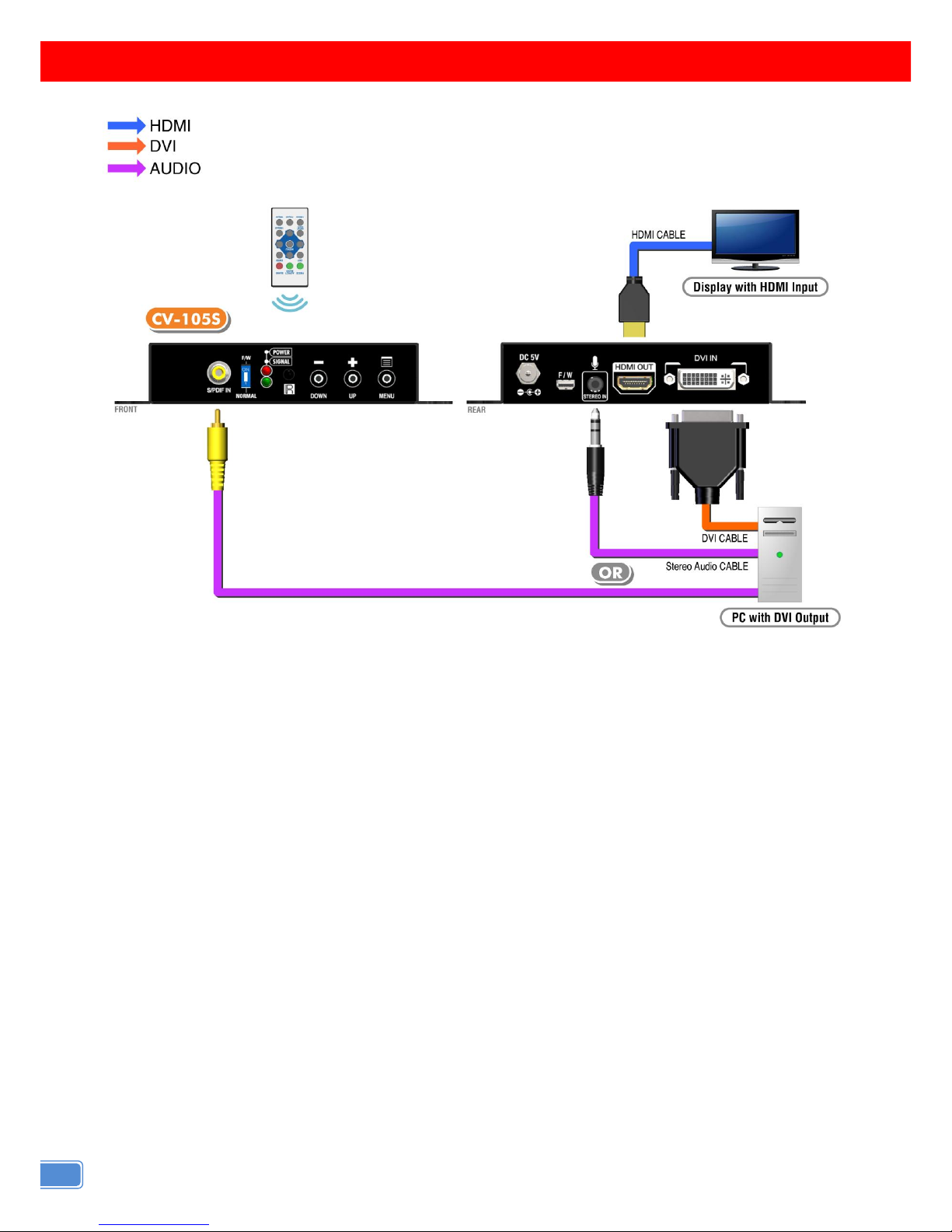
CONNECTION DIAGRAM
Page 7
5
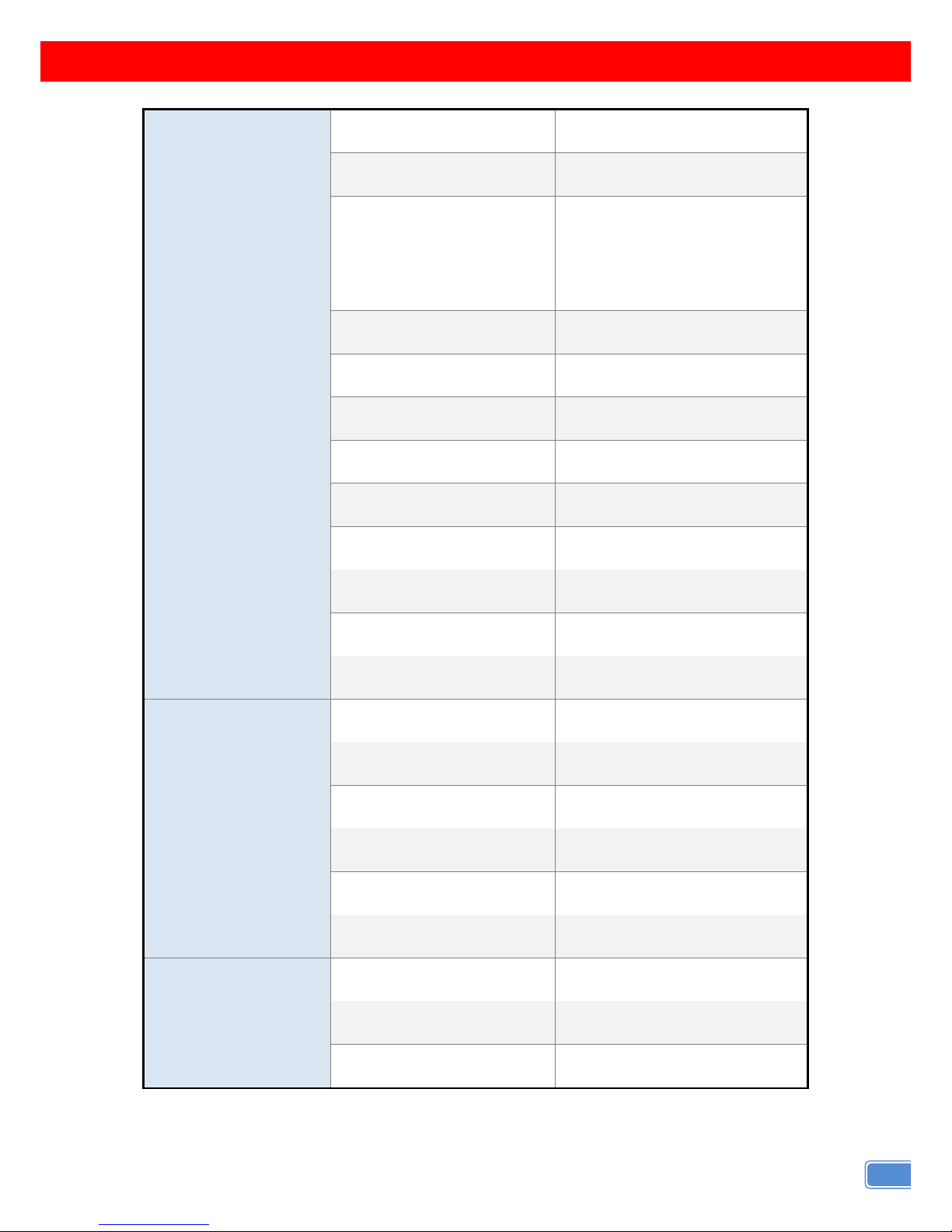
OSD MENU
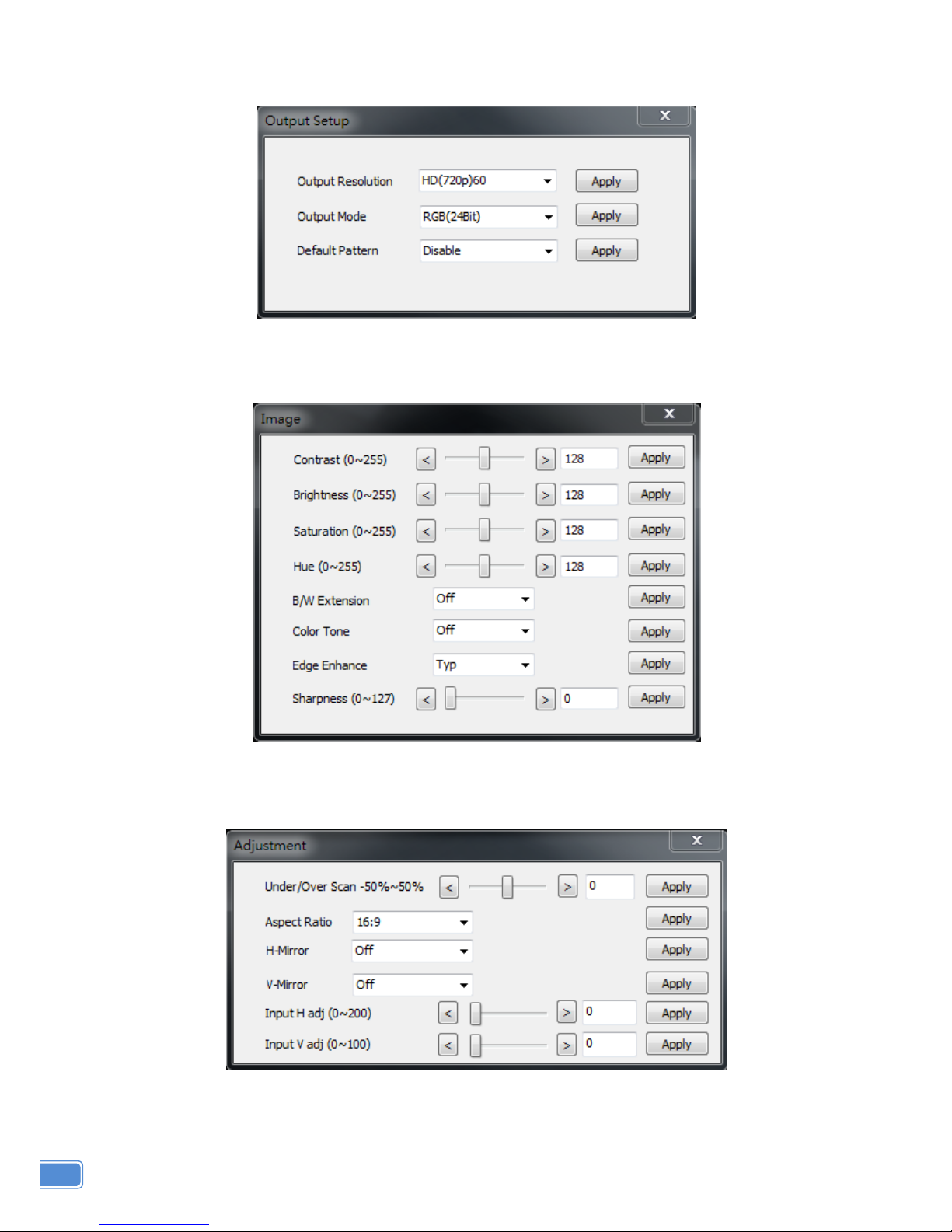
1.Output Setup
Out Res.
Output Mode
RGB, YCbCr444, YCbCr422
Default Pattern
Disable, White, Cross, Hatch,
Color, Gray, Windows,
H-Ramp, W-HRamp,
W-VRamp, Diagonal
Audio Source
Stereo, SPDIF
2.Image
Contrast
0~255 of Contrast Level
Brightness
0~255 of Brightness Level
Saturation
0~255 of Saturation Level
Hue
0~255 of Hue Level
B/W Extension
Off, On
Color Tone
Off, Skin, Green
Edge Enhance
Typ, Mid, Max, Off
Sharpness
0~127 of Sharpness Level
3.Adjustment
Under/Over Scan
-50%~50% of Scan Level
Aspect Ratio
16:9, 4:3
H-Mirror
Off, On
V-Mirror
Off, On
H-Shift
-100~100 of H-Shift Level
V-Shift
-50~50 of V-Shift Level
4. System
Input Res. Info
Firmware Version
Factory Reset
Page 8
6
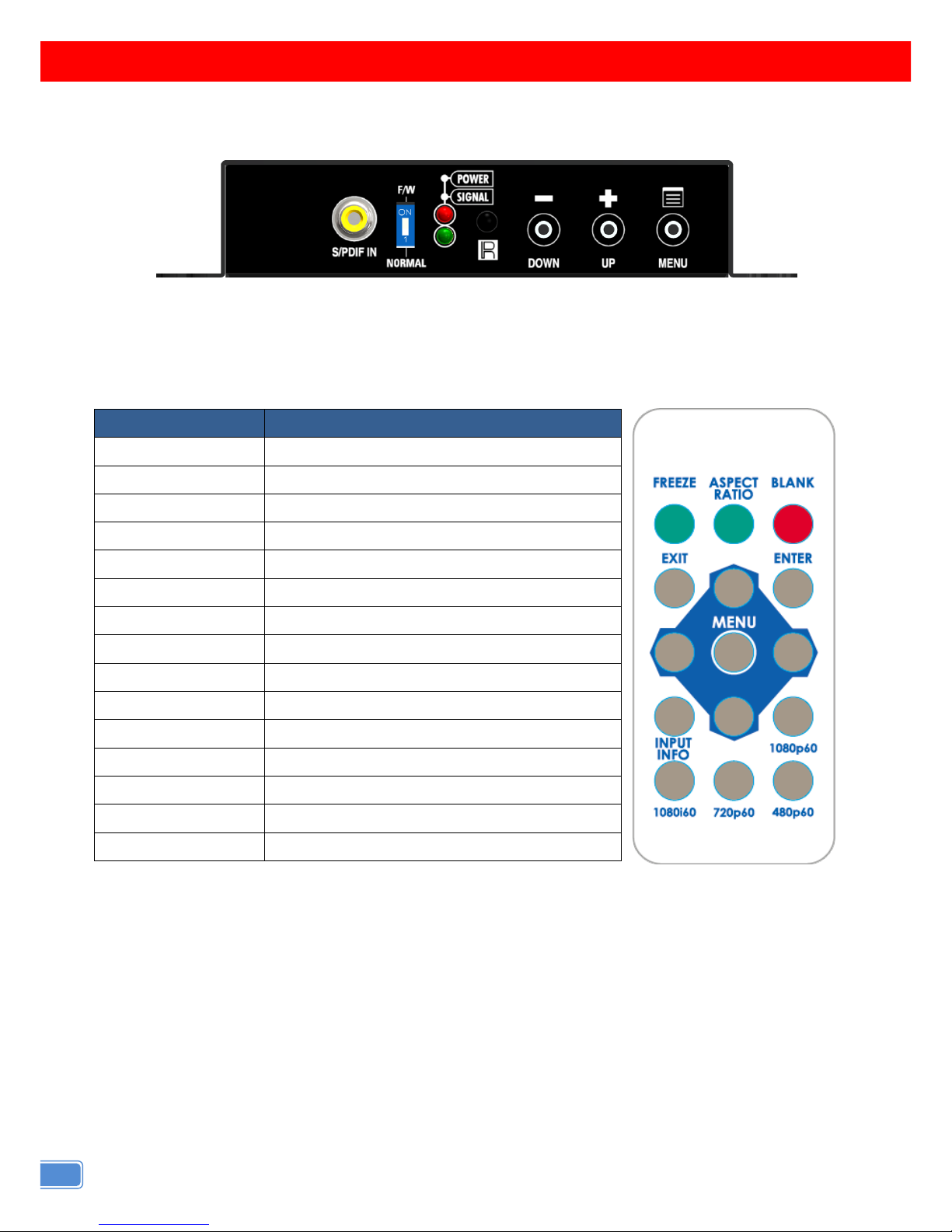
OPERATION APPROACH
Method A: Push-in Button
Method B: IR Remote Control
Button
Function
FREEZE
Freeze video
ASPECT RATIO
Aspect ratio change
BLANK
Blank video
EXIT
Exit OSD
ENTER
Enter key
UP
Up key
LEFT
Left key
RIGHT
Right key
DOWN
Down key
MENU
Menu on
INPUT INFO
Source resolution information
1080p60
Select 1080p60 output resolution
1080i60
Select 1080i60 output resolution
720p60
Select 720p60 output resolution
480p60
Select 480p60 output resolution
Page 9
7
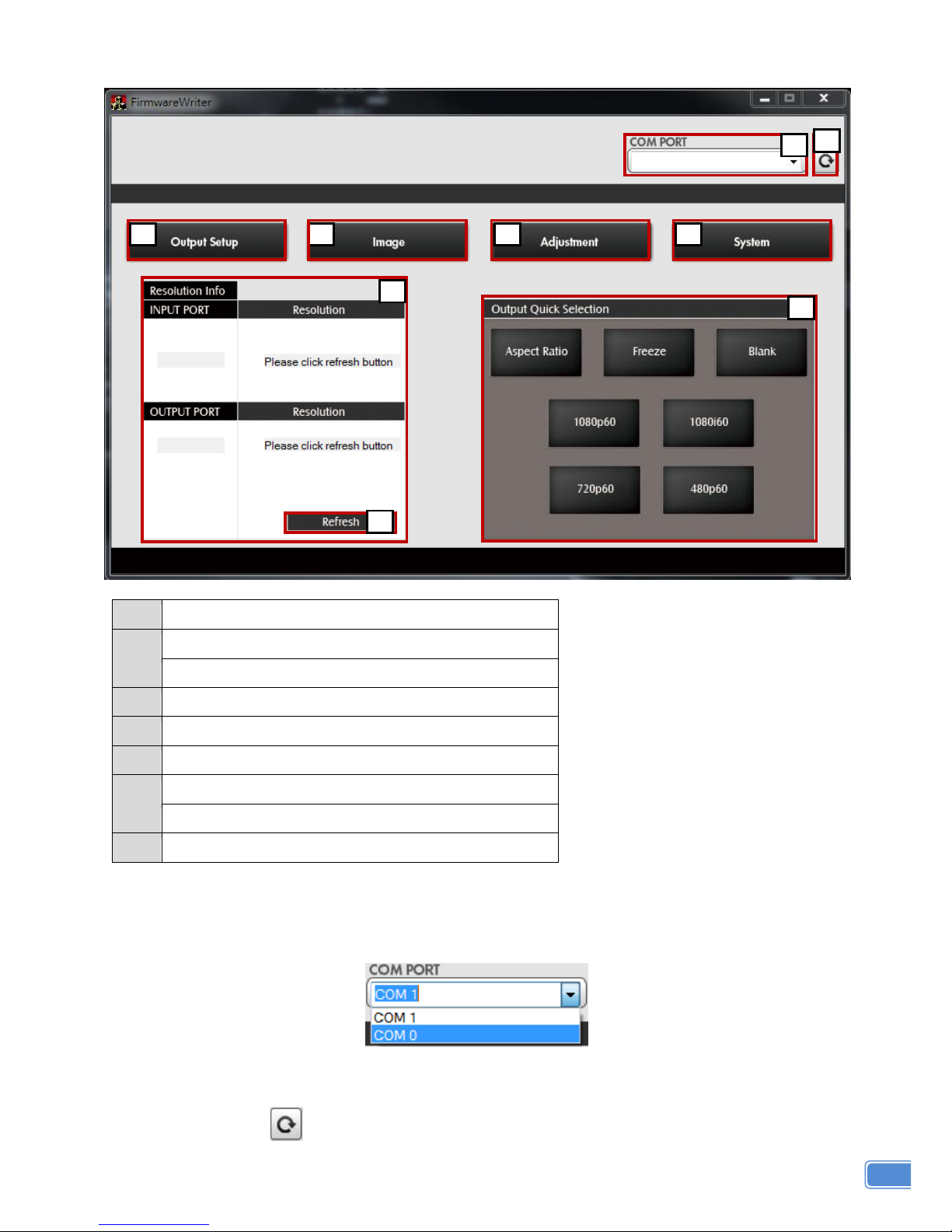
Method C: IR Remote Control through Mini-USB port
1
COM Port Selection
2
COM Port Detection Button
3
Output Setup Button
4
Image Button
5
Adjustment Button
6
System Button
7
Input / Output Resolution Info
8
Refresh Input / Output Resolution Info Button
9
Output Quick Selection Button
1. COM Port Selection
Please select the application COM PORT
2. COM Port Detection Button
Click this button to detect the COM PORT
9
6 5 4
3
1
2 8 7
Page 10
8
3. Output Setup Button
4. Image Button
5. Adjustment Button
Page 11
9
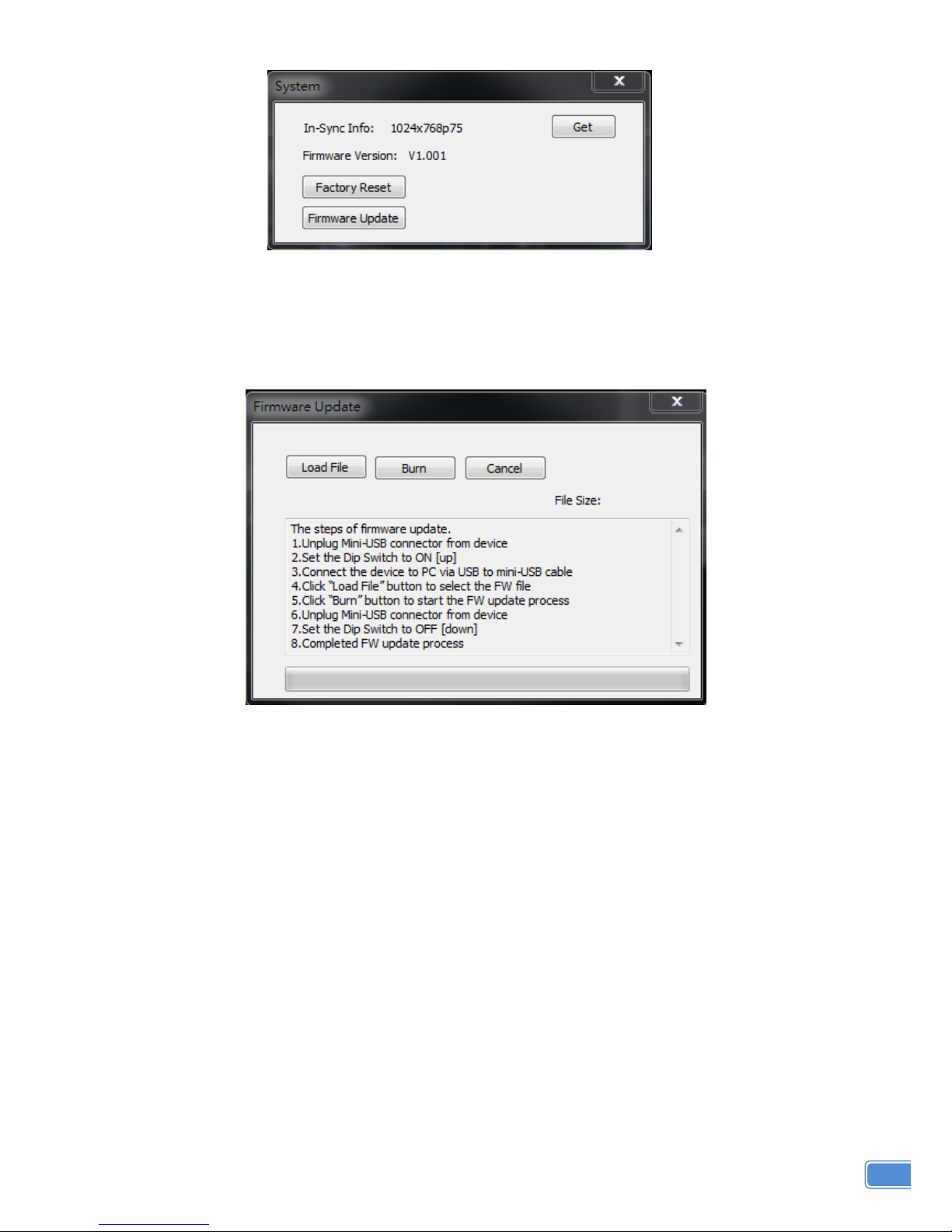
6. System Button
1) In-Sync Info:
To view the current input resolution
2) Factory Reset Button
3) Firmware Update Button
The steps of firmware update:
a) Unplug Mini-USB connector from device
b) Set the Dip Switch to ON []
c) Connect the device to PC via USB to mini-USB cable
d) Click the FW Update button on software
e) Click “Load File” button to select the FW file
f) Click “Burn” button to start the FW update process
g) Unplug Mini-USB connector from device
h) Set the Dip Switch to OFF []
i) Completed FW update process
7. I/O Port and Resolution Info
To display the information about the I/O Port and the applied Resolution
8. Refresh Button
To refresh the status of the converter
9. Output Quick Selection Button
Common functions for quick setting
Page 12
10
LIMITED WARRANTY
The SELLER warrants the CV-105S DVI to HDMI & Audio Scaler Converter to be free
from defects in the material and workmanship for 1 year from the date of purchase from the
SELLER or an authorized dealer. Should this product fail to be in good working order within 1
year warranty period, The SELLER, at its option, repair or replace the unit, provided that the unit
has not been subjected to accident, disaster, abuse or any unauthorized modifications including
static discharge and power surges.
Unit that fails under conditions other than those covered will be repaired at the current price
of parts and labor in effect at the time of repair. Such repairs are warranted for 90 days from the
day of reshipment to the BUYER. If the unit is delivered by mail, customers agree to insure the
unit or assume the risk of loss or damage in transit. Under no circumstances will a unit be
accepted without a return authorization number.
The warranty is in lieu of all other warranties expressed or implied, including without
limitations, any other implied warranty or fitness or merchantability for any particular purpose, all
of which are expressly disclaimed.
Proof of sale may be required in order to claim warranty. Customers outside Taiwan are
responsible for shipping charges to and from the SELLER. Cables are limited to a 30 day
warranty and cable must be free from any markings, scratches, and neatly coiled.
The content of this manual has been carefully checked and is believed to be accurate.
However, The SELLER assumes no responsibility for any inaccuracies that may be contained in
this manual. The SELLER will NOT be liable for direct, indirect, incidental, special, or
consequential damages resulting from any defect or omission in this manual, even if advised of
the possibility of such damages. Also, the technical information contained herein regarding
the CV-105S features and specifications is subject to change without further notice.
 Loading...