

Page 1

Owners Instructions For Use
www.golfstream.co.uk
Proudly Made in Britain
Page 2
Thank you for purchasing your Golfstream DV-8 remote controlled electric
golf trolley. Please take time to read these instructions to ensure you get
the best from your new purchase. In the box you will have the main frame,
handset complete with batteries, main lithium battery source with purpose
designed charger and these instructions.
Guarantee
Your new DV-8 has a two year guarantee from date of purchase - Please
take a moment to register your purchase for guarantee purposes, go to
www.golfstream.co.uk/guarantee all parts other than handset batteries are
covered for two years against faulty workmanship or materials. Please keep
your original receipt (maybe staple it inside the cover of this manual) as it
may be needed in the event of a claim.
Getting started
Unpack the box and identify the various parts of your equipment. Put the
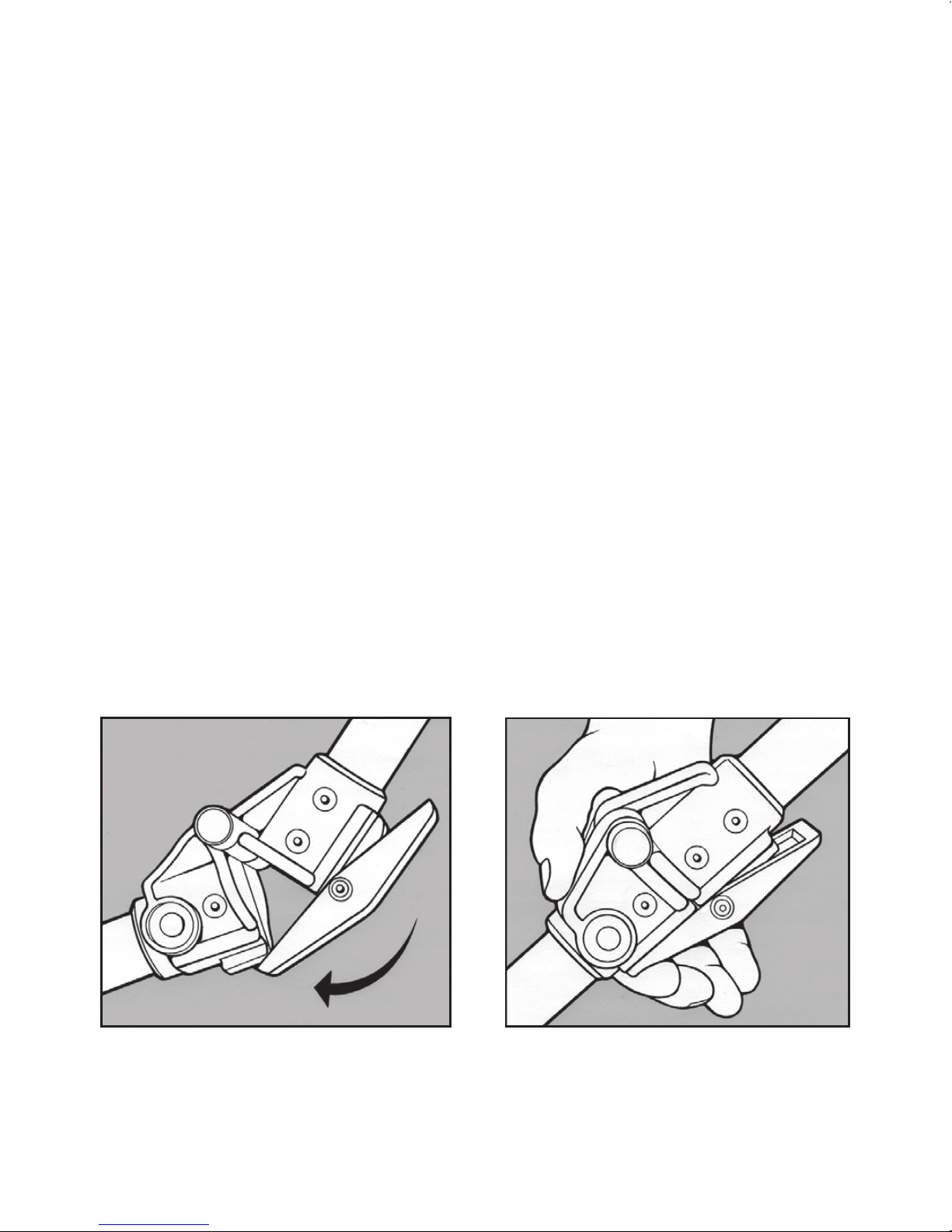
batteries into the handset and erect your new DV-8 by lifting the handle,
straightening the central tube and clicking the two bracket as shown.
CLICK!
Now unfold the zero-tip wheel from under the DV-8 and then put the main
battery into place and plug in. There will be plenty of power in your battery
for testing and getting to know your new DV-8 but do charge it up before
your rst full round.
Page 3

Getting to know your DV-8
Your DV-8 is a fully remote control machine that in perfect conditions will be
operable up to 100 meters away, as such always use your machine responsibly,
respecting other players games and health and safety. In crowded areas such
as car parks, use the manual control rather than the hand set. We recommend
using the machine no further away than 50 meters.
Using as a standard electric trolley
Your DV-8 has xed wheels which enable braking, you are therefore, in
normal use, unable to push your trolley. Instead you need to use as a manual
electric trolley. After setting the machine up, press the control knob down
once, the LED on the machine will ash to show manual operation (solid
for remote). Rotating the control knob clockwise will increase the speed,
anti-clockwise will decrease speed. Should you need to push the machine
manually at any time you will need to disengage the two main wheels from
the inner “locked” position to the outer “freewheel” groove. This is done by
sliding the black “pip” on the outer of the central hub on each wheel whilst
pulling outwards. Ensure the wheel clicks into the outer axle groove. To use
your DV-8 electronically you must have the wheels in the engaged position
on the inner groove of the axle.
Remote Control
Once you are in a safe open and appropriate area you can start to use remote
control. Press any button once on your handset, this will turn the handset
on and immediately take over from manual control. Take time to practise
and perfect controlling your machine before you are playing in an important
match. Please note that the DV-8 will react dierently with a fully loaded bag
so practise with your golf bag tted. The handset automatically powers o
after 45 seconds if no button is pressed.
Page 4

Note: When your DV-8 is turned on and o in manual mode it will always
start at zero, this is a safety feature and is normal.
The + key will start the trolley moving forward and
continual presses will increase the speed of your
DV-8. The – button will slow it down. A single press on the
brake will stop the machine normally and press and hold
will activate an emergency stop.
Starting the DV-8 using the – button will start the machine
in reverse, please note that reverse speed is limited. With
your DV-8 moving forward or backward press the left or
right hand arrow as a single press, you DV-8 will move
slightly in the direction selected. A prolonged or multiple
presses will increase the level of deviation from straight.
Practise in an open space with no obstacles until you can operate the machine
accurately, practise makes perfect!!
If you press the left or right key from the start your DV-8 will move the front
wheel in direction selected. In this way you can make minor adjustments
before you set o. Each press of the handset will produce a ashing green
light in the centre of your handset, this shows all is normal and working well.
This ash is replicated on the top of your DV-8 and conrms that all is well
and that the signal has been received. If either ash Red, please see trouble
shooting at the end of these instructions.
Range and safety
The DV-8 in perfect conditions will operate up to 100 metres away from you
(we recommend not exceeding 50 metres). Should you go out of range, the
DV-8 will stop after 2 seconds. As the handset goes to sleep after 45 seconds
when no buttons are pressed, the trolley will also stop 2 seconds after the
handset goes to sleep. This is normal and unlikely to occur in normal use.
Once you are back in range, pressing any button will start your machine once
more. Range will be aected by course conditions including terrain, overhead
power cables, wet misty conditions and clear line of sight. Your DV-8 takes
3 x AAA batteries, as these run down the eective range will be diminished.
Page 5

Battery Charging
Your battery is supplied with a purpose designed charger, only use the correct charger
with this battery. The battery is charged via a side socket on the left of the battery.
Your battery will typically take between 3 and 5 hours to charge and then the charger
will indicate charged with a green indicator light. Once the green light is shown the
charger will go into standby mode. At this point we advise you to remove the battery
from the charger and the charger from the mains, this will save you money and is
kinder to the environment. Your charger will remain ready to use without the need
for a top up for at least two months.
Folding away
Your new DV-8 can be folded smaller lengthways if required. The rear wheel should
always be stored under the machine when not in use. The front wheel can also be
folded underneath like this – Locate the two knurled knobs either side of the lower
bag stay. Pull each one out in turn and rotate by ¼ of a turn, this will hold the plunger
out. When both are done, pull the whole front wheel section forwards. Once to its full
extent it will fold under reducing the overall length of your stored machine. Reverse
this operation to put back in place before use.
Trimming left/Right bias
From time to time you may need to adjust your DV-8 to ensure that when going
straight forward it goes as straight as possible within the constraints of the terrain.
To do this, rst nd a at level surface such as an unused car park and adjust as follows:
• Please only carry out this procedure on a at level surface.
• Press the Plus (+) and minus (-) buttons simultaneously for 3 seconds.
• The trolley has now entered “Trimming” mode and the DV-8 LED will ash alternate
red and green.
• Press the Plus (+) button to move forward at a slow pace.
• Now use the left and right buttons to get the DV-8 to go forwards perfectly straight.
• When satised, press the brake button to save the settings and exit the trimming
mode.
Page 6

Matching your handset to the DV-8
Your handset is pre programmed in the factory to your DV-8. There are
thousandsof random codes and it is unlikely that you will ever come across
someone with the same code. Should this ever happen or you lose your
handset please follow these instructions:
• Hold the rotary control knob down whilst you connect the main battery.
• The LED on your DV-8 will ash RED.
• Press and hold any key until the LED ashes green
• Now disconnect the battery to save the new handset to your DV-8
Cleaning and Maintenance
Your DV-8 needs very little in the way of maintenance but it is good practice to
keep it clean and free from long grasses. Never use a jet washer on your DV-8,
although your machine is designed for outdoor use the pressure and angles
of a jet washer can and will cause damage. Periodically check the wheels for
debris caught around them and wipe the machine over with a damp cloth.
LED Signal indications
Your DV-8 will oer reliable service but should you have any problems, the
following may be of help:
• When your handset batteries are low on power the handset will ash red
when any button is pressed.
• When your main battery is low on power the LED on the top of the DV-8
will ash RED.
Note: We do not recommend rechargeable batteries for your handset
Golfstream Customer Care 01843 594213
Page 7

THE WEIGHT IS
OVER
The new lightweight, CaddyCell lithium-ion golf trolley battery weighs
just 2.1kg - less than a quarter of the weight of a lead acid battery.
And it lasts 5 times longer, is compatible with all 12 volt electric golf
trolleys and has a 2 year guarantee.
It’s what trolleys have been weighting for...
RRP £19 9 ( inc battery, charger and carry case)
www.caddycell.com sales@caddycell.com
Available in the UK via all good golf shops
and at www.golfstream.co.uk – 01843 594213
THE WEIGHT IS
OVER
The new lightweight, CaddyCell lithium-ion golf trolley battery weighs
just 2.1kg - less than a quarter of the weight of a lead acid battery.
And it lasts 5 times longer, is compatible with all 12 volt electric golf
trolleys and has a 2 year guarantee.
It’s what trolleys have been weighting for...
RRP £19 9 ( inc battery, charger and carry case)
www.caddycell.com sales@caddycell.com
Available in the UK via all good golf shops
and at www.golfstream.co.uk – 01843 594213
Page 8

Golfstream Ltd, Wilton Road, Ramsgate, Kent, CT12 5HG
Telephone: 01843 594213
www.golfstream.co.uk
 Loading...