

Page 1
Page 2

CONTENTS
I. Introduction 2
II. Safety notices 2
III. General Information 3
IV. General description of the equipment 5
V. ` ` Equipment characteristics 6
VI. Description of the control panel 7
VII. Manual mode 10
VIII. Recipes 15
IX. Easy cooking 23
X. Automatic cleaning 25
XI. Extras 27
XII. Settings 33
XIII. Help 37
XIV. VISION AGENT 38
XV Maintenance 38
XVI Error Code Table 42
Goldstein contact details 44
Page 3

Dear Customer,
Congratulations on purchasing the new VISION combi-steam oven. The Company appreciates your decision and
believes that you will always achieve great results realizing your ideas in everyday work by using this equipment. By
using your new combi-steamer you will attain the highest quality of prepared food and your guests will like to return
to your establishment.
Your new VISION combi steamer combines long-term experience of the best chefs together with the latest scientific
and modern technologies. Due to intuitive operation, option of pre-set programs, and the unique “Easy cooking”
function, you will instantly reach optimum performance cooking without the necessity of studying the technologies
and procedures of food preparation.
It is also possible to create your own programs with unlimited number of steps which you can store and sort
according to your routines and requirements. Well arranged menu offers the choice of your favorite recipes, as well
as your most often used cooking programs.
The advanced cooking system of the VISION oven allows you to make changes to the cooking programme even
after you have started the cooking process. The new “Learn and Remember function” allows you to store the
programme so that you can use it again with all the changes you have made.
In order for you to achieve great results with your new combi-steam oven VISION right from the beginning we
would like to provide you through this manual with all the necessary information and useful advice for trouble-free
work. To be able to take full advantage of all the possibilities of your new combi-steam oven VISION we
recommend you study the manual carefully before you begin to use the combi-steam oven.
Goldstein wishes you joyful use of your new combi-steam oven VISION.
1
Page 4

I. Introduction
OPERATION MANUAL FOR GOLDSTEIN VISION COOKING CENTRES
Safe Use of the Equipment
Combi-steam ovens VISION have been designed and
produced to meet all applicable international safety
standards. Installation deviating from the installation
instructions, wrongful use, setting, servicing, as well as
improper cleaning or eventual changes to the combi-steam
oven, which are not authorized by the manufacturer, may
cause injury or eventual death.
READ CAREFULLY the operation manual before you begin to
use the equipment. Keep this manual safe to be used by all
users of the equipment and for further reference in the
future.
Make sure the electricity connection, water connection, as
well as the waste water pipe connections are correct and in
accordance with the manufacturer’s directions stated in
chapter “Transport and Installation” of the combi-steam
ovens technical documentation. Should you have any doubts
or questions regarding installation, operation, or safety of the
equipment, please consult your supplier.
Do not remove any covers – danger of electricity-related
injuries.
Do not leave the running equipment without supervision
unless specifically stated in the manual.
Do not continue running the device should you have the
slightest doubts concerning its faultless operation, or should
it be damaged in any way, turn it off immediately, disconnect
the electricity connection, stop the water supply and consult
your supplier.
II. Safety notices
Study this operation manual carefully
Only qualified and trained personnel is allowed
to use this device
Provide regular training of operation personnel.
Thus you shall prevent possible work-related
injuries and damage to the equipment.
The equipment is to be used only for food
preparation and in accordance with the manual.
Any alternative use is against its designation and
is considered dangerous.
Before use check the cooking cabinet of the
combi-steam oven. Left over food as well as
cleaning materials or other left over objects are
to be removed and the cooking cabinet
thoroughly cleaned with the use of the manual
shower.
Never shower left over food into the drain –
remove it from the cooking cabinet.
Cleaning agents and decalcifying agents are to
be used only according to the description in this
manual and following the instructions on each of
the agents.
The buttons on the control panel are to be
pressed explicitly by fingers. The use of sharp,
pointed or other objects causes the warranty
violation
Do not block the ventilation openings of the
combi-steam oven by placing things in front of
them, namely do not place GN containers on
the ovens, fabric or other objects. Ensue clear
steam exhaust through the ventilation openings
above the combi-oven.
Make sure water doesn’t drip or spray on the
equipment or in its vicinity.
Never let unauthorized personnel operate this equipment or
manipulate it, clean it or carry out other activities in conflict
with its designed use. Such unauthorized use may cause
injuries or eventual depreciation of the equipment.
Always comply with the principles of working with electric
devices.
Do not place source of fire on the equipment or
in its vicinity.
For safety reasons do not remove the compact
cover and do not attempt to reach inside the
equipment The device does not include any
parts the user could repair. Repairs not
described in this manual should be carried out
by a qualified service technician.
2
Page 5

General notices
OPERATION MANUAL FOR GOLDSTEIN VISION COOKING CENTRES
III. General Information
Do not install any heat sources (deep-fryers, grills,
burners, cooking plates …) in the vicinity of the combisteam ovens.
The temperature of the outside glass of the door can
exceed 60˚C.
Switch off the water and electricity supplies when not
using the combi-oven for extended period of time.
Leave the combi-steam oven door open when finished
working, e.g. overnight
Should the GN containers be filled with liquids for
more than two thirds – special attention should be
paid during manipulation and when taking them out.
Place such filled GN containers only to the racks
where you can see. Pay extra attention when
extracting any hot GN containers with any content!
Attention! When working with the combi-steam oven
bear in mind that the GN containers, cooking mats and
trays may be hot – danger of burn injuries!
Attention! When in operation the combi steam oven
produces hot steam – danger of scalding!
Accident hazard!!! Be careful when using with gastro containers in
combi steamer where the upper tray is 160 cm and
more above the floor. Risk of injury because of hot GN
content.
Switching ON/OFF the combi-steam oven
The combi-steam oven is designed for continuous connection to
electric power. Connect or disconnect the power by switching the
external main switch.
The switch is to be used for switching on and off (when brought to
use, maintenance, and installation and also during emergency switch
off of the device.)
Boiler preheating
(only for boiler combi-ovens)
After switching the combi-steam oven on the boiler fills with water
automatically and the water is then heated. During this process, in
modes “Steam” or “Hot air” the start of the program will be delayed
until the water is hot. After that the combi-steam oven shall
automatically proceed. After switching the combi-steam oven on the
boiler fills with water automatically and the water is then heated.
During this process, in modes “Steam” or “Hot air” the start of the
program will be delayed until the water is hot. After that the combisteam oven shall automatically proceed.
Opening/closing the door
The combi-steam oven door is fitted with a closing mechanism
enabling opening with both right and left hand. By moving the handle
to the sides, the latch is released and the door can be opened by
pulling the handle. For safety reasons, the heating and ventilation fans
are switched off upon opening the door to prevent escape of steam
from the cooking cabinet. Open the door slightly at first, opening it fully
after a short while in order to prevent scalding by hot steam. Close the
door by pressing on the door handle (shut the door.)
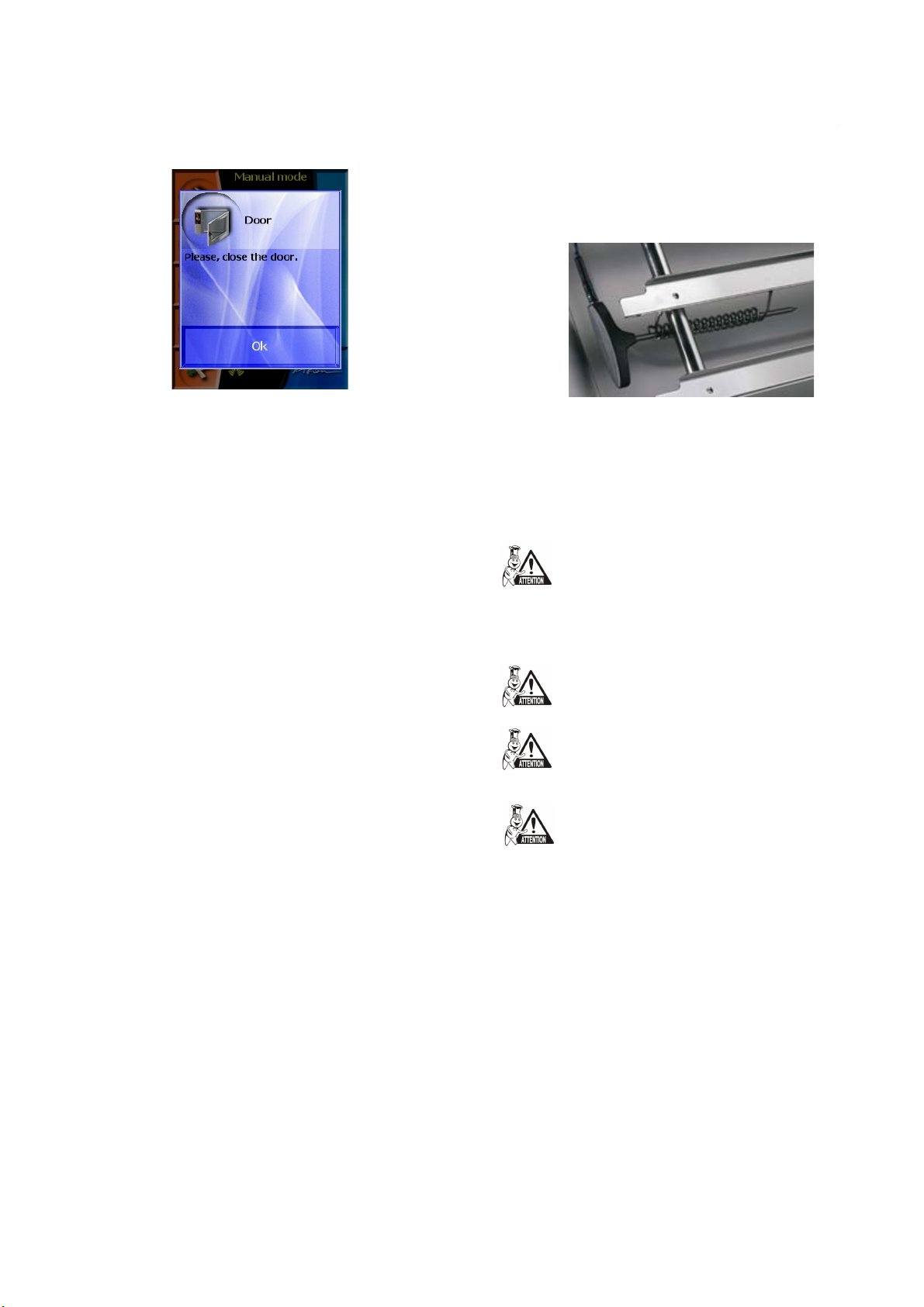
Should the door remain open and the equipment is set to
“START” a warning to close the door shall appear.
3
Page 6
Manipulation with GN containers
OPERATION MANUAL FOR GOLDSTEIN VISION COOKING CENTRES
•Should the GN containers be filled with liquids for more
than two thirds – special attention should be paid during
manipulation and when taking them out. Place such filled
GN containers only to the racks where you can see. Pay
extra attention when extracting any hot GN containers
with any content!
Loading trolley
– applies to types 2011, 1221
– You must halt the trolley every time you drive it into the
combi-steam oven.
• When operating loaded trolley you must always use and
apply arrestment (GN closure) of GN containers.
• The core probe might be hot – use protective gloves.
• Take out the core probe before you take the food out and
place it in the probe holder.
• When not using the core probe, place it in the probe holder.
• Never leave the core probe outside the cooking cabinet –
danger of closing between the door and damaging it
Cooling the cooking cabinet
For fast cooling of the cooking cabinet use the “Cooling” function in the
“Extras” section
Never use the manual shower to cool the cooking cabinet.
Should the temperature be higher than 90˚C – danger of
damaging the inside door glass!
Manual shower
Use the manual shower to rinse the inside of the cooking cabinet, to
cool the cooking cabinet to lower temperature and for further helping
processes in combi-steam ovens (basting…)
• When moving GN containers filled with liquids – sealing
covers must be used. Otherwise there is a risk of scalding.
• In case the floor is uneven the loading trolleys are not to be
used to drive into the combi-oven.
• Never leave the handle bar of the trolley inside a closed
combi-steam oven – the door might be damaged.
• Never pull out the trolley not using the appropriate handle
bar – not using the handle bar might lead to burns.
• When using banquet trolleys always make sure the plates
are fitted to the stands correctly.
• Always use the automatic cleaning program to clean the
trolleys.
• It is forbidden to use the combi-steam oven without loading
trolley for normal operation and for cleaning!
Temperature core probe
The core probe is used to read temperature inside the food being
prepared and also for managing the cooking process during gentle
way of food processing.
• Use the core probe only with food.
• Never inject the probe into frozen foods – danger of
breaking!
• Avoid hyper flexing the feed in cable leading into the probe.
Manual shower is functional only when the combi-steam
oven door is open
Never spray water from the manual shower onto the hot
door glass – danger of glass destruction.
Always place the manual shower to its holder after use.
Cleaning the combi-steam oven
It is necessary to clean the combi-steam oven on a regular
basis (see chapter “Cleaning the combi-steam oven”) When
cleaning the combi-steam oven it is necessary to follow these
instructions:
• use only cleaning agents recommended by the manufacturer
of the combi-steam oven
• follow instructions written on the cleaning agents
• never apply cleaning agents onto hot stainless surfaces –
danger of disturbance of the surface and consequent
discoloration. The warranty does not cover such damage!
• always rinse the inside of the cooking cabinet with the
manual shower after cleaning – thus rid of the cleaning
agents used.
• Do not pull the core probe out by pulling the cable
• Place the probe so that it does not touch the door glass.
4
Page 7
IV. General description of the equipment
OPERATION MANUAL FOR GOLDSTEIN VISION COOKING CENTRES
• never apply mechanical cleaning means to clean the combi-
steam oven (such as wire wools, scrapers, knives)
• do not clean the combi-steam oven with high-pressure
water cleaners
• leave the door open after cleaning the cooking cabinet
Always use protective wear and recommended working
attire (gloves, goggles, mask) when cleaning the combisteam oven! You are protecting your health!
When the combi-steam oven is not cleaned often enough –
left over grease builds up on the cooking cabinet walls – it
can ignite at high temperatures. Such damage is excluded
from warranty!
Malfunction repairs
Malfunctions can be repaired only by authorized service, trained
and certified by the manufacturer.
In case of untrained entry or unauthorized service warranty does
not apply!
Combi-steam oven types 623, 611, 1011
Monitoring and maintenance
It is necessary to provide minimum annual check up of the combisteam oven and its equipment by an authorized service to ensure safe
and faultless operation of the equipment. (see chapter
“Maintenance”).
Combi-steam oven types 1221, 2011
5
Page 8

combi-steam oven door with double glass
OPERATION MANUAL FOR GOLDSTEIN VISION COOKING CENTRES
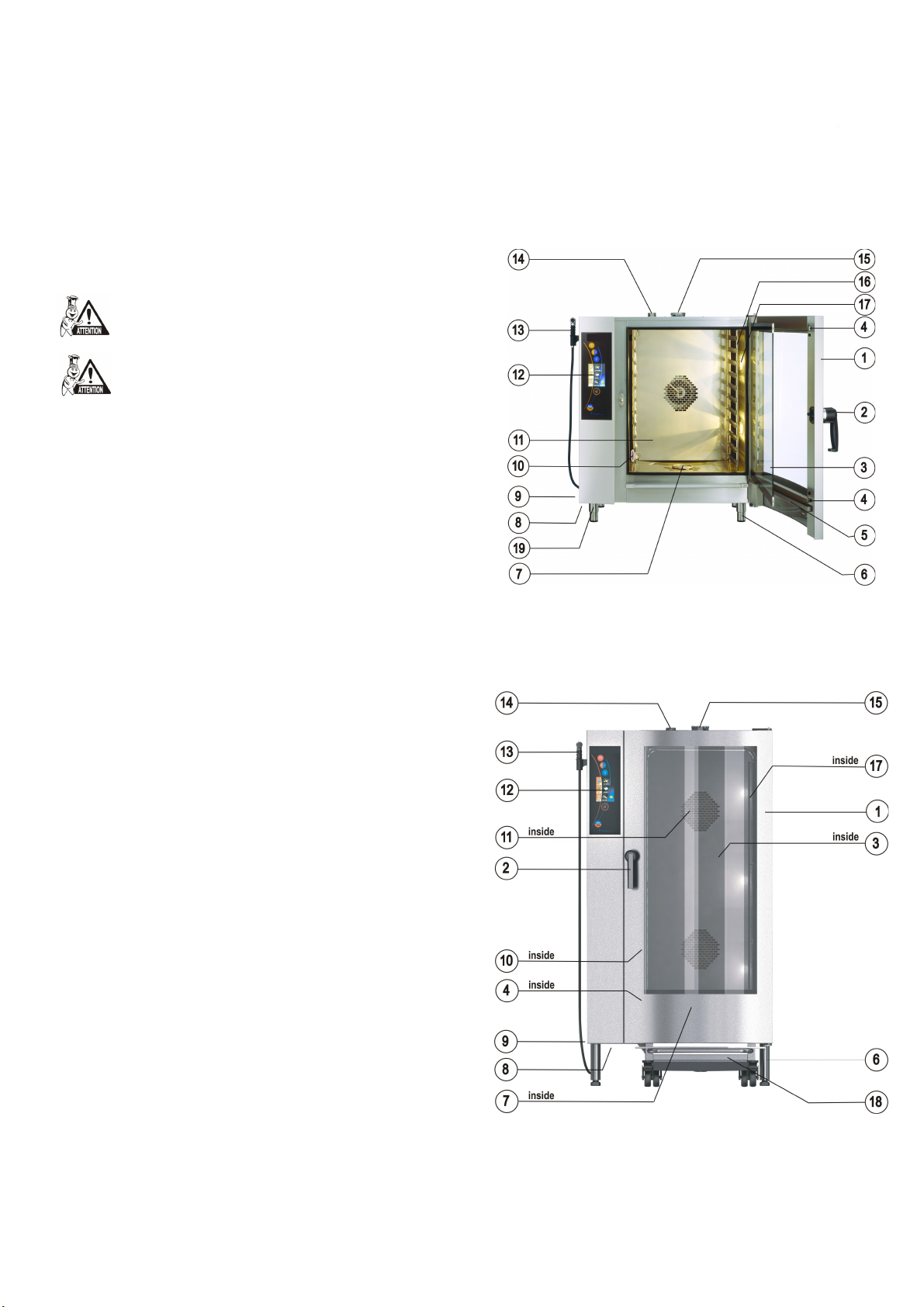
1.
door handle with integrated latch
2.
inner door glass
3.
catch to fixate the inner glass
4.
condensate door drip tray catching the condensed water
5.
from the inner glass with automatic release.
adjustable legs
6.
drain cover
7.
aiir and dust filter
8.
side cover
9.
core probe
10.
inner detachable wall in front of the ventilation fan
11.
combi-steam oven control panel
12.
manual shower
13.
ventilation shaft
14.
controlled and safety valve exhausting surplus steam
15.
racks for GN containers
16.
inside light
17.
loading trolley (combi-steam ovens type 1221, 2011)
18.
USB connector
19.
V. Equipment characteristics
GOLDSTEIN VISION is a universal device for preparation of dishes. It
enables the user to prepare a complete menu. It is possible to carry
out all kinds of thermal processing of food in the GOLDSTEIN VISION
combi-steam oven, such as roasting, frying, grilling, stewing, steaming,
cooking at low temperatures, low-temperature overnight
roasting/baking. One of the advantages is food-processing with low
consumption of water and oil, exclusive of smell transfer when
processing two different dishes, preservation of vitamins and minerals,
great power, water, place and time saving. Due to the possibility to
control humidity in the cooking cabinet there are great savings in the
weight of the food processed.
It is also possible to use the combi-steam oven as proofing
compartment, to preserve and dry fruits or other technological
processes. All such processes are programmable and can be carried out
regardless of the personnel. Use of the temperature probe is another
advantage, especially with high-temperature-sensitive foods (roast
beef).
If using the equipment reasonably, you can save place and time,
otherwise necessary for single-purpose devices for individual
production processes.
Thermal processing of food takes place in the cooking cabinet where
hot air is circulated evenly by the ventilation fan. The air can be
moistened by generating steam. The humidity is controlled
automatically according to set value and operation. During steam
operation the humidity is set to 100%, in combined operation it can be
varied.
All processes are automatically controlled by a microcomputer, inbuilt
in the CPU of the combi-steam oven.
The cooking itself can take three different forms:
Product plate of the combi-steam oven is located on the upper right
side. A copy of the plate is located inside the device, on the left side.
The plate contains the following information: the manufacturer,
technical data regarding the equipment, i.e. type and model,
construction number, year when manufactured, important data
regarding type of power supply, energy input, weight and protection
from water. The label also includes CE and ESC marks, confirming
that the equipment complies with all requirements of CSN, EN, IEC
and government ordinances.
• Less experienced users can use EASY COOKING which will
recommend and set suitable values according to the dish
prepared. EASY COOKING uses technology which has been
developed by a team of GOLDSTEIN expert chefs and
includes all kinds of food processing that can be done in a
combi-steam oven.
• Another option is to use pre-set programs or create own
programs. 1000 programs (recipes) can be entered in the
combi-steam oven memory and they can contain up to 20
steps. Each step can include different parameters and
different cooking mode. The advantage of such programs is
the fact that they are carried out automatically and when
keeping the same input conditions the same quality result
can be reached every time.
• The last option is the setting of al the parameters manually.
Only an experienced user should use this option, setting the
parameters of cooking process exactly according to their
requirements.
Advantages
• rational food preparation
• preservation of vitamins and minerals, microelements and
taste
• weight-loss reduction
• Processing using minimum amount of water and oil
• no smell or odor transfer during concurrent food-processing
• saving of energy, water, oil and time compared to common
technologies
6
Page 9

• steam generation of a boiler with self-cleaning automatic
OPERATION MANUAL FOR GOLDSTEIN VISION COOKING CENTRES
mechanism, or with spraying technology (the water is led to
the ventilator and then sprayed onto the heating devices).
• hygienic cooking compartment
• two-way ventilator rotation provides ideal evenness
• the equipment is controlled by a microcomputer with
memory
• perfect illumination of the inside of the cabinet – halogen
light with automatic shut off after 2 minutes
• automatic safety device with service diagnostic systém
• continuous temperature regulation of the condensed water
(max. 60˚C)
• acoustic signal of end of cooking process
• built-in shower for cleaning the inside of the combi-steam
oven
• panoramic door with double glass
• heat sensor
• HACCP data recording
• possibility to analyze HACCP data on PC
Description of the control panel
The combi-steam oven is fitted with touch-screen control panel.
Individual functions are selected in an easy way – by gentle “tapping”
on a desired symbol on the display, or relevant button of the desired
way of food processing.
In the upper part of the panel, above the display, there are three
buttons for selection of the cooking mode, in the area bellow the
display, there are buttons “VISION AGENT” and “START/STOP”.
• option to create and archive programs on PC
Combi-steam oven control panel
7
Page 10
Description of control buttons of the control panel
OPERATION MANUAL FOR GOLDSTEIN VISION COOKING CENTRES
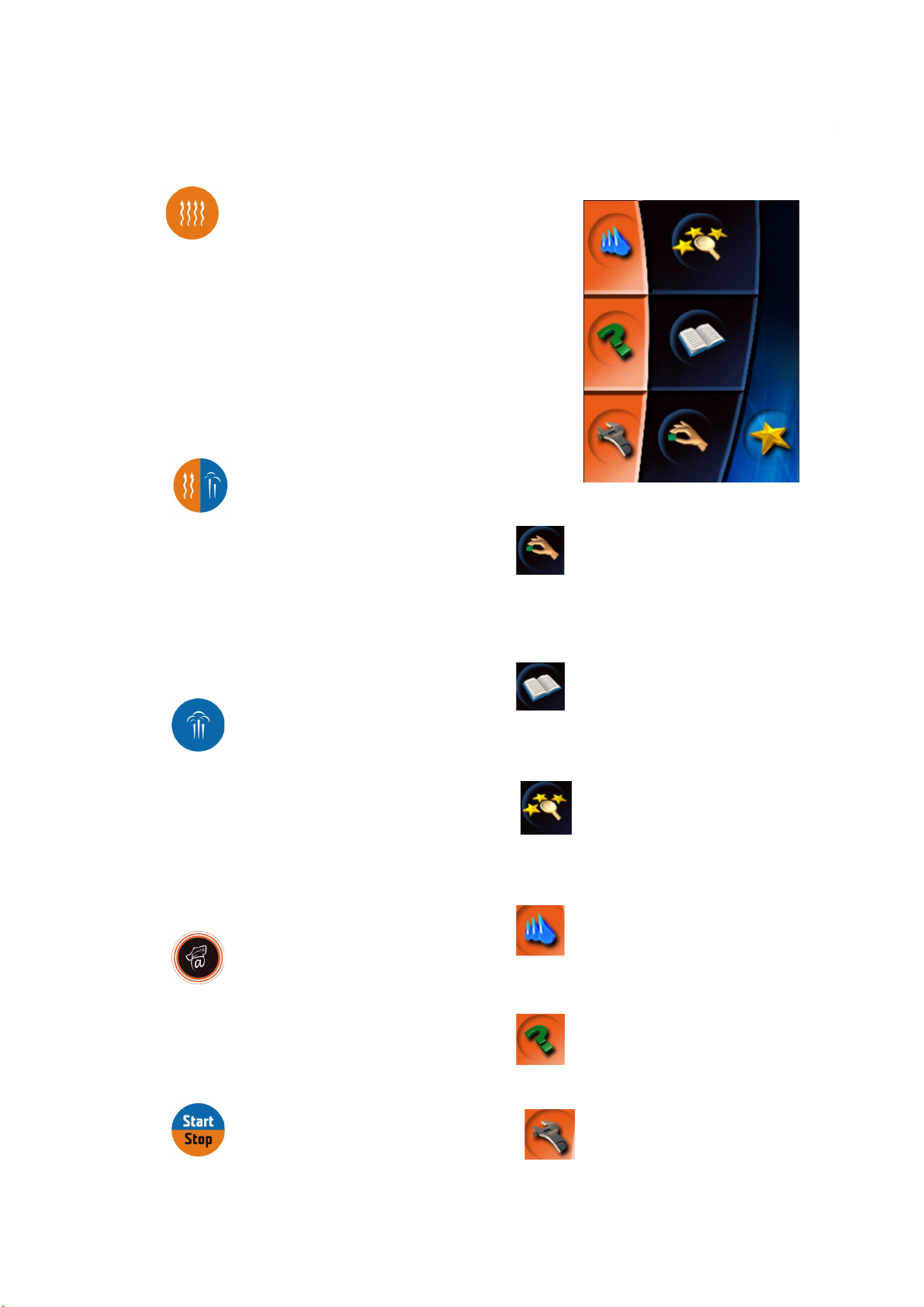
“Hot air” button
Pressing the button sets the cooking values as following:
Time of preparation 30 min
Temperature inside 180˚C
Humidity 0%
Ending the cooking process after the preset time has passed.
The time value can be set between 1min – 23hours 59 min.
The temperature value can be set between 30 - 300˚C.
“Hot air and steam” button
Icons on the touch-screen – description
Pressing the button sets the cooking values as following:
Time of preparation 30 min
Temperature inside 160˚C
Humidity 50%
Ending the cooking process after the preset time has passed.
The time value can be set between 1min – 23hours 59 min.
The temperature value can be set between 30 - 300˚C.
“Steaming” button
Pressing the button sets the cooking values as following:
Time of preparation 30 min
Temperature inside 99˚C
Humidity 100%
Ending the cooking process after the preset time has passed.
The time value can be set between 1min – 23hours 59 min.
The temperature value can be set between 30 - 300˚C
.
“VISION AGENT” button
“Manual setting” icon
Enables the manual setting and change of parameters of the cooking
process (time, temperature, humidity, core temperature, special
functions).
“Programs” icon
Enables the choice of pre-set programs, creation of own programs and
their division into categories; it shows and enables the choice of the
last 10 programs used; and creation of favorite programs.
. „Easy cooking“ icon
Enables the choice of pre-set programs, creation of own programs and
their division into categories; it shows and enables the choice of the
last 10 programs used; and creation of favorite programs.
“Automatic cleaning” icon
Enables the choice between four programs of automatic wash of the
combi-steam oven.
shows the help information regarding the currently running
process on the control panel. “Vision agent” explains currently running
process, or helps with further possible steps.
“START/STOP” button
Starts or stops the cooking process.
Shows the user manual for the combi-steam oven.
“Service” icon
Enables the choice of service functions of the combi-steam oven
(setting of time/date, sounds, access for service technicians)
“Help” icon
8
Page 11
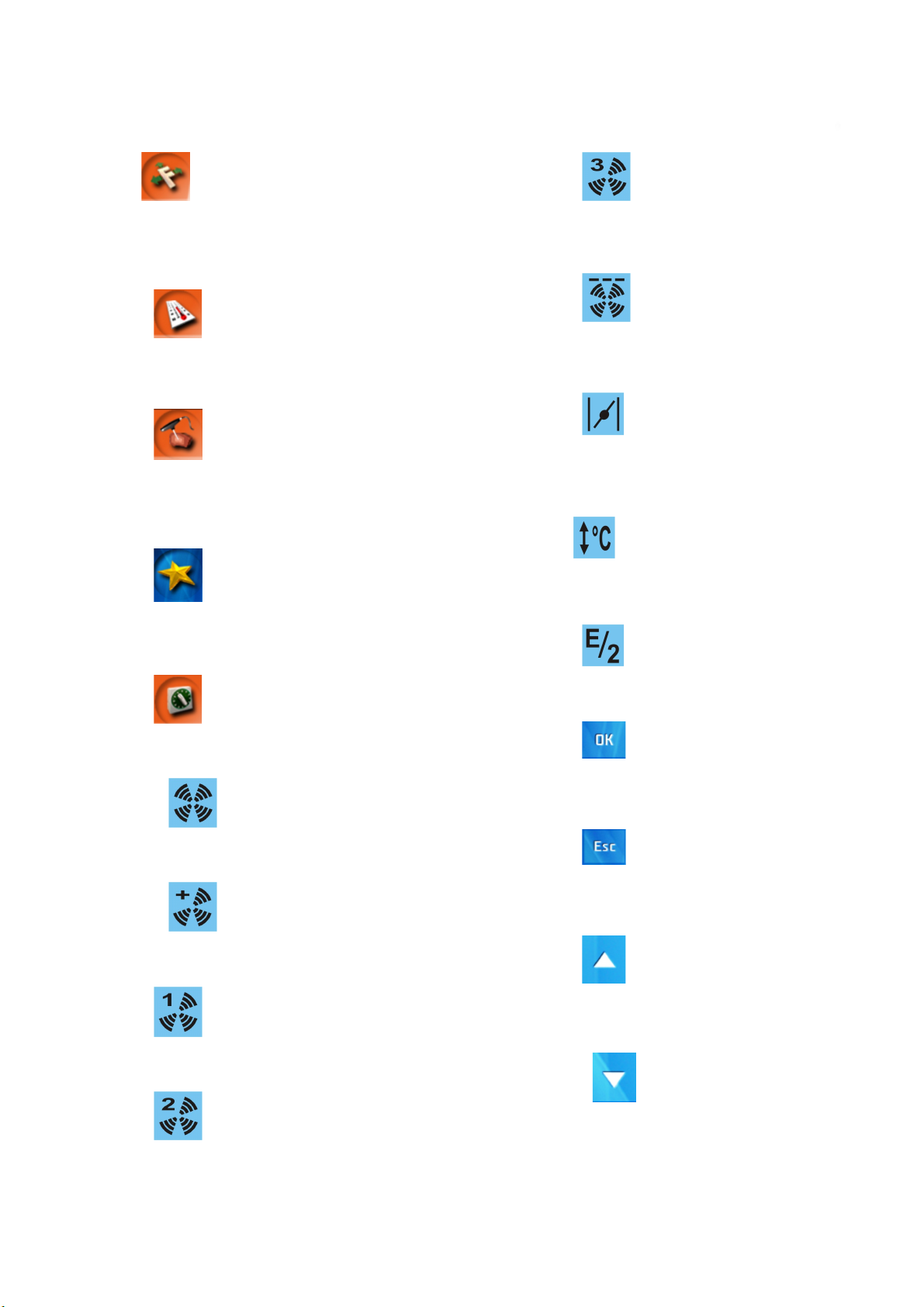
“Special functions” icon
OPERATION MANUAL FOR GOLDSTEIN VISION COOKING CENTRES
“Lower ventilator speed – 2/3” icon
Enables the choice of special functions of the combi-steam oven
operation.
“Temperature setting” icon
Enables the setting of cooking process temperature within the
range available for individual modes.
“Core temperature setting”
icon
Enables the setting of the core temperature at which the cooking
process is stopped (30 - 100˚C)
“Extras” icon
Enables access to special functions of the combi-steam oven, e.g.
showing of the HACCP data of an actual cooking procedure
.
Sets the ventilator speed to 75% of normal speed.
“Ventilator time control” icon
Sets the ventilator to special mode for gentle baking/roasting, or
keeping the food at serving temperature.
“Flap valve” icon
Enables the opening or closing of the valve in case it is
necessary to exhaust surplus humidity from the cooking
cabinet.
“Automatic preheating/cooling of
combi steam oven“
Chooses the automatic preheating of the chamber
before cooking, or the automatic cooling of the chamber in
case of high starting temperature.
icon
“Half power” icon
“Time setting” icon
Enables to set the time of cooking process from 1min. to 23hours
59min.
“Normal ventilator speed” icon
Sets the speed of ventilator rotation to normal value.
“Higher ventilator speed” icon
Sets the speed of ventilator to value 20% higher than normal.
“Lower ventilator speed – 1/4” icon
Sets the ventilator speed to 25% of normal speed.
“Lower ventilator speed – 1/2” icon
Sets the ventilator speed to 50% of normal speed.
.
Chooses the mode of half consumption of power.
“Choice selection” icon
Selects the desired function or set parameters of the
cooking process
“Choice cancellation” icon
Cancels the selected function or set parameters and
returns one step back.
“Item setting” icon
Enables the step by step setting on the linear level in selected
function or increasing of the numeric value of the parameters being
set.
“Item setting” icon
Enables the step by step setting on the linear level in selected
function or decreasing of the numeric value of the parameters being
set.
9
Page 12
VII. Manual mode
OPERATION MANUAL FOR GOLDSTEIN VISION COOKING CENTRES
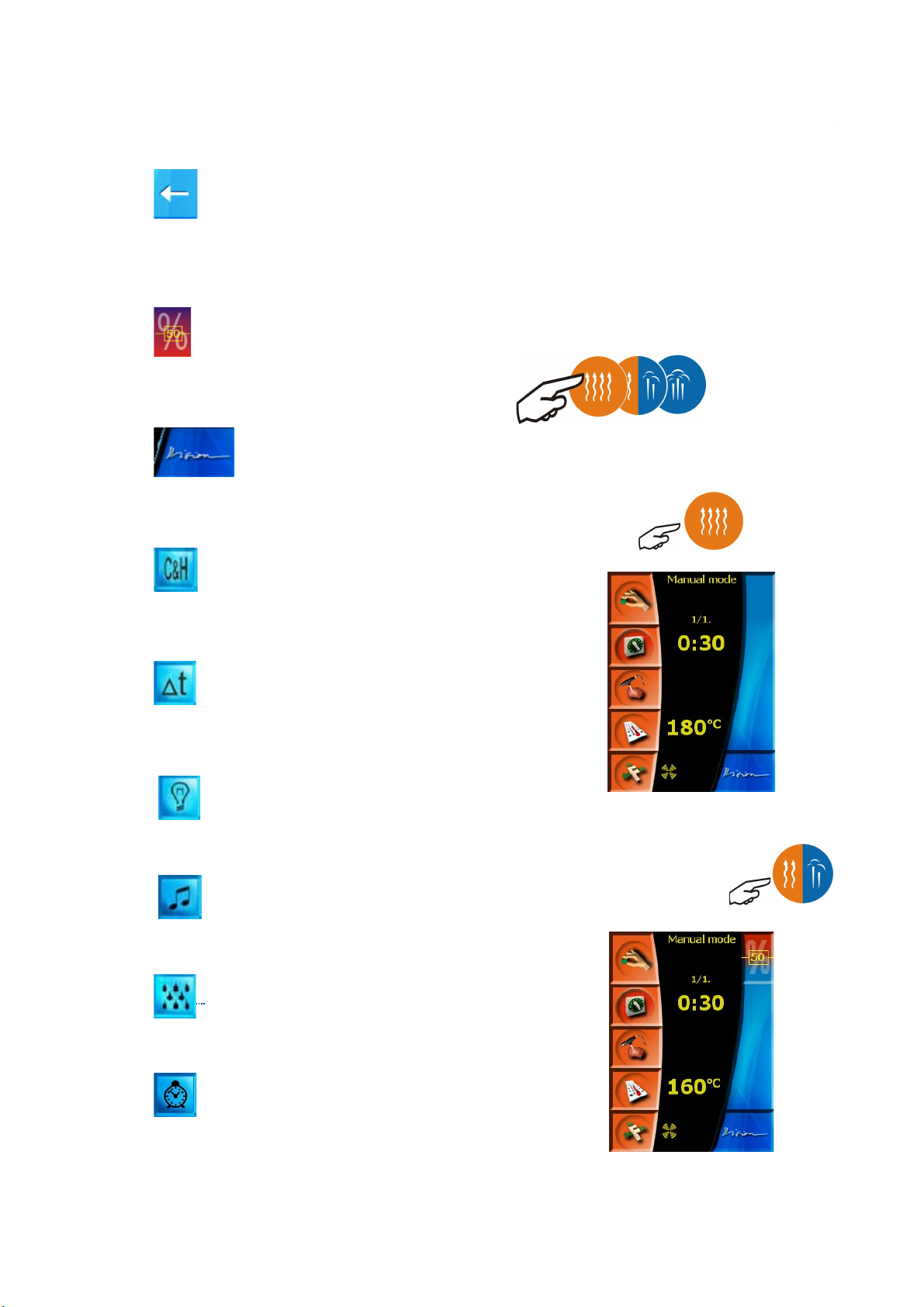
“Delete item” icon
Deletes the set item, e.g. when selecting time and cooking
process temperature.
“Humidity setting” icon
Enables the setting of desired humidity during cooking process in
the “Hot air and steam” mode.
“Vision” icon
Returns the screen from the manual setting mode to the initial
scheme.
“Cook&Hold” icon
Set the special function COOK&HOLD by pressing this icon which
enables you to hold the meal in required temperature after cooking
process.
Select this mode when you do not wish to use the “Easy cooking”
mode, or use the pre-set programs in the mode “Cookbook”. Choice of
manual mode enables to create ones own creative procedure, which,
after finishing the cooking process, and if you are satisfied with your
results, can be stored as newly created program.
The manual mode can be selected in two ways:
a) by pressing any button of the mode selection
Values TEMPERATURE, TIME and VENTILATOR SPEED will be preset to initiatory values.
“Hot air” mode
“Delta T” icon
Delta T is a special function used for cooking of meat and slow
cooking with low yield loss. The core probe must be used.
“Permanent light” icon
Setting of the permanent light in cooking chamber
“Sounds” icon
Setting of sound when the program step is finished
“Manual moistening” icon
Manual moistening in cooking chamber.
“Automatic start” icon
“Hot air and steam” mode
You can set the time for automatic start.
10
Page 13
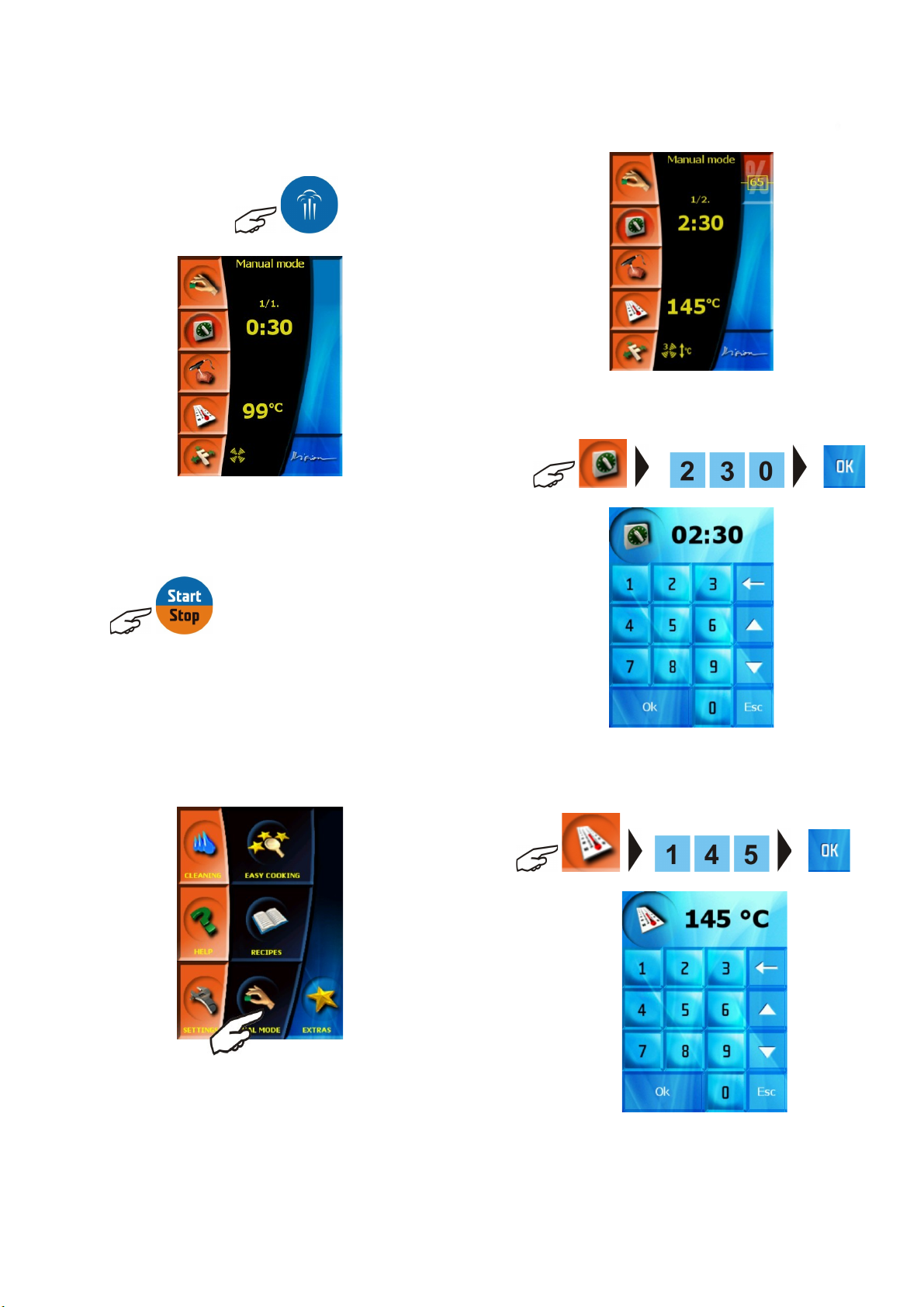
Steaming” mode
OPERATION MANUAL FOR GOLDSTEIN VISION COOKING CENTRES
When the pre-set values comply with required values for the
preparation of an actual food, the process will be initiated by pressing
the button
1. Set the desired preparation time; confirm the selection by
pressing “OK”
cooking process. We can stop the process by pressing the same
button at any time.
b) by pressing the manual control button and choosing
the setting of parameters according to your own requirements
The same procedure of adjusting the pre-set values according to
own needs and processes applies to all the three cooking modes!!
Sample setting of cooking process to:
Mode Hot air and steam
Time 2hrs 30min
Temperature 145˚C
Humidity 65%
Ventilator speed Lower ventilator speed – ¾”
Preheating YES
2. Set the desired preparation temperature; confirm the selection
by pressing “OK”
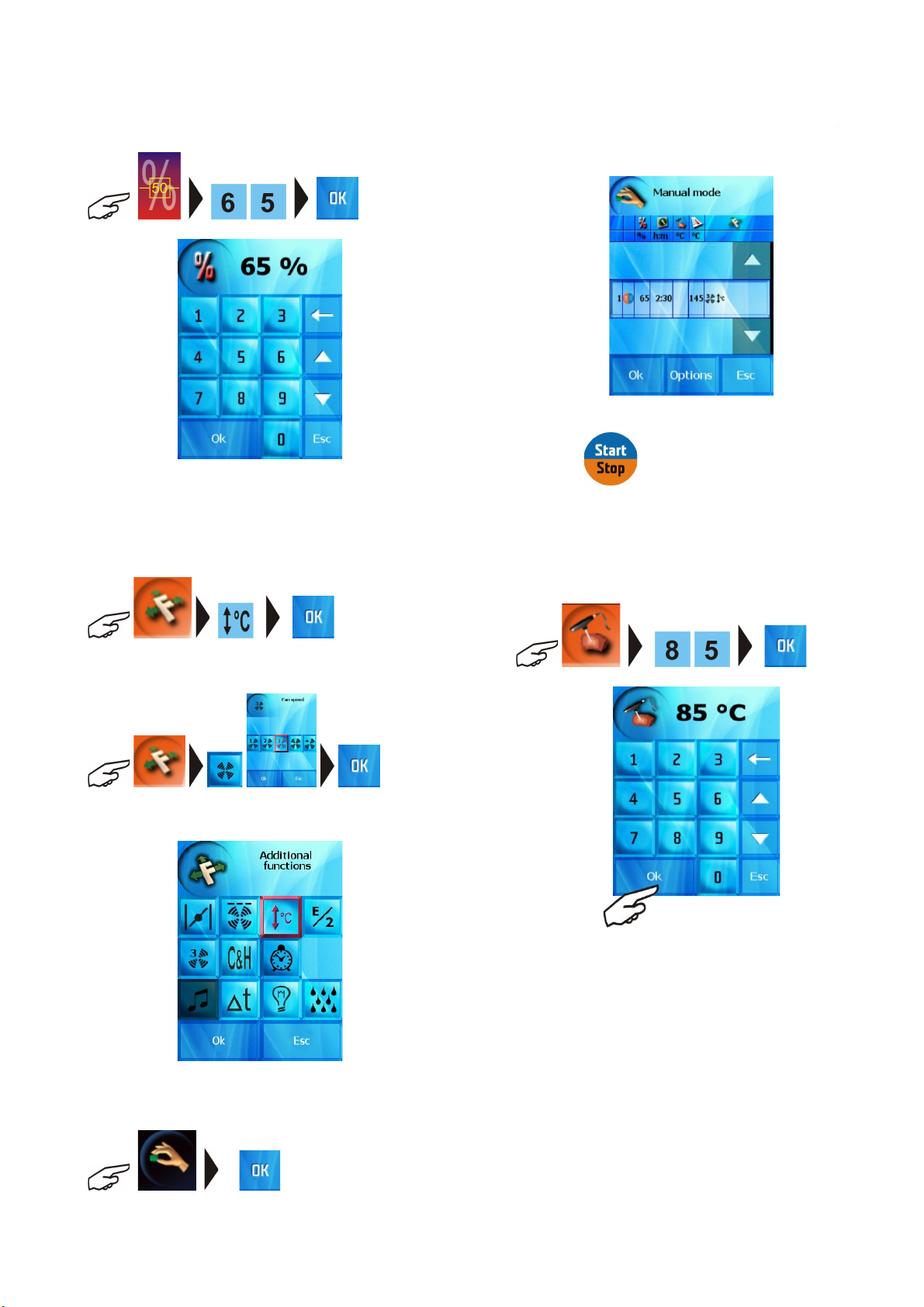
3. Select “Hot air and steam” mode; you can also set the value
of humidity in the cooking chamber:
11
Page 14
OPERATION MANUAL FOR GOLDSTEIN VISION COOKING CENTRES
Note: in modes “Hot air” and “Steaming” it is not possible to
set the humidity.
4. Select additional functions “Preheating”
and “Lower ventilator speed – 3/4”
By pressing
c) core probe temperature controlled cooking process
select in case you desire to finish the cooking process when set
temperature has been reached in the food. You can set the
temperature in a similar way as setting the temperature in the cooking
chamber (see point 2)
you start the cooking process.
d) further setting options in the manual mode
1. changing the set parameters during cooking process
In case it is necessary to change the parameters of the currently
running cooking process, press relevant button (Time, Temperature,
Probe temperature, Function) and adjust the parameters according to
actual requirements and press the OK button. The cooking process will
5. You can check the set values by pressing
proceed according to newly set values.
2. adding steps to set process
If you require the cooking process to consist of more steps, it is
possible to add such steps so that the food is processed in a gentle way
and the result is exactly according to your desires.
12
Page 15
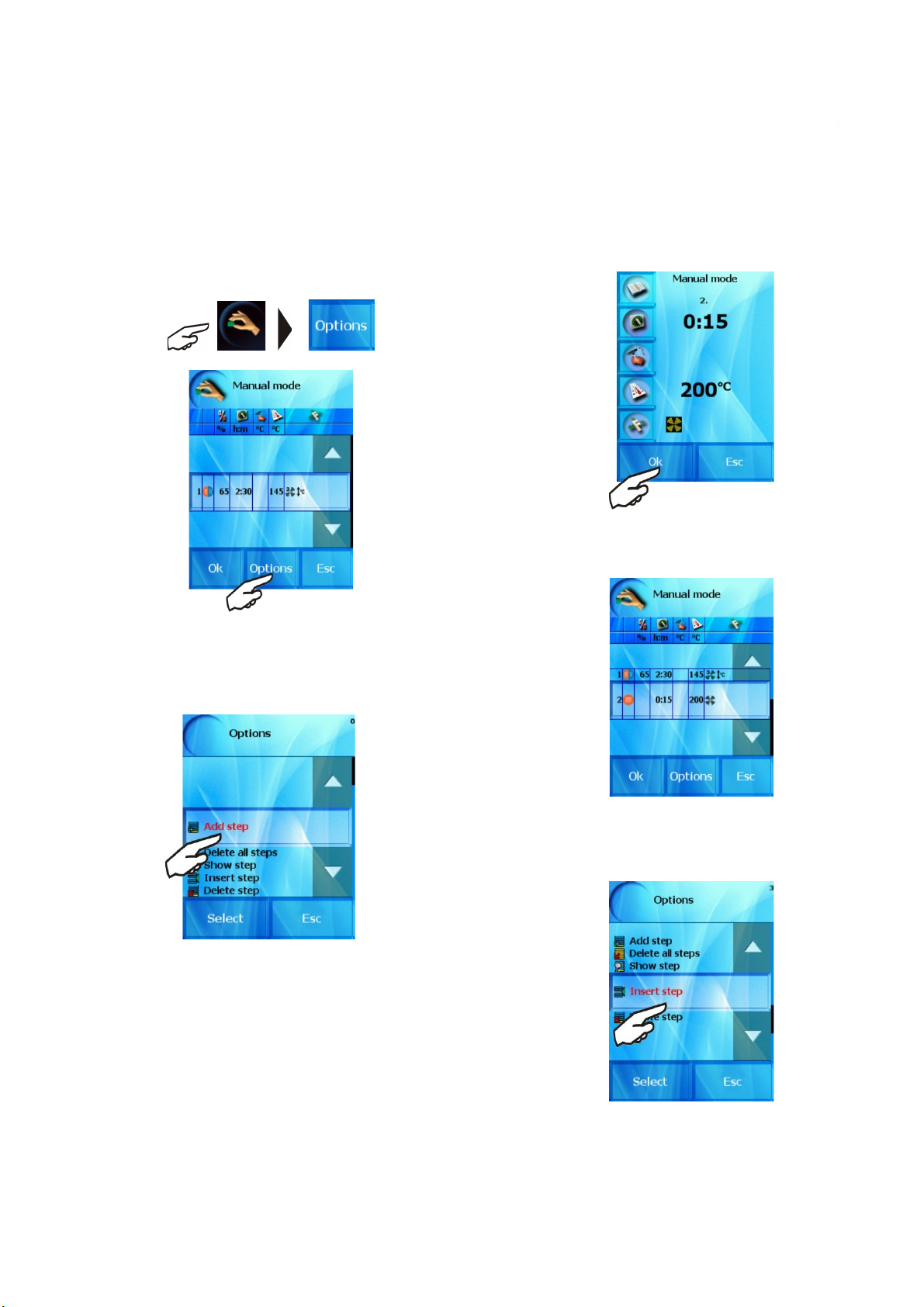
Example: we want to add following steps after the pre-set
OPERATION MANUAL FOR GOLDSTEIN VISION COOKING CENTRES
parameters (see point b / 1-4)
Mode Hot air
Time 15min
Temperature 200˚C
Ventilator speed Normal ventilator speed
Press the “Check” button and select “Options” function
2.1
Actual setting of all steps and parameters of the cooking process
will show.
2.2 Press “Add step” or choose the item “Add step” using
arrows and press “OK”
2.3 Set the desired values of the second step in as usual and
press “Select”
You can now proceed in adding further steps, add or delete step, or
adjust parameters of individual steps set by you.
You can leave “Options” any time by pressing the “Esc” button.
The initial screen will show relevant step and the number of set
steps of the cooking technological process.
13
Page 16
OPERATION MANUAL FOR GOLDSTEIN VISION COOKING CENTRES
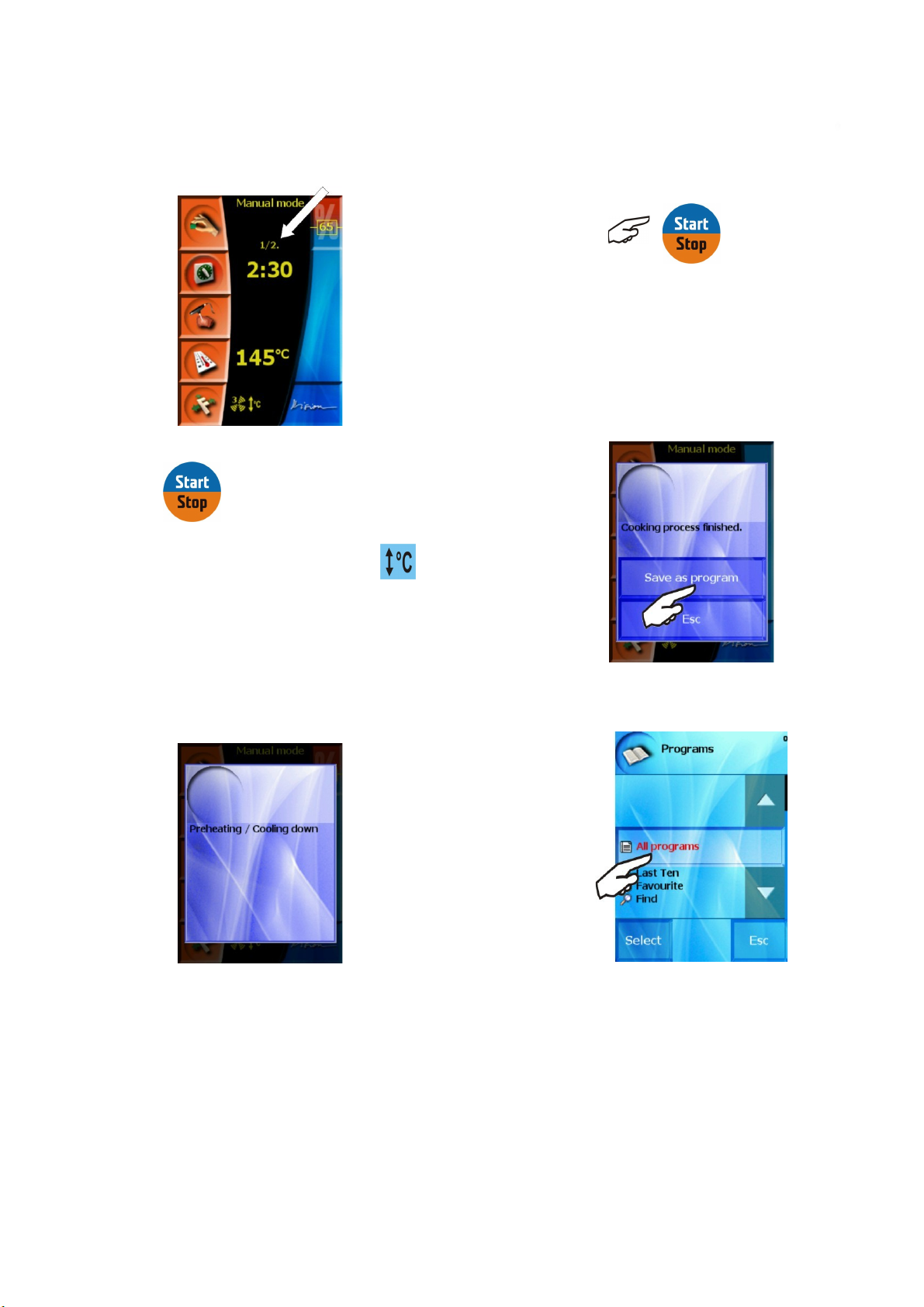
f) Entering the finished cooking process to the programs
If you are happy with the result of the cooking process and assume
that you will repeat it with the same set parameters, you can enter the
steps and parameters of the finished cooking process as new program.
Upon the end of the cooking process an invite to save a new
process will appear. If you decide to do so, confirm the selection by
“Save as program”
By pressing
If you chose the function “Preheating/Cooling”
combi-steam oven firstly evaluates the inside temperature. Should the
temperature be lower than desired, the combi-steam oven will then
preheat itself to a temperature 25% higher than the pre-set
temperature and upon reaching the temperature the combi-steam
oven shall produce an audio signal with a sign to place in the food.
Should the temperature be higher than the desired one, the combistem oven will cool the inside to the desired temperature and upon
reaching the desired temperature will sound an audio signal with a
sign to place in food.
we start the cooking process.
, the
The system will offer “Programs”
The cooking process according to the actual setting starts
automatically once the GN containers with food have been put in and
the door closed, you do not need to press the “START” button.
e) Ending the manual operation and returning to the initial
menu
Follows automatically after the finish of the cooking process, after
elapse of the pre-set time, or upon reaching pre-set temperature
when using the core probe or after pressing the end icon.
Now you can enter the created program into a selected group, or
you can create your own group by pressing “Select” – the procedure
is described in detail in chapter “Programming”
If you decide not to save the process as program, press “Esc”.
If the cooking process parameters and steps are not saved as
program, they will be lost upon new manual mode setting or after
turning off the combi-steam oven!
14
Page 17
VIII. Recipes
OPERATION MANUAL FOR GOLDSTEIN VISION COOKING CENTRES
GOLDSTEIN Vision combi-steam ovens offer the use of pre-set
programs to prepare a large number of dishes. expert chefs have
prepared for you typical recipes for food preparations so that all the
quality and sanitary standards and HACCP norms are met.
Special attention was paid to the maximum use of the combisteam oven features, maximum extraction and quality of dishes when
designing the programs.
A team of Goldstein expert chefs drew inspiration from everyday
experience of chefs in gastronomic establishments and created a
group of programs, which contain most of the common needs of all
types of gastronomic establishments so that the operation of the
combi-ovens was less complicated.
Great advantage of the combi-steam ovens is the possibility to
use pre-set programs so that the final product complies with the
gastronomic establishment, national, regional and local customs and
taste and experience of the chefs.
Matter of fact of the Goldstein combi-steam ovens is the
possibility to create own programs and their consequent changes with
the maximum use of the combi-steam oven’s features, entry of
created programs into typical groups so that the experience,
inventions and creativeness of the chef is used when creating
gastronomic and culinary specialties. It is up to the chef’s imagination
and experience which technology, steps or functions they use.
The program creation is not limited by number of steps and
enables the use of all available functions and procedures. It is possible
to define typical groups of dishes for created programs, where
programs can be stored, moved, deleted or changed and added
further steps.
You can use your USB flash stick when working with „Recipes“
section. You can choose recipes or categories and copy these to your
USB or to your combi steamer.
It is also possible to store most often used programs to
“Favorites” and use the option of quick access to the most important
and favorite programs.
The advantage is also the “Last ten” where the last ten used
programs are stored for quick use in everyday practice.
“Programs” allows you to use the combi-steam oven in its
maximum capacity, with ease of operation and enables the products
to be prepared repeatedly to the highest quality.
1.1 „All programs“ option
Allows you to use pre-set programs, which are in chronological
order according to typical food groups or according to the way of
preparation.
Basic operations with programs
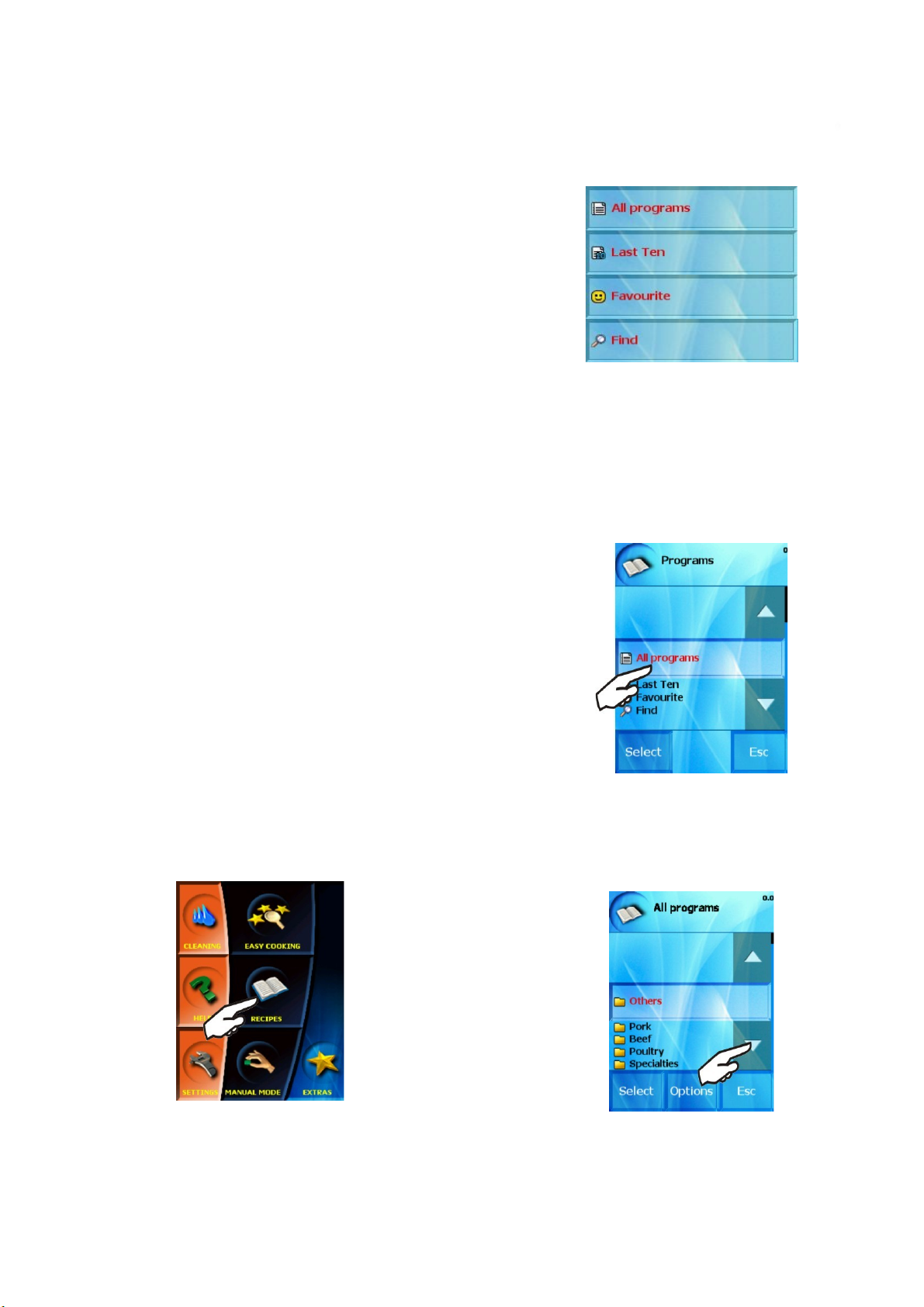
1. Using the „Recipes“ section
Press “Recipes” on the initial screen
The screen shows the initial offer of the “Recipes” section, which
you can use to set prepared and created programs:
When pressing this button the food group (folder) option appears,
where individual programs are sorted. The groups may vary according
to the types of dishes or way of preparation.
If choose for example “Pork meat”
15
Page 18
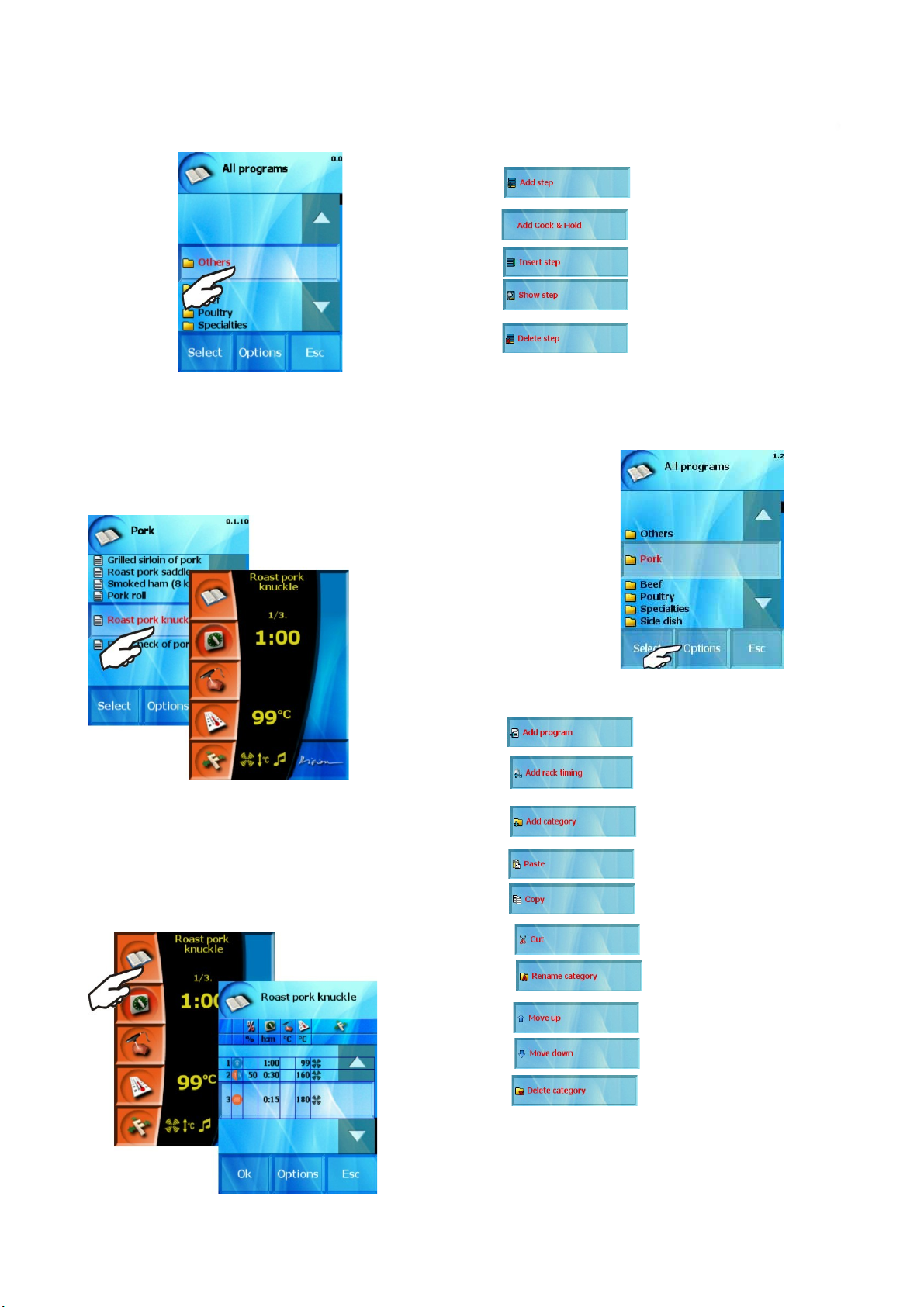
On the screen with the list of program steps there is possible:
OPERATION MANUAL FOR GOLDSTEIN VISION COOKING CENTRES
Create and add next step which is placed as
a last step
Add Cook&Hold function as the last step.
Default parameters are possible to set in
the „Settings“ section.
Show the parameters of the selected step. It
is possible to change.
Create and add new step. The new step is
inserted before selected step.
Delete the selected step.
-
Enhanced operations with categories and programs
you will get the offer of all programs stored in this folder.
After pressing selected recipe (or “Select” button) the selected
program is set. At this moment you can press the “Start” button and
initiate the selected cooking process.
Applying the same procedure, you can also choose programs from
the options “Last ten” and “Favorites”.
Using the Quick View function you can see all the steps of the
selected program and check the set parameters.
Individual steps and program parameters setting can be shown by
pressing the “Recipes” butt
on“.
A) Categories
If you mark any category in „ALL PROGRAMS“ section you have
several choices in „Options“ option:
- Create a new program which is placed in
the selected category.
- Create a new program for „Rack timing“
function which is placed in the selected
category.
Create a new category.
-
-
Paste a category or a program.
Copy a category or a program.
Cut a category or a program.
- Rename the selected category.
- Move the selected category one position
up.
- Move the selected category one position
down.
Delete the selected category.
–
16
Page 19
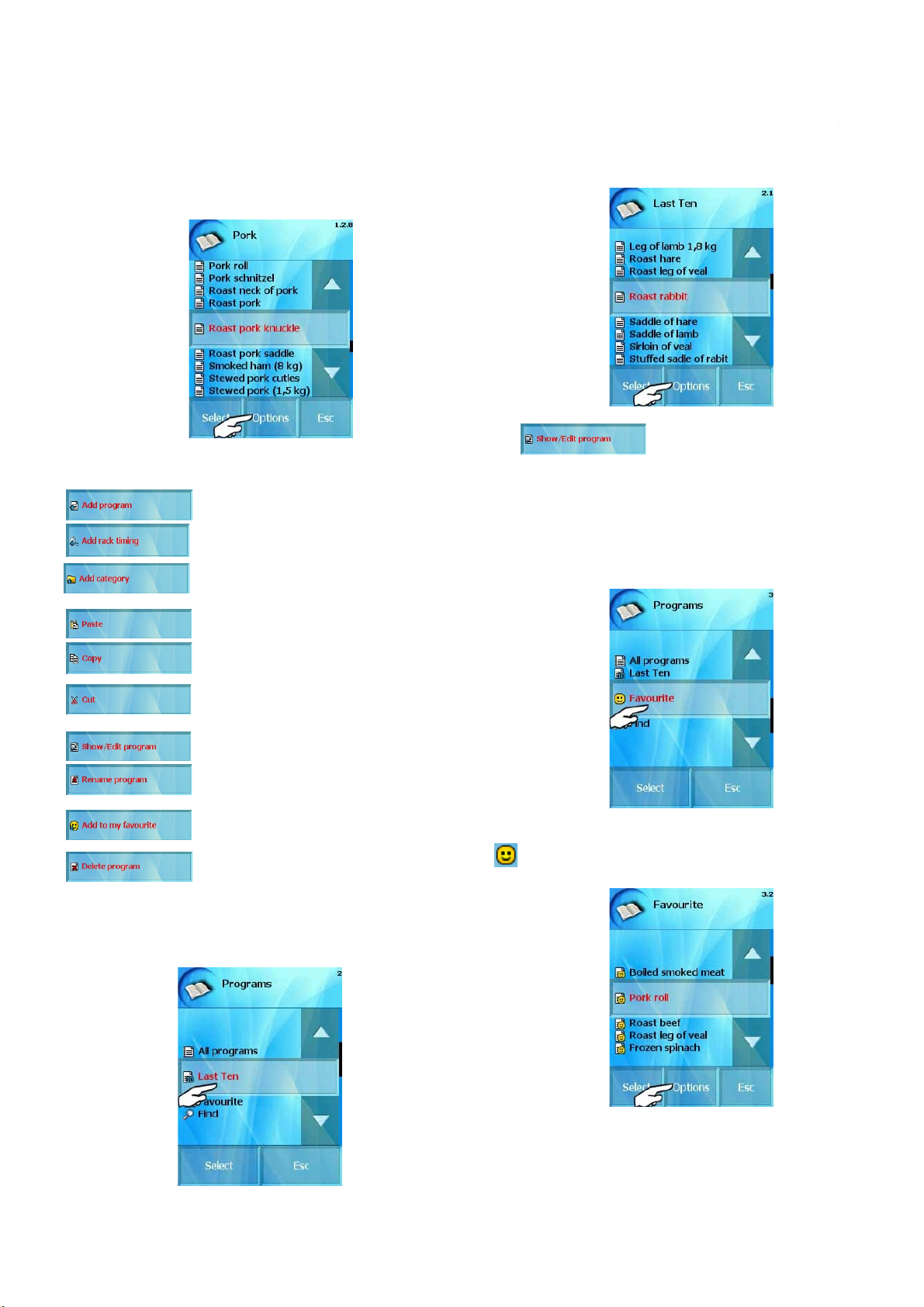
B) Programs
OPERATION MANUAL FOR GOLDSTEIN VISION COOKING CENTRES
If you mark any program in any category you have several
choices in „Options“ option:
- Create a new program.
n „Last ten“ section you can choose „Options“ option
I
- Show the program steps and you can edit
them
1.3 “Favourites” option
- Create a new program for „Rack timing“
function.
- Create a new category, which will be placed
among the programs.
- Paste a category or a program.
- Copy a category or a program.
- Cut a category or a program
- Show the program’s steps and you can
edit them.
- Rename the selected program.
- Add this program to your favourites.
- Delete the selected program.
1.2 “Last ten” option
Last ten used cooking processes are stored in this section. The
combi-steam oven remembers it automatically. It could be your own
program, the Easy Cooking technology or the manual mode.
.
You can store your favorite recipes here for quick access. You can
create your own database of programs, which you use most often or
like the most.
Programs saved in this category are specified with the „Smile“ icon.
.
You can edit this program as well by click on „Options“ option:
17
Page 20
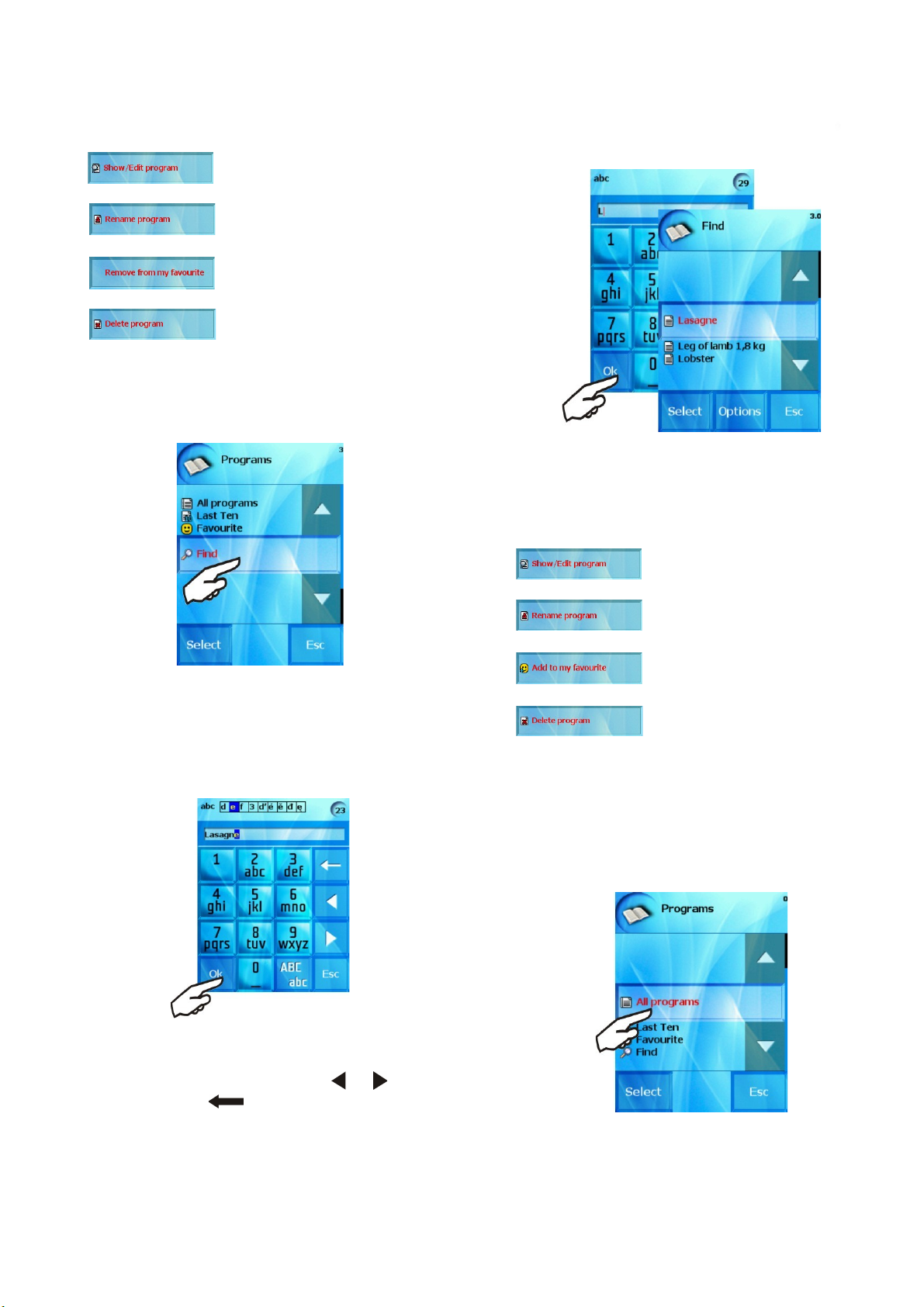
- Show the program’s steps and you can
OPERATION MANUAL FOR GOLDSTEIN VISION COOKING CENTRES
edit them.
- Rename the selected program.
- Delete the selected program in
„Favourite“ category
- Delete the selected program.
1.4 “Find” option
For quick search through the large number of programs you can
use the “Find” function
The choice and selection of the program is the same as in the
preceding chapter.
You have several choices in „Options“ option:
:
- Show the program’s steps and you can
edit them.
- Rename the selected program.
If you know the name of the program, you can enter it in a similar
way to writing a text message on your mobile phone.
By repetitive pressing of the relevant button you select the
desired letter. Short pause between the selections will move the
cursor to the next position of name selection.
By pressing “OK” button you get the selection of all programs
that begin with the entered name. The buttons and are used to
move the cursor and the button to delete a letter.
“Recipes” section
- Add this program to your favourites.
- Delete the selected program.
2. Further options in the “Recipes” section
2.1 Creating your own recipes
If you wish to create your own recipe select “All programs” in the
You can also use the option of entering only a part of a program
or category name and the search help will offer all the programs and
categories beginning with the same letters.
then select “Options”.
18
Page 21
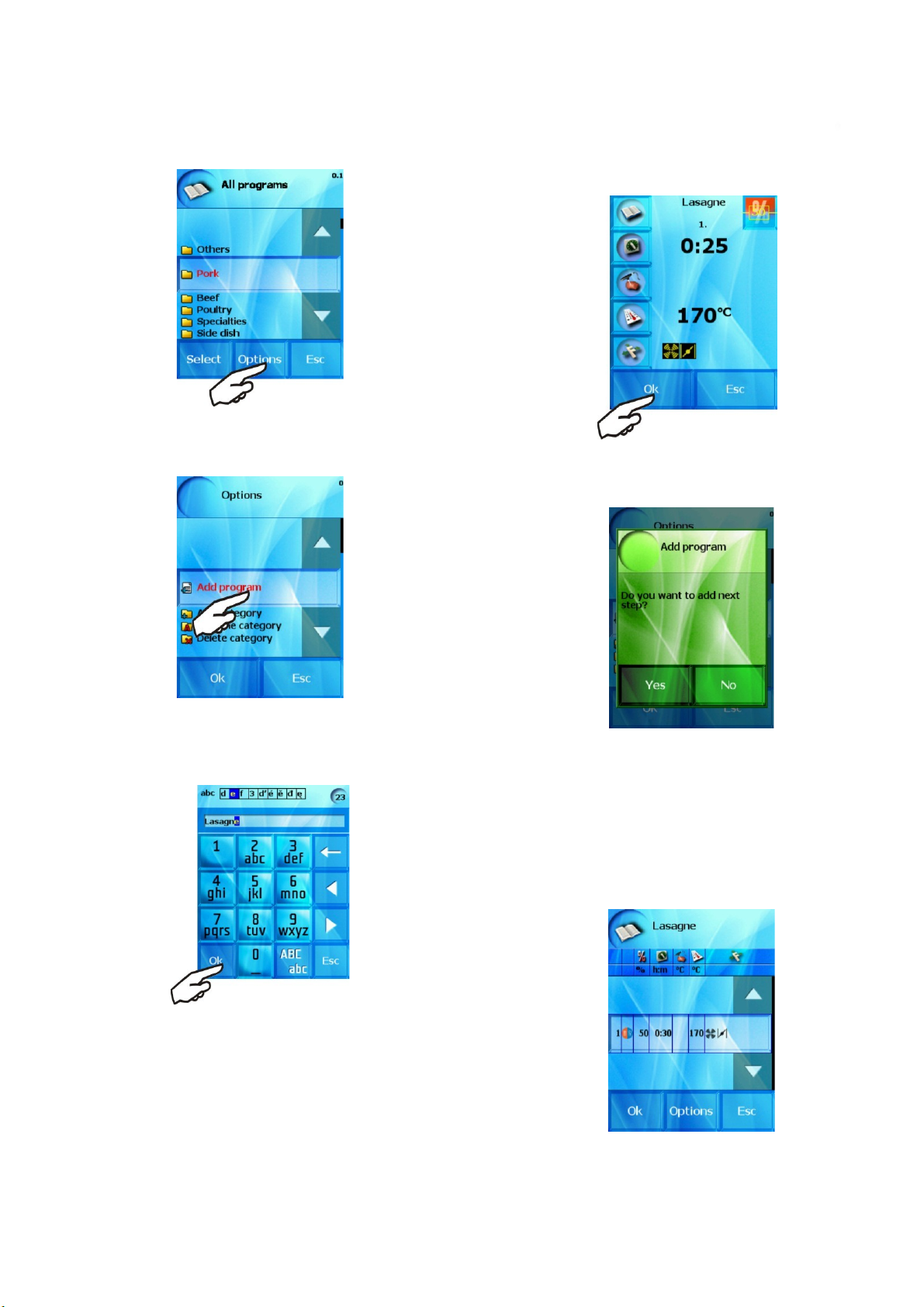
In the “Options” menu press “Add program” button.
OPERATION MANUAL FOR GOLDSTEIN VISION COOKING CENTRES
The procedure of setting is described in detail in chapter
“Manual mode”
After entering the parameters of step 1 you will be asked if you
want to add next step.
a) enter the name of the program and press “OK”
b) enter the technology for step 1
In case you wish to proceed in creating the program by adding
further steps, press the “Yes” button and enter another step of the
program. If you do not wish to add another step, press the “No”
button.
c) checking the created program
“Quick View” function allows you to see all the steps of the
relevant program and thus check the set parameters.
In case you agree with the selected setting, press the “OK” button.
Press the “Options” button if you disagree and select one of the
offered options
19
Page 22
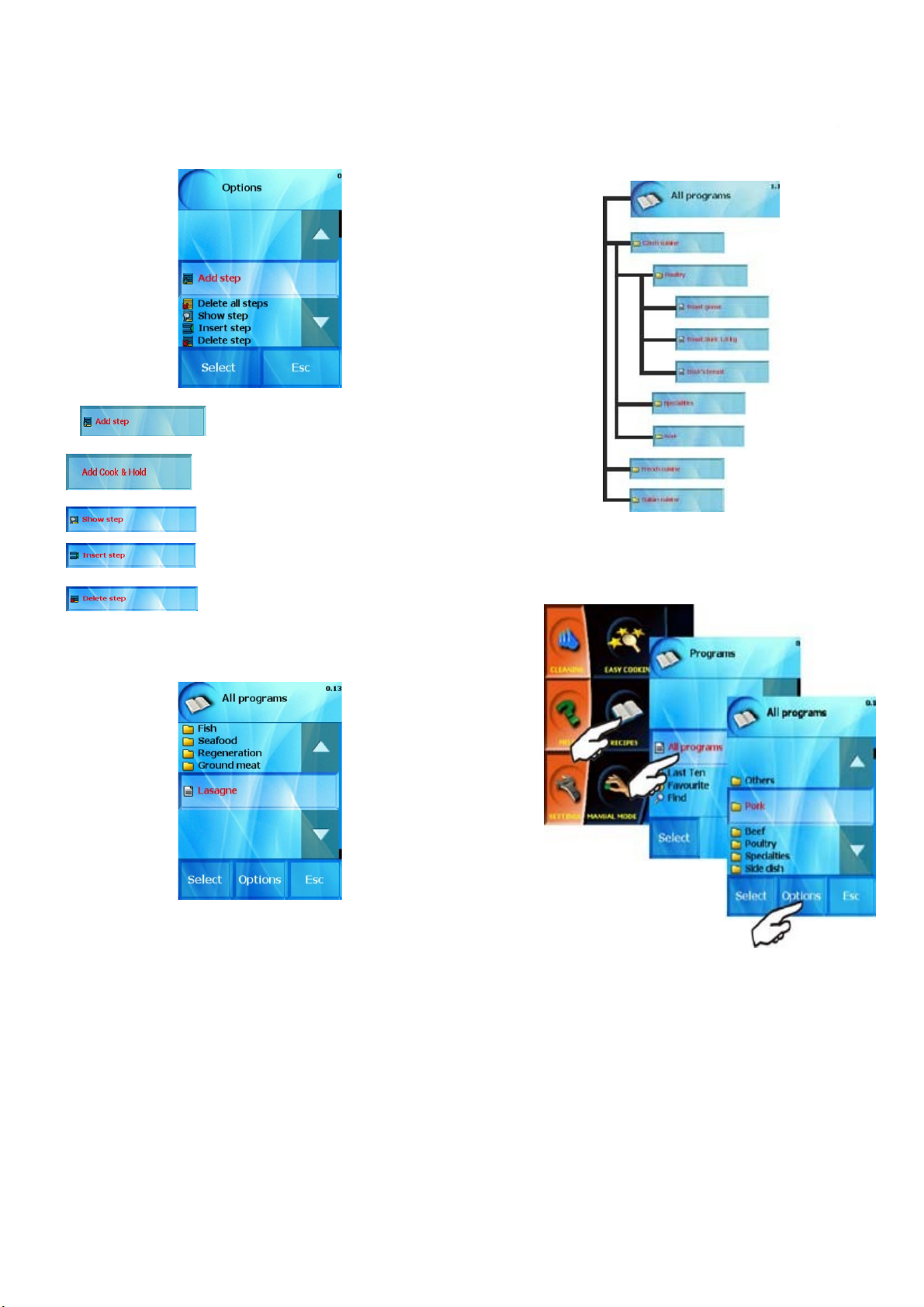
using this option you can add a
OPERATION MANUAL FOR GOLDSTEIN VISION COOKING CENTRES
new step to the program after
the previously created steps-
– Add Cook&Hold function as a last
step. Default parameters is possible
to set in the „Settings“
section
show currently selected step and you
can edit it
using this command you create a new
step, which will be entered before the
selected step.
- delete the selected step and adds new
number to the remaining steps
Example structure:
You can also use pre-entered groups, or either rename or delete a
group you will no longer use by using “Options“ button.
The access to the section of group organization is selected as shown
below
The program we created by using the procedure described above
will be listed in the initial offer “All programs” as individual program,
in groups of programs.
This program is possible to edit and move to another category
through the „Options“ option.
2.2 Creating your own groups of programs
To make it easier to work with the programs it is possible to
organize created programs in groups, according to the type of
processed food, processing technology, etc. We can also create our
own group organization and structure so that the orientation and
selection of programs is easy and less complicated.
Choose “Add catagory”
20
Page 23
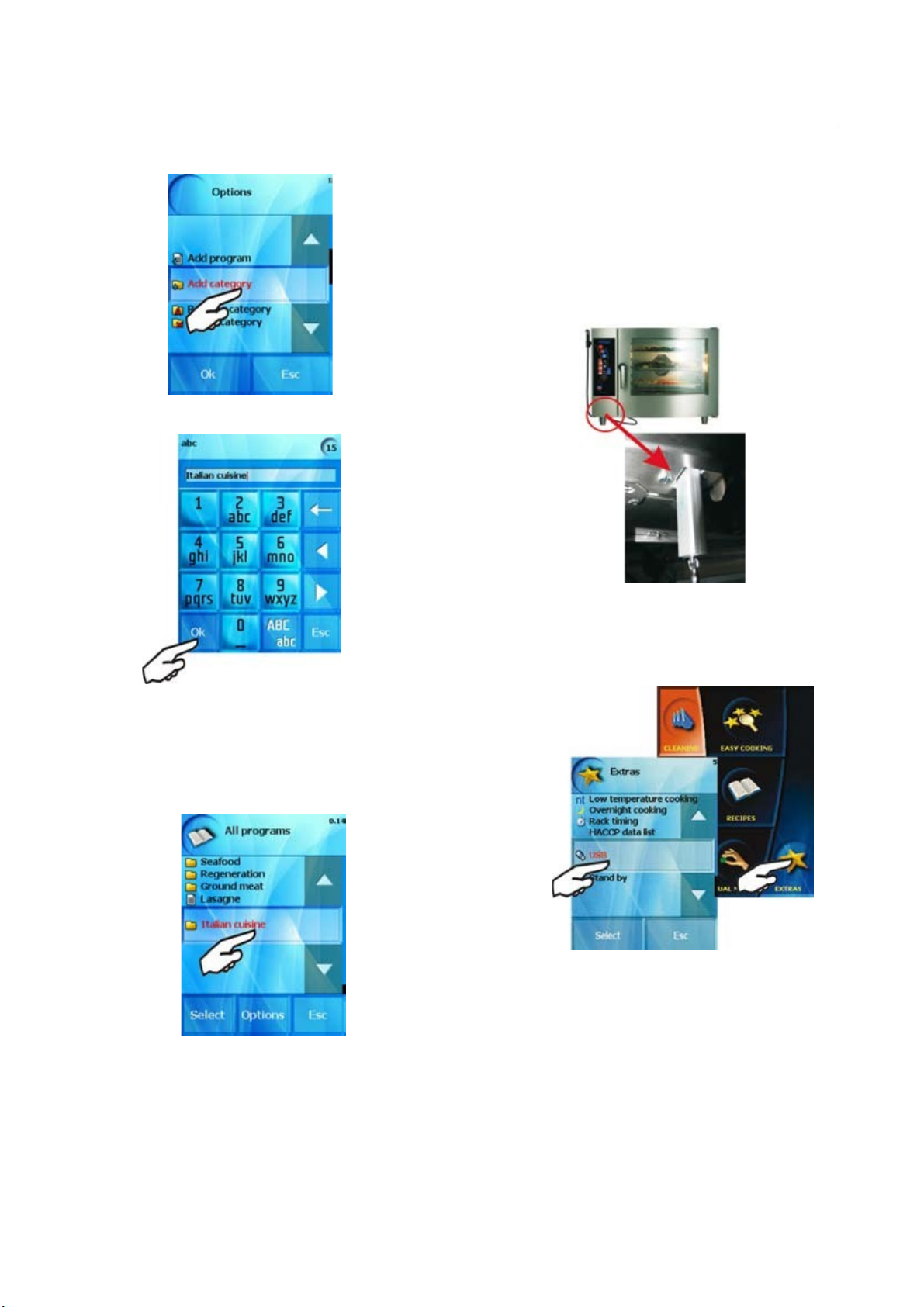
The combi-steam oven will offer the option of entering the category
OPERATION MANUAL FOR GOLDSTEIN VISION COOKING CENTRES
name
2.3 Loading of programs via USB flash stick
You can use your USB flash stick when working with „Recipes“
section. You can choose recipes or categories and copy these to your
USB or to your combi steamer. Therefore you can have the same
recipes or categories in all your combi ovens.
2.3.1 Loading of programs „Combi oven to USB“
a) Connect your USB flash stick to the combi steamer.
You can enter the category name by using the same procedure as
entering the program name.
After pressing “Select” the newly created group will be placed at
the end of the list of groups.
We can add programs into the new subgroup according to our own
needs, add new subgroups or delete, rename programs etc. according
to the actual offer. The process is the same like as in „Creating of
your own recipes“ chapter
b) The connection is signalized by sound. Enter „EXTRAS“ menu
and press the USB button which is active (highlighted).
In case of no sound and the USB button is not active {grey} try
connect the USB once again.
21
Page 24
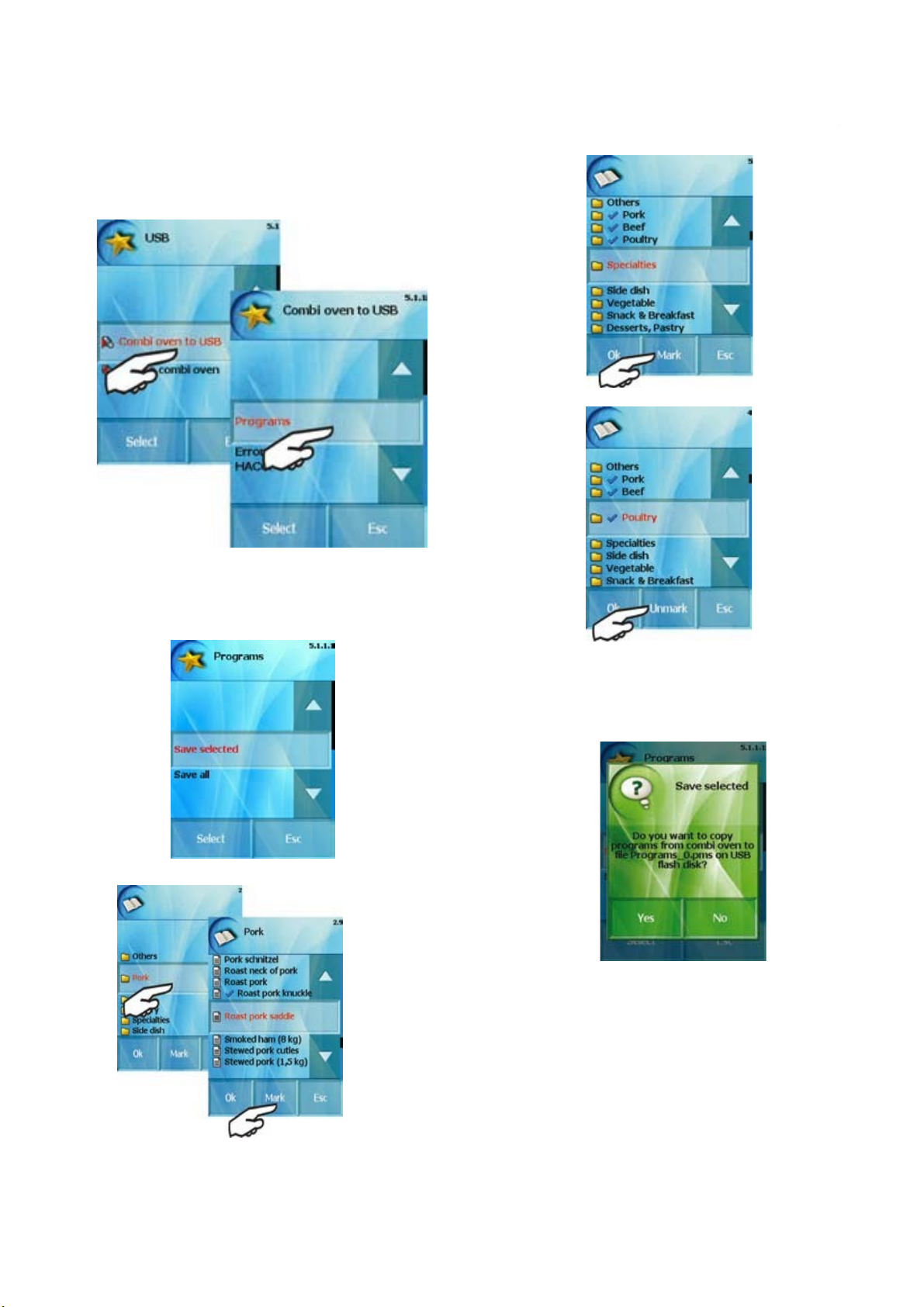
c) The screen of choices „Combi oven to USB“ or „USB to
OPERATION MANUAL FOR GOLDSTEIN VISION COOKING CENTRES
Combi oven“ appears. Choose „Combi oven to USB“ and
then the „Programs“ button.
d) Then you can choose „Save selected“ or Save all“.
„Save All“ – all programs of „All programs“ section will
be completely saved on USB. „Save selected“ – you
can choose and save on USB either
You can unmark programs as well by using 'Unmark'button
marked programs'
As soon as you choose the programs or categories which you
want to copy on your USB confirm it by clicking „OK“.
e) The green screen apears as the last step. If you want confirm,
press „Yes“, if not, press „No“.
The programs or categories are saved on your USB as
Programs_0.pms
When you load these programs (catagories) back into the
steamer they are saved here under the original name in the
“ALL PROGRAMS” section.
or marked catagories.Both choices could be made by Mark“
button
22
Page 25
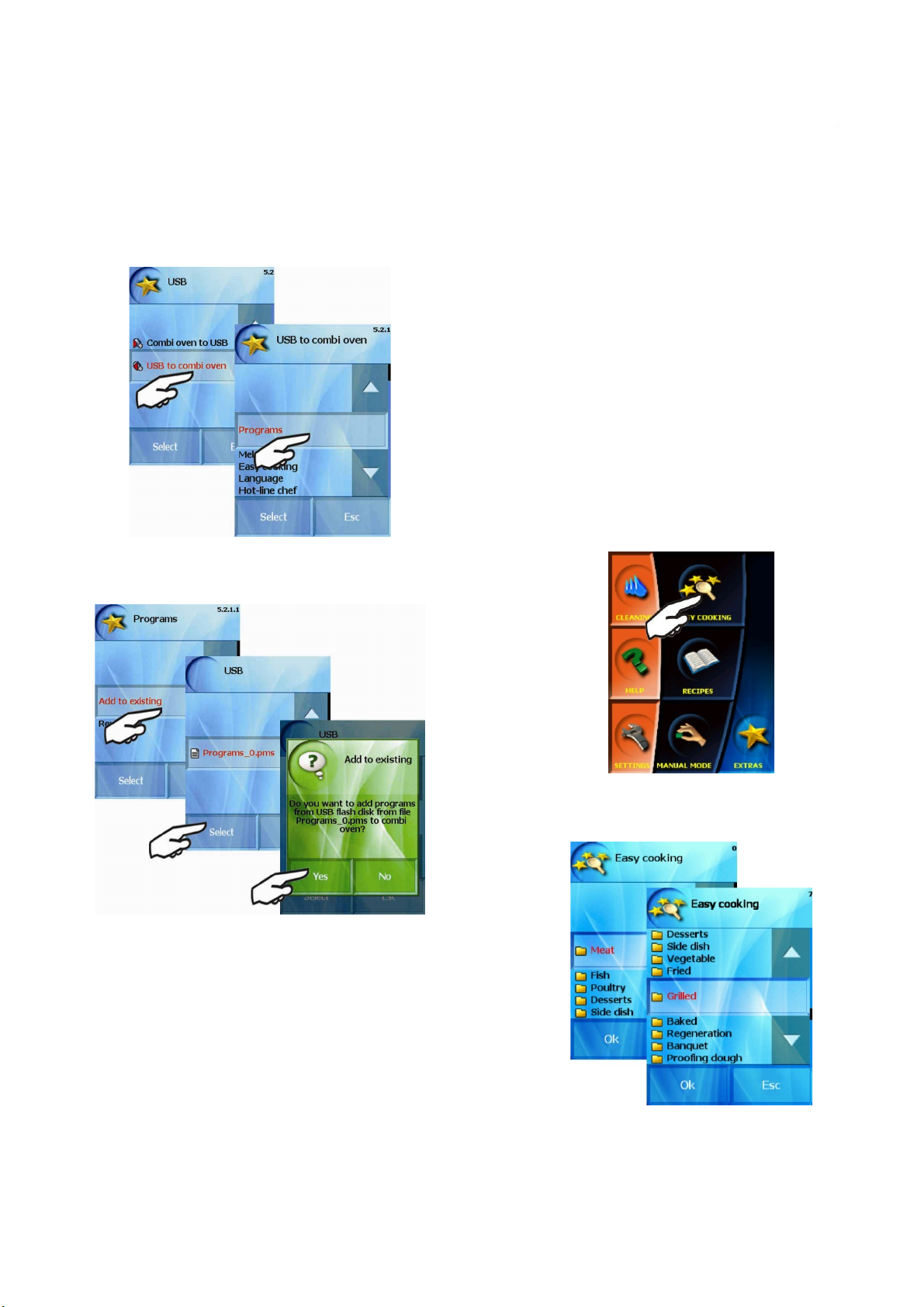
2.3.2 Loading of programs „USB to combi oven“
OPERATION MANUAL FOR GOLDSTEIN VISION COOKING CENTRES
To start the loading follow the chapter 2.3.1 the steps a} and b}.
The screen of choices „Combi oven to USB“ or „USB to
c)
Combi oven“ appears. Choose „USB to Combi oven“ and
then the „Programs“ button.
d) Then you can choose
„Add to existing“ – add the copying programs or
categories to „ALL PROGRAMS“
.
IX. Easy cooking
GOLDSTEIN VISION combi-steam ovens offer a unique
technology Easy Cooking which enables even the less experienced
chefs to obtain excellent results. It is not necessary to know in detail all
the cooking process stages and set individual steps. The “Easy cooking”
system is sort of a guide which recommends and sets suitable
technology according to the type of dish and required result.
The operation in “Easy cooking” mode is limited only to the choice
of dish, or gentle “tuning” of the intensity of roasting/baking and color
of the surface and following pressing of the “Start” button. The rest will
be done by the combi-steam oven for us.
The fact that at every stage we can enter the cooking process and
adjust the offered parameters so that the result meets our expectations
is obvious.
If you are satisfied with your final product, it is possible to enter
the selected technology among your favorite programs and use it again
any time to obtain as quality result.
Using EASY COOKING
To select this mode press “Easy cooking”
Rewrite all“ - all programs will be completly rewritten in „ALL
PROGRAMS“ section.
Loading Programs (categories) are saved under the original
name in the „ALL PROGRAMS“ section.
Choose the desired kind of dish or technology (e.g. “Grilling”)
from the menu
Choose the desired kind of dish in the following step (e.g.
“Chicken”)
23
Page 26
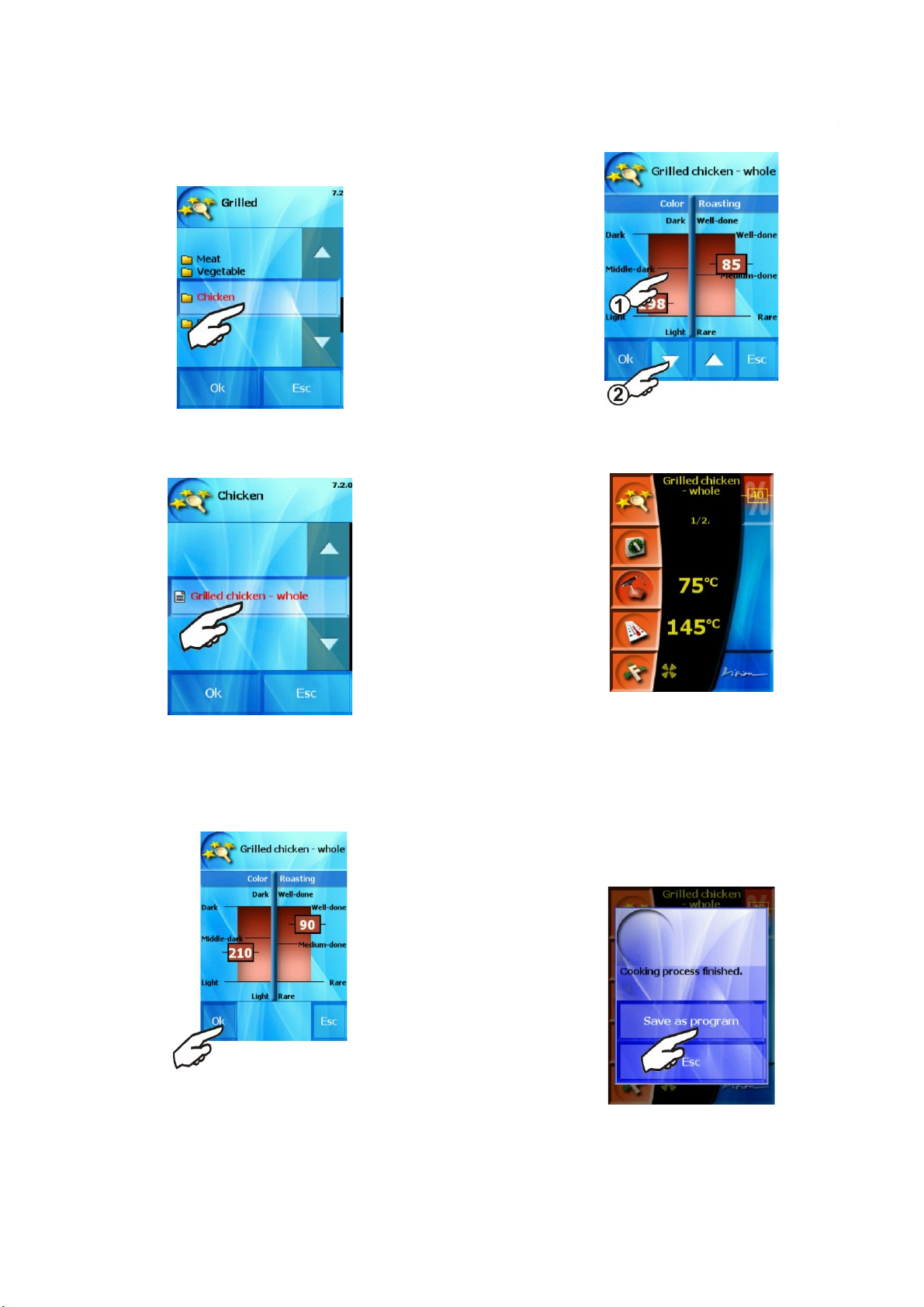
and choose a product.
OPERATION MANUAL FOR GOLDSTEIN VISION COOKING CENTRES
The combi-steam oven will now show parameters of core
temperature and the cooking cabinet temperature at which the
process will terminate. If you agree with the parameters, press “OK”
and the combi-steam oven will set the selected technology to be used.
Having set the parameters you can now initiate the cooking process
by pressing “Start”
A matter of fact when using the Goldstein Vision combi-steam
ovens is the possibility to change all pres-set parameters during
cooking process. By pressing the relevant button (Time, Temperature
etc.) you can change the selected values and the combi-steam oven
will then proceed with the newly set parameters.
Storing own parameters “Easy cooking”
You can save any changes you made to any parameters of any
step. At the end of the cooking process the combi-steam oven will offer
the possibility to save the changed program into the “Programs”
section.
If you desire different values for the final parameters, (e.g. darker
and crispier skin of a grilled chicken) select the required temperature
in the red field on the display (1) (left side for the cooking cabinet
temperature, right side for the probe temperature). To fine-tunesetting use the arrows to increase/decrease temperature (2).
When saving the program proceed according to the instructions as
described in chapter “Programs”
24
Page 27
X. Automatic cleaning
OPERATION MANUAL FOR GOLDSTEIN VISION COOKING CENTRES
GOLDSTEIN combi-steam ovens are fitted with automatic
cleaning system ACTIVE CLEANING which makes sure your combisteam oven is always perfectly sanitary clean. Regular use of the
automatic cleaning system saves your time and also significantly
helps to prolong the lifecycle of the equipment.
All the activities devoted to cleaning the combi-steam oven will be
limited to:
choice of appropriate cleaning program according to the
•
degree of contamination
use of cleaning agent
•
start of the cleaning program
•
Using the “Cleaning” programs
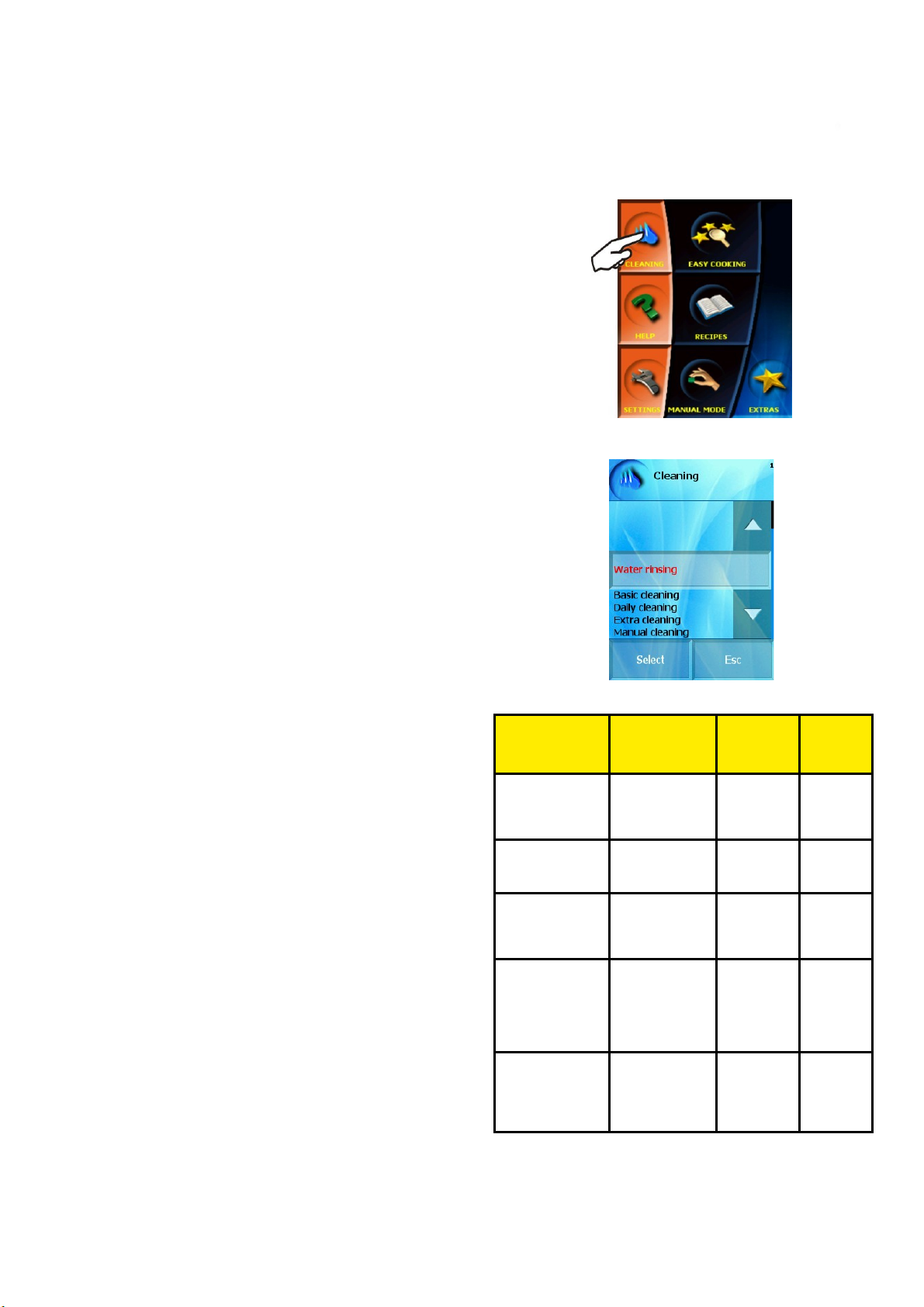
The automatic cleaning of the combi-steam oven can be started by
pressing “Cleaning”
It is necessary to use the “GOLDSTEIN Active Cleaner” as a
cleaning powder.
Store it in places without the presence of water and high
humidity. Apply the powder when opened, never leave it open,
especially in a damp place and without supervision.
Important warnings:
In case you use other cleaning agent than
•
“GOLDSTEIN Active Cleaner the company Goldstein
accepts no responsibility for any consequent damage
and such damage is excluded from the warranty.
Keep the cleaning agents away from the reach of
•
children.
When manipulating with the cleaning agent observe all
•
safety regulations and regulations of work with
chemicals, especially use protective wear (gloves and
goggles)
Follow instructions written on the cover of the cleaning
•
agent.
Under no circumstances may the cleaning agent come
•
in contact with skin, eyes or mouth.
Never open the combi-steam oven door when the
•
cleaning program is running – danger of being stained
by the cleaning chemical.
Take out all the GN containers before the cleaning.
•
Follow the instructions shown on the display.
•
Do not leave the cleaning agent packaging inside the
•
cooking cabinet.
Never apply the cleaning agent onto hot surface of the
•
combi-steam oven – an irreversible damage to the
surface may occur. Such damage is excluded from the
warranty.
In case of insufficient cleaning of the equipment, during
•
common use, cumulated grease in the cooking cabinet
may ignite.
The combi-steam oven then offers five cleaning programs.
Use individual programs according to the contamination of the
cooking compartment – see the “Cleaning programs” table
Program
selection
Rinsing with water
Basic cleaning
Medium
cleaning
Extra strong
cleaning
Manual
Cleaning
Description
Cleaning the cooking
cabinet with lukewarm water without
using cleaning agents
Cleaning of light
contamination without
burnt grease
Cleaning of medium
contamination after
roasting, grilling at
higher temperatures
Cleaning of strong
contamination, very
burnt grease, after
roasting and grilling,
after several using of
combi-steamer
Manual Cleaning is
used when the
automatic cleaning is
not using or not
available
Cleaning
powder
No 16 min.
Yes
1 pieces
Yes
1 pieces
Yes
2 pieces
Goldstein Manual
cleaner Yes -
according to dirty
situation
Duration*
62 min.
83 min.
110 min
68 min.
.
*-duration of washing process is approximate only and may differ
according to the size of combi steamer
25
Page 28
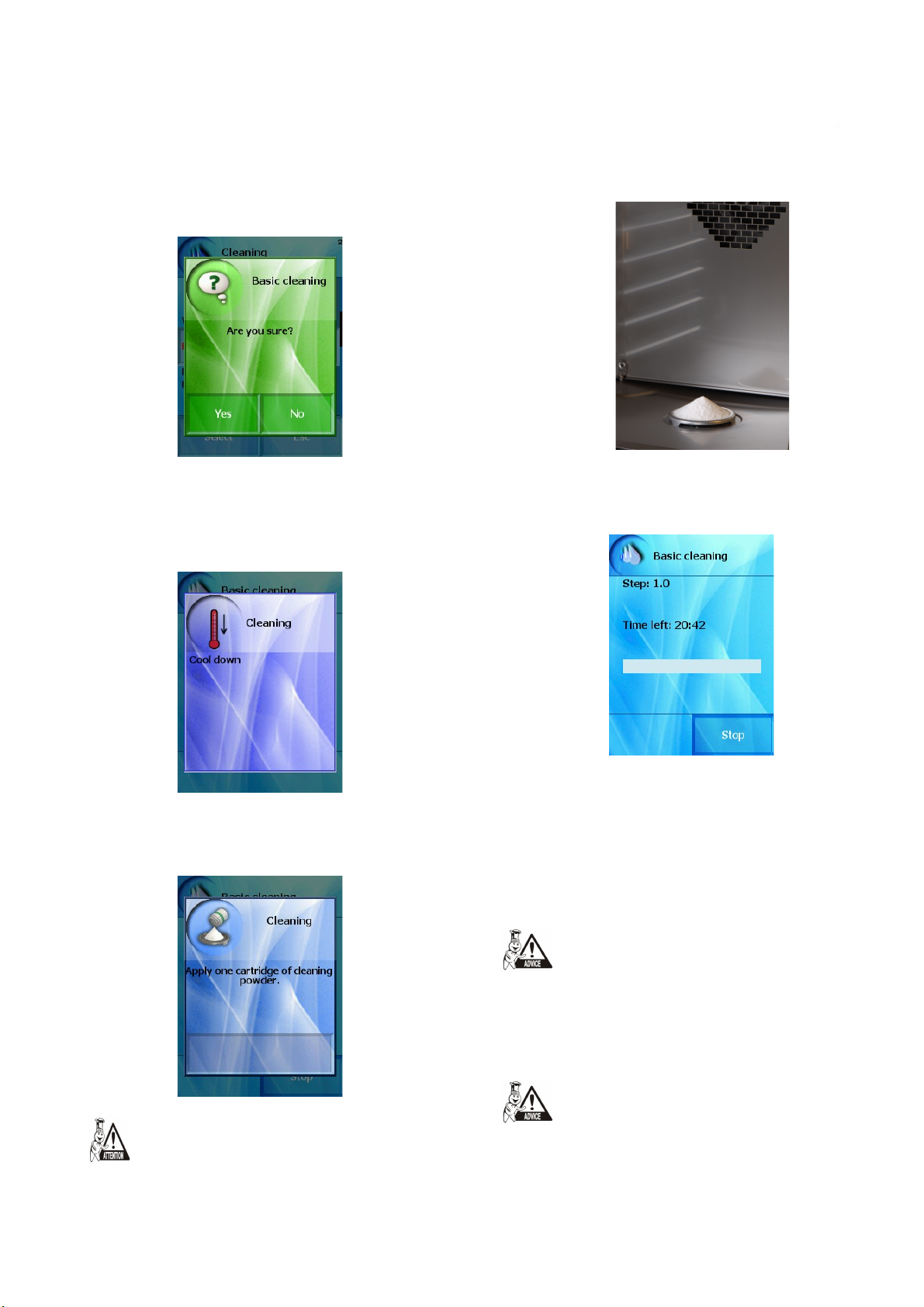
Combi oven will ask you if you are sure with this program.
OPERATION MANUAL FOR GOLDSTEIN VISION COOKING CENTRES
After choosing and confirming the cleaning program combi
steamer starts checking the temperature in the cooking cabinet.
Should the temperature exceed 80˚C, start the process of cooling the
cooking cabinet. The combi-steam oven will announce that by an
information report.
To apply the cleaning agent proceed in the following manner:
Pour the powder onto the drain cover in the bottom of the
•
cooking chamber.
close the combi-steam oven door.
•
The selected program starts automatically and the screen will
inform you about the actual position of the program and the remaining
cleaning time.
Should the temperature not exceed 80˚C or the cooling has
finished, the combi-steam oven will invite you to apply the cleaning
agent.
When using the cleaning powder, follow all the above
stated directions of working with chemicals!
The end of the cleaning process will be announced by a sound
together with announcement of end of cleaning process. The combisteam oven is now ready to be used again.
Cancellation of running cleaning process before time
You can cancel the cleaning process early by pressing the „STOP“
button. You will be asked if you are sure. If yes, the process stops and
the rinsing program starts for aprox. 5 min. The cleaning is definitely
off after that. If you do not confirm the cancellation, the process will
continues where you stopped it.
Manual Cleaning - At first the combi steamer will be cooled down
to acceptable temperature 80 °C (if it is necessary). Then you will be
asked to apply the Manual cleaner. Leave the manual cleaner treat as
necessary, approx. 50 min. After time elapsed the combi steamer will
ask you to wash the cooking chamber with integrated shower in depth.
The manual cleaning process is finished after this process.
Check the cooking cabinet after the cleaning process has finished.
Thoroughly rinse out eventual remaining cleaning agent by the manual
shower or by water.
26
Page 29
If you are not going to use the combi-steam oven after cleaning, we
OPERATION MANUAL FOR GOLDSTEIN VISION COOKING CENTRES
recommend you leave the door open (overnight,…)
Dispose of the cleaning agent packaging in a usual way – take them
to places designed for the collection of plastic packaging.
Never leave used packaging lying around or freely accessible.
XI.Extras
The “Extras” section allows access to special functions of the
combi-steam ovens, e.g. it enables to preheat or cool the combi-oven
to a pre-set value. It is suitable to use these functions in case the
technological process we want to use does not allow the start from
actual temperatures in the cooking cabinet.
“Extras” section also allows access to the USB port on the combisteam oven to archive or record programs, it also enables to see the
HACCP data for the cooking processes to be checked.
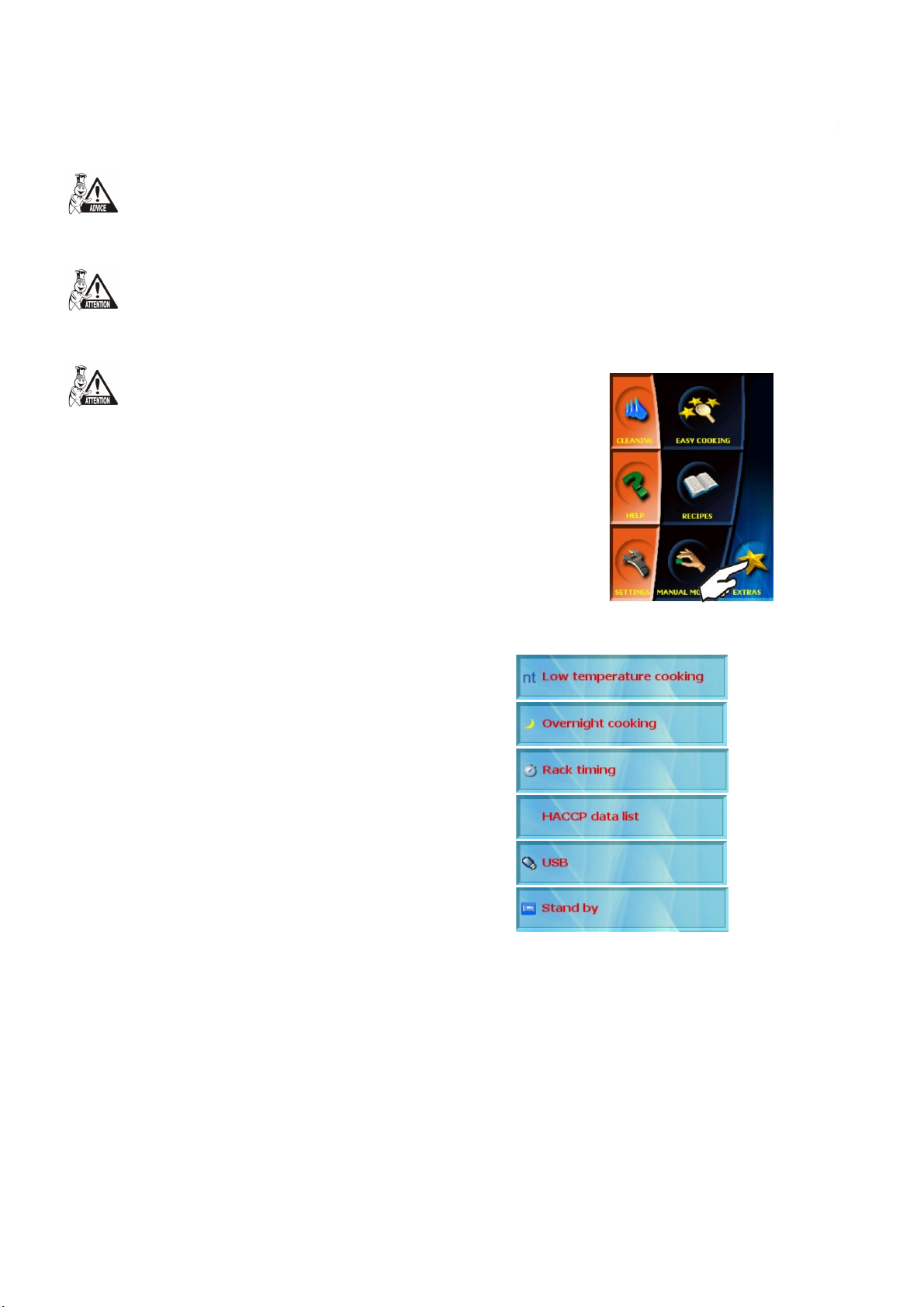
Select the “Extras” section by pressing „Extras“ button.
The combi-steam oven offers the following functions:
1. “Low temperature cooking” option (LTC)
This function allows you to prepare food which needs longer
cooking time or slower cooking process (e.g. big pieces of meat).
There are two ways how to set LTC:
- Termination by Core probe
- Termination by Time
1.1 Termination by Core probe
Core probe is basic accessories in your combi oven. The core probe
measures the temperature inside the food. When the temperature
inside food reach preset temperature the cooking process is finished.
The setting is as follows:
27
Page 30
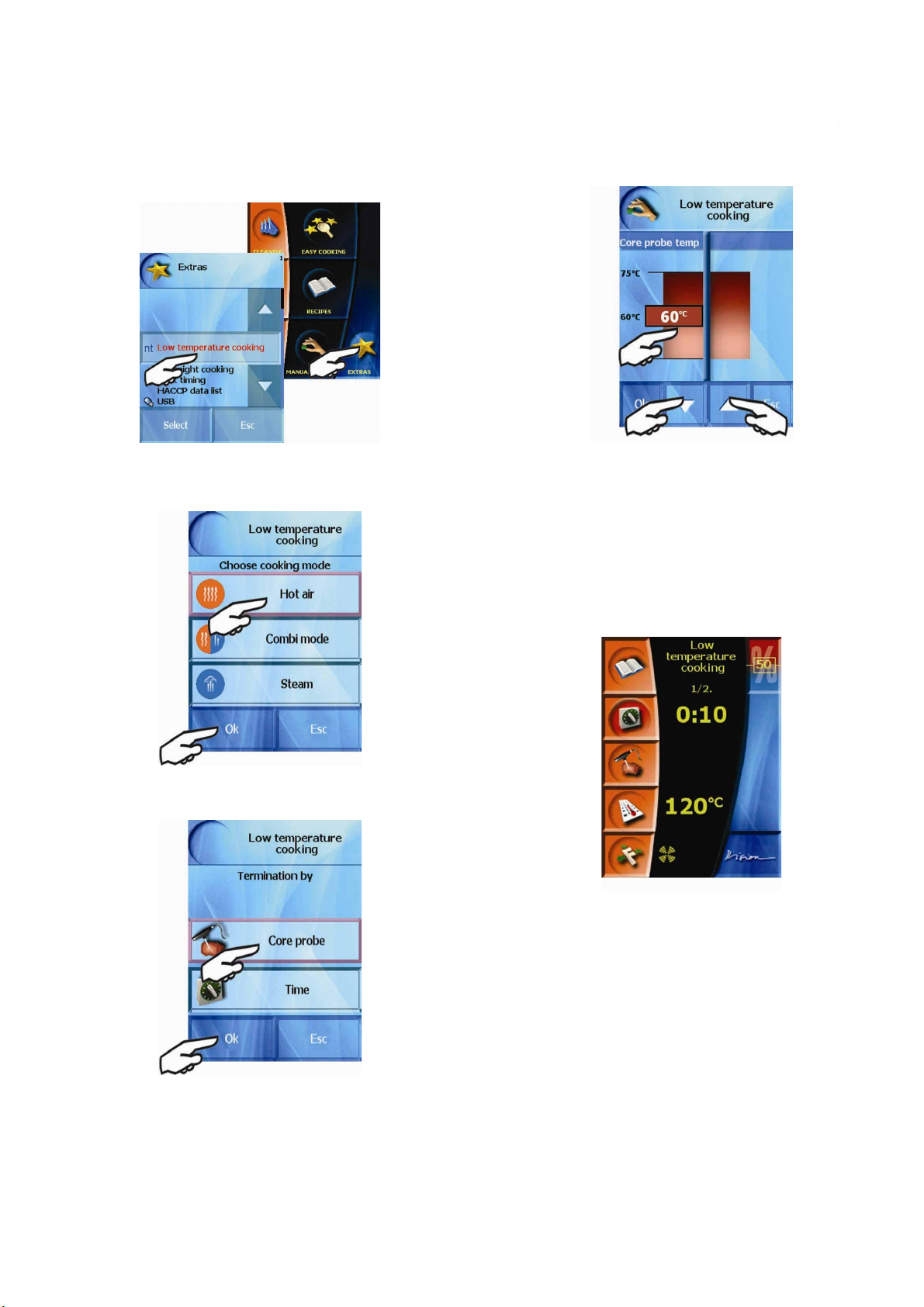
a) Choose „Low temperature cooking“ in the „EXTRAS“ menu
OPERATION MANUAL FOR GOLDSTEIN VISION COOKING CENTRES
b) The offer of 3 basic modes appears. Choose the right one, e.g.
HOT AIR and confirm your choice by clicking „OK“.
Click on the red frame where you can see the temperature. When
the frame starts blink you can set required temperature by using white
arrows or just clicking into the screen. Minimal temp. is 45 °C,
maximum temp. is 75 °C
e) Confirm „OK“ after setting. The operating screen of first cooking
step appears. The fist step is preset on:
Temperature: 120°C
Time: 10 min.
Mode: The same as we preset in b) paragraph
c) Then choose „Termination by Core probe“ and confirm „OK“
d) The last step is setting of temperature which we want to reach
inside the food. When we achieve this temperature LTC is finished.
.
The second step is as we set it. You can check and change the set
steps by clicking „RECIPES“ icon. (see chapter VIII.-2.1 „Creating your
own programs“).
f) If the set parameters are OK we can start the process by clicking the
„START“ button.
1.2 Termination by Time
The end of LTC is according to the set cooking time.
The first two setting steps are the same like in paragraph 1.1 a)-b).
c) Then choose „Termination by time“ and confirm by „OK“.
28
Page 31
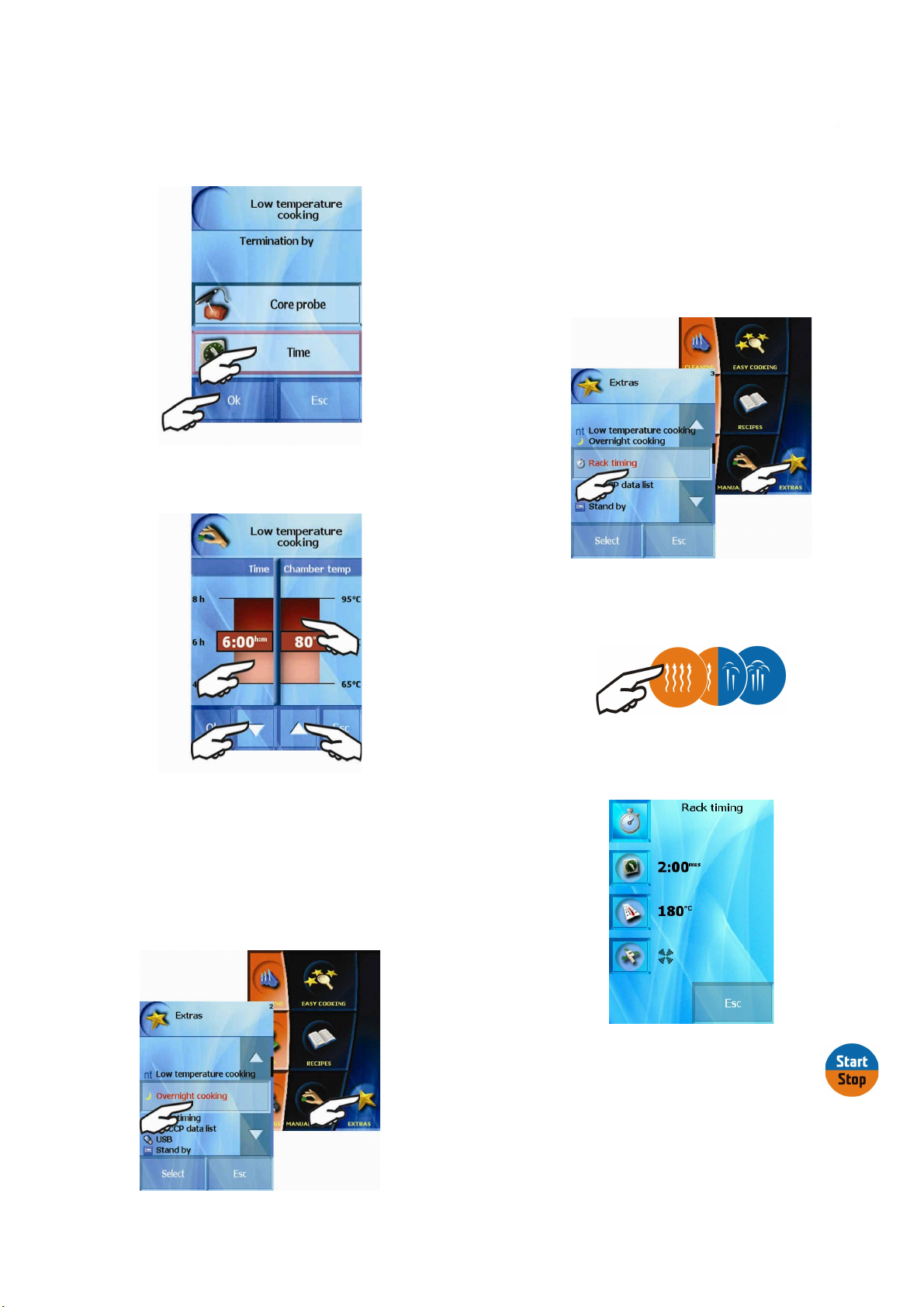
d) The setting of time and temperature appears. You can change
OPERATION MANUAL FOR GOLDSTEIN VISION COOKING CENTRES
these values the same way as in paragraph 1.1 d).
3. “Rack timing” option (RT)
This option makes it possible to add different time to each rack.
You can prepare different types of food (with the same temperature) at
one time.
The „Rack Timing“ function you can set:
Manually
-
- Use the preset programs
The RT is in „EXTRAS“ menu.
3.1 Manual setting
The next procedure is the same as in paragraph 1.1 e)
2. “Overnight cooking” option (OC
his option makes possible to use your combi-steamer during the
T
night and prepare food for another day.
The parameters setting is exactly the same as setting of LTC
parameters (see the previous chapter)
.
)
Press the RT button. At first set the basic mode (hot air, combi or
steam).
Then set the time, temperature and additional functions (flap
valve, fan speed, permanent light and half-input of electricity)
As these parameters are set press the „START“
On the next screen you can choose the racks which you want to
time. Selected racks are in red colour and the time is started to count
down. This time is possible to change by clicking on the rack button.
Note: The numbers of racks are up to you.
button
29
Page 32
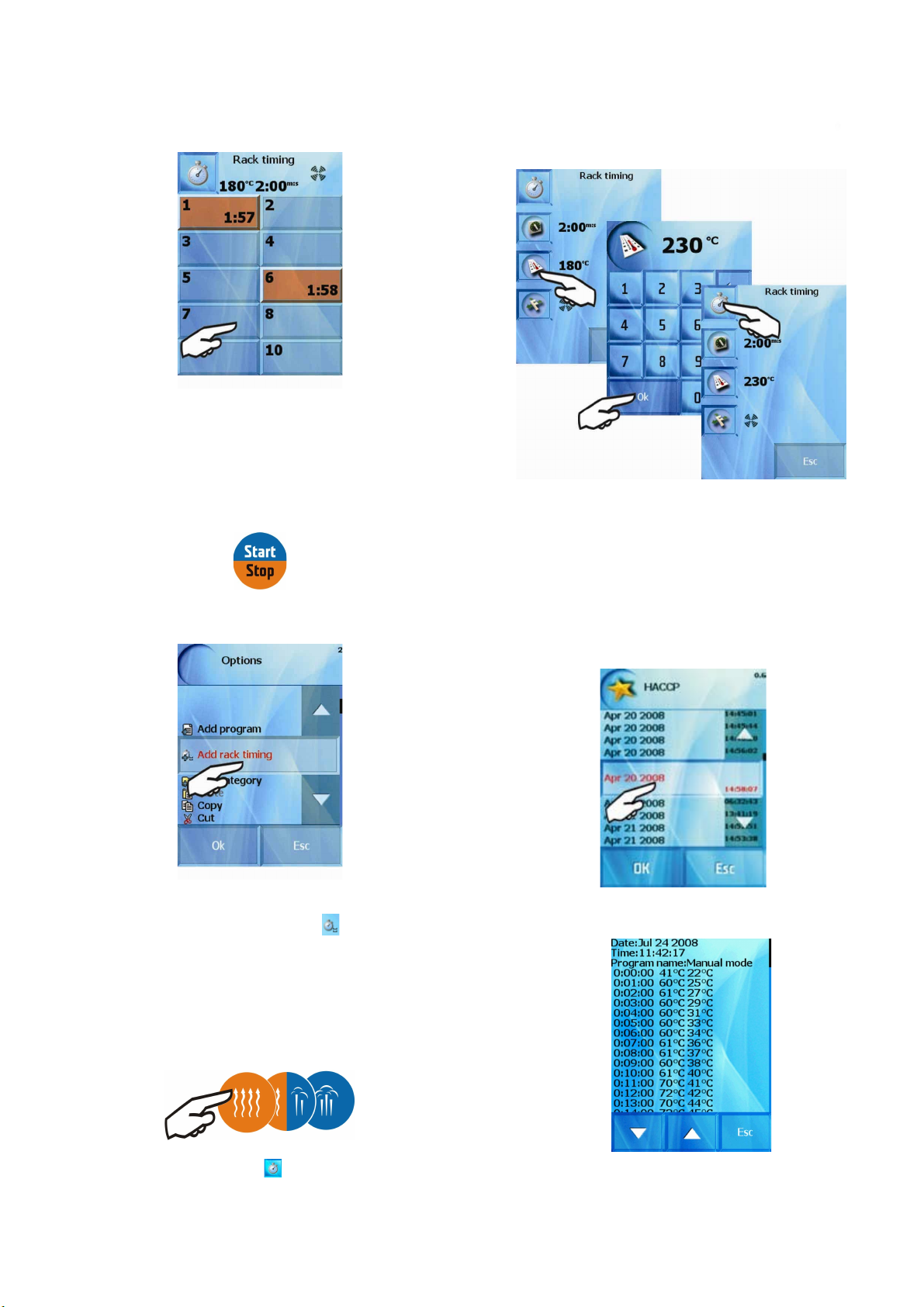
When the time elapses the signal sounds and relevant
OPERATION MANUAL FOR GOLDSTEIN VISION COOKING CENTRES
rack starts to blink. Click the blinking rack to switch it off.
If you want to finish the rack before the time is elapsed
just set the time to „0:00“.
For complete end of RT click „START“ button.
3.2 Programs for RT
4. “HACCP” option
During the cooking process, when using the Manual
mode/Programs/Easy cooking, the values of time, temperature, core
temperature and further important information regarding running
events recorded continuously. The values can be seen on the combisteam oven display in a well-organized form.
After pressing “HACCP” you choose between individual
technological processes, sorted by date and time.
You can create the RT programs in „ALL PROGRAMS – Options“
menu
The RT program is saved with special icon
If there are more RT programs saved with the same temperature,
mode and additional functions you can see the list of them.
.
By selecting a line a detailed survey of technological process will
come up.
As an example there is a list of programs for RT - temperature
230°C, mode HOT AIR and standard fan speed:
1) Choose RT in „Extras“ menu
2) Set hot air mode
Temp. 230 °C and press icon
30
Page 33
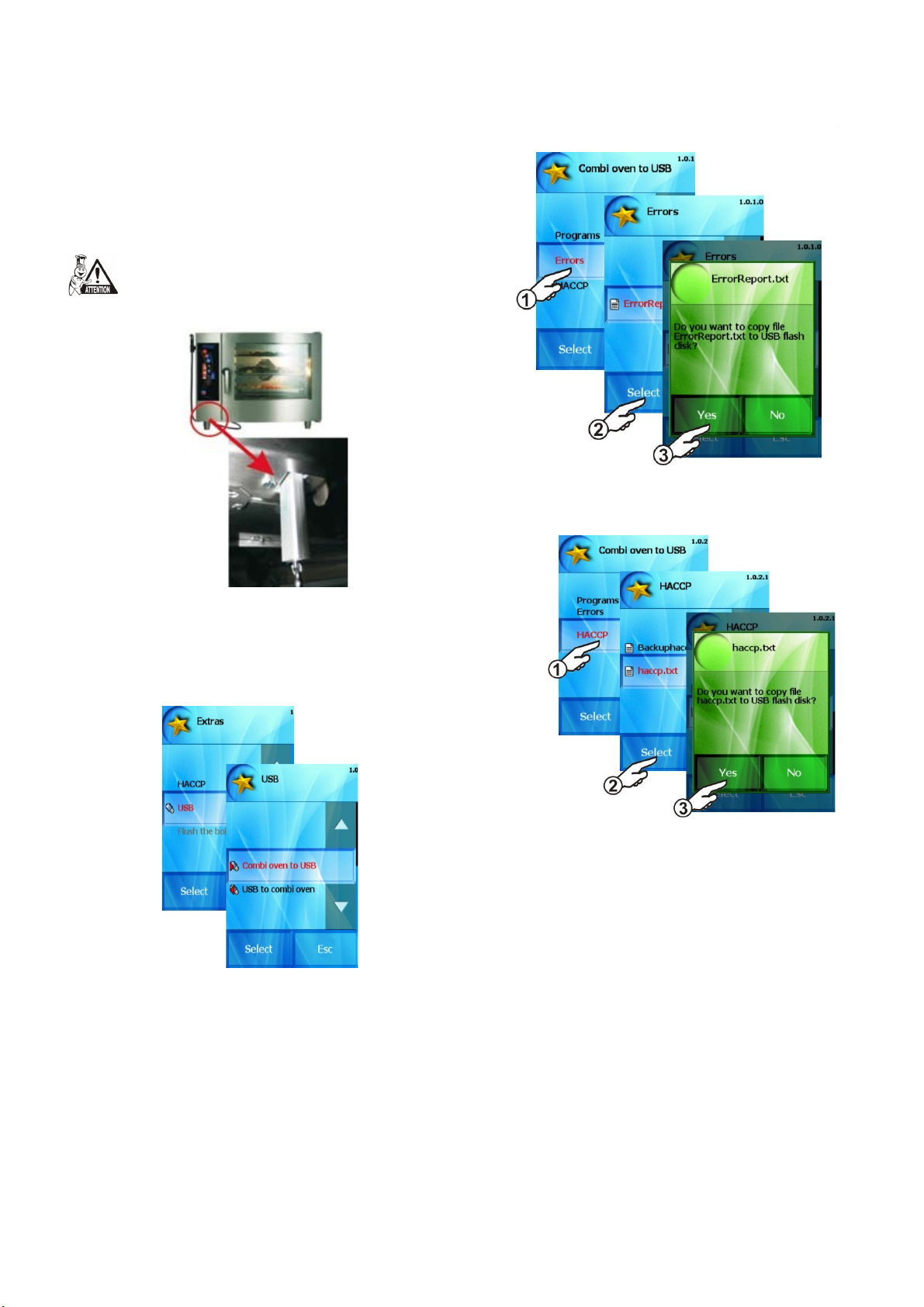
5. “USB” option
OPERATION MANUAL FOR GOLDSTEIN VISION COOKING CENTRES
By using this function you can save selected items to an external
USB device (Flash disc), or upload the data into the combi-steam
oven.
This function will only be active when a USB device
is connected to the USB port, e.g. a flash disc, which
contains relevant data or onto which we want to save
data.
Error messages will be copied to your flash disc.
c) „HACCP“
After a USB device is connected the combi-steam oven offers the
following functions:
5.1 Recording data from the combi-steam oven onto the
USB
Using this option we can archive:
a) “Programs” which will be saved as “Programs.pms”
More in capture VIII. Recipes
“Errors”
b)
Error will be copied onto your flash disc.
To view HACCP data in common Windows programs we
recommend to save the file as “haccp.txt”
5.2 Uploading data from the USB into the combi-steam
oven
Using this option you can upload from an external memory:
a) “Programs”
More in capture VIII. Recipes
b) “Tunes”
Using this option you can upload tunes or sounds into the combisteam oven. Thus uploaded sounds you can choose in the “Settings”
section and assign them to individual events (e.g. end of cooking
process announcement, pressing a button sound etc.)
.
31
Page 34
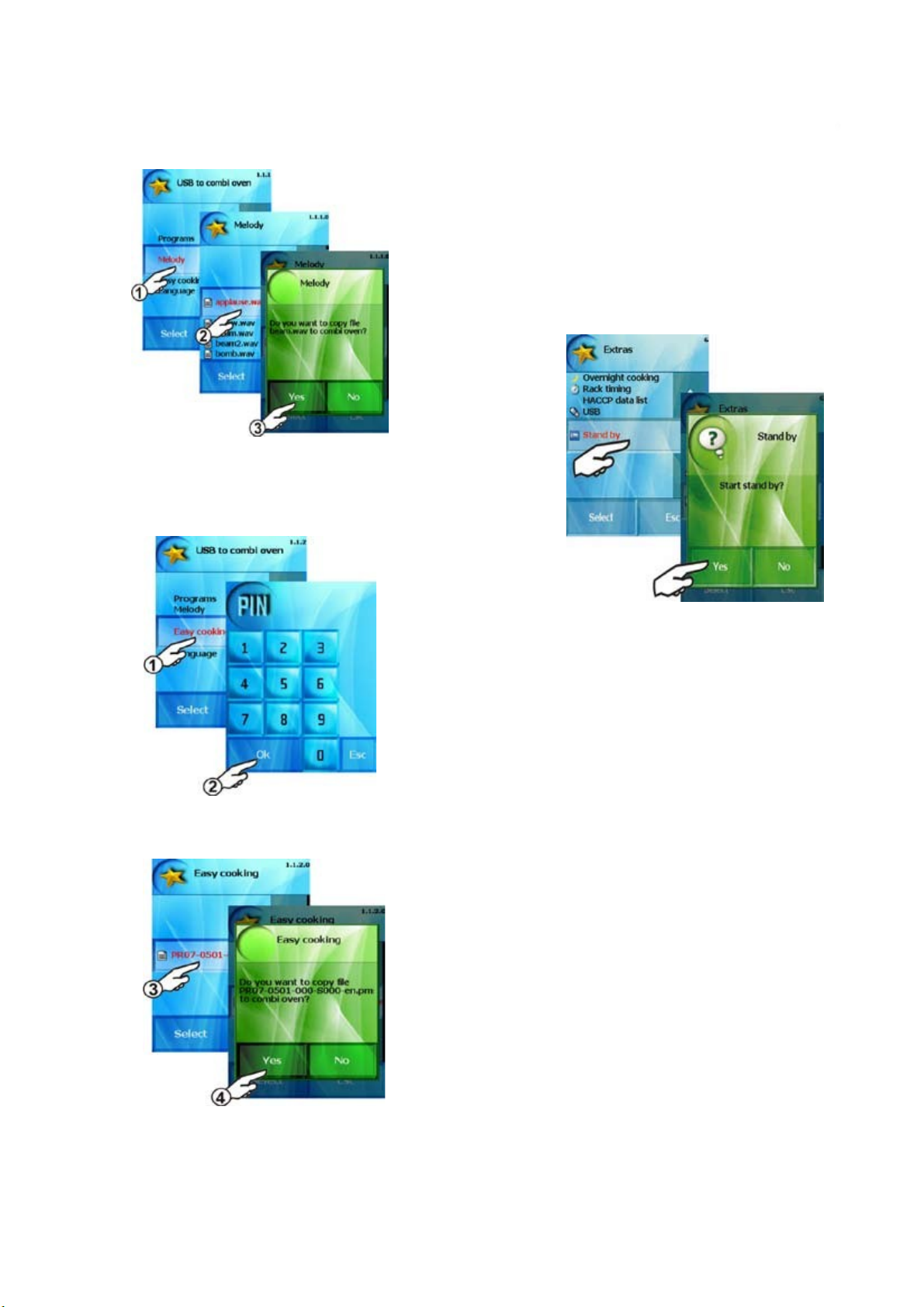
c) „Easy cooking“
OPERATION MANUAL FOR GOLDSTEIN VISION COOKING CENTRES
This option allows you to upload cooking programs for Easy
cooking function. This option is only accessible after entering PIN
code 6006.
6. “Stand by” option
You can make asleep your combi steamer by „Stand by“ function.
You can do it either press „Stand-by button“ in „Extras“ menu or
hold the „START“ button for 3 sec.
By holding the „START“ button for 3 sec. you wake up the combi
steamer again.
From the menu on the USB select the desired file and confirm the
selection.
Easy cooking programs will be uploaded into the combi-steam
oven.
32
Page 35
XII. Settings
OPERATION MANUAL FOR GOLDSTEIN VISION COOKING CENTRES
he “Settings” section allows special setting of the combi-steam
T
oven, as well as access to technical information regarding the combisteam oven and the service settings for advanced users.
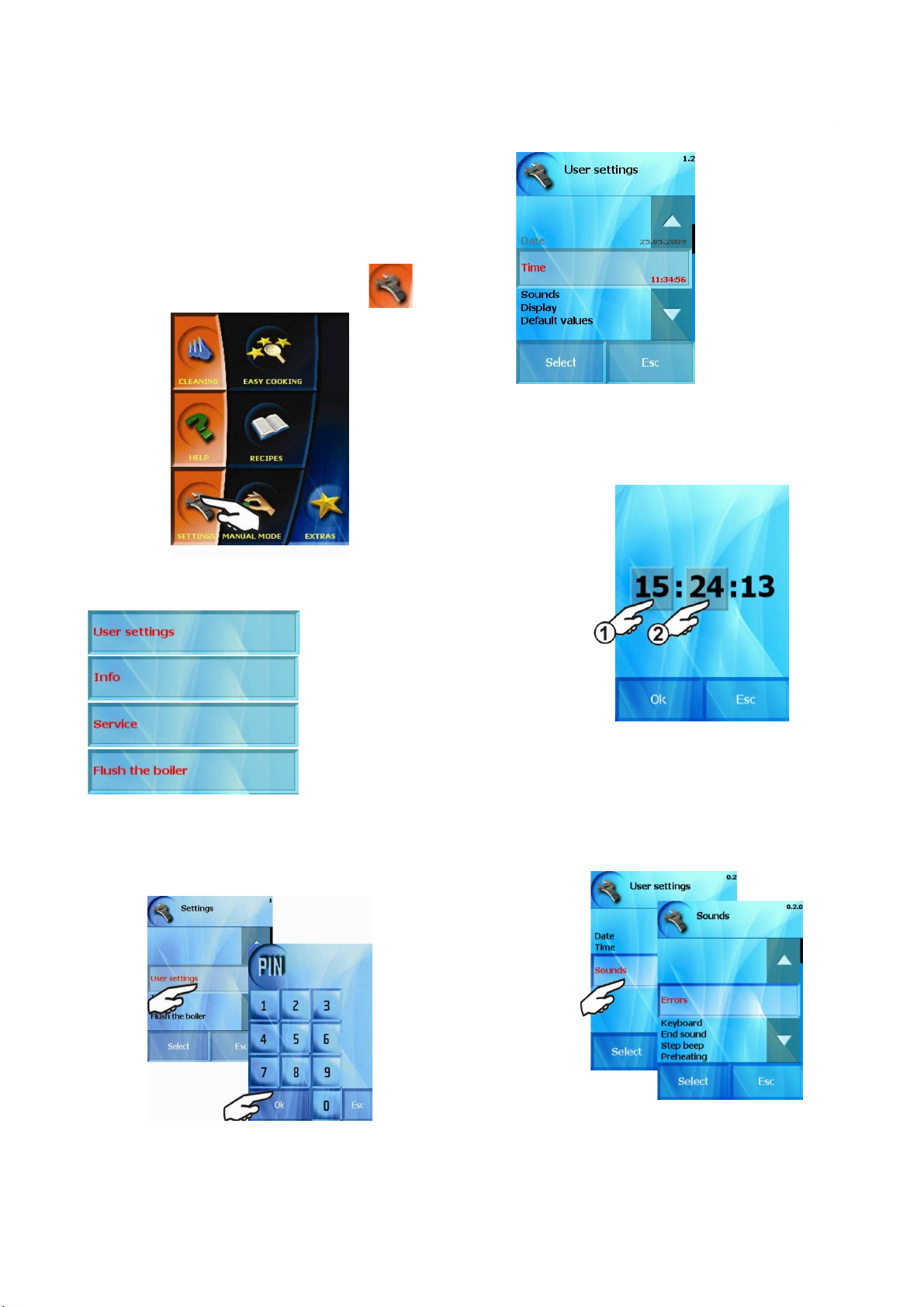
The “Settings” section is selected by pressing
The following functions are available to set the combi-steam oven:
1.1 Setting “Clock”
By using this button we set the actual time, i.e. the hour and
minutes. The procedure is similar to the one setting the actual date.
1. “User settings” option
This function allows setting of time, brightness of display, sounds
and default values. In “User settings” option a four-digit PIN code is
required. For advanced users the PIN code has been set to 1001.
Select the correct PIN code and press “OK”. The combi-steam
oven will offer:
1.2 Setting “Sounds”
By using this option you can assign sound effects or tunes to
individual events announced by the combi-steam oven (e.g. the sound
of pressing a button, announcement of end of cooking process etc.) or
change it volume.
Select event to which a sound should be assigned or changed (e.g.
End of cooking process)
33
Page 36

By dragging the volume indicator you can change the volume -1-
OPERATION MANUAL FOR GOLDSTEIN VISION COOKING CENTRES
and when pressing the “Play” button -2- the combi-steam oven will
play audio samples
.
1.3 Setting „Display
You can change the brightness of the screen.
“
You can choose the sound of event by choosing from a list.
1.4 Setting „Default values
Some functions have default values set (Hot air, combi, steam,
COOK&HOLD and Rack timing). You can change these values according
to your needs.
“
2. „Info“
When pressing “Info” information regarding the software version
used to operate the combi-steam oven will appear.
Your own sounds can be added to the list in the “Extras” section
(see chapter xxx – Uploading data from USB into the combi-steam
oven)
34
Page 37
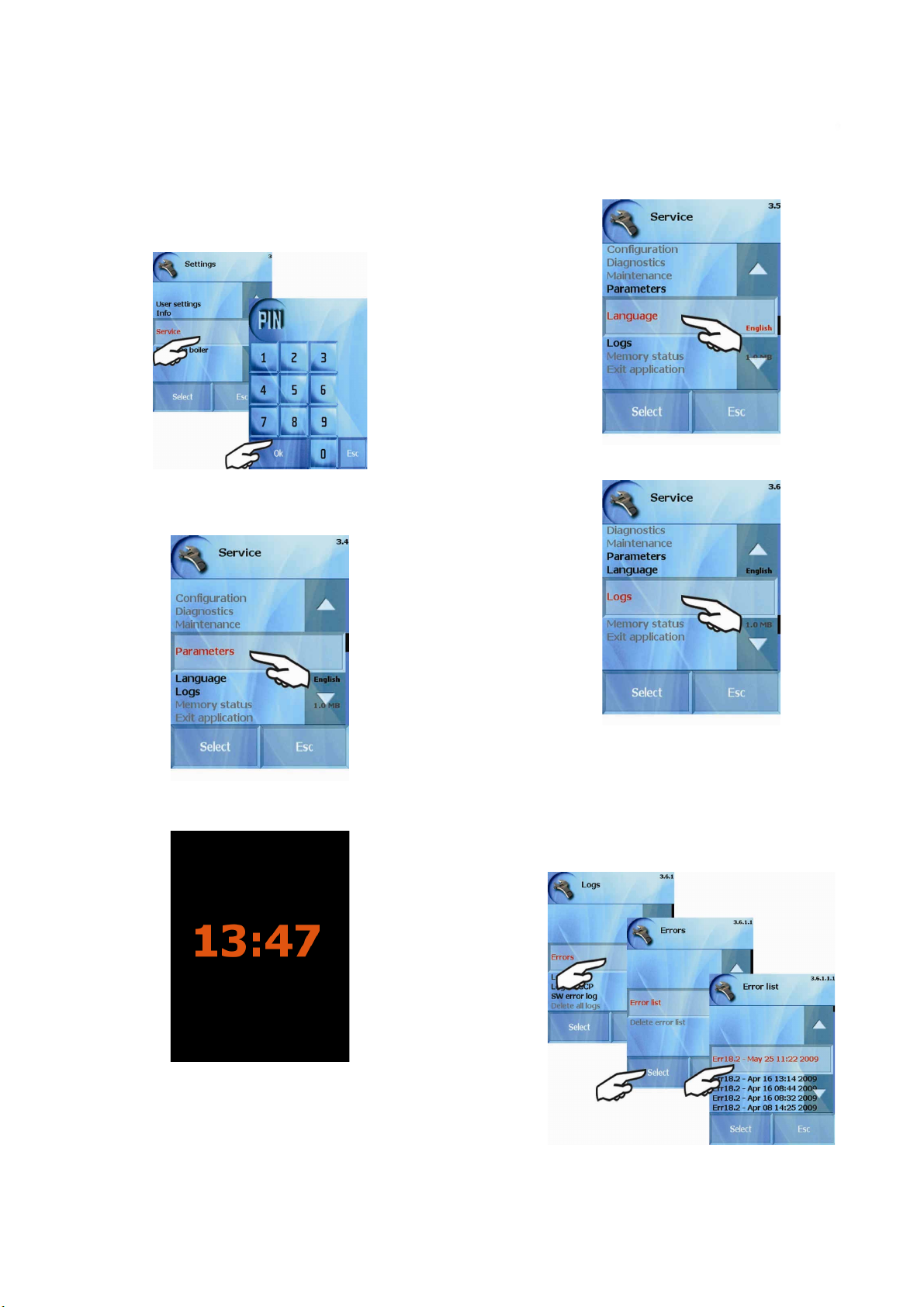
3. „Service“
OPERATION MANUAL FOR GOLDSTEIN VISION COOKING CENTRES
This function allows entering the service menu. In order to be able
to access In “Service” option a four-digit PIN code is required. For
advanced users the PIN code has been set to 1001.
Select the correct PIN code and press “OK”. The combi-steam
oven will offer:
3.1 “Parameters” option
3.2 “Language” option
You can choose language according to the area or the operation
personnel.
3.3 “Logs” option
a) Screen saver option – here you can switch on or off the
screensaver. If the screensaver is active it appears after 5 min. of
combi-steamer inactivity.
By touching the display you are back in operating mode.
b) Program menu lock – You can lock your recipes. After
locking you can see the recipes but you can not edited them.
c) Learn function – After each cooking process you will be asked
if you want to save the program.
In this option you can display:
- Errors
- Log
- Log HACCP
- SW error log
a) Errors – The list about operation errors. The list of errors and
their description is at the end of this manual.
35
Page 38

b) Log - List of all operations made during 60 days.
OPERATION MANUAL FOR GOLDSTEIN VISION COOKING CENTRES
c) Log HACCP - the list of HACCP data (temperatures, times and
modes). The data are lined up according dates and time.
d) SW error log - The list of software errors. This list is useful just
for service technicians.
The options shown in grey color are only accessible to a specialized
service place.
The data are saved during approximately 60 days of operating the
steamer and the amount of data depends on the memory capacity of
combi steamer. After this period the data are rewritten from the oldest
record.
36
Page 39
XIII. Help
OPERATION MANUAL FOR GOLDSTEIN VISION COOKING CENTRES
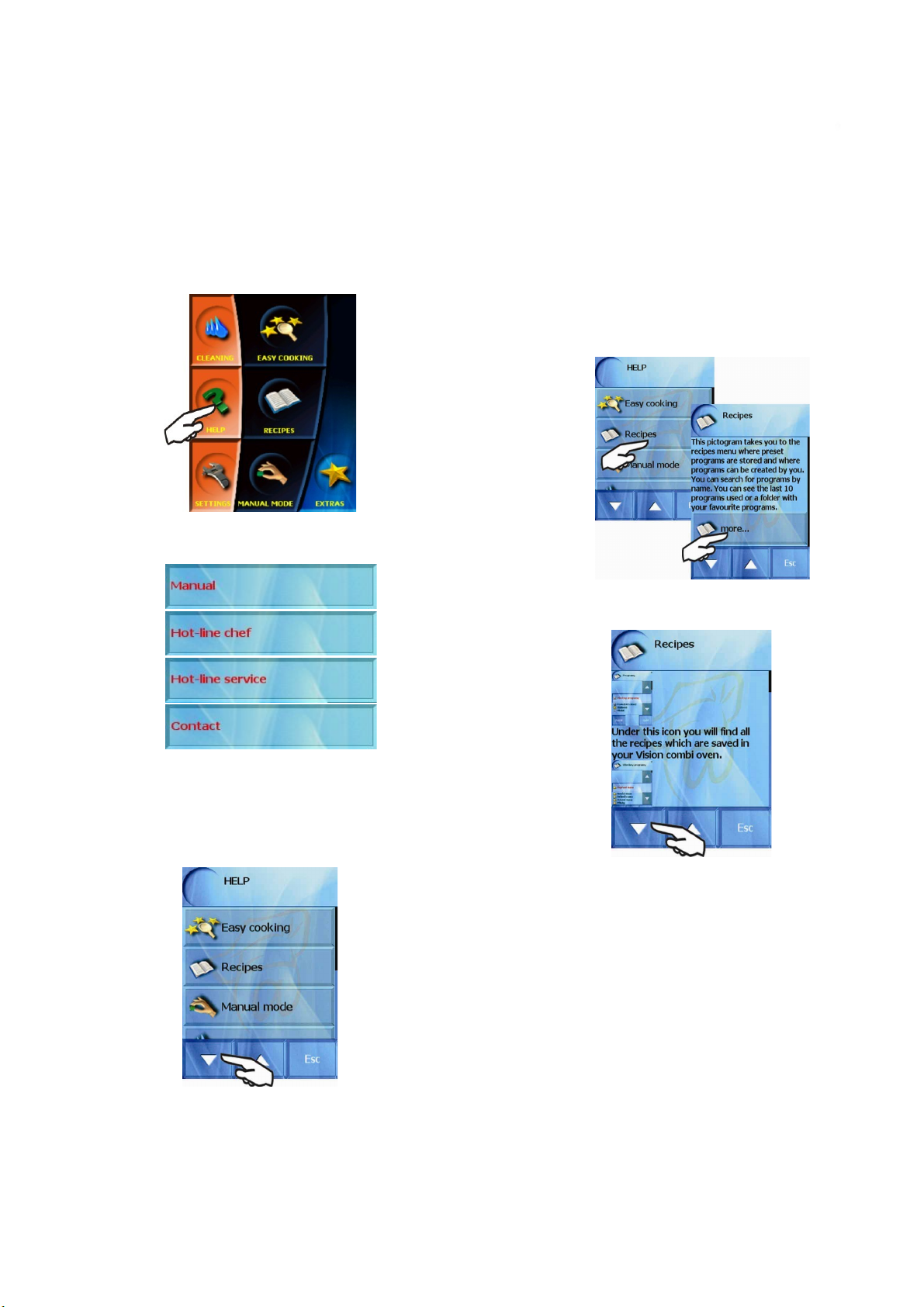
The help option contains basic information regarding the combisteam oven operation as well as important telephone numbers where
you can obtain further help when neither the Operation manual nor
Help provide answers to your questions.
When you press HEPL you can choose:
If you need more information about this function click on the
„More...“ button. The detail description appears. Move with arrows.
1. “Manual” option
Offers detailed description of individual sections of the combisteamer operations.
Move with arrows. If you need help to any function in list click on
it. You will see basic description. For example the „Recipes“ function
37
Page 40

XIV. VISION AGENT
OPERATION MANUAL FOR GOLDSTEIN VISION COOKING CENTRES
XV. Maintenance
shows the help information regarding the currently running
process on the control panel. “Vision agent” explains currently
running process, or helps with further possible steps.
For VISION Agent function press at first „AGENT“ button
and then the button which you need described.
General instructions
Daily rinsing out of the interior of the appliance and the compliance
with the maintenance instructions will substantially increase the life
cycle of the device and guarantee it faultless functioning.
Values preset by the manufacturer or assigned service technician
must not be altered by the user.
When opening the door, especially during steam operation, always
stand in such place where the hot steam escaping from the open door
cannot scald you. Open the door slightly at first, letting the hot steam
out, then open the door all the way! Do not spray water from the
shower onto the glass of the door or lights unless the temperature is
lower than 90˚C. The glass could break!
Before every starting of the device please ensure that the water
supply is open. Close the water supply after finishing operation of the
device!
Daily cleaning (maintenance)
To clean the combi-steam oven use the “Cleaning” function from
the initial menu (see chapter “Cleaning”)
Should you decide to wash the combi-steam oven manually, follow
these instructions:
Cool or warm the cooking cabinet to the temperature of
•
approximately 50-60˚C. In no case may the temperature
exceed 70˚C!
Take out the pieces of leftover food from the cooking
•
cabinet – never spray them into the drain of the combisteam oven.
Spray the cooking cabinet, including the racks, trays,
•
etc. with a special cleaning agent and let it act for about
15 minutes.
Then switch on the device to steam operation for about
•
10 minutes at the temperature of 60˚C.
After the program ends, switch off the main switch of the
•
power supply and thoroughly rinse out the cooking
cabinet using the manual shower.
Also spray the rear part of the ventilation fan behind the
•
inner wall through the suction opening and the openings
in the sides of the inner wall.
Remove the drain screen from the cooking cabinet and
•
for the duration of several seconds direct the manual
shower into the drain and rinse out the waste. Put the
drain screen back.
Using a cleaning agent – wash the door seal
•
If the door seal is very dirty or greasy, wash it or, if
•
necessary, remove it without using any tools (start in the
corners) and wash it in water and cleaning agent.
38
Page 41
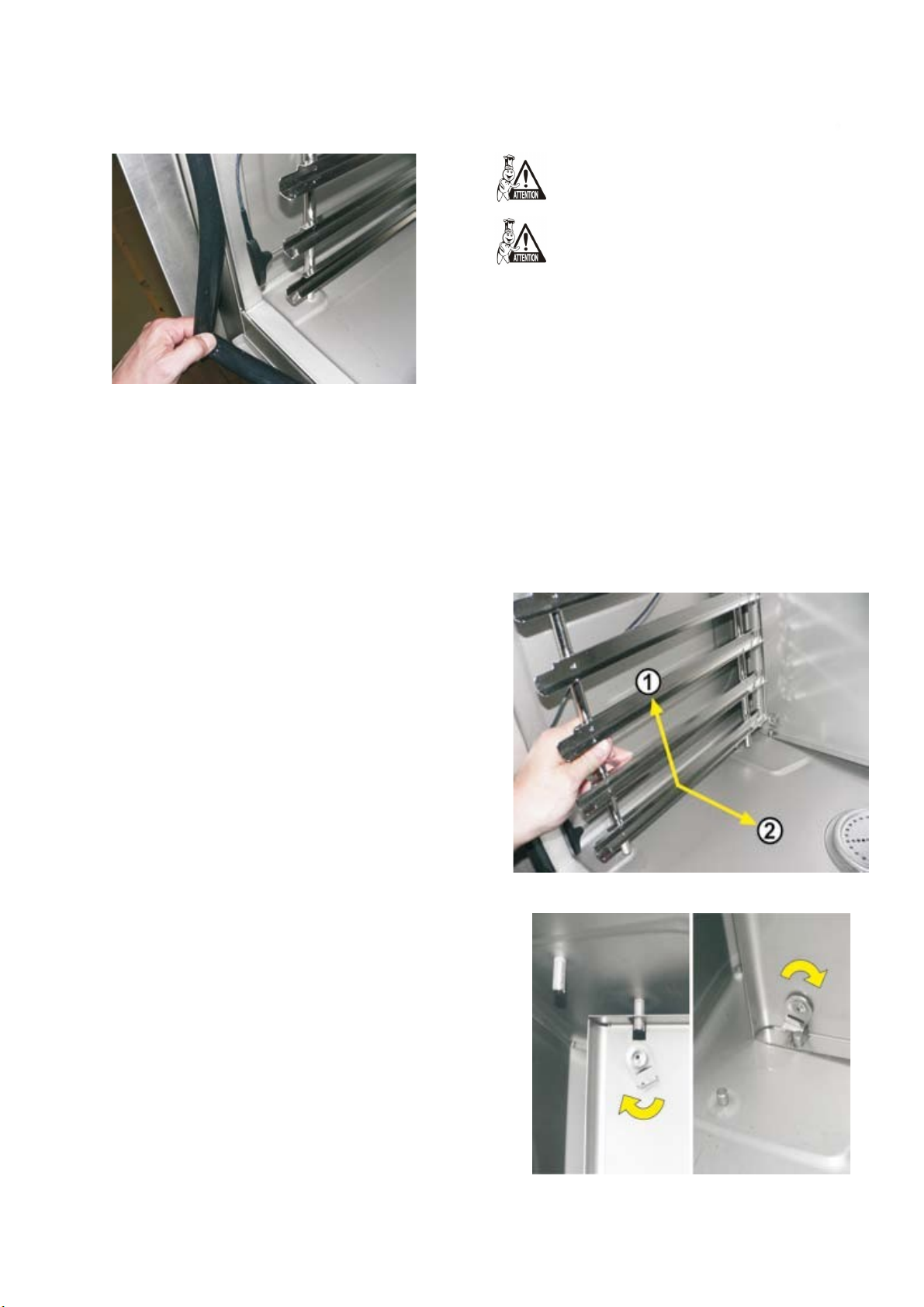
Put the dry seal back in (start again in the corners)
OPERATION MANUAL FOR GOLDSTEIN VISION COOKING CENTRES
•
without using any tools.
After cleaning, leave the door of the device ajar so that
•
the cooking cabinet can be aired out. By doing so you
can prolong the lifecycle of the door seal.
When cleaning the device use only cleaning agents
•
recommended by the manufacturer (Goldstein Manual
cleaner, Goldstein Active cleaning). Refrain from using
abrasive agents! Do not use mechanical cleaning means
for cleaning the surfaces (wire scrubbers, etc.) Only
through daily cleaning of the cooking cabinet a long
lifecycle and quality of food processing can be ensured.
Always use protective wear and recommended working attire
(gloves, goggles, mask) when cleaning the combi-steam
oven! You are protecting your health!
When the combi-steam oven is not cleaned often enough –
left over grease builds up on the cooking cabinet walls – it
can ignite at high temperatures. Such damage is excluded
from warranty!
Monthly cleaning (maintenance)
Clean equipment and following the maintenance instructions
increases the lifecycle of the device and guarantees its faultless
operation.
Monthly cleaning is similar to the chapter “Cleaning”. In addition
to the process described there the rear part of the ventilator is
thoroughly cleaned and decalcified
Combi-steam oven cleaning procedure:
Carry out manual cleaning as described in chapter
•
“Cleaning”
Take out the left rack (it is necessary to press in upward
•
direction and thus release it from the lower bolts, then
the rack can be released from the upper bolts and
extracted)
.
.
Under no circumstances can the temperature exceed
•
70˚C when cleaning the device using a cleaning agent.
At higher temperatures the cleaning agent can burn
onto the surface of the cooking cabinet and leave rust
like stains. The warranty does not cover such damage.
When working with cleaning agents be very cautious
•
and always follow the instructions and
recommendations of the manufacturer of the cleaning
agent. Thus you will avoid damage to your health!!
Always thoroughly rinse the inside of the cooking
•
cabinet with the manual shower after manual cleaning –
to wash off the cleaning agents. Failing to do so may
result in damage to the surface of the cooking cabinet
and its discoloration during following use at high
temperatures. Such damage is not covered by the
warranty.
Never clean the combi-steam oven using acids, or do
•
not leave them in their vicinity – danger of damage to
the surface.
Never use cleaning agents or sand on coarse-grained
•
basis.
Never use mechanical objects to clean the combi-steam
•
oven (wire wools, scrapers, knives)
Release the latches holding the front wall in front of the
•
ventilator (use a coin to loosen it).
Do not clean the combi-steam oven with high-pressure
•
water cleaners
Leave the door ajar after cleaning the cooking cabinet.
•
By pulling the left side open the inner wall.
•
39
Page 42
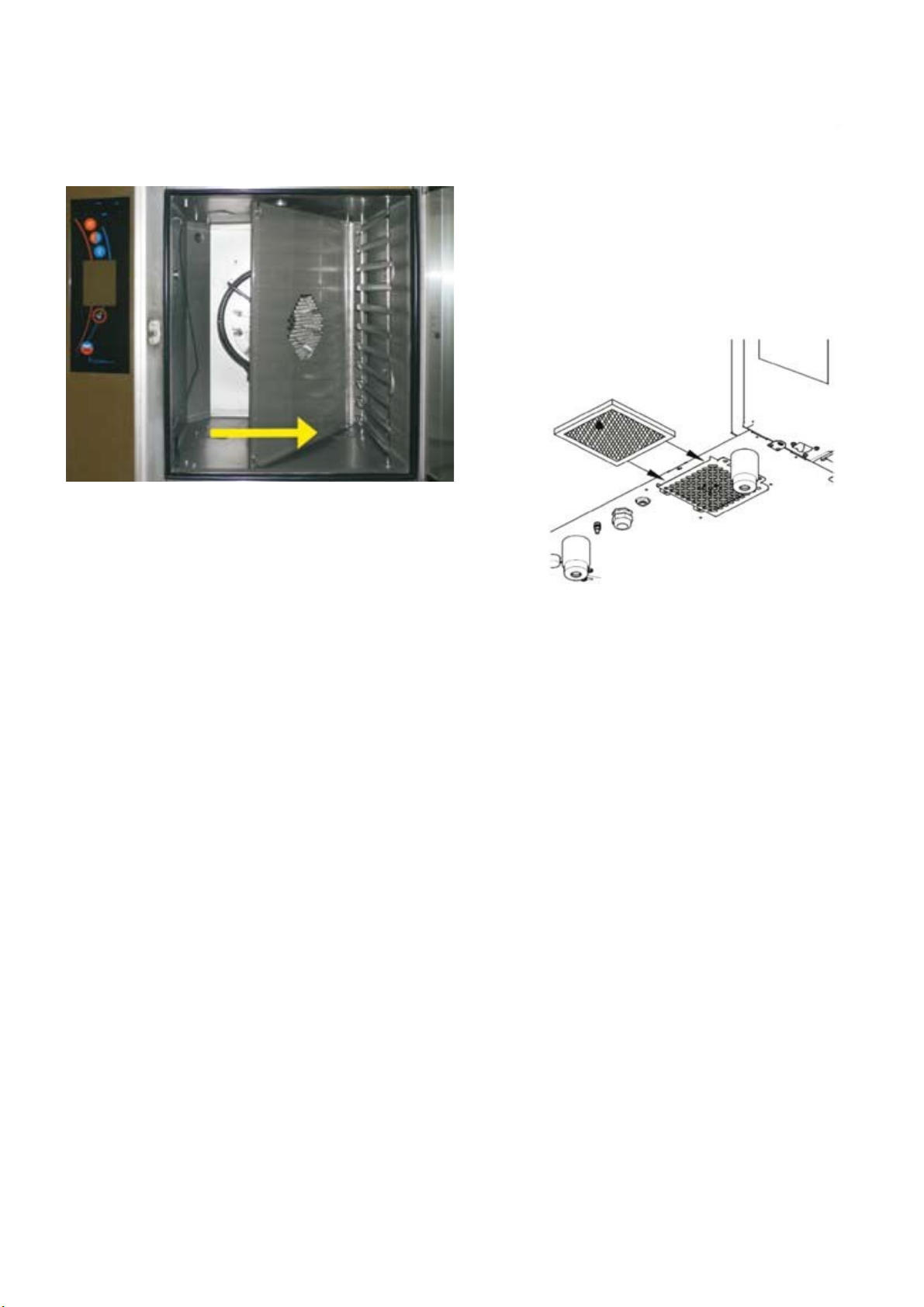
Continue in the same manner as in chapter “Cleaning”
OPERATION MANUAL FOR GOLDSTEIN VISION COOKING CENTRES
•
Daily cleaning (maintenance) only in addition to that
spray a special cleanser (Goldstein manual cleaner)
onto the rear of the cooking cabinet, ventilator, water
sprinkler (the pipe in the center of the ventilator into
which the feed in pipe leads) and the heating elements.
necessary to clean the air filter every three months. In case of heavy
soiling clean it more often.
The air filter replacement procedure
The air filter is located on the bottom left part of the
•
combi-steam oven.
After thorough cleaning of the cooking cabinet of the
•
device, warm it up to the temperature of approximately
50 – 60˚C. Under no circumstances can the
temperature exceed 70˚C!
Thoroughly rinse out the entire cooking cabinet with the
•
manual shower.
Repeat the process if necessary.
•
Wash the door seal with the cleaning agent.
•
After cleaning the cooking cabinet, close again the inner
•
wall (in front of the ventilation fan) and lock the locks
by turning them, put back the left rack.
After cleaning leave the door ajar to air out the cooking
•
cabinet. By doing so you help to prolong the lifecycle of
the door seal.
When working with cleaning agents be very careful and
•
always proceed according to the instructions and
recommendations of the manufacturer of the cleaning
agent. Thus you will avoid damage to your health!!!
Quarterly cleaning (maintenance)
Regular air filter replacement and following the maintenance
instructions helps to significantly prolong the lifecycle of the device and
guarantees its trouble-free operation.
Annual maintenance
Carry out the quarterly maintenance.
•
Also it is necessary to check the installation and
•
equipment. Goldstein. recommends to carrying out this
procedure only through an authorized service (see
chapter “General information”).
Only expert installation and compliance with the
•
maintenance instructions increases the lifecycle of the
device and guarantees its faultless operation.
After year’s operation an authorized service should check
•
the installation and the device as in table IX.3
For the whole duration of operation the device must
•
undergo regular checks, tests and revisions
The warranty does not cover damage cause by inexpert
•
cleaning and maintenance.
The user of the device may not alter the values preset by
•
the manufacturer or assigned service technician.
Only through regular checks and cleaning of the device
•
you can avoid excessive wear and tear to the device.
Monthly cleaning is similar to the chapter “Cleaning”. In addition
to the process described there the air filter is replaced.
The equipment is designed for IPX5 environment (spraying water
resistant). For this reason it includes an auxiliary ventilator for cooling
the inside space where the electricity is connected and the electronic
controls are. The cooling air is sucked in through an air filter which is
located at the bottom under the control panel and it is exhausted
through an opening in the back of the device. For effective cooling it is
Combi-steam ovens GOLDSTEIN
The lifecycle of the device is 10 years providing the
following conditions are met:
Regular preventive service inspections every 12 months
•
of operation.
40
Page 43

Such inspection must be carried out by service
OPERATION MANUAL FOR GOLDSTEIN VISION COOKING CENTRES
•
technicians of GOLDSTEIN or by service technicians of
GOLDSTEIN authorized business.
The customer is obliged to produce a record of such
•
service intervention
Strict compliance with operation instructions according
•
to the operation manual.
Daily maintenance and cleaning of the combi-oven
•
using cleaning agents recommended by GOLDSTEIN.
In case of combi-ovens with automatic cleaning it is
•
necessary to use exclusively GOLDSTEIN Active
Cleaner.
Training of operating personnel by GOLDSTEIN expert
•
chef. It must be recorded in the service documentation
or a copy of training record of the personnel
In case of change of operating personnel another
•
training must be carried out.
CHECK LIST
1 Following of the enclosed installation instructions
2 Leveling the device into a horizontal plane position
3 Adjustment of the door
4 Connection of appliance to cold water with correct filtration
5 Setting of pressure of inflow water to 300 – 500 kPa
Complying the inclination, min. length and diameter of
6
disposal pipe
7 Minimum distance of 50 cm from additional heat sources
8 Minimum distance of 5 cm from other terminal surfaces
9 Room for the free air flow at least 50 cm above the device
10 Sufficient working area for operation and maintenance
11 Water softener if the water hardness exceeds 10_N
12 Electric fuse protection of the device
13 Compliance with fire regulations
14 Electric fuse protection of the device
Call customer’s attention to the conditions for cleaning and
15
maintenance of the device
41
Page 44

XVI. Error code table
OPERATION MANUAL FOR GOLDSTEIN VISION COOKING CENTRES
ERROR
Err 10
Err 11 Preheating of a boiler took longer then 6 min.
Err 12
Err 13
Err 14 One phase of a power distribution is missing Please call your service company.
Err 15
The water reaches the max level but does not
reach the min level in two minutes.
When filling the boiler, the max water level is
not reached in 2 minutes.
When filling the boiler, the min water level is
not reached in 2 minutes.
F2 motor thermal overload protection failure.
Indication of motor overheating above a set
limit.
WHAT HAPPENED WHAT TO DO
Error message can be cancelled by pressing „ESC“ button. Combi oven can
be used in „Hot air“ only. Please call your service company.
Error message can be cancelled by pressing „ESC“ button. Combi oven can
be used in „Hot air“ only. Please call your service company.
Error message can be cancelled by pressing „ESC“ button. Combi oven can
be used in „Hot air“ only. Please call your service company.
Check water supply line (open valve)
Error message can be cancelled by pressing „ESC“ button. Combi oven can
be used in „Hot air“ only. Please call your service company.
Please call your service company.
Err 16 Preheating of a boiler took longer then 7 min.
Err 17
Err 18
Err 26
Err 27
When emptying the boiler, the water level did
not decrease under the min level in 2min.
When emptying the boiler, the water level did
not decrease under the max level in 2min.
Flap valve motor is not blocked or switch is
still closed.
Flap valve motor is not blocked or switch
is still opened.
Error message can be cancelled by pressing „ESC“ button. Combi oven can
be used in „Hot air“ only. Please call your service company.
Error message can be cancelled by pressing „ESC“ button. Combi oven can
be used in „Hot air“ only. Please call your service company.
Check the drain.
Error message can be cancelled by pressing „ESC“ button. Combi oven can
be used in „Hot air“ only. Please call your service company.
Error message can be cancelled by pressing „ESC“ button. Combi oven can
be used without „Flap valve“ function.
Error message can be cancelled by pressing „ESC“ button. Combi
oven can be used without „Flap valve“ function.
42
Page 45

ERROR
OPERATION MANUAL FOR GOLDSTEIN VISION COOKING CENTRES
WHAT HAPPENED WHAT TO DO
Err 28
Err 29 Flap valve motor failure.
Err 30 Waste steam temperature sensor failure
Err 31 Drain temperature sensor failure.
Err 32 Boiler temperature sensor failure.
Err 33
Flap valve switch failure.
Cooking cabinet temperature sensor 2 failure
– the lower one in 1221/2011
Error message can be cancelled by pressing „ESC“ button. Combi
oven can be used without „Flap valve“ function.
Error message can be cancelled by pressing „ESC“ button. Combi oven can
be used without „Flap valve“ function.
Error message can be cancelled by pressing „ESC“ button. Combi oven can
be used temporarily in all cooking modes. Please call your service company.
Error message can be cancelled by pressing „ESC“ button. Combi oven can
be used temporarily in all cooking modes. Please call your service company.
Error message can be cancelled by pressing „ESC“ button. Combi oven can
be used temporarily in all cooking modes. Please call your service company.
Error message can be cancelled by pressing „ESC“ button. Combi oven can
be used temporarily in all cooking modes. Please call your service company.
Err 34 Core probe failure – core probe 1
Err 35
Err 36 Core probe failure – core probe 2
Err 40
Err 60-78 Electronic board failure Please call your service company.
Err 80-90 Frequency converter failure Please call your service company.
Cooking cabinet temperature sensor 1 failure
– the upper one in 1221/2011
Cooking cabinet thermal fuse (S1, S2) or
boiler thermal fuse (S3) triggered –
overheating protection.
Error message can be cancelled by pressing „ESC“ button. Combi oven can
be used temporarily in all cooking modes. Please call your service company.
Combi oven is blocked in all cooking modes.
Please call your service company.
Error message can be cancelled by pressing „ESC“ button. Combi oven can
be used temporarily in all cooking modes. Core probe 2 cannot be used.
Please call your service company.
Please call your service company.
43
Page 46

GOLDSTEIN/ESWOOD BRANCHES
For inquiries please call your nearest state branch:
Head Office
211-213 Woodpark Road
Smithfield NSW 2164
Phone: 02 9604 7333
Fax: 02 9604 5420
Victoria Queensland
47 Stubbs Rd Nautilus Complex
Kensington Unit 12
Victoria 3031 210 Queensport Road
Murrarie Qld 4172
Phone: 03 9372 6577 Phone: 07 3890 1811
Fax: 03 9372 6477 Fax: 07 3890 1788
South Australia Western Australia
Suite 26 Unit 2
283-287 Sir Donald Bradman Drive 9 Meares Way
Brooklyn Park Canning Vale
South Australia 5032 Western Australia 6155
Phone: 08 8238 3423 Phone: 08 9456 0559
Fax: 08 8238 3400 Fax: 08 9456 0554
FOR SERVICE IN AUSTRALIA
CALL 1800 013 123
47
 Loading...