

Page 1
Prophecy HDMI 2.0 to 2x DP
1.2 Converter
User's Guide
G4-0048A
P/N: HDMI2DP-2P
Page 2

2
Thank you for purchasing from gofanco. Our
products aim to meet all your connectivity needs
wherever you go. For optimum performance
and safety, please read the instructions carefully
and keep this User’s Guide for future reference.
If you need more information about our
products, please visit www.gofanco.com. For
technical support, please email us at
[email protected]. For drivers/manuals
download, please go to www.gofanco.com/
download.
Important Safety Notices
Please read safety instructions carefully before
installation and operation.
• Please pay close attention to all warnings
and hints for this device
• Do not expose this unit to rain, heavy
moisture, or liquid
• Do not attempt to repair the device or open
the enclosure without professional guidance
to avoid electric shocks. Doing so may void
your warranty
• Keep the product in a well-ventilated
location to avoid damage from overheating
Page 3

3
• Shut off power and make sure environment
is safe before installation
• Do not plug the HDMI cables and
DisplayPort cables in/out when the device
is in use to avoid cable damage.
• Use the included DC12V power adapter
only. Make sure the specification matches
if using 3rd-party DC power adapters
Introduction
The Prophecy HDMI 2.0 to 2x DP 1.2 Converter
allows you to connect an HDMI 4K@60Hz source
device such as Blu-ray player, Xbox One X, PS4,
or computer and display on up to two
DisplayPort 1.2 displays simultaneously.
Features
• Transmits HDMI signals from a source
device to 2 displays simultaneously.
Note: The 2 DisplayPort outputs are in
splitter mode, you will see the same content
on both displays.
• Supports HDCP 1.4 / 2.2
• Resolution up to 4Kx2K@60Hz 4:4:4 8bit
• DisplayPort 1.2 and HDMI 2.0 compliant
Page 4

4
Package Contents
• Prophecy HDMI 2.0 to 2x DP 1.2a Converter
• Power adapter (12VDC)
• User's Guide
Installation Requirements
• HDMI source device (computer, Blu-ray/
DVD player, PS4, Xbox, etc.)
• DisplayPort display device(s) (Monitor,
HDTV, projector, etc.)
• DisplayPort and HDMI cables
Specifications
Item Specifications
Input Interface 1 HDMI Type A (Female)
Output Interface 2 DisplayPort (Female)
Resolution
3840x2160@60Hz 4:4:4
4096x2160@60Hz 4:4:4
Audio Stereo, 32k ~ 192KHz sample rate
Environmental
Conditions
Operating temperature: 0 to 45 C
Storage temperature: -20 to 60 C
Operating humidity: 20 to 90%
Power Adapter Output: DC 12V/2A
Dimensions 4.2" (L) x 4.5" (W) x 0.97" (H)
Page 5
5
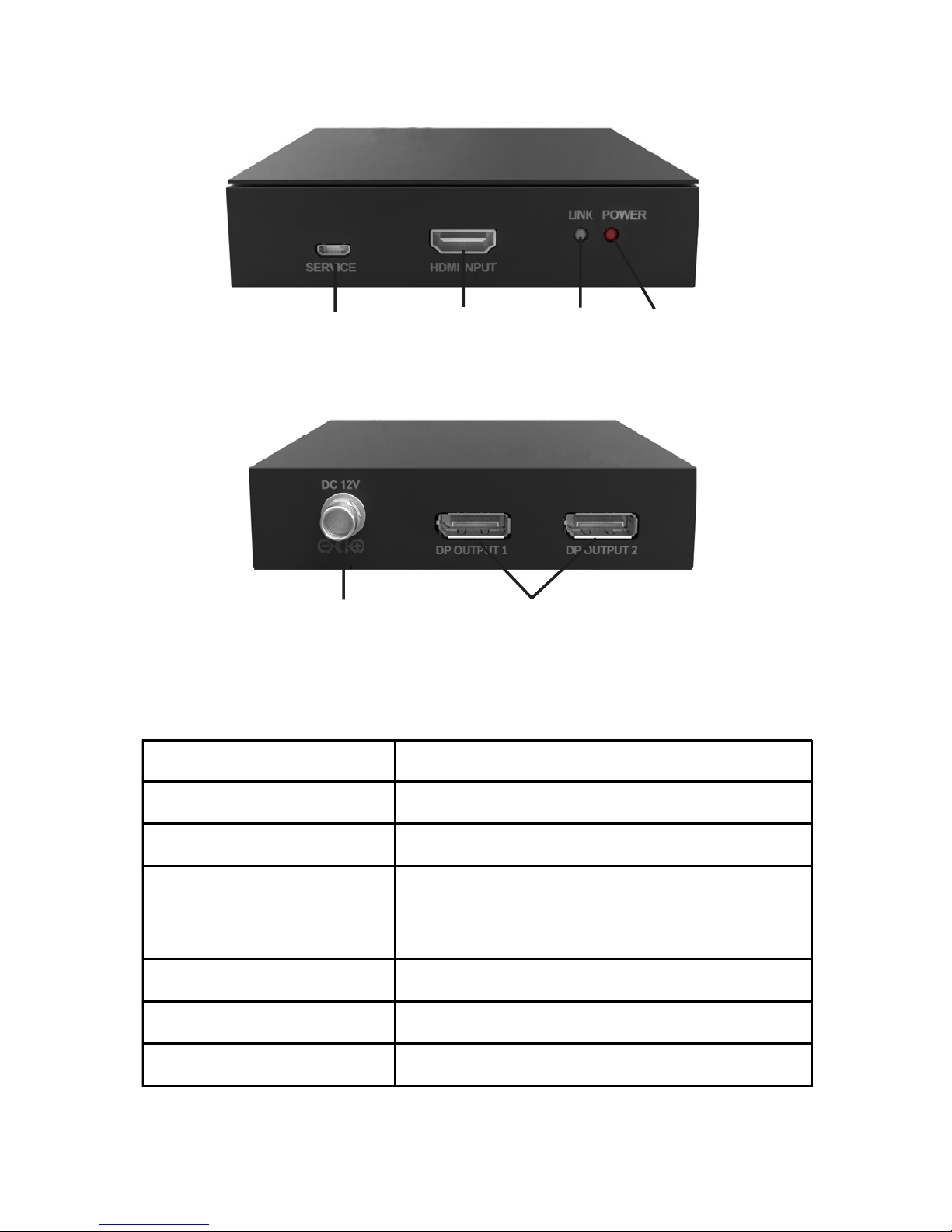
Product Layout
Figure 1: Front Panel
Figure 2: Back Panel
Micro USB
HDMI Input
Link Power
Power Jack DisplayPort Outputs
Item Description
Micro USB Firmware update
HDMI Input HDMI source connection
Link LED
Off: Power Saving Mode
Blinking: Devices waiting to sync
On: Device sync successful
Power LED On when power up
Power Jack Connects to the included power adapter
DisplayPort Outputs Connects to DisplayPort displays
Page 6
6
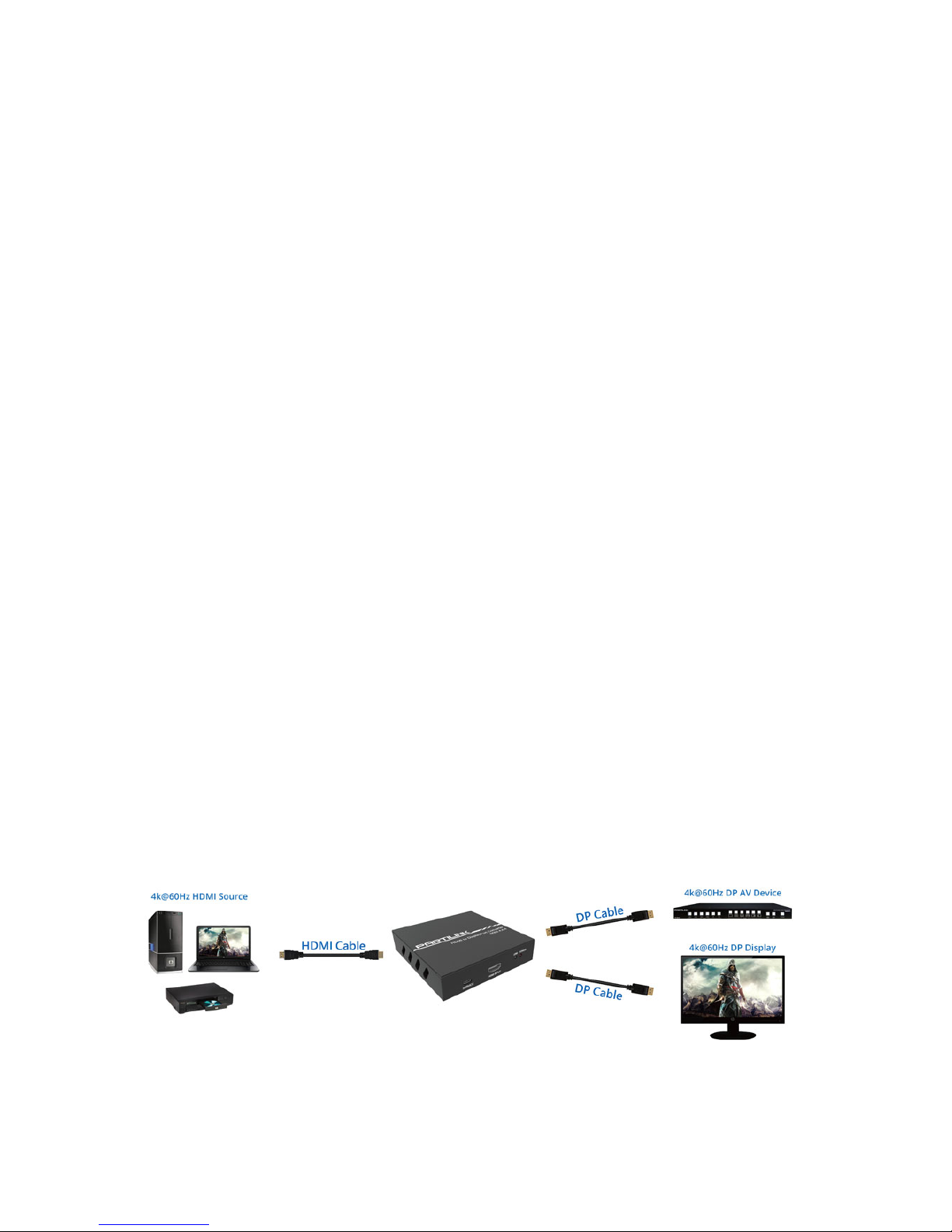
Application
The 2 DisplayPort outputs are in splitter mode,
you will see the same content on both displays.
Hardware Installation
1. Power off all devices including your HDMI
source and DisplayPort display(s).
2. Connect your HDMI source device to the
HDMI Input connector with an HDMI cable
(HDMI cable not included).
3. Connect your DisplayPort display(s) to the
DisplayPort output(s) with DisplayPort
cable(s) (DisplayPort cable not included).
4. Connect the power adapter to the Power
Jack and plug it into a reliable power outlet.
5. Power on all connected devices. The
converter is ready for use.
Page 7

7
Disclaimer
The product name and brand name may be
registered trademarks of related manufacturers.
TM and ® may be omitted on the user’s guide.
The pictures on the user’s guide are just for
reference, and there may be some slight
differences with the actual products.
We reserve the right to make changes without
prior notice to a product or system described
herein to improve reliability, function, or design.
Page 8

Thank you for choosing gofanco
www.gofanco.com
 Loading...