

Page 1
Page 2

Page 3
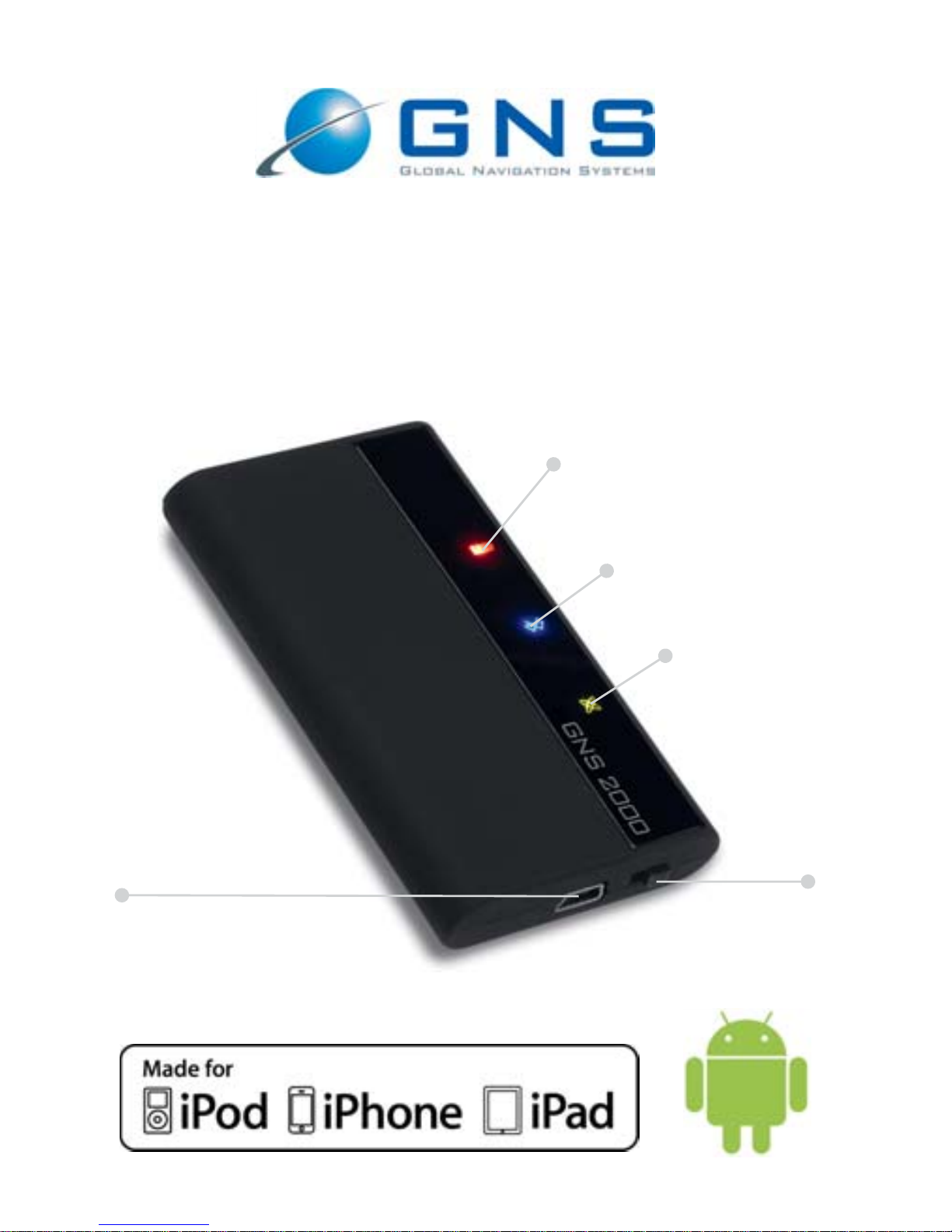
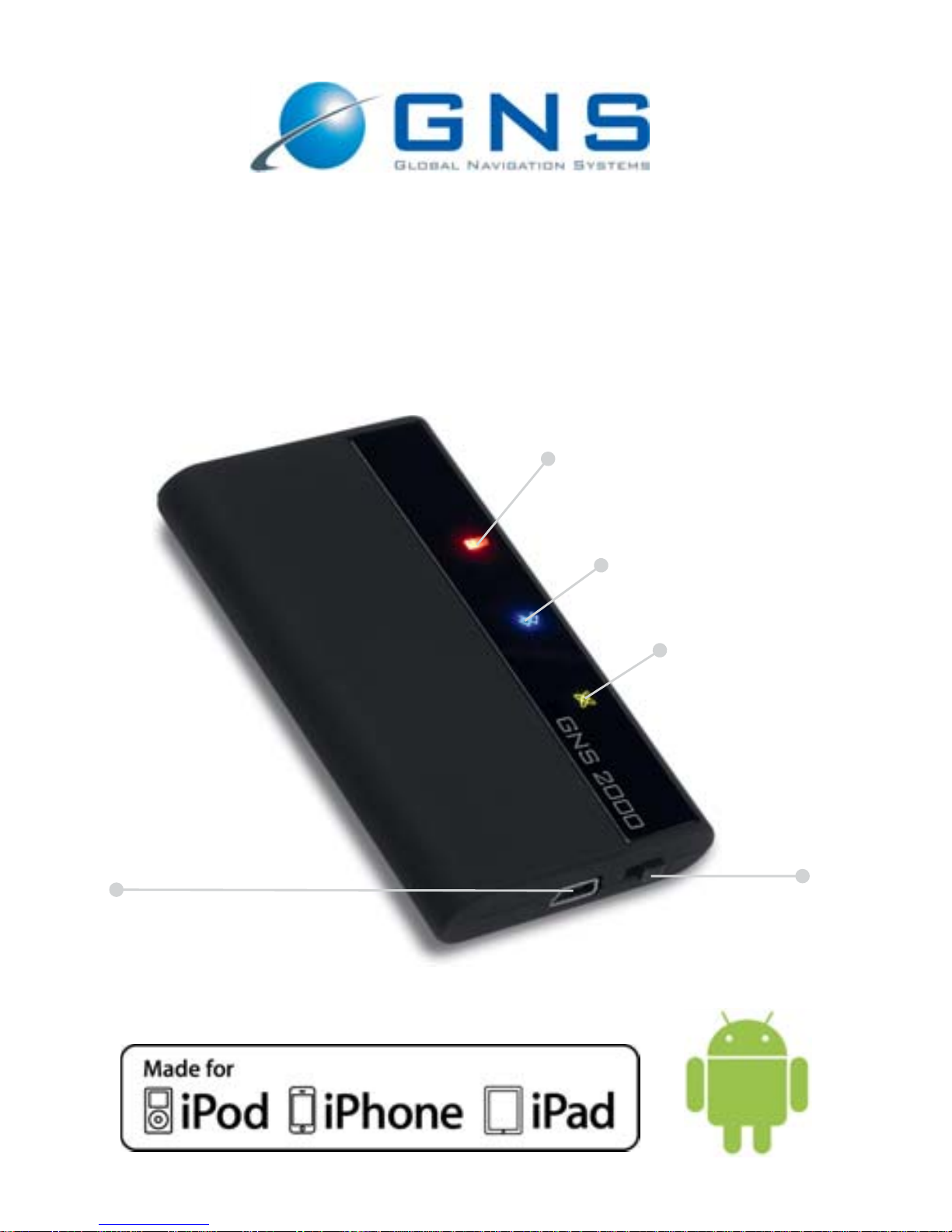
Charge indicator
Bluetooth status
GPS status
USB power supply jack
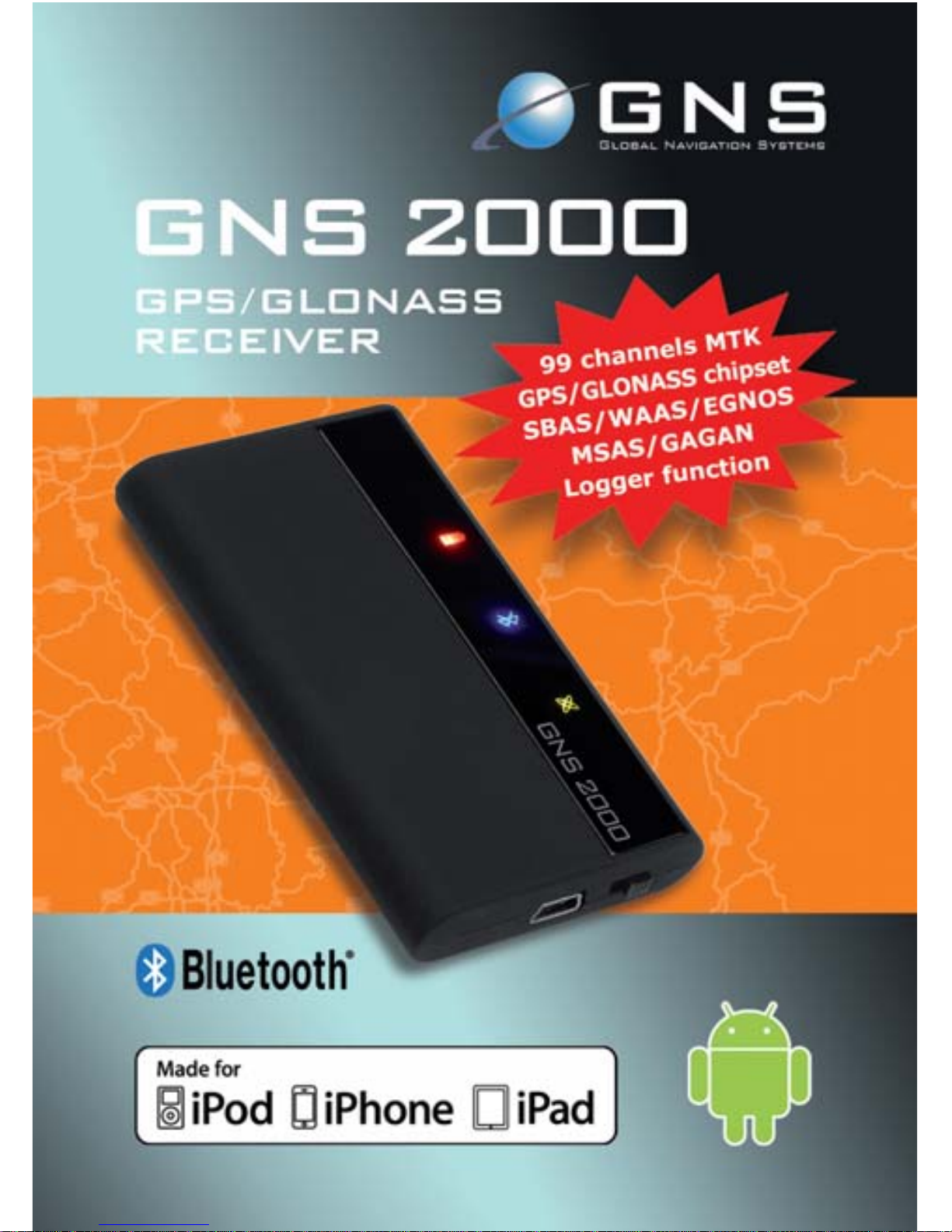
GNS 2000
GPS/GLONASS Receiver
Manual
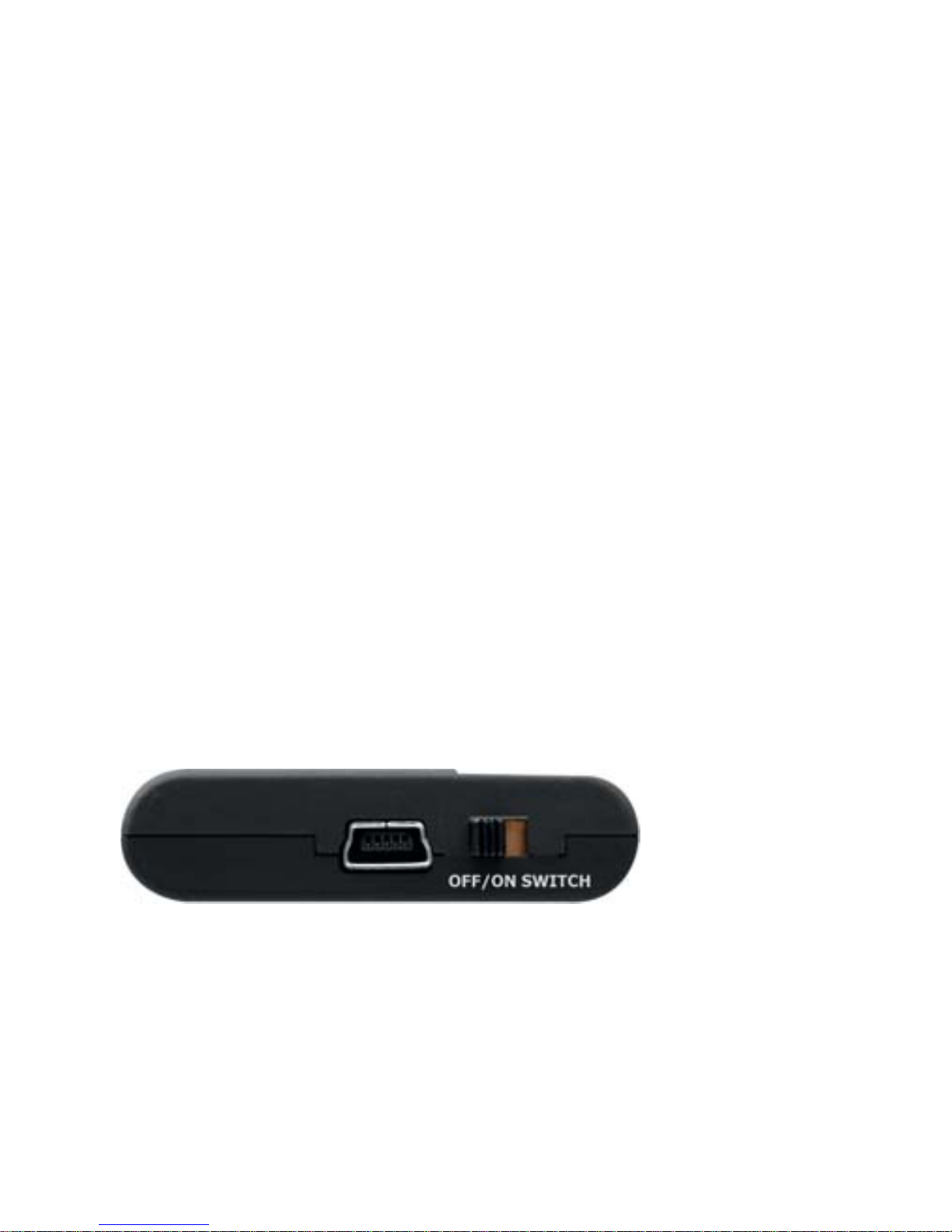
on-/off-switch
Page 4

Dear Customer,
thank you for purchasing the GNS 2000. Please read the fol
lowing information carefully to ensure problem-free and op
timal functionality.
The GNS 2000 is a GPS/GLONASS receiver with Bluetooth
technology. The powerful 99-channel GNSS receiver allows
simultaneous reception of GPS and GLONASS signals. The
GNS 2000 supports the SBAS System for accuracy impro
vement, all worldwide standards (WAAS, EGNOS, QZSS,
MSAS, GAGAN) are supported. With the GNS 2000 again
a highly sensitive Bluetooth GPS receiver is available. With
its GNSS technology it supplies Apple´s iPod touch 2G,
3G,4G, iPhone 3G, 3GS, 4, 4S, 5 (starting with iPhone OS
3.0.1), iPad, iPad2, iPad3, iPad4, iPad mini as well as
Android devices (starting with Android 2.3 Gingerbread)
and other handhelds (Smart Phones, PDAs, Notebooks)
with highly accurate position information.
Safety notices
· Never manipulate or adjust your GPS Navigation System
while driving.
· Safeguard the GNS 2000 from moisture; observe
the limits on operating and storage temperatures.
· This device contains a Li-Ion battery and should only be
operated at temperatures between 0° and 50° C.
Do not expose the GNS 2000 to direct sunlight or heat.
· Do not open or modify. Failure to comply will result in the
guarantee and warranty becoming void. There are no
components inside that can be serviced by the user.
· Only connect the GNS 2000 to the devices and connector
types described in these this instructionsmanual.
· Be sure to respect the laws of the country you are in with
respect to operation of devices whilst driving.
· Do not operate the GNS 2000 with a damaged cord
or if the unit has been dropped or damaged.
· Do not bend the cable forcibly or place a heavy object
on it. This will damage the cord and may cause fire or
electrical shock.
Page 5
· Ensure that your GNS 2000 is firmly fixed in your car to
avoid damage.
Package contents
· GNS 2000 GPS/GLONASS BT Receiver
· Cigarette-lighter charger device and charger cable
· Suction mount
· This instruction booklet
Should anything be missing, please contact your dealer.
Operating buttons and LEDs
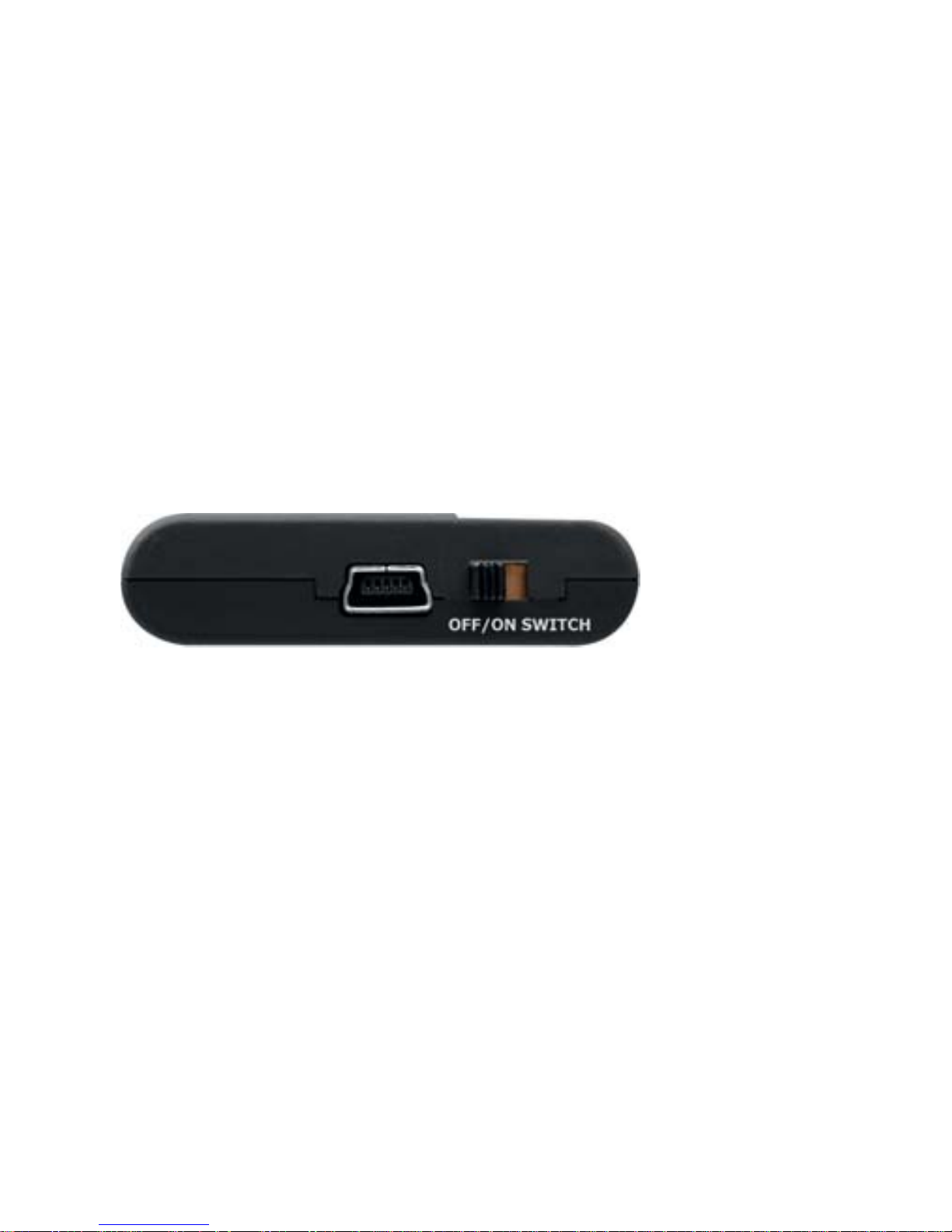
The GNS 2000 has a physical on-/off-switch.
To switch on your GNS 2000, move the switch from left to
the right and from right to the left to switch off.
Logger Function
The GNS 2000 provides a logger with a 15 hour internal
memory. After 15 hours of independent position data
collection the data is overwritten automatically.
To turn on the logger function, please use the switch as
follows: Switch the device on and then (within one second)
switch it off and on again. The green GPS LED will flash
3 times to confirm that the logger function is activated.
During operation the activity of the logger is indicated by
the green LED going out briefly every second while a GPS
fix is available. To deactivate the logger function, switch off
the device as usual.
Using the GNS tool GNS2000Track the logged data can be
transferred to your computer and saved in NMEA- or KML (Google Earth) format. GNS2000Track can be down-
loaded from our webpage, please pay attention to the listed
compatibility information.
Page 6
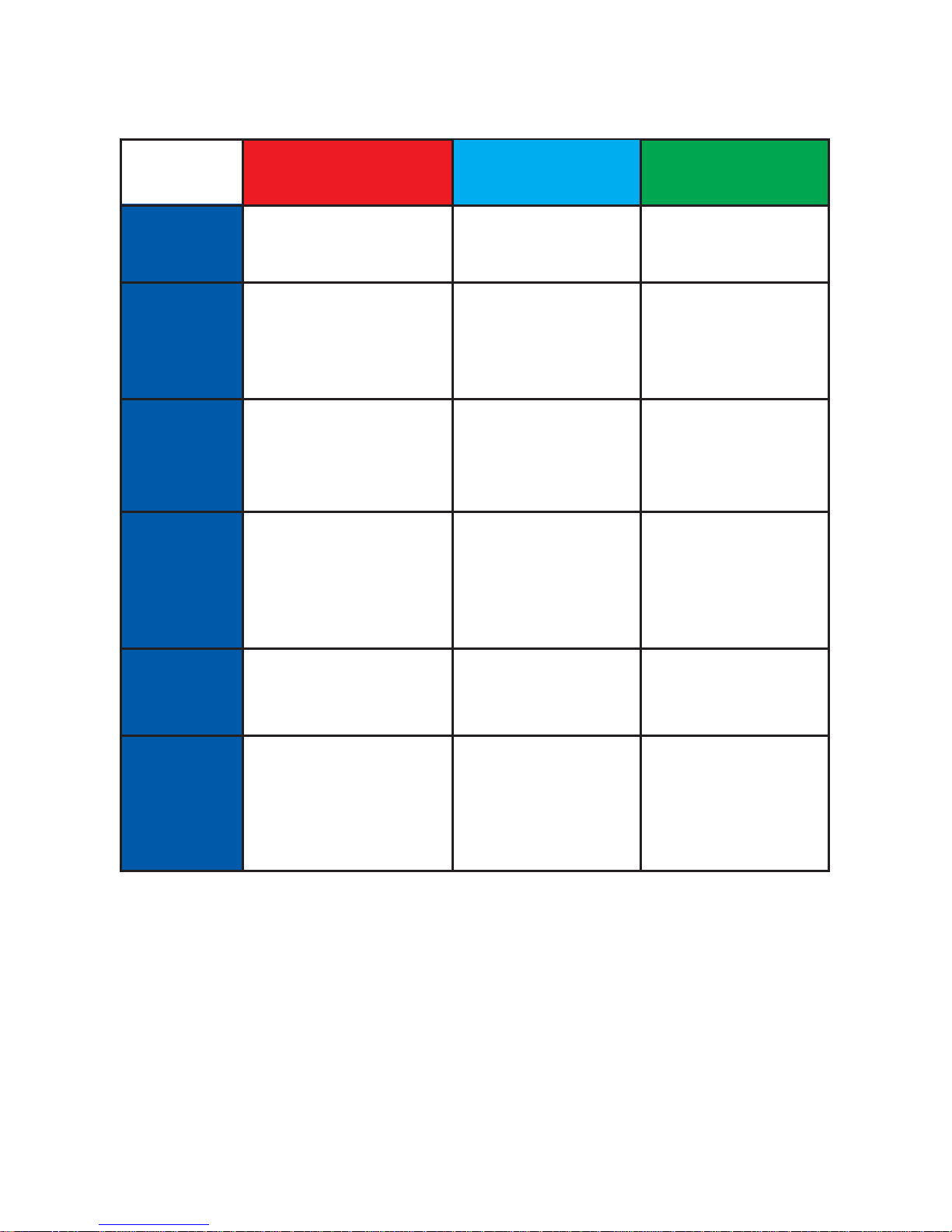
Illuminated display
Charging
The GNS 2000 is equipped with a Li-Ion rechargeable
battery. Operating times are in excess of 10 hours.
For charging (charging time approx. 3.5 hours) connect the
charging cable as supplied to the cigarette-lighter charger
device and the GNS 2000. The red indicator light blinks to
indicate that the device is charging. You can also use the
loading cable to charge the GNS 2000 at PC USB connectors.
off
on
blinking
fast
blinking
flashes
3 times
On with
short
inter-
ruptions
charging
light
normal battery
operation
Charger cable
attached,battery
fully charged
Charger cable
attached,battery
charging
Battery almost
empty, device
switching off in
about 10 mins
Bluetooth
status
GNS 2000 is off
Bluetooth
connection
established
No Bluetooth
connection
established
GPS
status
GNS 2000 is off
GPS position
available
GPS position
not (yet)
available
Logger
is activated
GPS position is
available and
position data is
recorded (logged)
Page 7

Installation and Bluetooth mode
Position the GNS 2000 so that it has an unobstructed view
of the sky. Secure the receiver to avoid slipping. Switch on
the GNS 2000. Activate the Bluetooth mode in your Apple-
/ Android device / PDA / PC and initiate a search for the
GNS 2000 with your Apple / Android / PDA / Handheld /
tablet / PC devices Bluetooth manager. This is described
in the manual for your device. When you are asked for the
PIN to establish the link, enter 0000.
Start your navigation software and select the appropriate
interface under the GPS settings if required.
The GNS 2000 can be connected to several Android devices
or SPP (serial port profile) devices simultaneously. For Apple
( IOS) devices only one exclusive connection at the same
time is possible.
Special feature for Apple devices: After the first connection
with an Apple device, the connection will be automatically
re-established when restarting the GNS 2000.
This automatic connection establishment will be interrupted
when you connect your GNS 1000 with another device
intermediately.
Operation over car ignition
For fixed and unfixed installation and operation in motor
vehicles with 12-24V power supply.
Due to the power management features described below
the GNS 2000 is prepared for fixed installation in motor
vehicles. If your vehicle is equipped with a cigarette lighter
socket which is connected to the car ignition and the GNS
2000 is connected via the included charging adapter and
the USB cable, the GNS 2000 will turn on automatically
when the car ignition is activated and will shut down automatically 15 minutes after switching off the car ignition (on/off
switch of the GNS 2000 has to be in the position on).
Page 8

Power management
1. Without external power supply (cable/car ignition off)
the GNS 2000 will shut down automatically after 15 minutes
without a Bluetooth connection to reduce battery consumption
2. The GNS 2000 can be turned on again easily using the
on/off switch or by powering the device with an external
charging cable.
Reset
For technical reasons the GNS 2000 is not equipped with
a RESET switch. If you should experience an unexpected
malfunction - e.g. no data is sent or the partner device does
not recognize the GNS 2000 - please simply plug in the
external charging cable to perform a full RESET. An existing
Bluetooth connection should be terminated first.
Approvals
The declaration of conformity is available from the manufacturer.
CE: The GNS 2000 satisfies the R&TTE directives (99/5/EC),
the EMC directives (2004/108/EC) and the low voltage
directive (2006/95/EC) as issued by the EU commission.
FCC: This device conforms to FCC Part 15 subpart B,
section 15.247 regulations.
R&TTE Bluetooth EMC: This device also complies with EN
62479:2010 ; EN 60950-1:2006+A1+A11+A12;
EN 301 489-1 V1.9.2; EN 301 489-17 V2.1.1; EN 300 4402 V1.4.1; EN 300 328 V1.7.1 and is listed under Bluetooth
Qualified Products.
Although the GNS 2000 conforms to the current strict
guidelines and norms it cannot be guaranteed that other
devices will not be affected by interference.
Page 9
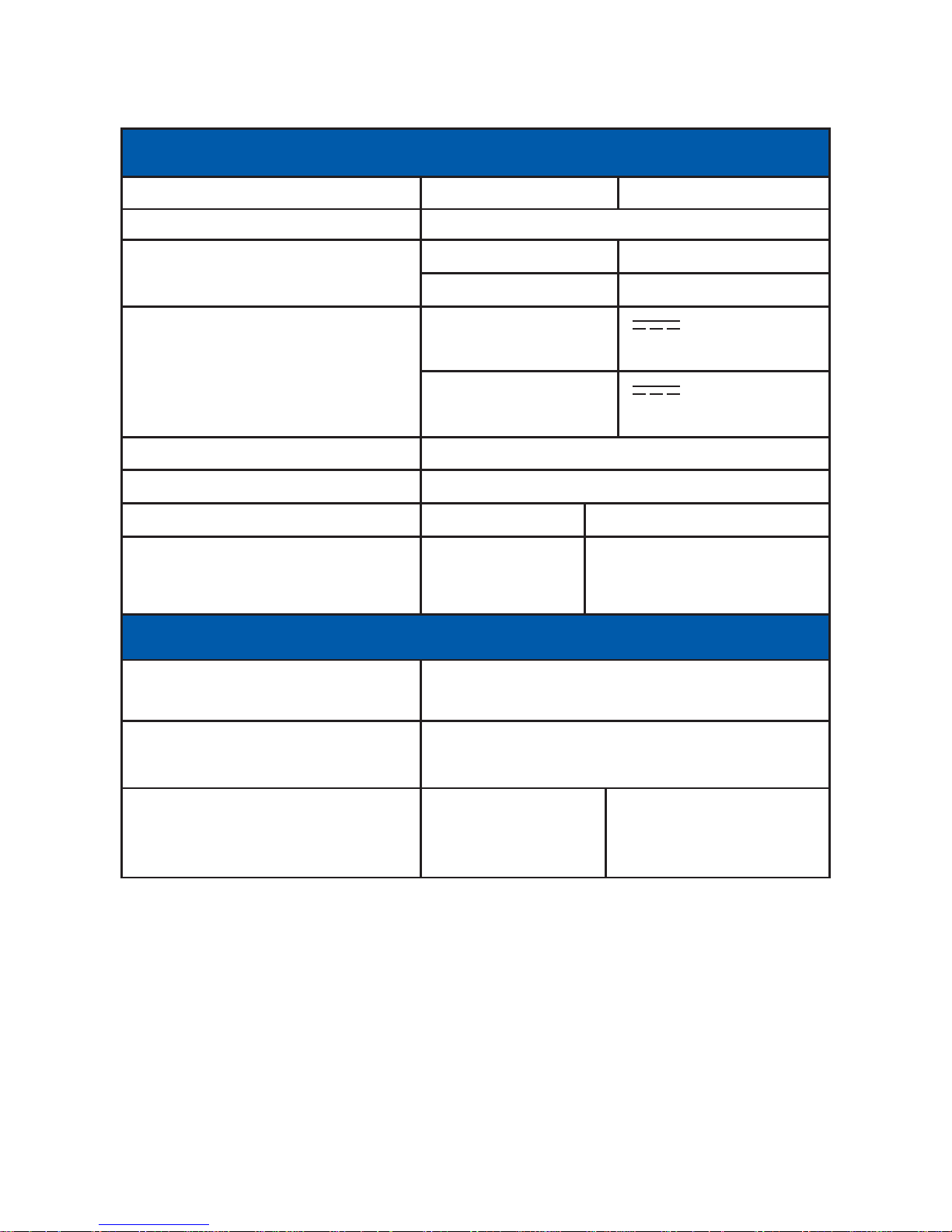
Technical Data
Safety notice, Bluetooth operation
Bluetooth should not be used in the proximity of the following
devices or in the following locations:
Medicinal devices, pacemakers, automatic control devices,
automatic doors, fire alarms, aeroplanes, public transport.
If you are unsure if the operation of wireless devices is
permitted in certain environments, please enquire before
operating the device.
General
Weight GNS 2000 only ca. 47 g
Dimensions 79.1mm x 45.3mm x 11.3mm
Ambient temperatures Storage -10..+50°C
Operation - 0..+50°C
Power supply Charging & 5.0V DC
and consumption operation (+-5%) 500mA
Via car adapter 12..24VDC
10..300mA
Battery operating time > 10 h
Battery charging time 0-90% ca. 3.5h
Connectors Supply Mini-USB socket
Data interface Via Bluetooth multi connection
only for Android
and SPP devices
GPS
Chip set MediaTek MTK 3333 99-channel
GPS & GLONASS receiver
GPS SBAS (default) [WAAS, EGNOS,
QZSS, MSAS, GAGAN]
Typical start times Cold start 35 s
Warm start 33 s
Hot start < 1 s
Page 10

WEEE declaration
This device is labelled in accordance with the European
directive 2002/96/EG concerning waste electrical and
electronic equipment WEEE. The directive sets down a
Europe-wide framework for the return and recycling of endof-life devices. WEEE reg. no. DE 30136236.
Warranty notice
The product is to be repaired at no cost within the legal
warranty period of 24 months assuming that there is no
damage though third-party interference, moisture, being
dropped, or other improper handling.
The internal Li-Ion accumulator has a warranty period of 6
months and is excluded from the 24 months warranty!
Page 11

Technical Support
GNS GmbH
Adenauerstrasse 18
D-52146 Würselen
Telefon +49 (0) 24 05 / 41 48 - 0
Telefax +49 (0) 24 05 / 41 48 - 19
www.gns-gmbh.com
[email protected]
Brands, trademarks, product descriptions and logos from third parties used in these
instructions may be trademarks or registered trademarks of their respective owners.
Made for iPhone means that an electronic accessory has been designed to connect
specifically to iPhone and has been certified by the developer to meet Apple per
formance standards. Apple is not responsible for the operation of this device or
its compliance with safety and regulatory standards.
Android is a trademark of Google Inc.
V 1.1 EU © 2013 by GNS GmbH
Reproduction in whole or in part
only with the permission of GNS GmbH
Subject to change without notice
Made in Germany
Page 12

Page 13
Ladekontrolle
Bluetooth Status
GPS Status
USB Ladebuchse
GNS 2000
GPS/GLONASS Receiver
Anleitung
Ein-/Aus-Schalter
Page 14

Sehr geehrte(r) Kundin/Kunde,
Wir bedanken uns dafür, daß Sie sich für ein qualitativ
hochwertiges und zuverlässiges GNS-Produkt entschieden
haben! Alle GNS-Produkte werden bei uns einem intensiven
Funktionstest unterzogen. Bitte lesen Sie die folgenden
Informationen sorgfältig, um einen problemlosen Betrieb
und eine optimale Funktion zu erhalten.
Der GNS 2000 ist ein GPS/GLONASS Empfänger mit
Bluetooth-Technologie. Der leistungsfähige 99-Kanal GNSS
Empfänger erlaubt den simultanen Empfang von GPS und
GLONASS Empfangsdaten. Der GNS 2000 unterstützt das
SBAS System zur Verbesserung der Positionsgenauigkeit,
alle weltweiten Standards (WAAS, EGNOS, QZSS, MSAS,
GAGAN) werden unterstützt. Mit dem GNS 2000 steht ein
weiterer hochempfindlicher Bluetooth GPS Empfänger
zur Verfügung. Dank seiner GNSS Technologie versorgt er
sowohl Apple´s iPod touch 2G, 3G, 4G, iPhone 3G, 3GS,
4, 4S, 5 (ab iPhone OS 3.0.1), iPad, iPad2, iPad3, iPad4,
iPad mini als auch Android Geräte (ab Android 2.3
Gingerbread) und andere Handhelds (Smart Phones, PDAs,
Notebooks) mit höchst genauen Positionsdaten.
Sicherheitshinweise
· Bedienen Sie Ihr GPS-Navigationssystem niemals während
der Fahrt
· Schützen Sie den GNS 2000 vor Feuchtigkeit und halten
Sie die Betriebs- und Aufbewahrungstemperaturlimits ein.
· Dieses Gerät enthält eine Li-Ion-Batterie und sollte nur
zwischen 0° C und 50° C betrieben werden. Setzen Sie
den GNS 2000 nicht direktem Sonnenlicht oder Hitze aus.
· Öffnen oder modifizieren Sie den GNS 2000 nicht,
ansonsten verfällt die Garantie. Im Innern sind keine Teile
vorhanden, die durch den Benutzer gewartet werden können.
· Schließen Sie den GNS 2000 nur an die in der Anleitung
angegebenen Anschlüsse an.
· Vergewissern Sie sich, dass Sie die Gesetze des Landes
bezüglich der Benutzung von Geräten im Fahrzeug ein
halten, in dem Sie sich gerade befinden.
Page 15
· Benutzen Sie den GNS 2000 nicht mit beschädigtem
Kabel oder nachdem es heruntergefallen ist oder
beschädigt wurde.
· Knicken Sie Kabel nicht und stellen Sie keine schweren
Gegenstände darauf. Dies kann das Kabel beschädigen
und zu Feuer oder Stromschlägen führen.
· Fixieren Sie den GNS 2000 in Ihrem Fahrzeug, damit
kein Schaden angerichtet werden kann.
Packungsinhalt
· GNS 2000 GPS/GLONASS BT-Empfänger
· Zigarettenanzünderladegerät und Ladekabel
· Spezial Befestigungslasche zur Fixierung des Gerätes
z.B. am Fenster
· diese Bedienungsanleitung
Sollte etwas fehlen, wenden Sie sich bitte direkt an Ihren
Händler!
Bedienelemente und LEDs
Der GNS 2000 besitzt einen physikalischen Ein-/Aus-Schalter.
Um Ihren GNS 2000 einzuschalten, schieben Sie den Schalter
von links nach rechts. Um das Gerät auszuschalten schieben
Sie den Schalter von rechts nach links.
Page 16

Loggerfunktion
Der GNS 2000 bietet eine Loggerfunktion mit einem internen
Speicher für 15 Stunden. Nach Erreichen der 15 Stunden
werden die zuerst aufgenommenen Logdaten automatisch
überschrieben.
Um die Loggerfunktion einzuschalten benutzen Sie bitte
den Schalter wie folgt: Den Schalter ein- und sofort (innerhalb
einer Sekunde) wieder aus- und dann wieder einschalten.
Die grüne LED blinkt daraufhin dreimal kurz, um den Start
der Loggerfunktion anzuzeigen.
Während des Betriebes wird die Aktivität des Loggers durch
sekündliches kurzes Verlöschen der grünen LED angezeigt,
jedoch nur, wenn eine GPS Position gefunden wurde (GPS
fix).
Zum Ausschalten der Loggerfunktion das Gerät wie gewohnt
ausschalten. Die geloggten Daten können mit dem GNS
tool GNS2000Track aus dem Gerät ausgelesen und im
NMEA-oder KML-(Google Earth) Format ausgegeben
werden. GNS2000Track kann von unserer Webseite herunter
geladen werden. Bitte beachten Sie die dort angegebenen
Kompatibilitätsinformationen.
Ladefunktion
Der GNS 2000 ist mit einem Li-Ion-Akku ausgestattet. Die
Laufzeit beträgt hiermit über 10 Stunden. Zum Aufladen,
Ladezeit ca 3,5 Stunden, verbinden Sie das mitgelieferte
Ladekabel mit dem Zigarettenanzünder-Ladegerät und dem
GNS 2000. Die rote Leuchtanzeige beginnt zu blinken, um
den Ladevorgang anzuzeigen. Sie können das Ladekabel
auch verwenden um den GNS 2000 über den USB Anschluss
eines PCs aufzuladen.
Page 17

Leuchtanzeigen
Inbetriebnahme Bluetoothbetrieb
Platzieren Sie Ihren GNS 2000 so, dass er eine freie Sicht
zum Himmel hat. Sichern Sie den Empfänger gegen Verrut
schen. Schalten Sie den GNS 2000 ein.
Schalten Sie in Ihrem Apple Gerät / Android Gerät / PDA /
PC den Bluetooth-Betrieb ein und lassen Sie den Bluetooth-
Manager Ihres Gerätes nach GNS 2000 suchen.
aus
an
blinkt
blinkt
schnell
blinkt
3 mal
an mit
kurzen
Unterbrech-
ungen
Ladekontrolle
normal
Ladekabel ange-
schlossen, Akku
ist voll geladen
Ladekabel ange-
schlossen, Akku
wird geladen
Akku fast leer
Gerät schaltet
nach ca. 10min ab
Bluetooth
Status
GNS 2000 is aus
Bluetooth
Verbindung
hergestellt
(noch) keine
Bluetooth Verbin-
dung hergestellt
GPS
Status
GNS 2000 is aus
GPS Position
wird empfangen
GPS Position
(noch) nicht
verfügbar
Logger Funktion
wurde aktiviert
GPS Position ist
verfügbar und
Positionsdaten
werden aufge-
zeichnet (Logger)
Page 18

Die Beschreibung für die Einrichtung von Bluetooth-Geräten
entnehmen Sie bitte Ihrem Gerätehandbuch. Geben Sie bei
der PIN Anfrage zur Kopplung bitte 0000 ein.
Starten Sie Ihre Navigationssoftware und stellen Sie, wenn
nötig, unter GPS Einstellungen die entsprechende Schnitt
stelle ein.
Der GNS 2000 kann mit Android- und SPP (serial port profile)
Geräten mehrere Bluetooth-Verbindungen gleichzeitig auf
bauen. Bei Apple (IOS) Geräten ist nur je eine Verbindung
möglich.
Besonderheit bei Apple Geräten: Nach der ersten Installation einer Verbindung mit einem Apple Gerät wird diese
automatisch wieder aufgebaut, wenn der GNS 2000 eingeschaltet wird.
Dieser automatische Verbindungaufbau wird unterbrochen,
wenn zwischenzeitlich eine Bluetooth-Verbindung zwischen
Ihrem GNS 2000 und einem anderen Gerät aufgebaut wurde.
Betrieb über Automobil Zündung
Für Fest- und Mobilinstallation in Motorfahrzeugen mit
12-24V Stromversorgung.
Aufgrund des unten beschriebenen Strom-Managements
ist der GNS 2000 auch zum Festeinbau in Motorfahrzeugen
vorbereitet. Wenn Ihr Fahrzeug über eine ZigarettenanzünderBuchse verfügt, welche mit der Zündung geschaltet wird,
kann der GNS 2000 über den mitgelieferten Ladeadapter
dort angeschlossen werden. Wenn sich der Ein/Aus-Schalter
in der Position Ein befindet, schaltet sich der GNS 2000
an, sobald die Zündung des Fahrzeugs aktiviert wird und
schaltet sich automatisch 15 Minuten nach dem Abschalten
der Zündung wieder ab.
Strom Management
1.Ohne externe Stromversorgung (Kabel/ Zündung aus)
schaltet sich das Gerät , sofern keine Bluetooth Verbindung
besteht, nach 15 Minuten automatisch ab, um den Akku zu
schonen.
Page 19

2. Um den GNS 2000 wieder einzuschalten, benutzen Sie
den Ein/Aus Schalter und/oder verbinden Sie das Gerät
wieder mit der externen Stromversorgung.
Reset
Es steht aus technischen Gründen kein Reset-Schalter mehr
zur Verfügung. Sollte es dennoch zu einer unerwarteten Betriebsstörung kommen kann der GNS 2000 durch Einstecken
des Mini-USB Ladekabels zurückgesetzt werden. Eine bestehende Bluetooth Verbindung sollte vorher beendet werden.
Zulassungen
Die Konformitätserklärung kann beim Hersteller angefordert
werden.
CE: Der GNS 2000 entspricht der R&TTE-Richtlinie (99/5/EC),
der EMC-Richtlinie (2004/108/EC) und der
Niederspannungsrichtlinie (2006/95/EC), herausgegeben
von der EU-Kommission.
FCC: Dieses Gerät ist konform mit FCC part 15, subpart B.
R&TTE Bluetooth EMC Norm: Dieses Gerät erfüllt ebenfalls
die EN 62479:2010 ; EN 60950-1:2006+A1+A11+A12;
EN 301 489-1 V1.9.2; EN 301 489-17 V2.1.1; EN 300 4402 V1.4.1; EN 300 328 V1.7.1 und ist unter Bluetooth Qualified
Products gelistet.
Obwohl der GNS 2000 den momentanen strengen Richtlinien
entspricht, ist es nicht möglich, zu garantieren, dass keine
anderen Geräte durch Interferenz gestört werden.
Sicherheitshinweise zum Bluetoothbetrieb
Bluetooth sollte in der Nähe von folgenden Geräten und an
folgenden Orten nicht eingesetzt werden:
Medizinische Geräte, Herzschrittmacher, automatische
Kontrolleinrichtungen, Automatische Türen, Feuermelder,
Flugzeuge, Öffentliche Verkehrsmittel. Wenn Sie sich nicht
sicher sind, ob drahtlose Geräte in einer bestimmten
Umgebung verwendet werden dürfen, sollten Sie sich
erkundigen, bevor Sie die Geräte benutzen.
Page 20
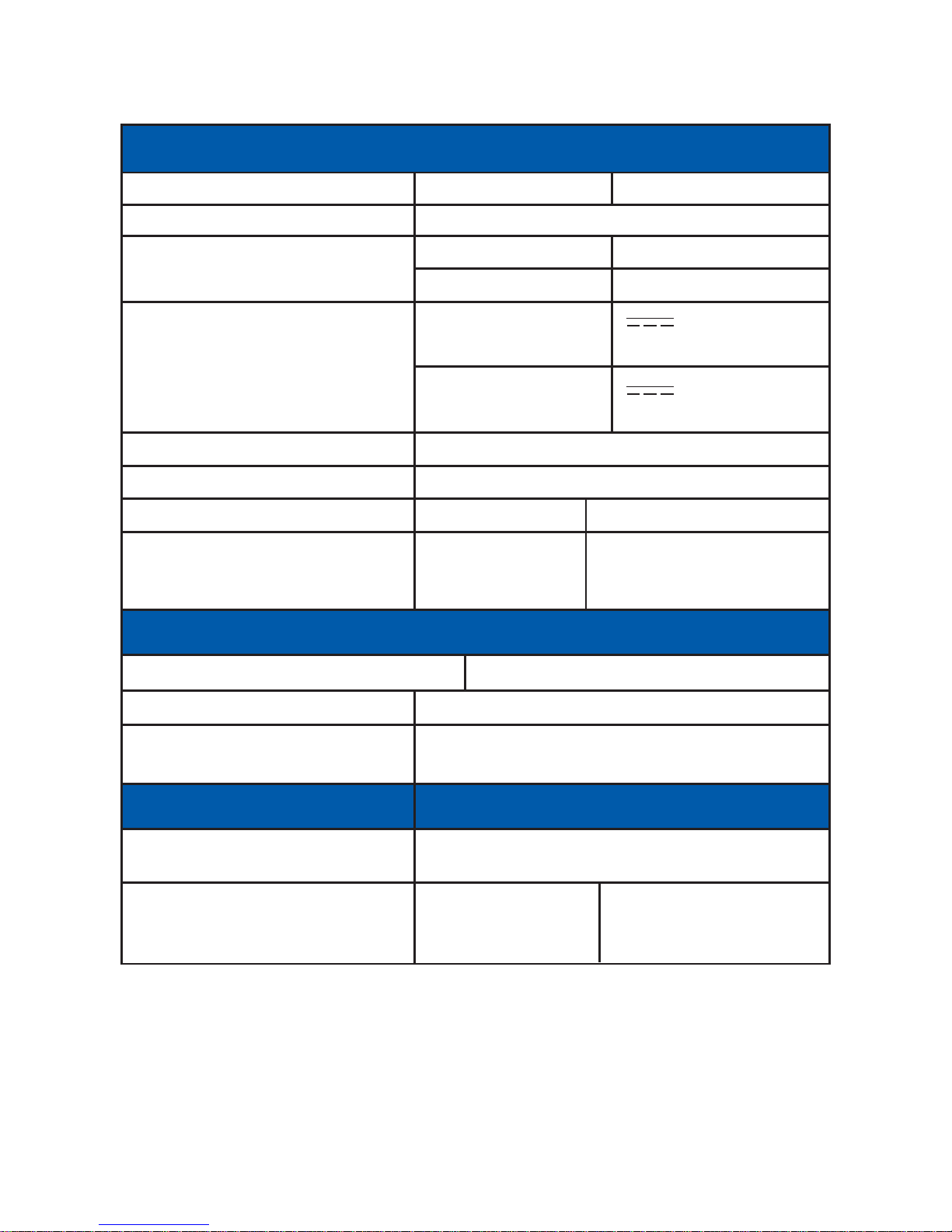
Gewicht GNS 2000 ca. 47 g
Maße 79.1mm x 45.3mm x 11.3mm
Umgebungstemperatur Aufbewahrung -10..+50°C
in Betrieb - 0..+50°C
Energieversorgung Laden & Betrieb 5.0V DC
und -bedarf (+-5%) 500mA
über Autoadapter 12..24V DC
10..300mA
Akku Laufzeit > 10 h
Akku Ladezeit 0-90% ca. 3.5h
Anschlüsse Versorgung Mini-USB Buchse
Datenschnittstelle über Bluetooth Mehrfach-Verbindung
nur bei Android- und
SPP Geräten möglich
Class2 Bluetooth V2.1 + EDR
Reichweite typ. 10m
Chipsatz MediaTek MT 3333 99-Kanal
GPS & GLONASS Empfänger
GPS SBAS(default) [QZSS, WAAS, EGNOS,
MSAS, GAGAN]
Typische Startzeiten Cold start 35 s
Warm start 33 s
Hot start < 1 s
Allgemein
Bluetooth
GPS
Technische Daten
Page 21

Garantiehinweis
Das Produkt wird innerhalb der gesetzlichen Garantiezeit
von 24 Monaten kostenlos instand gesetzt, sofern
keineEinwirkungen durch Fremdeingriff, Feuchtigkeit, Sturz
oder andere Beschädigung durch unsachgemäße
Handhabung vorliegen.
Der interne Li-Ion-Akku hat eine Garantiezeit von 6 Monaten
und ist von der 24 Monate Garantie ausgenommen!
Page 22

Technischer Support:
GNS GmbH
Adenauerstrasse 18
D-52146 Würselen
Telefon +49 (0) 24 05 / 41 48 - 0
Telefax +49 (0) 24 05 / 41 48 - 19
www.gns-gmbh.com
[email protected]
Marken, Handelsnamen, Produktbezeichnungen und Logos Dritter, die in dieser
Anleitung verwendet werden, sind möglicherweise Marken oder eingetragene Marken
der jeweiligen Rechtsinhaber.
Made for iPhone bedeutet, dass ein elektronisches Gerät speziell für die Verbindung
zu iPhone, iPod und iPad entwickelt und vom Entwickler zur Erfüllung der Apple
Funktionen zertifiziert wurde. Apple ist nicht verantwortlich für die Richtigkeit der Angaben zum Gerät oder der Erfüllung von Sicherheits- oder behördlichen Bestimmungen.
Android ist ein Warenzeichen der Google Inc.
V 1.1 EU © 2013 by GNS GmbH
Nachdruck, auch auszugsweise,
nur mit Genehmigung der GNS GmbH
Technische Änderungen vorbehalten
Made in Germany
Page 23

Notizen
Page 24
 Loading...