

Page 1
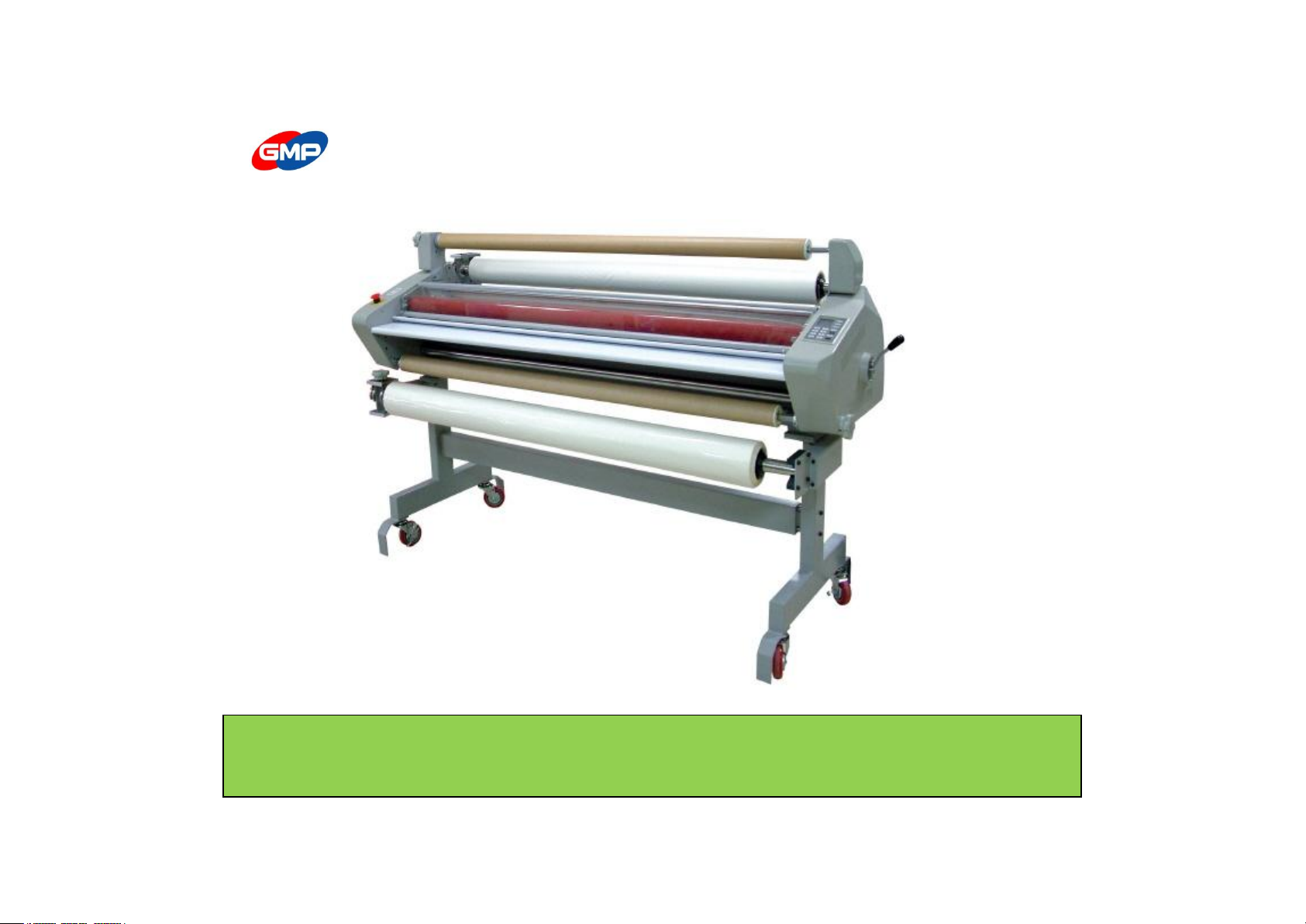
User Manual for EXCELAM-1100SWING
EXCELAM-1670SWING
Before operating the unit, please read this manual thoroughly and retain it for future reference.
※ The design / specification of the machine could be changed for improvement without any prior notice.
Page 2

INDEX
◐ SAFETY PRECAUTION ◐ HOW TO LAMINATE
Important Safety Instruction 3
page
Hot Laminating 23
page
Safety device 7
page
ULTRA-THIN OVERLAY COATING
27
page
Warning Sticker 8
page
(MICRONEX FILM LAMINATING)
Cold Laminating 30
page
◐ INSTALLATION
Mounting 32
page
Packing Contents 10
page
Part name 11
page
◐ LAMINATION GUIDE 33
page
Carriage and Installation 14
page
◐ PRODUCT MAINTENANCE 35
page
◐ USAGE OF CONTROL PANEL
Control Panel 16
page
◐ TROUBLE SHOOTING 36
page
Function Button 17
page
◐ PRODUCT SPECIFICATION 38
page
◐ USAGE OF MAIN DEVICE 20
page
◐ GMP SUBSIDIARIES 39
page
Page 3
IMPORTANT SAFETY INSTRUCTION
It is for the purpose of user's safety and prevention of the property loss.
Read thoroughly the following contents and use rightly according to the manual.
Safety instruction is classified as "Warning" and "Caution", the meaning is as follows;
Warning : If you ignore this symbol, you can suffer serious injury and sudden to death.
Caution : If you ignore this symbol, you can receive a severe wound and property loss.
This symbol means a prohibited action.
If you ignore a prohibited action, you can suffer a personal injury and damage by the result of machinery.
This symbol means a required action. If you don't follow this action, Your safety is not guaranteed.
Required action will be included in this symbol.
Reference : The sign above refers the contents for user's safety and prevention of Property loss.
3/39
Page 4
IMPORTANT SAFETY INSTRUCTION
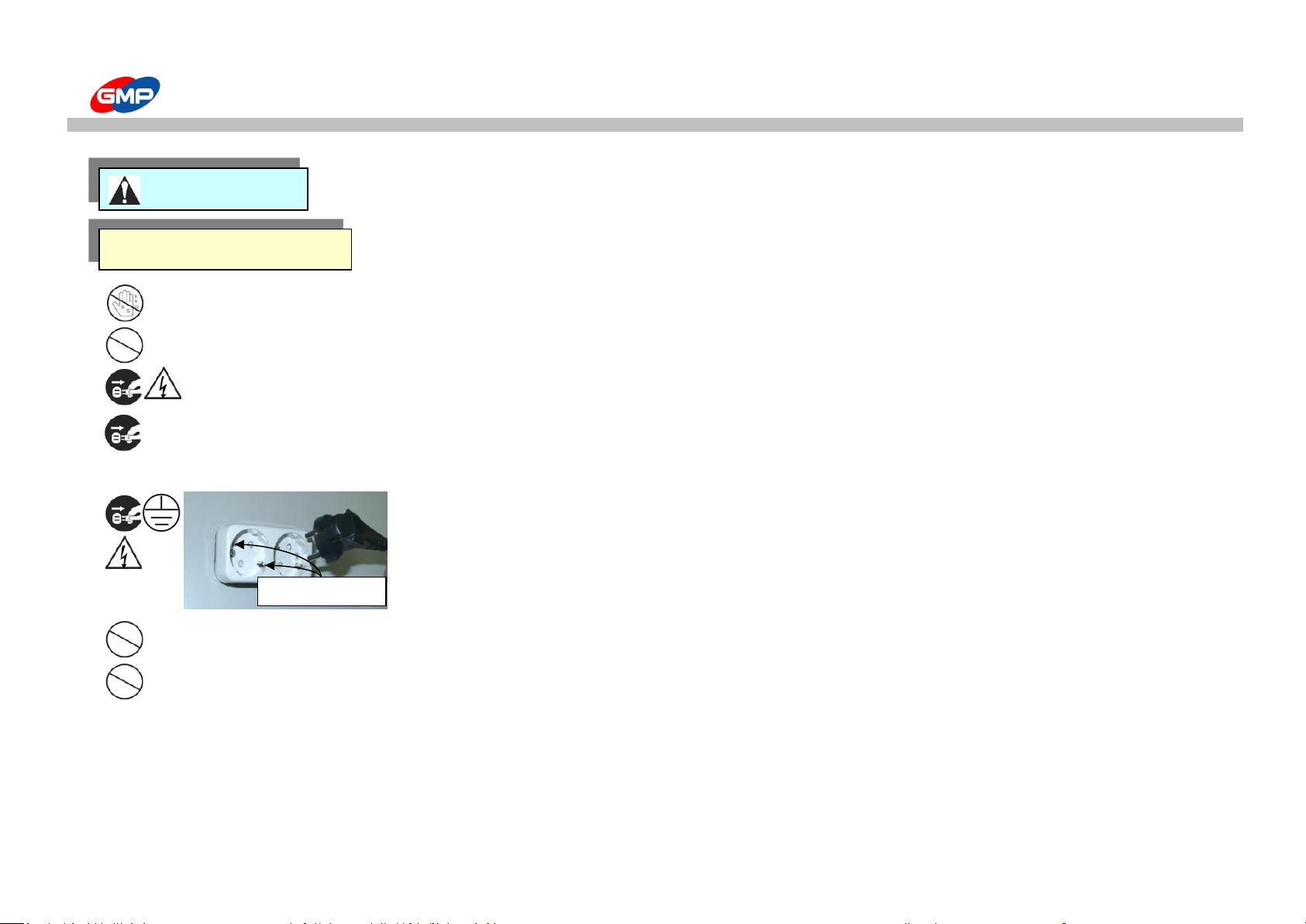
Connect or dissemble the power plug with a wet hand. It make a electric shock
Do not use more than one outlet with other products. The overheating of the outlet can be a main reason of a fire flame.
Do not use without a specified power supply and voltage. It makes a fire or an electric shock
Inset the power plug inside firmly. The overheating of an outlet can make a fire flame,
a malfunction and losing electricity make an electric shock.
Grounding is needed for your safety.
A malfunction and losing electricity make an electric shock.
Do not damage or transform a power cord and a plug. It is a main cause of a fire or an electric shock.
Do not curve the power cord or pull, press with a heavy weighted materials.
The power cord damage can make a fire or an electric shock..
POWER
GROUNDING
WARNING
4/39
Page 5
IMPORTANT SAFETY INSTRUCTION
Do not use materials near the heating place or flammable materials. It makes a fire flame.
Do not place nearby a place just like a dark place or slope
Do not use more than one outlet with other products. The overheating of the outlet can be a main reason of a fire flame
Do not dissemble, make repairs, convert. It makes a fire flame or an electric shock Contact with the purchase place about
the checks inside the laminator or making repairs.
Please, avoid wearing loose outfits such as a necktie, a necklace or shirts with a long lace.
Such an outfit might get stuck into the roller or the rotating part and you might be exposed to fatal injury.
Do not remodel the safety switch artificially. Refer servicing to qualified service personnel.
Do not put a kind of a water like liquid on the machine, It makes an electric shock or malfunction.
Do not use a flammable spray or flammable materials inside or outside the machine. It makes a fire flame
Keep away the machine from children. You can get burned or suffer an electric shock
When you move this product, Switch off and segregate the plug from the outlet. If the cord is damaged, it
make a fire or an electric shock.
If you left the machine for a long time, necessarily switch off and then segregate the plug from the outlet.
Installation & Usage
CAUTION
POWER
5/39
Page 6
IMPORTANT SAFETY INSTRUCTION
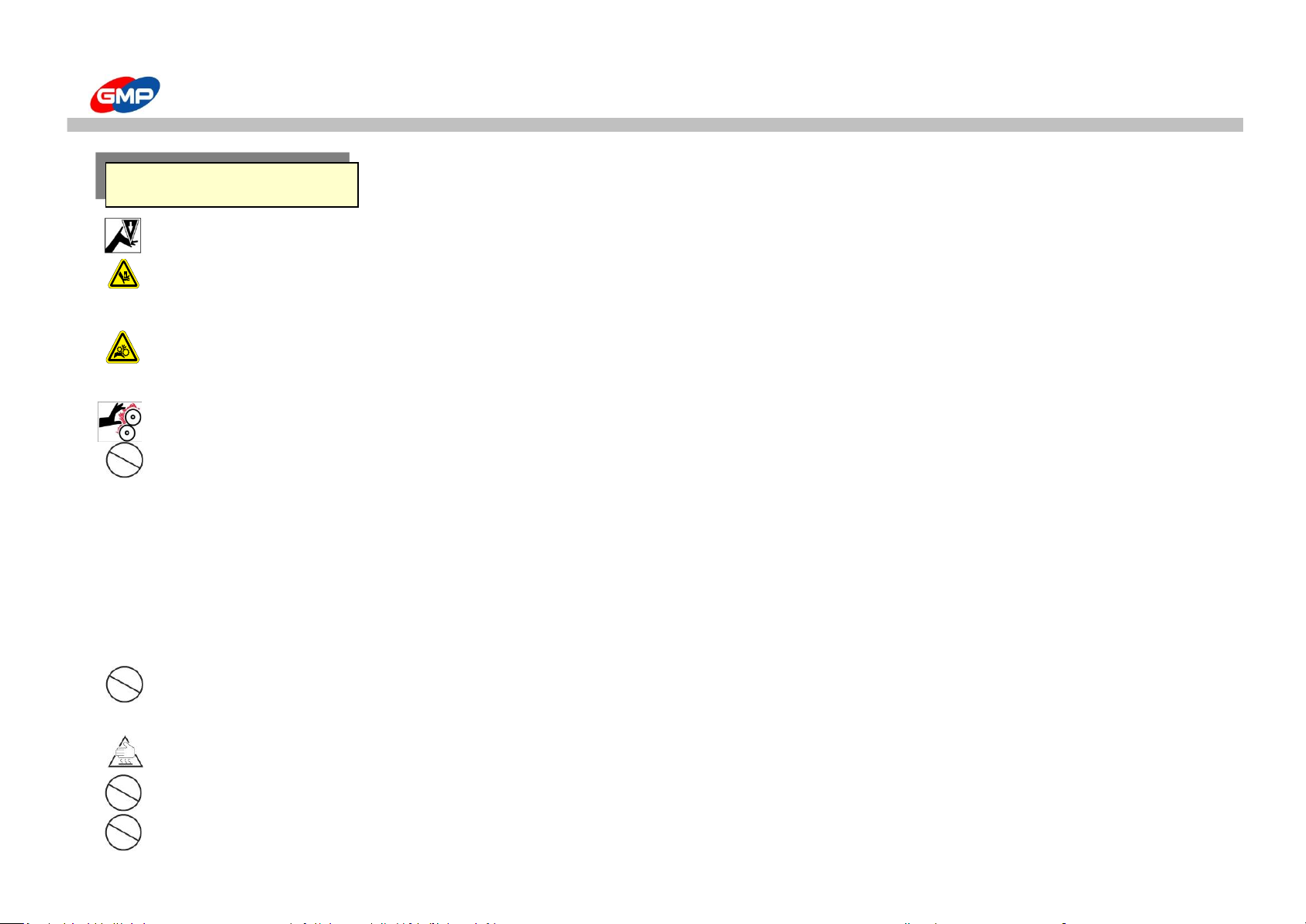
Take care of yourself from wound by cutting knife.
This product is too heavy so, necessarily a lot of people should carry the product when unpacking or carrying,
if you don't , it makes a product damage or personal injury
Be careful not to allow a part of your body or other alien substance wound into the gear or the chain.
That's the reason for injury and malfunction of the machine.
The laminating roller is very hot. If your body contacts it, you might suffer a burn.
Please avoid installing near the following places;
- Gas stove, Ventilator or Air conditioner due the higher temperature or higher humidity
- Do not place any materials on the laminator as they could catch a fire
- Avoid the direct sunlight for the installing the machine
- Make sure no vibration and dusts are found in the place during the installation.
- Avoid the dark and slope place for installation
Don't place an object on the product. The upper part of the main body is hot, objects on the surface will be deformed
or the equipment will malfunction.
During operation, the upper part of the machine and the film right after laminating are very hot. You might suffer a burn injury.
Do not use except laminating. It is a main reason of an accident or malfunction
Please arrange the surrounding during laminating.
Installation & Usage
6/39
Page 7
SAFETY DEVICE
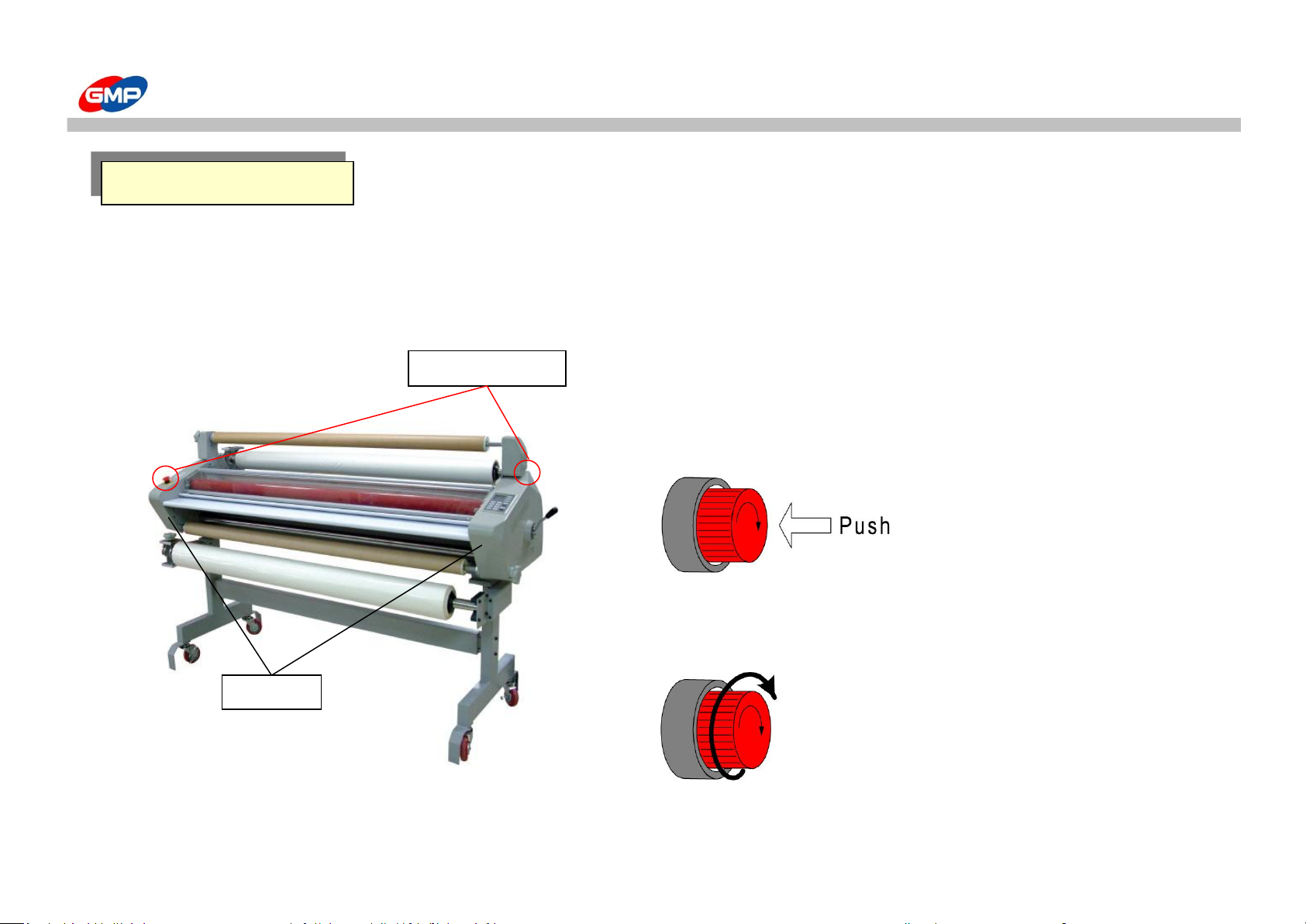
☞ Emergency Switch
This device is stopping the system operating and running motor of roller, at emergency.
when this switch is pressed, the system does not operate.
☞ Location of Emergency Switch
☞ Emergency stop and release
Press the emergency switch(red button) will stop the motor.
Release of emergency switch can be made when you
turn right the red emergency switch
Emergency switch
Housing
Emergency Switch
7/39
Page 8
WARNING STICKER
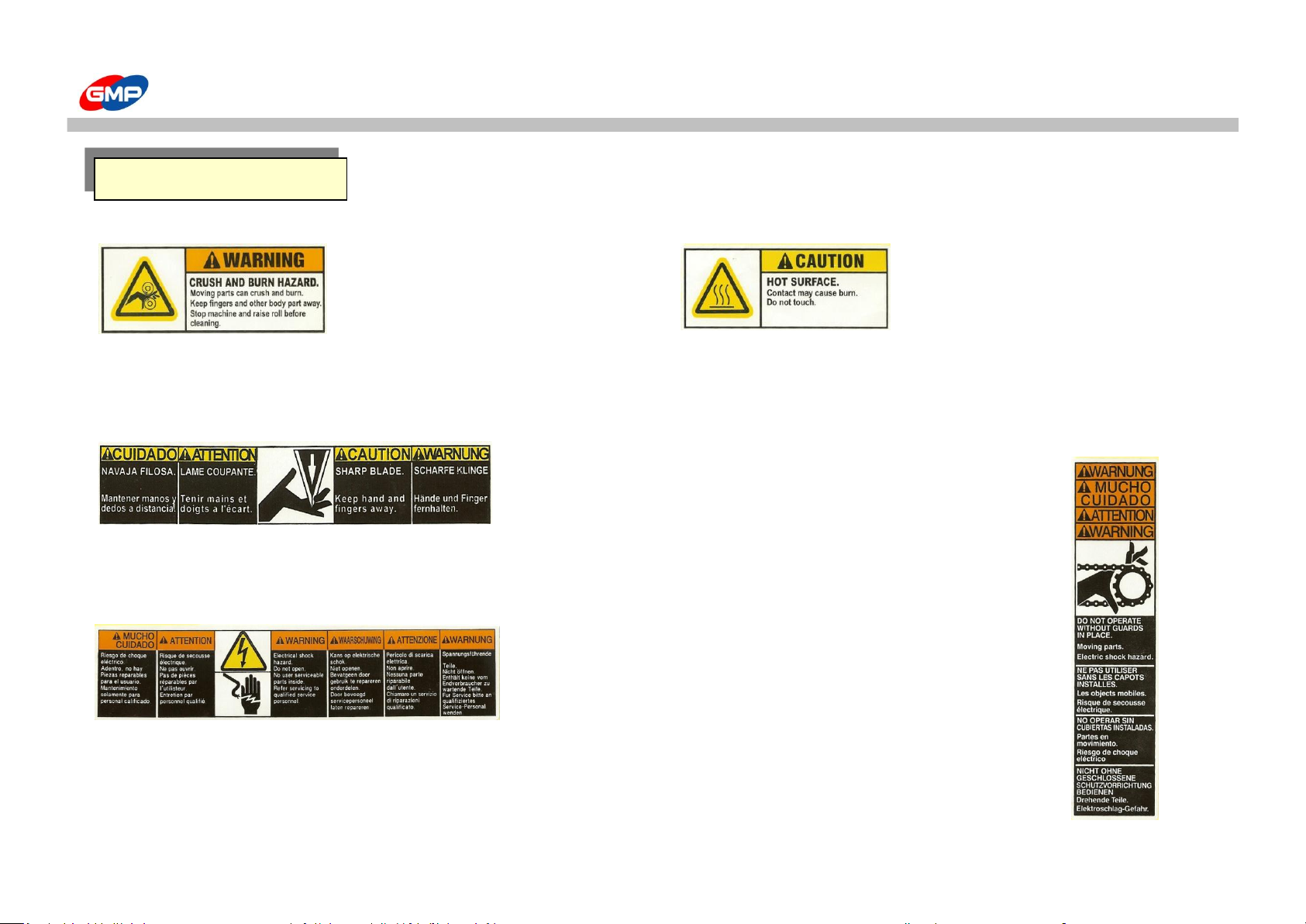
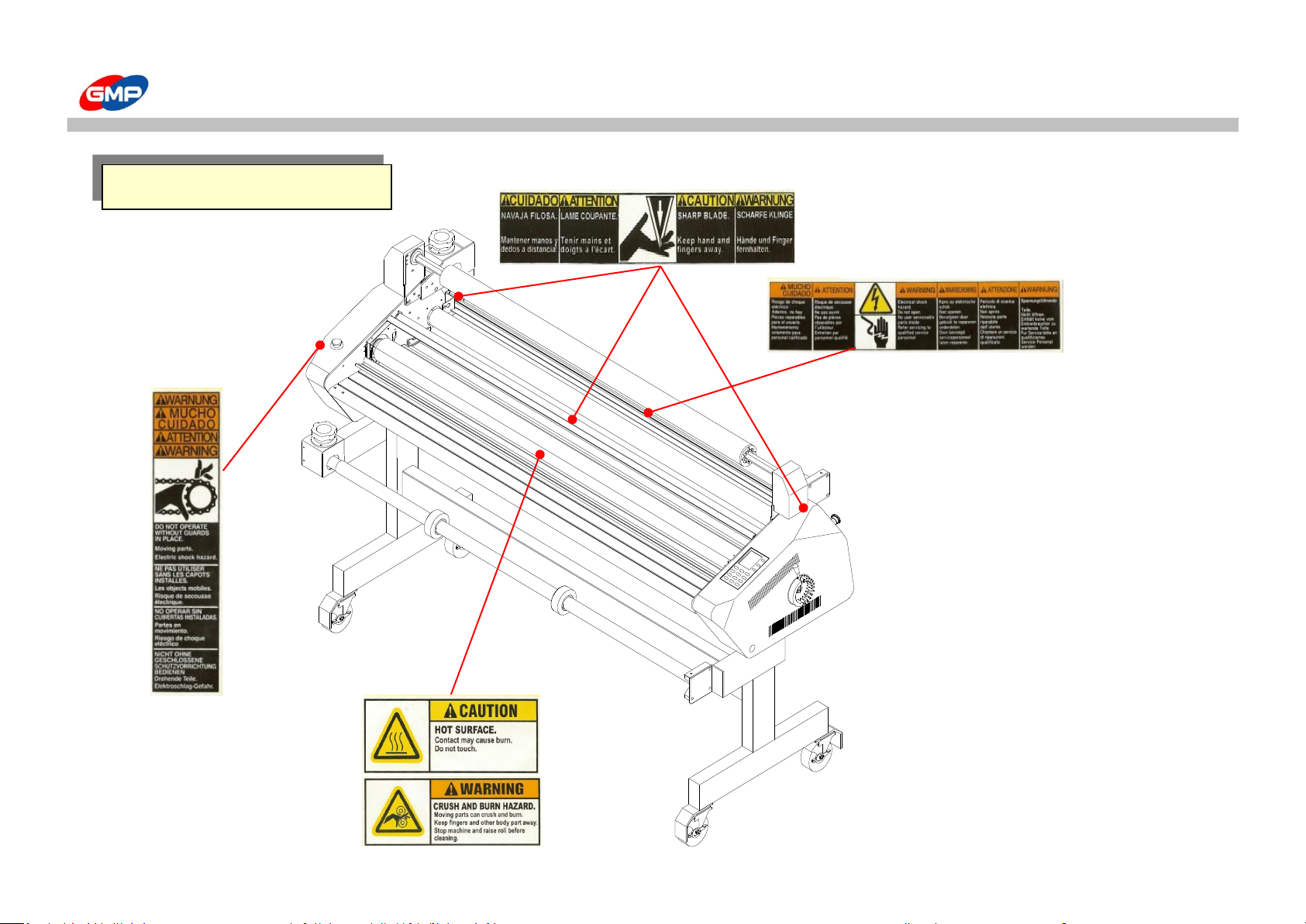
In order to avoid an unexpected damage & to keep the operators' safety, the Warning Stickers are on the machine.
☞ Roller ☞ Extremely high Temperature
Do not insert the Hand or body to the rollers Be cautious not to touch the surface
This would be a cause of damage by high temp. & pressure of rollers.
☞ Blade ☞ Chain
Keep away from the blade Do not insert the hand or body to the Chain.
This would be a cause of personal injury This would be a cause of damage of
severance of body by a chain.
☞ Electricity
High voltage of Electricity flows inside
Be cautious of electric shock, while operation
You may get injury or death by electric shock
Warning Sticker
8/39
Page 9
WARNING STICKER
Location of Warning Sticker
9/39
Page 10
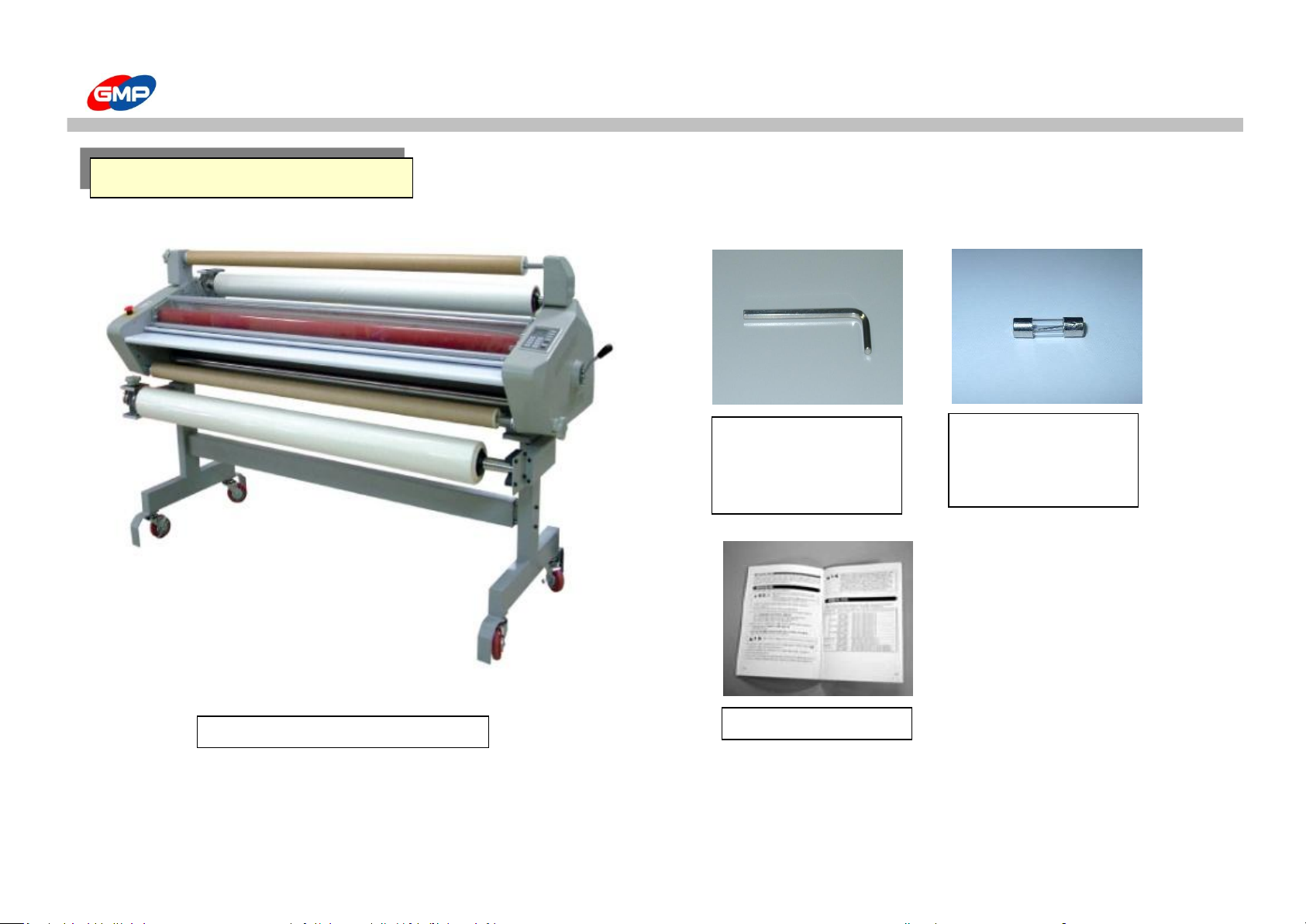
PACKING CONTENTS
Packing contents
LAMINATOR
FUSE 3A 2EA
FUSE 6A 2EA
(UL 5A 4EA)
2.5mm T wrench 1EA
3mm L wrench 1EA
5mm L wrench 2EA
User Manual
10/39
Page 11
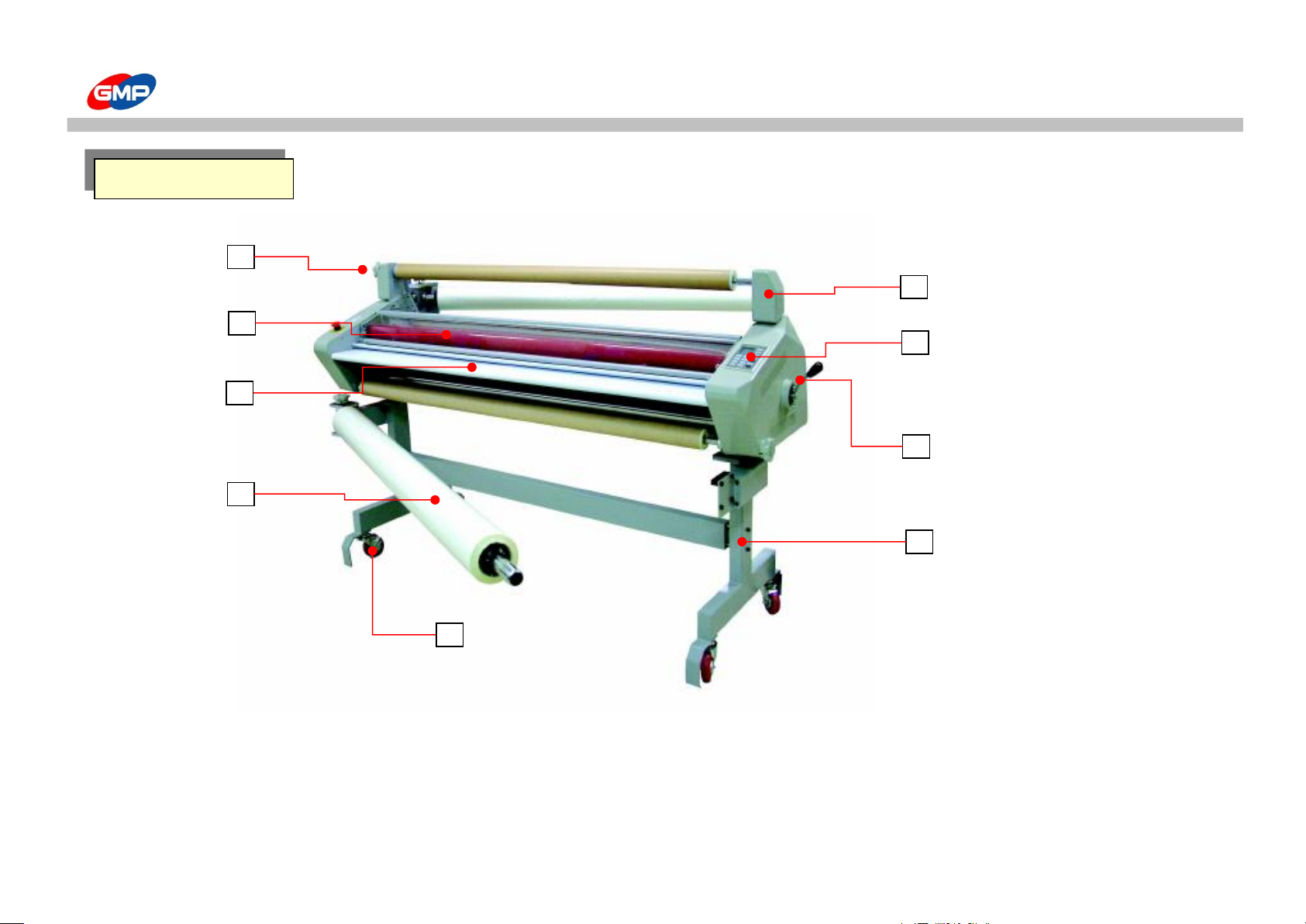
PART NAME
1. Rewinder tension Control handle 4. Roll film 7. Control panel
2. Laminating roller 5. Caster 8. Roller Pressure Control handle
3. Front Table 6. Rewinder 9. Stand
Part Name
2
4
6
7
9
8
5
3
1
11/39
Page 12
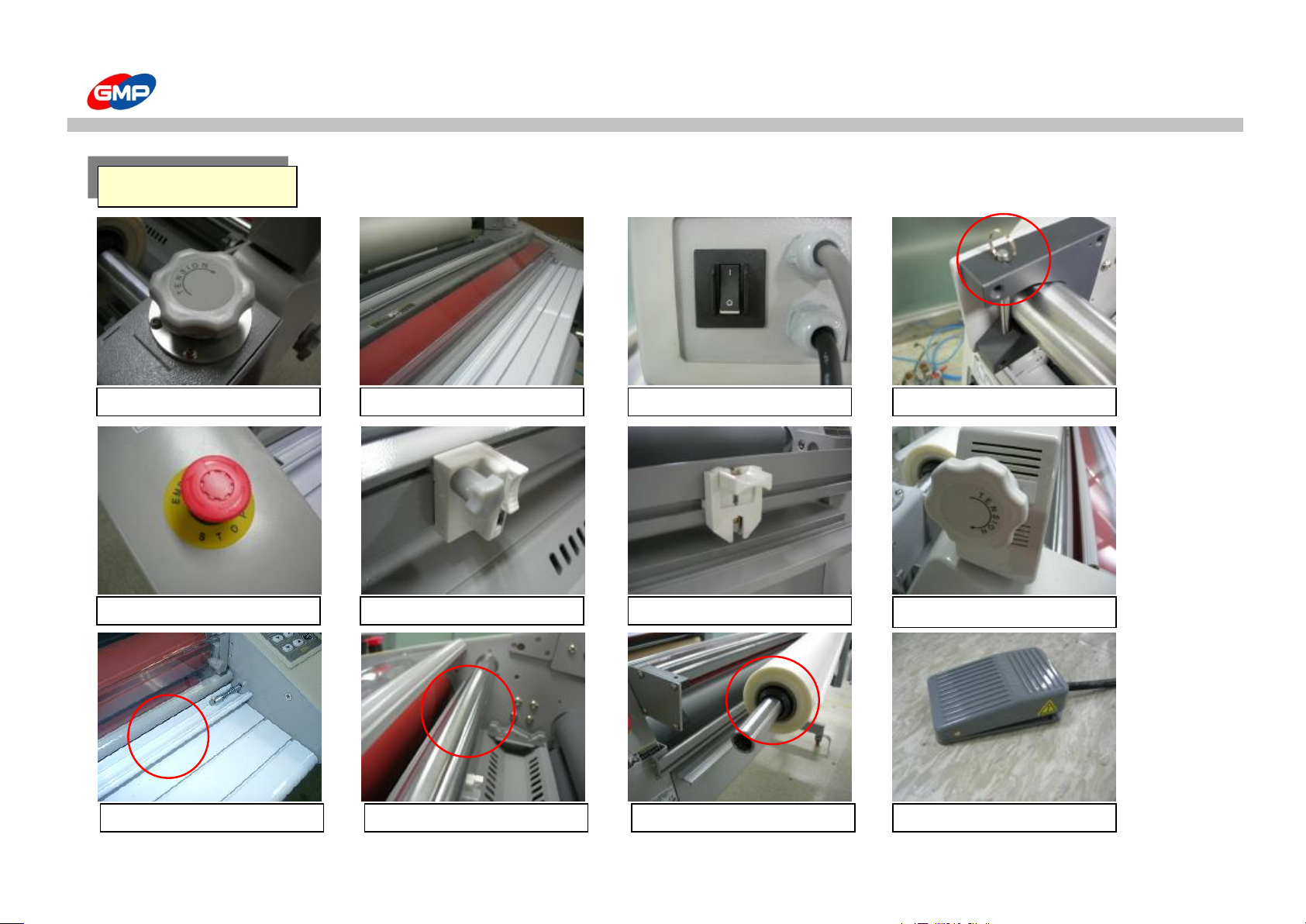
PART NAME
Main Device
Film tension handle
Roller safety cover
Power switch
Film shaft holding pin
Emergency switch
Side slitter
Film trimmer
Rewinder tension control
Pressure plate
Idle roller
Film core
Foot switch
12/39
Page 13
PART NAME
Emergency switch
When pressing in emergent situation, motor stops.
Film shaft Device for installing laminating film rolls
Film shaft holding pin This is not to let film shaft move needlessly
Laminating roller
Heating & pressing roller
Idle roller This is to make being-laminated film flat for good lamination result.
Pull roller To provide final direct effect to flat result of laminated film
Film tension Control handle To adjust film tension.
Rewinder To rewind release liner etc.
Rewinder tension Control handle To adjust rewinder tension
Control panel To set condition for lamination job & operate machine
Power switch
To supply electricity power to machine
Side slitter Slitting the width of laminating film
Film trimmer To cut off laminated output
Pressure plate To get paper flat when feeding.
Roller pressure adjustment handle
To adjust pressure of laminating roller
Roll film Laminating roll film
Film core To fix roll film stably.
Foot switch To rotate laminating roller
Casters To move machine conveniently
Main Device Explanation
13/39
Page 14
CARRIAGE AND INSTALLATION
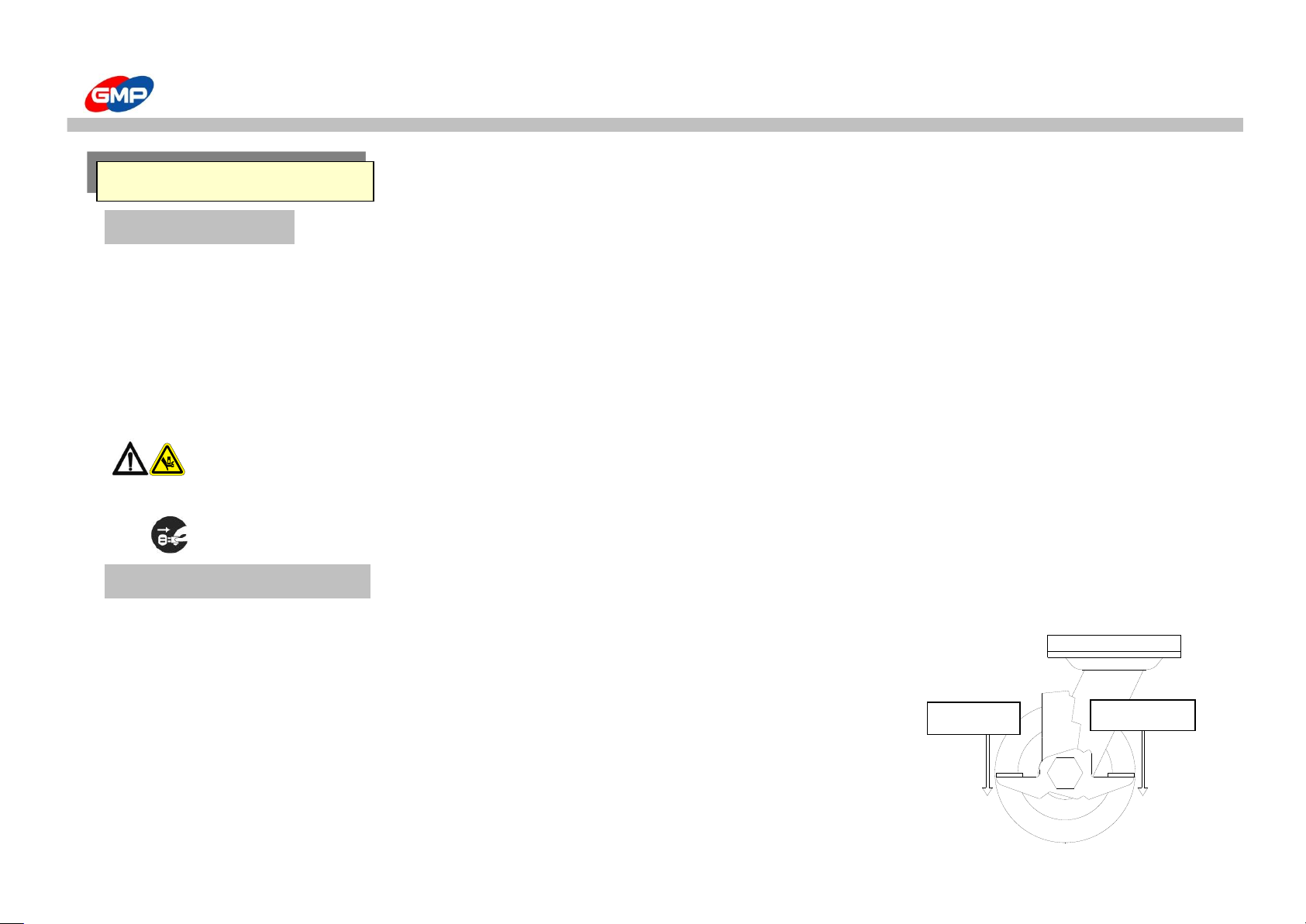
Product Carriage
This product is too easy to carry mainly due to the moving wheels.
At transportation, "Moving wheel "works after pushing the moving wheel locker's direction "OFF" and then push the laminator
The product is too heavy to carry, therefore more than two persons should carry the laminator.
If you carry this product, necessarily move it with a forklift truck
After a product installation, Push "the moving wheel locker's direction "On".
it prevent the movement of a product due to the wheel locking
Caution : This product is too heavy to carry, therefore more than 3 persons carry this product.
If you don't, it is a main reason of a product breakage and personal injury
Caution : On carrying a product, segregate the power plug from the outlet. It is a main reason of an electric shock.
Usage of Caster
In the same place, you can move the laminator using the moving wheels, and install the machine in a short distance.
When you move the laminator, unlock the fixing device attached on the moving wheels.
The locking of wheels or unlocking of the fixing device is as follows ;
When you push the "Lock(ON)" lever, the wheels are locked, otherwise unlocked.
When push Unlock(OFF) lever, the wheels are unlocked
After the movement of laminator, necessarily fix the wheels.
Carriage and Installation
잠김(ON)
풀림(OFF)
UNLOCK(OFF)
LOCK(ON)
14/39
Page 15
CARRIAGE AND INSTALLATION
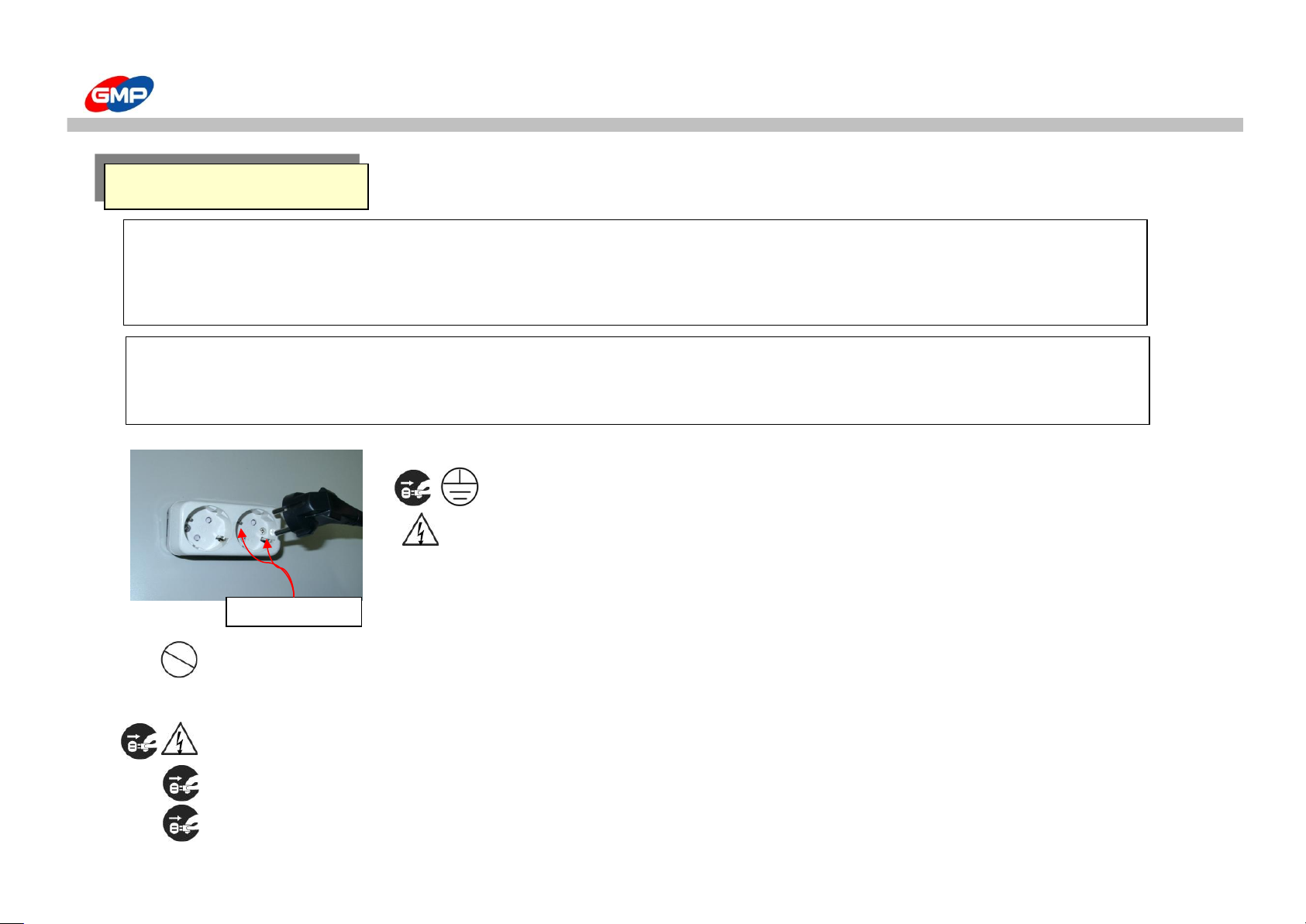
Caution : Necessarily grounding is needed for your safety
At the case of malfunction and electric leakage can make an electric shock.
Caution : Do not use more than one outlet with other products.
The overheating of the outlet can be a main reason of a fire flam.
Caution : Do not use without a specified power supply and voltage. It makes a fire or an electric shock.
Caution : Inset the power plug inside firmly. The overheating of an outlet can make a fire flame,
Caution : The socket-outlet shall be installed near the equipment and shall be easily accessible.
Carriage and Installation
Connecting Power :
Power supply should be used AC 220V/20A above. Necessarily Grounding is needed for your safety.
Grounding
잠김(ON)
풀림(OFF)
Product Carriage and Installation :
When you carry this product, more than 3persons necessarily carry safety.
Product placing should be installed at the hard and balanced floor.
15/39
Page 16
USAGE OF CONTROL PANEL
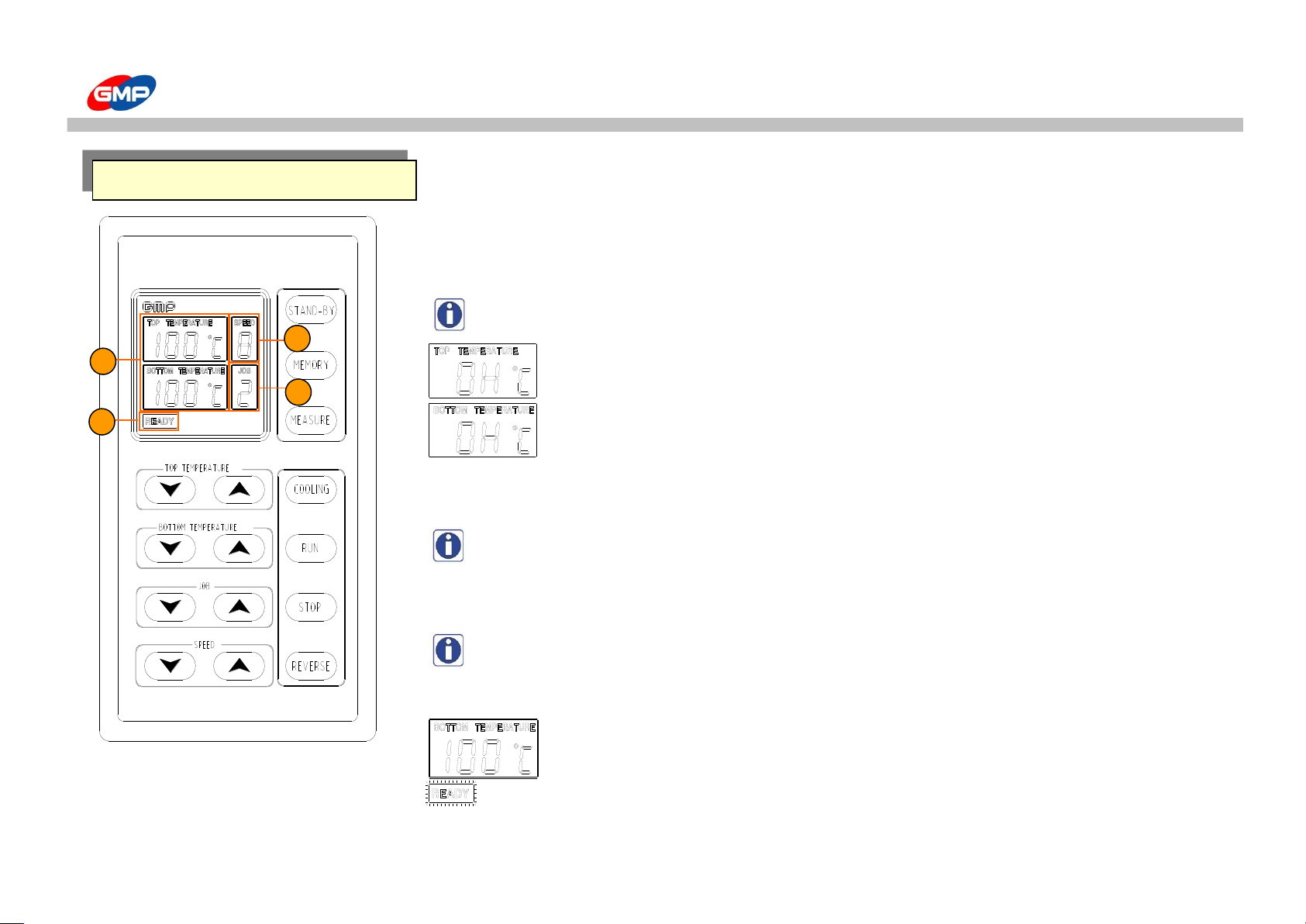
1. TEMP.DISPLAY WINDOW
Displays the present temperature or setting temperature of roller
Temperature setting range is from Min. "0℃" to Max."160℃"
Note : Refer to function button guide to check present temperature or set up the temperature.
This product has function of self-diagnosis for troubles.
If a heater temp. is not adjusted and heater is overshooting, as the left picture,
"OH" is displayed. Then, power off the machine and ask to supplier.
2. Speed Display Window
Displays the roller rotating speed, changing width is "1~9".
Note : Roller rotating speed can be made by "Speed button".
3. Job Condition Saving No.
can memorize the different working condition from "1" to "9", the displayed number.
Note : Working condition change can be adjusted by "Job button".
4. Job Display
"WAIT" : "WAIT" means that the roller temp. is not enough to laminate
compared to the setting temp.
At the condition of "WAIT", the laminating status is not good.
"READY" : READY means that heat plate temperature reached to a setting temp.
Start laminating when the "READY" displays.
Control Panel
1
4
2
3
EXCELAM-1670SWING
16/39
Page 17
USAGE OF CONTROL PANEL
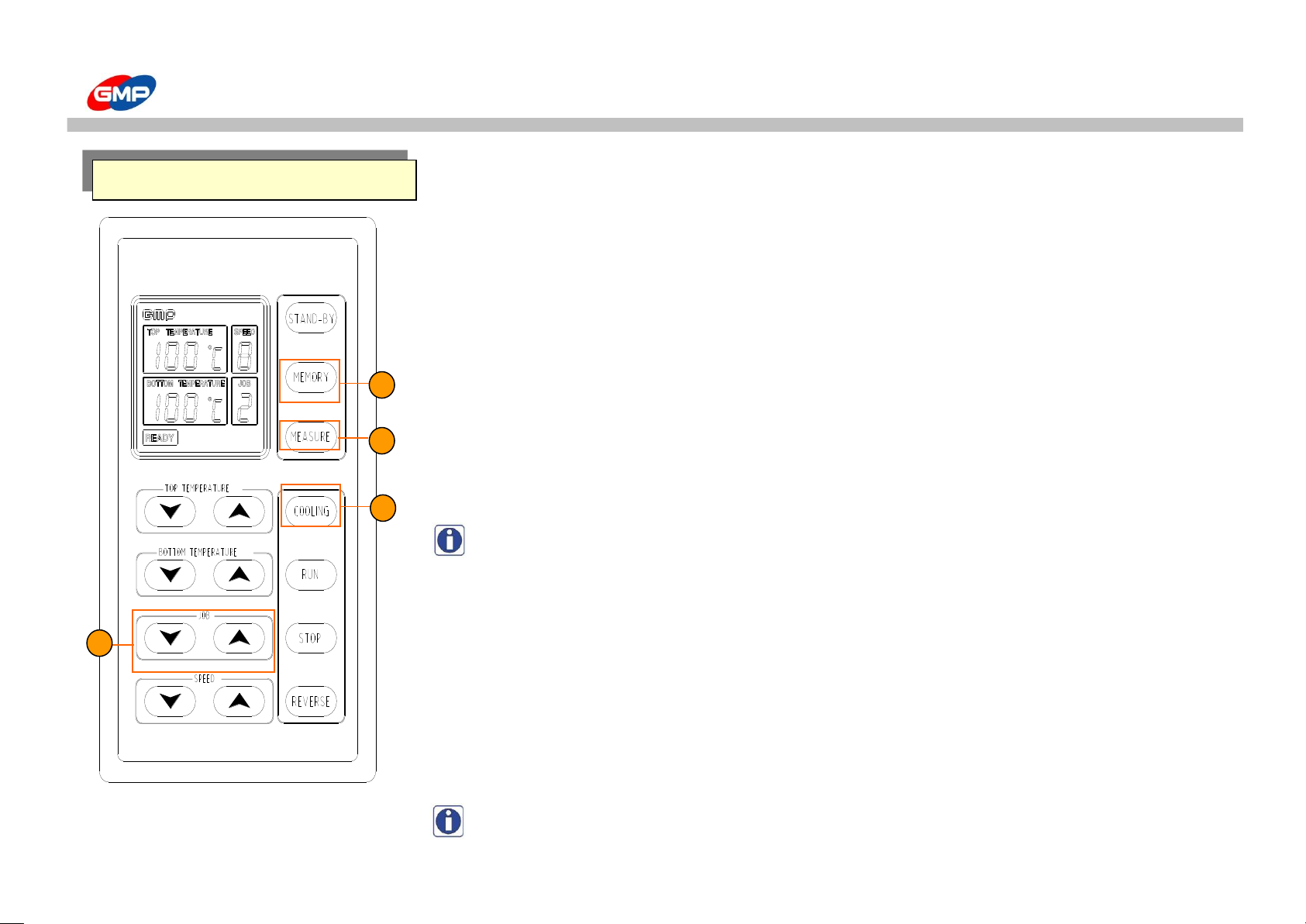
1 - MEMORY
is for memorizing of working condition.
2 - JOB
is for working condition memorized from JOB1 to JOB9.
☞ Saving working condition
1) By using Job button, select the number to memorize. (Selected number displays on window)
2) Set the roller temp. and speed by using temp./speed button.
3) If you press the "MEMORY", setting value automatically is memorized.
☞ JOB Function?
is memorizing a reiterating working condition and preventing to remove for the repeating setting
working condition by button setting. From Job1~9, 9 working condition can be memorized.
Note : When you change the temperature or speed, the changed number and current
job number flickers for 2senconds. The flickering alarms that the setting value
is correct and asks that saving the changed contents to memorize at the job condition.
3 - MEASURE
When you press the "MEAS", beeps and roller temp. flickers on the "Temp. Display Window"
It is for the purpose of separating setting temp.
if you take off the button, again setting temp. displays.
4 - COOLING
is for cooling motor running. When you press the "COOLING" button for one time,
cooling motor runs and again press the button, the motor stops.
Note : Bad laminating condition change can be adjusted by "Cooling button".
Start when the machine can not cool down naturally by itself
Function Button
2
3
1
4
EXCELAM-1670SWING
17/39
Page 18
USAGE OF CONTROL PANEL
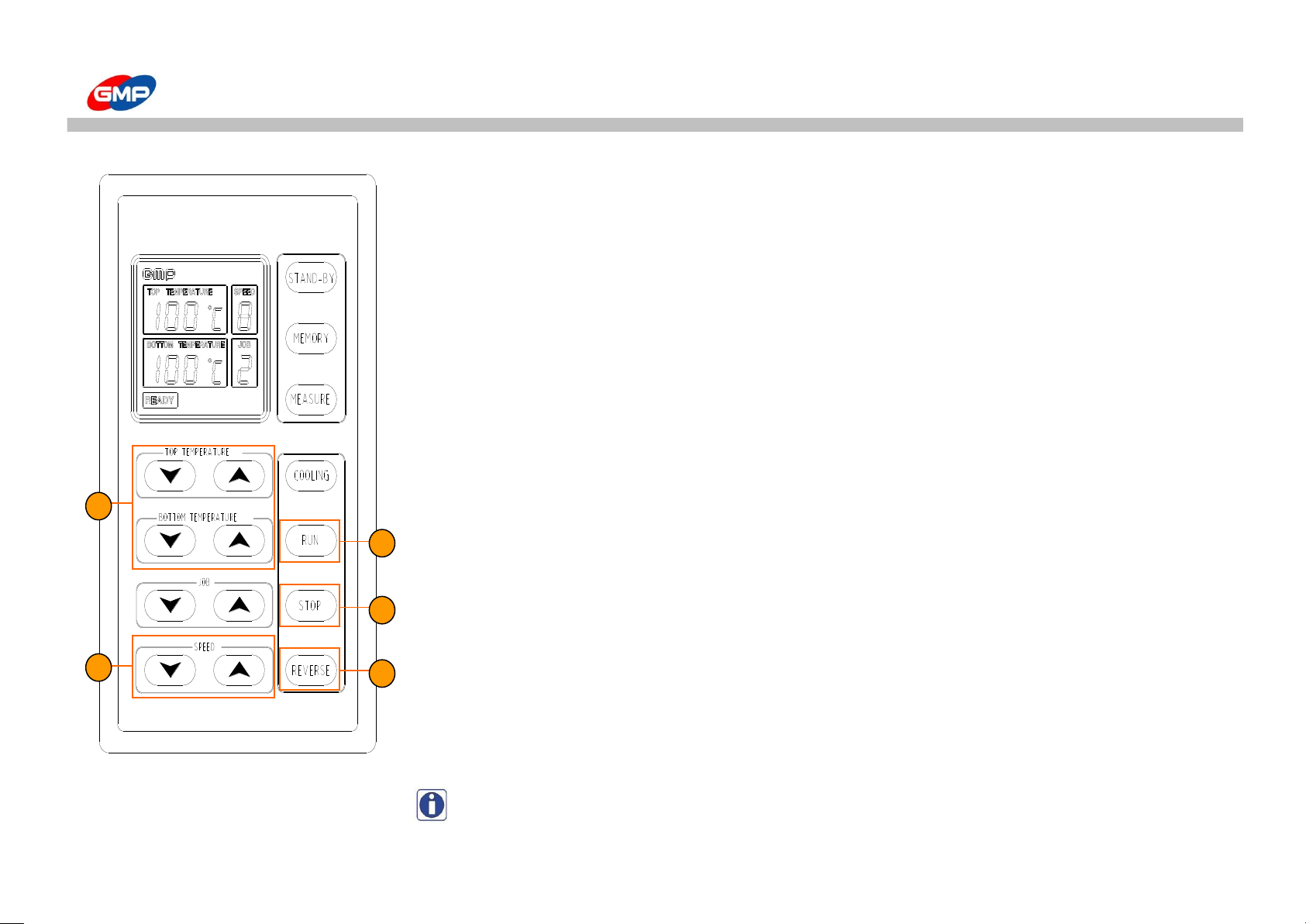
5 - TOP/BOTTOM TEMPERATURE
To set up the Roller Temp. Temp. Setting Range is "0 ~ 160"℃ .
First press the button one time, temperature goes up(down) by "1℃", continuous pressing
can make that for the first 2second, goes up 1℃ by 0.5sencond, after then goes up 10℃rapidly.
6 - SPEED
To set up the laminating speed. Speed setting range is "1 ~ 9".
☞ Roller Rotating Speed Change
1) When roller rotates : For the time of roller rotating, if you change the speed,
rollers rotate at the changed speed.
2) When roller stops : In the case of roller stopping, if you change the speed,
roller does not change and only the number of speed window changes.
If you want to rotate the roller, press run button.
7 - RUN
is for roller rotation. When you press "RUN" button, stopped rollers rotates at the setting speed.
8 - STOP
is for roller rotation stop. When you press "STOP" button, rotating rollers stop.
9 - REVERSE
is for roller reverse-rotation. During "REVERSE" button pressed, the roller reverse-rotates
and the number of speed flickers and "beeps". This sound happens when the roller reverse-rotates,
at the same time of reverse-rotation stop the roller stops
Note : When the roller is reverse, the speed will be automatically change to “Speed 1”
6
7
8
9
5
EXCELAM-1670SWING
18/39
Page 19
USAGE OF CONTROL PANEL
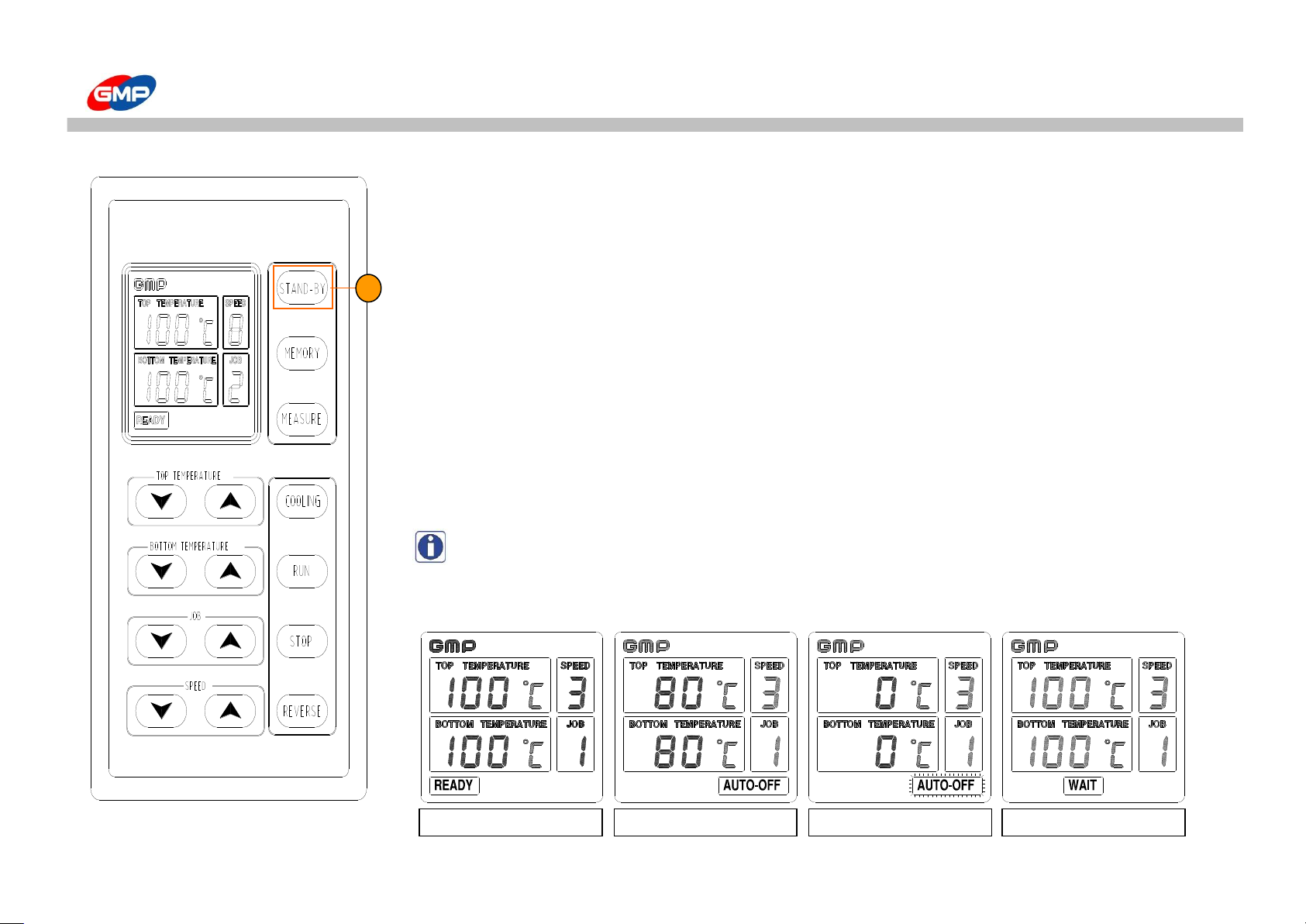
10 - STAND-BY
Is for stand-By the machine.
☞ STAND-BY MODE ?
When you leaves the machine for long time, the roller temp. can be controlled below 80℃
or cut off the power of machine.
1) Setting by Users : For short time, if you does not operate the machine, it can be used.
At the normal condition if you press the "STAND-BY" button, the setting temp.
can be changed to 80℃ automatically. (The operating condition stops)
2) Automatic setting by microprocessor : If you leave the machine for 3hours,
micro-processor installed in machine controls the roller temp. below 80℃.
(If the setting temp is below 80℃, it is controlled at the 0℃)
At this time, stand-by display lamp is on, Job display or Heater display window is cleared.
and then one and half hour passed, Stand-by Mode flickers and Power of heater is cut off.
Note : At the above two condition, release of standby mode is available by pressing
"STAND-BY" button again. If the saving mode is released, all conditions come back
to the previous status of stand-by mode.
EXCELAM-1670SWING
Before Stand by Mode
STAND-BY MODE
Setting(Safety) Mode
Release STAND-BY
10
19/39
Page 20
USAGE OF MAIN DEVICE
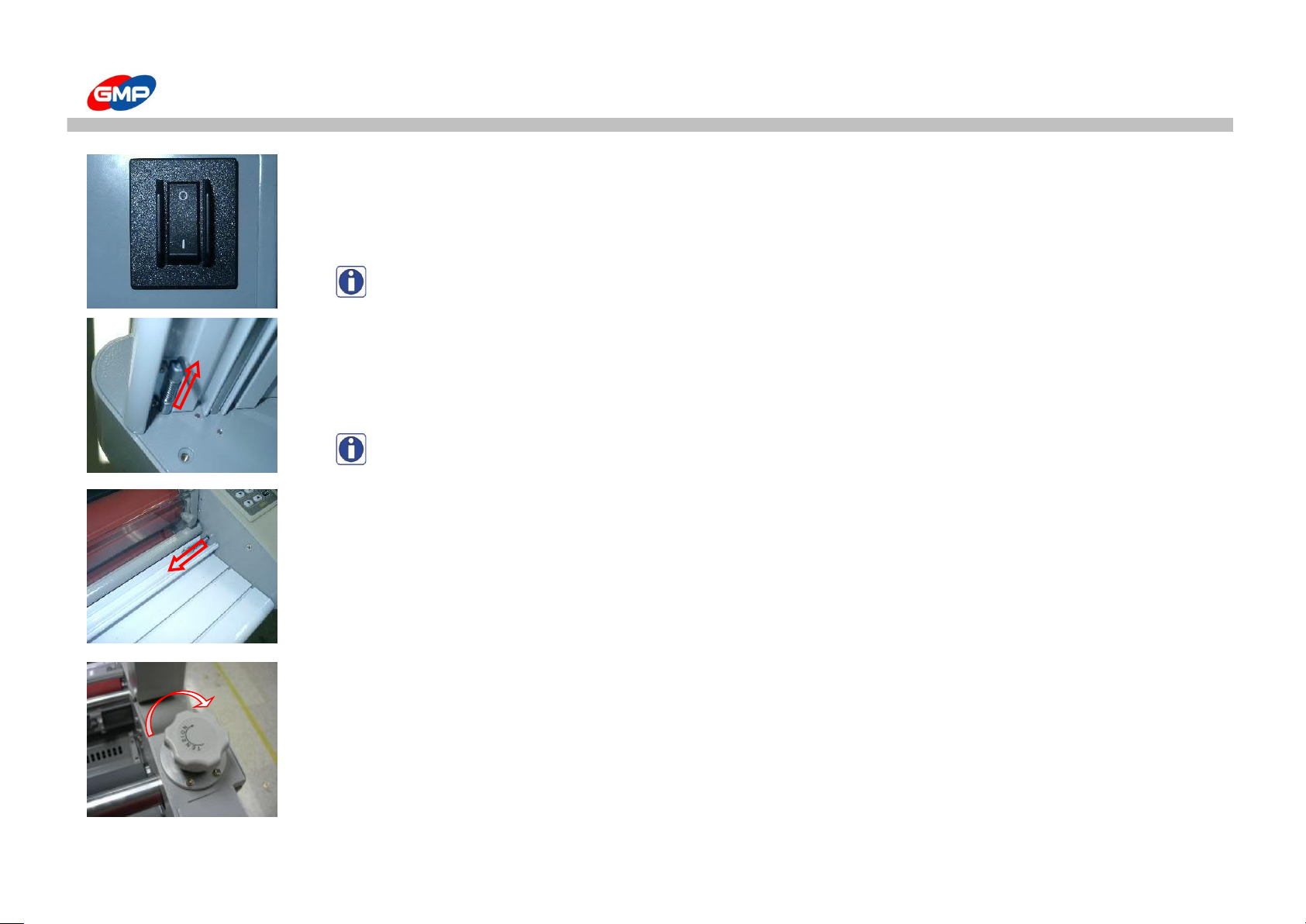
☞ POWER SWITCH
is for supplying or cutting off the power, circuit breaker installed, at the time of overloading of machine,
current overflow, automatically cut off the power.
When the switch direction is "I", the power is on, otherwise the power is off.
Remark : If found wrong operating continuously please contact to your agent or distributor.
☞ FRONT SAFETY LEVER
Front Safety Lever is designed for user's safety and prevention to breakdown.
When install Front Plate, pull Front Safety lever.
When install Front Plate, Front Safety Lever will be restored.
Remark : If Front Safety Lever does not lock up, Roller will not run.
☞ PRESSURE PLATE
Pressure Plate is a function that smooth out a sheet on the plate.
When install Pressure Plate, please make sure that pull Levers at both edges.
When install Pressure Plate, Front Safety Lever will be restored.
☞ FILM TENSION CONTROL HANDLE
Film Tension Control Handle is a function that adjust tensile of film.
About film tension, adjust as much as a sheet can be spreaded passing between the rollers.
When turn the Film Tension Control handle to the right, film tension increases and turn to the left,
it decreases.
20/39
Page 21
USAGE OF MAIN DEVICE
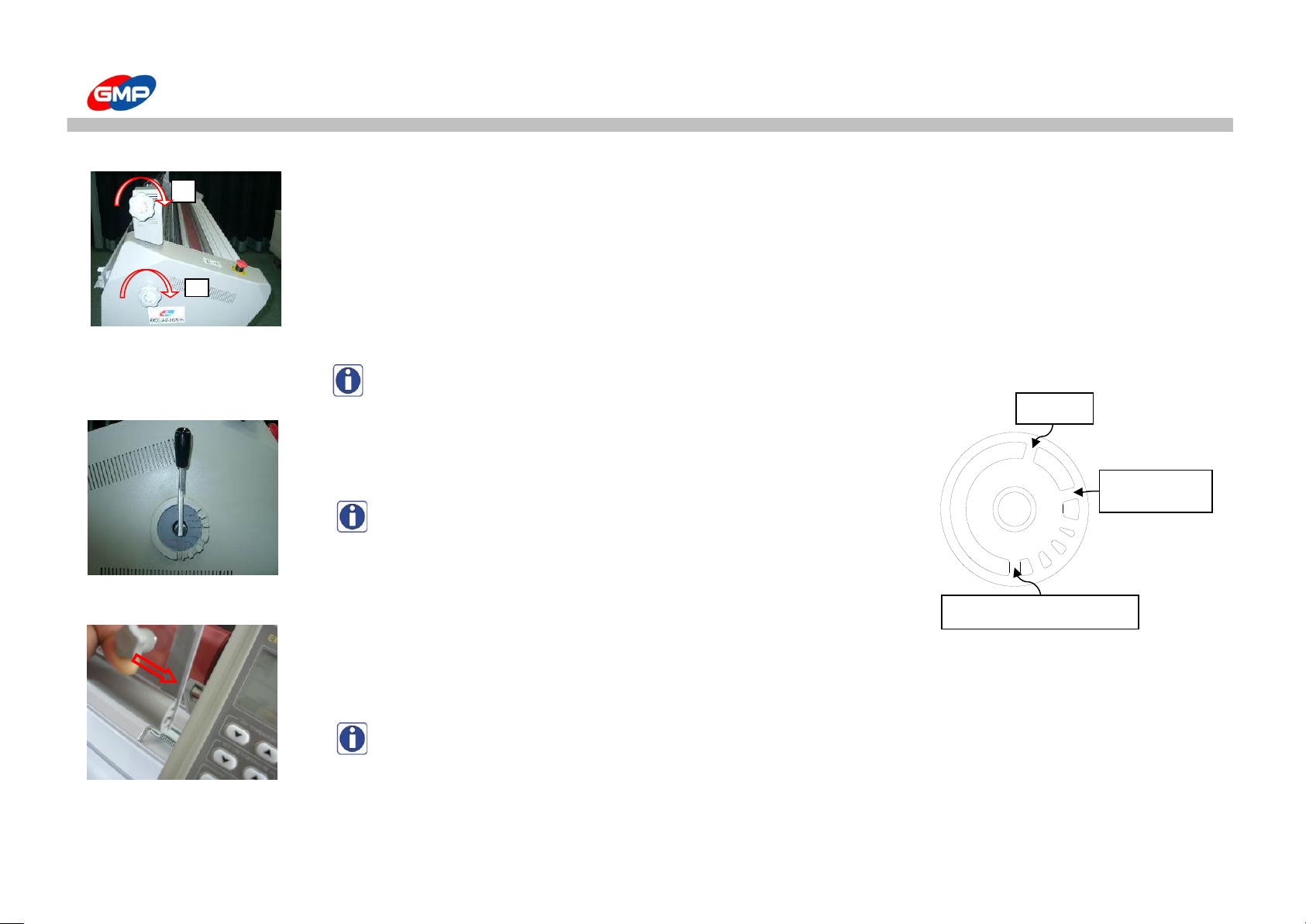
☞ FILM TENSION CONTROL HANDLE FOR REWINDING - ①
This handle functions to adjust tensile of film for rewinding.
Use this handle when film tension is loosened or tightened too much.
When turn the Film Tension Control handle to the right, film tension increases and turn to the left, it decreases.
☞ CLUTCH PRESSURE ADJUST HANDLE - ②
Clutch Pressure increases when turn the handle to the right.
Clutch Pressure decreases when turn the handle to the left
Remark : Recommend to do not touch Clutch Pressure as much as possible.
☞ ROLLER PRESSURE ADJUST HANDLE
This handle functions to adjust pressure of laminating roller.
Depend on laminating types, user can select suitable pressure.
Remark : Position the handle on Heavy Gauge when hot laminating.
☞ ROLLER SAFETY COVER
It prevents you from burnings occurred by touching hot roller
Make sure close the cover except for loading of film
NOTE : If the "SAFETY COVER" is not closed properly, the machine cannot be working.
1
LAMINATING HEAVY GAUGE
15mm MOUNT
(15mm Mounting)
MOUNT
21/39
Page 22
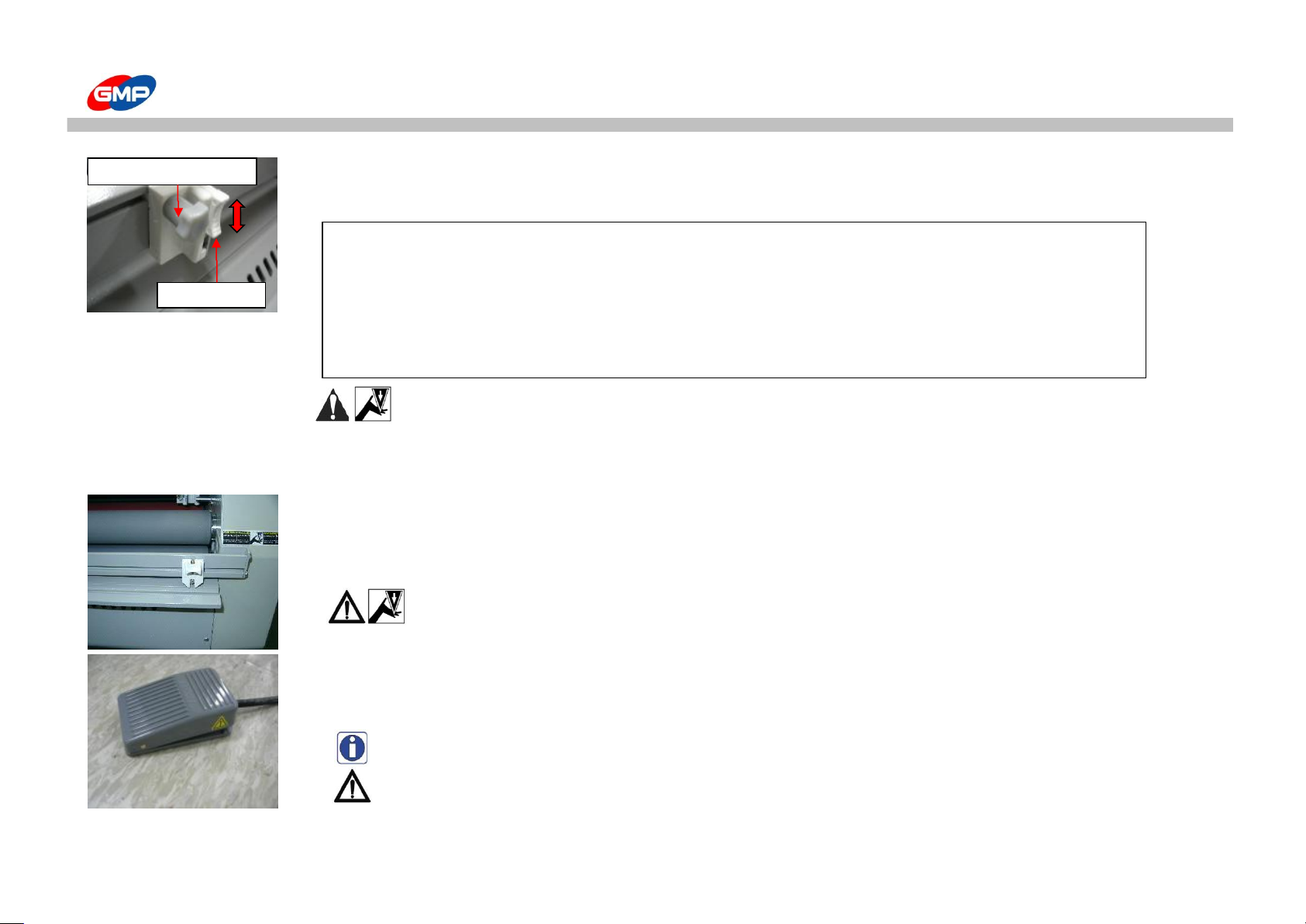
USAGE OF MAIN DEVICE
☞ SIDE SLITTER
Side slitter is located in between the Heat Roller and Pull Roller and this is to trim a margin on laminating film.
☞ FILM TRIMMER
This Trimmer cuts laminating sheets
When laminating sheet comes out between rollers, just cut pushing the lever of knife.
CAUTION : Please Be Attention On Knife.
☞ FOOT SWITCH
This Switch functions to make a rotation of laminating roller when press a foot switch.
When take operator's foot off the Foot Switch, laminating stops.
Remark : Easy to work Mounting or Cold Laminating.
CAUTION : During Foot Switch Job, Any Safety Device Function Does Not Work.
Please Be Attention On Injury.
How to use Side Slitter :
1. Move Side Slitter at a required position.
2. Rotate Fixing Knob to the right to fix the trimmer position.
3. Press Blade Lever to the downward.
4. Left/Right Side Slitter are installed, start lamination.
☞ Job is done, the blade lever has to be upward.
CAUTION : Certainly lift up blade lever of SIDE Slitter in the following circumstances.
1. After finishing operation with SIDE Slitter.
2. When you do not use SIDE Slitter.
3. When you change a blade of SIDE Slitter. If not, it cause injury by its blade or trouble.
Blade Lever
Trimmer Fixing Knob
22/39
Page 23
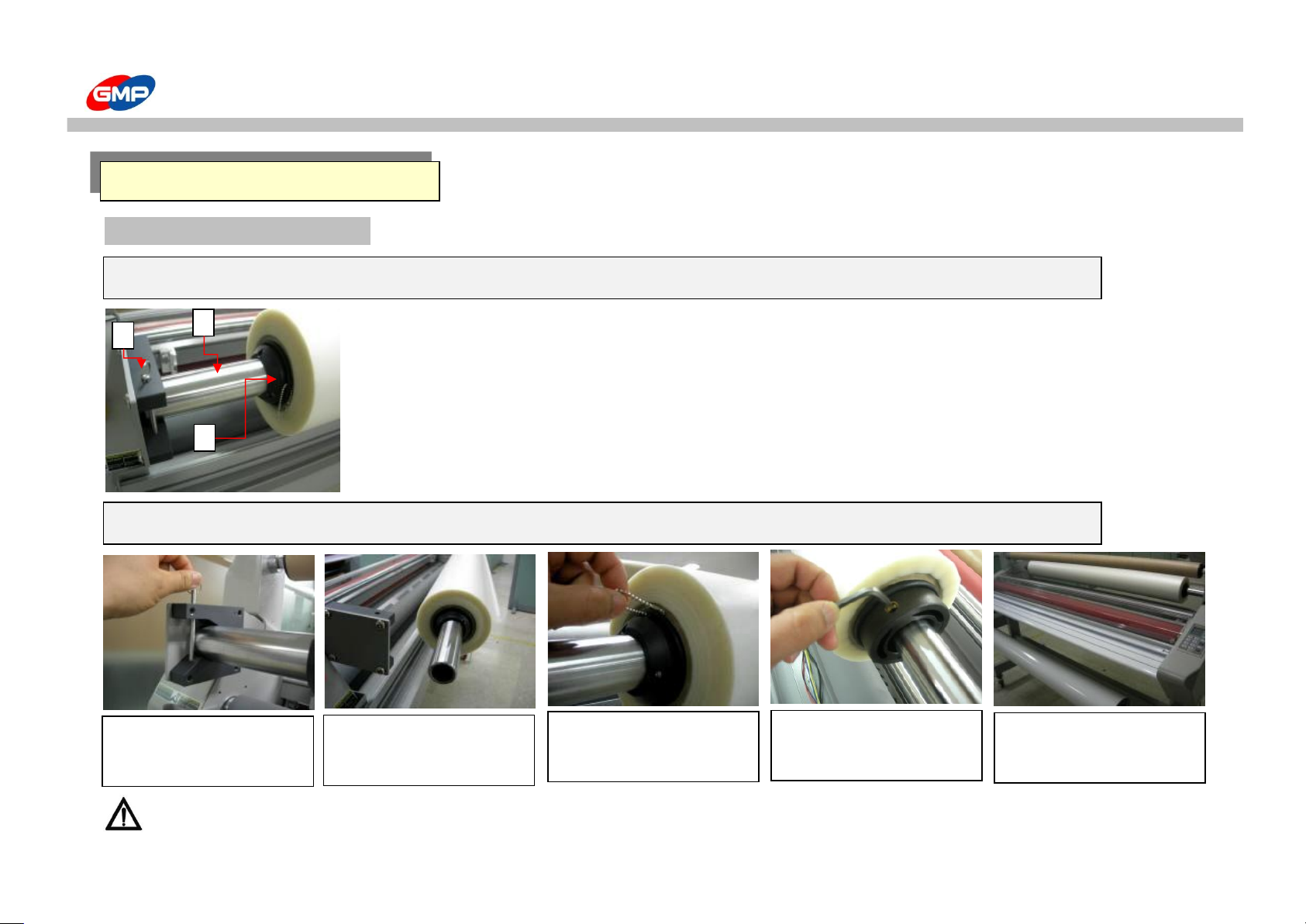
HOW TO LAMINATE
Stage 1 : Film Installation
1. Film Shaft : Device for loading a laminating roll film.
2. Film Shaft Pin : Device to prevent from moving film shaft.
3. Film Core : Device for fixing a laminating roll film.
CAUTION : In the case of film width is above 1M or 25KG, More than 2persons is needed.
If you does not, you can suffer a personal injury.
HOT LAMINATING
1. Remove Film Shaft Pin.
5. Put Film Shaft and insert a
pin.
Structure of Film Shaft
Film Loading
3. Pull out a ring from
Film Core then load a film.
1 3 2
4. Arrange a position of film
and tighten a bolt with
enclosed 4mm wrench.
2. Pull Out Film Shaft.
23/39
Page 24
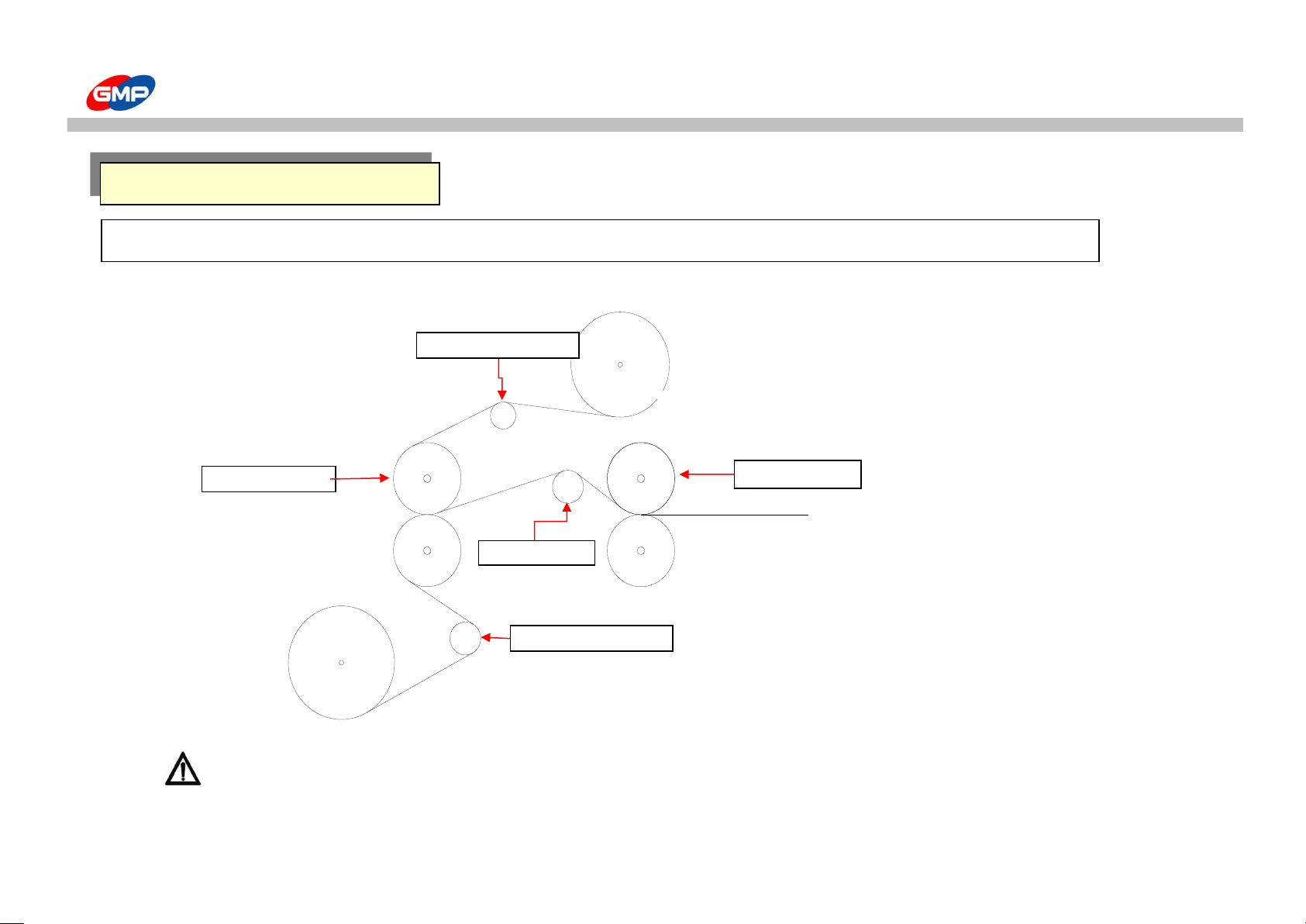
HOW TO LAMINATE
Caution : At the condition of laminating status, temperature and speed adjusting is needed.
Film Loading
Roll Film
Pulling Roller
Laminating Roller
Lower Sub-Roller
Stretch bar
HOT LAMINATING
Roll Film
Upper Sub-Roller
24/39
Page 25
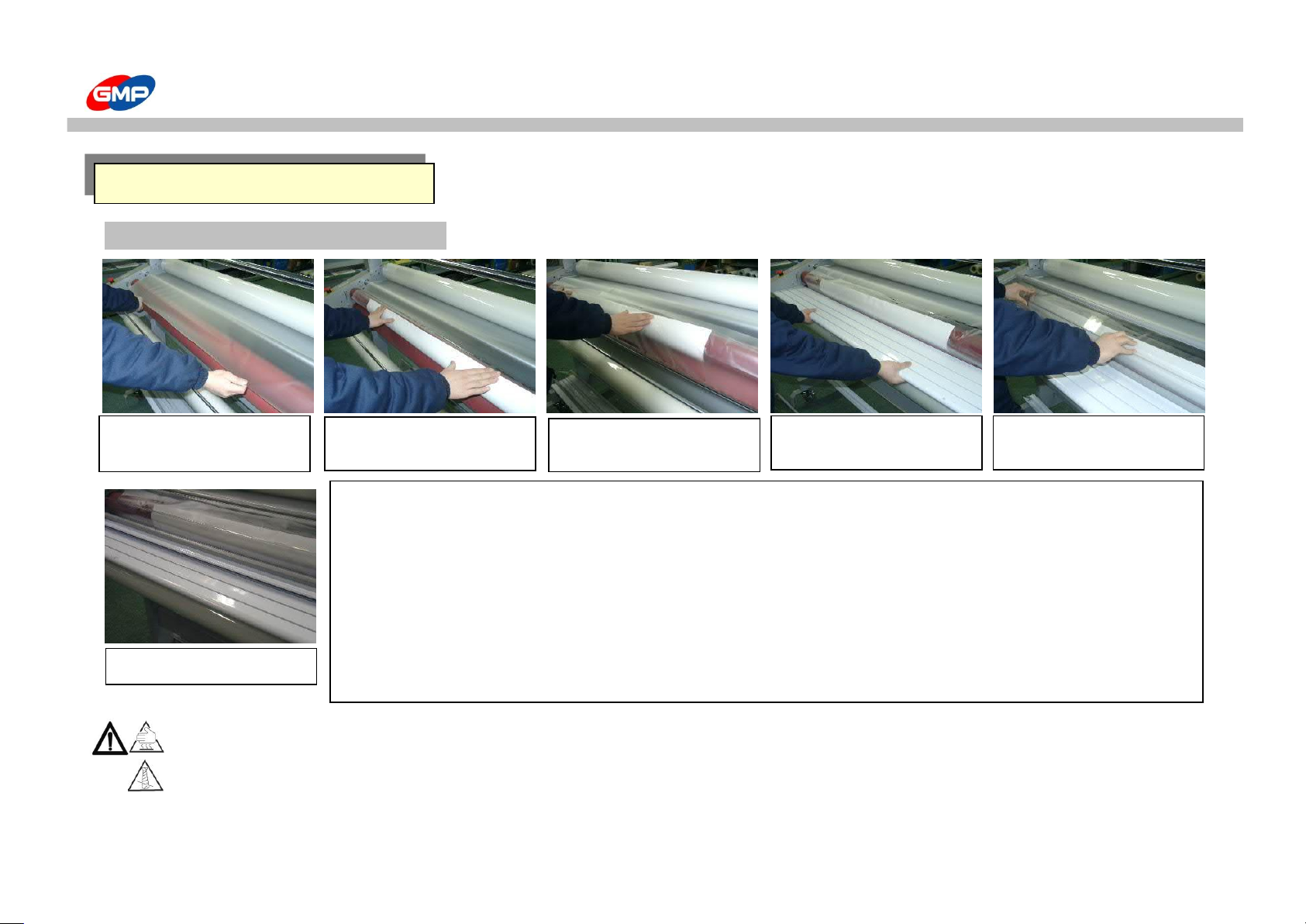
HOW TO LAMINATE
Stage 2 : To Ready For Laminating
Caution : Be cautious to the body touch to the heat plate at laminating. It will cause a personal damage.
Caution : When you laminate and machine running, you should be careful not to touch the hair, necktie, necklace with the machine.
It will cause a personal injury.
2. Stick paper in between
rollers on the upper film.
3. Stick lower film on the
paper and upper film.
4. Install Front Plate.
1. Put some beginning parts
of upper film on the roller.
6. Install Pressure Plate
5. Install Laminating Roller
Cover.
HOT LAMINATING
☞ It is easy to work if you preheat the roller before readiness stage.
☞ Necessarily film should be passed by sub-roller. (Refer to film loading)
If the film does not pass by sub-roller, it will cause a film crease.
☞ Film tension is available to adjust according to the laminating results,
basically film tension is enough to spread over the film crease.
☞ When paper width is smaller than the laminating film, the glue of film can contaminate the bottom roller.
It is possible to use the paper width larger than film width.
☞ At the condition of roller stop, lay down the roller pressure handle to the preheating or stand-by.
It is for preventing roller damage.
25/39
Page 26
HOW TO LAMINATE
Stage 3 : Laminating
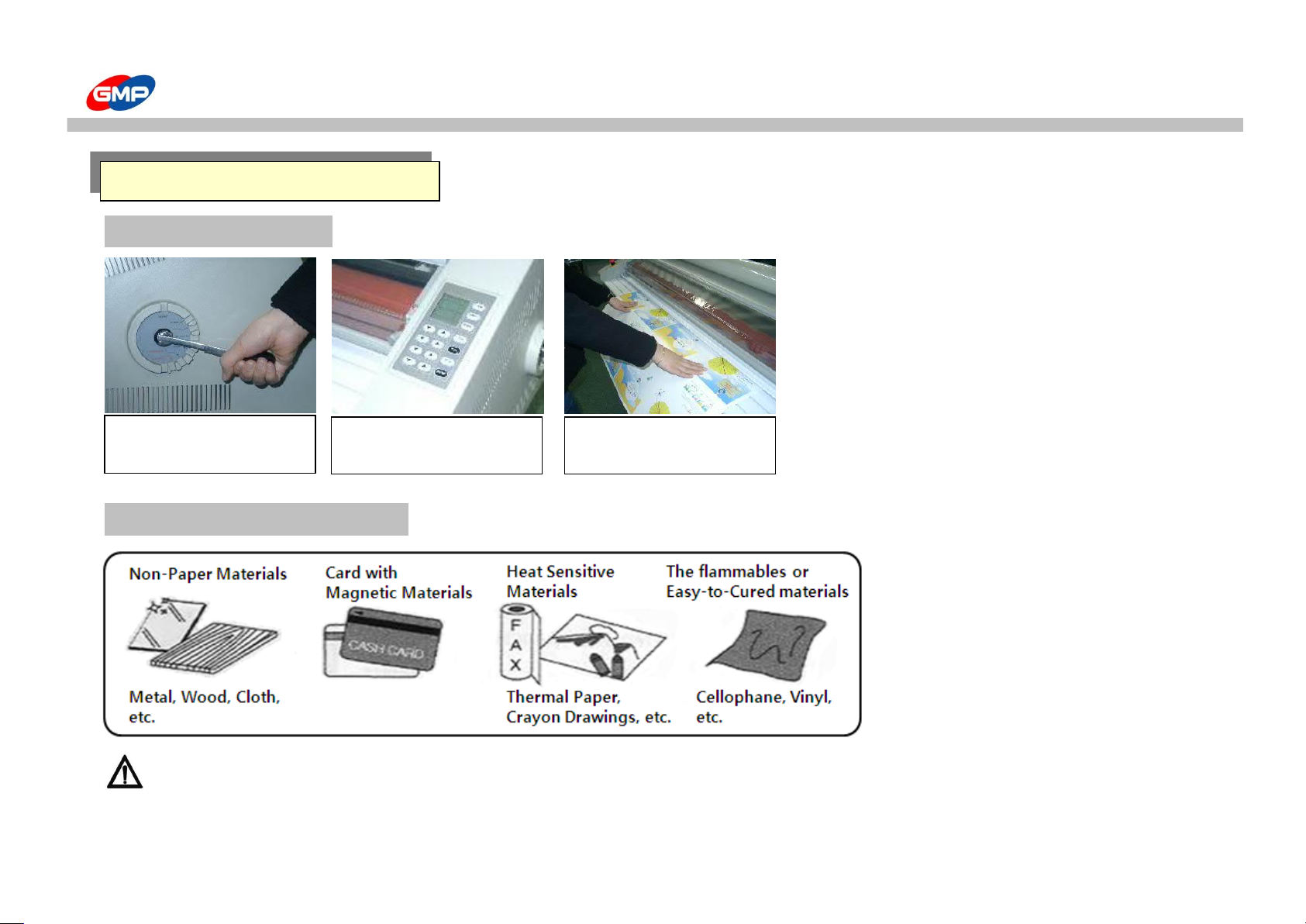
DO NOT HOT LAMINATING
Caution : If you laminate the paper printed by the sublimating heat transfer printer, the laminated paper changed by the time passed.
You should be cautious.
1. Put a Pressure Adjust
handle on required position.
2. Set required Speed and
temperature.
3. Lay the sheet on front
plate and push it in slightly.
HOT LAMINATING
26/39
Page 27
HOW TO LAMINATE
Stage 1 : Film Installation
Caution : In the case of film width is above 1M or 25KG, More than 2persons is needed.
If you does not, you can suffer a personal injury.
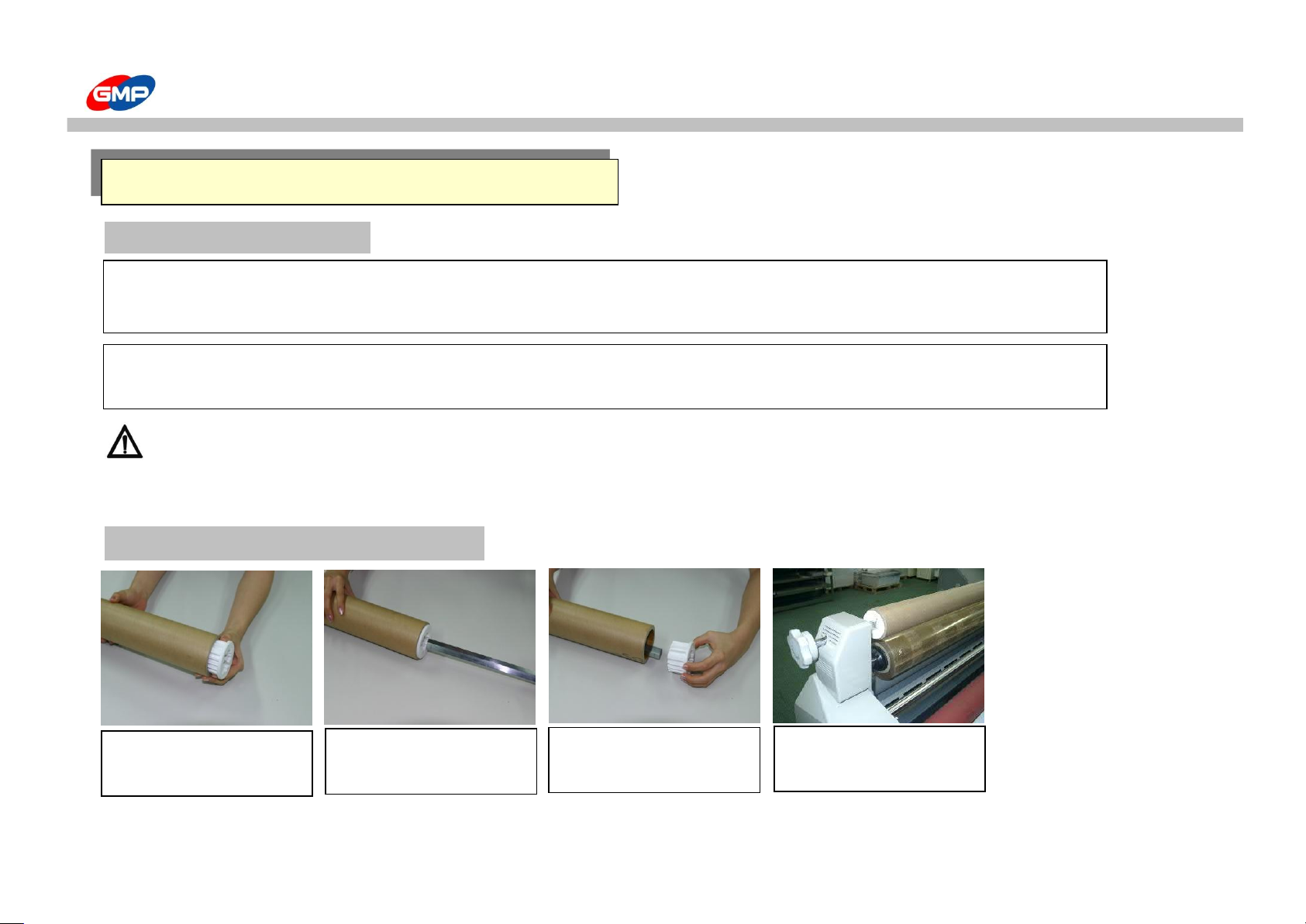
Stage 2 : Rewinder Paper Pipe Installation
1. Insert the paper core into
the rewinder paper pipe
2. Insert the paper pipe shaft
into the rewinder paper pipe.
3. And then insert another
paper pipe core.
4. It is a figure of rewinder
installation finished.
Film installation is the same as the stage 1 of hot laminating.
Only the film should be placed at the upper end of the film core. MICRONEX is only for the single side laminator.
☞ Film should be passed by the sub-roller. (Refer to the film loading)
If you does not like that, it will cause a film crease.
ULTRA-THIN OVERLAY COATING (MICRONEX FILM)
27/39
Page 28
HOW TO LAMINATE
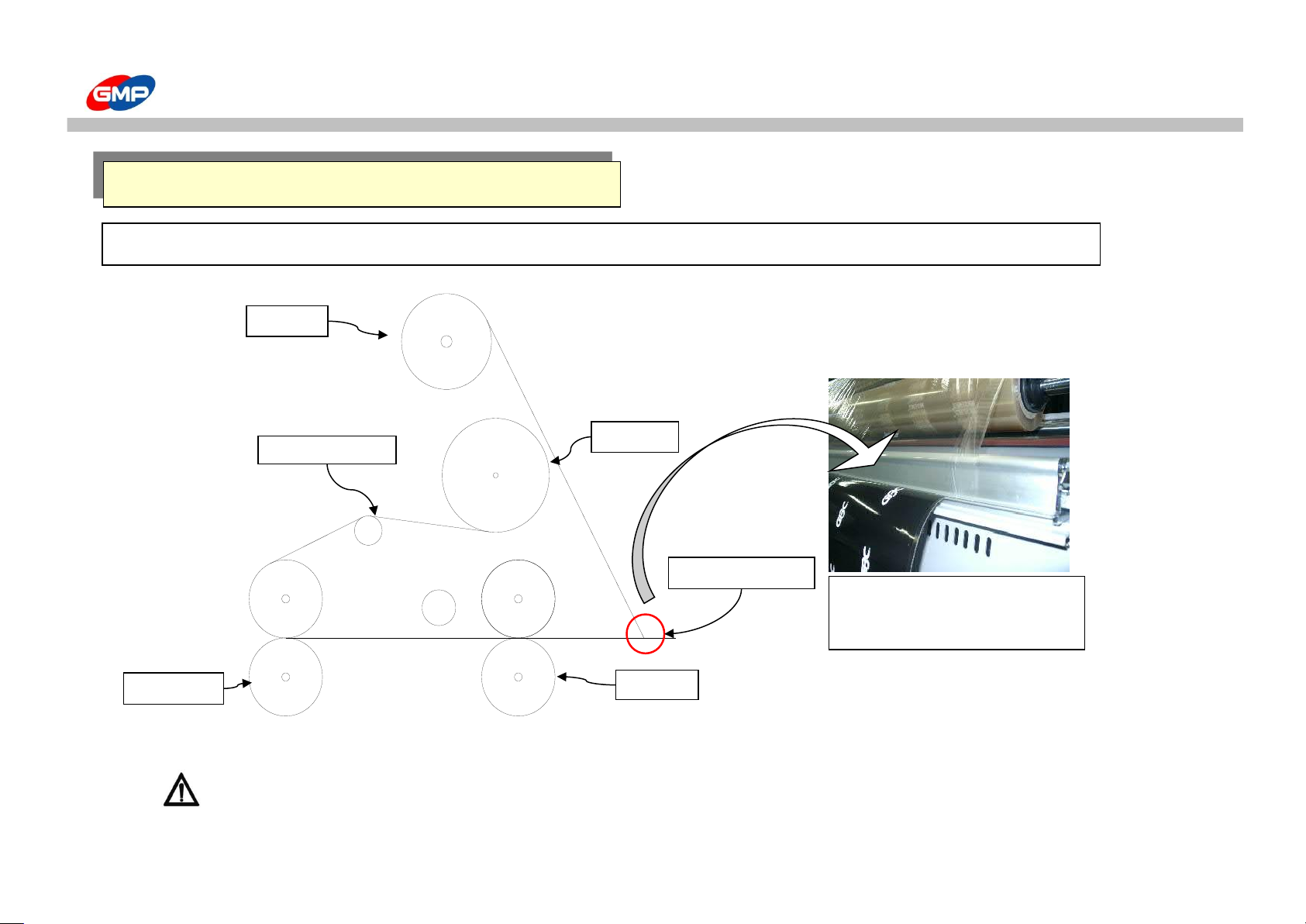
Caution : At the condition of laminating status, temperature and speed adjusting is needed.
Film Loading
Heat Roller
Pull Roller
Upper Film
Rewinder
Upper Sub-Roller
Using a separator(optional),
separate the laminated Film and
paper.
Separator(Optional)
ULTRA-THIN OVERLAY COATING (MICRONEX FILM)
28/39
Page 29
HOW TO LAMINATE
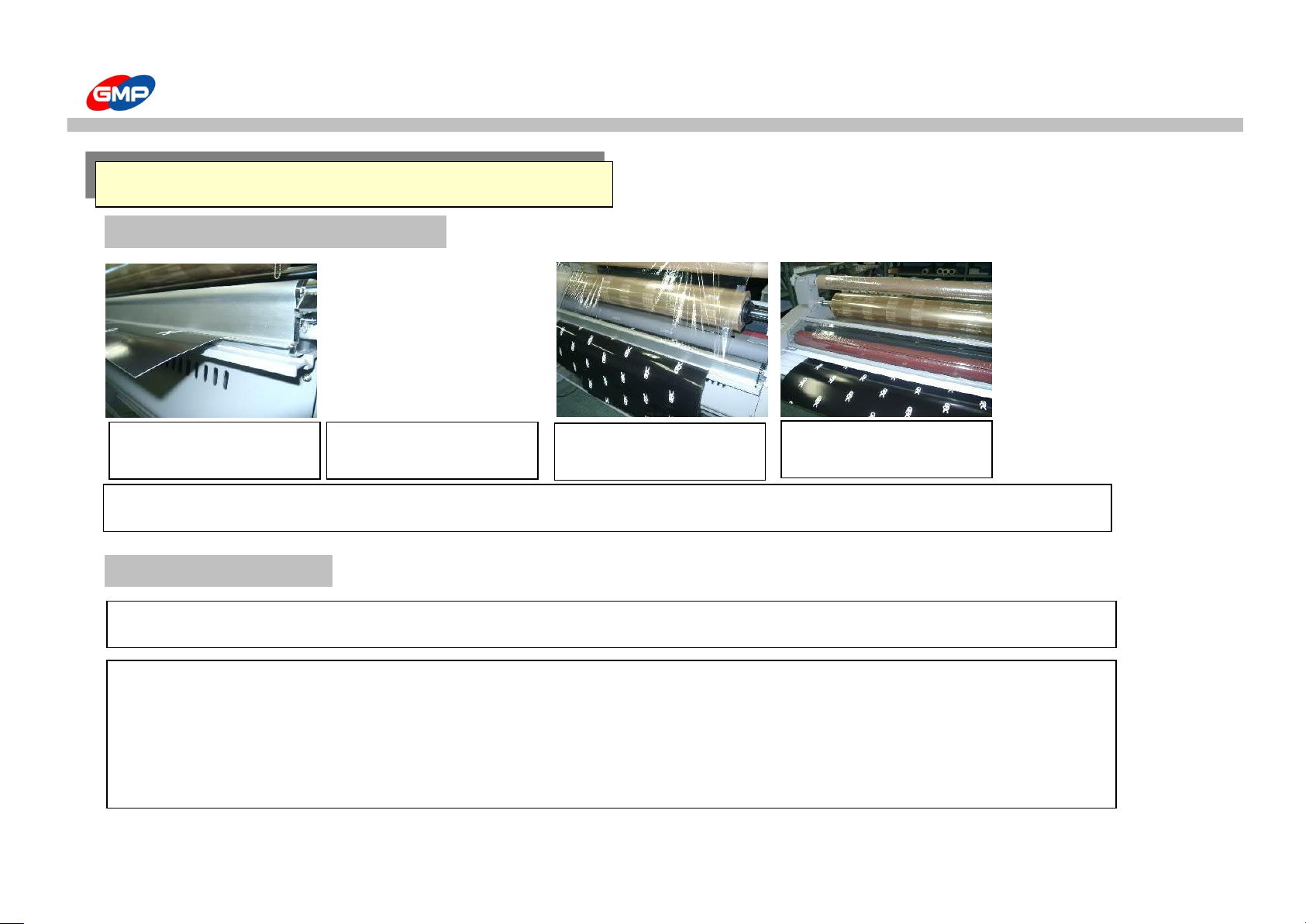
Stage 3 : To Ready For Laminating
Stage 4 : Laminating
ULTRA-THIN OVERLAY COATING (MICRONEX FILM)
1. After Installing separator,
insert the paper to push out.
2. It is the same as hot
laminating stage 2.
3. Rewind the film into the
rewinder paper pipe.
4. It is a readiness for
micronex film laminating.
☞ MICRONEX film necessarily should be used at the condition of bottom heat roller cooled down.
It is a same procedure just like the hot laminating stage 3.
☞ When you handle the micronex film, the caution to treat.
1. At the condition of no paper and roller stopping, roller pressure handle should be at the stand-by status.
2. On operating, necessarily use the cooling fan.
3. Below 80g paper is not separated.
29/39
Page 30
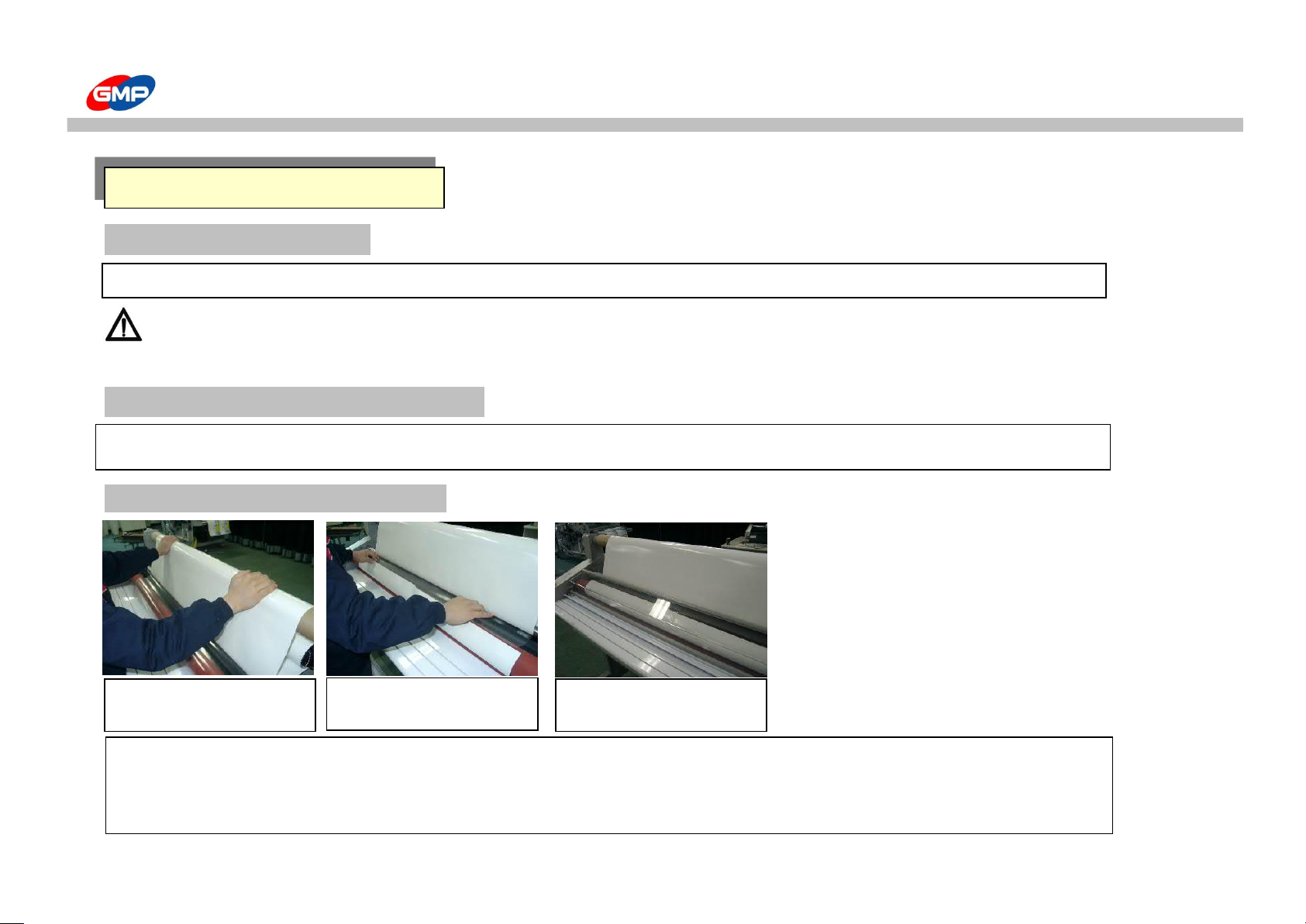
HOW TO LAMINATE
Stage 1 : Film Installation
Caution : In the case of film width is above 1M or 25KG, More than 2persons is needed.
If you does not, you can suffer a personal injury.
Stage 2 : Rewinder Paper Pipe Installation
Stage 3 : To Ready For Laminating
Film Installation is the same case as like the hot laminating stage 1(Film installation)
☞ Release liner should be larger than film's width in order not to put up.
☞ Film tension can be adjusted by the result of laminating but normally
adjust as much as spread wrinkle from a laminating roller.
COLD LAMINATING
2. Stick the paper to the
bottom film.
1. Install the paper liner on
the rewinder paper pipe.
3. It is a cold laminating
readiness.
Rewinder paper pipe installation is the same as the ultra-thin film laminating stage 2.
30/39
Page 31
HOW TO LAMINATE
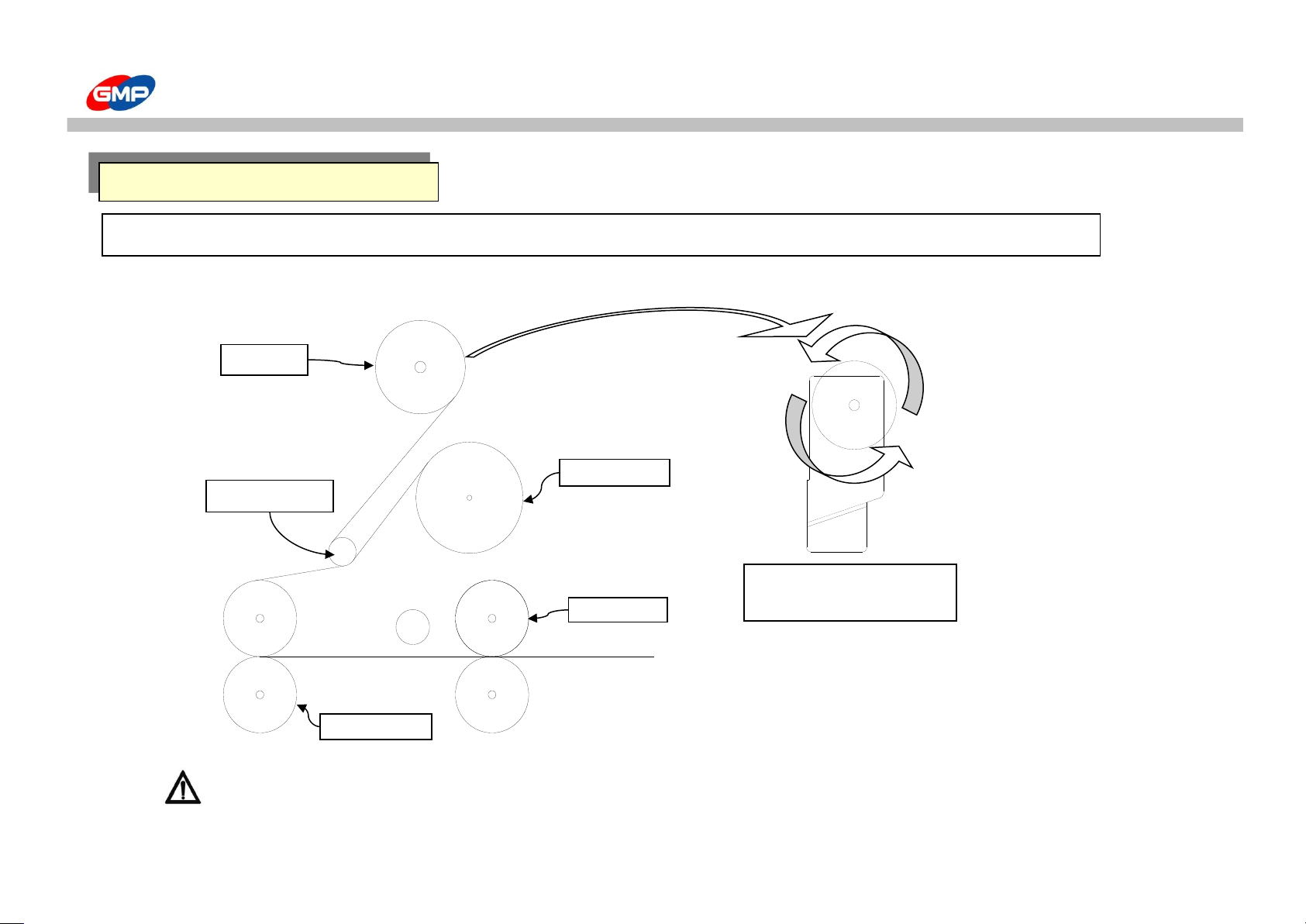
Caution : At the condition of laminating status, temperature and speed adjusting is needed.
COLD LAMINATING
Film Loading
Upper sub-roller
Upper Film
Rewinder
Pull roller
Heat roller
The rotating direction of
rewinder
31/39
Page 32
HOW TO LAMINATE
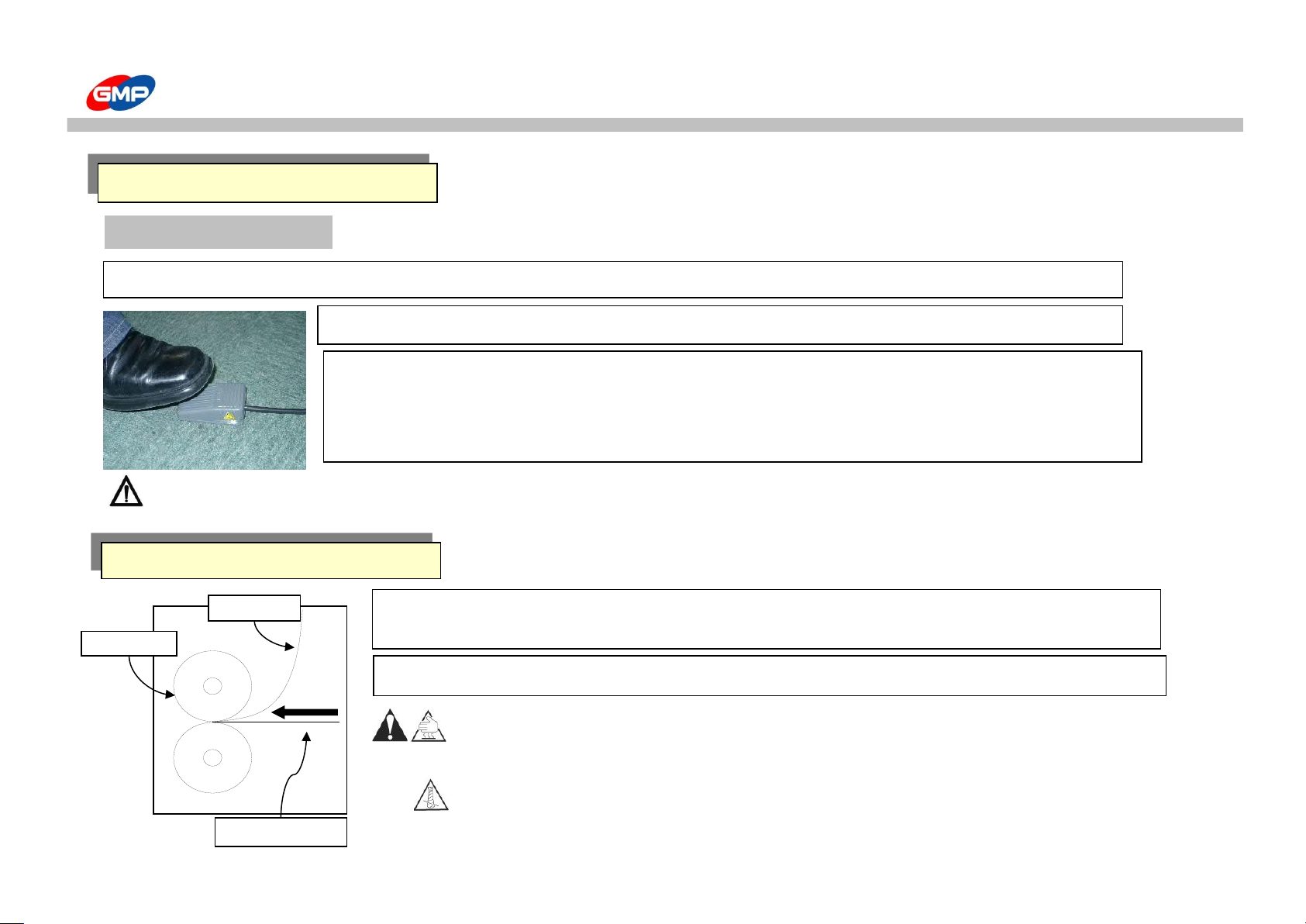
Stage 4 : Laminating
Caution : when the rollers rotate by foot switch, you have to take care
because the safety function does not activated. You can suffer a personal injury.
Caution : When you are ready to laminate, take care of non-touching your body to the machine.
You can suffer a personal injury.
Caution : When laminating or machine operating, Do not wind the long-hair, necktie, necklace
into machine. It will cause a personal injury.
Laminating is same with 3rd step of Hot laminating.
COLD LAMINATING
☞ It is easy to work when you use the foot switch on cold laminating.
☞ Caution at the cold laminating
1. Please Be Attention That sheet Printed By Sublimated Heat Transfer Mode Is Subject To Degenerate
Or Lost Its Color When Cold Laminating.
2. Please Make Sure That Work 30℃ or Below When Cold Laminating.
1. Load the paper on the mounting board.
2. Feed the mounting board between rollers.
Mounting
Direction
Liner
Mounting Board
Heat Roller
☞ Some glue which run off from the film is subject to be stuck to the rollers during Mounting job.
32/39
Page 33
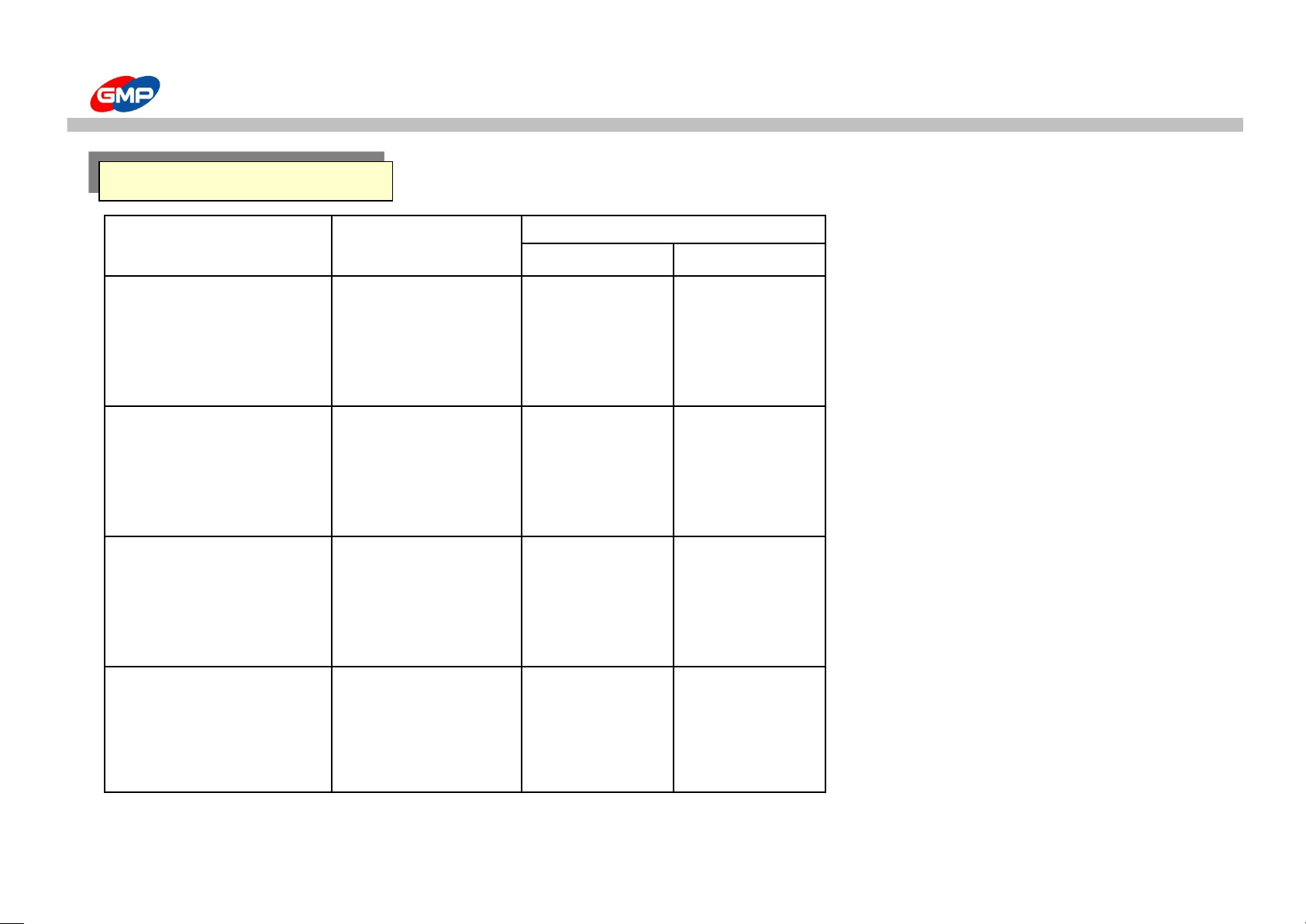
LAMINATION GUIDE
Film Thickness Paper Type Max. Setting
Temp. Speed
Below 38㎛(1.5mil) 110℃ 9
50~80㎛(2~3.5mil) Below 100g 110℃ 5
100~150㎛(4~6mil) 110℃ 3
175~250㎛(7~10mil) 110℃ 1
Below 38㎛(1.5mil) 110℃ 7
50~80㎛(2~3.5mil)
Above 100g ~
110℃ 3
100~150㎛(4~6mil)
Below 150g
110℃ 1
175~250㎛(7~10mil) 110℃ X
Below 38㎛(1.5mil) 110℃ 5
50~80㎛(2~3.5mil)
Above 150g ~
110℃ 1
100~150㎛(4~6mil)
Below 300g
110℃ X
175~250㎛(7~10mil) 110℃ X
Below 38㎛(1.5mil) 110℃ 3
50~80㎛(2~3.5mil)
Above 300g ~
110℃ X
100~150㎛(4~6mil)
1mm
110℃ X
175~250㎛(7~10mil) 110℃ X
☞ When the laminating results are not good, adjust the speed.
LAMINATION GUIDE
33/39
Page 34
LAMINATION GUIDE
1. Do not use too thick paper at the nip point. The papers can not be removed from the rollers.
2. A sudden stop can make a mark on the laminating paper.
3. Generally thick paper or film are needed a slower speed and higher temperature.
4. Thin paper and film are needed a faster speed and lower temperature.
5. If you want a clear laminating result, laminating tests are needed using a similar paper or material
by that results, you can decide to select the rightful temp. and speed by setting.
6. Do not use other film except GMP laminating film. It can cause a machine disorder.
7. If the paper are not feeded into feeding table rightly, it can cause film crease.
8. When the laminating stickiness are not good, therefore the paper is not clear, you should speed down or raise the temp.
※ For the purpose of long term use.
- After laminating, separate the bottom and upper heat rollers.
- At the condition of heat roller warmed up and roller pressured, run rollers.
- When you left the machine for one hour, set the roller temp. to 0℃
Above guides are for the purpose of preventing the roller and machine from the overheating and saving electricity.
TIPS FOR LAMINATION
34/39
Page 35
PRODUCT MAINTENCE
CAUTION : When washing the roller, you should use the isoprophilene alcohol.
CAUTION : after lamination, the laminating roller temp. is too high, if it would be contacted to body,
this could be a cause of burn.
CAUTION : Segregate the power plug from the outlet. It is a main reason of a fire flame.
CAUTION : Do not use the flammables such like an acetone, benzene etc. It is a main reason of a fire flame.
A roller's washing
☞ If the rollers not to be washed ~
- A film can be wound into the rollers
- A laminating result has a stain
* To prevent this status, roller cleansing is needed.
☞ A roller's washing
- After laminating, if the roller's temperature is lowered below 80, with "linen" and "isoprophil alcohol" wash the rollers
- After removing the safety cover with a "put switch" wash the rollers at the speed 1
Main body's cleansing
Main body and Cover should be polished with a soft linen
On washing, follow the cautions when using neutral detergent or chemicals
35/39
Page 36
TROUBLE SHOOTING
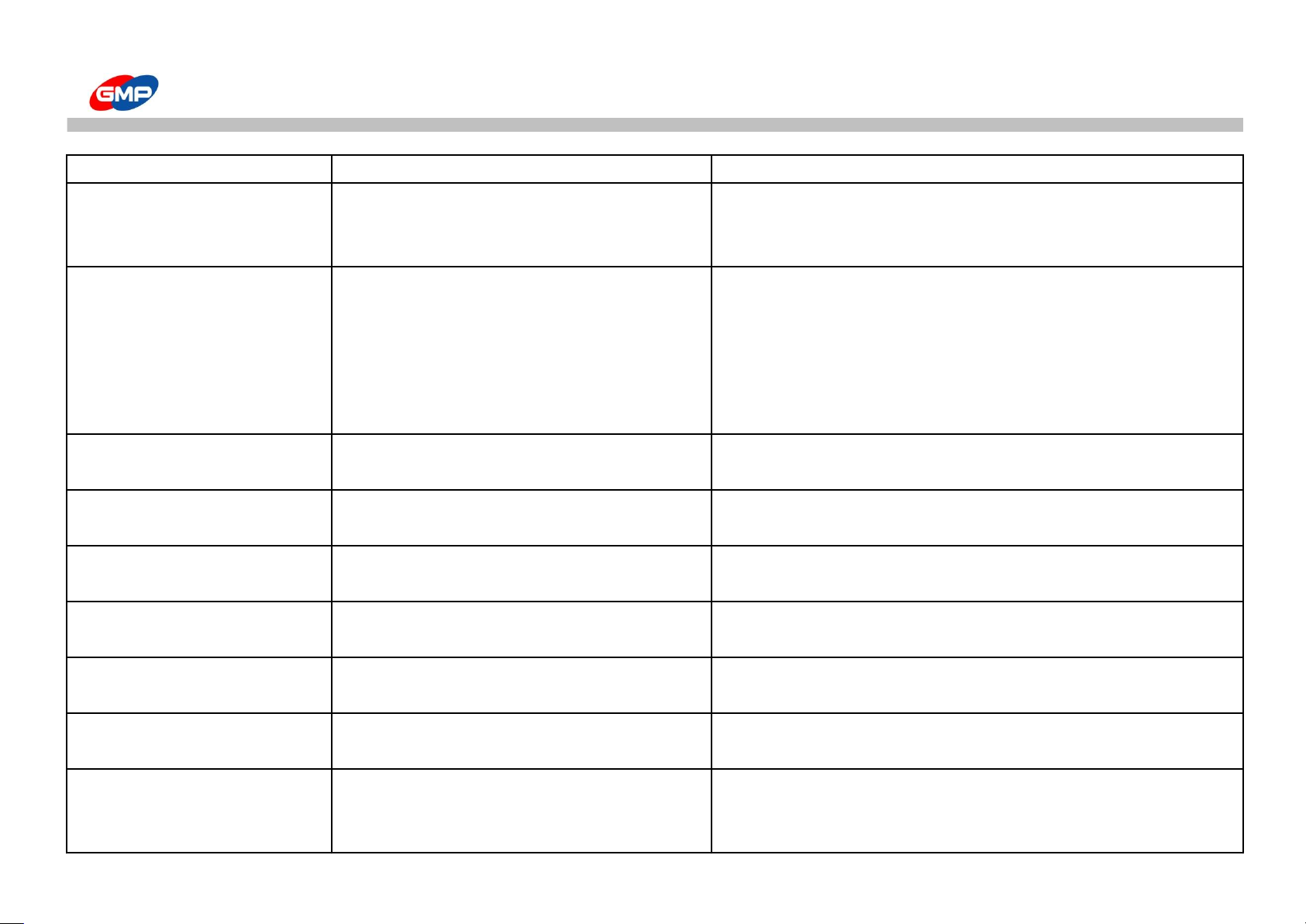
Symptom Cause of Trouble How to solve
When the power is not "ON" 1. Check Power Switch "ON/OFF"
2. When ran reverse-current circuit breaker 2. Contact Purchased place or Service Center.
3. When cut off fuse 3. Please exchange to included Fuse.
When roller not working 1. When Emergency switch operated 1. Release the emergency Switch
reference the "emergency switch" on safety notice
2. when laminating roller pressure is not transferred 2. Check the position of roller pressure knob
3. when front tray safety lever is not locked up 3. lock up the safety lever on front tray
reference the "front tray safety lever" on main device explanation
4. when laminating roller cover is open 4. Close the Laminating Roller Cover
Rewinder is not working 1. Rack of pressure on re-winder 1.Please increase pressure of Rewinder with a tension adjustment knob.
2. Chain damaged 2. Contact Purchased place or Service Center.
while cold laminating, rewinder 1. when rewinder need a pressure 1. Please increase pressure of Rewinder with a tension adjustment knob.
liner tension status is not enough 2. when over tension on roll film 2. Please decrease tension with a film tension adjustment knob.
while cold laminating, 1. When over pressure on rewinder 1. Please decrease pressure of rewinder with a pressure adjustment knob
film tension is not enough 2. when roll film tension needed 2. Please increase tension with a film tension adjustment knob.
when laminated material decurls 1. when over tension on upper roll film 1. Please decrease tension with a film tension adjustment knob.
face toward 2. when loose tension on lower roll film 2. Please increase tension with a film tension adjustment knob.
when laminated material decurls 1. when loose tension on upper roll film 1. Please increase tension with a film tension adjustment knob.
face down 2. when over tension on lower roll film 2. Please decrease tension with a film tension adjustment knob.
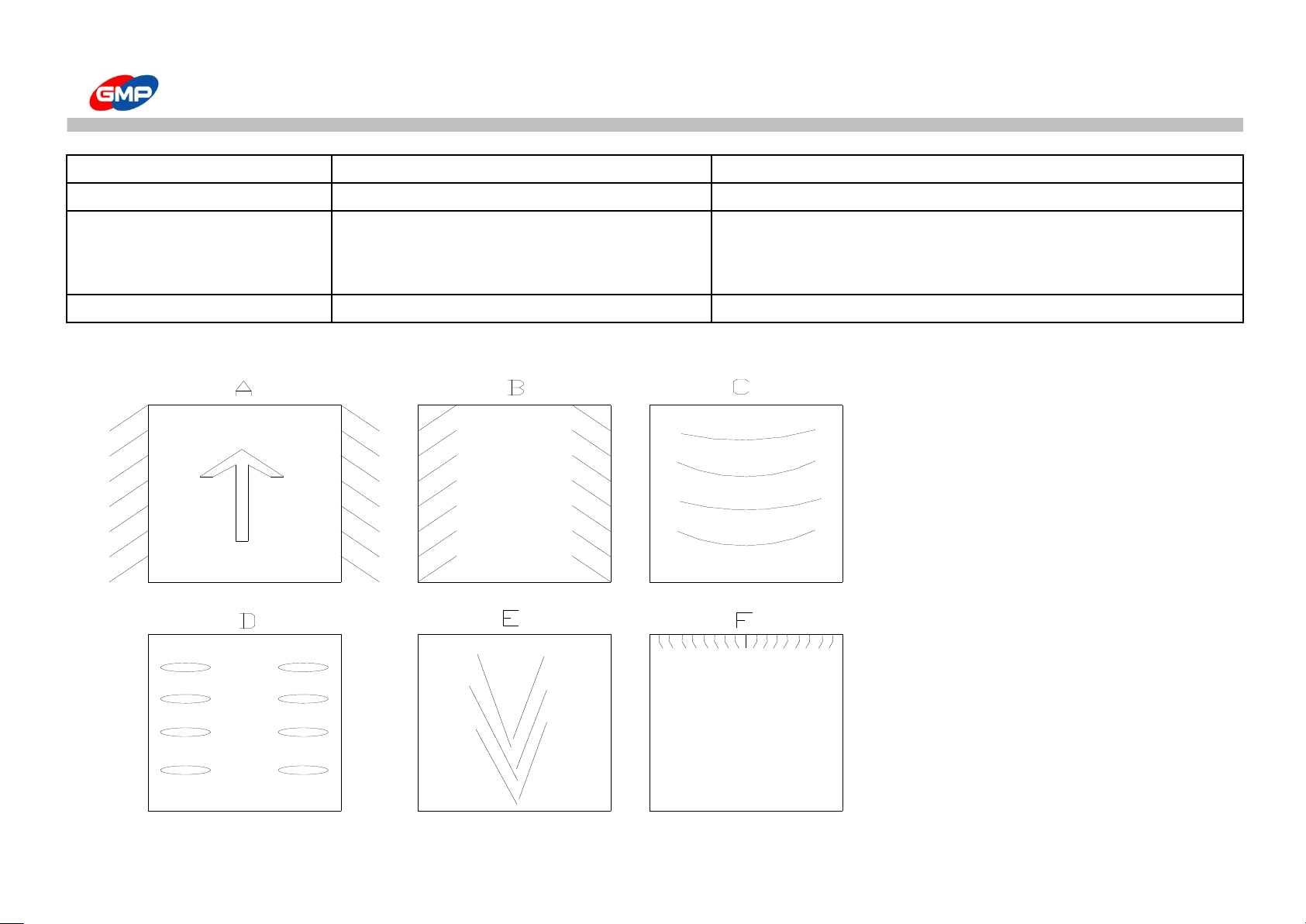
Symptom "A" of Fig. 1. when laminating roller pressure needed 1. Increase a laminating roller pressure.
reference the "roller pressure adjustment knob on main device explanation
Symptom "B" of Fig. 1. when laminating roller pressure is high 1. decrease a laminating roller pressure
2. when laminated material temperature is high 2. operate the cooling motor
reference the "cooling" on display explanation
36/39
Page 37
TROUBLE SHOOTING
Symptom "C" of Fig.
1. when over pressure on laminating roller
1. decrease a lamination roller pressure
Symptom "D" of Fig. 1. when laminating roller need a pressure 1. Increase a laminating roller pressure
Symptom "E" of Fig. 1. when laminating roller temperature is high 1. decrease a laminating roller set up temperature
2. When pull roller temperature is high 2. operate the cooling motor
shut down the power and let it cool down for 30 min
Symptom "F" of Fig. 1. When laminating roller temperature is high 1. decrease a laminating roller set up temperature
☞ result of laminated material diagram
37/39
Page 38
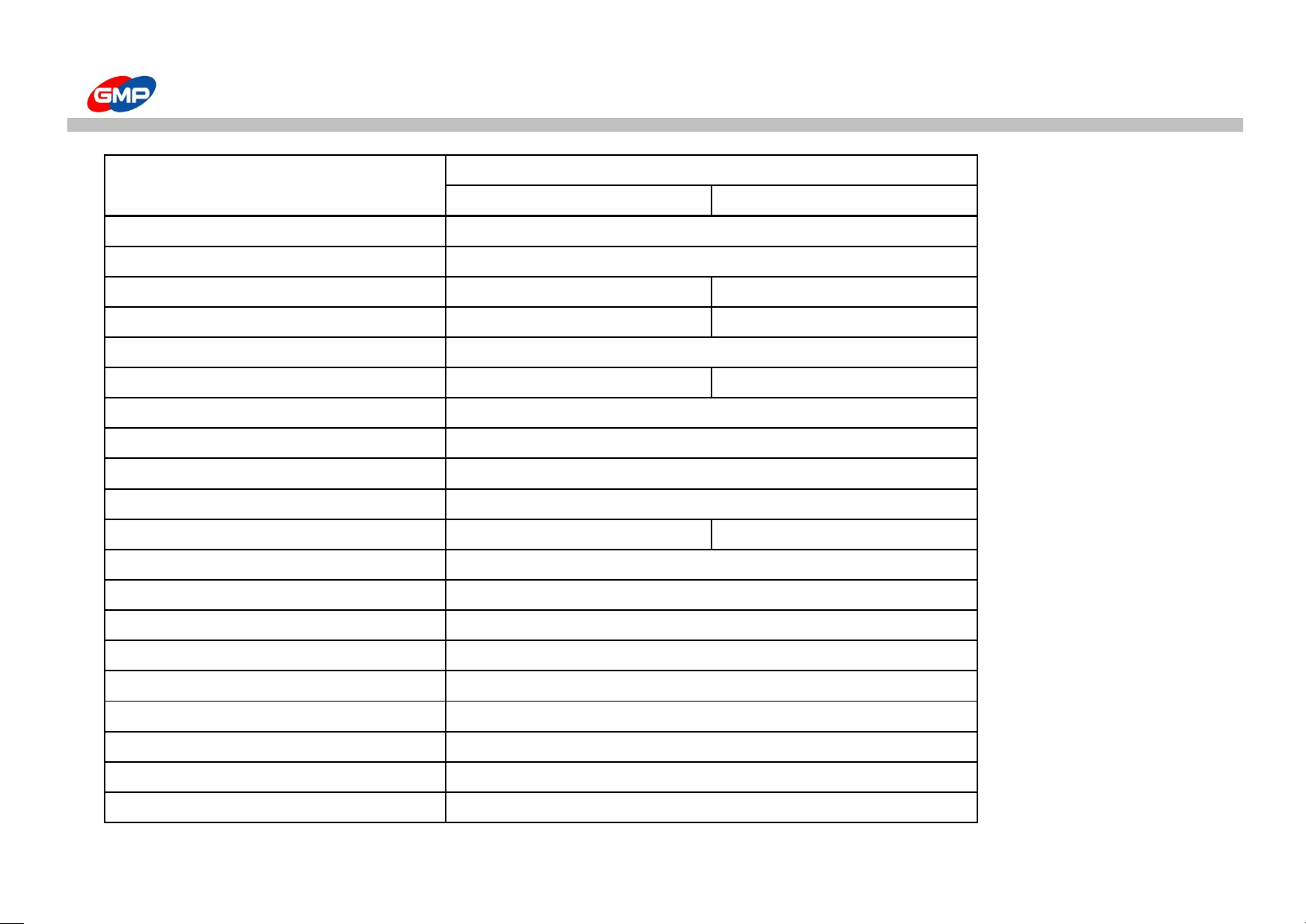
Product Specification
Specification
EXCELAM-Q1100SWING EXCELAM-Q1670SWING
Regular voltage 220~240V, 50/60Hz
Consumption electricity 3300W/15A
Product size(W*L*H)(mm) 1500*710*1250 2000*710*1250
Preheating time(min) 22 Minutes 25 Minutes
Max Laminating speed(mm) 3,000
Max Laminating Width(mm) 1,100 1,670
Laminating film thickness(mic, ㎛)
25~500㎛
Max Mounting Height(mm) 13mm
Laminating paper(g/㎡)
80g/㎡ ~ 350g/㎡
Roller temperature℃, degree) 160℃
Weight(Kg) 205 276
Heating method
Infrared Heater
Temperature control
Button
Temperature control Time control
Speed control
Button
Start motor
DC Motor
Roller pressure control
Manual
Film core
77MM(3") Dual core
Cooling motor AC Motor(Blower fan)
Rewinding control Link to Main Motor
※ The design / specification of the machine could be changed for improvement without any prior notice.
Classification
38/39
Page 39
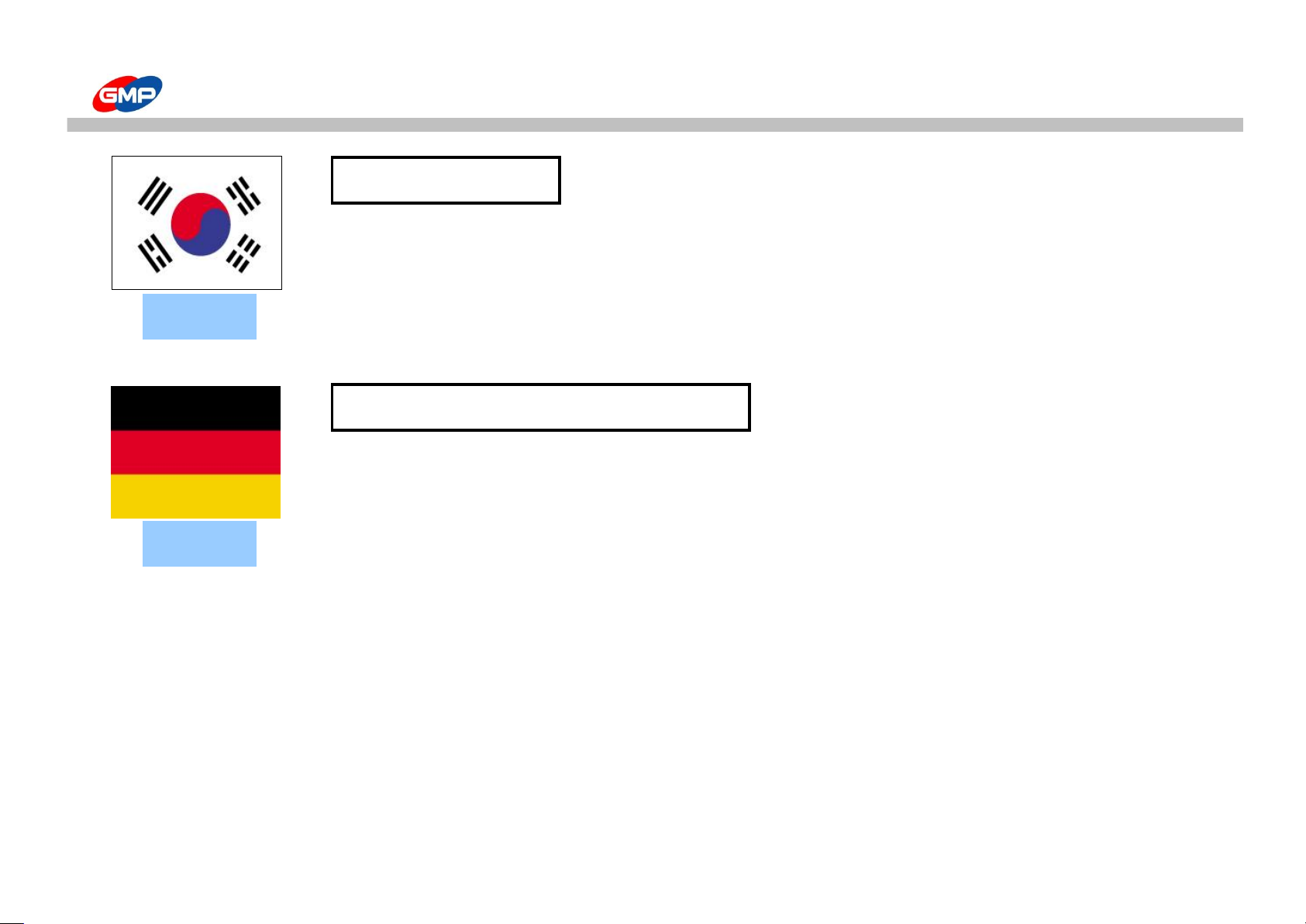
GMP SUBSIDIARIES
GMPCO.,LTD.
Address : #139, Saneopdanji-gil, Paju-si, Gyeonggi-do, Korea
Tel No : +82-31-943-3600
Fax No : +82-31-943-4433
http://www.gmp.com
GMP PROGRAPHICS Germany GmbH
EU Prographics Center for Distribution, Marketing, Service and Training
Address : Robert-Bosch-Str.4 D-56751 Polch, Germany
Tel No : +49-2654-9490-0
Fax No : +49-2654-9490-90
European Lamination Service Center
http://www.gmp-germany.de
KOREA
GERMANY
39/39
 Loading...