

Page 1
INSTALLATION INSTRUCTIONS
“Lighting Enhanced by Design”
®
“Lighting Enhanced by Design”
®
120V RSD Regressed Slim Downlight
BEFORE YOU START:
• Please check local electrical codes before beginning
• Turn power off before installing
• Make sure to use properly rated wire
NOTE: DO NOT INSTALL IN AN APPLICATION THAT IS OUTSIDE OF THE
PRODUCTS LISTED AMBIENT TEMPERATURE AND IN AN AREA THAT IS
NOT EASILY ACCESSED FOR SERVICE REQUIREMENTS.
TURN POWER OFF FROM ELECTRICAL PANEL BEFORE INSTALLTION.
REFER TO HOLE CUT TABLE BELOW FOR ACCURATE DIAMETER. RUN
ELECTRICAL WIRE FROM THE SWITCH (POWER SUPPLY) THROUGH
THE MOUNTING HOLE - USE NMD90 ROMEX OR BX CABLE.
CUT-OUT DIMENSIONS
CAT. NO. PREFIX HOLE DIAMETER
RSD-3 3-1/4”
RSD-4 4-1/4”
RSD-6 6-1/8”
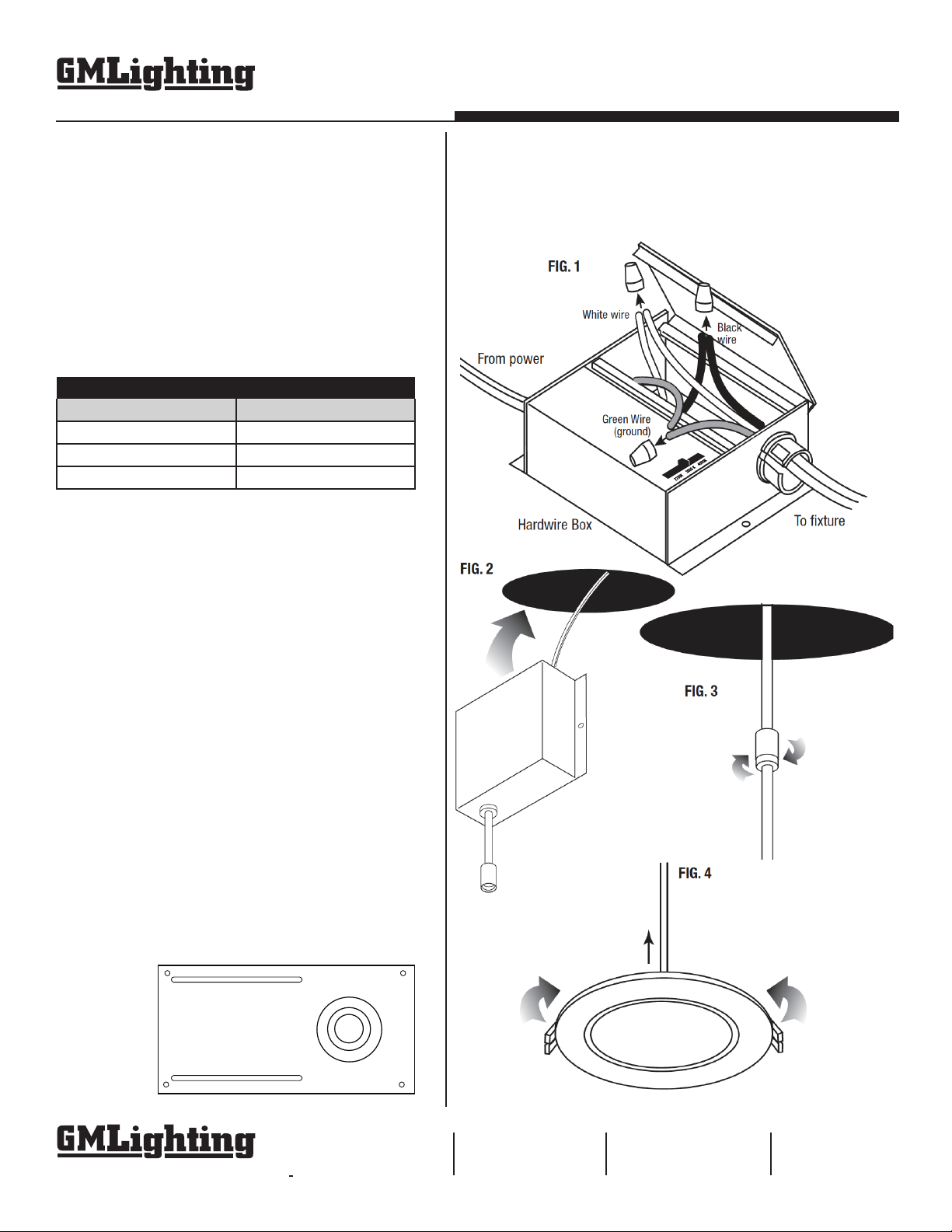
1. OPEN HARDWIRE BOX COVER and remove appropriate knock-outs.
Insert electrical supply cable through knock-out and using wire nuts,
connect green ground wire of cable to green wire on box. Connect white
wire from cable to white wire in box. Connect black wire of cable to
black wire of box. (Fig. 1). Use switch to select desired color temp
before closing box. Secure cable with cable connector (sold separately).
TOOLS REQUIRED:
• Hole saw
• Measuring Tape
• Electrical Wire (use type and gauge suitable for installation).
Switch
2. PLACE WIRE and connectors back in box, close cover, and push box
up through ceiling hole, letting modular connector dangle from hole (Fig.
2). NOTE: For new construction, secure hardwire box to studs,
joists, or similar fixed structure. For remodel applications, driver
can be loose.
3. CONNECT FIXTURE TRIM to modular jack by inserting and twisting
the male / female connectors (Fig. 3).
4. INSTALL FIXTURE into ceiling by pushing spring loaded clips on the
fixture upwards and pushing fixture up into the mounting hole. Release
the clips and the fixture will be pulled flush to ceiling (Fig. 4). A new
construction plate (UNV-NCP) is available for new construction installations (Fig. 5).
5. TURN POWER ON to confirm that fixture is working
properly.
FIG. 5
©2022 GM Lighting
Specifications are subject to change
without notice.
18700 Ridgeland Ave.
Tinley Park, IL 60477
Toll-Free: (866) 671-0811
FAX: (708) 478-2640
www.gmlighting.net
[email protected]
RSDI-Installation_012122
 Loading...