

Page 1
Quick guide for GlucoMen LX PLUS
How to set the time, date and sound.
1. Start the meter. Hold in for more than 3 seconds.
For a moment, the screen will show all symbols.
2. Set the time. The digits for hour blink. Browse and
select by pressing or . Confirm with .
Set the minutes in the same way.
3. Set the year, month and day. Select the year by
pressing or . Confirm with . Select the
month in the same way. Confirm with . Select
the day in the same way. Confirm with .
4. Set the sound. Press or to activate the sound
(you can choose whether the meter has sound or is
silent). Select ”on” or ”off”. Confirm with .
5. Save by holding in for longer than 3 seconds.
State the following Apoteket item
number when you order:
50 Lancing devices GlucoMen® LX Sensor
Apoteket item no. 22 01 84
100 Lancets Glucoject® Lancets
Apoteket item no. 22 01 28
200 Lancets Glucoject® Lancets
Apoteket item no. 22 02 29
1 st Glucoject
®
Dual Testing device
Apoteket item no. 20 47 11
Error codes
E-0
Software error. Call customer service 040-32 12 70.
E-1
System error with hardware. Call customer service
040-32 12 70.
E-2
Wrong usage temperature. Temperature is outside
the limits (5°C–45°C).
E-3
Wrong or previously used test strip.
E-4
Blood test error. Incorrect test.
E-xx
Other figure than above. Call customer service
040-32 12 70.
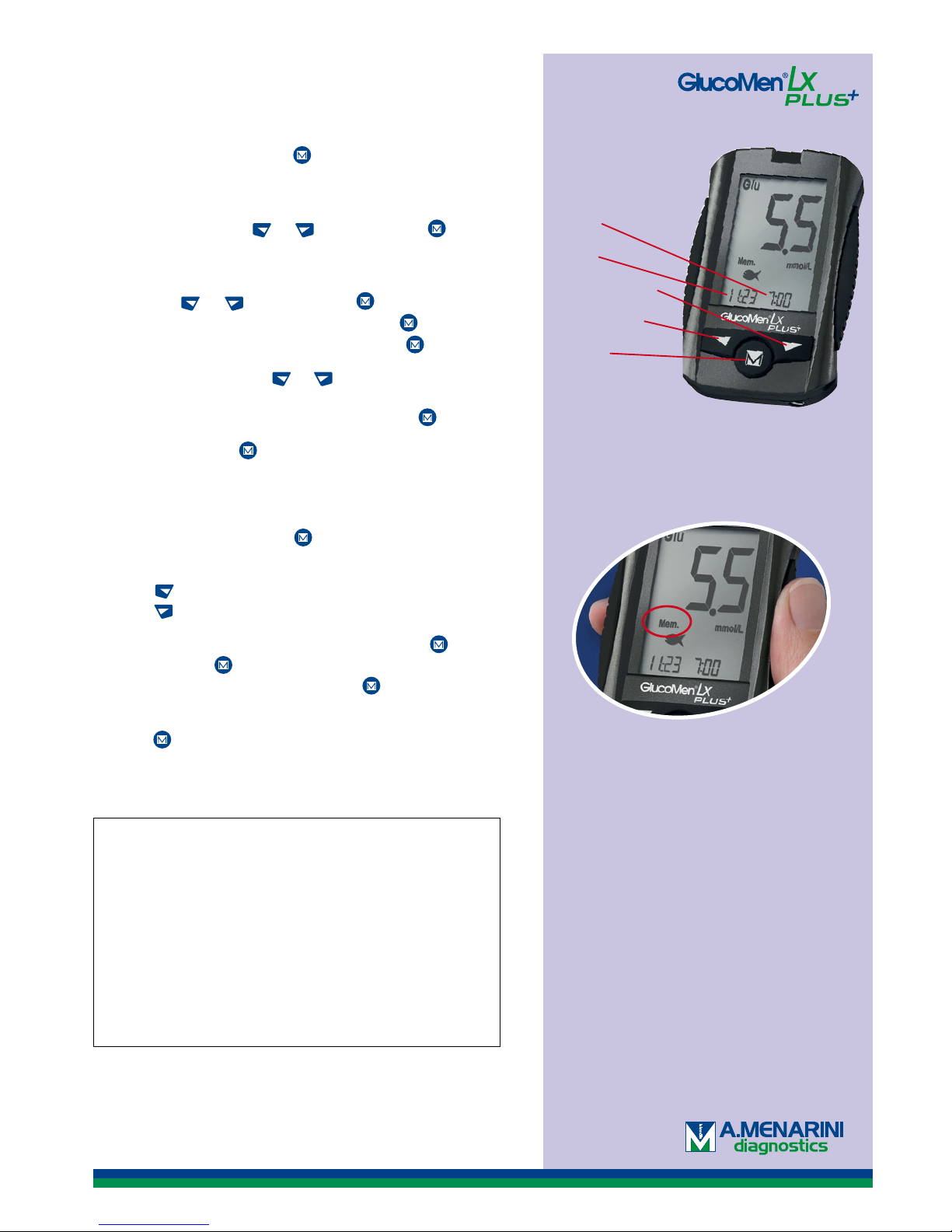
Time
Date
Left button
On/off
Right button
How to get the meter results from the memory.
1. Start the meter with the -button and the
latest meter result is shown in the display.
2. Press to scroll back in time (max 400 values).
Press to go forward.
3. Average value; turn on the meter with the button. Press again and the meter shows the
day’s average. Continue to press to show
the latest 1, 7, 14 and 30-day averages.
4. Keep pressed down longer than 3 seconds
in order to turn off the meter.
Note that this printed matter is a quick guide and more detailed
information can be found in the user’s manual that comes with
your meter. If you have further questions contact our customer
service on 040-32 12 70. or [email protected].
engelska
The teststripe GlucoMen® LX Sensor and
GlucoMen® LX ß-Ketone Sensor are
subsidized and approved by Läkemedelsförmånsnämnden.
Page 2
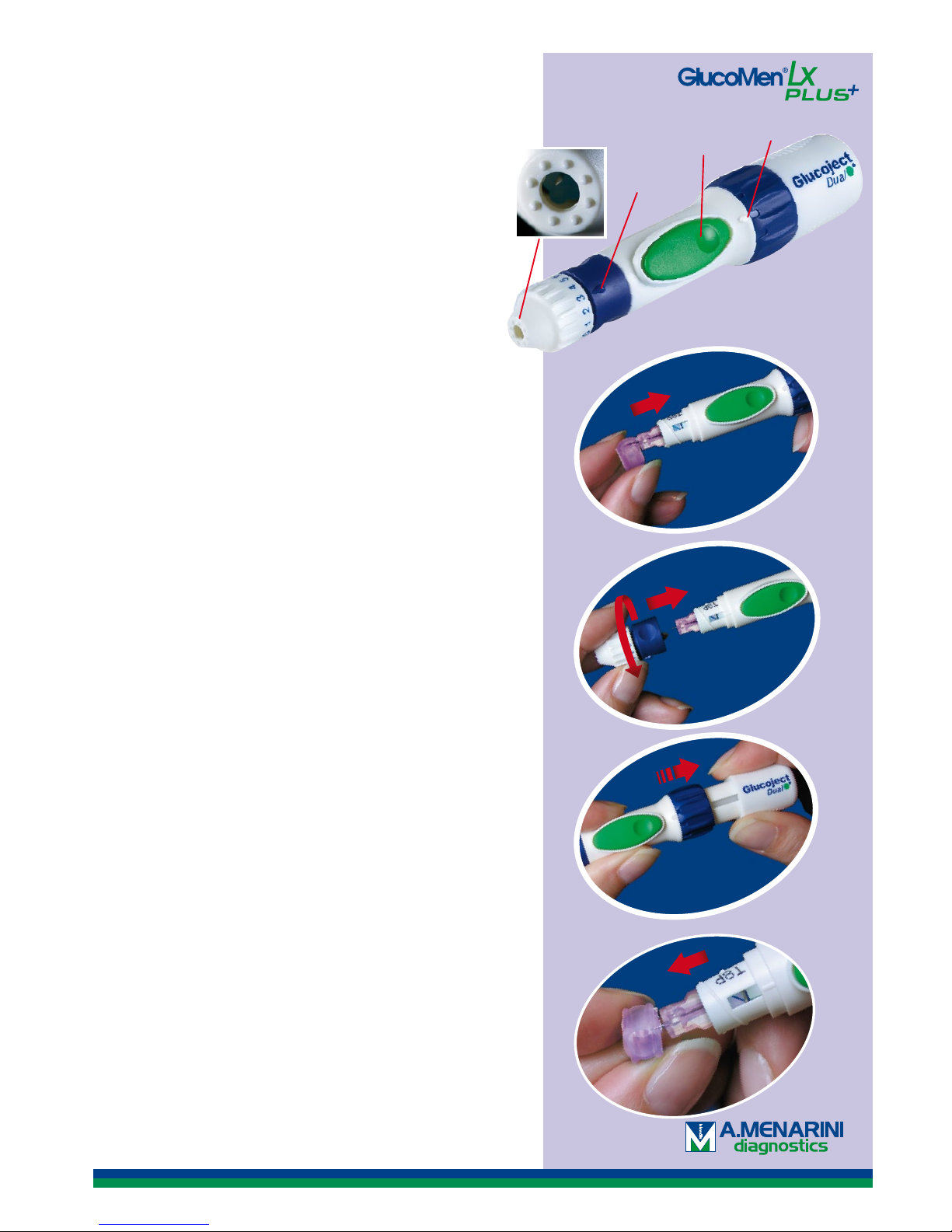
1. Unscrew the top of the device and push in a new
lancet as far as it will go.
2. Twist off the needle’s plastic protective cover and
screw the top back on again.
3. Set the desired penetration depth 0–6 (0 is the
shallowest and 6 is the deepest) and adjust the
force level (three settings) to adapt the penetration
to your skin type.
4. Grasp the back section of the lancing device and
pull it out until you hear a click. Now the device
is loaded.
5. Press the top against your fi nger and press the
trigger.
6. Remove the lancet after the test and throw it in a
container for sharp objects. Do not reuse the lancet.
Tip! Before you pull out the lancet, place the needle
in the four-sided piece of plastic that previously pro tected the needle so you don’t risk sticking yourself.
Puncture
depth
Force adjustment
Painless testing.
Your new lancing device is equipped with the
unique and ingenious Comfort Zone-technology:
eight small points in a circle, which block the
brain’s sensory perception so that the testing is
practically painless.
The fact that you, in addition, can adjust the force
means that you don’t have to penetrate so deeply
to get the right amount of blood.
A shallow penetration is felt considerably less than
a deep one. So try to get a shallow penetration
depth and increase the force instead.
Trigger
How to use the lancing device.
1.
2.
6.
4.
Customer service 040-32 12 70 or [email protected]
engelska
Quick guide for GlucoMen LX PLUS
Page 3
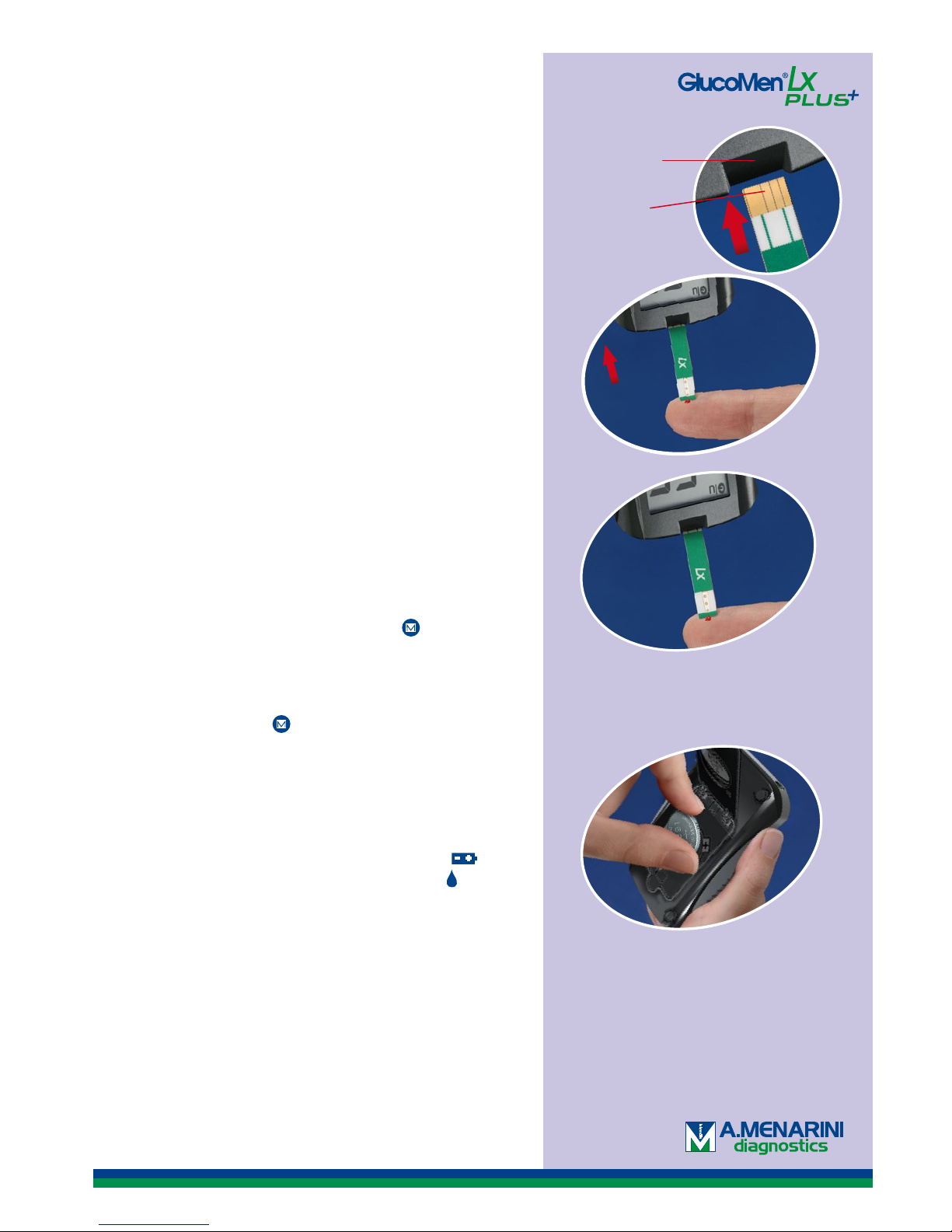
How to measure the blood glucose/ketone value.
1. Wash your hands with soap and water.
2. Take a glucose or ketone test strip.
3. Put the gold-coloured contact area of the strip in the
test strip port of the meter.
4. The meter shows a blinking blood drop and is now
ready to perform a measurement.
5. Lance yourself with the lancing device.
6. Set the blood drop against the short end of the test
strip, which automatically will draw up the right
amount of blood.
7. When you have read your blood glucose value (after
4 seconds for glucose strips and 10 seconds for ketone
strips), take out the test strip and discard it. The meter
shuts off automatically.
This is how you use the value mark-up function
(only glucose values)
1. Select one of the mark-ups with the arrow buttons
(”before meal”, ”after meal”, ”training” or”check”).
2. Confirm the selection by pressing the -button.
3. When selecting the mark-up ”before meal” an alarm
can be activated to go off after 2,5 hours for a ”after
meal” test. Select activation with the arrow buttons
and confirm with the -button.
Note. The meter is NOT automatically saving a mark-up if the strip is removed
or if one minutes passes.
3.
6.
Öppning för
teststickan
Kontaktyta
Quick guide for GlucoMen LX PLUS
Customer service 040-32 12 70 or [email protected]
Changing the battery.
GlucoMen® LX is powered by one CR2450 battery.
When battery strength is low, the meter shows in
the upper right-hand corner and a blood drop in the
lower left corner. You then have power for approximately
20 additional measurements. The battery symbol will
remain until you have changed the battery. Contact our
customer service at tel. 040-32 12 70, and we will send
you a new battery free of charge.
1. Open the battery slot on the back of the meter.
2. Pull out the old battery and .and put in a new
battery in, with the”+” symbol facing upward.
3. Put the cover back on.
engelska
 Loading...