

Page 1

Simplify
59042-00 A Page i
SANbox2-8c Fibre Channel Switch
Inst allation Guide
Page 2

Page ii 59042-00 A
SANbox2-8c Fibre Channel Switch
Installation Guide
© 2000–2002 QLogic Corporation
First Printed: May 2001
All Rights Reserved Worldwide.
Printed in U.S.A.
QLogic Corporation, 6321 Bury Drive, Eden Prairie, MN 55346
(800) 342-7379 or (952) 932-4000
Information furnished in thi s man ual is belie ved to be ac curate and rel iable . Howev er, QLogic Corporation assu mes no
responsibility for its use, nor for any infringements of patents or other rights of third parties which may result from its
use. QLogic Corporation reserves the right to change product specifications at any time without notice. Applications
described in this document for any of these products are for illustrative purposes only. QLogic Corporation makes no
representation nor warranty that such applications are suitable for the specified use without further testing or
modification. QLogic Corporation assumes no responsibility for any errors that may appear in this document.
QLogic, SANbox, SANbox2, SANblade, and SANsurfer are trademarks or registered trademarks of QLogic
Corporation.
Java and Solaris are registered trademarks of Sun Microsystems, Inc.
Pentium is a registered trademark of Intel Corporation.
Linux is a registered trademark of Linus Torva lds.
Microsoft, Windows NT, and Windows 2000, and Internet Explorer are registered trademarks of Microsoft
Corporation.
Brocade is a trademark of Brocade Communications Systems Inc.
NetScape Navigator is a registered trademark of Netscape Communications Corporation.
All other brand and product names are trademarks or registered trademarks of their respective owners.
Document Revision History
Revision A, Release, September 2002
Changes Sections Affected
Page 3

59042-00 A Page iii
Table of Contents
Section 1 Introduction
1.1 Intended Audience.............................................................................................1-1
1.2 Related Ma te rials ...............................................................................................1-2
1.3 Safety N o ti ces..................................................... .. .............................................1-3
1.4 Sicherheitshinweise............................................................................................1-3
1.5 Notes informatives relatives à la sécurité...........................................................1-3
1.6 Communications Statements..............................................................................1-4
1.6.1 Federal Communications Commission (FCC) Class A Statement ............1-4
1.6.2 Canadian Department of Communications Class A
Compliance Statement .............................................................................. 1-4
1.6.3 Avis de conformité aux normes du ministère des
Communications du Canada................................................................... ..1-4
1.6.4 CE Statement ............................................................................................ 1-5
1.6.5 VCCI Class A Statement ...........................................................................1-6
1.6.6 BSMI Class A Statement ...........................................................................1-6
1.6.7 Laser Safety Information ...........................................................................1-7
1.7 Electrostatic Discharge Sensitivity (ESDS) Precautions....................................1-7
1.8 Access ib le P a rts.......... .. .....................................................................................1 -7
1.9 Pièces Accessibles............................................................................................. 1-7
1.10 Zugängliche Teile...............................................................................................1-7
1.11 Technical Support...............................................................................................1-8
1.1 1.1 Availability..................................................................................................1-8
1.1 1.2 Training......................................................................................................1-8
1.1 1.3 Contact Information ...................................................................................1-8
Section 2 General Description
2.1 Chassis Controls and LEDs .............................................. .................................2-2
2.1.1 Res e t/F o r c e P R OM Button..... .. .. ............. ... .. .............................................2 -2
2.1.1.1 Resetting a Switch............................................................................2-3
2.1.1.2 Placing the Switch in Force PROM Mode.......................... .. .............2-3
2.1.2 Ove r Temperature LED (Yellow).......... ...................................................... 2-3
2.1.3 Fan Fail LED (Yellow)......................... .. ............................... .. ....................2-3
2.1.4 Heartbeat LED (Yellow)............................................................................. 2-4
2.1.5 Input Power LED (Green)..........................................................................2-4
2.2 Fibre Channel Ports ...........................................................................................2-4
2.2.1 Small Form-Factor Pluggable (SFP) Transceivers........................... .........2-5
Page 4

Page iv 59042-00 A
SANbox2-8c Fibre Channel Switch
Installation Guide
2.2.2 Port Modes.............................. .. ................................................................2-5
2.2.2.1 Fabric Ports ......................................................................................2-5
2.2.2.2 Expansion Port ................................................................................. 2-5
2.2.2.3 Translated Loop Port........................................................................2-6
2.2.3 Logged-In LED..........................................................................................2-6
2.2.4 Activity LED ...............................................................................................2-7
2.3 Ethernet Port ...................................................................................................... 2-7
2.4 Serial Port........................................................................................................... 2-8
2.5 Power Supply and Fan.......................................................................... .. ...........2-9
2.6 Switch Management...........................................................................................2-9
Section 3 Planning
3.1 Devices............................................................................................................... 3-1
3.2 Multiple C h a ss is F a br ic s .......... ..........................................................................3-2
3.2.1 Domain ID, Principal Priori ty, and Domain ID Lock...................................3-2
3.2.2 Common Topologies..................................................................................3-3
3.2.2.1 Cascade Topology............................................................................3-3
3.2.2.2 Mesh Topology .......................................................................... .......3-4
3.2.2.3 Multistage Topology................................................ .. ........................3-5
3.3 Performance.......................................................................................................3-6
3.3.1 Distance.....................................................................................................3-6
3.3.2 Bandwidth..................................................................................................3-7
3.3.3 Latency...................................................................................................... 3-7
3.4 Device Access....................................................................................................3-8
3.4.1 Soft Zones.................................................................................................3-9
3.4.2 Access Control List H a rd Z o ne s. .. .............................................................3-9
3.4.3 Virtual Private Fabri c Hard Zones........................................... ..................3-9
3.5 Fabric Management.........................................................................................3-10
3.6 Fabric Security.................................................................................................3-10
Section 4 Installation
4.1 Site Requirements..................................... .. ................................... .. ..................4-1
4.1.1 Fabric Management Workstation...............................................................4-1
4.1.2 Switch Power Requirements.....................................................................4-1
4.1.3 Environmental Conditions.......... ................................................................4-2
4.2 Installing a Switch...............................................................................................4-2
4.2.1 Mount the Switch.......................................................................................4-3
4.2.2 Install SFP Transceivers............................................................................4-4
4.2.3 Connect the Switch to AC Power ..............................................................4-5
4.2.4 Install SANbox Manager......................................... .. .. ...............................4-7
Page 5

59042-00 A Page v
SANbox2-8c Fibre Channel Switch
Installation Guide
4.2.4.1 SANbox Manager Installation for Windows ......................................4-7
4.2.4.2 SANbox Manager Installation for Linux ............................................4-8
4.2.4.3 SANbox Manager Installation for Solaris..........................................4-9
4.2.5 Connect the Management Workstation to the Switch..............................4-10
4.2.5.1 Ethernet Connection............................................ ...........................4-11
4.2.5.2 Serial Connection...........................................................................4-11
4.2.6 Set th e Dat e ....................................... .. .. .................................................. 4-12
4.2.7 Configure the Switch ...............................................................................4-13
4.2.8 Configure the Ports.................................................................................. 4-14
4.2.9 Cable Devices to the Switch....................................................................4-14
4.3 Loading Firmware............. ........................... .....................................................4-14
4.3.1 Using File Transfer Protocol to Load Firmware........................ .. .............4-14
4.3.2 Using SANbox Manager to Load Firmware................................ .............4-16
4.3.3 Usin g th e CLI to L o ad F ir m w a re............ .. ................................................4-16
Section 5 Diagnostics/Troubleshooting
5.1 POST Diagnostics..............................................................................................5-1
5.1.1 Hea rt b ea t LED Blink Patt erns..... ............. ... .. ............. .. ..............................5-1
5.1.1.1 Normal (all pass)...............................................................................5-1
5.1.1.2 Force PROM Mode Pattern..............................................................5-2
5.1.1.3 In ternal Firmwa re Fa i lu re B lin k P a tte rn ..................... ....................... 5-2
5.1.1.4 Fatal Error Blink Pattern ...................................................................5-2
5.1.1.5 Configuration File System Error Blink Pattern .................................. 5-2
5.1.2 Logged-In LED Indications........................................................................5-3
5.2 Chassis Diagnostics...........................................................................................5-5
5.2.1 Ove r Temperature LED is Illumi n a te d........... .. .. ........................... .. .. .......... 5-5
5.2.2 Input Power LED Is Extinguished..............................................................5-6
5.2.3 Fan Fail LED is Illuminated................................................................. .......5-6
5.3 Recovering a Switch...........................................................................................5-6
Appendix A Specifications
A.1 Switch Specification s............ ..............................................................................A-1
A.2 Switch Maintai n a bi lit y ........... .. .. ..........................................................................A-2
A.3 Fabric Management........................................................................................... A -2
A.4 Switch Dimen s io n s.................................................... .. ... ............. .. .. ...................A-3
A.5 Switch Electrical............ .....................................................................................A-3
A.6 Switch Enviro nmental............. .. ........................... .. ........................................ .. ...A-3
A.7 Switch Regulatory Certifications.........................................................................A-4
A.8 Shortwave Laser SFP 1G/2G (multi-mode)........................................................A -4
A.9 Longwave Laser SFP 1G/2G (single-mode) ......................................................A -5
Page 6

Page vi 59042-00 A
SANbox2-8c Fibre Channel Switch
Installation Guide
Appendix B Command Line Interface
B.1 Logging On to a Switch.......................................................... .. ..........................B-1
B.2 Command Syntax...............................................................................................B-2
B.3 Commands.........................................................................................................B-3
Admin Comma n d............. .. ... .....................................................................B-4
Alias Comman d .........................................................................................B-5
Config Comma n d........... .. ..........................................................................B-7
Date Comman d .......................... .. ... ..........................................................B-9
Fallback Command..................................................................................B-10
Help Comman d.......... .. ............................................................................B-11
History Command....................................................................................B-12
Image Comma n d.. .. .................................................................................B-13
Lip Command..........................................................................................B-14
Passwd Comma n d ............ ......................................................................B-15
Ps Command...........................................................................................B-16
Quit Command ........................................................................................B-17
Reset Command......................................................................................B-18
Set Alarm Clear Command......................................................................B-22
Set Beacon Co m ma n d ............. .. ............. ... .. ...........................................B-23
Set Config Com m a n d ...... .. ......................................................................B-24
Set Log Comman d........... ........................................................................B-30
Set Port Comm a nd. ... .. ............................................................................B-33
Set Setup Com m a n d ..... .. ........................................................................B-34
Set Switch Com m a n d.. .. ..........................................................................B-38
Show Command......................................................................................B-39
Show Config Command.................... ................................... .. ..................B-48
Show Log Command...............................................................................B-50
Show Perf Command ..............................................................................B-52
Show Setup Command............................................................................B-53
Shutdown Command...............................................................................B-55
Test Command ........................................................................................B-56
Uptime Command............................. .. .. .. .. ........................................... .. ..B-58
User Comman d ............. .. .. .............. .. .. ....................................................B-5 9
Whoami Command................................................................ ..................B-61
Zone Command.......................................................................................B-62
Zoneset Command..................................................................................B-65
Zoning Command....................................................................................B-67
Glossary
Page 7

59042-00 A Page vii
SANbox2-8c Fibre Channel Switch
Installation Guide
Index
Figures
Figure Page
2-1 SANbox2-8c Fibre Channel Switch........................... ............................. ........................2-1
2-2 Chassis Controls and LEDS.................... .................................. ................................... ..2-2
2-3 Fibre Channel Ports.......................................................................................................2-4
2-4 Ethernet Port..................................................................................................................2-7
2-5 Serial Port and Pin Identification....................................................................................2-8
3-1 Cascade-with-a-Loop Topology......................................................... .. .. ........................3-3
3-2 Mesh Topology.......................................................... .....................................................3-4
3-3 Multistage Topology.............................. ................................................................ .........3-5
4-1 SANbox2-8c Fibre Channel Switch........................... ............................. ........................4-2
4-2 SFP Transceiver Installation ..........................................................................................4-4
4-3 Ethernet and Serial Cable Connections.................. ........................... .. ........................4-10
5-1 Port Logged-In LED ................... .................................................................................. ..5-3
5-2 Logged-In LED Indications.............................................................................................5-3
5-3 Chassi s L E D s.......... ... ............................................................................................ ... .. ...5-5
Tables
Table Page
2-1 Serial Port Pin Identification...........................................................................................2-8
3-1 Port-to-Port Transmission Combinations .......................................................................3-7
3-2 Port-to-Port Latency....................................................................................................... 3-7
4-1 Management Workstation Requirements.......................................................................4-1
5-1 E_Port Isolation Causes and Remedies .................................................... ....................5-4
B-1 Commands Listed by Authority Level.............................................................................B-3
B-2 Switch Configur a ti on D e fa u lt s.................................................... .. .. ........................... .. .B -1 9
B-3 Port Configuration Defaults..........................................................................................B-19
B-4 SNM P C o n fig u ration Defaults. .....................................................................................B-20
B-5 System Configuration Defaults.....................................................................................B-21
B-6 Set C o n fig P o rt Pa r ameters ........... .. ............................................................................B-24
B-7 Set C o n fig S w it ch P a ra me ters.....................................................................................B-26
B-8 Set C o n fig Z o ni n g Parameters.. ...................................................................................B-27
B-9 SNM P C o n fig u ration Setting s ............ ..........................................................................B-34
B-10 System Configuration Settings.....................................................................................B-35
B-11 Show Port Parameters.................................................................................................B-40
Page 8

Page viii 59042-00 A
SANbox2-8c Fibre Channel Switch
Installation Guide
Notes
Page 9

59042-00 A 1-1
Section 1
Introduction
This manual is organized as follows:
■ Section 1 describes the i ntended audience, related mater ials, safety notices ,
communications statement s, laser safety information, elec trostatic discharge
sensitivity precautions , accessible parts, and technical support.
■ Section 2 is an overview of the switch. It describes indicator LEDs and all
user controls and connections.
■ Section 3 describes the factors to consider when planning a fabric.
■ Section 4 explains how to install and configure the switch.
■ Section 5 describes the diagnosti c methods and tr oubleshooting
procedures.
■ Appendix A lists the switch specifications.
■ Appendix B describes the Command Line Interface.
Please read the communications statements and laser safety information later in
this section. Use this manual in conjunction with the SANbox2 Switch
Management User’s Guide.
1.1
Intended Audience
This manual introduces users to the switch and explains its installation and
service. It is intended for users who are competent in installing and servicing
electronic equipment.
Page 10

1 – Introduction
Related Materials
1-2 59042-00 A
1.2
Related Materials
The following manuals and materials are referenced in the text and/or provide
additional information.
■ SANbox2 Switch Management User’s Guide, Publication Number 59022-03.
Available from QLogic Corporation.
■ Fibre Channel-Arbitrated Loop (FC-AL-2) Rev. 6.8
■ Fibre Channel-Private Loop SCSI Direct Attach (FC-PLDA) NCITS
TR-19:1998
■ Fibre Channel-10-bit Interface Rev. 2.3
■ Definitions of Managed Objects for the Fabric El eme n t in Fibre Channel
Standard (draft-ietf-ipfc-fabric-element-mib-04.txt ).
The Fibre Channel Standards are available from:
Global Engineering Documents, 15 Inverness Way East, Englewood, CO
80112-5776 Phone: (800) 854-7179 or (303) 397-7956 Fax: (303)
397-2740
Page 11

1 – Introduction
Safety Notices
59042-00 A 1-3
1.3
Safety Notices
A Warning notice indicates the presence of a hazard that has the potential of
causing moderate or minor personal injury.
4-3, 4-5
A Caution notice indicates the presenc e of a hazard that has the potential of
causing damage to the equipment.
4-3
1.4
Sicherheitshinweise
Ein Warnhinweis weist auf das Vorhandensein einer Gefahr hin, die
möglicherweise mittelschwere oder leichte Verletzungen zur Folge hat.
4-3, 4-6
Ein Vorsichtshinweis weist auf das Vorhandensein einer Gefahr hin, die
möglicherweise Geräteschäden zur Folge hat.
4-3
1.5
Notes informatives relatives à la sécurité
Une note informative Avertissement indique la présence d’un risque pouvant
entraîner des blessures légères ou mineures.
4-3, 4-5
Une note informative Attention indiqu e la p résence d’un risqu e pouvant entraîner
des dégâts matériels.
4-3
Page 12

1 – Introduction
Communications Statements
1-4 59042-00 A
1.6
Communications Statements
The following statement s apply to this product. The statements for other products
intended for use with this product appear in thei r accompanying manuals.
1.6.1
Federal Communications Commission (FCC) Class A Statement
This equipment has been tested and found to comply with the limits for a Class A
digital device, pur suant to Part 15 of the FCC Rules. These limits are designed to
provide reasonable protection agai nst harmful interference when t he equipment is
operated in a commercial environment. This equipment gener ates, use s, and can
radiate radio frequency energy, and, if not installed and used in accordance with
the instruction manual, may cause harmful inter ference to radio communications.
Operation of this equipment in a residential area may cause unacceptable
interference, in which case the user wil l be required to correct the interference at
their own expense
Neither the provider nor the manufacturer is responsible for any radio or tel evision
interference caused by unauthorized changes or modifications to this equipment.
Unauthorized changes or modifications could void the user’s authority to operate
the equipment. This device complies with Part 15 of the FCC Rules. Operati on is
subject to the following two conditions:
■ This device may not cause harmful interference, and
■ This device must accept any interference received, including interference
that may cause undesired operation.
1.6.2
Canadian Department of Communications Class A Compliance
Statement
This equipment does not exceed Class A limits for radio emissions for digital
apparatus, set out in Radio Interfer ence Regulation of the Canadian Department
of Communications. Operation in a residential area may cause unacceptable
interference to radio and TV reception req uiring the owner or operator to take
whatever steps necessary to correct the interference.
1.6.3
Avis de conformité aux normes du ministère des Communications du
Canada
Cet équipement ne dépasse pas les limites de Classe A d'émission de bruits
radioélectriques por les appareils numériques, telles que prescrites par le
Réglement sur le brouillage radioélectrique établi par le ministère des
Communications du Canada. L'exploitation faite en milieu résidentiel peut
entraîner le brouillage des réceptions radio et télé, ce qui obligerait le propriétaire
ou l'opérateur à prendre les dis positi ons nécwssai res pour en éli miner les causes .
Page 13

1 – Introduction
Communications Sta tem ents
59042-00 A 1-5
1.6.4
CE Statement
The CE symbol on the equipment indicates that this system complies with the
EMC (Electromagnetic Compatibility) directive of the European Community
(89/336/EEC) and to the Low Voltage (Safety) Directive (73/23/EEC). Such
marking indicates that this system meets or exceeds the following technical
standards:
■ EN60950/A11:1997 – “Safety of Information Technology Equipment,
Including Electrical Business Equip ment”.
■ EN60825-1/A11:1996 – “Safety of Laser Products, Part 1".
■ EN55022:1998 – “Limits and Methods of Measurement of Radio
Interference Characteristics of Information Technology Equipment”.
■ EN55024-1:1998 – “Electromagnetic compatibility - Generic immunity
standard Part 1: Residential commercial, and light industry.”
❑ IEC1000-4-2:1995 – “Electrostat ic Discharge Immunity Test”
❑ IEC1000-4-3:1995 – “Radiated, Radio-Frequency, Electromagnetic
Field Immunity Test”
❑ IEC1000-4-4:1995 – “Electrical Fast Transient/Burst Immunity Test”
❑ IEC1000-4-5:1995 – “Surge Immunity Test”
❑ IEC1000-4-6:1996 – “Immunity To Conducted Disturbances, Induced
By Radio-Frequency Fields”
❑ IEC1000-4-8:1993 – "Power Frequency Magnetic Field Immunity T e st”
❑ IEC1000-4-11:1994 – “Voltage Dips, Short Interruptions And Voltage
Variations Immunity Tests”
■ EN61000-3-2:1995 – “Limits For Harmonic Current Emissions (Equipment
Input Current Less Than/Equal To 16 A Per Phase)” Class A
■ EN61000-3-3:1995 – “Limitation Of Voltage Fluctuations And Flicker In
Low-Volt age Supply Systems For Equi pment With Rat ed Current Less Than
Or Equal To 16 A”
Page 14
1 – Introduction
Communications Statements
1-6 59042-00 A
1.6.5
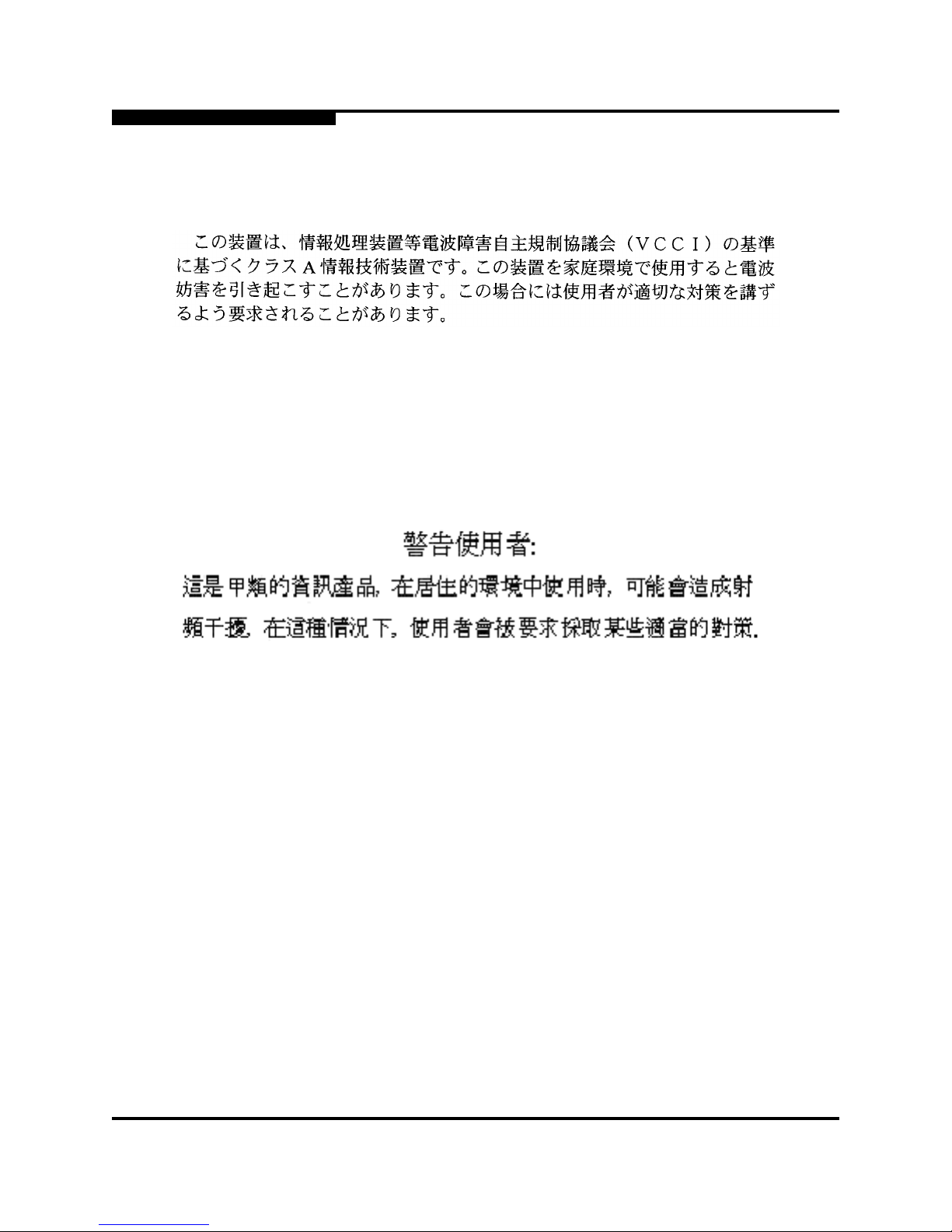
VCCI Class A Statement
This is a Class A product based on the standard of the Voluntary Control Council
For Interference by Information Technology Equipment (VCCI). If this equipment
is used in a domestic environment, radio disturba nce may arise. When such
trouble occurs, the user may be required to take corrective actions.
1.6.6
BSMI Class A Statement
Warning:
This is a Class A product. In a domestic environment, thi s product may cause
radio interference in which case the user will be required to take adequate
measures.
Page 15
1 – Introduction
Electrostatic Discharge Sensitivity (ESDS) Precautions
59042-00 A 1-7
1.6.7
Laser Safety Information
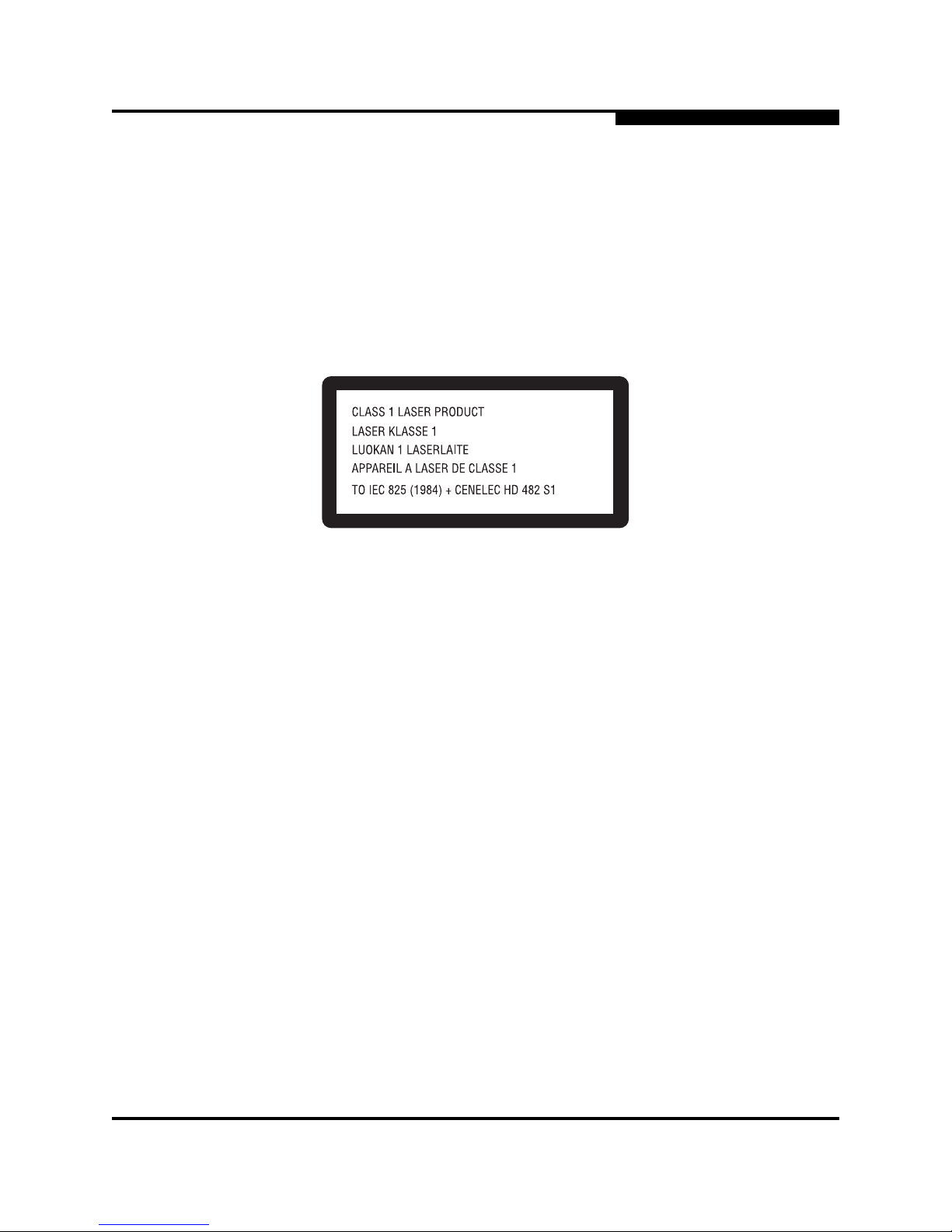
This product may use Class 1 laser optical transceivers to communicate over the
fiber optic conductors. The U.S. Department of Health and Human Services
(DHHS) does not consider Class 1 lasers to be hazardous. The International
Electrotechnical Commission (IEC) 825 Laser Saf ety S tandard requi res labeling in
English, German, Finnish, and French stating that the product uses Class 1
lasers. Because it is impractical to label the transceivers, the following label is
provided in this manual.
1.7
Electrostatic Discharge Sensitivity (ESDS) Precautions
The assemblies used in the switch chassis are ESD sensitive. Observe ESD
handling procedures when handling any assembly used in the switch chassis.
1.8
Accessible Parts
The only Field Replaceable Units (FRUs) are Small For m-Factor Pluggab le (SFP)
transceivers.
1.9
Pièces Accessibles
Les pièces remplaçables, Field Replaceable Units (FRU), du commutateur sont
interfaces aux media d’interconnex ion appelés SFP transceivers.
1.10
Zugängliche Teile
Nur die folgenden Teile im können kundenseitig ersetzt werden Schnittstellen für
die Zwischenverbindungsträger, SFP transceivers genannt.
Page 16

1 – Introduction
Technical Support
1-8 59042-00 A
1.11
Technical Support
Customers should contact their authorized maintenance provider for technical
support of their QLogic switch products. QLogic-direct customers may contact
QLogic Technical Support; others will be redirected to their authorized
maintenance provider.
Visit the QLogic switch support Web site listed in ”Contact Information” on
page 1-8 for the latest firmware and software updates.
1.11.1
Availability
QLogic Technical Support is available from 7:00 AM to 7:00 PM Central Standard
Time, Monday through Friday, excluding QLogic-observed holidays.
1.11.2
Training
QLogic offers the followi ng technical training courses:
■ Switch Cert if ic a tio n
■ HBA Certification
Each course is available at the train ing faci lity in Eden Prairi e, MN or at your local
facility. All courses include a Fibre Channel overview and sections on installation,
maintenance, and topology solutions. Each st udent receives a set of manuals and
a CD-ROM containing course training materials. Upon successful completion of
the training, Qlogic awards a certificate identifying the student as a Certified
SANbox® or SANblade™ Professional.
1.11.3
Contact Information
Address: QLogic Switch Products Inc.
6321 Bury Drive
Eden Prairie, Minnesota 55346
USA
Telephone: +1 952-932-4040
Fax: +1 952-932-4018
Email:
Technical Service
Technical Training
Page 17
59042-00 A 2-1
Section 2
General Description
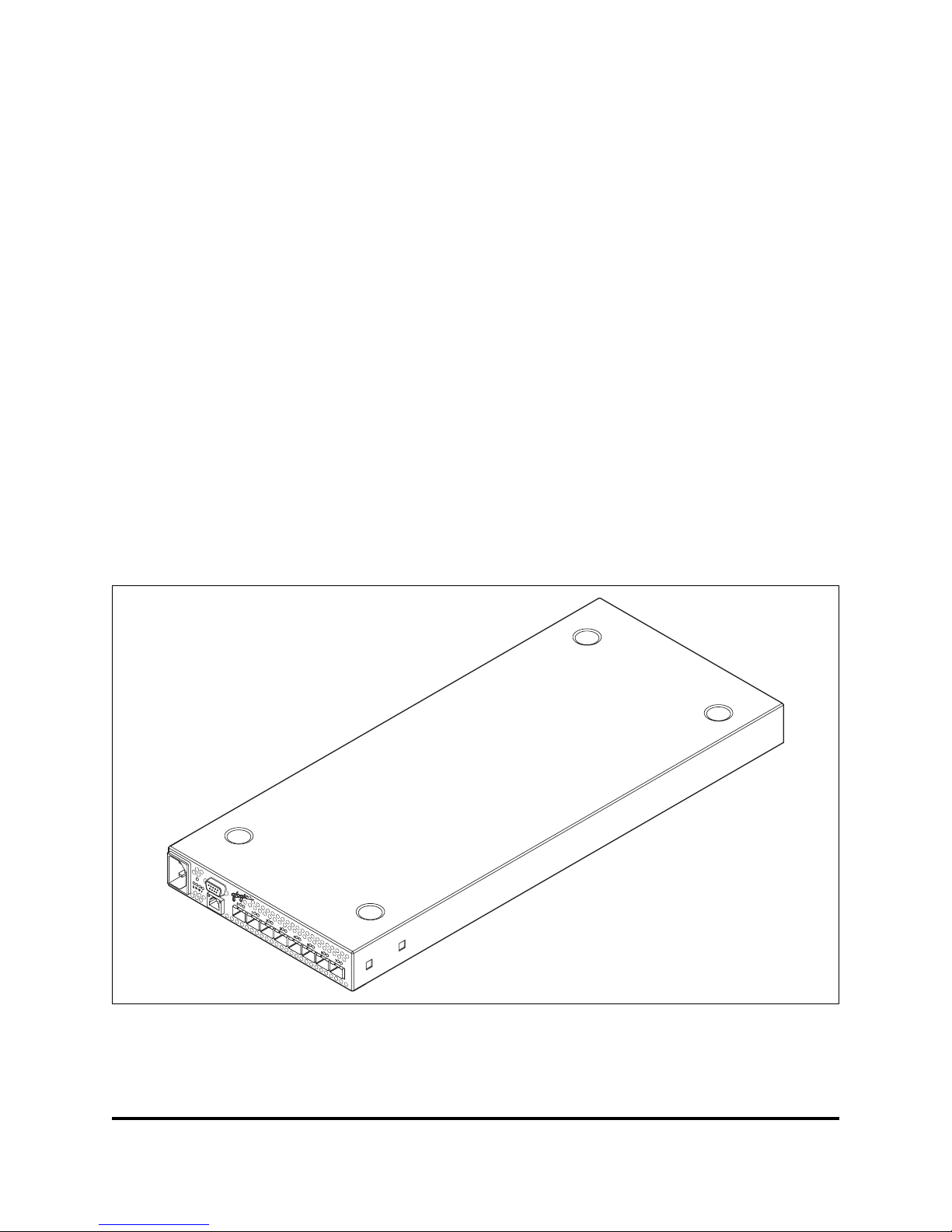
This section describes the features and capabilities of the SANbox2-8c Fibre
Channel Switch. The following topics are described:
■ Chassis controls and LEDs
■ Fibre channel ports
■ Ethernet port
■ Serial port
■ Power supply and fan
■ Fabric management
SANbox2 fabrics are managed with the SANbox Manager switch management
application or the Command Line Interface (CLI). Refer to the SANbox2 Switch
Management User’s Guide for information about us ing SANbox Manager. Refer to
Appendix B for information about using the CLI.
Figure 2-1. SANbox2-8c Fibre Channel Switch
Page 18
2 – General Description
Chassis Controls and LEDs
2-2 59042-00 A
2.1
Chassis Controls and LEDs
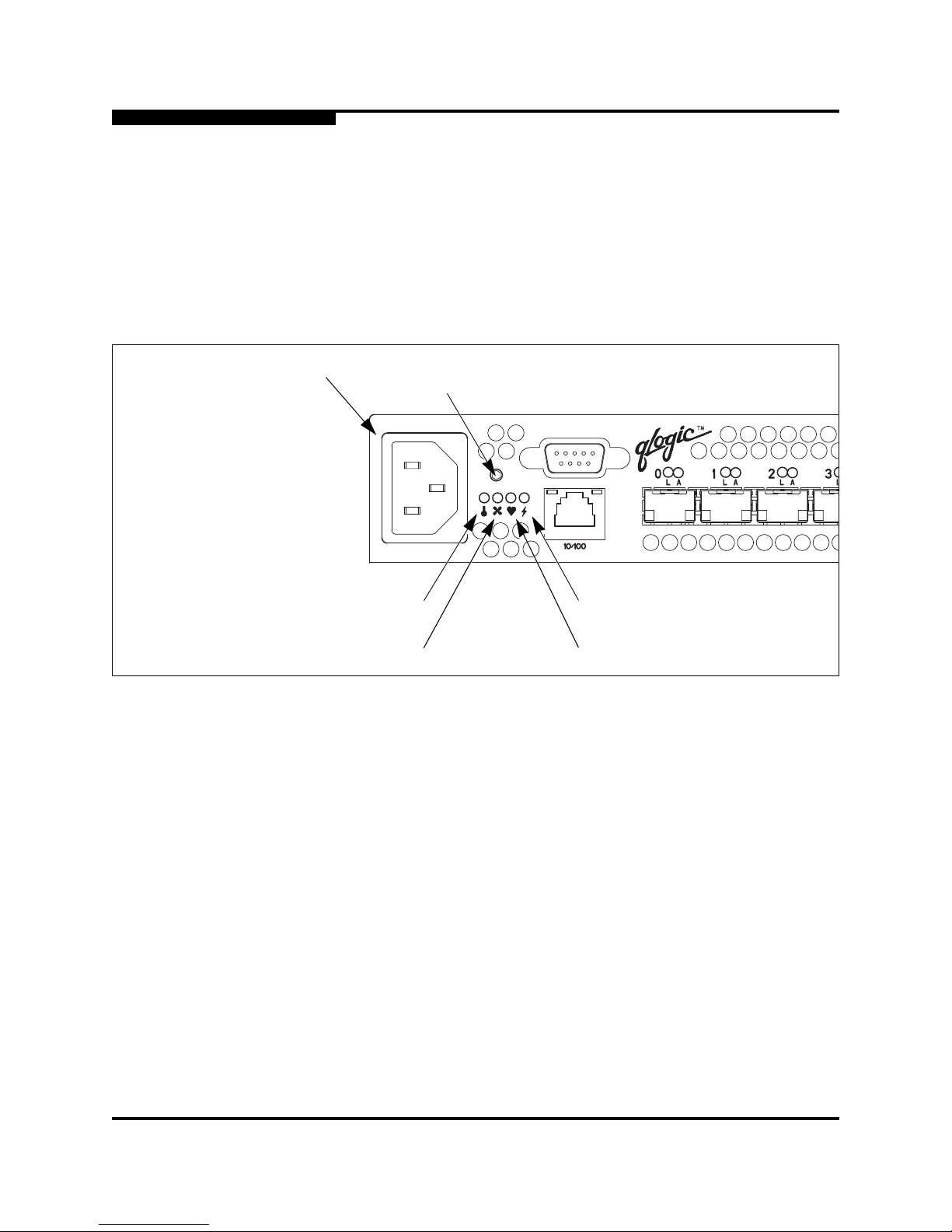
The Reset/Force PROM button shown in Figure 2-2 is the only chassis control
and is used to recover a disabled switch. The chassis LEDs provide information
about the switch’s operation status. These LEDS include the Over Temperature
LED, Fan Fail LED, Heartbeat LED, and the Input Power LED. To apply power to
the switch, plug the power cord into the switc h AC power receptacle and into a
110 or 230 VAC power source.
Figure 2-2. Chassis Controls and LEDS
2.1.1
Reset/Force PROM Button
The Reset/Force PROM button is a dual-function momentary switch on the front
panel. Its purp ose is to reset the switch or to place the switch in force PROM
mode. Force PROM mode causes the switch to access PROM when flash
memory or the resident configuration file is corrupted. Placing the switch in force
PROM mode forces the default IP address of 10.0.0.1. To exit force PROM mode,
reset the switch either by pressing the Reset/ Force PROM button or power cycling
the switch. Refer to ”Recovering a Switch” on page 5-6 for more informatio n about
using force PROM mode.
AC Power
Receptacle
Over Temperature LED
(Yellow)
Fan Fail LED
(Yellow)
Reset/Force
PROM Button
Heartbeat LED
(Yellow)
Input Power LED
(Green)
Page 19

2 – General Description
Chassis Controls and LEDs
59042-00 A 2-3
2.1.1.1
Resetting a Switch
To reset the switch, use a pointed tool to press and release (less than 4 seconds)
the Reset/Force PROM button. The switch will respond as follows:
1. All of the chassis LEDs will illuminate and then extinguish leaving only the
Input Power LED illuminated.
2. After approximately 1 minute, the power-on self test begins illuminating all
chassis LEDs.
3. When the POST is complete, the chassis LEDs extinguish leaving the Input
Power LED illuminated and the Heartbeat LED flashing once per second.
2.1.1.2
Placing the Switch in Force PROM Mode
To place the switch in force PROM mode, do the following:
1. Isolate the switch from the fabric.
2. Press and hold the Reset/Force PROM button with a pointed tool for about 4
seconds. When the Input Power LED alone is illuminated, release the
button.
3. After approximately 1 minute, the power-on self test begins illuminating all
chassis LEDs.
4. When the POST is complete, the chassis LEDs extinguish leaving the Input
Power LED and the Heartbeat LED illuminated. The Heartbeat LED
illuminates continuously while the switch is in force PROM mode.
To exit force PROM mode and return to normal operation, reset the switch.
2.1.2
Over Temperature LED (Yellow)
The Over Temperature LED provides status infor mation about the ai r t emperature
inside the switch. This LED illuminates to indicate that the switch logic circuitry is
overheating. Refer to Section 5 for information about troubleshooting over
temperature conditions.
2.1.3
Fan Fail LED (Yellow)
The Fan Fail LED indicates operational status of the fan. This LED illuminates if
the speed of the fan falls below the normal range. If t he Fa n Fail LED illuminates,
isolate the switch from the fabric, unplug the switch from the AC power source,
and contact your authorized maintenance provider.
Page 20
2 – General Description
Fibre Channel Ports
2-4 59042-00 A
2.1.4
Heartbeat LED (Yellow)
The Heartbeat LED indicates the status of the int ernal switch processor and the
results of the Power On Self Test (POST). Following a normal power-up, the
Heartbeat LED blinks about once per second to indicate that the switch passed
the POST and that the int ernal swi tch pr ocess or is r unning. In force PROM mode,
the Heartbeat LED illuminates continuously. Refer to ”Heartbeat LED Blink
Patterns” on page 5-1 for more information about Heartbeat LED blink patterns.
2.1.5
Input Power LED (Green)
The Input Power LED indicates the volt age st atus at the switch logi c circuitr y. This
LED illuminates when the switch logic circuitr y is receiving the proper DC
voltages.
2.2
Fibre Channel Ports
Each SANbox2-8c switch has 8 Fibre Channel ports numbered 0–7 as shown in
Figure 2-3. Each of these port s is serve d by a Small For m-Factor Pluggable (SFP)
optical transceiver. The ports self discover the proper mode when connected to
public devices and other switches. You can also configure any port to support a
loop of private devices.
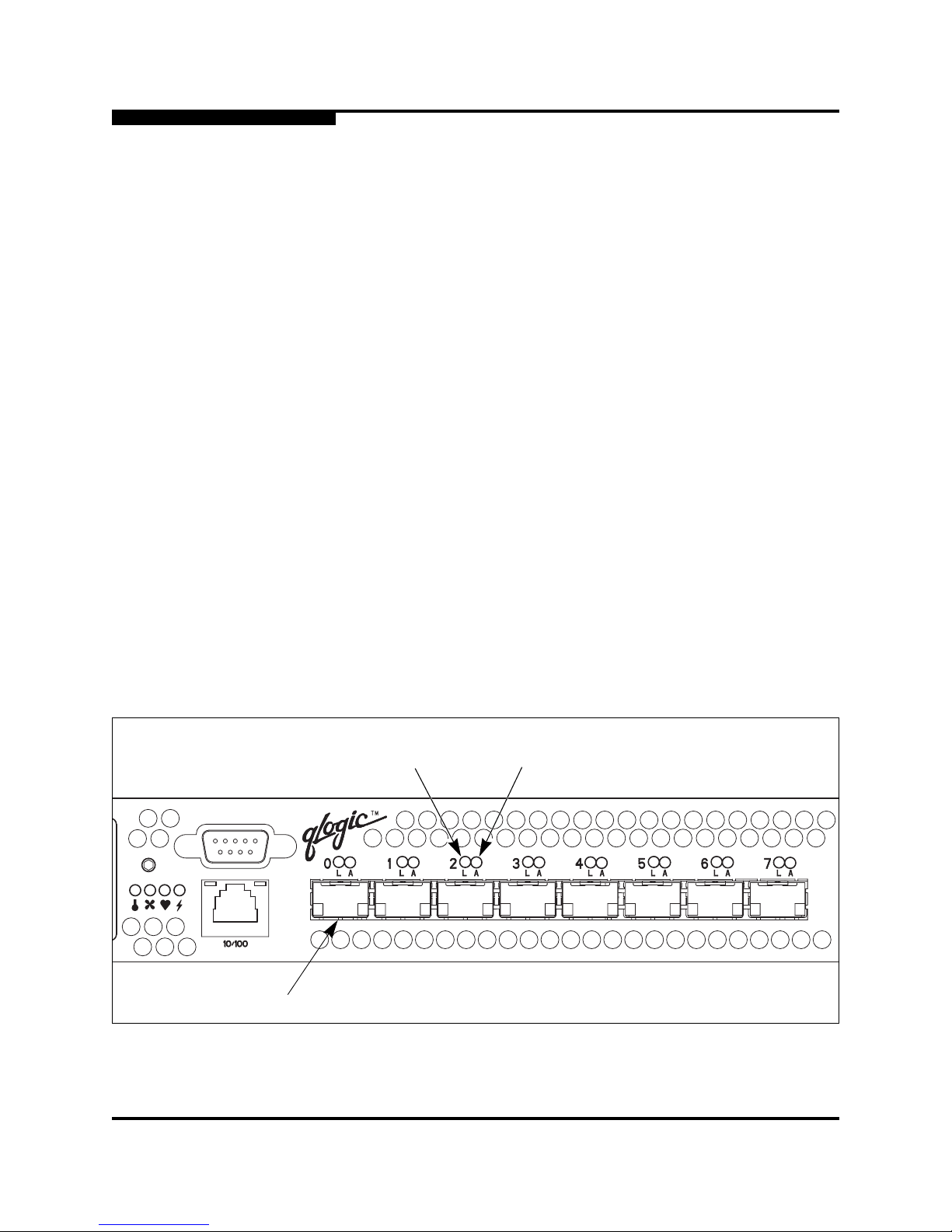
Each port has its own Logged-In LED and Activity LED as shown in Figure 2-3.
The Logged-In LED indicates whether the port and its connected device are
logged into the fabric. The Activity LED indicates the frequency at which frames
are entering or leaving the port.
Figure 2-3. Fibre Channel Ports
Fibre Channel
Port
Logged-In
LED (Green)
Activity LED
(Green)
Page 21

2 – General Description
Fibre Channel Ports
59042-00 A 2-5
2.2.1
Small Form-Factor Pluggable (SFP) Transceivers
SFP transceivers plug into the ports; duplex fiber optic cables plug into the
transceivers which then connect to the devices . A port is ca pable of t ransmitting at
1 Gbps or 2 Gbps; however, the transceiver must be capable of 2 Gbps for the
port to deliver at that rate.
The SFP transceivers are hot swappable. This means that you can re mov e or
install an SFP transceiver while the swi tch is operat ing without harming the swit ch
or the transceiver. However, communication wit h the connected device will be
interrupted. Refer to ”Install SFP Transceivers” on page 4-4 for information about
installing and removing SFP transceivers.
2.2.2
Port Modes
All ports are self-configuring generic ports: GL_Ports or G_Ports. A GL_Port
self-discovers in the following ways:
■ FL_Port when connected to a loop of public devices (NL_Port)
■ F_Port when connected to a single public device (N_Port). If the device is a
single device on a loop, the GL_Port will attempt to configure first as an
F_Port, then if that fails, as an FL_Port.
■ As an E_Port when connected to another FC-SW-2 compliant switch
A G_Port self-discovers as an F_Port when connected to a public device or an
E_Port when connected to another switch. You can also configure a port as a
translated loop port (TL_Port) to support private devices.
2.2.2.1
Fabric Ports
A fabric port supports either a single public device or a loop of up to 126 public
devices. A fabric port c onfigures i t self duri ng the fabric l ogin process as an F_Port
when connected to a single public device (N_Port), or an FL_Port wh en
connected to a loop of public devices (NL_Port).
2.2.2.2
Expansion Port
E_Ports enable you to expand the fabric enabling you to connect SANbox2
switches with other FC-SW-2 compliant swi tches. SANbox2-8c switches
self-discover all inter-switch connections. Refer to ”Multiple Chassis Fabrics” on
page 3-2 for more information about multiple chassis fabrics.
Page 22

2 – General Description
Fibre Channel Ports
2-6 59042-00 A
2.2.2.3
Translated Loop Port
A TL_Port supports a loop of up to 126 private devices with the ability to
communicate with “off-loop” devices such as public fabric devices and private
devices on other TL_Ports . TL_Por t s con nect to de vic es t hat confo rm to the Fibre
Channel-Private Loop SCSI Direct Attach (FC- PLDA) standard. Devices
connected to TL_Ports are registered with the Name Server. Use SANbox
Manager or the CLI to explicitly configure a TL_Port .
A TL_Port acts as a proxy for the off-loop device translating private frames into
and from public frames. Each TL_Port can proxy up to 63 of f-loop public or private
devices that are maintained in its translation entries list.
■ For a TL_Port connected to private target devices, the switch firmware
automatically creates an entry in the translation entries list for each off-loop
initiator device that att empts t o establ ish communic ation. Sof t zoning can be
used to limit the number of potential initiators to 63.
■ For a TL_Port connected to private initiator devices, the switch firmware
automatically creates an entry i n translation entri es list for each tar get device
that is a member of the same soft zone as the TL_Port devices. Before the
TL initiator can communicate with other target devices on your fabric, you
must create a WWN soft zone that includes both the ini ti a tor and targets.
Initiator devices can not communicate with target devices outside the zone.
2.2.3
Logged-In LED
The Logged-in LED indicates the logged-in or initi alization st atus of the connected
devices. After success ful completion of the POST, the switch extinguishes all
Logged-In LEDs. Following a successful loop i nitialization or port log-in, the switch
illuminates the corresponding logged-in LED. This shows that the port is properly
connected and able to communicate with its at tached devices. The Logged-In
LED remains illuminated as long as the port is initial ized or logged-in. An
Logged-In LED will also illuminate when the port has been designated as a donor
port and its buffer credits are being used by another port. Refer to ”Distance” on
page 3-6 for more information about extended credits and donor ports.
If the port connection is broken or an error occurs that disables the port, the
Logged-In LED will flash. Refer to ”Logged-In LED Indications” on page 5-3 for
more information about the Logged-In LED.
Page 23
2 – General Description
Ethernet Port
59042-00 A 2-7
2.2.4
Activity LED
The Activity LED indicates that data is passing through the port. Each frame that
enters or leaves the port causes this LED to illuminate for 50 milliseconds. This
makes it possible to observe the transmission of a single frame. When extending
credits, an Activity LED for a donor port will reflect the traffic of the recipient port.
Refer to ”Distance” on page 3-6 for more information about extended credit s and
donor ports.
2.3
Ethernet Port
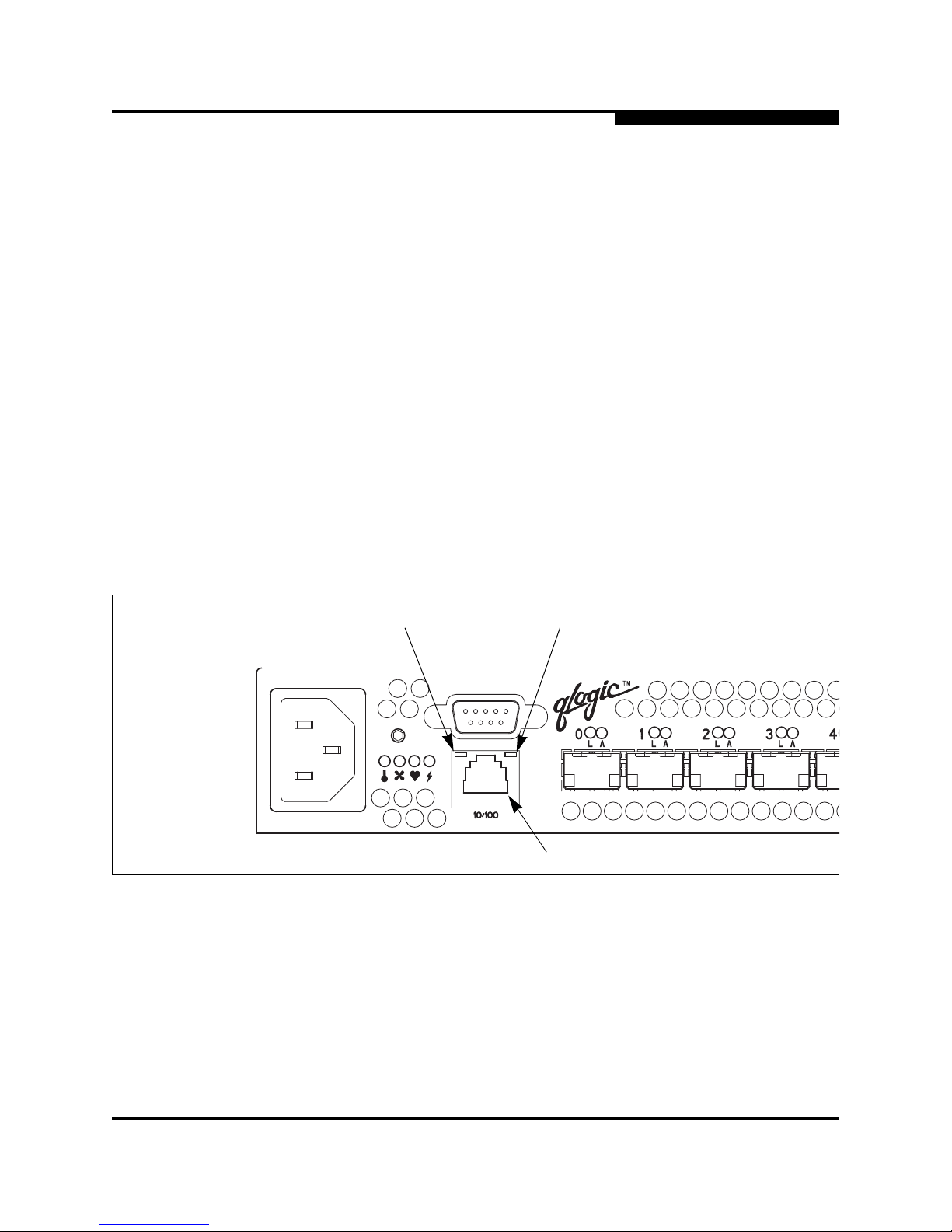
The Ethernet port shown in Figure 2-4 is an RJ-45 connector that provides a
connection to a management workstation. A management workstation can be a
Windows, Solaris, or Linux workstation that is used to configure and manage the
switch fabric. The switch through which the fabric is managed is called the fabric
management switch.
The Ethernet port has two LEDs: the L ink S t atus LED (green) and the Act ivity LED
(yellow). The Link Status LED illuminates continuously when an Ethernet
connection has been establ ished. The Activity LED illumina tes when dat a is being
transmitted or received over the Ethernet connection.
Figure 2-4. Ethernet Port
Ethernet Port
Link Status LED
(Green)
Activity LED
(Yellow)
Page 24
2 – General Description
Serial Port
2-8 59042-00 A
2.4
Serial Port
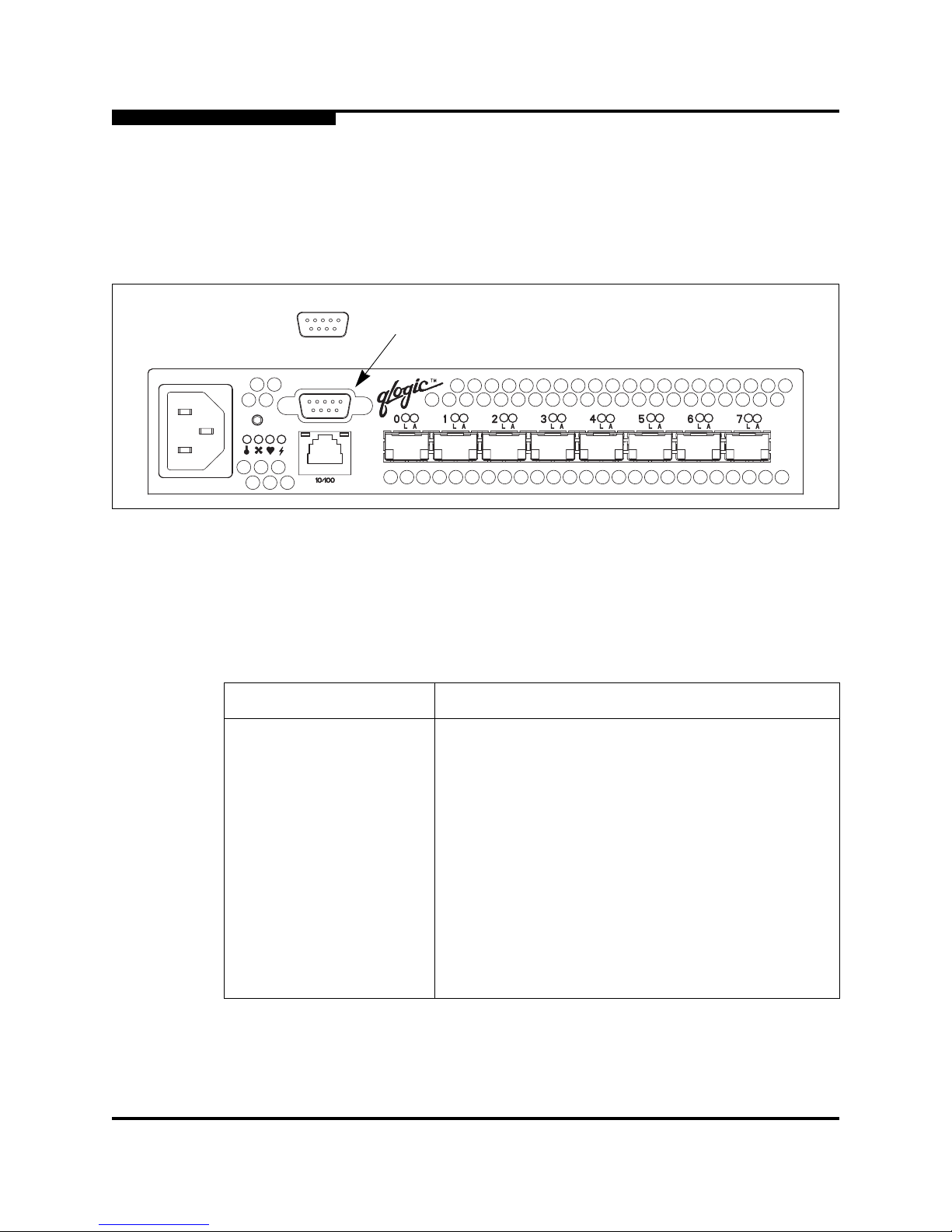
The SANbox2-8c switch is equipped with an RS-232 serial port for maintena nce
purposes as shown in Figure 2-5. You can manage the switch through the serial
port using the CLI.
Figure 2-5. Serial Port and Pin Identification
The serial port connector requires a null-mod em F/F DB9 cable. The pins on the
switch RS-232 connector are shown in Figure 2-5 and identified in Table 2-1.
Refer to ”Connect the Management Workst ation to the Switch” on page 4-10 for
information about connecting the management workst ation through the seri al port.
Table 2-1. Serial Port Pin Identification
Pin Number Description
1 Carrier Detect (DCD)
2 Receive Data (RxD)
3 Transmit Data (TxD)
4 Data Terminal Ready (DTR)
5 Signal Ground (GND)
6 Data Set Ready (DSR)
7 Request to Send (RTS)
8 Clear to Send (CTS)
9 Ring Indicator (RI)
1
6
5
9
Serial Port
Page 25

2 – General Description
Power Supply and Fan
59042-00 A 2-9
2.5
Power Supply and Fan
The power supply converts standard 110 or 230 VAC to DC voltages for the
various switch circuit s. An internal fan provides cooling. Depending on the switch
model, air flow is front-to-back or back-to-front. To energize the switch, plug the
power cord into the switch AC receptacle and into a 110 or 230 VAC power
source.
2.6
Switch Management
SANbox Manager is a PC-based Java® application that provi des a g raphical user
interface for fabric management. This application runs on a Windows®, Solari s ®,
or Linux® workstation. The management workstation connects to the fabric
directly through one switch’s Ethernet port and provides in-band management for
all other switches in the fabric. Refer to the SANbox2 Switch Management User’s
Guide for information about SANbox Manager and its use.
In addition to SANbox Manager, the switch also supports the following command
line interface tools:
■ Command Line Interface (CLI)
■ File Transfer Protocol (FTP)
■ Simple Network Management Protocol (SNMP)
The CLI provides monitoring and configuration functions by which the
administrator can manage the fabric and its switches. Refer to
Appendix B Command Line Interface for more information about the CLI
commands.
FTP provides a command line interface for loading new firmware.
SNMP provides monitoring and trap functions for the fabri c. SANbox2 firmware
supports SNMP version 1, 2, and 3, the Fibre Alliance Management Information
Base (FA-MIB) version 3.0, and the Fabric Element Management Information
Base (FE-MIB) RFC 2837. Traps are formatted using SNMP version 2.
Note: The power supply and fan are not field replaceable units .
Page 26

2 – General Description
Switch Management
2-10 59042-00 A
Notes
Page 27

59042-00 A 3-1
Section 3
Planning
Consider the following when planning a fabric:
■ Devices
■ Multiple chassis fa bric s
■ Performance
■ Device access
■ Fabric management
■ Fabric security
3.1
Devices
When planning a fabric, consider the number of devices and the anticipated
demand. This will determine the number of ports that are needed and in turn the
number of switches. Consider how many and what types of switches are needed.
Consider the distribution of public and private devices as well as targets and
initiators. Public devices have fu ll Fibre Channel addressing capability, and
therefore can communicate with any other public device on the fabric. A G_Port
supports a single p ublic device. A GL_Port can suppor t up to 126 publ ic devices i n
an arbitrated loop.
Private devices do not have full Fibre Channel addressing capability, only the
Arbitrated Loop Physical Address (ALPA) portion. A TL_Port provides a proxy for
a loop of private initiator or target devices allowing communication with off-loo p
public and private devices. Consider the number of private devices in the fabric
and the number of off-loop devices with which the private devices must
communicate. A TL_Port can support up to 126 private devi ces and can maintain
communications with up to 63 off-loop devi ces.
The Fibre Channel ports use SFP optical transceiver s, but the device host bus
adapters you are using may not. Consider whether the device adapters use SFP
transceivers or Gigabit Interface Converters (GBIC), and choose fiber optic cable
accordingly. Use LC-type cable connectors for SFP transceivers and SC-type
cable connectors for GBICs.
Page 28

3 – Planning
Multiple Chassis Fabrics
3-2 59042-00 A
3.2
Multiple Chassis Fabrics
By connecting switches together you c an expand t he number of availabl e ports for
devices. Each switch in the fabric is identi fied by a unique domain ID, and the
fabric will automatically resolve domain ID conflicts. Because the ports are
self-configuring, you can connect SANbox2 and other FC-SW-2 compliant
switches together in a wide variety of topologies.
3.2.1
Domain ID, Principal Priority , and Domain ID Lock
The following switch configuration settings affect multiple chassis fabrics:
■ Domain ID
■ Principal priority
■ Domain ID lock
The domain ID is a unique number from 1–239 that identifies each switch in a
fabric. The principal priority is a number (1–255) that determines the principal
switch which manages domain ID assignments for the fabric. The switch with the
highest principal pr io rity (1 i s high , 255 is l ow) beco mes the princ ipal switch. If the
principal priority is the same for all switches in a fabric, the switch with the lowest
WWN becomes the principal switch. The domain ID lock al lows (FALSE) or
prevents (TRUE) the reassignment of the domain ID on that switch. Switches
come from the factory with the domain ID set to 1, the domain ID lock set to
FALSE, and the principal priority set to 254. Refer to the SANbox2 Switch
Management User’s Guide for information about changing the domain ID using
SANbox Manager. Refer to the ”Set Config Command” on page B-24 for
information about changing the default domai n ID domain ID lock, and principal
priority settings.
If you connect a set of SANbox2 switches then power them up together, the
principal switch will reassign any domain ID conflicts and establish the fabric. For
any switch with a domain ID c onflict and a domain ID lock set to TRUE, that swi tch
will isolate as a separate fabric.
An unresolved domain ID conflict means that the switch with the higher WWN will
isolate as a separat e fabric , and t he Logged-In LEDs on both switches will flas h to
show the affected ports. If you connect a new switch with its domain ID unlocked
(domain ID lock = FALSE) to an existing fabric and a domain ID conflict occurs,
the new switch will isolate as a separate fabric. However, you can remedy this by
resetting the new switch or taking it offline then back online. The principal switch
will reassign the domain ID and the switch will join the fabric.
Page 29
3 – Planning
Multiple Chassis Fabrics
59042-00 A 3-3
3.2.2
Common Topologies
This section describes three commonly used topologies:
■ Cascade
■ Mesh
■ Multistage
3.2.2.1
Cascade To pology
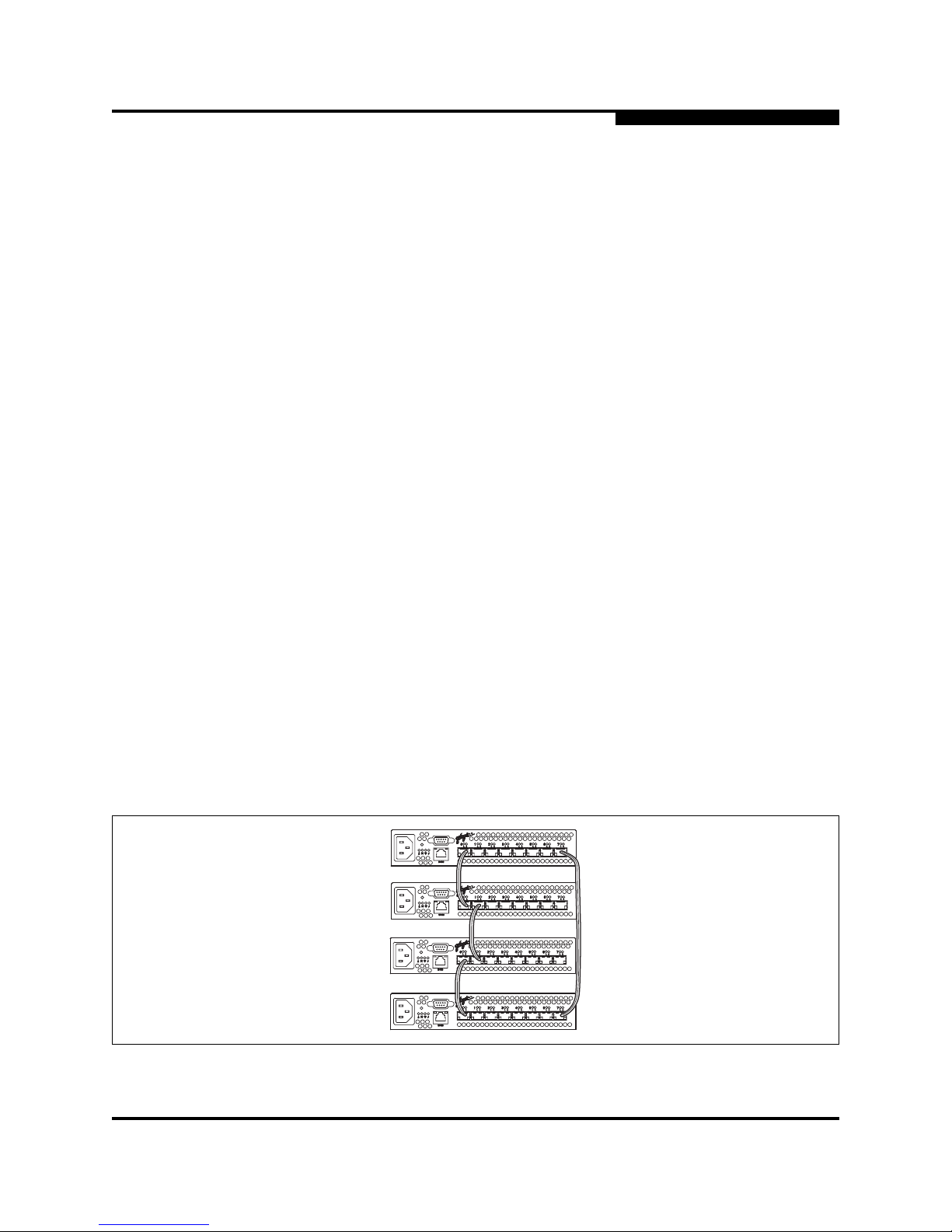
A cascade topology describes a fabric in which the switches are connected in a
line. If you connect the last switch back to the first switch, you create a
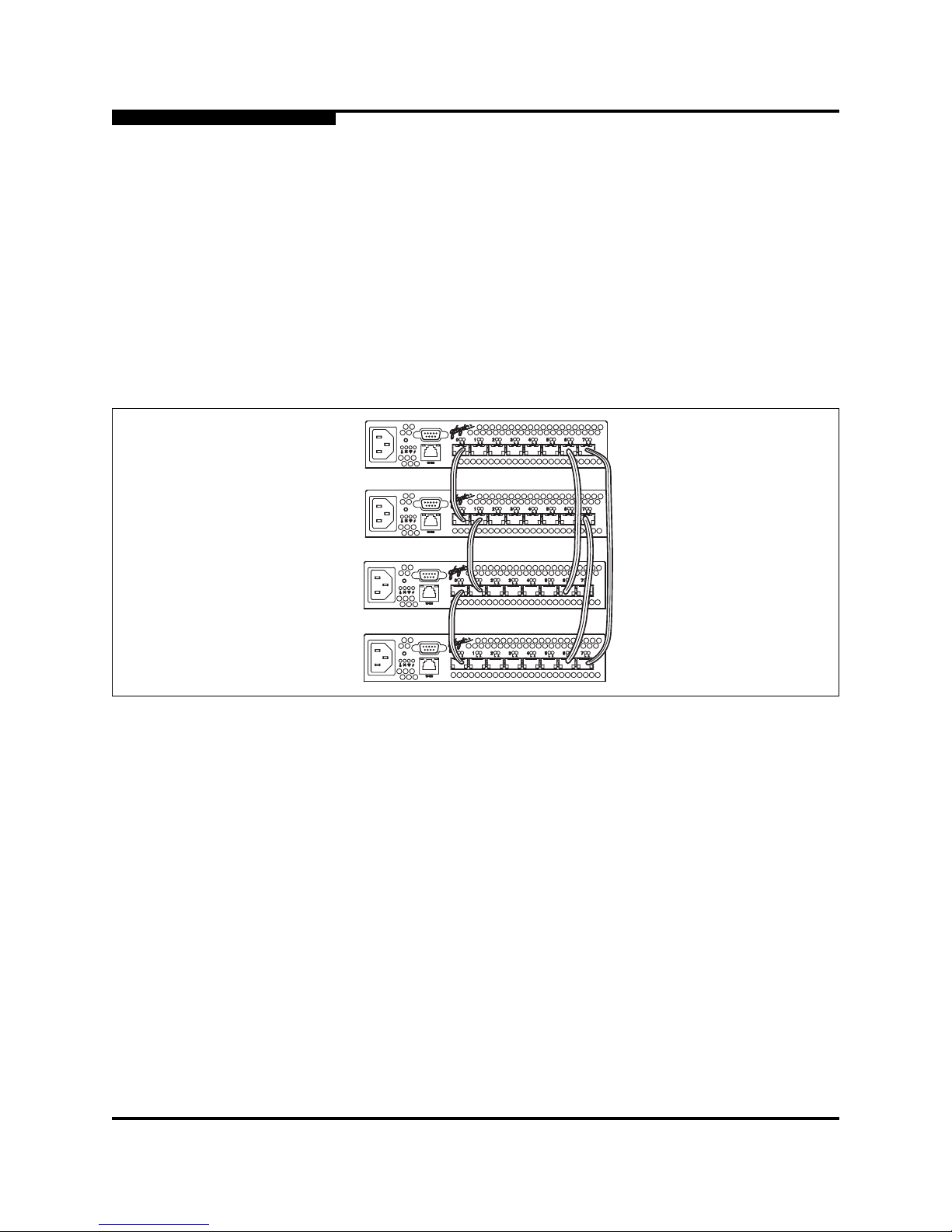
cascade-with-a-loop topology as shown in Figure 3-1. The loop reduces latency
because any switch can route traffic in the shortest direction to any switch in the
loop. The loop also provides failover should a switch fail.
The cascade fabric shown in Figure 3-1 has the following characteristics:
■ Each chassis link contributes up to 200 MB/s of bandwid th between chassi s,
400 MB/s in full duplex. However, because of the sequential structure, that
bandwidth will be shared by traffic between devices on other chassis.
■ Latency between any two ports is no more than three chassis hops.
■ 24 Fibre Channel ports are available for devices.
Figure 3-1. Cascade-with-a-Loop Topology
Note: Domain ID reassignment is not reflected in zoning that is defined by
domain ID/port number pair or Fibre Channel address. You must
reconfigure zones that are affected by domain ID reassignment. To
prevent zoning definitions from becoming invalid, use the Set Config
Switch command to lock the domain IDs. Refer to the ”Set Config
Command” on page B-24.
Page 30
3 – Planning
Multiple Chassis Fabrics
3-4 59042-00 A
3.2.2.2
Mesh Topology
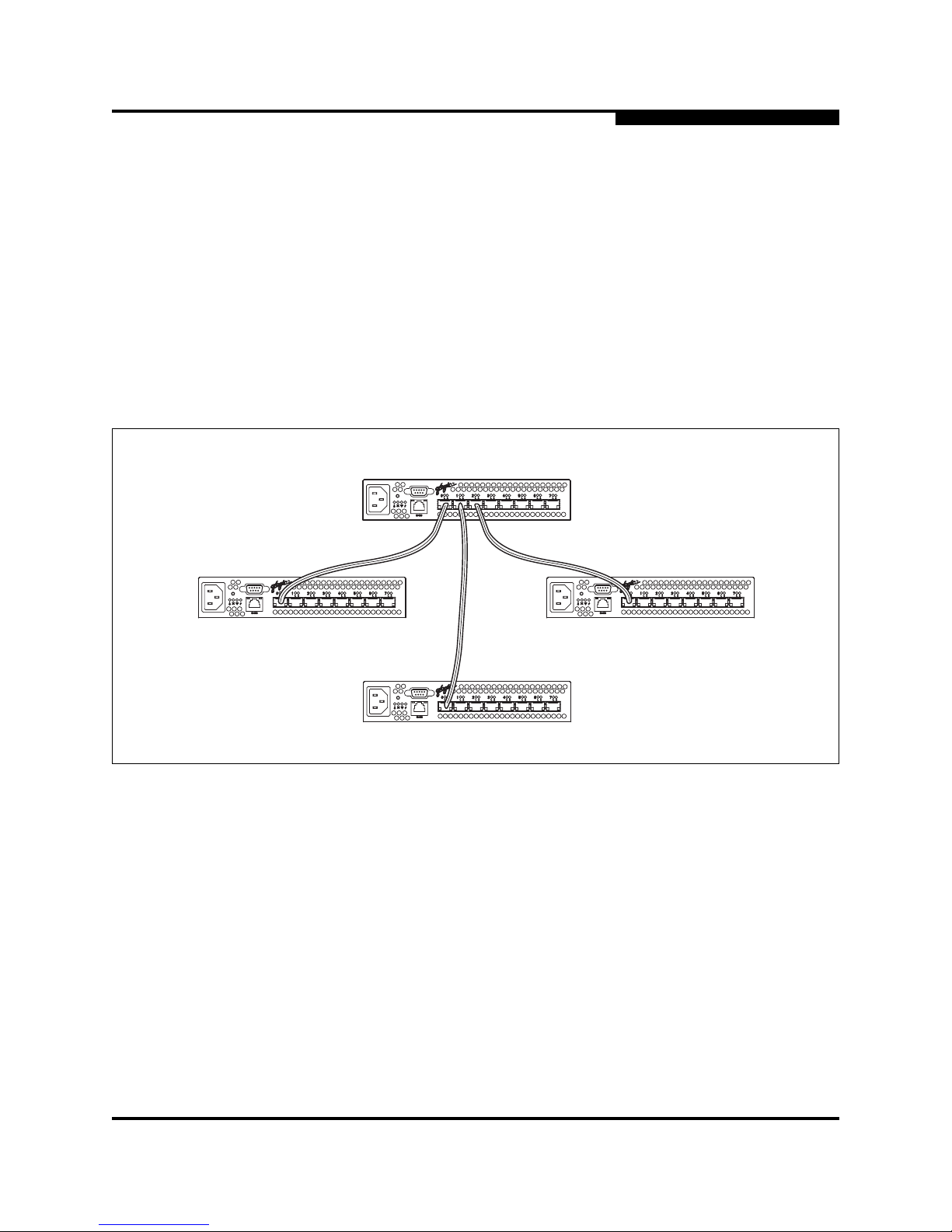
A mesh topology describes a fabric in which each chassis has at least one port
directly connected to each other chassis in the fabric. The example mesh fabric
shown in Figure 3-2 has the following characteristics:
■ Each link contributes up to 200 MB/s of bandwidth between swi tches, 400
MB/s in full duplex. Because of multiple parallel paths, there is less
competition for this bandwidth than with a cascade or a multistage topology.
■ Latency between any two device ports is no more than two chassis hops.
■ 20 Fibre Channel ports are available for devices
Figure 3-2. Mesh Topology
Page 31
3 – Planning
Multiple Chassis Fabrics
59042-00 A 3-5
3.2.2.3
Multistage Topology
A multistage topology descri bes a fabri c in which two or more edge switches
connect to one or more core switches. Each additional core switch increases the
bandwidth to each edge switch by 200 MB/s. The multistage fabr ic shown in
Figure 3-3 has the following characteristics:
■ Each link contributes up to 200 MB/s of bandwidth between chassis.
Competition for this bandwidth is less than that of a cascade topology, but
greater than that of the mesh topology.
■ Latency between any two device ports is three chassi s hops.
■ 26 Fibre Channel ports are available for devices
Figure 3-3. Multistage Topology
Edge Switch
Edge Switch
Edge Switch
Core Switch
Page 32

3 – Planning
Performance
3-6 59042-00 A
3.3
Performance
The SANbox2-8c switch supports class 2 and class 3 Fibre Channel service at
transmission rates of 1 Gbps or 2 Gbp s with a maximum frame size of 2148 byte s.
A port can transmit or receive at 1 Gbps or 2 Gbps depending on the device to
which it is connected. The port discovers the transmission speed prior to login
when the connected device powers up. Related performance characteristics
include the following:
■ Distance
■ Bandwidth
■ Latency
3.3.1
Distance
Consider the physical distribution of devices and switches in the fabric. Choose
SFP transceivers that are comp atible wit h the cable type, di stance, Fibre Channel
revision level, and the device host bus adapter. Refer to
Appendix A Specifications for more information about cable types and SFP
transceivers.
Each port is supported by a data buffer with a 12 credit capacity; that is, 12
maximum sized frames. For fibre optic cables, this enabl es full bandwidth over a
distance of 20 kilometers at 1 Gbps (0.6 credits/Km), or 10 kilometers at 2 Gbps
(1.2 credits/Km). Beyond this distance, however, there is some loss of efficiency
because the transmitting port must wait for an acknowledgement before sending
the next frame.
Longer distances can be spanned at ful l bandwi dth by extending credits on
G_Ports and F_Ports. Each port can donate up to 11 credits to a pool from which
a recipient port can borrow. For example, you can configure a recipient port to
borrow up to 66 credits from 6 ports for a total of 78 credits. This will support
communication over approximately 130 Km at 1 Gbps (78÷0.6) or 65 Km at 2
Gbps (78÷1.2).
You can configure recipient and donor ports using SANbox Manager or the Set
Config command. Refer to the ”Set Config Command” on page B-24 for more
information.
Page 33

3 – Planning
Performance
59042-00 A 3-7
3.3.2
Bandwidth
Bandwidth is a measure of the volume of data that can be transmitted at a given
transmission rate. A port can transmit or receive at 1 Gbps or 2 Gbps depending
on the device to which it is connected. The switch supports all transmission rate
combinations as shown in Table 3-1.
In multiple chassis fabrics, each link between chassis contributes 100 or 200
megabytes of bandwidth between those chassis. When additional bandwidth is
needed between devices, increase the number of links between the connecting
switches. The switch guarantees in-or der-delivery with any number of links
between chassis.
3.3.3
Latency
Latency is a measure of how fast a frame travels from one port to another. The
factors that affect latency include transmission rate and the source/destination
port relationship as shown in Table 3-2.
Table 3-1. Port-to-Port Transmission Combinations
Source Port Rate Destination Port Rate Maximum Bandwdith
1 Gbps 1 Gbps 100 MB
1 Gbps 2 Gbps 100 MB
1 Gbps x 2 ports 2 Gbps 200 MB
2 Gbps 1 Gbps x 2 ports
100 MB each port
1
1
Bandwidth will be less for larger sequence sizes.
2 Gbps 2 Gbps 200 MB
Table 3-2. Port-to-Port Latency
Source/Destination Rates Same Switch
1 Gbps - 1 Gbps < 1 µsec
2 Gbps - 2 Gbps < 0.5 µsec
Page 34

3 – Planning
Device Access
3-8 59042-00 A
3.4
Device Access
Consider device access need s within the f abric. Acc ess is controlled by t he use of
zones and zone sets. Some zoning strategies include the following:
■ Separate devices that use different operating systems.
■ Separate devices that have no need to communicate with other devices in
the fabric or have classified data.
■ Separate devices into department, administrative, or other functional group.
■ Group TL_Port devices with targets and initiators to allow automatic
discovery.
■ Reserve a path and its bandwidth from one port to another.
A zone is a named group of devices that can communicate with each other.
Membership in a zone can be defined by switch port number, port Fibre Channel
address, or by device World Wide Name (WWN). Devices can communi cate only
with devices that are members of the same zone. A zone can be a member of
more than one zone set. Several zone sets can be defined for a fabric, but only
one zone set can be active at one time. The active zone set determines the
current fabric zoning.
A zoning database is maintained on each switch consisting of all inactive zone
sets, the active zone set, all zones, aliases, and their membership. The
SANbox2-8c switch supports the followi ng maximum limits:
■ 256 zone sets
■ 256 zones
■ 256 aliases
■ 2000 alias and zone members combined
The following zone types define increasingly restrictive levels of communication:
■ Soft zone
■ Access Control List (ACL) - hard zone
■ Virtual Private Fabric (VPF) - hard zone
Page 35

3 – Planning
Device Access
59042-00 A 3-9
3.4.1
Soft Zones
Soft zoning divides the fabric for purposes of controlling discovery. Members of
the same soft zone automatically discover and communicate freely with all other
members of the same zone. The soft zone boundary is not secure; traffic across
soft zones can occur if addressed correctly. Soft zones that include members from
multiple switches need not include the ports of the inter-switch links. Soft zone
boundaries yield to ACL and VPF zone boundaries. Soft zones can overlap; that
is, a port can be a member of more than one soft zone. Membership can be
defined by Fibre Channel address, port ID and domain ID, or worldwide name.
Soft zoning supports all port modes.
3.4.2
Access Control List Hard Zones
Access Control List (ACL) zoning divides the fabr ic for purposes of controlling
discovery and inbound traff ic. ACL zoning is a type of hard zoning that is
hardware enforced. This type of zoning is usef ul for controlling access to certain
devices without totally isolating them from the fabric. Members can communicate
with each other and transmit outside the ACL zone, but cannot receive inbound
traffic from out side the zone. The ACL zone boundary is secure against inbound
traffic. ACL zones can overlap; that is, a port can be a member of more than one
ACL zone. ACL zones that include members from multiple switches need not
include the ports of the inter-switch links. ACL zone boundaries supersede soft
zone boundaries, but yield to VPF zone boundaries. Membership can be defined
only by port ID and domain ID. ACL zoning supports all port modes except
TL_Ports.
3.4.3
Virtual Private Fabric Hard Zones
Virtual Private Fabric (VPF) zoning divides the fabric for purposes of controlling
discovery and both inbound and outbound traffic. This type of zoning is useful for
providing security and reserving paths between devices to guarantee bandwidth.
VPF zoning is a type of h ard zoni ng that is ha rdwar e enforc ed. Members can only
transmit to and receive from members of the same VPF zone. The VPF zone
boundary is secure against both inbound and outbound tra ffic. VPF zones that
include members from multiple switches must include the port s of the inter- switc h
links. VPF zones cannot overlap; that i s, a por t can be a memb er of onl y one VPF
zone. VPF zone boundaries supersede both soft and ACL zone boundaries.
Membership can be defined only by port ID and domain ID. VPF zoning supports
all port modes.
Page 36

3 – Planning
Fabric Management
3-10 59042-00 A
3.5
Fabric Management
SANbox Manager and the CLI execute on a management workstation that
provides for the configuration, control, maintenance of the fabric. Supported
platforms include Windows, Solaris, and Linux. SANbox Manager can manage
multiple fabrics. Consider how many fabrics will be managed, how many
management workstations are needed, and whether the fabrics will be managed
with the CLI or SANbox Manager.
The switch supports a combined maximum of 15 switch logins. This inc ludes
SANbox Manager inband or out-of-band logins, Telnet out-of-band logins, and
SNMP out-of-band logins.
3.6
Fabric Security
You manage fabric security on a switch basis through the creati on of user
accounts. Each account consists of an account name, a password, and an
authority level. There are two authority levels: User and Admin. These authority
levels apply to SANbox Manager and to the CLI. User authority permits only
monitoring and display tasks. Admin authority permits all management tasks
including user administration. Consider your fabric security needs, who the
system administrators will be, and authority levels they should have.
■ Refer to ”Commands” on page B-3 for more information about authori ty
levels.
■ Refer to the ”User Command” on page B-59 for information about creating
user accounts.
■ Refer to the ”Set Setup Command” on page B-34 and the System keyword
for information about fabric security and the enforcement of user accounts.
Page 37

59042-00 A 4-1
Section 4
Installation
This section describes how to i nstal l and configur e the SANbox2-8 c switch. It also
describes how to load new firmware and how to recover a disabled switch.
4.1
Site Requirements
The following items are required for the installation of a SANbox2-8c switch:
■ Fabric management workstation
■ Power requirements
■ Environmental conditions
4.1.1
Fabric Management Workstation
SANbox Manager requires a management workstation equipped as described in
Table 4-1:
Telnet workstations require an RJ-45 Ethernet port and an operating system with
a Telnet client.
4.1.2
Switch Power Requirements
Operating voltage requirements are as follows:
90 to 137 Vac; 47 to 63 Hz
180 to 264 Vac; 47 to 63 Hz
Table 4-1. Management Workstation Requirements
Operating System
■ Windows® NT, 2000, 95/98
■ Linux® 6.2 Red Hat®
■ Solaris®
Memory 128 MB or more
Disk Space 150 MB per installation
Processor 300 MHz or faster
Hardware CD-ROM drive, RS-232 serial port, RJ-45 Ethernet port
Internet Browser Microsoft Internet Explorer®
Netscape Navigator®
Page 38
4 – Installation
Installing a Switch
4-2 59042-00 A
4.1.3
Environmental Conditions
Consider the factors that af fect the climate conditions in your facility such as heat
dissipation and ventilation. The switch requires the following operating conditions:
■ Operating temperature range: 5 to 50°C (41 to 122°F)
■ Relative humidity: 15% to 80%, non-condensing
4.2
Installing a Switch
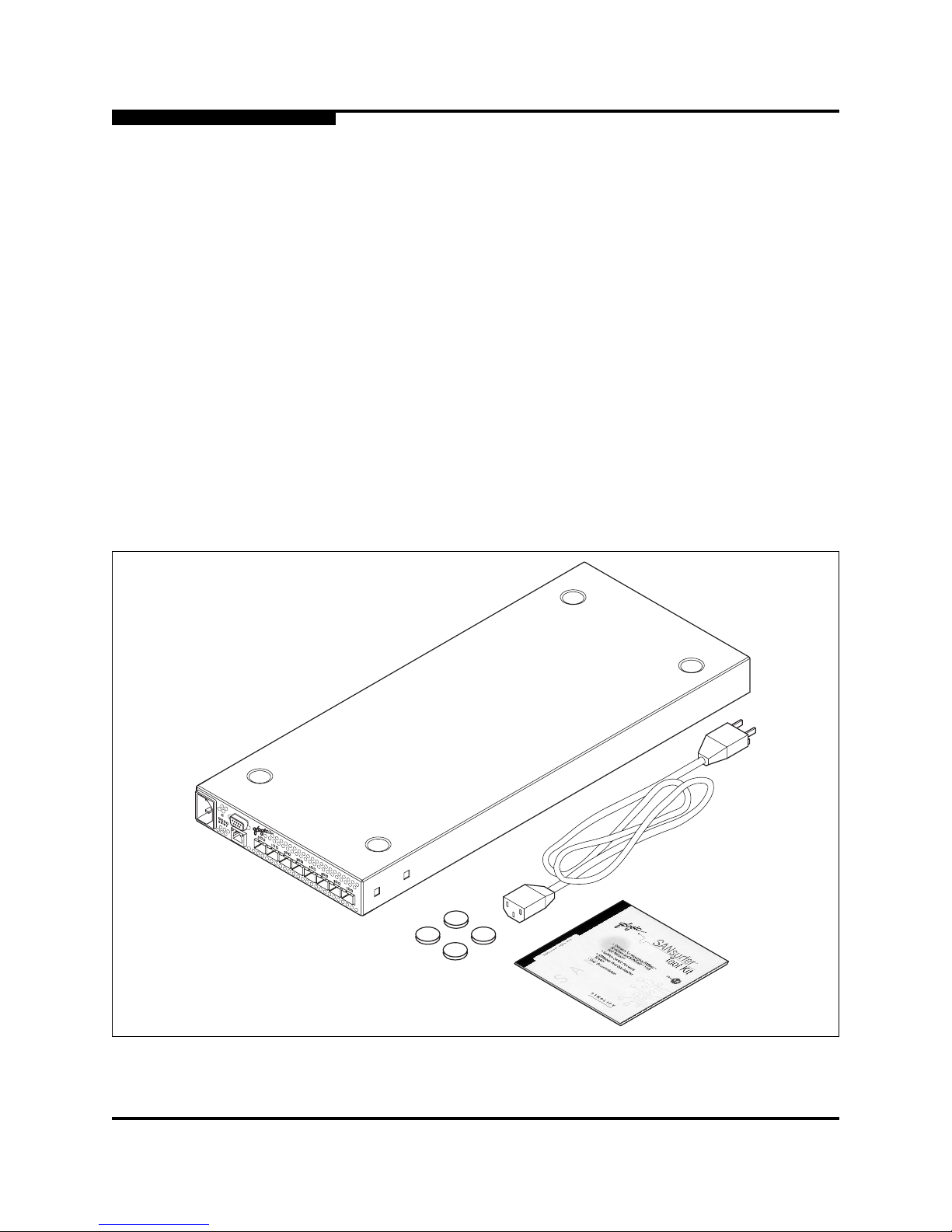
Unpack the switch and accessories. The SANbox2-8c prod uct is shippe d with the
components shown in Figure 4-1:
■ SANbox2-8c Fibre Channel Switch (1) with firmware inst alled
■ Power cord (1)
■ Rubber feet (4)
■ CD-ROM containing the SANbox Manager switch management application,
release notes, and documentation
Figure 4-1. SANbox2-8c Fibre Channel Switch
Page 39

4 – Installation
Installing a Switch
59042-00 A 4-3
Installing a SANbox2-8c switch involves the following steps:
1. Mount the switch
2. Install SFP transceivers
3. Connect the switch to the AC power source
4. Install SANbox Manager
5. Connect the management workstation to the switch
6. Set the date
7. Configure the switch
8. Configure the ports
9. Cable devices to the switch
4.2.1
Mount the Switch
The switch can be placed on a flat surface and stacked or mounted in a 19” EIA
rack. The top of each chassis has dimples to receive the rubber feet of a second
chassis stacked on top. Without the rub ber feet, the switch occupies 1U of space
in an EIA rack. A rail kit is required for rack mounting and is available through
QLogic Corporation.
WARNING!!
Mount switches in the rack so that the weight is distribut ed evenly.
An unevenly loaded rack can become unstable possibly resulting
in equipment damage or personal injury.
CAUTION!
If the switch is mounted in a closed or multi-unit rack assembly,
make sure that the operating temperature inside the rack
enclosure does not exceed the maximum rated ambient
temperature. Refer to ”Switch Environmental” on page A- 3 .
Do not restrict chassis air flow. Allow 16 cm (6.5 in) minimum
clearance at the front and rear of the rack for service access and
ventilation.
Multiple rack-mounted units connect ed to the AC supply circuit
may overload that circuit or overload the AC supply wiring.
Consider the power source capacity and the total power us age of
all switches on the circuit. Refer to ”Switch Electrical” on
page A-3.
Reliable grounding in the r ack must be maint ained from the s witch
chassis to the AC power source.
Page 40
4 – Installation
Installing a Switch
4-4 59042-00 A
4.2.2
Install SFP Transceivers
The switch has been validated with transceivers that support a variety of
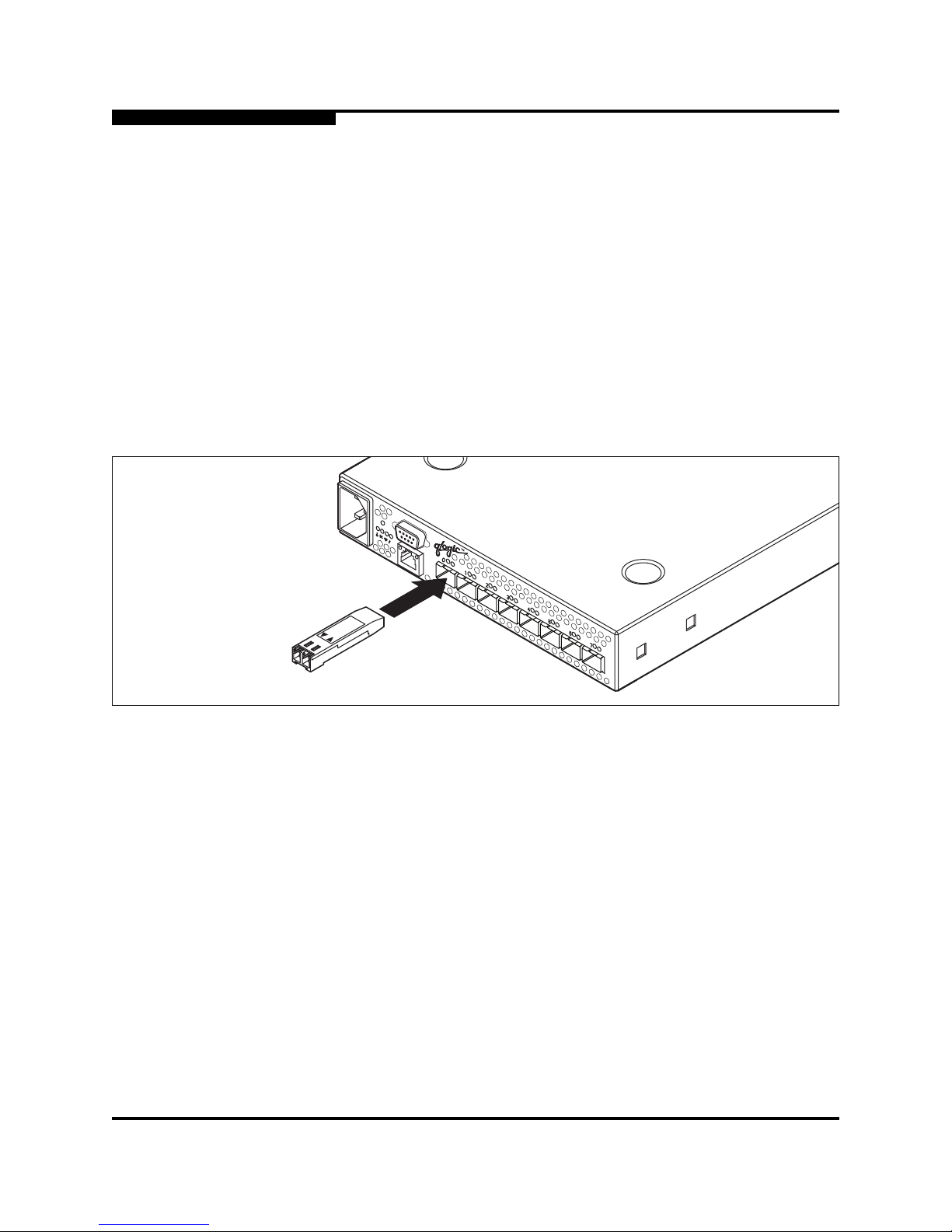
interconnection media. To install, insert the transc e iver into the port and gently
press until it snaps in place as shown in Figure 4-2. To remove a transceiver,
gently press the transceiver into the port to release the tension, then pull on the
release tab or lever and remove the transceiver. Different transceiver
manufacturers have dif ferent r elease mechanis ms. Consul t the document ation for
your transceiver.
Figure 4-2. SFP Transceiver Installation
Note: The SFP transceiver will fit only one way. If the SFP does not install
under gentle pressure, flip it over and try again.
Page 41

4 – Installation
Installing a Switch
59042-00 A 4-5
4.2.3
Connect the Switch to AC Power
WARNING!! This product is supplied with a 3-wire power cor d and plug for the
user’s safety. Use this power cord in conjunction with a properly
grounded outlet to avoid electrical shock . An elect ri cal outlet that
is not correctly wired could place hazardous voltage on metal
parts of the Switch chass is. It is the respo nsi bili ty of the customer
to ensure that the outlet is correctly wired and grounded to
prevent electrical shock.
You may require a different power cord in some countries
because the plug on the cable supplied with the equipment will
not fit your electrical outlet. In this case, you must supply your
own power cord. The cable you use must meet the following
requirements:
For 125 Volt electrical service, the cable must be rated at 10
Amps and be approved by UL and CSA.
For 250 Volt electrical service: The cable must be rated at 10
Amps, meet the requirements of H05VV-F, and be approved by
VDE, SEMKO, and DEMKO.
AVERTISSEMENT!!
Pour la sécurité de l’utilisateur, l’appareil est livré avec un câble
d’alimentation trifilaire et une fiche. Pour éviter toute secousse
électrique, enficher ce câble à une prise correctement mise à la
terre.Une prise électrique dont les fils sont mal branchés peut
créer une tension dangereuse dans les pièces métalliques du
châssis Switch. Pour éviter toute secousse électrique, s’assurer
que les fils sont correctement branchés et que la prise est bien
mise à la terre.
Dans certains pays les prises électriques sont de modèle
différent; on ne peut y enficher le câble de l’app areil. On doit donc
en utiliser un autre ayant les caractéristiques suivantes:
Alimentation 125 V: Câble pour courant nominal de 10 A, agréé
LAC et CSA.
Alimentation 250 V: Câble pour courant nominal de 10 A,
conforme au H05VV -F, et agréé VDE, SEMKO et DEMKO.
Page 42

4 – Installation
Installing a Switch
4-6 59042-00 A
To energize the switch, connect the power cord to the AC power recept acle o n the
front of the switch chassis and to a grounded AC outlet. The switch responds in
the following sequence:
1. The chassis LEDs (Fan Fail, Over Temperature, Heartbeat, Input Power)
illuminate followed by all port Logged-In LEDs.
2. After a couple seconds, the Over Temperature, Fan Fail, and Heartbeat
LEDs are extinguished while the Input Power LED remains illuminat ed.
3. After approximately one minut e, the POST executes a nd al l LEDs il luminate .
4. When the POST is complete, all LEDs are extinguished except the Input
Power LED and the Heartbeat LED:
■ The Input Power LED remains illuminated indicating that the switch
logic circuitry is receiving DC voltage. If not, contact your authorized
maintenance provider.
■ The Heartbeat LED indicates the result s o f t he POST. The POST tests
the condition of firmware, memories, data-paths, and switch logic
circuitry. If the Heartbeat LED blinks steadily about once per second,
the POST was successful, and you can continue with the installation
process. Any other blink pattern indicates that an error has occurred.
Refer to ”Heartbeat LED Blink Patterns” on p age 5-1 for more
information about error blink patterns.
WARNUNG!!
Dieses Produkt wird mit einem 3-adrigen Netzkabel mit Stecker
geliefert. Dieses Kabel erfüllt die Sicherheitsanforderungen und
sollte an einer vorschriftsmäßigen Schukosteckdose
angeschlossen werden, um die Gefahr eines elektrische n
Schlages zu vermeiden.Elektrosteck dosen, die nicht richtig
verdrahtet sind, können gefährliche Hochspannung an den
Metallteilen des Switch-Gehäuses verursachen. Der Kunde trägt
die V e rantwortung für eine vo rs chriftsmäßige Verdrahtung und
Erdung der St eckdose zur Vermeidung eines elektrischen
Schlages.
In manchen Ländern ist eventuell die Verwendung eines anderen
Kabels erforderlich, da der Stecker des mitgelieferten Kabels
nicht in die landesüblichen Steckdosen paßt. In diesem Fall
müssen Sie sich ein Kabel besorgen, daß die folgenden
Anforderungen erfüllt:
Für 125 Volt -Netze: 10 Ampere Kabel mit UL- und
CSA-Zulassung.
Für 250 V olt- Netze : 1 0 Ampere Kabel gemäß den Anfor derungen
der H05VV-F und VDE-, SEMKO- und DEMKO-Zulassung.
Page 43

4 – Installation
Installing a Switch
59042-00 A 4-7
4.2.4
Install SANbox Manager
You can install SANbox Manager on the Windows, Linux, and Solaris platforms.
Refer to the subsection that corresponds to your workstation:
■ 4.2.4.1 SANbox Manager Installation fo r Windows
■ 4.2.4.2 SANbox Manager Installation for Linux
■ 4.2.4.3 SANbox Manager Installation for Solaris
4.2.4.1
SANbox Manager Installation for Windows
To install the SANbox Manager application on Windows from the SANsurfer® Tool
Kit CD-ROM, do the following:
1. Close all programs currently running, and insert the SANsurfer Tool Kit CD
into the management workstation CD-ROM drive. If the SANsurfer Tool Kit
start page does not open in your default browser, do the following:
a. Using Windows Explorer, double-click the drive letter which cont ains
the SANsurfer Took Kit CD.
b. Locate and double-click the Start_Here.htm file to open the
SANsurfer® Tool Kit start page in your default browser.
2. On the SANsurfer Tool Kit start page, choose the SANbox Switch Soft ware
button.
3. On the SANbox Switch Software page, scrol l to the SANbox2-8c (2Gb)
Series area.
4. In the Windows column, choose the SANbox Manager link to open the File
Download window .
5. You have a choice of running the installation file from the CD-ROM or
downloading the installati on file to your hard drive. Choose one of the
following:
■ Open the installation file from the CD-ROM and follow the SANbox
Manager installation instructions.
■ Specify a location in which to save the
sansurfer_windows_install.exe file, and choose the Save button.
Double-click the saved sansurfer_windows_install.exe file and
follow the SANbox Manager installat ion instructions.
Page 44

4 – Installation
Installing a Switch
4-8 59042-00 A
4.2.4.2
SANbox Manager Installation for Linux
To install the SANbox Manager application on Linux from the SANsurfer Tool Kit
CD-ROM, do the following:
1. Close all programs currently running, and insert the SANsurfer Tool Kit CD
into the management workstation CD-ROM drive. If a file browser window
opens showing icons for the contents of the CD-ROM, double-click the
Start_Here.htm file to open the SANsurfer Tool Kit start page. If a file
browser does not open, double-click the CD-ROM icon on the to open the
browser. If there is no CD-ROM icon on the, do the following:
a. Open an xterm or other terminal window.
b. Mount the CD-ROM. From a shell prompt, enter the following
command:
mount /mnt/cdrom
c. Execute your web browser to view the Start_Here.htm document
using one of the following commands:
$mozilla file:/mnt/cdrom/Start_Here.htm
or
$netscape file:/mnt/cdrom/Start_Here.htm
d. The SANsurfer Tool Kit start page opens in your default browser.
2. On the SANsurfer Tool Kit start page, choose the SANbox Switch Soft ware
button.
3. On the SANbox Switch Software page, scrol l to the SANbox2-8c (2Gb)
Series area.
4. In the Linux column, choose the SANbox Manager link to open the Save As
window.
5. Enter a path name to save the sansurfer_linux_install.bin file, and choose
the Save button.
6. Open a terminal window for the directory in which the
sansurfer_linux_install.bin file was saved, and enter the following
command:
chmod +x sansurfer_linux_install.bin
7. Press the Enter key.
8. Enter the following command:
./sansurfer_linux_install.bin
9. Press the Enter key, and follow the SANbox Manager installation
instructions.
Page 45

4 – Installation
Installing a Switch
59042-00 A 4-9
4.2.4.3
SANbox Manager Installation for Solaris
To install the SANbox Manager application on Solaris from the SANsurfer Tool Kit
CD-ROM, do the following:
1. Close all programs currently running, and insert the SANsurfer Tool Kit CD
into the management workstation CD-ROM drive. If the SANsurfer Tool Kit
start page does not open in your default browser, do the following:
a. Right-click the to open the Works pace Menu.
b. Point to and select Files, then select Fil e Manag er.
c. In File Manager, double-click t he CD-ROM icon, and then double-click
the Sansur fe r fo l de r.
d. In the Sansurfer folder, double-click the Start_Here.htm file to open
the SANsurfer Tool Kit start page in your default browser.
2. On the SANsurfer Tool Kit start page, choose the SANbox Switch Soft ware
button.
3. On the SANbox Switch Software page, scrol l to the SANbox2-8c (2Gb)
Series area.
4. In the Solaris column, choose the SANbox Manager link to open the Save
As window .
5. Enter a path name to save the sansurfer_solaris_install.bin file and
choose the Save button.
6. Open a terminal window for the directory in which the
sansurfer_solaris_install.bin file was saved, and enter the following
command:
chmod +x sansurfer_solaris_install.bin
7. Press the Enter key.
8. Enter the following command:
./sansurfer_solaris_install.bin
9. Press the Enter key, and follow the SANbox Manager installation
instructions
Note: If you download SANbox Manager from a server, be sure the
downloaded file has execute permission before installing.
Page 46
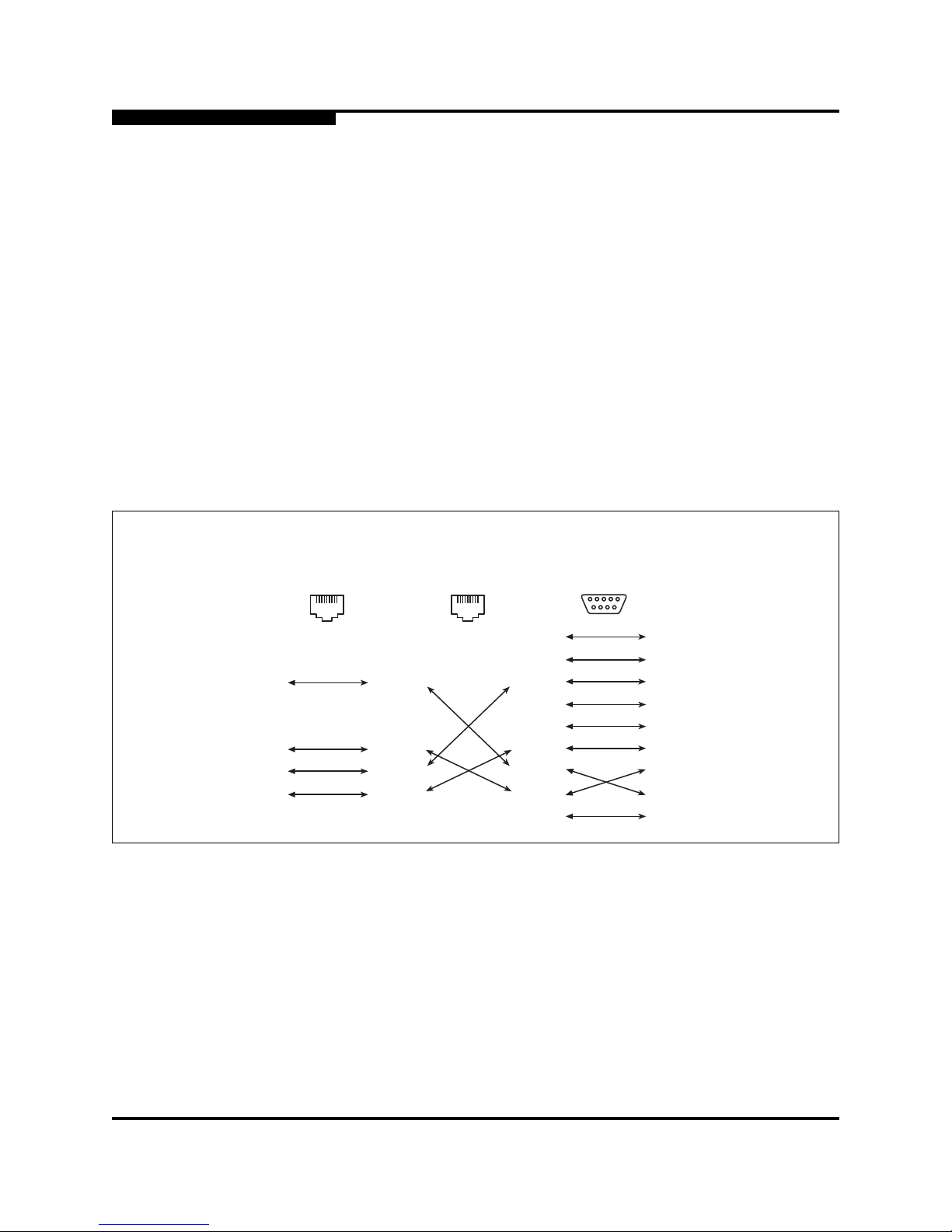
4 – Installation
Installing a Switch
4-10 59042-00 A
4.2.5
Connect the Management Workstation to the Switch
Connect the management workstation to the switch in one of three ways:
■ Indirect Ethernet connection from the management workstation to t he switch
RJ-45 Ethernet connector through an Ethernet switch or a hub. This requires
a 10/100 Base-T straight cable as shown in Figure 4-3. With this method,
you can manage the switch with SANbox Manager or the CLI.
■ Direct Ethernet connection from the management workstation to the switch
RJ-45 Ethernet connector. This requires a 10/100 Base-T cross-over cable
as shown in Figure 4-3. With this method provides, you can manage the
switch with SANbox Manager or the CLI.
■ Serial port connection from the management workstation to the switch
RS-232 serial port connector. This requires a null modem F/F DB9 cable as
shown in Figure 4-3. With this method, you can manage the switch with the
CLI.
Figure 4-3. Ethernet and Serial Cable Connections
81
8
1
2
7
6
5
4
3
8
1
2
7
6
5
4
3
81
8
1
2
7
6
5
4
3
8
1
2
7
6
5
4
3
8
1
2
7
6
5
4
3
9
8
1
2
7
6
5
4
3
9
1
6
5
9
Direct Ethernet
RJ-45 Connection
Indirect Ethernet
RJ-45 Connection
Serial RS-232
Connection
Page 47

4 – Installation
Installing a Switch
59042-00 A 4-11
4.2.5.1
Ethernet Connection
To establish an Ethernet connection, do the following:
1. Connect a 10/100 Base-T cross-over cable from a COM port on the
management workstation directly to the RJ-45 Ethernet port; or a 10/100
Base-T straight cable indirect ly over an Ethernet network.
2. Open a command line window.
3. Open a Telnet session by entering the following command with the switch IP
address. The default IP address is 10.0.0.1
telnet 10.0.0.1
4. Log in to the switch. If fabric security i s d isabled, account names and
passwords are not enforced. Refer to the ”Set Setup Command” on
page B-34 for information about setting fabric security. The default account
name and password are (admin, passwor d).
SANbox2 Login: admin
Password: ********
4.2.5.2
Serial Connection
To establish a serial port connection, do the following:
1. Connect a null modem F/F DB9 cabl e from a COM port on t he management
workstation to the RS-232 serial port on the switch.
2. Configure the connection according to your platform:
■ For Windows:
a. Open the HyperTerminal application on a Windows platform.
Choose the Start button, select Programs, Accessories,
HyperTerminal, and HyperTerminal.
b. Enter a name for the switch connection and choose an icon in the
Connection Description window. Choose the OK button.
c. Select the COM port in the Connect To window and choose the
OK button.
d. Enter the following COM Port settings in the COM Properties
window and choose the OK button.
❑ Bits per second: 9600
❑ Data Bits: 8
❑ Parity: Non e
❑ Stop Bits: 1
❑ Flow Control: None
Page 48

4 – Installation
Installing a Switch
4-12 59042-00 A
■ For Linux:
a. Set up minicom to use the serial port. Create or modify the
/etc/minirc.dfl fi le with the following content:
pr portdev/ttyS0
pu minit
pu mreset
pu mhangup
b. Verify that all users have permission to run minicom. Review the
/etc/minicom/users file and confirm that the line "ALL" exists or
that there are specific user entri es.
c. Enter the following command at the Linux prompt:
minicom
■ For Solaris:
a. Set up Solaris to use t he seri al por t. Modif y the /et c/remot e fi le to
include the following lines:
sanbox2:\
:dv=/dev/term/a:br#9600:el=C^S^Q^U^D:ie%$:oe=^D:
b. Enter the following command at the Solaris prompt:
# tip sanbox2
3. Log in to the switch. If fabric security i s d isabled, account names and
passwords are not enforced. Refer to the ”Set Setup Command” on
page B-34 for information about setting fabric security. The default account
name and password are (admin, passwor d).
SANbox2 Login: admin
Password: ********
4.2.6
Set the Date
To set the date and time on the switch, do the following:
1. Using an Ethernet or a serial connection, open an admin session by entering
the following command:
SANbox2 $> admin start
Note: The SANbox2-8c switch can maintain the date in memory for only a
few hours after being shut down.
Page 49

4 – Installation
Installing a Switch
59042-00 A 4-13
2. Enter the Date command and parameters (MMDDhhmmCCYY format) to set
the system date on the switch.
SANbox2 (admin) $> date 083007512002
<an alarm is displayed that specifies that the switch
must be reset before the date can be set>
3. To reset the switch, enter the following command and press the Enter key.
SANbox2 (admin) $> reset switch
4.2.7
Configure the Switch
Do the following to configure a switch using the SANbox Manager application.
Refer to the SANbox2 Switch Management User’s Guide for more information
about configuring a swit ch. You can also configure the switch us ing t he CLI . Ref er
to Appendix B for information about the Command Line Interface.
1. Connect to the switch using an Ethernet connection and run SANbox
Manager.
2. Open the Fabric menu and select Add Fabric to open the Add a New Fabric
window.
3. Enter a fabric name and the IP address of the switch through which to
manage the fabric.
4. Enter an account name and a password and choose the Add Fabri c butt on.
The default account name and password are (admin, password). If fabric
security is disabled, account names and passwords are not enforced. Refer
to the ”Set Setup Command” on page B-34 for information about setting
fabric security.
5. Open the Switch menu and select Switch Properties. In the Switch
Properties window , ent er a chassis name. Accept the def ault domain ID, and
choose the OK button.
6. Open the Switch menu and select Network Properties. In the Network
Properties window, enter values for the IP address, subnet mask, and
gateway address. Accept the default static setting. If you know the SNMP
configuration settings, enter those as well. Choose the OK button.
7. Remove the old fabric and add a new one. Add a fabric with the new IP
address.
Repeat this process for each switch in the fabri c, then connect the switches.
Page 50

4 – Installation
Loading Firmware
4-14 59042-00 A
4.2.8
Configure the Ports
Configuring a port involves defining the port mode and setting the frame
sequencing if necessary. For public devices and other switches, a switch
automatically sets the port mode as each port di scovers the type of device to
which it is connected.
A GL_Port will self configure as an FL_Port when connected to a loop of public
devices or an F_Port when connected to a single device. A G_Port will self
configure as an F_Port when connected to a single public device. Both GL_Ports
and G_Ports self configure as E_Ports when connected to another switch. Refer
to the SANbox2 Switch Management User’s Guide for more information about
configuring ports. You can also configure ports using the CLI. Refer to Appendix B
for information about the CLI.
4.2.9
Cable Devices to the Switch
Connect cables to the SFP transceivers and their corresponding devices, and
then energize the devices. Device host bus adapters can ha ve SFP (or SFF)
transceivers or GigaBit Interface Converters (GBIC). LC-type duplex fiber optic
cable connectors are designed for SFP transcei vers, while SC-type connectors
are designed for GBICs. Duplex cable connectors are keyed to ensure proper
orientation. Choose the fiber optic cable with the connector combination that
matches the device host bus adapter.
4.3
Loading Firmware
The switch comes with current firmware inst alled. However, you can upgrade
switch firmware from a Windows, Solaris, or Linux workst ati on. New fir mware can
be loaded on the switch while the switch is operating without disr upting service.
However, you must reset the switch to activate the new firmware, which does
disrupt service.
4.3.1
Using File Transfer Protocol to Load Firmware
To load and activate new firmware, do the following:
1. Connect a workstation to the switch through t he Ethernet port.
2. Move to the folder or directory that contains the new firmware image file.
Page 51

4 – Installation
Loading Firmware
59042-00 A 4-15
3. Establish communications with the switch using the File Transfer Protocol
(FTP). Enter one of the following on the command line:
>ftp xxx.xxx.xxx.xxx
or
>ftp switchname
where xxx.xxx.xxx.xxx is the switch IP address and switchname is the switch
name associated with the IP address.
4. Enter the following account name and password:
user:images
password:images
5. Activate binary mode and copy the fir mware image file (f ilename.i mg) on the
switch:
ftp>bin
ftp>put filename
6. Close the FTP session.
ftp>quit
7. Establish communications with the switch using Telnet. Enter one of the
following on the command line:
telnet xxx.xxx.xxx.xxx
or
telnet switchname
where xxx.xxx.xxx.xxx is the switch IP address and switchname is the switch
name associated with the IP address.
8. Open an Admin session to acquire the necessary authority.
SANbox2 $>admin start
9. Display the list of firmware image file s on the switch to confirm that the file
was loaded. Refer to the ”Image Command” on page B-13.
SANbox2 (admin) $>image list
10. Unpack the firmware image file to install the new firmware in flash memory.
SANbox2 (admin) $>image unpack filename
11. Reset the switch to activate the new firmware. This will close the Telnet
session by default.
SANbox2 (admin) $>reset
Page 52

4 – Installation
Loading Firmware
4-16 59042-00 A
4.3.2
Using SANbox Manager to Load Firmware
To load the firmware using SANbox Manager, do the following:
1. From the Faceplate display, open the Switch menu and select Load
Firmware.
2. In the Firmware Upload window, browse and select the firmware file you
want to load.
3. In the Firmware Upload window, choose the Start button to begin the
loading process. When the firmware is finished loading, the Bytes
Transferred f ield displ ays the number of byt es transferred du ring the loadi ng
process.
4. Choose the Close button to close the Firmware Upload window.
5. Open the Switch menu and select Reset Switch to activate the new
firmware.
4.3.3
Using the CLI to Load Firmware
To load the firmware using the CLI, do the following:
1. Enter the following account name and password:
SANbox2 Login:admin
Password: password
2. To start an Admin session, enter the following:
SANbox2 $> admin start
3. Retrieve the firmware file. The device on which th e firm ware file is stored
must be running an FTP ser ver. Enter the following c ommand to ret rieve th e
firmware file from the specified IP address:
SANbox2 (admin) #> image fetch username 10.0.0.254
firmwarefilenametoload firmwarefilenameonswitch
Connected to 10.0.0.254.
331 Password required for username.
Password:
230 User username logged in.
bin
200 Type set to I.
verbose
Verbose mode off.
Note: If prompted for your password, enter your password (for that IP
Address) and press the Enter key.
Page 53

4 – Installation
Loading Firmware
59042-00 A 4-17
4. Enter the following command to display the list of firmware files:
SANbox2 (admin) #> image list firmwarefilenameonswitch
5. Enter the following command to install the new firmware:
SANbox2 (admin) #>image unpack firmwarefilenameonswitch
6. Reset the switch to activate the new firmware.
SANbox2 (admin) $>reset
Page 54

4 – Installation
Loading Firmware
4-18 59042-00 A
Notes
Page 55

59042-00 A 5-1
Section 5
Diagnostics/Troubleshooting
Diagnostic information about t he switch is avail able through the c hassis LEDs and
the port LEDs. Diagnostic information is also available through the SANbox
Manager and CLI event logs and error displays. This section describes two types
of diagnostics: Power On Self Test (POST) and chassis. POST diagnostics
describe the Heartbeat LED and the port Logged-In LED indica tions. Chassis
diagnostics cover power supply and fan diagnostics as well as chassis over
temperature conditions. This section also describes how to use force PROM
mode to recover a disabled switch.
5.1
POST Diagnostics
The switch performs a series of Power On Self Tests (POST) as part of its
power-up procedure. The POST diagnostic program performs the following tests:
■ Checksum tests on the boot firmware in PROM and the switch firmware in
flash memory
■ Internal data loopback test on all ports
■ Access and integrity test on the ASIC
During the POST, the switch logs any errors encoun ter ed. Some POST err ors ar e
fatal, others are non-fatal. The switch uses the Heartbeat LED and the Logged-In
LED to indicate switch and port status. A fatal error disables the switch so that it
will not operate. A non-fatal error allows the switch to operate, but disables the
ports that have errors. Whether the problem is fatal or non-fatal, contact your
authorized maintenance provider.
If there are no errors, the Heartbeat LED blin ks at a steady rate of once per
second. If a fatal erro r occurs, the Heartbeat LED will show an error blink p attern.
If there are non-fatal err ors, the switch disables the failed ports and flashes the
corresponding Logged-In LEDs. Refer to ”Heartbeat LED Blink Patterns” on
page 5-1 for more information about Heartbeat LED blink patterns.
5.1.1
Heartbeat LED Blink Patterns
5.1.1.1
Normal (all pass)
If all POST diagnostics pass, the switch will go to normal operation and the
Heartbeat LED will blink at a steady rate of one (1) blink pe r second.
Page 56

5 – Diagnostics/Troubleshooting
POST Diagnostics
5-2 59042-00 A
5.1.1.2
Force PROM Mode Pattern
Steady illumination indicates t hat the swi tch is in force PROM mode, which returns
the switch IP address to 10.0.0.1. From force PROM mode, you may reload
firmware, reset the password to the factory default, and remove a corrupt
configuration.
5.1.1.3
Internal Firmware Failure Blink Pattern
An internal firmware failure bl ink pattern is 2 blinks per second followed by a two
second pause. The 2-blink error p attern indi cates that the fir mware has failed, and
that the switch must be reset.
5.1.1.4
Fatal Er ror Blink Pattern
A fatal error blink pattern is 3 blinks per second followed by a two second pause.
The 3-blink error pattern i ndicates that a fatal error has left the switch inoperable.
If a fatal error occurs, contact your authorized maintenance provider.
5.1.1.5
Configuration File System Error Blink Pattern
A configuration file system error blink pattern is 4 blinks per second followed by a
two second pause. The 4-blink error pattern indicates that a configuration file
system error has occurred, and that a Remake File System procedure is
necessary to return the switch to a normal state. Refer to ”Recovering a Switch”
on page 5-6 for more information.
2 seconds
1 second
2 seconds
1 second
2 seconds
1 second
Page 57
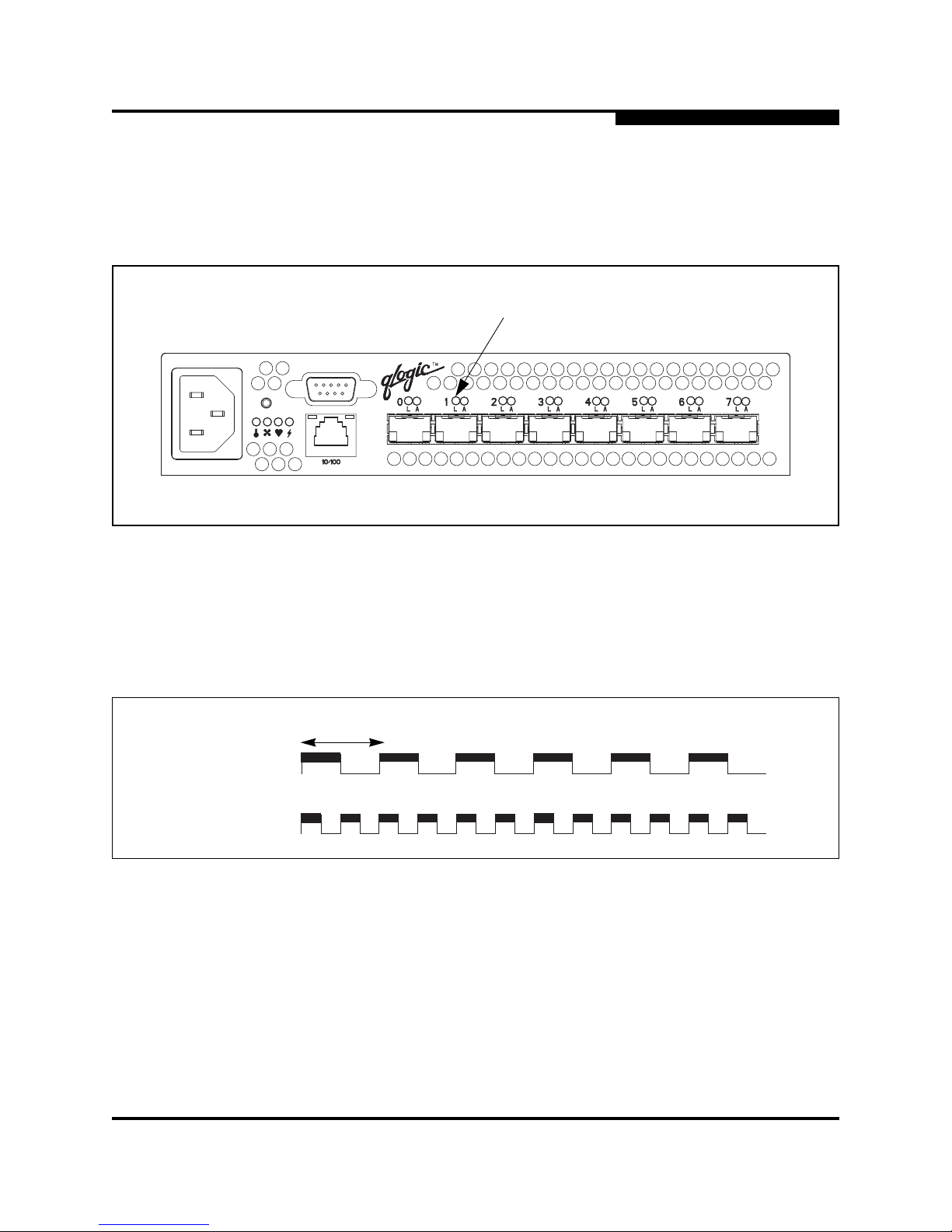
5 – Diagnostics/Troubleshooting
POST Diagnostics
59042-00 A 5-3
5.1.2
Logged-In LED Indications
Port diagnostics are indicated by the Logged-In LED for each port as shown in
Figure 5-1.
Figure 5-1. Port Logged-In LED
The Logged-In LED has three indications:
■ Logged in - Continuous illumination.
■ Logging in - Flashes at roughly once per second as shown in Figure 5-2.
■ Error - Flashes at roughly twice per second as shown in Figure 5-2.
Figure 5-2. Logged-In LED Indications
Logged-In LED
Logging In
Error
1 second
Page 58

5 – Diagnostics/Troubleshooting
POST Diagnostics
5-4 59042-00 A
A Logged-In LED error indicat ion is of ten the result of E_Port isol ation. An isolat ed
E_Port is indicated by a red link in the topology display. Table 5-1 describes the
causes and remedies for E_Port isolation conditions.
If a Logged-In LED is flashing, do the following:
1. Inspect the cable connecting the port to another switch or to a device. Is the
cable connected and in good operating condition?
■ Yes - Continue.
■ No - Make necessary corrections or replace the cable.
2. Inspect the switch or device to which the port is connected. Is the switch or
device operating properly?
■ Yes - Continue.
■ No - Make necessary corrections. If the problem remains, continue.
3. Replace the SFP. Does this correct the problem?
■ Yes - Diagnosis complete.
■ No - Continue.
4. Inspect the switches in the fabric for domain ID, timeout value, or conflicting
zone name problems. Do any of these conditions exist?
■ Yes - Reconfigure the switches as needed to eliminate the problem.
Refer to the SANbox2 Switch Management User’s Guide for
information about how to change domain IDs, timeout values, and edit
zoning.
■ No - Contact your authorized maintenance provi der.
Table 5-1. E_Port Isolation Causes and Remedies
Isolation Cause Remedy
Two switches in the same
fabric have the same
domain ID
Correct the domain IDs on the offending switches.
Domain IDs must be unique.
All switches in the fabric do
no have the same timeout
values
Correct the timeout values on the offending switches.
When merging two fabrics,
the active zone sets contain
zones with the same names
but different membership.
Deactivate one of the active zone sets or edit the
conflicting zones so that their membership is the same.
The conflicting zones have the same name, but different
membership. Finally, take the affected ports offline then
back online to restore the inter -sw i tch link s.
Page 59
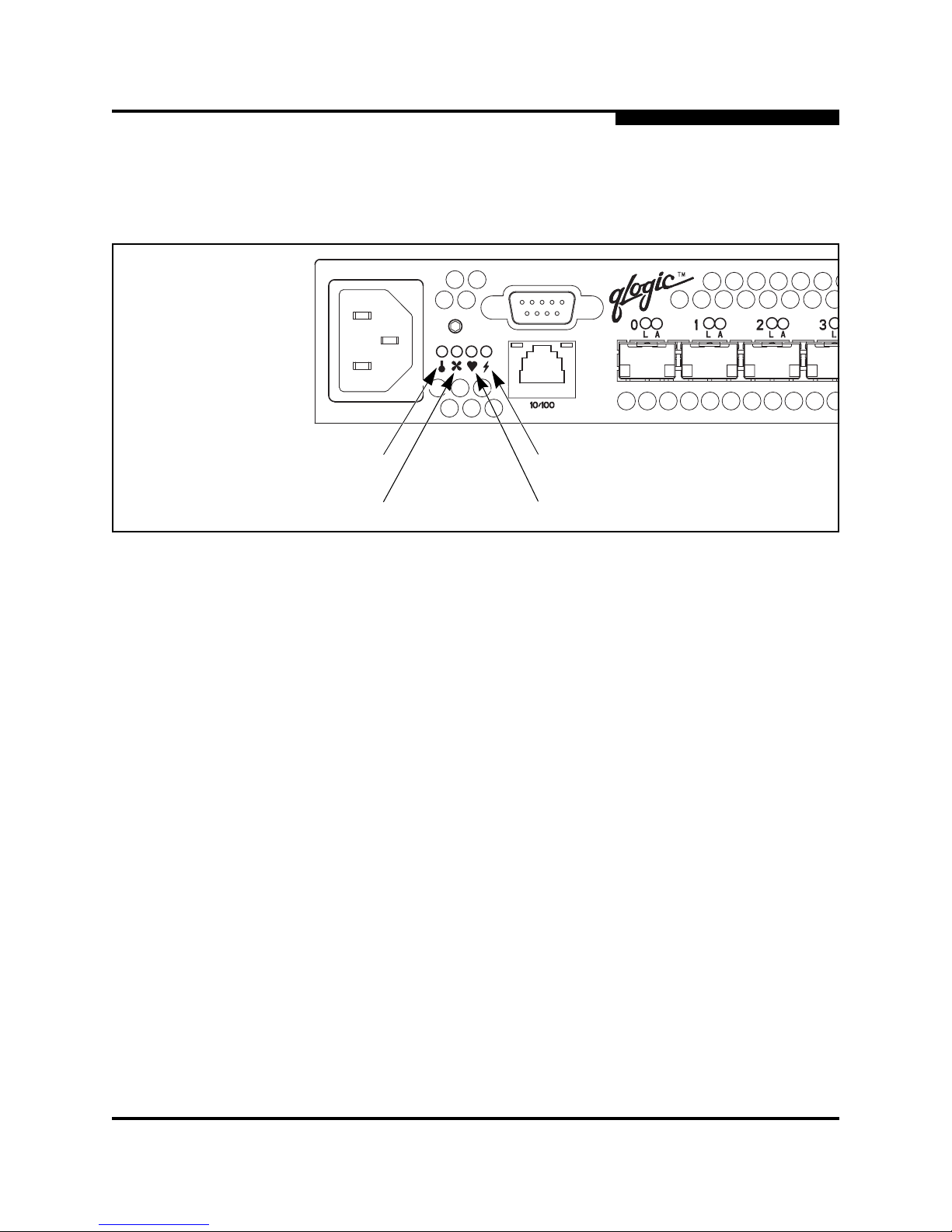
5 – Diagnostics/Troubleshooting
Chassis Diagnostics
59042-00 A 5-5
5.2
Chassis Diagnostics
Chassis diagnostics are indicated by the chassis LEDs as shown in Figure 5-3.
Figure 5-3. Chassis LEDs
The following conditions are described:
■ Over Temperature LED is illuminated
■ Input Power LED is extinguished
■ Fan Fail LED is illuminated
5.2.1
Over Temperature LED is Illuminated
The Over Temperature LED illuminates to indicate that the switch logic circuitry is
overheating. If the Over Temperature LED illuminates, do the following:
1. Inspect the chassis fan. Is the i ntake ope ning cl ear? Is the fan oper ating and
producing air flow?
■ Yes - Continue.
■ No - Remove any debris from fan intake and exhaust if necessar y. If
the condition remains, continue.
2. Consider the ambient air temperat ure near the swi tch and c lea rance aro und
the switch. Make necessary corrections. If the condition remains, contact
your authorized maintenance provider.
Over Temperature LED
(Yellow)
Fan Fail LED
(Yellow)
Heartbea t LED
(Yellow)
Input Power LED
(Green)
Page 60

5 – Diagnostics/Troubleshooting
Recovering a Switch
5-6 59042-00 A
5.2.2
Input Power LED Is Extinguished
The Input Power LED illuminates to indicate that the switch logic circuitry is
receiving proper voltages . If the Input Power LED is extinguished, do the
following:
1. Inspect the power cords and connectors. Is the cord unplugged? Is the cord
or connector damaged?
■ Yes - Make necessary corrections or repairs. If the condition remains,
continue.
■ No - Continue.
2. Inspect the AC power source. Is the power source delivering the proper
voltage?
■ Yes - Continue
■ No - Make necessary repairs. If the condition remains, contact your
authorized maintenance provider.
5.2.3
Fan Fail LED is Illuminated
The Fan Fail LED illuminates to indicate a malfunction with the chassis fan. If the
Fan Fail LED illuminates, isolate the switch from the fa bric, unplug the switch from
the AC power source, and contact your authorized maintenance provider.
5.3
Recovering a Switch
A switch can become inoperable or unavailable for following reasons:
■ Firmware becomes corrupt
■ IP address is lost
■ Switch configuration becomes corrupt
■ Forgotten password
In these specific cases, you can recover the switch using force PROM mode. In
force PROM mode, the switch IP address becomes 10.0.0.1 and provides
opportunities to do the following:
■ Reload firmware
■ Reset the configuration IP address
■ Reset the password to the factory default
■ Remove a corrupt configuration
■ Restore the factory configuration
■ Copy the log file
Page 61

5 – Diagnostics/Troubleshooting
Recovering a Switch
59042-00 A 5-7
To recover a switch, do the following:
1. Connect a workstation to the switch throug h the Ethernet connector . Refer to
”Connect the Management Workstat ion to the Switch” on page 4-10.
2. Before a switch can be recovered, you must upload the firmware to the
switch. Refer to ”Loading Firmware” on page 4-14 for instructions on loading
firmware using the SANbox Manager and using the File Transfer Protocol
method. After uploading fir mware, continue with the following steps to
recover the switch.
3. Place the switch in force PROM mode. Do the following:
a. Isolate the switch from the fabric.
b. Press and hold the Reset/Force PROM button with a pointed tool for
about 4 seconds. All of the chassis LEDs wil l illuminate then exti nguish
leaving only the Input Power LED illuminated. Release the butt on.
c. Allow about one minute for the switch to complete it test s and come up
in force PROM mode. When the switch is in force PROM mode, the
Input LED will be illuminated and the Heartbeat LED will illuminat e
continuously. All other chassis LEDs will be extinguished.
4. Establish a Telnet session with the switch using the default IP address
10.0.0.1.
5. Enter the account name (prom) and password (prom), and press the Enter
key.
Sanbox2 login: prom
Password:xxxxx
[username@host:Itasca]% telnet 10.0.0.1
Trying 10.0.0.1...
Connected to 10.0.0.1.
Escape character is ’^]’.
6. The following text menu is displayed. To select a switch recovery option,
press the corresponding number on the keyboard and press the Enter key.
0) Exit
1) Image Unpack
2) Reset Network Config
3) Reset Password File
4) Copy Log Files
5) Remove Switch Config
6) Remake Filesystem
7) Reset Switch
Option:
■ Choose the Image Unpack option to inst all t he fi rmware on the swi tch.
■ Choose the Reset Network Config option t o change the configur ation
IP address to 10.0.0.1.
Page 62

5 – Diagnostics/Troubleshooting
Recovering a Switch
5-8 59042-00 A
■ Choose the Reset Password File option to restore the def ault account
name and password (Admin, Password).
■ Choose the Copy Log Files option to copy the log file
■ Choose the Remove Switch Config option to delete a corrupt
configuration. This will reset the factory defaults for the switch, except
for account names and passwords.
■ Choose the Remake Filesystem option to reset the entire switch to
the factory default settings. In the event of sudden loss of power, it is
possible that the switch configuration may become corrupt. The file
system on which the configuration is stored must be recreated.
■ Choose the Reset Switch option to reboot the switch using
configuration parameters in memory.
7. To load the firmware image, press the number 1 key on the keyboard and
press the Enter key.
Option: 1
8. At the firmware image filename prompt, enter the name (firmware) of the
firmware file and press the Enter key.
Image filename: firmware
Unpacking ’firmware’, please wait...
Unpackage successful.
9. Repeat the above procedures for each option, as necessary. Some options
prompt you to confirm your choices. Press the “y” key for yes, and the “n”
key for no.
10. To exit force PROM mode and return to normal operation, wait about 15
seconds after the la st operat ion , then res et t he switch eit her by press ing the
Reset/Force PROM button or power cycling the switch.
CAUTION!
If you choose the Remake Filesystem opt ion, y ou will
lose all changes made to the switch configuration,
such as password and z oning changes. You must then
reconfigure the portions of the fabric that involve the
switch.
Page 63

59042-00 A A-1
Appendix A
Specifications
Appendix A contains the speci fications f or the SANbox2-8c Fibr e Channel Swit ch.
Refer to Section 2 General Description for the location of all connections,
switches, and components.
A.1
Switch Specifications
Fibre Channel Protocols................. FC-PH Rev. 4.3
FC-PH-2
FC-PH-3
FC-AL Rev 4.5
FC-AL-2 Rev 7.0
FC-FLA
FC-GS-2
FC-FG
FC-PLDA
FC-Tape
FC-VI
FC-SW-2
Fabric Element MIB RFC 2837
Fibre Alliance MIB Version 3.0
Fibre Channel Classes of Service .. Classes 2 and 3 connectionless
Fabric Port Modes ................... ....... F_Port
FL_Port
TL_Port
E_Port
G_Port
GL_Port
Port Characteristics........................ All ports are auto-discovering and
self-configuring.
Number of Fibre Channel Ports...... 8 ports per chassis
Scalability........................................ Maximum 239 switches depending on
configuration
Maximum User Ports...................... >225,000 ports dep endin g on confi gurati on
Buffer Credits.................................. 12 b u ffer cr e d its pe r po r t
Page 64

A – Specifications
Switch Maintainability
A-2 59042-00 A
A.2
Switch Maintainability
A.3
Fabric Management
Media Type..................................... Small Form Pluggable (SFP), 3.3 volt,
optical transceivers. Hot swappable.
Fabric Port Speed........................... 1 .0625 or 2.125 Gigabits/second
Maximum Frame Size..................... 2148 bytes (2112 byte payload)
System Processor........................... 266 MHz Pentium® processor
Fabric Latency (best case)............. < 0.5 µsec.
Fabric Point-to-Point Bandwidth..... 212 or 424 MB/s full duplex
Fabric Aggregate Bandwidth .......... 32 Gb/s for a single switch
Diagnostics..................................... Power On Self Test (POST) tests all
functional components except SFP
transceivers. Port tests include online,
internal, and external tests
User Interface................................. LED indicators
Management Methods.................... SANbox Manager application
Command Line Interface
GS-3 Management Server
SNMP
FTP
Maintenance Connection................ RS-232 connector; null modem F/F DB9
cable
Ethernet Connection....................... RJ-45 connector; 10/100 BASE T cable
Switch Agent................................... Allows a network management station to
obtain configuration values, traffic
information, and failure data pertaining to
the Fibre Channels using SNMP through
the Ethernet interface.
Page 65

A – Specifications
Switch Dimensions
59042-00 A A-3
A.4
Switch Dimensions
A.5
Switch Electrical
A.6
Switch Environmental
Width...............................................
Height .............................................
Depth..............................................
8.5”
1.70”
20.0”
Weight............................................. 8.5 lbs.
Operating voltage ........................... 90 to 1 37 Vac; 47 to 63 Hz
180 to 264 Vac; 47 to 63 Hz
Power source loading..................... 1.0 Amps maximum at 90 to 137 Vac
0.45 Amps maximum at 180 to 264 Vac
Heat Output (maximum) 70 watts
Circuit Protection ............................ Internally fused
Temperature
■ Operating..................................
■ Non-operating...........................
5 to 50°C (41 to 122°F)
-40 to 65°C (-40 to 149°F)
Humidity
■ Operating..................................
■ Non-operating...........................
15% to 80%, non-condensing
25% to 90%, non-condensing
Altitude
■ Operating..................................
■ Non-operating...........................
0 to 3048m (0 to 10,000 feet)
0 to 15,240m (0 to 50,000 feet)
Vibration
■ Operating..................................
■ Non-operating...........................
IEC 68-2
5-500 Hz, random, 0.21 G rms, 10 minutes
5-500 Hz, random, 2.09 G rms, 10 minutes
Shock
■ Operating..................................
■ Non-operating...........................
IEC 68-2
4 g, 11ms, 20 repetitions
30g, 292 ips, 3 repetitions, 3 axis
Air flow............................................ Front-to-back or back-to-front, by model
Page 66

A – Specifications
Switch Regulatory Certifications
A-4 59042-00 A
A.7
Switch Regulatory Certifications
A.8
Shortwave Laser SFP 1G/2G (multi-mode)
Safety Standards ............................ UL60950, CSA 22.2 No. 60950, EN60950
Emissions Standards...................... FCC Part 15B Class A
VCCI Class A ITE
BSMI Class A
ICES-03 Issue 3
CISPR 22, Class A
EN 55022, Class A
Voltage Fluctuations ....................... EN 61000-3-3
Harmonics....................................... EN 61000-3-2
Immunity.............................. .. .. ....... EN 55024:1998
Marking........................................... FCC Part 15, UL (United States), cUL
(Canada), TUV, BSMI, VCCI, CE
Connector....................................... Duplex LC
Color coding.................................... Beige or black exposed connector
surfaces
Cable .............................................. Fibre Channel 100-M6-SN-I (50 µm
multimode)
Fibre Channel 200-M5-SN-I or
200-M6-SN-I (62.5 µm multimode)
Wavelength..................................... 830 - 860 nm
Transmit Power............................... -10 dBm minimum
Receiver Sensitivity ........................ -16 dBm average
Distance................ ... .. ............. .. ... ... 500 meters m a x im u m, 50 micron fib e r
300 meters maximum, 62.5 micron fiber
Safety........... ............................ ....... DHHS 21 CFR(J), IEC 825-1
CENELEC EN 60825-1, VDE
Standard ......................................... Small Form-Factor Pluggable Multisource
Agreement
Page 67

A – Specifications
Longwave Laser SFP 1G/2G (single-mode)
59042-00 A A-5
A.9
Longwave Laser SFP 1G/2G (single-mode)
Connector....................................... Duplex LC
Color coding.................................... Blue exposed connector surfaces
Cable ...................... .. ...................... Fibre Channel 100SM-LC-L (9 µm single
mode)
Wavelength..................................... 1270 - 13.5 nm
Transmit Power............................... -10 dBm minimum
Receiver Sensitivity ........................ -20 dBm average
Distance.......................................... 2 me ters to 10 kilome te r s
Safety........... ............................ ....... DHHS 21 CFR(J), IEC 825-1
CENELEC EN 60825-1, VDE
Standard ......................................... Small Form-Factor Pluggable Multisource
Agreement
Page 68

A – Specifications
Longwave Laser SFP 1G/2G (single-mode)
A-6 59042-00 A
Notes
Page 69

59042-00 A B-1
Appendix B
Command Line Interfa c e
Each SANbox2 switch contains a Telnet server. This server allows a Telnet client
to establish a Telnet session with the switch to retrieve information or to configure
parameters. The Command Line Interface (CLI) enables you to perform a variety
of fabric and switch management tasks through an Ethernet or a serial port
connection to a switch.
B.1
Logging On to a Switch
To log on to a switch using Telnet, open a command line window on the
management workstation and ent er the Telnet command followed by the switch I P
address:
/> telnet 123.45.67.890
A Telnet window opens prompting you for a SANbox2 login. Enter an account
name and password. Switches come from the factory with the following user
account already defined:
Account name: admin
Password: password
Authority: Admin
This user account provides full access to the switch and its configuration. After
planning your fabric management needs and creating your own user account s,
consider changing the password for this account. Refer to ”Commands” on
page B-3 for more information about authority levels. Refer to the ”User
Command” on page B-59 for information about creating and deleting user
accounts.
Note: The switch supports a combined maximum of 15 logins. This incl udes
SANbox Manager inband and out-of-band logins, Telnet out-of-band
logins, and SNMP out-of-band logins. Additional logins will be refused.
Page 70

B – Command Line Interface
Command Syntax
B-2 59042-00 A
B.2
Command Syntax
The command syntax is as follows:
command
key
word
keyword [value]
keyword [value1] [value2]
The Command is f ollowed by o ne or mor e keywords. Consid er the fol lowing rules
and conventions:
■ Commands and keywords are lowercase and case sensitive.
■ Commands with keywords require one of those keywords.
■ Required keyword values appear in standard font: [value]. Optional values
are shown in italics: [value].
■ Underlined portions of the keyword in the command format indicate the
abbreviated form that can be used. For example the Del
ete keyword can be
abbreviated Del.
Page 71

B – Command Line Interface
Commands
59042-00 A B-3
B.3
Commands
The Command Line Interface provides for User and Admin authority levels.
■ User authority grants viewing access to the fabric and switches using the
Show command and other read-only commands.
■ Admin authority includes the User authority and grant s permission to use the
Admin command. The Admin S t art command opens an admin session which
provides access to the commands that change switch and fabric
configurations. Refer to the ”Admin Command” on page B-4.
The commands and their page numbers are listed by authority level in Table B-1.
Note: Admin authority is enforced only if fabric security is enabled on
the switch. By default, fabric security is disabled. Refer to the
System keyword of the ”Set Setup Command” on page B-34 fo r
information about setting fabric security.
Table B-1. Commands Listed by Authority Level
User Authority Commands Admin Authority Command
Date
Help
History
Ps
Quit
Set Beacon
Show
Show Config
Show Log
Show Perf
Show Setup
Uptime
Whoami
(B-9)
(B-11)
(B-12)
(B-16)
(B-17)
(B-23)
(B-39)
(B-48)
(B-50)
(B-52)
(B-53)
(B-58)
(B-61)
Admin (B-4)
Admin Session Commands
Alias
1
Config
1
Fallback
Image
Lip
Passwd
Reset
Set Alarm Clear
Set Config
Set Log
Set Port
Set Setup
Set Switch
Shutdown
Test
User
1
Zone
1
Zoneset
1
Zoning
1
1
Some keywords are available with User authority.
(B-5)
(B-7)
(B-10)
(B-13)
(B-14)
(B-15)
(B-18)
(B-22)
(B-24)
(B-30)
(B-33)
(B-34)
(B-38)
(B-55)
(B-56)
(B-59)
(B-62)
(B-65)
(B-67)
Page 72

B – Command Line Interface
Admin Command
B-4 59042-00 A
Admin Command
Opens and closes an Admin sessi on granting Admin authority. The Admin session
provides commands that change the fabric and switch conf igurations. Only one
Admin session can be open in the fabric at any time. An inactive Admin session
will time out after a period of time which can be changed using the Set Setup
System command. Refer to the ”Set Setup Command” on page B-34.
Authority Admin
Syntax admin
start
end
cancel
Keywords start
Opens the Admin session.
end
Closes the Admin session.
cancel
Terminates an Admin session opened by another user. Use this keyword with care
because it terminates the Admin session withou t warning the other user and
without saving pending changes.
Examples The following example shows how to open and close an Admin session:
SANbox2 $> admin start
SANbox2 (admin) #>
.
.
.
SANbox2 (admin) #> admin end
SANbox2 #>
Page 73

B – Command Line Interface
Alias Command
59042-00 A B-5
Alias Command
Creates a named set of ports. Aliases make it easier to assign a set of ports to
many zones. An alias can not have a zone or another alias as a member.
Authority Admin
Syntax alias
add [alias] [members]
copy [alias_source] [alias_destination]
create [alias]
del
ete [alias]
list
members [alias]
remove [alias] [members]
rename [alias_old] [alias_new]
Keywords add [alias] [members]
Speci fies one or more ports given by [members] to add to the alias named [alias].
[members] can have one of the following formats:
■ Domain ID and port number p air (Domain I D, Port Number). Domain IDs and
port numbers are in decimal. Ports are numbered beginning with 0.
■ 6-character device Fibre Channel address (hex)
■ 16-character hexadecimal worldwide port name (WWPN) with the format
xx:xx:xx:xx:xx:xx:xx:xx.
The application verifie s that the [alias] format is correct, but does not validate that
such a port/device exists.
copy [alias_source] [alias_destination]
Creates a new alias named [alias_destination] and copies the membership into it
from the alias given by [alias_source].
create [alias]
Creates an alias with the name given by [alias]. The alias name can have a
maximum of 64 characters.
del
ete [alias]
Deletes the specified alias gi ven by [ali as] from the zon ing datab ase. If the alias i s
a member of the active zone set, the alias will not be removed from the active
zone set until the active zone set is deactivated.
list
Displays a list of all aliases. This keyword is valid for User authority and does not
require a zoning edit session or an admin session.
members [alias]
Displays all members of the alias given by [alias]. This keyword is available with
User authority and does not require a zoning edit session or an admin session.
Page 74

B – Command Line Interface
Alias Command
B-6 59042-00 A
remove [alias] [members]
Removes the ports given by [members] from the alias given by [alias]. [members]
can have one of the following formats:
■ Domain ID and port number p air (Domain I D, Port Number). Domain IDs and
port numbers are in decimal. Ports are numbered beginning with 0.
■ 6-character device Fibre Channel address (hex)
■ 16-character hexadecimal worldwide port name ( WWPN) for the device wi th
the format xx:xx:xx:xx:xx:xx:xx:xx.
rename [alias_old] [alias_new]
Renames the alias given by [alias_old] to the alias given by [alias_new].
Page 75

B – Command Line Interface
Config Command
59042-00 A B-7
Config Command
Manages the Fibre Channel configurations on a switch. For infor m ation about
setting the port and switch configurations, refer to the ”Set Config Command” on
page B-24.
Authority Admin for all keywords except List
Syntax config
act
ivate [config]
backup
cancel
copy [config_source] [config_destination]
del
ete [config]
edit [config]
list
restore
save [config]
Keywords activate [config]
Activates the configuration given by [config]. If you omit the configuration, the
currently active configura ti on is used. SANbox2-8c supports up to 10
configurations (only one can be active at a time).
backup
Creates a file named configdata, which contains the system configuration
information. This file should be downl oaded from the switch using FTP and st ored
in a safe place.
cancel
Terminates the current configuration edit session without saving changes that
were made.
copy [config_source] [config_destination]
Copies the configuration given by [config_source] to the configuration given by
[config_destination].
delete [config]
Deletes the specified configurati on fi le where [config] is a file name.
edit [config]
Opens the an edit session for the configuration given by [config]. If you omit the
configuration name, the currently active configuration is used. SANbox2-8c
supports up to 10 configurations (only one can be active at a time).
list
Displays a list of all available configurations. This keyword is available with User
authority.
Page 76

B – Command Line Interface
Config Command
B-8 59042-00 A
restore
Restores configuration settings t o the switch fr om a backup file named configdata,
which must be first uploaded on the switch using FTP. You create the backup file
using the Config Backup command. Use FTP to load the backup file on a switch,
then enter the Config Restore command.
save [config]
Saves changes made during a configuration edit session in the configuration
given by [config]. If you omit the configur ation name value, the configuration you
chose for the Config Edit command is used.
Notes If you edit the active configuration, changes will be held in suspense until you
reactivate the configurati on or activate another configuration.
Examples The following shows an example of how to open and close a Config Edit session:
SANbox2 $> admin start
SANbox2 (admin) #> config edit
.
.
.
SANbox2 (admin-config) #> config cancel
Configuration mode will be canceled.Please confirm (y/n): [n] y
SANbox2 (admin) #> admin end
SANbox2 $>
Page 77

B – Command Line Interface
Date Command
59042-00 A B-9
Date Command
This command displays or set s the system dat e and time. To set the date and time
the information string must be provided in this forma t: MMDDhhmmCCYY
Authority Admin
Syntax date
[MMDDhhmmCCYY]
Keywords [MMDDhhmmCCYY]
Specifies the date. If you omit the keyword value, the current date is displayed.
Examples The following is an example of the Date command:
SANbox2 $> date
Tue Jun 12 07:51:24 2001
Page 78

B – Command Line Interface
Fallback Command
B-10 59042-00 A
Fallback Command
Loads the fallback version of the fir mware fr om switch memory. The switch stores
two versions of the firmware. This command alternately activates the two
versions.
Authority Admin
Syntax fallback
Notes ■ The Show Switch command displays the available firmware versions and
the currently active version.
■ After executing the Fallback command, reset the switch for the firmware to
placed in effect.
Examples The following is an example of the Fallback command:
SANbox2 $> admin start
SANbox2 (admin) #> fallback
Reverting to previous software image. Please confirm (y/n): [n] y
SANbox2 $> admin end
SANbox2 $>
Page 79

B – Command Line Interface
Help Command
59042-00 A B-11
Help Command
Displays a brief description of the specifi ed command and its keywords.
Authority User
Syntax help [command] [keyword]
Keywords [command]
A command name. If you omit this value, the system displays all available
commands from which to choose.
[keyword]
A keyword associated with the command named by [command]. If you omit this
value, the system displays the available keywords for the specified command.
all
Displays a list of all available commands (including command variations).
Examples The following is an example of the Help Set command:
SANbox2 $> help set
set SET_OPTIONS
There are many attributes that can be set.
Type help with one of the following to get more information:
set beacon
set config port
set config ports
set config switch
set log
set port
set setup snmp
set setup system
set switch
The following is an example of the Help Set Beacon command:
SANbox2 $> help set beacon
set beacon On | Off
This command allows the lights on the front of the switch to flash.
The On option will start and the Off option will stop the flashing.
Page 80

B – Command Line Interface
History Command
B-12 59042-00 A
History Command
Displays a numbered list of the previously entered commands from which you can
re-execute selected commands.
Authority User
Syntax history
Notes Use the History command to provide context for the ! command:
■ Enter ![command] to re-enter the most recent execution of that command.
■ Enter ![line number] to re-execute the corresponding command from the
History display
■ Enter ![partial command string] to re-execute a command that matches the
command string.
■ Enter !! to re-execute the most recent command.
Examples The following is an example of the History command:
SANbox2 $> history
1 show switch
2 date
3 help set
4 history
SANbox2 $> !3
help set
set SET_OPTIONS
There are many attributes that can be set.
Type help with one of the following to get more information:
set beacon
set config port
set config ports
set config switch
set log
set port
set setup snmp
set setup system
set switch
Page 81

B – Command Line Interface
Image Command
59042-00 A B-13
Image Command
Manages and installs switch firmware.
Authority Admin
Syntax image
cleanup
fetch [account_name] [ip_address] [file_source] [file_destination]
list
unpack [file]
Keywords cleanup
Removes the firmware image file from the switch. The firmware image file is
removed automatically each time the switch is reset.
fetch [account_name] [ip_address] [file_source] [file_destination]
Retrieves image file given by [file_source] and stores it on the switch with the file
name given by [file_destination]. The image file is retrieved from the device with
the IP address given by [ip_address] and an account name given by
[account_name]. If an account name needs a password to access the device, the
system will prompted you for it.
list
Displays the list of image files that reside on the switch.
unpack [file]
Installs the firmware file given by [file]. After unpacking the file, a message
appears confirming successful unpacking. The switch must be reset for the new
firmware to take effect.
Page 82

B – Command Line Interface
Lip Command
B-14 59042-00 A
Lip Command
Reinitializes the specified loop port.
Authority Admin
Syntax lip [port_number]
Keywords [port_number]
The number of the port to be reinitialized.
Examples The following is an example of the Lip command:
SANbox2 (admin) #> lip 2
Page 83

B – Command Line Interface
Passwd Command
59042-00 A B-15
Passwd Command
Changes a user account’s password.
Authority Admin
Syntax passwd [account_name]
Keywords [account_name]
The user account name.
Examples The following is an example of the Passwd command:
SANbox2 (admin) #> passwd user2
Press ’q’ and the ENTER key to abort this command.
account OLD password :
account NEW password (4-20 chars) :
please confirm account NEW password:
password has been changed.
Page 84

B – Command Line Interface
Ps Command
B-16 59042-00 A
Ps Command
Displays current system process information.
Authority User
Syntax ps
Examples The following is an example of the Ps command:
SANbox2 $> ps
PID PPID %CPU TIME ELAPSED COMMAND
298 292 0.0 00:00:00 59:42 cns
299 292 0.0 00:00:00 59:42 ens
300 292 0.0 00:00:00 59:42 dlog
301 292 0.3 00:00:53 59:42 ds
302 292 0.2 00:00:29 59:42 mgmtApp
303 292 0.0 00:00:02 59:42 nserver
304 292 0.0 00:00:00 59:42 mserver
305 292 0.1 00:00:15 59:42 util
306 292 0.0 00:00:04 59:42 eport
307 292 1.2 00:02:53 59:41 PortApp
308 292 0.0 00:00:01 59:41 zoning
309 292 0.0 00:00:00 59:41 diagApp
Page 85

B – Command Line Interface
Quit Command
59042-00 A B-17
Quit Command
Closes the Telnet session.
Authority User
Syntax quit, exit, or logout
Page 86

B – Command Line Interface
Reset Command
B-18 59042-00 A
Reset Command
Resets the switch and port configuration parameters.
Authority Admin
Syntax reset
config
factory
port [port_number]
snmp
switch (default)
system
zoning
Keywords config
Resets the configuration settings for the switch and its ports to the factory default
values. Refer to Table B-2 and Table B-3 for switch and port configuration default
values.
factory
Resets switch, port, SNMP, and system configuration settings to the factory
default values. Refer to Table B-2 through Table B-5.
port [port_number]
Reinitializes the port given by [port_number]. Ports are numbered beginning with
0.
snmp
Resets the SNMP configuration settings to the factory default values. Refer to
Table B-4 for SNMP configuration default values.
switch
Reinitializes the switch. This command als o closes the Telnet session.
system
Resets the system configuration settings to the factory default values. Refer to
Table B-5 for system configuration default values.
zoning
Resets the zoning configuration settings to the factory default settings. This
keyword clears all zoning definitions on the switch.
Page 87

B – Command Line Interface
Reset Command
59042-00 A B-19
Notes The following tables specify the various factory default settings:
Table B-2. Switch Configuration Defaults
Parameter Default
Admin State Online
Broadcast Enable False
Domain ID 1
Domain ID Lock True
Symbolic Name SANbox2
R_T_TOV 100
R_A_TOV 10000
E_D_TOV 2000
FS_TOV 5000
DS_TOV 5000
Principal Priority 254
Description Undefined
Table B-3. Port Configuration Defaults
Parameter Default
Admin State Online
Link Speed Auto
Port Type GL
TL_Port Mode True
ISL Security Any
Symbolic Name Port
ALFairness False
ARB_FF False
InteropCredit 0
ExtCredit 0
FanEnable True
Page 88

B – Command Line Interface
Reset Command
B-20 59042-00 A
LCFEnable False
MFSEnable False
MFS_TOV 640
MSEnable True
NoClose False
IOStreamGuard False
VIEnable False
CheckAlps False
Table B-4. SNMP Configuration Defaults
Parameter Default
Contact Undefined
Location Undefined
Description Undefined
Trap [1-5] Enabled False
Trap [1-5] Address 127.0.0.1
Trap [1-5] Port Undefined
Trap [1-5] Severity Warning
ObjectID 1663.1.1.1.1.111.3.6.1.4.1
AuthFailureTrap False
Table B-3. Port Conf iguration Defaults (Continued)
Parameter Default
Page 89

B – Command Line Interface
Reset Command
59042-00 A B-21
Table B-5. System Configuration Defaults
Parameter Default
Network IP Address 10.0.0.1
Network IP Mask 255.0.0.0
Gateway Address 10.0.0.254
Network Discovery Static
Admin Timeout 30 minutes
Security Enabled False
Remotelog Enabled False
LogHost IP Address Undefined
Page 90

B – Command Line Interface
Set Alarm Clear Command
B-22 59042-00 A
Set Alarm Clear Command
Clears the log (list) of alarms.
Authority User
Syntax set alarm clear
Examples The following example clears the list of alarms.
SANbox2 $> set alarm clear
Page 91

B – Command Line Interface
Set Beacon Command
59042-00 A B-23
Set Beacon Command
Assists in locating a switch by causing all port Logged-In LEDs on the switch to
flash.
Authority User
Syntax set beacon [state]
Keywords [state]
Enables or disables the flashing of the port Logged-In LEDs according to [state].
On
Enables the flashing beacon.
Off
Disables the flashing beacon.
Examples The following examples enables and disables the beacon:
SANbox2 $> set beacon on
Command succeeded.
SANbox2 $> set beacon off
Command succeeded.
Page 92

B – Command Line Interface
Set Config Command
B-24 59042-00 A
Set Config Command
Sets switch, port, and zoning configuration parameters.
Authority Admin authority within a Config Edit session
Syntax set config
port [port_number]
ports [port_number]
switch
zoning
Keywords port [port_number]
Changes configuration parameters for the port number given by [port_number]. If
you omit this value, the system begins with port 0 and proceeds in order t h rough
port 15 or until you enter “qq”. The system displays each parameter one line at a
time and prompts you for a value. For each p arameter, enter a new value or press
the Enter key to accept the current value shown in brackets.
ports [port_number]
Very similar to the Set Config Port command, except that any attribute value that
is changed by the user is applied to ALL ports. ONLY attribute values that are
changed are updated; the attribute values that are not changed are left alone.
Ports are numbered beginning with 0. The default is port 0. The system displays
each parameter one line at a time and prompts you for a value. For each
parameter, enter a new value or press the Enter key to accept the current value
shown in brackets. Admin and config edit modes are required for this command.
Table B-6. Set Confi g Port Parameters
Parameter Description
AdminState Port administrative state: online, offline,
diagnostics, or down.
LinkSpeed 1Gb/sec or 2 Gb/sec
PortType Type of port
TLPortMode Initiates the configuration of ports
attributes. Indicates whether using initiator
or target devices on the loop. If
[port_number] is specified then the user
will be presented with attributes for that
port only; otherwise, all attributes for all
ports will be available for configuration.
Page 93

B – Command Line Interface
Set Config Command
59042-00 A B-25
ISLSecurity E_Port security. Determines w hich
switches a port will establish a link with.
■ ANY - we will link with any switch.
■ Ours - we will only link to another
SANbox2 switch.
■ None - the port will not establish an
ISL link.
SymbolicPortName Descriptive name
ALFairness Default is switch that has priority
ARB_FF Use ARB_FF instead of idles on loop
FCAL option
InteropCredit Number of buffer-to-buffer credits per port.
0 means the default (12) is unchanged.
ExtCredit Extended credit port
FANEnable Fabric Address Notification. If enabled,
notifies logged-in NL_Ports of the
FL_Ports’s address, port name, and node
name.
LCFEnable Link control frame preference, R_CTL =
0xC
MFSEnable Multi-Frame Sequence bundling
MFS_TOV MFS limit for camp on
MSEnable Management Server enable on this port
NoClose Don't close unless another devices
arbitrates
I/O Stream Guard Enables or disables the suppression of
RSCN messages
VIEnable Enable VI preference routing
CheckAlps Close before sending frames to new target
Table B-6. Set Config Port Parameters (Continued)
Parameter Description
Page 94

B – Command Line Interface
Set Config Command
B-26 59042-00 A
switch
Initiates an editing session in which to change switch configuration settings. The
system displays each parameter one lin e at a time and prompts you for a value.
For each parameter, enter a new value or press the Enter key to accept the
current value shown in brackets.
Table B-7. Set Config Switch Paramete rs
Parameter Description
AdminState Switch administrative state: online, offline,
or diagnostics.
Broadcast Enable Enables or disables (default) forwarding if
broadcasting frames.
DefaultDomainID Default domain ID setting
DomainIDLock If set to True (default), prevents domain ID
from being changed.
SymbolicName Descriptive name
R_T_TOV Receiver Transmitter Timeout Value.
Specifies the number of milliseconds a
port is to wait to receive a response from
another port. The default is 100.
R_A_TOV Resourc e Allocati on Timeout Value. The
number of milliseconds the switch waits to
allow two ports to allocate enough
resources to establish a link. The default is
10000.
E_D_TOV Error Detect Timeout Value. The number
of milliseconds a port is to wait for errors to
clear. The default is 2000 msec.
FS_TOV Fabric Stability Timeout V alue. The default
is 5000 msec.
DS_TOV Distributed Services Timeout Value
(Management Server, Name Server). The
default is 5000 msec.
PrincipalPriority The priority used in the FC-SW-2 principal
switch selection algorithm. 1 is high, 255 is
low.
Description The name for the configuration. The
default is undefined.
Page 95

B – Command Line Interface
Set Config Command
59042-00 A B-27
zoning
Initiates an editing session in which to chan ge swit ch zoning attributes. The
system displays each parameter one lin e at a time and prompts you for a value.
For each parameter, enter a new value or press the Enter key to accept the
current value shown in brackets.
Examples The following is an example of the Set Config Port command:
SANbox2 $> admin start
SANbox2 (admin) #> config edit
SANbox2 (admin-config) #> set config port 1
A list of attributes with formatting and current values will follow.
Enter a new value or simply press the ENTER key to accept the default value.
If you wish to terminate this process before reaching the end of the list
press ’q’ or ’Q’ and the ENTER key to do so.
Configuring Port Number: 1
------------------------
AdminState (1=Online, 2=Offline, 3=Diagnostics, 4=Down) [Online]
LinkSpeed (1=1Gb/s, 2=2Gb/s, 3=Auto) [Auto ]
PortType (TL / GL / G / F / FL / Donor) [GL ]
TLPortMode (1=TLTargetMode, 2=TLInitiatorMode) [TLInitiatorMode]
ISLSecurity (Any / Ours / None) [Any ]
SymPortName (string, max=32 chars) [Port2 ]
ALFairness (True / False) [False ]
Table B-8. Set Confi g Zon ing Parameters
Parameter Description
AutoSave Determines whether zoning changes will
be saved to flash (non-volatile) memory or
to RAM (volatile) in each switch. The
default is On.
Default Determines communication among
ports/devices in the absence of an active
zone set. “All” enables all ports/devices to
communicate with one another. “None”
prohibits communicat ion among
ports/devices.
Merge Mode Enables SANbox2 switch to interoperate
with Brocade™ switches running
non-FC-SW-2 compliant firmware.
Page 96

B – Command Line Interface
Set Config Command
B-28 59042-00 A
ARB_FF (True / False) [False ]
InteropCredit (decimal value, 0-255) [0 ]
ExtCredit (decimal value, 0-65535) [0 ]
FANEnable (True / False) [True ]
LCFEnable (True / False) [False ]
MFSEnable (True / False) [False ]
MFS_TOV (decimal value, 10-20480 msec) [640 ]
MSEnable (True / False) [True ]
NoClose (True / False) [False ]
I/O Stream Guard -
(Suppress RSCN)(Enable / Disable) [Disable]
VIEnable (True / False) [False ]
CheckAlps (True / False) [False ]
Finished configuring attributes.
This configuration must be saved (see config save command) and
activated (see config activate command) before it can take effect.
To discard this configuration use the config cancel command.
The following is an example of the Set Config Switch command:
SANbox2 $> admin start
SANbox2 (admin) #> config edit
SANbox2 (admin-config) #> set config switch
A list of attributes with formatting and default values will follow.
Enter a new value or simply press the ENTER key to accept the default value.
If you wish to terminate this process before reaching the end of the list
press ’q’ or ’Q’ and the ENTER key to do so.
AdminState (1=Online, 2=Offline, 3=Diagnostics) [Online ]
BroadcastEnable (True / False) [False ]
DefaultDomainID (decimal value, 1-239) [11 ]
DomainIDLock (True / False) [True ]
SymbolicName (string, max=32 chars) [bottom switch]
R_T_TOV (decimal value, 1-1000 msec) [100 ]
R_A_TOV (decimal value, 100-100000 msec) [10000 ]
E_D_TOV (decimal value, 10-20000 msec) [2000 ]
FS_TOV (decimal value, 100-100000 msec) [5000 ]
DS_TOV (decimal value, 100-100000 msec) [5000 ]
PrincipalPriority (decimal value, 1-255) [254 ]
Description (string, max=32 chars) [ ]
Page 97

B – Command Line Interface
Set Config Command
59042-00 A B-29
The following is an example of the Set Config Zoning command.
SANbox2 $> admin start
SANbox2 (admin) #> config edit
SANbox2 (admin-config) #> set config zoning
A list of attributes with formatting and current values will follow.
Enter a new value or simply press the ENTER key to accept the default value.
If you wish to terminate this process before reaching the end of the list
press ’q’ or ’Q’ and the ENTER key to do so.
AutoSave (True / False) [True]
Default (All / None) [All ]
Merge Mode (Brocade / SW2) [SW2 ]
Finished configuring attributes.
This configuration must be saved (see config save command) and
activated (see config activate command) before it can take effect.
To discard this configuration use the config cancel command.
Page 98

B – Command Line Interface
Set Log Command
B-30 59042-00 A
Set Log Command
Speci fies the type of entries to be enter ed in the event log. The log is a storage fi le
contained on the switch. The log can hold a maximum of 200 entries. When the
log becomes full, the entries are replaced, starting with the oldest entry, to
produce a list of the last 200 events whic h occurred. Log entries are created for
ports, components, and event severity levels, based on the settings defined for
the active configuration.
Authority Admin
Syntax set log
archive
clear
component [list]
level [level]
port [ports]
restore
save
start (default)
stop
Keywords archive
Archives the log entries to a file on the switch named logfi le that can be
downloaded from the switch using FTP. (FTP to the switch, log in with
username/password of “images” for both, and type “get logfile”.)
clear
Clears all log entries.
component [list]
Speci fies one or more components to monitor for events. Use spaces to deli mit
values in the list. Choose one or more of the following values:
All
Monitors all components. To maintain optimal switch perfor man ce, do not
use this setting with the Level keyword set to Info.
Blade
Monitors modular circuit boards in cabinets, racks, and high-port-count
switches.
Chassis
Monitors chassis hardware components such as fans and power suppl ies.
Eport
Monitors all E_Ports.
MgmtServer
Monitors management server status.
NameServer
Monitors name server status.
Page 99

B – Command Line Interface
Set Log Command
59042-00 A B-31
None
Monitor none of the component events.
Other
Monitors other miscellaneous even ts.
Port
Monitors all port events
Switch
Monitors switch management events.
Zoning
Monitors zoning conflict events .
level [level]
Specifies the severity level given by [level] to use in monitoring events for the
specified components or port s. [level] can be one of the following values:
Critical
Monitors critical events.
Warn
Monitors warning events.
Info
Monitors informational events. To maintain optimal switch performance, do
not use this setting with the Component keyword set to All.
None
Monitors none of the severity levels.
port [ports]
Speci fies one or more ports to monitor for events. Choose one of the following
values:
<port number list>
Specifies port or ports to monitor. Use spaces to delimit values in the list.
Ports are numbered beginning with 0.
All
Specifies all ports.
None
Disables monitoring on all port s.
restore
Returns the port, component, and level settings to the default values.
save
Saves the log settings for the co mponent, level and port. These set tings remain i n
effect after a switch reset. To retrieve the actual log entries, refer to the Set Log
Archive command.
Page 100

B – Command Line Interface
Set Log Command
B-32 59042-00 A
start
Starts the logging of events based on the Port, Component, and Level keywords
assigned to the active c onfigur ation. The log ging cont in ues unti l you e nter the Set
Log Stop command.
stop
Stops logging of events.
Notes To maintain optimal switch performance, do not set the Component key word to All
and the Level keyword to Info at the same time.
 Loading...