

Page 1
User manual
Contents
1. Safety precautions ........................................................................................................................ 1
2. Environment protection ................................................................................................................ 3
3. Features ........................................................................................................................................ 4
4. Accessories ................................................................................................................................... 4
5. Front panel ................................................................................................................................... 4
6. Rear panel ..................................................................................................................................... 5
7. Remote controller ......................................................................................................................... 6
8. Basic connection ........................................................................................................................... 7
8.1. Connecting to TV set and aerial ............................................................................................. 7
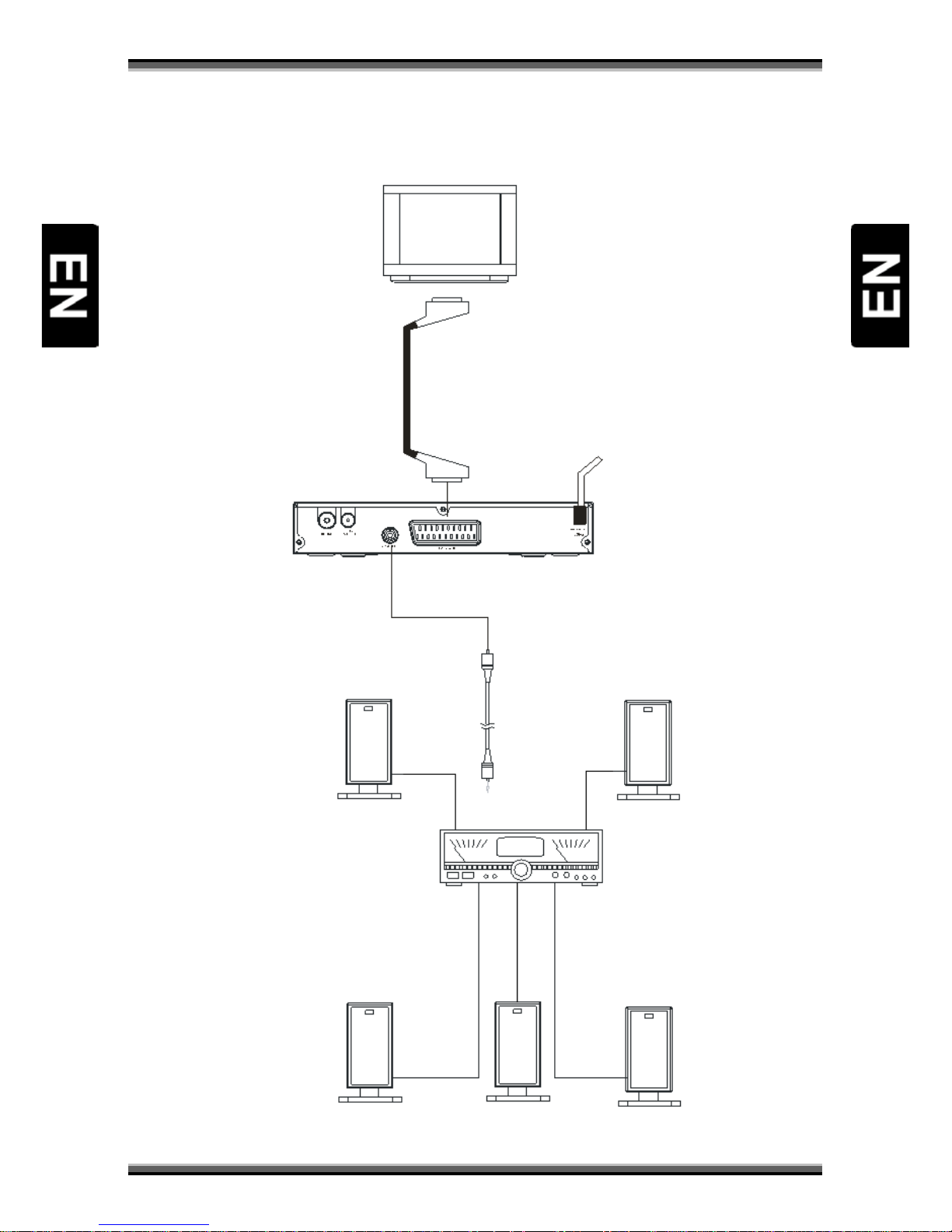
8.2. Connecting to decoder or amplifier ....................................................................................... 8
8.3. Battery installation ................................................................................................................. 9
8.4. Operation range of remote control ........................................................................................ 9
9. Easy installation .......................................................................................................................... 10
10. Main menu ............................................................................................................................ 10
10.1. Menu “Edit channel” ............................................................................................................ 10
10.2. Menu „Installation” .............................................................................................................. 11
10.3. Menu „System setup” .......................................................................................................... 13
10.4. Menu „Tools” ....................................................................................................................... 15
10.5. Menu “Game” ...................................................................................................................... 16
10.6. Menu „REC” ......................................................................................................................... 17
11. Troubleshooting .................................................................................................................... 18
12. Technical specification ........................................................................................................... 19
Page 2
User manual
1
1. Safety precautions
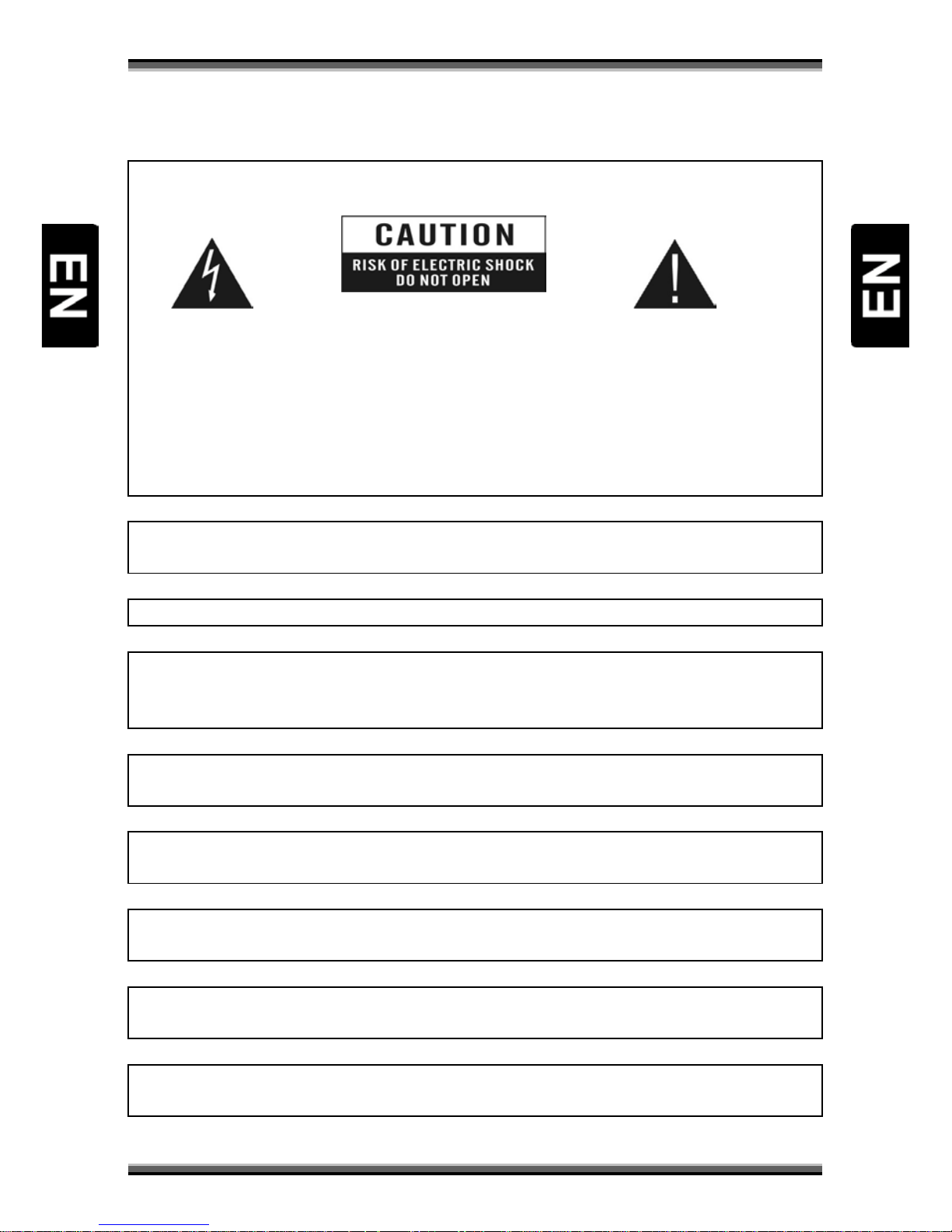
CAUTION:
The lightning flash with
arrowhead symbol, within an
equilateral triangle, is
intended to alert the user to
"dangerous voltage" and to
prevent from a risk of electric
shock.
Warning:
To reduce the risk of electric
shock, don't open the cabinet.
Refer servicing to qualified
personnel only.
The exclamation point within an
equilateral triangle is intended to
alert the user to important
operating and maintenance
(servicing).
WARNING: Do not use this STB where contact with or immersion in water is a pos
sibility. Do not use
near flower vase, washbowls, kitchen sinks, laundry tubs, swimming pools, etc.
WARNING: Do not put the candle or lamp stand on the cabinet; otherwise, there is the danger of fire.
WARNING: The unit should be connected to a powe
r supply only of the type described in the
operating instructions or as marked on the unit. If you are not sure of the type of power supply (for
example, 120 or 230 V) to your home, consult your local dealer or local power company.
WARNING: This product
install diodes. Do not open the cabinet or touch any parts in the inner
mechanism. Consult your local dealer for technical service if the opening is required.
Note: To ensure proper use of this product, please read this User manual carefully and retain for
further reference.
Note:
This product install diodes. Do not open the cabinet to avoid the unit direct exposure to
radiation.
Unit Cleaning: After the unit power is turned off, you can clean the cabinet, panel and remote control
with a soft cloth lightly moistened with a mild detergent solution.
Attachments: Never add any attachments
and/or equipment without the manufacturer consent; as
such additions may result in the risk of fire, electric shock, or other personal injury.
Page 3
User manual
2
Locating: Slots
and openings in the cabinet are provided for ventilation to protect it from overheating.
Do not block these openings or allow them to be blocked by placing the STB on a bed, sofa, or other
similar surface, nor should it be placed over a radiator or heat regi s t er.
Power-Cord Protection: Place the power-
supply cord out of the way, where it will not be walked on.
Please take special attentions to cords at plugs, convenience receptacles, and the point
where they
exit from the unit.
Object and Liquid Entry:
Never put objects of any kind into this STB through openings, as they may
touch dangerous voltage points or short-
out parts that could result in a fire or electric shock. Never
spill any liquid on the STB.
Note: Moisture may be formed on the lens In the following conditions:
when the unit is suddenly moved from a cold environment or an air-condition room to a warm place.
immediately after a heater has been turned on.
in a steamy or very humid room.
If the moisture forms inside the unit, it may not opera
te properly. To correct this problem, turn on the
power and wait about two hours for the moisture to evaporate.
Parts Replacement:
When the unit parts need to be replaced, user should make sure the service
technician use the replacement parts specified by the manufacturer or having the same characteristics
as the original part. Unauthorized replacement may put the unit In the risk of fire, electric shock or
other hazards.
Safety Check: After all the maintenances and repairs are done, user is required
to request the service
technician to conduct the overall safety check to ensure the machine is In the proper condition.
Page 4
User manual
3
2. Environment protection
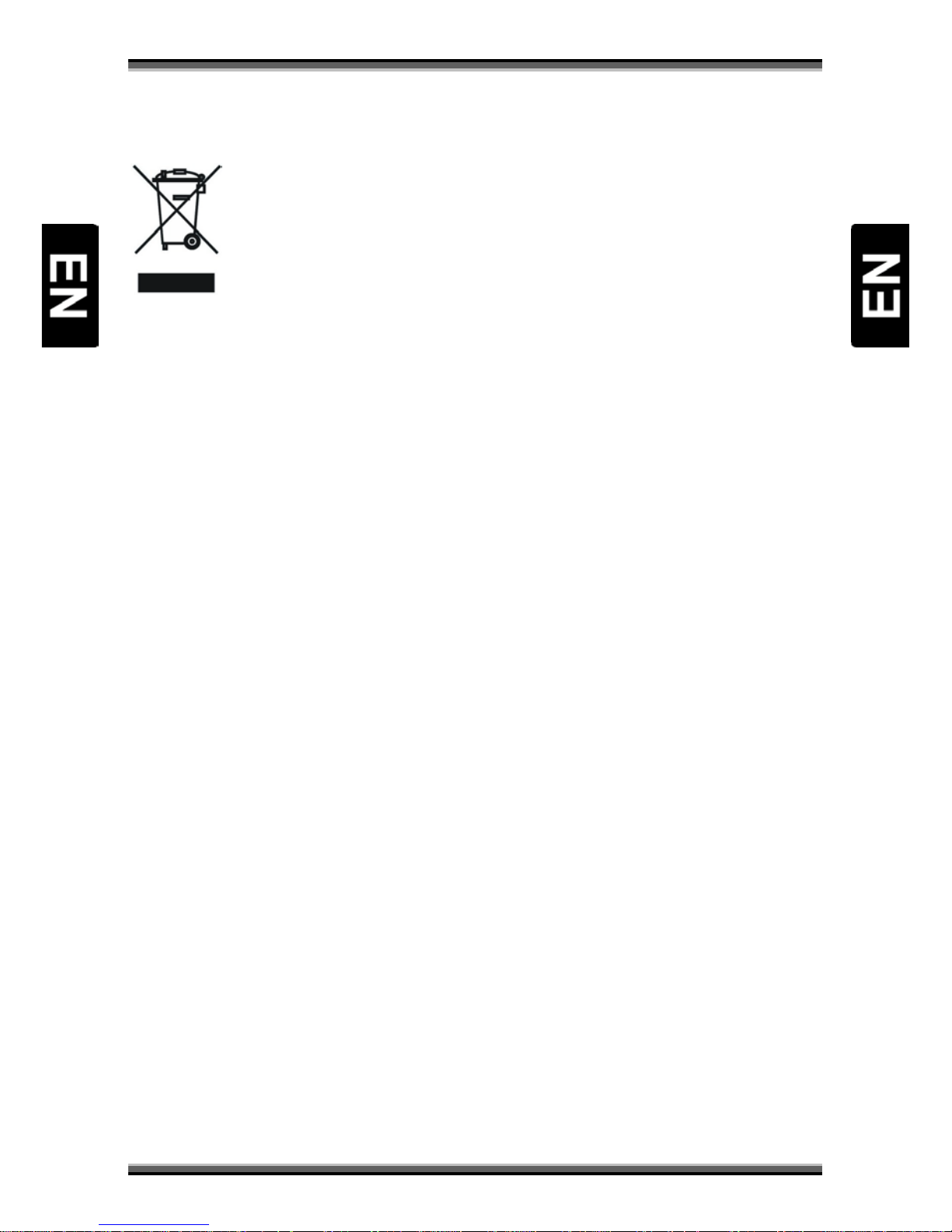
Attention!
Your product Is marked with this symbol. It means that used electrical and electronic products should
not be mixed with general household waste. There is a separate collection system for these products.
Information on Disposal for Users (private households) in the European Union
Used electrical and electronic equipment must be treated separately and In accordance with
legislation that requires proper treatment, recovery and recycling of used electrical and electronic
equipment.
Following the implementation by member states, private households within the EU states may return
their used electrical and electronic equipment to designated collection facilities free of charge*. In
some countries* your local retailer may also take back your old product free of charge if you purchase
a similar new one. *) Please contact your local authority for further details.
If your used electrical or electronic equipment has batteries or accumulators, please dispose of these
separately beforehand according to local requirements.
By disposing of this product correctly you will help ensure that the waste undergoes the necessary
treatment, recovery and recycling and thus prevent potential negative effects on the environment and
human health which could otherwise arise due to inappropriate waste handling.
Information on Disposal for Business Users
In the European Union
If the product is used for business purposes and you want to discard It:
Please contact your dealer who will inform you about the take-back of the product. You might be
charged for the costs arising from take-back and recycling Small products (and small amounts) might
be taken back by your local collection facilities,
In other Countries outside the EU
If you wish to discard of this product, please contact your local authorities and ask for the correct
method of disposal.
Page 5
User manual
4
3. Features
• MPEG-2 and MPEG-4 / DVB-T compatible
• Bandwidth 6 MHz, 7MHz or 8MHz optional
• Support USB 2.0 port
• Software upgrade via USB device
• Electronic Program Guide(EPG)
• Active antenna with 5V DC output
• TV SCART jack
• Auto scan/ Channel Scan
• Multiple subtitles
4. Accessories
Please make sure the following accessories:
• 1 x Remote control
• 1 x User manual
• 2 x Batteries (1,5V AAA)
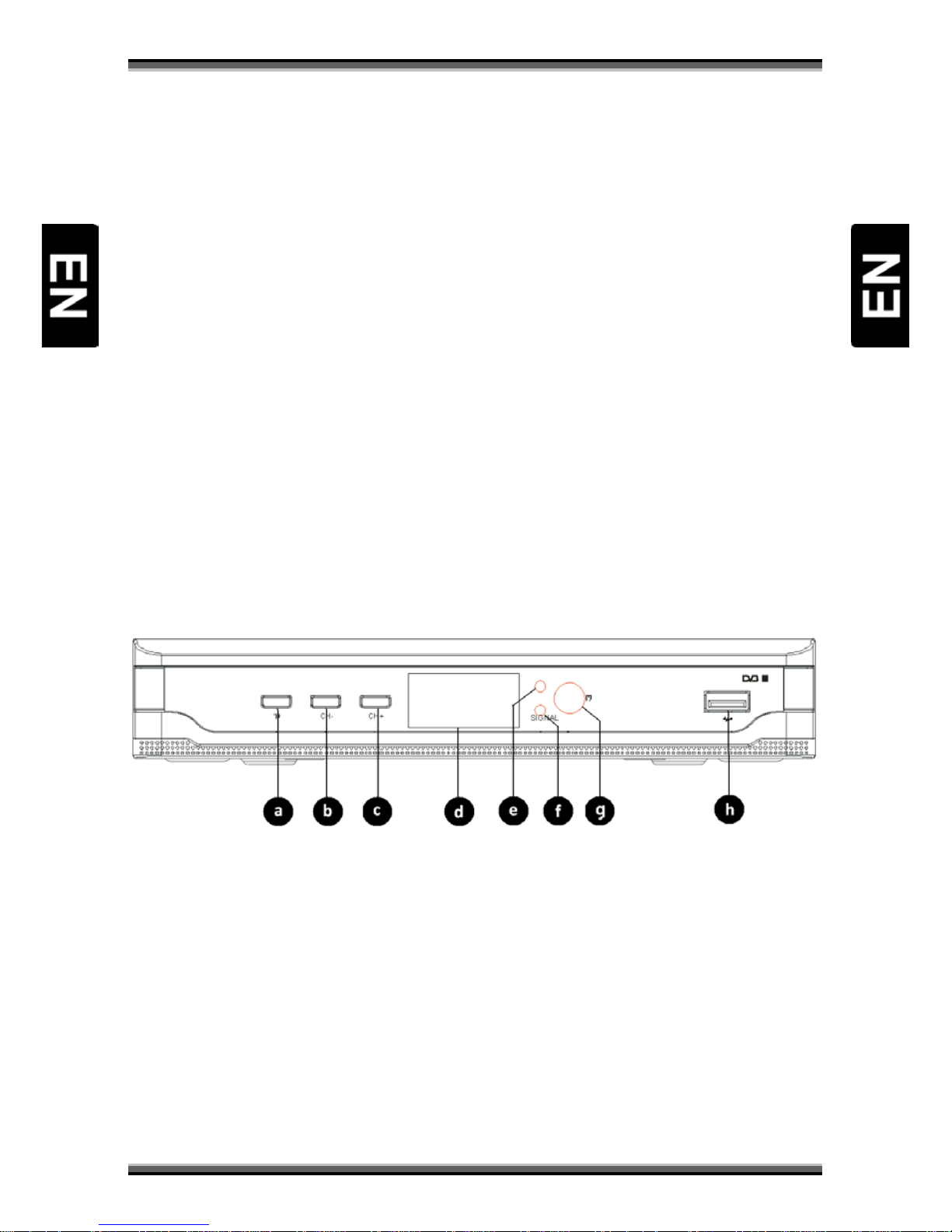
5. Front panel
a) Power button
b) CH- button (previous channel)
c) CH+ button (next channel)
d) LED display (optional)
e) Power/Standby LED
f) Signal LED
g) Remote control sensor
h) USB 2.0 port
Page 6
User manual
5
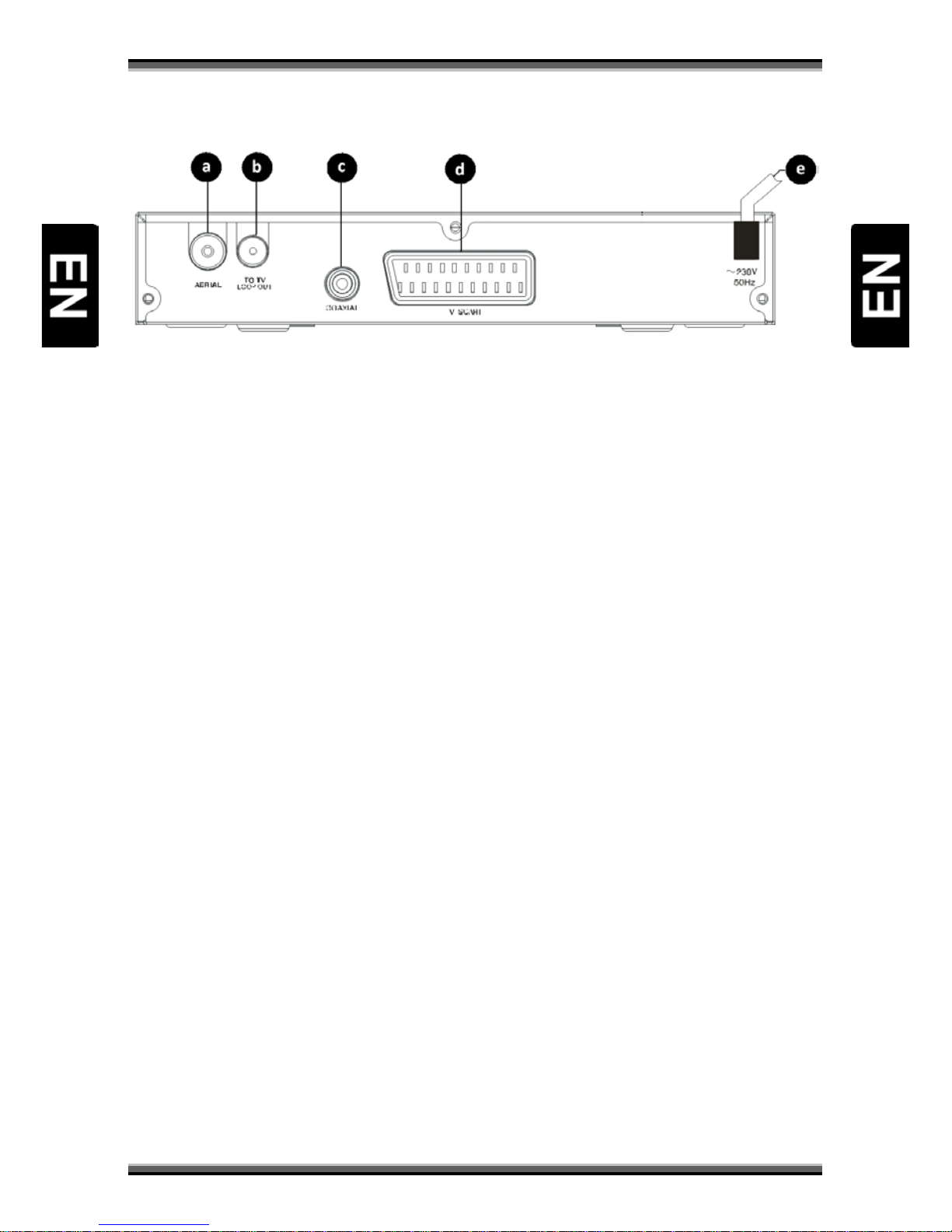
6. Rear panel
a) Aerial input jack (75Ω)
b) Loop Out jack
c) Digital Audio Coaxial output jack
d) TV SCART jack
e) Power cord cable
Warning!
Please unplug the power cord and keep it orderly when the unit shall not be used for a long time in
case that the power cord may get scratched and thus leads to electric leak and shock.
Page 7
User manual
6
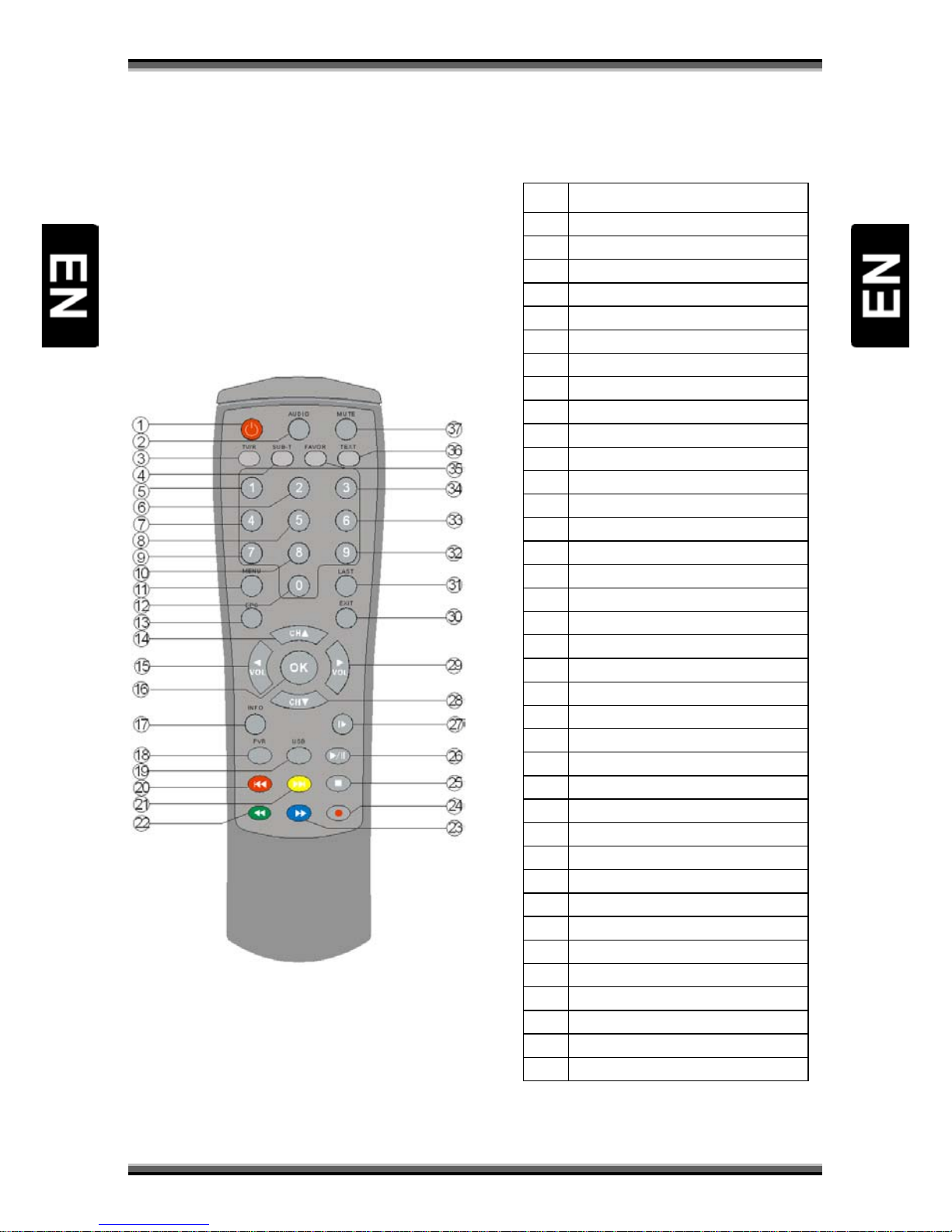
7. Remote controller
Nr Function
1 Standby
2 Audio
3 TV / Radio
4 Subtitles
5 Numeric button 1
6 Numeric button 2
7 Numeric button 4
8 Numeric button 5
9 Numeric button 7
10 Numeric button 8
11
Menu
12 Numeric button 0
13 Electronic Program Guide
14
▲
UP button / next channel
15
◄
LEFT button / decr. volume
16 OK button
17
INFO button
18 PVR button
19 USB button
20 RED / Skip 21 YELLOW / Skip +
22 GREEN / F.Rwd
23 BLUE / F.Fwd
24 RECORD
25 STOP
26 PLAY / PAUSE
27 PAUSE / STEP
28 ▼DOWN button / prev. channel
29
►
RIGHT button /incr. volume
30 EXIT button
31
LAST button
32 Numeric button 9
33 Numeric button 6
34
Numeric button 3
35 FAVOR button
36 TELETEXT button
37 MUTE button
Page 8
User manual
7
8. Basic connection
Warning!
• Ensure that the power switches of this unit and other equipment to be connected, are
turned off before commencing connection
• Read the instructions attentively before connecting other equipments
• Ensure that you observe the color-coding when connecting audio and video cords
• Please connect the unit with TV by only one kind of video output format, and setup a
suitable output mode, otherwise there might be image distortion.
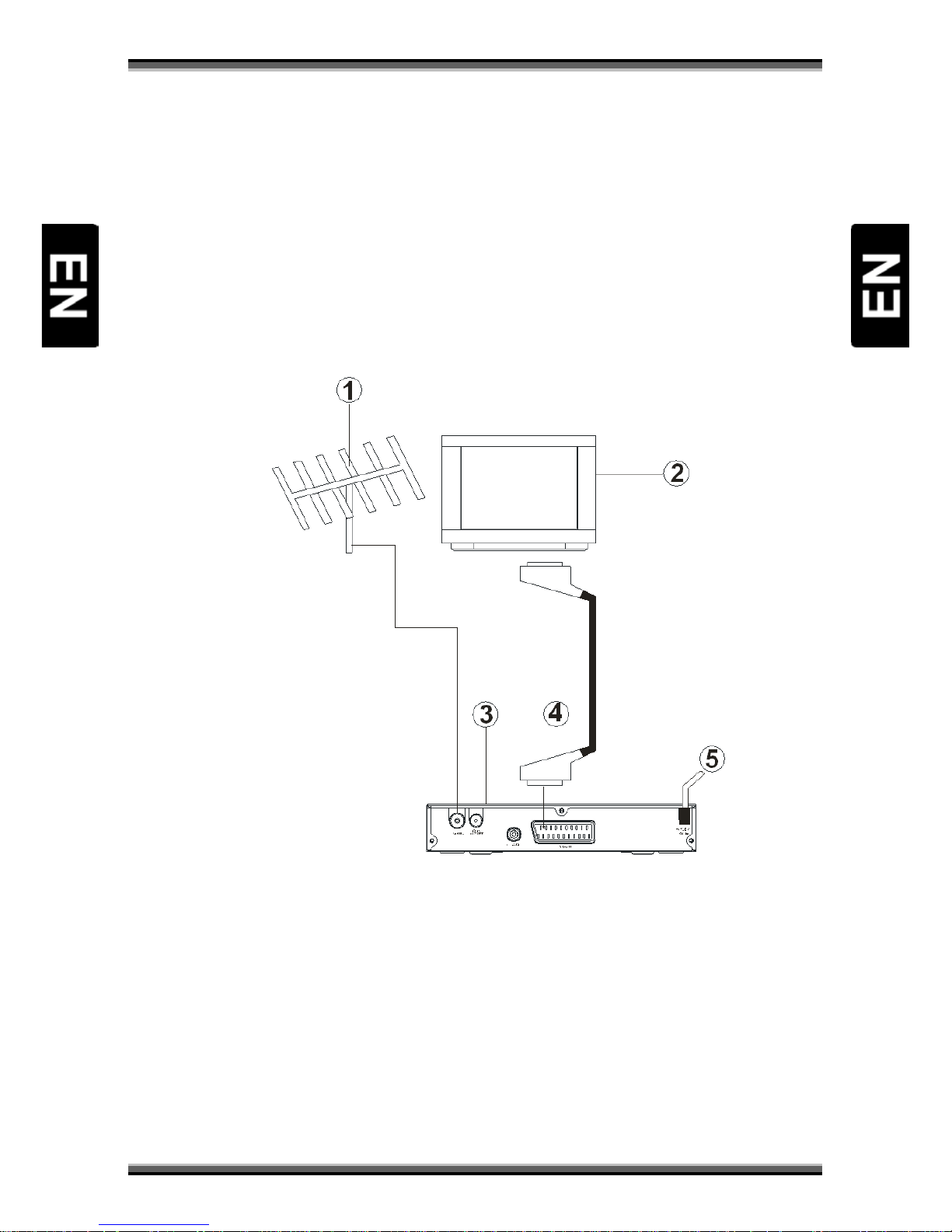
8.1. Connecting to TV set and aerial
1. Aerial
2. TV set
3. DVB-T receiver
4. SCART cable connected to TV set
5. AC Power cord cable
Page 9
User manual
8
8.2. Connecting to decoder or amplifier
Page 10
User manual
9
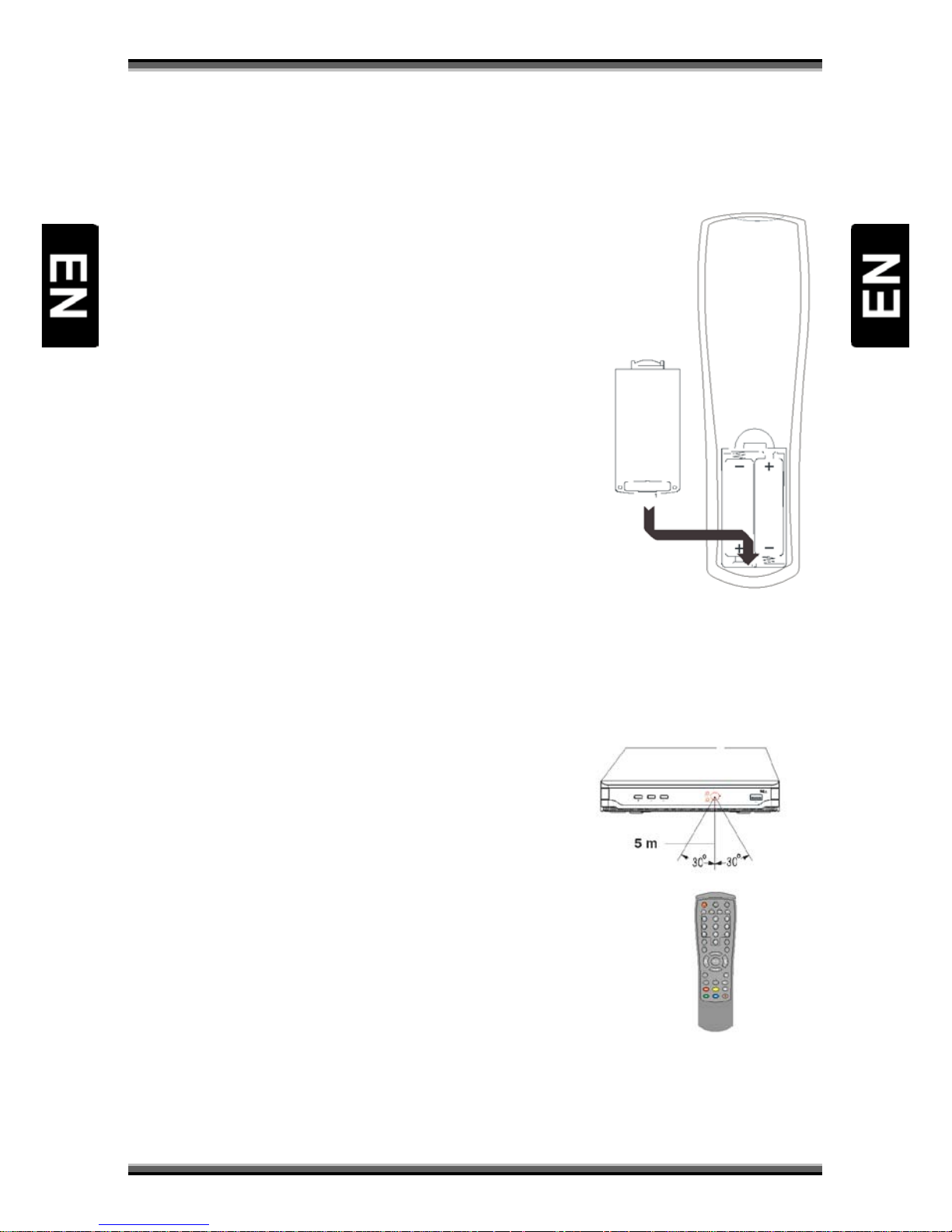
8.3. Battery installation
Insert the batteries observing the positive (+) and negative (-) polarities as per figure below .
Service life of batteries
• The batteries normally last for about one year despite
that it depends on how often and in what way the
remote control is operated.
• If the remote control fails to work even when operated
near the DVB receiver, replace the batteries.
• Use size 7 (AAA) batteries (2 pieces).
Warning!
• Do not use rechargeable (Ni-Cd) batteries.
• Do not attempt to recharge, short circuit, disassemble,
heat the batteries or throw them into the fire.
• Do not drop, tramp or impact the remote control. This
may damage the parts and lead to malfunction.
• Do not mix used battery with new one ever when using.
• If the remote control shall be spared for a long time,
remove the batteries. Otherwise, electrolyte may leak,
which may lead to malfunction, even fire accident when
some substance contacts with the electrolyte.
• Wipe away the electrolyte having leaked inside the remote control, and replace with new
batteries.
• If any electrolyte happens to touch some parts of your skin, wash it off thoroughly with
clean water immediately.
8.4. Operation range of remote control
Pointing the remote control to the signal sensor, it shall be
effective to operate the remote control within a distance of
about 5 meters and an angle of about 60 degrees.
The effective range may vary slightly with the brightness of
the room.
Warning!
• Do not point bright light to the remote control
sensor.
• Make sure that there is not any shield between
the remote control unit and the sensor when use
it.
• Do not use this remote control while the remote
control of other equipment is being used.
Page 11
User manual
10
9. Easy installation
Connect the receiver and other equipments related according to “Basic connection”.
Generally, once the receiver is switched on, the Easy Install menu emerges:
• Explore the menu with ▲/▼ button, and select the necessary setting options with ◄/►
button: Region, OSD Language, Display Mode and Aspect Mode;
• When the setting is over, enter menu Installation, then select Auto Scan with ▲/▼ button
and press OK button to scan for TV services and radio services.
• When auto scan is finished, press MENU button or EXIT button to close all menus.
• Press OK button to pop up the Channel List and choose a preferred channel on the list with
▲/▼ button and press OK to enjoy it.
If no Easy Install menu appears after the receiver is turned on:
• Press MENU button to open the Main Menu, and use ▲/▼button to enter the submenu
Tools to conduct Load Factory Default. For this operation, the default password “0000” is
required and the change should be saved.
• Enter Installation menu and select Auto Scan to start searching;
• Close the menus and press OK to bring up Channel List and choose and channel available to
enjoy.
10. Main menu
Press MENU key to open the Main Menu which includes 6 sub-menus:
• Edit channel
• Installation
• System setup
• Tools
• Game
• REC
Use ▲/▼ button to select a submenu item, OK button to confirm, ◄/► button to choose a setting
option, or EXIT to return to the upper-level menu.
Some operations should be performed according to the navigation guide displayed on the screen.
Colored buttons refer to different function operations in different menus.
10.1. Menu “Edit channel”
Move the cursor to Channel with ▲/▼button and press OK to open this menu:
• TV channel list
• Radio channel list
• Delete all
TV channel list
Open TV Channel List. Use UP/DOWN button to select a channel, OK to open the channel which can be
dealt with in the following ways according to the navigation guide:
Page 12
User manual
11
FAVOR: Use this button to put the selected channels into any of 8 favorite groups.
RED: Lock. Use this button to lock or unlock a selected channel. If you want to lock a channel, you will
have to enter some numbers as the password. Once a channel is locked, there will an icon of “Lock”
appearing to the end of the channel, and you must enter the preset password correctly to open the
channel or unlock it.
GREEN: Skip. Select one channel to be skipped over, then press GREEN button and reply to the
question “Are you sure to save? “ Click Yes to confirm, or click No to cancel. Such setting will be valid
only after you exit from TV Channel List and scroll through the channels with ◄/► button.
YELLOW: Move. Select a channel, then use UP/ DOWN button to move the cursor to where the
channel is expected to be placed before pressing OK button to confirm.
BLUE: Edit. Select a channel and press BLUE button to enter the channel edit menu:
a) Sort: Use this function to sort the orders of the channels on the list. There are five ways to
sort the channels: Name (A-Z), Name (Z-A), Free/ Scramble, Lock or Default.
b) Edit: Use this operation to rename a channel. In this menu, there will be a soft keyboard for
you to choose the letters for renaming the channel with direction button.
c) Delete: Use this operation to delete a selected channel.
EXIT: Exit. Press this button to cancel current menu operation any time and leave for the upper-level
menu or the Main Menu.
Radio Channel List
Open Radio Channel List if there is any radio channel that has been detected through auto scan.
Refer to the operation of TV Channel List (Item 1.1) for detailed instructions.
Delete All
Press OK to get to this setup item, then delete all stored TV channels and radio channels according to
the hints on the screen.
10.2. Menu „Installation”
Select Installation in the Main Menu and press OK button to open it. It consists of four submenus:
• Auto Scan
• Channel Scan
• Aerial Adjustment
• LCN
Auto scan
Select and enter submenu Auto Scan which contains the following information:
• FTA Only: Yes/ No
• Search:
Use ◄/► button to choose an option, then move the cursor to Search and press OK button to confirm
the operation of auto scan. As auto scan is under way, all channels (TV channels and radio channels)
that have been detected will be listed respectively in the window. Under the window are the
constantly changing data concerning frequency band, frequency, channel No. modulation type etc.
Once the scan is completed, the receiver will play the first TV channel automatically. User can use
Page 13
User manual
12
CH+/ CH- button to shift channel as like or press OK button to pop up TV Channel List and select a
preferred channel to enjoy. Or press TV/ R button to toggle between TV channel and radio channels.
Channel scan
Select and enter submenu Channel Scan which contains the following contents:
• Scan Mode: By Channel or By Frequency.
Scan a particular channel by the exact channel Number or frequency. For By Channel mode, user will
have to set Scan Band, Ch No. and Network Search in the meantime. For By Frequency mode, user will
have to set the correct Frequency and Bandwidth data together.
• Scan Band: VHF or UHF.
Scan channels within either VHF (Very High Frequency) or UHF (Ultra High Frequency) or both bands.
Such setting is active only in By Channel mode.
• Ch No.: Channel 5~12 ( VHF), or Channel 21~69(UHF)
Choose the exact channel number to search for a designated channel. Active only in By Channel mode.
• Frequency: 174~230MHz (VHF) or 470~862MHz (UHF).
Enter the correct frequency parameter of certain channel for scan. Active only in By Frequency mode.
• Band Width: 6MHz, 7 MHz or 8 MHz.
Set the right bandwidth of the region where the receiver is in use. Active only in By Frequency mode.
• Search:
Click Search with OK button to start scanning manually.
• Signal Intensity:
• Signal Quality:
The green Signal Intensity bar and yellow Signal Quality bar indicate the real-time receiving condition
of the signal.
Use ▲/▼ button to select a setting item, and ◄/► button to shift the options. Press EXIT button to
leave.
Note: The frequency system automatically depends on the region where the receiver is in use, and the
actual frequency setting should follow the practice strictly.
When channel scan is under way, user can check the relevant parameters concerning the process and
progress:
Frequency band, Frequency, Modulation type, Guard Interval and FFT mode namely.
Aerial Adjustment
Select Aerial Adjustment and open the menu:
Tuner Power: On/ Off
This setting is designed to enable or disable active antenna depending on user’s needs.
LCN
LCN mode: On/ Off.
Use this setting to enable or disable LCN function. If LCN mode is On (enabled), the system will sort
the channels in an order preset in the signal stream; if LCN mode is Off (disabled), the system will sort
the channels in a routine order.
Note: When there is no LCN data in the stream, and LCN is enabled, the system will not sort the
Page 14
User manual
13
channels in any particular order, and all channels will be numbered with “000”. Therefore, for regions
where LCN function is not required, LCN mode should be “Off”.
10.3. Menu „System setup”
Select Setup menu and press OK button to enter the System Setup window which consists of 7
submenus:
• Language
• TV System
• Local Time Setting
• Timer Setting
• Parental Lock
• OSD Setting
• Favorite
• Other
Language
Select Language and press OK to enter the setting menu:
• Language: Use this settings to change menu language,
• First Audio: Use this settings to change preferable audio track language,
• Second Audio: Use this settings to change alternative audio track language,
• Subtitle Language: Use this settings to change subtitles language,
• Teletext (optional): Use this settings to change teletext language,
Use ◄/► button to change the language options if multiple languages are available. Press EXIT to
leave for the upper -level menu.
TV System
Select TV System with ▲/▼ button and press OK button to open the menu:
• Video Resolution: 576i, 480i
• Aspect Ratio: Auto (Ignore) / 4:3 PS (Pan Scan) / 4:3 LB (Letter Box) / 16:9
• Video Output: CVBS / RGB
• Digital Audio Output: LPCM Out (AC3 track as PCM) / BS Out (AC3 track as AC3)
Use ◄/► button to change the options. User can also press OK button to pop up the option list and
use ▲/▼ button to select one with OK button to confirm the change.
Local Time Setting
Open the menu of Region and Time which consists of the following items:
• Region: List of countries
This setting makes it possible for users from different regions to utilize this device.
• GMT Usage: On / Off
This setting determines how GMT (Greenwich Mean Time) will be used.
• GMT Offset: Within the range of UTC+12:00~ UTC -11:30
It can be set only when GMT Usage is set to On
Page 15
User manual
14
• Summer Time: On/Off
It can be set only when GMT Usage is set to On
• Date:
• Time:
Here user can enter the settings and change their values with numeric buttons as needed. However,
they are accessible for setting only when GMT Usage is set to Off, i.e. GMT usage is disabled.
Use ▲/▼ button to select, ◄/► button to change, OK button to enter, EXIT button to exit.
Timer Setting
Open Timer Setting menu. There are totally 30 timers can be set here.
• Timer Mode: Off, Once, Daily, Weekly, and Monthly.
• Timer Service: TV Service or Record service.
This setting is active only when T imer Mode is enabled, e.g. in Once, Daily, Weekly or Monthly mode.
• Wakeup Channel:
If a timer is enabled and a wakeup channel is preset, the system will start showing the preset channel
as the program wakes up.
• Wakeup Date: 1, 2, 3, ~ 30, 31.
It can be set with Timer Mode set to either Once or Monthly and means on which date the program
will wake up.
• Wakeup Time:
Set the exact time when the preset program wakes up and stops according to the clock system of the
receiver.
• Duration:
Set duration time for the alarm.
Use ▲/▼ button to select a submenu, OK button to enter or confirm, ◄/► button to change the
options, Numeric buttons to input the time or date values and EXIT button to exit.
Parental Lock
Select this menu and press OK button, a dialogue window will come up requiring that the password
must be entered so as to open the menu. The password preset at the factory is 0000. The menu
includes the following submenus:
• Menu Lock: On/Off.
Once Menu Lock is set to On, it means that the menu system is locked, and user will have to enter the
password to unlock it prior to any other menu operation.
If Menu Lock is closed, i.e. is set to Off, no password is required for performing menu operation.
• Channel Lock: Off, Manual, Age 4~18
This function is designed to lock some channels that are not appropriate for audiences of special
groups, e.g. children under 18 years old.
Once a channel is locked, you will have to enter the right password to access it.
• New Password:
• Confirm Password:
Page 16
User manual
15
Here user can change the old password to any other he likes by entering a new password that is valid
and confirming it.
Use ▲/▼ button to select, OK button to enter, Numeric buttons to enter numbers as the password,
EXIT button to exit.
OSD Setting
Select and open this submenu:
• OSD Timeout: 1~ 10 seconds.
Such setting is designed to control the display duration of those information bars only instead of
channel.
• OSD Transparency: Off, 10%, 20%, 30% and 40%.
User can choose any level of OSD transparency as preferred to and such setting makes it possible to
conduct some setting operation without missing program.
Use ▲/▼ button to select, ◄/► button to change, OK button to enter, EXIT button to exit.
• Load Default OSD Setting:
User can select this submenu and press OK button to cancel all changes to OSD parameters and load
the default settings.
Favorite
There are 8 Favorite groups in total. They can be renamed here.
Other
• Automatic Power Down: Off ~ 180 minutes.
If user will not use receiver actively during this time (no channel switching, no entering to menu etc.),
receiver will automatically turn into standby mode. User will be informed short moment before this
operation by popup window. Default time is 180 minutes and is dictated by the regulations to reduce
energy consumption. If ‘Off’ mode is selected – function is deactivated, and receiver can be turned
into standby mode only manually.
10.4. Menu „Tools”
Highlight Tools and press OK to enter the menu which consists of five sub-items:
• Information
• Load Factory Default
• Upgrade by RS232 (Optional)
• Upgrade by USB
• USB Device
• Save to USB
• Remove USB Device Safely
Information
Choose this item to press OK button to check the relevant information of the system, such as
Hardware version, Software version, Remote control etc.
Load Factory Default
Select this menu, press OK and input the password as required, then choose Yes and press OK again to
Page 17
User manual
16
load factory default settings.
Note: When this unit is used for the first time or has just been upgraded, be sure to perform this
setting operation.
The initial password preset at the factory is “0000”.
Upgrade By RS232 (Optional)
User can update the receiver’s software by RS232. (Special connector and service software needed).
Upgrade By USB
User can update the receiver’s software by USB. Open the menu, there are 3 submenus:
• Upgrade Mode: All Code, Main Code, Radioback
• Upgrade File:
• Start:
Use ▲/▼ button to select, ◄/► button to change, OK button to enter, EXIT button to exit.
USB Device
Open the menu of USB Device, use ▲/▼ button to select a submenu, press OK button to enter it
where you can choose your preferred music file or picture file to pla y, use ◄/► button to toggle the
options, or press EXIT button to cancel the operation and quit.
• Play List: Press OK button to enter the list and play picture files.
• Setup: Set up the play parameters for the picture files, such as time-out duration, repeat
mode and play mode etc.
• All Music: Press Numeric o button to select all music files and play them one by one in the
preset order. Use RED button for F.FWD playback, GREEN for F,RWD playback, YELLOW for
Play/ Pause, BLUE for Repeat.
• Add File: Press FAVOR button to save a file to the favorite groups.
• Repeat Mode: Press Numeric 3 button to play the selected file repeatedly.
• Sort: Press REC button to sort the files in different ways: Name (A-Z), Name (Z-A), Image
List and Music List.
• All Image: Play all the image files on the list. Use ▲/▼ button to select previous or next
image, ◄/► button to rotate it, OK button to Zoom in it at different levels, YELLOW
button to make a pause in slide playback mode.
Note: Refer to actual navigation guides for more details;
During menu operation, when you want to shift from one menu to another, you had better use EXIT
button to exit level by level until you close the menu entirely.
Save to USB
This function enables to make software backup into file on connected USB device.
Remove USB Device Safely
In order to protect both the receiver and the USB device, it is strongly suggested conduct this
operation when you want to remove the USB device.
10.5. Menu “Game”
Select and open the menu that includes the following items:
• Tetris
• Othello
Page 18
User manual
17
• Sudoku
Note: Refer to the actual navigation guide for this operation.
10.6. Menu „REC”
Open this menu with OK button.
• Record Manage
• DVR HDD Information
• HDD Format
• DVR Configuration
• Jump
Record Manager
Press OK button to open this menu which contains the relevant information about the recorded
programs (only valid with external USB device connected), then you can play any recorded program or
conduct other operations:
• GREEN button: Lock
• BLUE button: Delete
• RED button: Rename
DVR HDD Information
Use this menu to check the relevant information of the DVR HDD, such as Total capacity, Free capacity,
Used capacity, Timeshift, Rec Free and File System.
HDD Format
Enter this menu to format the HDD in either of the two modes :FAT or NTFS, press OK to confirm, or
Cancel to cancel, EXIT to quit.
DVR Configuration
Press OK to open this menu.
• Time Shift: On or Off
Time Shift function allows user to review any fragment of a program as he does during playback of a
DVD disc. It is playback of a recorded program in itself. The length of fragment that user can playback
depends on the capacity of the HDD.
• Time Shift to Rec: On or Off
• Record Type: TS/ PS
• Record Selection
Use LEFT/ RIGHT button to change the setting. Press EXIT to cancel and quit.
Jump
This setting is used to play the recorded program at different jump pace (time interval). Press OK
button to enter the menu where there are five options for the setting: 30 Sec, 1 min, 5 min, 10 min or
30 min. Once a option is set, each time you press PVR button to play the recorded program, the
playback will jump over the interval you have set.
Page 19
User manual
18
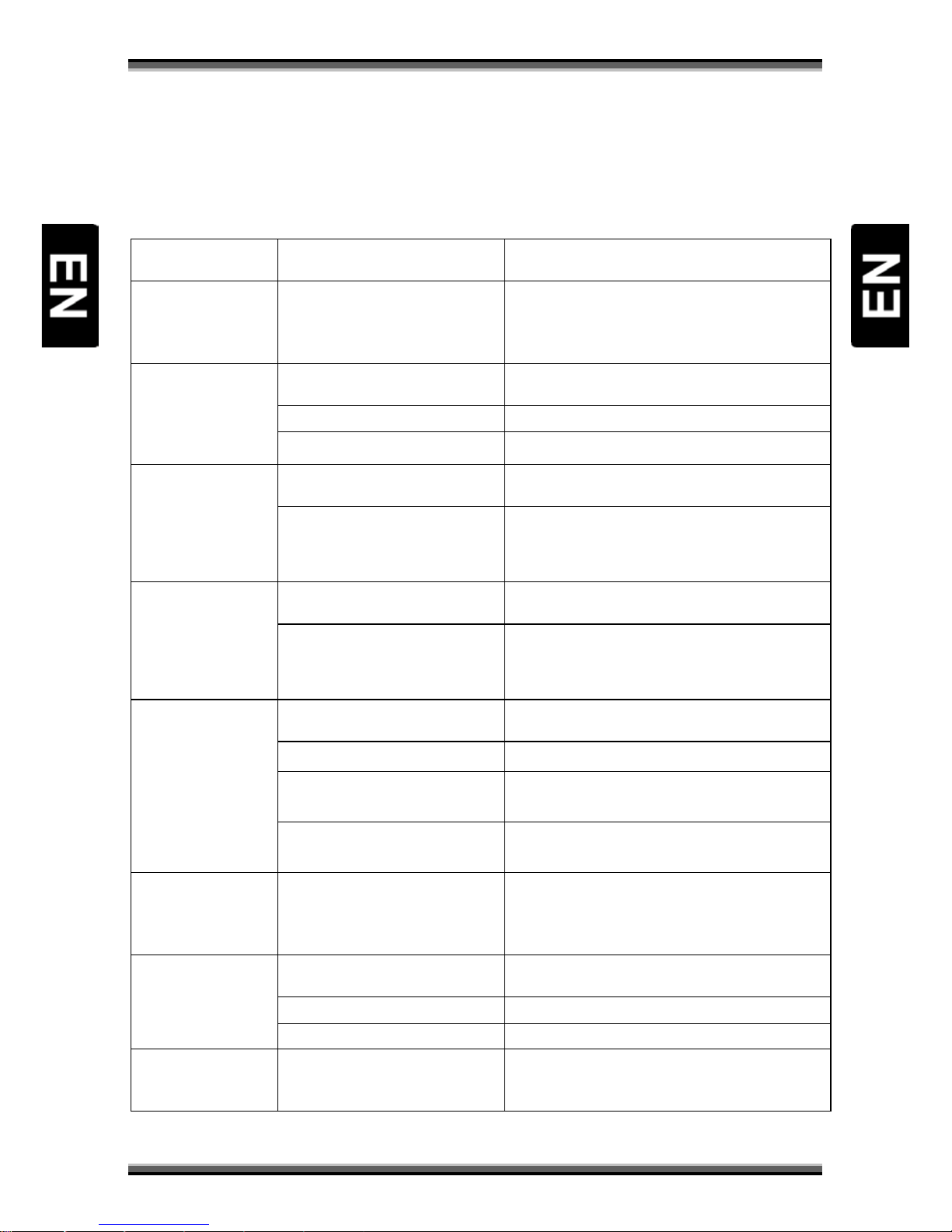
11. Troubleshooting
Look through the trouble shooting information. Some simple checks or minor adjustment of the unit
on your part may help resolve the problems. If the problems prove to be beyond your capability, you
had better hand it over to a professional qualified technician.
Troubles Possible Causes Suggested Solutions (for reference)
No power
The power cord has not been well
connected
Plug the power cord into the outlet tightly and turn
on the power; if no power still, turn off the power
again, and turn it on in 5-10 minutes.
Cannot scan
programs
The antenna is not adjusted well Adjust the antenna or use an outdoor antenna
Use antenna incorrectly Use an antenna with 75 Ω impedance input
Parameter input incorrectly Input Frequency, Bandwidth parameter correctly
No picture
Output cord connect incorrectly Connect the output cord correctly
The video output mode of the unit
is different from the mode of
monitor
Reset the working mode
No color
Output cord connect incorrectly Connect the output cord correctly
The video output system of the
unit is different from the mode of
monitor
Reset the working system
The remote control
fails to work
Batteries incorrectly installed Install the battery correctly
Batteries exhausted Replace the battery
Beyond the effective operation
range
Operate within a normal range
The remote sensor is pointed to
by bright light
Place the unit elsewhere for a change
Audio sound and
subtitle language are
not the chosen items
Has not chosen the right sound
channel
Press the Audio button to shift the channel
No sound at all
The unit is in a mute status Cancel the mute
Volume set at a too low level Augment the volume
Cable connected incorrectly Connect the cable correctly
No sound by chance There might be a short circuit
Correct the output-cable connection, and turn on
it.
Page 20
User manual
19
12. Technical specification
High frequency tuner
Input frequency range: 174-230, 470-862MHz (VHF&UHF)
Bandwidth: 6, 7 or 8MHz
Input signal level: -75 to -20dBm
RF Input connector: IEC169-2, Female
Loop connector: IEC169-2, Male (Optional)
Input impedance: 75Ω
Demodulation
Waveform: COFDM(Code Orthogonal Frequency Division Multiplexing)
Demodulation: QPSK,QAM16,QAM64
Transmission mode: 2K,8K
Guard interval: 1/4, 1/8, 1/16 ,1/3 2
Code rate: 1/2,2/3,3/4,5/6,7/8
Video, Audio decoding
Video decoding: MPEG2(MP@ML), MPEG 4, AVC/H. 264 @ L3 Compatible
Video resolution: PAL 720×576 @ 25 Hz; NTSC 720X480 @ 30 Hz:
Audio decoding: MPEG-1, 2 Layer 1 & 2
Audio track: Stereo, Left, Right
Dolby Downmix to stereo: No (External decoder needed for AC3 tracks)
Video/Audio connector: SCART
Digital Audio connector: Coaxial
USB 2.0
Supported file formats: BMP, OGG
Output voltage of USB port: 5V, 1000 mA (Max.)
Power specification
Rated voltage: ~ 230V,50Hz
Range of rate voltage: ~ 165-265V,50Hz
Rated consumption: 5 W
Standby consumption: < 1 W
Operating condition
Temperature: 5-40℃
Humidity: <95%
Others
Net weight: ~0,5 kg (receiver)
Packet measurements: 200 mm ×110 mm ×38 mm (receiver)
Weight and dimensions are not absolutely exact values.
Specifications are subject to change (by manufacturer) without notice.
 Loading...