

Page 1
3
GU-213
Page 2

globex-electronics.com
2
ENG
Car Recorder
User Manual
Not only include camcorder's common features also added 4
features:
1. Full HD 1080P 30fps H.264 Mov High-quality picture and highdefinition night vision clarity
2. SOS enforce saving the current video, and video file can be
encrypted and unlocked independently
3. Built-in G-Sensor (Car accident case of emergency save will not be
deleted)
4. Open the stop monitoring function, in the off state can be judged on
their own on the surrounding environment and automatically start
recording automatically save protected files
5. In order to better maximize performance tachograph, please read
this manual carefully before using (Native and Accessories Design
and specifications are subject to change without notice)
Page 3
globex-electronics.com
3
ENG
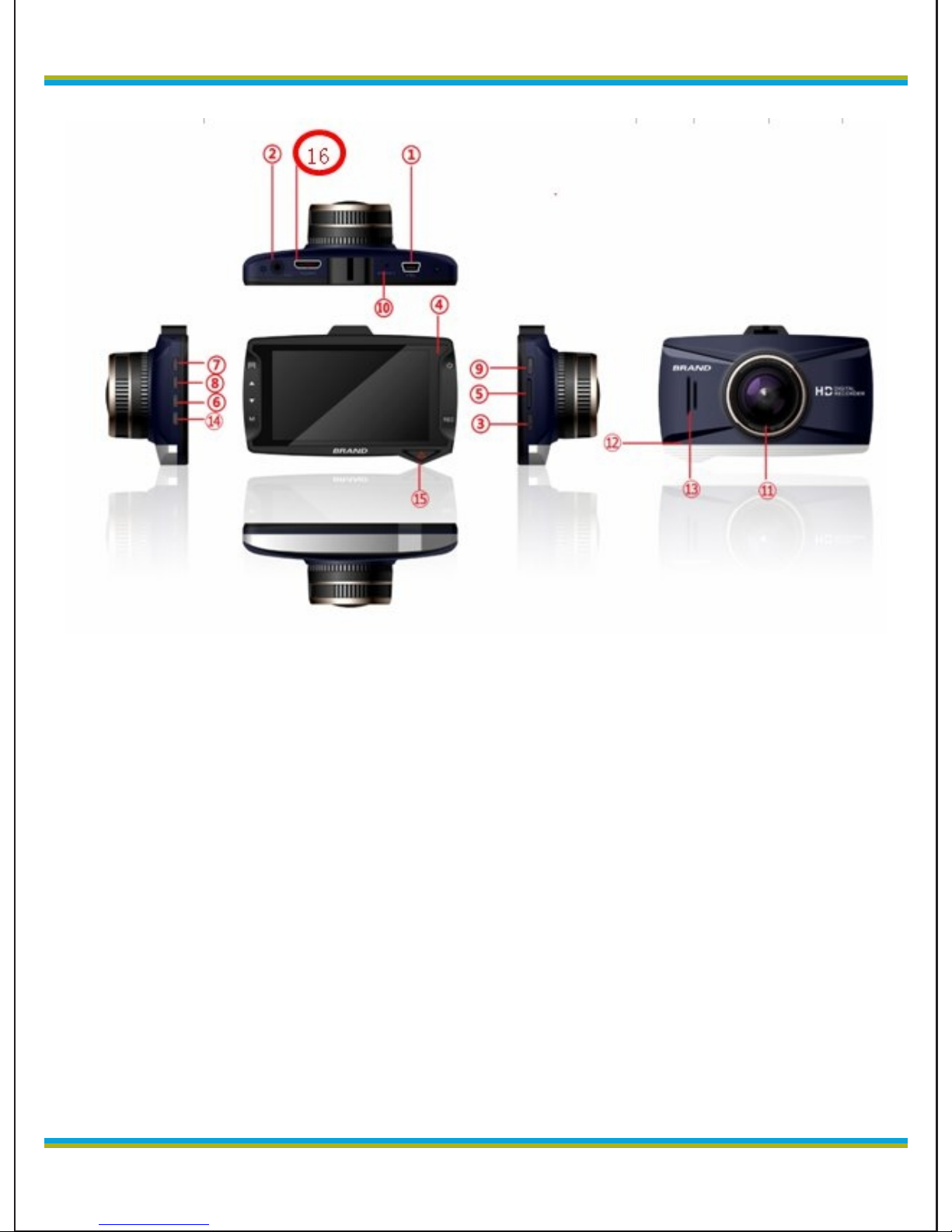
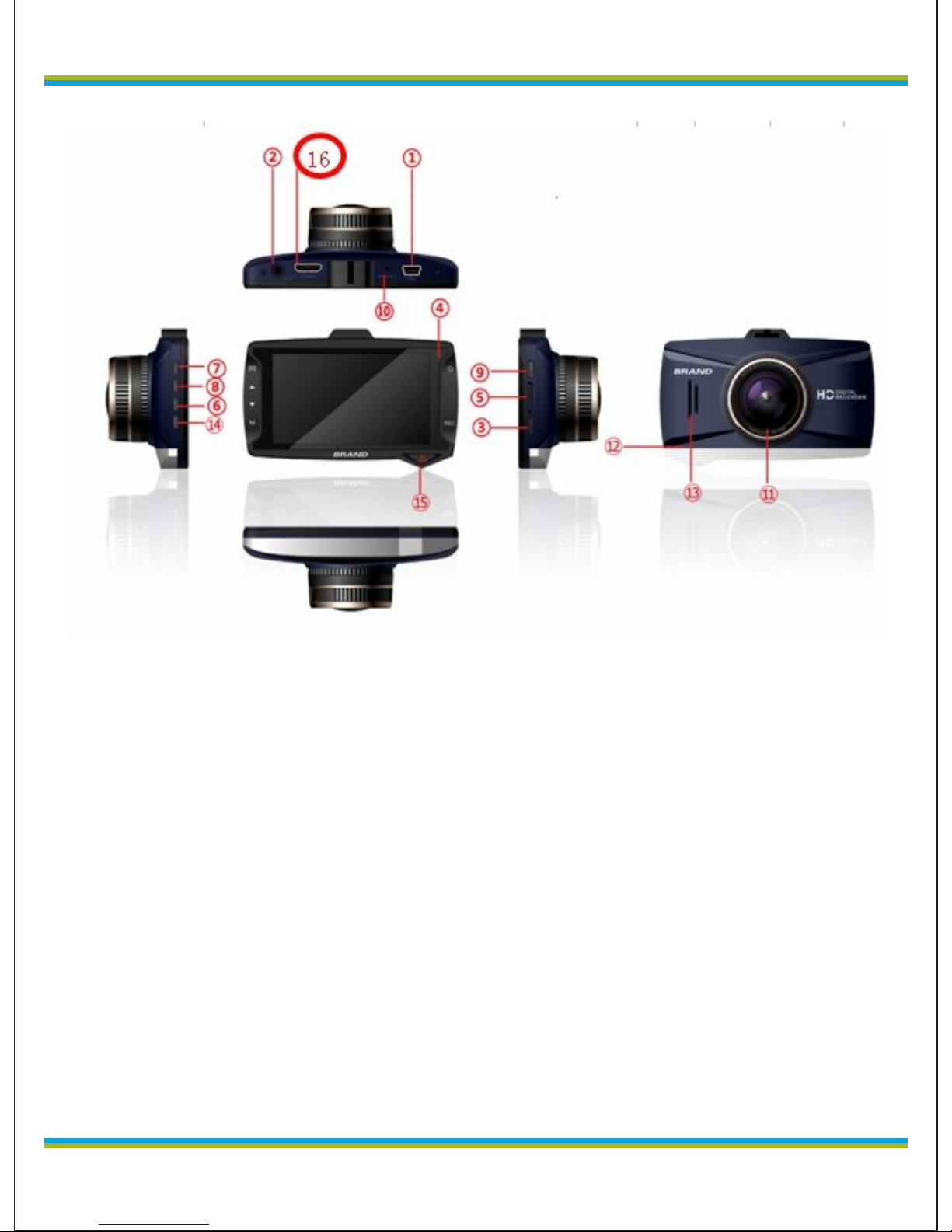
1. USB Interface
2. AV Interface
3. REC Key
4. Indicator light
5. TF Slot
6. Down
7. Menu
8. Up
9. On/Off
10. Reset hole
11. Lens
12. MIC
13. Speaker
14. Mode
15. SOS
16. HDMI
Page 4

globex-electronics.com
4
ENG
Turn on
Parking mode function
1、Insert memory card and turn on,Press up key until appear P
mode on the screen,car keep in parking mode function.When car got
touch of emergency video will not be deleted
2、Press Up key again then P mode disappear and car will not
have parking mode function
Battery mode
There are 2 methods to charge
1.Use PC-USB to charge
2.Use car power to charge
The indicator light up when charging,the entire charging time is about
120 minutes and indicator light automatically off when charging
completed
TF Card
TF card request: TF card capacity of more than CLASS6
TF card slotted and extracted
1,Put TF card in slot in the correct directly until TF is secured in the
slot
2,Remove TF card and press gently TF card can be removed after
the pop-up
Note:
1. Note: Do not remove TF card when camera working to avoid
damage.
2. Please note TF card insertion direction, The camera and TF card
might damage if the reverse insertion
3. After you put TF card into the camera, the camera set this TF card
as the default storage equipment, original TF card could not be read
4, If the TF card is incompatible with the camera, please re-plug it or
change TF card or retry in the menu.
Page 5

globex-electronics.com
5
ENG
5, Supports up to 32G.
Adjust the position of the lens
The camera can be rotated 360 degrees around to better fit a fixed
position tachograph, get better by shooting.
On/off
1. Manual Off: Short press the power button once, the screen lights
up, then press the power button to achieve shutdown.
2. Driving Switcher: connect 5V power supply, the camera will
automatically start recording when the car is started after the time
delay. When car cease fire automatically save the current video
according delay time and the menu select the default is 10 seconds
off.
Note: When using the tachograph built-in power, low battery will be
prompted to save the video automatically shut down low.
The camera reset
When operate irregularly , press the reset button and then boot, the
camera will return to normal.
Basic operation tachograph
Page 6
globex-electronics.com
6
ENG
Switch operating modes
The machine has three operating modes: video, camera and clip
playback and photo browsing. Press the M key to switch.
Menus and System Setting
Page 7

globex-electronics.com
7
ENG
Under camera mode, press the menu key, go to "System
Preferences" option, then "Menu setting" column is blue
background. Press the up / down keys to select the desired setting
item; press "REC" button to confirm the setting, press the menu
key again to exit the menu.
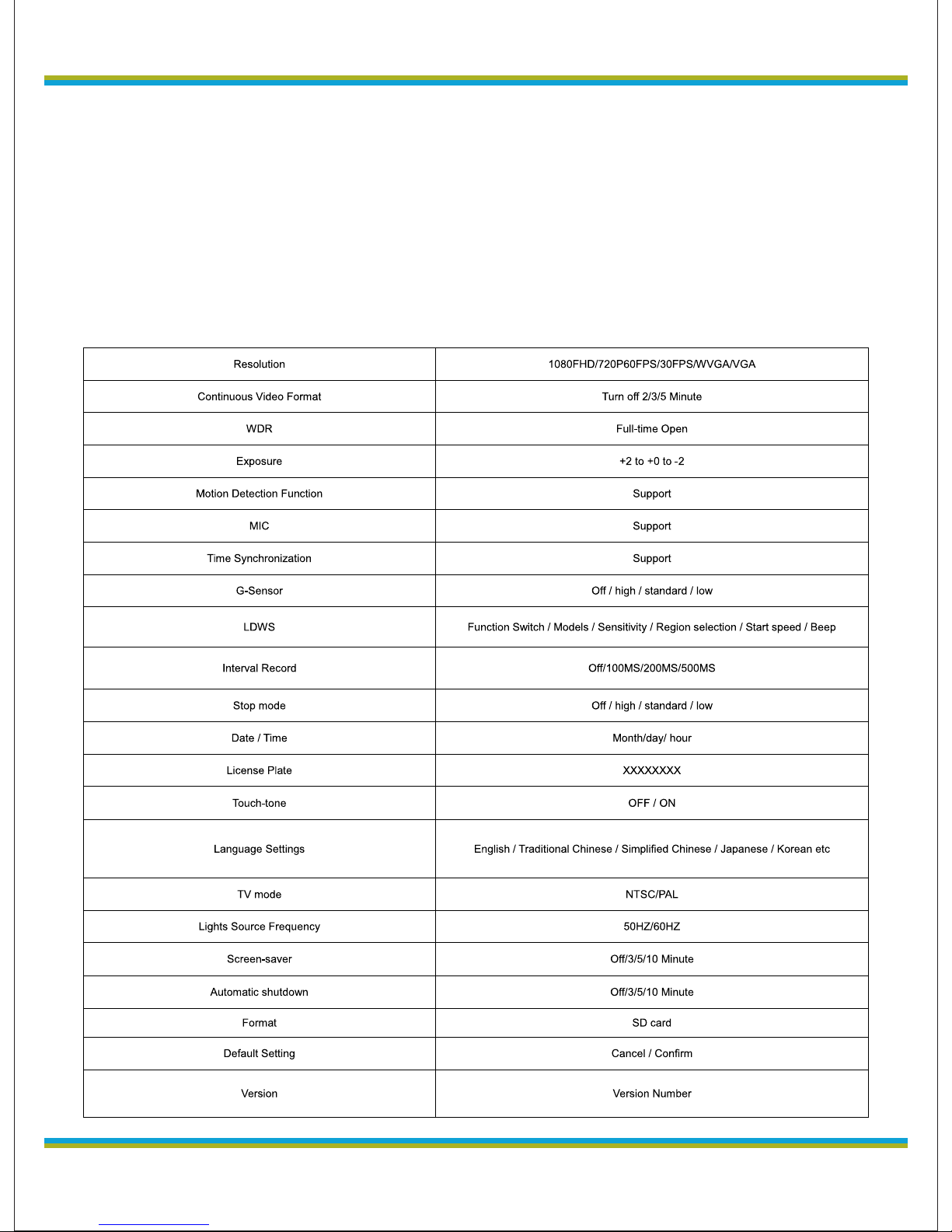
System Setup Options
Parking: Off / High / Standard / Low
Date / Time:
License Plate:
Key Sound; ON / OFF
Languages; English / Portuguese / Russian / Simplified Chinese /
Traditional Chinese / Japanese / Spanish / French / German /
Italian
TV standard: P / N
Light frequency: 50/60
Screen Saver: Off / 3/5/10 minutes (Auto off-Screen)
Auto Power Off: Off / 3/5/10 minutes
Format: SD Card
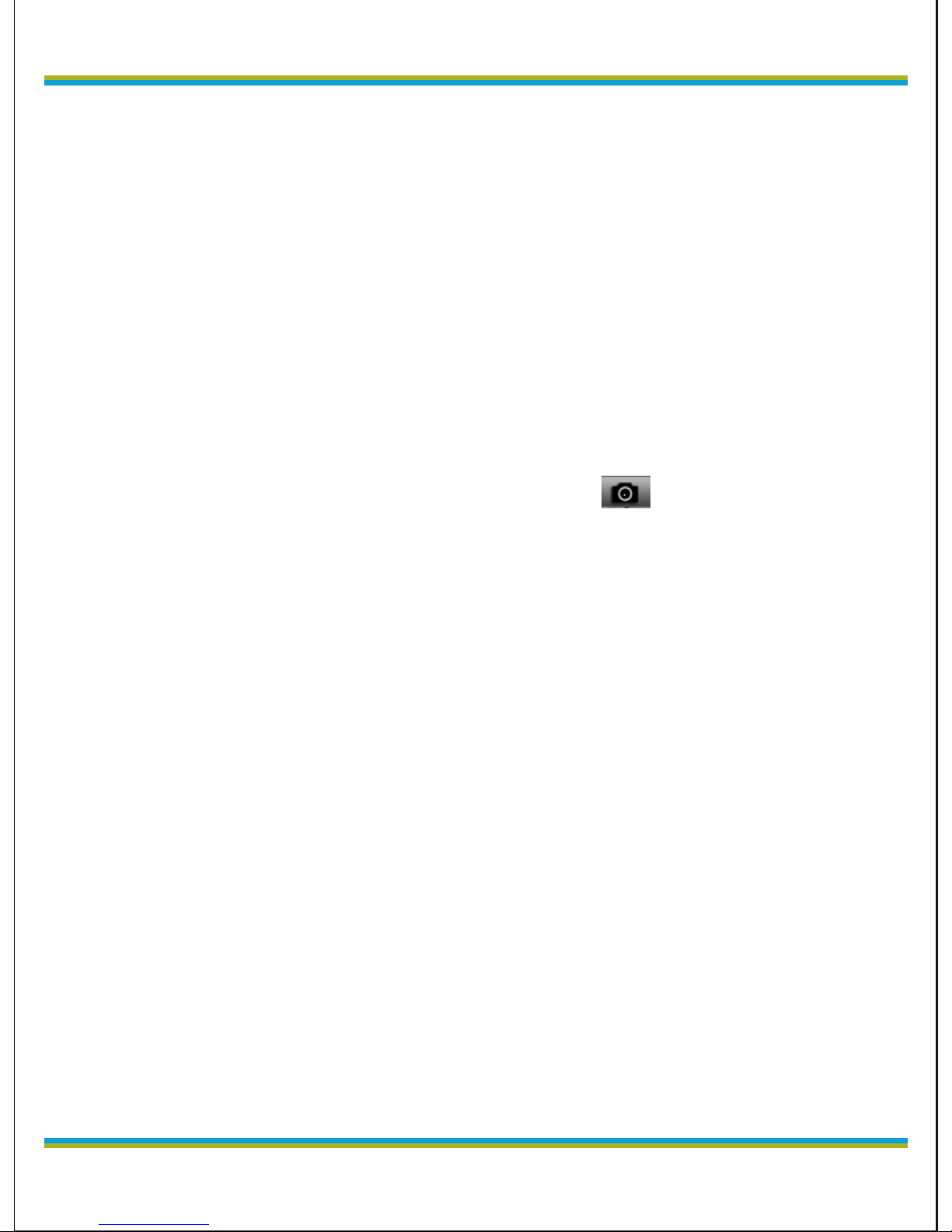
In camera mode, when you have signs on upper left corner of the
screen , press the REC button to start recording, the signs
flashing,Press REC button to stop recording, the signs
disappeared.
Video Mode Options
Resolution: Full HD 1080FHD; HD 720P 60fps; 720P 30fps
WVGA, VGA
Loop recording: Off, 2 minutes, 3 minutes, 5 minutes;
WDR: On / Off;
Exposure Compensation: EV-2.0, EV-5/3, EV-4/3, EV-1.0, EV-2/3,
EV-1/3, EV + 0.0, EV + 1/3, EV + 2/3 , EV + 1.0, EV
Page 8
ENG
globex-electronics.com
8
+ 4/3, EV + 5/3, EV + 2.0
Motion detection: On / Off;
Video Audio: On / Off
Date Tag: On / Off
G-sensor: off, low, medium and high;
Lane Departure: function switch / models / sensitivity / region
selection / start speed / start beep;
Interval Video: Off / 100ms / 200ms / 500ms
Photo and camera mode setting
1. Press the REC button, the camera enters camera mode, press the
shift key to enter camera mode have a signs on the upper left
corner of the screen , into camera mode
2. Press the video button, there are image preview and about one
second , hold on so as not to shake the camera while taking
pictures.
Shooting mode: single shot, two seconds timer, five seconds timer,
ten seconds timer,
Resolution: 12M, 10M, 8M, 5M, 3M, 2MHD, VGA, 1.3M
CS: On / Off
Image quality: high-quality, standard, economy
Sharpness: intense, standard, soft
White Balance: Auto, daylight, cloudy, tungsten, fluorescent
Color: Color, black and white, sepia
ISO: Auto, 100,200, 400
Exposure Compensation:EV-2.0,EV-5/3,EV-4/3,EV-1.0,EV2/3, EV-1/3, EV+0.0, EV+1/3, EV+2/3, EV+1.0, EV+4/3,
EV+5/3,EV+2.0
Anti-shake: On / Off
Date Label: Off, Date, Date / Time
Page 9
globex-electronics.com
9
ENG
Playback Mode
1, browse the file:
When the camera completes start and enter the recording mode,
then press the mode button twice to enter playback mode, press the
Up or Down keys to browse audio and video file. Playback browse by
file type, respectively, when the file type is video, only browse video
files, as a picture, you can only view images.
2. Delete and protection
In Playback mode, press the Menu key when appear delete and
protection options, press the REC button to enter the "delete current"
"Delete All" option, press the REC button to enter, press the REC
button to confirm. You can also lock on the file, before unlocking can
not be deleted, the protection of some important information.
Shortcut keys application in the process of recording :
SOS lock key: emergency manual press icon to lock the file.
Press the DOWN button to turn off the microphone: under
recording, press the DOWN button to quickly close the microphone
C h a r g i n g w h i l e r e c o r d i n g m o d e
Car charger connected to the USB end of the machine, the boot that
can enter the charging while video mode
Use car charger connect with device,turn on will go into the
charging and recording.
Video read and USB function instruction
The devide support USB read,you could choose connect device to
PC via USB cable to read the file,or take out the TF card ,use card
reader to read the file.
PC CAM
The device can be used as PC cam,use USB cable connect with
PC,when device turn on,will show two choices,storage or PC
Page 10

ENG
globex-electronics.com
10
cam.Choose PC cam,Select the bottom right of the computer screen
the camera will pop up letter, click the drive letter and automatically
installed can be used.
Connect TV to Playback
1, Use the AV cable connecte to a TV for playback of high-quality
Tip: No need to install drivers
Product Features
- Ultra-small size, directly attached to the car will not block line
of sight, 1080P ultra wide-angle lens perfect combination of
design, more convenient for various occasions multi-angle,
high resolution video capture.
- Built-in 1/3 inch low-noise high-quality sensor, it can be in darker
occasions capture super clear picture
- Built-in lithium battery while charging recording function
- Built-in microphone / speaker
- Support high-capacity Micro TF card
- Car launch automatically start recording function
- With a delayed start function to prevent the car to start an instant
pulse current to damage the machine
- Gravity sensor G-SENSOR
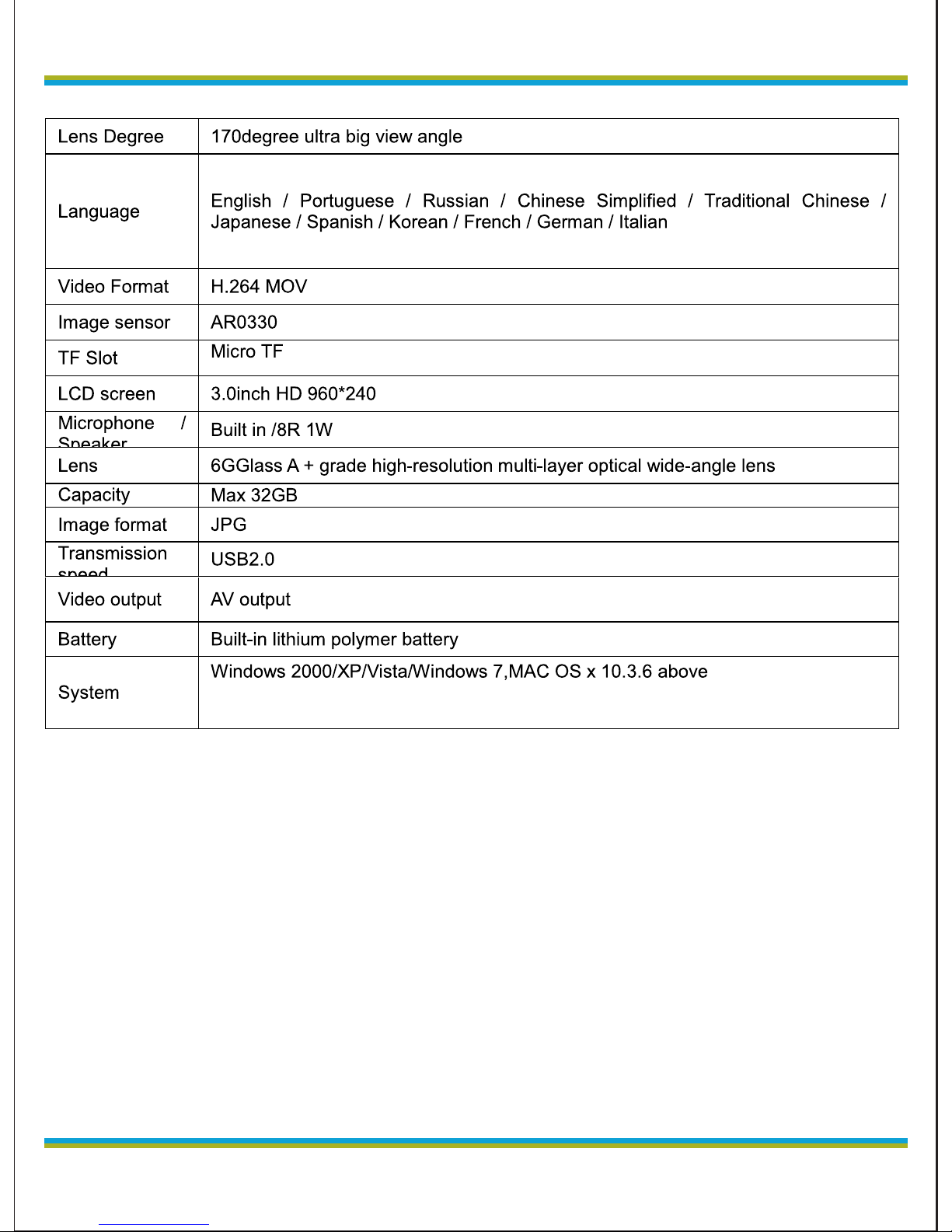
Tech Specification
Page 11
globex-electronics.com
11
ENG
Questions:
1: Why the new card prompts the memory card error.
A: Because new card no system file so it will display an error,
as long as format card on device
2. Why new card can not recording and freeze or no video files or
not playback?
A: The memory card is a fake card and black card so that
recorded video files can not be played.
3. Why is my memory card recording and Playing freeze.
A; this machine using a high-speed memory card, using a low
speed memory card will not fluent, recommend C6-C10 high-
speed memory card....
Page 12

ENG
globex-electronics.com
12
4. Why can not loop recording:
1. The customer turn on the G-sensor and parking mode
function, these two features will lead to locked file (the
beginning of the file ZW_ , the file only manually deleted), if the
card full of such files, it stops recording, and prompts the card
is full. Turn off G-sensor
2. market many low speed cards or black cards posing highspeed card, if you use this card, will lead to prompt card is full,
due to the normal stroke logger will record all the time to write
cards, if the card in question It will cause the machine to
determine the error.
5. Record how righteous crash after work.
A: If you use, for some reason the crash, attach the USB
underneath the machine at the point RESET hole to reset
Note: This product is reserved the right to change design and
specifications without notice.
1, please use the Company with special adapter, the adapter will
use substandard products cause harm, or even burn the
product.
2. Do not use this product in wet or high temperature
environments.
3. Keep the lens clean, so as not to affect the camera effects.
4, in order to protect your legal rights, do not disassemble this
product.
5. Please strictly abide by relevant state laws, this product can
not be used for illegal purposes, or peril.
Page 13

globex-electronics.com
13
RU
Видеорегистратор
Руководство пользователя
Кр о м е о б щ и х во з мо ж но с те й в к л юч а ет та к же
дополнительно 4 возможности:
1. Высококачественное изображение Full HD 1080P 30fps H.264
Mov, с высокой четкостью и ясностью при ночной съемке.
2. В случае аварии текущий видеофайл сохраняется и может
быть зашифрован и разблокирован независимо.
3. Встроенный G-сенсор (для принудительного сохранения
видео в случае аварии)
4. Постоянный мониторинг даже в выключенном состоянии
оценивает окружающее пространство и автоматически
начинает запись, автоматически сохраняет защищенные
файлы.
5. Для лучшего использования регистратора, пожалуйста
прочтите внимательно эту инструкцию перед использованием.
(Спецификация прибора и аксессуаров могут быть изменены
без предварительного уведомления)
Page 14
RU
globex-electronics.com
14
1. USB порт
2. AV порт
3. Kнопка записи
4. Индикатор освещенности
5. TF Слот карты памяти
6. Кнопка «Вниз»
7. Кнопка «Меню»
8. Кнопка «Вверх»
9. Кнопка включения
10. Отверстие для сброса
11. Объектив
12. Микрофон
13. Динамик
14. Кнопка выбора режима
15. SOS
16. Разъем HDMI
Page 15

globex-electronics.com
15
RU
Включение
Функции режима парковки
1 Вставьте карту памяти и включите устройство.
Нажимайте кнопку «вверх» до появления символа “P” на экране.
Функция режима парковки включена. В случае аварии,
видеофайлы не удаляются.
2 Нажмите «вверх» еще раз. Надпись «P» исчезнет, и
режим парковки выключится.
Режимы зарядки батареи
Есть два способа зарядки
1.Зарядка от порта USB компьютера
2. Зарядка от автомобильной сети
Индикатор зажигается, когда идет зарядка батареи и
автоматически гаснет, когда зарядка окончена. Полное время
заряда – около 120 минут.
Карта памяти (TF Card)
Необходимо использовать карту памяти классом не ниже чем
CLASS6
Установка и извлечение карты памяти
1, Вставьте карту памяти в слот нужной стороной до легкого
щелчка.
2, Для удаления – слегка нажмите карту памяти до щелчка и
вытащите ее.
Примечание:
1.Не вынимайте карту памяти при работающем регистраторе во
избежание повреждений
2. Следите за правильной ориентацией карты памяти при
установке. Регистратор и карта могут быть повреждены при
неправильной установке.
Page 16

RU
globex-electronics.com
16
3. После того, как Вы вставите карту памяти, регистратор
установит эту карту как основное хранилище, и предыдущая
карта может не восприниматься.
4, Если карта памяти не распознается регистратором,
попробуйте вставить ее еще раз, или замените ее и попробуйте
повторить попытку через меню
5, Поддерживаются карты емкостью до 32Gb.
Настройка положения объектива.
Регистратор может поворачиваться на 360 градусов для
достижения лучшего положения съемки.
Включение/выключение
1. Для ручного выключения, нажмите дважды на кнопку
включения: первое нажатие включит экран, второе нажатие
подтвердит выключение.
2. После включения питания 5V, регистратор автоматически
начинает запись. После отключения зажигания регистратор
продолжить работать для сохранения снятых файлов и
выключится через 10 секунд.
Примечание: Когда используется встроенное питание, при
разряде батареи видео будет автоматически сохранено и
регистратор выключится.
Сброс регистратора
Если устройство не реагирует на нажатия или ведет себя
неадекватно, нажмите кнопку сброса для перезагрузки и
возврата к нормальному состоянию.
Page 17
globex-electronics.com
17
RU
Основные операции
Переключение режимов работы
Устройство поддерживает три режима работы: проигрывание
видео, съемка, и просмотр фотографий. Нажмите кнопку «М»
для переключения режима.
Меню настройки системы
Page 18

RU
globex-electronics.com
18
В режиме съемки, нажмите кнопку меню, перейдите к
настройкам системы, текущие установки подсвечены синей
рамкой. Нажимая кнопки «вниз» и «вверх» выберите нужный
пункт, нажмите кнопку "REC" для подтверждения изменений.
Нажмите кнопку меню снова для выхода из меню
Возможности установок системы
Парковка: Выкл / высокая / стандартная / низкая
Дата / Время:
Автомобильный номер:
Звук клавиш: вкл / выкл
Языки; English / Португальский/ Русский/ Китайский
упрощенный/ Китайский традиционный/ Японский/ Испанский/
Французский/ Немецкий/ Итальянский
Стандарт TВ-выхода: P / N
Частота подсветки: 50/60
Заставка: выкл / 3/5/10 минут (автовыключение экрана)
Автовыключение: выкл / 3/5/10 минут
Формат: SD карта
В режиме съемки, когда Вы видите знак в верхнем левом углу
экрана, нажмите кнопку REC для начала записи. Знак мигает,
подтверждая запись. Нажмите REC для остановки записи,
знак исчезнет.
Возможности видео
Разрешение: Full HD 1080FHD; HD 720P 60fps; 720P 30fps
WVGA, VGA
Время циклической записи: выкл, 2, 3 или 5 минут;
WDR: On / Off;
Компенсация экспозиции: EV-2.0, EV-5/3, EV-4/3, EV-1.0, EV-
Page 19
globex-electronics.com
19
RU
2/3, EV-1/3, EV + 0.0, EV + 1/3, EV + 2/3 , EV + 1.0, EV + 4/3, EV
+ 5/3, EV + 2.0
Обнаружение движения: Вкл/ Выкл;
Видео Аудио: On / Off
Метка даты: On / Off
G-сенсор: выкл, низкий, средний и высокий;
Датчик смены полосы: переключатель / модели/
чувствительность/ выбор региона/ начальная скорость/
стартовый сигнал;
Видео интервал: выкл / 100ms / 200ms / 500ms
Настройка режима фотографирования
1. Нажмите кнопку REC, регистратора перейдет в режим съемки.
Нажмите клавишу shift для входа в режим съемки. Появится знак
в левом верхнем углу экрана.
2. Нажмите кнопку Видео, появится превью картинки.
Воздержитесь от сотрясения регистратора во время
фотографирования.
Режим фотографирования: одиночный снимок, задержка на 2,
5, 10 секунд,
Разрешение: 12M, 10M, 8M, 5M, 3M, 2MHD, VGA, 1.3M
CS: Вкл / Выкл
Качество картинки: Высокое, стандарт, экономичное
Резкость: высокая, стандартная, мягкая
Баланс белого: авто, дневной свет, облачно, лампы
накаливания, люминесцентный свет
Цвет: цветной, черно-белый, сепия
ISO: авто, 100,200, 400
Компенсация экспозиции: EV-2.0, EV-5/3, EV-4/3, EV-1.0,
Page 20
RU
globex-electronics.com
20
EV-2/3,EV-1/3,EV+0.0,EV+1/3,EV+2/3,EV+1.0,EV+4/3,
EV+5/3,EV+2.0
Стабилизатор: вкл / выкл
Метка даты: выкл, дата, / время
Воспроизведение
1, Просмотр файлов
Когда регистратор включен и начал запись, нажмите кнопку
режима дважды для запуска проигрывания. Нажимайте «Вверх»
и «Вниз» для просмотра аудио и видео файлов. При этом файлы
организованы по типам, поэтому вы можете либо только
смотреть видеофайлы, либо только просмотреть фотографии.
2. Удаление и защита от удаления
В режиме воспроизведения, нажмите кнопку «Меню» когда
появляется опция «удаление и защита», нажмите кнопку REC
для выбора "удалить текущий" "удалить все", нажмите кнопку
REC для входа, и еще раз для подтверждения. Вы также можете
заблокировать файл для предотвращения удаления важной
информации
Г о р я ч и е к л а в и ш и в о в р е м я с ъ е м к и : :
SOS -клавиша: при аварии нажмите самостоятельно иконку
для блокирования файла.
«Вниз» - быстрое отключение микрофона во время записи.
Зарядка во время записи
Подключите зарядное устройство. Регистратор может
заряжаться во время записи.
После подключения регистратор начнет съемку одновременно с
записью.
Чтение информации через USB
Page 21

globex-electronics.com
21
RU
Устройство поддерживает чтение через USB. Вы можете
подключить регистратор к компьютеру USB-кабелем для чтения
или копирования файлов, или вытащить карту памяти для
чтения ее через кард-ридер.
Внешняя камера для компьютера
Устройство может быть использовано как камера компьютера.
Подключите видеорегистратор к компьютеру с помощью USB
кабеля, Нажмите кнопку питания на регистраторе. На экране
регистратора появится меню выбора режима работы:
1. USB диск
В этом режиме вы можете получить доступ к видео и фото
файлам
2. Камера компьютера
В этом режиме вы можете использовать регистратор как
внешнюю видео и фотокамеру для вашего ПК
AV OUT выход
Подключите видеорегистратор к телевизору с помощью AV
кабеля. Экран видеорегистратора будет выключен и
изображение будет отображено на телевизоре.
Характеристики регистратора
- Ультра-компактный дизайн, крепление к автомобилю без
помехи обзору. Широкоугольный объектив, отличное сочетание
дизайна и технологий, захват картинки высокого разрешения
1080P.
- Встроенная высококачественная матрица 1/3” с низким
уровнем шума, даже в темноте дающая четкую и чистую
картинку.
- Встроенный аккумулятор
- Встроенный микрофон и динамик
Micro SD TF card высокой плотности
Page 22
RU
globex-electronics.com
22
- Автоматический старт записи при запуске автомобиля
- Функция отложенного старта для предотвращения
повреждения устройства импульсом стартового тока
- Датчик гравитации (G-сенсор)
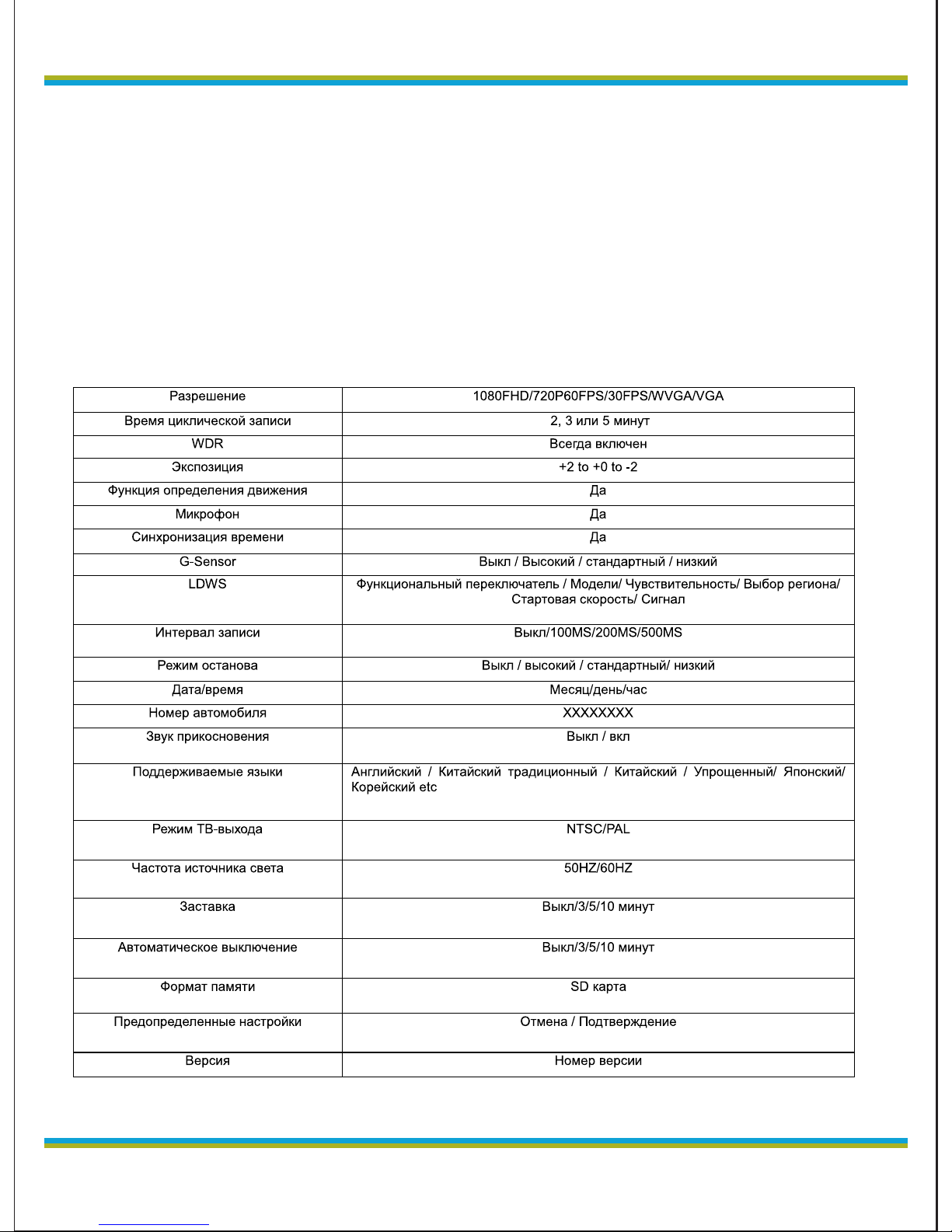
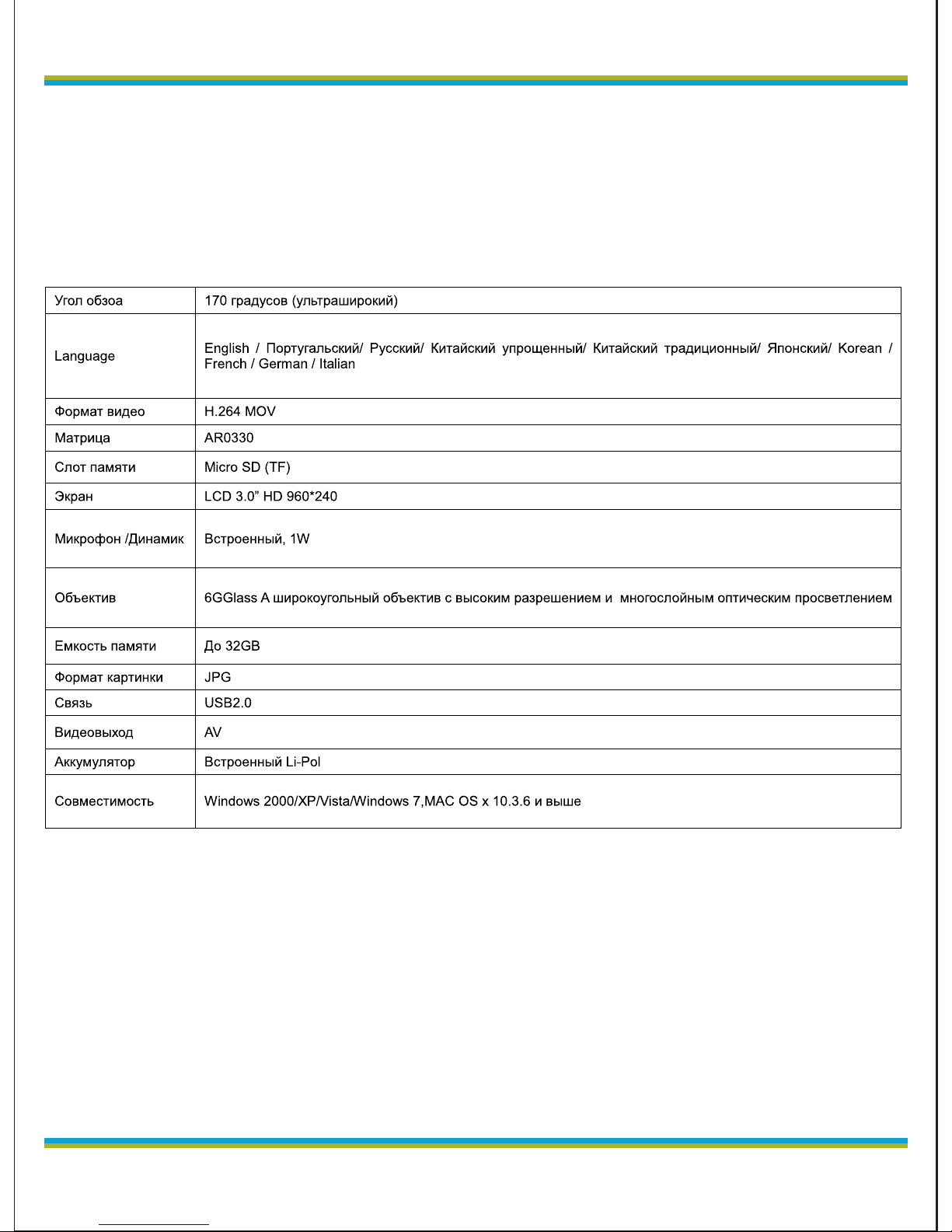
Спецификация
Частые вопросы и ответы:
1: Почему при установке новой карты памяти выдается
сообщение об ошибке?
Ответ: Потому что новая карта не отформатирована.
Вставьте ее в компьютер и отформатируйте.
2. Почему не получается запись на новую карту памяти –
зависает и на карте нет файлов?
О: Это фальшивая карта, или подделка, поэтому
записанные видеофайлы не могут быть проиграны.
Page 23

globex-electronics.com
23
RU
3. Почему моя карта памяти тормозит при записи и
проигрывании?
О; Для записи высококачественного видео требуется высокая
скорость записи. Поэтому необходимо использовать
высокоскоростную карту памяти классом не ниже C6-
4. Почему запись не происходит?
1. Пользователь включил G-сенсор и функцию режима
парковки, эти две функции приводят к блокированию файла
(название начинается на ZW_ , файл может быть удален только
вручную), если карта памяти заполнена такими файлами,
запись останавливается с сообщением «Карта заполнена»
Выключите G-сенсор.
2. На рынке полно низкоскоростных карт памяти, а также
подделок. Использование таких карт приведет к тому что карта
будет заполнена вследствие попыток сделать запись,
несоответствующую по скорости и объему данных. В таком
случае часто определяется ошибка.
5. Восстановите файлы на карте после сбоя.
Примечание: Разработчик оставляет за собой право изменить
дизайн или спецификацию без изменений.
1, Пожалуйста, используйте специальный адаптер, входящий в
комплект, во избежание повреждения регистратора,
2. Не используйте устройство во влажной среде или при высокой
температуре.
3. Сохраняйте объектив чистым
4, В порядке защиты ваших законных прав, не разбирайте этот
продукт.
5. Пожалуйста, строго соблюдайте законы вашего места
проживания. Этот продукт не может быть использован для
незаконных или сомнительных целей.
Page 24

UKR
globex-electronics.com
24
Відеореєстратор
Інструкція користувача
Крім загальних функцій має додатково такі можливості:
1. Високоякісне зображення Full HD 1080P 30fps H.264 Mov, з
високою чіткістю і ясністю при нічній зйомці.
2. У випадку зіткнення поточний відеофайл зберігається та може
бути зашифрований та розблокований автоматично.
3. Вбудований G-сенсор (для примусового зберігання відео у
випадку аварії)
4. Постійний моніторинг навіть у вимкненому стані оцінює
оточення та автоматично починає запис, автоматично зберігає
захищені файли.
Для кращого використання регістратора, будь-ласка прочитайте
цю інструкцію перед використанням. Специфікація пристрою та
аксесуарів можуть бути змінені без попереднього повідомлення.
Page 25
globex-electronics.com
25
UKR
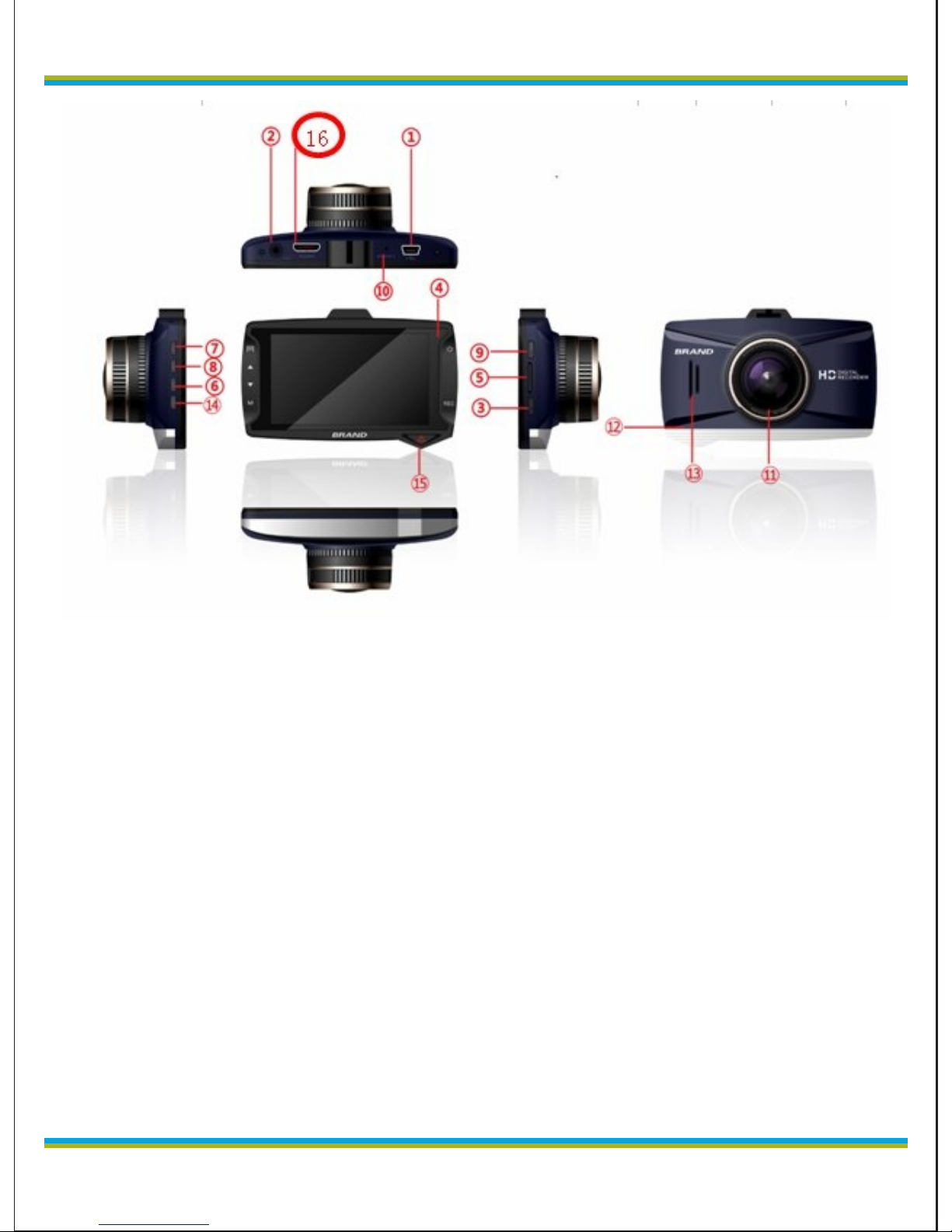
1. USB порт
2. AV порт
3. кнопка запису
4. Індикатор освітлення
5. TF Слот карти пам'яті
6. Кнопка «Вниз»
7. Кнопка «Меню»
8. Кнопка «Вгору»
9. Кнопка включення
10. Отвір кнопки скидання
11. Об'єктив
12. Мікрофон
13. Динамік
14. Кнопка вибору режиму
15. SOS
16. Роз'єм HDMI
Page 26

UKR
globex-electronics.com
26
Включення
Паркувальний моніторинг
1 Вставте карту пам'яті та увімкніть пристрій. Натисніть
кнопку «вгору» до з'явлення значка “P” на екрані. Функцію
паркувального моніторинга увімкнено. При виявленні руху біля
автомобіля реєстратор автоматично включиться і справить
запис протягом 20 секунд. Після цього він автоматично
відключиться. Такі файли зберігаються.
2 Натисніть «вгору» ще раз. Знак «P» зникне, і
паркувальний моніторинг буде вимкнено.
Зарядка батареї
Є два способи зарядки:
1. Зарядка от порту USB комп`ютера. Підключіть пристрій до
комп'ютера за допомогою USB кабелю.
Примітка: Коли пристрій почне заряджатися, загориться червона
лампочка. Вона згасне, коли пристрій зарядиться
2. Зарядка от автомобільної мережи.
Індикатор засвітиться, коли йде зарядка батареї та автоматично
згасне, коли її буде закінчено. Повний час заряду– близько 120
мінут.
Карта пам'яті (TF Card)
Необхідно використовувати карту пам'яті класом не нижче ніж
CLASS6
Встановлення та витягання карти пам'яті
1, Всуньте карту пам'яті в слот правильною стороною до
відчування легкого кліку.
2, Для видалення карти– легенько натисніть карту пам'яті до
кліка та витягніть її.
Примітка:
1. Не витягайте карту пам'яті під час роботи пристрою для
Page 27

globex-electronics.com
27
UKR
запобігання пошкоджень.
2. Слідкуйте за правильною орієнтацією карти пам'яті під час
встановлення. Реєстратор та карту може бути пошкоджено
невірним встановленням.
3. Після встановлення карти, реєстратор встановить цю карту у
якості основного сховища, та попередня карта може не
сприйматися.
4. Якщо карта пам'яті не сприймається реєстратором, спробуйте
вставити її ще раз, або замініть її та спробуйте повторити спробу
за допомогою меню.
5. Підтримуються карти ємністю до 32Gb.
Налаштування положення об'єктива.
Для встановлення відеореєстратора прикріпіть пристрій на
лобове скло. Підключіть пристрій до роз'єму живлення
автомобіля за допомогою зарядного пристрою, який входить
до комплекту. Реєстратор може обертатися на 360 градусів
для досягнення кращого положення зйомки.
Увімкнення /вимкнення
1. Для ручного вимкнення, натисніть двічі на кнопку включення:
перше натискання включить екран, друге натиснення
підтвердить вимикання.
2. Після включення живлення 5V, реєстратор автоматично
починає запис. Після відключення запалення реєстратор
продовжить працювати для збереження знятих відео та
відключиться за 10 секунд.
Примітка: Коли використовується вбудоване живлення, при
розрядці батареї відео буде автоматично збережено і
реєстратор відключиться.
Перезавантаження реєстратора
Якщо пристрій не реагує на натискання кнопок або веде себе
Page 28
UKR
globex-electronics.com
28
неадекватно, н атисніть кно п к у скидання(reset) для
перезавантаження та повернення до нормального стану.
Основні операції
Переключення режимів роботи
Пристрій підтримує три режими роботи: програвання відео,
зйомка, та перегляд фотографій. Натисніть кнопку «М» для
переключення режиму.
Меню налаштування системи
Page 29

globex-electronics.com
29
UKR
В режимі зйомки, натисніть кнопку меню, перейдіть до
налаштування системи, поточні пункт підсвічений синьою
рамкою. Натискаючи кнопки «вниз» і «вгору» виберіть
потрібний пункт, натисніть кнопку "REC" для підтвердження
змін. Натисніть кнопку меню знову для виходу з меню
Можливості налаштування системи.
Чутливість парковки: Вимк / Висока / стандартна / низька
Дата / Час:
Автомобільний номер:
Звук клавіш: вкл / вимк
Мови; Англійська / Китайска традиційна / Китайська спрощена/
Японська/ Корейська / Іспанська/ Французька/ Німецька/
Італійська
Стандарт TВ-виходу: PAL / NTSC
Частота підсвітлювання: 50/60
Заставка: вимк / 3/5/10 мінут (автовимкнення екрану)
Автовимкнення: вимк / 3/5/10 мінут
Формат: SD карта (TF)
В режимі зйомки, коли Ви бачите знак у верхньому лівому углу
екрану, натисніть кнопку REC для початку запису. Знак
блимає, що підтверджує запис. Натисніть REC для зупинки
запису, знак зникне.
Можливості відео
Роздільна здатність: Full HD 1080FHD; HD 720P 60fps; 720P
30fps WVGA, VGA
Час циклічного запису: вимк, 2, 3 або 5 мінут;
WDR: On / Off;
Компенсація експозиції: EV-2.0, EV-5/3, EV-4/3, EV-1.0, EV-2/3,
EV-1/3, EV + 0.0, EV + 1/3, EV + 2/3 , EV + 1.0, EV + 4/3, EV +
5/3, EV + 2.0
Page 30

UKR
globex-electronics.com
30
Виялення руху: Вкл/ Вимк;
Відео Аудіо: On / Off
Мітка дати: On / Off
G-сенсор: вимк, низький, середній та високий;
Датчик зміни смуги: перемикач / моделі / чутливість / вибір
регіону / початкова швидкість / стартовий сигнал.
Відео інтервал: вимк / 100ms / 200ms / 500ms
Налаштування режіму фотографування
1. Натисніть кнопку REC, реєстратор перейде в режим зйомки.
Натисніть клавішу shift для входу в режим зйомки. З'явиться знак
в лівому верхньому кутку екрана.
2. Натисніть кнопку Відео, з'явиться прев'ю картинки.
Утримайтеся від струсу реєстратору під час фотографування.
Режим фотографування: одиночний знімок, затримка на 2, 5,
10 секунд,
Роздільна здатність: 12M, 10M, 8M, 5M, 3M, 2MHD, VGA, 1.3M
CS: Вкл / Вимк
Якість картинки: Висока, стандарт, економічна
Різкість: висока, стандартна, м'яка
Баланс білого: авто, денне світло, хмарно, лампи
розжарювання, люмінесцентне світло
Колір зображення: кольорове, чорно-біле, сепія
ISO: авто, 100,200, 400
компенсація експозиції:EV-2.0,EV-5/3,EV-4/3,EV-1.0,EV2/3, EV-1/3, EV+0.0, EV+1/3, EV+2/3, EV+1.0, EV+4/3,
EV+5/3,EV+2.0
Стабілізатор: вкл / вимк
Мітка дати: вимк, дата, / час
Page 31

globex-electronics.com
31
UKR
Відтворення
1, Перегляд файлів.
Коли реєстратор увімкнений та почав начал запис, натисніть
кнопку режиму двічі для запуска програвання. Натискайте
«Вгору» і «Вниз» для перегляду аудіо або відео файлів. Файли
організовані за типами, тому ви можете або тільки дивитися
відеофайли, або тільки переглянути фотографії.
2. Видалення і захист від видалення
У режимі відтворення, натисніть кнопку «Меню». Коли
з'явиться опція «видалення й захист», натисніть кнопку REC,
щоб вибрати "видалити поточний" або "видалити всі", натисніть
кнопку REC для входу, і ще раз для підтвердження. Ви також
можете заблокувати файл для запобігання видалення важливої
інформації.
Гарячі клавіші під час зйомки :
SOS -клавіша: при аварії натисніть самостійно іконку для
блокування файлу.
«Вниз» - швидке відключення мікрофона під час запису.
Зарядка під час запису:
Підключіть зарядний пристрій. Реєстратор може заряджатися
під час запису.
Після підключення реєстратор почне зйомку одночасно із
записом.
Читання інформації через USB.
Пристрій підтримує читання через USB. Ви можете підключити
реєстратор до комп'ютера кабелем USB для читання або
копіювання файлів, або витягти карту пам'яті для читання її
через кард-рідер.
Зовнішня камера для комп'ютера
Пристрій може бути використаний як камера комп'ютера.
Page 32

globex-electronics.com
Підключіть відео-реєстратор до комп'ютера за допомогою USBкабелю, Натисніть кнопку живлення на реєстраторе. На екрані
Реєстратора з'явиться меню вибору режиму роботи:
1. USB-диск. У цьому режимі ви можете отримати доступ до відео
та фото файлів
2. Камера комп'ютера. У цьому режимі ви можете
використовувати реєстратор як зовнішню відео і фотокамеру
для вашого ПК
AV OUT вихід
Підключіть відеореєстратор до телевізора за допомогою AVкабелю. Екран відеореєстратора буде вимкнений і зображення
буде відображено на телевізорі.
Характеристики реєстратора
- Ультра-компактний дизайн, кріплення к автомобілю що не
заважає обзору. Ширококутний об'єктив, відмінне поєднання
дизайну і технологій, зйомка зображення високої роздільної
здатності 1080P.
- Вбудована високоякісна матриця 1/3 "з низьким рівнем шуму,
навіть у темряві дає чітку і чисту картинку.
- Вбудований акумулятор
- Вбудований мікрофон і динамік
- Підтримка Micro SD карт пам'яті високої щільності (до 32Gb)
- Автоматичний старт запису при запуску автомобіля
- Функція відкладеного старту для запобігання пошкодження
пристрою імпульсом стартового струму
- Датчик гравітації (G-сенсор)
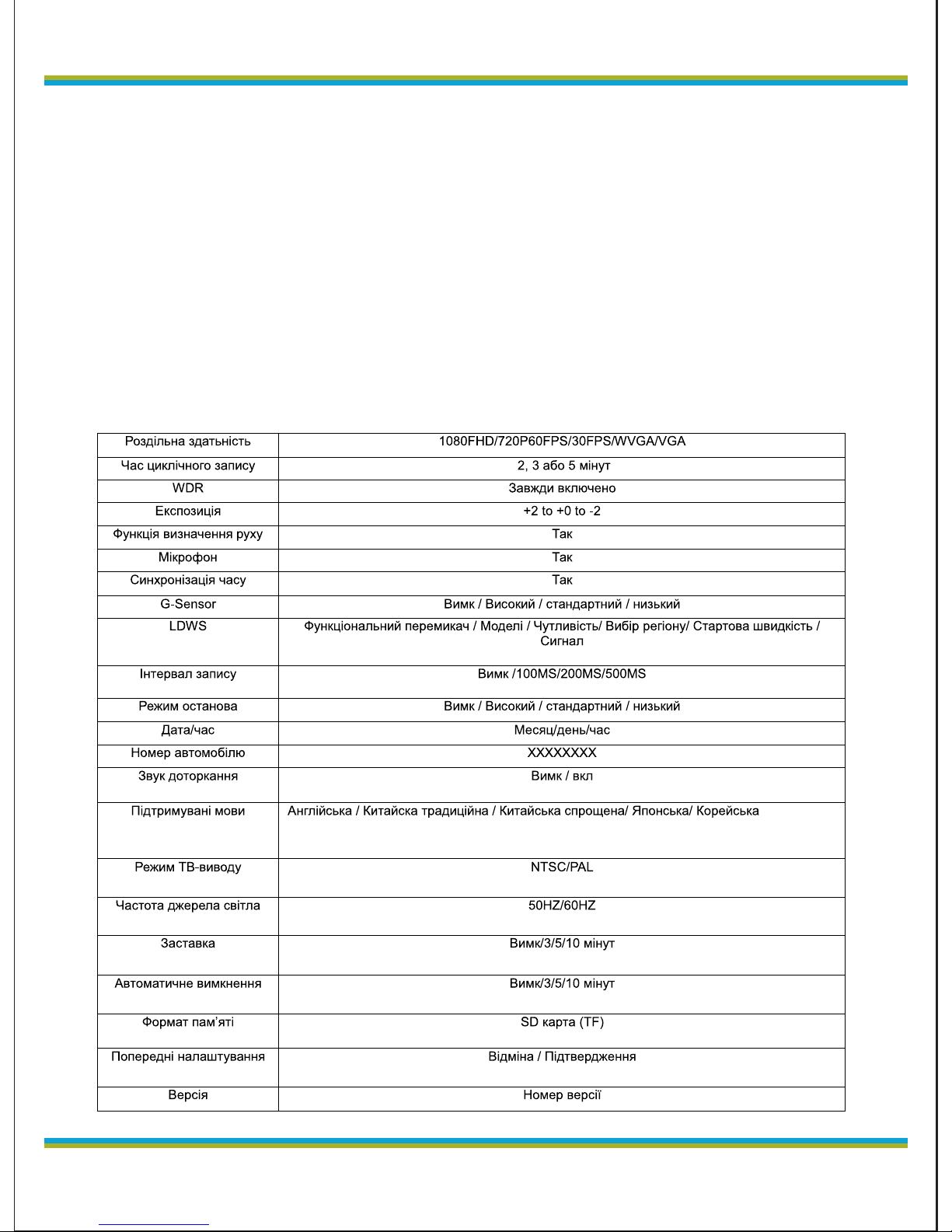
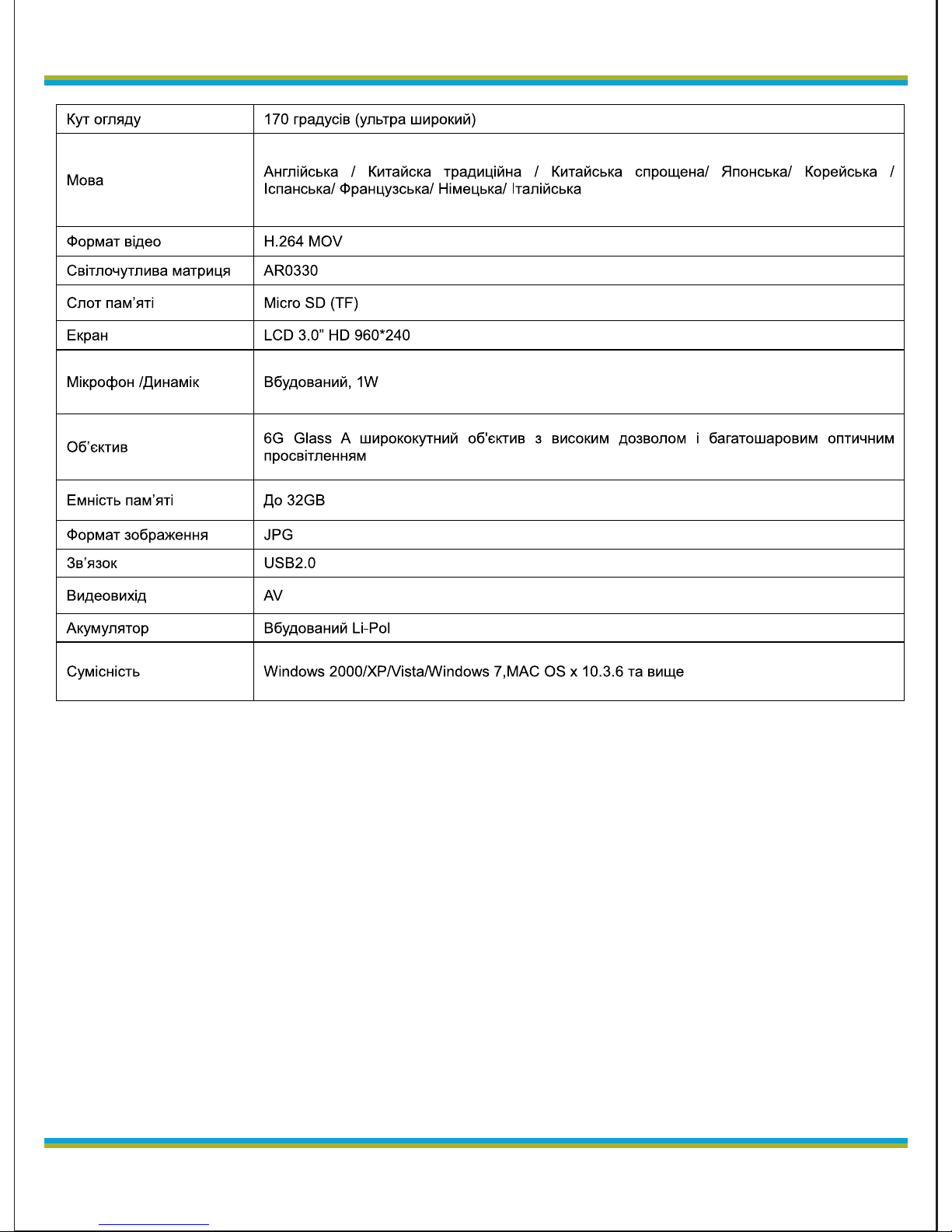
Спецификация
UKR
32
Page 33
globex-electronics.com
Найчастіші питання та відповіді:
П. Чому, при встановленні нової карти пам'яті видається
повідомлення про помилку?.
Відповідь: Тому що нова картка не відформатована. Вставте її в
комп'ютер і відформатуйте.
П. Чому не виходить запис на нову карту пам'яті – вона зависає і
на карті немає файлів?
В: Це може бути з неякісними картами, коли записані відеофайли
не можуть бути програні.
П. Чому моя карта пам'яті «гальмує» при записі і програванні?
В; Для запису високоякісного відео потрібна висока швидкість
запису. Тому необхідно використовувати високошвидкісну карту
33
UKR
Page 34

globex-electronics.com
UKR
34
П. Чому запис не відбувається?
1. Користувач включив G-сенсор і функцію режиму моніторингу
паркування, ці дві функції призводять до блокування знятого
відео файлу (назва починається на ZW_, файл може бути
видалений тільки вручну), якщо карта пам'яті заповнена такими
файлами, запис зупиняється з повідомленням «Карта
заповнено». Вимкніть G-сенсор.
2. На ринку багато низько-швидкісних карт пам'яті, а також
підробок. Використання таких карт призведе до того що карта
буде заповнена внаслідок спроб зробити запис, невідповідну по
швидкості і обсягом даних. У такому випадку часто визначається
помилка.
3. Відновіть файли на карті після збою.
Примітки:
1, Будь ласка, використовуйте спеціальний адаптер, що входить
в комплект, щоб уникнути пошкодження Реєстратора,
2. Не використовуйте пристрій у вологому середовищі або при
високій температурі.
3. Зберігайте об'єктив чистим
4, У порядку захисту ваших законних прав, не розбирайте цей
продукт.
5. Будь ласка, дотримуйтесь усіх законів вашого місця
проживання. Цей продукт не може
Розробник залишає за собою право змінити дизайн або
специфікацію без попередження.бути використаний для
незаконних або сумнівних цілей.
Page 35
globex-electronics.com
35
 Loading...