

Page 1
GSP-1700
QUICK REFERENCE GUIDE
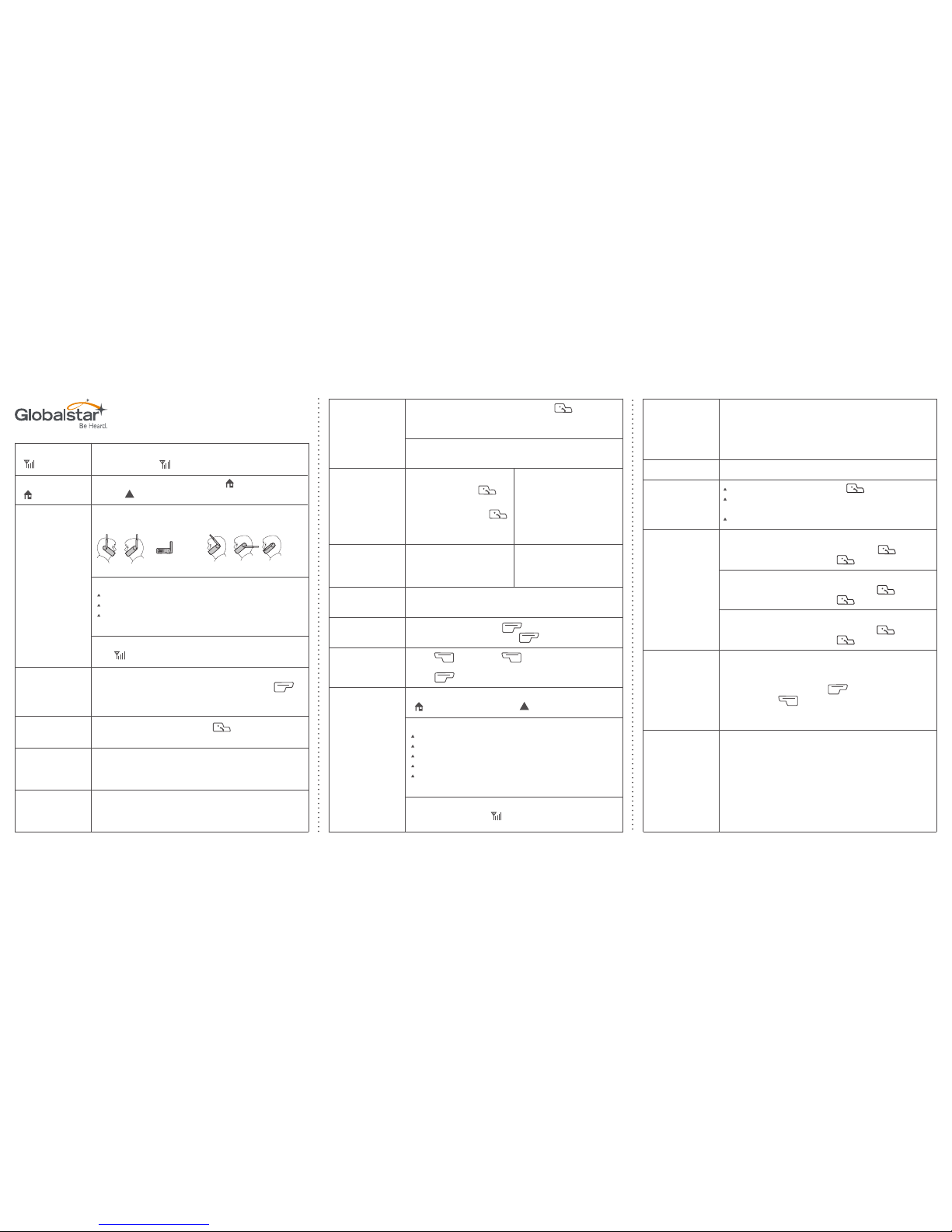
Located to the left of the battery indicator on phone display, the
level of bars in the “ ” icon indicates signal strength.
To make a call, either the home service “ ” icon or the roaming
service “ ” icon must be steady and visible.
Always rotate and extend the antenna fully and keep it
pointing straight up to the sky before dialing and while talking.
Before making a call ensure:
You are outdoors.
You have a clear view of the sky.
Your satellite antenna is pointing straight up
to the sky.
Check signal strength indicator on phone display.
The “ ” icon is visible.
Please set your phone to “chirp” when you enter and exit service
areas. The default setting is OFF. To change, press the “ ”
key, then “7”, then “3”, then “3” again, then toggle to ON using
the volume button.
Dial “1” + area code + number + . (No long distance
charges apply for calls placed in USA and Canada).
Dial “0” and hold until “+” appears
+ country code + area code + number.
(Long Distance Charges May Apply)
Dial “0” and hold until “+” appears
+ country code + area code + number.
(Roaming Charges May Apply)
Always Check
“ ” Icon
Always Check
“ ” Icon
Making Calls
Always rotate and
extend the antenna
fully and keep it
pointing straight
up to the sky before
dialing and
while talking.
For Calls Within
North America
Turn on
Service Alert
For International
Calls From Within
USA & CAN
For All Calls
While Outside
Your Home Zone
IncorrectCorrect
To call customer care, dial “*611” and press from your
GSP-1700 satellite phone, 1.877.452.5782 from any touch tone
phone or visit Globalstar.com.
To reach Customer Care while outside of North America, please
dial 985.327.7500.
Includes all inbound and outbound calls other than calls to
Globalstar Customer Care and 9-1-1.
Enter phone number. Press “ ” save.
Enter name and locations. Press “ ” ok.
Press “ ” book. Press “ ” find.
Press “1”, “2” or “3”. Enter numbers or letters.
Press “ ” find.
Check that the phone is on and that either the home service
“ ” icon or the roaming service “ ” icon is visible.
Ensure:
Check that the ringer is loud enough.
Rotate and fully extend the antenna.
You are outdoors.
You have a clear view of the sky.
Your satellite antenna is pointing straight
up to the sky.
Check signal strength indicator on the phone display and
service availability (the“ ” icon is visible).
Dial “1” + area code +
555-1212 + press .
75 cents per call +
applicable airtime charges.
Airtime
Save Phone
Book Entry
Find Phone
Book Entry
Receiving Calls
Customer Care
Directory
Assistance
Dial 1-800 # Series.
Dial “9-1-1” and press .
Standard airtime charges
apply (Calls subject to
regional area code routing).
No charge (Calls routed
to third party emergency
service provider).
Toll Free
Numbers
Emergency
Number/S.O.S.
Displays your GSP-1700 phone number.
Dial “*86” from your phone. Press “ ”.
Call your number from any touch tone phone or from your
GSP-1700 satellite phone.
Press “5” when you hear the greeting.
Unconditional Call Forward
To activate: Press “*72” + forwarding #, and “ ”.
To deactivate: Press “*720” and “ ”.
No Answer Call Forward
To activate: Press “*92” + forwarding #, and “ ”.
To deactivate: Press “*920” and “ ”.
Busy Call Forward
To activate: Press “*90” + forwarding #, and “ ”.
To deactivate: Press “*900” and “ ”.
Your Globalstar phone can broadcast your latitude and longitude
with an accuracy within 1/4 mile of GPS-based coordinates when
needing 911 emergency response without having a GPS device.
Simply make a call, then press “ ” Key, then “4”, then
“3”, then press “ ” key. Your approximate location will be
broadcast on the screen which you can read to first responders
while on a 911 call.
If you are on a call and it drops, don’t worry. Globalstar satellites
are constantly orbiting the earth right above you. That means
if one passed out of sight and dropped your call, another one is
right behid it. Simply make sure your antenna is fully extended
and pointed straight up to the sky and redial.
1. Check that the phone is on.
2. Connect the data cable to the phone and computer. After software
is installed, the computer will automatically configure the
data drivers.
3. Change dialing properties to the number that you are connecting to.
Direct Internet
Data Access
Menu ‘9’
Voicemail
Call Forwarding
What if My
Call Drops?
Obtaining Your
GPS Coordinates
Page 2
Notification
1
General option
2
Greeting
3
Language profile
4
Voicemail help
0
Cancel/exit the system
#
Cancel/exit to previous menu
*
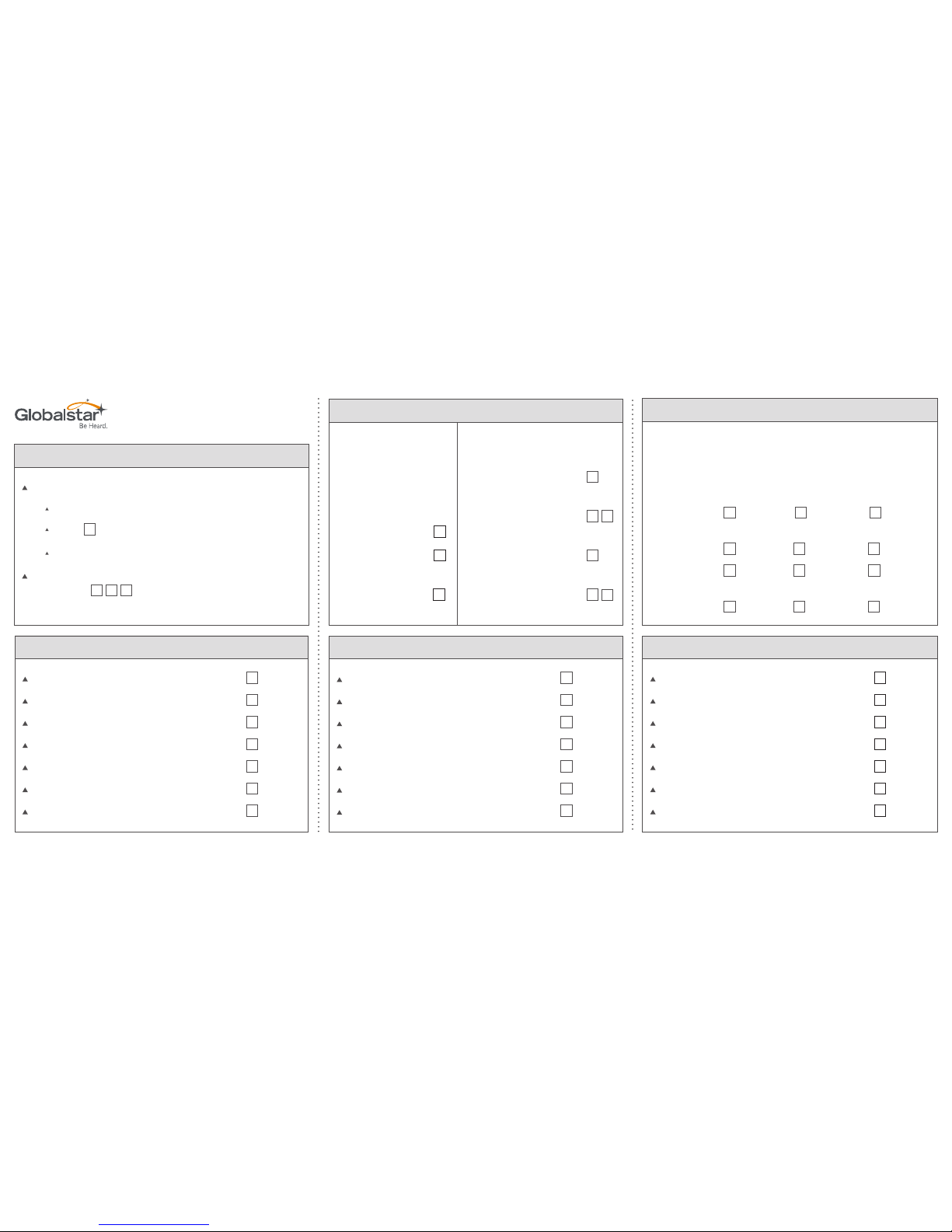
To set-up GSP-1700 voicemail
Call your number from any touchtone phone
Dial
5
when you hear the greeting
Follow the prompts
To access your voicemail from your GSP-1700
phone dial
*
8
6
Replay message
1
Envelope information
5
Erase message
7
Save message
9
Voicemail help
0
Skip message
#
EXIT sub-process
*
1. Voicemail Access & Setup
4. Retrieve Messages
Power Keys
Controls that are
frequently available
depending on the
process:
HELP
0
Finish/Skip
#
Cancel/Exit to
previous menu
*
Additional Play Control
Rewind 8 seconds
back
1
Rewind to start
of message
1
1
Fast forward 8
seconds forward
3
Fast forward to
end of message
3
3
Delivery option
1
Replays message
2
Re-record message
3
Continue recording message
4
Voicemail help
0
Finish/complete
#
Recording canceled/exit
*
2. Legend
5. Send Message
6. Personal Options
Controls that can be used while listening to a
message. Some controls are available while
recording messages.
Rewind Pause/Restart Forward
Position
1
2
3
Rewind Pause/Restart Forward
Speed
4
5
6
7
8
9
Rewind Pause/Restart Forward
Power Keys
*
0
#
3. Playback Controls
GSP-1700
QUICK REFERENCE GUIDE
 Loading...